IDOR via GET Request which can SOLD all User Products
The application used a GET request with product_Id and user_Id parameters to mark a product as sold, without verifying that the user_Id belonged to the authenticated user. An attacker could change these parameters to another user's product and user_Id, causing the victim's product to be marked as sold.

aidilarf.medium.com
Published on aidilarf.medium.com
Bug Bounty
The full write-up lives on its author's site
It belongs to its author, so we link to it rather than copy it. The other two tabs are our own rewrites, checked against it.
Context
This write-up covers a finding on a private program on HackerOne. The in-scope asset was a market site, referred to throughout as redacted.com because the program keeps its scope secret. The site lets users list products, and the feature examined here is the action that marks a product as sold.
What made the target interesting was how the application processes that action: through a GET request rather than a POST. The researcher notes this is probably normal, and that API testers may find it unusual.
The request that performs the sale carries three parameters:
| Parameter | Role described in the report |
|---|---|
product_Id |
Identifies the product the request acts on |
user_Id |
Identifies the rightful owner of the product |
Access |
Identifies what request the user is making (here, sold) |
Setup
The researcher first studied how the application processes requests, and only started hunting once that flow was understood. Two accounts were created, each in a different browser: one as the Attacker and one as the Victim. A product was then created with each account.
The resulting product URLs were:
- Attacker:
https://www.redacted.com/product?product_Id=125 - Victim:
https://www.redacted.com/product?product_Id=123
Finding it
The starting point was the observation that the sold action is driven by GET parameters, with the product and its owner both supplied by the client. That means the two identifiers that decide which product is sold and on whose behalf are fully attacker-controlled input, which is exactly the shape of an IDOR.
Exploitation
Step 1: capture the legitimate request
With the Attacker account open, the researcher captured the request sent when the attacker marked the attacker's own product as sold:
GET /product?product_Id=123&user_Id=1337&Access=sold HTTP/2
Host: www.redacted.com
Cookie: *******
User-Agent: *******
Referer: https://www.redacted.com/product?product_id=125
Upgrade-Insecure-Requests: 1
Sec-Fetch-Dest: document
Sec-Fetch-Mode: navigate
Sec-Fetch-Site: same-origin
Sec-Fetch-User: ?1
Te: trailers
In this request product_Id=123 selects the product, user_Id=1337 names the owner, and Access=sold selects the sold action. The Referer points at the attacker's own product page.
Step 2: swap the identifiers
The next step was to replace the valid product_Id and user_Id values with those belonging to the Victim, and to see whether the action still worked.
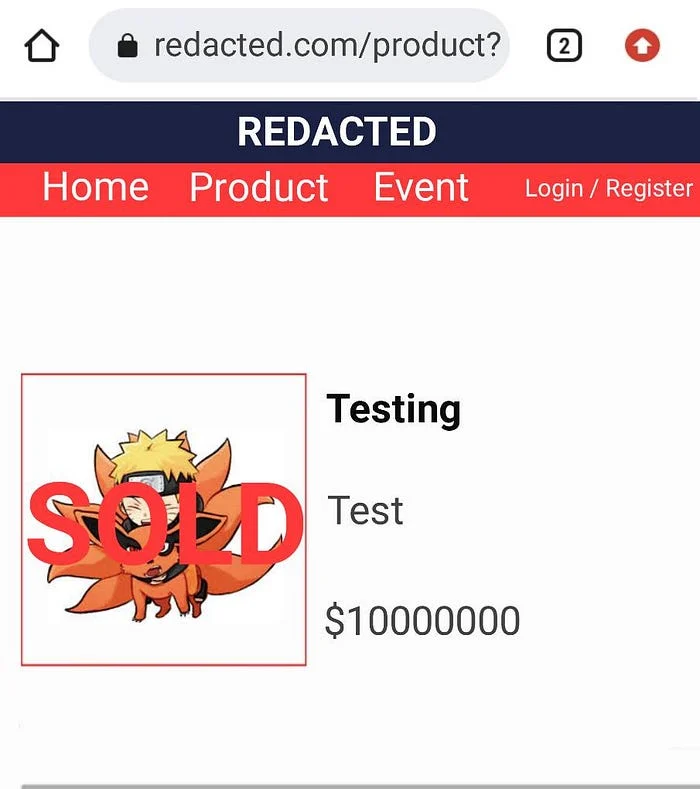

The researcher then replaced the valid product_Id and user_Id with the Victim's values and checked whether it worked. The report does not include the exact response returned by the server for the modified request.
Root cause
The request carries the product and its owner as client-supplied parameters, and the report does not describe any server-side ownership check. Because the sold action is a state-changing operation performed over GET, the whole authorisation decision rests on parameters the client can edit. The report does not describe any server-side ownership check, so the absence of one is likely the core mistake.
Impact
The report frames the finding as being able to "SOLD" all user products. The report frames this as being able to "SOLD" all user products, and the only precondition shown is knowing or guessing the victim's product_Id and user_Id.
Fix
The report gives a timeline rather than a description of the code change:
| Event | Date |
|---|---|
| Report | Mar 1th, 2022 |
| Fix | Mar 8th, 2022 |
| Bounty | $$$ |
What was actually changed is not stated. The natural remediation, consistent with the finding, is to derive the owner from the authenticated session instead of accepting user_Id from the client, and to verify that the session user owns the referenced product_Id before performing the sale. Moving the state-changing action off GET would also reduce exposure.
Variants to test
- Owner parameter in other actions. Look for other state-changing endpoints that take a user identifier alongside an object identifier, such as edit, delete or relist. A positive result is the action succeeding against another account's object after swapping both values.
- Object identifier only. Try changing just
product_Idwhile keeping your ownuser_Id. If the action succeeds, the ownership check is missing entirely rather than merely trusting the user parameter. - State changes over GET. Watch for GET requests that mutate data, since they are easy to replay and often skip CSRF protections. A positive result is a GET request that changes server state when replayed with another user's identifiers.
- Identifier enumeration. Test whether sequential
product_Idanduser_Idvalues map to other users' objects. A positive result is a valid object belonging to another account being reachable with a guessed identifier.
What happened, in plain words
A security researcher was testing a website that runs a marketplace, where people list products for sale. The site was part of a private bug bounty program on HackerOne, which means the company invited a limited group of researchers to look for problems and paid for what they found. The researcher found that one action on the site, marking a product as sold, could be performed on someone else's product just by changing two numbers in the web address. That kind of mistake is called an IDOR, and it meant any logged-in user could mark any other user's product as sold.
This article walks through the finding from the beginning, assuming you have never done security testing before. You only need to know how to use a browser and a computer.
Some words you will meet first
Before the story, a few ideas that come up constantly.
A request. When you click a link or press a button on a website, your browser sends a message to a server asking it to do something. That message is a request. The server sends a message back, called the response, and your browser draws the page from it.
GET and POST. These are two kinds of request. A GET request is normally used just to fetch a page: the details of what you want are written into the web address itself, after a question mark. A POST request is normally used to send data that changes something, and the data travels in the body of the message rather than in the address. Think of GET as pointing at a page in a book and POST as filling in a form and handing it over.
Parameters. The pieces of information written after the question mark in a web address. In product?product_Id=125, the parameter is called product_Id and its value is 125. Parameters are just labels and values, and anyone can edit them in the address bar before pressing Enter.
An API. A way for one piece of software to talk to another, or for a website's own pages to talk to its server, using requests and responses rather than screens. You can think of it as a waiter: you tell the waiter what you want, the waiter carries the order to the kitchen, and brings back a result. The waiter does not decide what you are allowed to order; the kitchen does, or should.
A cookie. A small piece of text that a website asks your browser to store and send back with every request to that site. It is how a site remembers who you are between page loads. After you log in, the cookie usually contains a session identifier, a long random string that the server uses to look up your account. If someone else gets your cookie, they can act as you, which is why cookies are treated as secrets.
A session. The server's memory of your logged-in visit. Your browser holds the cookie; the server holds the matching record that says which account that cookie belongs to.
IDOR. Short for Insecure Direct Object Reference. It means the application lets you name an object, such as a product, an order or a document, by an identifier in the request, and then acts on that object without checking that the object is yours. The identifier is "direct" because it points straight at the thing, and "insecure" because nothing verifies you are allowed to touch it. A simple comparison: a cloakroom that hands out a numbered ticket, but gives you any coat you ask for as long as you say the right number, without checking the ticket matches.
State-changing action. Anything that alters data on the server rather than just displaying it: marking something sold, deleting a listing, changing a price. These are the actions attackers care about most, because they have a real effect.
Bug bounty program. An arrangement where a company invites researchers to test its systems and pays a reward, called a bounty, for valid findings. A private program is one where only invited researchers can take part.
The target
The researcher was hunting on a private program on HackerOne and came across an in-scope asset, a market site. Throughout the write-up the site is called redacted.com, because the program keeps its scope secret. The site lets users list products, and the feature examined here is the action that marks a product as sold.
What made the target interesting was how the application processes that action: through a GET request rather than a POST. The researcher notes this is probably normal, and that API testers may find it unusual. The reason it matters is that GET parameters sit in the address bar, fully visible and fully editable by whoever is making the request. If a GET request also changes something on the server, then the thing being changed is chosen by input the client controls.
Reading the request
The request that performs the sale carries three parameters:
| Parameter | Role described in the report |
|---|---|
product_Id |
Identifies the product the request acts on |
user_Id |
Identifies the rightful owner of the product |
Access |
Identifies what request the user is making (here, sold) |
In plain words: the request says which product to sell, who owns it, and what to do with it. All three values arrive from the browser. Nothing in the request itself proves that the person sending it is the owner named in user_Id; that proof, if it exists at all, has to happen on the server.
Setting up the test
The researcher first studied how the application processes requests, and only started hunting once that flow was understood. This is a habit worth copying: before trying to break something, watch how it normally behaves, so you can recognise abnormal behaviour.
Two accounts were then created, each in a different browser: one as the Attacker and one as the Victim. Using two separate browsers keeps the two sessions apart, so the cookie for one account is never mixed up with the other. A product was created with each account.
The resulting product URLs were:
- Attacker:
https://www.redacted.com/product?product_Id=125 - Victim:
https://www.redacted.com/product?product_Id=123
Notice that the only difference between the two addresses is the number at the end. Each product has its own identifier, and the two addresses differ only in that number.
Finding it
The starting point was the observation that the sold action is driven by GET parameters, with the product and its owner both supplied by the client. That means the two identifiers that decide which product is sold and on whose behalf are fully attacker-controlled input, which is exactly the shape of an IDOR. If the server simply believes what the request says about ownership, then anyone can claim to own anything.
Exploitation
Step 1: capture the legitimate request
With the Attacker account open, the researcher captured the request sent when the attacker marked the attacker's own product as sold. Capturing means recording the request as the browser sends it, usually with the browser's developer tools or a proxy that sits between the browser and the server. The point of capturing your own legitimate request first is to get a correct example you can then edit, rather than guessing at the format.
GET /product?product_Id=123&user_Id=1337&Access=sold HTTP/2
Host: www.redacted.com
Cookie: *******
User-Agent: *******
Referer: https://www.redacted.com/product?product_id=125
Upgrade-Insecure-Requests: 1
Sec-Fetch-Dest: document
Sec-Fetch-Mode: navigate
Sec-Fetch-Site: same-origin
Sec-Fetch-User: ?1
Te: trailers
Line by line:
GET /product?product_Id=123&user_Id=1337&Access=sold HTTP/2is the request line.GETis the kind of request./productis the path on the server. After the question mark come the three parameters, joined by&: the product to act on, the owner, and the action.HTTP/2is the version of the protocol used to speak to the server.Host: www.redacted.comnames the site the request is addressed to. One server can host many sites, so the request has to say which one it wants.Cookie: *******is where the browser sends back the session cookie. The value is hidden here because it is a secret: anyone holding it could act as that user.User-Agent: *******identifies the browser and operating system making the request. It is hidden here too.Referer: https://www.redacted.com/product?product_id=125tells the server which page the request came from. Here it points at the attacker's own product page, which is consistent with the attacker having pressed the sold button there.Upgrade-Insecure-Requests: 1says the browser is willing to upgrade plain HTTP to the encrypted HTTPS version.- The four
Sec-Fetch-*lines are hints the browser adds about the context of the request: it is a top-level page navigation (document,navigate), it comes from the same site (same-origin), and it was triggered by the user (?1). Te: trailerstells the server the client can accept trailing headers at the end of the message.
In this request product_Id=123 selects the product, user_Id=1337 names the owner, and Access=sold selects the sold action. The Referer points at the attacker's own product page.
Step 2: swap the identifiers
The next step was to replace the valid product_Id and user_Id values with those belonging to the Victim, and to see whether the action still worked. The reasoning is simple: if the server checks that the logged-in user really owns the product, the request should be refused. If it does not check, the request will succeed, and the success itself is the proof of the vulnerability.
The researcher then replaced the valid product_Id and user_Id with the Victim's values and checked whether it worked. The report does not include the exact response returned by the server for the modified request.
Root cause
The request carries the product and its owner as client-supplied parameters, and the report does not describe any server-side ownership check. Because the sold action is a state-changing operation performed over GET, the whole authorisation decision rests on parameters the client can edit. The report does not describe any server-side ownership check, so the absence of one is likely the core mistake.
Put differently: the server should look up who you are from your session cookie, then check that the product you named belongs to that account. Instead, it appears to have taken your word for it.
Impact
The report frames the finding as being able to "SOLD" all user products. The report frames this as being able to "SOLD" all user products, and the only precondition shown is knowing or guessing the victim's product_Id and user_Id.
Fix
The report gives a timeline rather than a description of the code change:
| Event | Date |
|---|---|
| Report | Mar 1th, 2022 |
| Fix | Mar 8th, 2022 |
| Bounty | $$$ |
What was actually changed is not stated. The natural remediation, consistent with the finding, is to derive the owner from the authenticated session instead of accepting user_Id from the client, and to verify that the session user owns the referenced product_Id before performing the sale. Moving the state-changing action off GET would also reduce exposure.
Variants to test
If you want to practise this kind of thinking on a site you are allowed to test, here are four directions the same idea points in.
- Owner parameter in other actions. Look for other state-changing endpoints that take a user identifier alongside an object identifier, such as edit, delete or relist. A positive result is the action succeeding against another account's object after swapping both values.
- Object identifier only. Try changing just
product_Idwhile keeping your ownuser_Id. If the action succeeds, the ownership check is missing entirely rather than merely trusting the user parameter. - State changes over GET. Watch for GET requests that mutate data, since they are easy to replay and often skip CSRF protections. A positive result is a GET request that changes server state when replayed with another user's identifiers.
- Identifier enumeration. Test whether sequential
product_Idanduser_Idvalues map to other users' objects. A positive result is a valid object belonging to another account being reachable with a guessed identifier.
Glossary
- API: a way for software to talk to software using requests and responses, rather than screens meant for people.
- Attacker: in a test, the account you control and use to try to reach another user's data.
- Authorisation: the decision about whether a logged-in user is allowed to perform a particular action on a particular object.
- Bounty: the reward a company pays for a valid security finding in its bug bounty program.
- Bug bounty program: an arrangement where a company invites researchers to test its systems and pays for valid findings; a private program is open only to invited researchers.
- Cookie: a small piece of text a site asks your browser to store and send back with each request, commonly holding a session identifier.
- CSRF: cross-site request forgery, an attack where another site causes your browser to send a request you did not intend; state-changing GET requests are especially exposed to it.
- Endpoint: a specific address on a server that performs a specific action, such as
/product. - Enumeration: trying a series of values, such as sequential numbers, to discover which ones exist or belong to someone else.
- GET: a request type normally used to fetch a page, with the details written into the web address after a question mark.
- HackerOne: a platform where companies run bug bounty programs and researchers submit findings.
- Host: the header in a request naming which site on the server is being addressed.
- HTTP/2: a version of the protocol browsers and servers use to exchange requests and responses.
- IDOR: insecure direct object reference, where an application acts on an object named by an identifier in the request without checking that the object belongs to the user making it.
- Impact: the real-world consequence of a vulnerability, such as another user's data being changed.
- Parameter: a label and value pair in a request, such as
product_Id=125. - POST: a request type normally used to send data that changes something, carried in the body of the message rather than the address.
- Private program: a bug bounty program open only to researchers the company has invited.
- Referer: a header telling the server which page the request came from.
- Remediation: the change made to the software to close a vulnerability.
- Request: the message a browser sends to a server asking it to do something.
- Response: the message a server sends back.
- Root cause: the underlying mistake in the software that makes a vulnerability possible.
- Scope: the set of systems a program allows researchers to test.
- Sec-Fetch-*: headers a browser adds describing the context of a request, such as whether it is a page navigation and whether it comes from the same site.
- Session: the server's record of your logged-in visit, matched to your browser by a cookie.
- State-changing action: any action that alters data on the server rather than only displaying it.
- Te: a header telling the server the client can accept trailing headers at the end of a message.
- Upgrade-Insecure-Requests: a header saying the browser is willing to upgrade plain HTTP to encrypted HTTPS.
- User-Agent: a header identifying the browser and operating system making a request.
- Victim: in a test, the second account whose data you are trying to reach without permission.
- Vulnerability: a weakness in software that someone can use to do something the owner did not intend.



