Inside the LogoFAIL PoC: From Integer Overflow to Arbitrary Code Execution
An integer overflow in the PNG parser's size calculation for the output buffer leads to a heap overflow with attacker-controlled data. An attacker can exploit this to corrupt UEFI heap objects and achieve arbitrary code execution during the DXE phase, even with Secure Boot and Intel Boot Guard enabled.

binarly.io
Published on binarly.io
01.LogoFAIL Errata
The full write-up lives on its author's site
It belongs to its author, so we link to it rather than copy it. The other two tabs are our own rewrites, checked against it.
Context
The Binarly REsearch team set out to answer a question that firmware security often leaves open: when a fuzzer finds a crash in a firmware image parser, can an attacker actually turn it into arbitrary code execution with firmware privileges during boot? The target of the exercise is the firmware of a real device, a Lenovo ThinkCentre M70s Gen 2, with modern firmware security features enabled, specifically Intel Boot Guard and Secure Boot. The feature under attack is the image parsing that happens during system boot, related to the team's earlier LogoFAIL research.
The write-up walks through the full chain: selecting one crash from the fuzzer output, understanding the UEFI heap, turning an integer overflow into a heap overflow, massaging the heap so that a useful object sits after the overflowing buffer, corrupting a PROTOCOL_ENTRY, abusing the UEFI event system to get a callback invoked, and finally redirecting execution to shellcode stored in NVRAM. The extended proof of concept is able to disable Secure Boot and load a second stage from disk.
Setup
The work was done on a Lenovo ThinkCentre M70s Gen 2. Intel Boot Guard and Secure Boot were enabled on the device. The team notes that they had no debugging capabilities on the device under test: Intel Direct Connect Interface (DCI) is not available on newer CPUs, and Intel Boot Guard prevents debugging stubs from being injected into the firmware runtime. That constraint shapes the whole exploitation approach, because the state of heap memory at overflow time cannot be inspected directly.
The starting point was a set of crashes produced by the team's fuzzer on the test device. In the demonstration, the team runs the proof of concept from a terminal with Admin privileges: it prepares the UEFI objects, saves a malicious PNG inside an NVRAM variable, and restarts the device so that the firmware parses the injected image during boot.
Finding it
The fuzzer found multiple crashes on the test device, so the first task was to pick one as a starting point. The team analysed the different root causes and selected an integer overflow in the PNG parser. Two properties made it attractive: PNG is a file format that is easy to work with, and the bug easily leads to a heap overflow with arbitrary content and arbitrary size.
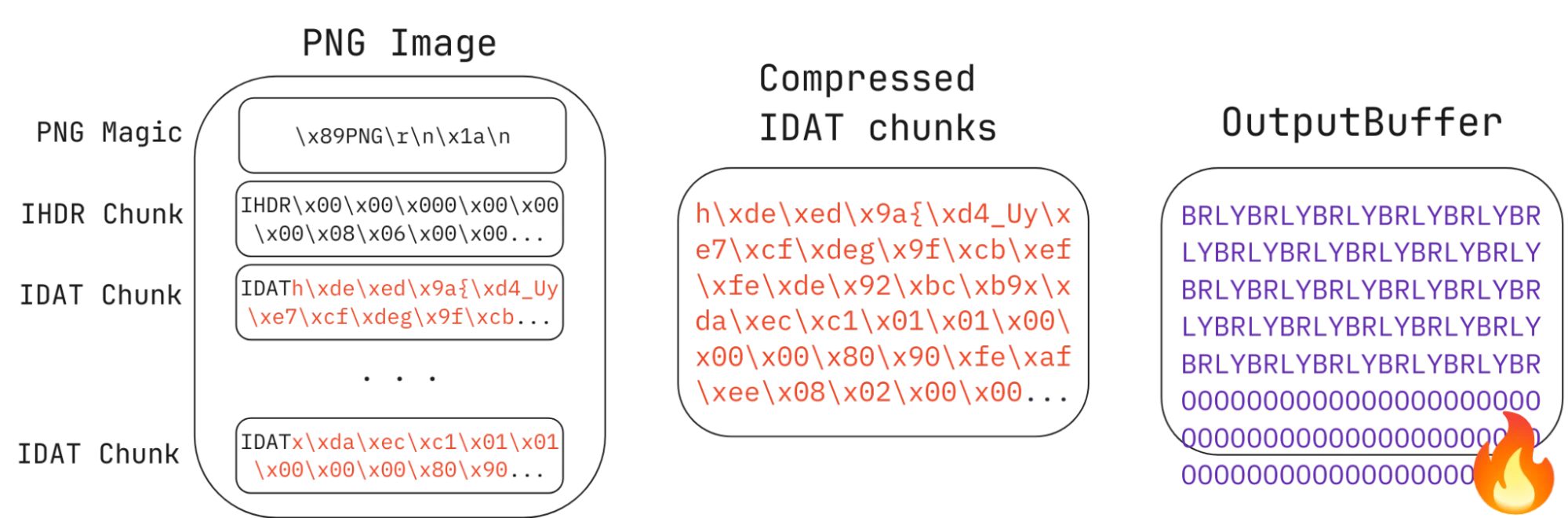
The image below gives a high level overview of how the PNG parser works. It locates the different PNG chunks of the image and extracts global information such as width and height from the IHDR chunk. All the IDAT chunks, which contain the actual image data, are concatenated into a single buffer (called Compressed IDAT chunks in the figure). The parser then allocates all the buffers needed for processing the image, and finally uncompresses the IDAT chunks into another buffer called OutputBuffer.
The vulnerable code is shown in the next two snippets.


The root cause is an integer overflow on the size used to allocate OutputBuffer. PngWidth is related to the width contained in the IHDR chunk, so an attacker can increase this value until the 32-bit multiplication result overflows, for example 2 * 0x80000040 = 0x80. Because of this overflow, the attacker can allocate an OutputBuffer that is not large enough to contain the uncompressed data, which leads directly to a heap overflow with attacker-controlled data during the PNG uncompression phase.
Exploitation
Step 1: understand the UEFI heap
To know what the heap overflow can corrupt, the team dissected the UEFI heap. It is pool-based: it maintains a set of pools for different memory types, and the figure shows the pool associated with the EfiBootServicesData memory type. Each pool contains a set of free memory chunks, represented by the POOL_FREE object, distributed by size and used to fulfil allocation requests.
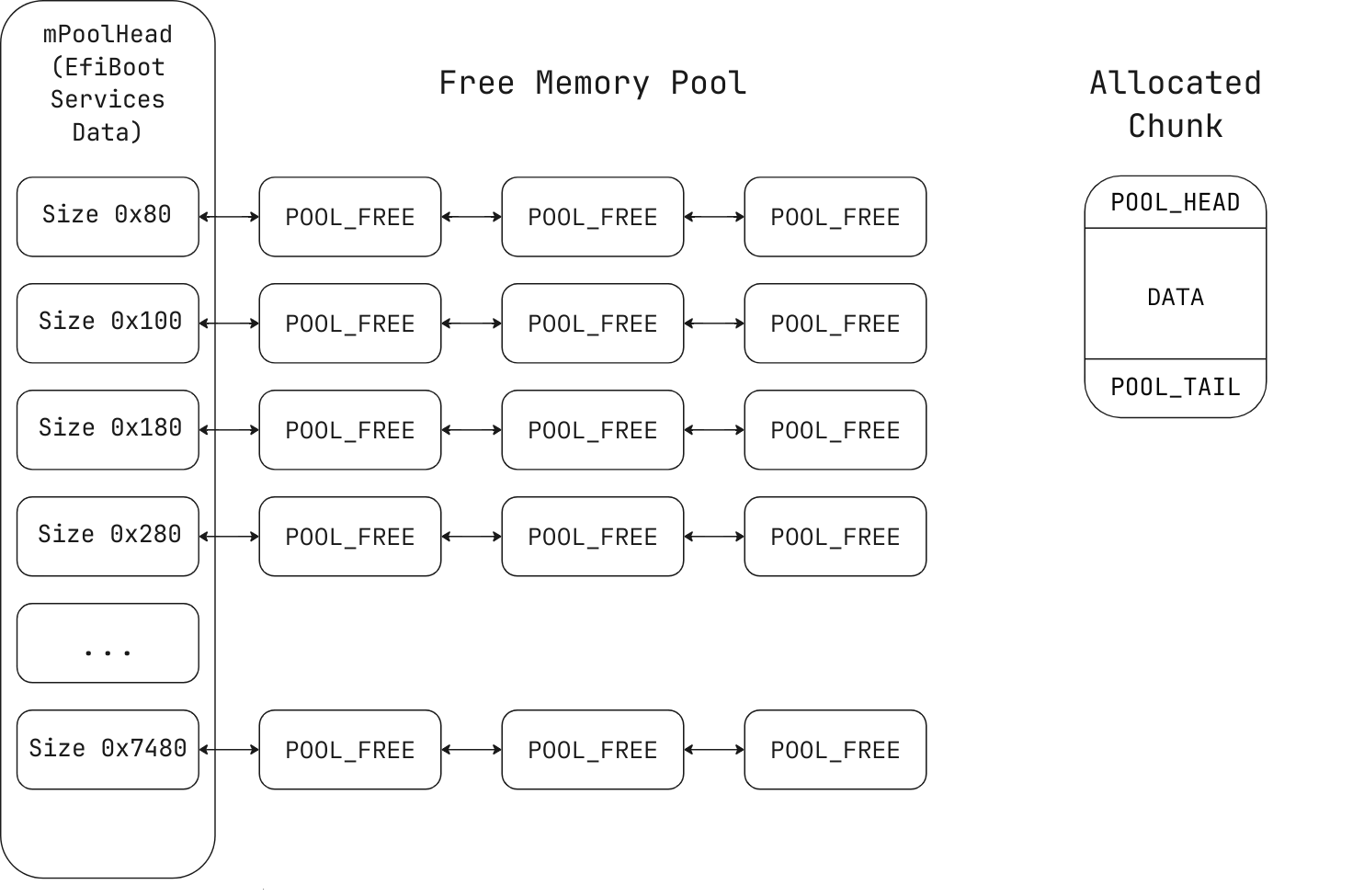
When EFI_BOOT_SERVICES->AllocatePool is called, the heap manager selects the correct free list depending on the requested allocation size, unlinks the first POOL_FREE element, and returns an allocated chunk to the caller. The allocated chunk is wrapped with a POOL_HEAD and POOL_TAIL object, so when EFI_BOOT_SERVICES->FreePool is called on a chunk, the heap manager can retrieve all the metadata needed to place the chunk back in the appropriate free list.
Step 2: work around the lack of debugging
Allocated chunks and free chunks co-exist in the same memory regions, so a heap overflow can corrupt either an allocated chunk or a free one, depending on what is stored after the overflowing buffer. On this device the team could not inspect heap memory when the overflow occurs, so they did not know what could be overwritten.
One peculiarity of UEFI helps here: the memory used during the boot process is not cleared when control is passed to the operating system, so it survives after boot and can be inspected from the OS. Searching for the pattern BRLYBRLY, which results from uncompressing the PNG data chunks, locates OutputBuffer in memory. At first glance this seems to identify what is stored after OutputBuffer.
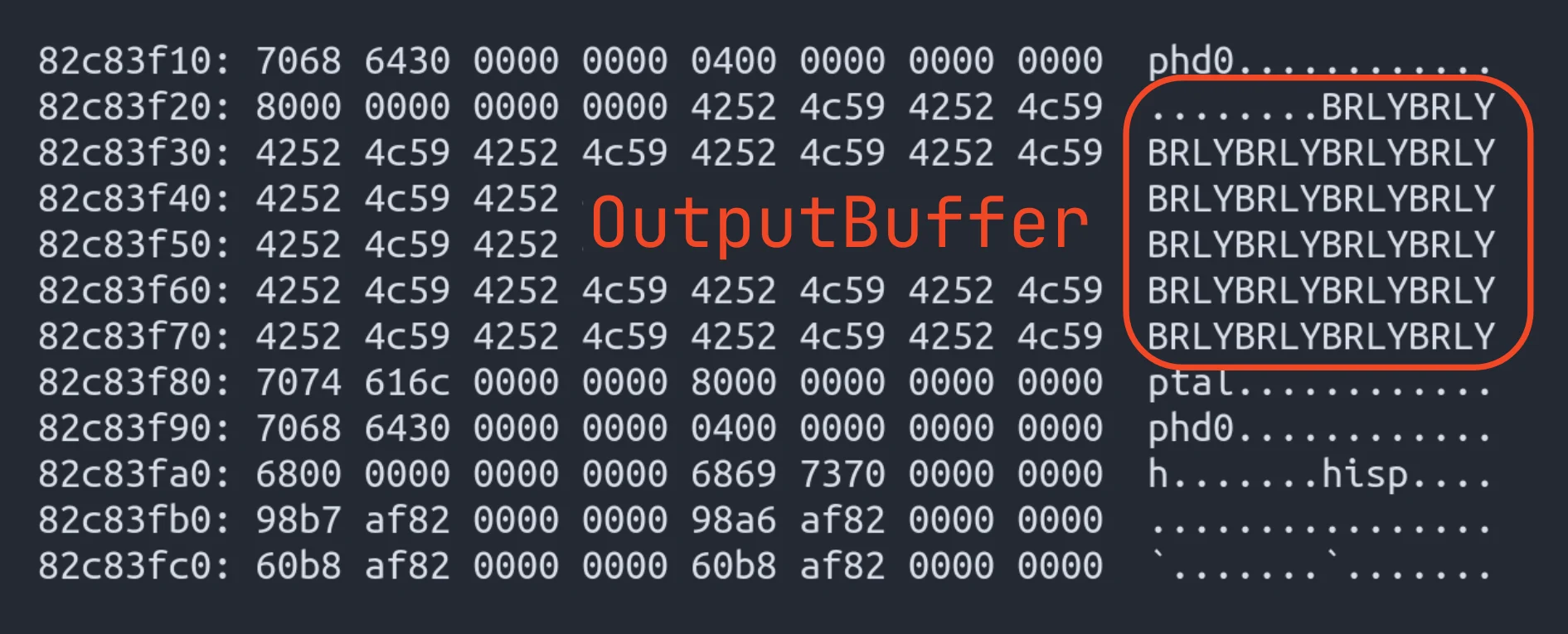
However, that memory content is not a snapshot of the memory present when the overflow happens, but what was left when control was passed to the OS. The chunk starting at address 0x82c83f90 is therefore not what is present at overflow time and can be corrupted; it is the last object that was allocated there by UEFI code.
Step 3: preserve the corrupted chunk with a signature check
A second insight came from reading the source code of EFI_BOOT_SERVICES->FreePool. As the snippet shows, FreePool immediately returns an error when the signature of the chunk to be freed does not match POOL_HEAD_SIGNATURE, defined as phd0.
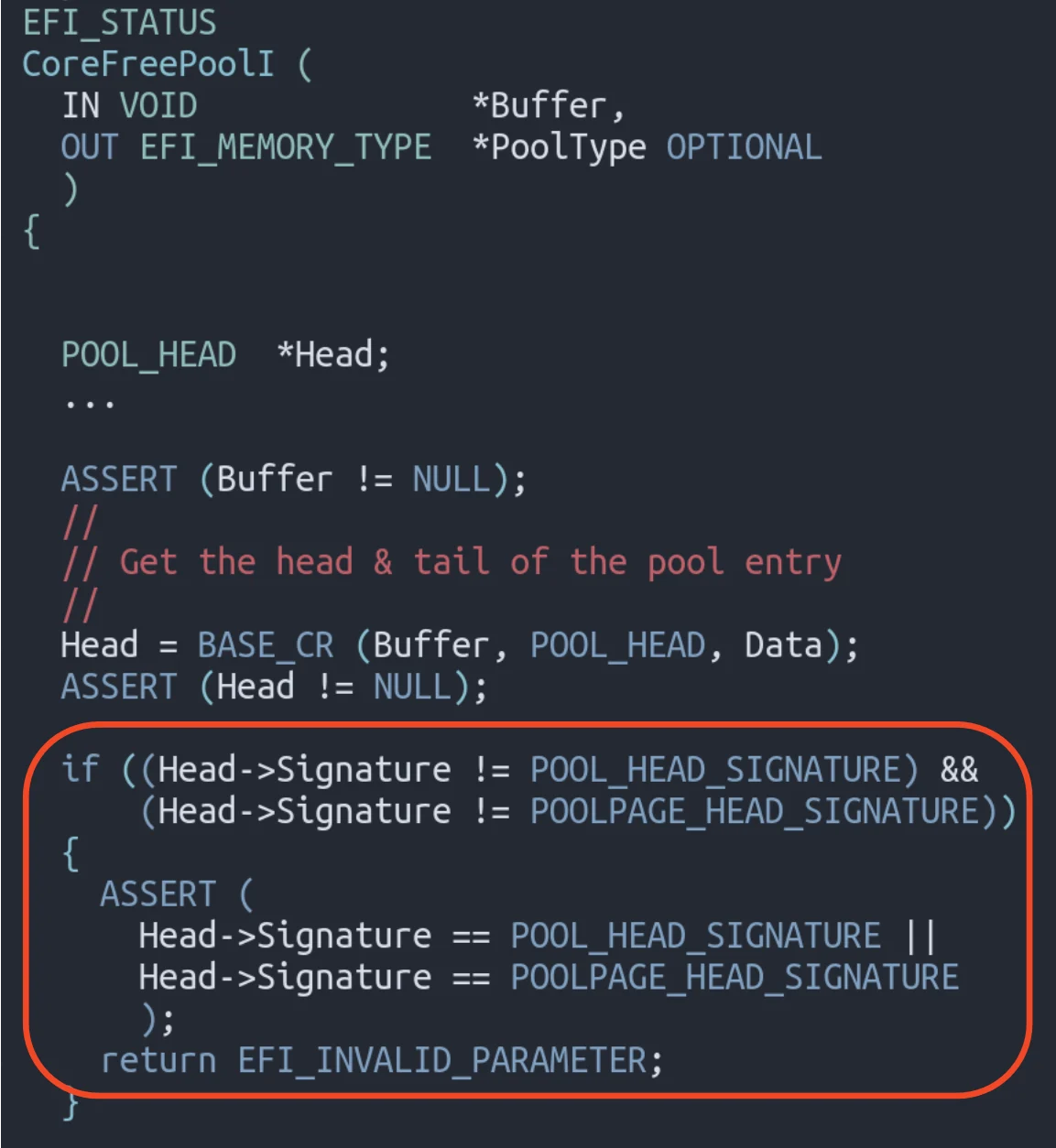
By corrupting the signature of the chunk allocated after OutputBuffer, the attacker can force FreePool to return an error, so the chunk is not put back in the free lists and is not reused for future allocations. The team says they have not seen this technique documented elsewhere. It preserves the content of an allocated chunk so that the attacker can inspect it from the OS.
Step 4: heap feng shui with PNG chunks
Heap overflows usually require strong control over the state of the heap: the attacker performs multiple allocations and deallocations in an arbitrary sequence to massage the heap and choose which object is allocated after the overflowing one. In this scenario the team lacked strong primitives, but found that the state of the heap can be influenced by including certain PNG chunks, such as PLTE and gAMA, in the final PNG image and varying their sizes.
They tried this basic heap massaging technique with different sequences of PNG chunks and stopped after a few tries, when they found that OutputBuffer got allocated before a PROTOCOL_ENTRY object.
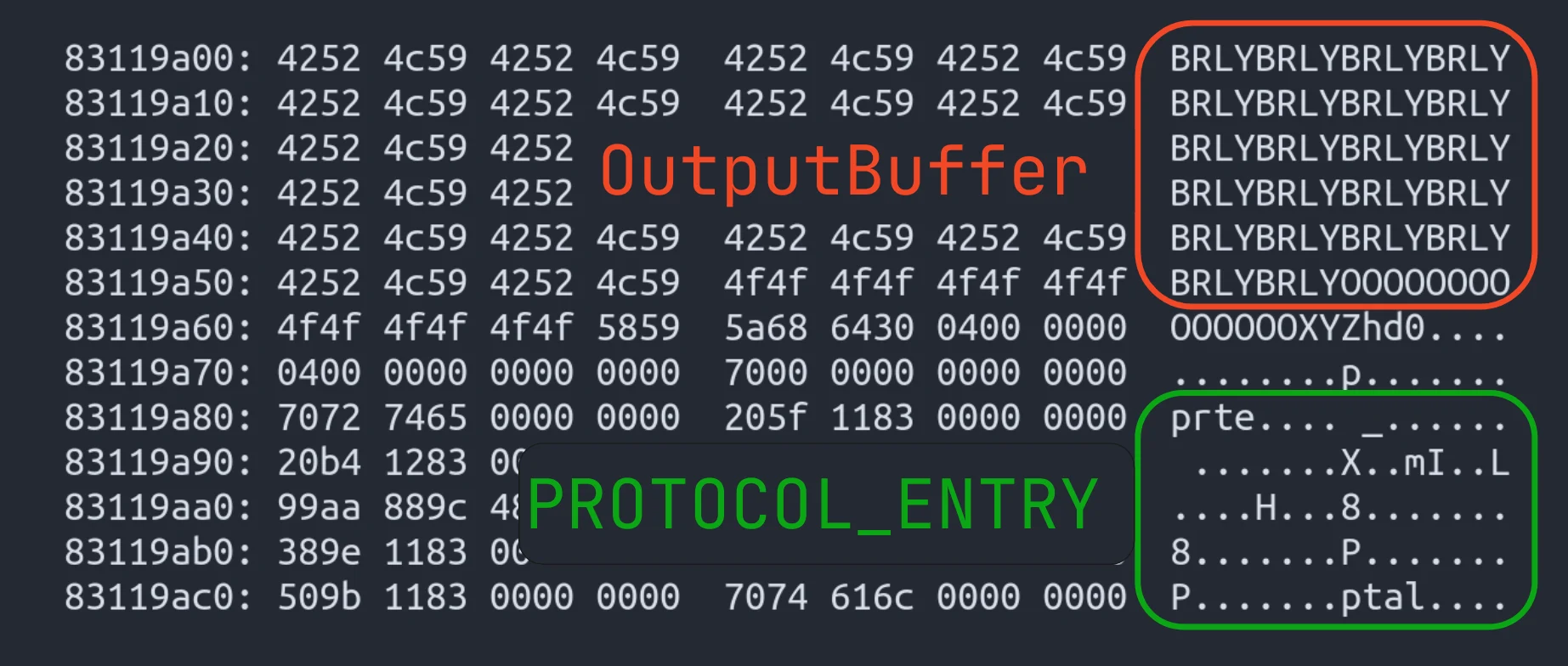
PROTOCOL_ENTRY was immediately recognised as a powerful target: protocols are a core concept in UEFI, PROTOCOL_ENTRY contains multiple pointers to EFI protocol objects, and many of those in turn contain function pointers.
Step 5: corrupt PROTOCOL_ENTRY
A PROTOCOL_ENTRY object represents an EFI protocol and everything around it. The screenshot shows the definition of PROTOCOL_ENTRY as taken from the EDK2 reference code.
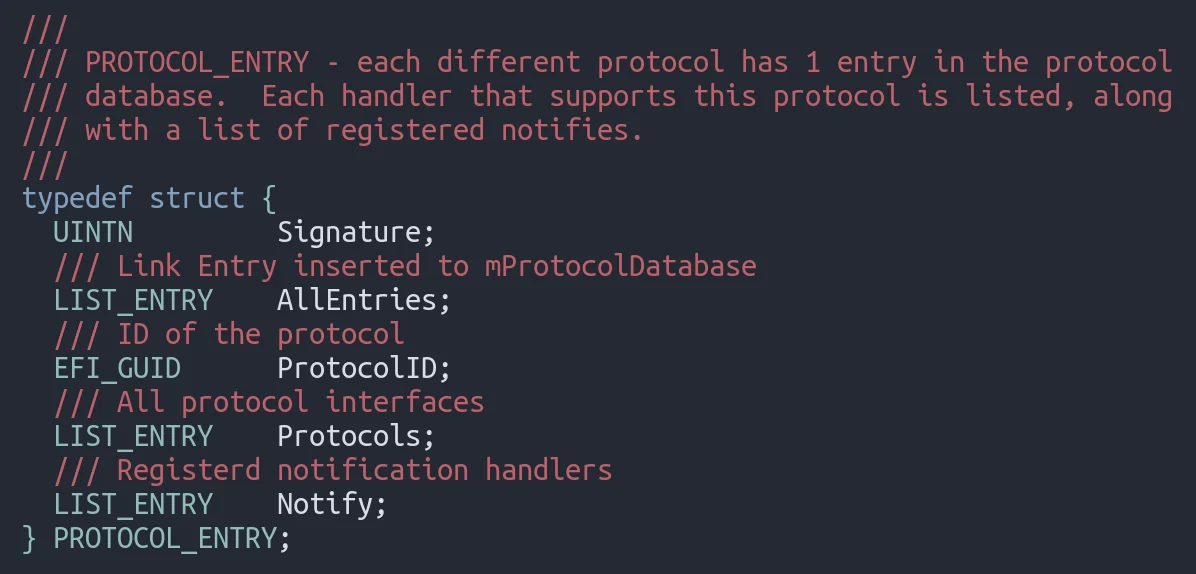
The ProtocolID field stores the GUID of the protocol represented by the entry. The AllEntries field is used by the UEFI reference code to keep track of the different PROTOCOL_ENTRY objects in a circular doubly-linked list rooted at the mProtocolDatabase global variable. That list matters because it is traversed, for example by EFI_BOOT_SERVICES->LocateProtocol, to search for a specific protocol.
From the Protocols field of PROTOCOL_ENTRY it is possible to reach its PROTOCOL_INTERFACE, which contains a pointer to the actual interface installed by EFI_BOOT_SERVICES->InstallProtocolInterface. The Notify field points to a PROTOCOL_NOTIFY object used by the UEFI event system. Both of these fields eventually point to function pointers, so an attacker able to corrupt a PROTOCOL_NOTIFY can overwrite one of them and achieve arbitrary code execution when the protocol interface or the notification callback handler is invoked.
Step 6: abuse the UEFI event system
The proof of concept abuses the EFI Event System. Among other things, this system lets a module register a callback handler that is invoked when a specific protocol is installed. UEFI code normally does this by calling EFI_BOOT_SERVICES->CreateEvent and EFI_BOOT_SERVICES->RegisterProtocolNotify, which create and prepare the PROTOCOL_NOTIFY and IEVENT objects.
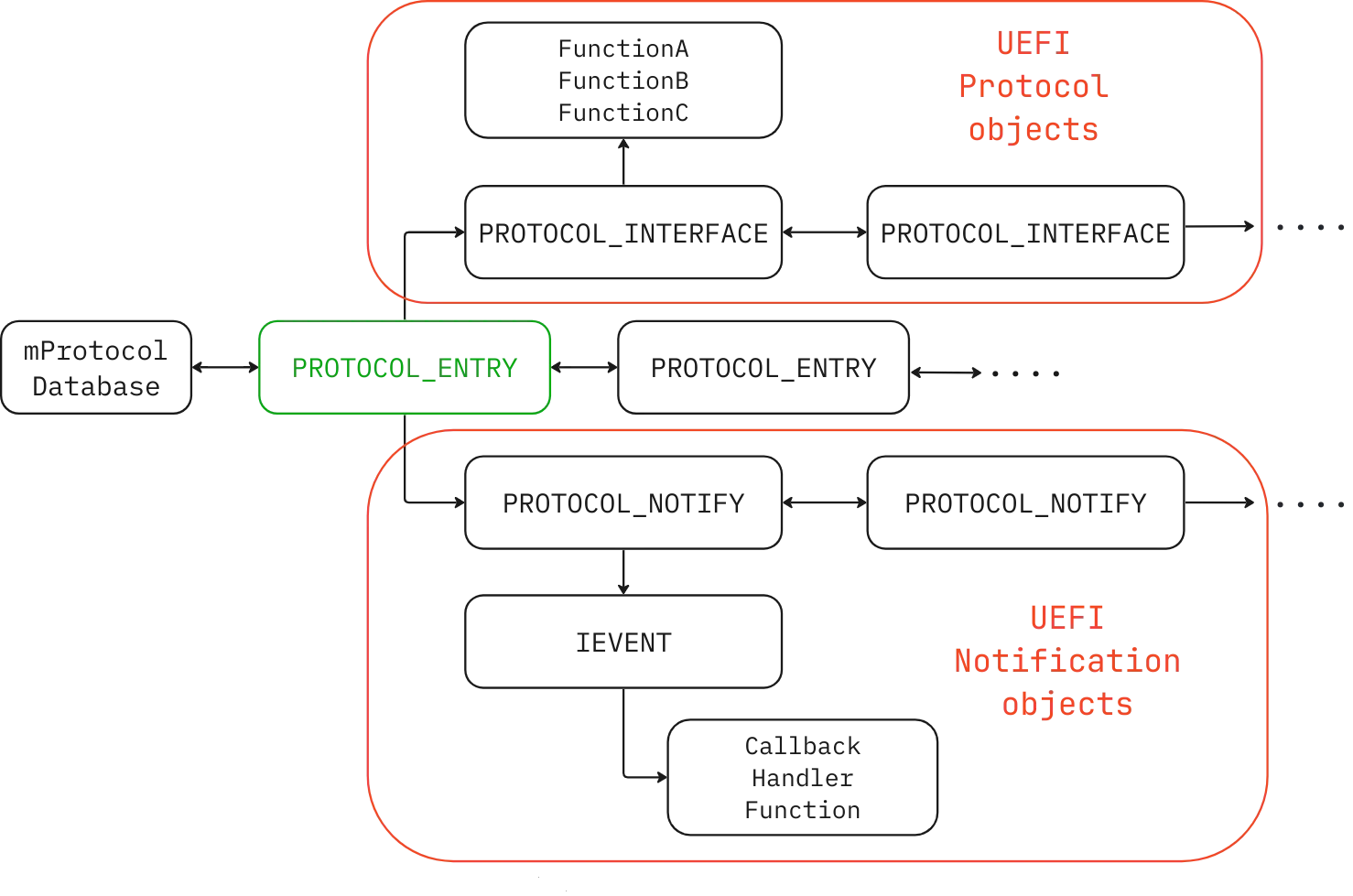
When the specified protocol is installed, CoreNotifyProtocolEntry queues the event to be notified in a global list pointed to by gEventQueue. The pending events are dispatched, and the callback handler invoked, when the task priority is set to a value lower than the notification priority specified in the IEVENT object.
The proof of concept mimics an event registration by crafting the PROTOCOL_ENTRY, PROTOCOL_NOTIFY and IEVENT objects in memory and setting all the connections between them. When the protocol stored in PROTOCOL_ENTRY during the overflow is installed, the event dispatchers invoke the attacker's callback handler, which gives arbitrary code execution.
As the target protocol GUID in the protocol entry, the team used a protocol that is installed just after the logo parsing function is called. That GUID can be found either by reverse engineering or by reconstructing the list of installed protocols, rooted at mProtocolDatabase, from the UEFI memory left after boot using basic memory forensics.
Step 7: shellcode in NVRAM and a second stage
The last piece is where to redirect control flow after the callback handler is invoked. A common misconfiguration makes this easy: executable permissions are not removed from the memory used to map NVRAM variables. A shellcode can therefore be stored inside an NVRAM variable, and that memory is both executable and always mapped at the same address.
Once arbitrary code execution is achieved during the DXE phase, platform security is lost. From this stage the attacker has full control over the memory and the disk of the target device, including the operating system that will be started. It is very easy to start a bootkit such as BlackLotus and modify the OS that will be started.
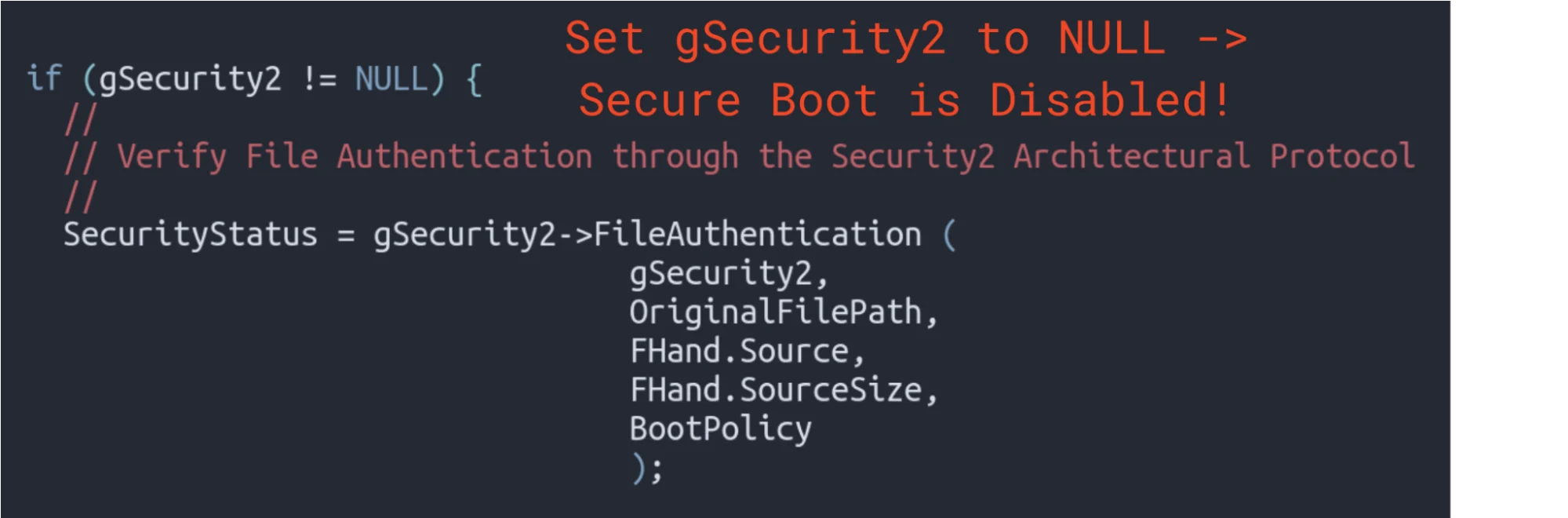
To prove the point, the team extended the initial proof of concept. The final PoC disables Secure Boot, which is straightforward because it only requires setting the gSecurity2 global variable to NULL, and loads and executes a second stage from the disk. The second stage replaces the current NTFS driver with one that has write support, so files can be written into the Windows file system.
Step 8: the proof of concept in action
After logging in, the team starts a terminal with Admin privileges, checks that Secure Boot and Intel Boot Guard (Verified Boot) are enabled, and runs the LogoFAIL proof of concept. The PoC prepares all the needed UEFI objects, saves the malicious PNG file inside an NVRAM variable, and restarts the device. During boot, the system firmware parses the injected PNG and triggers the heap overflow, resulting in the memory corruption described above. The video demonstrates arbitrary code execution during DXE by printing a message on the display and by showing that the advanced payload can create a file on the Windows file system.
Root cause
The immediate defect is an integer overflow in the PNG parser: the size used to allocate OutputBuffer is computed from PngWidth, taken from the IHDR chunk, and a 32-bit multiplication overflows, so a buffer smaller than the uncompressed data is allocated. The uncompression phase then writes attacker-controlled data past the end of that buffer.
The exploitation is possible because of how the UEFI heap and the surrounding firmware behave. Allocated and free chunks share memory regions, so an overflow can hit live objects. Boot-time memory is not cleared before the OS starts, which lets an attacker inspect leftovers, and FreePool's signature check on POOL_HEAD_SIGNATURE (phd0) can be turned into a way to keep a corrupted chunk out of the free lists. The event system then provides the path from a corrupted PROTOCOL_NOTIFY to a function pointer call, and NVRAM memory that is executable and mapped at a fixed address provides the payload location.
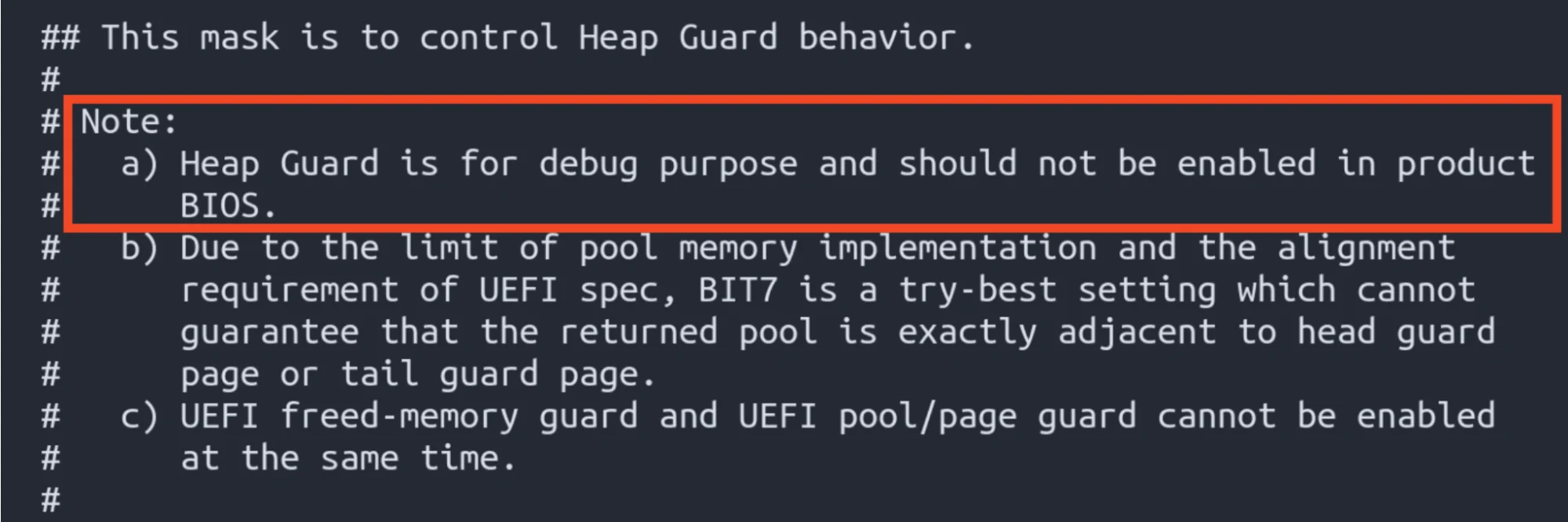
Existing defences did not stop the chain. The EDK2 reference code implements Heap Guard, which puts an unmapped page before and after each allocation so any overflow is immediately blocked, and it would completely hinder this proof of concept. But a comment in the EDK2 sources says Heap Guard is only intended for debugging and should not be enabled in any product, which matches the team's experience: they have not seen any system in the wild with this mitigation enabled. The reference code also contains logic to disable execution of code stored in the NVRAM area by setting the page tables correctly; the only systems where the team found this mitigation enabled and properly configured are ARM-based systems and some servers. Even there, exploitation would likely still be possible with more advanced techniques such as ROP.
Impact
On the test device, getting a malicious PNG parsed by the firmware during boot yielded arbitrary code execution in the DXE phase with firmware privileges. On the test device this was demonstrated with Intel Boot Guard and Secure Boot enabled. From that position the attacker has full control over the memory and the disk of the target device, including the operating system that will be started, and can disable Secure Boot by setting gSecurity2 to NULL and load a second stage from disk that writes into the Windows file system.
The techniques are described as very generic and deeply tied to the UEFI ecosystem, so they can likely be applied to exploit any heap overflow, and will be very hard, if not impossible, to fix without stronger defences tailored for heap corruptions, such as Heap Guard. The team also notes that this is one of the first heap exploits documented in UEFI, and does not rule out easier and more stable techniques being discovered in the future.
Fix
The write-up does not describe a specific patch being applied. It points to the defences that would address the chain: Heap Guard, which blocks the overflow outright but is documented in EDK2 as debugging-only and is not seen enabled in the wild, and correct page table configuration to make NVRAM memory non-executable, which the team found enabled only on ARM-based systems and some servers. The closing argument is that fixes without stronger heap-corruption defences will struggle to stop this class of exploit.
Variants to test
- Other image parsers in firmware. The same crash-to-exploit method applies to any parser that produces a heap overflow with controlled content and size. A positive result is an allocation size that can be made to wrap while the uncompressed or decoded data still exceeds the allocated buffer.
- Other heap overflow targets. Instead of
PROTOCOL_ENTRY, look for objects allocated after the overflowing buffer that contain function pointers or pointers to structures with function pointers. A positive result is an object whose corruption leads to a controlled indirect call. - Heap massaging with format-specific chunks. The team influenced allocation order with PLTE and gAMA chunks and varying sizes. On other formats, look for optional sections or metadata blocks whose size changes the allocation sequence. A positive result is a deterministic layout where the overflowing buffer precedes a chosen object.
- Signature-preserving corruption. The
FreePoolsignature check trick can be reused wherever a corrupted chunk would otherwise be freed and reused. A positive result is that the corrupted chunk stays out of the free lists and its content is still visible from the OS after boot. - NVRAM execution. Check whether NVRAM-backed memory is mapped executable at a fixed address on a given platform. A positive result is shellcode placed in an NVRAM variable being executed after control flow is redirected.
- Heap Guard coverage. Check whether Heap Guard is enabled on a target. A positive result for the attacker is its absence, which the team reports as the norm outside debugging configurations.
What happened, in plain words
Every computer has a tiny piece of software that runs before anything else when you press the power button. It is called firmware, and its job is to wake up the hardware, check that things look sane, and then hand control to the operating system (Windows, for example). On most PCs this firmware follows a standard called UEFI.
One of the things UEFI firmware does during startup is show a logo on the screen. To do that, it reads an image file stored in the firmware. That means the firmware contains code that opens image files and decodes them. Code that reads files from the outside world is a classic place for bugs, because an attacker can craft a file that the code was never designed to handle.
The Binarly REsearch team asked a practical question: when their automated bug-finding tool (a fuzzer) makes this image-reading code crash, can a real attacker turn that crash into full control of the machine during boot? They answered it on a real computer, a Lenovo ThinkCentre M70s Gen 2, with two important security features switched on: Intel Boot Guard and Secure Boot. Both are designed to stop unauthorised code from running early in the boot process.
On the test device, yes. They took a single crash, an integer overflow in the PNG image parser, and built a step-by-step chain that ends with their own code running with the firmware's privileges. In an extended version of the proof of concept, they could switch Secure Boot off and load a second program from the disk that writes files into the Windows file system.
This article walks through that chain from zero. Every technical term is explained the first time it appears, and every code snippet is copied exactly as it appears in the write-up, followed by a plain-language explanation.
The setup: what was tested and what made it hard
The test machine was a Lenovo ThinkCentre M70s Gen 2, a desktop PC. Two protections were enabled on it:
- Intel Boot Guard: a hardware-backed check that makes sure the first piece of firmware that runs is the one the manufacturer signed. If someone swaps in modified firmware, the machine refuses to start it. Think of it as a wax seal on an envelope: if the seal is broken, you know not to trust the contents.
- Secure Boot: a UEFI feature that only allows boot software carrying a valid digital signature to run. Think of it as a bouncer at a door who checks ID before letting anyone in.
The team also explains a limitation that shaped everything they did: they had no way to debug the firmware while it was running on this machine. Two things blocked them. Intel Direct Connect Interface (DCI), a hardware debugging channel, is not available on newer CPUs. And Intel Boot Guard prevents anyone from injecting debugging code into the running firmware. So they could not pause the machine at the moment of the crash and look at memory. They had to find indirect ways to learn what was happening, which is a recurring theme below.
The starting material was a batch of crashes their fuzzer had produced on this device. A fuzzer is a program that feeds huge numbers of strange, malformed inputs to another program and records every time it crashes. Each crash is a clue, but not every clue leads to an exploitable bug, so the first job was to pick one.
Choosing which crash to chase
The fuzzer produced several crashes. The team looked at the underlying cause of each one and picked an integer overflow in the PNG parser. Two reasons made it the best candidate: PNG is a file format that is easy to work with, and this particular bug easily produces a heap overflow with arbitrary content and arbitrary size. In plain terms, they could choose both what bytes get written past the end of a buffer and how many.
Before going further, it helps to know what a PNG file actually is. A PNG is not one solid blob; it is a sequence of labelled sections called chunks. Each chunk has a type. The IHDR chunk holds global facts about the image, such as its width and height. The IDAT chunks hold the actual picture data, compressed to save space. Other chunk types carry optional extras such as colour tables.
The diagram below shows the whole flow of the parser at a high level.
Reading the diagram from left to right: the parser finds the chunks in the PNG, reads width and height from IHDR, glues all the IDAT chunks together into one buffer (labelled Compressed IDAT), allocates the working buffers it needs, and finally decompresses the IDAT data into a buffer the team calls OutputBuffer. That last buffer is where the trouble starts.
The vulnerable code is shown in the next two snippets.
The root cause is an integer overflow in the calculation of how big OutputBuffer should be. PngWidth comes straight from the width field in the IHDR chunk, which the attacker controls. The size calculation multiplies values together in 32-bit arithmetic. A 32-bit number can only hold values up to a certain limit; when a calculation goes past that limit, the result wraps around to a small number instead of growing. The write-up gives the example 2 * 0x80000040 = 0x80: a huge width, when multiplied, produces the tiny result 0x80.
So the attacker can make the firmware allocate an OutputBuffer far too small for the data that will be decompressed into it. When decompression runs, it writes the full, large amount of data into the small buffer, and everything past the end gets overwritten. That is a heap overflow: writing beyond the boundaries of a reserved block of memory.
To understand why that matters, you need to know how that memory is organised.
Step 1: how the UEFI heap works
A heap is a region of memory that a program uses as a scratch pad, handing out small blocks on request and taking them back when they are no longer needed. The UEFI heap is pool-based: it keeps separate pools for different kinds of memory, and the diagram shows the pool for the EfiBootServicesData memory type.
Inside each pool there are free chunks, each represented by a POOL_FREE object, sorted by size. When firmware code calls EFI_BOOT_SERVICES->AllocatePool and asks for a block of a given size, the heap manager picks the right free list, unlinks the first POOL_FREE entry, and hands that block to the caller. The block is wrapped in a POOL_HEAD and a POOL_TAIL, small pieces of bookkeeping data at the start and end. When the caller later calls EFI_BOOT_SERVICES->FreePool, the heap manager reads that bookkeeping data to know where to put the block back.
A useful comparison: imagine a car park where spaces are marked out with painted lines and a small sign at each space. The lines and signs are the POOL_HEAD and POOL_TAIL. If someone paints over a sign, the attendant no longer knows which space is which.
Step 2: working around the lack of a debugger
In a normal heap, allocated blocks and free blocks sit side by side in the same memory. So an overflow can land on either kind: it might overwrite a block that is currently in use, or one that is sitting free waiting to be reused. Which one gets hit depends entirely on what happens to be stored right after the overflowing buffer. On this machine the team could not pause and look, so they did not know what was there.
UEFI gives them an unexpected helping hand. Memory used during boot is not wiped when control passes to the operating system. It survives, and can be read from the running OS. So the team searched OS memory for the pattern BRLYBRLY, which is what you get when you decompress the PNG data chunks they had crafted. Finding that pattern locates OutputBuffer after the fact.
At first glance this looks like it reveals what sits after OutputBuffer. But there is a catch: what they see is not a snapshot from the moment of the overflow. It is whatever was left behind when the OS started. The block starting at address 0x82c83f90 is therefore not what was there at overflow time; it is simply the last object UEFI allocated in that spot.
Step 3: freezing a corrupted block with a signature check
The team found a second useful detail by reading the source code of EFI_BOOT_SERVICES->FreePool. As the snippet shows, FreePool checks the signature of the block it is about to free, and returns an error immediately if it does not match POOL_HEAD_SIGNATURE, which is defined as phd0.
Why does this matter? If the attacker deliberately corrupts that signature on the block sitting after OutputBuffer, then when the firmware tries to free that block, FreePool refuses. The block is never returned to the free lists, so it is never handed out again and its contents are never overwritten by later allocations. The corrupted block stays put, and the attacker can read it from the OS after boot. The team says they have not seen this trick documented elsewhere.
In car park terms: if you scribble over a space's sign, the attendant cannot recycle the space, so whatever you parked there stays exactly where it is.
Step 4: arranging memory with PNG chunks (heap feng shui)
Heap overflows usually need careful setup. An attacker performs a sequence of allocations and frees to shape the heap so that the object they want to corrupt ends up right after the buffer that overflows. This shaping is informally called heap feng shui, by analogy with arranging furniture so everything lands in the right place.
The team did not have powerful tools for this, but they discovered that the heap layout can be nudged by including certain optional PNG chunks, such as PLTE and gAMA, in the final image and varying their sizes. Different chunk sequences produce different allocation patterns.
They tried a few sequences and stopped early, when they found one where OutputBuffer was allocated immediately before a PROTOCOL_ENTRY object.
They recognised PROTOCOL_ENTRY as a strong target straight away. Protocols are a central concept in UEFI: they are the standard way one part of the firmware offers a service to another. A PROTOCOL_ENTRY holds several pointers to protocol objects, and many of those objects in turn hold function pointers. A function pointer is simply a memory address that says "run the code located here". If an attacker can change one, they can make the firmware run their code instead.
Step 5: corrupting PROTOCOL_ENTRY
A PROTOCOL_ENTRY object represents one EFI protocol and everything connected to it. The screenshot shows its definition as taken from the EDK2 reference code, the openly published sample firmware code that many vendors base their firmware on.
A few fields matter here:
ProtocolIDstores the GUID of the protocol. A GUID is a long unique identifier, like a serial number, used to tell protocols apart.AllEntrieslinks this entry into a circular doubly-linked list rooted at the global variablemProtocolDatabase. A linked list is a chain of items where each one points to the next; circular means the last points back to the first; doubly-linked means each item also points backwards. This list is how the firmware keeps track of every registered protocol, and functions such asEFI_BOOT_SERVICES->LocateProtocolwalk it when they need to find one.Protocolsleads to thePROTOCOL_INTERFACE, which holds a pointer to the actual interface installed byEFI_BOOT_SERVICES->InstallProtocolInterface.Notifypoints to aPROTOCOL_NOTIFYobject used by the UEFI event system.
Both of those last two paths eventually reach function pointers. So an attacker who can corrupt a PROTOCOL_NOTIFY can overwrite one of those pointers and get their own code executed when the protocol interface or the notification callback is invoked.
Step 6: abusing the UEFI event system
The proof of concept uses the EFI Event System. Among other things, this system lets a module say: "when a particular protocol gets installed, call this function of mine". Firmware code normally sets this up by calling EFI_BOOT_SERVICES->CreateEvent and EFI_BOOT_SERVICES->RegisterProtocolNotify, which create and prepare the PROTOCOL_NOTIFY and IEVENT objects.
When the protocol in question is installed, a function called CoreNotifyProtocolEntry puts the event on a global queue pointed to by gEventQueue. The queued events are then dispatched, and the callback runs, when the task priority is set lower than the notification priority recorded in the IEVENT object. Task priority is a number that tells the firmware how urgent the current work is; lower numbers mean more urgent, so lowering it lets pending notifications fire.
The proof of concept fakes an event registration. It crafts the PROTOCOL_ENTRY, PROTOCOL_NOTIFY and IEVENT objects directly in memory and wires all the connections between them. Then, when the protocol named in the corrupted PROTOCOL_ENTRY is installed during boot, the event dispatcher calls the attacker's callback, and that is arbitrary code execution.
One detail: the target protocol GUID they used belongs to a protocol that gets installed just after the logo parsing function runs. That GUID can be found either by reverse engineering the firmware or by reconstructing the list of installed protocols, rooted at mProtocolDatabase, from the UEFI memory left behind after boot, using basic memory forensics.
Step 7: shellcode in NVRAM and a second stage
The last piece is deciding where the callback should send execution. A common misconfiguration makes this easy: the memory used to map NVRAM variables is not stripped of executable permission. NVRAM is a small area of non-volatile memory on the motherboard that keeps settings across power cycles. Because that memory is executable and always mapped at the same address, the attacker can simply store shellcode in an NVRAM variable and jump to it. Shellcode is a small piece of hand-written machine code whose only job is to get the attacker started.
Once code execution is achieved during the DXE phase, platform security is gone. DXE is one of the stages of UEFI boot, the point where drivers and services are being loaded. From there the attacker controls the machine's memory and disk, including the operating system that is about to start. Starting a bootkit such as BlackLotus becomes very easy.
To prove the point, the team extended the proof of concept. The final version disables Secure Boot, which is easy because it only requires setting the global variable gSecurity2 to NULL, and then loads and runs a second stage from disk. That second stage replaces the current NTFS driver with one that can write, so files can be written into the Windows file system.
Step 8: the proof of concept in action
After logging in, the team opens a terminal with Admin privileges, confirms that Secure Boot and Intel Boot Guard (Verified Boot) are enabled, and runs the LogoFAIL proof of concept. The PoC prepares all the UEFI objects it needs, saves the malicious PNG inside an NVRAM variable, and restarts the machine. During boot, the firmware parses the injected PNG, triggers the heap overflow, and the memory corruption described above follows. The video shows code execution during DXE by printing a message on the display and by showing that the advanced payload can create a file on the Windows file system.
Root cause
The immediate defect is an integer overflow in the PNG parser. The size used to allocate OutputBuffer is computed from PngWidth, taken from the IHDR chunk, and a 32-bit multiplication wraps around, so a buffer smaller than the decompressed data is allocated. Decompression then writes attacker-controlled data past the end of that buffer.
Exploitation works because of how the UEFI heap and the surrounding firmware behave. Allocated and free blocks share memory regions, so an overflow can hit live objects. Boot-time memory is not cleared before the OS starts, which lets an attacker inspect leftovers. The signature check on POOL_HEAD_SIGNATURE (phd0) can be turned into a way to keep a corrupted block out of the free lists. The event system provides the path from a corrupted PROTOCOL_NOTIFY to a function pointer call. And NVRAM memory that is executable and mapped at a fixed address provides a home for the payload.
Existing defences did not stop the chain. The EDK2 reference code implements Heap Guard, which places an unmapped page before and after every allocation so any overflow is blocked immediately; it would completely stop this proof of concept. But a comment in the EDK2 sources says Heap Guard is intended only for debugging and should not be enabled in any product, which matches the team's experience: they have not seen any system in the wild with it enabled. The reference code also contains logic to make NVRAM memory non-executable by configuring the page tables correctly; the only systems where the team found this enabled and properly configured are ARM-based systems and some servers. Even there, exploitation would likely still be possible with more advanced techniques such as ROP, which chains together small existing pieces of code instead of injecting new code.
Impact
On the test device, getting the firmware to parse a malicious PNG during boot yielded arbitrary code execution in the DXE phase with firmware privileges. On the test device this was demonstrated with Intel Boot Guard and Secure Boot enabled. From that position the attacker controls the machine's memory and disk, including the operating system that will start, and can disable Secure Boot by setting gSecurity2 to NULL and load a second stage from disk that writes into the Windows file system.
The techniques are described as very generic and deeply tied to the UEFI ecosystem, so they can likely be applied to exploit any heap overflow, and will be very hard, if not impossible, to fix without stronger defences tailored for heap corruption, such as Heap Guard. The team also notes that this is one of the first heap exploits documented in UEFI, and does not rule out easier and more stable techniques being found in the future.
Fix
The write-up does not describe a specific patch being applied. It points to the defences that would address the chain: Heap Guard, which blocks the overflow outright but is documented in EDK2 as debugging-only and is not seen enabled in the wild, and correct page table configuration to make NVRAM memory non-executable, which the team found enabled only on ARM-based systems and some servers. The closing argument is that fixes without stronger heap-corruption defences will struggle to stop this class of exploit.
Variants to test
- Other image parsers in firmware. The same crash-to-exploit method applies to any parser that produces a heap overflow with controlled content and size. A positive result is an allocation size that can be made to wrap while the decompressed or decoded data still exceeds the allocated buffer.
- Other heap overflow targets. Instead of
PROTOCOL_ENTRY, look for objects allocated after the overflowing buffer that contain function pointers or pointers to structures with function pointers. A positive result is an object whose corruption leads to a controlled indirect call. - Heap massaging with format-specific chunks. The team influenced allocation order with PLTE and gAMA chunks and varying sizes. On other formats, look for optional sections or metadata blocks whose size changes the allocation sequence. A positive result is a deterministic layout where the overflowing buffer precedes a chosen object.
- Signature-preserving corruption. The
FreePoolsignature check trick can be reused wherever a corrupted block would otherwise be freed and reused. A positive result is that the corrupted block stays out of the free lists and its content is still visible from the OS after boot. - NVRAM execution. Check whether NVRAM-backed memory is mapped executable at a fixed address on a given platform. A positive result is shellcode placed in an NVRAM variable being executed after control flow is redirected.
- Heap Guard coverage. Check whether Heap Guard is enabled on a target. A positive result for the attacker is its absence, which the team reports as the norm outside debugging configurations.
Glossary
- Firmware: software built into a device that runs before the operating system and prepares the hardware.
- UEFI: the standard that modern PC firmware follows for booting and for offering services to the OS.
- DXE phase: a stage of UEFI boot where drivers and services are loaded and run.
- Intel Boot Guard: a hardware-backed protection that only lets signed firmware run first.
- Secure Boot: a UEFI feature that only allows boot software with a valid digital signature to run.
- Fuzzer: a program that feeds many malformed inputs to another program to find crashes.
- Crash: the moment a program fails badly enough to stop working correctly.
- Integer overflow: when a calculation produces a number too large for its fixed-size storage, so it wraps around to a small value.
- 32-bit: a number format that can only hold values up to a fixed limit before wrapping.
- PNG: an image file format made of labelled sections called chunks.
- Chunk: one labelled section of a PNG file, such as IHDR, IDAT, PLTE or gAMA.
- IHDR: the PNG chunk holding global image facts such as width and height.
- IDAT: the PNG chunks holding the compressed picture data.
- PLTE / gAMA: optional PNG chunks carrying a colour table and gamma information.
- Compressed IDAT: the single buffer into which all IDAT chunks are concatenated.
- OutputBuffer: the buffer into which the compressed image data is decompressed.
- Heap: a region of memory a program uses as a scratch pad, handing out and reclaiming blocks.
- Heap overflow: writing past the end of a reserved block of memory into neighbouring memory.
- Pool: a UEFI heap region dedicated to one memory type.
- EfiBootServicesData: a UEFI memory type used for boot-time data.
- POOL_FREE: the bookkeeping object representing a free block in a UEFI pool.
- POOL_HEAD / POOL_TAIL: bookkeeping data at the start and end of an allocated block.
- AllocatePool / FreePool: UEFI functions that hand out and reclaim heap blocks.
- POOL_HEAD_SIGNATURE: the marker
phd0thatFreePoolchecks before freeing a block. - Debugger: a tool that lets you pause a running program and inspect its memory.
- Intel DCI: a hardware debugging channel that is not available on newer CPUs.
- Heap feng shui: deliberately arranging allocations and frees so a chosen object lands next to the overflowing buffer.
- PROTOCOL_ENTRY: a UEFI object representing one registered protocol.
- Protocol: the standard way one part of UEFI firmware offers a service to another.
- GUID: a long unique identifier used to tell protocols apart.
- PROTOCOL_INTERFACE: the object holding the actual interface installed for a protocol.
- PROTOCOL_NOTIFY: the object used by the UEFI event system to track who wants to be told when a protocol appears.
- IEVENT: the UEFI object describing a registered event.
- Function pointer: a memory address that tells the program where to run code.
- Linked list: a chain of items where each points to the next; circular means the last points back to the first; doubly-linked means each also points backwards.
- mProtocolDatabase: the global list of all registered protocols.
- gEventQueue: the global queue of events waiting to be dispatched.
- Task priority: a number saying how urgent current work is; lower means more urgent.
- NVRAM: small non-volatile memory on the motherboard that keeps settings across power cycles.
- Shellcode: a small piece of hand-written machine code used to start an attack.
- Bootkit: malicious software that modifies the system before the operating system starts.
- BlackLotus: a known UEFI bootkit.
- NTFS: the file system Windows uses.
- Heap Guard: an EDK2 defence that puts an unmapped page before and after each allocation to block overflows.
- EDK2: openly published reference firmware code that many vendors base their firmware on.
- Page tables: the structures that tell the CPU which memory is mapped and what permissions it has.
- ROP: return-oriented programming, a technique that chains small existing pieces of code instead of injecting new code.
- ARM-based systems: computers using ARM processors rather than Intel-style ones.
- Reverse engineering: taking software apart to understand how it works.
- Memory forensics: examining leftover memory to reconstruct what happened.

