Juicy Infos hidden in js scripts leads to RCE
A JavaScript file exposed a password-change URL that took a user identifier as a parameter, and the application did not verify the caller's identity. By supplying the identifier of the first account, an attacker could take over the administrator account and then reach remote code execution on the server.

medium.com
Published on medium.com
Sorry for the late, I wasn’t able to write this before. Academic exams were overwhelming as usual.
The full write-up lives on its author's site
It belongs to its author, so we link to it rather than copy it. The other two tabs are our own rewrites, checked against it.
Context
While doing routine research, the author came across a web application that was not the original target, and decided to give it a quick look with a small checklist. The application belonged to a public college (the name is deliberately not disclosed) and ran on a dedicated server. It was a full Content Management System covering college administrative work: employee attendance, salaries, payments, classes, a teacher's section for posting assignments, and students' grades. Grades could be changed from the panel, and there was more functionality beyond that.
The entry point was a resource where users and admins were supposed to enter their credentials. It was not on the main domain.
Setup
No accounts, roles, tools or versions are described in the report. The only precondition mentioned is that the login resource sat on a host other than the main domain, and that the front-end JavaScript was readable, as front-end code always is.
Finding it
The first step was to look at the source code. The author likes inspecting JavaScript because it is the first sensitive code used by some technologies to interact with the internal system, and it offers more to test than white-box inspection alone, if that is available.
One function stood out: ChangePassword.

The function introduced a relative path with a parameter inside it. Opening that path with a random name as the parameter value showed the change password utility with the given name reflected in the parameter.
At that point the author had a forced browser to a user's password change utility, plus an IDOR. The page showed a disabled field for the new password. The disabled attribute was bypassed by editing the element in the browser's inspector. After submitting the form, the application returned a message saying the username was not found.
That response led to two hypotheses about how the user is verified:
- If there is no further check once a correct username is entered, the result is a critical account takeover IDOR.
- If there is such a check, how can it be bypassed?
Exploitation
Step 1: read the parameter format from the JavaScript
Going back to the JavaScript, the parameter value had the form change?pass=user-. The author assumed the application assigns an incremented value after the hyphen for every user created.
Step 2: guess the first user
If values are incremented, the first user would be user-1, and the first user is, if not always, the administrator. The resulting URL was:
change?pass=user-1
Step 3: take over the administrator account
The trick worked. The author obtained a full critical IDOR leading to account takeover, and with it an administrator panel with full functionality.

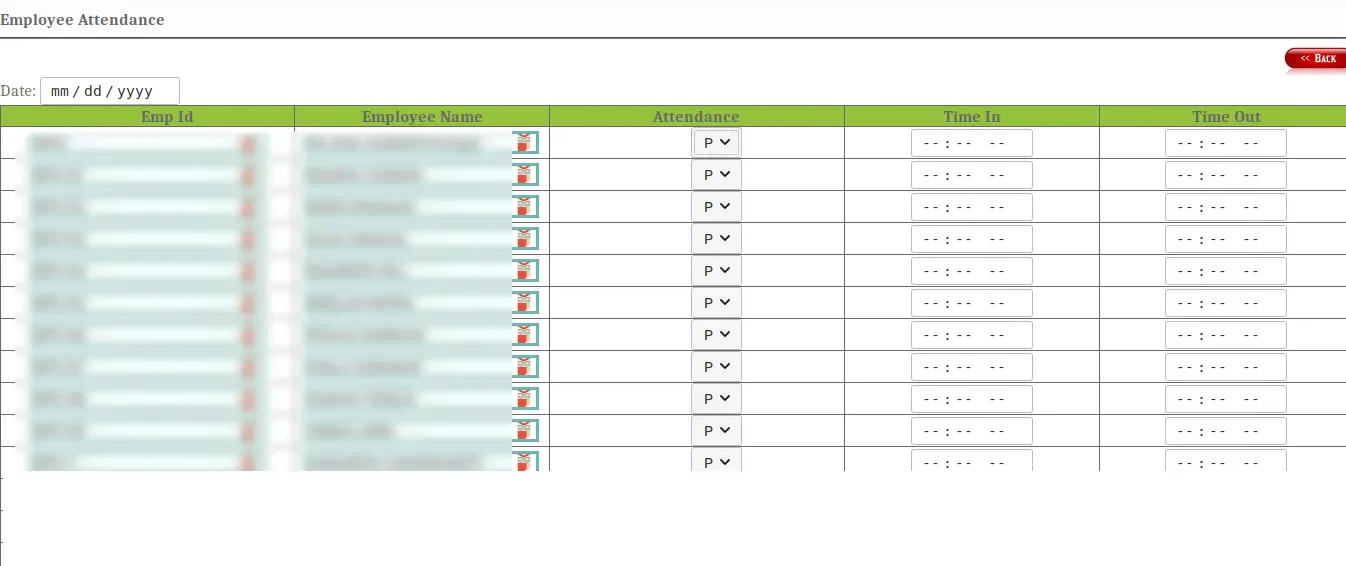
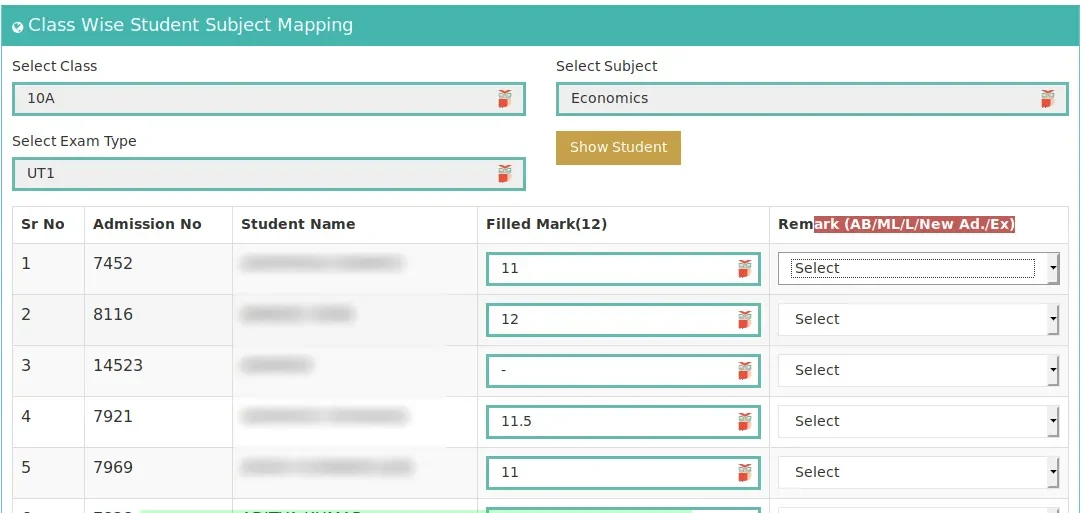


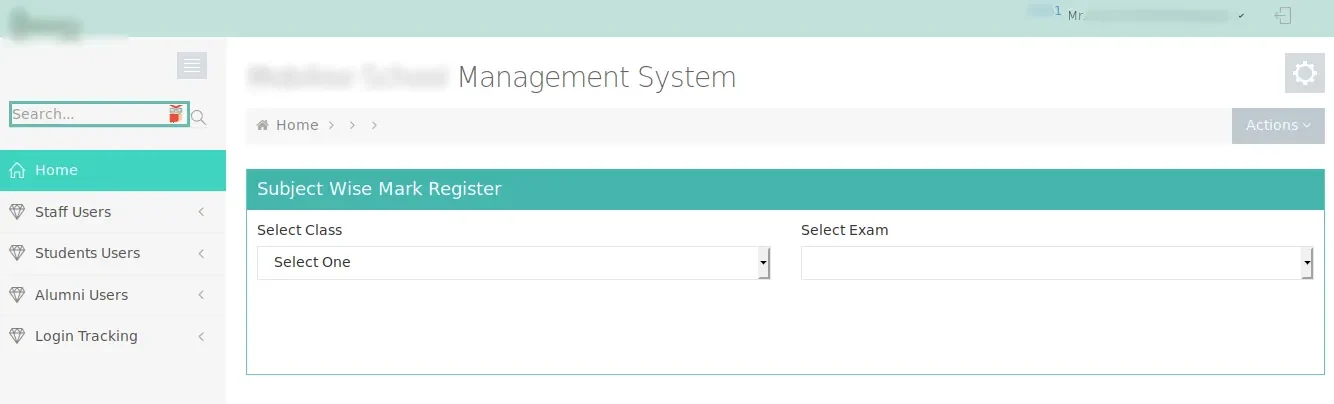
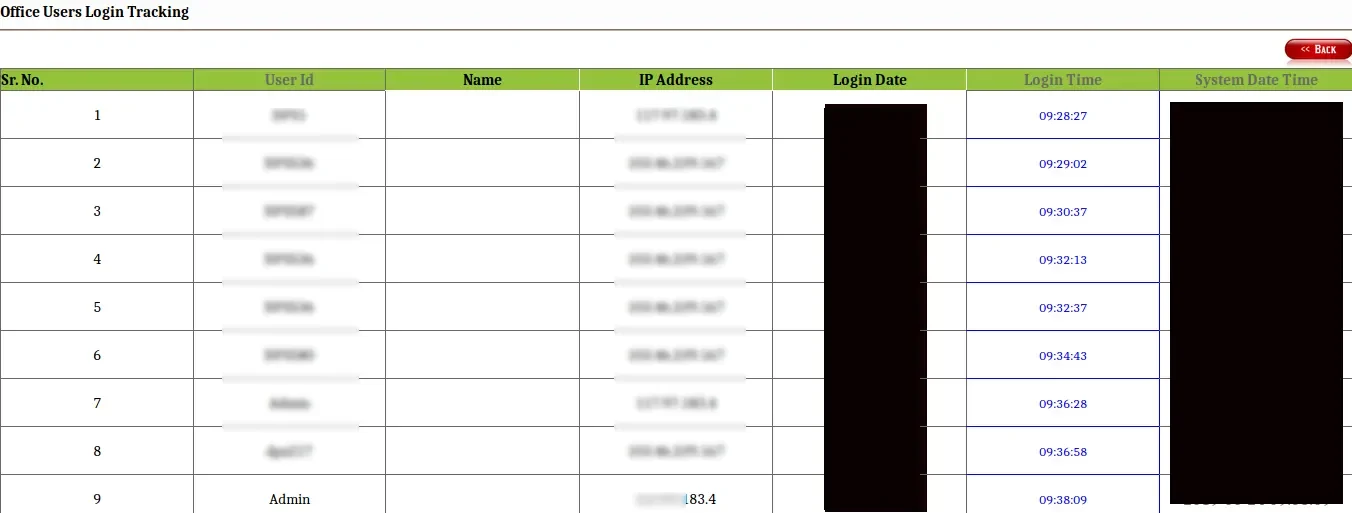
Some functionalities
Exploring the web application and its design from the administrator panel took up to 15 minutes, and ended with remote code execution on the dedicated server, which had plenty of activity going on inside.
Root cause
The report does not show the server-side code, so the following is inferred from behaviour. The password change utility appeared to take the account identifier from the pass parameter, with no visible check that the requester owned that account. The identifier was predictable: a fixed prefix followed by an incrementing number, which the front-end JavaScript exposed. The application returned a not-found message for an unknown username, which the user-1 guess did not trigger. The disabled password field was a client-side control only, so removing the disabled attribute in the inspector was enough to submit a new password.
Impact
An attacker who can reach the change password path can set the password of an account whose identifier can be guessed, including the first account, which the author expected to be the administrator. With administrator access the attacker reaches the full CMS: administrative records, employee attendance, salaries, payments, classes, assignments and students' grades, and can modify grades. From that panel the author obtained remote code execution on the dedicated server. The report does not describe the specific route from the panel to code execution.
Fix
The author notes that no malicious act was carried out, that the system administrators were contacted, that no index file or other files were changed, and that at the time of writing the server was safe and functional.
Variants to test
- Look for password change or reset utilities that take a user identifier as a request parameter, and try values belonging to other users. A positive result is the utility rendering for an account you do not own.
- Read front-end JavaScript for identifier formats such as a prefix plus an incrementing number, then try the lowest values, especially the first one. A positive result is a valid account being resolved where you expected a not-found message.
- Submit the form with a guessed identifier and observe the error. A message that only reports whether the username exists, rather than refusing the request outright, suggests the authorisation check is missing.
- Check whether security-relevant fields such as the new password input are only disabled in the markup. A positive result is the field accepting input and the form submitting after the attribute is removed.
- After gaining a privileged panel, review its features for paths that reach the underlying server, since the author's chain ended in remote code execution from the administrator panel.
What happened, in plain words
A security researcher was browsing the web, doing routine research, when they stumbled on a website that was not part of their original plan. It belonged to a public college (the name is deliberately kept private) and ran on a dedicated server, meaning a physical or virtual machine used only by that college rather than shared with other customers. The site was a full Content Management System, or CMS: a piece of software that lets people manage a website's content and data through a control panel instead of editing files by hand. This particular CMS held college administrative records, employee attendance, salaries, payments, classes, a teacher's section for posting assignments, and students' grades. Grades could be changed from the panel, and there was more functionality beyond that.
The researcher found a login page where users and admins were supposed to type their credentials. It was not on the main domain, meaning it lived at a different address than the college's main website. The first thing they did was look at the page's source code, and in particular the JavaScript. JavaScript is the programming language that runs inside your browser and makes web pages interactive: buttons that respond, forms that check what you typed, menus that open. Because it runs in your browser, anyone can read it. That is normal and not a flaw by itself, but it sometimes reveals how the site talks to its server, and that is exactly what happened here.
One function in that JavaScript, called ChangePassword, caught their attention. It pointed to a web address for changing a password, and that address took a parameter, which is a piece of information appended to a web address, usually after a question mark, that the site uses to decide what to show. By opening that address with a random name as the parameter value, the researcher saw the change password page appear, with that name shown on it. In other words, the page let the researcher reach the password change screen for a chosen user. That is an IDOR, short for Insecure Direct Object Reference: a situation where a website lets you reach a specific record (a user, an order, a document) just by naming it in the address, without checking that you are allowed to see or change it. Think of a hotel where the room number is written on the key card and the reception never checks whether the card belongs to you.
The page showed a field for the new password, but the field was disabled, meaning greyed out and not accepting typing. The researcher removed that restriction by editing the page in the browser's inspector, a built-in tool that lets you view and change the page as it exists in your browser. The disabled state was only in the page markup, so editing it in the inspector allowed the form to be submitted. After submitting the form, the site replied that the username was not found. That reply raised two possibilities in the researcher's mind: either there is no further check once a correct username is entered, which would mean a critical account takeover, or there is such a check, and the question becomes how to get past it.
Going back to the JavaScript, the researcher noticed the parameter value looked like change?pass=user-. They guessed that the site gives every user an identifier made of the word user, a hyphen, and a number that goes up by one for each new account. If that is true, the very first account would be user-1, and the first account is, if not always, the administrator. They tried it, and it worked. They now had an administrator panel with full functionality. Exploring that panel took up to 15 minutes and ended with remote code execution on the dedicated server, meaning the ability to run their own commands on the machine itself, not just use the website. The report does not describe the specific route from the panel to code execution.
The researcher states that no malicious act was carried out, that the system administrators were contacted, that no index file or other files were changed, and that at the time of writing the server was safe and functional.
Setup
The report does not describe any accounts, roles, tools or software versions. The only precondition mentioned is that the login resource sat on a host other than the main domain, and that the front-end JavaScript was readable, as front-end code always is. Front-end means everything that runs in your browser; back-end means the server and database behind it. Front-end code is delivered to your computer to make the page work, so you can always read it.
Finding it
The first step was to look at the source code. The author likes inspecting JavaScript because it is the first sensitive code used by some technologies to interact with the internal system, and it offers more to test than white-box inspection alone, if that is available. White-box inspection means testing with full knowledge of the source code, as opposed to black-box testing, where you only see the outside of the application.
One function stood out: ChangePassword.
The function introduced a relative path with a parameter inside it. A relative path is a web address written relative to the current one, so /change on example.com/login means example.com/change. Opening that path with a random name as the parameter value showed the change password utility with the given name reflected in the parameter. Reflected means the value you supplied appears back on the page.
At that point the author had a forced browser to a user's password change utility, plus an IDOR. Forced browsing means reaching a page directly by typing its address, skipping whatever links or menus the site intended you to follow. The page showed a disabled field for the new password. The disabled attribute was bypassed by editing the element in the browser's inspector. After submitting the form, the application returned a message saying the username was not found.
That response led to two hypotheses about how the user is verified:
- If there is no further check once a correct username is entered, the result is a critical account takeover IDOR.
- If there is such a check, how can it be bypassed?
Account takeover means logging in as someone else and acting with their rights. Critical is a severity label meaning the impact is as bad as it gets.
Exploitation
Step 1: read the parameter format from the JavaScript
Going back to the JavaScript, the parameter value had the form change?pass=user-. The author assumed the application assigns an incremented value after the hyphen for every user created. Incremented means increased by one each time, like ticket numbers at a bakery: 1, 2, 3, and so on. Predictable identifiers like this are a gift to an attacker, because guessing them is trivial.
Step 2: guess the first user
If values are incremented, the first user would be user-1, and the first user is, if not always, the administrator. The resulting URL was:
change?pass=user-1
This is a web address fragment. change is the page, ? starts the parameters, pass is the parameter name, = assigns a value, and user-1 is the value. The site reads pass and decides whose password to change. By putting user-1 there, the researcher asked the site to change the password of the first account, which they expected to be the administrator's.
Step 3: take over the administrator account
The trick worked. The author obtained a full critical IDOR leading to account takeover, and with it an administrator panel with full functionality.
Some functionalities
Exploring the web application and its design from the administrator panel took up to 15 minutes, and ended with remote code execution on the dedicated server, which had plenty of activity going on inside. Remote code execution, often shortened to RCE, means running your own commands on the server, which is the most serious outcome in web security because the server is no longer just serving pages, it is obeying you.
Root cause
The password change utility appeared to take the account identifier from the pass parameter, with no visible check that the requester owned that account. The identifier was predictable: a fixed prefix followed by an incrementing number, which the front-end JavaScript exposed. The application returned a not-found message for an unknown username, which the user-1 guess did not trigger. The disabled password field was a client-side control only, so removing the disabled attribute in the inspector was enough to submit a new password. Client-side means it happens in your browser, where you are in charge; server-side means it happens on the server, where you are not.
Impact
An attacker who can reach the change password path can set the password of an account whose identifier can be guessed, including the first account, which the author expected to be the administrator. Unauthenticated means without logging in at all. With administrator access the attacker reaches the full CMS: administrative records, employee attendance, salaries, payments, classes, assignments and students' grades, and can modify grades. From that panel the author obtained remote code execution on the dedicated server.
Fix
The author notes that no malicious act was carried out, that the system administrators were contacted, that no index file or other files were changed, and that at the time of writing the server was safe and functional.
Variants to test
- Look for password change or reset utilities that take a user identifier as a request parameter, and try values belonging to other users. A positive result is the utility rendering for an account you do not own.
- Read front-end JavaScript for identifier formats such as a prefix plus an incrementing number, then try the lowest values, especially the first one. A positive result is a valid account being resolved where you expected a not-found message.
- Submit the form with a guessed identifier and observe the error. A message that only reports whether the username exists, rather than refusing the request outright, suggests the authorisation check is missing.
- Check whether security-relevant fields such as the new password input are only disabled in the markup. A positive result is the field accepting input and the form submitting after the attribute is removed.
- After gaining a privileged panel, review its features for paths that reach the underlying server, since the author's chain ended in remote code execution from the administrator panel.
Glossary
- API: a way for one piece of software to talk to another, like a waiter taking your order to the kitchen.
- Account takeover: logging in as another person and acting with their rights.
- Administrator panel: the control area of a website where privileged users manage content and settings.
- Back-end: the server and database behind a website, which you cannot see from your browser.
- Client-side: happening in your browser, where you control the code.
- CMS (Content Management System): software that lets people manage a website's content and data through a control panel.
- Cookie: a small piece of data a website stores in your browser to remember who you are between requests.
- Critical: a severity label meaning the impact is as bad as it gets.
- Dedicated server: a machine used by one organisation only, not shared with other customers.
- Disabled attribute: an HTML setting that greys out a form field and stops it accepting input; it is only a browser-side decoration.
- Forced browsing: reaching a page directly by typing its address, skipping the links the site intended you to follow.
- Front-end: everything that runs in your browser.
- Function: a named block of code that does a particular job.
- IDOR (Insecure Direct Object Reference): a flaw where a site lets you reach a specific record just by naming it in the address, without checking you are allowed to.
- Incremented: increased by one each time, like ticket numbers.
- Inspector: a built-in browser tool that lets you view and change the page as it exists in your browser.
- JavaScript: the programming language that runs in your browser and makes pages interactive.
- Parameter: a piece of information appended to a web address, usually after a question mark, that the site uses to decide what to show.
- RCE (Remote Code Execution): running your own commands on a server, the most serious outcome in web security.
- Reflected: a value you supplied appearing back on the page.
- Relative path: a web address written relative to the current one.
- Server-side: happening on the server, where you are not in charge.
- Token: a piece of data, often secret, that proves who you are or grants access, similar in role to a cookie.
- Unauthenticated: without logging in at all.
- White-box inspection: testing with full knowledge of the source code, as opposed to black-box testing, where you only see the outside of the application.



