**New Critical Java Vulnerability (Java4Shell): One Base64 String Can Take Over Your Server**
A heap overflow in the JDK's Base64 decoder intrinsic writes past the output buffer before input validation rejects malformed data. An attacker could corrupt memory via a crafted Base64 string in an authentication header, potentially leading to session theft or remote code execution.
 Published on medium.com
Java
The full write-up lives on its author's site
It belongs to its author, so we link to it rather than copy it. The other two tabs are our own rewrites, checked against it.
Context
CVE-2026-114938, nicknamed Java4Shell, is a heap overflow inside the JDK itself. There is no library, framework or dependency to bump: the vulnerable code is the JIT-compiled intrinsic that implements Base64.Decoder.decode. The affected JDKs are Java 17, 21, 25 and 27, and the researchers report working exploit chains against Jira, Jenkins, Confluence, Keycloak and others with no login required.
The reason this matters so much is where Base64 decoding sits in a typical service. Java decodes Base64 constantly, and often before it knows who is asking:
Authorization: Basic ...headers- JWTs (three Base64 segments)
- SAML responses in SSO logins
- session cookies and API tokens
That list is what makes the bug pre-auth. The attacker sends the payload in the login header itself, and the overflow happens before any password is checked. To the service it looks like a malformed login: a 400, one log line, no crash, no alert.
Setup
No accounts, roles or tooling are needed to reach the vulnerable path. The preconditions are on the server side, and all three must hold:
- An affected JDK: Java 17 (17.0.6 and later), 21, 25 or 27, from any vendor, until patched.
- An x86-64 CPU with AVX-512 VBMI. No VBMI, no vulnerable code path.
- Base64 decoding is hot enough to be JIT-compiled. On any service that handles auth headers or tokens, assume this is true within minutes of startup. An attacker can also warm it up with ordinary requests first.
The second condition is the one that surprises people: the same container image can be vulnerable on one machine and safe on the next.
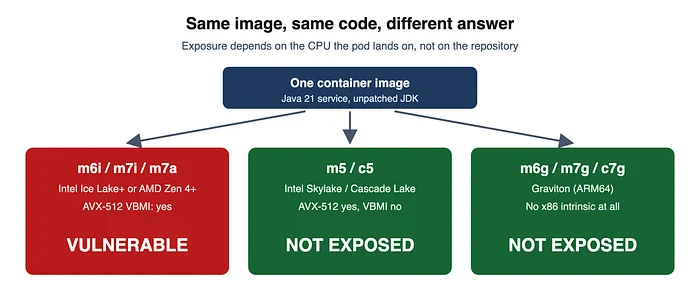
On AWS, roughly:
- Exposed: Intel Ice Lake and newer (m6i, c6i, r6i, m7i...), AMD Zen 4 and newer (m7a, c7a...).
- Not exposed: Graviton/ARM (m6g, m7g, c7g...). Older Intel Skylake and Cascade Lake (m5, c5) have AVX-512 but not VBMI. AMD Zen 3 (m6a) has no AVX-512 at all.
To check a specific node, do not guess from the instance name:
lscpu | grep -o avx512vbmi
If it prints something, that machine runs the vulnerable path. If your Kubernetes node groups mix instance families, exposure changes every time the scheduler moves a pod. "Are we vulnerable?" does not have a yes/no answer per service; it has one per pod.
Finding it
The bug lives in the fast path of the Base64 decoder. On x86 CPUs with AVX-512 VBMI (Intel Ice Lake and newer, AMD Zen 4 and newer), the intrinsic decodes 64 bytes per instruction instead of one at a time.
The tricky part is the tail. The last chunk is usually shorter than 64 bytes, so the routine uses a store mask: a bit pattern that says "write only these bytes, skip the rest." Get the mask right and you write exactly what fits. Get it wrong and you write the full 64.
For a specific padded input shape, a run of valid Base64 followed by a stray =, the routine picks the wrong mask. It writes a full block into a buffer that is shorter than that, and roughly 62 to 63 bytes spill past the end of the output array onto whatever object sits next to it on the heap.
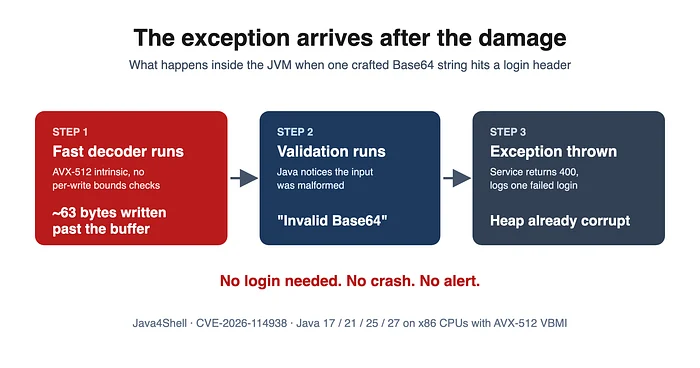
Then Java's normal validation runs, notices the input was malformed, and throws IllegalArgumentException.
The order is the whole bug:
- The intrinsic writes past the buffer. Memory is corrupted.
- Validation runs. The input is invalid.
- Java throws an exception. Your code returns 400 Bad Request.
Your logs show one failed request. The heap is already damaged.
Exploitation
Heap overflow sounds abstract. The step that makes it concrete is this: memory does not only hold data. It also holds the labels and directions Java trusts without checking.
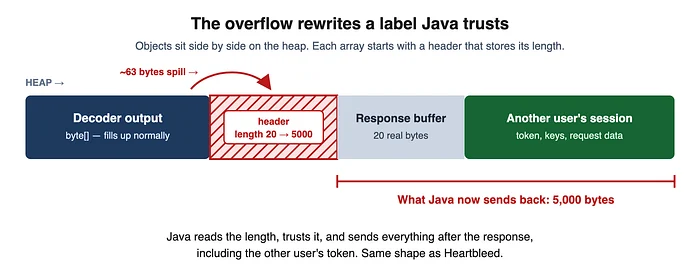
Every Java array carries a small header just before its data, and that header includes its length:
[ header: length = 20 ][ 20 bytes of data ]
When Java reads, copies or sends an array, it reads that length and trusts it. Nothing double-checks it, because in normal Java nothing can change it. The overflow lands on the next object in memory, and the first thing in the next object is its header.
Step 1: Stealing another user's session
Picture a login service handling two requests at once:
- The attacker sends a crafted
Authorizationheader. - Priya is logged in. Her session token is sitting in memory a little further along.
The attacker shapes the overflow so it rewrites the length of a buffer that is about to be sent back to them: 20 becomes 5,000.
Java prepares the response, reads the length, trusts it, and sends 5,000 bytes. The first 20 are the real response. The other 4,980 are whatever was next on the heap, and that includes Priya's token.
The attacker pastes it into a browser and is now logged in as Priya. Repeat a few thousand times and you have harvested sessions, API keys and passwords without ever touching a database. This is the same shape as Heartbleed (2014), which is why the researchers nicknamed the read side of this bug "JavaBleed."
Step 2: Building a "reach anywhere" array
The attacker gets the service to allocate a small array, then uses the overflow to change its length from 16 to about 2 billion. Java now believes that 16-byte array is enormous, so reading or writing index 5,000,000 passes the bounds check. That array has become a tool to read and write almost any memory in the process.
Step 3: Changing where Java jumps next
Memory also holds directions: pointers that tell the JVM which code to run for an object, where compiled methods live, what type an object really is. With read/write-anywhere, the attacker rewrites one of those pointers to aim at code they control, then triggers the action that follows it.
Java follows the pointer, as it always does, and runs the attacker's code. That code opens a shell back to the attacker. From there it is cat the database password, pull down malware, move sideways into internal systems.
This is simplified but faithful: real chains target object headers, type pointers and compiled-code addresses rather than English instructions. The principle is the same.
Why this is not trivial, and why that does not help much
An attacker does not know exactly what sits next to their buffer. A real exploit needs heap grooming (thousands of requests to arrange memory predictably), many attempts that just crash or do nothing, and a separate chain for each application. A Jenkins exploit will not work on Keycloak.
But once someone publishes a working chain for a popular product, anyone can run it. That is the Log4Shell lesson, and it is why this is rated critical (9.2 by the researchers, 8.1 in Amazon's advisory).
Root cause
Java is memory-safe except where it chooses not to be. When Java decodes, it creates an output array (a byte[]) and fills it. In memory, objects sit right next to each other:
[ output byte[] ][ some other object ][ another object ] ...
Normally Java checks every single write: is this index inside the array? If not, you get ArrayIndexOutOfBoundsException, and nothing outside the box is touched. That guarantee is why Java does not have the buffer overflows that plague C.
But for a handful of very hot methods, the JIT compiler swaps your Java code for a hand-written assembly routine tuned for your exact CPU. These are called intrinsics. String.equals, array copies and CRC32 have them, and so does Base64.Decoder.decode. Intrinsics are fast because they skip the per-write safety checks and trust their own arithmetic instead. Inside an intrinsic, Java's memory safety is only as good as the assembly author's math.
The specific mistake is the store mask on a padded tail: for a run of valid Base64 followed by a stray =, the routine picks the wrong mask and writes a full 64-byte block into a shorter buffer. Intrinsics skip the per-write safety checks and trust their own arithmetic instead. The later validation of the input is correct but arrives after the write, so it cannot prevent the corruption.
Impact
Where all three conditions hold, an attacker can corrupt heap memory without an account. Depending on the chain they build, that means reading memory past a buffer (sessions, API keys, passwords, as in the JavaBleed read side) or achieving remote code execution and a shell. The researchers report working exploit chains against Jira, Jenkins, Confluence, Keycloak and others with no login.
The conditions are strict and worth repeating: an affected JDK, an x86-64 CPU with AVX-512 VBMI, and a Base64 path hot enough to be JIT-compiled. Where any of those is missing, the vulnerable code path is not reached. Because the CPU condition varies per machine, exposure is per pod, not per service.
Fix
Step 1: Mitigate today with one flag
-XX:-UseBASE64Intrinsics
This tells the JVM not to use the assembly shortcut for Base64 and to run the normal Java code instead. The normal code is bounds-checked, so the overflow cannot happen. You lose a little Base64 throughput, which almost no service will notice. It needs a restart, not a rebuild.
There is a broader option, -XX:UseAVX=2, which turns off AVX-512 entirely. Prefer the targeted flag: it keeps your other AVX-512 speedups, and UseAVX is not recognised on ARM, so a JVM there will refuse to start with it.
Step 2: Patch the JDK itself
Vendors shipped fixed builds on November 17. For example, Amazon Corretto lists [redacted], [redacted] and 25.0.5.1. Version numbers differ slightly between vendors, so check yours.
What does not work: bumping Spring Boot, updating Maven or Gradle dependencies, or re-running your dependency scanner. The bug is not in anything your pom.xml knows about.
Step 3: The trap, your base image does not update itself
For a lot of fleets the application code will not be the issue. The base image will be. The JDK is not in your code; it is in the image your Dockerfile starts from:
FROM eclipse-temurin:21-jre
That line looks like it always gives you the latest Java 21. It often does not. Docker and most CI runners reuse a cached copy of the base image unless you build with --pull. Pinned tags like 21.0.4_7-jre never move, by design. And many companies wrap the public image in their own internal base image that only gets rebuilt when someone remembers. Either way, the repo looks fine, CI is green, and the JDK running in production is months old.
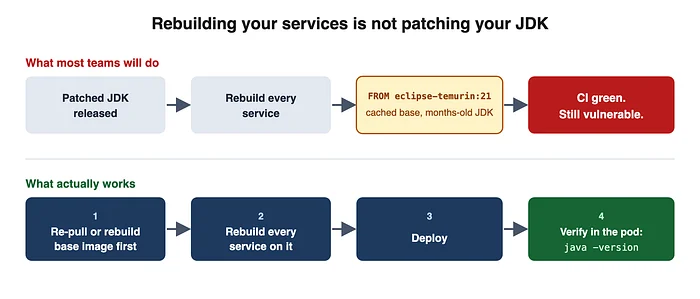
The order that actually works:
- Re-pull or rebuild the base image on a patched JDK.
- Rebuild every service that uses it.
- Deploy.
- Verify in a running container, not in Git:
kubectl exec <pod>
If you skip step 1, you will rebuild your whole fleet and still be vulnerable.
Making the next one faster
Patching this CVE is the easy part. The real question is how long it took to answer "which of our services are exposed?" If it took more than an hour, the next one will too.
Make every JVM report what it actually is. Your repo tells you what you meant to run; only the running process tells you what you are running. Log the real JDK version and the CPU features that matter at startup and send them to your APM as attributes:
@EventListener(ApplicationReadyEvent.class)public void reportRuntime() throws IOException { String jdk = System.getProperty("java.runtime.version"); String vendor = System.getProperty("java.vendor"); boolean vbmi = Files.exists(Path.of("/proc/cpuinfo")) && Files.readString(Path.of("/proc/cpuinfo")).contains("avx512vbmi"); log.info("runtime jdk={} vendor={} avx512vbmi={}", jdk, vendor, vbmi); }
Next time, "who is exposed?" is one query against live data, not a week of grepping Dockerfiles. This also catches the scheduler problem, because it reports per pod, not per service.
Treat JVM flags as a fleet-wide switch. The JVM reads an environment variable called JAVA_TOOL_OPTIONS automatically, in addition to the flags each service already passes. Put it under central control: an ENV line in the base image, a shared Helm value, or a cluster policy that injects it into every Java pod. Then a mitigation like -XX:-UseBASE64Intrinsics is one change and a rolling restart, not a fleet-wide PR campaign. The JVM even prints Picked up JAVA_TOOL_OPTIONS: ... at startup, so you can confirm it landed.
Stop trusting tags to update themselves.
- Pin base images by digest (
FROM eclipse-temurin:21-jre@sha256:...), not by tag. - Let Renovate or Dependabot open a PR in every service whenever the base digest changes, so a base-image patch shows up as a visible, reviewable change everywhere.
- Rebuild the base image on a schedule (weekly is fine) so JDK updates flow in even when nobody is paying attention.
- Add a CI check that fails the build if the JDK in the image is below a minimum version, turning "we forgot" into a red build.
Add a tripwire, not a wall. A WAF or edge rule that flags malformed Base64 in Authorization headers is worth adding as an alert. A spike in failed decodes from one source is a strong signal someone is grooming your heap. Do not treat it as the fix: there are too many places Base64 enters a service (cookies, JWTs, bodies) to filter them all at the edge.
Variants to test
- Check the CPU before anything else. Run
lscpu | grep -o avx512vbmion each node type. A positive result means the vulnerable path exists on that host; no output means it does not. - Check the running JDK, not the repo. Exec into a live pod and read
java.runtime.versionandjava.vendor. A positive result is a JDK in the affected range (17.0.6 and later, 21, 25, 27). - Confirm the mitigation landed. Look for
Picked up JAVA_TOOL_OPTIONS: ...in startup logs and check that-XX:-UseBASE64Intrinsicsis present. A positive result is the flag appearing in the running process. - Probe pre-auth Base64 entry points. Watch for 400s with no crash, which the report says is how the attack looks to the service. A spike of failed decodes from one source is the signal to investigate heap grooming.
- Audit base image freshness. Compare the digest your Dockerfile pins against the current upstream digest, and check whether your internal base image has been rebuilt since the vendor patch. A positive result is a base image older than the patched JDK builds.
The one-sentence version: On newer Intel and AMD CPUs, Java's fast Base64 decoder writes past its buffer before it rejects bad input, so anyone can corrupt memory through a login header without an account. You fix it with one JVM flag today, then a patched JDK in your base image first and your services second.
What happened, in plain words
On 17 November, researchers told the world about a serious flaw in Java, the programming language and runtime that a huge number of business websites and internal tools are built on. The flaw has been given an official tracking number, CVE-2026-114938, and a nickname, Java4Shell. The report mentions Log4Shell only as a lesson about published exploit chains.
The flaw is not in some add-on library that a developer installed. It is inside Java itself, in the part that every Java program carries with it. That is why the usual advice, "just update your dependencies", does nothing here.
The researchers say the flaw affects Java versions 17, 21, 25 and 27, and that they have built working attacks against popular products including Jira, Jenkins, Confluence and Keycloak, all without logging in. Those four products are widely used: Jira and Confluence are project and documentation tools, Jenkins is a build server, Keycloak is a login system.
The short version of the flaw: when a Java program is handed a particular malformed piece of text to decode, it writes a few dozen bytes of data into the wrong place in its own memory, and only afterwards notices the text was invalid and reports an error. By then the damage is done. Those stray bytes can be shaped to leak other users' data, or, with more work, to let an attacker run their own commands on the server.
This article walks through the whole story from zero. No prior security knowledge is assumed. Every term is explained the first time it appears, and every command and code snippet is broken down line by line.
Part 1: The vulnerability
A 30-second Base64 primer
Before anything else, you need to know what Base64 is, because it is the star of this show.
Computers store data as raw bytes, which are numbers from 0 to 255. Some channels, like the text of an HTTP header or a cookie, are only designed to carry plain readable characters. If you try to shove raw bytes through them, things break. Base64 is a trick for turning any raw bytes into a string of ordinary letters, digits, +, / and =, so the data can travel safely through text-only channels. The receiving side turns it back into the original bytes. That reverse step is called decoding.
The rule of thumb: every 4 Base64 characters decode back into 3 bytes of original data. If the original data does not divide evenly into groups of 3, the end is padded with one or two = characters to make the length come out right.
Here is a tiny example from the report:
cmFodWw6cGFzc3dvcmQxMjM= → rahul:password123
Line by line:
- On the left is a Base64 string,
cmFodWw6cGFzc3dvcmQxMjM=. It looks like gibberish, but it is just a text-safe encoding of some underlying bytes. - The arrow means "decodes to".
- On the right is what those bytes actually spell out:
rahul:password123. That is a username and password separated by a colon, the classic format used in HTTP Basic authentication. - The trailing
=on the left is the padding character. It is there because the underlying data did not divide evenly into groups of 3 bytes.
So Base64 is not encryption. It is not a secret code. Anyone can decode it instantly. It is just a way of carrying data through text channels without corruption.
Now, why does this matter for the bug? Because your Java service decodes Base64 constantly, and often before it knows who you are. The report lists the common places:
Authorization: Basic ...headers. When your browser or a script logs into a website using the old "Basic" scheme, it sends the username and password joined by a colon, Base64-encoded, in a header calledAuthorization. The server decodes it to find out who is asking.- JWTs (three Base64 segments). A JWT, or JSON Web Token, is a small signed token that many modern websites use to remember that you are logged in. It is made of three Base64 chunks separated by dots. The server decodes them to check who you are.
- SAML responses in SSO logins. SAML is an older standard for single sign-on, where one central login system vouches for you to many other sites. The voucher travels as a Base64 blob.
- Session cookies and API tokens. A cookie is a small piece of text your browser stores for a website and sends back on every request. A session cookie is the one that says "this browser is logged in as this user". An API token is a similar secret string used by programs rather than browsers.
Hold on to that list. It is what makes this bug pre-auth, meaning it can be triggered before any authentication (login check) happens. The attacker does not need an account. They send the malicious text in the login header itself, and the flaw fires before the server has checked any password.
Java is memory-safe, except where it chooses not to be
To understand the flaw itself, you need a mental picture of how a program uses memory. Memory is the working space a program uses while it runs, like a very long row of numbered pigeonholes, each holding one byte. When a program stores something, it picks a range of pigeonholes and writes into them.
A buffer is just a named range of those pigeonholes reserved for one purpose. An array is the programming construct for a buffer: a fixed-length row of slots, all the same size, numbered from zero.
When Java decodes Base64, it creates an output array (a byte[], meaning an array of bytes) and fills it with the decoded data. In memory, objects sit right next to each other, like boxes on a shelf:
[ output byte[] ][ some other object ][ another object ] ...
Line by line:
[ output byte[] ]is the array the decoder is filling with the decoded bytes.[ some other object ]is whatever the program happened to allocate next. It could be another user's session data, a password, a piece of a response being prepared, anything.[ another object ]is the next thing after that, and so on.- The
...means the shelf continues.
The key point is that these boxes are adjacent. If a write goes past the end of one box, it lands in the next box.
Normally Java prevents that. It checks every single write: is this index inside the array? If not, you get an ArrayIndexOutOfBoundsException, which is Java's way of saying "you tried to write outside the box, I refused". Nothing outside the box is touched. That guarantee is why Java does not have the buffer overflows that plague C, an older language where the programmer is responsible for every check.
But for a handful of very hot methods, meaning methods that get called so often that their speed matters a lot, the JIT compiler swaps your Java code for a hand-written assembly routine tuned for your exact CPU. Let me unpack that.
- The JIT compiler (Just-In-Time compiler) is a part of Java that watches which methods your program calls most and, after a while, translates them into faster machine code on the fly.
- Assembly is the lowest-level human-readable form of machine instructions, the actual commands the CPU executes.
- A CPU is the chip that runs your program. Different CPU families understand slightly different instruction sets, so an assembly routine tuned for one family may not run on another.
These hand-written routines are called intrinsics. String.equals, array copies and CRC32 have them, and so does Base64.Decoder.decode. Intrinsics are fast because they skip the per-write safety checks and trust their own arithmetic instead. Inside an intrinsic, Java's memory safety is only as good as the assembly author's math. That sentence is the whole root cause in one line.
The fast path: 64 bytes at a time
On x86 CPUs with a feature called AVX-512 VBMI (Intel Ice Lake and newer, AMD Zen 4 and newer), the Base64 intrinsic decodes 64 bytes per instruction instead of one at a time. AVX-512 is a set of wide instructions that let the CPU work on many bytes in parallel; VBMI is a specific extension that makes byte shuffling fast. You do not need to memorise the names. What matters is that this is a hardware feature, and only some CPUs have it.
The tricky part is the tail. The last chunk of input is usually shorter than 64 bytes, so the routine uses a store mask: a bit pattern that says "write only these bytes, skip the rest". Think of it like a stencil laid over a page: only the holes in the stencil get paint. Get the mask right and you write exactly what fits. Get it wrong and you write the full 64.
The bug: a wrong mask on a padded tail
For a specific padded input shape, meaning a run of valid Base64 followed by a stray =, the routine picks the wrong mask. It writes a full block into a buffer that is shorter than that, and roughly 62 to 63 bytes spill past the end of the output array onto whatever object sits next to it on the heap.
A quick definition: the heap is the region of memory where a program keeps objects that it creates while running, as opposed to the stack, which is for short-lived local variables. When people say "heap overflow", they mean a write that goes past the end of one heap object into the next.
Then Java's normal validation runs, notices the input was malformed, and throws IllegalArgumentException. That is Java's way of saying "the input you gave me is not valid Base64".
The order is the whole bug:
- The intrinsic writes past the buffer. Memory is corrupted.
- Validation runs. The input is invalid.
- Java throws an exception. Your code returns 400 Bad Request.
A 400 Bad Request is the standard HTTP status code for "the client sent something I could not understand". It is what your service sends back to the attacker.
Your logs show one failed request. The heap is already damaged. That is the sentence to remember: the error message is real, but it arrives after the damage.
The author of the report deliberately does not print the exact trigger string. It is public, but you do not need it to understand the bug or fix it. This article follows the same choice.
Part 2: How a few corrupted bytes become stolen data and a shell
"Heap overflow" sounds abstract. The step that makes it concrete is this: memory does not only hold data. It also holds the labels and directions Java trusts without checking.
Labels: every array knows its own length
Every Java array carries a small header just before its data, and that header includes its length:
[ header: length = 20 ][ 20 bytes of data ]
Line by line:
[ header: length = 20 ]is the small piece of bookkeeping that sits immediately before the data. It records how long the array is.[ 20 bytes of data ]is the actual content, in this example 20 bytes.
When Java reads, copies or sends an array, it reads that length and trusts it. Nothing double-checks it, because in normal Java nothing can change it.
The overflow lands on the next object in memory, and the first thing in the next object is its header.
So if the attacker can control what bytes spill out of their buffer, they can control the first bytes of the next object's header, which means they can control that object's length. That is the pivot from "a few stray bytes" to "a real attack".
Example 1: Stealing another user's session
Picture a login service handling two requests at once:
- The attacker sends a crafted
Authorizationheader. - Priya is logged in. Her session token is sitting in memory a little further along.
A session token is the secret string that proves Priya is logged in. If someone else gets hold of it, they can paste it into their own browser and be logged in as her, without knowing her password.
The attacker shapes the overflow so it rewrites the length of a buffer that is about to be sent back to them: 20 becomes 5,000.
Java prepares the response, reads the length, trusts it, and sends 5,000 bytes. The first 20 are the real response. The other 4,980 are whatever was next on the heap, and that includes Priya's token.
The attacker pastes it into a browser and is now logged in as Priya. Repeat a few thousand times and you have harvested sessions, API keys and passwords without ever touching a database. An API key is a secret string that lets a program call another service; it works like a password for machines.
If that sounds familiar, it is the same shape as Heartbleed (2014), a famous bug in the OpenSSL library where a server would send back more memory than it should, leaking secrets. That is why the researchers nicknamed the read side of this bug "JavaBleed."
Example 2: From a corrupted length to a remote shell
This one takes two stages.
Stage 1: build a "reach anywhere" array. The attacker gets the service to allocate a small array, then uses the overflow to change its length from 16 to about 2 billion. Java now believes that 16-byte array is enormous, so reading or writing index 5,000,000 passes the bounds check. That array has become a tool to read and write almost any memory in the process.
Think of it like this: the array's length is the fence that keeps the program inside its own field. If you can move the fence to the horizon, you can walk anywhere.
Stage 2: change where Java jumps next. Memory also holds directions: pointers that tell the JVM which code to run for an object, where compiled methods live, what type an object really is. A pointer is just a number that says "the thing you want is at this address in memory". The JVM (Java Virtual Machine) is the program that runs Java code; it uses pointers constantly to find the right code and data.
With read/write-anywhere, the attacker rewrites one of those pointers to aim at code they control, then triggers the action that follows it. Java follows the pointer, as it always does, and runs the attacker's code. That code opens a shell back to the attacker. A shell is a text interface where you type commands and the computer runs them; a "reverse shell" is one where the server connects out to the attacker, so the attacker can type commands on the server from their own machine. From there it is cat the database password, pull down malware, move sideways into internal systems. cat is a Unix command that prints the contents of a file.
This is simplified but faithful: real chains target object headers, type pointers and compiled-code addresses rather than English instructions. The principle is the same.
Why this is not trivial, and why that does not help much
An attacker does not know exactly what sits next to their buffer. A real exploit needs heap grooming (thousands of requests to arrange memory predictably), many attempts that just crash or do nothing, and a separate chain for each application. A Jenkins exploit will not work on Keycloak.
Heap grooming is worth a sentence: it is the art of sending lots of harmless-looking requests first, so that the program's memory ends up laid out in a predictable pattern, with the attacker's buffer next to something valuable. It is like shuffling a deck until the card you want is on top.
But once someone publishes a working chain for a popular product, anyone can run it. That is the Log4Shell lesson, and it is why this is rated critical (9.2 by the researchers, 8.1 in Amazon's advisory). A CVSS score is a standard 0-to-10 severity rating; 9.2 is critical and 8.1 is high.
Why "pre-auth" makes it so serious
Go back to the primer. Services decode Base64 to find out who you are. The attacker does not need an account. They send the payload in the login header itself, and the overflow happens before any password is checked.
And it is quiet. To your service it looks like a malformed login: a 400, one log line, no crash, no alert.
Part 3: Who is actually at risk
You are exposed only if all three are true:
- An affected JDK: Java 17 (17.0.6 and later), 21, 25 or 27, from any vendor, until patched. A JDK (Java Development Kit) is the package that contains the Java runtime and the tools to build Java programs. "From any vendor" means it does not matter whether you use Oracle's, Amazon's, Eclipse's or anyone else's build; the flaw is in the shared code.
- An x86-64 CPU with AVX-512 VBMI. No VBMI, no vulnerable code path. x86-64 is the CPU family used by most Intel and AMD chips in servers and laptops. If your server runs on ARM, for example, this condition is not met.
- Base64 decoding is hot enough to be JIT-compiled. On any service that handles auth headers or tokens, assume this is true within minutes of startup. An attacker can also warm it up with ordinary requests first. "Hot enough" means the method has been called often enough that the JIT compiler has replaced it with the fast assembly version. If it has not, the safe Java version is still running.
Condition 2 is the one that surprises people. The same container image can be vulnerable on one machine and safe on the next. A container image is a packaged bundle of an application and everything it needs to run, including the JDK. The same image can be started on many different machines, and the CPU underneath is not part of the image.
On AWS, roughly:
- Exposed: Intel Ice Lake and newer (m6i, c6i, r6i, m7i...), AMD Zen 4 and newer (m7a, c7a...).
- Not exposed: Graviton/ARM (m6g, m7g, c7g...). Older Intel Skylake and Cascade Lake (m5, c5) have AVX-512 but not VBMI. AMD Zen 3 (m6a) has no AVX-512 at all.
Those codes like m6i and c7g are AWS instance type names. The letter after the number tells you the CPU family: i for Intel, a for AMD, g for Graviton (ARM). The report lists these families as roughly exposed or not exposed, but says not to guess from the instance name.
To check a specific node, do not guess from the instance name:
lscpu | grep -o avx512vbmi
Line by line:
lscpuis a standard Linux command that prints information about the CPU of the machine you are on.|is the pipe symbol. It takes the output of the command on its left and feeds it as input to the command on its right.grepis a command that searches text for a pattern and prints matching lines.-otellsgrepto print only the matching part, not the whole line.avx512vbmiis the exact CPU feature name we are looking for.
So the whole line means: "ask the CPU what features it has, and print the string avx512vbmi if it appears". If it prints something, that machine runs the vulnerable path. If it prints nothing, the feature is not there and the vulnerable code path is not reached.
One consequence of this: if your Kubernetes node groups mix instance families, your exposure changes every time the scheduler moves a pod. Kubernetes is a system for running containers across many machines; a pod is the smallest unit it schedules, usually one container. The scheduler is the part of Kubernetes that decides which machine each pod runs on. If some machines have the vulnerable CPU and some do not, then "are we vulnerable?" does not have a yes/no answer per service. It has one per pod.
Part 4: The fix, and the trap
Step 1: Mitigate today with one flag
-XX:-UseBASE64Intrinsics
Line by line:
- The leading
-XX:is the prefix Java uses for advanced runtime options, the kind you pass on the command line when starting the JVM. -UseBASE64Intrinsicsis the name of the option. The leading-before the name means "turn this feature off".- So the whole thing means: "do not use the hand-written assembly shortcut for Base64".
This tells the JVM not to use the assembly shortcut for Base64 and to run the normal Java code instead. The normal code is bounds-checked, so the overflow cannot happen. You lose a little Base64 throughput, which almost no service will notice. It needs a restart, not a rebuild. A restart means stopping and starting the process; a rebuild means recompiling and repackaging the application, which is much slower and riskier.
There is a broader option, -XX:UseAVX=2, which turns off AVX-512 entirely. Prefer the targeted flag: it keeps your other AVX-512 speedups, and UseAVX is not recognised on ARM, so a JVM there will refuse to start with it. That last point is a practical trap: if you copy the broad flag onto an ARM machine, the JVM will not start at all.
Step 2: Patch the JDK itself
Vendors shipped fixed builds on 17 November. For example, Amazon Corretto lists [redacted], [redacted] and 25.0.5.1. Version numbers differ slightly between vendors, so check yours. A vendor here means a company or project that publishes its own build of Java, such as Amazon with Corretto or Eclipse with Temurin.
What does not work: bumping Spring Boot, updating Maven or Gradle dependencies, or re-running your dependency scanner. Spring Boot is a popular framework for building Java web applications; Maven and Gradle are tools that fetch and build the libraries a project depends on. A dependency scanner is a tool that checks those libraries against lists of known vulnerabilities. None of them will help, because the bug is not in anything your pom.xml knows about. pom.xml is the file where a Maven project lists its dependencies.
Step 3: The trap, your base image does not update itself
This is the step the report expects most teams to get wrong. For a lot of fleets the application code will not be the issue. The base image will be. A fleet just means all your running servers taken together.
The JDK is not in your code. It is in the image your Dockerfile starts from. A Dockerfile is a text file that describes how to build a container image, and its first meaningful line is usually FROM, which names the starting image. A base image is that starting image: someone else's pre-built bundle that you add your application on top of.
FROM eclipse-temurin:21-jre
Line by line:
FROMsays "start from this image".eclipse-temurinis the name of the publisher and image. Temurin is Eclipse's free build of Java.:21-jreis the tag, a human-friendly label meaning "Java 21 runtime". A JRE (Java Runtime Environment) is the part of Java needed to run programs, without the build tools.
That line looks like it always gives you the latest Java 21. It often does not. Docker and most CI runners reuse a cached copy of the base image unless you build with --pull. Docker is the tool that builds and runs containers; a CI runner is the machine that automatically builds and tests your code when you push changes. A cache is a stored copy kept to save time. --pull is a build option that forces Docker to fetch a fresh copy from the registry instead of using the cache.
Pinned tags like 21.0.4_7-jre never move, by design. A pinned tag is one that names an exact version rather than a moving label. That is good for reproducibility and bad for security, because it will keep giving you the same old Java forever.
And many companies wrap the public image in their own internal base image that only gets rebuilt when someone remembers. Either way, the repo looks fine, CI is green, and the JDK running in production is months old. Production means the live systems that real users hit, as opposed to test or staging environments.
The order that actually works:
- Re-pull or rebuild the base image on a patched JDK.
- Rebuild every service that uses it.
- Deploy. Deploy means push the new build out to the running servers.
- Verify in a running container, not in Git. Git is the version-control system where your source code lives; checking a file in Git tells you what you intended to run, not what is actually running.
kubectl exec <pod>
Line by line:
kubectlis the command-line tool for talking to a Kubernetes cluster.execmeans "run a command inside an existing container".<pod>is a placeholder for the name of the pod you want to enter. The angle brackets are not typed literally; you replace them with the real name.
The report gives this as the way to verify inside a running container rather than in Git. The report does not spell out the exact command to run once inside; the point is to look at the running process, not at the repository.
If you skip step 1, you will rebuild your whole fleet and still be vulnerable. That is the trap in one sentence: rebuilding your application on top of an old base image gives you a fresh build of the same old Java.
Part 5: A better way, so the next JDK bug takes minutes instead of days
Patching this one CVE is the easy part. The real question is how long it took you to answer "which of our services are exposed?" If it took more than an hour, the next one will too. Here is what the report suggests putting in place.
1. Make every JVM report what it actually is
Your repo tells you what you meant to run; only the running process tells you what you are running. Log the real JDK version and the CPU features that matter at startup and send them to your APM as attributes. APM stands for Application Performance Monitoring: a system that collects logs and metrics from running services so you can search them later.
@EventListener(ApplicationReadyEvent.class)public void reportRuntime() throws IOException { String jdk = System.getProperty("java.runtime.version"); String vendor = System.getProperty("java.vendor"); boolean vbmi = Files.exists(Path.of("/proc/cpuinfo")) && Files.readString(Path.of("/proc/cpuinfo")).contains("avx512vbmi"); log.info("runtime jdk={} vendor={} avx512vbmi={}", jdk, vendor, vbmi); }
This snippet is printed as one long line in the report, so I will break it into its parts and explain each:
@EventListener(ApplicationReadyEvent.class)is a Spring annotation. It says: run the method below once, when the application has finished starting up. An annotation is a label you put on code to give the framework instructions.public void reportRuntime() throws IOExceptiondeclares a method calledreportRuntime.publicmeans other code can call it,voidmeans it returns nothing, andthrows IOExceptionwarns that it might fail with an input/output error, for example if it cannot read a file.String jdk = System.getProperty("java.runtime.version");asks the JVM for its exact version string and stores it in a variable calledjdk.String vendor = System.getProperty("java.vendor");does the same for the name of the company or project that built this Java.boolean vbmi = Files.exists(Path.of("/proc/cpuinfo"))starts a check: does the file/proc/cpuinfoexist? On Linux, that file is where the kernel lists the CPU's features. The result is stored in a true/false variable calledvbmi.&& Files.readString(Path.of("/proc/cpuinfo")).contains("avx512vbmi");continues the check: if the file exists, read it and see whether it contains the textavx512vbmi. The&&means "and", sovbmiis true only if both parts are true.log.info("runtime jdk={} vendor={} avx512vbmi={}", jdk, vendor, vbmi);writes one log line with the three values filled into the{}placeholders.
Next time, "who is exposed?" is one query against live data, not a week of grepping Dockerfiles. Grepping means searching files with the grep command. This also catches the scheduler problem from Part 3, because it reports per pod, not per service.
2. Treat JVM flags as a fleet-wide switch
Most teams' mitigation plan for a JVM flag is a pull request per service. A pull request is a proposed code change that someone has to review and merge. That is dozens of PRs during an incident.
The JVM reads an environment variable called JAVA_TOOL_OPTIONS automatically, in addition to the flags each service already passes. An environment variable is a named value that the operating system passes to a program when it starts. Put it under central control: an ENV line in the base image, a shared Helm value, or a cluster policy that injects it into every Java pod. Helm is a tool for packaging Kubernetes configuration; a cluster policy is a rule that Kubernetes applies to every pod automatically. Then a mitigation like -XX:-UseBASE64Intrinsics is one change and a rolling restart, not a fleet-wide PR campaign. A rolling restart replaces pods one at a time so the service stays up. The JVM even prints Picked up JAVA_TOOL_OPTIONS: ... at startup, so you can confirm it landed.
3. Stop trusting tags to update themselves
- Pin base images by digest (
FROM eclipse-temurin:21-jre@sha256:...), not by tag. A digest is a long fingerprint of the exact image contents. Unlike a tag, it cannot be reused for a different image, so pinning by digest means you always get exactly the same bytes. - Let Renovate or Dependabot open a PR in every service whenever the base digest changes. Renovate and Dependabot are bots that watch your dependencies and open pull requests when new versions appear. Now a base-image patch shows up as a visible, reviewable change everywhere, instead of something you have to remember to trigger.
- Rebuild the base image on a schedule (weekly is fine) so JDK updates flow in even when nobody is paying attention.
- Add a CI check that fails the build if the JDK in the image is below a minimum version. That turns "we forgot" into a red build. A red build is a CI run that has failed, which usually blocks deployment.
4. Add a tripwire, not a wall
A WAF or edge rule that flags malformed Base64 in Authorization headers is worth adding as an alert. A WAF (Web Application Firewall) is a filter that sits in front of your web servers and inspects incoming requests. An edge rule is a similar filter applied at the network edge, before traffic reaches your servers. A spike in failed decodes from one source is a strong signal someone is grooming your heap. Just do not treat it as the fix: there are too many places Base64 enters a service (cookies, JWTs, bodies) to filter them all at the edge.
The lessons (the part you can steal)
Memory safety is a property of the code path, not the language.
Java is memory-safe until the JIT swaps in hand-written assembly. Intrinsics, JNI and native libraries are where "cannot happen in Java" bugs live. JNI (Java Native Interface) is the mechanism that lets Java call code written in other languages, which is another place where Java's usual safety checks do not apply.
Validating input after you have processed it is not validation.
The exception was correct. It just arrived after the damage. Anywhere you parse first and check second, ask what the parser did before it gave up.
Your exposure lives in the running process, not the repository.
A JDK bug that depends on CPU features cannot be answered from Git. Instrument the runtime so the truth is one query away.
A tag is a pointer, not a promise.
eclipse-temurin:21-jre sounds current. What you actually run is whatever copy your build last pulled. Pin by digest and make base updates show up as visible changes.
Pre-auth parsing is your largest attack surface.
Everything you decode before you know who is asking (headers, tokens, SSO responses) is reachable by anyone on the internet. Know that list for your services. Attack surface means all the places an outsider can send data into your system.
The one-sentence version: On newer Intel and AMD CPUs, Java's fast Base64 decoder writes past its buffer before it rejects bad input, so anyone can corrupt memory through a login header without an account. You fix it with one JVM flag today, then a patched JDK in your base image first and your services second.
Glossary
- 400 Bad Request: the standard HTTP status code meaning the client sent something the server could not understand.
- API key: a secret string that lets a program call another service, like a password for machines.
- APM: Application Performance Monitoring; a system that collects logs and metrics from running services so you can search them later.
- Array: a fixed-length row of slots in memory, all the same size, numbered from zero.
- Assembly: the lowest-level human-readable form of machine instructions, the actual commands the CPU executes.
- Attack surface: all the places an outsider can send data into your system.
- AVX-512: a set of wide CPU instructions that let the CPU work on many bytes in parallel.
- Base image: the starting image a Dockerfile builds on top of.
- Base64: a way of turning raw bytes into ordinary text characters so they can travel through text-only channels; not encryption.
- Buffer: a named range of memory reserved for one purpose.
- Cache: a stored copy kept to save time.
- CI runner: the machine that automatically builds and tests your code when you push changes.
- Container image: a packaged bundle of an application and everything it needs to run.
- Cookie: a small piece of text your browser stores for a website and sends back on every request.
- CPU: the chip that runs your program.
- CVSS score: a standard 0-to-10 severity rating for a vulnerability.
- Decoding: turning encoded data (such as Base64) back into its original bytes.
- Deploy: push a new build out to the running servers.
- Digest: a long fingerprint of the exact contents of an image; unlike a tag, it cannot be reused for a different image.
- Docker: the tool that builds and runs containers.
- Dockerfile: a text file that describes how to build a container image.
- Dependency scanner: a tool that checks the libraries a project uses against lists of known vulnerabilities.
- Environment variable: a named value the operating system passes to a program when it starts.
- Fleet: all your running servers taken together.
- Git: the version-control system where your source code lives.
- Grep: searching files with the
grepcommand. - Heap: the region of memory where a program keeps objects it creates while running.
- Heap grooming: sending many requests to arrange memory predictably so an exploit lands where the attacker wants.
- Heartbleed: a 2014 bug in OpenSSL where a server sent back more memory than it should, leaking secrets.
- Helm: a tool for packaging Kubernetes configuration.
- Intrinsic: a hand-written assembly routine the JIT compiler swaps in for a hot Java method, skipping the usual safety checks.
- JDK: Java Development Kit; the package containing the Java runtime and the tools to build Java programs.
- JIT compiler: the part of Java that watches which methods are called most and translates them into faster machine code on the fly.
- JNI: Java Native Interface; the mechanism that lets Java call code written in other languages.
- JRE: Java Runtime Environment; the part of Java needed to run programs, without the build tools.
- JVM: Java Virtual Machine; the program that runs Java code.
- JWT: JSON Web Token; a small signed token made of three Base64 chunks, used by many websites to remember that you are logged in.
- Kubernetes: a system for running containers across many machines.
- Maven / Gradle: tools that fetch and build the libraries a Java project depends on.
- Memory: the working space a program uses while it runs, like a long row of numbered pigeonholes.
- Pod: the smallest unit Kubernetes schedules, usually one container.
- Pointer: a number that says where in memory a thing is.
- Pre-auth: reachable before any login check happens.
- Production: the live systems that real users hit.
- Pull request: a proposed code change that someone has to review and merge.
- Red build: a CI run that has failed, which usually blocks deployment.
- Renovate / Dependabot: bots that watch your dependencies and open pull requests when new versions appear.
- Restart: stopping and starting a process.
- Rebuild: recompiling and repackaging an application.
- Reverse shell: a shell where the server connects out to the attacker, so the attacker can type commands on the server.
- Rolling restart: replacing pods one at a time so the service stays up.
- SAML: an older standard for single sign-on, where one central login system vouches for you to many other sites.
- Scheduler: the part of Kubernetes that decides which machine each pod runs on.
- Session cookie: the cookie that says "this browser is logged in as this user".
- Session token: the secret string that proves a user is logged in.
- Shell: a text interface where you type commands and the computer runs them.
- Spring Boot: a popular framework for building Java web applications.
- Store mask: a bit pattern that says which bytes of a wide write should actually be written.
- Tag: a human-friendly label on an image, such as
21-jre. - Vendor: a company or project that publishes its own build of Java.
- WAF: Web Application Firewall; a filter that sits in front of your web servers and inspects incoming requests.
- x86-64: the CPU family used by most Intel and AMD chips in servers and laptops.

