One Bug at a Time: I failed my quiz on purpose to get $1,000!
An endpoint that let users opt out of mailing lists used a sequential profile identifier in the URL, so changing one digit revealed another user's email address. An attacker could opt out any user, including from password reset emails, and enumerate email addresses on the platform.
 Published on medium.com
Hello all! Glad to see you back : ) Today I will be writing about my first paid bug, it has a funny story line so read along!
The full write-up lives on its author's site
It belongs to its author, so we link to it rather than copy it. The other two tabs are our own rewrites, checked against it.
Context
The target was a large platform whose main application the researcher had been browsing, working within a scope of *.redacted.com. The feature at the centre of the report is a mailing-list opt-out flow. Normally a user enters an email address on an opt-out page, and the platform records that the address should no longer receive mail. The report does not name the company or the product beyond the redacted scope.
Setup
The researcher was in English class, on a laptop that was not their main hacking device, with Burp Suite open while waiting for the lesson to start. No special accounts, roles or versions are described. The precondition was simply access to the public site and a proxy to record traffic.
Finding it
Recon started from the scope *.redacted.com. The researcher notes that they did not know much about subdomain recon at the time, and that most bugs they had found on platforms were on the main application, so the main application should not be skipped. They browsed every endpoint on the site, found little functionality, and then turned to the Burp Suite site map to review what had been collected.
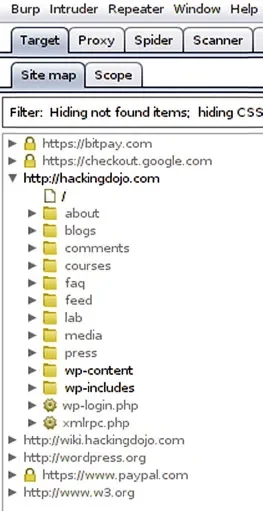
The site map is shown above. While going through the folders, one endpoint stood out as odd and isolated: /opt-out/. The request in Burp rendered nothing, so the researcher opened the URL directly in the browser. It returned a page that looked like an older version of the website, with a field to enter an email address and opt out of mailing lists. That is normal functionality, but the researcher wanted to see what happened on submission. At that moment the teacher announced a quiz; the researcher chose to answer randomly and fail it on purpose so they could keep working.
Exploitation
Step 1: Submit an email to the opt-out form
Submitting an email redirected the browser to a new subdomain that looked extremely old, which raised interest for several reasons.
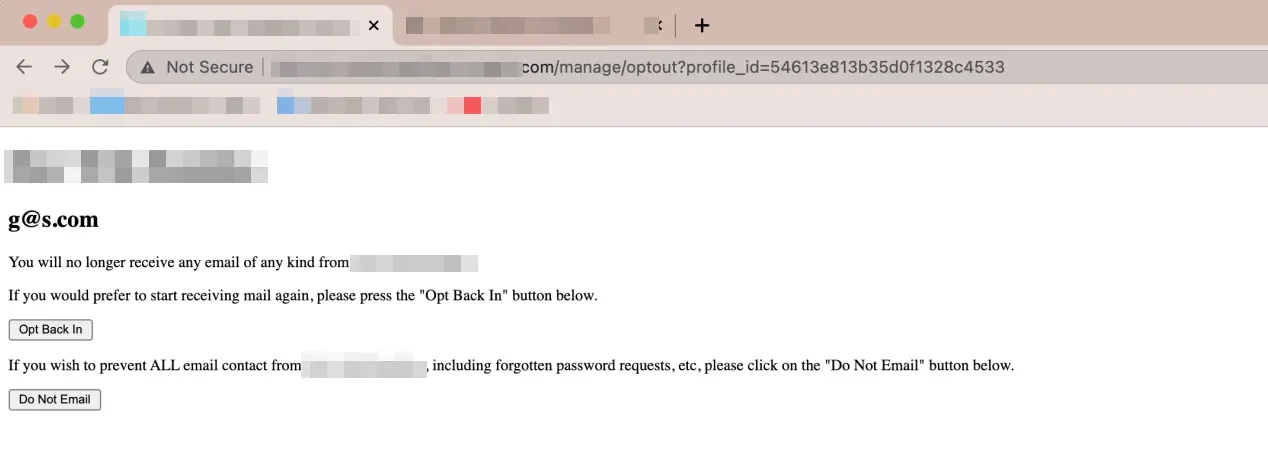
The new subdomain had a URL of the form:
http://link.XXX-XXX.redacted.com/manage/optout/
After entering an email, the page offered the choices to "Opt Back In" or "Do Not Email".
Step 2: Inspect the identifier in the URL
Looking at the URL, the researcher saw a profile_id parameter carrying a long hexadecimal value:
?profile_id=54613e813b35d0f1328c4533
The URL carried a profile_id parameter with a long hexadecimal value.
Step 3: Change one digit
The researcher changed the last digit of the identifier:
?profile_id=54613e813b35d0f1328c4534
The response was a new email address. The page returned a new email address after the identifier was changed. That is the IDOR: the object reference is user controlled and the server does not verify ownership.
Step 4: What the primitive allows
With the identifier changed, the researcher could opt out any user on the platform, including suppressing password reset requests, and could enumerate email addresses on what is described as a huge platform. The report does not show further requests beyond the single identifier change.
Root cause
The /manage/optout/ page trusts the profile_id query parameter to select the profile to act on, and the server does not check that the requester is entitled to that profile. The identifier is a long hexadecimal string, and changing the final digit reached a different profile.
Impact
The researcher could opt out any user on the platform, including password reset requests, and enumerate emails. The report does not quantify the user base or state whether authentication was required to reach the page. The bounty was $1,000.
Fix
The fix that follows from the finding is to stop trusting the client-supplied profile_id for authorisation: derive the profile from the authenticated session, or verify that the profile belongs to the requester before displaying or changing its opt-out state, and return an error for identifiers the requester does not own. The report gives no confirmation of which of these was implemented.
Variants to test
- On any opt-out, unsubscribe or preference-centre flow, submit an address and inspect the resulting URL for an object identifier. Change one digit and see whether another user's record is returned. A positive result is a page showing a different email address or preference state.
- Look for identifiers in query strings, hidden form fields and path segments of legacy-looking subdomains reached by redirect from the main site. A positive result is any endpoint that returns data for an identifier you did not receive.
- Test whether the same identifier can be used to change state, not just read it, for example by opting a second profile out and confirming the change persists. A positive result is a state change on an account you do not control.
- Check whether the flow requires authentication at all, and whether an unauthenticated request with a guessed identifier still returns a profile. A positive result is profile data returned without a session.
- Where identifiers are long hexadecimal strings, try incrementing and decrementing the final characters rather than assuming the value is unguessable. A positive result is any neighbouring value that resolves to a valid profile.
Timeline
- Reported: 2021-10-28
- Internal Discussion: 2021-11-02 20:24
- Triaged & Bounty: 2021-12-03 13:30
- Resolved: 2022-02-09

The report included the steps to reach the endpoint, two screenshots of different email addresses, and a video of each step.
Conclusion
The researcher made $1,000 in class and failed the quiz. The lesson is to keep looking at the odd, lonely endpoint in the site map, and to check what happens when an identifier in a URL is changed by one digit.
What happened, in plain words
A security researcher was sitting in English class with a laptop, waiting for the lesson to start, and poking around a company's website with a tool that records every request the browser makes. While browsing, they found an old-looking page that let a visitor enter an email address to stop receiving the company's mail. When they submitted an email, the browser was sent to a different, even older-looking part of the site, and the address bar contained a long string of letters and numbers identifying the person. They changed the last digit of that string, and the page came back showing a different person's email address. Changing the last digit of that string made the page show a different person's email address. This class of mistake is called an IDOR. The researcher reported it, the company paid a $1,000 bounty, and the researcher failed the quiz they had deliberately answered at random so they could keep working.

The picture above is the artwork the researcher used to open the story.
The setup
The researcher was in English class, on a laptop that was not their usual hacking machine, with Burp Suite open while waiting for the lesson. Burp Suite is a program that sits between your browser and a website and lets you read, pause and edit every request and response that passes through. Think of it as a glass pipe fitted between the tap and the sink: the water still flows, but you can see it and reach in to change it.
No special accounts, roles or software versions are involved. All that was needed was access to the public website and a proxy to record the traffic.
Finding it
Step 1: Recon
Recon, short for reconnaissance, means looking around a target before attacking anything: which pages exist, which links work, what the site is built from. The researcher started from the scope *.redacted.com. A scope is the list of systems a researcher is allowed to test; the * is a wildcard meaning "any subdomain", so every address ending in .redacted.com was in play. A subdomain is a prefix on a domain name, like shop in shop.example.com, and companies often run many of them, some old and forgotten.
The researcher admits they did not know much about subdomain recon at the time, and adds a useful observation: most of the bugs they had found on bug bounty platforms were on the main application, so the main site should not be skipped in favour of exotic subdomains.
They browsed every endpoint on the site. An endpoint is a specific address on a server that does something, for example a page, a form handler or a piece of an API. An API (application programming interface) is the part of a website that returns raw data rather than a finished page, so that programs, and the site's own JavaScript, can talk to it. There was not much functionality visible, so once every link had been visited, the researcher moved to the next step.
Step 2: Analyse the site map
Burp Suite keeps a site map: a tree of every host, folder and endpoint the browser has visited while the proxy was running. It is like the index at the back of a book, built automatically as you read. The researcher opened it and it looked roughly like this:
The screenshot shows the collected tree of folders and endpoints. Going through the folders, one endpoint stood out as odd and isolated: /opt-out/. The request for it in Burp rendered nothing, meaning the response was empty or not a normal page, so the researcher opened the URL directly in the browser instead. It returned a page that looked like an older version of the website, with a field to enter an email address and opt out of mailing lists.
Opting out is ordinary, legitimate functionality: you give your address, the company records that it should stop mailing you. But the researcher wanted to see what happened after submission, because forms that take an identifier and act on a record are exactly where access-control mistakes hide. At that moment the teacher announced a quiz. The researcher answered randomly and failed it on purpose so they could keep working.
Exploitation
Step 1: Submit an email to the opt-out form
Submitting an email redirected the browser to a new subdomain that looked extremely old, which raised interest for several reasons: old code often predates modern security checks.
The screenshot shows that redirected page. The new subdomain had a URL of the form:
http://link.XXX-XXX.redacted.com/manage/optout/
Reading that line piece by piece:
http://is the plain, unencrypted web protocol. The page was served without HTTPS, so traffic was not protected by encryption in transit.link.XXX-XXX.redacted.comis the host: a subdomain calledlink, under a two-part name that has been redacted, under the company's domain. Redaction means the real name was removed before publication./manage/optout/is the path, the address of the specific page on that host. The wordmanagesuggests an administrative side of the application.
After entering an email, the page offered the choices to "Opt Back In" or "Do Not Email".
Step 2: Inspect the identifier in the URL
Looking at the address bar, the researcher saw a profile_id parameter carrying a long hexadecimal value:
?profile_id=54613e813b35d0f1328c4533
Line by line:
- The
?marks the start of the query string, the part of a URL that carries data rather than a page address. profile_idis the name of the parameter. A parameter is a labelled value sent to the server, like a field on a paper form.=separates the name from the value.54613e813b35d0f1328c4533is the value: a long string of hexadecimal characters, meaning the digits 0 to 9 and the letters a to f. It is the identifier of the profile associated with the submitted email.
The URL carried this value when the page showed the email address.
Step 3: Change one digit
The researcher changed the last digit of the identifier:
?profile_id=54613e813b35d0f1328c4534
Only the final 3 became a 4. The response was a new email address. The page returned a new email address after the identifier was changed. That is the IDOR. IDOR stands for Insecure Direct Object Reference: the application exposes a direct reference to an internal object, here a profile, and lets the client choose it without verifying ownership. A simple comparison: a cloakroom that hands out coats to anyone who reads out a ticket number, without checking that the ticket is theirs.
Step 4: What the primitive allows
A primitive, in security writing, is the basic capability a bug gives you, before you build anything bigger on it. With the identifier changed, the researcher could opt out any user on the platform, including suppressing password reset requests, and could enumerate email addresses on what is described as a huge platform. Enumerate means to walk through values one by one and collect what comes back, so a page that reveals an address for each identifier becomes a way to harvest addresses. The researcher could opt out any user, including password reset requests, and enumerate emails. The report does not show further requests beyond the single identifier change.
Root cause
The /manage/optout/ page trusts the profile_id query parameter to select the profile to act on, and the server does not check that the requester is entitled to that profile. The identifier is a long hexadecimal string, and changing the final digit reached a different profile. The report does not describe the server-side logic.
Impact
The researcher could opt out any user on the platform, including password reset requests, and enumerate emails. The report does not quantify the user base or state whether authentication was required to reach the page. The bounty was $1,000.
Fix
The fix that follows from the finding is to stop trusting the client-supplied profile_id for authorisation: derive the profile from the authenticated session, or verify that the profile belongs to the requester before displaying or changing its opt-out state, and return an error for identifiers the requester does not own. The report gives no confirmation of which of these was implemented.
Variants to test
These are the same checks, written so you can try them yourself with nothing but a browser.
- On any opt-out, unsubscribe or preference-centre flow, submit an address and inspect the resulting URL for an object identifier. Change one digit and see whether another user's record is returned. A positive result is a page showing a different email address or preference state.
- Look for identifiers in query strings, hidden form fields and path segments of legacy-looking subdomains reached by redirect from the main site. A hidden form field is an input in a page's HTML that the visitor does not see but the browser still sends. A positive result is any endpoint that returns data for an identifier you did not receive.
- Test whether the same identifier can be used to change state, not just read it, for example by opting a second profile out and confirming the change persists. A positive result is a state change on an account you do not control.
- Check whether the flow requires authentication at all, and whether an unauthenticated request with a guessed identifier still returns a profile. Authentication means proving who you are, usually by logging in. A positive result is profile data returned without a session.
- Where identifiers are long hexadecimal strings, try incrementing and decrementing the final characters rather than assuming the value is unguessable. A positive result is any neighbouring value that resolves to a valid profile.
Timeline
The report gives these dates:
| Event | Date |
|---|---|
| Reported | 2021-10-28 |
| Internal Discussion | 2021-11-02 20:24 |
| Triaged & Bounty | 2021-12-03 13:30 |
| Resolved | 2022-02-09 |
Triaged means the company confirmed the report was valid and assigned it for handling. Resolved means the issue was closed, presumably after a fix.
The image above accompanies the timeline. The report included the steps to reach the endpoint, two screenshots of different email addresses, and a video of each step.
Conclusion
The researcher made $1,000 in class and failed the quiz. The lesson is to keep looking at the odd, lonely endpoint in the site map, and to check what happens when an identifier in a URL is changed by one digit.
Glossary
- API: the part of a website that returns raw data rather than a finished page, so programs and the site's own scripts can talk to it.
- Authentication: proving who you are, usually by logging in.
- Authorisation: deciding what an identified user is allowed to do or see.
- Bounty: money a company pays a researcher for reporting a valid security bug.
- Burp Suite: a proxy tool that sits between browser and website and lets you read, pause and edit traffic.
- Endpoint: a specific address on a server that does something, such as a page, a form handler or an API route.
- Enumerate: to walk through values one by one and collect what comes back.
- Hexadecimal: a way of writing numbers using digits 0 to 9 and letters a to f.
- Host: the machine name part of a URL, such as
link.example.com. - HTTP: the plain, unencrypted protocol browsers use to fetch web pages.
- HTTPS: the encrypted version of HTTP.
- IDOR: Insecure Direct Object Reference, a bug where the application lets the client choose a reference to an internal object without checking ownership.
- Impact: the harm a bug can cause if someone abuses it.
- Parameter: a labelled value sent to a server, like a field on a form.
- Path: the part of a URL naming the specific page on a host, such as
/manage/optout/. - Primitive: the basic capability a bug gives an attacker.
- Proxy: an intermediary that forwards traffic and can record or modify it.
- Query string: the part of a URL after
?that carries data rather than a page address. - Recon: reconnaissance, looking around a target to learn what exists before testing it.
- Redacted: removed or masked before publication, usually to protect a name or secret.
- Root cause: the underlying mistake in the code or design that produces a bug.
- Scope: the list of systems a researcher is allowed to test.
- Session: the server's memory of who you are across several requests, usually tied to a cookie or token.
- Site map: a tree of every host, folder and endpoint a proxy has seen.
- Subdomain: a prefix on a domain name, such as
shopinshop.example.com. - Triaged: confirmed as valid and assigned for handling by the company.
- Wildcard: a
*character meaning "anything here", used in scopes to cover every subdomain.



