One IDOR, Three Leaks, $3K in Payouts
Several sharing APIs on a SaaS collaboration platform accepted a user-supplied user ID without checking that the user belonged to the current workspace. An attacker could supply an external user's ID and then read that user's profile details from the application's audit activity, even when the endpoint returned an error.

medium.com
Published on medium.com
Bug Bounty
The full write-up lives on its author's site
It belongs to its author, so we link to it rather than copy it. The other two tabs are our own rewrites, checked against it.
Context
The target was a SaaS collaboration platform. Its sharing features were split across several separate APIs, and each of those APIs accepted a user-supplied userId when a permission update was submitted. The platform also kept an audit and activity system that recorded what happened to shared resources.
The write-up is deliberately generalised: the author states that the underlying issue remains unresolved, so implementation details, target-specific identifiers and other identifying information have been left out. What follows is the pattern and the reasoning, not a reproduction against a live host.
Setup
The report does not describe the accounts, roles, tooling or versions used. The flow it describes starts with sharing a resource and intercepting the permission update request.
Finding it
While testing the platform, the author noticed a pattern: different sharing features used separate APIs, but they appeared to trust a user-supplied userId without consistently verifying whether that user actually belonged to the current workspace. That is the classic broken access-control assumption: the identifier is taken at face value and resolved, rather than being checked against the caller's tenant before use.
Rather than stopping at the first endpoint, the author tested the same authorization assumption across several similar endpoints. The result was three separate findings totalling $3,000.
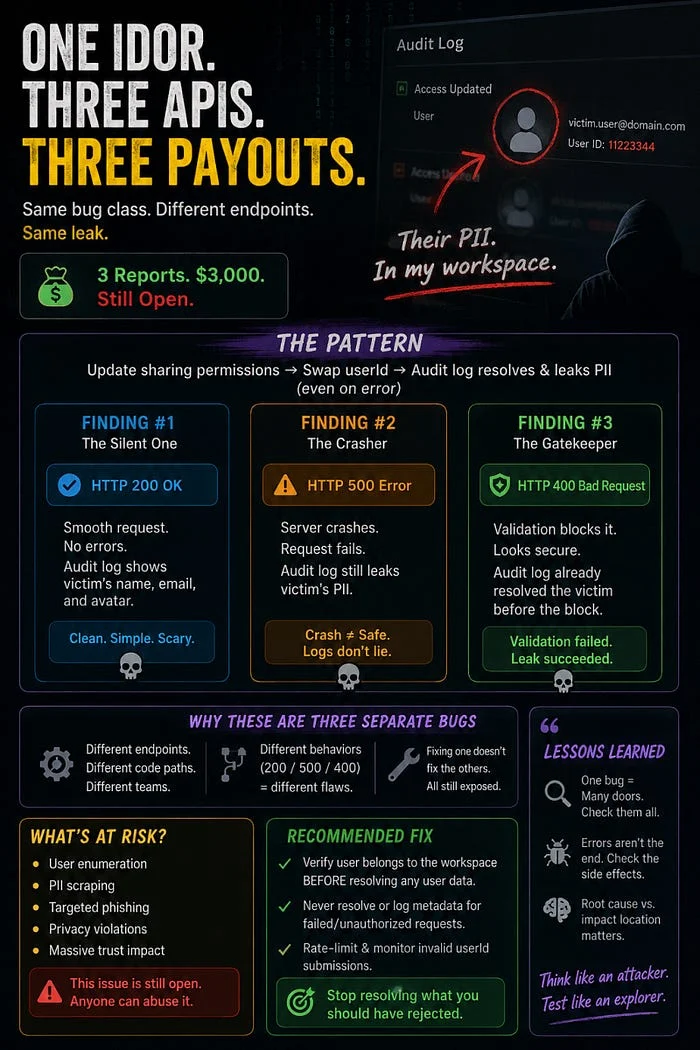
The image sits at the top of the write-up, under the subtitle describing a single access-control mistake across multiple sharing APIs that turned into three accepted reports and three payouts.
Exploitation
The basic flow was the same each time:
- Share a resource.
- Intercept the permission update request.
- Replace the
userIdwith one belonging to an external user. - Check the audit activity.
Instead of rejecting the external user ID before processing it, the backend could resolve the supplied ID and expose information through its audit system. The API responses differed between endpoints, but the leak was still there in every case. The report does not include the raw requests or responses, so the exact payloads and bodies are not reproduced here.
Step 1: the endpoint that returned 200 OK
The first endpoint accepted the modified request normally. The audit activity then exposed information associated with the external user, including profile details. A 200 here is the least surprising outcome: the request was processed and the side effect is visible where you would expect it.
Step 2: the endpoint that returned 500 Internal Server Error
The second endpoint crashed after processing the request. A 500 normally suggests nothing happened, but checking the resulting activity showed that the external user's information had still been resolved and exposed. The error was raised after the identifier had already been handled, so the side effect survived the failure of the response.
Step 3: the endpoint that returned 400 Bad Request
The third endpoint rejected the request with a validation error. It looked secure. It was not: the audit process had already handled the supplied user ID, and the external user's information was still observable through the application's activity history.
Root cause
The three endpoints behaved differently at the HTTP layer:
| Response | Meaning |
|---|---|
| 200 | request accepted |
| 500 | server error |
| 400 | validation rejected |
Yet all three produced the same security impact. The author treated them as separate vulnerable implementations rather than duplicates, and drew the distinction explicitly:
- Root cause: an authorization/validation failure in each individual endpoint.
- Impact: unauthorised user information being exposed through the audit system.
Fixing one endpoint would not automatically fix the others. The likely mechanism is that the supplied userId is resolved before, or independently of, the membership check that should reject an external user. In the 400 and 500 cases the rejection or crash happens after that resolution, so the response looks safe while the side effect has already been recorded.
Impact
An attacker who can submit a permission update with an arbitrary userId can cause information about users outside their workspace to be resolved and exposed through the application's activity history. In the first finding the exposed data included profile details. The report does not enumerate the full set of fields leaked, nor the exact conditions under which each endpoint is reachable beyond the sharing flow described.
Fix
The report does not say what was changed. A fix would need to verify that the supplied userId belongs to the current workspace before it is resolved, and to apply that check across every sharing API rather than in one place. Because the root cause is per-endpoint, each of the three implementations needs its own correction.
Variants to test
- Sibling sharing endpoints. When you find an IDOR in one sharing flow, enumerate the other sharing features and repeat the same permission-update interception with an external
userId. A positive result is any activity, audit or notification entry that resolves the external user. - Error responses as a blind spot. Send the modified request and then inspect activity history, audit logs, notifications, emails, webhooks and object history regardless of the status code. A positive result is leaked data appearing after a 400 or 500.
- Separate root cause from impact. Look for the leak in a different component from the one that accepted the request. A positive result is data surfacing in a place the vulnerable endpoint does not obviously write to.
- Side-effect checks after every authorization test. The author's habit is to test authorization first and then check what the application actually did. A positive result is any asynchronous artefact that quietly says "here's the data" while the response says otherwise.
What happened, in plain words
A security researcher was testing a SaaS collaboration platform. "SaaS" means software you use through a browser, run by someone else on their servers, rather than installed on your own computer. A "collaboration platform" is a product where several people work together on the same things: documents, projects, files, and so on. Think of it like a shared office building where different companies rent different floors.
On a platform like this, people share things with each other. You might share a document with a colleague, give them permission to edit it, or take that permission away. The platform has to keep track of who is allowed to see and change what. It does this through pieces of software called APIs.
An API is the part of a website that the browser talks to behind the scenes. When you click a button, your browser does not usually reload the whole page. Instead it sends a small message to the server, and the server sends a small message back. That message exchange is the API. A useful comparison: the page you see is the restaurant menu and dining room; the API is the waiter who carries your order to the kitchen and brings back the food. You never walk into the kitchen yourself, but the waiter carries exactly what you asked for.
The researcher noticed something interesting. The platform had several different sharing features, and each one used its own separate API. But all of them seemed to trust a piece of information the user sent along: a userId. A userId is simply a unique label for a person's account, like a customer number. The platform was accepting whatever userId the browser sent, and using it, without properly checking whether that person actually belonged to the workspace you were working in.
A workspace is the shared area where a team's stuff lives. Think of it as a company's floor in that office building. If you are on floor 3, you should only be able to affect people on floor 3. The bug was that the platform would happily look up a person from floor 7 if you gave it their number.
This kind of mistake has a name: IDOR, which stands for Insecure Direct Object Reference. It means the software takes an identifier (like a userId) that the user supplied, and uses it directly to look something up, without checking that the user is allowed to access that thing. A simple comparison: a hotel clerk who hands out a room key to anyone who says a room number, without checking whether that person is actually booked into that room.
So the researcher tested the same assumption across several similar endpoints. An endpoint is one specific address on the server that accepts one specific kind of request. If the API is the waiter, each endpoint is a different dish on the menu: one for sharing, one for updating permissions, one for listing activity, and so on.
The result was three separate findings, totalling $3,000 in bug bounty payouts. A bug bounty is a programme where companies pay researchers for finding and reporting security problems responsibly, instead of the researcher using them for harm.
The image sits at the top of the write-up, under the subtitle describing a single access-control mistake across multiple sharing APIs that turned into three accepted reports and three payouts.
The pattern
The basic flow looked like this each time:
- Share a resource.
- Intercept the permission update request.
- Replace the
userIdwith one belonging to an external user. - Check the audit activity.
Let's unpack each step, because each one needs a little background.
Step 1: Share a resource. A "resource" is whatever the platform lets you share: a document, a folder, a project. Sharing means telling the platform "let this other person see or edit this thing".
Step 2: Intercept the permission update request. When you change who can access something, your browser sends a message to the server saying "give user X permission Y on resource Z". "Intercept" means catching that message before it leaves your computer, so you can look at it and change it. Researchers do this with a tool called a proxy, which sits between the browser and the internet. A comparison: a postal worker who, before delivering your letter, opens it, reads it, and can rewrite it. Normally your browser and the server talk directly; with a proxy, everything passes through the researcher's hands first.
Step 3: Replace the userId. The message contains a userId. The researcher swaps it for the userId of somebody who is not in the workspace, an "external user". If the platform is doing its job, it should notice that this person does not belong here and refuse. The question is whether it actually does.
Step 4: Check the audit activity. An audit log or activity history is a record the platform keeps of what happened: who did what, when. It is like a building's visitor book. Even if the front desk turns you away, the visitor book might still have your name written in it. That is the leak: the platform wrote down information about the external user, even though it should never have looked them up at all.
Instead of rejecting the external user ID before processing it, the backend could resolve the supplied ID and expose information through its audit system. "Resolve" here means "look up in the database and turn the number into a real person's details". The API responses were different between endpoints, but the leak was still there in every case.
The report does not include the raw requests or responses, so the exact payloads and bodies are not reproduced here.
Step 1: the endpoint that returned 200 OK
The first endpoint accepted the modified request normally. The audit activity then exposed information associated with the external user, including profile details.
A 200 OK is the standard HTTP status code meaning "everything went fine, here is your answer". HTTP status codes are short numbers the server sends back to tell you how the request went. You have probably seen 404 (page not found) without knowing it was a status code. A 200 is the least surprising outcome: the request was processed, and the side effect is visible where you would expect it. The platform did what it was told, and the visitor book now contains the external user's name and profile details.
Step 2: the endpoint that returned 500 Internal Server Error
The second endpoint crashed after processing the request. A 500 Internal Server Error means the server hit an unexpected problem and could not finish. It is the server equivalent of a shop assistant saying "something went wrong, I can't help you right now".
A 500 normally suggests nothing happened. But checking the resulting activity showed that the external user's information had still been resolved and exposed. The error was raised after the identifier had already been handled, so the side effect survived the failure of the response.
This is the key insight of the whole write-up. The server did two things in order: first it looked up the user, then it tried to do something else and fell over. The crash happened after the identifier had already been handled. The response says "failure", but the visitor book says "I wrote your name down anyway".
Step 3: the endpoint that returned 400 Bad Request
The third endpoint rejected the request with a validation error. A 400 Bad Request means the server looked at what you sent and decided it was not acceptable. It is the server saying "I can't process this, the request is malformed or invalid".
It looked secure. It was not: the audit process had already handled the supplied user ID, and the external user's information was still observable through the application's activity history.
So even the endpoint that appeared to say "no" had already done the dangerous part before saying no. The rejection came too late. The visitor book was already written.
Why this was interesting
The three endpoints behaved differently at the HTTP layer:
| Response | Meaning |
|---|---|
| 200 | request accepted |
| 500 | server error |
| 400 | validation rejected |
Yet all three produced the same security impact. The author treated them as separate vulnerable implementations rather than duplicates, and drew the distinction explicitly:
- Root cause: an authorization/validation failure in each individual endpoint.
- Impact: unauthorised user information being exposed through the audit system.
Let's explain those two words, because they matter for the whole story. The root cause is the underlying mistake that makes the bug possible. The impact is the harm that results from it. They are not always in the same place. A comparison: a leaking pipe in the basement (root cause) causes a wet patch on the ceiling of the floor above (impact). Fixing the wet patch does not fix the pipe.
Here, the root cause is that each endpoint fails to check whether the supplied userId belongs to the current workspace. The impact is that information about an outside user ends up visible in the activity history. Fixing one endpoint would not automatically fix the others, because each one has its own copy of the same mistake. Three doors, three broken locks.
The likely mechanism is that the supplied userId is resolved before, or independently of, the membership check that should reject an external user. In the 400 and 500 cases the rejection or crash happens after that resolution, so the response looks safe while the side effect has already been recorded.
Impact
An attacker who can submit a permission update with an arbitrary userId can cause information about users outside their workspace to be resolved and exposed through the application's activity history. "Arbitrary" just means "any value they choose", not necessarily their own. In the first finding the exposed data included profile details. The report does not enumerate the full set of fields leaked, nor the exact conditions under which each endpoint is reachable beyond the sharing flow described.
Why does this matter in practice? Because a person's profile details, and the fact that they exist on the platform at all, can be sensitive. If you can make the platform reveal details about users in other organisations, you have learned something you were never meant to see. It is the difference between a receptionist confirming "yes, that person works here" and handing over their file.
Fix
The report does not say what was changed. A fix would need to verify that the supplied userId belongs to the current workspace before it is resolved, and to apply that check across every sharing API rather than in one place. Because the root cause is per-endpoint, each of the three implementations needs its own correction.
In plain terms: before looking anyone up, check that they are on your floor. And do that check in every door, not just the main entrance.
Variants to test
These are the habits the researcher recommends carrying forward. Each one is written as a thing to try and a sign that you have found something.
- Sibling sharing endpoints. When you find an IDOR in one sharing flow, enumerate the other sharing features and repeat the same permission-update interception with an external
userId. "Sibling" means endpoints that do similar jobs in different parts of the product. A positive result is any activity, audit or notification entry that resolves the external user. - Error responses as a blind spot. Send the modified request and then inspect activity history, audit logs, notifications, emails, webhooks and object history regardless of the status code. A webhook is an automatic message one system sends to another when something happens, like a doorbell that rings in another building. A positive result is leaked data appearing after a 400 or 500.
- Separate root cause from impact. Look for the leak in a different component from the one that accepted the request. A positive result is data surfacing in a place the vulnerable endpoint does not obviously write to.
- Side-effect checks after every authorization test. The author's habit is to test authorization first and then check what the application actually did. A positive result is any asynchronous artefact that quietly says "here's the data" while the response says otherwise. "Asynchronous" means it happens on its own schedule, slightly later, not in the immediate reply to your request.
The biggest lesson, in the author's words, is that one of the easiest mistakes in security testing is assuming "the server returned an error, so nothing happened". That is not always true. After testing authorization, always check the application's side effects: activity history, audit logs, notifications, emails, webhooks and object history. Sometimes the response says 400 or 500, while another part of the application quietly says "here's the data".
Glossary
- API: the part of a website that the browser talks to behind the scenes, exchanging small messages with the server instead of reloading the whole page.
- Activity history / audit log: a record the platform keeps of what happened, who did what and when.
- Asynchronous: happening on its own schedule, slightly later, rather than in the immediate reply to a request.
- Authorization: the check that decides whether a user is allowed to do a particular thing.
- Backend: the server-side part of an application that the user does not see directly.
- Bug bounty: a programme where companies pay researchers for finding and reporting security problems responsibly.
- Endpoint: one specific address on a server that accepts one specific kind of request.
- External user: in this report, a user who does not belong to the current workspace.
- HTTP status code: a short number the server sends back to say how a request went, such as 200, 400, 404 or 500.
- 200 OK: the status code meaning the request succeeded.
- 400 Bad Request: the status code meaning the server rejected the request as invalid.
- 500 Internal Server Error: the status code meaning the server hit an unexpected problem and could not finish.
- IDOR (Insecure Direct Object Reference): a bug where the software takes an identifier supplied by the user and uses it directly to look something up, without checking that the user is allowed to access that thing.
- Impact: the harm that results from a bug.
- Intercept: catching a message between browser and server so it can be read and changed.
- Proxy: a tool that sits between the browser and the internet, letting the researcher see and modify traffic.
- Resolve: look up an identifier in a database and turn it into real details.
- Resource: whatever the platform lets you share, such as a document, folder or project.
- Root cause: the underlying mistake that makes a bug possible.
- SaaS: software you use through a browser, run by someone else on their servers.
- userId: a unique label for a person's account, like a customer number.
- Webhook: an automatic message one system sends to another when something happens.
- Workspace: the shared area where a team's stuff lives on a collaboration platform.



