Open Redirect via Sendgrid Email Misconfiguration
The application allowed users to set a nickname containing a URL, which was then included in emails sent via SendGrid. SendGrid's click tracking turned the nickname into a link on the link.xyz.com domain, and because the application's return_to parameter accepted that domain as whitelisted, an attacker could chain the two to redirect users to an arbitrary external site.
 Published on medium.com
Bug Bounty
The full write-up lives on its author's site
It belongs to its author, so we link to it rather than copy it. The other two tabs are our own rewrites, checked against it.
Context
This is a write-up of a first bug bounty submission, made against a public HackerOne program. The company is referred to throughout as xyz.com because the report was not disclosed at the time of writing. The product is a web application with an account area that includes a change email address feature and a profile page with a nickname form. The change email flow sends a verification email to the new address, and that email includes the user's nickname.
The bug type is open redirect (CWE-601), rated Low severity. The bounty was $200 plus a $50 retest fee. The timeline was:
| Date | Event |
|---|---|
| 26 January | Reported |
| 28 January | Closed as Informative |
| 28 January | New attack flow added |
| 5 February | Triaged |
| 14 February | Bounty rewarded |
| 24 February | Retest |
| 24 February | Resolved |
An open redirect, as the report defines it, is a vulnerability where a user can control the input to the external website and use that to redirect.
Setup
The researcher was working against a public HackerOne bug bounty program, so a normal user account on xyz.com was the only precondition. No special tools or versions are mentioned. The work was done by hand: changing the nickname, changing the email address, and reading the resulting verification emails.
Finding it
The original goal was account takeover through the change email address feature. Changing the email address requires an OTP sent to the new address. After some time looking around, no vulnerability was found there.
The researcher then moved to the profile page, which has a nickname form. The nickname was set to www.evil.com and then to http://evil.com. No error occurred, so the assumption was that there is no restriction on using symbols in the nickname.
Earlier, while checking the email from the change email address, the researcher had noticed that the nickname is included in the email. Changing the email again showed how the nickname is rendered in the message:
Dear www.evil.com,We have received your change e-mail address request.As soon as you've confirmed your identity with the verification code, you'll be able to use your new e-mail address with our services.Please enter the following verification code on the e-mail address change page.Verification code: 123456....--------------------------------------------------------------------Dear http://www.evil.com,We have received your change e-mail address request.As soon as you've confirmed your identity with the verification code, you'll be able to use your new e-mail address with our services.Please enter the following verification code on the e-mail address change page.Verification code: 123456....
With the nickname www.evil.com, the value became a redirect link to http://www.evil.com. With the nickname http://www.evil.com, the generated link looked like link.xyz.com/ls/click?upn=some_long_random_string, which also redirected to http://www.evil.com.
Exploitation
Step 1: Put a URL in the nickname
The nickname field accepted www.evil.com and http://evil.com without error. The nickname is embedded in the change email verification message, so the value ends up inside an email that xyz.com sends.
Step 2: Observe the generated tracking link
When the nickname was http://www.evil.com, the link in the email was not the nickname itself but a Sendgrid click tracking URL:
link.xyz.com/ls/click?upn=some_long_random_string
That link redirected to http://www.evil.com. The click?upn=some_long_random_string part is a Sendgrid click tracking feature.
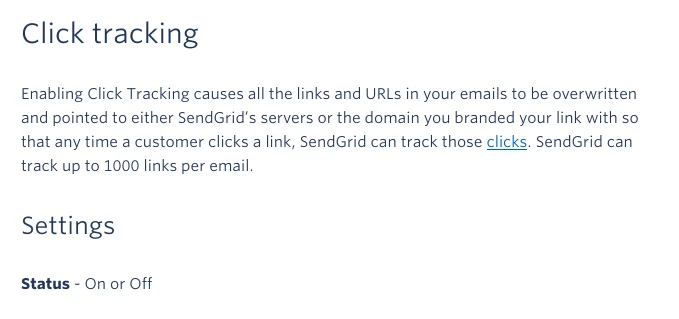
The image is captioned with the Sendgrid documentation URL on tracking.
Step 3: Understand the misconfiguration
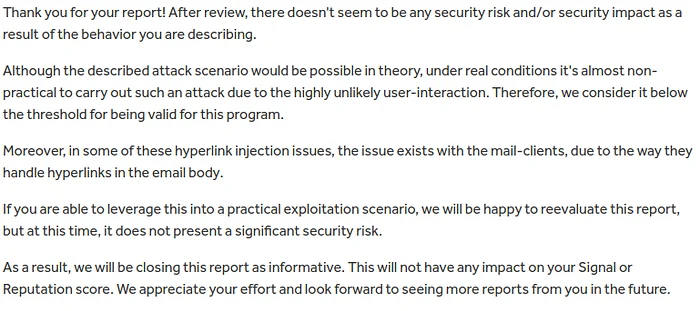
There was a misconfiguration in xyz's Sendgrid email setup that caused the nickname to be overwritten to link.xyz.com. At that point the researcher believed this was an open redirect and reported it immediately. The report was later disclosed as informative.
Step 4: Find the redirect parameter
On the same day the report was closed as informative, the researcher found that xyz.com has a return_to parameter on the root path that redirects to an external link, but it only accepts whitelisted domains. Since a link could be generated with the nickname, and that generated link lives on the link.xyz.com domain, the idea was to use link.xyz.com as the redirect parameter value.
Step 5: Chain the two
The theory worked: it is possible to redirect to evil.com using link.xyz.com as the parameter. The final payload was:
xyz.com/?return_to=link.xyz.com/ls/click?upn=some_long_random_string
The redirect flow is:
xyz.com -> link.xyz.com/ls/click?upn=some_long_random_string -> www.evil.com
Root cause
Two weaknesses combine. First, the nickname is not sanitised before being placed into the verification email, and the Sendgrid click tracking configuration rewrites it into a link.xyz.com tracking URL whose upn value points at the attacker's site. Second, the return_to parameter on the root path validates its target against a whitelist of domains, but link.xyz.com is on that whitelist. The whitelist check therefore passes for a URL that itself redirects onward to an arbitrary destination. The first report was closed as informative; the chain through the whitelisted return_to parameter was the new attack flow.
Impact
The result is an open redirect: a victim who follows a crafted xyz.com link can be sent to an attacker-controlled site. The report rates severity as Low and does not describe any further use of the redirect, such as phishing or credential theft. The chain relies on the return_to parameter accepting link.xyz.com as a value.
Fix
After the new attack flow was added, the report was triaged, a bounty was rewarded, and the issue was retested and resolved on 24 February. The report does not describe the specific change that was made.
Variants to test
- Look for redirect parameters on the root path (
return_to,redirect,next,url) and check whether any whitelisted domain is itself a redirector, such as a tracking, CDN or marketing domain. A positive result is a payload where the whitelisted host forwards to an external site. - Check whether user-controlled profile fields (nickname, display name, company) are rendered into transactional emails. A positive result is seeing your value appear as a clickable link in the message.
- Inspect email links for click tracking domains and test whether the tracking URL's target can be influenced by the user-controlled value. A positive result is a tracking link that resolves to a host you chose.
- Try the same chain with the tracking domain placed in other redirect parameters and paths, not only the root. A positive result is a redirect that leaves the target site from a trusted-looking URL.
What happened, in plain words
A security researcher spent some time testing a company's website, looking for a way to break into accounts. The company is called xyz.com here because the report was not public when it was written. The website lets people create an account, change their email address, and set a nickname on their profile page.
The researcher found something odd: the nickname you type is copied into an email the website sends you. By putting a web address into the nickname, that address ended up inside the email as a clickable link. The email system the company uses, Sendgrid, rewrites links so it can count clicks, and that rewriting turned the nickname into a link on the company's own domain that then forwarded to whatever address the nickname contained.
The researcher reported this, but the company closed the report as "informative", meaning they did not treat it as a security problem. Later the same day, the researcher found a second piece: the website has a parameter called return_to that sends you to another site, but only to sites on an approved list. The return_to parameter accepted the tracking link on link.xyz.com. By putting the tracking link inside return_to, the researcher could make a link on the main website send a visitor to any site at all. The new attack flow was triaged, a bounty was rewarded, and the issue was retested and resolved.
This article walks through the whole story for someone who has never done security testing. Every term is explained the first time it appears, and there is a glossary at the end.
Background: what a bug bounty is, and what this report covers
A bug bounty program is an offer from a company: if you find a security flaw in our systems and tell us privately, we will pay you. The company sets the rules and the reward amounts on a platform. This work was done against a public program on HackerOne, one of the well-known bug bounty platforms.
A web application is a program you use through your browser: you open a page, fill in forms, click buttons, and the website's servers do the work behind the scenes. The xyz.com application has an account area with two features that matter here:
- A change email address feature. To prove the new address really belongs to you, the site sends a verification email to it containing a short numeric code, called an OTP (one-time password). You type that code back into the site to confirm.
- A profile page with a nickname form, where you choose the name the site shows for you.
The verification email includes your nickname, for example in the greeting line. That detail is the seed of the whole story.
The bug class is open redirect, catalogued as CWE-601. CWE is a public dictionary of weakness types; CWE-601 is its entry for open redirect. An open redirect is a flaw where a website takes a value from the user and uses it to send the browser to another site, without properly checking where it is sending people. The report's own definition is: a vulnerability where a user can control the input to the external website and use that to redirect.
A useful everyday comparison: think of a receptionist who will fetch anything you name. If you say "the post room", they walk you there. If a stranger can say "the car park, then follow the man in the van", the receptionist is doing exactly what they were told, but the visitor ends up somewhere the building never intended. An open redirect is that receptionist: the site is trusted, the destination is not.
Why does that matter? Because people trust links that start with a familiar domain. A link that begins with the company's own address but lands on a criminal's page is a good disguise for phishing, where an attacker builds a fake login page to steal passwords. The report itself does not describe any phishing use; it rates the severity as Low and stops at demonstrating the redirect.
Severity ratings are labels platforms use to say how serious a bug is. Low is the mildest of the serious categories.
The reward was $200 for the bounty plus $50 for a retest. A retest is when the researcher checks again, after the company says it has fixed the problem, that the problem is really gone; the extra fee pays for that second look.
The timeline was:
| Date | Event |
|---|---|
| 26 January | Reported |
| 28 January | Closed as Informative |
| 28 January | New attack flow added |
| 5 February | Triaged |
| 14 February | Bounty rewarded |
| 24 February | Retest |
| 24 February | Resolved |
A few of those words need explaining. Informative is a status a company can give a report when it decides the finding is not a security vulnerability, or not one they will act on. Triaged means the company has reviewed the report and accepted it as a real issue worth working on. Resolved means the fix is in place.
Getting started
The only thing needed was a normal user account on xyz.com. No special software, no hacking tools, no particular browser version: the work was done by hand, through the browser, changing the nickname, changing the email address, and reading the emails that arrived. That is worth stressing for a beginner, because it shows that a lot of real findings come from patient, ordinary use of a product rather than from exotic tooling.
Finding it
The original goal: account takeover
The researcher started with a different target: account takeover. That means getting control of someone else's account, usually by resetting their password or changing their email to one the attacker owns. The change email address feature is a classic place to look, because if you can trick the site into sending the confirmation code to an address you control, you can finish the change and own the account.
That is why the OTP exists: the site will only switch the address once someone proves they can read mail at the new address. After some time looking around, the researcher found nothing exploitable in that flow.
A detour to the nickname form
The researcher moved to the profile page, which has the nickname form. The nickname was set to www.evil.com, and then to http://evil.com. No error appeared. From that, the researcher assumed there is no restriction on symbols in the nickname: the form accepts dots, slashes and colons like any other text.
evil.com is a domain commonly used in examples and tests as a stand-in for "some site the attacker controls". It is not a real attack here; it is a placeholder name.
The nickname appears in the email
Earlier, while reading the change email verification message, the researcher had noticed that the nickname is included in the email. Changing the email address again showed exactly how the nickname is rendered in the message:
Dear www.evil.com,We have received your change e-mail address request.As soon as you've confirmed your identity with the verification code, you'll be able to use your new e-mail address with our services.Please enter the following verification code on the e-mail address change page.Verification code: 123456....--------------------------------------------------------------------Dear http://www.evil.com,We have received your change e-mail address request.As soon as you've confirmed your identity with the verification code, you'll be able to use your new e-mail address with our services.Please enter the following verification code on the e-mail address change page.Verification code: 123456....
Line by line, in plain words:
Dear www.evil.com,is the greeting of the first email. The nickname waswww.evil.com, and the site pasted it straight after "Dear".We have received your change e-mail address request.tells the user the site has started the email change.As soon as you've confirmed your identity with the verification code, you'll be able to use your new e-mail address with our services.explains that the change only completes after the code is entered.Please enter the following verification code on the e-mail address change page.points to the page where the code goes.Verification code: 123456....is the OTP itself.123456is a placeholder in this write-up, not a real code.- The row of dashes
----...separates the two examples in the write-up. - The second block repeats the same message, but the greeting is now
Dear http://www.evil.com,because the nickname was set tohttp://evil.com.
The important observation is not the text but what the email program does with it. With the nickname www.evil.com, the value became a redirect link to http://www.evil.com. Email programs and websites often turn anything that looks like a web address into a clickable link automatically. So a harmless-looking nickname field was quietly producing a link to a site of the user's choosing, inside an email sent by the company.
With the nickname http://www.evil.com, the generated link looked different:
link.xyz.com/ls/click?upn=some_long_random_string
That link also redirected to http://www.evil.com. So the site was not simply pasting the nickname; something in between was rewriting it into a link on link.xyz.com, a subdomain of the company's own domain, and that link forwarded to the nickname's address.
A subdomain is a prefix on a domain: link.xyz.com belongs to the same organisation as xyz.com, the way a named room belongs to a building. That matters later, because trust in a domain often extends to its subdomains.
Why did that happen?
The click?upn=some_long_random_string part is a Sendgrid click tracking feature. Sendgrid is an email delivery service: companies do not usually run their own mail servers, they hand their outgoing email to a service that sends it and reports back. Click tracking is a feature of such services: before sending, the service replaces every link in the email with a link to its own domain, and when the recipient clicks, the service records the click and then forwards the browser to the original destination.
The image is captioned with the Sendgrid documentation URL on tracking.
A comparison: a parcel delivery company that puts its own tracking label on your package. The label is not the address; it is a barcode the company scans, and then the parcel continues to the real address. Click tracking works the same way: the link you see is the tracking label, and the destination is stored inside it.
In this case there was a misconfiguration in xyz's Sendgrid setup. Configuration means the settings an administrator chooses; a misconfiguration is a setting that produces an unintended result. Here the effect was that the nickname got overwritten to link.xyz.com: the user's text was turned into a tracking link on the company's own domain, with the user's chosen address as the destination.
At that point the researcher believed this was an open redirect and reported it immediately. The report was later disclosed as informative. "Disclosed" means the report was made visible to the public on the platform; "informative" is the status described earlier, meaning the company did not treat it as a vulnerability.
The link lives on a domain the company owns, and the destination was set by the same person who would click it. There was no obvious way for an attacker to use it against someone else. That gap is what the next section closes.
The "light bulb" moment
On the same day the report was closed as informative, the researcher found something else: xyz.com has a return_to parameter on the root path that redirects to an external link, but it only accepts whitelisted domains.
A parameter is a named value attached to a web address, after a question mark. In xyz.com/?return_to=..., the parameter is called return_to and its value is whatever follows the equals sign. Websites use parameters to carry information between pages: which product to show, which language to use, where to send you after you log in.
A whitelist (also called an allowlist) is a list of things that are permitted, and everything not on the list is refused. Here the site checks the return_to value against a list of approved domains and only redirects if the value matches one of them. That is a sensible defence against open redirect: if only our own domains are allowed, an attacker cannot send people elsewhere.
The root path is simply the front page of the site, the address with nothing after the domain.
The new idea: since a link could be generated with the nickname, and that generated link lives on the link.xyz.com domain, why not use link.xyz.com as the value of the redirect parameter? The whitelist would see a domain it trusts. But that trusted domain is itself a redirector, and its destination is controlled by the nickname. Trust would pass through the front door and out the back.
Chaining the two
The theory worked: it is possible to redirect to evil.com using link.xyz.com as the parameter. The final payload was:
xyz.com/?return_to=link.xyz.com/ls/click?upn=some_long_random_string
Reading it piece by piece:
xyz.com/is the company's front page, the trusted starting point.?marks the start of the parameters.return_to=is the parameter name the site uses to decide where to send the visitor next.link.xyz.com/ls/click?upn=some_long_random_stringis the value. It is the Sendgrid tracking link, on the company's own subdomain, which the whitelist accepts.upn=some_long_random_stringis the part of the tracking link that identifies the destination, which in this case is the address placed in the nickname.
The redirect flow is:
xyz.com -> link.xyz.com/ls/click?upn=some_long_random_string -> www.evil.com
In words: the visitor clicks a link on xyz.com. The site checks return_to, sees link.xyz.com, which is on the whitelist, and sends the browser there. The tracking link then does its normal job and forwards to the destination stored in upn, which is www.evil.com. Two hops, and the visitor has left the trusted site for one the attacker chose.
Root cause
Two weaknesses combine, and neither is enough alone.
First, the nickname is not sanitised before being placed into the verification email. Sanitising means cleaning user input so it cannot do anything unexpected: stripping characters, escaping them, or refusing values that look like addresses. Because the nickname went in as-is, and because Sendgrid click tracking rewrote it into a link.xyz.com tracking URL, the user ended up with a link on the company's domain pointing at a site of their choosing.
Second, the return_to parameter on the root path validates its target against a whitelist of domains, but link.xyz.com is on that whitelist. The check therefore passes for a URL that itself redirects onward to an arbitrary destination. A whitelist is only as strong as the trustworthiness of everything on it: if one entry is a redirector, the whitelist is a door with a hole in it.
The first report was closed as informative; the chain through the return_to parameter was the new attack flow.
Impact
The result is an open redirect: a victim who follows a crafted xyz.com link can be sent to an attacker-controlled site. The report rates severity as Low and does not describe any further use of the redirect, such as phishing or credential theft. The chain relies on the return_to parameter accepting link.xyz.com as a value.
In plain terms: the danger is not that the attacker gains access to anything. The danger is that the company's own domain can be used as the first step of a link that ends somewhere hostile, which makes a suspicious destination look more trustworthy than it is.
Fix
After the new attack flow was added, the report was triaged, a bounty was rewarded, and the issue was retested and resolved on 24 February. The report does not describe the specific change that was made.
Variants to test
Each one is a question you can answer by using the site normally.
- Look for redirect parameters on the root path (
return_to,redirect,next,url) and check whether any whitelisted domain is itself a redirector, such as a tracking, CDN or marketing domain. A positive result is a payload where the whitelisted host forwards to an external site. A CDN (content delivery network) is a service that serves a site's files from many locations; marketing domains are the ones companies use for campaign links and email. - Check whether user-controlled profile fields (nickname, display name, company) are rendered into transactional emails. A transactional email is one sent because of something you did, such as a signup, a password reset or an email change, as opposed to a newsletter. A positive result is seeing your value appear as a clickable link in the message.
- Inspect email links for click tracking domains and test whether the tracking URL's target can be influenced by the user-controlled value. A positive result is a tracking link that resolves to a host you chose.
- Try the same chain with the tracking domain placed in other redirect parameters and paths, not only the root. A positive result is a redirect that leaves the target site from a trusted-looking URL.
Glossary
- Account takeover: gaining control of another person's account, for example by changing its email address or password.
- Bug bounty program: a company's offer to pay people who report security flaws privately.
- CDN (content delivery network): a service that stores and serves a website's files from many locations so pages load faster.
- Click tracking: an email service feature that replaces links with its own links, records the click, then forwards the browser to the original destination.
- CWE: a public dictionary of software weakness types; CWE-601 is open redirect.
- Disclosed: made visible to the public on the bug bounty platform.
- Domain: the name of a website, such as
xyz.com. - HackerOne: a bug bounty platform where companies publish programs and researchers submit reports.
- Informative: a report status meaning the company decided the finding is not a vulnerability it will act on.
- Low severity: the mildest of the serious severity ratings on a bug bounty platform.
- Misconfiguration: a setting chosen by an administrator that produces an unintended result.
- Nickname: the display name a user sets on their profile.
- Open redirect (CWE-601): a flaw where a site takes a user-supplied value and uses it to send the browser to another site without properly checking the destination.
- OTP (one-time password): a short code sent to prove you can read mail at an address, used once.
- Parameter: a named value attached to a web address after a question mark, such as
return_to. - Phishing: building a fake page or message to trick someone into giving away credentials or other sensitive data.
- Resolved: a report status meaning the fix is in place.
- Retest: a second check, after a fix, that the problem is really gone; sometimes paid separately.
- Root path: the front page of a site, the address with nothing after the domain.
- Sanitising: cleaning user input so it cannot do anything unexpected.
- Sendgrid: an email delivery service that companies use to send outgoing email and report on it.
- Subdomain: a prefix on a domain, such as
link.xyz.comunderxyz.com. - Transactional email: an email sent because of a user action, such as a signup or an email change.
- Triaged: a report status meaning the company has reviewed the report and accepted it as a real issue.
- Verification email: an email containing a code or link used to confirm that an address belongs to the person using it.
- Web application: a program used through a browser, where the website's servers do the work.
- Whitelist (allowlist): a list of permitted things; anything not on the list is refused.




