PHP2Shell: 2 Critical PHP Vulnerabilities & How to Fix Them
Two memory-safety flaws in the PHP runtime, one in upload-progress handling and one involving stale state and OPcache, could let an unauthenticated attacker corrupt process memory and execute code. The same flaws could also leak sensitive data such as credentials and tokens from PHP worker memory.
 Published on medium.com
WordPress, Drupal, Joomla, and thousands of custom applications run on it. At Astra, we’ve spent years protecting these applications with firewalls, malware scanning, and vulnerability detection.
The full write-up lives on its author's site
It belongs to its author, so we link to it rather than copy it. The other two tabs are our own rewrites, checked against it.
PHP powers roughly 70% of websites on the internet. WordPress, Drupal, Joomla and thousands of custom applications run on it, so when vulnerabilities turn up in PHP's core engine rather than in a plugin or a CMS, the blast radius is different. On 21 October 2026, two critical PHP vulnerabilities were publicly disclosed under the name PHP2Shell. Both carry a CVSS score of 9.2 and can allow unauthenticated attackers to execute code on vulnerable servers. The bugs had existed for years, and AI helped researchers turn complex memory-safety issues into working exploits.
Context: what is affected
PHP2Shell refers to two CVEs affecting PHP's core engine:
| CVE | CVSS | Nature |
|---|---|---|
| CVE-2026-109618 | 9.2 | Upload-progress handling, memory corruption, and process-memory disclosure |
| CVE-2026-109619 | 9.2 | Stale internal state and OPcache type confusion |
The important distinction is that these are not WordPress plugin vulnerabilities or bugs in a particular CMS. The underlying issues exist in PHP itself. Wiz Research demonstrated unauthenticated remote code execution against WordPress, Drupal and Joomla, but those are examples of affected applications, not an exhaustive list. A vulnerable PHP runtime can expose an application even when its own code is secure.
One of the two bugs sits in a feature most developers never think about: session upload progress, which lets applications track the progress of file uploads. The other involves internal state retained across requests and OPcache, PHP's bytecode caching system.
Setup and preconditions
No accounts, roles or special tooling are described for the attacker side: the demonstrated attacks are unauthenticated. The relevant preconditions are on the defender side. The flaws sit in the PHP runtime, so any application served by an affected PHP build is in scope, including WordPress, Drupal, Joomla and custom PHP applications. Fixed releases are PHP 8.2.35, 8.3.36, 8.4.27 and 8.5.12. The report does not list which earlier versions are affected.
Finding it
To understand PHP2Shell you need two concepts: use-after-free and type confusion.
A use-after-free happens when software continues using a piece of memory after it has been released. A type-confusion bug happens when software interprets data as the wrong kind of object. Both are dangerous because they allow an attacker to influence how a program reads, writes or interprets memory.
According to Wiz, frontier AI models helped researchers discover these issues and develop working exploits. The process involved chaining bugs, adapting to different memory layouts, testing and debugging. The code had existed for years; the fact that a bug has survived for a long time does not mean it is safe, and complexity is becoming a weaker barrier when AI can help researchers reason through it and iterate on working exploits.
Exploitation
Step 1: CVE-2026-109618, upload-progress handling
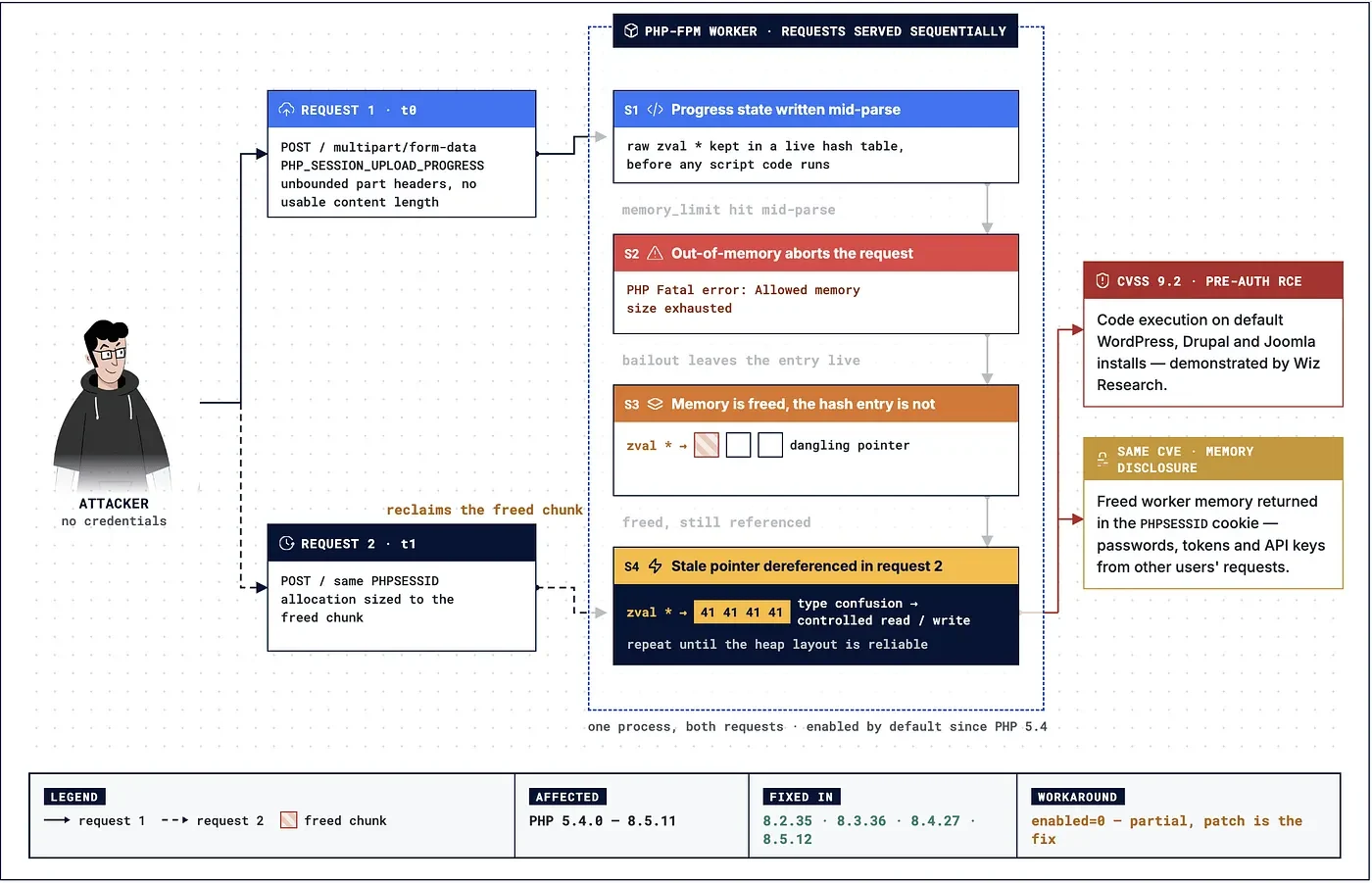
The problem identified by Wiz involves how PHP handles internal state during request processing, particularly when an out-of-memory error interrupts normal execution.
If PHP fails partway through processing a request, its cleanup routines may encounter internal data that was never fully initialized or that points to memory that has already been released. Under the right conditions, a subsequent request can interact with this stale state.
Wiz demonstrated that this family of issues could be used to corrupt PHP process memory and achieve unauthenticated RCE on WordPress, Drupal and Joomla. The researchers also demonstrated a related memory-disclosure issue that could expose sensitive data from a PHP worker. That data could include credentials, tokens or API keys belonging to other requests.
The security implication is important: a memory-safety flaw can expose more than the application handling the request. It can potentially expose data held in the same process.
Step 2: CVE-2026-109619, stale state and OPcache
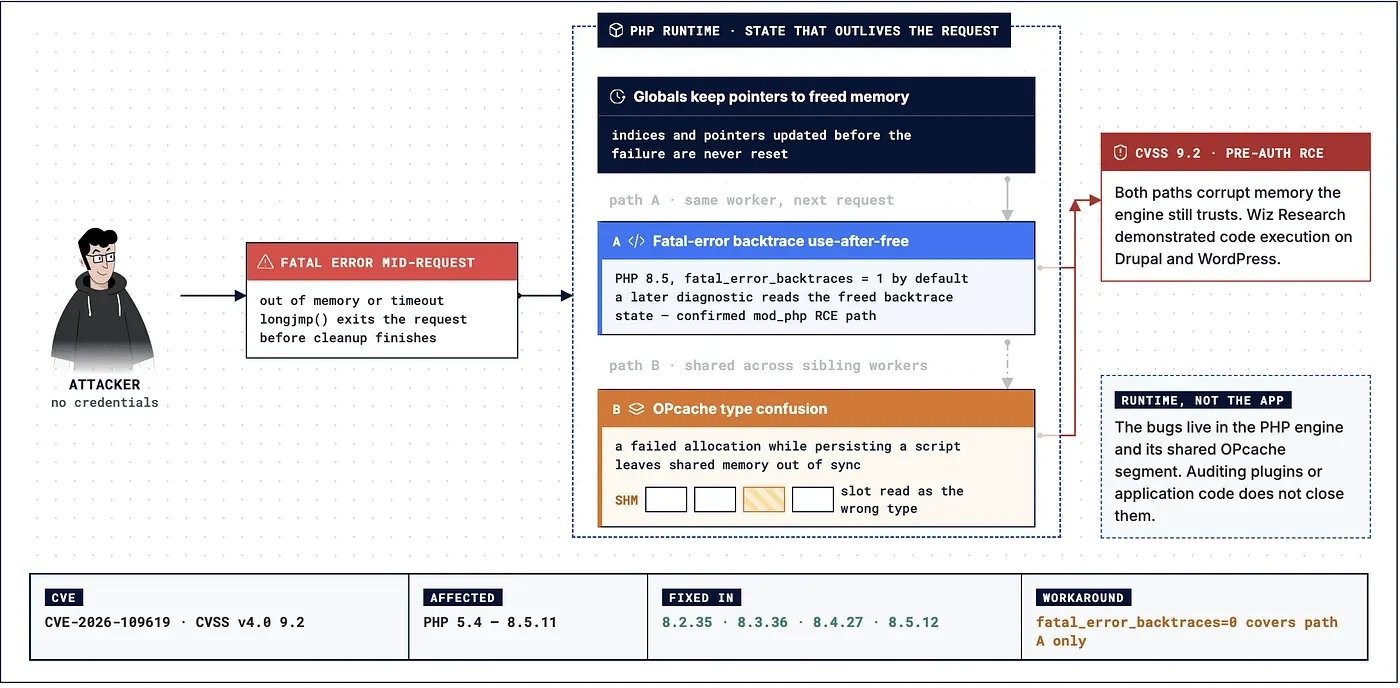
The second CVE involves additional problems with internal state retained across requests and with OPcache.
PHP workers and OPcache maintain internal references to objects and memory. Those references must remain valid as requests finish, new requests begin and cached code is managed. If a reference survives after the memory it points to has been released, later execution can access invalid state. Separately, inconsistencies in how OPcache tracks runtime objects can cause a memory slot to be interpreted as an object of the wrong type.
These are different exploitation paths, but both create opportunities for memory corruption. Wiz demonstrated unauthenticated RCE against Drupal and WordPress using the relevant exploit paths.
The important point is that these are runtime-level weaknesses. Fixing a CMS plugin or reviewing application code alone does not resolve them.
Root cause
The root cause is memory-safety handling inside the PHP runtime: cleanup routines that can meet uninitialised or already-released internal data after an out-of-memory error interrupts a request, internal state that survives across requests after the memory it references has been freed, and OPcache bookkeeping that can let a memory slot be interpreted as the wrong object type. Because the defects live in the engine, application-level defences do not reach them: a well-written CMS or custom application inherits the risk from the runtime beneath it.
Impact
Exploitation can lead to unauthenticated remote code execution and leakage of sensitive data from PHP process memory. The memory-disclosure issue could expose credentials, tokens or API keys belonging to other requests handled by the same worker. An attacker does not always need to jump straight to code execution: information leaked from process memory can reveal addresses, credentials or other data that makes subsequent exploitation easier.
Three things make the impact broader than a single application. First, the attack surface spans hosting providers, containers, CMS platforms and custom applications, and security teams may not even have a complete inventory of every PHP runtime in their environment. Second, memory disclosure can make exploitation easier. Third, AI changes the economics of exploit development, in both directions: attackers can move faster, but defenders can also use AI to find weaknesses and improve detection before they are exploited.
Disclosure timeline
The responsible disclosure process unfolded as follows:
| Date | Event |
|---|---|
| 19 August 2026 | Wiz Research discovered the first vulnerability |
| 20 August 2026 | Unauthenticated RCE confirmed against Drupal |
| 21 August 2026 | Unauthenticated RCE confirmed against WordPress |
| 24 August 2026 | Findings reported to the PHP security team |
| 21 September 2026 | PHP acknowledged the reports and began developing a coordinated fix |
| 21 October 2026 | Fixed PHP releases became available and the vulnerabilities were publicly disclosed |
The response required coordination between the PHP team, researchers, and security providers preparing patches, detections and mitigations.
Fix
Patching is the primary remediation. The technical details and remediation guidance are in the PHP security advisories for CVE-2026-109618 and CVE-2026-109619. The fixed releases are PHP 8.2.35, 8.3.36, 8.4.27 and 8.5.12.
If your PHP comes from an operating system or hosting provider, check its advisory for the patched package. Distributions often backport fixes without changing the version number, so the version string alone may not tell you whether you are protected.
Priorities, in order:
- Find every PHP runtime. Inventory PHP across web servers, containers, CMS installations and applications managed by other teams. Do not limit the audit to your primary production application.
- Patch and verify. Install the appropriate fixed release. Restart PHP-FPM, web servers and long-running workers as required. Verify the version actually running in production. Updating WordPress or another application does not update the PHP runtime beneath it.
- Update WAF rules. Apply available protections from your WAF provider. These can provide an additional layer of defence, but the PHP security update remains essential.
- Investigate potential exploitation. Review web server and application logs for unusual requests, unexpected PHP worker errors, unexplained process activity and suspicious outbound connections. These signals are not proof of exploitation, but they can help guide an investigation.
- Check older and less visible environments. Staging systems, forgotten CMS installations, legacy applications and third-party managed servers are easy to miss. They still matter if they are exposed to the internet.
Detection is not a substitute for patching. Astra's Autonomous Pentest and DAST capabilities are described as actively detecting PHP2Shell vulnerabilities for customers: DAST identifies exposure in running web applications, while Autonomous Pentest tests applications for exploitable weaknesses and validates attack paths. Knowing that a vulnerable technology exists in your environment is useful, but understanding whether an exposed application can be attacked helps teams prioritise remediation.
Final thoughts
PHP2Shell is a reminder that application security does not stop at application code. Your application can be well written and still inherit serious risk from the runtime it depends on. The immediate priority is straightforward: identify affected runtimes, patch them, and investigate anything suspicious. The longer-term lesson is about AI: vulnerabilities that were difficult to discover and exploit are becoming more accessible to researchers, and defenders need to use the same advances to discover weaknesses earlier and reduce the time between disclosure and remediation.
The goal is not just to know which vulnerabilities exist. It is to know where you are exposed, validate the risk, and fix it before someone else gets there.
What happened, in plain words
Most websites you visit are built with a programming language called PHP. The article puts the figure at roughly 70% of the websites on the internet. WordPress, Drupal, Joomla and thousands of custom applications all run on it. Think of PHP as the engine under the bonnet of a car: the website is the bodywork, the plugins and themes are the accessories, but the engine is what actually makes it move.
On 21 October 2026, two serious flaws in that engine were made public under the name PHP2Shell. Both are rated CVSS 9.2. CVSS is a standard scoring system for how bad a security flaw is, running from 0 to 10, so 9.2 is near the top of the scale. Both flaws let an attacker who has not logged in at all run their own code on a vulnerable server. Running your own code on someone else's server is about as bad as it gets: it is called remote code execution, or RCE.
The part that makes this story interesting is not only the severity. These bugs had been sitting in PHP for years. What changed is that AI tools helped the researchers turn very complicated memory problems into working attacks.
Below I explain what the flaws are, how they work, what to do about them, and what every technical term means along the way.
Key takeaways
- PHP2Shell is the name for two critical PHP vulnerabilities, CVE-2026-109618 and CVE-2026-109619, each rated CVSS 9.2. A CVE is a public catalogue number for a known security flaw, so each of these two bugs has its own entry.
- The flaws sit in the PHP runtime itself. The runtime is the program that actually executes PHP code on the server. Because the problem is in the engine, WordPress, Drupal, Joomla and custom PHP applications can be exposed even when their own code is secure.
- Exploitation can lead to unauthenticated remote code execution and leakage of sensitive data from PHP process memory. "Unauthenticated" means the attacker does not need a username or password. "Process memory" is the working memory the PHP program uses while it runs, a bit like the scratchpad on someone's desk.
- Fixed releases are PHP 8.2.35, 8.3.36, 8.4.27 and 8.5.12. Patch, restart PHP workers, and confirm the version actually running in production. "Patching" means installing the corrected version. A "worker" is one of the small processes that handles incoming requests.
What is PHP2Shell?
PHP2Shell refers to two CVEs affecting PHP's core engine:
| CVE | CVSS | Nature |
|---|---|---|
| CVE-2026-109618 | 9.2 | Upload-progress handling, memory corruption, and process-memory disclosure |
| CVE-2026-109619 | 9.2 | Stale internal state and OPcache type confusion |
The table has three columns. The first is the CVE number, the official identifier you would search for. The second is the severity score. The third describes the kind of problem in a few words; each of those phrases is explained below.
The important distinction is that these are not WordPress plugin vulnerabilities or bugs in a particular CMS. A CMS, or content management system, is software such as WordPress that lets people publish and manage a website without writing code. The underlying issues exist in PHP itself. Wiz Research demonstrated unauthenticated remote code execution against WordPress, Drupal and Joomla, but those are examples of affected applications, not an exhaustive list. A vulnerable PHP runtime can expose an application even when its own code is secure.
A useful comparison: if the lock on your front door is fine but the wall of the house is crumbling, checking the lock does not help. Reviewing your website's own code is like checking the lock. The PHP runtime is the wall.
How do the PHP2Shell vulnerabilities work?
To understand PHP2Shell, you need to understand two concepts: use-after-free and type confusion.
A use-after-free happens when software continues using a piece of memory after it has been released. Imagine borrowing a meeting room, handing the key back at the end, and then walking back in later as if the room were still yours. If someone else has been given that room in the meantime, you may read their notes or move their furniture. In software, the same thing happens with memory: the program frees a chunk of memory, something else takes it over, and the old code still writes into it.
A type-confusion bug happens when software interprets data as the wrong kind of object. Think of a form where one box expects a date and another expects a phone number. If the program reads the phone number box and treats its contents as a date, the result is nonsense at best and dangerous at worst. In memory, treating one kind of object as another can let an attacker control what the program does next.
Both can be dangerous because they allow an attacker to influence how a program reads, writes or interprets memory.
1. CVE-2026-109618: PHP's upload-progress handling
PHP supports a feature called session upload progress. It lets applications track the progress of file uploads. A "session" is simply the server's way of remembering who you are across several requests.
The problem identified by Wiz involves how PHP handles internal state during request processing, particularly when an out-of-memory error interrupts normal execution. "Internal state" means the notes the program keeps about what it is currently doing. "Out of memory" means the program asked the computer for more working memory and was refused, so it has to stop partway through.
If PHP fails partway through processing a request, its cleanup routines may encounter internal data that was never fully initialized or that points to memory that has already been released. Cleanup routines are the tidy-up steps a program runs when it finishes or fails, like clearing a desk at the end of the day. If the tidy-up assumes the desk was set up properly and it was not, the tidy-up itself can go wrong.
Under the right conditions, a subsequent request can interact with this stale state. "Stale" means left over from before and no longer valid. A later visitor's request can then bump into the leftovers from the failed one.
Wiz demonstrated that this family of issues could be used to corrupt PHP process memory and achieve unauthenticated RCE on WordPress, Drupal and Joomla. "Corrupt" here means to write into memory in a way the program did not intend. The researchers also demonstrated a related memory-disclosure issue that could expose sensitive data from a PHP worker. "Disclosure" means the data leaks out where an attacker can read it.
That data could include credentials, tokens or API keys belonging to other requests. A credential is a username and password. A token is a short string that proves you are allowed in, like a wristband at an event. An API key is a password for software rather than a person, used when one program talks to another. An API, or application programming interface, is the set of doors and windows one program offers to another so they can exchange data.
The security implication is important: a memory-safety flaw can expose more than the application handling the request. It can potentially expose data held in the same process. In everyday terms, one worker handles many visitors one after another. If the worker's memory is not cleaned properly, one visitor can end up seeing what the previous visitor left behind.
2. CVE-2026-109619: Stale state and OPcache
The second CVE involves additional problems with internal state retained across requests and with OPcache, PHP's bytecode caching system. A cache is a store of things kept ready so they do not have to be prepared again. OPcache keeps compiled PHP code in memory so the server does not have to re-read and re-compile the same files for every visitor. It is like keeping a printed copy of a recipe on the kitchen wall instead of opening the cookbook each time.
PHP workers and OPcache maintain internal references to objects and memory. A reference is a pointer, a note saying "the thing you want is over there". Those references must remain valid as requests finish, new requests begin and cached code is managed.
If a reference survives after the memory it points to has been released, later execution can access invalid state. This is the use-after-free idea again, in a different place. Separately, inconsistencies in how OPcache tracks runtime objects can cause a memory slot to be interpreted as an object of the wrong type. That is the type-confusion idea again.
These are different exploitation paths, but both create opportunities for memory corruption. Wiz demonstrated unauthenticated RCE against Drupal and WordPress using the relevant exploit paths.
The important point is that these are runtime-level weaknesses. Fixing a CMS plugin or reviewing application code alone does not resolve them. Updating a plugin is like changing the accessories in the car; the engine fault is still there.
Why PHP2Shell is different from other PHP vulnerabilities
There are three things worth paying attention to.
1. The attack surface is much larger than a single application.
The attack surface is everything an attacker can reach and try. PHP runs across hosting providers, containers, CMS platforms and custom applications. A container is a packaged, isolated environment for running software, a bit like a shipping container for programs. Security teams may not even have a complete inventory of every PHP runtime in their environment. An inventory is simply a list of what you have and where it is.
2. Memory disclosure can make exploitation easier.
An attacker does not always need to jump straight to code execution. Information leaked from process memory can reveal addresses, credentials or other data that makes subsequent exploitation easier. An address here is the location of something in memory, which helps an attacker aim the next step.
3. AI changes the economics of exploit development.
According to Wiz, frontier AI models helped researchers discover these issues and develop working exploits. The process involved chaining bugs, adapting to different memory layouts, testing and debugging. Chaining bugs means using one small flaw to set up another, like a series of small steps that together reach somewhere you could not jump to directly.
This is where I think the bigger story lies.
The code had existed for years. The fact that a bug has survived for a long time does not mean it is safe. And complexity is becoming a weaker barrier when AI can help researchers reason through it and iterate on working exploits.
That cuts both ways. Attackers can move faster, but defenders can also use AI to find weaknesses and improve detection before they are exploited.
Disclosure timeline
The responsible disclosure process unfolded as follows. Responsible disclosure is the practice of telling the maker of the software privately first, giving them time to fix it before the details become public.
| Date | Event |
|---|---|
| 19 August 2026 | Wiz Research discovered the first vulnerability |
| 20 August 2026 | Unauthenticated RCE confirmed against Drupal |
| 21 August 2026 | Unauthenticated RCE confirmed against WordPress |
| 24 August 2026 | Findings reported to the PHP security team |
| 21 September 2026 | PHP acknowledged the reports and began developing a coordinated fix |
| 21 October 2026 | Fixed PHP releases became available and the vulnerabilities were publicly disclosed |
The response required coordination between the PHP team, researchers and security providers preparing patches, detections and mitigations. A mitigation is something that reduces the harm even if the underlying flaw is not yet fixed, such as a firewall rule that blocks the attack.
How to fix PHP2Shell
Patching is the primary remediation. Remediation means actually removing the risk, not just watching it.
Check the PHP security advisories for CVE-2026-109618 and CVE-2026-109619 for the technical details and remediation guidance. An advisory is the official notice from the software's maintainers describing the flaw and the fix.
If your PHP comes from an operating system or hosting provider, check its advisory for the patched package. Distributions often backport fixes without changing the version number, so the version string alone may not tell you whether you are protected. Backporting means taking the fix from a newer version and applying it to an older one, so the number on the label stays the same even though the contents changed.
Here is what I would prioritise:
1. Find every PHP runtime.
Inventory PHP across web servers, containers, CMS installations and applications managed by other teams. Do not limit the audit to your primary production application. Production means the live system real users are on, as opposed to a test copy.
2. Patch and verify.
Install the appropriate fixed release. Restart PHP-FPM, web servers and long-running workers as required. PHP-FPM is the component that manages the pool of PHP workers on a web server. Verify the version actually running in production. Updating WordPress or another application does not update the PHP runtime beneath it.
3. Update WAF rules.
Apply available protections from your WAF provider. A WAF, or web application firewall, inspects incoming requests and blocks ones that look like attacks, like a security guard at the door. These can provide an additional layer of defence, but the PHP security update remains essential.
4. Investigate potential exploitation.
Review web server and application logs for unusual requests, unexpected PHP worker errors, unexplained process activity and suspicious outbound connections. A log is the running record of what happened on a server. An outbound connection is the server reaching out to somewhere else, which is suspicious if nobody asked it to.
These signals are not proof of exploitation, but they can help guide an investigation.
5. Check older and less visible environments.
Staging systems, forgotten CMS installations, legacy applications and third-party managed servers are easy to miss. Staging is a test copy of a site used before changes go live. They still matter if they are exposed to the internet.
How Astra helps customers detect PHP2Shell
At Astra, our focus is not just finding vulnerabilities. It is helping customers understand where they are exposed and what needs to be fixed.
Astra's Autonomous Pentest and DAST capabilities are actively detecting PHP2Shell vulnerabilities for our customers.
DAST, or dynamic application security testing, means testing a running application from the outside by sending it requests and watching how it responds, much like a burglar testing doors and windows. Autonomous Pentest goes further by testing applications for exploitable weaknesses and validating attack paths. Validating an attack path means proving that a chain of weaknesses can actually be used, rather than just noting that the weaknesses exist.
This distinction matters. Knowing that a vulnerable technology exists in your environment is useful, but understanding whether an exposed application can be attacked helps security teams prioritise remediation.
Detection is not a substitute for patching. Customers should still update affected PHP runtimes and verify remediation.
A busy week for security teams
PHP2Shell is not happening in isolation.
This week has also brought a compromised LiteLLM release containing credential-stealing malware, a Railway security incident involving customer environment variables, and the disclosure of compromised eMudhra intermediate certificate keys. Compromised means tampered with by an attacker. Malware is software written to do harm. Environment variables are settings, often including passwords, that a program reads when it starts. A certificate is a digital identity document that proves a website or service is genuine, and an intermediate certificate is one issued by a trusted authority to sign others.
These are different incidents with different root causes. But they point to a shared challenge: trust in the software, infrastructure and cryptographic systems we depend on.
A vulnerable runtime, a compromised software release, exposed environment secrets and compromised certificate keys are not the same problem. Yet each can create consequences far beyond the original component.
For security teams, this is why asset inventory, dependency visibility, credential hygiene and continuous validation matter. An asset is anything you own and must protect, such as a server or an application. Dependency visibility means knowing which outside software your own software relies on. Credential hygiene means keeping passwords and keys tidy, unique and rotated. Continuous validation means checking regularly rather than once. You cannot respond quickly to a risk you do not know exists.
The response also cannot stop at a single scan or a single patching cycle. Systems change, new vulnerabilities emerge, and yesterday's trusted dependency can become tomorrow's incident.
Final thoughts
PHP2Shell is a reminder that application security does not stop at application code.
Your application can be well written and still inherit serious risk from the runtime it depends on.
The immediate priority is straightforward: identify affected runtimes, patch them, and investigate anything suspicious.
The longer-term lesson is about AI. Vulnerabilities that were difficult to discover and exploit are becoming more accessible to researchers. Defenders need to use these same advances to discover weaknesses earlier and reduce the time between disclosure and remediation.
The goal is not just to know which vulnerabilities exist. It is to know where you are exposed, validate the risk, and fix it before someone else gets there.
Glossary
- API (application programming interface): the set of rules and entry points one program offers so another program can talk to it.
- API key: a secret string that lets software prove its identity to another service, like a password for programs.
- Attack path: a chain of weaknesses that, taken together, lets an attacker get somewhere they should not.
- Attack surface: everything an attacker can reach and try to abuse.
- Backport: applying a fix from a newer software version to an older one, often without changing the version number.
- Cache: a store of prepared data kept ready so it does not have to be rebuilt each time.
- Certificate: a digital identity document proving that a website or service is genuine.
- CMS (content management system): software such as WordPress that lets people build and manage a website without writing code.
- Container: a packaged, isolated environment for running software.
- Cookie: a small piece of data a website stores in your browser so it can recognise you on later requests.
- Credential: a username and password, or similar proof of identity.
- CVE: a public catalogue number for a known security vulnerability.
- CVSS: a standard 0 to 10 score for the severity of a vulnerability.
- DAST (dynamic application security testing): testing a running application from the outside by sending requests and watching responses.
- Dependency: outside software that your own software relies on.
- Disclosure: making the details of a vulnerability public, or leaking data where it can be read.
- Environment variable: a setting, often including a secret, that a program reads when it starts.
- Exploit: code or a technique that actually uses a vulnerability to do something harmful.
- Inventory: a list of what you have and where it is.
- Log: the running record of events on a server.
- Malware: software written to cause harm.
- Memory corruption: writing into memory in a way the program did not intend.
- Mitigation: something that reduces harm even when the underlying flaw is not fixed.
- OPcache: PHP's bytecode caching system, which keeps compiled PHP code in memory.
- Out of memory: the state where a program asks for more working memory and is refused.
- Patch: an update that fixes a flaw.
- PHP: the programming language that runs most websites on the internet.
- PHP-FPM: the component that manages the pool of PHP workers on a web server.
- Production: the live system that real users are on.
- RCE (remote code execution): running your own code on someone else's server over a network.
- Reference: a pointer in memory saying where something is stored.
- Remediation: actually removing the risk, not just watching it.
- Responsible disclosure: telling the maker of the software privately first so they can fix it before details go public.
- Runtime: the program that actually executes code on the server.
- Session: the server's way of remembering who you are across several requests.
- Session upload progress: a PHP feature that lets an application track how much of a file upload has arrived so far.
- Staging: a test copy of a site used before changes go live.
- Stale state: leftover internal data from earlier that is no longer valid.
- Token: a short string that proves you are allowed in, like a wristband at an event.
- Type confusion: a bug where software treats data as the wrong kind of object.
- Unauthenticated: without logging in or proving identity.
- Use-after-free: a bug where software keeps using memory after it has been released.
- WAF (web application firewall): a filter that inspects incoming requests and blocks ones that look like attacks.
- Worker: one of the small processes on a server that handles incoming requests.

