PHP2Shell : comprendre et corriger les deux failles critiques de PHP
Two memory-safety flaws in the PHP engine itself, described as use-after-free style bugs, could let an unauthenticated attacker run commands with the rights of the PHP process. The text says exploitation attempts were seen before the patch and that session upload progress tracking is one confirmed attack vector, but not the only one.
 Published on medium.com
PHP
The full write-up lives on its author's site
It belongs to its author, so we link to it rather than copy it. The other two tabs are our own rewrites, checked against it.
Context
On 21 October 2026 the PHP team published an emergency security update for two critical vulnerabilities that the security community named "PHP2Shell". Both allow unauthenticated remote code execution (RCE) and both are rated CVSS 9.2.
The essential point is that the flaws sit in the PHP engine itself, not in a framework or a dependency. A Symfony, Laravel, Drupal, WordPress or Magento project that is perfectly up to date remains vulnerable if the PHP runtime executing it is not patched. The attack can trigger before the application code even runs.
The context makes it worse: details leaked the day before the coordinated disclosure, which forced an accelerated publication. Exploitation attempts were observed before the fix was even released. CERT-EU and the UK NCSC published alerts.
Setup
The report does not describe a lab, accounts or tooling. It is an operational write-up about the two CVEs, the affected versions and the remediation steps for different deployment models. The relevant preconditions are the ones that make the flaws so serious:
- the default PHP configuration is vulnerable;
- no authentication is required;
- a successful exploitation gives command execution with the privileges of the PHP process;
- PHP runs a considerable share of the web, including many forgotten or unmaintained applications.
Affected execution modes are PHP-FPM, Apache with mod_php (the most exposed), php-cgi, FrankenPHP and LiteSpeed. In practice, any PHP installation that serves web requests.
Finding it
Both vulnerabilities are memory safety problems in the handling of the request lifecycle.
CVE-2026-109618: corruption linked to an out-of-memory (OOM) error. An insufficient-memory error can interrupt PHP while internal request data is only partially initialised. The end-of-request cleanup mechanism can then process that invalid data as if it were valid.
CVE-2026-109619: reuse of a freed internal state. An internal state specific to a request can survive the freeing of the memory that carries it. A later request handled by the same worker can then use that stale state before normal initialisation resets it.
In both cases these are use-after-free or similar bugs: a freed memory area is still referenced, and an attacker can try to place data they control there. The first public analyses identified session upload progress tracking as a confirmed attack vector, but not the only one.
Exploitation
The report does not publish a proof-of-concept request or payload. It describes the attack surface and the observable traces of attempts, and gives the defensive steps below.
Step 1: identify the vulnerable runtime
Corrected versions to install:
- PHP 8.5.12
- PHP 8.4.27
- PHP 8.3.36
- PHP 8.2.35
All earlier versions of the 8.2 to 8.5 branches are vulnerable. PHP 8.1 and earlier are no longer supported by the PHP project and will not receive an official release. Unusually, and as a sign of the severity, the PHP security team still published minimal source backports for PHP 7.4, 8.0 and 8.1, intended for those who compile PHP themselves or have no LTS vendor. Some distributions and extended support offerings also provide their own fixes. The real answer remains migration to a supported branch.
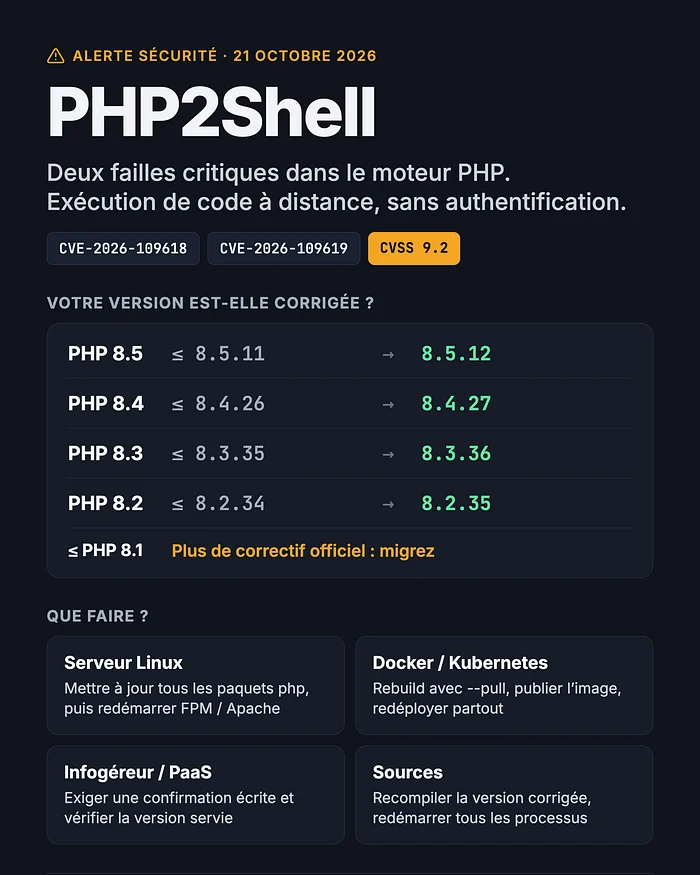
The table summarises the vulnerable and corrected PHP versions and the actions to take depending on the environment.
Step 2: patch Linux servers installed from packages
On Debian or Ubuntu, update all packages of your PHP branch, not only FPM and CLI: extensions and php8.x-common are separate packages.
sudo apt updatesudo apt install --only-upgrade 'php8.3-*'sudo apt install --only-upgrade libapache2-mod-php8.3
On RHEL, Rocky Linux or AlmaLinux:
sudo dnf upgrade 'php*'
Adapt the branch number to your installation. Then restart the services, otherwise the old binary stays loaded in memory:
sudo systemctl restart php8.3-fpmsudo systemctl restart apache2
Points to watch:
- Distributions often backport fixes without taking the upstream version number. A version displayed as "8.3.x" can be fixed if the distribution package is: refer to your distribution's security bulletin.
- The Remi repository (widely used on RHEL and derivatives) is maintained by volunteers and had no update available on the day of publication. Switch to the distribution packages, compile from source, or apply the temporary mitigation while waiting.
Step 3: patch Docker and Kubernetes
Changing the tag in the Dockerfile is not enough: the image must be rebuilt, published and redeployed.
FROM php:8.3.36-fpm
docker build --pull --no-cache -t mon-registre/mon-app:patched .docker push mon-registre/mon-app:patched
Then, on the Kubernetes side:
kubectl set image deployment/mon-app app=mon-registre/mon-app:patchedkubectl rollout status deployment/mon-app
And check the version actually running in a live container:
kubectl exec deploy/mon-app -- php -v
Points to watch:
- a floating tag such as
php:8.3-fpmguarantees nothing if the base image stayed cached: use--pull; - do not forget workers, CLI containers, CronJobs and pre-production environments, which often use different images;
- scan your registries: an old image redeployed by mistake reintroduces the flaw.
Step 4: managed hosting, PaaS or outsourcer
If you do not manage the server, do not assume the fix is applied. Ask for written confirmation stating:
- that both CVEs are taken into account;
- the version or patch level actually deployed;
- the production date;
- the restart or renewal of all workers and environments.
Do not rely only on the version shown in an administration console: verify the runtime actually used by your application (see the checklist below).
Step 5: PHP compiled from source
Fetch the sources of the corrected version from php.net (or the adapted backport for 7.4, 8.0 and 8.1), recompile with your usual options, deploy the new binary and restart all the processes concerned. Be careful in environments where several PHP binaries coexist: FPM, CLI and scheduled tasks do not always use the same one.
Step 6: interim measures if you cannot patch immediately
The absolute priority remains the update. In the meantime, some measures reduce exposure.
Disable session upload progress tracking, which is the most documented attack vector:
session.upload_progress.enabled = Off
Apply it in the configuration actually loaded by FPM or Apache (php.ini, FPM pool or .user.ini depending on your installation), then restart the workers. Check with phpinfo() that it is really taken into account.
Enable WAF rules: Cloudflare in particular deployed rules for the known vectors, available even on the free plan. Filtering multipart requests is also possible, but may break your application's upload features.
Beware: these measures do not fix the vulnerabilities. Disabling session.upload_progress only covers one attack path. For an exposed system that cannot be patched quickly, the UK NCSC recommends considering taking it offline. Assess this with your security team.
Root cause
The mistake is in the PHP engine's request lifecycle management, not in application code. In CVE-2026-109618, an OOM condition leaves internal request data partially initialised, and the end-of-request cleanup treats it as valid. In CVE-2026-109619, a per-request internal state outlives the memory that carries it, and a later request on the same worker can use the stale state before normal initialisation resets it. Both are use-after-free or similar memory safety bugs.
The flaws sit in the PHP engine, not in application code: the default configuration is vulnerable, no authentication is needed, and the attack can trigger before the application code runs, so an up-to-date framework or dependency does not help. The report does not go further into the code-level cause.
Impact
A successful exploitation gives command execution with the privileges of the PHP process, without authentication. Any PHP installation serving web requests is in scope, whatever the framework or CMS running on top, and the attack can fire before the application code executes. The report notes that PHP runs a considerable share of the web, including many forgotten or unmaintained applications, which widens the exposure. Exploitation attempts were observed before the fix was released.
Fix
Install the corrected versions: PHP 8.5.12, 8.4.27, 8.3.36 or 8.2.35. For PHP 8.1 and earlier, which are unsupported, minimal source backports exist for 7.4, 8.0 and 8.1, and some distributions and extended support offerings provide their own fixes; the real answer remains migration to a supported branch. Restart every process after patching, since the old binary otherwise stays loaded in memory.
The production checklist the author would apply:
- Inventory every environment running PHP: servers, containers, pre-production, internal tools, appliances and third-party software that embeds PHP.
- Identify the installation mode of each: packages, containers, compilation or managed service.
- Apply the fix and restart the processes concerned.
- Verify separately FPM, Apache, CLI and persistent workers.
php -von the command line proves nothing for FPM: usephp-fpm8.3 -v(depending on your distribution) or a temporaryphpinfo()served by the web server, removed immediately afterwards. - Analyse the logs since 20 October. An unusual rise in 5xx responses (often 502 behind nginx) on multipart POST requests can signal failed exploitation attempts. That is not proof on its own, but it is a signal to investigate, as are unusual files or processes under the PHP user.
- Document the fix, environment by environment.
- Revisit the forgotten ones: run the inventory again a week later to catch what the first pass missed.
The lesson: the fix is one command line, but inventorying runtimes is an architecture and operations problem. PHP runs in a forgotten container, behind an outsourcer, in a persistent worker, on an exposed pre-production server or in an internal tool nobody maintains any more. That is precisely where the risk remains, long after the main applications have been patched. The real question is not only "Have we updated PHP?" but "Are we able to identify every exposed PHP runtime, and to prove it is patched?"
Variants to test
The report names session upload progress tracking as a confirmed attack vector but not the only one, and describes no other specific vector. Concrete things to check on your own estate, each with what a positive result looks like:
- Session upload progress tracking: confirm whether
session.upload_progress.enabledis on in the configuration actually loaded by FPM or Apache. A positive result isphpinfo()showing it enabled on a runtime that is not patched. - Multiple PHP binaries on one host: compare the version reported by FPM, Apache, CLI and scheduled tasks. A positive result is any of them still on a vulnerable version after the others were patched.
- Container images and registries: inspect the base image tags and digests actually deployed, including workers, CLI containers and CronJobs. A positive result is a running container whose
php -vreports a vulnerable version. - Distribution backports: check the distribution security bulletin rather than the displayed version number. A positive result is a package marked as fixed by the distribution while still showing an older upstream version.
- Logs since 20 October: look for unusual 5xx responses on multipart POST requests and for unusual files or processes under the PHP user. A positive result is a cluster of such events worth investigating, not proof by itself.
- Managed hosting and outsourcers: request written confirmation of the deployed patch level and worker restarts. A positive result is a runtime that differs from what the console claims.
What happened, in plain words
On 21 October 2026 the team that maintains PHP published an emergency security update. PHP is the software that runs a very large part of the websites you visit: when you load a page that ends in .php, or a site built with WordPress, Drupal, Laravel or Symfony, there is a good chance PHP is doing the work behind it. The update fixes two serious flaws that the security community nicknamed "PHP2Shell".
Both flaws let an attacker run their own commands on the server without logging in anywhere. In security language that is called remote code execution, usually shortened to RCE. "Remote" means the attacker does not need to sit at the machine; they can do it over the network. "Code execution" means the attacker's instructions run on the server as if the server's own software had written them. Both flaws are rated CVSS 9.2. CVSS is a public scoring system for the severity of a security flaw, running from 0 to 10, where 10 is the worst. 9.2 is in the "critical" range.
The most important thing to understand is where the flaws live. They are not in WordPress, not in Symfony, not in any plugin or library you install on top of PHP. They are in the PHP engine itself, the program that reads and runs PHP code. That means a website whose WordPress, plugins and theme are all perfectly up to date is still vulnerable if the PHP underneath it has not been updated. The attack can fire before the website's own code even starts running, so nothing the website does can block it.
The timing made things worse. Details about the flaws leaked the day before the planned coordinated announcement, which forced the PHP team to publish earlier than intended. Coordinated disclosure is the usual practice where researchers tell the vendor first and everyone agrees a date to go public, so that defenders have a fix ready when the details appear. Attack attempts were seen in the wild before the fix was even released. CERT-EU, the European Union's computer emergency response team, and the UK's National Cyber Security Centre (NCSC) both published alerts.
Why this one is so serious
Before going further, it helps to know what a few everyday things mean.
- A server is a computer somewhere that answers requests from your browser. When you type an address, your browser sends a request and the server sends back a page.
- A runtime is the program on the server that actually executes the code of a website. For PHP sites, the runtime is PHP itself.
- Authentication is the step where you prove who you are, usually with a username and password. A flaw that needs "no authentication" can be triggered by anyone who can reach the server, with no account at all.
- Privileges are the permissions a program has on the machine. If PHP runs as a user that can read files and start processes, then an attacker who gets code execution inherits those permissions.
The report lists four reasons the flaws are especially dangerous:
- The default configuration of PHP is vulnerable. In other words, a freshly installed PHP with no special settings is exposed. You do not have to have misconfigured anything.
- No authentication is required. The attacker does not need a login.
- A successful exploitation gives command execution with the privileges of the PHP process. The attacker can run commands on the server with whatever rights PHP has.
- PHP runs a considerable share of the web, including many forgotten or unmaintained applications. Old sites nobody looks after are still out there, still running PHP, and often nobody is watching them.
The report also lists the ways PHP can be set up to serve web pages, and says all of them are affected: PHP-FPM, Apache with mod_php (described as the most exposed), php-cgi, FrankenPHP and LiteSpeed. These are different "engines" or connectors that hand web requests to PHP. In practice, any PHP installation that serves web requests is in scope. You do not need to know which one you have to understand the article; the point is that there is no safe variant.
What actually goes wrong inside PHP
Both flaws are memory safety problems in how PHP handles the life of a request. A request is one visit: your browser asks for a page, PHP builds the answer, and then the request ends. PHP is built to reuse the same worker process for many requests in a row, which is efficient, like a shop assistant serving one customer after another at the same counter.
A useful comparison is a desk that is cleared between customers. If the assistant forgets to clear one drawer, the next customer may find the previous customer's papers and, worse, may be able to slip their own papers into that drawer for the assistant to pick up later.
CVE-2026-109618: corruption linked to an out-of-memory (OOM) error. Out of memory means the program asked for more memory than was available and the request was interrupted. If that happens while PHP is still setting up its internal data for the request, some of that data is only partially initialised, meaning half-written. The cleanup step that runs at the end of every request can then treat that half-written data as if it were complete and valid. CVE is simply the standard identifier format for publicly catalogued vulnerabilities; each flaw gets a number so everyone can refer to the same thing.
CVE-2026-109619: reuse of a freed internal state. Here an internal state belonging to one request can survive after the memory that held it has been freed. A later request handled by the same worker can then use that stale state before normal initialisation resets it. "Freed" means the program told the operating system it no longer needs that memory, but a leftover reference to it remains.
In both cases these are use-after-free bugs or similar. Use-after-free means the program keeps using a piece of memory after declaring it free. An attacker can try to place data they control into that freed area, so that when PHP later reads it, it reads the attacker's data instead of its own. The first public analyses identified session upload progress tracking as a confirmed attack vector, but not the only one. A vector is simply a route or path an attacker uses to reach the flaw.
Step 1: work out which PHP you are running
The first job is to know whether your PHP is one of the fixed versions. The corrected versions to install are:
- PHP 8.5.12
- PHP 8.4.27
- PHP 8.3.36
- PHP 8.2.35
All earlier versions of the 8.2 to 8.5 branches are vulnerable. A branch here means a major version line, such as 8.3, which receives its own updates. PHP 8.1 and earlier are no longer supported by the PHP project and will not receive an official release. Unusually, and as a sign of the severity, the PHP security team still published minimal source backports for PHP 7.4, 8.0 and 8.1. A backport is a fix taken from newer code and adapted to older code. These backports are intended for those who compile PHP themselves or have no long-term-support (LTS) vendor. Some distributions and extended support offerings also provide their own fixes. The real answer remains migration to a supported branch.
The table summarises the vulnerable and corrected PHP versions and the actions to take depending on the environment.
Step 2: patch Linux servers installed from packages
Many servers run Linux, and on Linux you usually install software as packages, which are bundles prepared by the operating system's distributor. On Debian or Ubuntu, the report says to update all packages of your PHP branch, not only FPM and CLI. FPM is the part that serves web requests; CLI is the command-line version. Extensions and php8.x-common are separate packages, so updating only one of them leaves the others old.
sudo apt updatesudo apt install --only-upgrade 'php8.3-*'sudo apt install --only-upgrade libapache2-mod-php8.3
Line by line:
sudo apt updaterefreshes the list of available packages from the repositories, so the machine knows which newer versions exist.sudomeans "run this with administrator rights".sudo apt install --only-upgrade 'php8.3-*'installs newer versions of every package whose name starts withphp8.3-, but only upgrades ones already installed; it does not add new software. The*is a wildcard meaning "anything after this".sudo apt install --only-upgrade libapache2-mod-php8.3does the same for the package that lets the Apache web server run PHP. If you use Apache, this is the piece that matters most.
On RHEL, Rocky Linux or AlmaLinux, which are different Linux families, the command is:
sudo dnf upgrade 'php*'
dnf is the package manager on those systems, and upgrade 'php*' asks it to upgrade every package whose name begins with php. Adapt the branch number to your installation: if you run 8.2, use php8.2-* and so on.
Then restart the services, otherwise the old binary stays loaded in memory. A binary is the compiled program file. Restarting is essential because a running program keeps using the copy it loaded at start-up; replacing the file on disk does not change what is already running.
sudo systemctl restart php8.3-fpmsudo systemctl restart apache2
sudo systemctl restart php8.3-fpmstops and starts the PHP-FPM service, so it loads the new binary.sudo systemctl restart apache2does the same for the Apache web server, which may also have PHP loaded inside it.
Two points to watch:
- Distributions often backport fixes without taking the upstream version number. Upstream means the original PHP project. A version displayed as "8.3.x" can be fixed if the distribution package is fixed, so refer to your distribution's security bulletin rather than trusting the number alone.
- The Remi repository, widely used on RHEL and derivatives, is maintained by volunteers and had no update available on the day of publication. A repository is an online source of packages. Switch to the distribution packages, compile from source, or apply the temporary mitigation described later while waiting.
Step 3: patch Docker and Kubernetes
Docker is a way of packaging an application together with everything it needs into an image, which is then run as a container. Think of an image as a recipe and a container as the cake baked from it. Kubernetes is a system that runs many containers across many machines and keeps them running. Changing the tag in the Dockerfile is not enough: a tag is the label on an image, such as 8.3.36-fpm, and the image must be rebuilt, published and redeployed.
FROM php:8.3.36-fpm
This line says the image is built on top of the official PHP image at version 8.3.36 with FPM. It is the corrected version from the list above. Changing this line is the first step, not the last.
docker build --pull --no-cache -t mon-registre/mon-app:patched .docker push mon-registre/mon-app:patched
docker buildbuilds a new image from the Dockerfile.--pullforces Docker to fetch the latest base image from the registry instead of using a cached copy. A registry is the online store of images.--no-cachetells Docker not to reuse old intermediate steps, so nothing stale slips in.-t mon-registre/mon-app:patchedgives the new image a name and tag.mon-registreis the registry,mon-appthe application,patchedthe tag.- The final
.says the Dockerfile is in the current directory. docker push mon-registre/mon-app:patcheduploads the new image to the registry so other machines can pull it.
Then, on the Kubernetes side:
kubectl set image deployment/mon-app app=mon-registre/mon-app:patchedkubectl rollout status deployment/mon-app
kubectl set image deployment/mon-app app=mon-registre/mon-app:patchedtells Kubernetes that the container calledappinside the deployment calledmon-appshould now use the new image. A deployment is Kubernetes' name for a group of identical containers it manages.kubectl rollout status deployment/mon-appwatches the replacement happen and reports whether it succeeded, so you know the new version is actually running.
And check the version actually running in a live container:
kubectl exec deploy/mon-app -- php -v
kubectl exec runs a command inside a running container. Here it runs php -v, which prints the PHP version. This is the proof that matters: not what the file says, but what the running process reports.
Points to watch:
- A floating tag such as
php:8.3-fpmguarantees nothing if the base image stayed cached. A floating tag is one that moves to point at newer images over time, so you cannot tell which exact version you got. Use--pull. - Do not forget workers, CLI containers, CronJobs and pre-production environments, which often use different images. Workers are background processes that handle queued jobs; CronJobs are scheduled tasks; pre-production is the test copy of your site, which often uses different images from production.
- Scan your registries: an old image redeployed by mistake reintroduces the flaw.
Step 4: managed hosting, PaaS or outsourcer
If you do not manage the server yourself, do not assume the fix is applied. A PaaS, or platform as a service, is a provider that runs your application for you; an outsourcer is a company you have contracted to operate it. Ask for written confirmation stating:
- that both CVEs are taken into account;
- the version or patch level actually deployed;
- the production date;
- the restart or renewal of all workers and environments.
Do not rely only on the version shown in an administration console. A console is the web page where the provider shows you information about your service, and it can be out of date or show a different thing from what your application actually uses. Verify the runtime actually used by your application, as described in the checklist below.
Step 5: PHP compiled from source
Some organisations build PHP themselves from its source code rather than installing a package. Source code is the human-readable form of a program, which then has to be compiled, meaning translated into a runnable binary. Fetch the sources of the corrected version from php.net, or the adapted backport for 7.4, 8.0 and 8.1, recompile with your usual options, deploy the new binary and restart all the processes concerned. Be careful in environments where several PHP binaries coexist: FPM, CLI and scheduled tasks do not always use the same one. This is the same trap as before, in a different form: you can update one copy and leave another running.
Step 6: interim measures if you cannot patch immediately
The absolute priority remains the update. In the meantime, some measures reduce exposure. Reducing exposure means making the attack harder or less likely, not closing the hole.
Disable session upload progress tracking, which is the most documented attack vector. A session is how a website remembers you between page loads, usually via a cookie, which is a small piece of data your browser stores and sends back on each request. Upload progress tracking is a PHP feature that lets a website show a progress bar while a file uploads, by writing the upload's status into the session. Because it involves data written during a request and read later, it is the attack vector the first public analyses confirmed.
session.upload_progress.enabled = Off
This is a setting in a configuration file. session.upload_progress.enabled is the name of the switch, and Off turns it off. Apply it in the configuration actually loaded by FPM or Apache (php.ini, FPM pool or .user.ini depending on your installation), then restart the workers. "Actually loaded" matters because PHP can read several configuration files, and editing one that is not in use changes nothing. Check with phpinfo() that it is really taken into account. phpinfo() is a built-in PHP page that prints the full configuration of the running PHP; it must be temporary and removed immediately after, because it reveals a lot about your server.
Enable WAF rules. A WAF, or web application firewall, is a filter that inspects incoming requests and blocks ones that look malicious. Cloudflare in particular deployed rules for the known vectors, available even on the free plan. Filtering multipart requests is also possible, but may break your application's upload features. Multipart is the format browsers use to send files in a form; blocking it wholesale also blocks legitimate uploads.
Beware: these measures do not fix the vulnerabilities. Disabling session.upload_progress only covers one attack path. For an exposed system that cannot be patched quickly, the UK NCSC recommends considering taking it offline. Assess this with your security team.
The production checklist
This is the sequence the author would apply on real systems.
- Inventory every environment running PHP: servers, containers, pre-production, internal tools, appliances and third-party software that embeds PHP. An inventory is simply a list you can trust. Appliances are ready-made devices or virtual machines that come with software inside, often including PHP without anyone noticing.
- Identify the installation mode of each: packages, containers, compilation or managed service. The mode determines which of the steps above applies.
- Apply the fix and restart the processes concerned.
- Verify separately FPM, Apache, CLI and persistent workers.
php -von the command line proves nothing for FPM: usephp-fpm8.3 -v(depending on your distribution) or a temporaryphpinfo()served by the web server, removed immediately afterwards. The reason is that the command line and the web server can be different programs on the same machine. - Analyse the logs since 20 October. Logs are the records a server keeps of the requests it received and the answers it gave. An unusual rise in 5xx responses, often 502 behind nginx, on multipart POST requests can signal failed exploitation attempts. A 5xx response is an error answer from the server; 502 specifically means a gateway got a bad answer from the program behind it. POST is the request type a browser uses to send data, such as a form or a file. That is not proof on its own, but it is a signal to investigate, as are unusual files or processes under the PHP user.
- Document the fix, environment by environment, so you can show what was done and when.
- Revisit the forgotten ones: run the inventory again a week later to catch what the first pass missed.
The lesson
The fix is one command line. Inventorying runtimes is an architecture and operations problem. PHP runs in a forgotten container, behind an outsourcer, in a persistent worker, on an exposed pre-production server or in an internal tool nobody maintains any more. That is precisely where the risk remains, long after the main applications have been patched. The real question is not only "Have we updated PHP?" but "Are we able to identify every exposed PHP runtime, and to prove it is patched?"
Things worth checking on your own systems
The report names session upload progress tracking as a confirmed attack vector but not the only one, and describes no other specific vector. These are the concrete things to check, each with what a positive result looks like:
- Session upload progress tracking: confirm whether
session.upload_progress.enabledis on in the configuration actually loaded by FPM or Apache. A positive result isphpinfo()showing it enabled on a runtime that is not patched. - Multiple PHP binaries on one host: compare the version reported by FPM, Apache, CLI and scheduled tasks. A positive result is any of them still on a vulnerable version after the others were patched.
- Container images and registries: inspect the base image tags and digests actually deployed, including workers, CLI containers and CronJobs. A digest is the unique fingerprint of an exact image version. A positive result is a running container whose
php -vreports a vulnerable version. - Distribution backports: check the distribution security bulletin rather than the displayed version number. A positive result is a package marked as fixed by the distribution while still showing an older upstream version.
- Logs since 20 October: look for unusual 5xx responses on multipart POST requests and for unusual files or processes under the PHP user. A positive result is a cluster of such events worth investigating, not proof by itself.
- Managed hosting and outsourcers: request written confirmation of the deployed patch level and worker restarts. A positive result is a runtime that differs from what the console claims.
Glossary
- Authentication: the step where you prove who you are, usually with a username and password.
- Backport: a fix taken from newer code and adapted to older code.
- Binary: the compiled, runnable form of a program.
- Branch: a major version line of software, such as PHP 8.3, which receives its own updates.
- Container: a packaged application running in isolation, built from an image.
- Cookie: a small piece of data a website stores in your browser and gets back on each request, often used to remember you.
- Coordinated disclosure: the practice of telling the vendor first and agreeing a public date, so defenders have a fix ready.
- CronJob: a scheduled task that runs automatically at set times.
- CVSS: a public scoring system for the severity of a security flaw, from 0 to 10.
- CVE: the standard identifier format for publicly catalogued vulnerabilities.
- Digest: the unique fingerprint of an exact container image version.
- Docker: a system for packaging applications into images and running them as containers.
- Dockerfile: the file that describes how to build a Docker image.
- Floating tag: an image label that moves to point at newer images over time, so you cannot tell which exact version you got.
- FPM (PHP-FPM): the part of PHP that serves web requests on many servers.
- Image: a packaged recipe for a container, including the application and everything it needs.
- Inventory: a list of all the systems you have, which you can trust to be complete.
- Kubernetes: a system that runs and manages many containers across many machines.
- Logs: the records a server keeps of requests received and answers given.
- LTS (long-term support): a version kept updated with fixes for a long period.
- Multipart: the format browsers use to send files in a form.
- Out-of-memory (OOM): a condition where a program asks for more memory than is available and is interrupted.
- PaaS (platform as a service): a provider that runs your application for you.
- Package: a bundle of software prepared by an operating system's distributor.
- phpinfo(): a built-in PHP page that prints the full configuration of the running PHP.
- POST: the request type a browser uses to send data, such as a form or a file.
- Privileges: the permissions a program has on a machine.
- Registry: the online store of container images.
- Remote code execution (RCE): running an attacker's commands on a server over the network.
- Repository: an online source of software packages.
- Request: one visit from a browser to a server, asking for a page or sending data.
- Runtime: the program that actually executes an application's code.
- Session: how a website remembers you between page loads, usually via a cookie.
- Source code: the human-readable form of a program, which must be compiled to run.
- Tag: the label on a container image, such as
8.3.36-fpm. - Upstream: the original project that produces the software, as opposed to a distributor that repackages it.
- Use-after-free: a bug where a program keeps using a piece of memory after declaring it free.
- Vector: a route or path an attacker uses to reach a flaw.
- WAF (web application firewall): a filter that inspects incoming requests and blocks ones that look malicious.
- Worker: a background process that handles requests or queued jobs.
- 5xx response: an error answer from a server; 502 specifically means a gateway got a bad answer from the program behind it.

