PHP2Shell Explained: When PHP’s Memory Management Becomes an Attacker’s Playground
Two memory-management flaws in the PHP runtime were described: an out-of-memory condition where partially initialised structures are treated as complete, and a stale global reference to freed memory that persists across requests. An attacker could potentially corrupt memory and, under the right conditions, achieve remote code execution.
 Published on medium.com
Php2shell
The full write-up lives on its author's site
It belongs to its author, so we link to it rather than copy it. The other two tabs are our own rewrites, checked against it.
Context
PHP2Shell is the name used in this write-up for two critical vulnerabilities in the PHP runtime itself, not in any particular application built on top of it:
- CVE-2026-109618: Out-of-Memory (OOM) memory corruption
- CVE-2026-109619: Stale global state, leading to Use-After-Free (UAF)
Both are memory-management flaws, and both may potentially lead to Remote Code Execution (RCE). The surface under discussion is PHP's internal request-processing and memory handling, which every request passes through. When you log in to a site, PHP might process your credentials, manage your session, query a database and build the page you see. Behind every response the runtime is allocating memory, parsing requests, managing internal structures and running application logic. The argument of the article is that a flaw in that layer sits underneath every application the runtime serves.
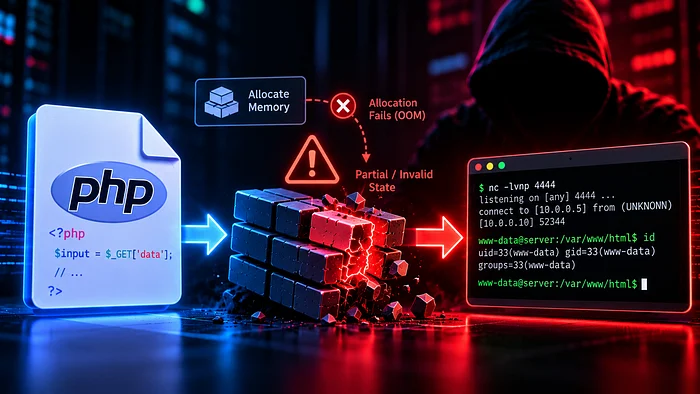
The article's framing is deliberately minimal: someone sends a single HTTP request to your website, with no vulnerable plugin, no exposed admin panel and no authentication bypass. There is only a request reaching a vulnerable runtime. In some scenarios the vulnerable behaviour can occur before the application's own authentication logic even runs, so login pages and access controls alone may not protect a vulnerable server.
Setup
The write-up does not describe a lab, a target host, accounts, roles or tooling. It is an explanatory analysis of the two CVEs, illustrated with analogies and diagrams, followed by a defensive checklist. The concrete technical artefacts it gives are a trivial PHP snippet, a C-style illustration of use-after-free, and a version-check command.
The PHP example used to show what the runtime is doing on every request is:
<?php
echo "Hello, World!";
?>
Simple, but behind every response the runtime is allocating memory, parsing requests, managing internal structures and running application logic.
The deployment contexts named as relevant are Apache mod_php, PHP-FPM, PHP-CGI, FrankenPHP and LiteSpeed. Real risk depends on version, configuration and whether the vulnerable path is reachable. No specific affected or fixed version numbers appear in the text; the advice is to use the fixed version listed in the official PHP security advisory for your branch.
Finding it
The article does not present a researcher's discovery process, a reproduction or a proof of concept. What it does is separate the two bugs by their root cause and explain why each is dangerous.
CVE-2026-109618: allocation failure handled as success
Every request needs memory: for parameters, internal structures and temporary data. Sometimes an allocation fails. This is an Out-of-Memory (OOM) condition. A well-built runtime handles this safely: it stops the operation and cleans up anything half-built. CVE-2026-109618 involves a request-processing path where allocation failures may be handled incorrectly.
The point the author stresses is that the problem is not that PHP runs out of memory. The problem is what happens afterwards. If internal structures are left partially initialized, and the cleanup or error-handling code treats them as if they were complete, memory corruption can occur. Under certain conditions, an attacker may be able to influence that corruption and gain control over execution.
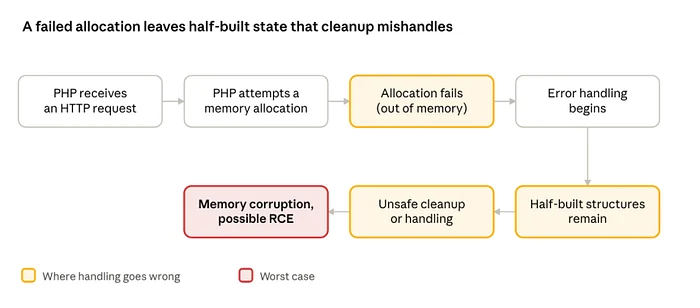
PHP stops at the failed allocation, but the cleanup path treats half-built structures as complete.
CVE-2026-109619: a reference that outlives the request
To explain the second bug the article starts from use-after-free in general: a program accessing memory after it has been released.
int *ptr = malloc(sizeof(int));
*ptr = 10;
free(ptr);
/* Unsafe: memory has already been released */
printf("%d", *ptr);
The pointer still exists, but the memory behind it is no longer valid. If that memory gets reused for something else, the program may read or write unexpected data. The results can include memory corruption, information disclosure, or even code execution.
Applied to PHP: the runtime keeps internal global structures to manage request-related data, and some of them may reference memory tied to a specific HTTP request. The vulnerability involves internal state that retains a reference to memory that has already been freed. Because that state may persist across requests handled by the same PHP worker, a later operation can touch memory that is no longer valid.
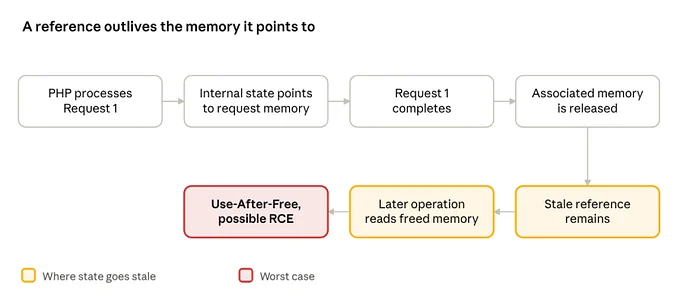
The memory is freed when Request 1 ends, but the internal state still points at it.
How the two connect
The root causes differ: one is a failed allocation, the other is access after release. But both target the same surface, PHP's internal request-processing and memory handling, and both can leave PHP's internal state corrupted.
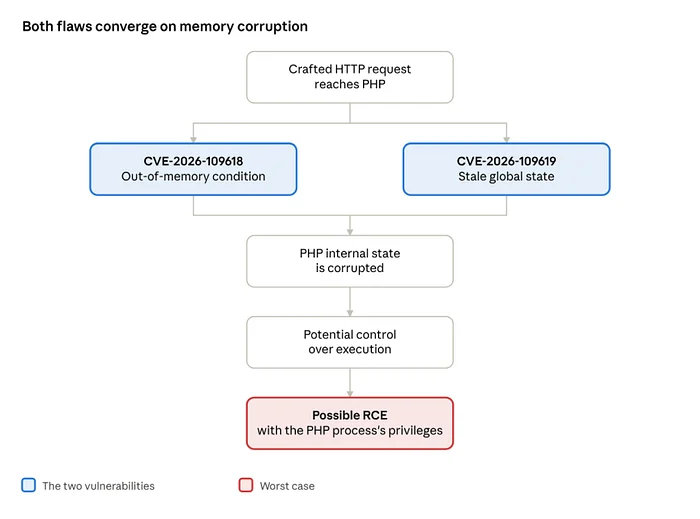
Either flaw can corrupt PHP's internal state; what follows depends on whether the attacker can steer it.
Exploitation
The article describes the exploitation path at the level of stages rather than with concrete requests. It gives no payloads, no HTTP messages and no observed responses. The stages are as follows.
Step 1: Finding a vulnerable install
Attackers look for apps running affected PHP versions. Deployments vary: Apache mod_php, PHP-FPM, PHP-CGI, FrankenPHP, LiteSpeed.
Step 2: Triggering the flaw
A specially crafted request is sent to cause an OOM condition or force access to stale internal state. The article does not show what that request looks like.
Step 3: Shaping the corruption
Triggering is only half the battle. The attacker must influence the resulting corruption so that it affects program execution. If successful, code can run with the privileges of the PHP process.
Step 4: Post-exploitation
If RCE is achieved, the fallout can include:
- Access to config files and database credentials
- Exposure of sensitive application data
- Modification of application files
- Web shells and malicious scripts
- Pivoting to internal services
- Availability disruption
How bad it gets depends largely on how locked down the PHP process is.
One important caveat runs through the whole section: triggering a memory bug does not automatically mean RCE. Exploitation depends on the PHP version, deployment configuration, memory layout, and whether an attacker can actually control the resulting corruption.
Root cause
There are two distinct mistakes, both in the runtime rather than in application code.
For CVE-2026-109618, the mistake is in error handling on a request-processing path: when an allocation fails, internal structures can be left partially initialized, and the cleanup or error-handling code treats them as if they were complete. The corruption follows from that mismatch between the real state of the structure and the state the cleanup path assumes.
For CVE-2026-109619, the mistake is lifetime management of internal global state. A structure that manages request-related data retains a reference to memory that has already been freed.
The reason existing defences do not help is structural: the flaw lives in the component that handles every web request, below the application. Updating WordPress, Drupal or Joomla does not patch the underlying PHP runtime, and in some scenarios the vulnerable behaviour can occur before the application's own authentication logic even runs.
Impact
Both flaws can leave PHP's internal state corrupted, and both may potentially lead to RCE. If RCE is achieved, the consequences listed are access to config files and database credentials, exposure of sensitive application data, modification of application files, web shells and malicious scripts, pivoting to internal services, and availability disruption.
The impact is hedged on several conditions: the PHP version, the deployment configuration, the memory layout, and whether an attacker can actually control the resulting corruption. Triggering a memory bug alone does not mean code execution. The blast radius also depends on how locked down the PHP process is, since successful code runs with the privileges of that process.
Fix
The short version given is: upgrade PHP. Because this is a runtime flaw, updating your framework or plugins is not enough.
- Upgrade to a fixed release. Use the fixed version listed in the official PHP security advisory for your branch. If you are on an unsupported branch, plan a migration to a supported one.
- Verify the version your web server actually uses.
php -v
This shows the command-line PHP, which can differ from the version running behind your web server (for example via PHP-FPM). Always check the runtime your application actually uses. 3. Audit every PHP deployment: production servers, dev and staging environments, containers, shared hosting, PHP-FPM and Apache mod_php installs, and PHP bundled inside third-party products. 4. Apply temporary mitigations if you cannot patch yet: restrict access to exposed PHP services, disable unnecessary PHP services, apply appropriate WAF rules, monitor suspicious HTTP requests and PHP error logs, restrict outbound network access from PHP workers, and run PHP with minimal privileges. These reduce exposure but are not a substitute for patching. 5. Monitor for exploitation: watch web server access logs, PHP error logs, process execution logs, EDR alerts and network egress logs. Red flags include unexpected child processes spawned by PHP workers, unusual outbound connections, and unexplained changes to application files.
Only an upgraded runtime closes the hole; the review and monitoring steps catch what slipped through.
Variants to test
The article does not propose variants for other targets. The closest thing to testable guidance it offers is the audit and monitoring surface, which can be turned into checks:
- Version drift between CLI and server runtime. Run
php -vand compare it with the PHP version the web server actually loads, for example through PHP-FPM. A positive result is a server-side runtime that differs from the CLI version and is not the fixed release for its branch. - Unpatched deployments outside production. Inventory dev, staging, container images, shared hosting and PHP bundled inside third-party products. A positive result is any of these running a PHP runtime that has not been upgraded to the fixed release.
- Reachability of the vulnerable path. For each deployment, establish whether the request-processing path involved is reachable given its SAPI (Apache mod_php, PHP-FPM, PHP-CGI, FrankenPHP, LiteSpeed) and configuration. Establish whether the request-processing path involved is reachable given its SAPI and configuration.
- Detection coverage. Check that access logs, PHP error logs, process execution logs, EDR and egress logs would surface unexpected child processes spawned by PHP workers, unusual outbound connections and unexplained changes to application files. Check that those logs would surface the red flags the article lists.
Final thoughts
PHP2Shell is a reminder that the most dangerous bugs often live underneath your application, in the layers you assume are solid. CVE-2026-109618 and CVE-2026-109619 are two different memory-management failures, one around failed allocations and one around stale references to freed memory. Both can potentially lead to RCE, and both live in the component that handles every web request your server receives. The key point is that this is a runtime-level vulnerability, not a flaw in one particular website or plugin: find your PHP installs, patch the runtime, check your configurations, and keep watching your logs.
What happened, in plain words
Imagine a large office building. Every visitor who walks in goes through the same front desk, the same lift, the same corridors. If the building's plumbing is broken, it does not matter how tidy any single office is: the problem is in the building itself, and every tenant is affected.
That is the situation described here. The building is PHP, the software that runs on a web server and builds most of the dynamic pages you visit. The two problems are not in any particular website. They are inside PHP itself, in the part that handles every single request that arrives at the server.
The two problems have been given the collective name PHP2Shell:
- CVE-2026-109618: a memory corruption bug that happens when PHP runs out of memory (Out-of-Memory, or OOM).
- CVE-2026-109619: a bug where PHP keeps a reference to memory it has already released, called a Use-After-Free (UAF).
Both are memory-management flaws, and both may potentially lead to Remote Code Execution (RCE), where an attacker makes the server run code of their choosing, though exploitation depends on several conditions.
A few terms before we go further, because everything else depends on them:
- Runtime: the engine that actually executes a program while it is running. PHP the language is a set of rules; the PHP runtime is the machine that follows those rules on your server.
- Memory: the working space a program uses to hold data while it runs. Think of it as a desk covered in sticky notes. The program writes on notes, reads them back, and throws them away when done.
- Request: the message your browser sends to a server when you open a page or submit a form. The server reads it, does some work, and sends back a response.
- Vulnerability: a weakness in software that someone could abuse to make it behave in a way its authors did not intend.
The scenario the article paints is deliberately bare. Someone sends a single HTTP request to your website. There is no vulnerable plugin, no exposed admin panel, no authentication bypass. There is only a request reaching a vulnerable runtime. In some cases the dangerous behaviour can happen before your application's own login check even runs, so a login page and access controls alone may not protect a vulnerable server.
First, what is PHP actually doing?
PHP stands for PHP: Hypertext Preprocessor. It is a server-side scripting language, which means the code runs on the server, not in your browser. JavaScript in a web page runs on your own computer; PHP runs on the machine hosting the site.
When you log in to a site, PHP might check your credentials, manage your session, query a database and build the page you see. A session, in plain terms, is the server remembering who you are between requests, usually by handing your browser a small piece of data to send back each time.
The article's tiny example of PHP code is:
<?php
echo "Hello, World!";
?>
Line by line:
<?phpopens a block of PHP code. Everything after it is instructions for the PHP runtime, not text to display.echo "Hello, World!";tells PHP to output the textHello, World!into the page it is building.echomeans "send this out".?>closes the PHP block. Anything after it would be treated as plain HTML.
That looks trivial, but behind every response the runtime is allocating memory, parsing requests, managing internal structures and running application logic. Every one of those steps is a place where something can go wrong.
Why PHP2Shell is different
The article makes its central point with a quote:
A bug in a login page affects one application. A bug in the runtime can affect every application running on it.
Compare it to the office building again. A broken lock on one office door is that tenant's problem. A broken lock on the main entrance is everyone's problem.
The two flaws, restated:
- CVE-2026-109618: Out-of-Memory memory corruption, with potential RCE.
- CVE-2026-109619: Stale global state / Use-After-Free, with memory corruption and potential RCE.
CVE stands for Common Vulnerabilities and Exposures. It is a public catalogue where each known vulnerability gets a unique identifier, so people can talk about the same bug without confusion.
Vulnerability #1: CVE-2026-109618 (Out-of-Memory memory corruption)
When PHP runs out of memory, what happens next?
Every request needs memory: for parameters, internal structures and temporary data. Sometimes an allocation fails. Allocation is the act of asking the system for a chunk of memory to use. When the system says no, that is an Out-of-Memory (OOM) condition.
A well-built runtime handles this safely. It stops the operation and cleans up anything half-built. CVE-2026-109618 involves a request-processing path where allocation failures may be handled incorrectly.
The problem is not that PHP runs out of memory. The problem is what happens afterwards. If internal structures are left partially initialised, and the cleanup or error-handling code treats them as if they were complete, memory corruption can occur. Under certain conditions, an attacker may be able to influence that corruption and gain control over execution.
Think of a form being filled in by hand. If the clerk runs out of paper halfway through and the next person assumes the form is complete, they will act on blank fields as if they held real answers. The mistake is not running out of paper; it is treating an unfinished form as finished.
PHP stops at the failed allocation, but the cleanup path treats half-built structures as complete.
Vulnerability #2: CVE-2026-109619 (Stale global state / Use-After-Free)
Released memory should never be touched again
To understand this one, you need to know Use-After-Free (UAF): a program accessing memory after it has been released.
The article illustrates it with a C-style example:
int *ptr = malloc(sizeof(int));
*ptr = 10;
free(ptr);
/* Unsafe: memory has already been released */
printf("%d", *ptr);
Line by line:
int *ptr = malloc(sizeof(int));asks the system for enough memory to hold one integer and stores the address of that memory in a variable calledptr. A pointer is simply a note holding the address of a piece of memory, like a slip of paper with a house number on it.*ptr = 10;writes the value10into the memory thatptrpoints at.free(ptr);hands the memory back to the system. The house is now empty and available for someone else./* Unsafe: memory has already been released */is a comment, a note for humans, not an instruction.printf("%d", *ptr);reads the value at the addressptrstill holds. But the memory has been released. The slip of paper still has the house number, but someone else may now live there.
The pointer still exists, but the memory behind it is no longer valid. If that memory gets reused for something else, the program may read or write unexpected data. The results can include memory corruption, information disclosure, or even code execution.
Information disclosure means private data leaks out. Memory corruption means the program's own working data has been altered in ways it did not expect.
How this applies to PHP
PHP keeps internal global structures to manage request-related data. Some of them may reference memory tied to a specific HTTP request.
The vulnerability involves internal state that retains a reference to memory that has already been freed. Because that state may persist across requests handled by the same PHP worker, a later operation can touch memory that is no longer valid.
A worker is a process on the server that handles requests one after another. It is like a single clerk at a counter who serves customer after customer. If the clerk keeps a note about customer one on the desk and then uses it while serving customer two, confusion follows.
The memory is freed when Request 1 ends, but the internal state still points at it.
How the two bugs connect
The root causes differ: one is a failed allocation, the other is access after release. But both target the same surface, PHP's internal request-processing and memory handling, and both can leave PHP's internal state corrupted.
Either flaw can corrupt PHP's internal state; what follows depends on whether the attacker can steer it.
One important caveat: triggering a memory bug does not automatically mean RCE. Exploitation depends on the PHP version, deployment configuration, memory layout, and whether an attacker can actually control the resulting corruption.
From request to remote code execution: the four stages
1. Finding a vulnerable install
Attackers look for apps running affected PHP versions. Deployments vary: Apache mod_php, PHP-FPM, PHP-CGI, FrankenPHP, LiteSpeed. Real risk depends on version, configuration, and whether the vulnerable path is reachable.
Those names are different ways of running PHP behind a web server. Apache mod_php loads PHP directly inside the Apache web server. PHP-FPM runs PHP as a pool of worker processes behind a FastCGI interface. PHP-CGI runs PHP through the CGI interface. FrankenPHP and LiteSpeed are other server setups that can run PHP. You do not need to know the details to follow the article; the point is that the same PHP bug can sit behind several different front doors.
2. Triggering the flaw
A specially crafted request is sent to cause an OOM condition or force access to stale internal state. The article does not show what that request looks like.
3. Shaping the corruption
Triggering is only half the battle. The attacker must influence the resulting corruption so that it affects program execution. If successful, code can run with the privileges of the PHP process.
Privileges are the permissions a process has. If the PHP process runs as a limited user, damage is limited; if it runs as a powerful user, damage is wider.
4. Post-exploitation
If RCE is achieved, the fallout can include:
- Access to config files and database credentials
- Exposure of sensitive application data
- Modification of application files
- Web shells and malicious scripts
- Pivoting to internal services
- Availability disruption
A web shell is a small script an attacker plants on a server so they can run commands through the browser later. Pivoting means using the first compromised machine as a stepping stone to reach others inside the network. Availability disruption means making the service stop working for legitimate users.
How bad it gets depends largely on how locked down the PHP process is.
How to protect yourself
The short version: upgrade PHP. Because this is a runtime flaw, updating your framework or plugins is not enough.
1. Upgrade to a fixed release
Use the fixed version listed in the official PHP security advisory for your branch. If you are on an unsupported branch, plan a migration to a supported one.
A branch here means a major version line of PHP, such as one numbered series that receives its own fixes. An advisory is an official notice describing a vulnerability and what to do about it.
2. Verify the version your web server actually uses
php -v
Line by line:
phpis the name of the PHP program on the command line.-vis a flag meaning "show the version".
So the command asks the PHP installed on the machine to print its version number. Careful: this shows the command-line PHP, which can differ from the version running behind your web server (for example via PHP-FPM). Always check the runtime your application actually uses. It is like checking the label on one bottle in the cupboard when the one you actually drink from is in the fridge.
3. Audit every PHP deployment
- Production servers
- Dev and staging environments
- Containers
- Shared hosting
- PHP-FPM and Apache mod_php installs
- PHP bundled inside third-party products
Updating WordPress, Drupal, or Joomla does not patch the underlying PHP runtime. Those are content management systems built on top of PHP; updating them is like repainting an office while the building's plumbing stays broken.
4. Apply temporary mitigations if you cannot patch yet
- Restrict access to exposed PHP services
- Disable unnecessary PHP services
- Apply appropriate WAF rules
- Monitor suspicious HTTP requests and PHP error logs
- Restrict outbound network access from PHP workers
- Run PHP with minimal privileges
A WAF (Web Application Firewall) is a filter that sits in front of a website and blocks requests matching known-bad patterns. Outbound network access means connections going from your server out to the internet; restricting it limits what an attacker could do after a compromise. These measures reduce exposure. They are not a substitute for patching.
5. Monitor for exploitation
Watch your web server access logs, PHP error logs, process execution logs, EDR alerts, and network egress logs. Red flags include unexpected child processes spawned by PHP workers, unusual outbound connections, and unexplained changes to application files.
A log is a running record of what happened. EDR (Endpoint Detection and Response) is software that watches machines for suspicious behaviour. Egress means traffic leaving your network. A child process is a program started by another program; a PHP worker starting unexpected programs is a warning sign.
Only an upgraded runtime closes the hole; the review and monitoring steps catch what slipped through.
Final thoughts
PHP2Shell is a reminder that the most dangerous bugs often live underneath your application, in the layers you assume are solid.
CVE-2026-109618 and CVE-2026-109619 are two different memory-management failures, one around failed allocations and one around stale references to freed memory. Both can potentially lead to RCE, and both live in the component that handles every web request your server receives.
The key point: PHP2Shell is a runtime-level vulnerability, not a flaw in one particular website or plugin. Find your PHP installs, patch the runtime, check your configurations, and keep watching your logs.
Glossary
- Advisory: an official notice describing a vulnerability and the fix.
- Allocation: asking the system for a chunk of memory to use.
- Apache mod_php: a way of running PHP inside the Apache web server.
- Branch: a major version line of a piece of software that receives its own fixes.
- CVE: Common Vulnerabilities and Exposures, a public catalogue giving each known vulnerability a unique identifier.
- Child process: a program started by another program.
- EDR: Endpoint Detection and Response, software that watches machines for suspicious behaviour.
- Egress: network traffic leaving your network.
- FrankenPHP: a server setup that can run PHP.
- Information disclosure: private data leaking out of a system.
- LiteSpeed: a web server that can run PHP.
- Log: a running record of events.
- Memory corruption: a program's own working data being altered in ways it did not expect.
- OOM (Out-of-Memory): a condition where a request for memory fails because none is available.
- PHP: PHP: Hypertext Preprocessor, a server-side scripting language used to build dynamic websites.
- PHP-CGI: running PHP through the CGI interface.
- PHP-FPM: a FastCGI process manager that runs PHP as a pool of worker processes.
- Pointer: a value holding the address of a piece of memory.
- Pivoting: using one compromised machine as a stepping stone to reach others.
- Privileges: the permissions a process has.
- RCE (Remote Code Execution): making a remote server run code of the attacker's choosing.
- Request: the message a browser sends to a server asking for a page or action.
- Runtime: the engine that executes a program while it is running.
- Server-side: code that runs on the server rather than in the browser.
- Session: the server remembering who you are between requests.
- UAF (Use-After-Free): a program accessing memory after it has been released.
- Vulnerability: a weakness in software that could be abused to make it behave unexpectedly.
- WAF (Web Application Firewall): a filter in front of a website that blocks known-bad requests.
- Web shell: a small script planted on a server so an attacker can run commands through the browser later.
- Worker: a process on the server that handles requests one after another.

