PII Data Leakage and US$1500 Bounty
A user information endpoint lacked access control, allowing any authenticated user to retrieve another user's sensitive data by supplying their user ID. A company search feature leaked those user IDs, enabling an attacker to enumerate and harvest over 40,000 pieces of personal data.

Greetings, ladies, and gentlemen. Today, I would like to present to you an exposition on the vulnerability of information disclosure on a private program.
The full write-up lives on its author's site
It belongs to its author, so we link to it rather than copy it. The other two tabs are our own rewrites, checked against it.
Context
This is a write-up of an information disclosure vulnerability found on a private bug bounty program. The target was a startup whose product let users register an account, enter personal details (name, email, phone number and profile details) and define one or more companies that they could operate through the platform. The company search feature, which normally lets a visitor find companies by name, turned out to be the pivot that made a separate user information endpoint exploitable at scale.
The researcher is a former back-end developer who had recently moved into security, and the work was done against a private program, which the author notes tends to have fewer hackers competing on it than a public one.
Setup
The starting point was a Google dork used to find programs that publish a responsible disclosure page:
inurl:responsible disclosure
From the resulting list the author picked one program with an unusual startup concept. Reconnaissance then proceeded as follows:
- Subfinder to enumerate subdomains of the target domain.
- GitHub Scan and Certificate Scan to gather more information about the target's web environment.
- A personal wordlist used to brute force the target, both statically and dynamically, which produced 42 subdomains in total.
On the main domain the author found a registration button leading to a user panel where an account could be created with name, email, phone number and profile details. Two accounts were eventually needed: the original user and a second account created to obtain a company ID. Each user was assigned an ID of the form u_wdobhREkbf and each company an ID of the form c_z8zI6a4unp; the only structural difference is the leading u or c.
Finding it
Three earlier scenarios were tried and failed, but each one fed the next.
XSS on unvalidated fields
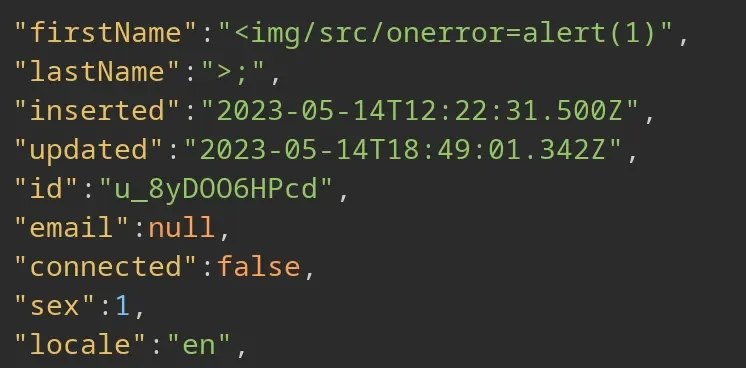
The first attempt was to inject XSS payloads into fields without validation, such as the name field. Several attempts were made and none worked. The payload used to try to pop an alert is shown here:
Shell upload via the profile image
Next, the author tried uploading a shell instead of the profile image: a PHP file containing echo 1, uploaded with content-type: image/png. The file was uploaded successfully, which was interesting, but when the author located the path of the photo and used curl in the terminal to check whether the code executed, it did not. Changing the content type did not help, since the only content type supported was "image", and renaming the extension to phar or php5 also failed.
IDOR on the company reference
The third attempt targeted the relationship between users and companies. The author created a second account, filled in company information to obtain that company's ID, then, while logged in as the original user, edited the profile and replaced the company ID with the ID of the company created earlier. The response was an API response containing a SQL query error. The same kind of API was also triggered when attempting to create another account with a duplicate email.
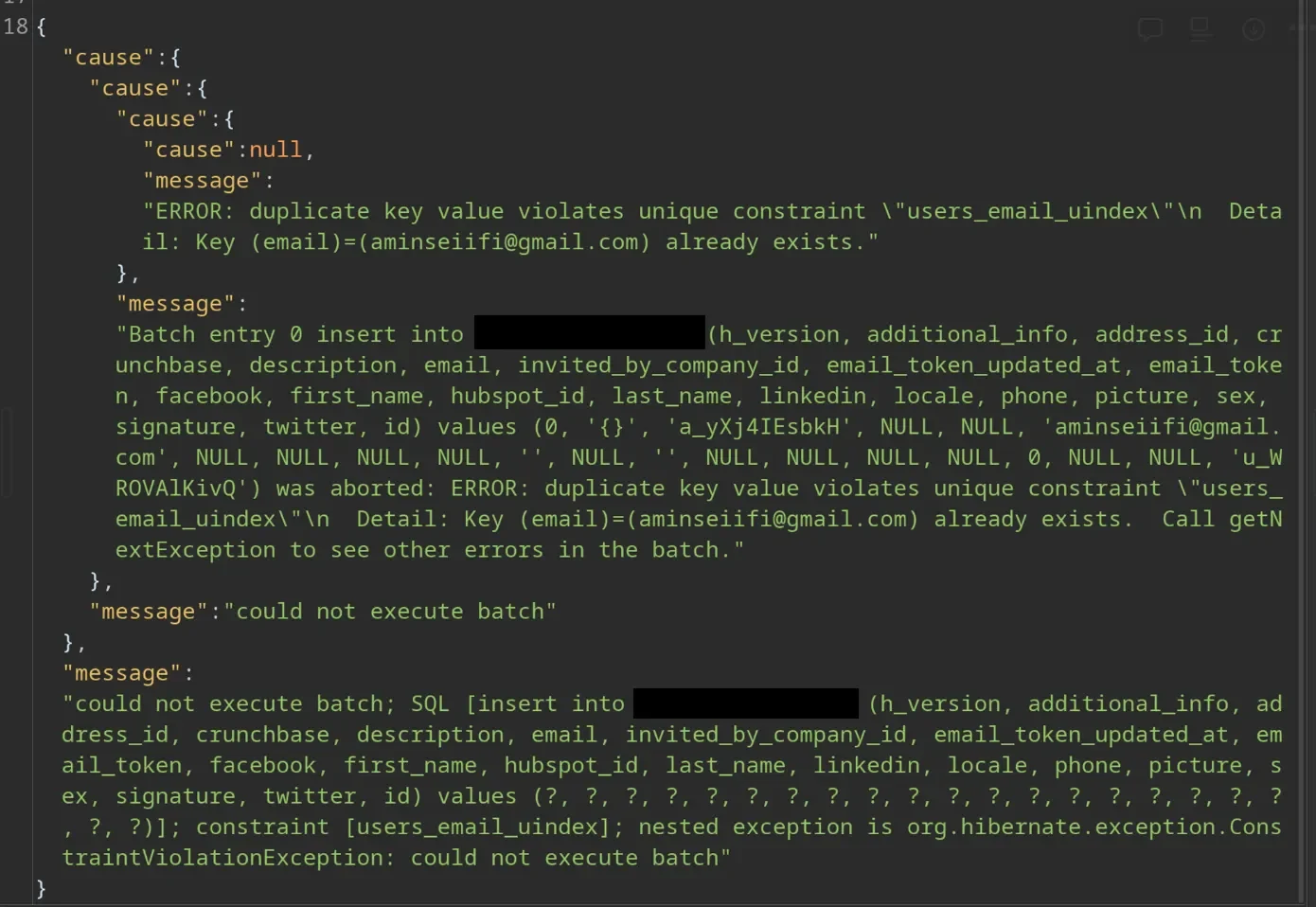
That scenario failed, but the SQL error was motivating because it should not appear under normal circumstances. SQL injection was considered next, but the startup had prepared statements on all of its fields, so that route was closed.
The user information endpoint
With two users on the site, the author tested access control using an endpoint that returns a user's information, entering the other user's ID to see whether one user could read another user's data.
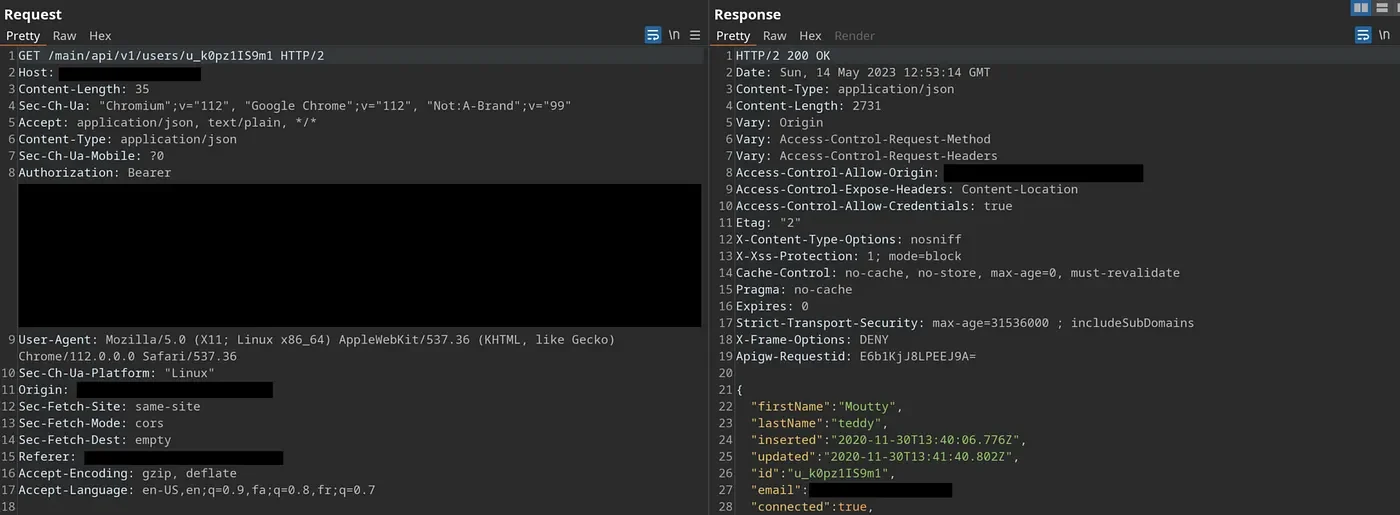
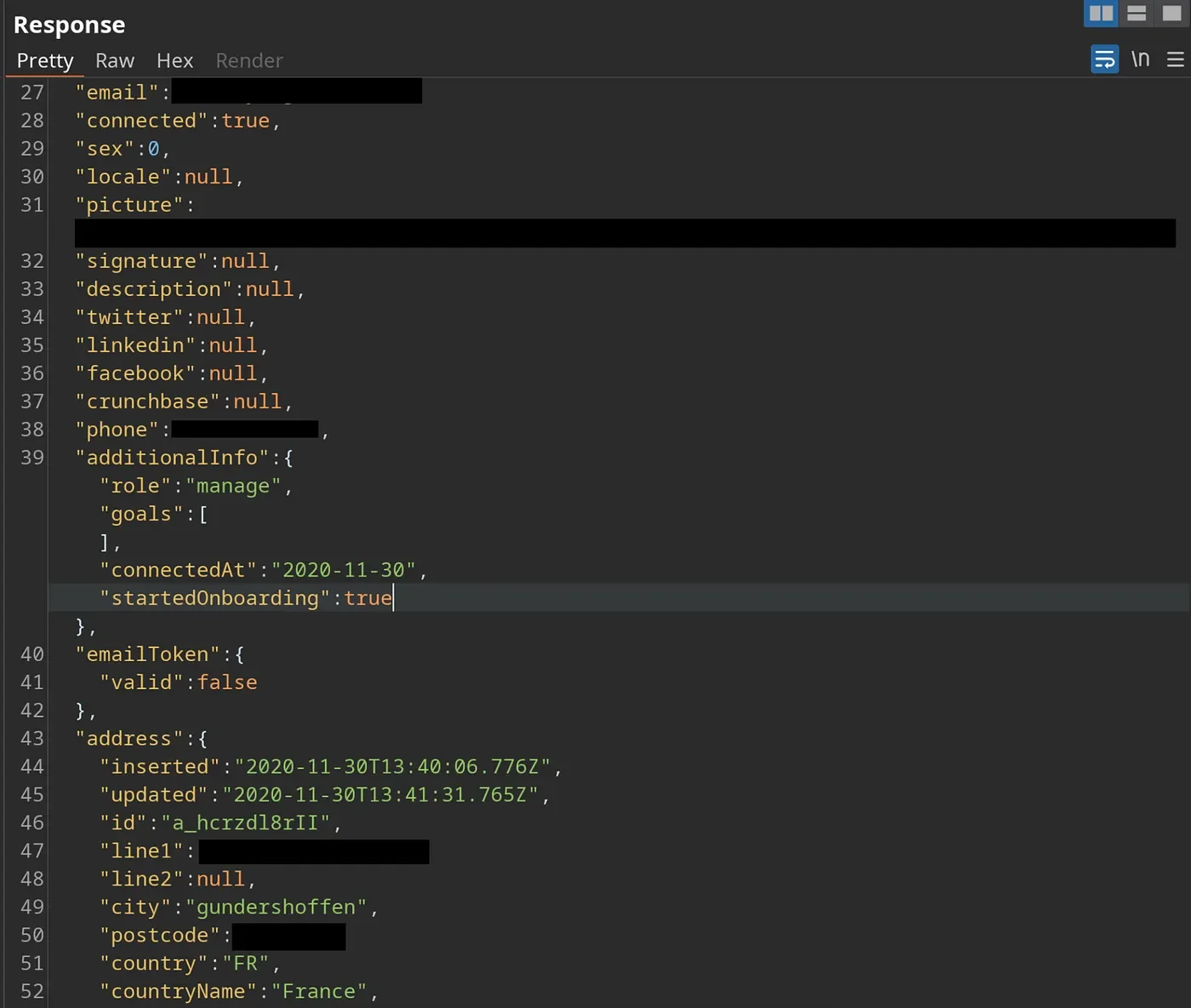
The endpoint was /main/api/v1/users/<userId>, and it disclosed the user's photo, phone number, signature picture, address and more. On its own this looked hard to exploit: a user ID is the letter u followed by a randomly generated string of 10 characters, and with 26 lowercase letters, 26 uppercase letters and 10 digits there are 62 choices per position, giving 839,299,365,868,340,224 possible IDs. That scale made brute forcing the user endpoint impractical.
The company search endpoint
The breakthrough was a second endpoint, /main/companies/search/findByNameIgnoreCaseContaining?q=<searchParam>&limit=20, which backs the feature that lets users search for companies by name. It returns up to 20 companies whose names contain the search term, and the user ID of the person who created each company is included in the results.
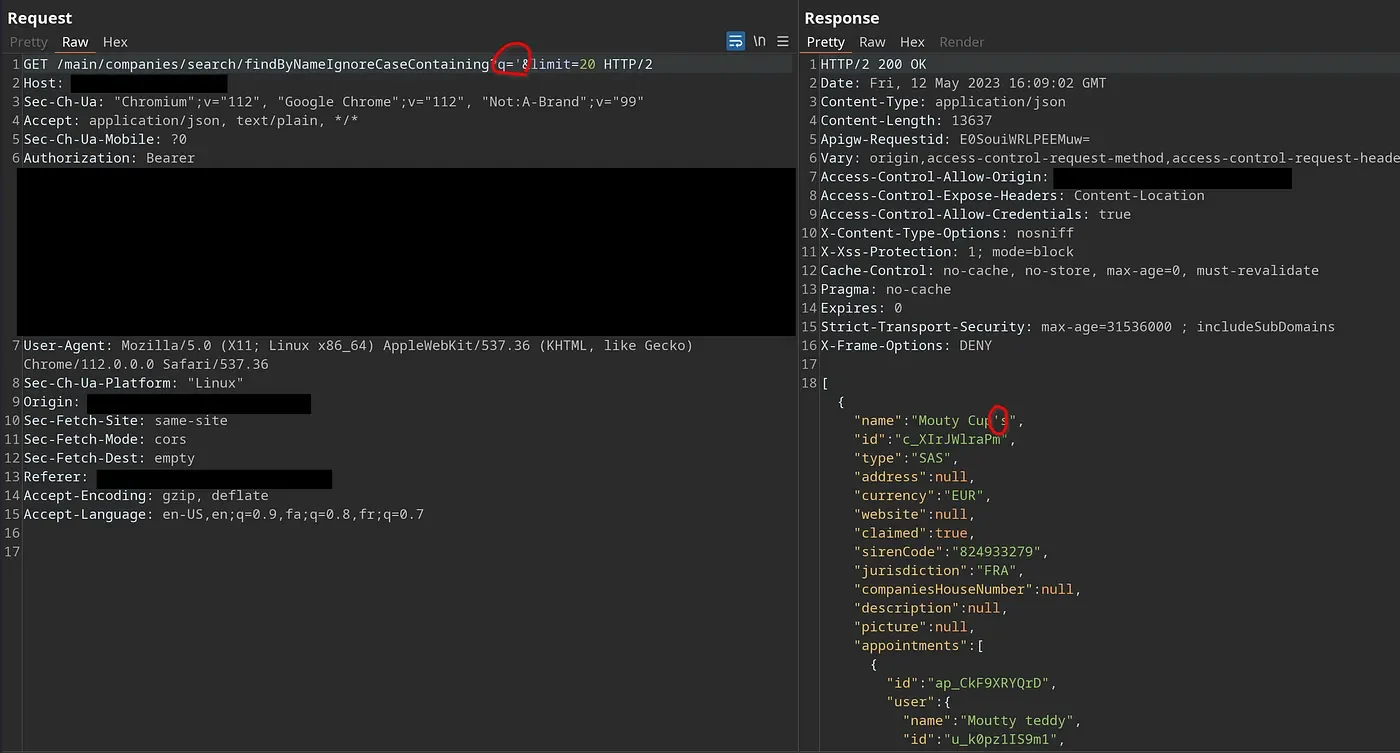
That turned the unguessable user ID into a lookup: search for a company, read the creator's user ID from the response, then call the user endpoint with it.
Exploitation
Step 1: enumerate company names
The author built a list of all possible one-letter, two-letter and three-letter combinations of English words and queried the search API with each one, collecting the company names and user IDs returned.
Step 2: resolve user IDs to user data
For each user ID obtained in step 1, the author called the API that provides user data and saved the results to a JSON file.
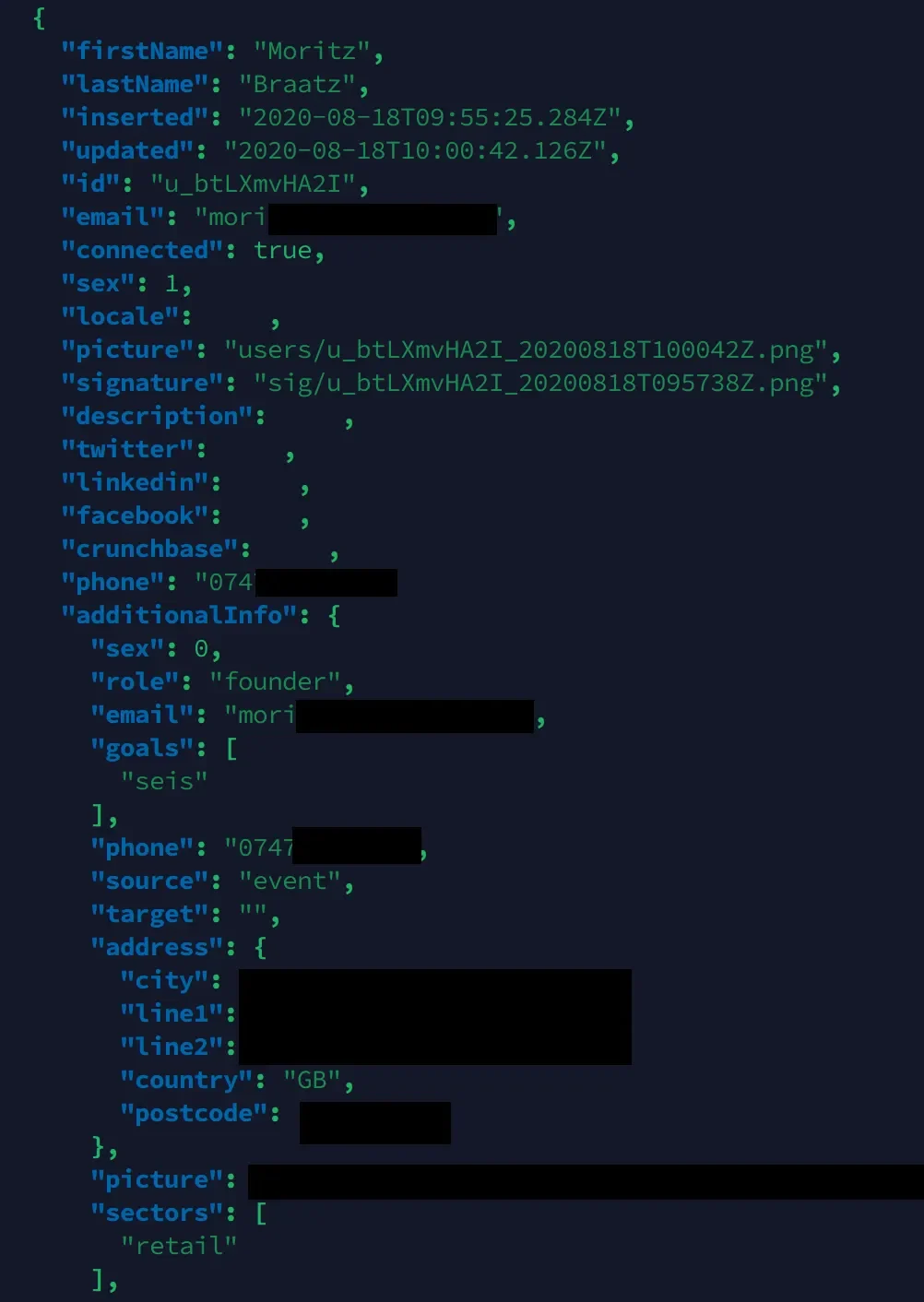

Because of the number of API calls involved, the algorithm was implemented in Python with multi-threading to speed up execution. Within 10 minutes it had exposed over 40,000 pieces of sensitive data.
Root cause
The user information endpoint /main/api/v1/users/<userId> returned another user's photo, phone number, signature picture, address and other details when the author supplied the other user's ID. The company search endpoint compounded this by returning the creator's user ID alongside each company, which removed the only practical barrier, the size of the ID space.
The report does not describe the server-side code, so the exact implementation mistake is not shown. Prepared statements were in place for all fields, which is why SQL injection was ruled out, but they do nothing against an authorisation failure of this kind. The SQL error seen when swapping company IDs was not explained in the report, and that path did not yield an exploit.
Impact
An attacker with an account could enumerate companies through the search API, harvest the creator's user ID from each result, and then retrieve that user's personal information from the user endpoint. The data disclosed included photo, phone number, signature picture, address and more. In the author's run, over 40,000 pieces of sensitive data were exposed in about 10 minutes.
The exposure is bounded by what the search returns: up to 20 companies per query, and only companies whose names match the search term. The user endpoint alone was not practically exploitable because of the 62-character alphabet and 10-character length of the ID suffix.
Fix
The report does not state what the company changed. The fix that addresses the root cause is to enforce an ownership check on /main/api/v1/users/<userId>, so that a request only returns data for the authenticated user (or for users the caller is authorised to see), and to stop returning the creator's user ID in the company search results unless the caller needs it.
Variants to test
- Search endpoints that leak identifiers. Look for any search or listing API that returns an internal ID alongside public fields. A positive result is a response containing a user, tenant or object ID that can be fed into another endpoint.
- Object endpoints without ownership checks. Take an ID from one account and request it while authenticated as another. A positive result is a 200 response containing the other account's data rather than a 403 or 404.
- Short, structured ID spaces. Where IDs have a fixed prefix and a short random suffix, estimate the search space and check whether any other endpoint exposes those IDs, which turns an unguessable ID into an enumerable one.
- Error-driven probing. Swap a related object ID (for example a company ID on a profile) and watch for SQL errors or stack traces. A positive result is a database error in the response, which points at missing validation even if the path itself is not exploitable.
- Upload validation. Upload a script file with an image content type and check whether it executes at its returned path. A positive result is the code running when the file is requested.
What happened, in plain words
A security researcher found a way to read the personal details of tens of thousands of users on a startup's website. The site let people register, fill in their name, email, phone number and profile details, and create one or more companies that they could manage through the platform.
The problem was in two places. One part of the site, the page that returns a user's information, handed over another user's data when the asker supplied that person's user ID. The other part, the company search box, quietly included the user ID of each company's creator in its results. Put together, the search box gave out the IDs, and the user page turned each ID into a full set of personal data.
The researcher reported it and received a bounty of US$1,500. This article walks through the whole story from the beginning, explaining each idea as it comes up, so you can follow it even if you have never done security work before.
Who is writing, and why private programs matter
The author introduces himself as someone who recently moved into security after working as a back-end developer. A back-end developer is the person who builds the part of a website that runs on the server, the computer that stores the data and answers requests, rather than the part you see in your browser.
He explains that he worked on private programs. A bug bounty program is an arrangement where a company invites outside people to look for security flaws in its systems and pays for the ones they find and report responsibly. A private program is one where only selected researchers are invited, rather than anyone being allowed to join. The author notes that private programs tend to have fewer people hunting on them than public ones, which made his work more manageable and kept him motivated.
Finding a target with a Google dork
The starting point was a Google dork. A Google dork is a specially crafted search query that uses Google's advanced search operators to surface pages with particular characteristics, in this case pages that mention a responsible disclosure policy. A responsible disclosure page is a page where a company explains how to report a security problem to it, so finding one is a hint that the company runs some kind of bounty or disclosure process.
The dork was:
inurl:responsible disclosure
Line by line: inurl: is a Google operator that restricts results to pages whose web address contains the text that follows. The text after it is responsible disclosure, so Google returns pages whose URL includes those words. The space separates the inurl: operator from its argument, so Google returns pages whose URL contains the words responsible disclosure.
From the list of results the author picked one program with an unusual startup concept. He does not describe the company or its product beyond that.
Mapping the target before touching it
Before testing anything, the author gathered information about the target's web environment. This phase is called reconnaissance, and the everyday comparison is a burglar walking around a building first to note the doors, windows and side entrances before trying any of them.
The steps were:
- Use Subfinder to find subdomains of the target's main domain. A subdomain is a name that sits under a main domain: if the main site is
example.com, thenshop.example.comandmail.example.comare subdomains. Each one can be a separate application with its own behaviour. - Use GitHub Scan and Certificate Scan to learn more about the target's web environment. GitHub Scan looks for information a company may have accidentally published in public code repositories, and Certificate Scan looks at the public records of security certificates, which can reveal hostnames that are not linked from anywhere on the site.
- Use a personal wordlist to brute force the target, both statically and dynamically. A wordlist is simply a long list of likely names, such as
admin,testordev. Brute forcing means trying each entry in turn to see which ones exist. The author does not explain what he means by statically and dynamically here.
This produced 42 subdomains in total.
The feature under test
On the main domain the author found a registration button leading to a user panel. There, a person could create an account and enter personal information: name, email, phone number and profile details. The same account could define one or more companies and operate them through the platform.
Every user was given an ID, an identifier the site uses internally to refer to that account. The example in the report is u_wdobhREkbf. Every company also had an ID, for example c_z8zI6a4unp. The only structural difference is the first letter: user IDs start with u, company IDs start with c.
Eventually the author needed two accounts: his original one, and a second one created specifically so that he would have a company ID belonging to somebody else to experiment with.
First attempt: cross-site scripting in the name field
The first idea was to try cross-site scripting, usually shortened to XSS. XSS is a vulnerability where a site takes text you typed and later shows it to other people as if it were part of the page, without neutralising it. If the text contains instructions that a browser understands as code, the browser runs that code. The classic demonstration is making a pop-up alert appear, because it proves code ran.
The author tried XSS payloads on fields that had no validation, such as the name field. Validation means the site checks what you typed before accepting it, for example rejecting characters that could be interpreted as code. Several attempts were made and none worked.
Here is the payload he tried in order to pop an alert:
The image shows the payload as it was entered. The report does not reproduce the payload as text, so it is not repeated here.
Second attempt: uploading a shell through the profile picture
Next he tried uploading a shell instead of a profile image. A shell in this context is a small program that, if the server runs it, lets the attacker execute commands on the server. The everyday comparison is slipping a note into a suggestion box and hoping the staff not only read it but follow its instructions.
He created a PHP file containing echo 1. PHP is a programming language commonly used on web servers, and echo 1 is an instruction that simply prints the character 1. If the server executed the file, the response would contain a 1, which would prove code execution.
He uploaded the file with content-type: image/png. The content type is a label the browser attaches to an upload saying what kind of file it is, and image/png claims the file is a PNG picture. The idea is to disguise a program as a picture.
The file uploaded successfully, which was interesting. He then located the path of the photo, meaning the web address where the uploaded file could be fetched, and used curl in the terminal to request it. curl is a command-line tool for making web requests, useful for fetching a URL and seeing exactly what comes back. The code did not execute.
He tried changing the content type, but the only content type the site accepted was "image". He also tried renaming the extension to phar or php5, which are alternative file extensions associated with PHP, and those attempts failed too.
Third attempt: swapping a company ID
The third idea was an IDOR, short for Insecure Direct Object Reference. This is a vulnerability where a site lets you refer to an object, such as a record, by its ID, and does not check whether that object actually belongs to you. The everyday comparison is a cloakroom that hands out any coat to anyone who reads out a ticket number, without checking that the ticket is theirs.
The author explains that during his time working at a company he had not paid attention to the relationship between objects in the database, and had forgotten to include validation checking whether the reference being retrieved was related to the user. This is background about his own past experience, not a claim about the target.
To test, he created a second account and filled in company information so that he would obtain that company's ID. Then, while logged in as his original user, he edited his profile and replaced the company ID with the ID of the company he had created earlier. The response was an API response containing a SQL query error.
An API, short for Application Programming Interface, is the set of addresses a website's own pages use to talk to its server behind the scenes. When you click something and a page updates without reloading, your browser is usually calling an API. SQL is the language used to ask a database questions, and a SQL query error means the database rejected or failed to understand a request. Seeing one in a response is a signal that your input reached the database layer.
He also noticed that a similar API was triggered when attempting to create another account with a duplicate email.
The image shows the response containing the SQL query error. The report does not reproduce the response as text.
That scenario failed, but the SQL error motivated him, because such an error should not appear under normal circumstances. He considered trying SQL injection next. SQL injection is a class of attack where an attacker slips database instructions into input so that the database executes them. He quickly discovered that the startup had implemented prepared statements for all of its fields. A prepared statement is a way of sending a query to the database where the input is kept strictly separate from the query's structure, so input cannot change what the query does. That made SQL injection impossible on those fields.
The user information endpoint
With two users on the site, the author tested access control. Access control is the set of rules deciding who is allowed to see or do what. He used an endpoint that returns a user's information and entered the other user's ID, to see whether one user could read another user's data.
An endpoint is a specific address on a server that performs one job, like a counter in a large office building: you go to the counter for passports, a different one for driving licences. Here the endpoint was /main/api/v1/users/<userId>, where <userId> is a placeholder for the actual ID you supply.
The two images show the request and the response. The report does not reproduce them as text.
What he found was surprising. The endpoint disclosed the user's photo, phone number, signature picture, address and more. In other words, anyone who knew a user ID could read that person's personal information.
On its own, though, this was hard to exploit. A user ID is the letter u followed by a randomly generated string of 10 characters. Each position can be one of 26 lowercase letters, 26 uppercase letters or 10 digits, so 62 possibilities per position. That gives 839,299,365,868,340,224 possible IDs. Guessing one at random is hopeless, even with very fast computers, so the sheer scale of possible user IDs made the endpoint difficult for anyone to exploit.
The company search endpoint
The breakthrough came from a second endpoint: /main/companies/search/findByNameIgnoreCaseContaining?q=<searchParam>&limit=20. This backs the feature that lets users search for companies by name. The name of the endpoint describes what it does: it finds companies whose name contains the search term, ignoring upper and lower case, and returns at most 20 of them.
In the address, q=<searchParam> is where the search term goes, and limit=20 caps the number of results. The ? separates the address from the parameters, and & separates parameters from each other.
When the author searched, the results included not only the company names but also the user ID of the person who had created each company. That changed everything: the search box turned an unguessable user ID into something you could simply look up. Search for a company, read the creator's user ID from the response, then call the user endpoint with it.
Exploitation, step by step
Step 1: collect company names and user IDs
The author built a list of all possible one-letter, two-letter and three-letter combinations of English words, and queried the search API with each one, collecting the company names and user IDs that came back. The reasoning is that many company names contain short words, so short search terms will match a large number of companies, and each match hands over a user ID.
Step 2: turn user IDs into personal data
For each user ID obtained in step 1, he called the API that provides user data and saved the results to a JSON file. JSON is a plain-text format for structured data, made of names and values in curly braces, and it is the usual way APIs return information.
The images show the leaked data and a sample of the results.
Because of the number of API calls involved, the algorithm was written in Python and used multi-threading to speed up execution. Multi-threading means running several parts of the program at the same time, so many requests are in flight at once instead of one after another. Within 10 minutes it had exposed over 40,000 pieces of sensitive data.
He reported the issue to the company, which recognised his efforts with a bounty of US$1,500.
Why it worked
The user information endpoint /main/api/v1/users/<userId> returned another user's data when given that user's ID. Any valid user ID returned another user's photo, phone number, signature picture, address and other details.
The company search endpoint made this far worse by returning the creator's user ID alongside each company. That removed the only practical barrier, the enormous size of the ID space.
The report does not describe the server-side code, so the exact implementation mistake is not shown. Prepared statements were in place for all fields, which is why SQL injection was ruled out, but they do nothing against an authorisation failure of this kind. Authorisation is the check that a logged-in person is allowed to do the thing they are asking for. The SQL error seen when swapping company IDs was not explained in the report, and that path did not yield an exploit.
What the impact was
Someone with an account could enumerate companies through the search API, harvest the creator's user ID from each result, and then retrieve that user's personal information from the user endpoint. The data disclosed included photo, phone number, signature picture, address and more. In the author's run, over 40,000 pieces of sensitive data were exposed in about 10 minutes.
The exposure is bounded by what the search returns: up to 20 companies per query, and only companies whose names match the search term. The user endpoint alone was not practically exploitable because of the 62-character alphabet and 10-character length of the ID suffix.
How it should be fixed
The report does not state what the company changed. The fix that addresses the root cause is to enforce an ownership check on /main/api/v1/users/<userId>, so that a request only returns data for the authenticated user, or for users the caller is authorised to see. The company search results should also stop returning the creator's user ID unless the caller actually needs it.
Other places to look for the same pattern
- Search endpoints that leak identifiers. Look for any search or listing API that returns an internal ID alongside public fields. A positive result is a response containing a user, tenant or object ID that can be fed into another endpoint.
- Object endpoints without ownership checks. Take an ID from one account and request it while logged in as another. A positive result is a 200 response containing the other account's data rather than a 403 or 404. Those two numbers are HTTP status codes: 200 means success, 403 means forbidden, 404 means not found.
- Short, structured ID spaces. Where IDs have a fixed prefix and a short random suffix, estimate the search space and check whether any other endpoint exposes those IDs, which turns an unguessable ID into an enumerable one.
- Error-driven probing. Swap a related object ID, for example a company ID on a profile, and watch for SQL errors or stack traces. A positive result is a database error in the response, which points at missing validation even if the path itself is not exploitable.
- Upload validation. Upload a script file with an image content type and check whether it executes at its returned path. A positive result is the code running when the file is requested.
Glossary
- API (Application Programming Interface): the set of addresses a website's own pages use to talk to its server behind the scenes.
- Access control: the rules deciding who is allowed to see or do what.
- Authorisation: the check that a logged-in person is allowed to perform the action they are asking for.
- Back-end developer: someone who builds the server-side part of a website, the part that stores data and answers requests.
- Brute force: trying every entry in a list, one after another, to see which ones exist or work.
- Bug bounty program: an arrangement where a company invites outside people to find security flaws and pays for the ones they report responsibly.
- Content type: a label attached to a file or request saying what kind of data it is, such as
image/pngfor a PNG picture. - Cross-site scripting (XSS): a vulnerability where a site shows text you typed to other people without neutralising it, so a browser may run it as code.
- curl: a command-line tool for making web requests and seeing exactly what comes back.
- Endpoint: a specific address on a server that performs one job.
- Google dork: a specially crafted Google search query using advanced operators to surface pages with particular characteristics.
- HTTP status code: a number in a web response saying how the request went, such as 200 for success, 403 for forbidden and 404 for not found.
- IDOR (Insecure Direct Object Reference): a vulnerability where a site lets you refer to an object by its ID without checking that the object belongs to you.
- JSON: a plain-text format for structured data, made of names and values, commonly used by APIs.
- Multi-threading: running several parts of a program at the same time so many requests are in flight at once.
- PHP: a programming language commonly used on web servers.
- Prepared statement: a way of sending a database query where input is kept separate from the query's structure, so input cannot change what the query does.
- Private program: a bug bounty program open only to selected researchers rather than anyone.
- Reconnaissance: the information-gathering phase before testing, mapping out what exists.
- Responsible disclosure page: a page where a company explains how to report a security problem to it.
- Shell: a small program that, if a server runs it, lets an attacker execute commands on that server.
- SQL: the language used to ask a database questions.
- SQL injection: an attack where database instructions are slipped into input so the database executes them.
- SQL query error: an error returned when a database rejects or fails to understand a request.
- Subdomain: a name that sits under a main domain, such as
shop.example.comunderexample.com. - Validation: checking what a user typed before accepting it, for example rejecting characters that could be interpreted as code.
- Wordlist: a long list of likely names used to try against a target.



