Pwn2Own Automotive 2024: Hacking the JuiceBox 40
A stack buffer overflow in the Gecko OS system message logging routine lets a crafted system message template with repeated timestamp tags write past a 192-byte stack buffer and overwrite the saved program counter. An attacker with access to the remote terminal could use this to execute arbitrary code on the charger.

sector7.computest.nl
Published on sector7.computest.nl
During Pwn2Own Automotive 2024 in Tokyo, we demonstrated exploits against three different EV chargers: the Autel MaxiCharger (MAXI US AC W12-L-4G), the ChargePoint Home Flex and the JuiceBox 40 Smart EV Charging Station with WiFi. This is our writeup of the research that we performed on the JuiceBox 40 Smart EV…
The full write-up lives on its author's site
It belongs to its author, so we link to it rather than copy it. The other two tabs are our own rewrites, checked against it.
Context
At Pwn2Own Automotive 2024 in Tokyo, the team demonstrated exploits against three EV chargers: the Autel MaxiCharger (MAXI US AC W12-L-4G), the ChargePoint Home Flex, and the JuiceBox 40 Smart EV Charging Station with WiFi. This article covers the research on the JuiceBox 40. The team discovered one vulnerability, later assigned CVE-2024-23938. During the competition they exploited it to execute arbitrary code on the charger while requiring only network access, for practical reasons at the event. Being within Bluetooth range of the device is sufficient with a few extra steps.
The JuiceBox 40 is a relatively straightforward piece of hardware. Its main components are:
- Silicon Labs WGM160PX22KGA3 application + WiFi processor
- Silicon Labs MGM13S12A Bluetooth/BLE processor
- Atmel ATMega328P MCU, which the team suspects is the charging/safety controller
- Atmel M90E36A metering IC
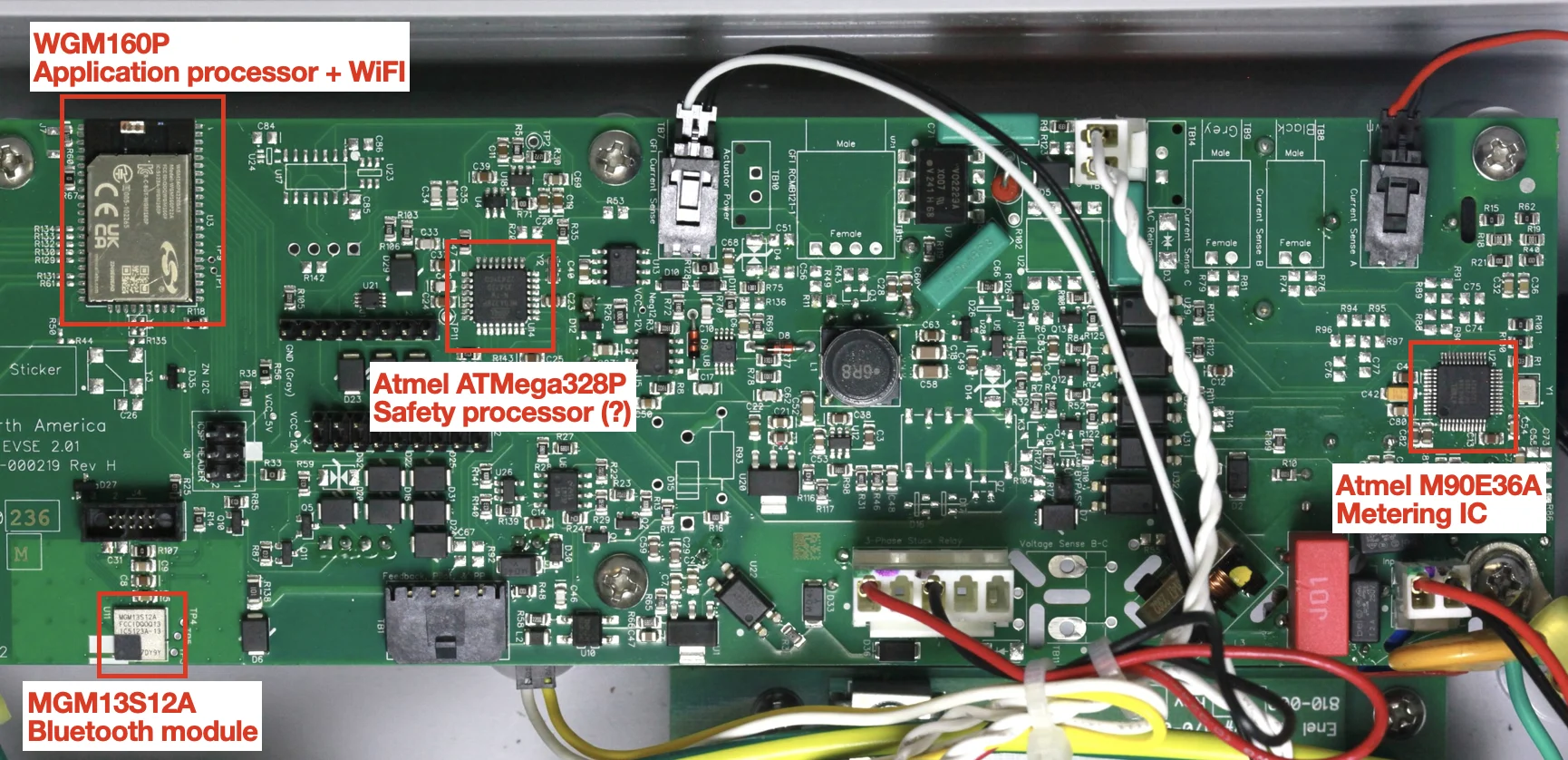
The image above is an annotated photo labelling and highlighting the components listed above. The team focused on the software hosted by the WGM160P processor as the main target for the competition and did not delve deeply into the MGM13S12A front, though they consider it an interesting attack surface choice for future research.
Setup
Before the event, the team undertook an initial online investigation of the available targets and picked those they deemed most promising. For the JuiceBox they found posts on Reddit about charger issues and how to fix them using a "remote terminal" accessible to devices on the same network as the charger. They also found YouTube videos of owners documenting fixes and modifications, and posts with photos of the internals of other models by the same vendor. A post on iFixit about the JuiceBox EVSE explaining how to replace a relay gave hints about the main hardware components of the line-up. The photo below, from that article, shows a large shielded module labelled "ZENTRI" and "AMW106":
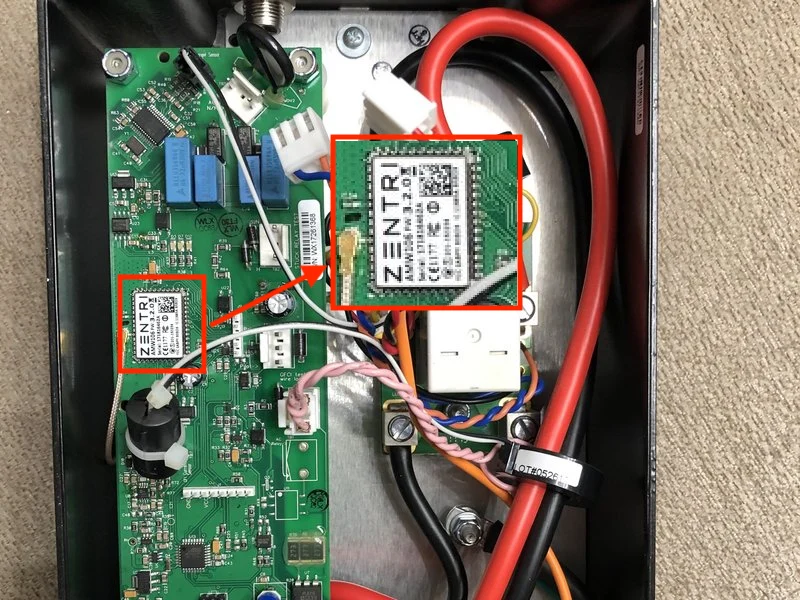
Most interesting of all, there was apparently an open administrative interface that any other device on the network could interact with. The main takeaways from this reconnaissance were:
- Older versions of the JuiceBox 40 were based on a WiFi module called the
AMW106, manufactured by Zentri. These versions run ZentriOS. - Newer versions are perhaps based on a successor WiFi module, the
WGM160P. These versions run a successor to ZentriOS, called Gecko OS. - Development modules and kits for both the
AMW106and theWGM160Pplatforms were easily sourceable from many resellers. - Both ZentriOS and Gecko OS have a plethora of features (e.g. the remote terminal feature) that seem to be accessible in a production setting on the JuiceBox 40.
The team ordered the charger and continued investigating while waiting for it to arrive from the US.
Getting closer to the firmware
The team started perusing the documentation of both ZentriOS and Gecko OS, focusing on how the update procedure is implemented, and looking for a way to download a firmware image. The main points learned were:
- Both operating systems consist of a core kernel and "built-in plugins" segment, in addition to an optional application that a developer could bundle with a specific build.
- Both systems had a fully-managed device auth{n,z} and updating mechanism in place, backed by Zentri Device Management Service (DMS).
- Both operating systems were designed to function both as development platforms and add-on turn-key solutions. The latter means the platform can be used as a sort of "connectivity" add-on in combination with a discrete application processor. This design decision explains the choice of exposing a lot of the features from the core kernel and associated plugins through a command line interface, making the platform easier to integrate with new or existing designs.
Exploring Zentri DMS further, the team learned it was possible to register an account and create test firmware bundles for specific platforms without having an actual device. They created a test WGM160P module bundle and set its firmware version to the latest stable base image of Gecko OS, which was 4.2.7 at the time. Afterwards they could see a listing of the "files" that constituted the firmware, as well as a JSON file specifying how these files were laid out in internal flash:
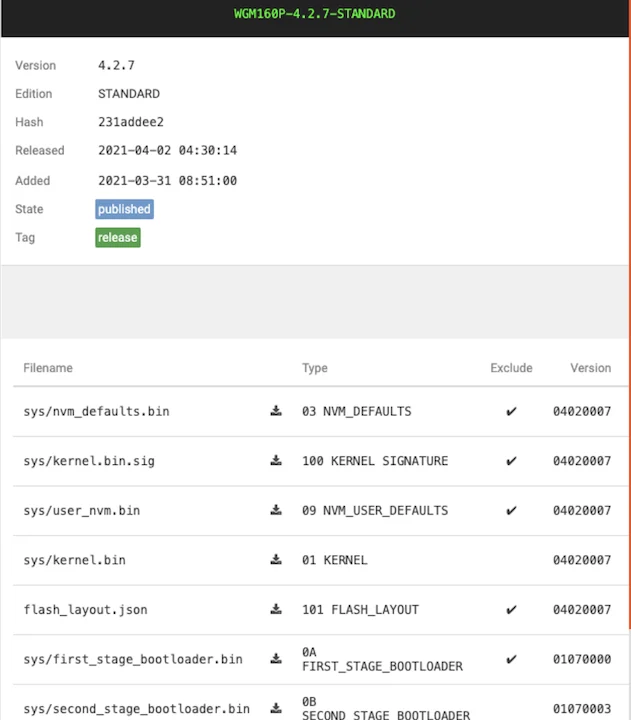
With these files in hand, the team could start vulnerability discovery on the base OS much faster than anticipated.
Development setup
As a rule of thumb, it is a good idea to have at least one backup device when diving into a piece of hardware. As Andrew "bunnie" Huang put it:
My rule is to ideally acquire three: one to totally trash and take apart (so this can literally come from a trash heap); one to tweak and tune; and one to keep pristine, so you have a reference to check your results.
Realistically, the team wanted to avoid buying a second charger to save potentially unnecessary costs, but a second unit would be handy in case something goes wrong. For most targets this was not financially feasible, except for the JuiceBox 40, in a way. They opted for purchasing a WGM160P Starter Kit (SLWSTK6121A). The kit came with a WGM160P development module and a base board exposing multiple interfaces over a USB connection:
They got it up and running quickly with Gecko OS Studio. In the process they downloaded the SDK targeting Gecko OS 4.2.7, which came with object files for the core kernel and plugins sections:
user@birdie 4.2.7-11064 % find . -name '*.a'
./tools/toolchains/gcc/arm/osx/libgcc.a
./hardware/platforms/gecko_os/wgm160p/libs/gcc/gecko_os_libraries/plugins_core/lib_network_protocols_websocket.a
./hardware/platforms/gecko_os/wgm160p/libs/gcc/gecko_os_libraries/plugins_core/lib_network_util_arp_lock.a
...
./hardware/platforms/gecko_os/wgm160p/libs/gcc/gecko_os_libraries/kernel_shared/[redacted].a
./hardware/platforms/gecko_os/wgm160p/libs/gcc/gecko_os_libraries/kernel_shared/gecko_os_kernel_core_dump.a
...
While the team had already found the vulnerability at that point, these files proved helpful while developing the exploit: they were used to better understand how the kernel, plugins and vendor apps are loaded in memory, and which useful data structures could be reliably located in memory during exploitation. The development kit also allowed much easier development and debugging of the exploitation steps using the enabled On-Chip Debugging (OCD) interface.
Finding it
The team started discovery by looking for vulnerabilities in the base images acquired from the Zentri DMS platform, instead of waiting for the charger to show up. From the initial assessment they knew a good part of the functionality provided by the base Gecko OS is likely also part of the viable attack surface on the JuiceBox.
It took only a few days of analysis of the base image before they discovered the vulnerability that would form the basis of their Pwn2Own entry: a bug in the Gecko OS system message logging component, triggerable at will using the OS's remote terminal feature.
Gecko OS system messages
Gecko OS provides the basic expected feature set of an embedded operating system like hardware/software interfacing, scheduling and resource management. Unlike many embedded OSes, it offers many high level features because of its design as a turn-key solution for IoT applications. For example, there is a config web UI on top of an onboarding WiFi AP setup component used for onboarding the device onto a user's WiFi network. It also provides high level APIs for application-level functions like HTTP, TLS, a TCP client and server, and many more built into the OS or one of its subcomponents.
Handling many of these high level actions involves many moving parts, and there are points during these interactions when it makes sense to provide a status update, for example in a human readable format for a user or a parseable text-based format for a secondary application processor. For that purpose, Gecko OS contains a system message logging facility which writes customizable messages to whatever logging interface is in use (serial, network, etc.) when certain events occur. The message types and their default values, per the Gecko OS documentation for the system.msg variable, are:
| Message Name | Default Value |
|---|---|
| initialized | [@tReady] |
| stream_closed | [@tClosed: @c] |
| stream_failed | [@tOpen failed] |
| stream_opened | [@tOpened: @c] |
| stream_opening | [@tOpening: @h] |
| sleep | [@tSleep] |
| wlan_failed | [@tJoin failed] |
| wlan_joined | [@tAssociated] |
| wlan_joining | [@tAssociating to @s] |
| wlan_leave | [@tDisassociated] |
| softap_joined | [@t@m associated] |
| softap_leave | [@t@m disassociated] |
| ethernet_starting | [@tEthernet Starting] |
| ethernet_started | [@tEthernet Started] |
| ethernet_stopped | [@tEthernet Stopped] |
| ethernet_failed | [@tEthernet Failed] |
These messages can be specified by setting the Gecko OS system.msg variable with the message name and the desired message text. For example, to change the initialized message to log "Rise and shine" instead of the default message, one could issue:
set system.msg initialized "Rise and shine"
System messages support a small subset of tags to add dynamic information to the logged message. They can be thought of as templates, where some parts are string literals and other parts are placeholder variables. Some tags are supported by all message types, like @t, which is replaced with a timestamp. Others are only supported by a small selection of message types. For example, @c prints a stream handle, which only makes sense for stream_closed and stream_opened. The availability of tags per the Gecko OS documentation is:
| Tag | Description | Tag is available for ... |
|---|---|---|
| @t | Timestamp | Can be set for all messages, but displays a value only for ethernet messages. |
| @s | SSID | WLAN messages |
| @c | Stream handle | stream_closed, stream_opened |
| @h | Connection host/port | stream_failed, stream_opening |
| @m | Client MAC Address | softap_joined, softap_leave |
For example, to log a message indicating the connection host/port pair (if any), a static message and a timestamp while a stream is being opened for an HTTP request, one could issue:
set system.msg stream_opening "[@t] Connecting to to @h"
The main limitation is that a system message template can be at most 32 bytes in length, including a terminating NUL byte. Since tags denote dynamic data that is likely longer than the space the tag occupies, the actual printed message can be much longer than 32 bytes.
Out of bounds write
Initially the team looked for "classic" vulnerabilities involving the usual suspects like memcpy calls with attacker controlled data and count, or snprintf calls where the return value is misused. The latter landed them in a routine that seemed responsible for applying dynamic data to system message templates and logging the result:
void print_system_msg(int msg_id, system_msg_arg *args)
{
  char cVar1;
  char **ppcVar2;
  int iVar3;
  byte *snrpintf_generic_arg;
  char *dst;
  char *template_;
  size_t n;
  uint snprintf_uint_arg;
  byte local_190;
  undefined scratch_buf_2 [35];
  byte scratch_buf_1 [132];
  char formatted_message_buffer [192];
  undefined message_buffer_end [4];
  system_message_entry *message_list;
  char *fmt;
  byte format_tag;

  message_list = (system_message_entry *)system_message_list;
  template_ = message_list[msg_id].message_format;
  if (message_list[msg_id].message_format[0] != '\0') {
    dst = formatted_message_buffer;
    while (cVar1 = *template_, cVar1 != '\0') {
      if (cVar1 == '@') {
        format_tag = template_[1];
        if (format_tag == 'm') {
          ppcVar2 = &args->value2;
          args = (system_msg_arg *)&args->value1;
          FUN_0002a018(*ppcVar2,dst);
          dst = dst + 0x11;
        }
        else if (format_tag < 'n') {
          if (format_tag == 'c') {
            snrpintf_generic_arg = (byte *)args->value2;
            args = (system_msg_arg *)&args->value1;
            fmt = "Running     : %u";
snprintf_into_dst:
            iVar3 = snprintf_signed_checked
                              (dst,(int)(message_buffer_end + -(int)dst),fmt + 0xe,
                               snrpintf_generic_arg);
            dst = dst + iVar3;
          }
          else if (format_tag == 'h') {
            snprintf_uint_arg = args->value1;
            iVar3 = snprintf_signed_checked
                              (dst,(int)(message_buffer_end + -(int)dst),"%s",args->value2);
            args = args + 1;
            dst = dst + iVar3;
            if (snprintf_uint_arg != 0) {
              fmt = dst + 1;
              *dst = ':';
              iVar3 = snprintf_signed_checked
                                (fmt,(int)(message_buffer_end + -(int)fmt),"%u",snprintf_uint_arg);
              dst = fmt + iVar3;
            }
          }
        }
        else {
          if (format_tag == 's') {
            n = args->value1;
            memcpy(scratch_buf_2,args->value2,n);
            local_190 = (byte)n;
            args = args + 1;
            escape_hex(scratch_buf_1,&local_190);
            snrpintf_generic_arg = scratch_buf_1;
            fmt = "Web browser : %s";
            goto snprintf_into_dst;
          }
          if ((format_tag == 't') &&
             (iVar3 = print_timestamp_to_string(scratch_buf_1,1), iVar3 == 0)) {
            memcpy(dst,scratch_buf_1,10);
            dst[0xb] = '|';
            dst[10] = ' ';
            dst[0xc] = ' ';
            memcpy(dst + 0xd,scratch_buf_1 + 0xb,8);
            dst[0x15] = ':';
            dst[0x16] = ' ';
            dst = dst + 0x17;
            *dst = '\0';
          }
        }
        template_ = template_ + 2;
      }
      else {
        *dst = cVar1;
        template_ = template_ + 1;
        dst = dst + 1;
      }
    }
    log_message(formatted_message_buffer,(int)dst - (int)formatted_message_buffer);
  }
  return;
}
To summarise: the routine is invoked with a msg_id and a list of arguments that might apply to the message, depending on the type of system message. msg_id is an index into a global list of system message templates, initialised to the default Gecko OS set and stored in a configuration segment in internal flash.
The function reserves a 192-byte stack buffer for the resulting message. It loops over the characters in the template. For each @ character, it checks if it is one of the known template tags and fills it in. Other characters are copied into the result directly. The loop ends when it reaches the end of the template; it never checks how many characters have been written to the result buffer and whether that is still in bounds.
The most glaring issue is in handling the @t tag for timestamps:
if ((format_tag == 't') && (iVar3 = print_timestamp_to_string(scratch_buf_1,1), iVar3 == 0)) {
    memcpy(dst,scratch_buf_1,10);
    dst[0xb] = '|';
    dst[10] = ' ';
    dst[0xc] = ' ';
    memcpy(dst + 0xd,scratch_buf_1 + 0xb,8);
    dst[0x15] = ':';
    dst[0x16] = ' ';
    dst = dst + 0x17;
    *dst = '\0';
}
The routine first writes the current time to a scratch buffer, then memcpys the contents a few times to the location addressed by dst while writing a bit of formatting characters. Afterwards it increments dst by 17h/23d positions and writes a NUL byte. At no point does it check that it wrote past the limit of formatted_message_buffer.
Given that messages can be 31 characters of usable text at most, and the @t tag uses 2 characters each, at most 15 @t tags fit in a message. Each @t tag produces 23 bytes of output, so 15 tags write 23 * 15 = 345 bytes of text, quite a bit larger than 192. That easily goes out of bounds of the output stack-allocated buffer and into saved registers and higher stack frames.
Another peculiarity is how replacement values are passed in through the args parameter: an array of values used to replace placeholder tags other than @t. There is no correlation between the provided args array and the expected matching tag, so there is an implicit ordering of occurrence of arguments and tags specified in the template. Once an argument is used, the function moves on to the next element in the array. This could be fine, because tags specific to a particular message type are not allowed in combination with any other tags besides @t. Nonetheless, there is a functional issue when multiple occurrences of the same tag are present: the caller does not provide multiple instances of the same argument to match the number of tags used in a template. This peculiarity was a key ingredient for the exploit technique covered later.
Controlling saved PC
Looking at the stack layout, the buffer the routine writes into is exactly 232 bytes away from the saved PC. All that is needed is 10 @t tags resulting in 230 bytes followed by 2 literals before starting to overwrite the saved PC. This allowed overwriting the PC with arbitrary data except for the literal @/40h and NUL bytes, since those indicate the end of the message and are not written by the subroutine to formatted_message_buffer.
Normally this might not be much of an issue, since a chain of ROP gadgets could perhaps be strung together assuming enough data can be written to the stack after the saved PC. However, the team was limited to only 31 bytes, and the 10 @t tags plus the 2 literals already used up 22, leaving only 9. That means fully overwriting PC and just a single additional saved register. This seemed highly restrictive and would require a very specific ROP gadget, and the team also wanted to avoid tuning the exploit to a specific build if possible.
Pivoting to configuration section
After some more investigation, the team came up with another path. Gecko OS has one variable that allows writing 16 arbitrary bytes at a very predictable location on flash, which is also memory mapped as an executable region. By changing the device's configuration encryption key, the system.security_key variable, 16 bytes of shellcode can be stored in the configuration section in flash. The location of this section can either begin at 0x2000 or 0x5000, which switches on every change to the device configuration. These switches are likely done to regulate wear on flash, and the team had to work around it for the final exploit, but it is essentially a 50% chance of success on the first try and 100% on the next, so the odds were good enough.
However, another issue appeared. To write a value of 0x2XXX or 0x5XXX to saved PC on the stack, the first two most significant bytes must be NUL. This was not the case for any of the code running on the device, as all executable code started at sections mapped at locations where the 2nd MSB is not NUL. Additionally, the function writes no NUL bytes while processing the template except when the @t tag is used. The @t tag could theoretically be used to partially overwrite PC and set its 2nd MSB to NUL, but it would not be possible to set PC into the desired range using that tag either.
Despite this apparent dead end, the team did not want to drop the vulnerability yet, so they took time to conjure up a usable exploitation path.
Using every bit of machinery
After a few hours going back and forth between the drawing board and the subroutine's functionality, the team came up with a way to increase PC control, using a number of side effects in how the subroutine handled different tags and some subtle side effects caused by the functions it called.
Host/connection tag
What if it were possible to go out of bounds, write a NUL byte using the @t tag at a desired location, then move the dst pointer back? Then an arbitrary literal followed by a NUL byte could be written. The answer turned out to be yes, by combining the host/connection tag @h and the @t tag. Here is the code section for handling @h:
else if (format_tag == 'h') {
    snprintf_uint_arg = args->value1;
    iVar3 = snprintf_signed_checked
                        (dst,(int)(message_buffer_end + -(int)dst),"%s",args->value2);
    args = args + 1;
    dst = dst + iVar3;
    if (snprintf_uint_arg != 0) {
        fmt = dst + 1;
        *dst = ':';
        iVar3 = snprintf_signed_checked
                        (fmt,(int)(message_buffer_end + -(int)fmt),"%u",snprintf_uint_arg);
        dst = fmt + iVar3;
    }
}
Recall that dst is a pointer to the current position in the output string and message_buffer_end is right after the end of the output string buffer. The code calls snprintf to write a string value to dst with a maximum length of message_buffer_end - dst. Afterwards, the return value of snprintf, which for a POSIX-compliant implementation is how many bytes it would have written if the buffer was large enough, is added indiscriminately to dst. On its own this already sounds like a vulnerability: what if the provided string args->value2 was much larger than the length of the buffer? More importantly, what if the condition where dst > message_buffer_end is hit, as is the case when abusing the vulnerability in handling the @t parameter?
It turns out this implementation of snprintf is a bit different:
int snprintf_signed_checked(char *dst,int maxn,char *fmt,...)
{
  undefined4 *puVar1;
  int res;

  puVar1 = (undefined4 *)DAT_20000984;
  if (maxn < 0) {
    res = -1;
    *puVar1 = 0x8b;
  }
  else {

  }
  return res;
}
If the provided maxn argument is a negative number, it returns -1 and sets some error code without performing any other actions. There is no error handling in print_system_msg for this condition. After the @h tag is processed in the case where dst is already out of bounds of the buffer, the final result is that dst is decremented. Additionally, if dst is still within bounds but the provided replacement value is larger than the buffer size, this snprintf implementation behaves in the expected way and returns the number of bytes it would have written, meaning dst will be incremented out of bounds. The latter case is particularly interesting because it means that even if stack canaries were enabled, exploitation would still be possible.
Putting it all together
The team finally had a usable exploitation path that allows using parts of the configuration segment as shellcode storage. Here is the PoC:
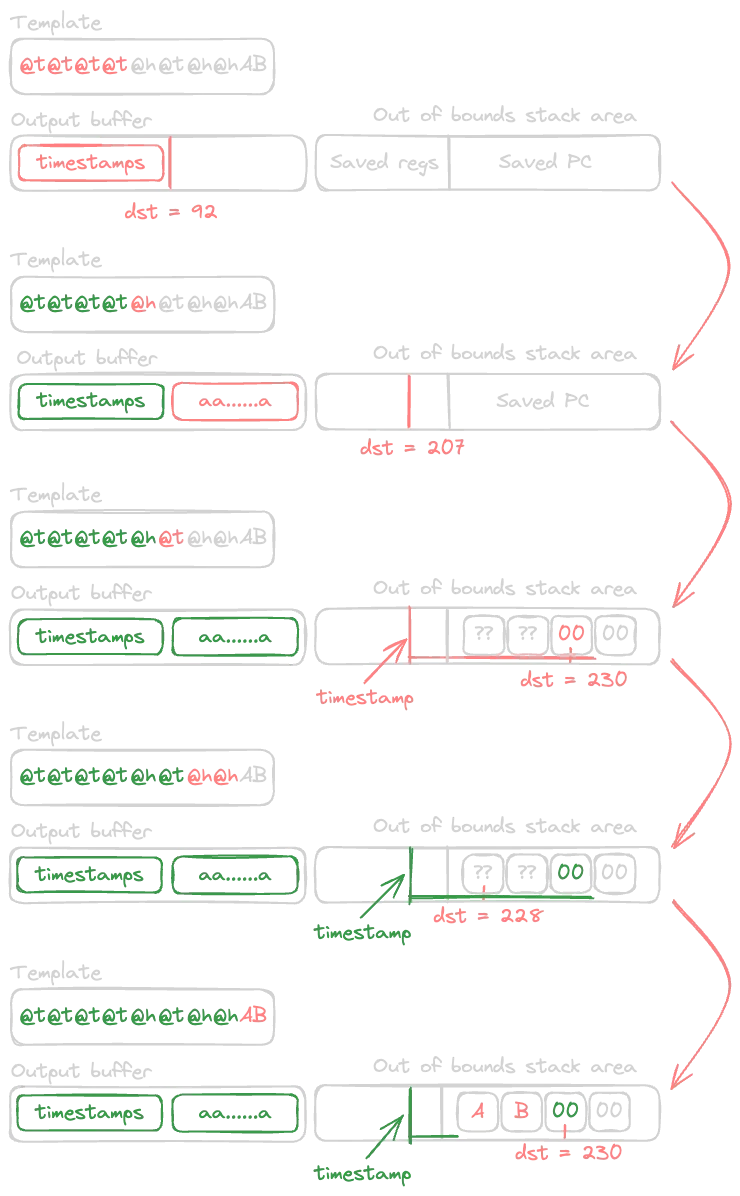
set system.msg stream_opening @t@t@t@t@h@t@h@hAB
where A and B are the lower bytes of the address of the next stage in the configuration segment. The exploit chain is triggered by making an HTTP request using the http_head command with a "domain" name of a specific size:
http_head aaaaaaaaaaaaaaaaaaaaaaaaaaaaaaaaaaaaaaaaaaaaaaaaaaaaaaaaaaaaaaaaaaaaaaaaaaaaaaaaaaaaaaaaaaaaaaaaaaaaaaaaaaaaaaaaaaa
Once the request is triggered, Gecko OS emits a stream_opening system log message which eventually makes its way to print_system_msg. The changes in the stack frame of the routine as it processes the log message are shown in the diagram below:
Exploitation
Having a vulnerability and an exploitation path, the team set out to develop the exploit chain. The WGM160P devkit proved incredibly useful for a couple of reasons. Firstly, different scenarios could be easily deployed and tested using Gecko OS Studio on the test module. Secondly, and perhaps most importantly, exploit code could be debugged at various stages by simply inspecting the side effects through SWD on the test module. The latter could not be (easily) done with production modules, such as the one used in the JuiceBox, because those are locked down.
One of the main selling points of the platform is that the entire update cycle and device auth{n,z} parameters are managed by the vendor, who in turn allows application designers to manage these through Zentri DMS. That means production units really do not need any form of debuggability, making it a safe (and more secure) bet to simply disable all unnecessary interfaces from the get go.
Besides that, there were no mitigations to speak of to hinder exploit development, so getting control flow control was straightforward. What made development a bit more involved is the number of stages that were forced as well as limitations to testing on the device itself.
Testing on production
Regardless of the lack of JTAG/SWD on production modules, the team needed to test the exploit chain against the device prior to the event to make sure it actually works. They ran into hiccups due to interactions between the deployed application code on the device and the OS which is not represented in the development setup. However, they found a way to get a bit of insight into what was happening so they could adjust as needed.
Gecko OS provides a mechanism for reporting operational faults, such as hard faults. If a fault handler is triggered, it stores the values of a few key registers to flash then reboots to a sane state. These faults can be listed using the faults_print command:
0: Hard Fault Exception, PC:0x42424242 LR:0x0003F8AB HFSR:0x40000000 CFSR:0x00000001 MMFAR:0x00000000 BFAR:0x00000000
1: Hard Fault Exception, PC:0x000123A0 LR:0x00077C6B HFSR:0x40000000 CFSR:0x00008200 MMFAR:0x00000000 BFAR:0x400AE2C2
2: Hard Fault Exception, PC:0x000123A0 LR:0x00077C6B HFSR:0x40000000 CFSR:0x00008200 MMFAR:0x00000000 BFAR:0x400AE2C2
3: Hard Fault Exception, PC:0x000123A0 LR:0x00077C6B HFSR:0x40000000 CFSR:0x00008200 MMFAR:0x00000000 BFAR:0x400AE2C2
4: Hard Fault Exception, PC:0x000123A0 LR:0x00077C6B HFSR:0x40000000 CFSR:0x00008200 MMFAR:0x00000000 BFAR:0x400AE2C2
5: Hard Fault Exception, PC:0x000123A0 LR:0x00077C6B HFSR:0x40000000 CFSR:0x00008200 MMFAR:0x00000000 BFAR:0x400AE2C2
6: Hard Fault Exception, PC:0x000123A0 LR:0x00077C6B HFSR:0x40000000 CFSR:0x00008200 MMFAR:0x00000000 BFAR:0x400AE2C2
7: Hard Fault Exception, PC:0x000123A0 LR:0x00077C6B HFSR:0x40000000 CFSR:0x00008200 MMFAR:0x00000000 BFAR:0x400AE2C2
These listings provided just enough information to proceed with exploit development on the JuiceBox, until the team ran into safe mode.
"Rejuicing" the JuiceBox, or how do we leave Safe Mode?
Safe Mode is a recovery mechanism implemented by Gecko OS for when the system is consistently misbehaving. By default it is triggered when 8 faults have occurred. When the system is in safe mode, most features are disabled including WiFi connectivity, and there is a limited number of commands available through a serial interface.
While developing the exploit the team inadvertently dropped into safe mode. This could have been avoided by using the faults_reset command before the 8 fault limit had been reached, but they were not aware of safe mode at the time.
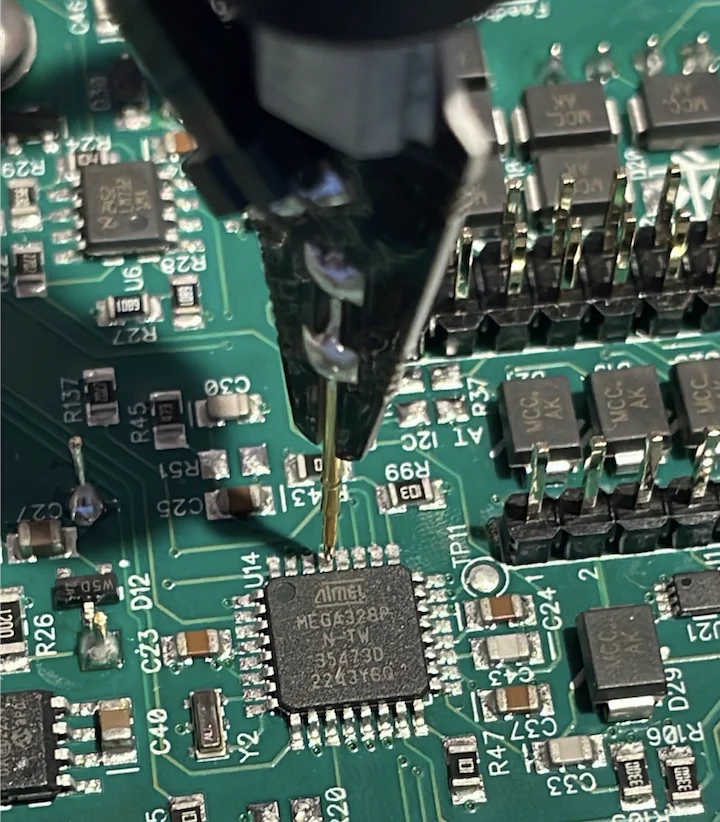
They had to somehow exit safe mode and return to the normal mode of operation. One problem: the serial port used to interact with safe mode is by default hooked up to the Atmel ATMega328P charging controller as a communication channel between both processors. As long as the Atmel controller is running, the necessary commands to exit safe mode on the WGM160P cannot be issued.
So the Atmel chip had to be disabled. The team went for the simple solution of holding its nRESET pin low, putting it in programming mode and keeping the serial port clear to issue the necessary commands:
Staging the exploit
The final exploit uses three stages in total:
- An initial 16-byte shellcode kickstarter stored in the configuration section as the
system.security_key, responsible for triggering the next stage. - A larger second stage shellcode block stored in the system messages themselves, with the exception of the one needed for the exploit. These are stored in the kernel data memory region and are referenced by a static location that can be reached by the first stage. The only limitation to shellcode in this stage is that it cannot contain NUL bytes or
@signs, as those may not match the allowed tags for a given message. This stage is responsible for reading and executing the final payload. - The payload, saved as a file on the device's flash file system. This is done by simply using the remote terminal to download a file and store it to flash at the setup stage of the exploit chain.
Out of all the exploits prepared before going to the event, this was by far the most complex and had the highest number of moving parts, so the team spent a good amount of time making sure it was as reliable as possible prior to their flight to Tokyo.
Avoiding collisions?
One important point kept in mind was to aim for vulnerabilities that aren't so immediately obvious. The team believed this vulnerability was not as low hanging as others might be, reasoning that focusing on the base OS instead of the vendor-provided application code might net vulnerabilities other teams would not focus as much on.
Their attempt against the JuiceBox was the third out of a total of six attempts targeting the JuiceBox. One of the first two attempts failed, so they were hopeful their odds of colliding had shrunk considerably. But the first successful attempt targeting the JuiceBox used the exact same vulnerability. This triggered the team to rethink their exploit for another target, the ChargePoint Home Flex, and they decided to spend a sleepless night finding a completely new set of vulnerabilities during the event.
Root cause
The core mistake is in print_system_msg: it formats a template into a fixed 192-byte stack buffer (formatted_message_buffer) and advances dst for every byte written, but the loop only ends at the end of the template and never checks how many characters have been written to the result buffer or whether that is still in bounds. The @t tag is the most direct way to abuse this, writing 23 bytes per tag while the template can hold up to 15 tags, for 345 bytes against a 192-byte buffer.
A second flaw compounds it: the @h handler adds the return value of snprintf_signed_checked to dst indiscriminately. When dst is already past message_buffer_end, the computed maxn is negative, the checked snprintf returns -1 without writing, and print_system_msg has no error handling for that condition, so dst is decremented. When dst is still in bounds but the replacement value is larger than the buffer, the return value is the number of bytes it would have written, so dst is incremented out of bounds. That second case means exploitation would still be possible even if stack canaries were enabled.
The design also contributes: Gecko OS exposes a lot of core kernel and plugin features through a command line interface, and the remote terminal feature appears to be accessible in a production setting on the JuiceBox 40. The team notes there were no mitigations to speak of to hinder exploit development.
Impact
In terms of design, the JuiceBox's charging controller is separated from the connectivity processor, so it is likely that damage to the charging process is minimal. However, the team did not investigate the serial protocol between the connectivity processor and the charging controller sufficiently to rule out the potential for physical/electrical damage completely.
Additionally, the BLE service exposed by the Bluetooth module provides a secondary interface to the Gecko OS command line, which makes it possible to gain access to the credentials for the WiFi network the device is onboarded to. This can be done by mounting a deauth attack, which causes the JuiceBox to reboot and enter configuration mode, re-enabling the BLE service. Since the BLE connection requires no authentication, an attacker could use it to retrieve the WiFi credentials and let the device reconnect. After that, it would be possible to exploit the charger to gain a stealthy foothold in the network or mount further attacks on other devices in the same network.
Fix
Silicon Labs published a security advisory regarding all the vulnerabilities in Gecko OS that were used in Pwn2Own Automotive. As of the time of writing, the advisory simply states that no fix will be made available, quoting the advisory:
Gecko OS is in end of life (EOL) status so no fix will be offered.
In theory, the use of a microcontroller combined with an RTOS that has all the essential functionality built-in, with an online platform that can be used to manage and OTA update the devices, sounds great. However, the support period becomes limited to how long that platform vendor is willing to keep maintaining the platform. Switching to a different platform or applying patches to a proprietary OS is almost impossible for such devices. This example highlights one of the major issues with IoT security: the support window for software could end much earlier than the expected lifespan of the hardware, and such an issue is not always due to the device vendor. It can also occur due to third-parties that constitute a critical part of the software supply chain for a piece of equipment.
Variants to test
- Other Gecko OS system message tags. The
@ttag is the clearest overflow, but the@hhandler's unchecked use of thesnprintfreturn value is a separate bug. Try templates that mix@hwith a long host value, or with@tto pushdstout of bounds first, and watch for a decremented or incrementeddstin a debugger. A positive result is a write outsideformatted_message_bufferwithout any@ttag. - Other fixed-size formatting buffers in the same OS. Look for routines that format templates or log messages into a stack buffer and advance a pointer by a return value. A positive result is a template whose expansion can exceed the buffer size while the loop only terminates on the template's end.
- Other message types with type-specific tags. The report notes that tags specific to a message type are not allowed in combination with any other tags besides
@t, and that the caller does not provide multiple instances of the same argument. Try templates with repeated tags of the same type and check whether the argument array is consumed in the expected order. A positive result is a mismatch between the number of tags and the number of arguments, leading to reads or writes of unintended values. - Production exposure of the remote terminal. The report notes there was apparently an open administrative interface reachable by other devices on the network. On other devices, check whether the remote terminal or command line is reachable in production and whether it requires authentication. A positive result is an unauthenticated command interface on the same network.
- BLE command line without authentication. The report describes a BLE service that provides a secondary interface to the Gecko OS command line, and a BLE connection that requires no authentication. On other devices, check whether a BLE service exposes a command line and whether it can be reached after a deauth-induced reboot into configuration mode. A positive result is command execution or credential retrieval over BLE without authentication.
- Safe mode recovery paths. The report shows that holding the Atmel
nRESETpin low frees the serial port for safe mode commands. On other devices, check whether safe mode can be exited or whether the serial channel to a companion MCU can be freed by holding a reset pin low. A positive result is regaining normal operation after a fault-induced safe mode. - Fault reporting as a debugging oracle. The
faults_printcommand revealed register values after hard faults. On other devices, check whether fault listings are available in production and whether they leakPC,LRor fault status registers. A positive result is a fault listing that reveals control-flow state useful for exploit development.
What happened, in plain words
At a hacking contest called Pwn2Own Automotive 2024, held in Tokyo, a team of researchers demonstrated attacks against three different electric vehicle (EV) chargers: the Autel MaxiCharger (MAXI US AC W12-L-4G), the ChargePoint Home Flex, and the JuiceBox 40 Smart EV Charging Station with WiFi. This article is about the JuiceBox 40.
An EV charger is the box on your wall that charges an electric car. The JuiceBox 40 is a "smart" charger: besides delivering electricity, it connects to your home WiFi network so you can control it from a phone app and so the manufacturer can send it software updates. That network connection is what made it interesting to attack.
The team found one vulnerability in the charger's software. A vulnerability is a mistake in a program that lets someone make it behave in a way its author did not intend. This one was later given an official identifier, CVE-2024-23938. CVE stands for Common Vulnerabilities and Exposures: it is a public catalogue number so that everyone can refer to the same bug unambiguously.
During the contest, the team used this bug to run their own code on the charger. To do that they only needed to be able to reach the charger over the network, which was the practical choice at the event. The report also notes that being within Bluetooth range of the device is enough, with a few extra steps. Bluetooth is the short-range radio technology your phone uses for wireless earbuds; "in range" usually means a few metres.
Background
Hardware
Before attacking software, it helps to know what is inside the box. The report describes the JuiceBox 40 as relatively straightforward hardware, with a few main components:
- Silicon Labs WGM160PX22KGA3 application + WiFi processor
- Silicon Labs MGM13S12A Bluetooth/BLE processor
- Atmel ATMega328P MCU, which the team suspects is the charging/safety controller
- Atmel M90E36A metering IC
In plain terms: a processor is a small computer chip. The WGM160P is the chip that runs the charger's main software and handles WiFi. The MGM13S12A is a separate chip that handles Bluetooth (BLE stands for Bluetooth Low Energy, a power-saving variant). An MCU, or microcontroller unit, is a small processor often used to control physical things; the team believes the ATMega328P is the one that actually manages the charging and safety functions. An IC is an integrated circuit, a chip; the M90E36A is a metering chip, meaning it measures electrical usage.
The image above is an annotated photo from ZDI's exploratory blog post, labelling and highlighting the components listed above. ZDI is the Zero Day Initiative, the organisation that runs Pwn2Own. The team focused on the software hosted by the WGM160P processor as the main target for the competition. They did not delve deeply into the MGM13S12A front, though they consider it an interesting attack surface choice for future research. "Attack surface" means all the ways an attacker could possibly interact with a system; the more entry points, the larger the surface.
Setup
Before the event, the team did an initial online investigation of the available targets and picked those they deemed most promising. This is normal practice: you read public information about a device before buying it, the same way you might read reviews before buying a car.
For the JuiceBox they found posts on Reddit about charger issues and how to fix them using a "remote terminal" accessible to devices on the same network as the charger. A remote terminal is a text-based control interface: you type commands and the device executes them, like a chat window where the other side is a computer.
They also found YouTube videos of owners documenting fixes and modifications, and posts with photos of the internals of other models by the same vendor. A post on iFixit about the JuiceBox EVSE explaining how to replace a relay gave hints about the main hardware components of the line-up. EVSE stands for Electric Vehicle Supply Equipment, the formal name for a charging station. A relay is an electrically operated switch.
The photo below, from that article, shows a large shielded module labelled "ZENTRI" and "AMW106":
A shielded module is a metal-covered circuit board section, shielded to stop radio interference. The label told the team which WiFi module older JuiceBox units used.
Most interesting of all, there was apparently an open administrative interface that any other device on the network could interact with. The main takeaways from this reconnaissance were:
- Older versions of the JuiceBox 40 were based on a WiFi module called the
AMW106, manufactured by Zentri. These versions run ZentriOS. - Newer versions are perhaps based on a successor WiFi module, the
WGM160P. These versions run a successor to ZentriOS, called Gecko OS. - Development modules and kits for both the
AMW106and theWGM160Pplatforms were easily sourceable from many resellers. - Both ZentriOS and Gecko OS have a plethora of features (e.g. the remote terminal feature) that seem to be accessible in a production setting on the JuiceBox 40.
An operating system (OS) is the software that manages a computer's basic functions; on a phone it is Android or iOS, and on these small chips it is ZentriOS or Gecko OS. A development kit is a small board sold to engineers so they can write software for a chip without owning the final product. "Production setting" means the device as sold to ordinary customers, as opposed to a lab prototype.
The team ordered the charger and continued investigating while waiting for it to arrive from the US.
Getting closer to the firmware
Firmware is the software permanently installed on a device, the equivalent of the operating system and apps on your phone but built into the hardware. The team started perusing the documentation of both ZentriOS and Gecko OS, focusing on how the update procedure is implemented, and looking for a way to download a firmware image. A firmware image is a single file containing the whole firmware, ready to be copied onto a device. If you can get the image, you can study it on a normal computer without needing the device at all.
The main points learned were:
- Both operating systems consist of a core kernel and "built-in plugins" segment, in addition to an optional application that a developer could bundle with a specific build.
- Both systems had a fully-managed device auth{n,z} and updating mechanism in place, backed by Zentri Device Management Service (DMS).
- Both operating systems were designed to function both as development platforms and add-on turn-key solutions. The latter means the platform can be used as a sort of "connectivity" add-on in combination with a discrete application processor. This design decision explains the choice of exposing a lot of the features from the core kernel and associated plugins through a command line interface, making the platform easier to integrate with new or existing designs.
A kernel is the central part of an operating system that controls the hardware and runs other programs. Plugins are optional extra pieces of software that add features. Auth{n,z} is shorthand for authentication and authorisation: authentication is proving who you are (like logging in), authorisation is what you are then allowed to do. A command line interface (CLI) is the text interface mentioned earlier, where you type commands instead of clicking buttons. A "turn-key solution" is something you can use as-is without building it yourself.
Exploring Zentri DMS further, the team learned it was possible to register an account and create test firmware bundles for specific platforms without having an actual device. They created a test WGM160P module bundle and set its firmware version to the latest stable base image of Gecko OS, which was 4.2.7 at the time. A base image is the standard firmware before any vendor customisation. Afterwards they could see a listing of the "files" that constituted the firmware, as well as a JSON file specifying how these files were laid out in internal flash:
JSON is a simple text format for structured data, like a shopping list written in a way both people and programs can read. Flash is the storage chip inside a device that keeps its contents when the power is off, like the storage in a USB stick. The listing showed the team exactly which pieces made up the firmware and where each piece sits in storage, which is a big head start.
With these files in hand, the team could start vulnerability discovery on the base OS much faster than anticipated.
Development setup
As a rule of thumb, it is a good idea to have at least one backup device when diving into a piece of hardware. As Andrew "bunnie" Huang put it:
My rule is to ideally acquire three: one to totally trash and take apart (so this can literally come from a trash heap); one to tweak and tune; and one to keep pristine, so you have a reference to check your results.
Realistically, the team wanted to avoid buying a second charger to save potentially unnecessary costs, but a second unit would be handy in case something goes wrong. For most targets this was not financially feasible, except for the JuiceBox 40, in a way. They opted for purchasing a WGM160P Starter Kit (SLWSTK6121A). The kit came with a WGM160P development module and a base board exposing multiple interfaces over a USB connection:
USB is the standard rectangular plug you use to connect a mouse or a phone charger. The point of the kit is that it contains the same processor as the charger, but in a form designed for engineers to experiment with, so mistakes do not destroy the real product.
They got it up and running quickly with Gecko OS Studio. In the process they downloaded the SDK targeting Gecko OS 4.2.7, which came with object files for the core kernel and plugins sections:
user@birdie 4.2.7-11064 % find . -name '*.a'
./tools/toolchains/gcc/arm/osx/libgcc.a
./hardware/platforms/gecko_os/wgm160p/libs/gcc/gecko_os_libraries/plugins_core/lib_network_protocols_websocket.a
./hardware/platforms/gecko_os/wgm160p/libs/gcc/gecko_os_libraries/plugins_core/lib_network_util_arp_lock.a
...
./hardware/platforms/gecko_os/wgm160p/libs/gcc/gecko_os_libraries/kernel_shared/[redacted].a
./hardware/platforms/gecko_os/wgm160p/libs/gcc/gecko_os_libraries/kernel_shared/gecko_os_kernel_core_dump.a
...
Line by line: the first line is a command typed into a terminal on a computer. user@birdie is the account and machine name, 4.2.7-11064 is the version of the software being worked on, and % is the prompt waiting for input. find . -name '*.a' means "search the current folder and everything below it for files whose name ends in .a". The .a extension marks a library file, a bundle of compiled code that other programs can reuse. The lines that follow are the results: paths to library files for the compiler toolchain, for network plugins such as websocket support, and for kernel pieces such as core dump handling. The ... lines mean the list was shortened for the article.
An SDK, or software development kit, is a package of tools and files that a manufacturer gives developers so they can build software for a platform. Object files are the intermediate result of compiling source code: not quite readable text, not quite a finished program.
While the team had already found the vulnerability at that point, these files proved helpful while developing the exploit. An exploit is the concrete technique that turns a vulnerability into an actual effect, the difference between knowing a door lock is weak and actually opening it. The files were used to better understand how the kernel, plugins and vendor apps are loaded in memory, and which useful data structures could be reliably located in memory during exploitation. Memory here means RAM, the working space a running program uses, which is wiped when power is lost. A data structure is an organised way of storing related pieces of information, like a table with rows and columns.
The development kit also allowed much easier development and debugging of the exploitation steps using the enabled On-Chip Debugging (OCD) interface. Debugging means watching a program run step by step to see what it is doing. On-Chip Debugging is a hardware feature that lets an engineer pause the chip and inspect its insides; it is normally switched off on devices sold to customers.
Finding it
The team started discovery by looking for vulnerabilities in the base images acquired from the Zentri DMS platform, instead of waiting for the charger to show up. From the initial assessment they knew a good part of the functionality provided by the base Gecko OS is likely also part of the viable attack surface on the JuiceBox. In other words: if the standard operating system has a bug, the charger probably has it too, because the charger is built on that same operating system.
It took only a few days of analysis of the base image before they discovered the vulnerability that would form the basis of their Pwn2Own entry: a bug in the Gecko OS system message logging component, triggerable at will using the OS's remote terminal feature.
Gecko OS system messages
Gecko OS provides the basic expected feature set of an embedded operating system like hardware/software interfacing, scheduling and resource management. An embedded operating system is one built into a device rather than a general-purpose computer. Scheduling means deciding which task runs when; resource management means sharing memory and processor time between tasks.
Unlike many embedded OSes, it offers many high level features because of its design as a turn-key solution for IoT applications. IoT stands for Internet of Things: everyday devices, from kettles to doorbells, that connect to the internet. For example, there is a config web UI on top of an onboarding WiFi AP setup component used for onboarding the device onto a user's WiFi network. A web UI is a page you open in a browser to configure something. An AP, or access point, is a WiFi network the device itself creates temporarily so your phone can connect to it and tell it your home WiFi details; this is the same trick a smart speaker uses during setup.
It also provides high level APIs for application-level functions like HTTP, TLS, a TCP client and server, and many more built into the OS or one of its subcomponents. An API, or application programming interface, is a defined way for one piece of software to ask another to do something, like a restaurant menu: you do not go into the kitchen, you order from the list. HTTP is the language browsers and websites use to exchange pages. TLS is the encryption layer that makes HTTPS secure. TCP is the basic protocol for reliable data delivery over a network; a client asks, a server answers.
Handling many of these high level actions involves many moving parts, and there are points during these interactions when it makes sense to provide a status update, for example in a human readable format for a user or a parseable text-based format for a secondary application processor. "Parseable" means a program can read it reliably. For that purpose, Gecko OS contains a system message logging facility which writes customizable messages to whatever logging interface is in use (serial, network, etc.) when certain events occur. A serial interface is a simple wired connection that sends data one bit at a time, historically used to connect a computer to a terminal.
The message types and their default values, per the Gecko OS documentation for the system.msg variable, are:
| Message Name | Default Value |
|---|---|
| initialized | [@tReady] |
| stream_closed | [@tClosed: @c] |
| stream_failed | [@tOpen failed] |
| stream_opened | [@tOpened: @c] |
| stream_opening | [@tOpening: @h] |
| sleep | [@tSleep] |
| wlan_failed | [@tJoin failed] |
| wlan_joined | [@tAssociated] |
| wlan_joining | [@tAssociating to @s] |
| wlan_leave | [@tDisassociated] |
| softap_joined | [@t@m associated] |
| softap_leave | [@t@m disassociated] |
| ethernet_starting | [@tEthernet Starting] |
| ethernet_started | [@tEthernet Started] |
| ethernet_stopped | [@tEthernet Stopped] |
| ethernet_failed | [@tEthernet Failed] |
A variable is a named storage slot holding a value, like a labelled box. system.msg is the box that holds these message templates. A stream is an open connection over which data flows, for example a network connection in progress. WLAN means wireless local area network, i.e. WiFi. Ethernet is the wired network standard. SoftAP refers to the temporary access point mentioned above.
These messages can be specified by setting the Gecko OS system.msg variable with the message name and the desired message text. For example, to change the initialized message to log "Rise and shine" instead of the default message, one could issue:
set system.msg initialized "Rise and shine"
This is a single command typed into the command line. set means "assign a value". system.msg is the variable. initialized is which message to change, and "Rise and shine" is the new text, in quotes because it contains spaces. After this, whenever the device finishes starting up, it would log "Rise and shine" instead of the default.
System messages support a small subset of tags to add dynamic information to the logged message. They can be thought of as templates, where some parts are string literals and other parts are placeholder variables. A template is a pattern with blanks to fill in, like a form letter. A string literal is text that appears exactly as written. A placeholder is a marker that gets replaced with a real value when the message is produced.
Some tags are supported by all message types, like @t, which is replaced with a timestamp. Others are only supported by a small selection of message types. For example, @c prints a stream handle, which only makes sense for stream_closed and stream_opened. A handle is a number the system uses to refer to an open connection. The availability of tags per the Gecko OS documentation is:
| Tag | Description | Tag is available for ... |
|---|---|---|
| @t | Timestamp | Can be set for all messages, but displays a value only for ethernet messages. |
| @s | SSID | WLAN messages |
| @c | Stream handle | stream_closed, stream_opened |
| @h | Connection host/port | stream_failed, stream_opening |
| @m | Client MAC Address | softap_joined, softap_leave |
SSID is the name of a WiFi network. A port is a numbered channel on a computer, so one machine can run several services at once. A MAC address is a hardware identifier burned into a network chip.
For example, to log a message indicating the connection host/port pair (if any), a static message and a timestamp while a stream is being opened for an HTTP request, one could issue:
set system.msg stream_opening "[@t] Connecting to to @h"
Again a single command. It changes the stream_opening message, the one logged when a connection is being opened, to the text [@t] Connecting to to @h. The @t will be replaced by a timestamp and @h by the host and port being contacted. The doubled "to to" is a typo in the original command text, harmless because it is just literal text.
The main limitation is that a system message template can be at most 32 bytes in length, including a terminating NUL byte. A byte is a unit of storage, roughly one character of text. A NUL byte is a byte with value zero, used in this kind of software to mark the end of a piece of text. Since tags denote dynamic data that is likely longer than the space the tag occupies, the actual printed message can be much longer than 32 bytes. For example, @t is two characters in the template but produces a full timestamp when printed. This gap between the size of the template and the size of the result is the seed of the bug.
Out of bounds write
Initially the team looked for "classic" vulnerabilities involving the usual suspects like memcpy calls with attacker controlled data and count, or snprintf calls where the return value is misused. memcpy is a standard function that copies a given number of bytes from one place to another; if an attacker controls the number, they can make it copy too much. snprintf is a standard function that formats text into a buffer with a stated maximum size. A buffer is a fixed-size area of memory set aside to hold data, like a row of boxes. "Out of bounds" means writing past the end of such an area, into neighbouring memory that was meant for something else.
The latter landed them in a routine that seemed responsible for applying dynamic data to system message templates and logging the result:
void print_system_msg(int msg_id, system_msg_arg *args)
{
  char cVar1;
  char **ppcVar2;
  int iVar3;
  byte *snrpintf_generic_arg;
  char *dst;
  char *template_;
  size_t n;
  uint snprintf_uint_arg;
  byte local_190;
  undefined scratch_buf_2 [35];
  byte scratch_buf_1 [132];
  char formatted_message_buffer [192];
  undefined message_buffer_end [4];
  system_message_entry *message_list;
  char *fmt;
  byte format_tag;

  message_list = (system_message_entry *)system_message_list;
  template_ = message_list[msg_id].message_format;
  if (message_list[msg_id].message_format[0] != '\0') {
    dst = formatted_message_buffer;
    while (cVar1 = *template_, cVar1 != '\0') {
      if (cVar1 == '@') {
        format_tag = template_[1];
        if (format_tag == 'm') {
          ppcVar2 = &args->value2;
          args = (system_msg_arg *)&args->value1;
          FUN_0002a018(*ppcVar2,dst);
          dst = dst + 0x11;
        }
        else if (format_tag < 'n') {
          if (format_tag == 'c') {
            snrpintf_generic_arg = (byte *)args->value2;
            args = (system_msg_arg *)&args->value1;
            fmt = "Running     : %u";
snprintf_into_dst:
            iVar3 = snprintf_signed_checked
                              (dst,(int)(message_buffer_end + -(int)dst),fmt + 0xe,
                               snrpintf_generic_arg);
            dst = dst + iVar3;
          }
          else if (format_tag == 'h') {
            snprintf_uint_arg = args->value1;
            iVar3 = snprintf_signed_checked
                              (dst,(int)(message_buffer_end + -(int)dst),"%s",args->value2);
            args = args + 1;
            dst = dst + iVar3;
            if (snprintf_uint_arg != 0) {
              fmt = dst + 1;
              *dst = ':';
              iVar3 = snprintf_signed_checked
                                (fmt,(int)(message_buffer_end + -(int)fmt),"%u",snprintf_uint_arg);
              dst = fmt + iVar3;
            }
          }
        }
        else {
          if (format_tag == 's') {
            n = args->value1;
            memcpy(scratch_buf_2,args->value2,n);
            local_190 = (byte)n;
            args = args + 1;
            escape_hex(scratch_buf_1,&local_190);
            snrpintf_generic_arg = scratch_buf_1;
            fmt = "Web browser : %s";
            goto snprintf_into_dst;
          }
          if ((format_tag == 't') &&
             (iVar3 = print_timestamp_to_string(scratch_buf_1,1), iVar3 == 0)) {
            memcpy(dst,scratch_buf_1,10);
            dst[0xb] = '|';
            dst[10] = ' ';
            dst[0xc] = ' ';
            memcpy(dst + 0xd,scratch_buf_1 + 0xb,8);
            dst[0x15] = ':';
            dst[0x16] = ' ';
            dst = dst + 0x17;
            *dst = '\0';
          }
        }
        template_ = template_ + 2;
      }
      else {
        *dst = cVar1;
        template_ = template_ + 1;
        dst = dst + 1;
      }
    }
    log_message(formatted_message_buffer,(int)dst - (int)formatted_message_buffer);
  }
  return;
}
This is C source code, the language these small systems are often written in. You do not need to read every line; the shape matters. The function is called print_system_msg and takes two inputs: msg_id, which message type this is, and args, a list of values to fill into the template. Inside, several local variables are declared, including three buffers: scratch_buf_2 of 35 bytes, scratch_buf_1 of 132 bytes, and formatted_message_buffer of 192 bytes. The last one is where the finished message is built. dst is a pointer, a variable that holds a memory address, and it starts at the beginning of formatted_message_buffer. template_ points at the chosen template text.
The while loop walks through the template one character at a time. If the character is not @, it is copied straight into the output and dst moves forward by one. If it is @, the next character decides which tag it is: m, c, h, s or t. Each branch writes something into the output and moves dst forward by however much it wrote. When the loop reaches the end of the template, it calls log_message with the buffer and the number of bytes written. The crucial detail: nothing in the loop checks whether dst has gone past the end of the 192-byte buffer.
To summarise: the routine is invoked with a msg_id and a list of arguments that might apply to the message, depending on the type of system message. msg_id is an index into a global list of system message templates, initialised to the default Gecko OS set and stored in a configuration segment in internal flash. An index is a position number, like the number of a shelf in a library. A configuration segment is a reserved area of storage holding settings.
The function reserves a 192-byte stack buffer for the resulting message. The stack is a region of memory used for short-lived data while a function runs; think of it as a stack of sticky notes, each function adding its own and removing it when done. It loops over the characters in the template. For each @ character, it checks if it is one of the known template tags and fills it in. Other characters are copied into the result directly. The loop ends when it reaches the end of the template; it never checks how many characters have been written to the result buffer and whether that is still in bounds.
The most glaring issue is in handling the @t tag for timestamps:
if ((format_tag == 't') && (iVar3 = print_timestamp_to_string(scratch_buf_1,1), iVar3 == 0)) {
    memcpy(dst,scratch_buf_1,10);
    dst[0xb] = '|';
    dst[10] = ' ';
    dst[0xc] = ' ';
    memcpy(dst + 0xd,scratch_buf_1 + 0xb,8);
    dst[0x15] = ':';
    dst[0x16] = ' ';
    dst = dst + 0x17;
    *dst = '\0';
}
Line by line: the if checks that the tag is t and that the timestamp was produced successfully. memcpy(dst,scratch_buf_1,10) copies the first 10 bytes of the timestamp to the output. The next lines write a pipe character and spaces at specific offsets to lay out the text. A second memcpy copies 8 more bytes. Two more characters are written, then dst = dst + 0x17 moves the pointer forward by 23 bytes (0x17 is hexadecimal for 23). Finally *dst = '\0' writes a NUL byte at the new position. The routine first writes the current time to a scratch buffer, then memcpys the contents a few times to the location addressed by dst while writing a bit of formatting characters. Afterwards it increments dst by 17h/23d positions and writes a NUL byte. At no point does it check that it wrote past the limit of formatted_message_buffer.
Given that messages can be 31 characters of usable text at most, and the @t tag uses 2 characters each, at most 15 @t tags fit in a message. Each @t tag produces 23 bytes of output, so 15 tags write 23 * 15 = 345 bytes of text, quite a bit larger than 192. That easily goes out of bounds of the output stack-allocated buffer and into saved registers and higher stack frames. A register is a tiny, very fast storage slot inside the processor. A stack frame is one function's slice of the stack; "higher stack frames" are the slices belonging to the functions that called this one. Overwriting them means changing data the program relies on to know where to return when the current function finishes.
Another peculiarity is how replacement values are passed in through the args parameter: an array of values used to replace placeholder tags other than @t. An array is an ordered list of values. There is no correlation between the provided args array and the expected matching tag, so there is an implicit ordering of occurrence of arguments and tags specified in the template. Once an argument is used, the function moves on to the next element in the array. This could be fine, because tags specific to a particular message type are not allowed in combination with any other tags besides @t. Nonetheless, there is a functional issue when multiple occurrences of the same tag are present: the caller does not provide multiple instances of the same argument to match the number of tags used in a template. This peculiarity was a key ingredient for the exploit technique covered later. In everyday terms: the function assumes each placeholder appears once and takes the next value from the list each time; if you repeat a placeholder, it runs out of matching values and starts reading whatever comes next.
Controlling saved PC
Looking at the stack layout, the buffer the routine writes into is exactly 232 bytes away from the saved PC. The PC, or program counter, is the register that tells the processor which instruction to run next. When a function is called, the address to return to afterwards is saved on the stack; overwriting that saved value lets an attacker redirect execution. All that is needed is 10 @t tags resulting in 230 bytes followed by 2 literals before starting to overwrite the saved PC. This allowed overwriting the PC with arbitrary data except for the literal @/40h and NUL bytes, since those indicate the end of the message and are not written by the subroutine to formatted_message_buffer. 40h is hexadecimal for 64, the character code of @.
Normally this might not be much of an issue, since a chain of ROP gadgets could perhaps be strung together assuming enough data can be written to the stack after the saved PC. ROP, return-oriented programming, is a technique where an attacker reuses small existing snippets of code, called gadgets, to build up behaviour without writing new code. However, the team was limited to only 31 bytes, and the 10 @t tags plus the 2 literals already used up 22, leaving only 9. That means fully overwriting PC and just a single additional saved register. This seemed highly restrictive and would require a very specific ROP gadget, and the team also wanted to avoid tuning the exploit to a specific build if possible. "Tuning to a specific build" means adjusting the exploit so it only works on one exact version of the software, which is fragile.
Pivoting to configuration section
After some more investigation, the team came up with another path. Gecko OS has one variable that allows writing 16 arbitrary bytes at a very predictable location on flash, which is also memory mapped as an executable region. "Memory mapped" means the processor can read that storage as if it were ordinary memory. "Executable" means the processor is allowed to run code stored there. By changing the device's configuration encryption key, the system.security_key variable, 16 bytes of shellcode can be stored in the configuration section in flash. An encryption key is a secret value used to scramble and unscramble data. Shellcode is a small piece of code whose only job is to start something bigger, like a key that opens a door to a room where the rest of the plan is waiting.
The location of this section can either begin at 0x2000 or 0x5000, which switches on every change to the device configuration. These are hexadecimal addresses. These switches are likely done to regulate wear on flash, and the team had to work around it for the final exploit, but it is essentially a 50% chance of success on the first try and 100% on the next, so the odds were good enough. Flash storage wears out after a limited number of writes, so spreading writes across two areas makes the chip last longer; the side effect is that the attacker has to guess which of the two areas is in use.
However, another issue appeared. To write a value of 0x2XXX or 0x5XXX to saved PC on the stack, the first two most significant bytes must be NUL. "Most significant" means the leftmost digits of a number, the ones that carry the most weight. This was not the case for any of the code running on the device, as all executable code started at sections mapped at locations where the 2nd MSB is not NUL. MSB means most significant byte. Additionally, the function writes no NUL bytes while processing the template except when the @t tag is used. The @t tag could theoretically be used to partially overwrite PC and set its 2nd MSB to NUL, but it would not be possible to set PC into the desired range using that tag either.
Despite this apparent dead end, the team did not want to drop the vulnerability yet, so they took time to conjure up a usable exploitation path.
Using every bit of machinery
After a few hours going back and forth between the drawing board and the subroutine's functionality, the team came up with a way to increase PC control, using a number of side effects in how the subroutine handled different tags and some subtle side effects caused by the functions it called. A side effect is an unintended consequence of an action, like knocking over a glass while reaching for a cup.
Host/connection tag
What if it were possible to go out of bounds, write a NUL byte using the @t tag at a desired location, then move the dst pointer back? Then an arbitrary literal followed by a NUL byte could be written. The answer turned out to be yes, by combining the host/connection tag @h and the @t tag. Here is the code section for handling @h:
else if (format_tag == 'h') {
    snprintf_uint_arg = args->value1;
    iVar3 = snprintf_signed_checked
                        (dst,(int)(message_buffer_end + -(int)dst),"%s",args->value2);
    args = args + 1;
    dst = dst + iVar3;
    if (snprintf_uint_arg != 0) {
        fmt = dst + 1;
        *dst = ':';
        iVar3 = snprintf_signed_checked
                        (fmt,(int)(message_buffer_end + -(int)fmt),"%u",snprintf_uint_arg);
        dst = fmt + iVar3;
    }
}
Line by line: the branch runs when the tag is h. It saves the port number from the arguments. It calls snprintf_signed_checked to write a string into dst, passing as the maximum allowed length the distance from dst to message_buffer_end. It then advances args to the next argument and adds the return value of snprintf to dst. If the port number is not zero, it writes a colon, then formats the port number the same way, and again adds the return value to dst.
Recall that dst is a pointer to the current position in the output string and message_buffer_end is right after the end of the output string buffer. The code calls snprintf to write a string value to dst with a maximum length of message_buffer_end - dst. Afterwards, the return value of snprintf, which for a POSIX-compliant implementation is how many bytes it would have written if the buffer was large enough, is added indiscriminately to dst. POSIX is a family of standards for operating system behaviour. On its own this already sounds like a vulnerability: what if the provided string args->value2 was much larger than the length of the buffer? More importantly, what if the condition where dst > message_buffer_end is hit, as is the case when abusing the vulnerability in handling the @t parameter?
It turns out this implementation of snprintf is a bit different:
int snprintf_signed_checked(char *dst,int maxn,char *fmt,...)
{
  undefined4 *puVar1;
  int res;

  puVar1 = (undefined4 *)DAT_20000984;
  if (maxn < 0) {
    res = -1;
    *puVar1 = 0x8b;
  }
  else {

  }
  return res;
}
This is a simplified view of the function. It takes a destination, a maximum length maxn, a format and further arguments. If maxn is negative, it sets the result to -1 and stores an error code 0x8b somewhere, then returns. The else branch is empty in this listing, meaning the real work is not shown. If the provided maxn argument is a negative number, it returns -1 and sets some error code without performing any other actions. There is no error handling in print_system_msg for this condition. After the @h tag is processed in the case where dst is already out of bounds of the buffer, the final result is that dst is decremented. Additionally, if dst is still within bounds but the provided replacement value is larger than the buffer size, this snprintf implementation behaves in the expected way and returns the number of bytes it would have written, meaning dst will be incremented out of bounds. The latter case is particularly interesting because it means that even if stack canaries were enabled, exploitation would still be possible. A stack canary is a known value placed on the stack that a program checks before returning from a function; if it has changed, the program knows something overwrote the stack and stops. The @h trick can move the pointer without tripping that check.
Putting it all together
The team finally had a usable exploitation path that allows using parts of the configuration segment as shellcode storage. Here is the PoC:
set system.msg stream_opening @t@t@t@t@h@t@h@hAB
A PoC, or proof of concept, is a minimal demonstration that an attack works. This command sets the stream_opening message template to a carefully chosen sequence. Reading it left to right: four @t tags, then @h, then @t, then @h, then @h, then the two characters A and B. Each tag expands to more bytes than it occupies, so the total written output is far longer than the 32-byte template limit, and the mix of @t and @h moves the write pointer forward and backward in a controlled way. A and B are placeholders in the article, not literal letters: where A and B are the lower bytes of the address of the next stage in the configuration segment. "Lower bytes" means the less significant part of a memory address, the part that is easiest to control.
The exploit chain is triggered by making an HTTP request using the http_head command with a "domain" name of a specific size:
http_head aaaaaaaaaaaaaaaaaaaaaaaaaaaaaaaaaaaaaaaaaaaaaaaaaaaaaaaaaaaaaaaaaaaaaaaaaaaaaaaaaaaaaaaaaaaaaaaaaaaaaaaaaaaaaaaaaaa
http_head is a Gecko OS command that performs an HTTP HEAD request, which asks a web server for the headers of a page without the page body. The long run of a characters is used as the domain name, of a specific size. Once the request is triggered, Gecko OS emits a stream_opening system log message which eventually makes its way to print_system_msg. The changes in the stack frame of the routine as it processes the log message are shown in the diagram below:
The diagram shows the changes in the stack frame of print_system_msg as it processes the log message.
Exploitation
Having a vulnerability and an exploitation path, the team set out to develop the exploit chain. The WGM160P devkit proved incredibly useful for a couple of reasons. Firstly, different scenarios could be easily deployed and tested using Gecko OS Studio on the test module. Secondly, and perhaps most importantly, exploit code could be debugged at various stages by simply inspecting the side effects through SWD on the test module. SWD, Serial Wire Debug, is the two-wire debugging connection used on these chips. The latter could not be (easily) done with production modules, such as the one used in the JuiceBox, because those are locked down. "Locked down" means the manufacturer has permanently disabled the debugging features, so you cannot pause the chip and look inside.
One of the main selling points of the platform is that the entire update cycle and device auth{n,z} parameters are managed by the vendor, who in turn allows application designers to manage these through Zentri DMS. That means production units really do not need any form of debuggability, making it a safe (and more secure) bet to simply disable all unnecessary interfaces from the get go. In other words: because updates and logins are handled centrally, the shipped device has no reason to expose debugging, so the manufacturer turns it off, which is good for security but makes the researchers' life harder.
Besides that, there were no mitigations to speak of to hinder exploit development, so getting control flow control was straightforward. A mitigation is a defence built into software to make bugs harder to exploit, such as the stack canary mentioned earlier. Control flow means the order in which a program executes its instructions; controlling it means making the program run the attacker's chosen code. What made development a bit more involved is the number of stages that were forced as well as limitations to testing on the device itself.
Testing on production
Regardless of the lack of JTAG/SWD on production modules, the team needed to test the exploit chain against the device prior to the event to make sure it actually works. JTAG is another hardware debugging interface, older and more capable than SWD. They ran into hiccups due to interactions between the deployed application code on the device and the OS which is not represented in the development setup. In plain terms: the real charger runs extra software from the manufacturer that the development kit does not, and that extra software changed how the exploit behaved. However, they found a way to get a bit of insight into what was happening so they could adjust as needed.
Gecko OS provides a mechanism for reporting operational faults, such as hard faults. A fault is a signal from the processor that something went wrong, for example trying to read memory that does not exist. If a fault handler is triggered, it stores the values of a few key registers to flash then reboots to a sane state. These faults can be listed using the faults_print command:
0: Hard Fault Exception, PC:0x42424242 LR:0x0003F8AB HFSR:0x40000000 CFSR:0x00000001 MMFAR:0x00000000 BFAR:0x00000000
1: Hard Fault Exception, PC:0x000123A0 LR:0x00077C6B HFSR:0x40000000 CFSR:0x00008200 MMFAR:0x00000000 BFAR:0x400AE2C2
2: Hard Fault Exception, PC:0x000123A0 LR:0x00077C6B HFSR:0x40000000 CFSR:0x00008200 MMFAR:0x00000000 BFAR:0x400AE2C2
3: Hard Fault Exception, PC:0x000123A0 LR:0x00077C6B HFSR:0x40000000 CFSR:0x00008200 MMFAR:0x00000000 BFAR:0x400AE2C2
4: Hard Fault Exception, PC:0x000123A0 LR:0x00077C6B HFSR:0x40000000 CFSR:0x00008200 MMFAR:0x00000000 BFAR:0x400AE2C2
5: Hard Fault Exception, PC:0x000123A0 LR:0x00077C6B HFSR:0x40000000 CFSR:0x00008200 MMFAR:0x00000000 BFAR:0x400AE2C2
6: Hard Fault Exception, PC:0x000123A0 LR:0x00077C6B HFSR:0x40000000 CFSR:0x00008200 MMFAR:0x00000000 BFAR:0x400AE2C2
7: Hard Fault Exception, PC:0x000123A0 LR:0x00077C6B HFSR:0x40000000 CFSR:0x00008200 MMFAR:0x00000000 BFAR:0x400AE2C2
Each line is one recorded fault, numbered 0 to 7. Hard Fault Exception is the processor's generic "something went badly wrong" signal. PC is the program counter at the moment of the fault, which tells you which instruction was running. LR is the link register, which holds the return address of the current function. HFSR, CFSR, MMFAR and BFAR are status registers that describe the fault in more detail; MMFAR and BFAR hold the memory address involved. The first line shows PC:0x42424242, a value in the program counter at the time of the fault. These listings provided just enough information to proceed with exploit development on the JuiceBox, until the team ran into safe mode.
"Rejuicing" the JuiceBox, or how do we leave Safe Mode?
Safe Mode is a recovery mechanism implemented by Gecko OS for when the system is consistently misbehaving. By default it is triggered when 8 faults have occurred. When the system is in safe mode, most features are disabled including WiFi connectivity, and there is a limited number of commands available through a serial interface. Think of it as a phone that boots into a minimal recovery screen after crashing too many times.
While developing the exploit the team inadvertently dropped into safe mode. This could have been avoided by using the faults_reset command before the 8 fault limit had been reached, but they were not aware of safe mode at the time. faults_reset clears the recorded fault count, so the device starts counting from zero again.
They had to somehow exit safe mode and return to the normal mode of operation. One problem: the serial port used to interact with safe mode is by default hooked up to the Atmel ATMega328P charging controller as a communication channel between both processors. As long as the Atmel controller is running, the necessary commands to exit safe mode on the WGM160P cannot be issued. The serial port is by default hooked up to the Atmel controller, so the necessary commands cannot be issued while it runs.
So the Atmel chip had to be disabled. The team went for the simple solution of holding its nRESET pin low, putting it in programming mode and keeping the serial port clear to issue the necessary commands:
A pin is a metal leg on a chip used for electrical connections. nRESET is the reset pin; holding it low means connecting it to the electrical ground level, which keeps the chip held in reset. The photo shows a probe connected to that pin.
Staging the exploit
The final exploit uses three stages in total:
- An initial 16-byte shellcode kickstarter stored in the configuration section as the
system.security_key, responsible for triggering the next stage. - A larger second stage shellcode block stored in the system messages themselves, with the exception of the one needed for the exploit. These are stored in the kernel data memory region and are referenced by a static location that can be reached by the first stage. The only limitation to shellcode in this stage is that it cannot contain NUL bytes or
@signs, as those may not match the allowed tags for a given message. This stage is responsible for reading and executing the final payload. - The payload, saved as a file on the device's flash file system. This is done by simply using the remote terminal to download a file and store it to flash at the setup stage of the exploit chain.
A payload is the code that does the actual work once access is gained. Staging means splitting the attack into small pieces, each one loading the next, because no single place has enough room for the whole thing. A file system is the way storage is organised into named files, as on your computer.
Out of all the exploits prepared before going to the event, this was by far the most complex and had the highest number of moving parts, so the team spent a good amount of time making sure it was as reliable as possible prior to their flight to Tokyo.
Avoiding collisions?
One important point kept in mind was to aim for vulnerabilities that aren't so immediately obvious. The team believed this vulnerability was not as low hanging as others might be, reasoning that focusing on the base OS instead of the vendor-provided application code might net vulnerabilities other teams would not focus as much on. "Low hanging" means easy to find. A collision here means two teams independently finding and using the same bug, which reduces the credit each gets.
Their attempt against the JuiceBox was the third out of a total of six attempts targeting the JuiceBox. One of the first two attempts failed, so they were hopeful their odds of colliding had shrunk considerably. But the first successful attempt targeting the JuiceBox used the exact same vulnerability. This triggered the team to rethink their exploit for another target, the ChargePoint Home Flex, and they decided to spend a sleepless night finding a completely new set of vulnerabilities during the event.
Root cause
The core mistake is in print_system_msg: it formats a template into a fixed 192-byte stack buffer (formatted_message_buffer) and advances dst for every byte written, but the loop only ends at the end of the template and never checks how many characters have been written to the result buffer or whether that is still in bounds. The @t tag is the most direct way to abuse this, writing 23 bytes per tag while the template can hold up to 15 tags, for 345 bytes against a 192-byte buffer.
A second flaw compounds it: the @h handler adds the return value of snprintf_signed_checked to dst indiscriminately. When dst is already past message_buffer_end, the computed maxn is negative, the checked snprintf returns -1 without writing, and print_system_msg has no error handling for that condition, so dst is decremented. When dst is still in bounds but the replacement value is larger than the buffer, the return value is the number of bytes it would have written, so dst is incremented out of bounds. That second case means exploitation would still be possible even if stack canaries were enabled.
The design also contributes: Gecko OS exposes a lot of core kernel and plugin features through a command line interface, and the remote terminal feature appears to be accessible in a production setting on the JuiceBox 40. The team notes there were no mitigations to speak of to hinder exploit development.
Impact
In terms of design, the JuiceBox's charging controller is separated from the connectivity processor, so it is likely that damage to the charging process is minimal. However, the team did not investigate the serial protocol between the connectivity processor and the charging controller sufficiently to rule out the potential for physical/electrical damage completely. A protocol is an agreed set of rules for how two systems talk to each other.
Additionally, the BLE service exposed by the Bluetooth module provides a secondary interface to the Gecko OS command line, which makes it possible to gain access to the credentials for the WiFi network the device is onboarded to. Credentials are the username and password, or in this case the WiFi password. This can be done by mounting a deauth attack, which causes the JuiceBox to reboot and enter configuration mode, re-enabling the BLE service. A deauth attack, short for deauthentication, is a way of forcing a device off a WiFi network by sending forged disconnect messages; the device then tries to reconnect, and in this case reboots into setup mode. Since the BLE connection requires no authentication, an attacker could use it to retrieve the WiFi credentials and let the device reconnect. After that, it would be possible to exploit the charger to gain a stealthy foothold in the network or mount further attacks on other devices in the same network. A foothold is a position inside a network from which further attacks can be launched; "stealthy" means hard to notice.
Fix
Silicon Labs published a security advisory regarding all the vulnerabilities in Gecko OS that were used in Pwn2Own Automotive. An advisory is an official notice about a security issue. As of the time of writing, the advisory simply states that no fix will be made available, quoting the advisory:
Gecko OS is in end of life (EOL) status so no fix will be offered.
End of life means the manufacturer has stopped supporting the product and will no longer produce updates, including security fixes.
In theory, the use of a microcontroller combined with an RTOS that has all the essential functionality built-in, with an online platform that can be used to manage and OTA update the devices, sounds great. An RTOS is a real-time operating system, one designed to respond within strict time limits, common in embedded devices. OTA means over the air: updates delivered wirelessly, like a phone updating itself without being plugged into a computer. However, the support period becomes limited to how long that platform vendor is willing to keep maintaining the platform. Switching to a different platform or applying patches to a proprietary OS is almost impossible for such devices. A patch is a small software update that fixes a problem. Proprietary means the source code is not public, so outsiders cannot fix it themselves. This example highlights one of the major issues with IoT security: the support window for software could end much earlier than the expected lifespan of the hardware, and such an issue is not always due to the device vendor. It can also occur due to third-parties that constitute a critical part of the software supply chain for a piece of equipment. A supply chain here means the chain of companies whose software ends up inside a product.
Variants to test
These are ideas for checking whether similar problems exist elsewhere, written for someone learning to look for them.
- Other Gecko OS system message tags. The
@ttag is the clearest overflow, but the@hhandler's unchecked use of thesnprintfreturn value is a separate bug. Try templates that mix@hwith a long host value, or with@tto pushdstout of bounds first, and watch for a decremented or incrementeddstin a debugger. A positive result is a write outsideformatted_message_bufferwithout any@ttag. - Other fixed-size formatting buffers in the same OS. Look for routines that format templates or log messages into a stack buffer and advance a pointer by a return value. A positive result is a template whose expansion can exceed the buffer size while the loop only terminates on the template's end.
- Other message types with type-specific tags. The report notes that tags specific to a message type are not allowed in combination with any other tags besides
@t, and that the caller does not provide multiple instances of the same argument. Try templates with repeated tags of the same type and check whether the argument array is consumed in the expected order. A positive result is a mismatch between the number of tags and the number of arguments, leading to reads or writes of unintended values. - Production exposure of the remote terminal. The report notes there was apparently an open administrative interface reachable by other devices on the network. On other devices, check whether the remote terminal or command line is reachable in production and whether it requires authentication. A positive result is an unauthenticated command interface on the same network.
- BLE command line without authentication. The report describes a BLE service that provides a secondary interface to the Gecko OS command line, and a BLE connection that requires no authentication. On other devices, check whether a BLE service exposes a command line and whether it can be reached after a deauth-induced reboot into configuration mode. A positive result is command execution or credential retrieval over BLE without authentication.
- Safe mode recovery paths. The report shows that holding the Atmel
nRESETpin low frees the serial port for safe mode commands. On other devices, check whether safe mode can be exited or whether the serial channel to a companion MCU can be freed by holding a reset pin low. A positive result is regaining normal operation after a fault-induced safe mode. - Fault reporting as a debugging oracle. The
faults_printcommand revealed register values after hard faults. An oracle here means a source of information that answers questions you could not otherwise ask. On other devices, check whether fault listings are available in production and whether they leakPC,LRor fault status registers. A positive result is a fault listing that reveals control-flow state useful for exploit development.
Glossary
- Advisory: an official public notice about a security issue, usually from the manufacturer.
- API (application programming interface): a defined way for one piece of software to ask another to do something.
- Array: an ordered list of values stored together.
- Attack surface: all the ways an attacker could possibly interact with a system.
- Authentication: proving who you are, for example by logging in.
- Authorisation: what an authenticated user is allowed to do.
- Base image: the standard firmware before any vendor customisation.
- BLE (Bluetooth Low Energy): a power-saving variant of Bluetooth used by small devices.
- Buffer: a fixed-size area of memory set aside to hold data.
- Byte: a unit of storage, roughly one character of text.
- CLI (command line interface): a text interface where you type commands instead of clicking buttons.
- Configuration segment: a reserved area of storage holding settings.
- Control flow: the order in which a program executes its instructions.
- Credentials: the secret values used to log in, such as a username and password or a WiFi password.
- CVE (Common Vulnerabilities and Exposures): a public catalogue number for a specific vulnerability.
- Data structure: an organised way of storing related pieces of information.
- Deauth attack: forcing a device off a WiFi network by sending forged disconnect messages.
- Debugging: watching a program run step by step to see what it is doing.
- Embedded operating system: an operating system built into a device rather than a general-purpose computer.
- Encryption key: a secret value used to scramble and unscramble data.
- End of life (EOL): the manufacturer has stopped supporting a product and will not issue updates.
- Ethernet: the wired network standard.
- EVSE (Electric Vehicle Supply Equipment): the formal name for a charging station.
- Exploit: the concrete technique that turns a vulnerability into an actual effect.
- Fault: a signal from the processor that something went wrong.
- Firmware: the software permanently installed on a device.
- Firmware image: a single file containing the whole firmware, ready to be copied onto a device.
- Flash: storage that keeps its contents when the power is off.
- Foothold: a position inside a network from which further attacks can be launched.
- Gadget: a small existing snippet of code reused in a ROP attack.
- Handle: a number the system uses to refer to an open connection.
- Hard fault: the processor's generic signal that something went badly wrong.
- HTTP: the language browsers and websites use to exchange pages.
- IC (integrated circuit): a chip.
- Index: a position number, like the number of a shelf in a library.
- IoT (Internet of Things): everyday devices that connect to the internet.
- JSON: a simple text format for structured data.
- JTAG: a hardware debugging interface, older and more capable than SWD.
- Kernel: the central part of an operating system that controls the hardware and runs other programs.
- Library file: a bundle of compiled code that other programs can reuse.
- Link register (LR): a register holding the return address of the current function.
- MAC address: a hardware identifier burned into a network chip.
- MCU (microcontroller unit): a small processor often used to control physical things.
- Memory mapped: storage the processor can read as if it were ordinary memory.
- Mitigation: a defence built into software to make bugs harder to exploit.
- MSB (most significant byte): the leftmost, highest-weight byte of a number.
- NUL byte: a byte with value zero, used to mark the end of a piece of text.
- Object file: the intermediate result of compiling source code.
- OCD (On-Chip Debugging): a hardware feature that lets an engineer pause the chip and inspect its insides.
- Operating system (OS): the software that manages a computer's basic functions.
- OTA (over the air): updates delivered wirelessly.
- Out of bounds: writing past the end of a buffer into neighbouring memory.
- Parseable: a program can read it reliably.
- Patch: a small software update that fixes a problem.
- Payload: the code that does the actual work once access is gained.
- PC (program counter): the register that tells the processor which instruction to run next.
- Pin: a metal leg on a chip used for electrical connections.
- Placeholder: a marker in a template that gets replaced with a real value.
- Plugin: an optional extra piece of software that adds features.
- PoC (proof of concept): a minimal demonstration that an attack works.
- Pointer: a variable that holds a memory address.
- Port: a numbered channel on a computer, so one machine can run several services at once.
- POSIX: a family of standards for operating system behaviour.
- Processor: a small computer chip.
- Production setting: the device as sold to ordinary customers.
- Proprietary: the source code is not public, so outsiders cannot fix it themselves.
- Protocol: an agreed set of rules for how two systems talk to each other.
- Register: a tiny, very fast storage slot inside the processor.
- Relay: an electrically operated switch.
- Remote terminal: a text-based control interface reachable over a network.
- ROP (return-oriented programming): building behaviour by reusing small existing code snippets.
- RTOS (real-time operating system): an operating system designed to respond within strict time limits.
- Safe mode: a recovery mode with most features disabled, entered after repeated faults.
- SDK (software development kit): a package of tools and files for building software for a platform.
- Serial interface: a simple wired connection that sends data one bit at a time.
- Shellcode: a small piece of code whose only job is to start something bigger.
- Side effect: an unintended consequence of an action.
- SoftAP: a temporary WiFi access point created by the device for setup.
- SSID: the name of a WiFi network.
- Stack: a region of memory used for short-lived data while a function runs.
- Stack canary: a known value placed on the stack that a program checks before returning from a function.
- Stack frame: one function's slice of the stack.
- Staging: splitting an attack into small pieces, each one loading the next.
- Stream: an open connection over which data flows.
- String literal: text that appears exactly as written.
- Supply chain: the chain of companies whose software ends up inside a product.
- SWD (Serial Wire Debug): the two-wire debugging connection used on these chips.
- TCP: the basic protocol for reliable data delivery over a network.
- Template: a pattern with blanks to fill in.
- TLS: the encryption layer that makes HTTPS secure.
- Turn-key solution: something you can use as-is without building it yourself.
- USB: the standard rectangular plug used to connect peripherals.
- Variable: a named storage slot holding a value.
- Vulnerability: a mistake in a program that lets someone make it behave in a way its author did not intend.
- Web UI: a page you open in a browser to configure something.
- WLAN: wireless local area network, i.e. WiFi.

