Race Against the (Mac)hine: Local Privilege Escalation in Microsoft Defender for macOS
Microsoft Defender for macOS had two local privilege escalation flaws: a PID-reuse race in peer validation allowed any local user to impersonate a trusted client, and an absent optional authorization blob in the restore handler skipped authorization entirely. An attacker could read arbitrary files as root or create arbitrary files as root, potentially leading to command execution.

spaceraccoon.dev
Published on spaceraccoon.dev
Microsoft Defender, like many other EDRs and AVs, is an attractive target for vulnerability research because it runs with the highest privileges and includes many kernel-level components. Another key property that expands its attack surface is that it’s multi-platform: it runs on Windows, macOS, and Linux, which each…
The full write-up lives on its author's site
It belongs to its author, so we link to it rather than copy it. The other two tabs are our own rewrites, checked against it.
Context
Microsoft Defender for macOS is an endpoint detection and response product that, like most EDR and AV agents, runs with the highest privileges and ships kernel-level components. It is also multi-platform, running on Windows, macOS and Linux, each with its own operating system APIs and security controls. That combination makes it an attractive research target: the same feature can be implemented with different primitives on each platform, and a fix applied to one platform does not automatically protect the others.
In early 2026, two local privilege escalations in Microsoft Defender for Windows were publicly disclosed and exploited in the wild. CVE-2026-33825 ("BlueHammer") exploited a race condition, and CVE-2026-41091 exploited missing symlink validation in Defender's detection and remediation flows. After those were patched, the researcher looked at their root causes and found that subtle differences in how security and filesystem APIs work on macOS allowed variants of both to remain exploitable. Microsoft has since patched both, assigning CVE-2026-50657 (arbitrary file read / information disclosure) and CVE-2026-50658 (TOCTOU race condition / elevation of privilege). The research was presented at BlueHat Asia 2026.
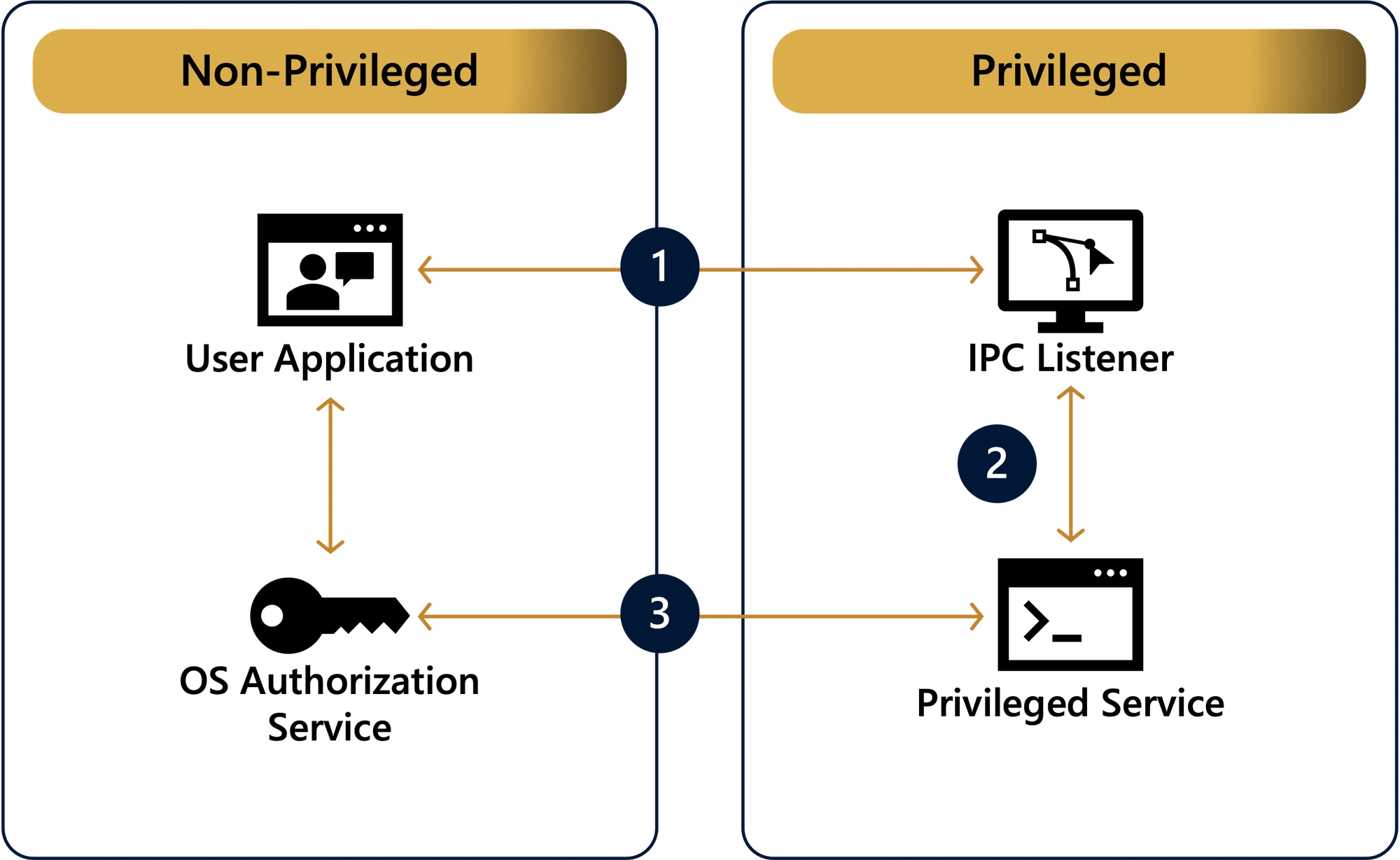
The relevant feature is Defender's privileged inter-process communication. The pattern is the usual one for privileged IPC: an unprivileged user application sends a request across a channel to a privileged listener, which performs a privileged action on its behalf. Things go wrong when there is a missing or broken authentication or authorization check at the listener, insufficient validation of inputs for the privileged action, or incorrect configuration of the OS authorization APIs.
Setup
On a running install of Defender for macOS, the relevant processes are: The relevant processes are:
| Process | Privilege | Role |
|---|---|---|
wdavdaemon |
root | The privileged broker. Owns the two IPC sockets, the engine, quarantine, and diagnostics. |
wdavdaemon_enterprise |
root | EDR worker (enterprise features). |
wdavdaemon_unprivileged |
_mdatp |
Scanning worker; communicates with the root daemon. |
Microsoft Defender Helper |
user | GUI/tray helper. |
The root-privilege wdavdaemon is signed by Microsoft (Team ID UBF8T346G9) and runs as a LaunchDaemon. The exploit is demonstrated as an ordinary local user, uid 501.
wdavdaemon exposes two AF_UNIX stream sockets:
/var/run/wdavdaemon.sock: the public socket./var/run/priv_wdavdaemon.sock: the private socket.
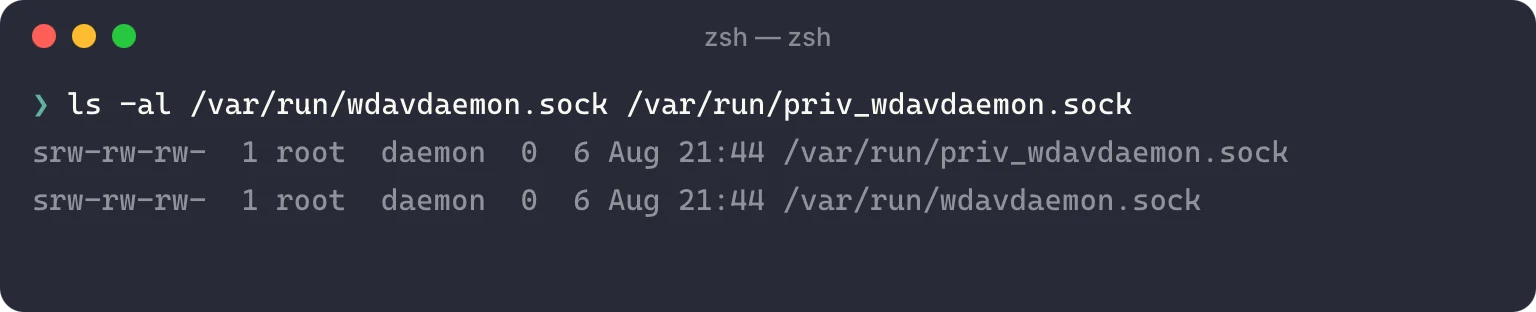
Both are created mode 0666 (srw-rw-rw-), owned by root, so any local process may connect to them. The "private" socket is private in intent only: it handles the more sensitive opcodes (threat handling, configuration) but is just as reachable.
Both sockets share a packet structure over SOCK_STREAM:
frame_header (16 bytes, big-endian)
  u32  seq            ; sequence, echoed in the reply
  u8   reserved[8]    ; always zero
  u32  body_len       ; length of body that follows
body (body_len bytes)
  u32  opcode  (little-endian)
  ...  payload        ; opcode-specific
Two opcodes matter for this writeup:
| Opcode | Name | Action |
|---|---|---|
0x05 |
handle_threat |
quarantine/restore a file |
0x0f |
get_diagnostic_files |
produces a world-readable ZIP |
Most privileged opcodes converge on a single call to AuthorizationCopyRights (re-checking a com.microsoft.mdatp.* right) inside libwdavdaemon_core.dylib. Without a valid 32-byte AuthorizationExternalForm structure in the body payload, a gated opcode returns a uniform "auth-failed" reply and the handler never runs. That is a reasonable consent gate, but it only establishes that an administrator consented, not that the caller is the genuine Defender client. Caller identity is delegated entirely to the separate per-connection peer check.
Finding it
The macOS primitives that matter
Before any handler runs, the daemon validates the connecting peer:
getsockopt(SOL_LOCAL, LOCAL_PEERPID)to retrieve the peer's connect-time pid.proc_pidpath(pid, ...)to retrieve that pid's current executable path.- A strict prefix match of that path against a runtime-built allowlist starting with
"/Applications/Microsoft Defender.app". The match enforces directory boundaries, so/Applications/Microsoft Defender.appEVILdoes not pass. - On a path match, a Code Signing Services requirement check (
anchor apple/anchor apple generic). For non-bundle peers this is never reached, because the prefix check rejects first. - On failure,
shutdown(SHUT_RDWR)+close(). From the client this looks like an EOF mid-handshake.
For an ordinary uid-501 process, step 3 rejects unconditionally. But steps 1 and 2 use two different representations of the peer: a frozen pid and a live path. That mismatch is the bug.
The macOS peer-identity APIs behave as follows:
getsockopt(client, SOL_LOCAL, LOCAL_PEERPID, ...)retrieves the pid of the peer atconnect()time. XNU records it once and never updates it.proc_pidpath(pid, ...)retrieves the current absolute filesystem path of the executable for a pid. It answers "what image is pid N running right now?" and that value changes if the process re-execs withexecve().getsockopt(client, SOL_LOCAL, LOCAL_PEERTOKEN, ...), orxpc_connection_get_audit_tokenfor XPC, retrieves the peer's audit token, an opaque struct carrying thepidand apidversiongeneration counter that is bumped on eachexecve, plus thesigning_idused to look up entitlements. It is the only peer credential that is both bound to a specific process and invalidated when that process re-execs.
Relying on only the first two creates a race window between the moment the pid is captured and the moment the path is checked. This "PID reuse" technique was presented by Samuel Groß (5aelo) in his Don't Trust the PID! WarCon 2018 talk.
Why the other defences do not close the gap
Code signing is why a privileged macOS daemon can verify whether an IPC peer is really a vendor's signed binary, and it is also why getting that question wrong is fatal. The Code Signing Services API (SecStaticCodeCreateWithPath, SecCodeCopyGuestWithAttributes, SecStaticCodeCheckValidity) lets userland programs verify that another file or running process satisfies a code-signing requirement using a small predicate language, for example anchor apple, anchor apple generic, or identifier "com.microsoft.wdav" and certificate leaf[subject.OU] = "UBF8T346G9". This is analogous to Windows' WinVerifyTrust API and Authenticode policy.
System Integrity Protection (SIP) is an on-by-default, kernel-enforced mandatory access control that forbids modifying protected locations and attaching to or injecting into protected processes. With SIP on, task_for_pid against an Apple-signed or hardened binary fails, and DYLD_* injection (the rough equivalent of DLL injection on Windows) is blocked. So an attacker cannot simply inject into one of Defender's signed helper processes to borrow its identity for IPC; the exploit has to find some other flaw in the target.
Authorization Services is the third piece. A program acquires an AuthorizationRef, then calls:
OSStatus AuthorizationCopyRights(AuthorizationRef authorization,
                                 const AuthorizationRights *rights,
                                 const AuthorizationEnvironment *environment,
                                 AuthorizationFlags flags,
                                 AuthorizationRights **authorizedRights);
naming one or more rights using string keys such as com.microsoft.mdatp.controllogging. The call consults the system authorization policy database, which maps each right to a rule. Built-in rules include allow, deny, is-root, authenticate-admin, and authenticate-session-owner. If the rule is satisfied, the call returns errAuthorizationSuccess.
On the build analysed, Defender registers thirteen custom rights in the policy database. Reading a live rule shows what it requires:
security authorizationdb read com.microsoft.mdatp.readlogs
returns a rule whose rule array is is-root or authenticate-admin-30. In other words, the right is granted if the authorization's owning process is already root, or if any administrator authenticates (with a 30-second credential cache) at a pop-up dialog box.
The crucial property is that this feature is opt-in, or "self-restricted" in Apple's terminology. The protection AuthorizationCopyRights offers is meaningful only as long as the code chooses to call it and to act on the result. It is not an enforcement boundary that the operating system maintains.
Exploitation
Step 1: win the peer check with a PID-reuse race
The race is straightforward. LOCAL_PEERPID is captured when the peer connects and is immutable thereafter. proc_pidpath returns the pid's current executable path, which the attacker can change with execve(). Strictly, this variant is not a recycled pid number landing on a different process but the same process re-execve-ing to change the path its pid resolves to, which is a member of the same pid-trust family.
The critical fact about execve is that the kernel updates the process's recorded image path before it returns to userland and before the new image's first instruction runs. The exec'd binary need not be functional, need not perform any IPC, and need not even survive. It only has to have caused the pid path update by the time the daemon calls proc_pidpath.
The exploit forks many child processes, each racing like this:
s = socket(AF_UNIX, SOCK_STREAM)connect("/var/run/wdavdaemon.sock"):LOCAL_PEERPIDis now frozen to the child's pid.send([16B header][u32 LE 0x0f]): the request is queued.execve("/Applications/Microsoft Defender.app/Contents/MacOS/wdavdaemon_unprivileged.app/Contents/MacOS/wdavdaemon_unprivileged", argv=["wdavdaemon"], ...): the kernel updates the pid path to an allowlisted, Microsoft-signed binary (which then immediately dies on its singleton check, but that's fine).
Meanwhile the daemon, after accept():
getsockopt(LOCAL_PEERPID, &pid): pid is the child's pid.proc_pidpath(pid, path): whatever path is recorded now.prefix-match(path, "/Applications/Microsoft Defender.app").- Match, run the handler; no match,
shutdown(fd).
If the daemon's step 2 runs after the child's step 4, proc_pidpath returns the bundle path and the check passes, even though the process that actually connected was the attacker's own program (a Perl script, in the PoC). By the time the daemon reads the path, that child has re-exec'd into the allowlisted, Microsoft-signed binary, which is what satisfies both the prefix match and the code-signing check. The attacker-controlled child can now make arbitrary IPC calls to wdavdaemon.
Step 2: arbitrary file read via get_diagnostic_files (CVE-2026-50657)
With the peer check beaten, any opcode on either socket can be invoked. Unlike the more privileged opcodes, 0x0f get_diagnostic_files does not funnel through the AuthorizationCopyRights gate at all. Sending a body of just [u32 LE 0x0f], with no authorization blob, returns a fully-formed reply:
result<optional<boost::filesystem::path>>  OK
path = "/Library/Application Support/Microsoft/Defender/wdavdiag/<UUID>.zip"
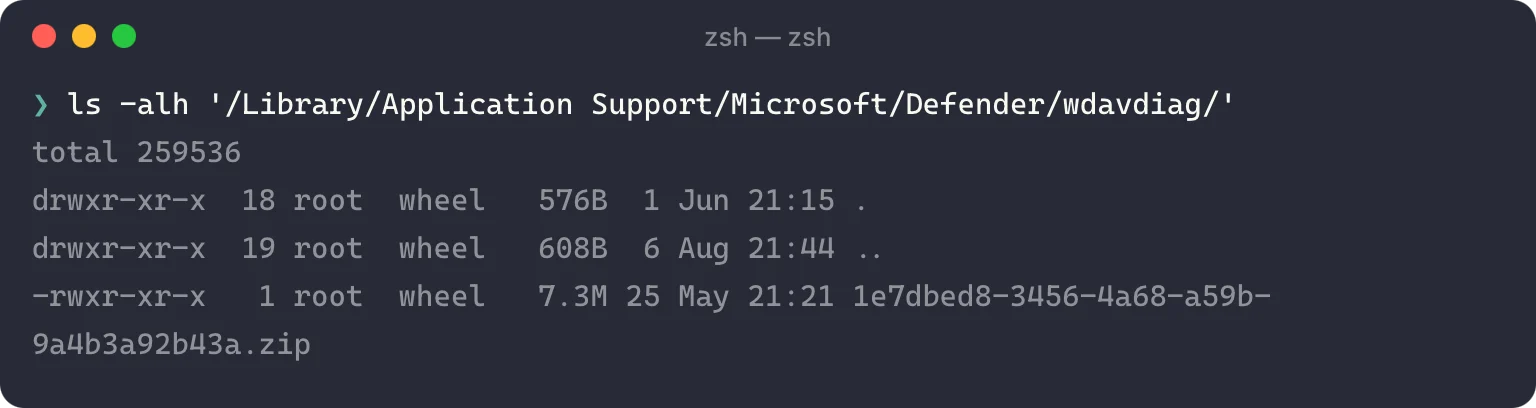
Each call makes the root daemon build a fresh diagnostic archive at a UUID-named path under /Library/Application Support/Microsoft/Defender/wdavdiag/, in a directory that is world-readable and searchable (0755 root:wheel).
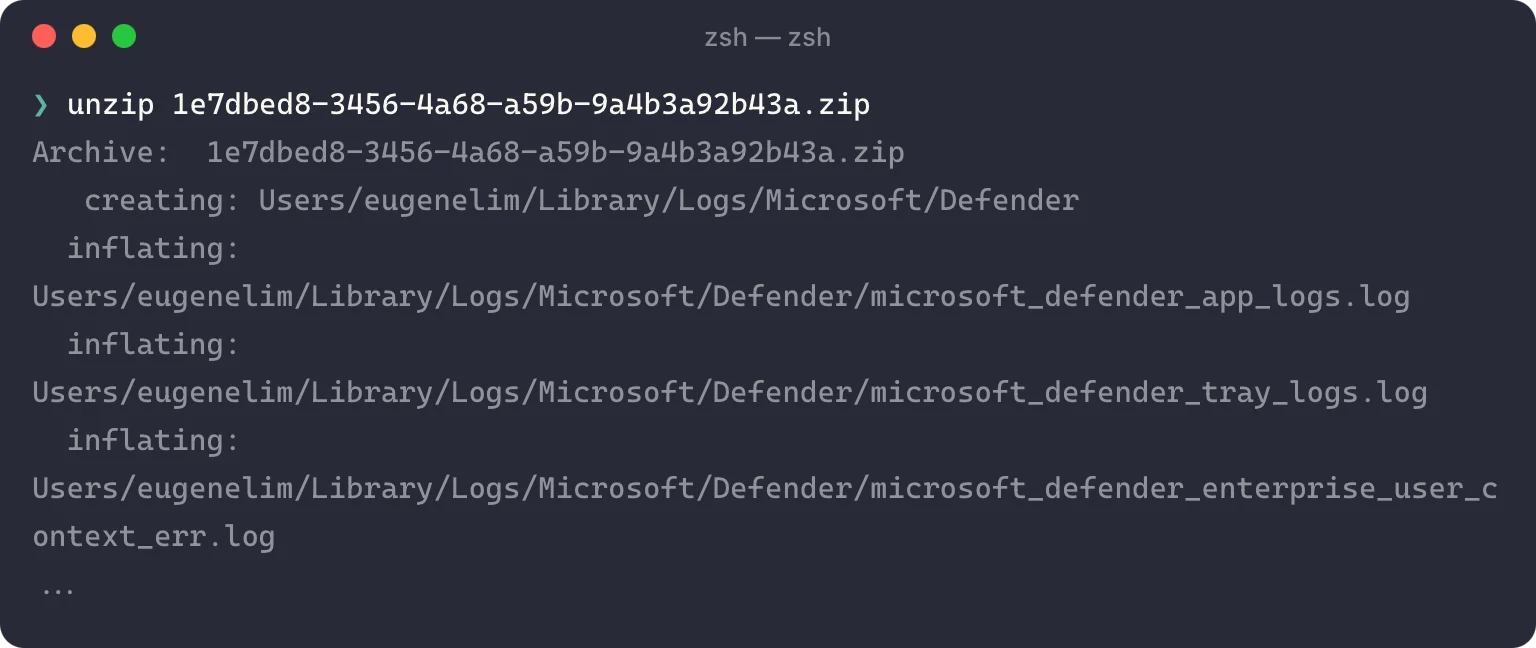
Inspecting a produced ZIP shows the archiver collects, among other things, all regular files under $HOME/Library/Logs/Microsoft/Defender/. This is the user's own log directory, created automatically on first launch. The archiver opens each file with the daemon's normal open routine. The daemon is root, so open(O_RDONLY) succeeds on whatever the path resolves to.
$HOME/Library/Logs/Microsoft/Defender/ is owned by the user (uid 501, 0755), so the user can create directory entries in it, including hardlinks. The subtlety that makes this an arbitrary read is a property of POSIX link(2): it does not require read access to the source file. It only requires the source path components be searchable and the destination directory be writable by the caller. So, as uid 501:
link("/etc/kcpassword",
     "/Users/eugenelim/Library/Logs/Microsoft/Defender/microsoft_defender_app_logs.log");
is legal even though the target is root-only. The planted directory entry now points at the root-owned inode while sitting inside a user-owned directory.
A hardlink is used rather than a symlink because, as the archiver walks the directory, it checks each entry and archives only regular files using the boost filesystem library function boost::filesystem::status(), which returns a file_status with a file_type enum member. The rejected types are directory_file, symlink_file, block_file, character_file, fifo_file, socket_file, reparse_file, and type_unknown, so a planted symlink is filtered out and never reaches the open().
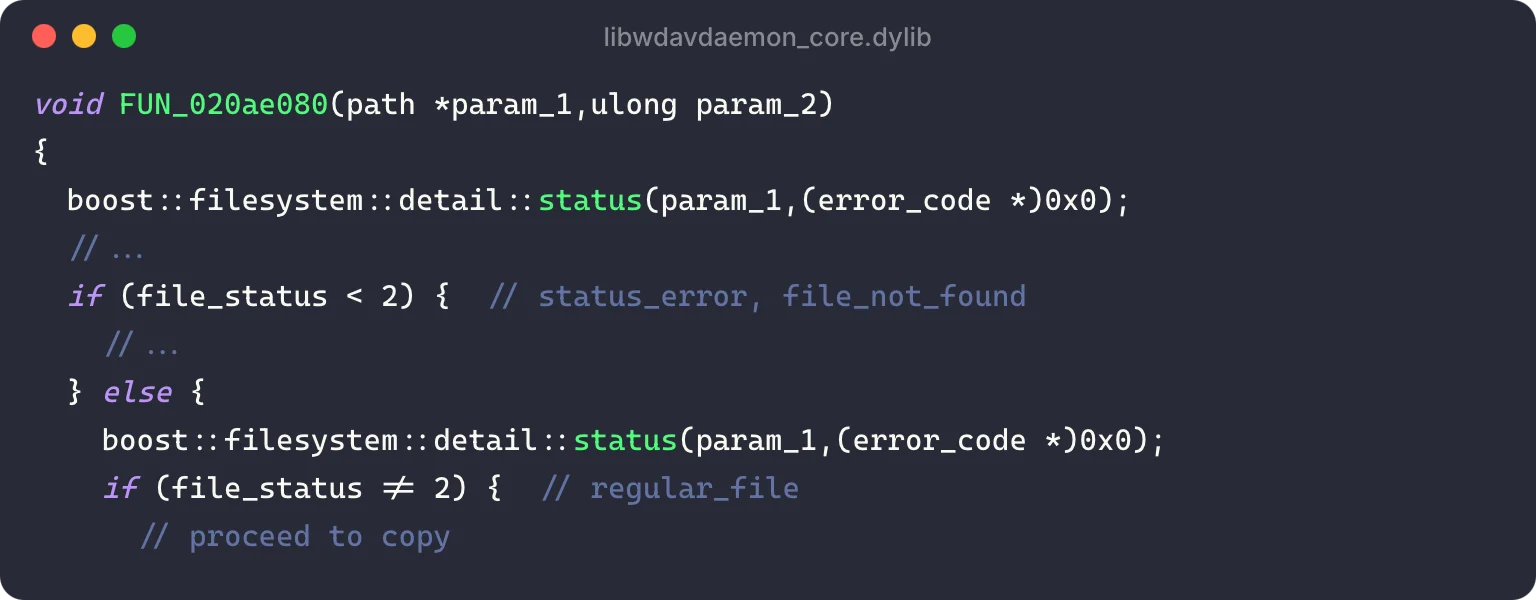
A hardlink, on the other hand, is not a distinct file type: it reports as an ordinary regular file (S_IFREG, uid=0) and passes the regular-file filter. The daemon, as root, opens the inode and streams its bytes into the world-readable ZIP, which the user then reads.
This is the macOS analogue of CVE-2026-41091, but a symlink-only fix would not have stopped it. Unlike a Windows hardlink, which has required FILE_WRITE_ATTRIBUTES access to the target since 2015 (as James Forshaw documented in Between a Rock and a Hard Link), a macOS hardlink needs no access to the target at all. That is a critical difference in security assumptions between the two platforms.
With a file read as root, escalating further is straightforward. Juicy targets include /var/db/dslocal/nodes/Default/users/*.plist (the ShadowHashData local-account password hashes, macOS's equivalent of the SAM), /etc/kcpassword (the XOR-obfuscated autologin password), TCC.db, other users' ~/Library secrets, SSH keys, and browser cookie jars.
Step 3: arbitrary file write via handle_threat::restore (CVE-2026-50658)
The second vulnerability targets the private socket and the handle_threat::restore action (opcode 0x05, sub-action restore), which lets an authorized admin release a quarantined file to a chosen destination.
The restore request encodes its AuthorizationExternalForm as a std::optional<array<u8,32>>. This is a presence byte followed, only if present, by the length and bytes:
body (opcode 0x05 restore):
  u32 LE opcode      = 5
  u32 LE pad         = 0
  u64 LE tid_len     + threat_id            ; ASCII UUID, 36 bytes
  u32 LE sub_action  = 1                     ; restore
  u8  has_dest_path  = 1
  u64 LE dest_len    + dest_path             ; daemon writes here, as root
  u8  has_auth_blob  = 0   <-- THE BYPASS    ; no bytes follow
When has_auth_blob = 0, the deserialiser reads an absent optional and the handler skips authorization entirely. It never calls AuthorizationCreateFromExternalForm or AuthorizationCopyRights.
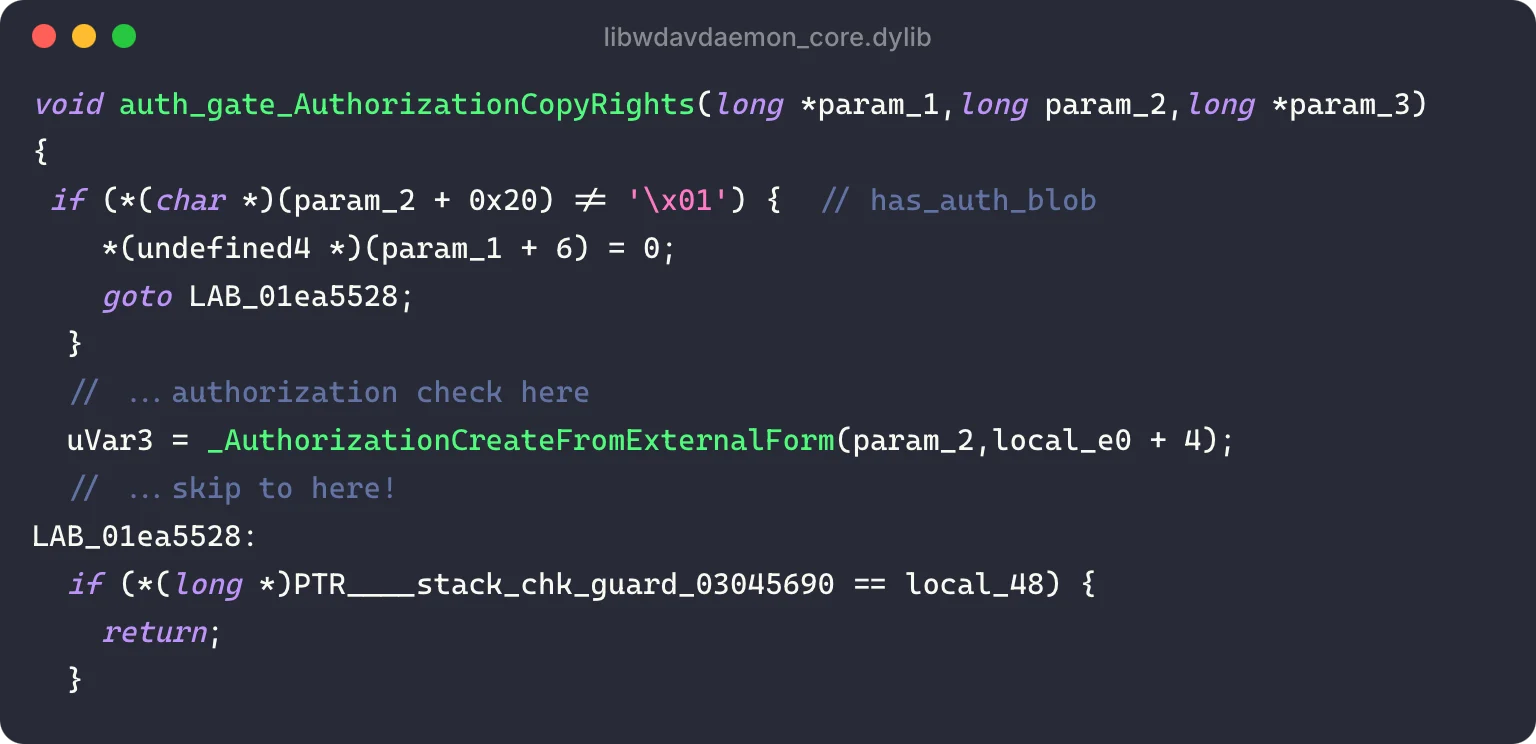
This is a distinct code path from providing an invalid authorization blob: a 32-byte all-zero blob (has_auth_blob = 1, content zero) is correctly rejected at AuthorizationCreateFromExternalForm. It is specifically the absent optional that falls through.
The only remaining gate is the private socket's peer validation, which is the same getsockopt(LOCAL_PEERPID) -> proc_pidpath -> SecStaticCodeCreateWithPath pattern and therefore vulnerable to the same PID-reuse race. So a non-root user can restore any quarantined file to an arbitrary destination.
Step 4: stage the quarantined file
The restore handler restores a previously quarantined file, so the attacker first lets Defender quarantine attacker-controlled bytes: write an EICAR string to /tmp/<name>, and real-time protection quarantines it, preserving the original basename in the quarantine metadata.
The quarantined files land in /Library/Application Support/Microsoft/Defender/quarantine/ as user-owned files, and their contents are simply XOR(0x25)-encoded. That makes it trivial to swap the quarantined EICAR for arbitrary content and stage it for restore. The exploit then triggers restore with a controlled dest_path, and Defender decodes and writes the attacker-controlled content to <DEST_PATH>/<ORIGINAL_BASE_NAME>. This is effectively an arbitrary file write as root.
There is one important caveat: the restore flow can only write to paths that do not exist yet.
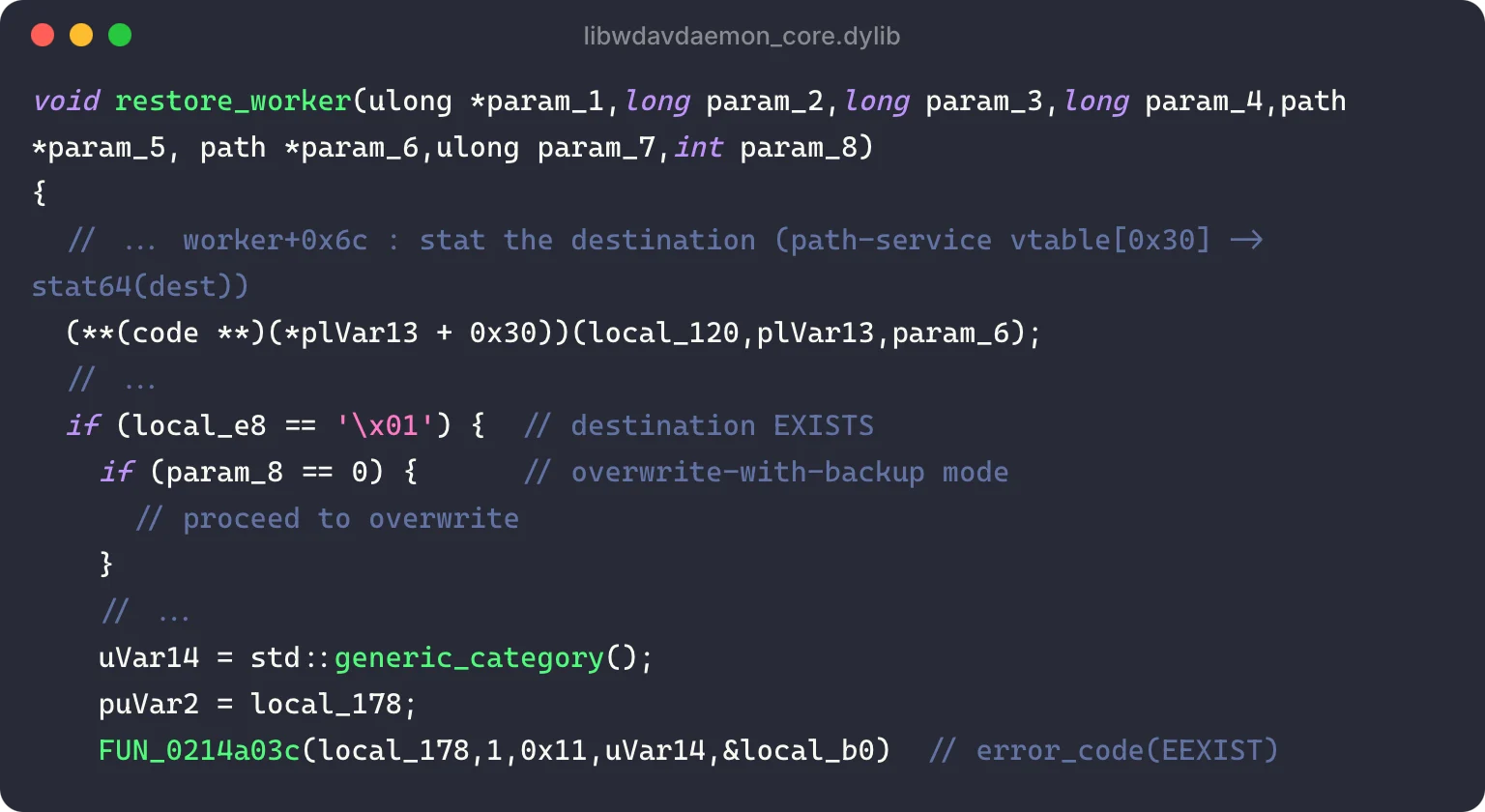
The handler stats the destination; if it exists, an overwrite-with-backup mode is possible in principle, but for the restore sub-action the relevant flag is hard-coded to the no-clobber path, which refuses with EEXIST. So this is an arbitrary file create primitive, not an overwrite.
Step 5: turn file create into code execution
The create-only constraint is what makes the final step interesting, because most known vectors for escalating a file write to code execution rely on overwriting or appending to existing files. Three attempts were needed.
Attempt 1: LaunchDaemons
LaunchDaemons (in /Library/LaunchDaemons/) are the macOS analogue of Windows Scheduled Tasks or Services, and dropping one does not require overwriting anything, so it looks like a clean fit. However, root-privilege LaunchDaemon scripts must be owned by root, and the restore process restores the original owner with chown:
1. open(<dest>/<basename>.tmp, O_CREAT|O_EXCL)        ; created as root
2. write(decoded original bytes)
3. rename(<dest>/<basename>.tmp, <dest>/<basename>)
4. chown(<dest>/<basename>, source_uid, source_gid)   ; BY PATH, not fchown
Step 4 chowns by path, not by the open fd. Between steps 3 and 4 the final file exists and is root-owned, so if <dest> is a symlink whose target is swapped during that window, step 4's chown lands on a different file (a decoy) and the real destination keeps root ownership. It is a much tighter race than the PID-reuse one, but theoretically winnable.
Unfortunately, an unprivileged user cannot launchctl bootstrap a system-domain plist, so even a perfectly root-owned LaunchDaemon has no trigger the attacker controls until the system is rebooted.
Attempt 2: Defender's own install-monitor LaunchDaemons
If a LaunchDaemon cannot be bootstrapped directly, maybe Defender will do it. The product ships install-monitor LaunchDaemons for its tracer and DLP subsystems that run a root script when a watched file appears under /Library/Application Support/Microsoft/{DLP, Defender/dlp_processor, Defender/tracer}/install/. That script (install_helper) copies a daemon plist into /Library/LaunchDaemons/ and bootstraps it:
cp  "<app-bundle>/.../com.microsoft.wdav.tracedaemon.plist"  /Library/LaunchDaemons/
launchctl bootstrap system  /Library/LaunchDaemons/com.microsoft.wdav.tracedaemon.plist
At first glance this is a deterministic, no-reboot path. But it fails for the same reason: the write primitive can only create. The cp source is a pre-existing, root-owned plist inside the app bundle, which the restore handler refuses to overwrite, so the script always ships Defender's own plist rather than the attacker's. Planting a file at the cp destination fails from the other side, because the root cp overwrites it before the bootstrap; and the destination cannot be locked either, since making a file immutable requires owning it, while launchd requires the plist to be root-owned. Every variation of this route depends on rewriting a file that already exists, which is exactly what the primitive cannot do.
Attempt 3: cron
macOS still ships a lot of legacy Unix artefacts, and one of them is cron. cron on macOS is itself a launchd job, com.vix.cron, and on a stock install it is deprecated but dormant. There is no /etc/crontab, and the job's KeepAlive is a PathState condition watching that exact path:
<key>KeepAlive</key>
<dict>
    <key>PathState</key>
    <dict>
        <key>/etc/crontab</key>
        <true/>
    </dict>
</dict>
Creating /etc/crontab therefore starts cron immediately, with no reboot. Because the file is normally absent, this is a create, not an overwrite, perfect for the write primitive. Ironically, by deprecating cron, macOS made this a perfect candidate for the chain.
Better yet, it sidesteps the ownership problem that killed the LaunchDaemon route. A LaunchDaemon must be root-owned or launchd rejects it, which is what forced the chown-TOCTOU race above. cron enforces no such rule on /etc/crontab: it reads the file and runs each line's command as the user named in that line's sixth field. A line beginning * * * * * root ... runs as root even when the file itself is owned by uid 501.
The payload is a single system-crontab line:
* * * * * root /bin/sh -c 'cp /bin/zsh /tmp/lpe_root_shell; chown root:wheel /tmp/lpe_root_shell; chmod 4755 /tmp/lpe_root_shell'
That completes the end-to-end escalation: stage an EICAR file named crontab, replace its quarantine blob with the line above, and run the auth-skip restore with dest = /etc. The peer race lands /etc/crontab (uid 501, 0644); launchd starts cron; and /tmp/lpe_root_shell -p triggers an interactive root shell within about a minute of the write. With only the single peer race to win, it is a lot more reliable.
Root cause
Two separate mistakes combine here.
Peer identity. The daemon answers "who is on the other end?" with a frozen pid plus a live path lookup. LOCAL_PEERPID is recorded at connect() and never updated, while proc_pidpath resolves the pid's current image. Because execve updates the recorded image path before returning to userland, the attacker controls the exact instant of the subject swap from inside their own process. The audit token, which carries both the pid and a pidversion bumped on each execve, is the credential that would have closed this; the daemon does not use it. The code-signing check that follows the prefix match is sound in itself, but it is applied to the path the pid currently resolves to, not to the process that actually connected.
Authorization. The restore handler treats the AuthorizationExternalForm as an optional and skips the authorization call when it is absent. Consent (AuthorizationCopyRights) and caller authentication (audit-token code-signing validation) are different questions, and the design conflates them: the consent gate is bypassable by omission, and the identity check is bypassable by race. Authorization Services being self-restricted means the OS does not enforce anything on the daemon's behalf; the protection exists only where the code chooses to call it.
File handling. The diagnostic archiver filters by file type, rejecting symlinks and other non-regular types, but a hardlink is not a distinct file type. On macOS, link(2) needs no read or write access to the target, only a searchable source path and a writable destination directory, so the regular-file filter passes a root-owned inode straight into a root open(). The Windows equivalent is gated by FILE_WRITE_ATTRIBUTES on the target, which is why the same fix logic does not transfer.
Impact
CVE-2026-50657 is an exposure of private personal information to an unauthorized actor: local information disclosure, specifically arbitrary file read as root. CVE-2026-50658 is a TOCTOU race condition: local elevation of privilege, arbitrary file write as root, chained to command execution through cron. Both are local privilege escalations. The write primitive is create-only, so it cannot overwrite existing files, and the LaunchDaemon routes are blocked by ownership requirements and the absence of an attacker-controlled trigger before reboot. On a stock install there is no /etc/crontab, and the com.vix.cron job is deprecated but dormant.
Both bugs were reported to the Microsoft Security Response Center (MSRC) and fixed on the July 2026 Patch Tuesday.
| CVE-2026-50657 | CVE-2026-50658 | |
|---|---|---|
| Class | Exposure of private personal information to an unauthorized actor | TOCTOU race condition |
| Impact | Local information disclosure (arbitrary file read) | Local elevation of privilege (arbitrary file write to root) |
The macOS LPEs were found independently of the Windows ones, but they mirror the 2026 Windows Defender escalations. What is interesting is how the same two bug classes are handled differently by macOS's IPC and security primitives.
| Windows | macOS | |
|---|---|---|
| Process identity | Relies on process handles; the kernel locks process objects in memory. | Must explicitly check the audit token to mitigate PID reuse. |
| Authorization | Kernel-evaluated access tokens and integrity levels against the target's ACLs. | "Self-restricted" (opt-in) use of the Authorization Services APIs. |
Due to these differences, the exploit also works differently on macOS:
- Identity. Windows TOCTOU typically moves a file between check and use. macOS provides a stronger primitive:
execvechanges the path of a process between connect and check. That is why the PID-reuse attack is so reliable; the attacker controls the exact instant of the subject swap from inside their own process. - Linking. On Windows, link creation is comparatively gated: a symbolic link needs
SeCreateSymbolicLinkPrivilege(held by Administrators by default), a hardlink needs write access to its target, and a junction (which needs no privilege but only redirects directories) can now be mitigated with RedirectionGuard. macOS uses Unix-style links, andlink(2)needs no read or write on the target, only a searchable path and a writable destination directory. That is exactly what makes the privileged read possible for a non-root user. - Authorization. On Windows, authorization is mediated by tokens, integrity levels, and ACLs. On macOS, Authorization Services is self-restricted, which makes it easy to footgun with an incorrect implementation. The macOS-specific issue is that consent (
AuthorizationCopyRights) and caller authentication (audit-token code-signing validation) are different questions and should not be conflated.
Fix
Microsoft patched both issues on the July 2026 Patch Tuesday. The durable fix it argues for is to use macOS-native IPC such as XPC, which supports OS-native APIs such as xpc_connection_get_audit_token and xpc_connection_set_peer_code_signing_requirement that are not vulnerable to PID reuse, and to block hardlinks rather than relying solely on symlink checks. Because of the platform differences above, patching the same primitives on Windows is not sufficient to secure them on macOS.
Variants to test
- Any privileged
AF_UNIXlistener that pairsLOCAL_PEERPIDwithproc_pidpath. Connect, send a request, thenexecveinto an allowlisted signed binary before the daemon resolves the path. A positive result is a handler running for a connection made by your own process, visible as a reply instead of an EOF mid-handshake. - Listeners that accept an optional authorization blob. Serialise the request with the presence byte set to zero and see whether the handler runs without calling
AuthorizationCreateFromExternalFormorAuthorizationCopyRights. A positive result is a privileged action completing with no admin prompt, while an all-zero 32-byte blob is still rejected. - Diagnostic or log-collection features that archive files as root. Plant a hardlink in a user-writable directory the collector walks, pointing at a root-only file such as
/etc/kcpassword. A positive result is the target's contents appearing in a world-readable archive. - File-type filters that reject symlinks. Check whether the filter is based on
boost::filesystem::status()or an equivalent that classifies hardlinks as regular files. A positive result is a root-owned inode being opened through a user-created directory entry. - Restore or extract flows with a no-clobber flag. Confirm whether the destination must be absent. If so, look for paths that are normally absent and whose creation triggers privileged behaviour, such as
/etc/crontabwith a dormantPathStatelaunchd job. chown-by-path afterrename. Where a privileged writer restores original ownership by path rather than by fd, try swapping a symlinked destination between the rename and the chown. A positive result is the final file retaining root ownership.
What happened, in plain words
Microsoft Defender is a security program that watches your computer for viruses and other bad software. The version for Macs (macOS) runs in the background with the highest level of permission a program can have, called root. A program running as root can read, change or delete almost anything on the machine. That is exactly why it is worth attacking: if you can make a root program do what you want, you effectively become root yourself.
In early 2026, two flaws in the Windows version of Defender were made public and were actually used by attackers. One (CVE-2026-33825, nicknamed "BlueHammer") relied on a race condition, which is a bug that appears only when two things happen at almost the same moment and the program checks something at the wrong instant. The other (CVE-2026-41091) relied on Defender failing to check a kind of shortcut called a symlink.
Microsoft fixed both for Windows. The researcher then asked a simple question: Defender is one product built for Windows, macOS and Linux, and each operating system works differently underneath. If the same feature is rebuilt for the Mac using Mac rules, does the fix still hold? It did not. Two variants of the same two bug classes still worked on macOS. Microsoft fixed those too, and gave them CVE-2026-50657 (a way to read any file on the machine) and CVE-2026-50658 (a way to write files as root and end up running commands as root). The research was presented at a conference called BlueHat Asia 2026.
This article walks through how those two bugs work, in the order the researcher found and used them. You do not need to know how to program to follow it. Every technical word is explained the first time it appears, and there is a glossary at the end.
The idea behind the bug
Defender is not one program. It is several programs that talk to each other. The one that matters here is called wdavdaemon, and it runs as root. Other, less privileged parts of Defender, and the little icon in your menu bar, need the root program to do things for them: scan a file, move a suspicious file to a safe place, produce a report. So they send it messages.
This kind of message passing between programs on the same computer is called inter-process communication, or IPC. The channel they use is a socket, which you can picture as a named pipe: one program writes into one end, another program reads from the other end. On macOS and other Unix-like systems, a socket that lives in the filesystem and only works between programs on the same machine is called an AF_UNIX socket (also written AF_LOCAL).
The pattern is always the same, and it is where bugs live: a program with few permissions sends a request to a program with many permissions, and the powerful one carries it out. Three things commonly go wrong:
- The powerful program does not properly check who is asking (authentication).
- It does not properly check what is being asked, so a strange request does something dangerous.
- It uses the operating system's permission-checking tools incorrectly.
The researcher had written about exactly this shape of bug before, in a different product (Zscaler Client Connector, CVE-2023-41973).
The diagram shows the trust model: on the left, an ordinary user program and the operating system's authorisation service; on the right, the privileged listener and the privileged service it drives. The three marked points are the three places where a check can be missing or wrong: who the caller is, what the request contains, and whether the operating system's permission API was used correctly.
Operating systems provide tools to help developers avoid these mistakes. The next sections explain the macOS tools, because the whole exploit is about Defender using them slightly wrongly.
The macOS security tools involved
Code signing, Developer ID and notarisation
Every program macOS runs is code-signed. A signature is a cryptographic stamp that says "this file was produced by this company and has not been altered since". Apple issues certificates to developers; a certificate for software distributed outside Apple's App Store is called a Developer ID certificate, and it is tied to a Team ID, a short string identifying the developer. Microsoft's Team ID is UBF8T346G9. Notarisation is an extra step where Apple scans the software and records that it has seen it.
macOS gives programs an API to check other programs' signatures. An API (application programming interface) is simply a set of functions that one program can call to ask the operating system, or another program, to do something. The relevant one here is called Code Signing Services, with functions named SecStaticCodeCreateWithPath, SecCodeCopyGuestWithAttributes and SecStaticCodeCheckValidity. You describe what you will accept in a small predicate language, for example:
anchor apple: signed by Apple itself.anchor apple generic: the signature chains back to an Apple root certificate, which includes Developer ID software.identifier "com.microsoft.wdav" and certificate leaf[subject.OU] = "UBF8T346G9": it is Microsoft's Defender, signed by Microsoft's team.
Windows has an equivalent called WinVerifyTrust with its Authenticode policy. The point is that a root daemon can ask the operating system "is the program on the other end of this socket really Microsoft's signed binary?" and get a trustworthy answer. Getting that question wrong is fatal, as we will see.
System Integrity Protection and the Hardened Runtime
System Integrity Protection, or SIP, is a macOS feature that is on by default and enforced by the kernel (the core of the operating system). It forbids changing protected parts of the system and forbids one program from reaching into another protected program's memory. Without SIP, an attacker could simply attach to one of Defender's signed helper programs and make it send messages on the attacker's behalf, borrowing its trusted identity. SIP blocks that: the function used to grab another process, task_for_pid, fails against Apple-signed or hardened binaries, and so does DYLD_* injection, the Mac equivalent of DLL injection on Windows. So the attacker has to find a different flaw in Defender itself.
Authorization Services
Defender uses a macOS facility called Authorization Services to decide whether a privileged action is allowed. A program first obtains an AuthorizationRef, which is a handle representing an authorisation session, and then calls:
OSStatus AuthorizationCopyRights(AuthorizationRef authorization,
                                 const AuthorizationRights *rights,
                                 const AuthorizationEnvironment *environment,
                                 AuthorizationFlags flags,
                                 AuthorizationRights **authorizedRights);
Line by line:
OSStatus AuthorizationCopyRights(...): this is the function's declaration.OSStatusis the type of value it returns, a numeric result code. The name means "copy the rights I am asking for into my authorisation session".AuthorizationRef authorization: the authorisation session handle the program already holds.const AuthorizationRights *rights: the list of rights being requested. A right is a named permission, written as a string such ascom.microsoft.mdatp.controllogging. Think of it as a ticket type: "permission to control logging".const AuthorizationEnvironment *environment: extra context, such as whether a username and password were supplied.AuthorizationFlags flags: options that change behaviour, for example whether the user may be prompted with a dialog box.AuthorizationRights **authorizedRights: where the granted rights are written back.
The call looks up each right in the system authorization policy database, a table that maps each right name to a rule. Built-in rules include allow (always), deny (never), is-root (only if the caller is already root), authenticate-admin (an administrator must type their password) and authenticate-session-owner (the person logged in must confirm). If the rule is satisfied, the call returns errAuthorizationSuccess.
On the build the researcher analysed, Defender had registered thirteen custom rights in that database. You can read one of them with a command in the Terminal:
security authorizationdb read com.microsoft.mdatp.readlogs
This asks the security command-line tool to read, from the authorisation database, the rule for the right named com.microsoft.mdatp.readlogs ("permission to read Defender's logs"). The answer is a rule whose rule array is is-root or authenticate-admin-30. In plain words: the right is granted if the program asking is already root, or if any administrator types their password in a pop-up dialog, and that password is remembered for 30 seconds.
The crucial property is that this whole mechanism is opt-in, which Apple calls self-restricted. The operating system does not force a program to check anything. AuthorizationCopyRights only protects you if your code chooses to call it and then actually obeys the answer. It is like a door with a lock that the builder may or may not decide to install.
Peer identity and audit tokens
When a message arrives at a privileged program, the first question is peer identity: which process is on the other end, and is it allowed to ask for this? macOS offers several ways to answer, and they are not equally good.
getsockopt(client, SOL_LOCAL, LOCAL_PEERPID, ...)asks the kernel for the pid (process ID, the number the system gives each running program) of the program on the other end, as recorded at the moment it connected. The kernel writes it down once and never updates it.proc_pidpath(pid, ...)asks the kernel for the current full path of the program file that the given pid is running right now. If the process replaces itself with a different program, this answer changes.getsockopt(client, SOL_LOCAL, LOCAL_PEERTOKEN, ...), orxpc_connection_get_audit_tokenfor Apple's XPC mechanism, returns the peer's audit token. This is an opaque bundle of information that includes the pid, apidversioncounter that goes up every time the process replaces itself with a new program, and thesigning_idused to look up entitlements (the extra permissions a signed program carries). It is the only credential that is both tied to one specific process and automatically invalidated when that process turns into a different program.
The dangerous pattern is to use only the first two: note the pid, then look up the path for that pid and compare it against a list of allowed programs. Between the moment the pid is noted and the moment the path is looked up, the process can change what program it is running. That gap is the race window. This technique is known as PID reuse and was presented by Samuel Groß (5aelo) in a 2018 talk called Don't Trust the PID!.
Defender's attack surface
The processes
On a running Mac with Defender installed, these are the relevant programs:
| Process | Privilege | Role |
|---|---|---|
wdavdaemon |
root | The privileged broker. Owns the two IPC sockets, the engine, quarantine, and diagnostics. |
wdavdaemon_enterprise |
root | EDR worker (enterprise features). |
wdavdaemon_unprivileged |
_mdatp |
Scanning worker; communicates with the root daemon. |
Microsoft Defender Helper |
user | GUI/tray helper. |
wdavdaemon is the important one. It runs as root, it is signed by Microsoft with Team ID UBF8T346G9, and it is started at boot by a LaunchDaemon. A LaunchDaemon is macOS's way of running a program automatically in the background as root, described by a small settings file (a plist) in /Library/LaunchDaemons/. The exploit is demonstrated as an ordinary local user, user number 501.
The sockets
wdavdaemon opens two AF_UNIX sockets:
/var/run/wdavdaemon.sock: the public socket./var/run/priv_wdavdaemon.sock: the private socket.
Both are created with permissions 0666, which in a directory listing looks like srw-rw-rw-. Those letters mean: it is a socket (s), and the owner, the group and everyone else can all read and write to it. It is owned by root, but because everyone has read and write permission, any program on the machine can connect. The word "private" describes the intention, not the reality: the private socket handles the more sensitive requests (dealing with threats, changing configuration), but it is just as reachable as the public one.
The screenshot shows both sockets in a directory listing, both marked srw-rw-rw-.
The message format
Both sockets use the same packet layout. A packet is one message: a fixed-size header followed by a body. The header is 16 bytes and uses big-endian byte order, which is simply a convention for which end of a multi-byte number comes first; the body uses little-endian, the opposite convention. Mixing them is unusual but harmless as long as both sides agree.
frame_header (16 bytes, big-endian)
  u32  seq            ; sequence, echoed in the reply
  u8   reserved[8]    ; always zero
  u32  body_len       ; length of body that follows
body (body_len bytes)
  u32  opcode  (little-endian)
  ...  payload        ; opcode-specific
Line by line:
frame_header (16 bytes, big-endian): the header is 16 bytes long and its numbers are written big-endian.u32 seq: an unsigned 32-bit number called the sequence number. The daemon copies it into its reply so the client can match reply to request, like a ticket number.u8 reserved[8]: eight bytes reserved for future use, always zero.u32 body_len: how many bytes of body follow the header.body (body_len bytes): the body itself, exactlybody_lenbytes long.u32 opcode (little-endian): the first four bytes of the body are the opcode, a number that says which action is being requested. This one is little-endian.... payload: the rest of the body, whose layout depends on the opcode.
Two opcodes matter here:
| Opcode | Name | Action |
|---|---|---|
0x05 |
handle_threat |
quarantine/restore a file |
0x0f |
get_diagnostic_files |
produces a world-readable ZIP |
0x05 and 0x0f are hexadecimal numbers, a way of writing numbers that programmers use; 0x0f is 15 and 0x05 is 5. "Quarantine" means moving a suspicious file into a safe holding area so it cannot run. "Restore" means taking it back out. "World-readable" means any user on the machine can read the file.
Most privileged opcodes end up calling AuthorizationCopyRights (checking a com.microsoft.mdatp.* right) inside a library file called libwdavdaemon_core.dylib. A library is a file of shared code that programs load and call into. If the request body does not contain a valid 32-byte AuthorizationExternalForm (a portable, transferable form of an authorisation ticket), the daemon replies with a uniform "auth-failed" message and never runs the handler. That is a reasonable consent gate: it establishes that an administrator agreed. But it does not establish that the caller is the real Defender client. Who the caller is gets decided entirely by a separate check, done once per connection.
How the daemon checks the peer
Before running any handler, the daemon checks the connecting program:
getsockopt(SOL_LOCAL, LOCAL_PEERPID)to retrieve the peer's connect-time pid.proc_pidpath(pid, ...)to retrieve that pid's current executable path.- A strict prefix match of that path against a runtime-built allowlist starting with
"/Applications/Microsoft Defender.app". The match enforces directory boundaries, so/Applications/Microsoft Defender.appEVILdoes not pass. - On a path match, a Code Signing Services requirement check (
anchor apple/anchor apple generic). For non-bundle peers this is never reached, because the prefix check rejects first. - On failure,
shutdown(SHUT_RDWR)+close(). From the client this looks like an EOF mid-handshake.
In plain words:
- Ask the kernel for the process ID of whoever connected.
- Ask the kernel what program that process ID is running right now.
- Check that the path starts with Defender's application folder. A prefix match means comparing the beginning of a string; the check is careful that the folder name ends at a boundary, so a folder named
Microsoft Defender.appEVILdoes not sneak through. - If the path matches, check the signature.
- If anything fails, close the connection.
shutdown(SHUT_RDWR)stops both directions of the socket andclose()releases it. EOF means "end of file", the signal a program gets when the other end hangs up; the client sees the connection die in the middle of the conversation.
For an ordinary user 501 process, step 3 always rejects. But look closely at steps 1 and 2: they describe the peer in two different ways, a frozen number and a live path. That mismatch is the bug.
Finding it: the peer check can be raced
The race is simple to describe:
LOCAL_PEERPIDis captured when the peer connects and never changes afterwards.proc_pidpathreturns the pid's current program path, and the attacker can change that by callingexecve().
execve() is the system call that replaces the program a process is running with a different program. Strictly, this is not a recycled pid number landing on a different process; it is the same process replacing itself so that its pid now points at a different program. It belongs to the same family of pid-trust bugs.
The critical fact about execve is that the kernel updates the process's recorded program path before it returns control to the program and before the new program's first instruction runs. The new program does not need to work, does not need to send any messages, and does not even need to stay alive. It only has to have caused the path update by the time the daemon calls proc_pidpath.
So the exploit starts many child processes at once, each doing this:
s = socket(AF_UNIX, SOCK_STREAM)connect("/var/run/wdavdaemon.sock"):LOCAL_PEERPIDis now frozen to the child's pid.send([16B header][u32 LE 0x0f]): the request is queued.execve("/Applications/Microsoft Defender.app/Contents/MacOS/wdavdaemon_unprivileged.app/Contents/MacOS/wdavdaemon_unprivileged", argv=["wdavdaemon"], ...): the kernel updates the pid path to an allowlisted, Microsoft-signed binary (which then immediately dies on its singleton check, but that's fine).
Line by line:
- Create a socket of the Unix type, using a stream (a continuous flow of bytes, like a phone call rather than a series of letters).
- Connect to the public socket. From this instant the kernel has recorded this child's pid as the peer.
- Send a 16-byte header followed by the four-byte opcode
0x0f(the diagnostic request). The request is now waiting in the daemon's queue. - Replace this process with Defender's own signed scanning program. The kernel immediately updates the recorded path for this pid. That program then exits because only one copy is allowed to run (a singleton check), but by then the damage is done.
Meanwhile the daemon, after accepting the connection:
getsockopt(LOCAL_PEERPID, &pid): pid is the child's pid.proc_pidpath(pid, path): whatever path is recorded now.prefix-match(path, "/Applications/Microsoft Defender.app").- Match, run the handler; no match,
shutdown(fd).
If the daemon's step 2 happens after the child's step 4, proc_pidpath returns Defender's own folder path and the check passes, even though the program that actually connected was the attacker's own script (a Perl script, in the proof of concept). By the time the daemon reads the path, the child has already turned into the allowlisted, Microsoft-signed program, which satisfies both the path check and the signature check. The attacker's process can now send any request it likes to wdavdaemon.
This is a race condition: the exploit does not need to be clever, it needs to be lucky many times. Starting many children at once makes one of them win the timing.
Turning the bypass into power
With the peer check beaten, any opcode on either socket can be used, and Defender's own privileged handlers become the attacker's tools. Two of them are enough: 0x0f get_diagnostic_files gives a read of any file as root, and 0x05 handle_threat::restore gives a write of any file as root.
Reading any file (CVE-2026-50657)
An opcode with no gate
Unlike the more privileged opcodes, 0x0f get_diagnostic_files does not go through the AuthorizationCopyRights gate at all. Sending a body of just [u32 LE 0x0f], with no authorisation blob, returns a fully formed reply:
result<optional<boost::filesystem::path>>  OK
path = "/Library/Application Support/Microsoft/Defender/wdavdiag/<UUID>.zip"
This says: the result is a path (possibly absent, hence optional), the status is OK, and the path is a ZIP file with a random name. A UUID is a long random identifier, used so that each file gets a unique name. Each call makes the root daemon build a fresh diagnostic archive at that path, inside a directory that is world-readable and searchable (0755 root:wheel). "Searchable" means other users can look files up inside it; 0755 is the permission code for "owner can do everything, everyone else can read and enter".
The screenshot shows the wdavdiag directory, world-readable, holding the archive that was just generated.
Looking inside a produced ZIP shows that the archiver collects, among other things, all regular files under $HOME/Library/Logs/Microsoft/Defender/. $HOME is the current user's home folder. This is the user's own log directory, created automatically the first time Defender starts. The archiver opens each file with the daemon's normal open routine. The daemon is root, so open(O_RDONLY) succeeds on whatever the path turns out to point at. open is the system call that opens a file; O_RDONLY means "open for reading only".
Unzipping the archive shows the Defender log files that were collected.
Redirecting the read with a hardlink
$HOME/Library/Logs/Microsoft/Defender/ is owned by the user (uid 501, 0755), so the user can create entries in it, including hardlinks. A hardlink is a second name for the same file. On a disk, a file is really an inode (a data structure holding the file's contents and details) plus one or more names pointing at it. A hardlink adds another name pointing at the same inode. It is not a shortcut that gets followed; it is the same file under two names.
The subtlety that makes this an arbitrary read is a property of the POSIX link(2) system call, which creates a hardlink: it does not require read access to the source file. It only requires that the folders in the source path can be searched and that the destination folder is writable by the caller. So, as user 501:
link("/etc/kcpassword",
     "/Users/eugenelim/Library/Logs/Microsoft/Defender/microsoft_defender_app_logs.log");
Line by line:
link(: call the system function that creates a hardlink."/etc/kcpassword": the existing file to link to. This is a root-only file holding an obfuscated autologin password."/Users/eugenelim/Library/Logs/Microsoft/Defender/microsoft_defender_app_logs.log": the new name to create, inside the user's own log folder.);: close the call.
This is legal even though the target is root-only. The new name now points at the root-owned file while sitting inside a folder the user controls.
Why a hardlink and not a symlink? A symlink is a different thing: a small file whose contents are "the real file is over there", and programs that open it are redirected. As the archiver walks the directory, it checks each entry and archives only regular files, using the boost library function boost::filesystem::status(), which returns a file_status with a file_type member. The rejected types are directory_file, symlink_file, block_file, character_file, fifo_file, socket_file, reparse_file and type_unknown, so a planted symlink is filtered out and never reaches the open().
The screenshot shows the filter in action: Defender only copies files that report as regular_file.
A hardlink, on the other hand, is not a separate file type. It reports as an ordinary regular file (S_IFREG, uid=0) and passes the filter. The daemon, as root, opens the inode and copies its bytes into the world-readable ZIP, which the user then reads.
This is the macOS version of CVE-2026-41091, but a fix that only blocked symlinks would not have stopped it. A Windows hardlink has, since 2015, required FILE_WRITE_ATTRIBUTES permission on the target, as James Forshaw documented in Between a Rock and a Hard Link. A macOS hardlink needs no permission on the target at all. That is a fundamental difference in the security assumptions of the two systems.
With a root file read, going further is easy. Interesting targets include /var/db/dslocal/nodes/Default/users/*.plist (the stored password hashes for local accounts, macOS's equivalent of Windows' SAM file), /etc/kcpassword (the obfuscated autologin password), TCC.db (the database of which apps were granted which privacy permissions), other users' ~/Library secrets, SSH keys, and browser cookie jars. A cookie jar is the file where a browser stores its cookies, the small pieces of data that keep you logged in to websites; stealing it can let an attacker act as you.
Writing any file (CVE-2026-50658)
The second vulnerability uses the private socket and the handle_threat::restore action (opcode 0x05, sub-action restore), which normally lets an authorised administrator release a quarantined file to a chosen destination.
The optional field that skips the check
The restore request carries its AuthorizationExternalForm as a std::optional<array<u8,32>>. An optional is a value that may or may not be present. In the message it is encoded as a presence byte, followed, only if present, by the length and the bytes:
body (opcode 0x05 restore):
  u32 LE opcode      = 5
  u32 LE pad         = 0
  u64 LE tid_len     + threat_id            ; ASCII UUID, 36 bytes
  u32 LE sub_action  = 1                     ; restore
  u8  has_dest_path  = 1
  u64 LE dest_len    + dest_path             ; daemon writes here, as root
  u8  has_auth_blob  = 0   <-- THE BYPASS    ; no bytes follow
Line by line:
u32 LE opcode = 5: the opcode, 5, written little-endian.u32 LE pad = 0: four bytes of padding, unused.u64 LE tid_len + threat_id: an eight-byte length followed by the threat ID, a 36-character text UUID identifying the quarantined item.u32 LE sub_action = 1: which action withinhandle_threat; 1 means restore.u8 has_dest_path = 1: one byte saying "a destination path follows".u64 LE dest_len + dest_path: the length of the destination path and the path itself. This is where the daemon will write, as root.u8 has_auth_blob = 0: one byte saying "no authorisation blob follows". This is the bypass: the field is simply left out.
When has_auth_blob = 0, the code that reads the message sees an absent optional and the handler skips authorisation entirely. It never calls AuthorizationCreateFromExternalForm or AuthorizationCopyRights.
The screenshot shows the handler with has_auth_blob = 0 jumping straight past the authorisation check.
This is a different code path from sending an invalid authorisation blob. A 32-byte all-zero blob (has_auth_blob = 1, content zero) is correctly rejected at AuthorizationCreateFromExternalForm. It is specifically the absent optional that falls through.
The only remaining gate is the private socket's peer check, which is the same getsockopt(LOCAL_PEERPID) -> proc_pidpath -> SecStaticCodeCreateWithPath pattern and therefore vulnerable to the same race. So a non-root user can restore any quarantined file to any destination.
Staging the quarantined file
The restore handler restores a file that was previously quarantined, so the attacker first lets Defender quarantine bytes the attacker controls. The trick is to write an EICAR string to /tmp/<name>. EICAR is a harmless test string that every antivirus product is designed to flag, used to check that scanning works. Real-time protection quarantines it, keeping the original file name in the quarantine metadata.
Quarantined files land in /Library/Application Support/Microsoft/Defender/quarantine/ as user-owned files, and their contents are simply XOR(0x25)-encoded. XOR is a simple mathematical operation on bytes; using it with a fixed value is a weak obfuscation, not encryption, and anyone who knows the value can reverse it. That makes it trivial to swap the quarantined EICAR for arbitrary content and stage it for restore. The exploit then triggers restore with a controlled dest_path, and Defender decodes and writes the attacker's content to <DEST_PATH>/<ORIGINAL_BASE_NAME>. That is effectively an arbitrary file write as root.
There is one important catch: the restore flow can only write to paths that do not exist yet.
The screenshot shows the restore worker refusing to overwrite an existing destination.
The handler checks whether the destination exists; if it does, an overwrite-with-backup mode would be possible in principle, but for the restore sub-action the relevant flag is hard-coded to the no-clobber path, which refuses with EEXIST. "No-clobber" means "do not overwrite". EEXIST is the error code meaning "it already exists". So this is an arbitrary file create primitive, not an overwrite.
From file create to running commands
This part is a little embarrassing, the researcher admits, because the create-only limit stumped him for a while: most known ways of turning a file write into code execution rely on overwriting or appending to existing files. It took three attempts.
Attempt 1: LaunchDaemons
LaunchDaemons (in /Library/LaunchDaemons/) are the macOS equivalent of Windows Scheduled Tasks or Services, and dropping one in does not require overwriting anything, so it looks like a clean fit. However, root-privilege LaunchDaemon scripts must be owned by root, and the restore process restores the original owner with chown:
1. open(<dest>/<basename>.tmp, O_CREAT|O_EXCL)        ; created as root
2. write(decoded original bytes)
3. rename(<dest>/<basename>.tmp, <dest>/<basename>)
4. chown(<dest>/<basename>, source_uid, source_gid)   ; BY PATH, not fchown
Line by line:
- Create a temporary file next to the destination.
O_CREATmeans "create it",O_EXCLmeans "fail if it already exists". Because the daemon is root, the file is created as root. - Write the decoded bytes into it.
- Rename the temporary file to its final name. Renaming is atomic: the file appears under the new name in one step.
- Change the file's owner back to the original owner recorded in quarantine.
chownmeans "change owner". The comment notes it works by path, not by the open file handle (fchown).
Step 4 is the weak point. Between steps 3 and 4 the final file exists and is root-owned. If <dest> is a symlink whose target is swapped during that window, step 4's chown lands on a different file (a decoy) and the real destination keeps root ownership. It is a much tighter race than the PID one, but theoretically winnable.
Unfortunately, an unprivileged user cannot launchctl bootstrap a system-domain plist. launchctl is the command that tells macOS to start a LaunchDaemon, and bootstrap loads one into the system. So even a perfectly root-owned LaunchDaemon has no trigger the attacker controls until the machine is rebooted.
Attempt 2: Defender's own install-monitor LaunchDaemons
If the attacker cannot start a LaunchDaemon directly, maybe Defender will. The product ships install-monitor LaunchDaemons for its tracer and DLP subsystems that run a root script when a watched file appears under /Library/Application Support/Microsoft/{DLP, Defender/dlp_processor, Defender/tracer}/install/. That script (install_helper) copies a daemon plist into /Library/LaunchDaemons/ and starts it:
cp  "<app-bundle>/.../com.microsoft.wdav.tracedaemon.plist"  /Library/LaunchDaemons/
launchctl bootstrap system  /Library/LaunchDaemons/com.microsoft.wdav.tracedaemon.plist
Line by line:
cp "<app-bundle>/.../com.microsoft.wdav.tracedaemon.plist" /Library/LaunchDaemons/: copy a settings file from inside Defender's application bundle into the system's LaunchDaemons folder.cpis the copy command.launchctl bootstrap system /Library/LaunchDaemons/com.microsoft.wdav.tracedaemon.plist: tell the system to load and start that daemon.
At first glance this is a deterministic, no-reboot path. But it fails for the same reason: the write primitive can only create. The cp source is a pre-existing, root-owned plist inside the app bundle, which the restore handler refuses to overwrite, so the script always ships Defender's own plist rather than the attacker's. Planting a file at the cp destination fails from the other side, because the root cp overwrites it before the bootstrap; and the destination cannot be locked either, since making a file immutable requires owning it, while launchd requires the plist to be root-owned. Every variation of this route depends on rewriting a file that already exists, which is exactly what the primitive cannot do.
Attempt 3: keeping it simple with cron
macOS still ships a lot of legacy Unix tools, and one of them is cron. cron is a scheduler: it reads a list of commands and runs them on a timetable. On macOS, cron is itself a launchd job called com.vix.cron, and on a stock install it is deprecated but dormant. There is no /etc/crontab, and the job's KeepAlive is a PathState condition watching that exact path:
<key>KeepAlive</key>
<dict>
    <key>PathState</key>
    <dict>
        <key>/etc/crontab</key>
        <true/>
    </dict>
</dict>
Line by line:
<key>KeepAlive</key>: the setting that says "keep this job running".<dict>: start a group of key/value settings.<key>PathState</key>: the condition is based on whether a path exists.<dict>: start the inner group.<key>/etc/crontab</key>: the path being watched.<true/>: the job should be running when that path exists.
Creating /etc/crontab therefore starts cron immediately, with no reboot. Because the file is normally absent, this is a create, not an overwrite, perfect for the write primitive. Ironically, by deprecating cron, macOS made it a perfect candidate for the chain.
Better still, it sidesteps the ownership problem that killed the LaunchDaemon route. A LaunchDaemon must be root-owned or launchd rejects it, which is what forced the chown race above. cron enforces no such rule on /etc/crontab: it reads the file and runs each line's command as the user named in that line's sixth field. A line beginning * * * * * root ... runs as root even when the file itself is owned by user 501.
The payload is a single system-crontab line:
* * * * * root /bin/sh -c 'cp /bin/zsh /tmp/lpe_root_shell; chown root:wheel /tmp/lpe_root_shell; chmod 4755 /tmp/lpe_root_shell'
Line by line:
* * * * *: the five timing fields, meaning every minute of every hour of every day.root: run the command as the root user./bin/sh -c '...': run the quoted text as a shell command. A shell is the program that reads and executes typed commands.cp /bin/zsh /tmp/lpe_root_shell: copy the zsh shell program to a new file in/tmp.chown root:wheel /tmp/lpe_root_shell: make that copy owned by root and thewheelgroup (the group of administrators).chmod 4755 /tmp/lpe_root_shell: set its permissions to4755. The leading 4 is the setuid bit, which means "when anyone runs this program, run it as its owner", so the copy runs as root.
That completes the end-to-end escalation: stage an EICAR file named crontab, replace its quarantine blob with the line above, and run the auth-skip restore with dest = /etc. The peer race lands /etc/crontab (owned by user 501, permissions 0644); launchd starts cron; and /tmp/lpe_root_shell -p gives an interactive root shell within about a minute of the write. With only the single peer race to win, it is a lot more reliable.
Why it worked
Two separate mistakes combine here.
Peer identity. The daemon answers "who is on the other end?" with a frozen pid plus a live path lookup. LOCAL_PEERPID is recorded at connect time and never updated, while proc_pidpath resolves the pid's current program. Because execve updates the recorded path before returning to the program, the attacker controls the exact instant of the swap from inside their own process. The audit token, which carries both the pid and a pidversion bumped on each execve, is the credential that would have closed this; the daemon does not use it. The signature check that follows the path match is sound in itself, but it is applied to the path the pid currently resolves to, not to the process that actually connected.
Authorization. The restore handler treats the AuthorizationExternalForm as optional and skips the authorisation call when it is absent. Consent (AuthorizationCopyRights) and caller authentication (audit-token signature validation) are different questions, and the design conflates them: the consent gate can be bypassed by leaving a field out, and the identity check can be bypassed by racing. Because Authorization Services is self-restricted, the operating system enforces nothing on the daemon's behalf; the protection exists only where the code chooses to call it.
File handling. The diagnostic archiver filters by file type, rejecting symlinks and other non-regular types, but a hardlink is not a separate file type. On macOS, link(2) needs no read or write access to the target, only a searchable source path and a writable destination folder, so the regular-file filter passes a root-owned inode straight into a root open(). The Windows equivalent is gated by FILE_WRITE_ATTRIBUTES on the target, which is why the same fix logic does not transfer.
What an attacker could do
CVE-2026-50657 is an exposure of private personal information to an unauthorised actor: local information disclosure, specifically arbitrary file read as root. CVE-2026-50658 is a TOCTOU race condition: local elevation of privilege, arbitrary file write as root, chained to command execution through cron. TOCTOU stands for "time of check to time of use": the program checks something, and by the time it uses the result, the situation has changed. Both are local privilege escalations. The write primitive is create-only, so it cannot overwrite existing files, and the LaunchDaemon routes are blocked by ownership requirements and the absence of an attacker-controlled trigger before reboot. On a stock install there is no /etc/crontab, and the com.vix.cron job is deprecated but dormant.
Both bugs were reported to the Microsoft Security Response Center (MSRC) and fixed on the July 2026 Patch Tuesday.
| CVE-2026-50657 | CVE-2026-50658 | |
|---|---|---|
| Class | Exposure of private personal information to an unauthorized actor | TOCTOU race condition |
| Impact | Local information disclosure (arbitrary file read) | Local elevation of privilege (arbitrary file write to root) |
The macOS bugs were found independently of the Windows ones, but it is no coincidence that they mirror the 2026 Windows Defender escalations. What is interesting is how the same two bug classes are handled differently by macOS's IPC and security tools.
| Windows | macOS | |
|---|---|---|
| Process identity | Relies on process handles; the kernel locks process objects in memory. | Must explicitly check the audit token to mitigate PID reuse. |
| Authorization | Kernel-evaluated access tokens and integrity levels against the target's ACLs. | "Self-restricted" (opt-in) use of the Authorization Services APIs. |
Because of these differences, the exploit also works differently on macOS:
- Identity. Windows TOCTOU typically moves a file between check and use. macOS provides a stronger primitive:
execvechanges the path of a process between connect and check. That is why the PID-reuse attack is so reliable; the attacker controls the exact instant of the swap from inside their own process. - Linking. On Windows, link creation is comparatively gated: a symbolic link needs
SeCreateSymbolicLinkPrivilege(held by Administrators by default), a hardlink needs write access to its target, and a junction (which needs no privilege but only redirects directories) can now be mitigated with RedirectionGuard. macOS uses Unix-style links, andlink(2)needs no read or write on the target, only a searchable path and a writable destination folder. That is exactly what makes the privileged read possible for a non-root user. - Authorization. On Windows, authorisation is mediated by tokens, integrity levels and ACLs. On macOS, Authorization Services is self-restricted, which makes it easy to get wrong with an incorrect implementation. The macOS-specific issue is that consent (
AuthorizationCopyRights) and caller authentication (audit-token signature validation) are different questions and should not be conflated.
The fix
Microsoft patched both issues on the July 2026 Patch Tuesday. The durable fix it argues for is to use macOS-native IPC such as XPC, which supports operating-system APIs such as xpc_connection_get_audit_token and xpc_connection_set_peer_code_signing_requirement that are not vulnerable to PID reuse, and to block hardlinks rather than relying solely on symlink checks. Because of the platform differences above, patching the same primitives on Windows is not enough to secure them on macOS.
Things to test elsewhere
- Any privileged
AF_UNIXlistener that pairsLOCAL_PEERPIDwithproc_pidpath. Connect, send a request, thenexecveinto an allowlisted signed binary before the daemon resolves the path. A positive result is a handler running for a connection made by your own process, visible as a reply instead of an EOF mid-handshake. - Listeners that accept an optional authorisation blob. Serialise the request with the presence byte set to zero and see whether the handler runs without calling
AuthorizationCreateFromExternalFormorAuthorizationCopyRights. A positive result is a privileged action completing with no admin prompt, while an all-zero 32-byte blob is still rejected. - Diagnostic or log-collection features that archive files as root. Plant a hardlink in a user-writable folder the collector walks, pointing at a root-only file such as
/etc/kcpassword. A positive result is the target's contents appearing in a world-readable archive. - File-type filters that reject symlinks. Check whether the filter is based on
boost::filesystem::status()or an equivalent that classifies hardlinks as regular files. A positive result is a root-owned inode being opened through a user-created folder entry. - Restore or extract flows with a no-clobber flag. Confirm whether the destination must be absent. If so, look for paths that are normally absent and whose creation triggers privileged behaviour, such as
/etc/crontabwith a dormantPathStatelaunchd job. chown-by-path afterrename. Where a privileged writer restores original ownership by path rather than by file handle, try swapping a symlinked destination between the rename and the chown. A positive result is the final file retaining root ownership.
Glossary
- API: a set of functions one program can call to ask the operating system or another program to do something.
- Audit token: a bundle of information about a process, including its pid, a version counter and its signing identity, that the kernel can hand to another process.
- Authentication: proving who you are.
- Authorization: deciding whether who you are is allowed to do this.
- Big-endian / little-endian: two conventions for the order in which the bytes of a multi-byte number are stored.
- Code signing: a cryptographic stamp proving which developer produced a file and that it has not been altered.
- Consent gate: a check that confirms a human administrator agreed to an action, as opposed to confirming who is asking.
- Cookie jar: the file where a browser stores the cookies that keep you logged in to websites.
- cron: a Unix scheduler that runs commands on a timetable.
- CVE: a public identifier for a known security vulnerability.
- Developer ID: an Apple certificate for software distributed outside the App Store.
- EICAR: a harmless test string that antivirus products are designed to flag.
- EOF: end of file; the signal a program gets when the other end of a connection hangs up.
- execve: the system call that replaces the program a process is running with a different one.
- Hardlink: a second name for the same file on disk, pointing at the same inode.
- Inode: the on-disk data structure holding a file's contents and details, separate from its name.
- IPC: inter-process communication; programs on the same machine sending each other messages.
- Kernel: the core of the operating system, which enforces permissions and manages processes and files.
- LaunchDaemon: macOS's way of running a program automatically in the background as root, described by a plist.
- Library: a file of shared code that programs load and call into.
- No-clobber: a mode that refuses to overwrite an existing file.
- Notarisation: Apple scanning and recording third-party software before distribution.
- Opcode: a number at the start of a message saying which action is requested.
- Optional: a value that may or may not be present.
- Packet: one complete message, here a header followed by a body.
- Peer identity: which process is on the other end of a connection.
- pid: process ID, the number the system gives each running program.
- PID reuse: a class of bug where a process ID is trusted after the process behind it has changed.
- plist: a small settings file used by macOS.
- Prefix match: comparing only the beginning of a string.
- Race condition: a bug that appears only when two things happen at almost the same moment and a check lands at the wrong instant.
- Root: the highest permission level on a Unix system; a root program can do almost anything.
- Self-restricted: Apple's term for a security API that only protects code that chooses to call it.
- Setuid: a permission bit that makes a program run as its owner rather than as the user who launched it.
- Shell: the program that reads and executes typed commands.
- SIP: System Integrity Protection; a macOS feature that stops programs modifying protected parts of the system or reaching into protected processes.
- Socket: a named channel through which two programs exchange messages; an
AF_UNIXsocket works only on the same machine. - Symlink: a small file whose contents point at another file, so programs opening it are redirected.
- Team ID: the short string identifying a developer in Apple's signing system.
- TOCTOU: time of check to time of use; a bug where the situation changes between a check and the action that relies on it.
- UUID: a long random identifier used to give something a unique name.
- World-readable: readable by every user on the machine.
- XOR: a simple mathematical operation on bytes, used here as weak obfuscation rather than encryption.
- XPC: Apple's recommended mechanism for communication between programs on macOS.
- ZIP: a common archive file format that bundles several files into one.



