Race Condition Lead To Persistent Board Corruption
A race condition in a board's custom field creation allowed a regular member to send multiple field-creation requests in parallel, which corrupted the board so that only one field existed and no further fields could be added. The board became permanently unusable for all users, including owners and admins, requiring deletion and recreation.

Bug Bounty
The full write-up lives on its author's site
It belongs to its author, so we link to it rather than copy it. The other two tabs are our own rewrites, checked against it.
Context
The target is a productivity suite that bundles three separate work tools under one umbrella. The researcher calls the umbrella account.target.com: this is where you sign up, and from there you get access to all three tools, each living on its own domain:
task.com: project management and task assignment for employees.chat.com: team communication and collaboration for employees.time.com: time and cost tracking for employees.
The bug was found on the project management tool, task.com.
When you first log into task.com, it asks you to create an organization, and you become the Owner. From there you can invite users and assign them roles: Admin or Member. Any role, Owner, Admin or Member, can create a Space, and inside any Space anyone can create a Board. Boards contain the actual tasks, and each task can have custom fields attached: things like status, tags, dates, text, numbers, links and others.
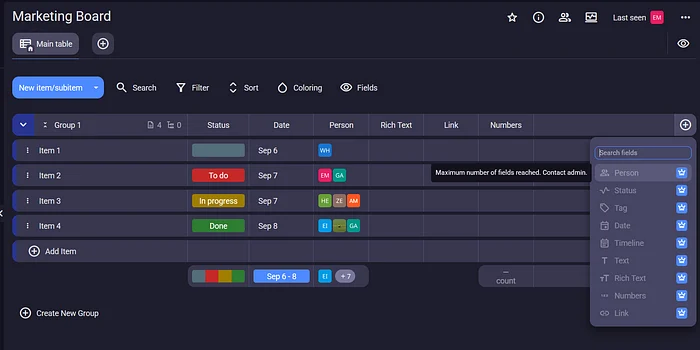
On the free plan you are capped at 6 fields per board. Wanting more than that means contacting your Admin to upgrade to the Pro plan.

Setup
The researcher is Mohamed Farghly, a web and network penetration tester and part-time bug bounty hunter. The work was done with an AI agent in the loop, and the report describes that workflow in some detail before getting to the bug.
The agent is OpenCode, chosen because the researcher finds it more flexible than Claude, connected to several MCP servers, each with its own purpose:
- Burp MCP server: connects the agent with Burp to analyse, inspect, modify and replay HTTP traffic during testing.
- Browser MCP server: automates and interacts with web browsers.
- GitHub MCP server: searches and works with GitHub repositories.
- OSINT MCP server: gathers public information for reconnaissance.
On model choice the report is deliberately non-committal: there is no universal answer, and people favour Claude, DeepSeek, GLM, Grok, Muse Spark, Kimi, Qwen or MiniMax. The criteria that matter are that the model should be uncensored, so it does not ask are you allowed to do this? every time, that it has solid tool-calling ability so it can actually use the MCP servers, and that it has decent reasoning so it can understand application logic instead of poking around randomly. The researcher started with DeepSeek, then moved on to Qwen and GLM.

The methodology has three steps.
Step 1: manual mapping. Before starting anything, the researcher discusses the target with the agent to understand what the company offers, who its customers are and how its business could be impacted by security issues. Then Burp Pro is opened, the target scope and MCP extension settings are set, intercept is turned off, FoxyProxy is enabled in Firefox, and the target UI is explored as a regular user. Nothing is tested at this stage: the researcher takes notes on the functions and privileges available to each role and visits every endpoint that can be found. The output is a set of notes covering every endpoint, every function and initial hunches about where vulnerabilities might hide. This takes days on a target with many functions, because you cannot hack something you do not understand. The agent could do this step, but the researcher believes it is worth doing manually first.
Step 2: let the agent fill the gaps. The notes are handed to the agent with a long prompt that frames it as an expert web application security researcher specialising in attack surface enumeration and threat modelling, gives it the manual notes, and grants it Burp MCP and Browser MCP access. The allowed modifications are strictly limited: change a parameter value only to understand its purpose, data type or handling; slightly alter a value to confirm behaviour or reduce uncertainty about a potential issue class; and only when the original request leaves ambiguity that would lead to inaccurate hypotheses. Forbidden: broad or aggressive testing, trying multiple payloads, exploitation attempts, destructive or state-changing actions beyond minimal observation, and modifying requests without a clear purpose. The task is to gather basic target information (technology stack, known active or public CVEs, hosting provider and its common misconfiguration risks), map the complete attack surface organised by standard web application and API vulnerability categories, and produce vulnerability hypotheses with endpoint, parameters, possible issue, reasoning and a confidence level of Low, Medium or High. The output structure is fixed: target information summary, attack surface map, potential vulnerability hypotheses. The agent adds its own notes on top of the manual ones, and by the end there is a complete picture of the site, a shortlist of likely vulnerability categories and a full understanding of the app's workflow.
Step 3: testing. There are two ways forward: vulnerability-first, picking one class such as XSS and hunting every instance across the site before moving on, or endpoint-first, picking one endpoint and exhausting every vulnerability type against it. The researcher prefers the first, and tells the agent, for example, that XSS has been manually confirmed somewhere in the attack surface and that it should locate it, reproduce and validate it according to the loaded skills, establish the actual security impact without assuming severity, record evidence, and stop once the task is fully validated. The prompt names the skills bb-methodology, hunt-xss and triage-validation and asks for a maintained to-do list.

A clear prompt plus skill instructions helps the agent understand how to operate and cuts down on false positives, provided there is no conflict between the prompt and the skills. The researcher repeats this for each vulnerability class, but notes that not every class is a good fit for agent-based hunting and that some are still better tested manually. He does not say which ones. He also warns against relying on other people's opinions about what agents are bad at: when he tested an agent on a class it was supposedly bad at, it succeeded, and skill and setup play a huge role.
Finding it
The idea came directly from the plan limit. The free plan caps a board at 6 custom fields, and the researcher wondered what would happen if more than 6 fields were added simultaneously through a race condition, and how the server would handle it.
As a Member, he went into the Admin's board and deleted all the existing fields, which brings the board back to a state where up to 6 fields can be added again.
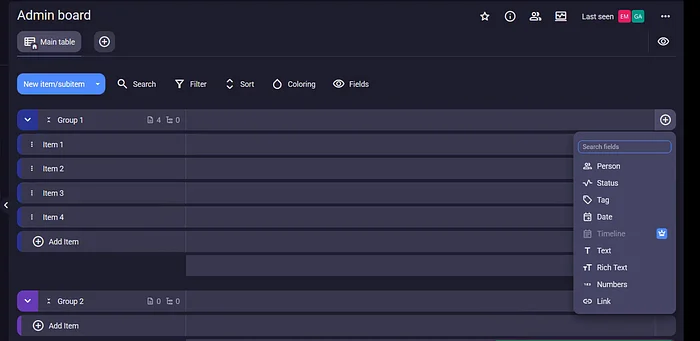
The report notes that a Member can delete, add and edit any fields in any board inside the organisation as part of the normal workflow, and that this is not a bug. A Viewer cannot, but inviting a user as a Viewer requires a Pro plan subscription.
Exploitation
Step 1: capture one field-creation request
With intercept on in Burp, add a Person field from the UI. The request hits Burp, so send it to Repeater.
Step 2: capture the other field types
Do the same for the remaining field types (Status, Tag, Date, Text, Numbers, Link), sending each one to Repeater.
Step 3: send all seven in parallel
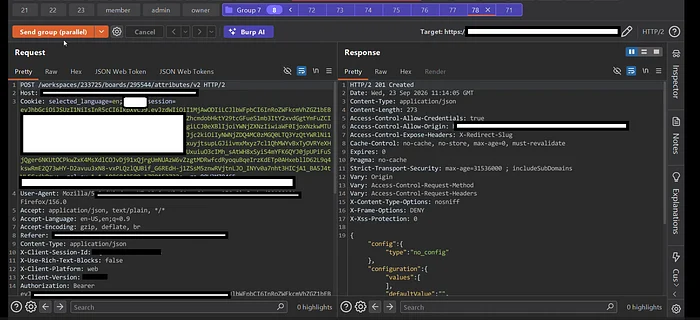
In the Repeater tab, group all 7 field-creation requests together and use Send group in parallel. All 7 requests come back with 201 Created.
Step 4: check the board in the UI
Going back to the UI, the result is not 7 new fields. Only 1 field exists, and no more fields can be added: all the buttons do not work, even after deleting the Number field.
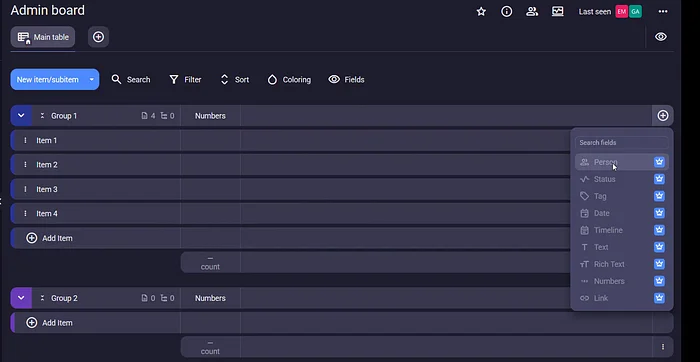
Neither the Owner nor the Admin can fix it. The board is damaged.
The original goal was to get extra fields for free by racing the requests. What was actually found is worse: any regular Member can permanently corrupt any board in the organisation, and there is no way for the Owner or Admin to recover it. The only fix is deleting the board entirely and creating a new one.
Root cause
The report does not describe the server-side implementation. All seven parallel requests returned 201 Created, which suggests the limit was not enforced across the board as a whole, but the report does not state the mechanism. The board then ended up in a state with a single field and non-functional controls, which the application could not repair through the UI.
Impact
Any regular Member can permanently corrupt any board in the organisation. The corruption survives attempts by the Owner and the Admin to fix it, and the only recovery is deleting the board and creating a new one, so the practical impact is permanent data loss and disruption caused by any user. The researcher frames this as the real business impact.
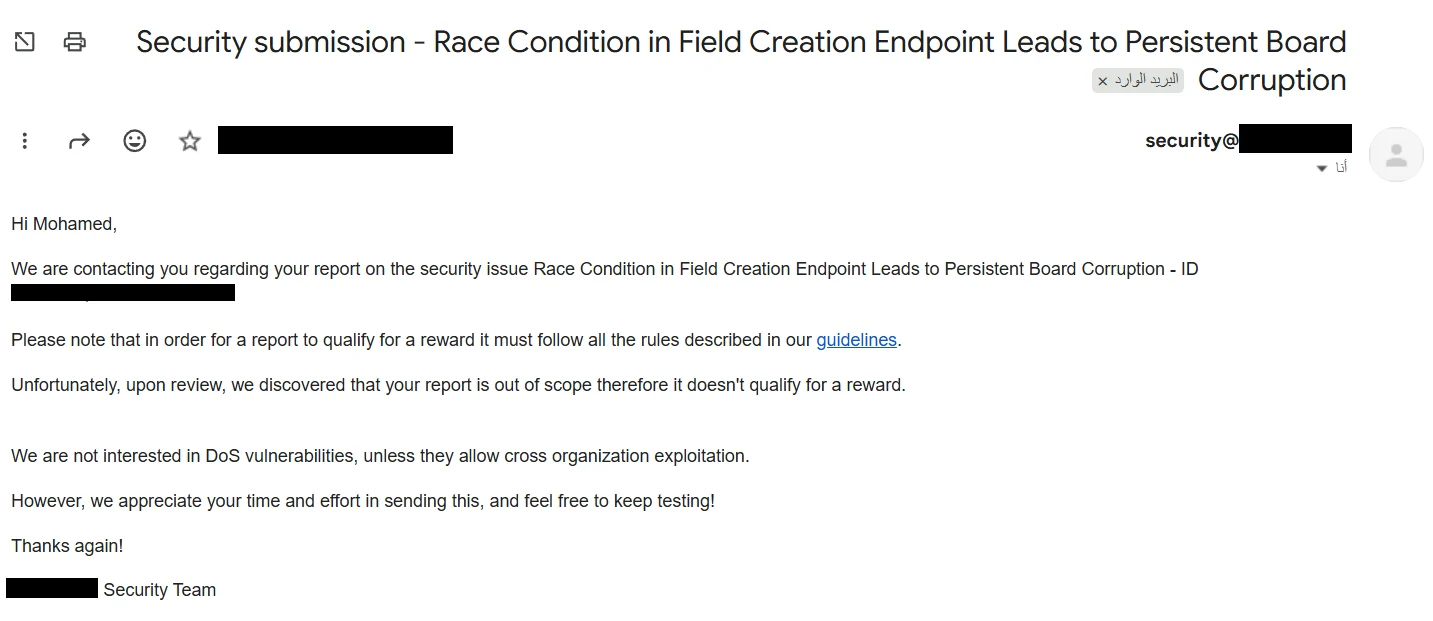
The security team classified the report as a DoS attack. They saw that the board becomes unusable and nobody can interact with it, and labelled it DoS because a service becomes unavailable to its users. The researcher re-explained the actual business impact, permanent data loss and disruption caused by any user, but the team looked at the end result only, without fully understanding the mechanism, and the classification did not change.

Fix
Other attempts that were not completed
1. JWT token exposure during recon
The JWT payload exposed data such as emails, workspaceExternalId, loginType, JWT ID(jti), productType, tagetSessionId, issued at(iss), expiration date(exp) and organizationsID. Using the JWT in his own session failed: the server checks exp, and removing it from the JWT or removing the signature did not help because the server checks the signature correctly.
2. Verification codes
A verification code was found at:
https://account.target.com/email-change-verification?code=[redacted]
The code was expired.
3. Blind SSRF in the X-Forwarded-For header
On this endpoint:
POST https://account.target.com/api/signup/organizations
the server makes outbound requests, detected with the Collaborator Everywhere extension during signup. Three escalation scenarios were tried.
Escalate to reading AWS metadata. The application was hosted on AWS EC2, confirmed via Wappalyzer and the EC2 hostnames exposed in the API response such as ec2-x-x-x-93.us-east-2.compute.amazonaws.com. The researcher attempted to reach the AWS Instance Metadata Service at [redacted] to retrieve IAM credentials. Because the interaction was limited to DNS lookups only and no HTTP requests were being issued, reaching the metadata endpoint was not possible.
Escalate to XSS. The Collaborator URL was reflected in the Active Sessions page as an IP address.
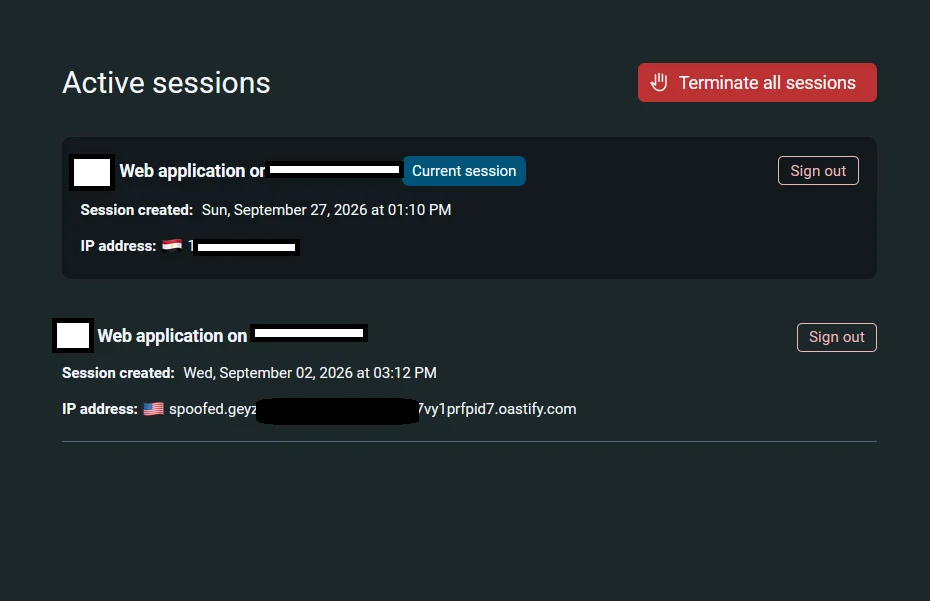
XSS payloads were injected via the X-Forwarded-For header to see whether the reflected value was sanitised. After numerous attempts with different payloads, the application appeared to encode the output properly and script execution was not achieved.
Escalate to tax enforcement bypass. The platform determines applicable tax rates from the user's IP address, so users connecting from Germany are subject to EU tax regulations when subscribing to a Pro plan. With control over X-Forwarded-For, the researcher tried spoofing the IP to a non-taxable region such as Egypt to bypass the tax logic. The application did not rely solely on the header for tax determination and the correct tax rate was still applied, so this escalation failed.
4. Two exposed S3 bucket names
Two bucket names were identified in responses:
- Bucket 1:
https://target-downloads.s3.eu-central-1.amazonaws.com, exposed viaGET https://task.com/board-templates. - Bucket 2:
https://target-prod-euc1-storage.s3.eu-central-1.amazonaws.com, exposed viaGET https://task.com/users?includeBots=true.
A full S3 misconfiguration assessment was performed on both with the AWS CLI, covering directory listing, ACL enumeration, bucket policy review, public access block status, and write and delete access testing. The researcher registered at aws.amazon.com to obtain a valid AWS Access Key, AWS Secret Key and Region.
Results: target-prod-euc1-storage allowed no public access. Directory listing, read, write and delete operations were all denied, and no data could be accessed, confirming the bucket is properly restricted. target-downloads allowed directory listing without authentication, but after reviewing all accessible files the bucket contained only board template assets (PNG, SVG) and a single ISO certification PDF. No sensitive data, credentials, PII or internal files were found, so the impact is informational only.
5. Member JWT reaching backend endpoints restricted in the UI
The Member JWT could access API endpoints in the backend that are restricted in the UI, but those endpoints did not show sensitive data or perform sensitive actions.
6. User data modification
This endpoint:
https://task.com/users/520082
accepts PUT /users/me with the Authorization header, and all users' data can be read with GET, for example GET /users/520078. This is not a bug, because the same is possible from the UI. The idea was that anyone holding another user's JWT could change that user's data such as location, title, phone, mobile or birthday through PUT /users/me by putting the victim's JWT in the Authorization header. The JWT obtained during recon did not work, and a search for XSS on other subdomains to chain with this part found nothing.
7. CORS misconfiguration
Sensitive data appears in the response of Get /users/me, and the Origin header was vulnerable to regex bypass, with payloads reflected in Access-Control-Allow-Origin:. The techniques used:
origin:https://vulnwebsite.com.evil.com >> failed
origin:https://vulnwebsite.com/evil.com >> failed
origin:https://evil.com?.vulnwebsite.com >> success
origin:https://wwwvulnwebsite.com >> success
origin:https://evil.com/vulnwebsite.com >> success
origin:https://evil.com%25%32%33@/vulnwebsite.com >> success
origin:https://evil.com%25%32%[redacted] >> success
origin:https://evil.com%25%32%[redacted] >> success
origin:https://evil.com%[redacted] >> success
However, there is an Authorization header with a JWT, and an attacker must obtain the victim's JWT to access the victim's data. Removing the header and sending the request without it failed.

- Other plan-limited resources. Any feature capped by plan, such as members per organisation, spaces per organisation or attachments per task, may enforce the cap per request. Send the creation requests as a parallel group and look for all of them returning success while the resulting state is inconsistent.
- Parallel creation with mixed types. The report used seven different field types. Try the same type repeatedly, and try mixing types, to see whether the corruption depends on the type combination.
- Recovery paths. After a corrupted state, try deleting the remaining object, re-adding fields, and having the Owner or Admin act on the board, to see whether any path restores it. A positive result means the corruption is recoverable and the impact is lower than reported.
- CORS regex bypass on other endpoints. Apply the same Origin payload list to endpoints that return sensitive data. A positive result is the payload reflected in
Access-Control-Allow-Origin:together with credentials being accepted, and the response readable cross-origin without needing a stolen token. - SSRF via
X-Forwarded-For. On any endpoint that logs or displays client IPs, inject a Collaborator URL and check for DNS or HTTP interaction. A positive result is an HTTP callback rather than DNS only, which is what would make metadata access possible. - S3 bucket enumeration. Look for bucket hostnames in API responses and test listing, ACLs, policy, public access block and write access. A positive result is unauthenticated listing containing sensitive objects, or write access.
What happened, in plain words
A security researcher was testing a web application, a productivity suite that bundles three separate work tools under one umbrella. He found a way for any ordinary user of the project management tool to permanently break any board in the organisation, so that nobody, not even the organisation's Owner or Admin, could repair it. The only fix was to delete the board and start again.
The trick was to ask the server to create several things at the same moment, rather than one after another. Every one of the seven requests was allowed, but the end result was a broken board. This kind of bug is called a race condition.
The researcher reported it, and the security team classified it as a denial of service (DoS) attack. He argued that the real impact was permanent data loss, but the classification did not change.
The report also describes several other things he found but could not turn into a working attack, and it starts with a long section on how he used AI agents to help him hunt.
The target and its vocabulary
Before the bug, some words that come up constantly in this report.
An organisation here is a company account inside the product. When you first log into task.com, the project management tool, it asks you to create one, and you become its Owner. The Owner can invite other people and give them a role: Admin or Member. These roles decide what a person is allowed to do.
A Space is a container inside the organisation, a bit like a folder for a team or a project. Any role, Owner, Admin or Member, can create a Space. Inside any Space, anyone can create a Board. A board is where the actual work lives: it holds tasks, and each task can have custom fields attached to it. A custom field is an extra piece of information you define yourself, such as status, tags, dates, text, numbers, links and others.
The product has paid plans. On the free plan you are capped at 6 fields per board. If you want more than that, you have to contact your Admin to upgrade to the Pro plan.
That cap is the seed of the whole story. A limit like this is a business rule: the company gives away a little for free and charges for more. Any time a program enforces a rule, it is worth asking where and when it enforces it, because a rule checked at the wrong moment can be bypassed.
The setup: hunting with an AI agent
The researcher is Mohamed Farghly, a web and network penetration tester and part-time bug bounty hunter. A bug bounty is a programme where companies pay people for reporting security problems in their systems. Before getting to the bug, the report describes how he works, because he used an AI agent as a helper throughout.
An AI agent here means a large language model (the kind of AI behind chat assistants) that is allowed to do things, not just talk: run tools, look at web traffic, open a browser. The agent he uses is called OpenCode, chosen because he finds it more flexible than Claude (another AI assistant). He connects it to several MCP servers. MCP is a standard way for an AI agent to plug into outside tools; each server gives the agent one new ability:
- Burp MCP server: connects the agent with Burp, a tool for intercepting and inspecting the traffic between a browser and a website, so the agent can analyse, inspect, modify and replay HTTP requests during testing.
- Browser MCP server: lets the agent automate and interact with web browsers.
- GitHub MCP server: lets it search and work with GitHub repositories (public code storage).
- OSINT MCP server: gathers public information for reconnaissance. OSINT means open-source intelligence: information anyone can find publicly.
On which AI model to use, the report is deliberately non-committal. There is no universal answer, and people favour Claude, DeepSeek, GLM, Grok, Muse Spark, Kimi, Qwen or MiniMax. What matters is that the model should be uncensored, so it does not ask are you allowed to do this? every time, that it has solid tool-calling ability so it can actually use the MCP servers, and that it has decent reasoning so it can understand application logic instead of poking around randomly. He started with DeepSeek, then moved on to Qwen and GLM.
Step 1: manual mapping
Before starting anything, he discusses the target with the agent to understand what the company offers, who its customers are and how its business could be impacted by security issues. Then he opens Burp Pro, sets the target scope and the MCP extension settings, turns intercept off, enables FoxyProxy in Firefox (a browser add-on that sends traffic through Burp), and explores the target as a regular user.
Nothing is tested at this stage. He takes notes on the functions and privileges available to each role and visits every endpoint he can find. An endpoint is one specific address on a server that does one thing, for example the address that creates a field on a board. This step takes days on a target with many functions, because you cannot hack something you do not understand. The agent could do it, but he believes it is worth doing manually first.
Step 2: let the agent fill the gaps
He hands his notes to the agent with a long prompt. The prompt frames the agent as an expert web application security researcher specialising in attack surface enumeration and threat modelling, gives it the manual notes, and grants it Burp MCP and Browser MCP access. Attack surface means everything an outsider can reach and interact with. Threat modelling means thinking about what could go wrong before trying anything.
The allowed modifications are strictly limited: change a parameter value only to understand its purpose, data type or handling; slightly alter a value to confirm behaviour or reduce uncertainty about a potential issue class; and only when the original request leaves ambiguity that would lead to inaccurate hypotheses. Forbidden: broad or aggressive testing, trying multiple payloads, exploitation attempts, destructive or state-changing actions beyond minimal observation, and modifying requests without a clear purpose.
The task is to gather basic target information (technology stack, known active or public CVEs, hosting provider and its common misconfiguration risks), map the complete attack surface organised by standard web application and API vulnerability categories, and produce vulnerability hypotheses with endpoint, parameters, possible issue, reasoning and a confidence level of Low, Medium or High. A CVE is a public catalogue number for a known vulnerability in a piece of software. An API is the set of addresses a program exposes so other programs can talk to it; think of it as the service counter of a shop, where requests are handed over and answers come back. The output structure is fixed: target information summary, attack surface map, potential vulnerability hypotheses.
The agent adds its own notes on top of the manual ones. By the end there is a complete picture of the site, a shortlist of likely vulnerability categories and a full understanding of the app's workflow.
Step 3: testing
There are two ways forward. Vulnerability-first means picking one class, such as XSS, and hunting every instance across the site before moving on. Endpoint-first means picking one endpoint and exhausting every vulnerability type against it. XSS, cross-site scripting, is a bug where an attacker gets their own code to run inside someone else's browser page.
He prefers the first, and tells the agent, for example, that XSS has been manually confirmed somewhere in the attack surface and that it should locate it, reproduce and validate it according to the loaded skills, establish the actual security impact without assuming severity, record evidence, and stop once the task is fully validated. The prompt names the skills bb-methodology, hunt-xss and triage-validation and asks for a maintained to-do list.
A clear prompt plus skill instructions helps the agent understand how to operate and cuts down on false positives, provided there is no conflict between the prompt and the skills. A false positive is a finding that looks real but is not. He repeats this for each vulnerability class, but notes that not every class is a good fit for agent-based hunting and that some are still better tested manually. He does not say which ones. He also warns against relying on other people's opinions about what agents are bad at: when he tested an agent on a class it was supposedly bad at, it succeeded, and skill and setup play a huge role.
Finding the race condition
The idea came directly from the plan limit. The free plan caps a board at 6 custom fields. He wondered what would happen if more than 6 fields were added simultaneously through a race condition, and how the server would handle it.
A race condition is a bug that appears when two or more actions happen at almost the same instant and the program is not built to handle that. A useful comparison is two people booking the last seat on a plane at the same moment: each request checks "is the seat free?", each sees "yes", and both get a ticket for one seat. The check and the action are not done as one indivisible step.
As a Member, he went into the Admin's board and deleted all the existing fields. That brings the board back to a state where up to 6 fields can be added again, which is what he needed to test the limit cleanly.
The report notes that a Member can delete, add and edit any fields in any board inside the organisation as part of the normal workflow, and that this is not a bug. A Viewer cannot, but inviting a user as a Viewer requires a Pro plan subscription.
Exploitation, step by step
Step 1: capture one field-creation request
With intercept on in Burp, he adds a Person field from the UI. Intercept means Burp pauses each request on its way out so you can look at it. The request hits Burp, so he sends it to Repeater. Repeater is Burp's workbench: a place where you can hold a request, edit it and send it again as many times as you like.
Why this step: to get an exact copy of the request the browser sends when a field is created. Once you hold that copy, you can replay it without clicking through the interface.
Step 2: capture the other field types
He does the same for the remaining field types (Status, Tag, Date, Text, Numbers, Link), sending each one to Repeater.
Why: each field type is created by a slightly different request. To test the limit with seven creations at once, he needs all seven requests ready to fire.
Step 3: send all seven in parallel
In the Repeater tab, he groups all 7 field-creation requests together and uses Send group in parallel. All 7 requests come back with 201 Created.
In plain words: Send group in parallel tells Burp to fire the whole group at the same moment instead of one after another. 201 Created is the standard HTTP status code a server returns when it has successfully created something new. So the server said yes seven times.
Why this matters: the free plan allows only 6 fields, yet all seven requests were accepted, which is the first sign that the limit was not enforced across the board as a whole.
Step 4: check the board in the UI
Going back to the UI, the result is not 7 new fields. Only 1 field exists, and no more fields can be added: all the buttons do not work, even after deleting the Number field.
Neither the Owner nor the Admin can fix it. The board is damaged.
Why this step matters: the server's answers and the actual state of the board disagree. Seven successes produced one field and a broken interface. That gap between what the server said and what the user sees is the bug.
His original goal was to get extra fields for free by racing the requests. What he actually found is worse: any regular Member can permanently corrupt any board in the organisation, and there is no way for the Owner or Admin to recover it. The only fix is deleting the board entirely and creating a new one.
Why it happens
The report does not describe the server-side implementation, so the mechanism can only be inferred. The parallel requests each passed the plan-limit check and each returned 201 Created, which suggests the limit was enforced per request without serialising concurrent field creation on the same board. Serialising means making actions take turns, one at a time, so two of them cannot overlap. The board then ended up in a state with a single field and non-functional controls, which the application could not repair through the UI. The report does not state what the server did with the other six creations, or why deleting the remaining field did not restore the board.
Impact
Any regular Member can permanently corrupt any board in the organisation. The corruption survives attempts by the Owner and the Admin to fix it, and the only recovery is deleting the board and creating a new one, so the practical impact is permanent data loss and disruption caused by any user. The researcher frames this as the real business impact.
The security team classified the report as a DoS attack. DoS, denial of service, means making a service unavailable to the people who need it. They saw that the board becomes unusable and nobody can interact with it, and labelled it DoS. The researcher re-explained the actual business impact, permanent data loss and disruption caused by any user, but the team looked at the end result only, without fully understanding the mechanism, and the classification did not change.
What a fix would look like
Based on the described behaviour, the fix would be to enforce the field limit atomically, so that concurrent creations on the same board are serialised or rejected once the cap is reached, and to make the board state recoverable, so that a partially created set of fields can be cleaned up by the Owner or Admin rather than requiring the board to be deleted. Atomic here means all-or-nothing: the check and the creation happen as one indivisible step, so two requests cannot both slip through.
Other attempts that were not completed
1. JWT token exposure during recon
A JWT, JSON Web Token, is a small signed piece of text a server gives you after you log in, and which you send back with later requests to prove who you are. Think of it as a wristband at an event: it carries some information about you and a stamp that proves the venue issued it. The payload, the readable part inside it, exposed data such as emails, workspaceExternalId, loginType, JWT ID(jti), productType, tagetSessionId, issued at(iss), expiration date(exp) and organizationsID.
Using the JWT in his own session failed. The server checks exp, the expiry time, and removing it from the JWT or removing the signature did not help because the server checks the signature correctly. The signature is the stamp that proves the token was issued by the server and not edited by someone else.
Why he tried: if a token could be edited or reused, an attacker might impersonate another user. The server's checks held.
2. Verification codes
A verification code was found at:
https://account.target.com/email-change-verification?code=[redacted]
Line by line: https:// is the secure web protocol; account.target.com is the sign-up site for the whole suite; /email-change-verification is the page that handles confirming an email change; ?code= starts the part of the address that carries extra data, and the long string after it is the code itself.
The code was expired. A verification code is a one-time secret sent to prove you control an email address. An expired one is useless, which is why this attempt went nowhere.
3. Blind SSRF in the X-Forwarded-For header
SSRF, server-side request forgery, is a bug where you can make the server send a request to an address of your choosing. It is called blind when you cannot see the answer, only evidence that the request happened. X-Forwarded-For is an HTTP header, a labelled line of extra information sent with a request, that is meant to carry the original client's IP address when traffic passes through proxies. A proxy is a middleman server that forwards traffic.
On this endpoint:
POST https://account.target.com/api/signup/organizations
Line by line: POST is the HTTP method used to send data and create something; https://account.target.com is the sign-up site; /api/signup/organizations is the API address that handles creating an organisation during signup.
The server makes outbound requests, detected with the Collaborator Everywhere extension during signup. Collaborator is a Burp feature that gives you a unique address you can plant in a request; if the server ever contacts that address, Burp records it, proving the server made the request. An extension is an add-on for Burp. Three escalation scenarios were tried.
Escalate to reading AWS metadata. The application was hosted on AWS EC2, confirmed via Wappalyzer and the EC2 hostnames exposed in the API response such as ec2-x-x-x-93.us-east-2.compute.amazonaws.com. AWS is Amazon's cloud platform, EC2 is its rent-a-server service, and Wappalyzer is a tool that guesses what software a site runs on. The researcher attempted to reach the AWS Instance Metadata Service at [redacted] to retrieve IAM credentials. That address is a special internal address that cloud servers use to fetch information about themselves, including temporary access keys; IAM is AWS's permission system, and credentials are the keys that grant access. Because the interaction was limited to DNS lookups only and no HTTP requests were being issued, reaching the metadata endpoint was not possible. A DNS lookup is just asking the internet's phone book to translate a name into an address; it proves the server tried to resolve the name, but not that it actually connected.
Escalate to XSS. The Collaborator URL was reflected in the Active Sessions page as an IP address.
Reflected means the value you sent comes back in the page. XSS payloads were injected via the X-Forwarded-For header to see whether the reflected value was sanitised. Sanitised means dangerous characters are neutralised before being shown. After numerous attempts with different payloads, the application appeared to encode the output properly and script execution was not achieved. Encoding turns characters into a safe form so the browser displays them as text instead of running them.
Escalate to tax enforcement bypass. The platform determines applicable tax rates from the user's IP address, so users connecting from Germany are subject to EU tax regulations when subscribing to a Pro plan. With control over X-Forwarded-For, the researcher tried spoofing the IP to a non-taxable region such as Egypt to bypass the tax logic. Spoofing means pretending to be something you are not. The application did not rely solely on the header for tax determination and the correct tax rate was still applied, so this escalation failed.
4. Two exposed S3 bucket names
S3 is Amazon's file storage service; a bucket is a named container of files inside it. Two bucket names were identified in responses:
- Bucket 1:
https://target-downloads.s3.eu-central-1.amazonaws.com, exposed viaGET https://task.com/board-templates. - Bucket 2:
https://target-prod-euc1-storage.s3.eu-central-1.amazonaws.com, exposed viaGET https://task.com/users?includeBots=true.
Line by line: GET is the HTTP method for fetching something. https://task.com/board-templates is the page that lists board templates; its response mentioned the first bucket. https://task.com/users?includeBots=true is the users listing, with a parameter includeBots set to true; its response mentioned the second bucket. The bucket addresses themselves follow the pattern https://<bucket name>.s3.<region>.amazonaws.com, where the region is the physical location of the storage.
A full S3 misconfiguration assessment was performed on both with the AWS CLI, covering directory listing, ACL enumeration, bucket policy review, public access block status, and write and delete access testing. The AWS CLI is Amazon's command-line tool for managing cloud resources. Directory listing means being able to see the list of files in the bucket. ACLs are access control lists, per-file permission rules. A bucket policy is the overall permission document for the bucket. Public access block is a setting that forbids public access entirely. He registered at aws.amazon.com to obtain a valid AWS Access Key, AWS Secret Key and Region, because the CLI needs credentials to talk to AWS.
Results: target-prod-euc1-storage allowed no public access. Directory listing, read, write and delete operations were all denied, and no data could be accessed, confirming the bucket is properly restricted. target-downloads allowed directory listing without authentication, but after reviewing all accessible files the bucket contained only board template assets (PNG, SVG) and a single ISO certification PDF. Authentication means proving who you are. No sensitive data, credentials, PII or internal files were found, so the impact is informational only. PII is personally identifiable information, data that identifies a real person.
5. Member JWT reaching backend endpoints restricted in the UI
The Member JWT could access API endpoints in the backend that are restricted in the UI, but those endpoints did not show sensitive data or perform sensitive actions. In other words, the interface hid some doors, but behind them there was nothing worth taking.
6. User data modification
This endpoint:
https://task.com/users/520082
Line by line: https://task.com is the project management tool; /users/520082 points at one specific user record, identified by the number at the end.
It accepts PUT /users/me with the Authorization header, and all users' data can be read with GET, for example GET /users/520078. PUT is the HTTP method for replacing or updating something; /users/me means "the user I am logged in as"; the Authorization header is the line in the request that carries your proof of identity, here the JWT. This is not a bug, because the same is possible from the UI. The idea was that anyone holding another user's JWT could change that user's data such as location, title, phone, mobile or birthday through PUT /users/me by putting the victim's JWT in the Authorization header. The JWT obtained during recon did not work, and a search for XSS on other subdomains to chain with this part found nothing. Chaining means combining two small issues so that together they do something bigger.
7. CORS misconfiguration
CORS, cross-origin resource sharing, is the browser rule that decides whether a page from one site may read responses from another site. A misconfiguration is a setting left in a state that is unsafe. Sensitive data appears in the response of Get /users/me, and the Origin header was vulnerable to regex bypass, with payloads reflected in Access-Control-Allow-Origin:. The Origin header tells the server which site the request came from. A regex bypass means crafting a value that slips past a pattern-matching check. Access-Control-Allow-Origin is the response header in which the server says which site is allowed to read the answer. The techniques used:
origin:https://vulnwebsite.com.evil.com >> failed
origin:https://vulnwebsite.com/evil.com >> failed
origin:https://evil.com?.vulnwebsite.com >> success
origin:https://wwwvulnwebsite.com >> success
origin:https://evil.com/vulnwebsite.com >> success
origin:https://evil.com%25%32%33@/vulnwebsite.com >> success
origin:https://evil.com%25%32%[redacted] >> success
origin:https://evil.com%25%32%[redacted] >> success
origin:https://evil.com%[redacted] >> success
Line by line: each line is one value sent in the origin: header, followed by >> and the result. vulnwebsite.com stands for the real site, evil.com for an attacker's site. The first two try to make an attacker's address look like it belongs to the real site by appending or prefixing it, and both failed. The rest use tricks such as a ? (which starts a query string), a missing dot (wwwvulnwebsite.com), a slash, an @ (which in web addresses separates a username from the host), and percent-encoded characters (%25%32%33 is an encoded %23, and %23 is an encoded #), and all of them succeeded, meaning the server echoed them back in Access-Control-Allow-Origin:.
However, there is an Authorization header with a JWT, and an attacker must obtain the victim's JWT to access the victim's data. Removing the header and sending the request without it failed. So the CORS hole alone was not enough.
These are follow-up ideas the report lists for anyone testing similar systems.
- Other plan-limited resources. Any feature capped by plan, such as members per organisation, spaces per organisation or attachments per task, may enforce the cap per request. Send the creation requests as a parallel group and look for all of them returning success while the resulting state is inconsistent.
- Parallel creation with mixed types. The report used seven different field types. Try the same type repeatedly, and try mixing types, to see whether the corruption depends on the type combination.
- Recovery paths. After a corrupted state, try deleting the remaining object, re-adding fields, and having the Owner or Admin act on the board, to see whether any path restores it. A positive result means the corruption is recoverable and the impact is lower than reported.
- CORS regex bypass on other endpoints. Apply the same Origin payload list to endpoints that return sensitive data. A positive result is the payload reflected in
Access-Control-Allow-Origin:together with credentials being accepted, and the response readable cross-origin without needing a stolen token. - SSRF via
X-Forwarded-For. On any endpoint that logs or displays client IPs, inject a Collaborator URL and check for DNS or HTTP interaction. A positive result is an HTTP callback rather than DNS only, which is what would make metadata access possible. - S3 bucket enumeration. Look for bucket hostnames in API responses and test listing, ACLs, policy, public access block and write access. A positive result is unauthenticated listing containing sensitive objects, or write access.
Glossary
- Admin: a role in the organisation with more permissions than a Member.
- AI agent: an AI model allowed to run tools and take actions, not just answer questions.
- API: the set of addresses a program exposes so other programs can talk to it.
- Atomic: done as one indivisible step, all or nothing, so two actions cannot overlap.
- Attack surface: everything an outsider can reach and interact with.
- Authentication: proving who you are.
- Authorization header: the part of a request that carries proof of identity, here a JWT.
- AWS: Amazon Web Services, Amazon's cloud platform.
- AWS CLI: Amazon's command-line tool for managing cloud resources.
- Blind SSRF: server-side request forgery where you cannot see the response, only evidence the request happened.
- Board: a container inside a Space that holds tasks and their custom fields.
- Bucket: a named container of files in Amazon S3.
- Bug bounty: a programme that pays people for reporting security problems.
- Burp: a tool for intercepting, inspecting and replaying web traffic.
- Chaining: combining two small issues so together they do something bigger.
- Collaborator: a Burp feature that gives you a unique address and records any contact from a server.
- CORS: the browser rule deciding whether a page from one site may read responses from another.
- CVE: a public catalogue number for a known vulnerability in software.
- Custom field: an extra piece of information you define and attach to tasks on a board.
- DNS lookup: asking the internet's phone book to translate a name into an address.
- DoS: denial of service, making a service unavailable to its users.
- EC2: Amazon's rent-a-server service.
- Encoding: turning characters into a safe form so they are displayed as text instead of run.
- Endpoint: one specific address on a server that does one thing.
- Extension: an add-on that adds features to a tool such as Burp.
- False positive: a finding that looks real but is not.
- FoxyProxy: a browser add-on that sends traffic through a proxy such as Burp.
- GET: the HTTP method for fetching something.
- Header: a labelled line of extra information sent with a request or response.
- IAM: Amazon's permission system for cloud resources.
- Intercept: pausing a request on its way out so you can inspect it.
- JWT: a small signed piece of text a server gives you after login, sent back to prove who you are.
- Member: the basic role in an organisation.
- MCP: a standard way for an AI agent to plug into outside tools.
- Misconfiguration: a setting left in an unsafe state.
- Organisation: the company account inside the product, with an Owner, Admins and Members.
- Origin header: tells the server which site a request came from.
- OSINT: open-source intelligence, information anyone can find publicly.
- Owner: the role that creates the organisation and has the most control.
- PII: personally identifiable information, data that identifies a real person.
- POST: the HTTP method for sending data and creating something.
- Pro plan: the paid plan that lifts the free plan's limits.
- Proxy: a middleman server that forwards traffic.
- PUT: the HTTP method for replacing or updating something.
- Race condition: a bug that appears when actions happen at almost the same instant and the program is not built to handle it.
- Reflected: a value you sent comes back in the page.
- Regex bypass: crafting a value that slips past a pattern-matching check.
- Repeater: Burp's workbench for holding, editing and resending a request.
- Sanitised: dangerous characters neutralised before being shown.
- S3: Amazon's file storage service.
- Serialising: making actions take turns so two cannot overlap.
- Signature: the stamp on a token proving the server issued it and nobody edited it.
- Space: a container inside the organisation, like a folder for a team or project.
- Spoofing: pretending to be something you are not.
- SSRF: server-side request forgery, making the server send a request to an address you choose.
- Threat modelling: thinking about what could go wrong before trying anything.
- Viewer: a role that can look but not change things, available only on the Pro plan.
- Wappalyzer: a tool that guesses what software a site runs on.
- XSS: cross-site scripting, getting your own code to run inside someone else's browser page.
- 201 Created: the HTTP status code meaning something new was successfully created.



