Response Filter Denial of Service (RFDoS): shut down a website by triggering WAF rule
Response-body WAF rules in the OWASP Core Rule Set, Comodo and Atomicorp rule sets block pages whenever the response contains simple strings such as an Oracle error code or a config-file marker. An attacker who can store such a string in a comment, review, username or email can make the affected page return a 403 to every visitor, causing a denial of service.
 Published on blog.sicuranext.com
TL;DR: Basically, if a target website is protected by a WAF using the OWASP Core Rule Set or Comodo Rule Set or Atomicorp Rule Set, you can send the string ORA-1234 or OracleDrive or ASL-CONFIG-FILE in a comment, product review, registration form, e-commerce order details, etc... to prevent the website from showing…
The full write-up lives on its author's site
It belongs to its author, so we link to it rather than copy it. The other two tabs are our own rewrites, checked against it.
Context
ModSecurity is an open-source web application firewall that runs as a module inside the web server, monitoring HTTP traffic in real time, logging it and enforcing access control. The engine on its own protects nothing: it needs rules, and the best-known free rule set is the OWASP Core Rule Set (CRS), used by Google Cloud Armor, Azure Application Gateway, Cloudflare and many other vendors. AWS WAF ships a managed rule group called "Core Rule Set", but it is not the OWASP CRS. Comodo and Atomicorp distribute their own ModSecurity rule sets as alternatives.
Like many rule sets, the CRS contains rules that inspect the response body. Those rules exist to stop sensitive data from reaching the user: SQL error messages, PHP source code, web shells, credit card numbers. The feature normally works by blocking the response (typically with a 403 Forbidden) or by replacing the leaked string with asterisks before the body is sent.
The problem described here, which the author calls Response Filter Denial of Service (RFDoS), turns that feature against the site: if a page reflects user input and the input matches a response rule, the WAF blocks the page for everyone. The author earned 1,200 USD of bounty from a single company that had this RFDoS problem on its portal.
Setup
The conditions are modest. The target must run ModSecurity with a rule set that inspects the response body, and it must have at least one place where user input is stored and reflected in a response: a comment, a product review, a registration form, an e-commerce order detail page, a username or an email address. The author notes that ModSecurity v2 is primarily available on Apache, while the v3.x branch runs as an external library on Nginx and other servers except Apache.
Rules operate in phases: phase 1 for the request line and request headers, phase 2 for the request body, phase 3 for response headers, phase 4 for the response body. Response inspection rules run at phase 4.
For the prevalence survey the author used a list of 15 million WordPress sites collected by parsing the Common Crawl dataset as part of the PWNPress side project, and a custom Nuclei template.
Finding it
The starting point is the well-known advice that debug and error messages should not be shown, because they leak database type and name, table names and fragments of the SQL query, which helps an attacker craft SQL injection. The same reasoning applies to PHP errors that reveal paths or snippets of server-side code.
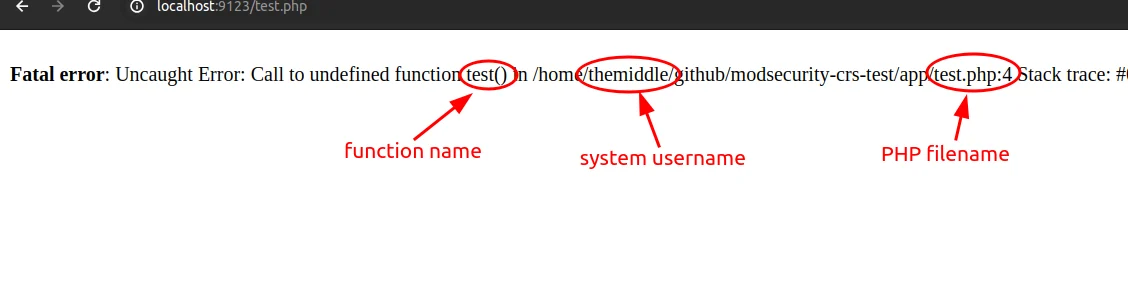
Example of a PHP error
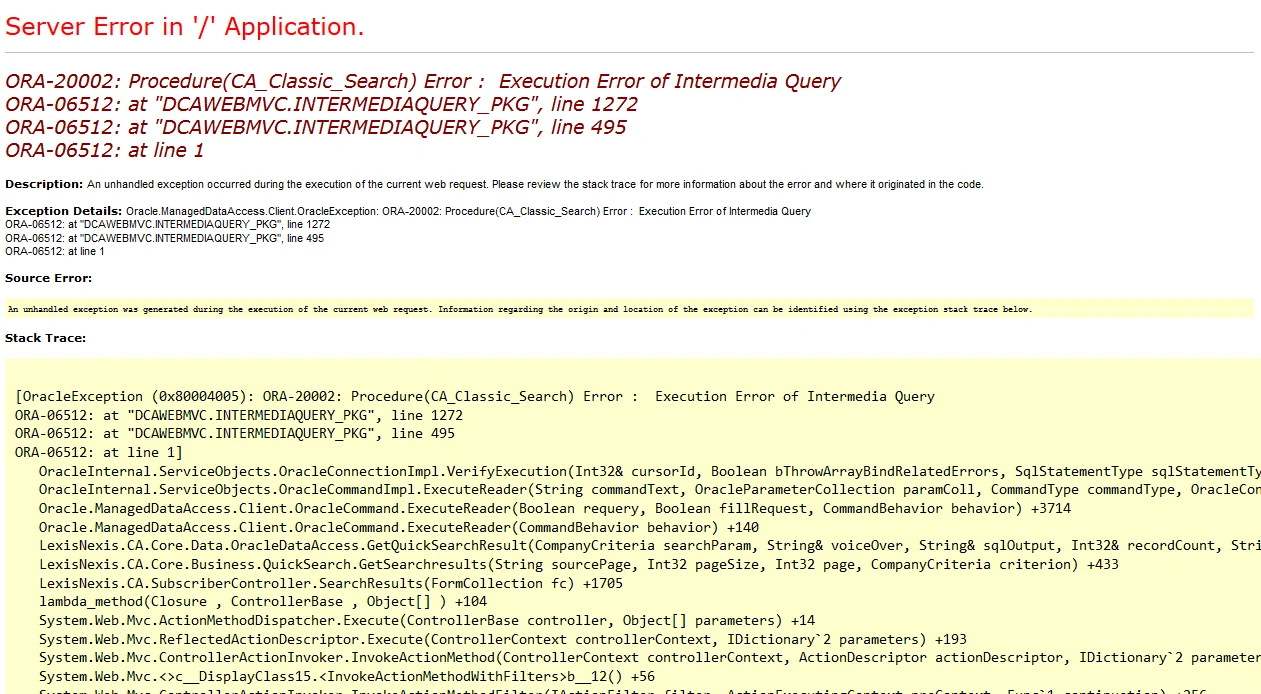
WAFs therefore implement response validation to stop these leaks, and the author's observation is that the rules doing so match strings that contain no special characters at all. A rule blocking the phrase You have an error in your SQL syntax cannot be validated or sanitised before storage, because the phrase is ordinary text. The same is true of a rule matching ORA- followed by four digits, or the string dynamic sql error.
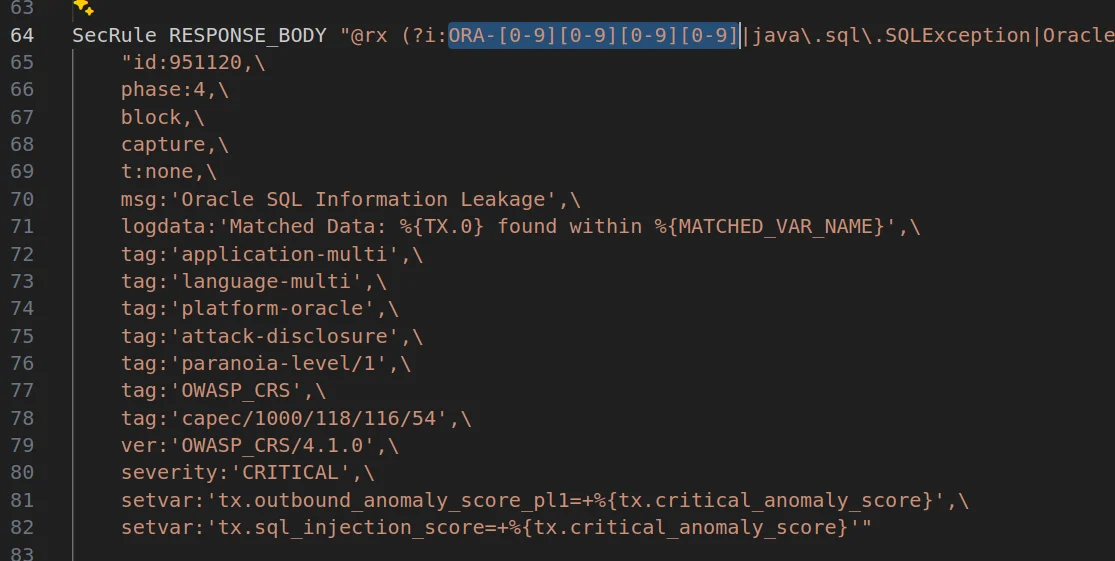
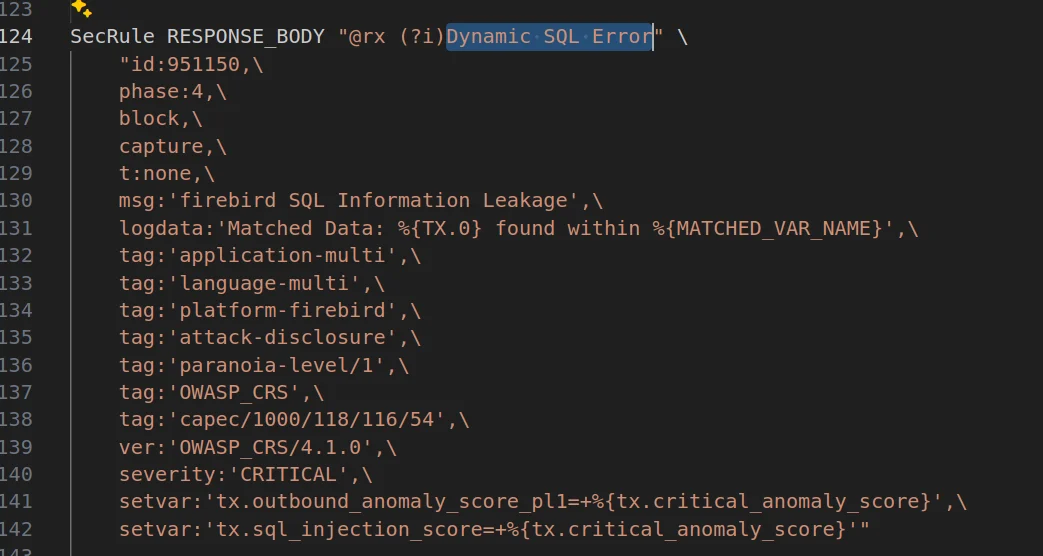
The rule shown runs at phase 4 and blocks the response when the regex matches the RESPONSE_BODY variable. Any page that stores and displays such a string is therefore a candidate for being shut down by anyone who can submit it.
Exploitation
Step 1: confirm the rule set inspects responses
The report links the CRS rules directory on GitHub. The most problematic file is RESPONSE-951-DATA-LEAKAGES-SQL.conf, because detecting SQL errors forces the use of regexes over plain strings.
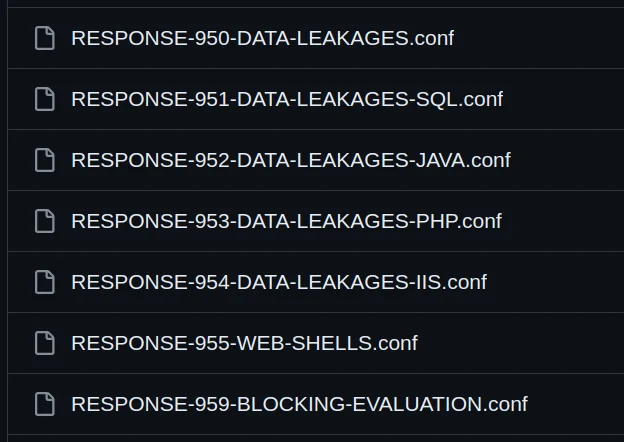
Step 2: pick a trigger string
The author lists strings that are blocked by one or more response body rules on ModSecurity v2 with the OWASP CRS:
ET Database Engine
Access Database Engine
ORA-1234
Oracle error
OracleDriver
CLI DriverDB2
DB2 SQL error
Dynamic SQL Error
An illegal character has been found in the statement
ExceptionInformix
Ingres SQLSTATE
Unexpected end of command in statement
SQL errorPOS1
Warningmaxdb
Unclosed quotation mark after the character string
Microsoft OLE DB Provider for ODBC Drivers
Microsoft OLE DB Provider for SQL Server
Incorrect syntax near
Sintaxis incorrecta cerca de
Syntax error in string in query expression
Procedure or function foo expects parameter
Unclosed quotation mark before the character string
Syntax error foo in query expression
the used select statements have different number of columns
OLE DBSQL Server
DriverSQL Server
SQL ServerDriverS
QL Server12345678
supplied argument is not a valid MySQL
on MySQL result index
You have an error in your SQL syntax near
MySQL server version for the right syntax to use
SQL syntaxMySQL
valid MySQL result
PostgreSQLERROR
valid PostgreSQL result
Supplied argument is not a valid PostgreSQL foo resource
Unable to connect to PostgreSQL server
Warningsybase
SybaseServer message
An Error Has Occurred
None of these strings contains special characters, HTML tags or words from bad-word dictionaries such as eval or exec, so they pass input validation and sanitisation.
Step 3: store the string where it will be reflected
On an e-commerce site, a product review such as "Really useful product, I tried it with ORA-1234, and it works really well" prevents any user from accessing the page where the review is published. On a user account page, registering with an email address like [redacted] stops administrators from viewing the user list or editing the account details. The same applies to comments, registration forms and order details.
Step 4: the same trick against Comodo rules
The Comodo Free ModSecurity Rules project is, in the author's words, even worse. After days trying to download the latest version because the website was always down, the author obtained cwaf_rules-1.241.
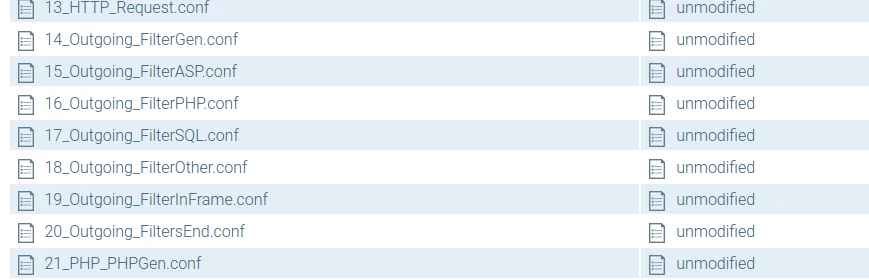
from Comodo https://waf.comodo.com/user/cwaf_revisions
Comodo distributes OutgoingFilter rule sets that include SQL error leakage prevention. Inside 17_Outgoing_FilterSQL.conf the string ORA-1234 appears:

So do simpler strings such as Dynamic SQL Error, JET Database Engine and Access Database Engine.


Step 5: the same trick against Atomicorp rules
Atomicorp's free rules, available after registering on their portal, include a rule that tries to prevent leakage of the rules and configurations themselves by blocking any response body containing:
---ASL-CONFIG-FILE---
By doing so, they let anyone shut down a site by reflecting input made up solely of A-Z characters and -.

From the latest Atomicorp modsec-202405080003.tar.bz2
Step 6: demonstrate it on WordPress
The demo video shows RFDoS on a vanilla WordPress website. WordPress reflects the s query string parameter back into the response body, as in /?s=foobar.
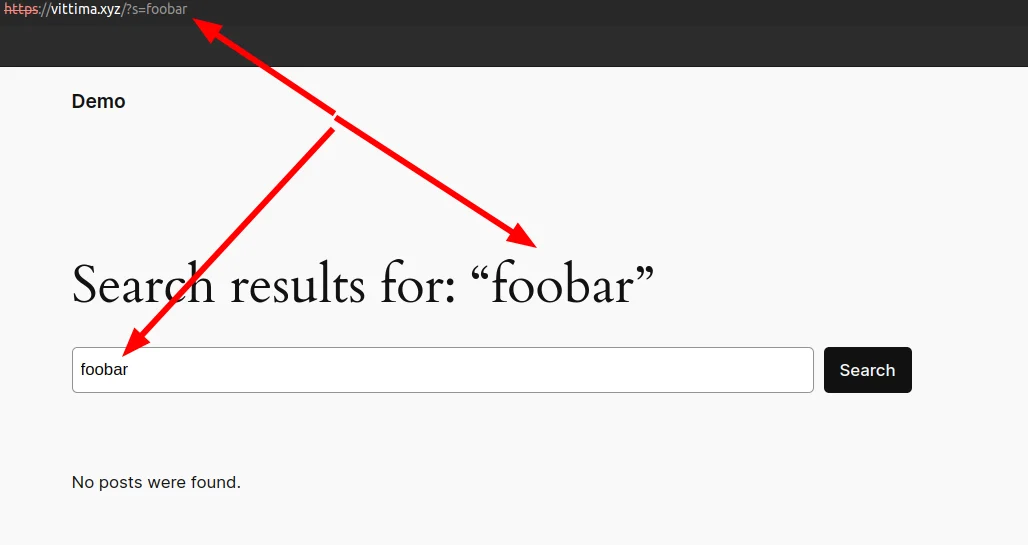
Step 7: bypass the filter with a Range request
Blocking the response is not even a reliable way to stop the leak. If a visible error-based SQL injection is blocked because the body contains a SQL error, the attacker can request only part of the body. The Range header asks for a specific portion of a resource, with syntax such as Range: bytes=0-499 for the first 500 bytes.
In the test, the injection uses the query string parameter a, the error occurs, and the WAF blocks the response body to prevent the error from leaking.
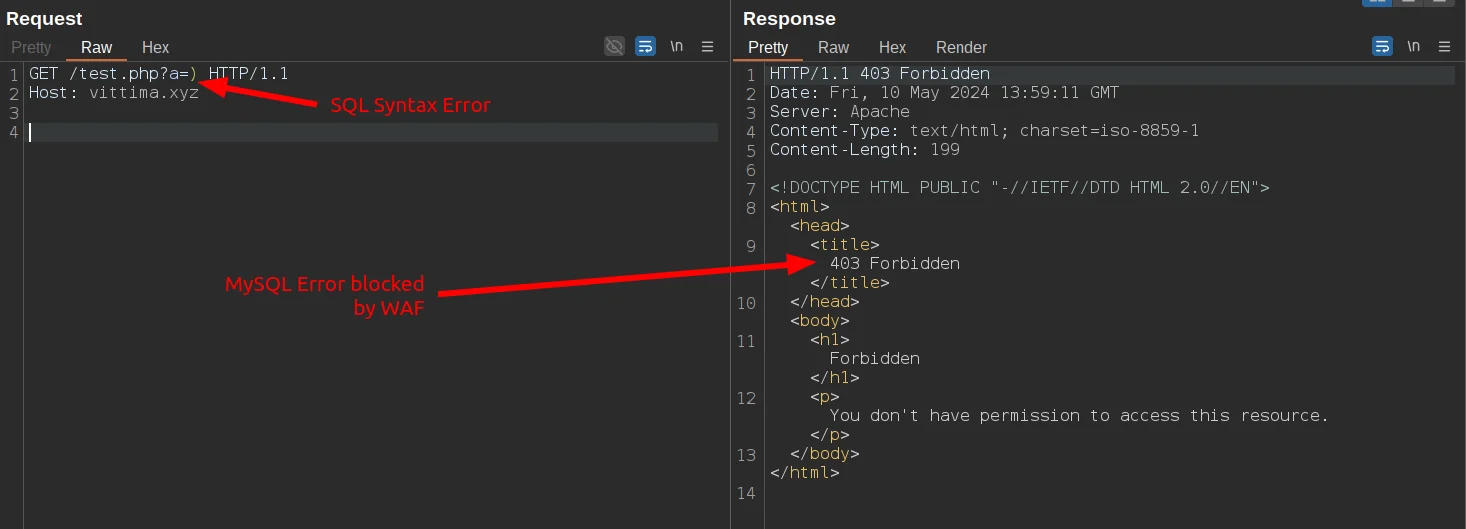
A MySQL error typically reads "You have an error in your SQL syntax; check the manual that corresponds to your MySQL server version for the right syntax to use near 'foo bar' at line xyz". Knowing that the rule matches the initial part, the author cuts off the beginning of the response by requesting bytes 90 to 140.
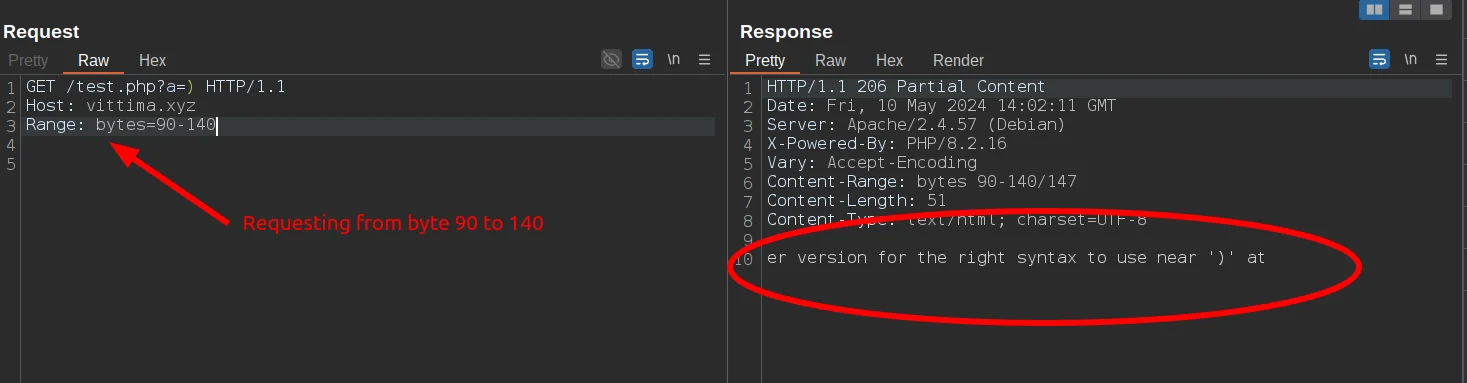
This works against SQL error rules and against rules meant to stop web shell or backdoor responses. It is not always possible: it depends on the web server accepting the range. If the injection leads to a 500 internal server error, the server might ignore the range and send the whole error page.
Step 8: bypass the web shell and PHP leakage rules
The CRS has rules aimed at web shells that match the HTML body of common backdoors, for example on the page title tag.
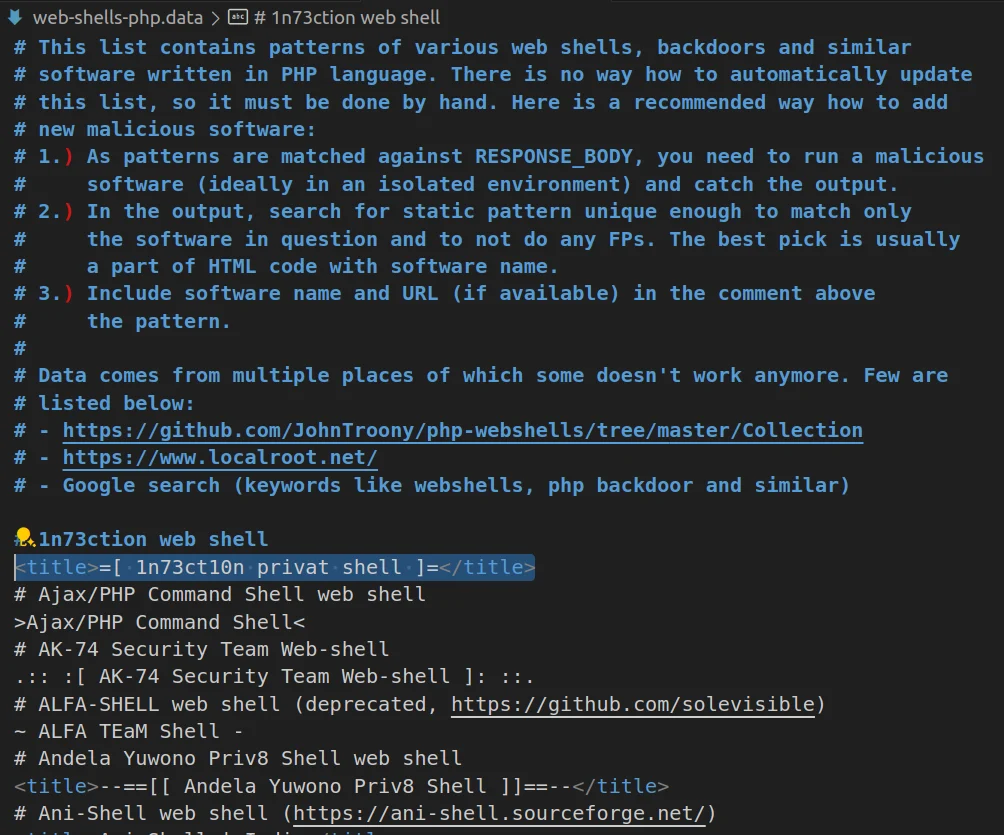
The author simulated a web shell with a title tag matching a web shell rule and included a leak of the WordPress config file, which often contains the MySQL username and password, to trigger the PHP code leakage rule.
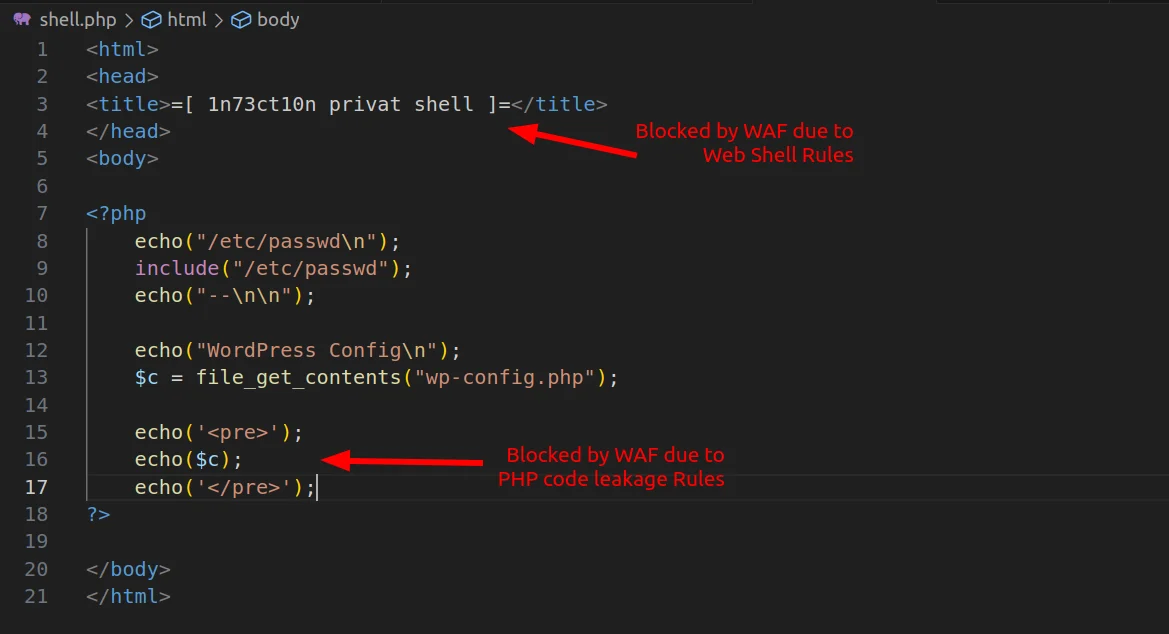
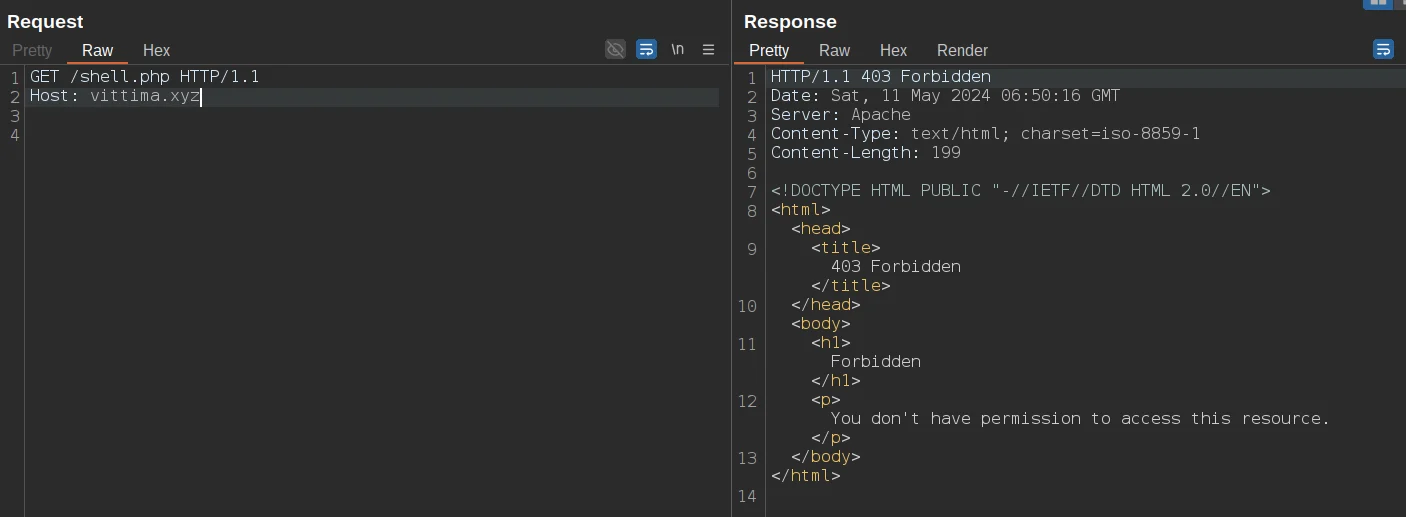
Accessing the shell is blocked by the WAF.
ModSecurity logs:
ModSecurity: Warning. Match of "rx ..." against "RESPONSE_BODY" required. [file "/etc/modsecurity.d/owasp-crs/rules/RESPONSE-953-DATA-LEAKAGES-PHP.conf"] [line "102"] [id "953120"] [msg "PHP source code leakage"] [severity "ERROR"] ...

ModSecurity: Warning. Matched phrase "<title>=[ 1n73ct10n privat shell ]=</title>" at RESPONSE_BODY. [file "/etc/modsecurity.d/owasp-crs/rules/RESPONSE-955-WEB-SHELLS.conf"] [line "41"] [id "955100"] [msg "Web shell detected"] ...
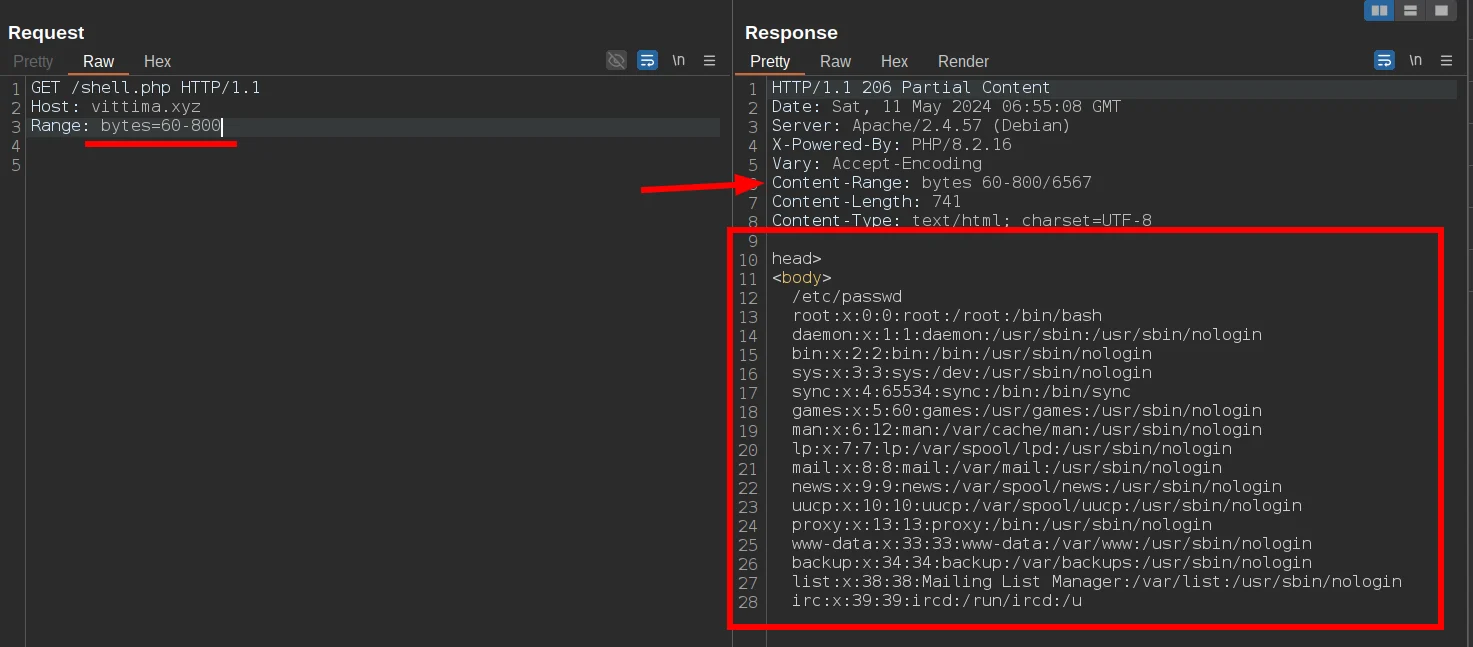
Skipping the first 60 bytes omits the title tag and avoids the web shell rule.
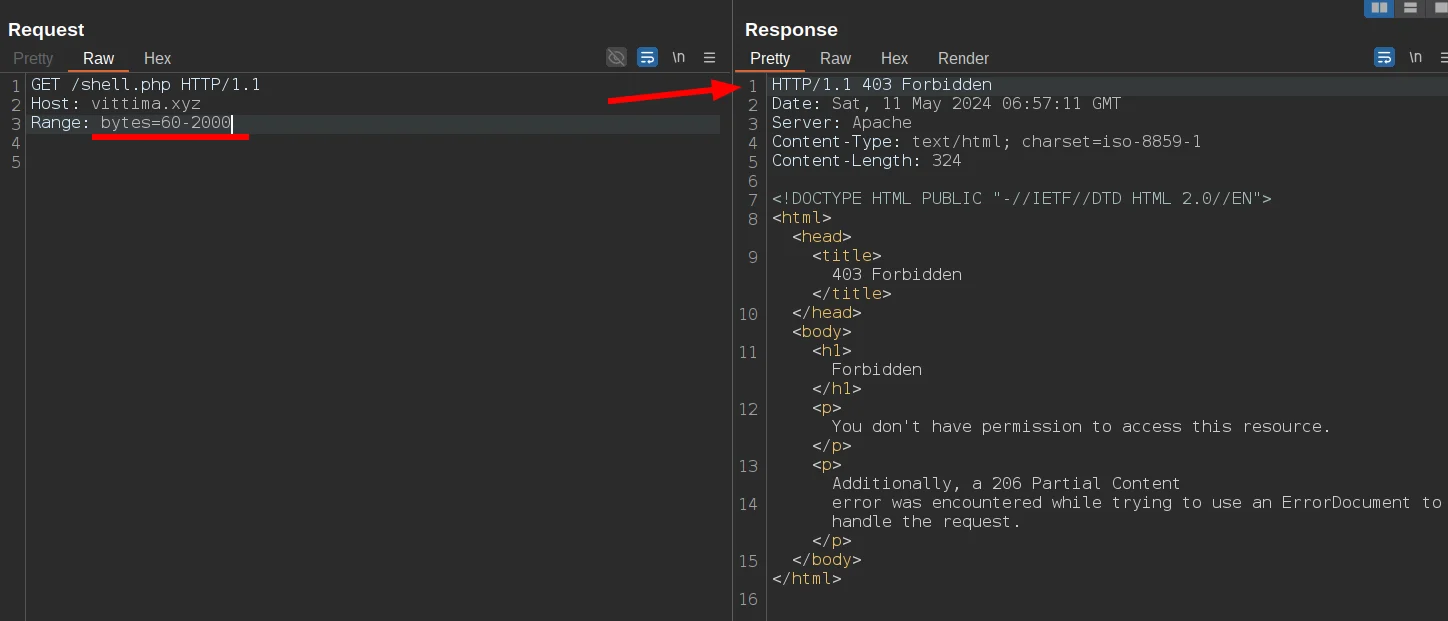
Extending the response to include the wp-config content triggers the PHP leakage rule again.
A multipart range requests several portions of the same body in one response and gets past both rules.
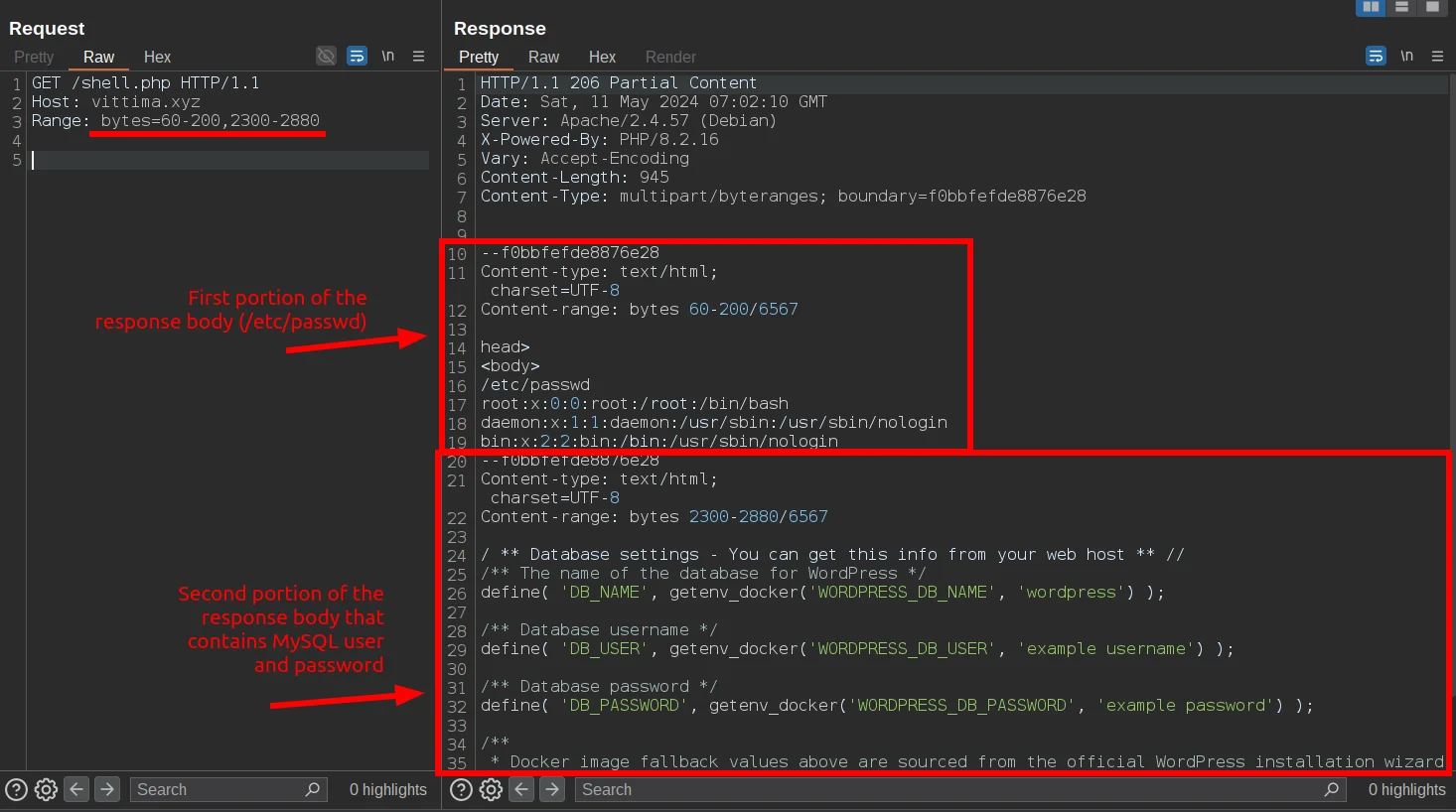
Two CRS response body rules bypassed, simply because HTTP allows it.
Step 9: measure how common it is
For each WordPress target the author sends two requests:
/?s=ORA-1expecting a 200 OK/?s=ORA-1234expecting a 403 Forbidden
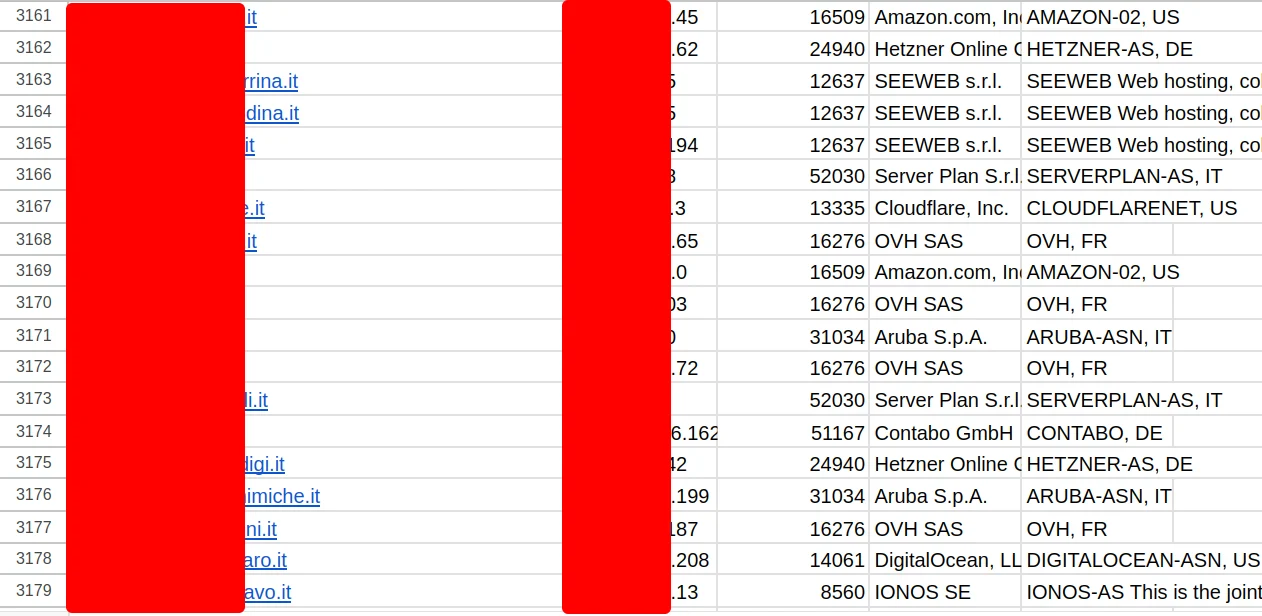
If both return the expected status, RFDoS is possible. The author tested the first 200,000 WordPress sites (alphabetically, from 0 to z) for five European ccTLDs, plus 124,658 for .ch:
| ccTLD | Tested first N targets | RFDoS found | % |
|---|---|---|---|
| .it | 200,000 | 3076 | 1.54 |
| .es | 200,000 | 2516 | 1.26 |
| .fr | 200,000 | 1032 | 0.52 |
| .de | 200,000 | 835 | 0.42 |
| .ch | 124,658 | 481 | 0.39 |
These numbers cover only WordPress sites. The top providers per ccTLD:
| .it provider | RFDoS found |
|---|---|
| Aruba S.p.A. | 1224 |
| OVH SAS | 386 |
| Server Plan S.r.l. | 314 |
| Cloudflare, Inc. | 216 |
| SEEWEB s.r.l. | 158 |
| Hetzner Online GmbH | 141 |
| Amazon.com, Inc. | 94 |
| IONOS SE | 91 |
| Consortium GARR | 78 |
| INTRED S.P.A. | 62 |
| .es provider | RFDoS found |
|---|---|
| DinaHosting S.L. | 667 |
| IONOS SE | 478 |
| OVH SAS | 374 |
| Cloudflare, Inc. | 157 |
| Soluciones web on line s.l. | 135 |
| AXARNET COMUNICACIONES, S.L. | 77 |
| Hetzner Online GmbH | 67 |
| Abansys & Hostytec, S.L. | 45 |
| Amazon.com, Inc. | 41 |
| CLOUDI NEXTGEN SL | 40 |
| .fr provider | RFDoS found |
|---|---|
| OVH SAS | 552 |
| IONOS SE | 104 |
| Cloudflare, Inc. | 63 |
| SCALEWAY S.A.S. | 43 |
| Contabo GmbH | 41 |
| Renater | 32 |
| Internet Vikings International AB | 22 |
| Cogent Communications | 21 |
| Amazon.com, Inc. | 12 |
| Ikoula Net SAS | 10 |
| .de provider | RFDoS found |
|---|---|
| Host Europe GmbH | 104 |
| IONOS SE | 100 |
| Hetzner Online GmbH | 91 |
| dogado GmbH | 77 |
| Strato AG | 49 |
| netcup GmbH | 30 |
| Cloudflare, Inc. | 29 |
| Internet Vikings International AB | 29 |
| Nawork Internet Informationssysteme GmbH | 26 |
| Michael Sebastian Schinzel trading as IP-Projects GmbH & Co. KG | 20 |
| .ch provider | RFDoS found |
|---|---|
| Hetzner Online GmbH | 157 |
| Cloudflare, Inc. | 35 |
| DATAWIRE AG | 31 |
| Internet Vikings International AB | 25 |
| Nexanet AG | 20 |
| Infomaniak Network SA | 17 |
| OVH SAS | 17 |
| hosttech GmbH | 11 |
| Amazon.com, Inc. | 10 |
| Liberty Global B.V. | 10 |
Step 10: the credit card number case
Years ago Trustwave published advice on preventing credit card leakage with ModSecurity:
# Visa
SecRule RESPONSE_BODY|RESPONSE_HEADERS:Location "@verifyCC (?:^|[^\d])(?<!google_ad_client = \"pub-)(4\d{3}\-?\d{4}\-?\d{2}\-?\d{2}\-?\d(?:\d{3})??)(?:[^\d]|$)" \
"chain,\
logdata:'Start of CC #: %{tx.ccdata_begin}***...',\
phase:4,\
t:none,\
ctl:auditLogParts=-E,\
block,
msg:'Visa Credit Card Number sent from site to user',\
id:'920008',\
tag:'WASCTC/5.2',\
tag:'PCI/3.3',\
severity:'1'"
The rule targets RESPONSE_BODY and the Location response header, uses @verifyCC to apply a card verification algorithm (Visa numbers start with 4, typically four groups of four digits optionally separated by hyphens, not part of a longer digit sequence), sets ctl:auditLogParts=-E to exclude the response body from audit logs, and uses block to stop the response. It is the same exposure: a site that stores and reflects user input can be shut down. A simpler regex such as [0-9]+\-[0-9]+\-[0-9]+\-[0-9]+ has the same effect, and a review containing 4111-1111-1111-1111 blocks the product page for everyone.
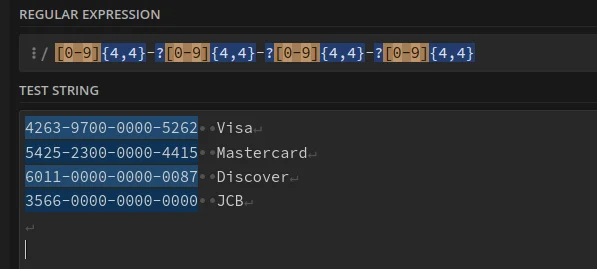
An example of Regular Expression matching CC numbers
Many vendors instead replace the suspicious string with * without blocking. That is less prone to RFDoS, but it is completely ineffective against a byte range request.
Root cause
Response body rules must match plain strings, because that is how SQL engines and scripting languages print their errors. Those strings contain no special characters, so no input validation or sanitisation can reject them before they are stored. Once stored and reflected, the same string that the rule was written to catch causes the rule to fire on a legitimate page, and the WAF blocks the response for every visitor.
The existing defences do not stop it. ModSecurity does enable access to the response body by default, on both v3.x and v2.x, and users typically keep the default configuration. The CRS documentation instructs users to Include rules/*.conf, which includes all rules, and does not tell them to review the response rules first. Plesk makes it easy to enable ModSecurity and the CRS (which it calls simply "OWASP Rule") but nearly impossible for a user to choose whether the response rules are enabled.
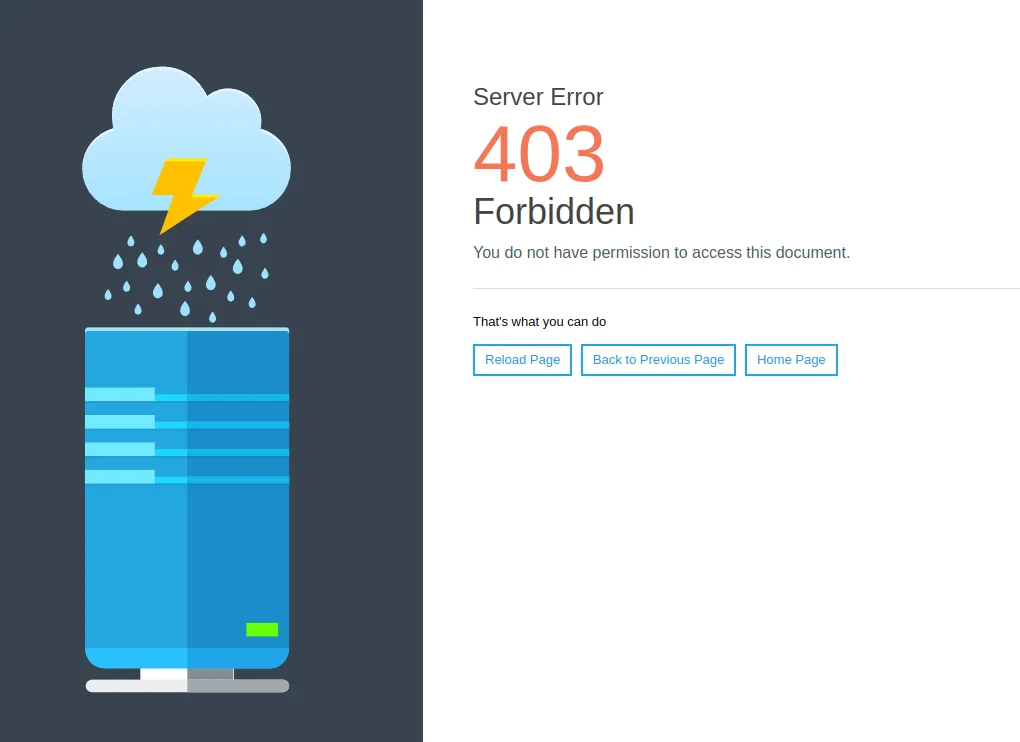
Plesk 403 Response HTML
Many of the targets the author checked in order to trigger this problem send a Plesk error page along with a 403 Forbidden response.
The author privately reported the issue to the CRS team months before publication, asking them to remove the strings without special characters from the denied list or, preferably, to move all RESPONSE rules into a plugin so none run by default. The request was not considered, for these reasons, which the author disagrees with:
- ModSecurity does not enable access to the response body by default.
- Users can choose to not include rules for the response body.
- The problem has not yet been reported by any other users.
- The technique requires too many preconditions.
- Blocking web shell is worth the risk of RFDoS.
On the first point, the author links the recommended modsecurity.conf lines for v3.x and v2.x showing that response body access is on. On the second, users seldom read what a rule inspects, and the documentation does not warn them. On the third, the author did earn a bounty, and there are numerous cases where a vulnerability was discovered years after being included in software. On the fourth, nearly all e-commerce platforms such as WooCommerce allow reviews and comments, and very few sites do not store user input and reflect it. On the fifth, the range request bypasses the web shell rules anyway.
As for why only the v2.x branch is affected: Nginx with ModSecurity v3.x sends the response to the user as quickly as possible, giving priority to sending over rule inspection, so phase 4 never gets a chance to inspect the body.
Impact
Anyone who can store input on a site protected by these rules can prevent that page from being displayed to any user, with no special skill and no special characters. On an e-commerce site this can cover every product page that carries a review, and on an account page it can stop administrators from viewing the user list or editing accounts. The author describes this as a Denial of Service with minimal effort.
Recovery is not trivial for the owner: they must remove the triggering rules, write exclusion rules, or disable response body access, each of which requires understanding how the WAF and its rules work. Less experienced users may not understand what is happening and may disable the WAF entirely, leaving the site unprotected. On a Plesk setup the time to diagnose the problem can mean significant downtime, which for e-commerce translates into missed sales.
Separately, the response filter does not reliably prevent leakage, because a byte range request can fetch only the portion of the body that does not match. This depends on the web server accepting the range.
Fix
While the article was being completed, the CRS team committed a change to the rule used in the demonstration, modifying the regex that matched ORA-1234 to something like ORA-12345:. This does not affect the RFDoS issue, and the old regex remains in every CRS deployment already in production.
The author's preferred fix is to remove from the denied strings all entries without special characters, or better, to move all RESPONSE rules into a plugin so that no response rule runs by default. More generally, developers and maintainers should consider RFDoS before adding a new response body rule, and users should be able to opt in to these rules rather than having them on by default. The author does not argue that preventing web shells is wrong: it helps administrators and hosting providers identify compromised sites, alert owners and remove shells promptly.
Variants to test
-
WordPress search reflection. Send
/?s=ORA-1and expect 200 OK, then/?s=ORA-1234and expect 403 Forbidden. Both statuses together indicate RFDoS. -
Comodo rule set. Try
Dynamic SQL Error,JET Database EngineandAccess Database Enginein reflected input; these appear in17_Outgoing_FilterSQL.conf. -
Atomicorp rule set. Try
---ASL-CONFIG-FILE---in reflected input; a blocked response indicates the self-configuration leakage rule fired.
Remember that range requests are not always honoured, for example when the application returns a 500 internal server error and the server sends the whole error page.
What happened, in plain words
Imagine a nightclub with a bouncer at the door. The bouncer has a list of banned phrases. If anyone says one of those phrases, the bouncer does not just stop that person: he closes the club for everybody. That is roughly what this report describes.
Many websites sit behind a piece of software called a Web Application Firewall, or WAF. A WAF is a filter that sits between the website and its visitors and inspects the traffic going in both directions. One of the things a WAF can do is read the page the website is about to send back to a visitor (the "response body") and block it if it contains something dangerous, such as a database error message or a credit card number. The idea is to stop secrets from leaking out.
The problem is that some of these blocking rules look for very ordinary text, like ORA-1234 or Dynamic SQL Error. If a website lets a visitor type text that is later shown on a page (a comment, a product review, a username, an email address), anyone can type one of those magic phrases. From then on, the WAF sees the phrase on the page and blocks the page for every visitor. The site is effectively down, and the person who did it needed no technical skill at all.
The author of the report calls this a Response Filter Denial of Service, or RFDoS. "Denial of Service" means making a service unavailable to its normal users. "Response filter" is the WAF feature that inspects and blocks outgoing pages. The author earned 1,200 USD of bounty from a single company that had this RFDoS problem on its portal.
The report also shows a second, related weakness: even when the WAF does block a page to stop a leak, an attacker can often ask the web server for only a slice of the page, using a standard HTTP feature called a Range request. The slice that arrives may not contain the banned phrase, so the WAF lets it through, and the secret leaks anyway. So the same feature that creates the denial of service does not even reliably do the job it was added for.
Why showing debug errors is bad in the first place
Before explaining the attack, the report explains why WAFs try to block error messages at all. When a website has a bug, it sometimes shows the visitor a technical error message. That message can reveal a lot: the type and name of the database, the names of its tables, and pieces of the database query that failed. A PHP error can reveal file paths or snippets of the server-side code.
Example of a PHP error
For someone attacking a site, this is free reconnaissance. If they know the database is MySQL and the table is called users, they can craft a more targeted attack. The report mentions SQL injection, which is a technique where an attacker slips database commands into a form field so the database runs them. Knowing the schema makes that easier and more damaging.
So WAFs implement rules that inspect the response body and stop these leaks. The usual method is to block the whole page, typically returning a 403 Forbidden status instead of the page. A 403 is the standard HTTP status code meaning "you are not allowed to see this". More modern WAFs instead replace the leaked text with a row of asterisks, ****, so the page still loads but the secret is hidden. That replacement method is common for credit card numbers and US Social Security numbers.
The report's point is that both methods are often ineffective, because an attacker can usually bypass them with a Range request, which asks for only part of the page. We will come back to that.
Why a WAF rule can be dangerous
The report quotes a line attributed to Ivan Ristić: when you create a new WAF rule, you are also creating many ways to bypass it. The author adds a parallel thought: every time you create a response body rule, you also expose websites to RFDoS.
Take a simple example. You run an online shop and you want to stop credit card numbers from appearing on your pages. You write a WAF rule that looks for four groups of digits separated by a hyphen, using a regular expression like [0-9]+\-[0-9]+\-[0-9]+\-[0-9]+. A regular expression (regex) is a pattern for matching text; [0-9]+ means "one or more digits".
An example of Regular Expression matching CC numbers
That looks sensible, but it is risky. If a customer posts a review containing 4111-1111-1111-1111, the WAF sees the pattern in the page and blocks the page for everyone. If someone posts that on every product, the whole shop becomes unviewable. That is the denial of service, and it is why the author coined the name RFDoS.
Recovering from this is not trivial for the site owner. They can remove the rule that fired, write an exclusion so the rule ignores that particular page, or turn off response body inspection entirely. Each option requires understanding how the WAF and its rules work. A less experienced user might not understand what is happening and might simply disable the WAF, leaving the site with no protection at all. On a hosting control panel like Plesk, where ModSecurity and a rule set can be switched on with a click, the time to diagnose the problem can mean significant downtime. For an online shop, downtime means lost sales.
What ModSecurity and rule sets are
ModSecurity is an open-source WAF. "Open-source" means the code is publicly available. It runs as a module inside the web server, the program that delivers web pages. It watches HTTP traffic in real time, writes logs, and can block requests or responses. HTTP is the language browsers and servers use to talk to each other.
On its own, ModSecurity protects nothing. It is just an engine; it needs rules. There are several free rule sets. The best known is the OWASP Core Rule Set, usually shortened to CRS. OWASP is a non-profit foundation that publishes security guidance. The report says the CRS is used by Google Cloud Armor, Azure Application Gateway, Cloudflare and many other vendors. It notes that AWS WAF has a managed rule group called "Core Rule Set", but that is not the OWASP CRS.
Other rule sets exist, from companies such as Comodo and Atomicorp. The report quotes a ChatGPT-generated description of these alternatives, then gives its own blunt opinion: there are no good alternatives to the OWASP CRS, and other rule sets are often a jumble of poorly crafted rules that target very specific payloads and are easily bypassed, mostly wasting CPU time.
The OWASP Core Rule Set
The CRS is a set of generic attack detection rules for ModSecurity and compatible WAFs. It aims to cover a wide range of attacks, including the OWASP Top Ten (a well-known list of the most common web security risks), with as few false positives as possible. A false positive is when a security tool flags something harmless as an attack. The CRS is designed to be plug-and-play: install it and you get a basic security layer.
Like other rule sets, the CRS includes rules that inspect the response body. You can find them in the project's rules directory on GitHub.
All of these rule sets have the RFDoS problem, but the report singles out one file as the most problematic: RESPONSE-951-DATA-LEAKAGES-SQL.conf. The reason is that detecting SQL errors forces the rule authors to use regexes that match plain strings with no special characters, because that is how database engines print their errors.
Consider a rule that blocks any page containing the phrase You have an error in your SQL syntax. It sounds reasonable, but it means any attacker can shut down any page that stores user input and displays it. The phrase contains no special characters, no HTML tags, and no words from a bad-word dictionary, so it is nearly impossible to validate or sanitise before storing it. "Sanitise" means cleaning input so dangerous characters are removed or neutralised.
Another example is a rule that matches ORA- followed by four digits, such as:
ORA-1234
The rule shown runs at phase 4, which is the phase that includes the response body, and blocks the response when the regex matches the RESPONSE_BODY variable. A variable here is just a named slot holding data; RESPONSE_BODY holds the page being sent back.
Another very simple string is dynamic sql error.
Imagine how easy it is to trigger these rules: just send ORA-1234 inside a comment, or use it as a username or email address.
An update from 14 May 2024
While the article was being finished, the CRS team committed a change to the rule used in the demonstration. They modified the regex that matched ORA-1234 to something like ORA-12345:. This does not fix the RFDoS issue, and the old regex is still present in every CRS deployment already running in production.
Comodo Free Rules
The Comodo Free ModSecurity Rules project is, in the author's words, even worse. It provides free but not open-source rules for ModSecurity, maintained by Comodo. After days trying to download the latest version (the website was always down), the author obtained a copy of cwaf_rules-1.241.
from Comodo https://waf.comodo.com/user/cwaf_revisions
Comodo distributes a series of OutgoingFilter rule sets, which also include prevention of SQL error leakage. Inside the file 17_Outgoing_FilterSQL.conf the magic string ORA-1234 appears:
So do other very simple strings such as Dynamic SQL Error, JET Database Engine and Access Database Engine.
Atomicorp Free ModSecurity Rules
Atomicorp offers a free set of ModSecurity rules that you can download after registering on their portal. One of these rules tries to prevent the leakage of the rules and configurations themselves by blocking any response body that includes the string:
---ASL-CONFIG-FILE---
This is a single line of text. The rule says: if this exact string appears anywhere in the page being sent to a visitor, block the page. The string is made only of capital letters A to Z and hyphens. So, in an attempt to prevent their own configuration from leaking, Atomicorp inadvertently lets anyone shut down a website by reflecting input made up solely of A-Z characters and -.
From the latest Atomicorp modsec-202405080003.tar.bz2
Why response WAF rules are dangerous
If you can store user input on a target website protected by a WAF, such as a comment or a product review, you can easily shut down the page where that input is displayed by sending something like:
ORA-1234
Imagine an online shop protected by a WAF. To cause a denial of service, an attacker could submit a product review saying, "Really useful product, I tried it with ORA-1234, and it works really well". From then on, no user can access the page where the review is published. The same applies to a "User Account Details" page: registering an account with an email address like [redacted] would stop any administrator from viewing the user list or editing the account details.
The magic string ORA-1234
ORA-1234 is not the only string that triggers this. The report lists many very simple strings, without special characters, that anyone can use to cause RFDoS on a site that meets the conditions described earlier. Each one is blocked by one or more response body rules enabled on ModSecurity v2 with the OWASP Core Rule Set:
ET Database Engine
Access Database Engine
ORA-1234
Oracle error
OracleDriver
CLI DriverDB2
DB2 SQL error
Dynamic SQL Error
An illegal character has been found in the statement
ExceptionInformix
Ingres SQLSTATE
Unexpected end of command in statement
SQL errorPOS1
Warningmaxdb
Unclosed quotation mark after the character string
Microsoft OLE DB Provider for ODBC Drivers
Microsoft OLE DB Provider for SQL Server
Incorrect syntax near
Sintaxis incorrecta cerca de
Syntax error in string in query expression
Procedure or function foo expects parameter
Unclosed quotation mark before the character string
Syntax error foo in query expression
the used select statements have different number of columns
OLE DBSQL Server
DriverSQL Server
SQL ServerDriverS
QL Server12345678
supplied argument is not a valid MySQL
on MySQL result index
You have an error in your SQL syntax near
MySQL server version for the right syntax to use
SQL syntaxMySQL
valid MySQL result
PostgreSQLERROR
valid PostgreSQL result
Supplied argument is not a valid PostgreSQL foo resource
Unable to connect to PostgreSQL server
Warningsybase
SybaseServer message
An Error Has Occurred
Each line is one phrase that some WAF rule treats as a sign of a database error. Some are fragments of real error messages from Oracle, MySQL, PostgreSQL, Sybase, DB2, Informix, Ingres and Microsoft database drivers. A few look like accidental concatenations, such as SQL ServerDriverS followed by QL Server12345678, which is how the list appears in the report. The important point is that none of them contains special characters, HTML tags, or words from bad-word dictionaries such as eval or exec. That means they pass through input validation and sanitisation untouched.
The core problem
The main issue is that all these strings can pass through any type of input validation or sanitisation. The lack of special characters, HTML tags, and dictionary words makes them the perfect choice for an attacker who wants to prevent a website from being displayed to users.
RFDoS demo on a vanilla WordPress website
The demo video shows RFDoS on a vanilla WordPress website. WordPress is a very popular system for building websites and blogs.
Why blocking the response body is often useless: the Range request
Now the report turns to the second half of the problem. Suppose the author is exploiting a visible error-based SQL injection on a target protected by a WAF. "Error-based" means the attacker deliberately causes the database to print an error, and reads the answer from that error. The WAF blocks all response bodies containing a SQL error. To get around this, the attacker can send a Byte Range HTTP request. By asking for only a portion of the response body, it is easy to avoid triggering the rule designed to prevent the leak.
The Range header is a standard HTTP feature that lets a client ask for a specific part of a resource instead of downloading the whole thing. A client can ask for the first 500 bytes of a file, or a segment in the middle of a large video. A byte is a unit of data; a page of text is a few thousand bytes. The syntax is typically Range: bytes=0-499, which asks for the first 500 bytes.
Let us test it. In the following test, the author tries to exploit a SQL injection using the query string parameter a. A query string is the part of a URL after the ?, where parameters are passed, like ?a=something. An error occurs, and the WAF blocks the response body to prevent the error from leaking.
A MySQL error typically reads: "You have an error in your SQL syntax; check the manual that corresponds to your MySQL server version for the right syntax to use near 'foo bar' at line xyz". Knowing that the WAF rule likely matches the initial part of this message, You have an error in your SQL syntax, the author avoids triggering the WAF by cutting off the beginning of the response. He does this by sending a byte range HTTP request from 90 to 140. For example:
So bypassing any response body filter becomes quite easy using the Range request header. This applies not only to SQL error leakage but also to rules designed to prevent web shell or backdoor responses in the response body.
A warning: requesting a byte range is not always possible. It depends on the web server deciding to accept it. For example, if a SQL injection payload leads the application to an error that results in a 500 internal server error, the web server might choose not to accept the range and instead send the entire error page. A 500 status means the server hit an unexpected problem.
Bypassing the web shell and PHP leakage rules
The OWASP Core Rule Set includes rules aimed at preventing web shells, in other words backdoors. A web shell is a small program an attacker uploads to a server to keep control of it remotely. These rules try to match the HTML body of the most common online backdoors, for example by triggering on the page's title tag. HTML is the language web pages are written in, and the title tag is the part that names the page in the browser tab.
One of the most common objections the author has heard goes like this: "Okay, RFDoS could be a problem, but preventing backdoors or PHP shells from being sent to an attacker is more important and worth the risk of RFDoS." PHP is a programming language commonly used for websites.
At first this seemed valid. But then the author remembered the Range request, and realised that attackers are often in a position to circumvent the response filter by requesting portions of the response body. "Often" because it depends on the web server configuration and its modules. Let us do a test.
The author simulates a web shell with a title tag that matches one of the web shell rules, and includes a leak of the WordPress config file, which often contains the username and password for the MySQL database, to trigger the PHP code leakage rule.
If the author tries to access the content of the web shell, the WAF blocks the request because of one of the rules mentioned above.
ModSecurity logs:
ModSecurity: Warning. Match of "rx ..." against "RESPONSE_BODY" required. [file "/etc/modsecurity.d/owasp-crs/rules/RESPONSE-953-DATA-LEAKAGES-PHP.conf"] [line "102"] [id "953120"] [msg "PHP source code leakage"] [severity "ERROR"] ...

ModSecurity: Warning. Matched phrase "<title>=[ 1n73ct10n privat shell ]=</title>" at RESPONSE_BODY. [file "/etc/modsecurity.d/owasp-crs/rules/RESPONSE-955-WEB-SHELLS.conf"] [line "41"] [id "955100"] [msg "Web shell detected"] ...
These are two log entries written by ModSecurity. The first says a rule in the file RESPONSE-953-DATA-LEAKAGES-PHP.conf, at line 102, with rule id 953120, matched the response body and flagged "PHP source code leakage". The second says a rule in RESPONSE-955-WEB-SHELLS.conf, at line 41, with rule id 955100, matched the exact phrase <title>=[ 1n73ct10n privat shell ]=</title> in the response body and flagged "Web shell detected". The ... at the end of each line means the log entry continues with more detail that the report does not show.
To bypass the response filter, the author omits the first part of the response that contains the title tag by skipping the first 60 bytes:
But when he tries to extend the response to include the wp-config file content, the WAF blocks him again because of the PHP leakage rule:
Fortunately, he can use a Multipart Range to request multiple portions of the same response body, which will be served as a multipart response. For example:
A multipart range asks for several slices in one request, and the server answers with each slice separated by a boundary marker. As the report shows, the author was able to bypass two OWASP Core Rule Set response body rules simply because the HTTP protocol allows it.
The author is not saying that preventing web shells is bad. In many cases it helps administrators or hosting providers quickly identify compromised websites, alert the owners, or remove the shells promptly. The point is that developers and maintainers need to consider RFDoS before adding a new response body rule, and users should be able to choose whether to enable these rules rather than having them on by default.
Why only ModSecurity v2 is affected, not v3
ModSecurity v2 is primarily available on Apache, a very common web server. The v3.x branch can only run as an external library on Nginx and other web servers, except Apache. Nginx is another popular web server.
All ModSecurity rules operate in a specific phase. Phase 1 is for the request line and request headers, phase 2 includes the request body, phase 3 adds the response headers, and phase 4 includes the response body. The request is what the browser sends; the response is what the server sends back.
Nginx, like many modern web servers, tries to send the HTTP response to the user as quickly as possible. Sending the response takes priority over ModSecurity rule inspection. That is why you cannot inspect the response body on Nginx with ModSecurity v3.x: Nginx sends the body before ModSecurity has a chance to inspect it at phase 4.
Why the OWASP Core Rule Set has not fixed it yet
The author is a fan of the CRS project. He privately reported the issue months before publication, hoping to convince the team to at least remove from the denied strings all those that contain no special characters, or, better in his view, to move all RESPONSE rules into a plugin so that no response rule runs by default. His concern was the release of CRS major version 4.0 with all these RFDoS issues enabled by default.
His request was not really considered, for the following reasons, which he strongly disagrees with:
- ModSecurity does not enable access to the response body by default.
- Users can choose to not include rules for the response body.
- The problem has not yet been reported by any other users.
- The technique requires too many preconditions.
- Blocking web shell is worth the risk of RFDoS.
Let us examine why, in his opinion, these assumptions are incorrect.
ModSecurity does not access the response body by default
Yes, it does on v3.x, and it does on v2.x. The author links to the recommended modsecurity.conf lines for both branches showing that response body access is on. Based on his experience, users typically keep the default configuration.
Users can choose to not include rules for the response body
In the author's experience, users seldom try to understand what a rule actually inspects. They simply run the rule set without reading the rule descriptions. Put yourself in the shoes of a WAF user: your main concern is protecting your website, and when a team of security experts maintaining one of the most used rule sets recommends preventing SQL error leakage by enabling all response rules by default, what would you do? Most users cannot tell when and where to enable a rule set, and they tend to trust the vendor or the community.
Even the CRS documentation does not mention that users should review the rules first to decide whether to include the response rule set. It simply instructs users to use Include rules/*.conf, which means including all rules.
The report says this RFDoS is prevalent across many websites, and one of the main reasons is Plesk. Plesk is a hosting control panel, a web interface that lets people manage their server without using the command line. Many of the targets the author checked in order to trigger this problem send a Plesk error page along with a 403 Forbidden response. According to Plesk's documentation, it is very easy for a Plesk user to enable ModSecurity and the OWASP Core Rule Set (which Plesk refers to simply as "OWASP Rule", which the author mocks), but it is nearly impossible for a user to choose whether to enable the Core Rule Set response rules.
Plesk 403 Response HTML
The problem has not been reported by any other users
It is true that leakage prevention rules have been part of the CRS for many years and no security issues were reported about them. But the author did earn a bounty thanks to this problem, so he is convinced these rules are a real issue that nobody has thoroughly investigated yet. There are also numerous cases where a vulnerability was discovered years after being included in software.
The technique requires too many preconditions
In e-commerce there are many places where user input is stored and reflected in the response body. Nearly all e-commerce platforms, such as WooCommerce, allow users to leave reviews and comments on products. That alone is enough to be concerned. The author believes there are no websites that do not handle user input at all, and very few that do not store it and include it in the response body.
Blocking web shells is worth the risk of RFDoS
As shown earlier, an attacker is often able to bypass a WAF response filter using the Range request header, requesting only the portion of the response that does not match any rule. In the author's opinion, protecting users from a backdoor should not expose them to another type of attack that is much easier to execute and that anyone can perform, regardless of skill level.
How many websites are affected
Software like Plesk and cPanel lets users easily enable ModSecurity and rule sets such as the OWASP Core Rule Set, Comodo or Atomicorp. cPanel is another hosting control panel. In both cPanel and Plesk, disabling response body inspection is not something a non-expert user can easily do or would typically consider. So many users keep the default configuration, which includes response body inspection and SQL error leakage prevention rules. Because Plesk and cPanel are so widespread, this RFDoS can easily be triggered on many websites across the internet.
It is hard to determine the exact extent across the internet. As part of a side project called PWNPress, the author has been collecting data on all WordPress websites worldwide by parsing the Common Crawl dataset. Common Crawl is a public archive of pages crawled from the web. Through this, the author identified 15 million WordPress sites. Using that information, he ran a custom Nuclei template to check for RFDoS against a subset of those sites, using the WordPress search function. Nuclei is a tool that runs automated checks against many targets.
WordPress reflects the user input from the s parameter in the query string back into the response body, as seen in URLs like /?s=foobar. In other words, if you search for foobar, the word foobar appears on the results page.
So for each target the author sends two HTTP requests:
/?s=ORA-1expecting a 200 OK/?s=ORA-1234expecting a 403 Forbidden
The first request searches for ORA-1, which is not one of the banned strings, so the page should load normally with a 200 OK status. The second searches for ORA-1234, which is banned, so the WAF should block the page with a 403 Forbidden. If both return the expected status code, RFDoS is possible. By doing this, the author identified a lot of WordPress websites affected by RFDoS.
He selected the first 200,000 WordPress sites with some European country-code top-level domains (ccTLDs, the last part of a domain name such as .it or .de), specifically IT, DE, FR, ES and CH. He did not plan to test all 15 million sites because that would take a huge amount of time. The goal was to understand how frequent the problem is.
| ccTLD | Tested first N targets | RFDoS found | % |
|---|---|---|---|
| .it | 200,000 | 3076 | 1.54 |
| .es | 200,000 | 2516 | 1.26 |
| .fr | 200,000 | 1032 | 0.52 |
| .de | 200,000 | 835 | 0.42 |
| .ch | 124,658 | 481 | 0.39 |
Each row shows one country domain, how many sites were tested, how many were found vulnerable, and the percentage. For .ch only 124,658 sites were available in the sample. All these numbers refer only to WordPress websites, and the subset was selected in alphabetical order: the first 200,000 results from 0 to z.
Top 10 providers with RFDoS found for each analysed ccTLD
The report also lists, for each country domain, the ten hosting providers with the most vulnerable sites found. A hosting provider is the company whose servers actually run the website.
| .it provider | RFDoS found |
|---|---|
| Aruba S.p.A. | 1224 |
| OVH SAS | 386 |
| Server Plan S.r.l. | 314 |
| Cloudflare, Inc. | 216 |
| SEEWEB s.r.l. | 158 |
| Hetzner Online GmbH | 141 |
| Amazon.com, Inc. | 94 |
| IONOS SE | 91 |
| Consortium GARR | 78 |
| INTRED S.P.A. | 62 |
| .es provider | RFDoS found |
|---|---|
| DinaHosting S.L. | 667 |
| IONOS SE | 478 |
| OVH SAS | 374 |
| Cloudflare, Inc. | 157 |
| Soluciones web on line s.l. | 135 |
| AXARNET COMUNICACIONES, S.L. | 77 |
| Hetzner Online GmbH | 67 |
| Abansys & Hostytec, S.L. | 45 |
| Amazon.com, Inc. | 41 |
| CLOUDI NEXTGEN SL | 40 |
| .fr provider | RFDoS found |
|---|---|
| OVH SAS | 552 |
| IONOS SE | 104 |
| Cloudflare, Inc. | 63 |
| SCALEWAY S.A.S. | 43 |
| Contabo GmbH | 41 |
| Renater | 32 |
| Internet Vikings International AB | 22 |
| Cogent Communications | 21 |
| Amazon.com, Inc. | 12 |
| Ikoula Net SAS | 10 |
| .de provider | RFDoS found |
|---|---|
| Host Europe GmbH | 104 |
| IONOS SE | 100 |
| Hetzner Online GmbH | 91 |
| dogado GmbH | 77 |
| Strato AG | 49 |
| netcup GmbH | 30 |
| Cloudflare, Inc. | 29 |
| Internet Vikings International AB | 29 |
| Nawork Internet Informationssysteme GmbH | 26 |
| Michael Sebastian Schinzel trading as IP-Projects GmbH & Co. KG | 20 |
| .ch provider | RFDoS found |
|---|---|
| Hetzner Online GmbH | 157 |
| Cloudflare, Inc. | 35 |
| DATAWIRE AG | 31 |
| Internet Vikings International AB | 25 |
| Nexanet AG | 20 |
| Infomaniak Network SA | 17 |
| OVH SAS | 17 |
| hosttech GmbH | 11 |
| Amazon.com, Inc. | 10 |
| Liberty Global B.V. | 10 |
If any of the mentioned providers want to know where the author found RFDoS issues with their customers, they can contact him and he is willing to share the information.
The credit card number problem
Many years ago, Trustwave published advice on how to prevent credit card number leakage using ModSecurity. Here is the rule they suggested:
# Visa
SecRule RESPONSE_BODY|RESPONSE_HEADERS:Location "@verifyCC (?:^|[^\d])(?<!google_ad_client = \"pub-)(4\d{3}\-?\d{4}\-?\d{2}\-?\d{2}\-?\d(?:\d{3})??)(?:[^\d]|$)" \
"chain,\
logdata:'Start of CC #: %{tx.ccdata_begin}***...',\
phase:4,\
t:none,\
ctl:auditLogParts=-E,\
block,
msg:'Visa Credit Card Number sent from site to user',\
id:'920008',\
tag:'WASCTC/5.2',\
tag:'PCI/3.3',\
severity:'1'"
This is a ModSecurity rule written in the tool's own configuration language. Let us break it down line by line.
# Visais a comment. The#marks the rest of the line as a note for humans, not code.SecRule RESPONSE_BODY|RESPONSE_HEADERS:Location "@verifyCC ..."starts a rule. The targets are the response body and theLocationresponse header. TheLocationheader is used in redirects to tell the browser where to go next. The rule checks both places for something that looks like a Visa card number.@verifyCCis a built-in operator that applies a card verification algorithm, so it does not just match digits but checks they form a plausible card number.- The regex inside the quotes describes a Visa number: it starts with a 4, followed by three digits, then optionally a hyphen, then four digits, optionally a hyphen, two digits, optionally a hyphen, two digits, optionally a hyphen, one digit and optionally three more. The
(?:^|[^\d])and(?:[^\d]|$)parts make sure the number is not part of a longer sequence of digits. The(?<!google_ad_client = \"pub-)part is a negative lookbehind, meaning the match is rejected if it is preceded by that specific text, which avoids a false positive in Google ad code. chainmeans this rule is part of a chain and the next rule must also match.logdata:'Start of CC #: %{tx.ccdata_begin}***...'sets what gets written to the log, showing only the start of the card number and then asterisks.phase:4runs the rule at phase 4, the response body phase.t:nonemeans no transformation is applied to the data before matching.ctl:auditLogParts=-Eexcludes the response body from the audit log, to protect sensitive data.blocktells ModSecurity to block the response if the rule matches.msg:'Visa Credit Card Number sent from site to user'is the message shown in logs.id:'920008'is the rule's unique identifier.tag:'WASCTC/5.2'andtag:'PCI/3.3'attach labels referring to security standards. PCI DSS is the payment card industry data security standard.severity:'1'marks the severity level.
This rule seems crucial for compliance with standards like PCI DSS, which require protecting card data. But it also exposes the protected website to RFDoS whenever the site lets users store and reflect input. The same applies to a simpler regex such as [0-9]+\-[0-9]+\-[0-9]+\-[0-9]+: a review containing 4111-1111-1111-1111 blocks the product page for everyone.
Many vendors instead replace the suspicious string with a series of * without blocking the response. That is less problematic for RFDoS, but it becomes completely ineffective when an attacker can send a byte range request, as shown earlier.
Conclusion
RFDoS is a security problem that arises when well-intentioned measures create new vulnerabilities. It happens when a WAF is configured to inspect and filter response bodies to prevent leaks of errors or card numbers. While these filters aim to protect data and comply with regulations, they also let attackers cause service disruptions by injecting content that matches the filters. The ability to use Range requests makes it worse, because an attacker can bypass filters that inspect the whole body by requesting only portions.
The main takeaway is that response body filtering is important, but it needs a balanced approach so it does not compromise availability. Security teams should keep evaluating their protective measures against new threats and consider more dynamic, context-aware filtering. Educating users about the risks and configurations of WAF settings can also help.
Glossary
- WAF (Web Application Firewall): a filter that sits between a website and its visitors and inspects traffic in both directions, blocking what looks dangerous.
- Response body: the actual content of a page that a web server sends back to a browser.
- Request: what a browser sends to a server, for example when you open a page or submit a form.
- HTTP: the language browsers and servers use to exchange requests and responses.
- Status code: a three-digit number in a response saying what happened, such as 200 OK (success), 403 Forbidden (not allowed) or 500 Internal Server Error (server problem).
- 403 Forbidden: the standard status meaning the server refuses to give you the content.
- 200 OK: the standard status meaning the request succeeded.
- 500 Internal Server Error: the standard status meaning the server hit an unexpected problem.
- Denial of Service (DoS): making a service unavailable to its normal users.
- RFDoS (Response Filter Denial of Service): the author's name for a DoS caused by a WAF response rule blocking a page because a visitor stored a banned phrase on it.
- ModSecurity: an open-source WAF engine that runs inside a web server and applies rules to traffic.
- Rule set: a collection of WAF rules, often maintained by a project or company.
- OWASP: a non-profit foundation that publishes web security guidance and projects.
- OWASP Core Rule Set (CRS): a widely used free rule set for ModSecurity and compatible WAFs.
- Comodo Free ModSecurity Rules: a free but not open-source rule set distributed by Comodo.
- Atomicorp Free ModSecurity Rules: a free rule set distributed by Atomicorp after registration.
- Phase: one of four stages in which ModSecurity rules run; phase 4 covers the response body.
- Regex (regular expression): a pattern used to match text, such as
[0-9]+for one or more digits. - Variable: a named slot holding data inside a rule;
RESPONSE_BODYholds the page being sent. - Input validation: checking user input to make sure it is in the expected form.
- Sanitisation: cleaning user input so dangerous characters or content are removed or neutralised.
- False positive: when a security tool flags something harmless as an attack.
- SQL: the language used to talk to relational databases.
- SQL injection: an attack where database commands are slipped into user input so the database runs them.
- Database schema: the structure of a database, including its tables and columns.
- PHP: a programming language commonly used to build websites.
- HTML: the language web pages are written in.
- Title tag: the HTML element that names a page, shown in the browser tab.
- Web shell: a small program an attacker uploads to a server to keep remote control of it.
- Backdoor: a hidden way into a system, often left by an attacker.
- Byte: a unit of data; a page of text is a few thousand bytes.
- Range request: an HTTP request asking for only a portion of a resource, using a header like
Range: bytes=0-499. - Multipart range: a range request asking for several portions at once, answered as a multipart response.
- Query string: the part of a URL after the
?, carrying parameters such as?s=foobar. - Parameter: a named value passed in a URL or form, such as
sora. - Header: a piece of metadata sent with an HTTP request or response, such as
RangeorLocation. - Location header: a response header used in redirects to tell the browser where to go next.
- WordPress: a very popular system for building websites and blogs.
- WooCommerce: an e-commerce plugin for WordPress.
- Plesk: a hosting control panel, a web interface for managing a server.
- cPanel: another hosting control panel.
- Hosting provider: the company whose servers run a website.
- ccTLD: a country-code top-level domain, the last part of a domain name such as
.itor.de. - Common Crawl: a public archive of pages crawled from the web.
- Nuclei: a tool that runs automated checks against many targets.
- Apache: a very common web server.
- Nginx: another popular web server.
- Module: a piece of software that plugs into a larger program to add features.
- PCI DSS: the payment card industry data security standard.
- Bounty: a reward paid to someone who reports a security problem responsibly.
- Open-source: software whose code is publicly available.