Scrambled Isn’t Secret: What I Learned From an MD5-Hashed User ID
A web application stored a user identifier in a cookie as an MD5 hash of a sequential numeric ID. Because MD5 is deterministic and fast, an attacker could compute the hash for every possible ID, enumerate valid accounts, and potentially impersonate other users if the server trusted the cookie for identity.

Web Security
The full write-up lives on its author's site
It belongs to its author, so we link to it rather than copy it. The other two tabs are our own rewrites, checked against it.
Context
The target was a web application built on Next.js. The feature under examination was its authentication flow: the login process and the cookie the application hands back to the browser once a user is authenticated. The write-up does not name the application, the program or the endpoint involved; it describes the class of mistake and the reasoning around it.
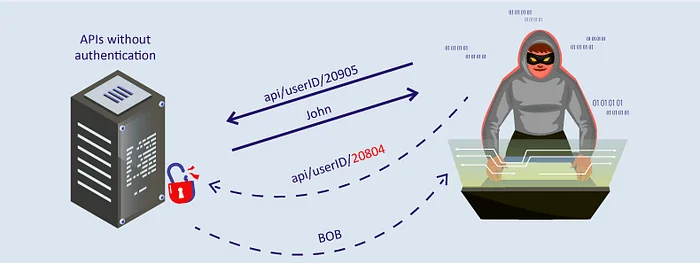
The image is captioned BOLA (Broken Object Level Authorization).
Setup
No accounts, roles, tooling versions or special preconditions are described beyond the ordinary routine: log in to the application, open the browser developer tools, and inspect what the application returns. The only artefact examined is a single cookie.
Finding it
After logging in, one cookie stood out. It was named userId, and its value was a 32-character hexadecimal string, of the form:
[redacted]
The value looked random, and that was clearly the intent: somebody had decided that hashing the user's ID before placing it in the cookie would stop anyone from recovering the real identifier. The author notes having seen this pattern often, and characterises it as a common instinct that is wrong.
The reasoning is that a hash function has two relevant properties. It is deterministic, so the same input always produces the same output, and it has no secret: there is no key, so anyone who runs the same function on the same input obtains the same fingerprint. A hash therefore only protects an input when the set of possible inputs is huge. Hashing a long random password makes guessing hopeless; hashing a sequential user ID leaves the possible inputs as 1, 2, 3, ... up to the number of users, which is a few thousand or a few million values, and that is nothing.
Exploitation
Step 1: recognise the value as a hash of a small integer
The 32-character string in the cookie is the MD5 of the number 2. The first few values in the sequence are:
1 → [redacted] → [redacted] → [redacted]
Each line maps a small integer to its MD5 digest, which is exactly the shape of the cookie value.
Step 2: build the lookup table
The whole mapping can be generated in a few lines:
import hashlibtable = {hashlib.md5(str(i).encode()).hexdigest(): i for i in range(1, 100_000)}print(table["[redacted]"])
The dictionary comprehension hashes every integer from 1 to 99,999 and keys the result by digest, so a digest can be looked up and turned back into the integer that produced it. The final line looks up the cookie value and prints the original number. This runs in a fraction of a second. MD5 is built to be fast, and a modern GPU can compute billions of hashes per second, so a much larger range would not slow anyone down either. The random-looking value becomes a plain number almost instantly.
Step 3: enumerate accounts
With valid values computable for any ID, the next move is to ask the application questions. If a user ID matches an existing account, the response may be a 200 OK, or otherwise differ from the response for an invalid user ID, which could be deduced from an HTTP status code such as 404, 403 or 401. Any such difference lets someone work out which accounts exist, roughly how many users there are, and how IDs were assigned. This is user enumeration, and it is usually the first step in a longer attack because it tells the attacker who to target.
Root cause
The design mistake is treating a hash as if it were a secret. MD5 is deterministic and keyless, so the cookie value is a fingerprint of a small, sequential integer and can be recomputed by anyone. The value was never unpredictable in the first place, and hashing did not protect it.
The author separates three ideas that are commonly conflated:
- Hashing produces a fingerprint. It is one-way, but only protects hard-to-guess inputs.
- Encryption hides data and needs a key.
- Random generation creates a value nobody can predict in the first place.
What the application needed was the third. The author does not think the developers were careless: hashing feels like protection because it is what everyone is told to do with passwords, and hexadecimal strings look serious, so the instinct carries over to other values.
Impact
The impact depends entirely on one question: what does the value actually control? The author works this through with CVSS 3.1.
If the hashed ID is only an identifier, and the worst outcome is learning which accounts exist, the result is low confidentiality impact and nothing else:
AV:N/AC:L/PR:N/UI:N/S:U/C:L/I:N/A:N
That scores 5.3, Medium.
If the application also trusts the value to decide who you are, so that changing it could make the server treat you as another user, the impact is account takeover:
AV:N/AC:L/PR:N/UI:N/S:U/C:H/I:H/A:N
That scores 9.1, Critical.
The same weakness and the same hashing mistake sit behind both scores. The difference between a mid-tier finding and a critical one is entirely what the value gates. This is why the author does not simply report that the ID is predictable: the author shows what the predictable value is used for, and tests that carefully before claiming anything. because triage teams act on demonstrated impact rather than guesses.
Fix
The recommendations are:
- Use random identifiers, not hashed counters. In Node, that is one line:
import { randomUUID } from "crypto"; const id = randomUUID();
- Keep identity on the server. Store the session server-side and give the browser only an opaque session token, or use a signed token the client cannot modify.
- Check authorization on every request, whatever the cookie says. A cookie tells you what the client claims, not what it is allowed to do.
- Make responses identical whether an account exists or not, to shut down enumeration.
- Set safe cookie flags:
HttpOnly; Secure; SameSite=Lax. - Stop using MD5 for anything security-related.
The write-up does not say which of these, if any, the application adopted.
Writing it up so it gets taken seriously
A good report does three things: it shows the flaw in a way anyone can reproduce, it states the real impact and nothing more, and it gives the developer a clear fix. The author writes for the person reading it at 5 p.m. on a busy day, who needs to decide within a minute whether the issue is urgent.
- Other cookies and hidden fields carrying hex values. Look for 32-character hex strings (MD5), 40-character (SHA-1) or 64-character (SHA-256) values in cookies, hidden form fields and local storage. A positive result is a value that maps back to a small integer when you hash the integers from 1 upwards.
- Sequential identifiers behind any encoding. Base64, hex or URL-encoded values that decode to small numbers behave the same way. A positive result is a decoded value that increments predictably between accounts.
- Response differences on invalid identifiers. Request objects with valid and invalid identifiers and compare status codes and bodies. A positive result is a 200 for an existing account and a 404, 403 or 401 for a non-existent one, which confirms enumeration.
- Identifier used for authorisation. Change the identifier to another user's value while authenticated as yourself and observe whether the server returns that user's data or acts on their behalf. A positive result is another user's resource or an action performed as them, which moves the finding from enumeration to account takeover.
- Cookie flags. Inspect the
userIdand session cookies forHttpOnly,SecureandSameSite. A positive result is a session-bearing cookie readable from JavaScript or sent over plain HTTP.
The takeaway
A value that looks scrambled is not the same as a value that is secret. If you can recompute it, so can everyone else. Before trusting any random-looking string in a request, ask what is actually keeping it unpredictable. Sometimes the answer is nothing.
What happened, in plain words
A website was built with a tool called Next.js, which is a framework developers use to build web applications. When you log in to a website, the site usually gives your browser a small piece of data to remember who you are. That piece of data is called a cookie. Every time your browser talks to the site afterwards, it sends the cookie back, so the site knows it is still you.
On this site, one cookie was called userId, and its value was a long string of letters and numbers that looked completely random. The developers had taken your real user number (like 1, 2 or 3) and run it through a mathematical process called hashing, which turns any input into a fixed-length scrambled-looking string. They probably thought this made the value secret, so nobody could work out your real user number.
It did not. The scrambling process used here, MD5, has no secret key. Anyone can run the same process on the same numbers and get the same results. Because user numbers are small and predictable (1, 2, 3 and so on), anyone can hash all the small numbers themselves and match the results against the cookie value. The cookie value turned out to be the MD5 hash of the number 2. In a fraction of a second, the "random" string became a plain number.
Once you can compute valid values for any ID, you can start asking the app questions. If the site answers differently for a real user number than for a fake one, you can work out which accounts exist. That is called user enumeration, and it is often the first step in a bigger attack.
The author then explains how serious this is. It depends on what the site does with that number. If the number is only used to identify you, the worst case is that someone learns which accounts exist, which is a medium-severity issue. But if the site also trusts the number to decide who you are, then changing it could let someone act as another user. That is account takeover, and it is critical.
The rest of the write-up explains why developers make this mistake, how to fix it, and how to write a report that gets taken seriously. It also lists variations of the same mistake to look for elsewhere.
The image is captioned BOLA (Broken Object Level Authorization). BOLA means the site fails to check whether you are allowed to access a particular object (like another person's account) when you ask for it by its identifier.
The setup
The author does not name the application, the bug bounty program or the specific web address involved. The target was simply a web application built on Next.js, and the part being examined was its login process: what happens when you sign in, and what the site hands back to your browser afterwards.
No special accounts, roles, tool versions or preconditions are described. The routine was ordinary: log in to the application, open the browser's developer tools, and look at what the application returns. The only thing examined was a single cookie.
If you have never opened developer tools: in most browsers you can press F12, or right-click on a page and choose "Inspect". There is a tab, usually called "Application" or "Storage", that lists the cookies the site has set. A cookie is a small label the site sticks on your browser so it can recognise you on the next visit, a bit like a cloakroom ticket: you hand it back and get your coat. The difference is that anyone who can read or change the ticket can try to claim a different coat.
Finding it
After logging in, one cookie stood out. It was named userId, and its value was a 32-character hexadecimal string. "Hexadecimal" just means the characters are the digits 0 to 9 and the letters a to f. The value looked like this:
[redacted]
The value looked random, and that was clearly the intent. Somebody had decided that hashing the user's ID before putting it in the cookie would stop anyone from recovering the real identifier. The author notes having seen this pattern often and calls it a common instinct that is wrong.
To understand why, you need to know two things about a hash function. A hash function is a mathematical recipe that takes any input and produces a fixed-size fingerprint. Two properties matter here:
- It is deterministic. The same input always produces the same output. If you hash the number 2 today, you get the same string as you would tomorrow, on any computer.
- It has no secret. There is no key or password involved. Anyone who runs the same function on the same input gets the same fingerprint.
That second property is the whole story. A hash only protects an input if the set of possible inputs is huge. Hashing a long random password makes guessing hopeless, because there are far too many possibilities. But hashing a sequential user ID leaves the possible inputs as 1, 2, 3, ... up to however many users exist. That is a few thousand or a few million values, which is nothing for a computer.
An everyday comparison: a hash is like a fingerprint. A fingerprint identifies a person, but it does not hide who they are. If you have a list of everyone in a small town and their fingerprints, you can match a fingerprint to a person instantly. Fingerprints only protect identity when the crowd is enormous and you have no list. Here the crowd is the number of users, and the list is easy to build.
Proving it takes about ten lines
Step 1: recognise the value as a hash of a small integer
The 32-character string in the cookie is the MD5 hash of the number 2. MD5 is one particular hash function, and it is very fast. The first few values in the sequence are:
1 → [redacted] → [redacted] → [redacted]
Each line maps a small integer to its MD5 digest, which is exactly the shape of the cookie value. The arrow means "hashes to". So the number 1 hashes to [redacted], the number 2 hashes to [redacted], and the number 3 hashes to [redacted]. The cookie value matched the middle one, so the real user number behind the cookie was 2.
Why this step matters: before building anything, the author checked that the cookie value really was the hash of a small number. That is the difference between a guess and a demonstrated fact. If the value had been the hash of something long and random, the rest of the attack would not work.
Step 2: build the lookup table
The whole mapping can be generated in a few lines of Python, a programming language often used for quick scripts:
import hashlibtable = {hashlib.md5(str(i).encode()).hexdigest(): i for i in range(1, 100_000)}print(table["[redacted]"])
Line by line, in plain words:
import hashlibloads a built-in Python toolbox that contains the MD5 function. Think of it as opening the drawer where the calculator lives.table = { ... }creates a dictionary, which is a lookup table: you give it a key and it gives you back a value, like a phone book where you look up a name and get a number.hashlib.md5(str(i).encode()).hexdigest()is the hashing part.str(i)turns the number into text,.encode()turns that text into bytes (the form the hash function expects),hashlib.md5(...)computes the MD5 fingerprint, and.hexdigest()writes that fingerprint as the familiar 32-character hexadecimal string.: imeans the dictionary stores the fingerprint as the key and the original number as the value. So if you look up a fingerprint, you get back the number that produced it.for i in range(1, 100_000)repeats this for every number from 1 to 99,999. That is the list of candidates.print(table["[redacted]"])looks up the cookie value in the table and prints the original number.
Why this step matters: it turns the attack from a theory into a tool. Once the table exists, any cookie value from this site can be converted back to a number instantly. The author notes this runs in a fraction of a second. MD5 is built to be fast, and a modern graphics card (GPU) can compute billions of hashes every second, so even a much bigger range would not slow anyone down. The random-looking value becomes a plain number almost instantly.
Step 3: enumerate accounts
With valid values computable for any ID, the next move is to ask the application questions. If a user ID matches an existing account, the response may be a 200 OK, or otherwise differ from the response for an invalid user ID, which could be deduced from an HTTP status code such as 404, 403 or 401.
A quick word on those codes. When your browser asks a web server for something, the server replies with a three-digit status code. 200 OK means "here it is, all good". 404 means "not found". 403 means "forbidden, you are not allowed". 401 means "unauthorised, you have not proved who you are". These codes are the server's way of saying what happened, and they are visible in the developer tools under the "Network" tab.
Any such difference lets someone work out which accounts exist, roughly how many users there are, and how IDs were assigned. This is called user enumeration, and it is usually the first step in a longer attack because it tells the attacker who to target.
Why this step matters: knowing that a cookie can be decoded is not, by itself, a serious bug. The serious part is what you can do with the decoded value. By sending requests with different IDs and comparing the responses, someone could work out which accounts are real. That is the bridge from "interesting" to "reportable".
Root cause
The design mistake is treating a hash as if it were a secret. MD5 is deterministic and keyless, so the cookie value is a fingerprint of a small, sequential integer and can be recomputed by anyone. The value was never unpredictable in the first place, and hashing did not add any unpredictability to it.
The author separates three ideas that are commonly mixed up:
- Hashing produces a fingerprint. It is one-way, but only protects hard-to-guess inputs.
- Encryption hides data and needs a key. Without the key, you cannot read it back.
- Random generation creates a value nobody can predict in the first place.
What the application needed was the third one. The author does not think the developers were careless. Hashing feels like protection because it is what everyone is told to do with passwords, and hexadecimal strings look serious, so the instinct carries over to other values.
An everyday comparison: hashing is like putting a document through a shredder that always produces the same pattern of confetti for the same document. It looks destroyed, but if there are only a handful of possible documents, anyone can shred each one and compare the confetti. Encryption is like a locked box: without the key, the contents stay hidden. Random generation is like rolling a die with a million sides: nobody can guess the result, and there is nothing to work backwards from.
Impact
The impact depends entirely on one question: what does the value actually control? The author works this through with CVSS 3.1. CVSS is a standard scoring system for security flaws. It produces a number from 0 to 10 and a vector string, which is a compact code describing the conditions of the attack. You do not need to memorise it; the point is that the same flaw can score very differently depending on what it lets an attacker do.
If the hashed ID is only an identifier, and the worst outcome is learning which accounts exist, the result is low confidentiality impact and nothing else:
AV:N/AC:L/PR:N/UI:N/S:U/C:L/I:N/A:N
That scores 5.3, Medium. In plain words: the attack can be done over the network (AV:N), it is easy (AC:L), no account is needed (PR:N), no user interaction is needed (UI:N), the scope is unchanged (S:U), confidentiality is low (C:L), and there is no impact on integrity (I:N) or availability (A:N).
If the application also trusts the value to decide who you are, so that changing it could make the server treat you as another user, the impact is account takeover:
AV:N/AC:L/PR:N/UI:N/S:U/C:H/I:H/A:N
That scores 9.1, Critical. The difference is C:H and I:H: high confidentiality and high integrity impact, because the attacker can read another user's data and act as them.
The same weakness and the same hashing mistake sit behind both scores. The difference between a mid-tier finding and a critical one is entirely what the value gates. This is why the author does not simply report that the ID is predictable: the author shows what the predictable value is used for, and tests that carefully before claiming anything. because triage teams act on demonstrated impact rather than guesses.
Why developers do this
As above, the author believes nobody was careless. Hashing feels like protection. It is the thing we are all told to do with passwords, so it is easy to carry the instinct over to other values. And hex strings look serious. But hashing, encryption and random generation are three different tools, and only the third one was needed here.
The fix
The recommendations are:
- Use random identifiers, not hashed counters. In Node, a JavaScript runtime often used for web servers, that is one line:
import { randomUUID } from "crypto"; const id = randomUUID();
Line by line: import { randomUUID } from "crypto"; brings in a built-in function that generates a universally unique identifier, a long random string that nobody can predict. const id = randomUUID(); calls that function and stores the result in a variable called id. That value is then used as the identifier instead of a hash of a small number.
- Keep identity on the server. Store the session server-side and give the browser only an opaque session token, or use a signed token the client cannot modify. "Opaque" means the browser cannot read anything useful out of it; it is just a reference number the server looks up. A signed token is one the server can verify has not been tampered with.
- Check authorization on every request, whatever the cookie says. A cookie tells you what the client claims, not what it is allowed to do. This is the BOLA idea from the image: the server must check, for every request, whether the logged-in user is allowed to access the object being asked for.
- Make responses identical whether an account exists or not, to shut down enumeration. If a real and a fake account produce the same response, an attacker cannot tell them apart.
- Set safe cookie flags:
HttpOnly; Secure; SameSite=Lax.HttpOnlystops JavaScript from reading the cookie, which limits damage if an attacker injects script into the page.Securemeans the cookie is only sent over encrypted HTTPS connections.SameSite=Laxlimits when the cookie is sent along with requests coming from other sites, which helps against cross-site request forgery. - Stop using MD5 for anything security-related. MD5 is fast and has no secret, so it is unsuitable for protecting values.
The write-up does not say which of these, if any, the application adopted.
Writing it up so it gets taken seriously
A good report does three things: it shows the flaw in a way anyone can reproduce, it states the real impact and nothing more, and it gives the developer a clear fix. The author writes for the person reading it at 5 p.m. on a busy day, who needs to decide within a minute whether the issue is urgent. That reader is often a triage analyst: someone at the company or bug bounty platform who reads incoming reports and decides whether they are valid and how serious they are.
These are other places the same kind of mistake can appear, and what a positive result looks like:
- Other cookies and hidden fields carrying hex values. Look for 32-character hex strings (MD5), 40-character (SHA-1) or 64-character (SHA-256) values in cookies, hidden form fields and local storage. A positive result is a value that maps back to a small integer when you hash the integers from 1 upwards.
- Sequential identifiers behind any encoding. Base64, hex or URL-encoded values that decode to small numbers behave the same way. A positive result is a decoded value that increments predictably between accounts.
- Response differences on invalid identifiers. Request objects with valid and invalid identifiers and compare status codes and bodies. A positive result is a 200 for an existing account and a 404, 403 or 401 for a non-existent one, which confirms enumeration.
- Identifier used for authorisation. Change the identifier to another user's value while logged in as yourself and observe whether the server returns that user's data or acts on their behalf. A positive result is another user's resource or an action performed as them, which moves the finding from enumeration to account takeover.
- Cookie flags. Inspect the
userIdand session cookies forHttpOnly,SecureandSameSite. A positive result is a session-bearing cookie readable from JavaScript or sent over plain HTTP.
The takeaway
A value that looks scrambled is not the same as a value that is secret. If you can recompute it, so can everyone else. Before trusting any random-looking string in a request, ask what is actually keeping it unpredictable. Sometimes the answer is nothing.
Glossary
- API: a way for one piece of software to ask another for data or actions, usually over the web, without a human clicking through pages.
- Authentication: proving who you are, usually by logging in.
- Authorization: deciding what a logged-in user is allowed to do or see.
- BOLA (Broken Object Level Authorization): a flaw where the server lets you access an object (such as another user's account) just because you asked for it by its identifier, without checking that it belongs to you.
- Cookie: a small piece of data a website stores in your browser and gets back on later requests, used to remember who you are.
- CVSS: a standard scoring system for security flaws, producing a number from 0 to 10 and a vector string describing the conditions.
- CVSS vector string: the compact code (like
AV:N/AC:L/...) that records each condition behind a CVSS score. - Deterministic: always producing the same output for the same input.
- Dictionary (Python): a lookup table that maps keys to values, like a phone book.
- Digest: the output of a hash function, the fingerprint string.
- Encryption: hiding data so that only someone with the key can read it.
- Enumeration: systematically trying values to discover which ones exist, for example which user accounts are real.
- GPU: a graphics processing unit, a chip that can perform many calculations in parallel, often used to compute hashes very quickly.
- Hash function: a mathematical recipe that turns any input into a fixed-size fingerprint.
- Hexadecimal: a way of writing numbers using the digits 0 to 9 and the letters a to f.
- HttpOnly: a cookie flag that stops JavaScript on the page from reading the cookie.
- HTTP status code: the three-digit number a web server returns with its reply, such as 200, 401, 403 or 404.
- Local storage: a place in the browser where a website can save data that persists between visits.
- MD5: a particular, very fast hash function that produces a 32-character hexadecimal fingerprint and uses no key.
- Next.js: a framework for building web applications with JavaScript.
- Node: a JavaScript runtime, a program that runs JavaScript outside the browser, often on web servers.
- Opaque token: a value that carries no readable information; the server looks it up to find out what it means.
- Random generation: creating a value that nobody can predict in advance.
- SameSite=Lax: a cookie flag that limits when the cookie is sent with requests coming from other websites.
- Secure (cookie flag): a setting that means the cookie is only sent over encrypted HTTPS connections.
- Session: the period during which a website remembers that you are logged in.
- Session token: the value the browser holds to prove it is part of a logged-in session.
- SHA-1 / SHA-256: other hash functions, producing 40-character and 64-character hexadecimal fingerprints respectively.
- Triage: the process of reading incoming security reports and deciding whether they are valid and how serious they are.
- User enumeration: working out which user accounts exist on a system by observing differences in responses.
- User ID: the number or string that identifies a particular user account.
- Web application: a program you use through a browser, running on a remote server.



