Some ways to find more IDOR
The author describes several IDOR vulnerabilities found in web applications, including a site-wide IDOR where replacing the word 'self' with a user ID allowed reading and modifying any user's data, and bypasses of authorization checks by appending special characters to IDs. An attacker could read other users' profiles, change their email addresses, and potentially take over accounts.

I had learnt a lot of knowledges from others’ s blogs, write-ups, so I think I should give back to the community. :) I hope this blog will be useful for someone.
The full write-up lives on its author's site
It belongs to its author, so we link to it rather than copy it. The other two tabs are our own rewrites, checked against it.
Context
This write-up collects several methodologies the author used to find IDOR vulnerabilities, together with the findings those methods produced. The targets are not named: the first is described only as a website with a main site and a set of APIs, the second as an application exposing account and application APIs, and the third as a private bug bounty program whose application is built on GraphQL. The common thread is that each feature normally lets an authenticated user read or act on their own data, and in each case the author found a way to make the same request act on somebody else's data.
The first finding is site-wide: it allowed reading, modifying and deleting any information of other users, and the author states it could be used to take over all accounts.
Setup
The author does not describe accounts, roles or tool versions. The work was done with Burp Suite, since the author repeatedly refers to looking back at Burp History, and user IDs are described as being obtainable from the JWT token. The only precondition mentioned is an authenticated session on each target.
Finding it
The API pattern with no ID
After exercising the functions of the main website, the author went back through Burp History and noticed something about the API traffic: no parameter and no URL path contained an ID, yet the requests clearly returned the author's own information or performed actions on the author's behalf.
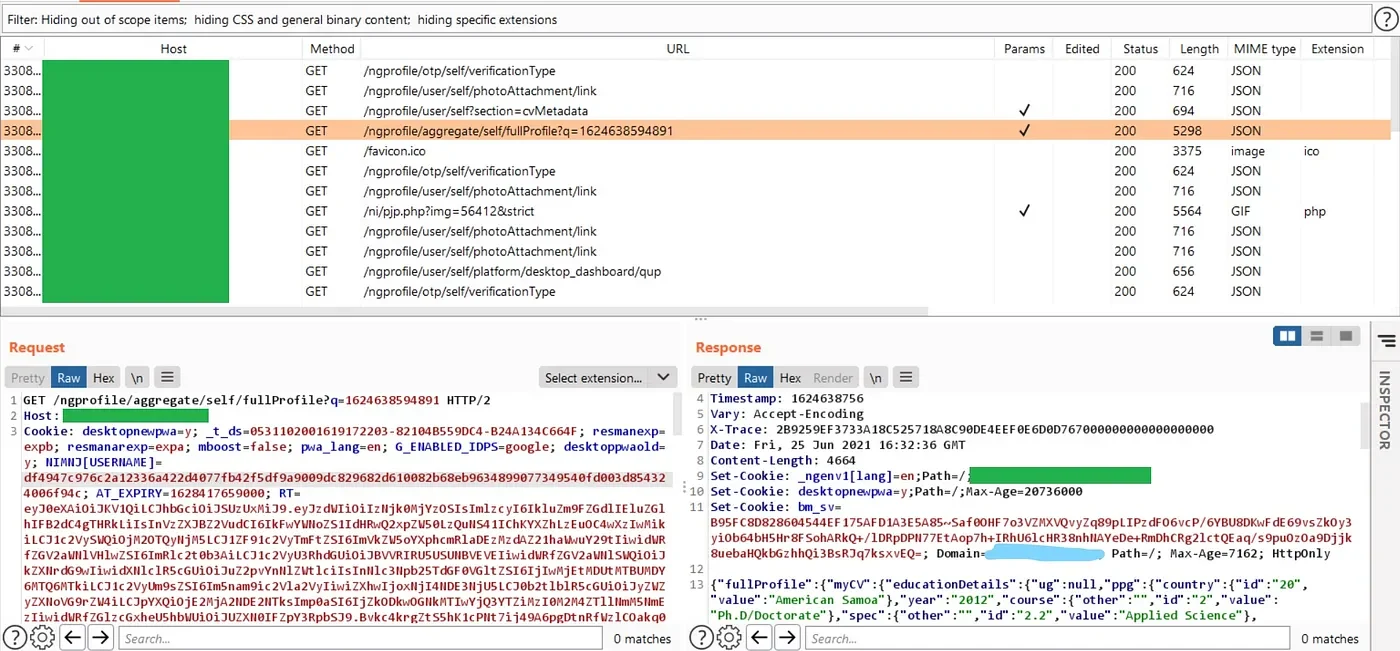
The screenshot shows the Burp History entries that prompted the observation. The requests shared a common pattern:
/something/something/self/something
The author asked what would happen if the word self were replaced with the user's own ID, for example:
/ngprofile/aggregate/31337/fullProfile
Replacing self with an ID
The response returned the author's full profile information.
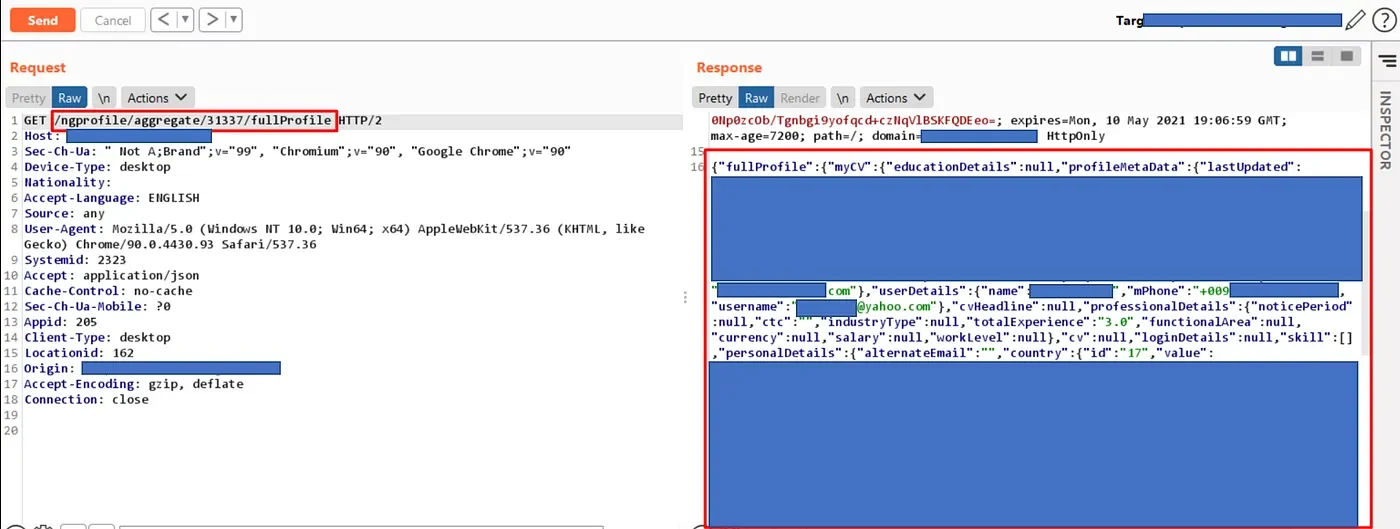
The author then replaced their own user ID with another user's ID. The user IDs are incremental, and the response returned the other user's profile information.
Every self API
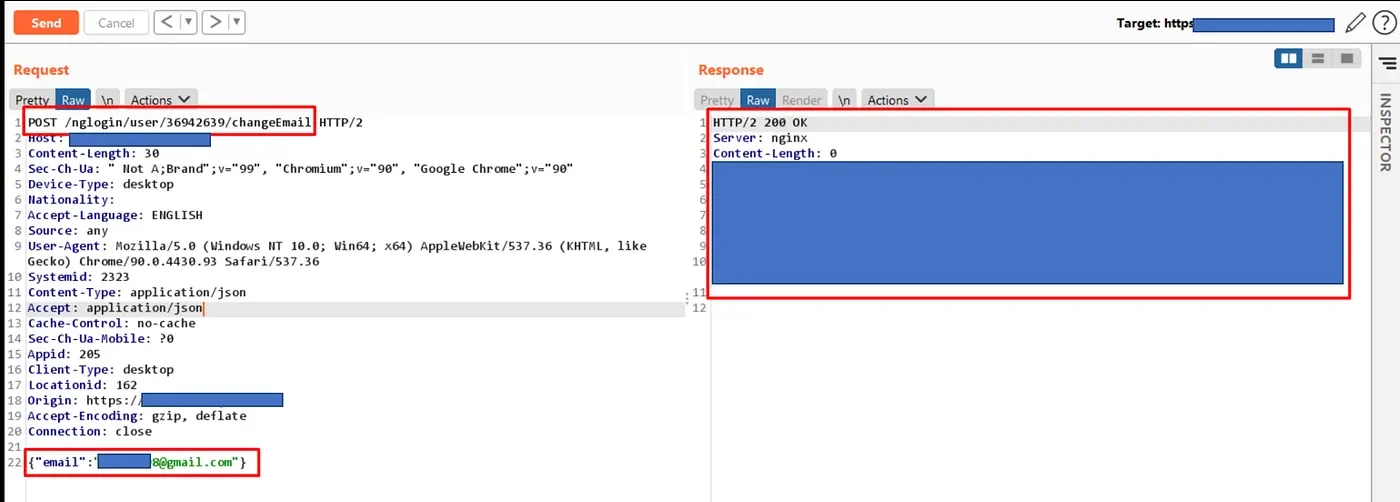
The author observed that every API containing the word self was vulnerable to the same IDOR, including the Change Email API.
Exploitation
Step 1: read another user's profile
- Capture an authenticated request whose path follows the
/something/something/self/somethingpattern. - Take your own user ID from the JWT token.
- Replace
selfwith that ID to confirm the segment is interpreted as a user identifier, for example/ngprofile/aggregate/31337/fullProfile. - Replace your ID with another user's ID. Because IDs are incremental, adjacent values are valid candidates.
- The response contains that user's profile information.
Step 2: change another user's email
The same substitution works on the Change Email API, so the author could change the email address of any user. Chaining this with the "Forgot password" function sends the password reset link to an email address the attacker controls; following that link resets the victim's password, and the attacker can then log in to any account in the system.
Step 3: don't just replace the ID (scenario 1)
On a different target, replacing the author's user ID with another user's ID in the API below did not work directly:
/accounts/0001176361
The server responded Invalid account number.
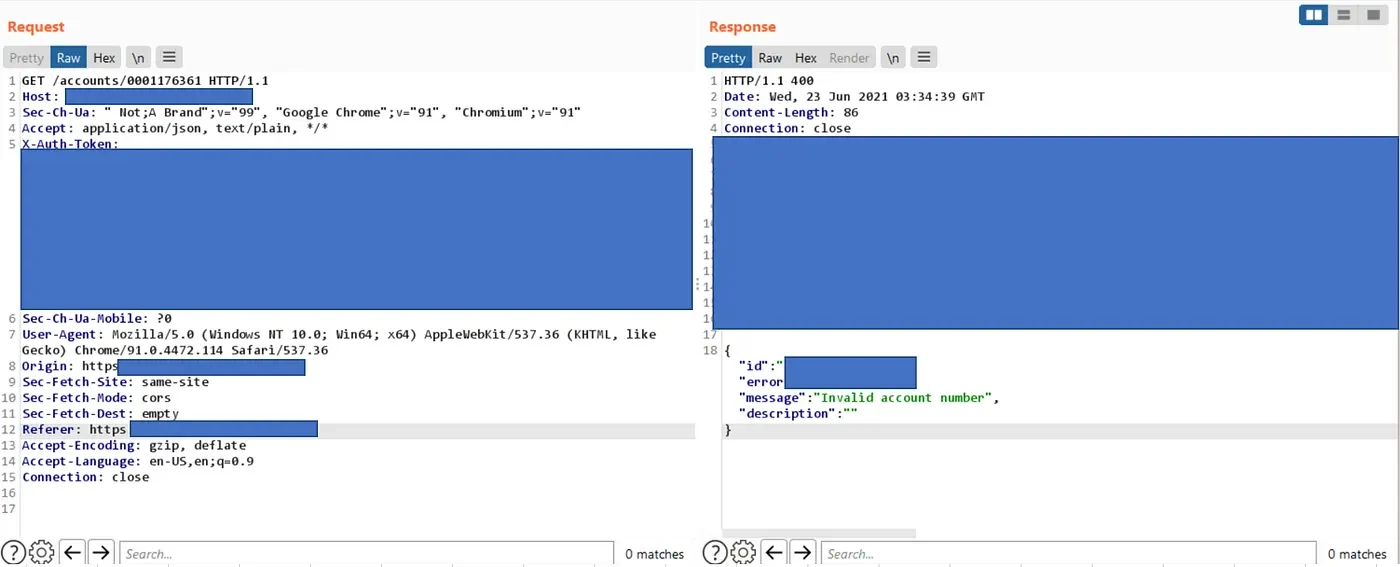
Appending a / character to the user ID changed the outcome: the server returned all information about that user.
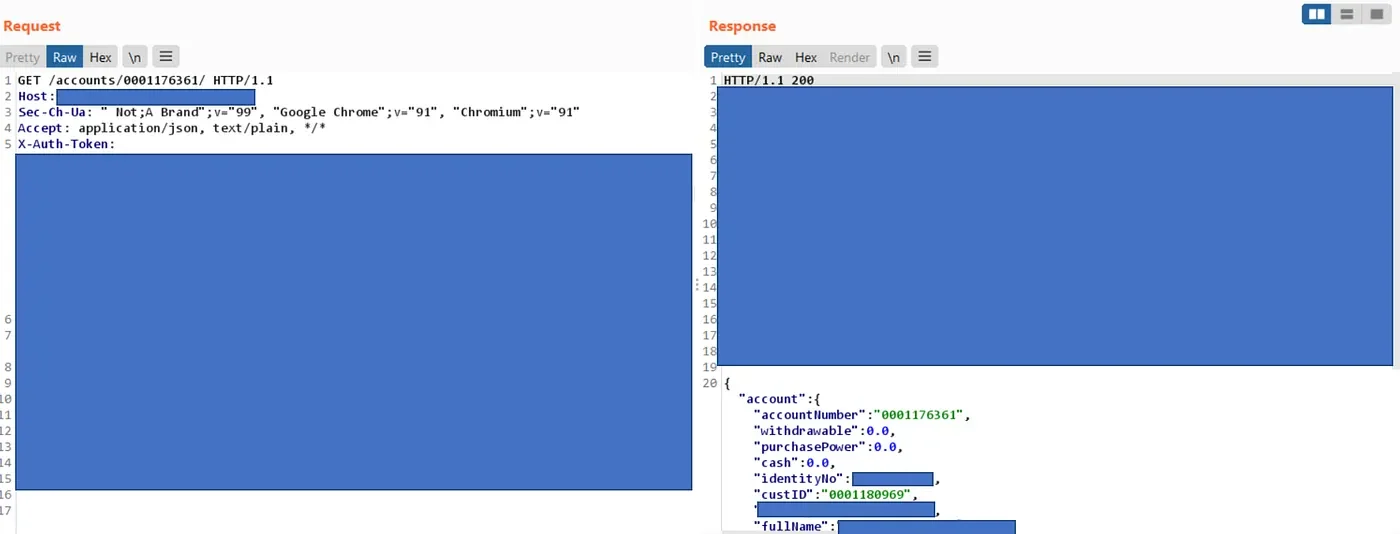
The author suggests the / character may break the logic of the regex or pattern the server used to restrict access.
Step 4: don't just replace the ID (scenario 2)
On the same target, replacing the author's application ID with another application's ID (18385027) in the API below returned access_denied with HTTP code 401:
api/applications/18385027
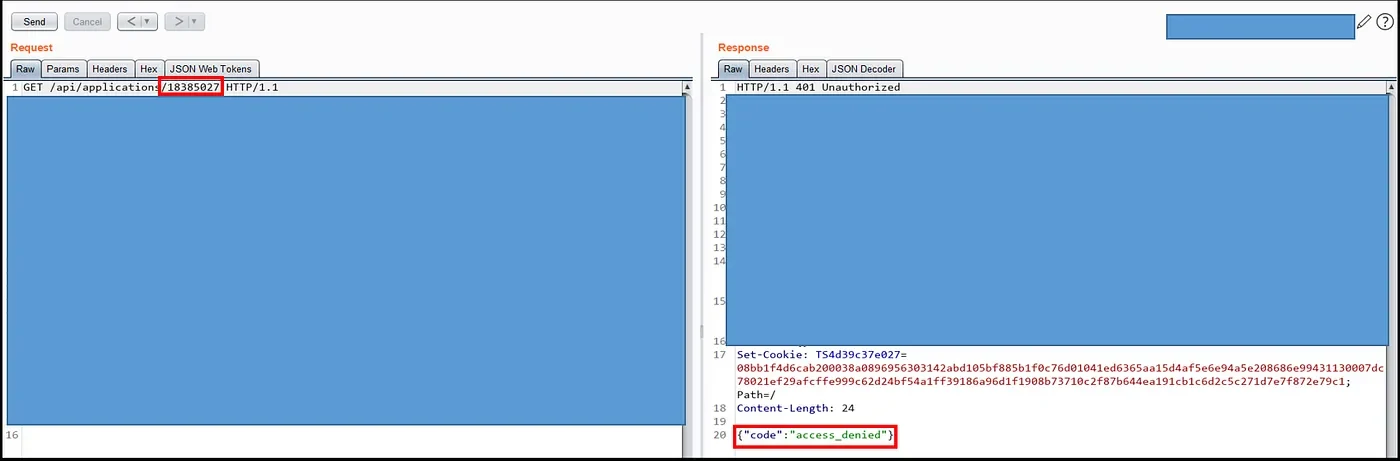
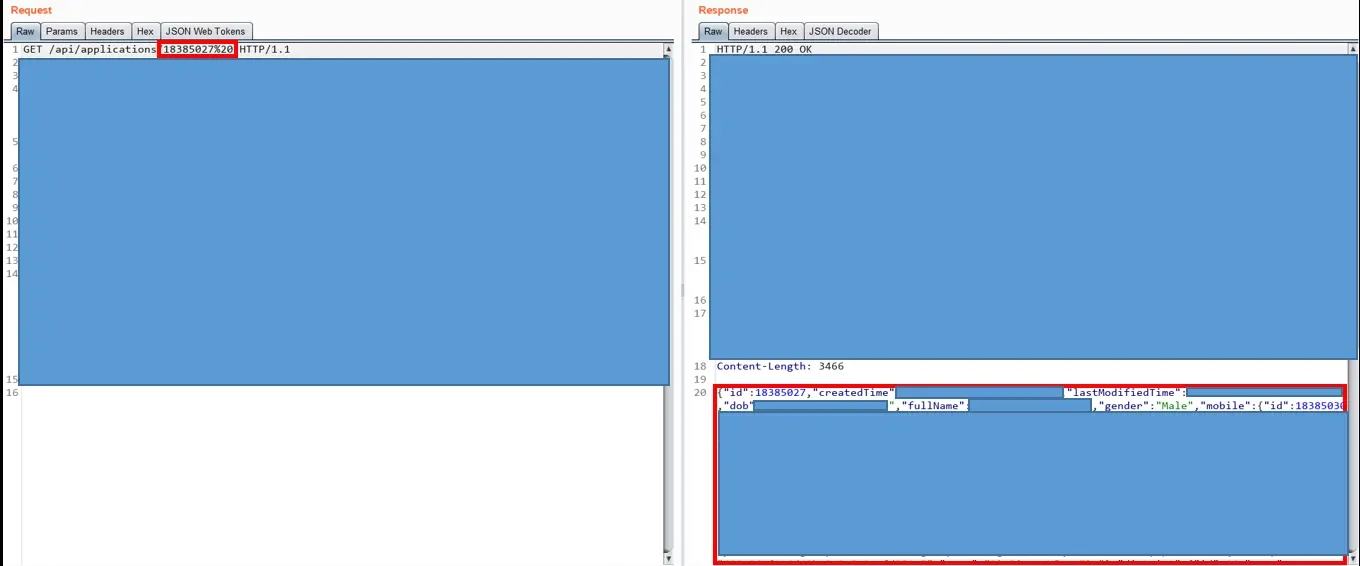
After fuzzing all characters, the author found that appending %20, %09, %0b, %0c, %1c, %1d, %1e or %1f to the application ID bypassed the authorization control, and the server returned full information about that application.
Step 5: GraphQL endpoints
The author admits to having been, and still being, a beginner at testing GraphQL applications.

While working a private program, the author noticed the application used GraphQL and immediately removed all /graphql endpoints from scope.
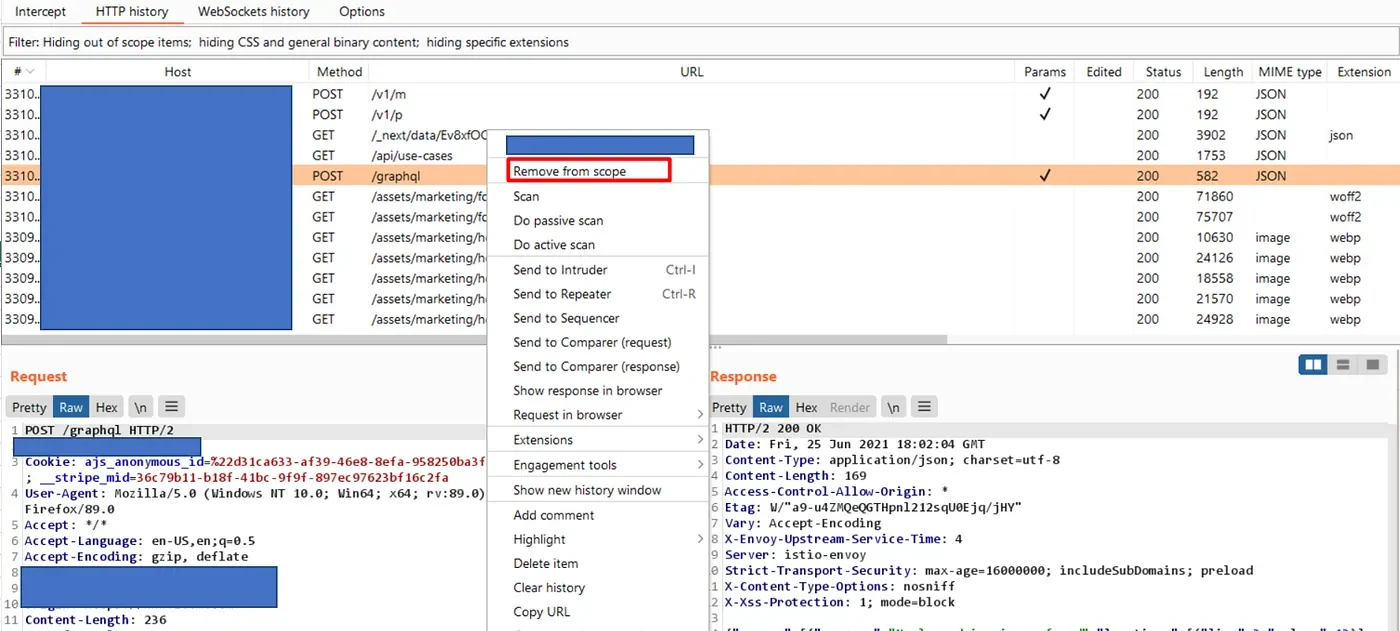
After exercising some functions, the author looked at Burp History again and found no requests at all, because every API of the application used GraphQL. Curiosity about what those requests looked like led the author to add the /graphql endpoints back to scope, and two IDORs were found in that application, both by simply replacing IDs.
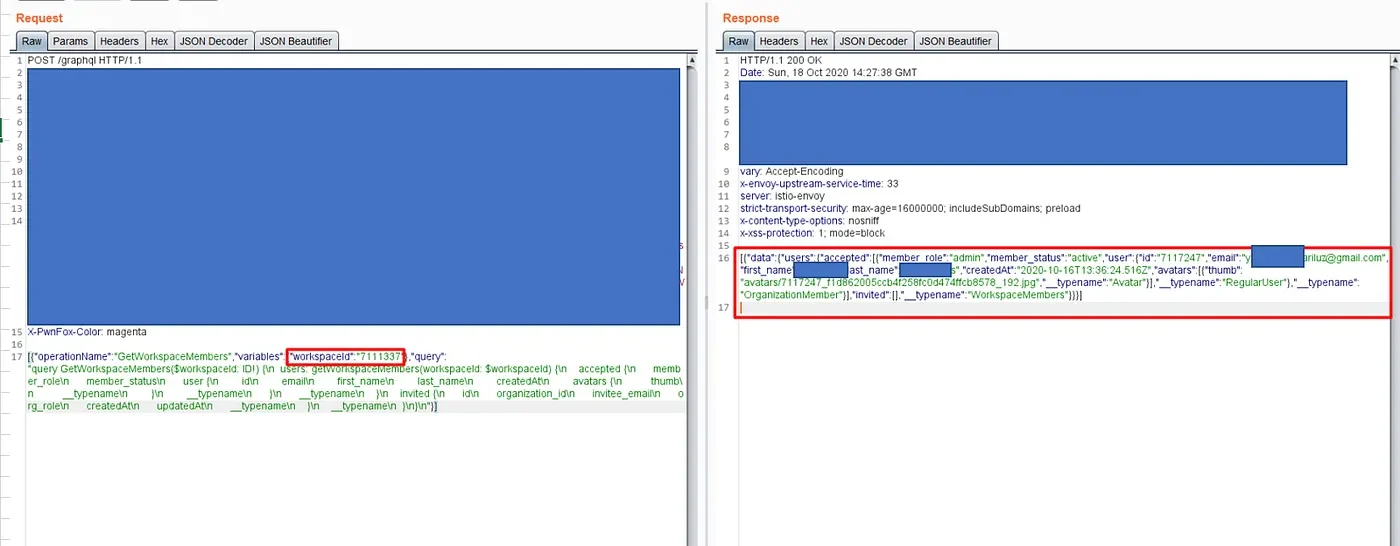
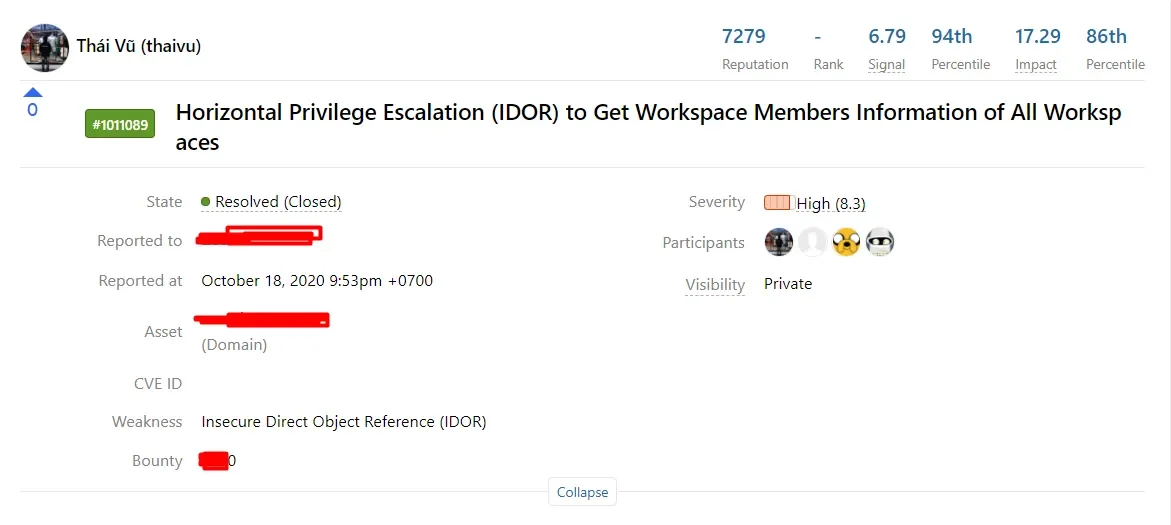
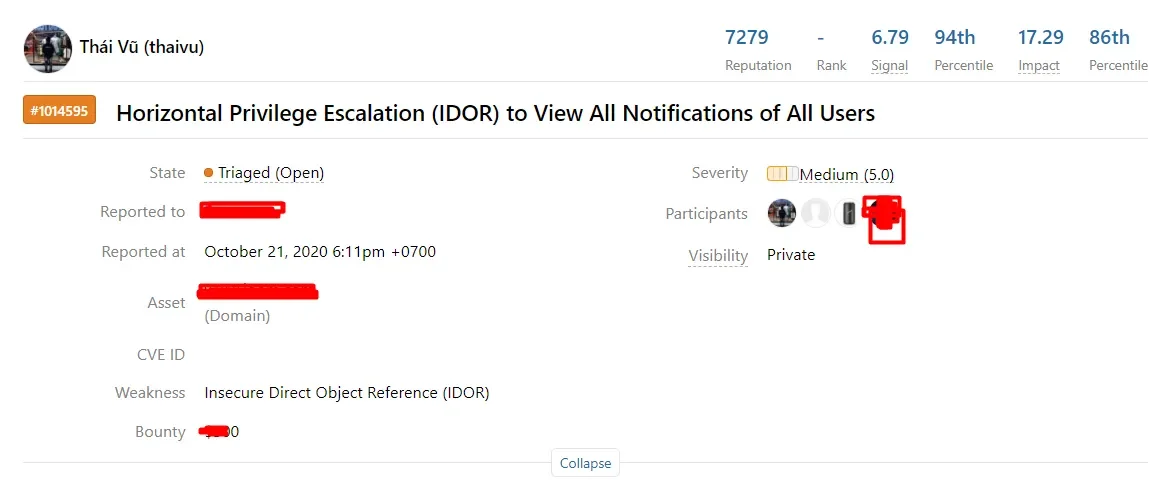
The author's conclusion is that security is quite hard to implement in GraphQL, noting that even Facebook and Google have had many bugs in GraphQL endpoints.
Root cause
In the first finding, the application used a literal self path segment to mean "the authenticated user" and also accepted a user ID in the same position. The author's advice is to understand how each API authorises users and why a request has no parameter, because that reasoning is what exposes this class of bug.
In the two later scenarios, the author suggests the access restriction was implemented as a regex or pattern match on the identifier, and that the extra characters break that logic. This is stated as a possibility ("maybe"), so the exact mechanism is likely a mismatch between how the identifier is validated and how it is later parsed.
In the GraphQL case the author does not analyse the cause beyond observing that IDs could simply be replaced.
Impact
The first bug is site-wide: an attacker could read, modify and delete any information of other users, and the author states this was enough to take over all accounts. The account takeover path is concrete: change the victim's email through the vulnerable Change Email API, trigger the forgot-password flow, receive the reset link at the attacker's address and set a new password. This requires a known victim user ID; the author notes the IDs are incremental.
The two later scenarios expose other users' account and application information once the correct character is appended.
The GraphQL finding is described only as two IDORs found by replacing IDs; the author does not state what data they exposed.
Fix
The report does not say what the vendors changed. Based on the findings, the fixes would be: derive the user from the authenticated session rather than from a path segment, and reject any ID in that position that does not match the caller; validate identifiers strictly and parse them the same way in the authorisation check and in the data lookup, so that trailing /, encoded whitespace and control characters cannot slip past the check; and apply the same ownership checks to every GraphQL resolver that accepts an ID.
Variants to test
- Look for path segments such as
self,meorcurrentin Burp History and replace them with your own ID, then with a neighbouring ID. A positive result is your own data returned for your ID and another user's data returned for theirs. - Apply the same substitution to state-changing endpoints, especially email or password change. A positive result is a successful change on an account you do not own.
- When a direct ID swap returns an error such as
Invalid account number, append a/to the ID. A positive result is the full record of the other user. - When a direct ID swap returns
access_deniedor 401, fuzz the identifier with the full%00to%ffrange, including%20,%09,%0b,%0c,%1c,%1d,%1eand%1f. A positive result is the full information of the other object. - Do not drop
/graphqlendpoints from scope. Capture the GraphQL requests, replace IDs in variables and arguments, and compare responses. A positive result is another user's object returned for an ID you do not own.
What happened, in plain words
This is a story about a class of bug called IDOR. The letters stand for Insecure Direct Object Reference. The idea is simple: a website gives you a numbered thing (a profile, an account, an application) and trusts that you will only ever ask for your own numbered thing. If you change the number in the request to somebody else's number and the website hands over their data anyway, that is an IDOR.
A useful everyday comparison: imagine a hotel where every room key is just the room number written on a card. The receptionist checks that you have a card, but never checks that the number on it is the room you booked. You walk up to room 204, wave a card that says 204, and the door opens. You did not break the lock. You just changed a number that the hotel trusted.
The author of this write-up found several IDORs using a handful of habits, and the post is organised as three lessons:
- Sometimes there is no ID in the request at all, just a word like
self, and that word can be swapped for a number. - Sometimes simply swapping the ID is not enough, and one extra character makes the difference.
- Do not skip GraphQL applications just because their requests look unfamiliar.
The first finding was site-wide: the author could read, modify and delete any information of other users, and states this was enough to take over all accounts.
Before going further, a few words that will come up constantly.
- An API is the part of a website that the page's own JavaScript talks to in the background. When you scroll a feed and more posts appear without the page reloading, your browser asked an API for them. An API usually answers in a machine-friendly format rather than a pretty web page.
- A request is one message your browser sends to a server: "give me this", or "change that". A response is the server's reply.
- A URL path is the part of the address after the site name, for example
/accounts/123. The pieces between the slashes are called path segments. - A parameter is a named value attached to a request, either in the URL after a
?or in the body of the request. - A JWT (JSON Web Token) is a small signed blob of text that a site gives you when you log in. Your browser sends it back with each request so the server knows who you are. It often contains your user ID in readable form.
- Burp Suite is a tool that sits between your browser and the website and records every request and response. Its Burp History is simply the list of everything captured so far, which you can scroll back through later.
- Fuzzing means trying many variations of an input automatically, to see which one the server treats differently.
- HTTP code 401 is the server's way of saying "you are not allowed in".
- GraphQL is a style of API where the client sends a query describing exactly the data it wants, instead of calling many separate fixed addresses.
Finding it
The API pattern with no ID
The author first used the main website normally, clicking through its features, so that the browser would generate lots of API traffic. Then they went back through Burp History and looked at what had been captured.
The screenshot shows the Burp History entries that prompted the observation. The interesting thing was that no parameter and no URL path contained an ID, yet the requests clearly returned the author's own information or performed actions on the author's behalf. That is unusual: normally a request for "my profile" contains something like ?userId=123 so the server knows whose profile to fetch.
Instead, the requests shared a common pattern:
/something/something/self/something
Line by line: this is not a real address, it is a template. The word something stands for whatever real segments appeared in the captured requests, and the important part is the literal word self sitting in the middle. The author's reasoning was: the server is reading that self and translating it to "the person who is logged in". If that is all it does, what happens if I put a number there instead?
So the author tried replacing self with their own user ID, which can be read out of the JWT token:
/ngprofile/aggregate/31337/fullProfile
Line by line: /ngprofile/aggregate/ is the fixed part of the path, 31337 is the author's own user ID put where self used to be, and /fullProfile is the operation being requested. The question being tested is whether the server treats that number as "a user ID to look up" rather than rejecting it because it is not the word self.
Replacing self with an ID
The response returned the author's full profile information.
Having proved the mechanism with their own ID, the author then replaced it with another user's ID. The user IDs are incremental, so they go up by one for each new record. The response returned the other user's profile information. This is the IDOR: the response returned the other user's profile information.
Every self API
The author then observed that every API containing the word self was vulnerable to the same IDOR, including the Change Email API.
This matters because reading a profile is embarrassing, but changing an email address is a step towards taking over an account. The same missing check appeared in a place where the request does not just read data, it writes it.
Exploitation
Step 1: read another user's profile
- Capture an authenticated request whose path follows the
/something/something/self/somethingpattern. "Authenticated" means it was made while logged in, so it carries your JWT. - Take your own user ID from the JWT token. The token is readable text, so you can decode it and find the number.
- Replace
selfwith that ID to confirm the segment is interpreted as a user identifier, for example/ngprofile/aggregate/31337/fullProfile. This step is a control: it proves the idea works before you point it at somebody else. - Replace your ID with another user's ID. Because IDs are incremental, adjacent values are valid candidates.
- The response contains that user's profile information.
Step 2: change another user's email
The same substitution works on the Change Email API, so the author could change the email address of any user. The chain then goes like this: trigger the "Forgot password" function for the victim, and the site sends the password reset link to the email address now on the account, which the attacker controls. Following that link resets the victim's password, and the attacker can then log in to any account in the system. Each individual step is a normal feature; the IDOR is what lets the attacker point those features at somebody else.
Step 3: don't just replace the ID (scenario 1)
On a different target, replacing the author's user ID with another user's ID in the API below did not work directly:
/accounts/0001176361
Line by line: /accounts/ is the fixed part of the path and 0001176361 is the account number being requested. The author put another user's number in that position and expected their data back.
The server responded Invalid account number.
So the server did have some kind of check, and it rejected the request. A less curious tester would stop here and move on. The author did not.
Appending a / character to the user ID changed the outcome: the server returned all information about that user.
The author suggests the / character may break the logic of the regex or pattern the server used to restrict access. A regex is a pattern used to describe what a piece of text should look like, for example "only digits". If the check is written in a way that the extra slash confuses, the request can pass the check and then be parsed differently by the code that actually fetches the data. The check and the lookup disagree about what the identifier is, and that gap is the bug.
Step 4: don't just replace the ID (scenario 2)
On the same target, replacing the author's application ID with another application's ID (18385027) in the API below returned access_denied with HTTP code 401:
api/applications/18385027
Line by line: api/applications/ is the fixed part of the path and 18385027 is the application ID. The author swapped in an application that did not belong to them, and the server said no.
Again, a plain swap was blocked. So the author fuzzed the identifier: tried many characters appended to it, one at a time, and watched which ones changed the answer. The result was that appending %20, %09, %0b, %0c, %1c, %1d, %1e or %1f to the application ID bypassed the authorization control, and the server returned full information about that application.
Those values are percent-encoded characters. Percent-encoding is how a URL carries characters that are awkward to type or invisible, such as spaces. %20 is a space, %09 is a tab, and the others are various control characters that normally have no visible effect. The author fuzzed all characters from %00 to %ff. The lesson is that the server's check and the server's lookup were again reading the identifier differently, and one of these invisible characters was enough to slip past the check.
Step 5: GraphQL endpoints
The author admits to having been, and still being, a beginner at testing GraphQL applications.
While working a private program, the author noticed the application used GraphQL and immediately removed all /graphql endpoints from scope. Scope is the list of things a tester is allowed to test; removing something from scope means deciding not to look at it. The reason was unfamiliarity: GraphQL requests do not look like the usual GET /accounts/123 calls, so it is tempting to skip them.
After exercising some functions, the author looked at Burp History again and found no requests at all, because every API of the application used GraphQL. That is the trap: by excluding /graphql, the author had excluded the entire application without meaning to. Curiosity about what those requests looked like led the author to add the /graphql endpoints back to scope, and two IDORs were found in that application, both by simply replacing IDs.
The author's conclusion is that security is quite hard to implement in GraphQL, noting that even Facebook and Google have had many bugs in GraphQL endpoints.
Root cause
In the first finding, the application used a literal self path segment to mean "the authenticated user" and also accepted a user ID in the same position. The author's advice is to understand how each API authorises users and why a request has no parameter, because that reasoning is what exposes this class of bug.
In the two later scenarios, the author suggests the access restriction was implemented as a regex or pattern match on the identifier, and that the extra characters break that logic. This is stated as a possibility ("maybe"), so the exact mechanism is likely a mismatch between how the identifier is validated and how it is later parsed.
In the GraphQL case the author does not analyse the cause beyond observing that IDs could simply be replaced.
Impact
The first bug is site-wide: an attacker could read, modify and delete any information of other users, and the author states this was enough to take over all accounts. The account takeover path is concrete: change the victim's email through the vulnerable Change Email API, trigger the forgot-password flow, receive the reset link at the attacker's address and set a new password. This requires a known victim user ID; the author notes the IDs are incremental.
The two later scenarios expose other users' account and application information once the correct character is appended.
The GraphQL finding is described only as two IDORs found by replacing IDs; the author does not state what data they exposed.
Fix
The report does not say what the vendors changed. Based on the findings, the fixes would be: derive the user from the authenticated session rather than from a path segment, and reject any ID in that position that does not match the caller; validate identifiers strictly and parse them the same way in the authorisation check and in the data lookup, so that trailing /, encoded whitespace and control characters cannot slip past the check; and apply the same ownership checks to every GraphQL resolver that accepts an ID. A resolver is the piece of server code that answers one field in a GraphQL query.
Variants to test
- Look for path segments such as
self,meorcurrentin Burp History and replace them with your own ID, then with a neighbouring ID. A positive result is your own data returned for your ID and another user's data returned for theirs. - Apply the same substitution to state-changing endpoints, especially email or password change. A positive result is a successful change on an account you do not own.
- When a direct ID swap returns an error such as
Invalid account number, append a/to the ID. A positive result is the full record of the other user. - When a direct ID swap returns
access_deniedor 401, fuzz the identifier with the full%00to%ffrange, including%20,%09,%0b,%0c,%1c,%1d,%1eand%1f. A positive result is the full information of the other object. A 200 response is the normal "here is your answer" code. - Do not drop
/graphqlendpoints from scope. Capture the GraphQL requests, replace IDs in variables and arguments, and compare responses. A positive result is another user's object returned for an ID you do not own.
Glossary
- API: the part of a website that the page's own code talks to in the background, usually answering in a machine-friendly format rather than a web page.
- Authentication: proving who you are, normally by logging in.
- Authorisation: deciding what a logged-in user is allowed to do or see.
- Burp History: the running list of requests and responses captured by Burp Suite.
- Burp Suite: a tool that sits between your browser and a website and records the traffic.
- Control character: an invisible character that was originally used to control devices, such as tab or carriage return.
- Fuzzing: trying many variations of an input automatically to see which one the server treats differently.
- GraphQL: a style of API where the client sends a query describing exactly the data it wants.
- HTTP code 200: the server's normal "here is your answer" reply.
- HTTP code 401: the server's "you are not allowed in" reply.
- IDOR: Insecure Direct Object Reference, where a site lets you change an identifier in a request and reach another user's data.
- Incremental ID: a number that goes up by one for each new record, so neighbouring values are easy to guess.
- JWT: JSON Web Token, a signed blob of text given at login and sent back with each request so the server knows who you are; it often contains your user ID.
- Parameter: a named value attached to a request, in the URL after a
?or in the request body. - Path segment: one piece of a URL path between two slashes.
- Percent-encoding: how a URL carries awkward or invisible characters, for example
%20for a space. - Regex: a pattern describing what a piece of text should look like, used to validate input.
- Request: one message your browser sends to a server.
- Resolver: the piece of server code that answers one field in a GraphQL query.
- Response: the server's reply to a request.
- Scope: the list of targets and endpoints a tester is allowed to test.
- URL path: the part of an address after the site name, such as
/accounts/123.



