Spear texting via parameter injection
The report describes how an attacker could manipulate a parameter in a POST request to a third-party API to generate a custom link that would be sent via SMS under the company's name, redirecting users to any website. This was possible because the API allowed setting redirect URLs for different platforms without proper validation.

This write-up focuses on how to take advantage of api knowledge and spotting opportunity when the right Burp request presents itself. By default this api lets you generate links with a public key, this finding was combined with an insecure account policy that allowed me to text any cell phone number with a custom link…
The full write-up lives on its author's site
It belongs to its author, so we link to it rather than copy it. The other two tabs are our own rewrites, checked against it.
Context
This write-up is about a third-party API that a company's website used to generate links and deliver them by SMS. By default the API lets you generate links with a public key. The finding combined that API with an insecure account policy: it allowed the researcher to text any cell phone number with a custom link, created en route, under the company's name. The crafted link could redirect users anywhere on the internet.
The researcher lists three main take-aways up front:
- Proxy all requests and follow the redirects.
- Read third-party API documentation for exploitable implementations.
- Support your proof of concept with official documentation to boost report quality.
The write-up is heavily redacted to follow a non-disclosure policy, so hosts, keys, identities and session values are replaced with redacted throughout.
Setup
The work was done in Firefox, using its developer tools to observe requests, and with a proxy to modify them. The browser string in the captured requests is:
Mozilla/5.0 (X11; Ubuntu; Linux x86_64; rv:65.0) Gecko/20100101 Firefox/65.0
The precondition was simply access to the public website flow: entering a cell phone number and clicking the link for the Android/iOS application download. That flow carried the company's API key in the request, which is what made the third-party API usable from the outside.
Finding it
The main website's requests, loaded in Firefox developer tools, pointed to a GET request going to an external API. After entering a cell phone number and clicking the Android/iOS application download link, a POST request was sent to the third-party API with the company API key and JSON data:
POST /v1/url HTTP/1.1
Host: redacted
User-Agent: Mozilla/5.0 (X11; Ubuntu; Linux x86_64; rv:65.0) Gecko/20100101 Firefox/65.0
Accept:
Accept-Language: en-US,en;q=0.5
Accept-Encoding: gzip, deflate
Referer: https://redacted
Content-Type: application/x-www-form-urlencoded
Content-Length: 644
Origin: https://redacted
Connection: close

scope=sms&data={"title":"redacted","description":"redacted","image":"redacted","video":null,"type":"website","desktop":"http://www.example.com","android":"http://www.example.com","ios":"http://www.example.com","fallback":"http://www.example.com"}&identity=redacted&source=web-sdk&browser=redacted&sdk=redacted&session_id=629935681409903301&key=redacted
Two details stood out. First, the request used a JSON data parameter to send the information used to generate a link. Second, that data was redirected to another internal API endpoint with a number parameter:
POST redacted HTTP/1.1
Host: redacted
User-Agent: Mozilla/5.0 (X11; Ubuntu; Linux x86_64; rv:65.0) Gecko/20100101 Firefox/65.0
Accept:
Accept-Language: en-US,en;q=0.5
Accept-Encoding: gzip, deflate
Referer: https://redacted
Content-Type: application/x-www-form-urlencoded
Content-Length: 83
Origin: https://redacted
Connection: close

sdk=redacted&phone=redacted&redacted_key=redacted
The reasoning was direct: if the data that generated the link could be changed, the redirected request would send the crafted link under the company's account.
Exploitation
Step 1: read the API documentation
Software documentation is not only good for building software quickly; it is also good for finding ways to break it. The third-party API's documentation showed how to set a redirect based on the platform used. In this case the platform was Android. As a test case the researcher set example.com as the URL for each platform, to override all redirect settings:
"desktop":"http://www.example.com","android:"http://www.example.com","ios":"http://www.example.com","fallback":"http://www.example.com"
Step 2: proxy the two requests
The proof of concept involved proxying two requests. The first was the POST request that sent data to the account which created the link; the second was the endpoint that sent the link to the cell phone number.
The initial POST request had only an android parameter:
After reading the API documentation the researcher learned there was a redirect property for every type of platform. Setting the same redirect for every platform (Desktop, Android, iOS) guaranteed that a user clicking the link would go to the chosen URL on all platforms. Researching the API elevated the impact, turning the issue into a cross-platform spear text phishing attack.
Step 3: send the final payload
The final payload set the same redirect for every platform:
Step 4: the modified requests
The first modified request, sent to the link-generation endpoint:
POST /v1/url HTTP/1.1
Host: redacted
User-Agent: Mozilla/5.0 (X11; Ubuntu; Linux x86_64; rv:65.0) Gecko/20100101 Firefox/65.0
Accept:
Accept-Language: en-US,en;q=0.5
Accept-Encoding: gzip, deflate
Referer: https://redacted
Content-Type: application/x-www-form-urlencoded
Content-Length: 644
Origin: https://redacted
Connection: close

scope=sms&data={"title":"redacted","description":"redacted","image":"redacted","video":null,"type":"website","desktop":"http://www.example.com","android":"http://www.example.com","ios":"http://www.example.com","fallback":"http://www.example.com"}&identity=redacted&source=web-sdk&browser=redacted&sdk=redacted&session_id=629935681409903301&key=redacted
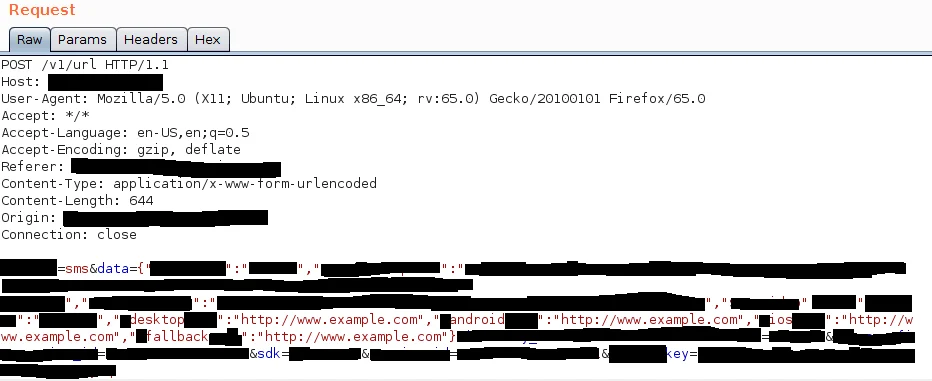
The screenshot accompanies the modified request.
The second modified request is the one that redirects to the text message endpoint:
POST redacted HTTP/1.1
Host: redacted
User-Agent: Mozilla/5.0 (X11; Ubuntu; Linux x86_64; rv:65.0) Gecko/20100101 Firefox/65.0
Accept:
Accept-Language: en-US,en;q=0.5
Accept-Encoding: gzip, deflate
Referer: redacted
Content-Type: application/x-www-form-urlencoded
Content-Length: 83
Origin: redacted
Connection: close

sdk=redacted&phone=yournumberhere&key=redacted
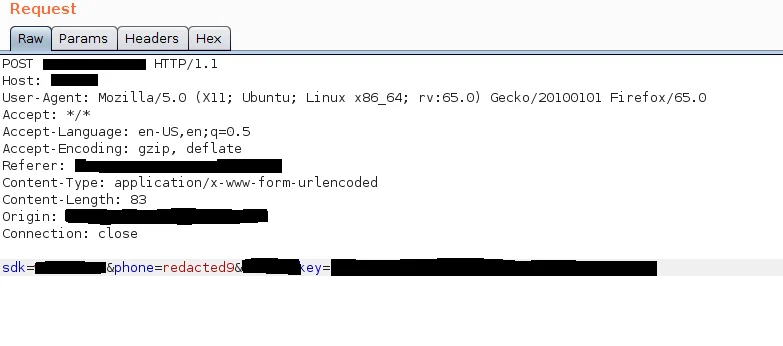
The screenshot accompanies the second request.
Step 5: the message arrives
The text message was received:
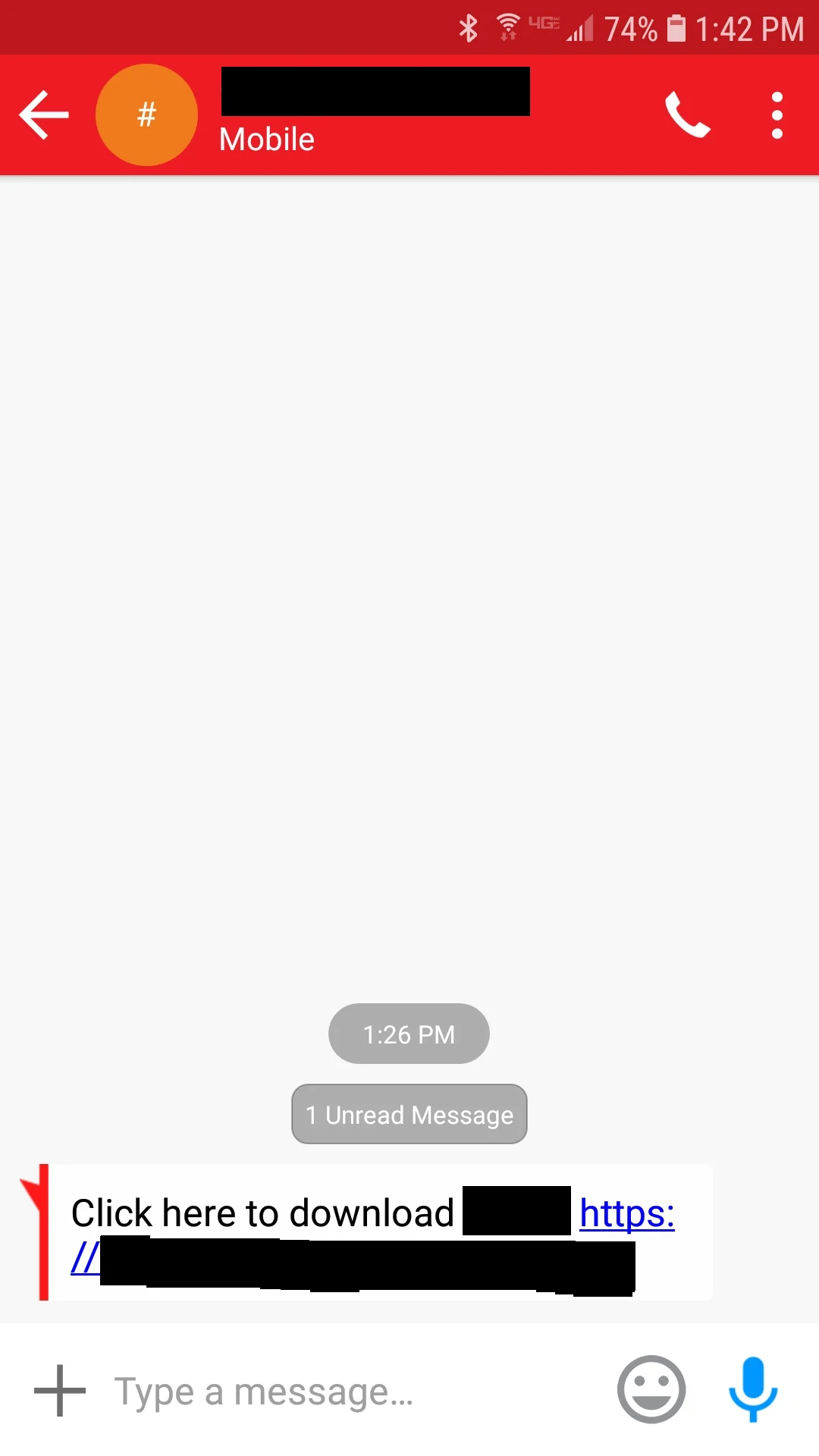
The text message was received.
After pressing the link, the user lands on the URL set in the payload:
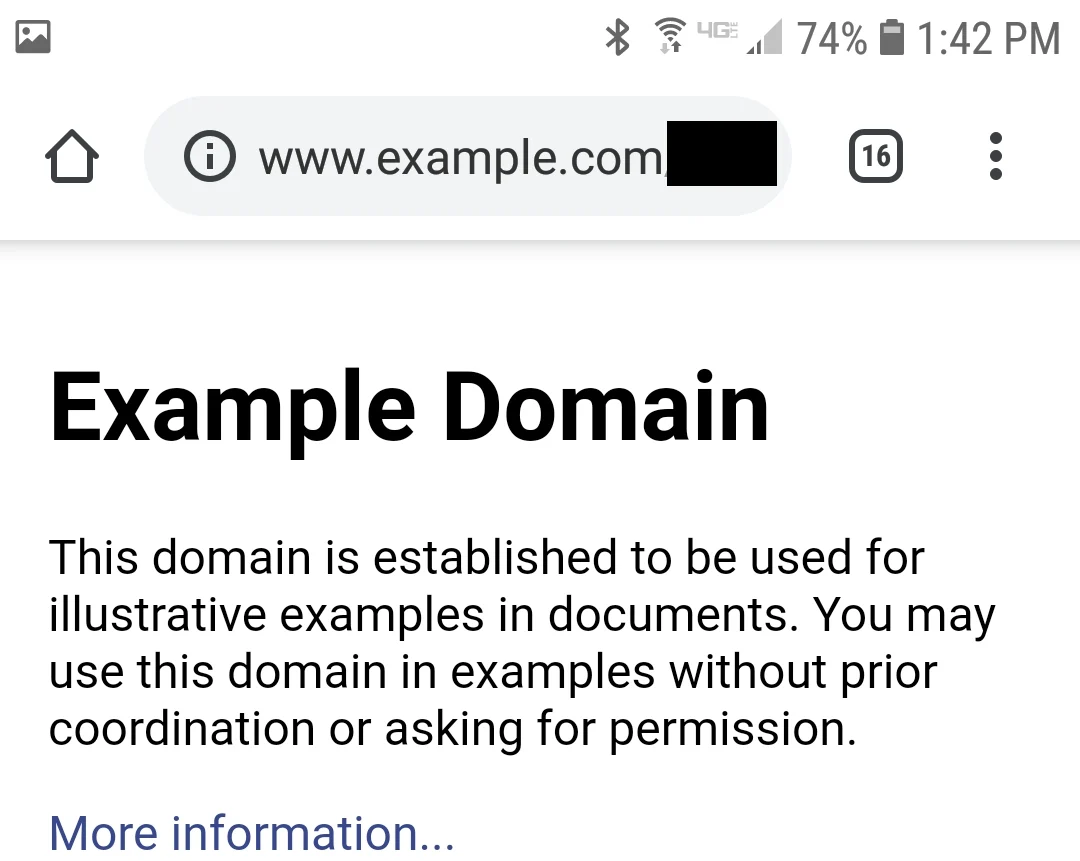
After pressing the link.
Root cause
The link-generation endpoint accepted a client-supplied JSON data parameter that controlled the redirect targets embedded in the generated link, and the account's redirect scope was not restricted. The API key used by the website travelled in requests from the browser. The second endpoint sent the generated link to the supplied phone value.
Impact
An attacker who can reach the flow can text any cell phone number with a custom link created under the company's name, and the link can redirect the recipient anywhere on the internet. Because the redirect property exists for every platform, setting the same URL for Desktop, Android, iOS and fallback makes the attack cross-platform: a recipient clicking the link goes to the attacker's URL regardless of device. The researcher notes that the initial vulnerability was one the company did not think was worth fixing, and that increasing the impact and severity by making the attack vector cross-platform changed that. The finding earned a $900 bounty.
Fix
The redirect scope could be restricted within the company's account. The following response on each platform endpoint guaranteed the scope for the company's API key was restricted successfully:
HTTP/1.1 400 Bad Request
Content-Type: application/json
Content-Length: 112
Connection: close
Access-Control-Allow-Origin: *
Date: redacted
Server: redacted/[redacted]
X-Cache: Error from cloudfront

{"error":{"code":400,"message":"Invalid value for property of 'desktop', url doesn't pass security tests"}}
Variants to test
- Other platform keys in the same
dataobject. Trydesktop,android,iosandfallbackindividually and together. A positive result is a generated link that redirects to your URL on the matching platform, or a 400 with a message naming the property, as in the fix response above. - Other link-generation APIs with a JSON blob parameter. Look for endpoints that take a
data-style JSON field containing URLs. A positive result is a link whose destination you control, generated under the target's key. - Phone parameter tampering on the send endpoint. Change
phoneto a number you control while keeping the rest of the request intact. A positive result is an SMS arriving at your number with a link generated under the target's account. - Public keys in browser flows. Proxy the site's requests and follow redirects to external APIs, looking for keys sent from the client. A positive result is a key that lets you call the third-party API directly.
- Redirect scope restrictions. After a fix, replay the original payload and check whether the response rejects the URL, for example with a message that the URL does not pass security tests. A positive result is a rejection that confirms the scope is now enforced.
What happened, in plain words
A company's website had a feature that let visitors type in a mobile phone number and receive a text message (SMS) with a link to download the company's Android or iOS app. To build that link and send that text, the website did not do the work itself. It quietly asked a separate company, a third-party service, to do it. That kind of outside service is called an API: a set of web addresses that one piece of software calls to make another piece of software do something, like a waiter carrying your order to the kitchen and bringing the food back.
The request the website sent to that outside service contained everything needed to decide what the link would point to. The request also carried the company's API key, a kind of password that proves to the outside service that the request really comes from the company. That key travelled in requests from the browser.
By changing the part of the request that says where the link should send people, the researcher could make the outside service generate a link that pointed anywhere on the internet, and then have that link texted to any phone number, all under the company's name. The recipient would see a message from a company they may trust, with a link that takes them to a page the attacker chose. That is called spear texting, or spear phishing by SMS: a targeted message that looks legitimate but leads somewhere harmful.
The researcher lists three lessons at the start:
- Proxy all requests and follow the redirects. In plain terms, watch every request the browser makes, including the ones that bounce on to other addresses, instead of only looking at the page you see.
- Read third-party API documentation for exploitable implementations. The public manual for the outside service describes every option it accepts, and some of those options may be more powerful than the website intended to expose.
- Support your proof of concept with official documentation to boost report quality. A proof of concept is a small, safe demonstration that the problem is real; backing it with the vendor's own manual makes the report harder to dismiss.
The write-up is heavily redacted to follow a non-disclosure policy. That means names of hosts, keys, identities and session values have been replaced with the word redacted, so the public version does not hand out the details needed to repeat the attack against the real company.
Setting up the tools
The work was done in Firefox, using its built-in developer tools to watch the requests the page made, and with a proxy tool. A proxy sits between your browser and the internet, like a postbox that lets you open, read and rewrite every letter before it is delivered. With Burp, the researcher could pause a request, change a value, and send it on.
The browser identified itself in the captured requests with this string:
Mozilla/5.0 (X11; Ubuntu; Linux x86_64; rv:65.0) Gecko/20100101 Firefox/65.0
This is the User-Agent header: a line every browser sends to say which browser and operating system it is, a bit like a return address on an envelope. It is not secret and does not cause the problem; it is simply part of the captured request.
The only precondition was access to the public website flow: entering a cell phone number and clicking the link for the Android/iOS application download. That flow carried the company's API key in the request, which is what made the third-party API usable from the outside.
Finding it
The main website's requests, loaded in Firefox developer tools, pointed to a GET request going to an external API. A GET request is the ordinary kind a browser makes when it asks a server for something, like asking a shop assistant to show you an item. Seeing a request leave for an outside company was the first clue that the site depended on someone else's service.
After entering a cell phone number and clicking the Android/iOS application download link, a POST request was sent to the third-party API with the company API key and JSON data. A POST request is the kind used to send information to a server, like handing a filled-in form across the counter. JSON is a simple text format for structured data, using curly brackets and quoted names, a bit like a labelled packing list.
POST /v1/url HTTP/1.1
Host: redacted
User-Agent: Mozilla/5.0 (X11; Ubuntu; Linux x86_64; rv:65.0) Gecko/20100101 Firefox/65.0
Accept:
Accept-Language: en-US,en;q=0.5
Accept-Encoding: gzip, deflate
Referer: https://redacted
Content-Type: application/x-www-form-urlencoded
Content-Length: 644
Origin: https://redacted
Connection: close

scope=sms&data={"title":"redacted","description":"redacted","image":"redacted","video":null,"type":"website","desktop":"http://www.example.com","android":"http://www.example.com","ios":"http://www.example.com","fallback":"http://www.example.com"}&identity=redacted&source=web-sdk&browser=redacted&sdk=redacted&session_id=629935681409903301&key=redacted
Line by line, in plain words:
POST /v1/url HTTP/1.1is the request line: it says the browser is sending data (POST) to the address/v1/urlon the server, using version 1.1 of the HTTP protocol, the language browsers and servers speak.Host: redactednames the server being contacted. It is hidden here.User-Agent: ...is the browser's self-description, as above.Accept:is empty, meaning the browser did not state a preference for the response format.Accept-Language: en-US,en;q=0.5says the browser prefers English (US), with English in general as a fallback.Accept-Encoding: gzip, deflatesays the browser can accept compressed responses, to save bandwidth.Referer: https://redactedtells the server which page the request came from, like a note saying which shop counter sent you.Content-Type: application/x-www-form-urlencodedsays the body is formatted as name=value pairs joined by&, the same format a web form uses.Content-Length: 644says the body is 644 bytes long, so the server knows where it ends.Origin: https://redactednames the site the request originates from, a security check browsers add.Connection: closeasks the server to close the connection after answering.- The blank line separates the headers from the body.
- The body is one long line of parameters.
scope=smssays the link is for an SMS.data=holds the JSON object that describes the link: atitle, adescription, animage, avideoset tonull(meaning empty), atypeofwebsite, and four URL fields nameddesktop,android,iosandfallback.identity,source,browser,sdk,session_idandkeyare supporting values: who is asking, from which software, in which session, and with which API key. A session is a short-lived conversation between browser and server, andsession_idis the label for that conversation.
Two details stood out. First, the request used a JSON data parameter to send the information used to generate a link. That means the destination of the link was decided by data the browser sent, not by something fixed on the server. Second, that data was redirected to another internal API endpoint with a number parameter:
POST redacted HTTP/1.1
Host: redacted
User-Agent: Mozilla/5.0 (X11; Ubuntu; Linux x86_64; rv:65.0) Gecko/20100101 Firefox/65.0
Accept:
Accept-Language: en-US,en;q=0.5
Accept-Encoding: gzip, deflate
Referer: https://redacted
Content-Type: application/x-www-form-urlencoded
Content-Length: 83
Origin: https://redacted
Connection: close

sdk=redacted&phone=redacted&redacted_key=redacted
Line by line:
- The request line,
Host,User-Agent,Accept,Accept-Language,Accept-Encoding,Referer,Content-Type,OriginandConnectionheaders play the same roles as in the first request. The address itself is hidden. Content-Length: 83says this body is much shorter, 83 bytes.- The body has three parameters:
sdk,phoneandredacted_key.phoneis the number the text message will go to. The key parameter is the credential that authorises the send.
The reasoning was direct: if the data that generated the link could be changed, the redirected request would send the crafted link under the company's account. In everyday terms, if the order slip that goes to the kitchen can be rewritten by the customer, the kitchen will cook whatever the customer wrote, and the bill will still be charged to the restaurant.
Exploitation
Step 1: read the API documentation
Software documentation is not only good for building software quickly; it is also good for finding ways to break it. The third-party API's documentation showed how to set a redirect based on the platform used. A redirect is when one web address automatically sends the visitor on to another, like a signpost that says "the shop you want is over there". Here the service could send Android users to one address, iPhone users to another, desktop users to a third, and anyone else to a fallback address.
In this case the platform was Android. As a test case the researcher set example.com as the URL for each platform, to override all redirect settings:
"desktop":"http://www.example.com","android:"http://www.example.com","ios":"http://www.example.com","fallback":"http://www.example.com"
This is the same set of four fields seen in the data object, each pointed at http://www.example.com, a domain reserved for examples and documentation. The point of the test was to see whether the service would accept a destination chosen by the caller for every platform at once. The snippet is copied exactly as it appears in the write-up, including the missing closing quote after android.
Step 2: proxy the two requests
The proof of concept involved proxying two requests. The first was the POST request that sent data to the account which created the link; the second was the endpoint that sent the link to the cell phone number. An endpoint is simply one specific address on a server that performs one specific job, like one counter in a large office.
The initial POST request had only an android parameter:
In plain words: this is the body of the first request, with the data JSON now containing only an android URL, set to http://www.example.com. The other platform fields are absent. The sdk value here is web2.49.0, a version label for the software kit the website uses. The snippet is copied exactly, including the missing closing quote after Redacted.
After reading the API documentation the researcher learned there was a redirect property for every type of platform. Setting the same redirect for every platform (Desktop, Android, iOS) guaranteed that a user clicking the link would go to the chosen URL on all platforms. Researching the API elevated the impact, turning the issue into a cross-platform spear text phishing attack. Cross-platform means the same trick works whether the recipient opens the link on a phone, a tablet or a computer.
Step 3: send the final payload
The final payload set the same redirect for every platform:
A payload is the part of a request that carries the attacker's chosen content. Here the data JSON lists all four destination fields, each set to http://www.example.com, so whichever device opens the link, the redirect points to the same place. The remaining parameters identify the caller and carry the key, exactly as in the original request.
Step 4: the modified requests
The first modified request, sent to the link-generation endpoint:
POST /v1/url HTTP/1.1
Host: redacted
User-Agent: Mozilla/5.0 (X11; Ubuntu; Linux x86_64; rv:65.0) Gecko/20100101 Firefox/65.0
Accept:
Accept-Language: en-US,en;q=0.5
Accept-Encoding: gzip, deflate
Referer: https://redacted
Content-Type: application/x-www-form-urlencoded
Content-Length: 644
Origin: https://redacted
Connection: close

scope=sms&data={"title":"redacted","description":"redacted","image":"redacted","video":null,"type":"website","desktop":"http://www.example.com","android":"http://www.example.com","ios":"http://www.example.com","fallback":"http://www.example.com"}&identity=redacted&source=web-sdk&browser=redacted&sdk=redacted&session_id=629935681409903301&key=redacted
Line by line, this is the same request as the one first captured, with one difference: the data JSON now carries the four destination fields set to http://www.example.com. The headers keep their usual roles: Host names the server, User-Agent describes the browser, Accept and Accept-Language state preferences, Accept-Encoding allows compression, Referer and Origin say where the request came from, Content-Type says the body is form-style name=value pairs, Content-Length: 644 gives the body size, and Connection: close ends the connection afterwards. The body keeps scope=sms, the modified data, and the identifying values identity, source, browser, sdk, session_id and key.
The screenshot accompanies the modified request.
The second modified request is the one that redirects to the text message endpoint:
POST redacted HTTP/1.1
Host: redacted
User-Agent: Mozilla/5.0 (X11; Ubuntu; Linux x86_64; rv:65.0) Gecko/20100101 Firefox/65.0
Accept:
Accept-Language: en-US,en;q=0.5
Accept-Encoding: gzip, deflate
Referer: redacted
Content-Type: application/x-www-form-urlencoded
Content-Length: 83
Origin: redacted
Connection: close

sdk=redacted&phone=yournumberhere&key=redacted
Line by line: the headers are the same set as before, with the same meanings. The body is short, 83 bytes, and contains sdk, phone and key. The phone value is yournumberhere, a placeholder standing in for the number the message is sent to. This is the request that actually delivers the text message.
The screenshot accompanies the second request.
Step 5: the message arrives
The text message was received:
The text message was received.
After pressing the link, the user lands on the URL set in the payload:
After pressing the link.
Root cause
The link-generation endpoint accepted a client-supplied JSON data parameter that controlled the redirect targets embedded in the generated link, and the account's redirect scope was not restricted. In plain words, the service believed whatever destination the browser put in the order slip, and the company's account had no rule limiting where links could point. The API key used by the website was public in the sense that it travelled in requests from the browser, so anyone who observed the flow could call the API with it. The second endpoint sent the generated link to the supplied phone value. An allow-list is a list of addresses that are explicitly permitted; anything not on the list is refused.
Impact
An attacker who can reach the flow can text any cell phone number with a custom link created under the company's name, and the link can redirect the recipient anywhere on the internet. Because the redirect property exists for every platform, setting the same URL for Desktop, Android, iOS and fallback makes the attack cross-platform: a recipient clicking the link goes to the attacker's URL regardless of device. The researcher notes that the initial vulnerability was one the company did not think was worth fixing, and that increasing the impact and severity by making the attack vector cross-platform changed that. The finding earned a $900 bounty. A bounty is a reward a company pays to someone who reports a security problem responsibly instead of abusing it.
Fix
The redirect scope could be restricted within the company's account. The following response on each platform endpoint guaranteed the scope for the company's API key was restricted successfully:
HTTP/1.1 400 Bad Request
Content-Type: application/json
Content-Length: 112
Connection: close
Access-Control-Allow-Origin: *
Date: redacted
Server: redacted/[redacted]
X-Cache: Error from cloudfront

{"error":{"code":400,"message":"Invalid value for property of 'desktop', url doesn't pass security tests"}}
Line by line:
HTTP/1.1 400 Bad Requestis the status line of the server's answer. 400 is an HTTP status code meaning the server refused the request because something in it was not acceptable. Status codes are three-digit numbers: 200 means success, 400 means a bad request, and so on.Content-Type: application/jsonsays the answer body is JSON.Content-Length: 112gives the body size in bytes.Connection: closesays the connection will be closed after this answer.Access-Control-Allow-Origin: *is a header that tells browsers which websites may read the answer; the asterisk means any origin.Date: redactedis when the answer was produced, hidden here.Server: redacted/[redacted]names the server software and its version, partly hidden.X-Cache: Error from cloudfrontis a header from a caching layer, a service that stores copies of answers to serve them faster; it records that the answer came from an error path.- The body is a JSON error object:
code400 and amessagesaying the value for thedesktopproperty is invalid because the URL does not pass security tests. That is the proof that the account now refuses destinations outside the allowed scope.
Variants to test
These are checks for similar situations, explained for a beginner:
- Other platform keys in the same
dataobject. Trydesktop,android,iosandfallbackindividually and together. A positive result is a generated link that redirects to your URL on the matching platform, or a 400 with a message naming the property, as in the fix response above. - Other link-generation APIs with a JSON blob parameter. Look for endpoints that take a
data-style JSON field containing URLs. A positive result is a link whose destination you control, generated under the target's key. - Phone parameter tampering on the send endpoint. Change
phoneto a number you control while keeping the rest of the request intact. A positive result is an SMS arriving at your number with a link generated under the target's account. - Public keys in browser flows. Proxy the site's requests and follow redirects to external APIs, looking for keys sent from the client. A positive result is a key that lets you call the third-party API directly.
- Redirect scope restrictions. After a fix, replay the original payload and check whether the response rejects the URL, for example with a message that the URL does not pass security tests. A positive result is a rejection that confirms the scope is now enforced.
Glossary
- API: a set of web addresses one piece of software calls to make another piece of software do something, like a waiter carrying orders to a kitchen.
- API key: a credential, a kind of password, that proves a request comes from a particular account.
- Allow-list: a list of values that are explicitly permitted; anything not on it is refused.
- Bounty: a reward a company pays for a responsibly reported security problem.
- Burp: a proxy tool that lets you pause, read and rewrite requests between your browser and a server.
- Cross-platform: working the same way on different kinds of device, such as phones, tablets and computers.
- Endpoint: one specific address on a server that performs one specific job.
- GET request: the ordinary kind of request a browser makes to ask a server for something.
- HTTP: the language browsers and servers use to exchange requests and answers.
- HTTP status code: a three-digit number in a server's answer, such as 200 for success or 400 for a bad request.
- JSON: a simple text format for structured data, using curly brackets and quoted names.
- Non-disclosure policy: a rule that keeps details of a security report private, so the public version hides names, keys and addresses.
- Parameter: a named value in a request, written as name=value.
- Payload: the part of a request that carries the attacker's chosen content.
- POST request: the kind of request used to send information to a server, like handing over a filled-in form.
- Proof of concept: a small, safe demonstration that a security problem is real.
- Proxy: a tool or service that sits between your browser and the internet and lets you inspect and change traffic.
- Redirect: when one web address automatically sends the visitor on to another.
- Redacted: hidden or replaced with a placeholder, usually to protect private details.
- Session: a short-lived conversation between a browser and a server, identified by a session ID.
- SMS: a text message sent to a mobile phone.
- Spear phishing / spear texting: a targeted message that looks legitimate but leads the recipient somewhere harmful.
- User-Agent: a header in which a browser describes itself and its operating system.





