SQLi Without SQLi: I Asked the AI, It Queried the Database
The AI query endpoint accepted a dataset identifier from the request body without checking whether the authenticated user was entitled to that dataset, so a low-privilege account could query restricted procurement and contract data. The AI also returned its internal SQL-generation prompt, shared other users' prior questions, and provided signed download URLs for full result sets.

medium.com
Published on medium.com
Cybersecurity
The full write-up lives on its author's site
It belongs to its author, so we link to it rather than copy it. The other two tabs are our own rewrites, checked against it.
Context
The target was an AI-powered analytics platform: a natural-language query interface sitting on top of a procurement and contract database. A user asks a question in plain English, the system translates it into SQL, runs it against live financial data, and streams structured results back.
The architecture, as described in the report, has four moving parts:
- A Python API exposes the AI query endpoint alongside supporting endpoints for authentication, dataset listing, chat history and feedback.
- The AI receives a question and a dataset identifier from the user, calls internal tools to retrieve the SQL generation rules for that dataset, generates a SQL query, executes it against the underlying database, and streams the result back as an NDJSON event stream.
- Access to specific datasets is meant to be controlled by a separate entitlement layer. Each user has an authorised dataset list, and the AI should only execute queries against datasets on that list.
- Every query result, regardless of size, is also written to Azure Blob Storage, and a signed download URL is included in the response.
The central claim of the write-up is that the entitlement check was attached to the wrong endpoint.
Setup
The researcher worked without any prior login. The only credential needed to reach the AI layer was an x-api-key, which, per the report, was available from the platform's public config.js file. The report refers to an earlier write-up on the same platform that established this.
For the authenticated portion, the researcher used a deliberately low-privilege account, referred to throughout as REDACTED-user. It had no administrative role and no elevated entitlements. The point was to establish a baseline: the lowest-access identity for which a token could be obtained.
No specific tooling is named beyond direct HTTP requests.
Finding it
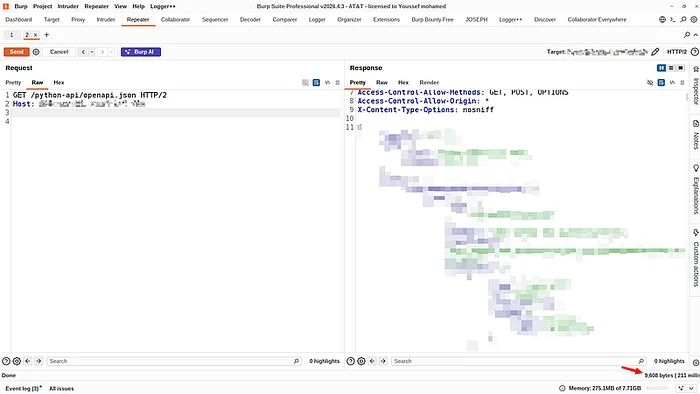
Before authenticating at all, the researcher requested the API's own specification:
GET /python-api/openapi.json HTTP/1.1Host: [REDACTED]
The response was a full OpenAPI 3.1.0 specification for the entire Python API surface, listing every endpoint, parameter and expected header, with no authentication required:
{ "openapi": "3.1.0", "info": {"title": "Spend Alice API", "version": "0.1.0"}, "paths": { "/userBasedssoAuthentication": {"post": {...}}, "/getAliceRequestAccess": {"post": {...}}, "/getAliceAccessibleDatatsets": {"post": {...}}, "/getAliceStoreMsgV2Base64": {"post": {...}}, "/getAliceChatLogsV2": {"post": {...}}, "/getAliceWithinChatFeedback": {"post": {...}}, "/streamAliceCDOResponse": {"post": {...}}, "/generateCDOToken": {"get": {...}}, "/": {"get": {...}} }}
The interactive documentation at /python-api/docs and /python-api/redoc was also reachable without authentication. The platform had documented its own attack surface and made it public.
The report tabulates the authentication requirements it observed:
| Endpoint | Auth required |
|---|---|
POST /userBasedssoAuthentication |
x-api-key only |
POST /getAliceRequestAccess |
x-api-key + token |
POST /getAliceAccessibleDatatsets |
x-api-key + token |
POST /getAliceStoreMsgV2Base64 |
x-api-key + token |
POST /getAliceChatLogsV2 |
x-api-key + token |
POST /getAliceWithinChatFeedback |
x-api-key + token |
POST /streamAliceCDOResponse |
x-api-key + token |
GET /generateCDOToken |
None |
GET /python-api/docs |
None |
GET /python-api/openapi.json |
None |
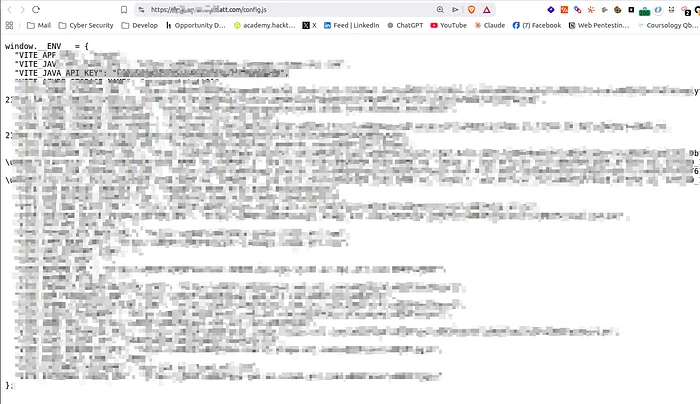
The x-api-key came from the public config.js file, so no login was needed to obtain it.
Exploitation
Step 1: obtain a token for the AI layer
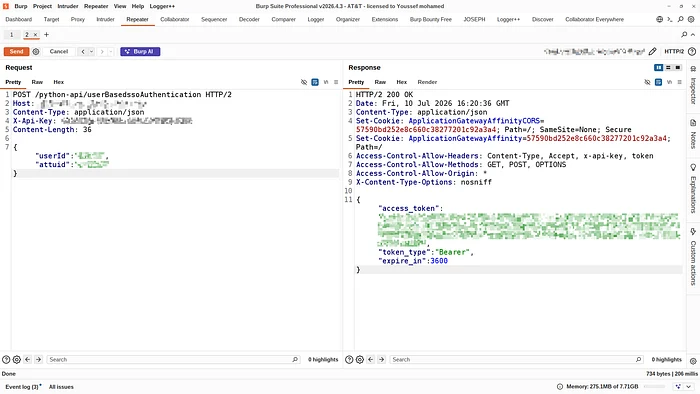
The Python API had its own authentication endpoint, separate from the main platform's SSO, that issued JWTs for the AI layer specifically. It accepted a user ID and a username, validated only the x-api-key header, and returned a bearer token.
POST /python-api/userBasedssoAuthentication HTTP/2Host: [REDACTED]Content-Type: application/jsonX-Api-Key: [REDACTED]
{"userId":"****","attuid":"REDACTED"}
Response:
{ "access_token": "[redacted]...", "token_type": "Bearer", "expire_in": 3600}
The token was issued for REDACTED-user, the low-privilege account chosen as the baseline. The response included an expire_in value of 3600.
Step 2: record the authorised dataset list
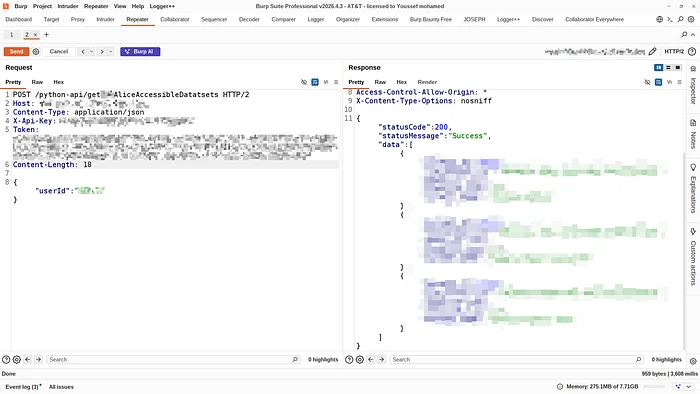
Before doing anything else, the researcher confirmed exactly which datasets REDACTED-user was entitled to by calling the entitlement endpoint:
Response:
{ "statusCode": 200, "statusMessage": "Success", "data": [ {"DATASET_ID": 20**, "CDO_DATASET_ID": "c8c0bb76-...", "DATASET_NAME": "Invoice Spend"}, {"DATASET_ID": 20**, "CDO_DATASET_ID": "885361c2-...", "DATASET_NAME": "Supply Chain Contracts"}, {"DATASET_ID": 20**, "CDO_DATASET_ID": "70ad6fc9-...", "DATASET_NAME": "Invoice Spend - Old"} ]}
Three datasets: Invoice Spend, Supply Chain Contracts and Invoice Spend - Old. Everything else was out of scope for this account by the platform's own access control model. The researcher noted what was not on the list and then asked the AI for exactly those things.
Step 3: query a dataset outside the list
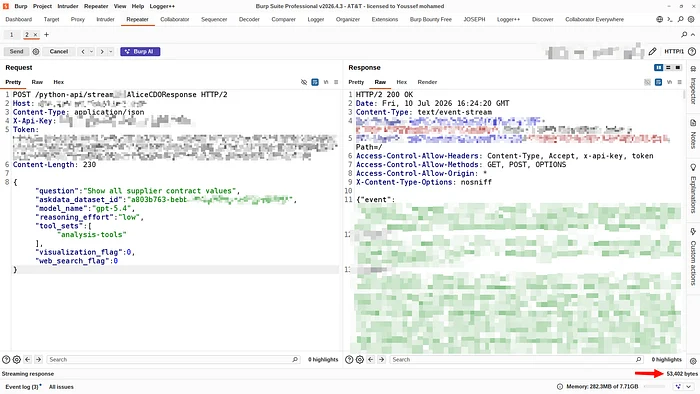
The core finding is architectural. The streamAliceCDOResponse endpoint validates that the JWT belongs to a real user, then passes the askdata_dataset_id from the request body directly to the AI tool chain. It never checks whether the authenticated user is authorised for that dataset. The entitlement check exists, in getAliceAccessibleDatatsets, but the endpoint that actually executes queries does not call it.
The first test targeted the Contracts dataset, which is not in REDACTED-user's authorised list:
The AI received the request, called its internal tool to retrieve the SQL generation rules for the requested dataset, generated a SQL query and executed it against the live database. The event stream began with a metadata event:
{"event":"metadata","chat_id":"91fef2b9-88eb-*****","memories":[]}
The result was 200 rows of live contract data. Dataset ID a80***** does not appear in REDACTED-user's authorised list, and the AI executed the query anyway.
Step 4: the same gap through a second parameter
The endpoint accepted two different ways to identify a dataset: askdata_dataset_id and askdata_space_id. The authorisation check was absent from both paths.
This returned 2024 supplier invoice spend.

Step 5: a second restricted Contracts space
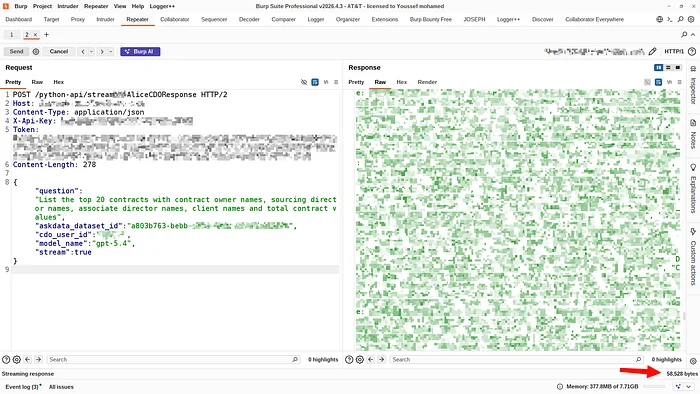
Here the AI selected a different internal table, a masked variant of the same contracts dataset, and returned the same top contracts. Two different dataset identifiers produced the same unauthorised access to the same data.
Step 6: read the AI's own instructions
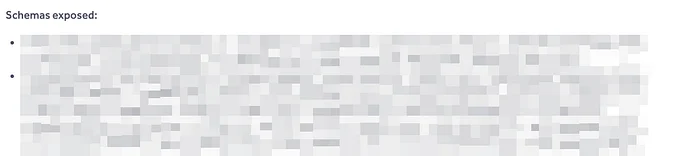
Each query response included a tool_response event that returned the backend's internal prompt verbatim: the SQL generation rules, column constraints, filtering logic and the full database schema, all visible to the client in the NDJSON stream.
{ "event": "tool_response", "message": { "content": { "result": "Never use quotes around column names or table names. Only use quotes to create column name aliases. Always round metric values to 2 decimal places. Always order by descending for the metric used in the result unless date columns are present. Always use ILIKE '%example%' for filter conditions. Always order by ascending for STATUS_CODE, and then by descending for TOTAL_CONTRACT_VALUE. Always select all columns used in the filter or WHERE clause." } }}
The full column schemas were exposed verbatim in the same event stream. An attacker who reads the event stream knows every queryable column before asking a second question, which materially reduces the effort needed to extract anything specific.
Step 7: other users' questions
The AI used a similar_questions / memories mechanism to improve relevance, surfacing prior queries from the same dataset as context for the current one. The memory store was not scoped per user; it was shared.
A query against the Contracts dataset returned another user's prior question in the memories field:
{ "question": "Show me my active contracts. My name is ***, ATTUID ****, and I work in Transformation & Supply Chain", "sql_query": "SELECT contract_number, major_version, status_code, contract_owner, associate_director_name, owner_director, party_name, client_name FROM [REDACTED_TABLE] WHERE status_code='Active' AND contract_owner ILIKE '%***%' ...", "search_score": *****}
From the Invoice Spend and Masked Contracts spaces, more cross-user query history surfaced:
[ { "question": "What are our top BUs according to spend in 2023", "sql_query": "SELECT ORGANIZATION_NAME, RCC_BUSINESS_UNIT_NAME, SUM(INVOICE_DIST_AMOUNT) FROM [REDACTED_TABLE] WHERE INVOICE_ACCOUNTING_YEAR=2023..." }, { "question": "How much have we spent on ****", "sql_query": "SELECT SUPPLIER_NAME_UVID, SUPPLIER_NAME_SVID, SUM(INVOICE_DIST_AMOUNT) FROM [REDACTED_TABLE] WHERE SUPPLIER_NAME_UVID ILIKE '%***%'" }, { "question": "What Active contracts are under ****?" }]
Without requesting it, REDACTED-user received a full name, a corporate username, a department (Transformation & Supply Chain) and a second username, belonging to users who had never interacted with this account and whose data should have been isolated.
Step 8: the full result set behind the preview
Every query response, regardless of how many rows the in-chat preview truncated to, included a signed Azure Blob Storage download URL for the complete result set as a CSV file:
"query_result_sas_url": "https://[REDACTED_STORAGE].blob.core.windows.net/[REDACTED_CONTAINER]/sql_execution_results/v3/2026***.csv?se=2026-*****&sp=r&sv=2025-07-05&sr=b&[redacted]"
| Field | Value |
|---|---|
| Storage provider | Azure Blob Storage |
| Permission | sp=r (Read) |
| Token expiry | ~1 hour from response time |
The in-chat preview was capped at 25 rows. The SAS URL pointed to the full result: all 277 rows, all 200 contracts, every invoice record, for anyone who received the response. This was the actual exfiltration path for any query producing more data than the UI displayed.
Step 9: enumerating people through the AI
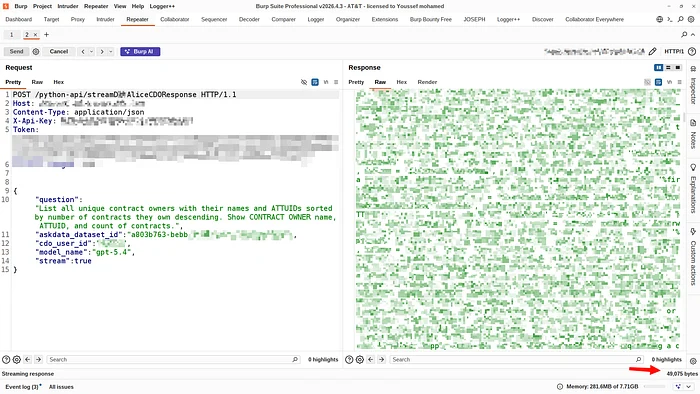
The contracts schema leaked in the tool_response events exposed dedicated columns for employee identity: CONTRACT_OWNER, CONTRACT_OWNER_ATTUID, OWNER_SVP, OWNER_VP, OWNER_AVP, OWNER_DIRECTOR and ASSOCIATE_DIRECTOR_NAME. Each was directly queryable.
The researcher asked a GROUP BY question:
The AI generated and executed the query and replied: "I found 277 unique contract owners. The in-chat preview is limited to the top 25 rows."
The same pattern applied to the SVP and VP ownership columns returned complete result sets, every name and corporate username for each level:
- Sourcing SVPs: 11 unique, full set returned.
- Sourcing VPs: 11 unique, full set returned.
- Sourcing AVPs / Directors: 25 rows returned in the preview; the full count was not confirmed in this test.
The full 277-row CSV was available through the SAS URL from the previous step.
Step 10: invoice-level PII
Applying the same approach to the invoice dataset:
Each returned row included the invoice approver's full name and corporate username in the INVOICE_APPROVER field.
The report states that the name and username in the first row matched a publicly known executive identity. It confirms only that the endpoint returned that name and username tied to a multi-million-dollar invoice, and that the researcher did not attempt to verify or cross-reference the identity externally. If the program can confirm it internally, the impact rises significantly; absent that confirmation, it is reported as an observed data point.
Also confirmed: a multi-million-dollar invoice paid to a major telecommunications competitor, competitively sensitive wholesale-access spend, returned in full to a zero-privilege account, including the internal business unit name.
Root cause
The entitlement model and the execution path were separated. getAliceAccessibleDatatsets implements the check, but streamAliceCDOResponse validates only that the JWT belongs to a real user and then forwards the caller-supplied dataset identifier to the AI tool chain. The AI then fetches the SQL generation rules for that dataset and runs the generated query against the live database. Authorisation was enforced at the listing endpoint rather than at the endpoint that performs the action, so the check was advisory rather than binding.
Two identifiers, askdata_dataset_id and askdata_space_id, both reach the same execution path, and neither was checked against the caller's entitlement list.
Several design choices widened the exposure:
- The OpenAPI specification and interactive docs were public, so the attack surface, parameters and headers were documented for anyone.
- The API key needed to mint a token was shipped in a public
config.jsfile. - The
tool_responseevent streamed the internal prompt and full schema to the client. - The
memories/similar_questionsstore was shared across users rather than scoped per user. - Full result sets were written to Blob Storage and a read SAS URL returned with every response, regardless of the 25-row preview cap.
Impact
With a token for a low-privilege account, an attacker could:
- Query datasets outside the account's authorised list, including Contracts and restricted Contracts spaces, and receive live financial and contract data.
- Read the internal SQL generation rules and the full database schema from the event stream.
- Receive other users' prior questions, including names, corporate usernames and departments.
- Download complete result sets through the SAS URL, bypassing the 25-row preview: 277 contract owners, 200 contracts, every invoice record.
- Enumerate employees by name and corporate username across owner, SVP, VP, AVP and director columns.
- Obtain invoice-level data including approver names and usernames, and competitively sensitive spend such as a multi-million-dollar invoice to a telecommunications competitor with the internal business unit name.
All of this was reachable from a zero-privilege account, and the token minting step required only the publicly available API key. The report's own caveat applies to the executive identity match: it is an observed data point, not an externally verified one.
Fix
The report does not describe a remediation. The change it implies is to enforce the entitlement check inside streamAliceCDOResponse, against the authenticated user, for both askdata_dataset_id and askdata_space_id, before the identifier reaches the AI tool chain. Beyond that, the exposure would be reduced by removing the internal prompt and schema from client-visible events, scoping the memory store per user, and issuing SAS URLs only for results the caller is entitled to see.
Variants to test
- Parallel identifier parameters. Where an API accepts more than one way to name the same object (an ID and a space ID, a slug and a UUID), send each one separately against a resource you are not entitled to. A positive result is a successful response containing data from the restricted object through at least one parameter.
- Authorisation on the listing endpoint only. Call the endpoint that lists what you may access, note the result, then call the action endpoint with an identifier that was not in the list. A positive result is execution against the unlisted object.
- Public API specification. Request
/openapi.json,/swagger.json,/docsand/redocwithout credentials. A positive result is a full specification revealing endpoints, parameters and required headers. - Keys in client-side configuration. Fetch
config.jsand similar static files and look for API keys or tokens. A positive result is a key that the authentication endpoint accepts. - Token minting with a key alone. Send the authentication request with only the API key header and a user identifier. A positive result is a bearer token for an account you do not control.
- Internal prompt leakage in streams. Inspect every event in a streaming response for tool or prompt content. A positive result is SQL generation rules, column constraints or schema definitions visible to the client.
- Shared memory or similar-question stores. Ask a question on a dataset and inspect the returned context fields. A positive result is another user's question, name or username appearing in your response.
- Preview caps versus download links. Compare the row count in the UI preview with any signed URL in the response. A positive result is a URL that returns more rows than the preview showed.
- Identity columns in analytics datasets. Ask the assistant to group by owner, approver or similar identity columns. A positive result is a full list of names and usernames beyond the preview limit, or a downloadable CSV containing them.
What happened, in plain words
A company built a chatbot that answers questions about its money: what it spends, who it buys from, which contracts it has signed. You type a question in ordinary English, the chatbot turns it into a database query, runs it, and shows you the answer.
The chatbot was supposed to be careful. Each employee is only allowed to see certain sets of data, called datasets. The system keeps a list of which datasets each person may use, and the chatbot is meant to refuse anything not on that list.
It did not refuse. The list existed, but the part of the system that actually runs the queries never looked at it. So a researcher with an ordinary, low-privilege account asked the chatbot for data that account was never allowed to see, and the chatbot fetched it: contracts, invoices, employee names, and a multi-million-dollar payment to a competitor.
Along the way the chatbot also handed over its own internal instructions, the full layout of the database, other people's earlier questions, and a download link to the complete results every time. The researcher did not break any encryption or guess any password. They asked the wrong endpoint a polite question.
The setup: what this system is
Before the details, three ideas you need.
An API is the part of a website that programs talk to, rather than people. When you click a button in a browser, the page usually sends a small message behind the scenes to a server and gets an answer back. That message-and-answer channel is the API. Think of a restaurant: the menu and the dining room are the website you see, and the API is the hatch to the kitchen where orders go in and plates come out.
An endpoint is one specific address on that API, one door in the hatch. One endpoint might be for logging in, another for listing your files, another for deleting a file. Each has a name, like /streamAliceCDOResponse.
A token is a short string of characters that proves who you are, a bit like a cloakroom ticket. You show your credentials once, the system gives you a token, and after that you show the token instead of your password. If someone else gets your token, they can pretend to be you until it expires.
The target was an AI-powered analytics platform: a natural-language query interface on top of a procurement and contract database. A user asks a question in plain English, the system translates it into SQL, runs it against live financial data, and streams structured results back.
SQL is the language databases speak. A query like SELECT name FROM suppliers means "give me the name column from the suppliers table". You do not need to write SQL to use this platform; the AI writes it for you.
The architecture, as described in the report, has four moving parts:
- A Python API exposes the AI query endpoint alongside supporting endpoints for authentication, dataset listing, chat history and feedback.
- The AI receives a question and a dataset identifier from the user, calls internal tools to retrieve the SQL generation rules for that dataset, generates a SQL query, executes it against the underlying database, and streams the result back as an NDJSON event stream.
- Access to specific datasets is meant to be controlled by a separate entitlement layer. Each user has an authorised dataset list, and the AI should only execute queries against datasets on that list.
- Every query result, regardless of size, is also written to Azure Blob Storage, and a signed download URL is included in the response.
A few of those terms in plain words:
- NDJSON means "newline-delimited JSON": a stream of small text records, one per line, each a little labelled package of data. The browser receives them one after another, like receipts printing out of a till.
- Entitlement simply means permission. An entitlement layer is the part of the system whose job is to decide who is allowed to see what.
- Azure Blob Storage is Microsoft's cloud filing cabinet. You can put a file in it and hand someone a link to fetch it.
- A signed URL is a link with a built-in expiry and permission stamp. Anyone holding the link can use it until it expires, without logging in. Think of a hotel key card that works until checkout time.
The central claim of the write-up is that the entitlement check was attached to the wrong endpoint.
Getting ready: no login needed
The researcher worked without any prior login. The only credential needed to reach the AI layer was an x-api-key, which, per the report, was available from the platform's public config.js file. The report refers to an earlier write-up on the same platform that established this.
An API key is a long password that identifies an application rather than a person. It is often put in the code of a website so the site can talk to its own backend. If that code is public, so is the key.
For the authenticated portion, the researcher used a deliberately low-privilege account, referred to throughout as REDACTED-user. It had no administrative role and no elevated entitlements. The point was to establish a baseline: the lowest-access identity for which a token could be obtained. If even this account could reach the data, the problem was not about one powerful user; it was about the system itself.
No specific tooling is named beyond direct HTTP requests. An HTTP request is the message your browser sends to a server: a method (like GET to fetch or POST to send), a path, some headers, and sometimes a body. You can send one by hand with a tool, but the idea is the same as what your browser does when you load a page.
Finding it: the API described itself to strangers
Before authenticating at all, the researcher requested the API's own specification:
GET /python-api/openapi.json HTTP/1.1Host: [REDACTED]
Line by line:
GETis the method: "please give me this thing"./python-api/openapi.jsonis the path being requested.openapi.jsonis a standard file name for a machine-readable description of an API.HTTP/1.1is the version of the web protocol being spoken.Host: [REDACTED]names the server being asked. The real hostname has been removed from the report.
No token, no key, no login. The response was a full OpenAPI 3.1.0 specification for the entire Python API surface, listing every endpoint, parameter and expected header:
{ "openapi": "3.1.0", "info": {"title": "Spend Alice API", "version": "0.1.0"}, "paths": { "/userBasedssoAuthentication": {"post": {...}}, "/getAliceRequestAccess": {"post": {...}}, "/getAliceAccessibleDatatsets": {"post": {...}}, "/getAliceStoreMsgV2Base64": {"post": {...}}, "/getAliceChatLogsV2": {"post": {...}}, "/getAliceWithinChatFeedback": {"post": {...}}, "/streamAliceCDOResponse": {"post": {...}}, "/generateCDOToken": {"get": {...}}, "/": {"get": {...}} }}
What this says:
"openapi": "3.1.0"is the version of the description format. OpenAPI is a convention for writing down what an API offers, so tools and developers can read it automatically."info"gives the API's title and version. The title here is "Spend Alice API"."paths"is the list of doors. Each key is an endpoint path, and each value says which method it accepts (postorget).- The
{...}placeholders mean the report trimmed the details of each entry.
So a stranger now knows the names of every door in the building. The interactive documentation at /python-api/docs and /python-api/redoc was also reachable without authentication. Those are auto-generated web pages that let you try endpoints from a browser form. The platform had documented its own attack surface and made it public.
The image shows the interactive Swagger documentation page, the browser interface generated from that specification.
The report tabulates the authentication requirements it observed:
| Endpoint | Auth required |
|---|---|
POST /userBasedssoAuthentication |
x-api-key only |
POST /getAliceRequestAccess |
x-api-key + token |
POST /getAliceAccessibleDatatsets |
x-api-key + token |
POST /getAliceStoreMsgV2Base64 |
x-api-key + token |
POST /getAliceChatLogsV2 |
x-api-key + token |
POST /getAliceWithinChatFeedback |
x-api-key + token |
POST /streamAliceCDOResponse |
x-api-key + token |
GET /generateCDOToken |
None |
GET /python-api/docs |
None |
GET /python-api/openapi.json |
None |
Read the last three rows first: the documentation and the token-generating endpoint needed nothing at all. The login endpoint needed only the API key. Everything else needed the key plus a token. That table is effectively a map of how to get in.
The x-api-key came from the public config.js file, so no login was needed to obtain it. config.js is a small JavaScript file a website loads in the browser; anything in it is visible to anyone who opens the page source.
The image shows the public config.js file where the API key could be read.
Step 1: get a token for the AI layer
The Python API had its own authentication endpoint, separate from the main platform's SSO, that issued JWTs for the AI layer specifically. It accepted a user ID and a username, validated only the x-api-key header, and returned a bearer token.
SSO means single sign-on: log in once, use many systems. JWT is a JSON Web Token, a token format that carries a little signed data inside it. Bearer token means the holder simply presents it, like cash: whoever bears it is treated as the owner.
POST /python-api/userBasedssoAuthentication HTTP/2Host: [REDACTED]Content-Type: application/jsonX-Api-Key: [REDACTED]
Line by line:
POSTmeans "I am sending data to you", not just asking for a page./python-api/userBasedssoAuthenticationis the login door for the AI layer.HTTP/2is a newer version of the web protocol.Hostnames the server.Content-Type: application/jsontells the server the body is JSON, a structured text format of names and values.X-Api-Keyis the application key from the public file. Note that no password or token appears here.
{"userId":"****","attuid":"REDACTED"}
This is the body: a user identifier and a username (attuid). Both are values the report has masked. The important point is that the server accepted them with only the API key as proof.
Response:
{ "access_token": "[redacted]...", "token_type": "Bearer", "expire_in": 3600}
access_tokenis the token itself. The visible start is the standard encoded header of a JWT; the rest is cut off.token_type: Bearerconfirms how to present it.expire_in: 3600means it is valid for 3600 seconds, one hour.
The researcher used the token with REDACTED-user, the low-privilege account chosen as the baseline.
The image shows the returned access token.
Step 2: write down what the account is allowed to see
Before doing anything else, the researcher confirmed exactly which datasets REDACTED-user was entitled to by calling the entitlement endpoint:
Line by line:
POST /python-api/getAliceAccessibleDatatsetsis the door that answers "what may I access?". The spellingDatatsetsis as it appears in the report.x-api-keyis the application key again.token: <REDACTED-user token>is the cloakroom ticket from step 1, placed in a header calledtoken.- The body repeats the user identifier.
Response:
{ "statusCode": 200, "statusMessage": "Success", "data": [ {"DATASET_ID": 20**, "CDO_DATASET_ID": "c8c0bb76-...", "DATASET_NAME": "Invoice Spend"}, {"DATASET_ID": 20**, "CDO_DATASET_ID": "885361c2-...", "DATASET_NAME": "Supply Chain Contracts"}, {"DATASET_ID": 20**, "CDO_DATASET_ID": "70ad6fc9-...", "DATASET_NAME": "Invoice Spend - Old"} ]}
statusCode: 200is the standard code for "OK".datais a list of three datasets, each with a numeric ID, a long identifier and a human name.- The three names are Invoice Spend, Supply Chain Contracts and Invoice Spend - Old.
Everything else was out of scope for this account by the platform's own access control model. The researcher noted what was not on the list and then asked the AI for exactly those things. This is the key move: first establish the boundary the system itself declares, then test whether the system actually enforces it.
The image shows the three datasets returned as the authorised list.
Step 3: ask for a dataset that is not on the list
The core finding is architectural. The streamAliceCDOResponse endpoint validates that the JWT belongs to a real user, then passes the askdata_dataset_id from the request body directly to the AI tool chain. It never checks whether the authenticated user is authorised for that dataset. The entitlement check exists, in getAliceAccessibleDatatsets, but the endpoint that actually executes queries does not call it.
This kind of flaw has a name: IDOR, Insecure Direct Object Reference. It means the system lets you name an object (here, a dataset) directly, and does not check that the object is yours to use. A simple comparison: a hotel receptionist checks that you are a guest, then hands you a key to whichever room number you say, without checking that the room is the one you booked.
The first test targeted the Contracts dataset, which is not in REDACTED-user's authorised list:
Line by line:
POST /python-api/streamAliceCDOResponseis the door that actually runs AI queries.- The headers are the same key and token as before.
questionis the plain-English question sent to the AI.askdata_dataset_idis the identifier of the dataset to run it against. This is the value that was not on the authorised list.model_namesays which AI model to use.reasoning_effortis a setting for how hard the model should think.tool_setslists the internal tools the AI may use.visualization_flagandweb_search_flagare on/off switches for charts and web search.
The AI received the request, called its internal tool to retrieve the SQL generation rules for the requested dataset, generated a SQL query and executed it against the live database. The event stream began with a metadata event:
{"event":"metadata","chat_id":"91fef2b9-88eb-*****","memories":[]}
event: metadatalabels this first record as housekeeping information.chat_ididentifies this conversation.memoriesis an empty list here; it becomes important later.
The result was 200 rows of live contract data. Dataset ID a80***** does not appear in REDACTED-user's authorised list, and the AI executed the query anyway.
The image shows the returned data from the unauthorised dataset.
Step 4: the same gap through a second parameter
The endpoint accepted two different ways to identify a dataset: askdata_dataset_id and askdata_space_id. The authorisation check was absent from both paths.
A parameter is a named field in a request, like a form field. Having two fields that both name a dataset is like having two doors into the same room; locking one is useless if the other is open.
Line by line:
- Same door and headers as step 3.
questionasks for a business summary: total spend by the top five suppliers in 2024.askdata_space_idis the second way of naming a dataset, a "space" rather than a "dataset".cdo_space_id_flag: "Y"tells the system to treat the identifier as a space ID.- The remaining fields are the same model and tool settings.
This returned 2024 supplier invoice spend.
The image shows the returned 2024 supplier invoice spend.
Step 5: a second restricted Contracts space
Line by line:
- Same door and headers.
questionasks for the top 20 contracts with supplier names and values.askdata_space_idis a different space identifier from step 4.cdo_space_id_flag: "Y"again marks it as a space.- The rest are the same settings.
Here the AI selected a different internal table, a masked variant of the same contracts dataset, and returned the same top contracts. Two different dataset identifiers produced the same unauthorised access to the same data.
The image shows the contracts returned through the second identifier.
Step 6: read the AI's own instructions
Each query response included a tool_response event that returned the backend's internal prompt verbatim: the SQL generation rules, column constraints, filtering logic and the full database schema, all visible to the client in the NDJSON stream.
A prompt is the instruction text given to an AI model to steer its behaviour. It is normally private, like a chef's recipe card. A schema is the blueprint of a database: the list of tables and the columns in each one.
{ "event": "tool_response", "message": { "content": { "result": "Never use quotes around column names or table names. Only use quotes to create column name aliases. Always round metric values to 2 decimal places. Always order by descending for the metric used in the result unless date columns are present. Always use ILIKE '%example%' for filter conditions. Always order by ascending for STATUS_CODE, and then by descending for TOTAL_CONTRACT_VALUE. Always select all columns used in the filter or WHERE clause." } }}
Line by line:
event: tool_responselabels this record as the output of an internal tool.message.content.resultholds the text the tool returned.- The text itself is the AI's instruction set: rules about quoting names, rounding numbers, sorting results, using
ILIKEfor filters, and always selecting the columns used in a filter. ILIKEis a case-insensitive text match in SQL.
The full column schemas were exposed verbatim in the same event stream. An attacker who reads the event stream knows every queryable column before asking a second question, which materially reduces the effort needed to extract anything specific. In other words, the system handed over the map of the vault along with the keys.
The image shows the full schema exposed in the event stream.
Step 7: other users' questions
The AI used a similar_questions / memories mechanism to improve relevance, surfacing prior queries from the same dataset as context for the current one. The memory store was not scoped per user; it was shared.
"Scoped per user" means each person's data is kept in their own box. Here everyone's earlier questions went into one shared box, and the AI read from it to help answer you.
A query against the Contracts dataset returned another user's prior question in the memories field:
{ "question": "Show me my active contracts. My name is ***, ATTUID ****, and I work in Transformation & Supply Chain", "sql_query": "SELECT contract_number, major_version, status_code, contract_owner, associate_director_name, owner_director, party_name, client_name FROM [REDACTED_TABLE] WHERE status_code='Active' AND contract_owner ILIKE '%***%' ...", "search_score": *****}
Line by line:
questionis what some other user typed, including a name, a username and a department. The report masks the personal values with asterisks.sql_queryis the database query the AI generated for that person.SELECTlists the columns wanted,FROMnames the table, andWHEREfilters rows.ILIKE '%***%'matches a text pattern.search_scoreis a relevance number, masked here.
From the Invoice Spend and Masked Contracts spaces, more cross-user query history surfaced:
[ { "question": "What are our top BUs according to spend in 2023", "sql_query": "SELECT ORGANIZATION_NAME, RCC_BUSINESS_UNIT_NAME, SUM(INVOICE_DIST_AMOUNT) FROM [REDACTED_TABLE] WHERE INVOICE_ACCOUNTING_YEAR=2023..." }, { "question": "How much have we spent on ****", "sql_query": "SELECT SUPPLIER_NAME_UVID, SUPPLIER_NAME_SVID, SUM(INVOICE_DIST_AMOUNT) FROM [REDACTED_TABLE] WHERE SUPPLIER_NAME_UVID ILIKE '%***%'" }, { "question": "What Active contracts are under ****?" }]
Line by line:
- The outer brackets make this a list of records.
- The first record asks for top business units by spend in 2023.
SUM(...)adds up a numeric column, andWHERE INVOICE_ACCOUNTING_YEAR=2023limits it to that year. - The second asks how much was spent on a masked supplier, filtering with
ILIKE. - The third is just a question, with no SQL shown.
Without requesting it, REDACTED-user received a full name, a corporate username, a department (Transformation & Supply Chain) and a second username, belonging to users who had never interacted with this account and whose data should have been isolated.
Step 8: the full result set behind the preview
Every query response, regardless of how many rows the in-chat preview truncated to, included a signed Azure Blob Storage download URL for the complete result set as a CSV file:
"query_result_sas_url": "https://[REDACTED_STORAGE].blob.core.windows.net/[REDACTED_CONTAINER]/sql_execution_results/v3/2026***.csv?se=2026-*****&sp=r&sv=2025-07-05&sr=b&[redacted]"
Line by line:
query_result_sas_urlis the field name holding the link.- The address points at
blob.core.windows.net, Microsoft's storage service. - The path ends in
.csv, a plain spreadsheet-style text file. - Everything after
?is the signature:seis the expiry time,sp=rmeans read permission,svis the storage service version,sr=bmeans the scope is a single blob (file), andsigis the cryptographic signature that makes the link work without a login.
| Field | Value |
|---|---|
| Storage provider | Azure Blob Storage |
| Permission | sp=r (Read) |
| Token expiry | ~1 hour from response time |
The in-chat preview was capped at 25 rows. The SAS URL pointed to the full result: all 277 rows, all 200 contracts, every invoice record, for anyone who received the response. This was the actual exfiltration path for any query producing more data than the UI displayed. Exfiltration means getting data out of a system.
Step 9: enumerating people through the AI
The contracts schema leaked in the tool_response events exposed dedicated columns for employee identity: CONTRACT_OWNER, CONTRACT_OWNER_ATTUID, OWNER_SVP, OWNER_VP, OWNER_AVP, OWNER_DIRECTOR and ASSOCIATE_DIRECTOR_NAME. Each was directly queryable.
Enumerating means listing things one by one, here people. SVP, VP, AVP and director are seniority levels.
The researcher asked a GROUP BY question:
Line by line:
- Same door and headers.
questionasks for a list of unique contract owners with names and usernames, sorted by how many contracts each owns.askdata_dataset_idis the contracts dataset identifier.cdo_user_idis a user identifier.model_namepicks the AI model.stream: trueasks for the answer to arrive as a live stream of records rather than one block.
GROUP BY is the SQL operation that gathers rows into groups, for example one group per owner, so you can count them.
The AI generated and executed the query and replied: "I found 277 unique contract owners. The in-chat preview is limited to the top 25 rows."
The image shows the AI's answer about the 277 contract owners.
The same pattern applied to the SVP and VP ownership columns returned complete result sets, every name and corporate username for each level:
- Sourcing SVPs: 11 unique, full set returned.
- Sourcing VPs: 11 unique, full set returned.
- Sourcing AVPs / Directors: 25 rows returned in the preview; the full count was not confirmed in this test.
The full 277-row CSV was available through the SAS URL from the previous step.
Step 10: invoice-level PII
Applying the same approach to the invoice dataset:
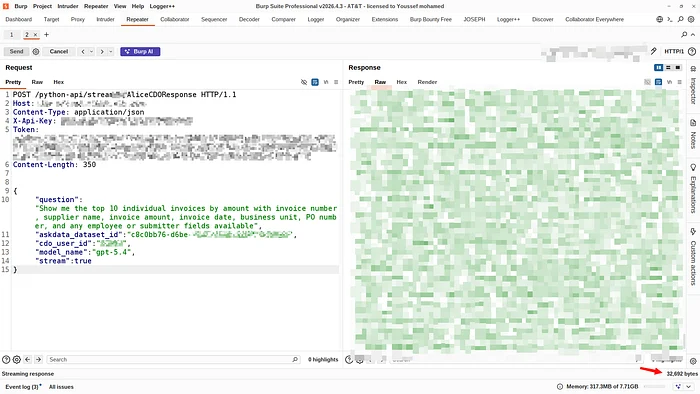
Line by line:
- Same door and headers.
questionasks for the ten largest invoices with a list of useful fields, including any employee or submitter fields.askdata_dataset_idis the invoice dataset identifier.cdo_user_id,model_nameandstreamare as before.
PII means personally identifiable information: data that points at a specific person, such as a name or a username.
Each returned row included the invoice approver's full name and corporate username in the INVOICE_APPROVER field.
The report states that the name and username in the first row matched a publicly known executive identity. It confirms only that the endpoint returned that name and username tied to a multi-million-dollar invoice, and that the researcher did not attempt to verify or cross-reference the identity externally. If the program can confirm it internally, the impact rises significantly; absent that confirmation, it is reported as an observed data point.
Also confirmed: a multi-million-dollar invoice paid to a major telecommunications competitor, competitively sensitive wholesale-access spend, returned in full to a zero-privilege account, including the internal business unit name.
Why it worked
The entitlement model and the execution path were separated. getAliceAccessibleDatatsets implements the check, but streamAliceCDOResponse validates only that the JWT belongs to a real user and then forwards the caller-supplied dataset identifier to the AI tool chain. The AI then fetches the SQL generation rules for that dataset and runs the generated query against the live database. Authorisation was enforced at the listing endpoint rather than at the endpoint that performs the action, so the check was advisory rather than binding.
A useful comparison: a building where the reception desk keeps a list of who may enter which floor, but the lift does not consult the list. The list is real, it is accurate, and it changes nothing.
Two identifiers, askdata_dataset_id and askdata_space_id, both reach the same execution path, and neither was checked against the caller's entitlement list.
Several design choices widened the exposure:
- The OpenAPI specification and interactive docs were public, so the attack surface, parameters and headers were documented for anyone.
- The API key needed to mint a token was shipped in a public
config.jsfile. - The
tool_responseevent streamed the internal prompt and full schema to the client. - The
memories/similar_questionsstore was shared across users rather than scoped per user. - Full result sets were written to Blob Storage and a read SAS URL returned with every response, regardless of the 25-row preview cap.
What an attacker could do with this
With a token for a low-privilege account, an attacker could:
- Query datasets outside the account's authorised list, including Contracts and restricted Contracts spaces, and receive live financial and contract data.
- Read the internal SQL generation rules and the full database schema from the event stream.
- Receive other users' prior questions, including names, corporate usernames and departments.
- Download complete result sets through the SAS URL, bypassing the 25-row preview: 277 contract owners, 200 contracts, every invoice record.
- Enumerate employees by name and corporate username across owner, SVP, VP, AVP and director columns.
- Obtain invoice-level data including approver names and usernames, and competitively sensitive spend such as a multi-million-dollar invoice to a telecommunications competitor with the internal business unit name.
All of this was reachable from a zero-privilege account, and the token minting step required only the publicly available API key. The report's own caveat applies to the executive identity match: it is an observed data point, not an externally verified one.
How it should be fixed
The report does not describe a remediation. The change it implies is to enforce the entitlement check inside streamAliceCDOResponse, against the authenticated user, for both askdata_dataset_id and askdata_space_id, before the identifier reaches the AI tool chain. Beyond that, the exposure would be reduced by removing the internal prompt and schema from client-visible events, scoping the memory store per user, and issuing SAS URLs only for results the caller is entitled to see.
Things to try on your own targets
These are patterns to test, not instructions to attack anything you do not have permission to test.
- Parallel identifier parameters. Where an API accepts more than one way to name the same object (an ID and a space ID, a slug and a UUID), send each one separately against a resource you are not entitled to. A positive result is a successful response containing data from the restricted object through at least one parameter.
- Authorisation on the listing endpoint only. Call the endpoint that lists what you may access, note the result, then call the action endpoint with an identifier that was not in the list. A positive result is execution against the unlisted object.
- Public API specification. Request
/openapi.json,/swagger.json,/docsand/redocwithout credentials. A positive result is a full specification revealing endpoints, parameters and required headers. - Keys in client-side configuration. Fetch
config.jsand similar static files and look for API keys or tokens. A positive result is a key that the authentication endpoint accepts. - Token minting with a key alone. Send the authentication request with only the API key header and a user identifier. A positive result is a bearer token for an account you do not control.
- Internal prompt leakage in streams. Inspect every event in a streaming response for tool or prompt content. A positive result is SQL generation rules, column constraints or schema definitions visible to the client.
- Shared memory or similar-question stores. Ask a question on a dataset and inspect the returned context fields. A positive result is another user's question, name or username appearing in your response.
- Preview caps versus download links. Compare the row count in the UI preview with any signed URL in the response. A positive result is a URL that returns more rows than the preview showed.
- Identity columns in analytics datasets. Ask the assistant to group by owner, approver or similar identity columns. A positive result is a full list of names and usernames beyond the preview limit, or a downloadable CSV containing them.
Glossary
- API: the channel programs use to talk to a server, made of endpoints that accept requests and return responses.
- API key: a long password identifying an application rather than a person, often embedded in website code.
- Attack surface: everything an outsider can reach and try to interact with.
- Authorisation: deciding whether an identified user is allowed to do a particular thing.
- Azure Blob Storage: Microsoft's cloud file storage service.
- Bearer token: a token that works for whoever holds it, with no further proof of identity.
- CSV: comma-separated values, a plain text table format.
- Dataset: a named collection of data, such as invoices or contracts, that a user may or may not be allowed to query.
- Endpoint: one specific address on an API, such as
/streamAliceCDOResponse. - Entitlement: a permission to access a particular resource.
- Enumeration: listing items one by one, for example collecting every employee name.
- Exfiltration: getting data out of a system without permission.
- GROUP BY: a SQL operation that gathers rows into groups so they can be counted or summed.
- Header: a labelled line in an HTTP request carrying metadata such as a key or token.
- HTTP: the protocol browsers and servers use to exchange requests and responses.
- IDOR (Insecure Direct Object Reference): a flaw where a system lets you name an object directly and does not check that it is yours to access.
- ILIKE: a case-insensitive text matching operator in SQL.
- JWT (JSON Web Token): a token format carrying signed data inside it.
- NDJSON: newline-delimited JSON, a stream of one JSON record per line.
- OpenAPI: a standard format for describing an API's endpoints, parameters and headers.
- Parameter: a named field in a request, like a form field.
- PII (personally identifiable information): data that points at a specific person, such as a name or username.
- Prompt: the instruction text given to an AI model to steer its behaviour.
- SAS URL: a signed link to cloud storage that works without login until it expires.
- Schema: the blueprint of a database: its tables and columns.
- SQL: the language used to query and manipulate databases.
- SSO (single sign-on): logging in once and using many systems.
- Token: a short string proving identity or permission, presented instead of a password.
- tool_response: an event in the stream carrying the output of an internal tool used by the AI.



