Story of a 1000$ Open Redirect
A redirect page accepted a base64-encoded URL and checked it against an allowlist using a regex that only looked for the allowed domain as a substring. An attacker could craft a URL that passed the check but redirected to an external site, enabling phishing.
 Published on infosecwriteups.com
For confidentiality purposes, I can’t use specific folder names or client information, but I’ll try my best to explain!
The full write-up lives on its author's site
It belongs to its author, so we link to it rather than copy it. The other two tabs are our own rewrites, checked against it.
Context
This is a write-up of an open redirect found on a SaaS product. The researcher was invited to the program, which the report describes as a SaaS program with generous payouts, including for P3 and P4 findings. The reward range for the program is shown below.
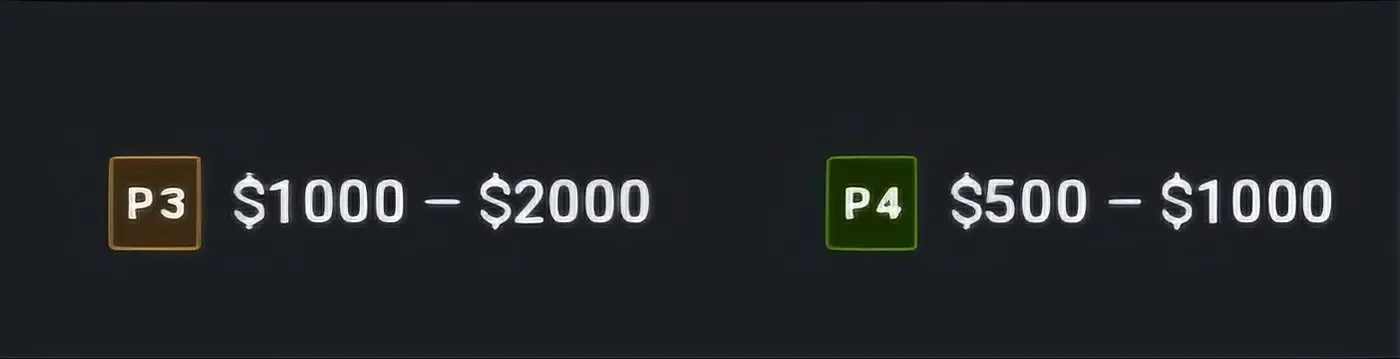
Reward Range for the program
The affected feature is a page, redirect.html, sitting deep in a folder path. For confidentiality the report does not give the real folder names or client information, so the path is shown as:
domain.com/abc/xyz/zyc/html/redirect.html
The page accepts a url= parameter whose value is Base64 encoded. When a user browses to it, the page decodes that value and, if the decoded URL passes an allowlist check, sends the user on to the allowed domain after a short delay. If the check fails, nothing happens.
Why open redirects matter
The report opens with the standard justification for treating these as more than cosmetic. An open redirect lets an attacker manipulate a user into being sent to a malicious site. A GET-based open redirect undermines the trust users place in legitimate web pages: a phishing email can carry a link with a real business name in the URL, and the user is then redirected from the legitimate web server to any external domain. Because the link uses an authentic URL with a valid SSL certificate, users are less likely to notice the subsequent redirect to a different domain.
The report also frames open redirects as a precursor to more serious issues: Cross-Site Scripting (XSS), Server-Side Request Forgery (SSRF), Cross-Site Request Forgery (CSRF), and successful phishing where an attacker harvests credentials or gains OAuth access by relaying the user through the open redirection to a server the attacker controls and can observe.
Setup
The researcher was invited to the SaaS program. The report does not describe any accounts, roles, tooling or versions used.
Finding it
Browsing to redirect.html reveals the page's code, shown below.
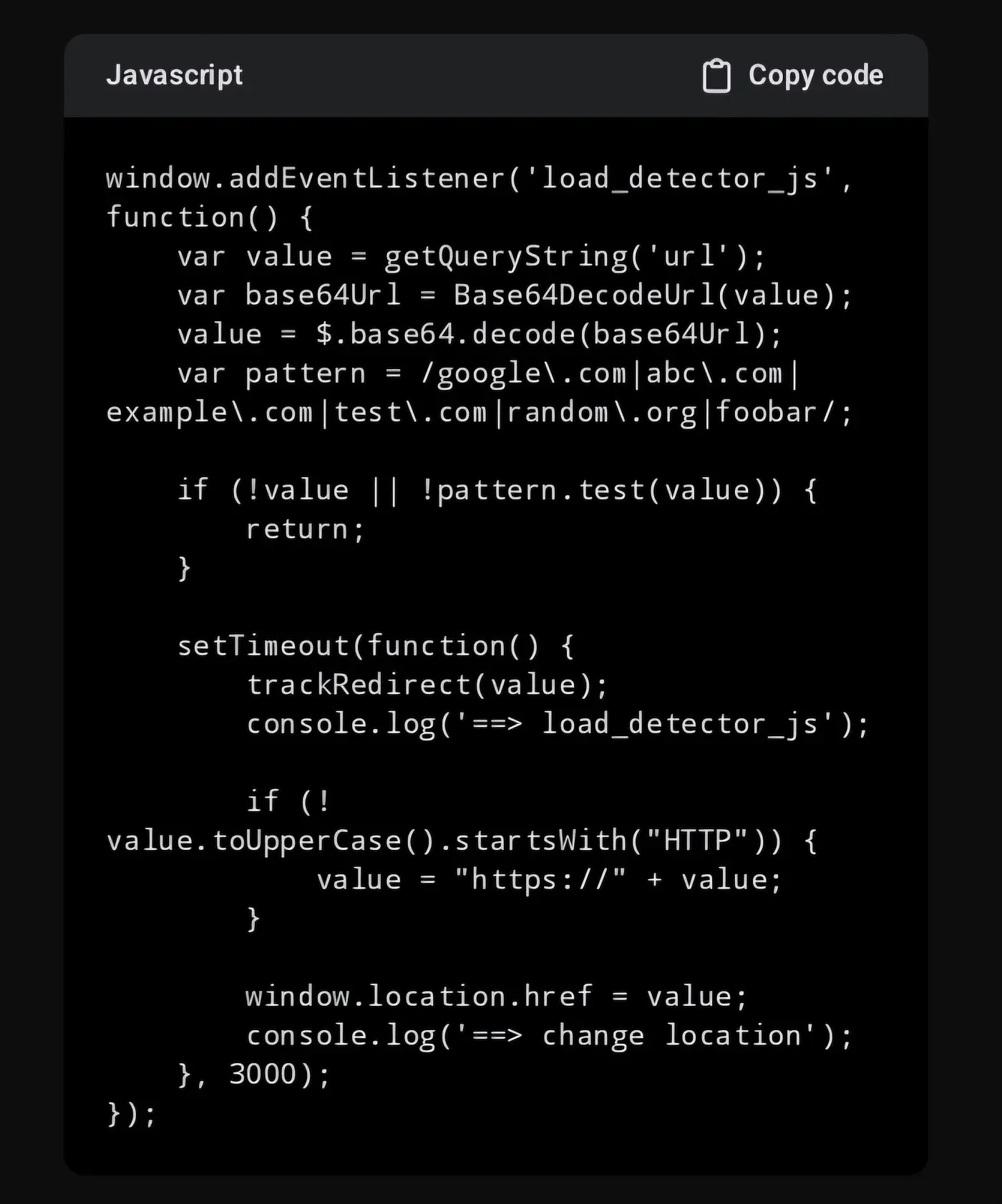
Code of redirect.html
The logic, as the report describes it, runs in this order:
- The script waits for an event to happen.
- It retrieves the input URL from the
url=parameter and Base64-decodes it. - It checks the decoded URL against an allowlist of certain domains, such as
google.com,abc.comand similar. - If the URL matches the allowlist, it waits 3 seconds (3000 milliseconds) and redirects the user to the allowed domain.
- If it does not match, it does nothing.
The fault is in how the allowlist check is written. The regex checks whether the URL contains any of the listed domains rather than whether the URL's host is one of them. The report calls out the consequence directly: the regex matches any URL that contains the specified domains as a substring, so malicious.com/google.com or phishing-abc.com will also match. That partial matching is what an attacker can exploit to craft URLs that still pass the check.
Exploitation
Step 1: build a URL that passes the substring check
The team crafted a payload that places an allowed domain somewhere in the URL and appends a fragment. The template they show is:
https://domain.com/abc/xyz/zyc/html/redirect.html?url=<BASE64>https://evil.com#foobar</BASE64>
Here the decoded value is https://evil.com#foobar. The report says the faulty regex allowed #foobar in the URL fragment, bypassing the checks even though the destination host is evil.com.
Step 2: encode it and send it
The Base64-encoded form of that value, as used in the request, is:
https://domain.com/abc/xyz/zyc/html/redirect.html?url=aHR0cHM6Ly9ldmlsLmNvbSNmb29iYXI=
The url= parameter carries the Base64 string. The page decodes it back to https://evil.com#foobar; the report says the faulty regex allowed the fragment, bypassing the checks and yielding the open redirect. The report summarises this as the faulty regex allowing #foobar in the URL fragment, which bypasses the checks and yields the open redirect.
Step 3: other placements of the allowlisted token
The report notes there were multiple bypasses of the protection the developers applied, and lists these as examples, not an exhaustive set:
target.evil.com
evil.com?param=target
evil.com/target
These work because the script only matches the domain (target) name anywhere in the redirection string. The report lists these three example placements of the target name. The report adds that the check does not validate TLDs, only the target token, and not even target.com.

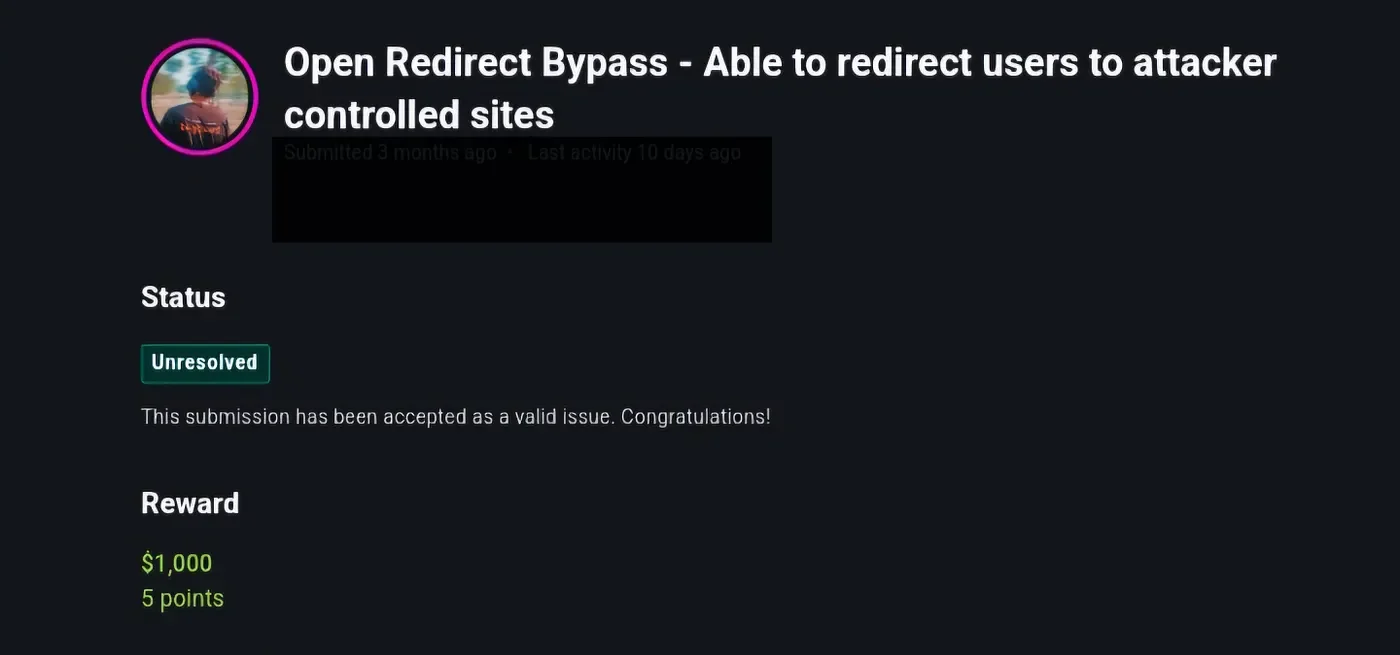
The finding earned a bounty of 1,000 USD, credited as a collaboration. The author says the bug was in collaboration with Aditya Sharma, whom he calls the mastermind behind the finding.
Root cause
The allowlist is enforced with a regex that tests whether the decoded URL contains an allowlisted domain as a substring, instead of parsing the URL and comparing the host component exactly. Any string that includes the allowlisted token anywhere, in the fragment, as a subdomain, in a query parameter, or in the path, satisfies the check. The redirect target comes from the decoded string, which the substring check does not properly constrain. The report describes the regex's behaviour rather than the regex itself.
Impact
An attacker can craft a link on the legitimate domain.com host that, per the report, bypasses the allowlist check and redirects to an external site. Because the link uses the real business domain and its valid certificate, it is well suited to phishing: the victim sees a trusted URL before being bounced to the attacker's page. The report also frames this as a stepping stone to XSS, SSRF, CSRF, credential harvesting, or OAuth access relayed through the redirect to an attacker-controlled server. These are described as the general consequences of open redirects; the report does not demonstrate any of them on this target.
Fix
Variants to test
What happened, in plain words
A security researcher was invited to test a SaaS product. SaaS stands for Software as a Service: software that runs on the vendor's servers and that customers use through a browser, rather than installing it on their own machines. Think of webmail or an online accounting tool. The report describes the program as having generous payouts, including for lower-severity findings (P3 and P4). The reward range for the program is shown below.
Reward Range for the program
On that product there was a page called redirect.html. Its job is simple: it takes a web address supplied in the link, checks it against a list of trusted domains, and if the address is on the list, it sends the visitor's browser there after a short pause. The check was written in a way that only looked for the trusted domain name somewhere inside the supplied address, rather than checking that the address really belonged to that domain. The researcher worked out how to slip an untrusted address past that check, so the page would send visitors to a site of the attacker's choosing. This kind of flaw is called an open redirect. It earned a bounty of 1,000 USD, credited as a collaboration.
Why open redirects matter
Before the technical part, it helps to understand why anyone cares about a page that simply forwards you somewhere else. The report quotes the standard justification, and it is worth unpacking each phrase.
An open redirect lets an attacker manipulate a user into being sent to a malicious site. A GET-based open redirect is one triggered by simply visiting a link (a GET request is the ordinary kind of request your browser makes when you type an address or click a link). It undermines the trust users place in legitimate web pages: a phishing email can carry a link with a real business name in the URL, and the user is then redirected from the legitimate web server to any external domain. Phishing means tricking someone into handing over information or visiting a fake site by pretending to be someone trustworthy. Because the link uses an authentic URL with a valid SSL certificate, users are less likely to notice the subsequent redirect to a different domain. SSL is the padlock-and-encryption system that makes a site's address start with https and proves the site is who it claims to be; a valid certificate on the first link makes the whole chain look trustworthy.
The report also frames open redirects as a precursor to more serious issues: Cross-Site Scripting (XSS), Server-Side Request Forgery (SSRF), Cross-Site Request Forgery (CSRF), and successful phishing where an attacker harvests credentials or gains OAuth access by relaying the user through the open redirection to a server the attacker controls and can observe. In plain terms:
- XSS is tricking a site into running an attacker's code in a victim's browser.
- SSRF is tricking a server into making requests on the attacker's behalf, for example to internal systems the attacker cannot reach directly.
- CSRF is tricking a logged-in user's browser into performing an action on a site without their intent.
- Credentials are usernames, passwords and similar proof of identity.
- OAuth is the system behind "Log in with Google" style buttons; if an attacker can relay a user through a redirect to their own server, they may capture the tokens involved in that login flow.
Setup
The researcher was invited to the SaaS program. The report does not describe any accounts, roles, tooling or versions used.
Two terms there need explaining. A parameter is a named value attached to the end of a web address after a question mark, like ?url=...; it is how a link passes information to a page. Base64 is a way of writing any text using only ordinary letters, digits and a couple of symbols, so it can travel safely inside a web address. Think of it as a standard envelope that hides the shape of the contents, not their meaning.
Finding it
Browsing to redirect.html reveals the page's code, shown below. The page sits deep in a folder path; for confidentiality the report does not give the real folder names or client information, so the path is shown as:
domain.com/abc/xyz/zyc/html/redirect.html
Reading that path: domain.com is the site, and abc/xyz/zyc/html/ are folders on the server, ending in the file redirect.html. Browsing to redirect.html reveals the page's code.
Code of redirect.html
The logic, as the report describes it, runs in this order:
- The script waits for an event to happen. An event here means something happening in the browser, such as the page finishing loading.
- It retrieves the input URL from the
url=parameter and Base64-decodes it. In other words, it takes the envelope, opens it, and reads the address inside. - It checks the decoded URL against an allowlist of certain domains, such as
google.com,abc.comand similar. An allowlist is simply a list of things that are permitted; anything not on the list should be refused. - If the URL matches the allowlist, it waits 3 seconds (3000 milliseconds) and redirects the user to the allowed domain.
- If it does not match, it does nothing.
The fault is in how the allowlist check is written. The check uses a regex, short for regular expression: a pattern-matching tool that searches text for a shape rather than comparing two values exactly. Think of it as a bouncer who is told "let in anyone whose name badge contains the word staff" rather than "let in only people on this list". The regex checks whether the URL contains any of the listed domains rather than whether the URL's host is one of them. The host is the part of an address that names the machine, such as google.com in https://google.com/search.
The report calls out the consequence directly: the regex matches any URL that contains the specified domains as a substring, so malicious.com/google.com or phishing-abc.com will also match. A substring is any run of characters found inside a longer piece of text; the word "cat" is a substring of "concatenate". That partial matching is what an attacker can exploit to craft URLs that still pass the check.
Exploitation
Step 1: build a URL that passes the substring check
The team crafted a payload that places an allowed domain somewhere in the URL and appends a fragment. A payload is the deliberately crafted input an attacker sends to trigger the flaw. A fragment is the part of a web address after a # symbol. Browsers use it to jump to a section of a page, and it is not sent to the server, but it is still part of the text the script sees. The template they show is:
https://domain.com/abc/xyz/zyc/html/redirect.html?url=<BASE64>https://evil.com#foobar</BASE64>
Line by line: https://domain.com/abc/xyz/zyc/html/redirect.html is the legitimate page being visited. ?url= starts the parameter. <BASE64> and </BASE64> are placeholders marking where the encoded value goes, not literal text. Inside them is the address the attacker wants the victim to end up on, https://evil.com, followed by #foobar. Here the decoded value is https://evil.com#foobar. The report says the faulty regex allowed #foobar in the URL fragment, bypassing the checks even though the destination host is evil.com. A token in this context is just a piece of text the check is looking for.
Step 2: encode it and send it
The Base64-encoded form of that value, as used in the request, is:
https://domain.com/abc/xyz/zyc/html/redirect.html?url=aHR0cHM6Ly9ldmlsLmNvbSNmb29iYXI=
Line by line: the first part is the same legitimate page. ?url= is the parameter name. aHR0cHM6Ly9ldmlsLmNvbSNmb29iYXI= is the Base64 encoding of https://evil.com#foobar; the trailing = is padding that Base64 uses to keep its output in neat blocks. The url= parameter carries the Base64 string. The page decodes it back to https://evil.com#foobar; the report says the faulty regex allowed the fragment, bypassing the checks and yielding the open redirect. The report summarises this as the faulty regex allowing #foobar in the URL fragment, which bypasses the checks and yields the open redirect.
Step 3: other placements of the allowlisted token
The report notes there were multiple bypasses of the protection the developers applied, and lists these as examples, not an exhaustive set:
target.evil.com
evil.com?param=target
evil.com/target
Line by line: target.evil.com puts the trusted name in front of the attacker's domain, as if it were a subdomain. evil.com?param=target puts it in a query parameter value. evil.com/target puts it in the path, the part of the address that identifies a page or folder. These work because the script only matches the domain (target) name anywhere in the redirection string. The report lists these three example placements of the target name. The report adds that the check does not validate TLDs, only the target token, and not even target.com. A TLD is the top-level domain, the last part of a name such as .com or .org.
The finding earned a bounty of 1,000 USD. The author says the bug was in collaboration with Aditya Sharma, whom he calls the mastermind behind the finding.
Root cause
The allowlist is enforced with a regex that tests whether the decoded URL contains an allowlisted domain as a substring, instead of parsing the URL and comparing the host component exactly. Parsing here means breaking the address into its parts (scheme, host, path and so on) and looking at the right part, the way you would read a postal address field by field instead of scanning the whole envelope for a town name. Any string that includes the allowlisted token anywhere, in the fragment, as a subdomain, in a query parameter, or in the path, satisfies the check. The redirect target comes from the decoded string, which the substring check does not properly constrain. The report describes the regex's behaviour rather than the regex itself.
Impact
An attacker can craft a link on the legitimate domain.com host that, per the report, bypasses the allowlist check and redirects to an external site. Because the link uses the real business domain and its valid certificate, it is well suited to phishing: the victim sees a trusted URL before being bounced to the attacker's page. The report also frames this as a stepping stone to XSS, SSRF, CSRF, credential harvesting, or OAuth access relayed through the redirect to an attacker-controlled server. These are described as the general consequences of open redirects; the report does not demonstrate any of them on this target.
Fix
In everyday terms: check the name on the badge against the list, letter for letter, instead of glancing for the word staff somewhere on it.
Variants to test
Glossary
- Allowlist: a list of things that are permitted; anything not on the list should be refused.
- Base64: a way of writing any text using ordinary letters, digits and a couple of symbols so it can travel safely inside a web address; it is encoding, not encryption, and anyone can decode it.
- Bounty: a reward paid by a company to someone who reports a security flaw to it.
- Credentials: usernames, passwords and similar proof of identity.
- CSRF (Cross-Site Request Forgery): tricking a logged-in user's browser into performing an action on a site without their intent.
- Event: something happening in the browser, such as a page finishing loading, that a script can react to.
- Fragment: the part of a web address after a
#symbol, used to jump to a section of a page. - GET request: the ordinary kind of request a browser makes when you type an address or click a link.
- Host: the part of a web address that names the machine, such as
google.cominhttps://google.com/search. - OAuth: the system behind "Log in with Google" style buttons, which lets one site obtain limited access to your account on another.
- Open redirect: a flaw where a site will forward a visitor to any address an attacker supplies, instead of only to trusted ones.
- Parameter: a named value attached to a web address after a question mark, used to pass information to a page.
- Parsing: breaking a piece of text such as a web address into its parts so each can be examined separately.
- Payload: the deliberately crafted input an attacker sends to trigger a flaw.
- Phishing: tricking someone into handing over information or visiting a fake site by pretending to be trustworthy.
- Regex (regular expression): a pattern-matching tool that searches text for a shape rather than comparing two values exactly.
- SaaS (Software as a Service): software that runs on the vendor's servers and is used through a browser.
- SSL certificate: the padlock-and-encryption system that makes a site's address start with
httpsand proves the site is who it claims to be. - SSRF (Server-Side Request Forgery): tricking a server into making requests on the attacker's behalf, for example to internal systems.
- Subdomain: a name placed in front of a domain, such as
mailinmail.example.com. - Substring: any run of characters found inside a longer piece of text.
- TLD (top-level domain): the last part of a domain name, such as
.comor.org. - Token: a piece of text that a check or system looks for or uses as proof of identity.
- XSS (Cross-Site Scripting): tricking a site into running an attacker's code in a victim's browser.





