Subdomain Fuzzing worth 35k bounty!
A test subdomain shared the same backend as the production admin panel, and its admin pages returned full content while also sending a redirect to the login page. By changing the redirect status to 200 and removing the redirect headers, the researchers bypassed authentication, added an admin account, ran arbitrary SQL queries, and enabled xp_cmdshell to execute system commands.
 Published on medium.com
My name is Abdullah Nawaf, full-time bug bounty hunter, working actively on Bugcrowd with a top 50 rank (rank 11 for P1 bugs), hunting for P1 and P2 bugs.
The full write-up lives on its author's site
It belongs to its author, so we link to it rather than copy it. The other two tabs are our own rewrites, checked against it.
Context
In 2022 I reported an authentication bypass that led to SQL injection and remote code execution on a private Bugcrowd program. The bug was fixed one day after the report. In March 2024, Orwa Atyat (@GodfatherOrwa) and I decided to re-test our old bugs, and the target of that re-test was admin.Target.com.
The application behind that host is an administrative panel: it has a login page at /admin/login.aspx, an authenticated dashboard at /admin/main.aspx, a user creation page at adduser.aspx, a page that lists administrator credentials, and a page called SQLQuery.aspx that runs SQL queries against the back end. The back end is Microsoft SQL Server (mssql).
The re-test turned into a chain: subdomain fuzzing found a second host sharing the same back end, an authentication bypass gave access to the panel, the panel gave an admin account, the admin account gave the SQL console, and the SQL console gave command execution. Everything went into one report, together with one other SQL injection on a different endpoint, and the total bounty was 35,000 USD.
Setup
The work was done against admin.Target.com and its siblings, with Burp Suite as the main proxy and ffuf for subdomain fuzzing. No accounts were needed at the start: the whole point was to get in without one. The wordlist used for fuzzing was subdomain_megalist.txt, taken from the netsecurity-as subfuz repository; the report also points to the SecLists DNS discovery lists as an alternative.
The original subdomain had already been fixed once, and the report's lessons recommend subdomain fuzzing in exactly that situation.
Finding it
We fuzzed subdomains of the original host with this command:
ffuf -w /subdomain_megalist.txt -u 'https://adminFUZZ.Target.com' -c -t 350 -mc all -fs 0
-w is the wordlist, -u is the URL with the FUZZ keyword placed inside the hostname, -c colours the output, -t 350 sets 350 threads, -mc all matches every response code (200, 302, 403 and so on) and -fs 0 filters out responses with a body size of zero.
The command found a subdomain called admintest.Target.com.
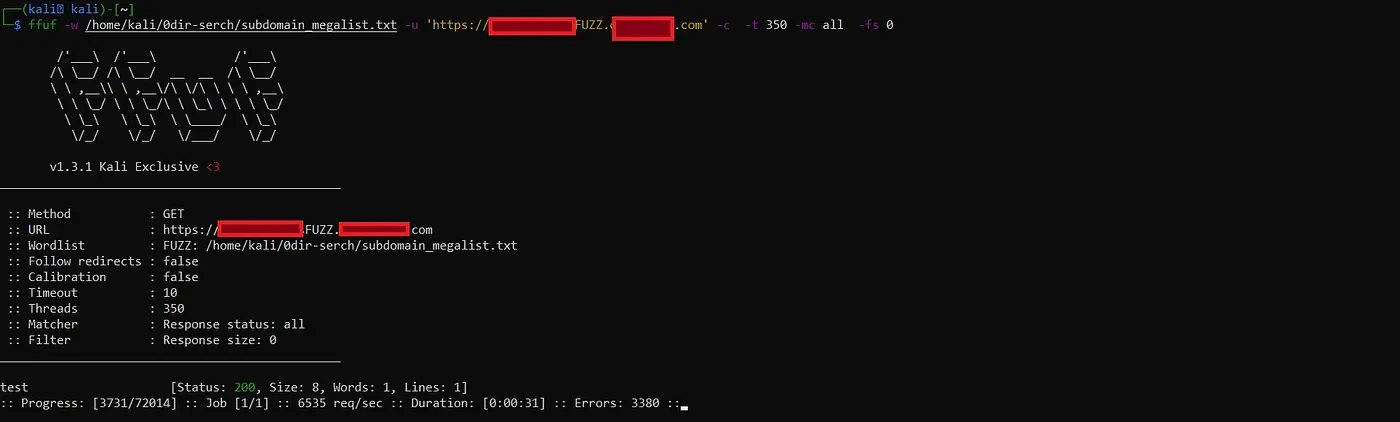
The screenshot shows a lot of errors among the results. That is expected when fuzzing subdomains: an error means that particular subdomain does not resolve or does not work. The one that mattered was admintest.Target.com, which was vulnerable because it had the same back end as the original admin.Target.com.
Exploitation
Step 1: find the panel endpoint behind the login redirect
https://admintest.Target.com redirected to https://admintest.Target.com/admin/login.aspx. Reading some JavaScript files, we found an endpoint called https://admintest.Target.com/admin/main.aspx. Opening it directly in the browser redirected us to the login page again, but in Burp we noticed something:
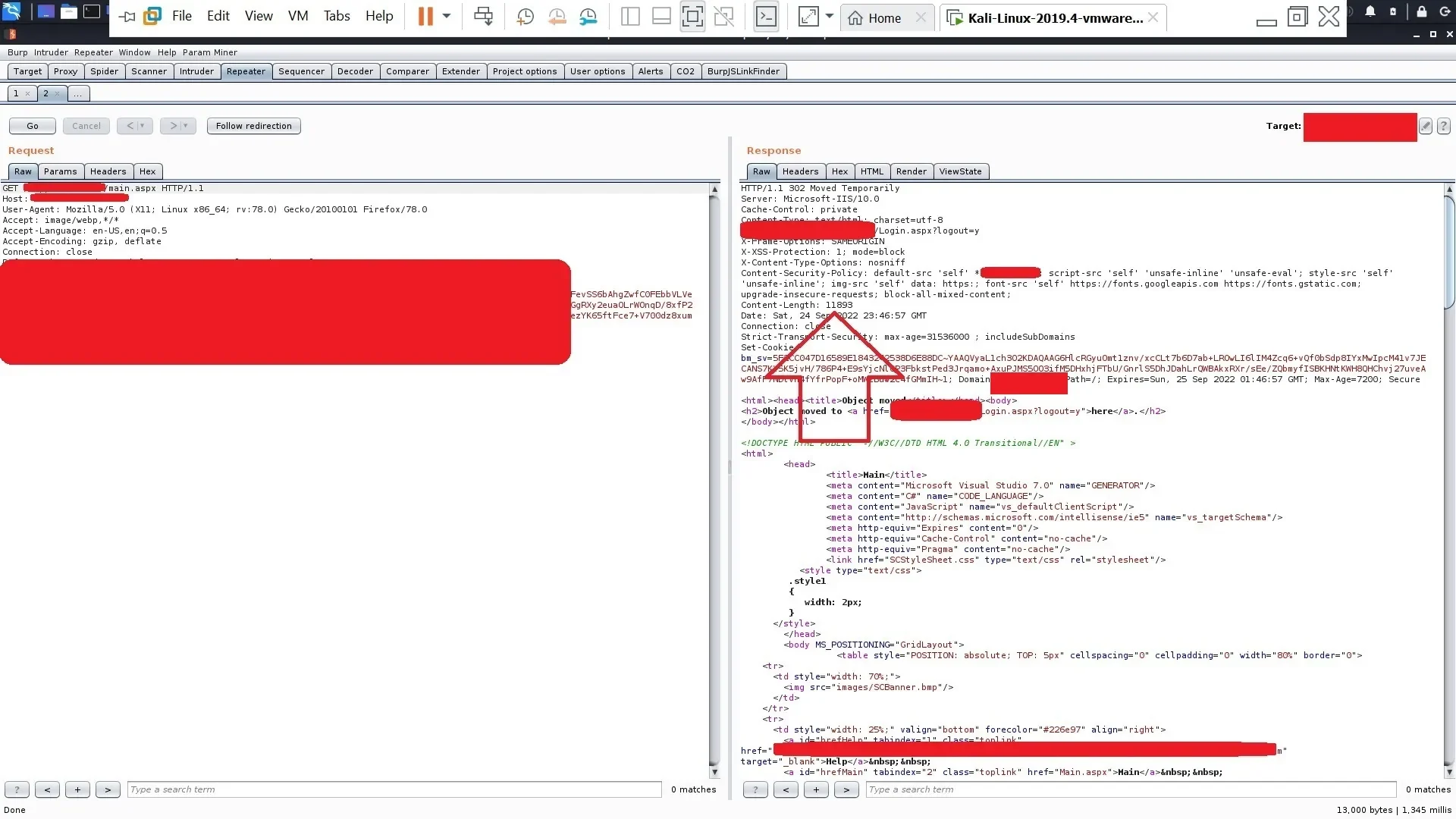
The Content-Length of the response was very large, far larger than a redirect response should be. That is the tell: the server was returning the full page body and then telling the browser to go to the login page, so the redirect was happening in the browser, not on the server.
Step 2: strip the redirect and get in
Even though we were redirected to the login page, the endpoint was working, with full access. Removing three things let us reach the panel:
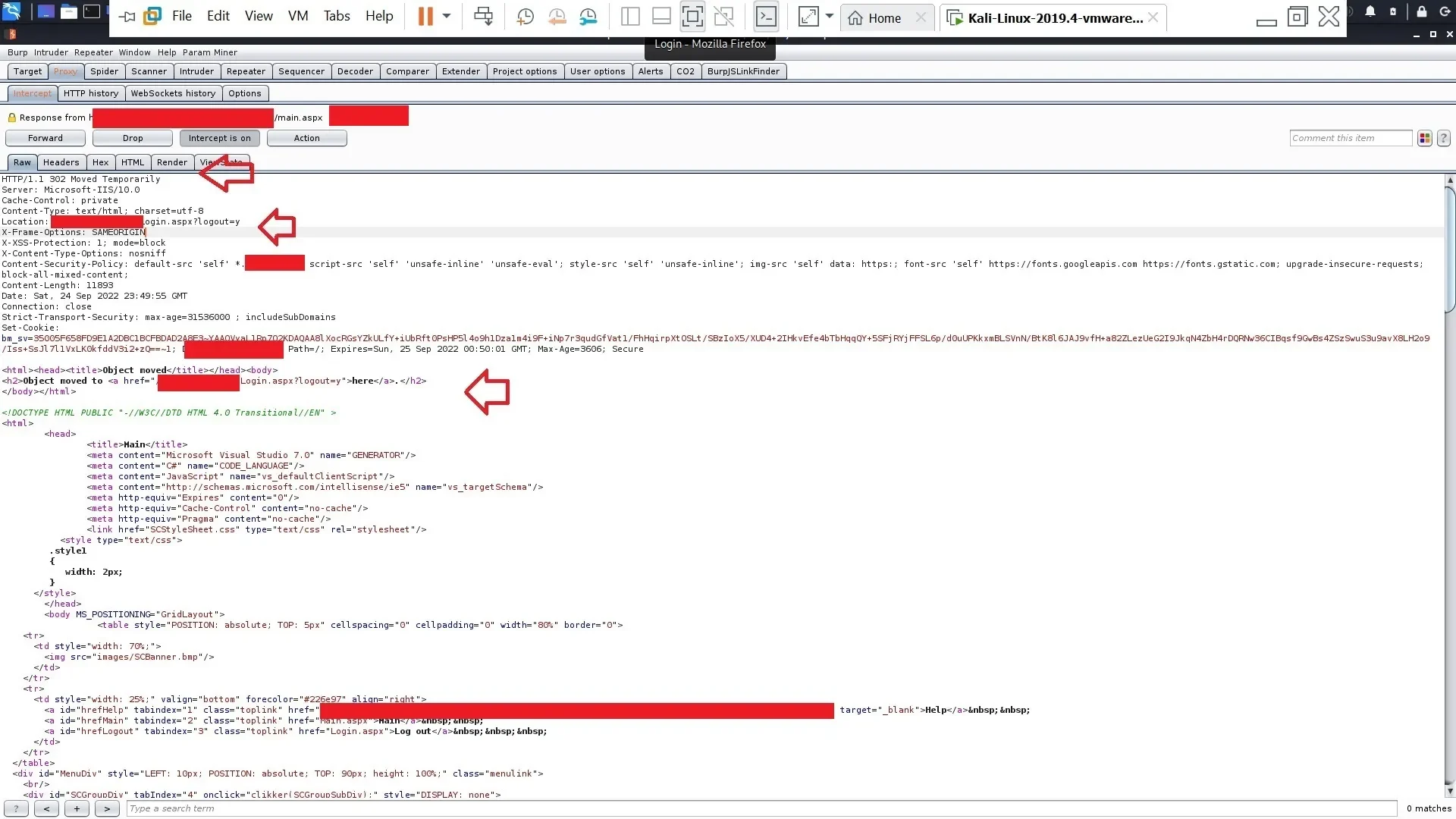
Using Burp Match and Replace, or Burp's intercept response, we changed the response as follows:
change 302 Moved Temporarily to 200 OK
remove Location: /admin/Login.aspx?logout=y
remove html redirect code
The result was a full authentication bypass, and it was fully functional, not just a front-end bypass: the page behind it really was served with its data.
Step 3: create an admin account
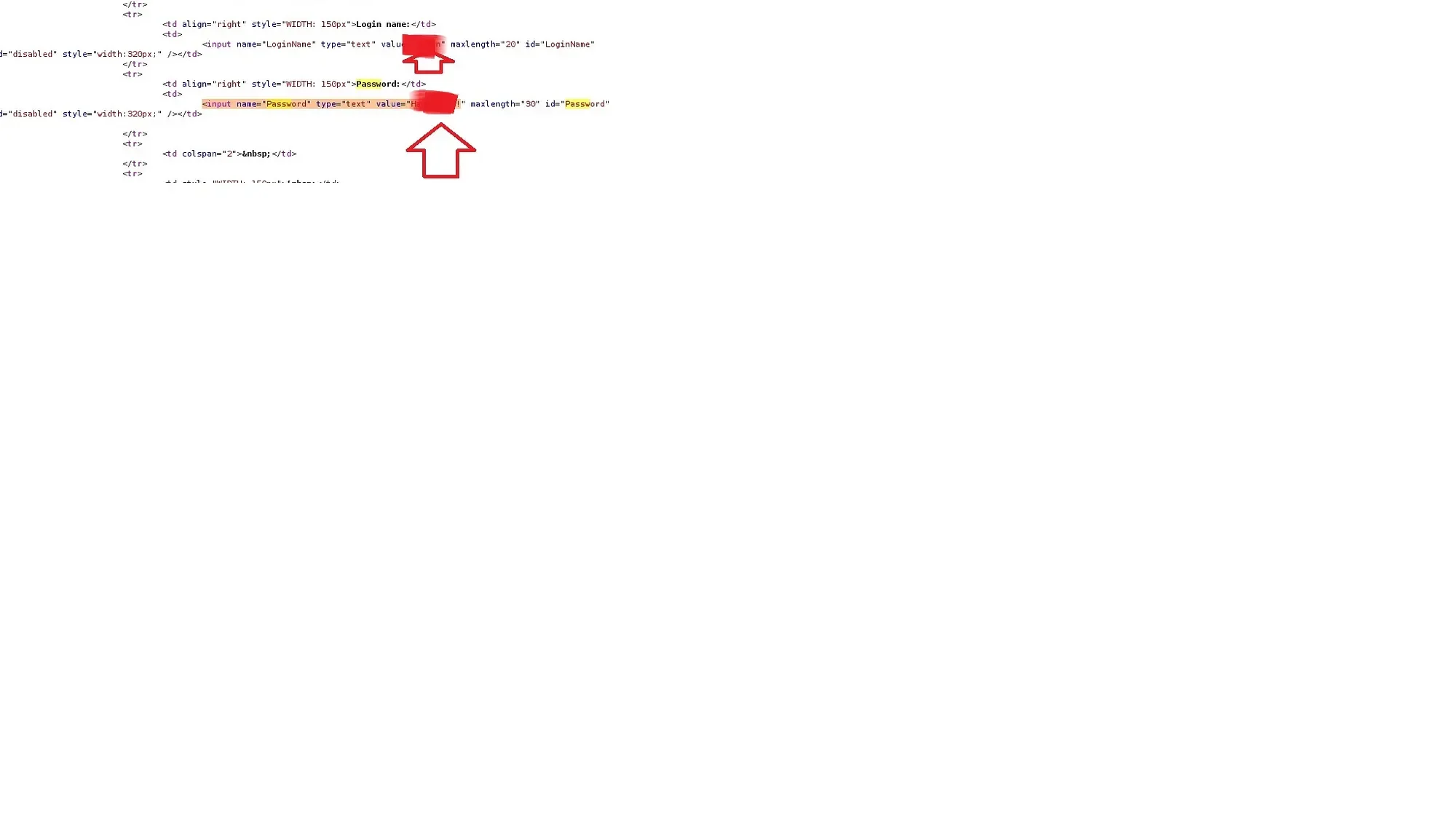
Digging deeper, we found adduser.aspx. This endpoint redirected us to the login page exactly like main.aspx. Applying the same trick to adduser.aspx gave us access to the endpoint and let us add an admin account. We also found another endpoint that shows administrators' passwords and usernames without any authentication.
Step 4: log in and reach the SQL console
After adding an admin account we were able to log in, which was easier than using the trick above. We found an endpoint called SQLQuery.aspx, and from its name you know what it does.
The first thing I tried was this query:
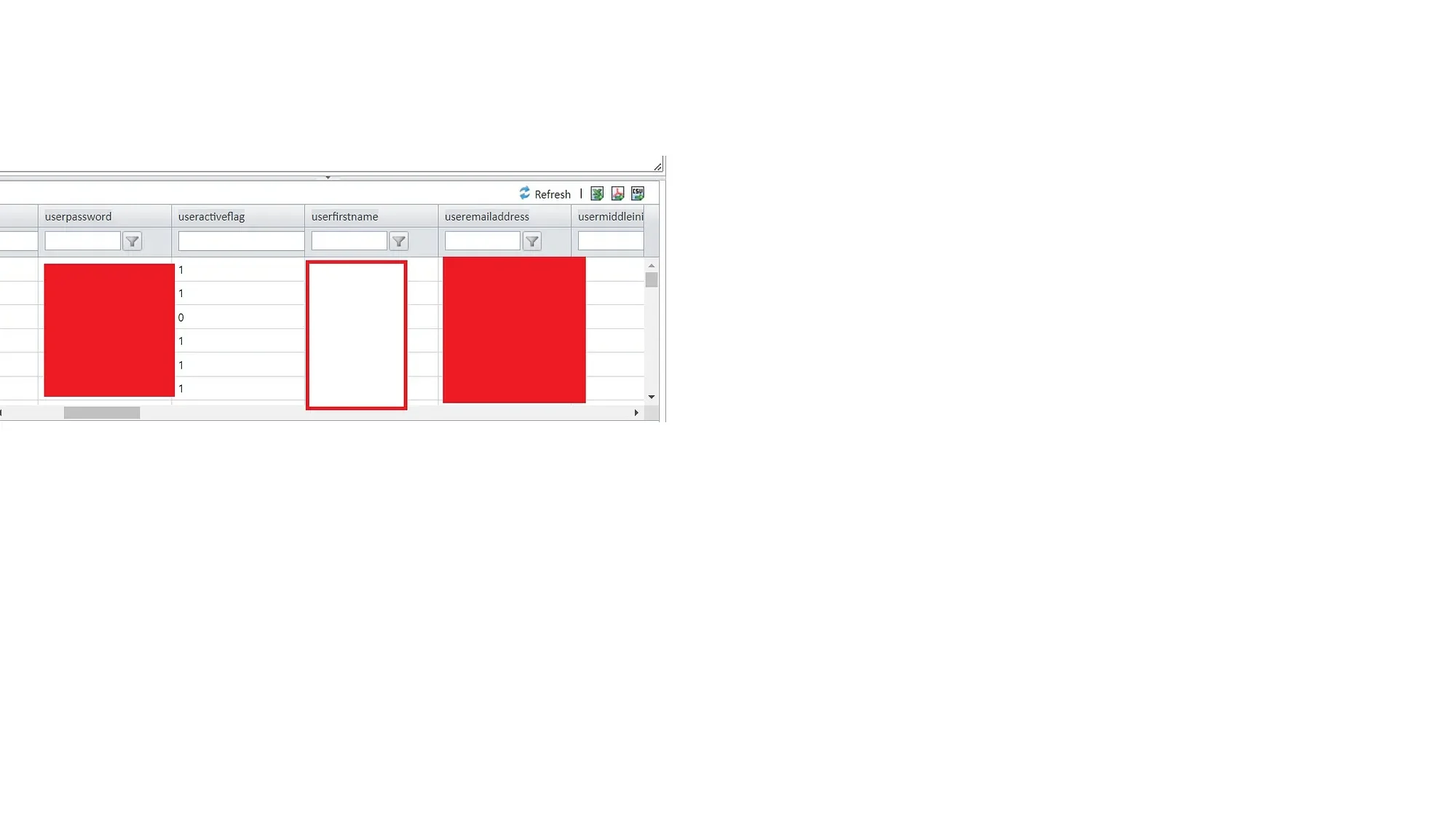
Select * from users
We were able to see all users' info, including passwords, emails and usernames.
Step 5: from SQL to RCE with xp_cmdshell
Since the database was mssql, we tried to escalate to RCE using xp_cmdshell. In short, xp_cmdshell allows the user to execute system commands through MSSQL. By default it is disabled, but it can be enabled easily, for example with sqlmap's --os-shell option.
In our case we did not need sqlmap, because we could run queries directly against the database, just like Select * from users or SELECT @@version. So the first thing to do to make xp_cmdshell work is to enable it with these queries:
SP_CONFIGURE "show advanced options", 1
RECONFIGURE
SP_CONFIGURE "xp_cmdshell", 1
RECONFIGURE
SP_CONFIGURE changes a server configuration option, RECONFIGURE applies it, and the two pairs first expose the advanced options and then switch xp_cmdshell on.
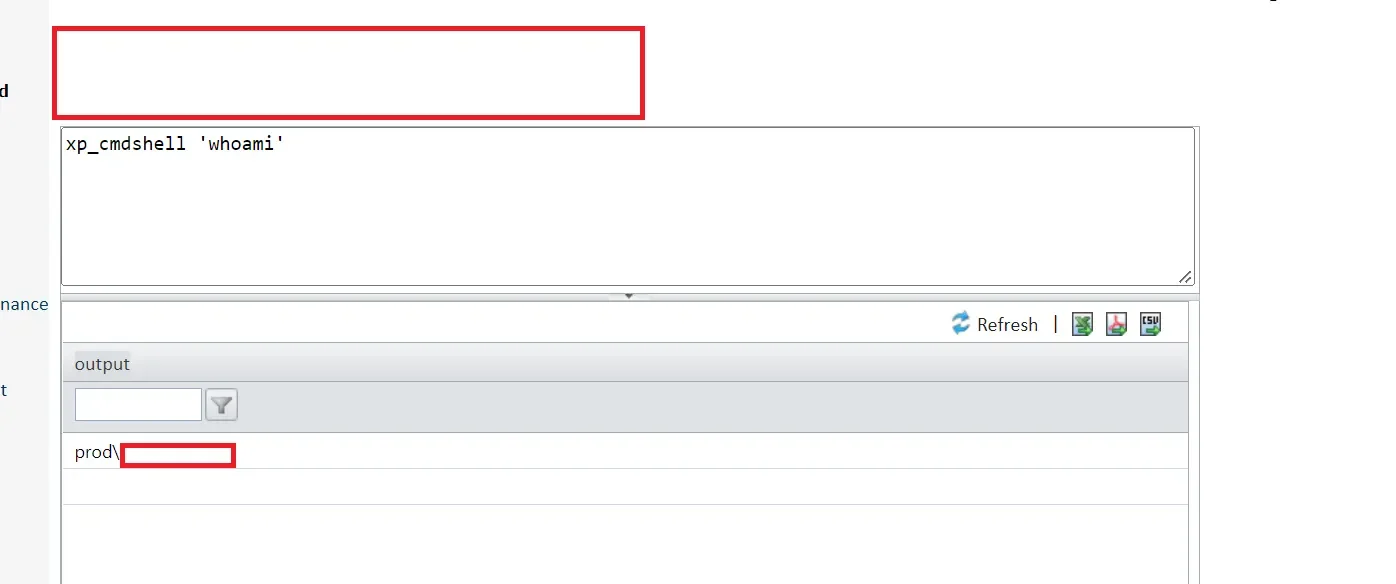
And then xp_cmdshell 'whoami': RCE!
All of these findings went into one report, plus one other SQL injection in another endpoint, and the total in bounties was 35,000 USD.
Root cause
The authentication bypass is a client-side redirect used as an access control. The server rendered the protected page and then answered with 302 Moved Temporarily and a Location: /admin/Login.aspx?logout=y header, plus HTML redirect code in the body. Because the full page was already in the response, anyone who stopped the browser from following the redirect got the page. The endpoint was working with full access even though the browser was redirected to the login page.
The SQL injection is a page, SQLQuery.aspx, that takes a query and runs it against the database. The page ran Select * from users, and xp_cmdshell could be enabled, which turned a data leak into command execution.
Impact
An attacker who found admintest.Target.com could bypass authentication to read the administrative panel, create an admin account, and reach an endpoint that showed administrators' passwords and usernames without authentication. With an admin account, the attacker could run arbitrary SQL against the mssql back end, dump every user's credentials, emails and usernames, and then enable xp_cmdshell and execute system commands on the database server.
Fix
The report does not say what the program changed. What should change is clear from the bypass: the server must refuse the request, not redirect it. Protected pages should check authorisation before rendering anything and return an error status without the page body, and the same applies to adduser.aspx and to the endpoint that exposes administrator credentials. SQLQuery.aspx should not accept arbitrary queries from a web session, and the database account should not be able to run SP_CONFIGURE or xp_cmdshell.
Lessons learned
- Always check the redirect response in Burp. Orwa and I found this same authentication bypass many times. My first bounty, in 2020, used the same trick:
/admin/admin.phpredirected tologin.php, but in Burp the response showedadmin.phpworking fine; the redirect was front-end only. - If you found a bug in a subdomain and it was fixed, try subdomain fuzzing. Useful patterns:
admin-FUZZ.target.com   e.g. admin-stg.target.com
FUZZ-admin.target.com   e.g. cert-admin.target.com
adminFUZZ.target.com    e.g. admintest.target.com
FUZZadmin.target.com    e.g. testadmin.target.com
admin.FUZZ.target.com   e.g. admin.dev.target.com
- Try to escalate the bug before reporting.
- Quality over quantity. When you find multiple bugs or chain bugs together, report them as one report; you will get a higher bounty.
Variants to test
- Redirect-based access control on other panels. Request a protected page with interception on and look at the response body size and status. A positive result is a
302whose body is far larger than a redirect should be, and the page content visible once you change the status to200and dropLocationand any HTML redirect. - Sibling hosts of a fixed bug. Run the
ffufcommand above with theFUZZkeyword in each of the five positions. A positive result is a host that resolves and behaves like the original application. - Unauthenticated endpoints next to authenticated ones. Enumerate JavaScript files for paths such as
main.aspxandadduser.aspx, then request each one without a session. A positive result is a page that renders data or performs an action despite the redirect. - Query consoles. If you reach a page that takes SQL, try
Select * from usersandSELECT @@version. A positive result is rows coming back. - Privilege of the database account. On MSSQL, try the
SP_CONFIGURE/RECONFIGUREpair and thenxp_cmdshell 'whoami'. A positive result is the command output returned in the query result.
References
- subdomain_megalist.txt: https://github.com/netsecurity-as/subfuz/blob/master/subdomain_megalist.txt (thanks to Netsecurity for the list)
- More lists: https://github.com/danielmiessler/SecLists/tree/master/Discovery/DNS
- Enable xp_cmdshell in SQL Server: mssqltips.com
- Microsoft SQL Server to RCE: https://medium.com/@s12deff/microsoft-sql-server-to-rce-984016b4aaf8
All of these findings were with OrwaGodfather, as we collaborate on all hunts.
What happened, in plain words
In 2022 I reported a bug on a private Bugcrowd program: a way to get past the login screen that led to SQL injection and then to remote code execution. The program fixed it one day after the report. In March 2024, Orwa Atyat (@GodfatherOrwa) and I decided to go back and re-test our old bugs. The target of that re-test was admin.Target.com.
A few words before we start, because this write-up is meant for someone who has never done security work.
A subdomain is a name that sits in front of a domain, like admin in admin.Target.com. Companies use them to separate services: admin for the admin panel, mail for webmail, shop for the store. Each one can be a different machine, or the same machine with a different configuration.
An admin panel is the private back office of a website. It is where staff log in to manage users, read data and change settings. It is not meant for visitors, which is exactly why it is interesting to an attacker.
Authentication means proving who you are, usually with a username and password. An authentication bypass is a way to get in without proving it. Authorisation (or access control) is the next question: now that we know who you are, are you allowed to do this? A broken access control bug is when the site answers yes when it should answer no.
SQL is the language databases speak. A SQL injection is when a website lets someone type SQL where it expected ordinary data, so the database runs the attacker's instructions instead of the site's. RCE, remote code execution, is the worst version of this: the attacker gets to run commands on the server itself, as if they were sitting at its keyboard.
The application behind admin.Target.com is an administrative panel. It has a login page at /admin/login.aspx, a dashboard you only see once logged in at /admin/main.aspx, a page for creating users at adduser.aspx, a page that lists administrator credentials, and a page called SQLQuery.aspx that runs SQL queries against the back end. The back end is Microsoft SQL Server, usually shortened to mssql.
The re-test turned into a chain. Subdomain fuzzing found a second host sharing the same back end. An authentication bypass gave access to the panel. The panel gave an admin account. The admin account gave the SQL console. The SQL console gave command execution. Everything went into one report, together with one other SQL injection on a different endpoint, and the total bounty was 35,000 USD.
Setup
The work was done against admin.Target.com and its siblings. The main tool was Burp Suite, a program that sits between your browser and the website and lets you read and edit every request and response. The other tool was ffuf, a command-line program that sends many requests quickly, one per word from a list.
No accounts were needed at the start: the whole point was to get in without one.
The wordlist used for fuzzing was subdomain_megalist.txt, taken from the netsecurity-as subfuz repository. A wordlist is just a text file with one candidate name per line. The report also points to the SecLists DNS discovery lists as an alternative.
The original subdomain had already been fixed once. The report's lessons recommend subdomain fuzzing in exactly that situation.
Finding it
We fuzzed subdomains of the original host with this command:
ffuf -w /subdomain_megalist.txt -u 'https://adminFUZZ.Target.com' -c -t 350 -mc all -fs 0
Line by line:
ffufis the program being run.-w /subdomain_megalist.txttells it which wordlist to use. Each line of that file will be tried in place of theFUZZkeyword.-u 'https://adminFUZZ.Target.com'is the URL to test. The wordFUZZis the placeholder: ffuf replaces it with each word from the list, so the first request might behttps://adminstaging.Target.com, the nexthttps://admindev.Target.com, and so on.-cadds colour to the output so results are easier to read.-t 350sets 350 threads, meaning 350 requests are in flight at the same time. More threads means faster, but too many can cause missed results.-mc allmatches every response code. A response code is the three-digit number a server sends back:200means OK,302means redirect,403means forbidden,404means not found. Matching all of them matters because a working subdomain might answer with a redirect or a forbidden page rather than a clean OK.-fs 0filters out responses with a body size of zero. A body is the content of the response, the actual page. If the body is empty, there is nothing there.
The command found a subdomain called admintest.Target.com.
The screenshot shows a lot of errors among the results. That is expected when fuzzing subdomains: an error means that particular subdomain does not resolve or does not work. The one that mattered was admintest.Target.com, which was vulnerable because it had the same back end as the original admin.Target.com.
Exploitation
Step 1: find the panel endpoint behind the login redirect
https://admintest.Target.com redirected to https://admintest.Target.com/admin/login.aspx. A redirect is the server telling the browser "not here, go there instead". It is how a site sends you to the login page when you are not logged in.
Reading some JavaScript files, we found an endpoint called https://admintest.Target.com/admin/main.aspx. JavaScript files are the code the browser downloads to make a page interactive; they often mention other pages the site can call. An endpoint is a specific address on a server that does something when you request it, like a counter in a shop: you ask for a particular thing at a particular window.
Opening main.aspx directly in the browser redirected us to the login page again, but in Burp we noticed something:
The Content-Length of the response was very large, far larger than a redirect response should be. Content-Length is a header that says how many bytes the body contains. A header is a small line of metadata sent with every request and response, like the label on a parcel. A large Content-Length on a redirect was the tell that the redirect was happening in the browser, not on the server. That is the tell: the redirect was happening in the browser, not on the server.
Step 2: strip the redirect and get in
Even though we were redirected to the login page, the endpoint was working, with full access. Removing three things let us reach the panel:
Using Burp Match and Replace, or Burp's intercept response, we changed the response as follows:
change 302 Moved Temporarily to 200 OK
remove Location: /admin/Login.aspx?logout=y
remove html redirect code
Line by line:
change 302 Moved Temporarily to 200 OKchanges the status code.302tells the browser to go elsewhere;200tells it "here is your page". With200, the browser stops and renders what it received.remove Location: /admin/Login.aspx?logout=ydeletes theLocationheader. That header is the server-side instruction for where the redirect should go. Without it, there is nowhere to be sent.remove html redirect codedeletes a fallback inside the page body, a small piece of HTML that also tells the browser to move on. Some sites use this when they cannot send a proper header.
The result was a full authentication bypass, and it was fully functional, not just a front-end bypass: the page behind it really was served with its data. A front-end bypass would only hide the login box in your browser while the server still refused to give you anything. Here the server had already handed over the page; we just stopped the browser from throwing it away.
Step 3: create an admin account
Digging deeper, we found adduser.aspx. This endpoint redirected us to the login page exactly like main.aspx. Applying the same trick to adduser.aspx gave us access to the endpoint and let us add an admin account. We also found another endpoint that shows administrators' passwords and usernames without any authentication.
The first bypass gave access to the panel. The same trick on adduser.aspx let us add an admin account, and another endpoint showed administrators' passwords and usernames without authentication.
Step 4: log in and reach the SQL console
After adding an admin account we were able to log in, which was easier than using the trick above. We found an endpoint called SQLQuery.aspx, and from its name you know what it does.
A page that takes a query and runs it is a query console. It is a tool for administrators, and it is dangerous by design: whoever reaches it can ask the database anything.
The first thing I tried was this query:
Select * from users
Line by line: Select means "give me data". * means "every column". from users means "from the table called users". A table is how a database stores rows of similar things, like a spreadsheet. So the whole line reads: show me everything in the users table.
We were able to see all users' info, including passwords, emails and usernames.
Step 5: from SQL to RCE with xp_cmdshell
Since the database was mssql, we tried to escalate to RCE using xp_cmdshell. In short, xp_cmdshell allows the user to execute system commands through MSSQL. Think of it as a hatch between the database and the operating system underneath it: normally it is bolted shut, but an administrator can open it.
By default it is disabled, but it can be enabled easily, for example with sqlmap's --os-shell option. sqlmap is a tool that automates SQL injection; --os-shell asks it to go all the way to a command shell.
In our case we did not need sqlmap, because we could run queries directly against the database, just like Select * from users or SELECT @@version. SELECT @@version is a query that asks the database to report its own version, which is a quick way to confirm what you are talking to.
So the first thing to do to make xp_cmdshell work is to enable it with these queries:
SP_CONFIGURE "show advanced options", 1
RECONFIGURE
SP_CONFIGURE "xp_cmdshell", 1
RECONFIGURE
Line by line:
SP_CONFIGURE "show advanced options", 1turns on the display of advanced settings. The1means on,0would mean off. Without this, the next setting is hidden.RECONFIGUREapplies the change. Configuration changes in SQL Server are staged and then applied, a bit like editing a form and then pressing save.SP_CONFIGURE "xp_cmdshell", 1switches the command hatch on.RECONFIGUREapplies that too.
And then xp_cmdshell 'whoami': RCE!
whoami is a command that simply prints the name of the user the server is running as. It is the smallest possible proof: if the output comes back, commands are running on the machine.
All of these findings went into one report, plus one other SQL injection in another endpoint, and the total in bounties was 35,000 USD.
Root cause
The authentication bypass is a client-side redirect used as an access control. The server rendered the protected page and then answered with 302 Moved Temporarily and a Location: /admin/Login.aspx?logout=y header, plus HTML redirect code in the body. Because the full page was already in the response, anyone who stopped the browser from following the redirect got the page. The endpoint was working with full access even though the browser was redirected to the login page. It is like a bouncer who hands you the keys and then points at the exit.
The SQL injection is a page, SQLQuery.aspx, that takes a query and runs it against the database. The page ran Select * from users, and xp_cmdshell could be enabled, which turned a data leak into command execution.
Impact
An attacker who found admintest.Target.com could bypass authentication to read the administrative panel, create an admin account, and reach an endpoint that showed administrators' passwords and usernames without authentication. With an admin account, the attacker could run arbitrary SQL against the mssql back end, dump every user's credentials, emails and usernames, and then enable xp_cmdshell and execute system commands on the database server.
Fix
The report does not say what the program changed. What should change is clear from the bypass: the server must refuse the request, not redirect it. Protected pages should check authorisation before rendering anything and return an error status without the page body, and the same applies to adduser.aspx and to the endpoint that exposes administrator credentials. SQLQuery.aspx should not accept arbitrary queries from a web session, and the database account should not be able to run SP_CONFIGURE or xp_cmdshell.
Lessons learned
- Always check the redirect response in Burp. Orwa and I found this same authentication bypass many times. My first bounty, in 2020, used the same trick:
/admin/admin.phpredirected tologin.php, but in Burp the response showedadmin.phpworking fine; the redirect was front-end only. - If you found a bug in a subdomain and it was fixed, try subdomain fuzzing. Useful patterns:
admin-FUZZ.target.com   e.g. admin-stg.target.com
FUZZ-admin.target.com   e.g. cert-admin.target.com
adminFUZZ.target.com    e.g. admintest.target.com
FUZZadmin.target.com    e.g. testadmin.target.com
admin.FUZZ.target.com   e.g. admin.dev.target.com
Each line shows where the FUZZ placeholder goes and an example of a real name it could produce. Teams name their hosts in predictable ways, so trying the common shapes catches the forgotten ones.
- Try to escalate the bug before reporting. A login bypass is serious; a login bypass that ends in command execution is a different conversation.
- Quality over quantity. When you find multiple bugs or chain bugs together, report them as one report; you will get a higher bounty.
Variants to test
- Redirect-based access control on other panels. Request a protected page with interception on and look at the response body size and status. A positive result is a
302whose body is far larger than a redirect should be, and the page content visible once you change the status to200and dropLocationand any HTML redirect. - Sibling hosts of a fixed bug. Run the
ffufcommand above with theFUZZkeyword in each of the five positions. A positive result is a host that resolves and behaves like the original application. - Unauthenticated endpoints next to authenticated ones. Enumerate JavaScript files for paths such as
main.aspxandadduser.aspx, then request each one without a session. A positive result is a page that renders data or performs an action despite the redirect. - Query consoles. If you reach a page that takes SQL, try
Select * from usersandSELECT @@version. A positive result is rows coming back. - Privilege of the database account. On MSSQL, try the
SP_CONFIGURE/RECONFIGUREpair and thenxp_cmdshell 'whoami'. A positive result is the command output returned in the query result.
References
- subdomain_megalist.txt: https://github.com/netsecurity-as/subfuz/blob/master/subdomain_megalist.txt (thanks to Netsecurity for the list)
- More lists: https://github.com/danielmiessler/SecLists/tree/master/Discovery/DNS
- Enable xp_cmdshell in SQL Server: mssqltips.com
- Microsoft SQL Server to RCE: https://medium.com/@s12deff/microsoft-sql-server-to-rce-984016b4aaf8
All of these findings were with OrwaGodfather, as we collaborate on all hunts.
Glossary
- Access control: the rules that decide what a logged-in user is allowed to see and do.
- Admin panel: the private back office of a website, used by staff to manage users, data and settings.
- Authentication: proving who you are, usually with a username and password.
- Authentication bypass: getting into a protected area without proving who you are.
- Authorisation: the check that a known user is allowed to perform a particular action.
- Body: the content of an HTTP response, the actual page or data.
- Broken access control: a bug where the site allows an action it should refuse.
- Burp Suite: a tool that sits between browser and server so you can read and edit requests and responses.
- Content-Length: a header stating how many bytes the response body contains.
- Endpoint: a specific address on a server that performs an action when requested.
- ffuf: a command-line tool that sends many requests quickly, substituting words from a list into a placeholder.
- Front-end bypass: hiding or skipping a check in the browser while the server still refuses to serve the protected content.
- FUZZ: the placeholder keyword in ffuf that gets replaced by each word from the wordlist.
- Header: a line of metadata sent with an HTTP request or response.
- HTML redirect code: a snippet inside a page body that tells the browser to navigate elsewhere.
- JavaScript: code the browser downloads and runs to make a page interactive; it often reveals other paths on the site.
- Location header: the response header that tells the browser where a redirect should go.
- mssql: Microsoft SQL Server, a relational database product.
- Query console: a page that accepts SQL and runs it against the database.
- RCE (remote code execution): running commands on a remote server as if you were at its keyboard.
- RECONFIGURE: the SQL Server command that applies staged configuration changes.
- Redirect: a server response telling the browser to go to a different address.
- Response code: the three-digit status a server returns, such as 200 (OK), 302 (redirect), 403 (forbidden).
- sqlmap: a tool that automates finding and exploiting SQL injection.
- SP_CONFIGURE: the SQL Server command that changes a server configuration option.
- SQL: the language used to query and modify relational databases.
- SQL injection: a bug where user input is treated as SQL and executed by the database.
- Subdomain: a name in front of a domain, such as
admininadmin.Target.com, often pointing to a separate service. - Table: a set of rows of similar data inside a database, like a spreadsheet.
- Threads: parallel workers; in ffuf, how many requests are sent at the same time.
- Wordlist: a text file with one candidate value per line, used by fuzzing tools.
- xp_cmdshell: an MSSQL feature that lets a database user run operating system commands; disabled by default.


