The $100 IDOR: One Missing Authorization Check in a Multi-Tenant App
A sub-page of an event management application failed to check whether the logged-in user owned the event, so an attacker could load another store's event data by changing the event ID in the URL. The main event page returned 403, but the emails-and-reminders page returned 200 with the victim's event title, state and schedule.

Continue the journey of bug bounty, I wanna share about my experience to get the bounties.
The full write-up lives on its author's site
It belongs to its author, so we link to it rather than copy it. The other two tabs are our own rewrites, checked against it.
Context
The target is a multi-tenant store application, referred to in the report as https://blablabalastore.io. Each store has its own identifier, and stores own events. The feature involved is the event management area, specifically the sub-page for a single event's emails and reminders, reached at /events/<id>/emails-and-reminders.
Normally, a store owner should only be able to open the events that belong to their own store. The main event page at /events/<id> enforces that ownership check. The emails-and-reminders sub-page is a separate route that rendered the victim's event data for the attacker.
Setup
The researcher used two accounts, both owned by them:
| Role | Store | Store ID | Events | |
|---|---|---|---|---|
| Attacker | [redacted] | Fauzi Store | 19145 | none |
| Victim | [redacted] | Acong | 19143 | event 98361, "Event Acong" |
The attacker's store owns no events at all, which makes any event data appearing in the attacker's session clearly out of scope. The victim's store owns event 98361. No special tools are described; the work is done with a browser session and the ability to send requests as each account.
Finding it
The starting point is the contrast between two routes on the same resource. Requesting the main event page as the attacker returns 403 Forbidden, so the ownership check on that route works. Requesting the sub-page for the same event as the same attacker returns 200 OK and renders the victim's event. The researcher's own explanation is that the developer forgot to check authorisation on this endpoint, and describes the find as a lucky one because of how simple it was.
Exploitation
Step 1: log in as the attacker
Log in to https://blablabalastore.io as the attacker account, store 19145 (Fauzi Store), which owns no events.
Step 2: confirm the main event page is protected
Request the event directly:
The result is HTTP 403 Forbidden. The ownership check works on the main event page, so the attacker cannot open the victim's event through the normal route.
Step 3: request the sub-page for the same event
Request the emails-and-reminders route for the same event ID:
The result is HTTP 200 OK. The page renders event 98361, which belongs to the victim's store 19143, inside the attacker's session.
Step 4: read the victim's event data in the response body
The response body contains the victim's event data in the page's Alpine.js state:
x-data="{ eventTitle: 'Event Acong', eventStateFormatted: 'Active', … }"
The event title and state are those of the victim's event, and the response also shows 31 Oct 2026 00:00–00:00 +07.
Step 5: confirm the wrong scope in the Livewire snapshot
The embedded Livewire snapshot shows the event and the store as separate components, and the store in the snapshot is the attacker's:
"event":[{"class":"Event","key":98361}]
"store":[{"class":"Store","key":19145}]
The event component is keyed to the victim's event 98361 while the store component is keyed to the attacker's store 19145. The page is therefore rendering another tenant's event under the attacker's store context.
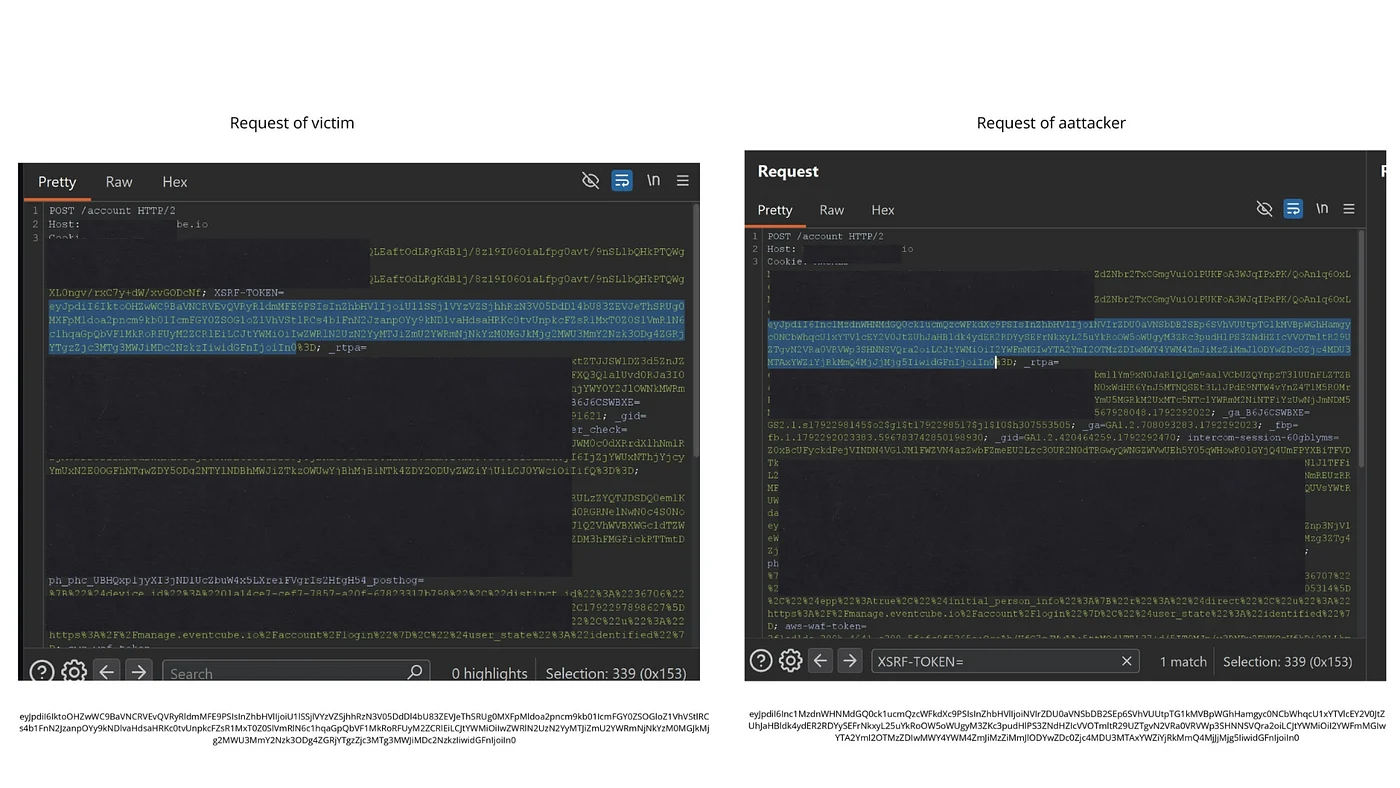
The request made for both accounts.
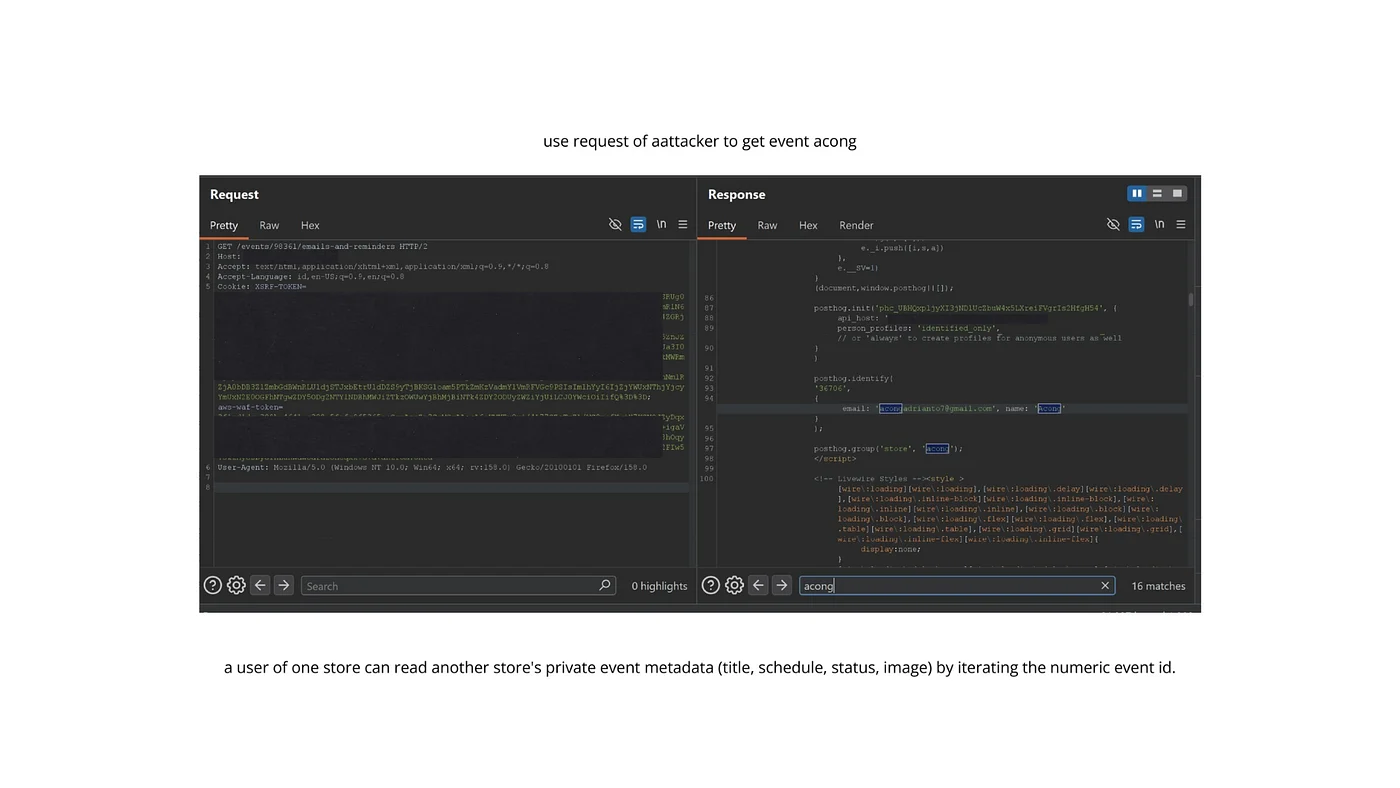
Using the attacker's request and swapping the identifier.
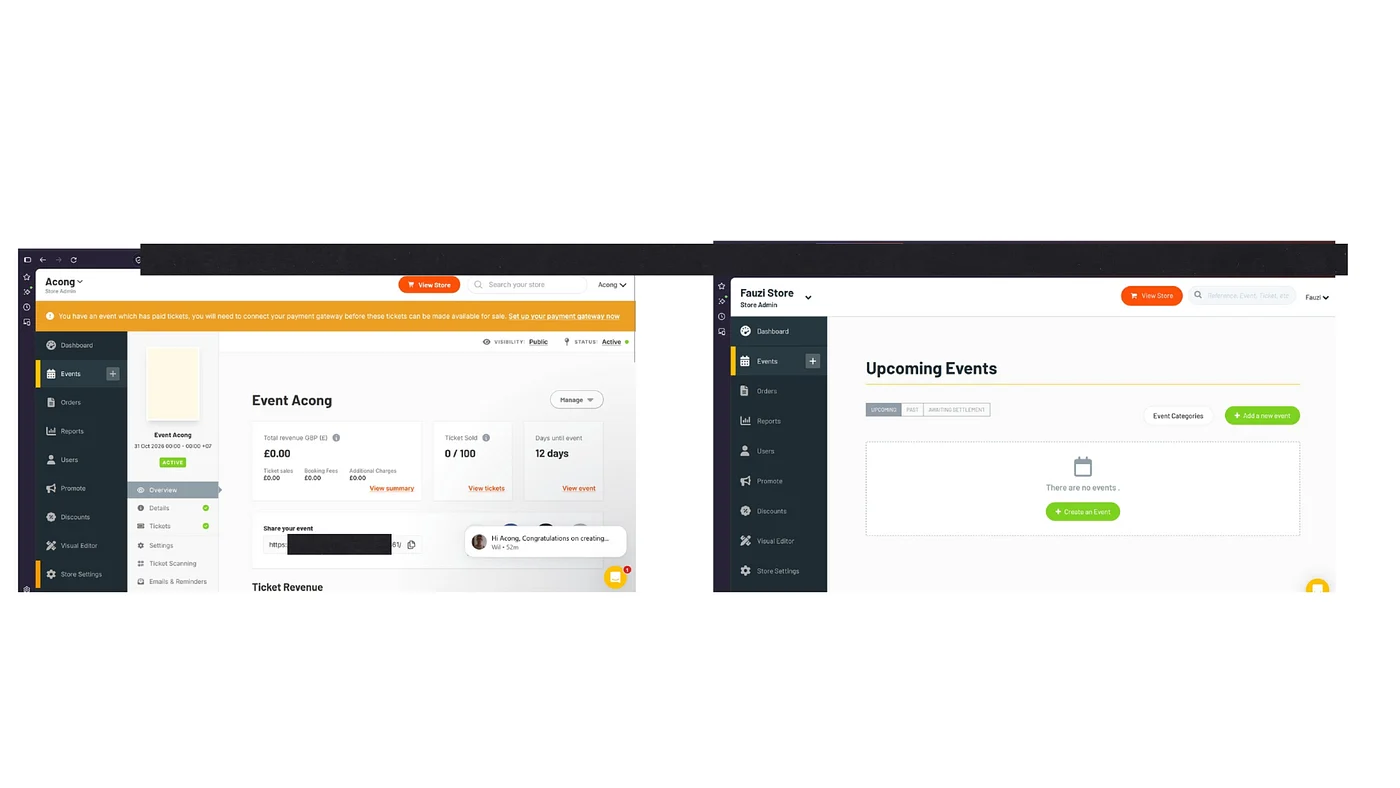
The condition of both accounts.
Root cause
The main event route checks that the event belongs to the current store and returns 403 when it does not. The emails-and-reminders sub-route returned the victim's event where the main route returned 403. The page state combined the victim's event key with the attacker's store key.
The Livewire snapshot makes the mismatch visible: the event component is keyed to 98361 while the store component is keyed to 19145. The main route returned 403 for the same event, while the sub-route returned 200.
Impact
An authenticated store owner can read the event data of another store by requesting that store's event ID on the emails-and-reminders route, even though the main event page refuses the same request. In the demonstrated case the exposed data includes the event title, its state and its date. The attacker's own store owning no events shows that no legitimate relationship to the event is required.
The report does not describe what else the sub-page exposes or whether the same request can change anything; it only shows the page rendering the victim's event data.
Fix
The report does not state what was changed. A fix would be to apply the same ownership check on /events/<id>/emails-and-reminders that already exists on /events/<id>.
Variants to test
- Enumerate sibling sub-routes of a protected resource, such as
/events/<id>/emails-and-reminders, and request each with an ID owned by another account. A positive result is200 OKwith the other tenant's data where the parent route returns403. - Compare the parent route and every child route for the same ID in the same session. Any difference in status code between parent and child is the signal.
- Inspect the rendered page state (Alpine
x-data, Livewire snapshots, embedded JSON) for identifiers that do not match the session's own tenant. A positive result is a component keyed to another tenant's object alongside your own store or user key. - Test with an account that owns no objects of the tested type, as here. Any object data appearing at all is then unambiguously out of scope.
Hunting notes
The signal during recon is a resource with a numeric or sequential identifier and several child paths under it; if the parent returns 403 for a foreign ID, try each child with the same ID.
When those two are resolved from different sources, one from the request and one from the session, a missing reconciliation check is likely.
The researcher demonstrated impact with two accounts they controlled, showing the parent route refusing the request and the child route serving the other account's event, including the mismatched store and event keys in the page state.
What happened, in plain words
A researcher found a bug in a website that lets people run online stores. Each store owner can create events (things like sales, launches or reminders) inside their own store. The website is supposed to make sure you only ever see your own store's events. On the main page for an event, that check worked: when the researcher asked for someone else's event, the site said no. But on a smaller sub-page of the same event, the site handed over the other person's event details without complaint.
This kind of bug is called an IDOR, short for Insecure Direct Object Reference. The name sounds technical, but the idea is simple. Imagine a hotel where every room key is just a number written on a card, and the front desk never checks whether the room is yours. If you change the number on your card from 101 to 102, you can walk into room 102. The website here works the same way: the event is identified by a number in the address, and one of the pages forgot to ask whether that number belongs to you.
The researcher describes the find as a lucky one because it was so simple. They did not use any special tools. They used two accounts they had created themselves, one playing the attacker and one playing the victim, and compared what the site did for each.
The target and the feature
The site is referred to in the report as https://blablabalastore.io. It is a multi-tenant store application. "Multi-tenant" means one installation of the software serves many separate customers (tenants), and each customer's data is meant to be kept apart from the others. Think of an office building with many companies inside: one building, one entrance, but each company's floor should only be reachable by its own staff.
Each store has its own identifier, a number that the site uses internally to tell stores apart. Stores own events. The feature involved is the event management area, and specifically the sub-page for a single event's emails and reminders. That page lives at the address /events/<id>/emails-and-reminders, where <id> is the event's number.
Normally, a store owner should only be able to open events that belong to their own store. The main event page at /events/<id> enforces that ownership check. The emails-and-reminders sub-page is a separate route, meaning a separate address the site knows how to answer, and it rendered the victim's event data.
A "route" is just a pattern of address the website recognises. When your browser asks for a particular path, the site looks up which piece of code should handle it. Two different paths can end up showing the same underlying record, and if only one of them was written with a security check, the other becomes a way around it.
The setup
The researcher used two accounts, both owned by them:
| Role | Store | Store ID | Events | |
|---|---|---|---|---|
| Attacker | [redacted] | Fauzi Store | 19145 | none |
| Victim | [redacted] | Acong | 19143 | event 98361, "Event Acong" |
The attacker's store owns no events at all. That detail matters: if any event data shows up while logged in as the attacker, it cannot possibly be the attacker's own data, so there is no ambiguity about whether the site leaked something. The victim's store owns event 98361.
No special tools are described. The work is done with a browser session and the ability to send requests as each account. A browser session means the browser is logged in and carries whatever the site uses to recognise you, typically a cookie. A cookie is a small piece of data the site stores in your browser and your browser sends back with every request, so the site can remember who you are between page loads. You do not have to understand cookies to follow this, only that the site knows which account is asking.
Finding it
The starting point is the contrast between two routes on the same resource. "Resource" here means the event record itself. Requesting the main event page as the attacker returns 403 Forbidden, so the ownership check on that route works. 403 Forbidden is the standard web response meaning "I understood your request, but you are not allowed to do this". Requesting the sub-page for the same event as the same attacker returns 200 OK and renders the victim's event. 200 OK is the standard response meaning "here is the page you asked for".
The researcher's own explanation is that the developer forgot to check authorisation on this endpoint, and describes the find as a lucky one because of how simple it was. An "endpoint" is simply a specific address on a server that accepts requests and returns something. "Authorisation" is the process of deciding whether a logged-in user is allowed to do a particular thing. Authentication, which is different, is about proving who you are; authorisation is about what you may then do. Here the site knew perfectly well who the attacker was, it just failed to ask whether that person was allowed to see this event.
Exploitation
Step 1: log in as the attacker
Log in to https://blablabalastore.io as the attacker account, store 19145 (Fauzi Store), which owns no events.
Why start here? Because the whole test depends on the site knowing which store you belong to. By logging in as the account with no events, every event the site shows you during the test is provably not yours.
Step 2: confirm the main event page is protected
Request the event directly:
This is a raw HTTP request. HTTP is the language browsers and servers use to talk to each other. GET means "please give me this thing". The path /events/98361 asks for event number 98361. HTTP/1.1 is the version of the protocol. Host: blablabalastore.io tells the server which site name the request is for, which matters because one server can host many sites.
The result is HTTP 403 Forbidden. The ownership check works on the main event page, so the attacker cannot open the victim's event through the normal route. This step is the control in the experiment: it proves the site does know how to refuse, so a later success is not just the site being generally careless.
Step 3: request the sub-page for the same event
Request the emails-and-reminders route for the same event ID:
Same method, same host, same event number, but now the path has an extra segment on the end: /emails-and-reminders. That segment points at a different piece of code, the sub-page. The only thing that changed between step 2 and step 3 is which handler answers the request.
The result is HTTP 200 OK. The page renders event 98361, which belongs to the victim's store 19143, inside the attacker's session. In other words, the site said "here you go" to a request it had just refused one address earlier.
Step 4: read the victim's event data in the response body
The response body contains the victim's event data in the page's Alpine.js state:
x-data="{ eventTitle: 'Event Acong', eventStateFormatted: 'Active', … }"
Alpine.js is a small JavaScript library that lets a web page keep bits of data in its HTML and update the page from them. The x-data attribute is where Alpine stores that starting data. Reading it line by line: x-data opens the attribute; the braces { … } hold a set of named values; eventTitle: 'Event Acong' is the event's title; eventStateFormatted: 'Active' is the event's state, already formatted for display; the ellipsis stands for further fields the report does not list.
The event title and state are those of the victim's event, and the response also shows 31 Oct 2026 00:00–00:00 +07. The +07 is a time zone offset, seven hours ahead of UTC. This step matters because it shows the leak is not just a page shell: real data belonging to the other store is sitting in the HTML your browser received.
Step 5: confirm the wrong scope in the Livewire snapshot
The embedded Livewire snapshot shows the event and the store as separate components, and the store in the snapshot is the attacker's:
"event":[{"class":"Event","key":98361}]
"store":[{"class":"Store","key":19145}]
Livewire is a framework that lets a server-rendered page behave interactively without the developer writing much JavaScript. To do that, it embeds a snapshot of the page's state in the HTML, so the browser can send it back later and the server knows what it was showing. JSON is a plain text format for structured data, made of names and values in braces and brackets.
In the first block, "event" names a component of class Event with key 98361, the victim's event. In the second, "store" names a component of class Store with key 19145, the attacker's store. A "key" here is the identifier the framework uses to know which record a component refers to.
The event component is keyed to the victim's event 98361 while the store component is keyed to the attacker's store 19145. The page is therefore rendering another tenant's event under the attacker's store context. This is the clearest evidence in the whole report: the two halves of the page disagree about whose data they are showing, and nothing in between noticed.
The request made for both accounts.
Using the attacker's request and swapping the identifier.
The condition of both accounts.
Root cause
The main event route checks that the event belongs to the current store and returns 403 when it does not. The emails-and-reminders sub-route returned the victim's event where the main route returned 403. The page state combined the victim's event key with the attacker's store key.
Put differently: one value comes from what you asked for (the event number in the address) and the other comes from who you are (the store attached to your login). Both are trusted, and nobody compares them.
The Livewire snapshot makes the mismatch visible: the event component is keyed to 98361 while the store component is keyed to 19145. The main route returned 403 for the same event, while the sub-route returned 200. A defence that lives in one place only protects that one place; the moment a second door is added to the same room, it needs its own lock or a shared one.
Impact
An authenticated store owner can read the event data of another store by requesting that store's event ID on the emails-and-reminders route, even though the main event page refuses the same request. In the demonstrated case the exposed data includes the event title, its state and its date. The attacker's own store owning no events shows that no legitimate relationship to the event is required.
The report does not describe what else the sub-page exposes or whether the same request can change anything; it only shows the page rendering the victim's event data.
Fix
The report does not state what was changed. A fix would be to apply the same ownership check on /events/<id>/emails-and-reminders that already exists on /events/<id>.
Middleware is code that runs before the main handler for a request, so a check placed there applies to every route it is attached to. A policy is a rule set describing who may do what to a given kind of record. Either way, the point is to stop relying on each new page remembering to repeat the check.
Variants to test
- Enumerate sibling sub-routes of a protected resource, such as
/events/<id>/emails-and-reminders, and request each with an ID owned by another account. A positive result is200 OKwith the other tenant's data where the parent route returns403. - Compare the parent route and every child route for the same ID in the same session. Any difference in status code between parent and child is the signal.
- Inspect the rendered page state (Alpine
x-data, Livewire snapshots, embedded JSON) for identifiers that do not match the session's own tenant. A positive result is a component keyed to another tenant's object alongside your own store or user key. - Test with an account that owns no objects of the tested type, as here. Any object data appearing at all is then unambiguously out of scope.
Hunting notes
The signal during recon is a resource with a numeric or sequential identifier and several child paths under it; if the parent returns 403 for a foreign ID, try each child with the same ID.
Recon, short for reconnaissance, is the stage of looking around a target to understand its structure before trying anything. A sequential identifier is one that counts up, like 98360, 98361, 98362, which makes guessing other people's records easy once you have seen one of your own.
When those two are resolved from different sources, one from the request and one from the session, a missing reconciliation check is likely.
The researcher demonstrated impact with two accounts they controlled, showing the parent route refusing the request and the child route serving the other account's event, including the mismatched store and event keys in the page state.
Glossary
- 403 Forbidden: the standard web response meaning the server understood the request but refuses to allow it.
- 200 OK: the standard web response meaning the request succeeded and the content follows.
- Alpine.js: a small JavaScript library that stores data in HTML attributes such as
x-dataand uses it to update the page. - Authentication: proving who you are, usually by logging in.
- Authorisation: deciding whether an authenticated user is allowed to perform a particular action or see a particular record.
- Cookie: a small piece of data a site stores in your browser, which the browser sends back on later requests so the site can recognise your session.
- Endpoint: a specific address on a server that accepts requests and returns a response.
- Event (in this app): a record owned by a store, with a title, a state and a date, managed through the event area of the site.
- GET: the HTTP method meaning "give me this thing".
- Host header: the part of an HTTP request that names which site the request is for.
- HTTP: the protocol browsers and servers use to exchange requests and responses.
- IDOR (Insecure Direct Object Reference): a bug where a record is fetched by an identifier supplied by the user without checking that the user is allowed to access that record.
- JSON: a plain text format for structured data, built from names, values, braces and brackets.
- Key (in Livewire): the identifier a component uses to refer to a particular record.
- Livewire: a framework that renders pages on the server and embeds a snapshot of their state in the HTML so they can behave interactively.
- Middleware: code that runs before a request reaches its main handler, often used to apply checks across many routes at once.
- Multi-tenant: one installation of an application serving many separate customers whose data must be kept apart.
- Policy: a rule set describing who may do what to a given kind of record.
- Recon (reconnaissance): the stage of exploring a target to understand its structure before testing.
- Resource: the underlying record, such as an event, that a route displays or acts on.
- Route: a pattern of address a website recognises, mapped to the code that handles it.
- Sequential identifier: an ID that counts upwards, making other records easy to guess.
- Session: the state of being logged in, carried between requests, usually by a cookie.
- Snapshot (Livewire): the embedded copy of a page's component state that Livewire puts in the HTML.
- Store (in this app): a tenant of the application, with its own identifier, owning events.
- Sub-route: a route nested under another, such as
/events/<id>/emails-and-remindersunder/events/<id>. - Tenant: one customer of a multi-tenant application, whose data should be isolated from other customers.
- x-data: the Alpine.js HTML attribute that holds a page's starting data.



