The First Bounty Target (Disclosing Multiple Reports)
The article describes multiple vulnerabilities on a shopping website, including an open redirect that could lead to account takeover via CSRF, and several IDOR flaws that exposed customer PII. An attacker could redirect victims to a malicious site and steal cookies, or brute-force order identifiers to access other users' order details.
 Published on infosecwriteups.com
Bug Bounty
The full write-up lives on its author's site
It belongs to its author, so we link to it rather than copy it. The other two tabs are our own rewrites, checked against it.
Context
The target was a private bug bounty program, so the company is not named; the author refers to it throughout as shopping.com, a shopping website. The write-up covers seven separate issues found on that one target, several of which only become reachable after a real purchase has been made. The author's stated aim is to show a methodology that found multiple vulnerabilities without using any tool. and he notes that this was the first target from which he received a bounty.

The features involved are ordinary e-commerce ones: registration and phone number handling, login sessions, the shopping cart, order tracking, order history, password reset, and the order confirmation page.
Setup
The write-up does not list tool versions. The tools and preconditions it does mention are:
- A browser with developer tools, used for the first case study.
- Burp Suite, used for intercepting requests, building a CSRF proof of concept, and running Intruder.
- Two accounts on the target, used in the session management and open redirect cases.
- At least one completed purchase. The author states explicitly that the features behind case studies 4 and 5 were only available to him after he made a purchase on shopping.com, and case study 7 was also found after placing an order.
Finding it
Each case study started from something small that looked wrong when a normal request was inspected.
- In the cart, deleting an item produced a POST request whose body carried a redirect parameter. A parameter that controls where the browser goes next, sitting in a request body, is a redirect candidate.
- The "Track my Order" feature let a customer track an order by order id. The lookup appeared to be keyed on data the customer supplies, with no check that the order belonged to them.
- Clicking an order on the "My Orders" page refreshed the page and showed the ordered product. The intercepted request carried an intOrderId parameter in the body, which is a direct object reference.
- The order confirmation URL contained both a secret key and an order id.
Exploitation
Case study 1: registering a number without authentication
This one is covered in a separate earlier post by the author, linked from this write-up, titled "How Inspect Element Got me a Bounty". The summary given here is that it was a bypass allowing a phone number to be changed in an application that does not allow it. The mechanics are not repeated in this report.
Case study 2: session not invalidated after a password reset
The author created an account and logged into it in two browsers. He then changed the password of the account in one browser and tried to make edits from the second browser. The edits went through successfully. The old session survived the password change, which the author classifies as a minor severity issue.
Case study 3: open redirect and CSRF leading to account takeover
- With an item in the cart, deleting it sent a POST request. The body contained a redirect parameter.
- He changed the value of that parameter to his own server. The response redirected to his server, and the request carried the user's cookies with it.
- He converted the request into a CSRF proof of concept through Burp Suite and replayed it with a different account. The victim was redirected to the attacker's website and their cookies were stolen.
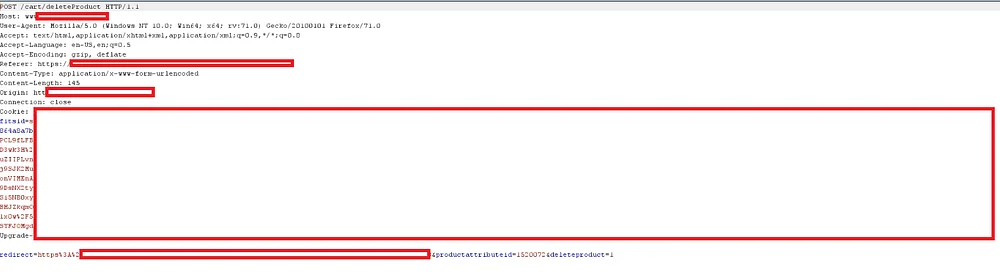
The screenshot shows the POST request used for this case study. The two properties that combine here are that the redirect target is taken from a user-controlled body parameter, and that cookies travel with the resulting request to the attacker's host.
Case study 4: IDOR in order tracking
- After a successful order, the "Track my Order" option lets a customer track an order by order id.
- The author supplied the phone number of a victim and brute forced the order number with Burp Suite Intruder, so knowing the order number itself was not necessary.
- A correct order number returned the order details, which leaked the address and other personal information of the victim.
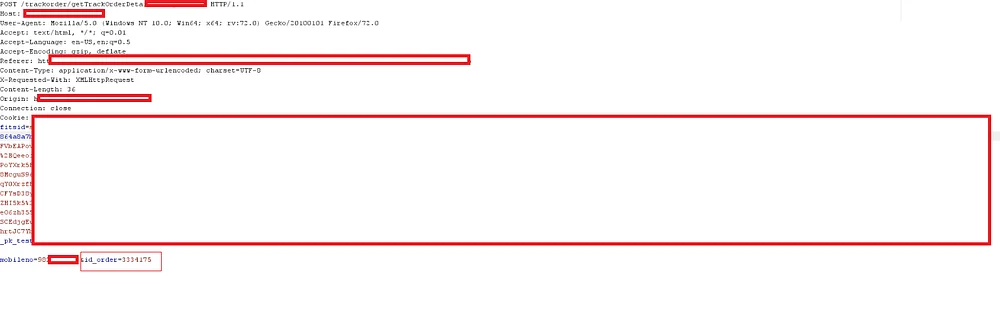
In his own test he brute forced the id_order parameter using the mobile number of his second account and retrieved all the orders placed by that second account.
Case study 5: IDOR in order history
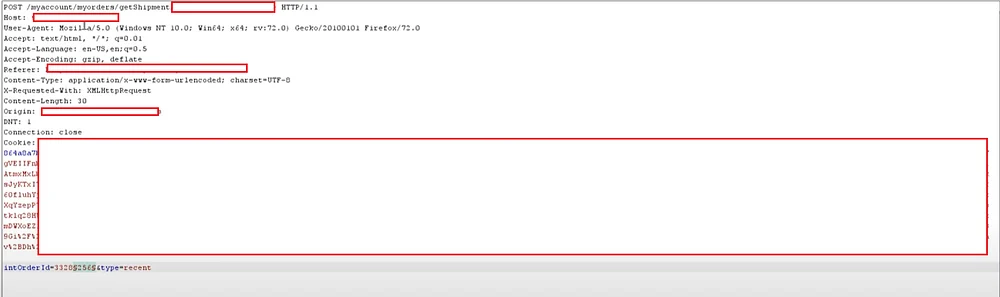
- On the "My Orders" page, clicking an order refreshes the page and shows the ordered product.
- He intercepted that request and clicked the ordered product again. The request body again contained an intOrderId parameter.
- He sent the request to Burp Intruder and obtained multiple order details, leaking PII of other customers.
Case study 6: password reset link does not expire
The reset link could be used to reset the password more than once. The author calls it a minor bug and points to a public HackerOne report on Shopify (report 898841) as an illustration, noting that behaviour may vary from program to program.
Case study 7: customer details leaked after a successful order
After placing an order, the URL looked like this:
He changed the order id in decreasing order and PII started disclosing: name, address, phone number, and mode of payment. He changed the order id in decreasing order and PII started disclosing.
Root cause
Across the object reference cases (4, 5 and 7), the server appears to authorise a lookup purely on identifiers supplied by the client, without binding the record to the authenticated session. In case 4 the order number is guessable by brute force once a phone number is known; in case 5 the intOrderId value is accepted directly; in case 7 the orderid is accepted and PII is disclosed when it is changed.. These are inferences from the observed behaviour; the report does not show server-side code.
Case 3 combines two weaknesses: the redirect destination is read from a request body parameter with no allow-list, and the session cookie is sent along to the new destination, so the redirect becomes a cookie exfiltration primitive that can be triggered cross-site..
Case 2 is a failure to invalidate existing sessions when credentials change. Case 6 is a reset token that is not invalidated after use.
Impact
- Case 1: a phone number could be registered or changed without authentication.
- Case 2: an attacker holding a live session keeps access after the victim resets their password. The author rates it minor.
- Case 3: an attacker can redirect a victim to their own site and steal the victim's cookies, which the author describes as account takeover.
- Case 4: anyone who knows a victim's phone number can brute force the order number and read the victim's address and other personal information.
- Case 5: multiple customers' order details and PII can be read by enumerating
intOrderId. - Case 6: a reset link remains usable more than once. Minor.
- Case 7: enumerating
orderiddiscloses name, address, phone number and mode of payment for other customers' orders.
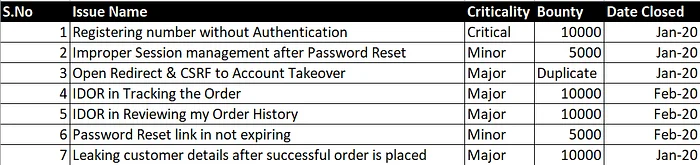
Cases 4, 5 and 7 require the attacker to have an account that has completed a purchase, because the features are only exposed after a purchase. The author reports a total of 50,000 INR in bounties across the reports from this target.
Fix
The report does not describe any fixes applied by the program. The changes implied by the findings are: bind order lookups to the authenticated user on the server rather than trusting client-supplied order identifiers; validate the secretkey against the specific order, or drop it in favour of a proper authorisation check; ; ; .
Variants to test
- Redirect parameters in state-changing bodies. Look for parameters named
redirect,return,nextor similar in POST bodies on cart, login and logout actions. A positive result is a response that sends the browser to a host you control, with the session cookie arriving at that host. - Order tracking by phone number. Submit a phone number you own and fuzz the order id field. A positive result is order details for an account other than the one making the request.
- Sequential object ids in post-purchase flows. Intercept requests from order history, invoices and confirmation pages and look for parameters such as
intOrderIdororderid. A positive result is another customer's PII returned for an id you do not own. - Secret keys alongside enumerable ids. Where a URL carries both a key and an id, change only the id. A positive result is that the key is ignored and the record for the new id is returned.
- Session survival after password change. Log in from two browsers, reset the password in one, and act from the other. A positive result is that the old session still performs authenticated actions.
- Reset link reuse. Request a reset link, use it, then use it again. A positive result is a second successful password change from the same link.
What happened, in plain words
A security researcher spent time on a shopping website that ran a private bug bounty programme. A bug bounty programme is an arrangement where a company invites people to look for security weaknesses in its systems and pays them for reporting what they find. Because the programme was private, the company is not named; throughout his write-up the author calls it shopping.com.
Over time he found seven separate problems on that one website. Several of them could only be reached after he had actually bought something, because the website only shows those pages to customers who have placed an order. He says his aim was to show a way of working that found many weaknesses using nothing more than a browser and a tool called Burp Suite, which sits between your browser and the website so you can read and change the messages they exchange.
The parts of the website involved are the ordinary pieces of any online shop: signing up and handling a phone number, staying logged in, the shopping cart, tracking an order, the list of your past orders, resetting a forgotten password, and the page shown after an order is confirmed.
Before going further, a few ideas that come up again and again below.
- A request is the message your browser sends to a website when you click something or load a page. A response is the website's reply.
- A parameter is a named piece of information carried inside a request, rather like a labelled field on a form. A request can carry parameters in its body (the part after the address, used for form submissions) or in the URL (the address itself, after a question mark).
- A cookie is a small piece of data the website asks your browser to store and send back with every later request. It is how the site recognises you from one page to the next, and it is effectively your proof that you are logged in. If someone else gets your cookie, they can often act as you.
- An API is the set of addresses and rules a website uses behind the scenes so its pages can fetch and change data. When you click a button, the page usually sends a request to one of these addresses.
- An identifier (or id) is a number or code that names a specific record, such as one particular order.
- PII stands for personally identifiable information: details that identify a real person, such as a name, address or phone number.
Setup
The write-up does not give versions for any of the tools. What it does say he used, and what he needed in place, is this:
- A browser with developer tools. Developer tools are built into every modern browser and let you look at the requests a page makes. He used them for the first case study.
- Burp Suite, used for three jobs: intercepting requests (pausing a request so you can read and edit it before it reaches the site), building a CSRF proof of concept, and running Intruder. CSRF and Intruder are explained where they first appear.
- Two accounts on the target, used in the session management and open redirect cases. Having two accounts lets you play both the attacker and the victim at once.
- At least one completed purchase. The author states plainly that the features behind case studies 4 and 5 were only available to him after he made a purchase on shopping.com, and case study 7 was also found after placing an order.
Finding it
None of these started with a scanner or a special tool. Each case study began with something small that looked wrong when he read a normal request closely. That is the habit worth copying: watch what your browser sends, and ask whether the website should really be trusting it.
- In the cart, deleting an item sent a POST request. POST is simply the type of request used when you are changing something rather than just viewing a page. Its body carried a redirect parameter. A parameter that decides where the browser goes next, sitting in a request body, is a candidate for an open redirect, which is explained in case study 3.
- The "Track my Order" feature let a customer track an order by order id. The lookup appeared to be keyed on data the customer supplies, with no check that the order actually belonged to them.
- Clicking an order on the "My Orders" page refreshed the page and showed the ordered product. The intercepted request carried an intOrderId parameter in the body. That is a direct reference to a specific order record, and if the server trusts whatever number you send, it is a candidate for an IDOR (explained in case study 4).
- The order confirmation URL contained both a secret key and an order id. Anything that counts upwards is easy to guess.
Exploitation
Case study 1: registering a number without authentication
This one is covered in a separate earlier post by the author, linked from this write-up, titled "How Inspect Element Got me a Bounty". The summary given here is that it was a bypass allowing a phone number to be changed in an application that does not allow it. The mechanics are not repeated in this report, so there is nothing more to explain about how it worked.
Case study 2: session not invalidated after a password reset
A session is the period during which a website treats you as logged in, and it is held together by the cookie described above. The usual expectation is that when you change your password, every other place you are logged in should be thrown out, because a password change is often how someone reacts to suspecting that their account is compromised.
- The author created an account and logged into it in two browsers. Two browsers means two separate sessions, each with its own cookie.
- He then changed the password of the account in one browser.
- He tried to make edits from the second browser, the one that had not been used for the password change.
- The edits went through successfully.
The old session survived the password change. In other words, the website never invalidated the cookie held by the second browser. The author classifies this as a minor severity issue, which is fair: on its own it does not let an outsider in, but it means that anyone already holding a live session keeps their access even after the real owner tries to lock them out.
Case study 3: open redirect and CSRF leading to account takeover
Two ideas need explaining first.
An open redirect is when a website takes a destination address from something the user supplies and sends the browser there without checking it. Shops legitimately use this: after you log in, the site sends you back to the page you came from. The danger is that the destination can be any address at all, including one belonging to an attacker.
CSRF stands for cross-site request forgery. It means tricking a logged-in victim's browser into sending a request to a site where they are logged in, without them meaning to. The browser automatically attaches the site's cookie to that request, because that is what browsers do, so the site believes the request came from the victim. Think of it as someone posting a signed letter in your name because your signature stamp was sitting on the desk.
Here is what he did:
- With an item in the cart, deleting it sent a POST request. The body contained a redirect parameter.
- He changed the value of that parameter to his own server. The response redirected to his server, and the request carried the user's cookies with it.
- He converted the request into a CSRF proof of concept through Burp Suite and replayed it with a different account. The victim was redirected to the attacker's website and their cookies were stolen.
The screenshot shows the POST request used for this case study. Two properties combine here. First, the redirect target is taken from a body parameter the user controls, with no list of allowed destinations. Second, cookies travel with the resulting request to the attacker's host. Put together, the redirect stops being a harmless navigation feature and becomes a way to carry the victim's cookie off to a server the attacker owns. Because the cart action has no CSRF protection, the attacker can make a victim's browser send that request without the victim doing anything deliberate. The author describes the outcome as account takeover, because a stolen session cookie is enough to act as the victim.
Case study 4: IDOR in order tracking
IDOR stands for insecure direct object reference. It means the website looks up a record using an identifier you send, but never checks that the record belongs to you. A everyday comparison: a cloakroom that hands over any coat whose ticket number you read out, without checking that the ticket is yours.
- After a successful order, the "Track my Order" option lets a customer track an order by order id.
- The author supplied the phone number of a victim and brute forced the order number with Burp Suite Intruder, so knowing the order number itself was not necessary.
- A correct order number returned the order details, which leaked the address and other personal information of the victim.
Brute forcing means trying many values in turn until one works. Burp Suite Intruder automates exactly that: you mark the part of the request you want to vary, give it a list or a range of values, and it sends the request once for each. Here the varying part was the order number, and the phone number was the piece of information the attacker needed to start.
In his own test he brute forced the id_order parameter using the mobile number of his second account and retrieved all the orders placed by that second account. Using his own second account as the victim is a sensible way to prove the issue without touching a stranger's data.
Case study 5: IDOR in order history
- On the "My Orders" page, clicking an order refreshes the page and shows the ordered product.
- He intercepted that request and clicked the ordered product again. The request body again contained an intOrderId parameter.
- He sent the request to Burp Intruder and obtained multiple order details, leaking PII of other customers.
This is the same class of mistake as case study 4, in a different feature. The page looks up an order by the number in intOrderId, and the server accepts whatever number is sent rather than checking it against the logged-in customer. Running it through Intruder with many values returned other people's order details.
Case study 6: password reset link does not expire
When you forget your password, a site emails you a link containing a one-time code. The expectation is that the link works once and then stops working, because a link that keeps working is a key that never gets taken back.
Here the reset link could be used to reset the password more than once. The author calls it a minor bug and points to a public HackerOne report on Shopify (report 898841) as an illustration, noting that behaviour may vary from program to program. In other words, whether a programme treats this as a real finding depends on its own rules.
Case study 7: customer details leaked after a successful order
After placing an order, the URL looked like this:
Reading that address in plain words: the site is shopping.com, the page is the order confirmation page, and after the question mark come two parameters joined by an ampersand. The first is secretkey, whose value is a placeholder for some key. The second is orderid, whose value is a placeholder for an order number. A URL like this is how a website can carry information from one page to the next.
He changed the order id in decreasing order and PII started disclosing: name, address, phone number, and mode of payment. He changed the order id in decreasing order and PII started disclosing. Enumeration means walking through a series of values, here simply counting the order id down, and collecting whatever comes back. The presence of a secret key looks reassuring, but if the server does not actually check it against the order being requested, it is decoration.
Root cause
A root cause is the underlying mistake that produces a symptom, as opposed to the symptom itself.
Across the object reference cases (4, 5 and 7), the server appears to authorise a lookup purely on identifiers supplied by the client, without binding the record to the authenticated session. In case 4 the order number is guessable by brute force once a phone number is known; in case 5 the intOrderId value is accepted directly; in case 7 the orderid is accepted and PII is disclosed when it is changed.. These are inferences from the observed behaviour; the report does not show server-side code.
Case 3 combines two weaknesses: the redirect destination is read from a request body parameter with no allow-list, and the session cookie is sent along to the new destination, so the redirect becomes a cookie exfiltration primitive that can be triggered cross-site.. Exfiltration simply means getting data out to somewhere the attacker controls.
Case 2 is a failure to invalidate existing sessions when credentials change. Case 6 is a reset token that is not invalidated after use.
Impact
Impact is what an attacker could actually do with the weakness, which is what usually decides how much a report is worth.
- Case 1: a phone number could be registered or changed without authentication.
- Case 2: an attacker holding a live session keeps access after the victim resets their password. The author rates it minor.
- Case 3: an attacker can redirect a victim to their own site and steal the victim's cookies, which the author describes as account takeover.
- Case 4: anyone who knows a victim's phone number can brute force the order number and read the victim's address and other personal information.
- Case 5: multiple customers' order details and PII can be read by enumerating
intOrderId. - Case 6: a reset link remains usable more than once. Minor.
- Case 7: enumerating
orderiddiscloses name, address, phone number and mode of payment for other customers' orders.
Cases 4, 5 and 7 require the attacker to have an account that has completed a purchase, because the features are only exposed after a purchase. The author reports a total of 50,000 INR in bounties across the reports from this target.
Fix
The changes implied by the findings are: bind order lookups to the authenticated user on the server rather than trusting client-supplied order identifiers; validate the secretkey against the specific order, or drop it in favour of a proper authorisation check; ; ; .
Variants to test
These are the same ideas generalised, so you can look for them on other sites.
- Redirect parameters in state-changing bodies. Look for parameters named
redirect,return,nextor similar in POST bodies on cart, login and logout actions. A positive result is a response that sends the browser to a host you control, with the session cookie arriving at that host. - Order tracking by phone number. Submit a phone number you own and fuzz the order id field. A positive result is order details for an account other than the one making the request.
- Sequential object ids in post-purchase flows. Intercept requests from order history, invoices and confirmation pages and look for parameters such as
intOrderIdororderid. A positive result is another customer's PII returned for an id you do not own. - Secret keys alongside enumerable ids. Where a URL carries both a key and an id, change only the id. A positive result is that the key is ignored and the record for the new id is returned.
- Session survival after password change. Log in from two browsers, reset the password in one, and act from the other. A positive result is that the old session still performs authenticated actions.
- Reset link reuse. Request a reset link, use it, then use it again. A positive result is a second successful password change from the same link.
Glossary
- API: the set of addresses and rules a website uses behind the scenes so its pages can fetch and change data.
- Body: the part of a request that carries data after the address, typically used for form submissions.
- Brute force: trying many possible values in turn until one works.
- Bug bounty programme: an arrangement where a company invites people to look for security weaknesses and pays them for reporting what they find.
- Burp Suite: a tool that sits between your browser and a website so you can read, pause and change the messages they exchange.
- Cookie: a small piece of data a website asks your browser to store and send back with later requests, used to recognise you and to prove you are logged in.
- CSRF (cross-site request forgery): tricking a logged-in victim's browser into sending a request to a site where they are logged in, without their intent, with their cookie attached automatically.
- Developer tools: features built into a browser that let you inspect the requests a page makes.
- Enumeration: walking through a series of values, such as counting order ids, and collecting whatever comes back.
- Exfiltration: getting data out to somewhere the attacker controls.
- IDOR (insecure direct object reference): a website looks up a record using an identifier you send but never checks that the record belongs to you.
- Identifier (id): a number or code that names a specific record, such as one particular order.
- Impact: what an attacker could actually do with a weakness, which usually decides how serious it is.
- Intercepting: pausing a request in a tool so you can read and edit it before it reaches the site.
- Intruder: the part of Burp Suite that sends the same request many times with a chosen part varied each time.
- Open redirect: a website takes a destination address from something the user supplies and sends the browser there without checking it.
- Parameter: a named piece of information carried inside a request, in its body or in its URL.
- PII (personally identifiable information): details that identify a real person, such as a name, address or phone number.
- POST request: the type of request used when you are changing something rather than just viewing a page.
- Request: the message your browser sends to a website when you click something or load a page.
- Response: the website's reply to a request.
- Root cause: the underlying mistake that produces a symptom, as opposed to the symptom itself.
- Session: the period during which a website treats you as logged in, held together by a cookie.
- URL: the address of a page, which can also carry parameters after a question mark.



