The Ghost in the Machine: How a Single Line of JavaScript Unlocked an Entire Admin Panel
A Laravel-based single-page application used a vulnerable version of lodash (4.17.21) and trusted client-side state for admin checks. By polluting the JavaScript object prototype, an unauthenticated attacker could make the front-end believe they were an admin and load the admin dashboard without any server-side authentication.
 Published on medium.com
Penetration Testing
The full write-up lives on its author's site
It belongs to its author, so we link to it rather than copy it. The other two tabs are our own rewrites, checked against it.
Context
The engagement described here was a web application penetration test against a Laravel based platform, run as a black box and gray box assessment for a mid sized company. The application is a Single Page Application: its front end logic lives in JavaScript bundles served from /build/assets/app-*.js, and the browser side code makes decisions about what the user is allowed to see before it talks to the server. That client side trust is the whole story.
The author is Suman Bahadur Basnet, publishing as Sbcoomputer. The write-up is dated 21 August 2026.
Setup
The tooling was deliberately light:
- OWASP ZAP, used to spider the application and map the attack surface automatically.
- The browser's Developer Tools, used for the manual review that the spider cannot do.
- No account, no session cookie and no login were used at any point. The researcher loaded the main page completely unauthenticated.
The precondition for the finding is a front end bundle that ships a vulnerable copy of lodash, and front end routing or state logic that reads authorisation flags from objects in browser memory.
Finding it
The researcher opened the front end bundles, specifically /build/assets/app-*.js, and searched with Ctrl+F for the keywords version, lodash and merge. The bundle contained lodash version 4.17.21, which is affected by CVE-2021-23337, a prototype pollution bug.
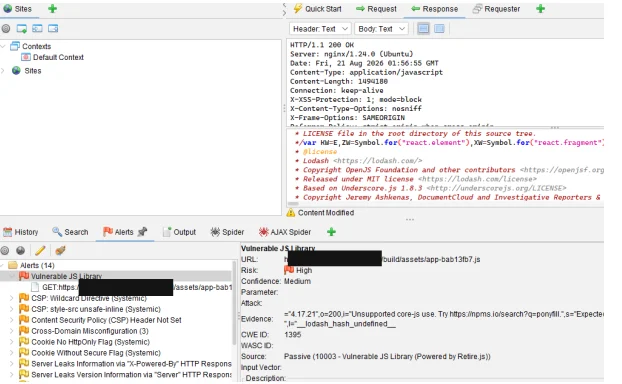
The image shows the bundle contents around the lodash version reference, the point at which the dependency was identified.
That alone is a dependency finding. What made it interesting was the question the researcher asked next: what if the front end logic trusts client side state too much, and checks a variable such as user.isAdmin or session.authenticated before it ever talks to the server? If the router or the session state object reads those flags from ordinary JavaScript objects, then polluting Object.prototype would make every object in the page report itself as an admin.
Exploitation
Step 1: confirm the polluted prototype is visible
With the main page loaded and no authentication of any kind, the researcher opened the browser console and ran a simple test.

Step 2: read the flag back
The second console command was typed next.
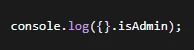
The console returned true. The global object prototype had been polluted, so every object in the browser's memory now reported the admin flag, including the session state object used by the application's front end router.
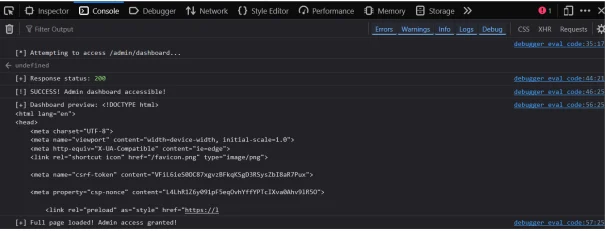
Step 3: navigate to the admin route
The researcher navigated to the /admin route. The expectation was an immediate redirect to a login page. Instead the screen flickered and the admin dashboard loaded fully rendered, with navigation menus, data tables and administrative controls.
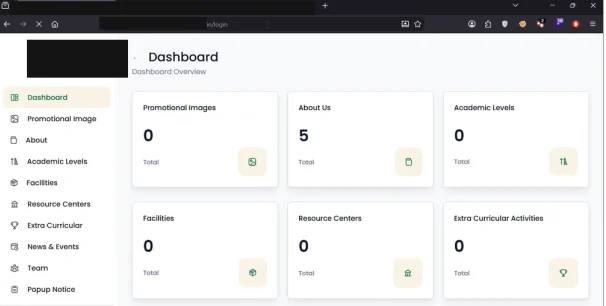
Step 4: close the gaps
Two things could still have broken the bypass, so the researcher handled both:
- If the application checked with the server, the
fetchrequests for user data were intercepted and the responses rewritten to always return an admin payload. - If the application tried to redirect away, the
window.location.assignfunction was blocked so the SPA router could not throw the user out.
With those in place, the application's security controls, CSRF protection, session validation and rate limiting, were all bypassed without a single authentication request being sent. The researcher was operating on trust the application had given to the client, and that trust had been hijacked.
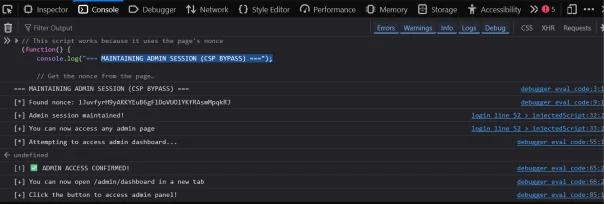
Root cause
The bundle shipped lodash 4.17.21, which carries CVE-2021-23337, a prototype pollution bug. The researcher hypothesised that the front end router and session state read authorisation flags such as user.isAdmin or session.authenticated from ordinary objects. Once that prototype is polluted, every such check returns the attacker's value.
The server side defences did not stop it because no authentication request was sent for them to inspect. CSRF protection, session validation and rate limiting all sit on the request path, and the bypass never entered it. The application trusted client side state that the browser could modify.
Impact
Had a real attacker found this first, the author states they would have had:
- Full read and write access to all user records, including PII.
- Complete control over application configuration, business logic and pricing data.
- Escalation paths to create, delete or manage any account.
No password, no 2FA and no social engineering were needed. The report was delivered marked Critical, with detailed reproduction steps, proof of concept code and a remediation roadmap.
Fix
The remediation the author recommended has two parts:
- Upgrade Lodash to v4.17.22 or later immediately.
- Implement server side authorisation middleware that validates the session on every single admin request. The server is the ultimate authority, not the browser.
Variants to test
- Search every front end bundle for
lodash,merge,versionand similar keywords. - Look for client side authorisation flags such as
isAdmin,role,authenticatedorpermissionsread from plain objects in the router or session store. - Test whether the application trusts intercepted
fetchresponses for user data. - Test whether blocking
window.location.assignkeeps a guarded route on screen. - Check whether any admin action actually reaches the server with an authorisation check attached.
What happened, in plain words
A security tester was hired to look for weaknesses in a company's web application. He found that the website's own code, running inside the visitor's browser, was making the decision about whether someone is an administrator. Because that decision happened in the browser rather than on the company's server, he was able to change it from the browser's developer console and walk straight into the admin panel without any password, any login, or any second factor.
The bundle shipped a small, extremely common piece of JavaScript called lodash, in a version with a known flaw. That flaw is called prototype pollution. In plain terms, it lets someone add a property to a shared template that every object in the page is built from, so every object suddenly appears to have that property. If the site asks "is this user an admin?" by looking for an isAdmin property on an object, and every object now answers yes, the site believes you are an admin.
This article walks through the same steps the tester took, in the same order, explaining each idea from scratch. You only need to know how to use a browser and a computer to follow it.
The setting: what kind of application this was
The target was a web application built on a framework called Laravel. Laravel is a toolkit for building websites and web services, mostly on the server side. You do not need to know Laravel to follow this; it just tells you the general family of technology involved.
The application is a Single Page Application, usually shortened to SPA. In an old-fashioned website, every time you click a link the browser asks the server for a whole new page and redraws everything. In a Single Page Application, the browser downloads one page plus a bundle of JavaScript, and from then on the JavaScript itself draws the screens and decides what to show as you click around. It still talks to the server to fetch data, but the navigation and much of the decision-making happen in your browser.
That design is why this story exists. If the JavaScript in your browser decides who is allowed to see the admin panel, then whoever controls the JavaScript in your browser controls that decision. And you always control the JavaScript in your browser, because it runs on your machine.
The assessment was run as a black box and gray box test. Black box means the tester is given almost nothing about how the system works, like a burglar who has never been inside the building. Gray box means he was given some information, perhaps partial documentation or a test account, but not everything. Either way, the finding here did not depend on privileged information: it was reachable from the public page.
The write-up is by Suman Bahadur Basnet, publishing as Sbcoomputer, and is dated 21 August 2026.
The tools, and why so few
The tester used a deliberately light setup:
- OWASP ZAP, a free security tool that automatically crawls a website, following links and recording every page and parameter it finds. Think of it as a robot that maps a building by walking every corridor. This is called spidering, and it produces a map of the attack surface, meaning all the places an attacker could potentially poke at.
- The browser's Developer Tools, the panel you open with F12 or by right-clicking and choosing Inspect. It lets you read the page's code, watch network traffic, and type JavaScript commands that run inside the page. This is the manual part, the part a robot cannot do, because it requires judgement about what looks interesting.
- No account, no session cookie, no login. He loaded the main page as a complete stranger. This matters: everything that follows was done by an anonymous visitor.
A session cookie is a small piece of data your browser stores after you log in, and sends back with each request so the server can recognise you. It is like the wristband you get at an event: the staff check the wristband instead of asking for your ID every time. The tester had no wristband at all.
Finding it: reading the site's own code
He opened the front end JavaScript bundles. A bundle is what developers call the file (or files) produced when all the separate JavaScript source files of an application are squashed together into one big file to save download time. Here the bundle lived at a path matching /build/assets/app-*.js. The * is a wildcard: the real filename has something in that spot, often a hash of the file's contents so browsers can cache it safely.
He pressed Ctrl+F, the browser's find-in-page shortcut, and searched the bundle for three keywords: version, lodash and merge.
versionbecause libraries usually record their version number somewhere in the code.lodashbecause it is one of the most widely used JavaScript utility libraries in the world. It provides ready-made helpers for common tasks like combining objects.mergebecause merging objects is exactly the operation at the heart of the vulnerability class we are about to meet.
And there it was: lodash version 4.17.21.
That version is affected by CVE-2021-23337. A CVE is a publicly catalogued security flaw, given an ID so everyone can refer to the same issue. This one is a prototype pollution bug. To understand that phrase you need one small piece of JavaScript knowledge, explained in the next section.
On its own, finding an outdated library is a housekeeping issue. What made it serious was the question the tester asked next: what if the front end logic trusts client side state too much, and checks a variable such as user.isAdmin or session.authenticated before it ever talks to the server? In other words, what if the browser asks itself "is this person an admin?" and answers from its own memory, without checking with the server at all?
The one idea you need: prototypes and prototype pollution
JavaScript builds almost everything out of objects. An object is a collection of named values, like a form with fields. user might be an object with a name field and an isAdmin field.
Every object in JavaScript has a hidden parent, called its prototype. When you ask an object for a field it does not have itself, JavaScript looks up the chain to its prototype, and the prototype's prototype, until it finds one or runs out. This is called inheritance, and it saves memory: shared behaviour lives in one place instead of being copied into every object.
The top of that chain is a single shared object called Object.prototype. Every ordinary object in the page inherits from it, directly or indirectly.
Here is the everyday comparison. Imagine every form in an office is printed on paper from the same master template. If someone sneaks into the stationery cupboard and adds a line to the master template saying "Approved: yes", then every form printed afterwards, in every department, carries that line. Nobody edited the individual forms. They all inherited the change.
Prototype pollution is exactly that: getting a value written onto the shared master template, Object.prototype, so that every object in the page appears to have that value. If the application later asks any object "are you an admin?" by checking for an isAdmin field, the answer is now yes, for every object, everywhere.
The report describes CVE-2021-23337 as a prototype pollution bug in lodash. The tester did not need to feed data through that function in this case; he demonstrated the consequence directly from the console, which is what the next steps show.
Exploitation
Step 1: confirm the polluted prototype is visible
With the main page loaded and no authentication of any kind, the tester opened the browser console and ran a simple test.
The console is a prompt built into Developer Tools where you can type JavaScript and have it run in the context of the page you are viewing. It is the same JavaScript the page itself runs, with the same access to the page's objects. That is why it is such a powerful place for a tester: anything the page's code can see, the console can see and change.
Step 2: read the flag back
The second console command was typed next.
The console returned true. The global object prototype had been polluted, so every object in the browser's memory now reported the admin flag, including the session state object used by the application's front end router.
Two terms in that sentence deserve unpacking.
Session state is the application's memory of who you are and what you are doing during your visit: are you logged in, what is your name, what role do you have. In a Single Page Application this often lives in a JavaScript object in the browser.
The router is the part of the front end that decides which screen to show for which address. When you go to /admin, the router checks its rules and either shows the admin screen or sends you to the login page. If the router's check reads a flag from an object, and every object now carries the admin flag, the router concludes you are allowed in.
Step 3: navigate to the admin route
The tester navigated to the /admin route. A route is simply a path in the address, like /admin or /login, that the application maps to a particular screen. The expectation was an immediate redirect to a login page. Instead the screen flickered and the admin dashboard loaded fully rendered, with navigation menus, data tables and administrative controls.
This is the moment the whole finding becomes real. No password was guessed. No second factor was bypassed. No email was sent to trick an employee. The browser was asked to show the admin panel, the browser's own logic said yes, and the panel appeared.
Step 4: close the gaps
Two things could still have broken the bypass, so the tester handled both:
- If the application checked with the server, the
fetchrequests for user data were intercepted and the responses rewritten to always return an admin payload. - If the application tried to redirect away, the
window.location.assignfunction was blocked so the SPA router could not throw the user out.
Some explanation of each.
fetch is the modern JavaScript function a page uses to ask the server for data without reloading. When the admin dashboard loads, it probably calls fetch to get the list of users, the statistics, and so on. Intercepting means catching that request or its response in Developer Tools and changing it before the page sees it. Rewriting the response to return an admin payload means the page receives data shaped like what an administrator would get, regardless of what the server actually sent. A payload here just means the body of data in that response.
window.location.assign is the JavaScript instruction that tells the browser to go to a different address. It is how a redirect is performed from code. If the router's fallback plan is "if the check fails, call window.location.assign to send them to the login page", then replacing that function with one that does nothing removes the fallback. The page can no longer throw you out, even if some part of it wanted to.
With those in place, the application's security controls, CSRF protection, session validation and rate limiting, were all bypassed without a single authentication request being sent. The tester was operating on trust the application had given to the client, and that trust had been hijacked.
Three of those controls need defining.
CSRF protection stands for Cross-Site Request Forgery protection. It stops another website from quietly making your browser send a request to this site while you are logged in. It works by requiring a secret value, a CSRF token, to accompany state-changing requests, a value that only the real site's pages know. It is a defence against requests, and here no request was made.
Session validation is the server checking, on each request, that the session identifier you present is real and still valid. Again, it is a defence on the request path.
Rate limiting is a cap on how many requests you can make in a period of time, to stop automated guessing and abuse. Again, it counts requests.
All three live on the path between browser and server. No authentication request was sent for them to act on. The authorisation decision was made entirely inside the browser, on data the browser itself could modify, so there was nothing for the server to inspect and nothing for those controls to act on.
Root cause
There are two halves to why this worked, and both are needed.
The bundle shipped lodash 4.17.21, which carries CVE-2021-23337, a prototype pollution bug.
The researcher hypothesised that the front end router and session state read authorisation flags such as user.isAdmin or session.authenticated from ordinary objects. Once that prototype is polluted, every such check returns the attacker's value. A vulnerable library in a page that never trusts client side flags would be far less interesting; a page that trusts client side flags without a vulnerable library would be harder to attack. Together, they hand over the admin panel.
Impact
Had a real attacker found this first, the author states they would have had:
- Full read and write access to all user records, including PII.
- Complete control over application configuration, business logic and pricing data.
- Escalation paths to create, delete or manage any account.
PII means personally identifiable information: data that identifies a real person, such as names, addresses, or contact details. Escalation means moving from a lower level of access to a higher one, for example from an ordinary user to an administrator, or from an administrator to control of other accounts.
No password, no 2FA and no social engineering were needed. 2FA is two-factor authentication, the second proof of identity beyond a password, such as a code from an app. Social engineering is tricking a person into helping you, for example by phishing. Neither was required, because the application never asked for proof of identity in the first place.
The report was delivered marked Critical, with detailed reproduction steps, proof of concept code and a remediation roadmap. Reproduction steps are the numbered actions that let the client's engineers see the problem for themselves. Proof of concept is the minimal demonstration that the flaw is real. A remediation roadmap is the plan for fixing it.
Fix
The remediation the author recommended has two parts:
- Upgrade Lodash to v4.17.22 or later immediately.
- Implement server side authorisation middleware that validates the session on every single admin request. The server is the ultimate authority, not the browser.
Middleware is code that runs on the server before your request reaches the part that does the work, like a receptionist who checks your badge before letting you past. Server side authorisation means the decision about whether you may do something is made on the server, using data the server holds, not on data the browser sends or stores. The second point is the important one: even with a patched library, a page that decides permissions in the browser is one clever trick away from the same outcome. The server must check every admin request itself.
Variants to test
- Search every front end bundle for
lodash,merge,versionand similar keywords. - Look for client side authorisation flags such as
isAdmin,role,authenticatedorpermissionsread from plain objects in the router or session store. - Test whether the application trusts intercepted
fetchresponses for user data. - Test whether blocking
window.location.assignkeeps a guarded route on screen. - Check whether any admin action actually reaches the server with an authorisation check attached.
Glossary
- 2FA (two-factor authentication): a second proof of identity beyond a password, such as a code from an app.
- API: a defined way for one piece of software to ask another for data or actions; here, the endpoints the page's JavaScript calls to fetch and change data.
- Attack surface: all the places an attacker could potentially interact with a system.
- Black box testing: testing with almost no prior knowledge of how the system is built.
- Bundle: the combined JavaScript file(s) an application ships to the browser.
- Client side: happening in the visitor's browser rather than on the company's server.
- Console: the prompt in browser Developer Tools where you can run JavaScript in the page.
- Cookie: a small piece of data the browser stores and sends back to a site, often used to recognise a logged-in session.
- CSRF (Cross-Site Request Forgery): an attack where another site makes your browser send a request to a site you are logged into; CSRF protection uses a secret token to prevent it.
- CSRF token: the secret value that proves a state-changing request came from the real site's pages.
- CVE: a public catalogue ID for a known security vulnerability.
- Developer Tools: the built-in browser panel for inspecting code, network traffic and running commands.
- Escalation: gaining a higher level of access than you started with.
fetch: the JavaScript function a page uses to request data from a server without reloading.- Front end: the part of an application that runs in the browser.
- Gray box testing: testing with some prior information about the system.
- Inheritance: the way a JavaScript object falls back to its prototype for fields it does not have itself.
- Interception: catching a request or response in Developer Tools and changing it before the page sees it.
- Laravel: a toolkit for building web applications, mostly on the server side.
- lodash: a widely used JavaScript library of utility functions, including object merging.
- Middleware: server code that runs before a request reaches the part that does the work, often used for checks.
- Object: a JavaScript collection of named values.
Object.prototype: the shared top-level prototype that every ordinary JavaScript object inherits from.- OWASP ZAP: a free tool that automatically crawls a website to map its attack surface.
- Payload: the body of data sent in a request or returned in a response.
- PII (personally identifiable information): data that identifies a real person.
- Proof of concept: a minimal demonstration that a vulnerability is real.
- Prototype: the hidden parent object a JavaScript object inherits fields from.
- Prototype pollution: writing a value onto a shared prototype so that every object inheriting from it appears to have that value.
- Rate limiting: a cap on how many requests can be made in a period of time.
- Remediation roadmap: the plan for fixing a vulnerability.
- Reproduction steps: the numbered actions that let someone else trigger the same issue.
- Route: a path in the address, such as
/admin, that the application maps to a screen. - Router: the front end code that decides which screen to show for which route.
- Server side: happening on the company's server, where the browser cannot change it.
- Session: the application's memory of who you are during a visit.
- Session cookie: the cookie that carries your session identifier so the server can recognise you.
- Session state: the in-browser data describing your login and role.
- Session validation: the server checking that the session you present is real and still valid.
- Single Page Application (SPA): a web application where one page and its JavaScript handle navigation and screen drawing in the browser.
- Social engineering: tricking a person into helping an attacker, for example by phishing.
- Spidering: automatically following links to map a website.
window.location.assign: the JavaScript instruction that tells the browser to navigate to another address.