The Mistake That Exposed Thousands of Private Documents
The server checked the session token but not whether the requested document belonged to the carrier, so any authenticated carrier could retrieve another carrier's documents by changing the document identifier. The server returned a presigned S3 URL that allowed direct access to the file without further authentication.

Logistics runs on paperwork, and that paperwork holds secrets: who ships what, to whom, and for how much. On Amazon, the app that connects trucking carriers with loads, every document is supposed to stay with the single carrier it belongs to.
The full write-up lives on its author's site
It belongs to its author, so we link to it rather than copy it. The other two tabs are our own rewrites, checked against it.
Context
Amazon runs an app that connects trucking carriers with loads. Logistics runs on paperwork, and that paperwork holds secrets: who ships what, to whom, and for how much. Every document in the app is supposed to stay with the single carrier it belongs to.
The feature at the centre of this write-up is document retrieval. To open a document, the app asks for it by an identifier, and that identifier is supplied by the client. The server looks the document up and hands back a ready-to-use link to the file, a presignedS3Url pointing directly at S3 storage.
This was joint work with the author's collaborator @mo7mead.
Setup
The investigation started from the mobile app. Mobile apps are honest in a way their servers are not: take one apart and you can read exactly how it talks to the backend, every request it makes and every value it sends. That is where the researchers started with Amazon.
Verification was done on accounts the researchers controlled, stopping at the first proof and redacting any third-party data. The cross-tenant test uses a documentId that belongs to a second account you control, or to a consenting colleague.
Finding it
One exchange stood out.
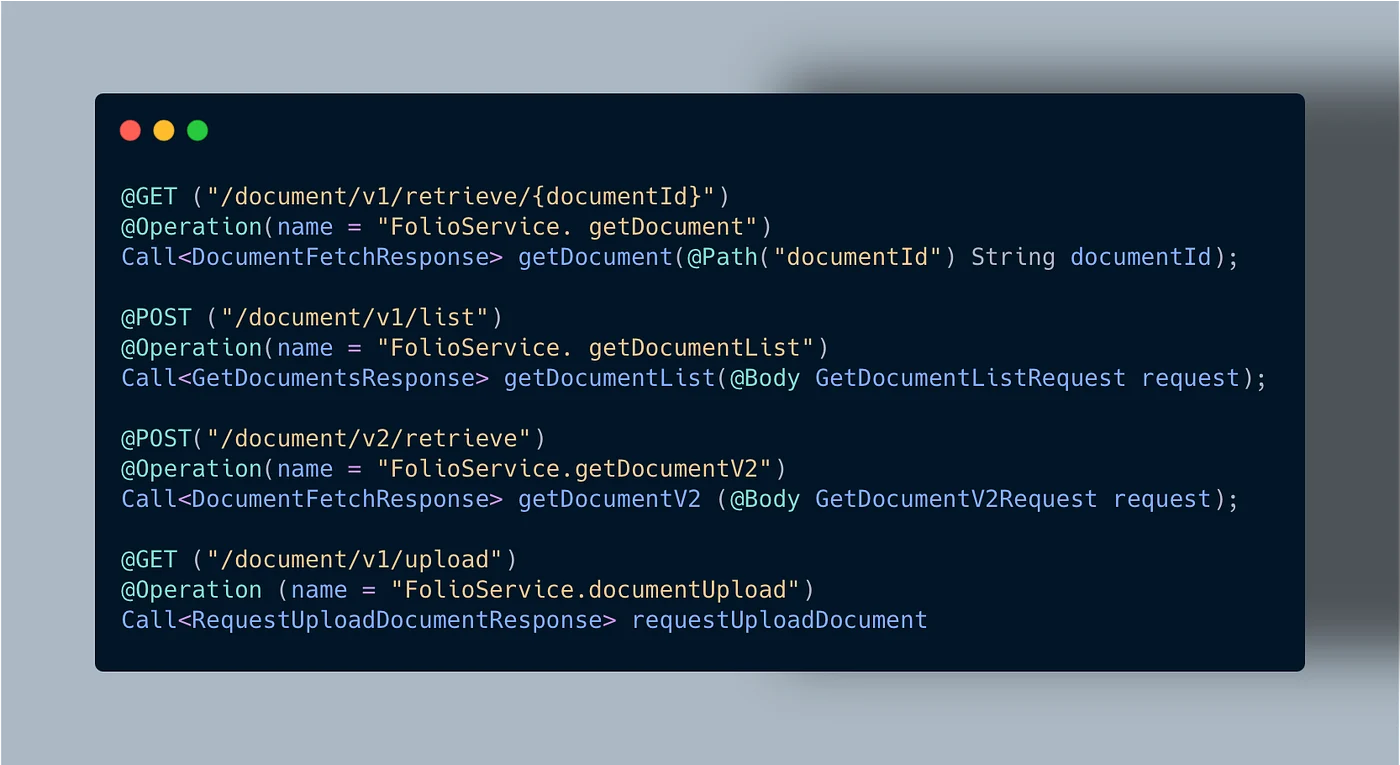
The app fetches a document by a client-supplied documentId
In other words, the "which document" decision is made on the phone, not on the server. That leaves the server one job before it answers: check that the document actually belongs to the carrier asking for it. Do that, and the system is safe. Skip it, and any carrier can reach any document by changing a single value.
Every request to Amazon carries a session token, so the server always knows who is asking. That half works perfectly: log in as the wrong person and you get nothing. The trouble is the second question, the one that actually protects the data: is this particular document yours?
When the app asks for a document, the server looks it up and hands back a ready-to-use link to the file.
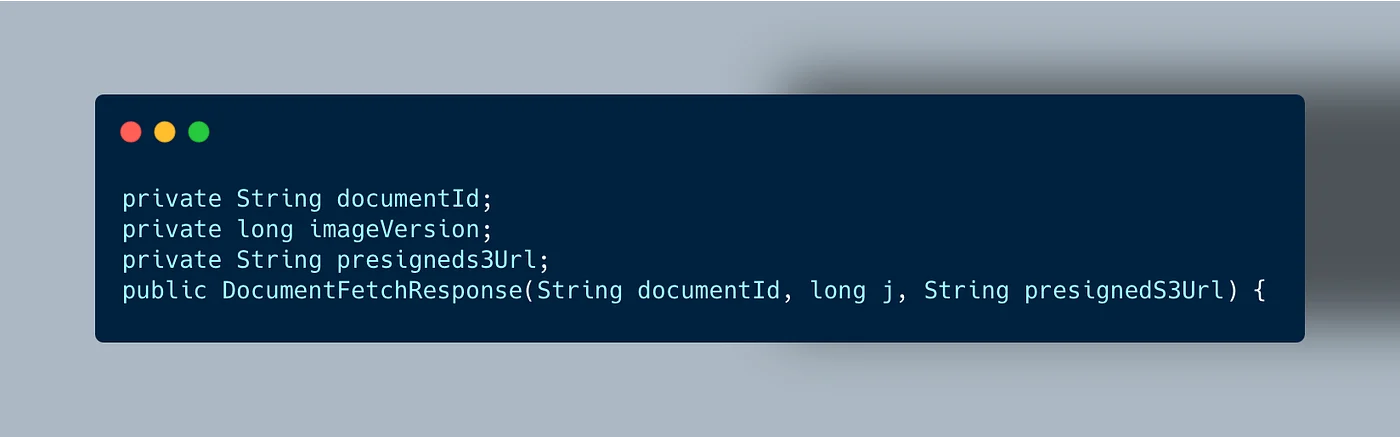
The server replies with a presignedS3Url, a direct link to the file
If it returns that link without first checking that the document belongs to the carrier asking, then the identifier on the phone is the only thing deciding what you see, and that identifier is yours to change.
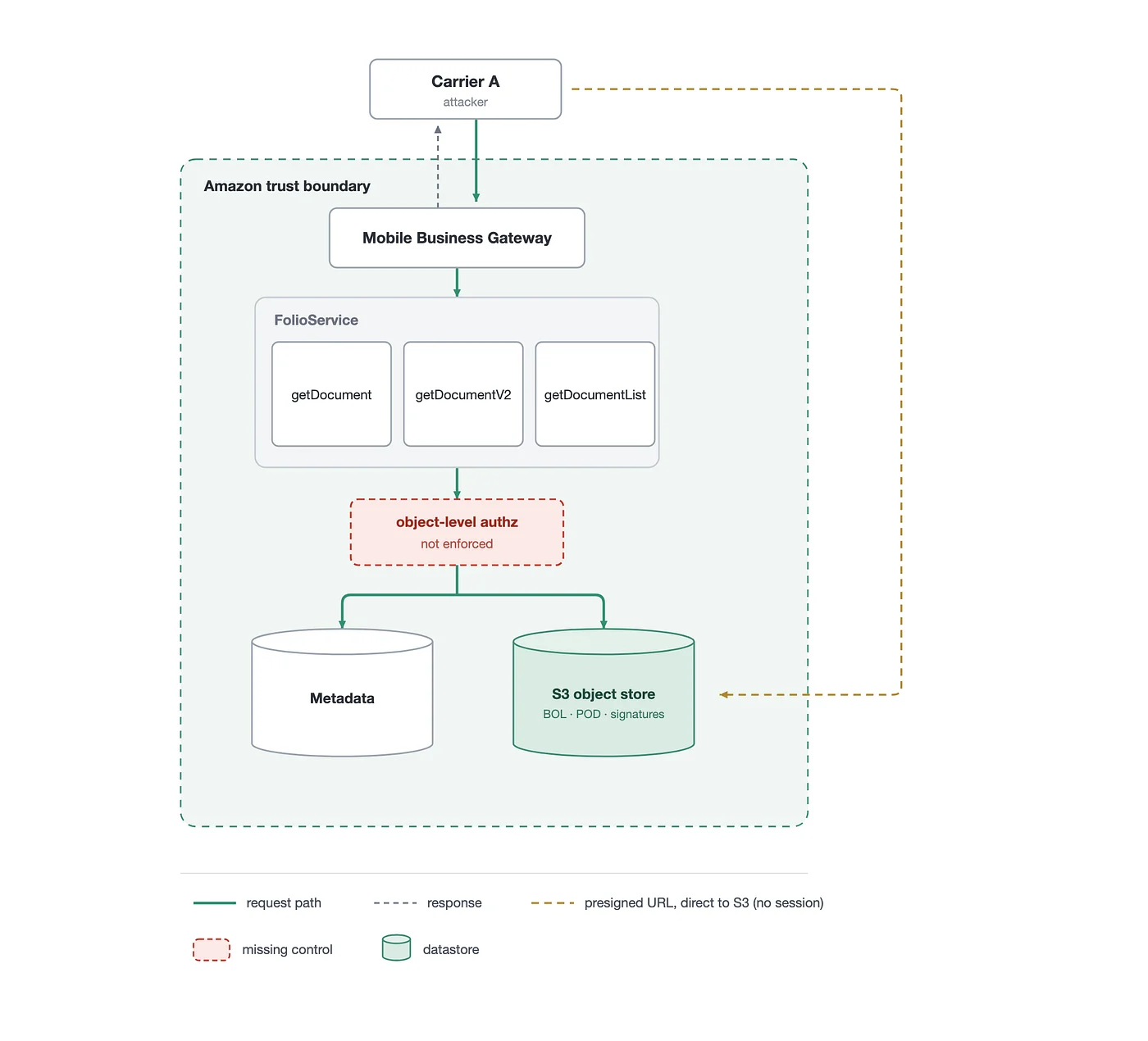
The server checks the session, but not whether the document belongs to you
That is what the researchers found. The server checked the login and skipped the ownership check. Swap in a document identifier that belongs to another carrier, keep your own valid session, and the server answers with their paperwork. No password, no trick, no broken encryption, just a question the server never asked. In security terms, this is Broken Object Level Authorization, or an IDOR.
Exploitation
Step 1: Baseline
Log in as a carrier, open one of your own loads that has documents, and capture a genuine request:
GET /document/v1/retrieve/{documentId}
Confirm a 200 that returns your own presignedS3Url. This is the normal, expected behaviour.
Step 2: Negative control
Request a well-formed but non-existent documentId. Note whether the server answers 404 or 403. This shows whether existence is checked before authorization.
Step 3: Cross-tenant test
Using a documentId that belongs to a second account you control (or a consenting colleague), send the request from the first account's session:
GET /document/v1/retrieve/<FOREIGN_DOCUMENT_ID> HTTP/2
accept: application/json
Secure behaviour is 403 or an empty response. The vulnerable behaviour is a 200 that returns the other account's document and a working presignedS3Url.
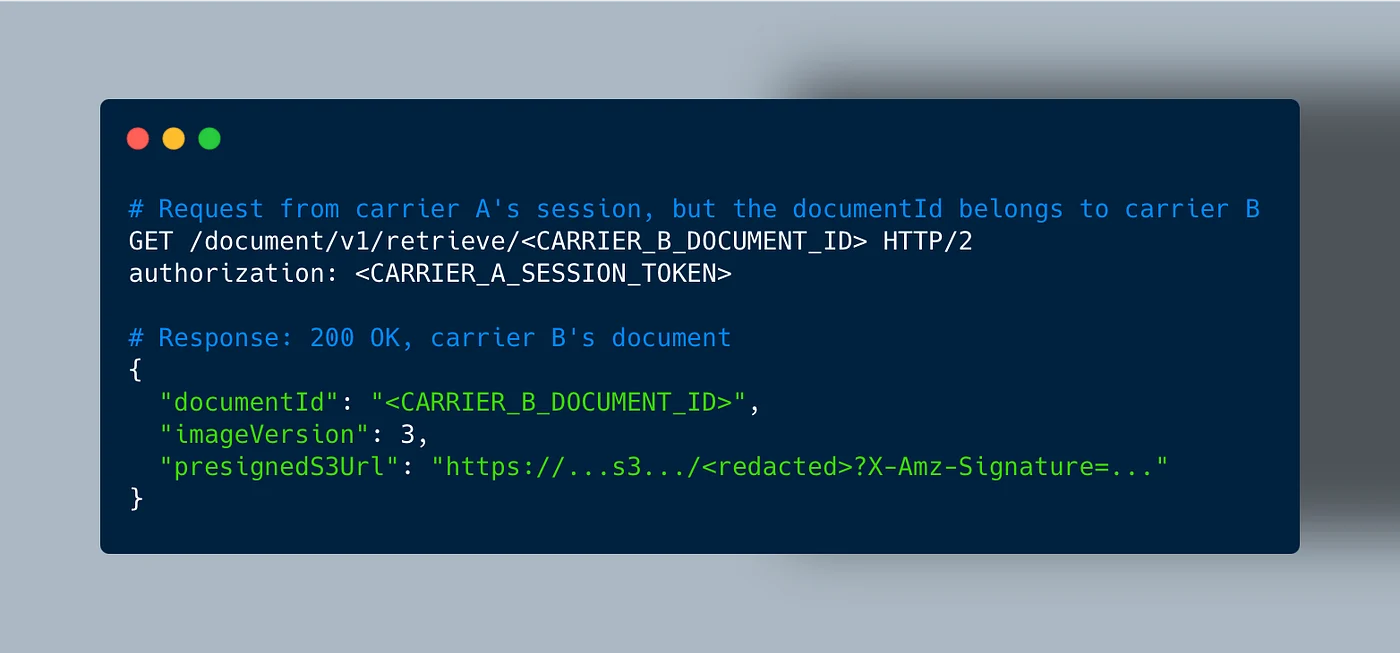
The server returns 200 and a working presignedS3Url for a document the caller does not own. Opening that link returns the other carrier's file with no further login.
Stop there. One cross-account document is proof enough.
Why one open door becomes thousands
A single document is bad enough. Two details turn it into something much larger.
First, the link the server hands back is not really a link, it is a key. Once issued, that signed URL opens the file on its own, with no login attached, until it quietly expires. It can be copied, logged, cached, or passed around, and it keeps working the whole time. Authorization happens once, when the link is minted, and never again.
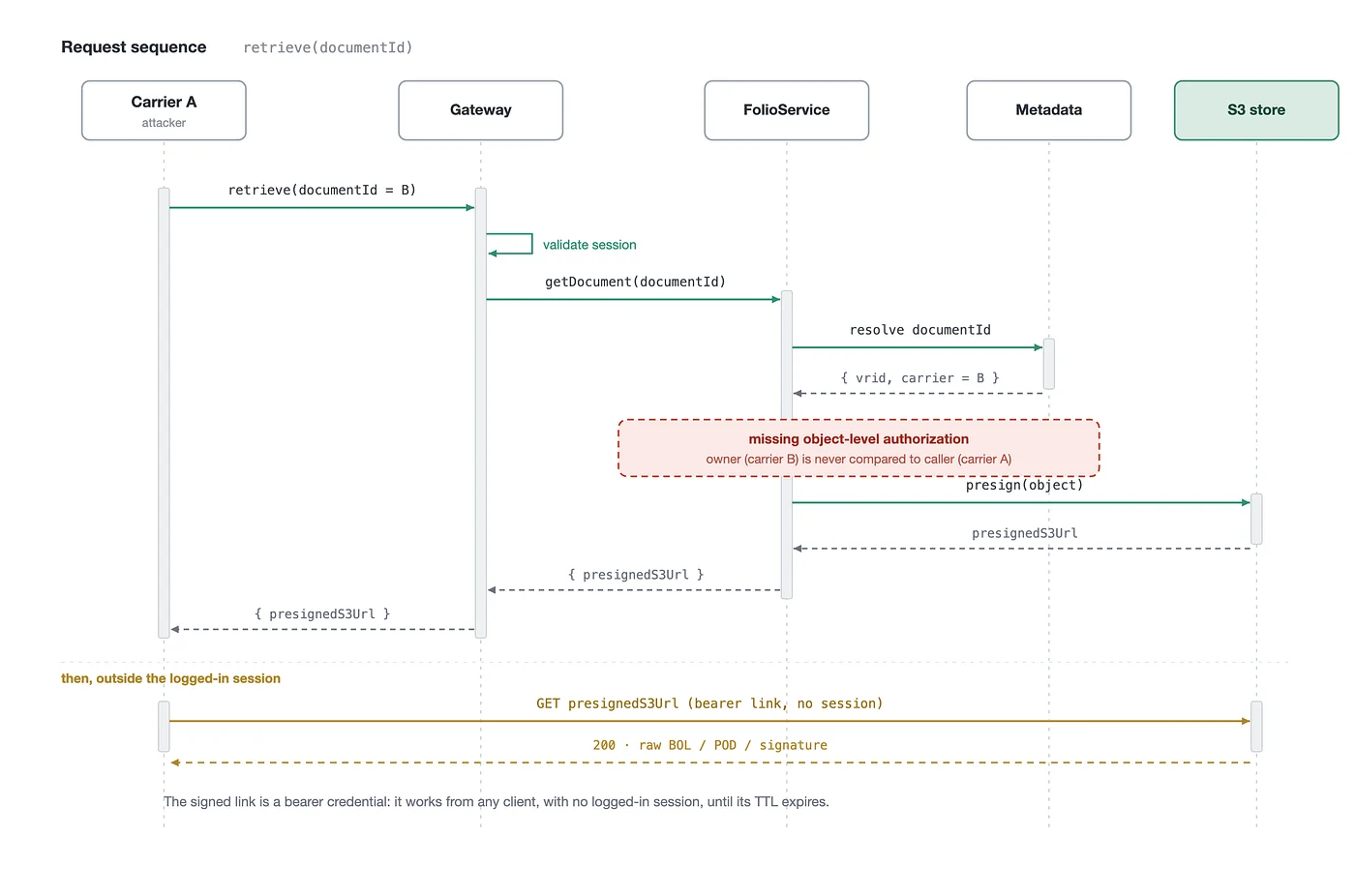
The file is pulled straight from storage with the signed link, no session required
Second, the identifiers do not have to be guessed one at a time. Amazon has a companion feature that, given a shipment reference, lists the documents attached to it and their identifiers. Those feed straight back into the same document request, and repeating it across shipments turns a single peek into a steady stream.
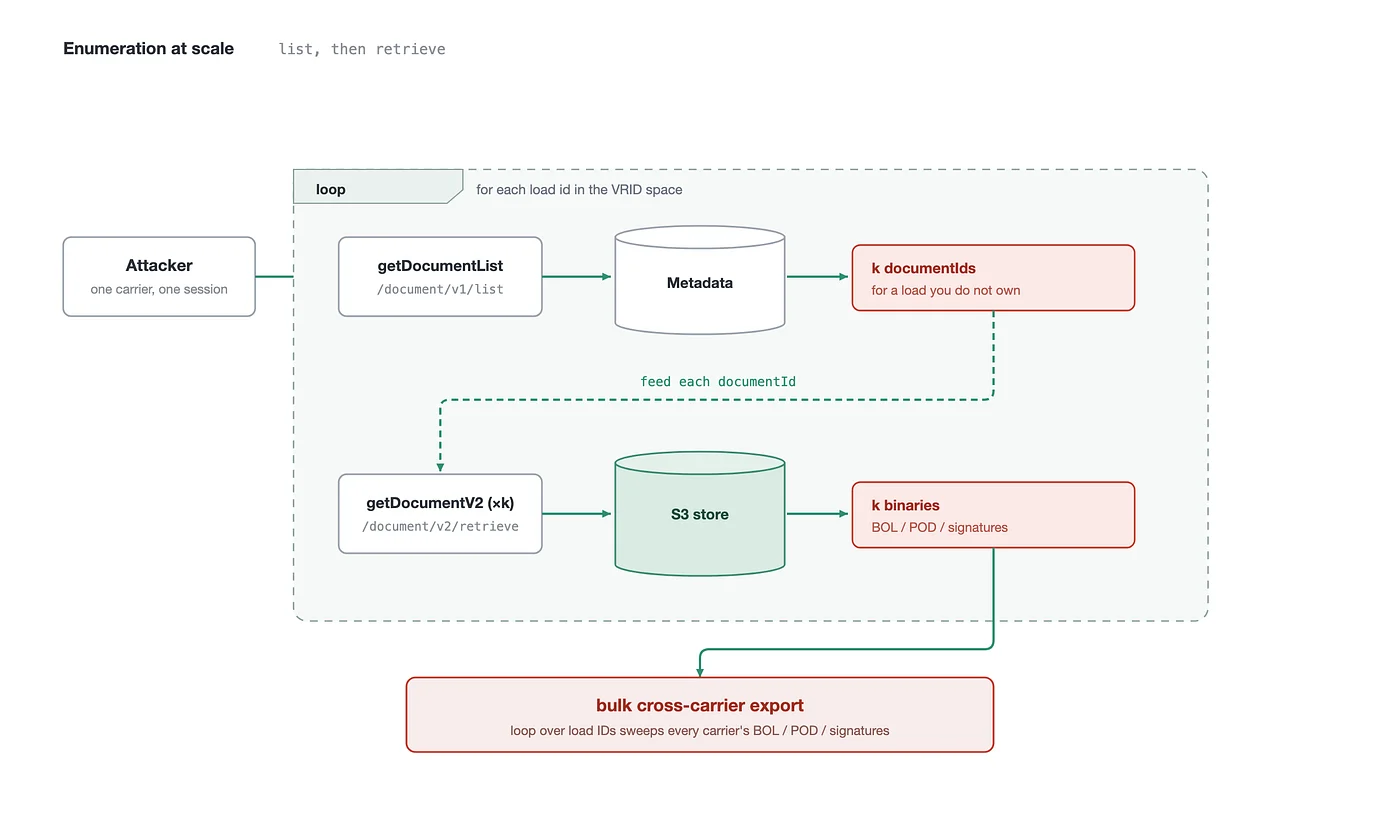
One feature lists the identifiers, another returns the files. Loop over shipments and it scales.
Together, the missing check stops being a one-off. It becomes a way to walk the marketplace and collect other carriers' paperwork at scale, one signed link at a time.
Root cause
The server performed authentication but not authorization at the object level. It checked the session, so it always knew who was asking, and that half worked perfectly: log in as the wrong person and you get nothing. It never asked whether the requested document belonged to the carrier making the request. The document identifier, supplied by the client, was therefore the only thing deciding what was returned.
Existing defences did not stop it because the session check was doing its job. The request was well formed, carried a valid token, and was answered with a 200. The gap sat between knowing who the caller is and knowing whether the object is theirs.
Impact
The documents behind this flaw are not trivia. A bill of lading and a proof of delivery name the companies shipping and receiving goods, their addresses, what was in the truck and how much, reference numbers, and the signatures of the people who handled it.
For the people named in them, that is a privacy exposure. For a competitor, it is business intelligence: a view of who a rival ships for, where, and how often, straight from the paperwork. And because the flaw scales from one document to many, this is not a single leaked file but a window into other carriers' operations across the platform.
The signed links keep working until they expire, so a link obtained once can be copied, logged, cached or passed around for the whole of its lifetime.
Fix
The issue was reported to the Amazon Vulnerability Research Program and has since been fixed. It does not describe the change that was made. The lesson the author draws is that "is this yours?" deserves to be asked on every request, not just the first.
Variants to test
- Other object identifiers in the same app. Any endpoint that takes a client-supplied identifier and returns a resource or a link to one. A positive result is a 200 returning another account's object when you send your own valid session.
- Listing features that feed identifiers. A companion endpoint that lists documents for a shipment reference and returns their identifiers. A positive result is a list you can feed straight back into the retrieval endpoint across shipments.
- Signed URL lifetime. Once you have a
presignedS3Urlfor your own object, check whether it still opens the file with no session attached until it expires. A positive result is the file being pulled straight from storage with the signed link and no login. - Existence versus authorization ordering. Send a well-formed but non-existent identifier and note whether the server answers 404 or 403. This shows whether existence is checked before authorization and tells you how the server orders its checks.
Hunting notes
This kind of bug hides where the client decides which object to fetch. Taking a mobile app apart and reading every request it makes and every value it sends is how the researchers found it: the document identifier was supplied by the client, so the server had one job left, checking ownership, and that was the job it skipped.
Signals during recon: endpoints that return a direct storage link rather than the file itself, because authorization then happens once, when the link is minted, and never again; and companion features that list identifiers for a parent object, because they turn a single peek into a steady stream.
On impact, the researchers showed enough by stopping at the first cross-account document, working only on accounts they controlled and redacting third-party data. The report was submitted and the issue has since been fixed.
**
The most damaging flaws are rarely the exotic ones. This was not a clever exploit or a broken lock, it was a missing question. The system was careful about who you are and quiet about whether a thing is yours, and in that gap sat other carriers' private paperwork.
What happened, in plain words
Amazon runs an app that connects trucking carriers with loads. A carrier is a company that owns or drives trucks; a load is the cargo that needs moving from one place to another. The app is the middleman: it lets carriers find loads and share the paperwork that goes with them.
That paperwork is not boring. It holds secrets: who ships what, to whom, and for how much. Every document in the app is supposed to stay with the single carrier it belongs to. Nobody else should be able to open it.
The researchers in this write-up, working with a collaborator, wanted to know how firm that line really was. They pulled on it, and it moved. This article walks through what they found, in the same order they found it, and explains every technical idea from scratch along the way.
Some words you will need first
Before the story makes sense, here are a few everyday ideas. Each one comes back later, so do not worry about memorising them now.
- An app and its server. The app on your phone is the part you see and tap. The server is a computer somewhere else that holds the real data and answers the app's questions. The app asks, the server answers.
- An API. Think of a restaurant. You do not walk into the kitchen; you tell the waiter what you want, and the waiter brings it. An API (Application Programming Interface) is the waiter between the app and the server: a fixed set of requests the app is allowed to make and the answers it gets back. Each request has an address (a URL), a method (usually
GETto fetch something), and sometimes extra details. - A request and a response. A request is the message the app sends ("give me document 123"). A response is the server's reply, which includes a status code:
200means "here you go, all fine",403means "you are not allowed",404means "there is no such thing". - A token (or session token). When you log in, the server gives your app a long random string. The app sends it with every later request, like a wristband at a festival that proves you paid to get in. The server reads the wristband and knows who is asking. Without a valid one, you get nothing.
- Authentication versus authorization. Authentication asks "who are you?" (checking the wristband). Authorization asks "are you allowed to do this particular thing?" (checking whether this wristband lets you into the backstage area). They are two different questions, and a system can get the first one perfectly right while forgetting the second.
- An identifier (ID). A short label that names one specific thing, like a ticket number. A
documentIdnames one specific document. - Object-level authorization. "Object" here just means a single thing stored on the server, such as one document. Object-level authorization means checking, for this one thing, whether this particular user is allowed to see it. When that check is missing, security people call it Broken Object Level Authorization, or IDOR (Insecure Direct Object Reference). The name sounds grand; the idea is simple: the server lets you name any object you like and hands it over without asking whether it is yours.
- S3 and a presigned URL. S3 is Amazon's file storage service: a huge online cupboard where files live. Normally you need a login to open the cupboard. A presigned URL is a special link the server creates that already contains permission inside it, so anyone holding the link can open that one file without logging in, until the link expires. It is like a visitor pass printed for one door, valid for a short time.
How they started: reading the app's conversations
The investigation started from the mobile app itself. The researchers' reasoning was that mobile apps are honest in a way their servers are not: take one apart and you can read exactly how it talks to the backend, every request it makes and every value it sends. The server can hide things; the app on your phone has to know the full recipe in order to work, so the recipe is in there somewhere.
That is where they started with Amazon.
One exchange stood out. To open a document, the app asks for it by an identifier, and that identifier is supplied by the client. "Client" means the app on the phone, the side the user controls.
The app fetches a document by a client-supplied documentId
In other words, the "which document" decision is made on the phone, not on the server. That is normal and not automatically a problem: plenty of apps let you say which item you want. But it leaves the server one job before it answers: check that the document actually belongs to the carrier asking for it. Do that, and the system is safe. Skip it, and any carrier can reach any document by changing a single value. The researchers had to find out which it was.
The missing question
Every request to Amazon carries a session token, so the server always knows who is asking. That half works perfectly: log in as the wrong person and you get nothing. The wristband check is solid.
The trouble is the second question, the one that actually protects the data: is this particular document yours?
When the app asks for a document, the server looks it up and hands back a ready-to-use link to the file.
The server replies with a presignedS3Url, a direct link to the file
If it returns that link without first checking that the document belongs to the carrier asking, then the identifier on the phone is the only thing deciding what you see, and that identifier is yours to change. The server would be acting like a cloakroom attendant who checks that you have a ticket, then hands over whichever coat number you read out, without checking that the coat is yours.
The server checks the session, but not whether the document belongs to you
That is what the researchers found. The server checked the login and skipped the ownership check. Swap in a document identifier that belongs to another carrier, keep your own valid session, and the server answers with their paperwork. No password, no trick, no broken encryption, just a question the server never asked. In security terms, this is Broken Object Level Authorization, or an IDOR.
Why one open door becomes thousands
A single document is bad enough. Two details turn it into something much larger.
First, the link the server hands back is not really a link, it is a key. Once issued, that signed URL opens the file on its own, with no login attached, until it quietly expires. It can be copied, logged, cached, or passed around, and it keeps working the whole time. Authorization happens once, when the link is minted, and never again. Think of a hotel key card: the front desk checks your booking when it makes the card, but after that the card opens the door for anyone who holds it, until the card stops working.
The file is pulled straight from storage with the signed link, no session required
Second, the identifiers do not have to be guessed one at a time. Amazon has a companion feature that, given a shipment reference, lists the documents attached to it and their identifiers. Those feed straight back into the same document request, and repeating it across shipments turns a single peek into a steady stream. It is the difference between guessing one house number and being handed the street directory.
One feature lists the identifiers, another returns the files. Loop over shipments and it scales.
Together, the missing check stops being a one-off. It becomes a way to walk the marketplace and collect other carriers' paperwork at scale, one signed link at a time.
Steps to reproduce
This section is the recipe, so that someone else can check the finding for themselves. The researchers were careful: they verified it responsibly, on accounts they controlled, stopping at the first proof, and redacting any third-party data. Anyone reproducing it should do the same and never pull real carriers' documents.
Step 1: Baseline
A baseline means doing the normal thing first, so you know what "working correctly" looks like. Log in as a carrier, open one of your own loads that has documents, and capture a genuine request:
GET /document/v1/retrieve/{documentId}
Line by line:
GETis the method: it means "fetch me something", as opposed to sending or changing something./document/v1/retrieve/{documentId}is the address of the feature on the server.retrievemeans "give me the document".{documentId}is a placeholder where the real identifier goes, the one the app fills in from the phone.
Confirm a 200 that returns your own presignedS3Url. This is the normal, expected behaviour: you asked for your own document, and you got a working link to it.
Step 2: Negative control
A negative control is a deliberate test with something that should fail, to see how the server behaves when it does. Request a well-formed but non-existent documentId. "Well-formed" means it looks like a real identifier, just one that does not exist. Note whether the server answers 404 or 403. This shows whether existence is checked before authorization.
Why does the difference matter? If the server says 404 ("no such document"), it looked for the document first and only then thought about permissions. If it says 403 ("not allowed"), it decided about permission first. Knowing the order tells you how the server is built, and whether it is even looking at ownership at all.
Step 3: Cross-tenant test
"Tenant" means one separate customer account. A cross-tenant test means using account A's login to ask for account B's data. Using a documentId that belongs to a second account you control (or a consenting colleague), send the request from the first account's session:
GET /document/v1/retrieve/<FOREIGN_DOCUMENT_ID> HTTP/2
accept: application/json
Line by line:
GET /document/v1/retrieve/<FOREIGN_DOCUMENT_ID>is the same fetch as before, but the placeholder is replaced with a document identifier that belongs to the other account.HTTP/2is simply the version of the web protocol being used; it does not change the meaning of the request.accept: application/jsontells the server what kind of answer the app would like back: JSON, a common text format for structured data.
A header is a small labelled line attached to a request, like the address and stamp on an envelope; authorization is the header where the wristband goes. The point is that the session is genuinely yours and genuinely valid. Nothing is forged. The only thing that is not yours is the document identifier.
Secure behaviour is 403 or an empty response. The vulnerable behaviour is a 200 that returns the other account's document and a working presignedS3Url.
The server returns 200 and a working presignedS3Url for a document the caller does not own. Opening that link returns the other carrier's file with no further login.
Stop there. One cross-account document is proof enough. There is no need to collect more, and collecting more would mean touching real people's paperwork.
Why it worked
The server performed authentication but not authorization at the object level. It checked the session, so it always knew who was asking, and that half worked perfectly: log in as the wrong person and you get nothing. It never asked whether the requested document belonged to the carrier making the request. The document identifier, supplied by the client, was therefore the only thing deciding what was returned.
Existing defences did not stop it because the session check was doing its job. The request was well formed, carried a valid token, and was answered with a 200. The gap sat between knowing who the caller is and knowing whether the object is theirs.
What was at stake
The documents behind this flaw are not trivia. A bill of lading and a proof of delivery name the companies shipping and receiving goods, their addresses, what was in the truck and how much, reference numbers, and the signatures of the people who handled it. A bill of lading is the receipt and contract for a shipment; a proof of delivery is the signed confirmation that the goods arrived.
For the people named in them, that is a privacy exposure. For a competitor, it is business intelligence: a view of who a rival ships for, where, and how often, straight from the paperwork. And because the flaw scales from one document to many, this is not a single leaked file but a window into other carriers' operations across the platform.
The signed links keep working until they expire, so a link obtained once can be copied, logged, cached or passed around for the whole of its lifetime.
The fix and the lesson
The issue was reported to the Amazon Vulnerability Research Program and has since been fixed. It does not describe the change that was made. The lesson the author draws is that "is this yours?" deserves to be asked on every request, not just the first.
Other places to look
Once you know the shape of a bug, you can look for the same shape elsewhere. These are variants worth testing.
- Other object identifiers in the same app. Any endpoint that takes a client-supplied identifier and returns a resource or a link to one. A positive result is a
200returning another account's object when you send your own valid session. - Listing features that feed identifiers. A companion endpoint that lists documents for a shipment reference and returns their identifiers. A positive result is a list you can feed straight back into the retrieval endpoint across shipments.
- Signed URL lifetime. Once you have a
presignedS3Urlfor your own object, check whether it still opens the file with no session attached until it expires. A positive result is the file being pulled straight from storage with the signed link and no login. - Existence versus authorization ordering. Send a well-formed but non-existent identifier and note whether the server answers
404or403. This shows whether existence is checked before authorization and tells you how the server orders its checks.
Notes for anyone hunting
This kind of bug hides where the client decides which object to fetch. Taking a mobile app apart and reading every request it makes and every value it sends is how the researchers found it: the document identifier was supplied by the client, so the server had one job left, checking ownership, and that was the job it skipped.
Signals during recon (the early looking-around phase) are: endpoints that return a direct storage link rather than the file itself, because authorization then happens once, when the link is minted, and never again; and companion features that list identifiers for a parent object, because they turn a single peek into a steady stream.
On impact, the researchers showed enough by stopping at the first cross-account document, working only on accounts they controlled and redacting third-party data. The report was submitted and the issue has since been fixed.
**
The most damaging flaws are rarely the exotic ones. This was not a clever exploit or a broken lock, it was a missing question. The system was careful about who you are and quiet about whether a thing is yours, and in that gap sat other carriers' private paperwork.
Glossary
- API (Application Programming Interface): the fixed set of requests an app is allowed to make to a server, and the answers it gets back; the waiter between the app and the kitchen.
- App: the program on the phone that the user sees and taps.
- Authentication: checking who someone is, for example by validating their session token.
- Authorization: checking whether that someone is allowed to do a particular thing, such as open a particular document.
- Baseline: a normal, expected request made first so you know what correct behaviour looks like.
- Bill of lading: the document that records a shipment and acts as its receipt and contract.
- Broken Object Level Authorization (BOLA): a flaw where the server checks who you are but not whether the specific object you asked for is yours.
- Carrier: a company that owns or drives trucks and moves loads.
- Client: the side the user controls, here the mobile app, as opposed to the server.
- Cross-tenant test: using one account's login to try to reach another account's data.
- Document identifier (
documentId): the label naming one specific document, supplied by the app. - Endpoint: one address on the server that accepts a particular kind of request.
- GET: the request method that means "fetch me something".
- Header: a small labelled line attached to a request, such as
acceptorauthorization. - HTTP/2: a version of the web protocol; it does not change what a request means.
- IDOR (Insecure Direct Object Reference): another name for the same class of flaw, where a user-supplied identifier directly selects an object without an ownership check.
- JSON: a common text format for structured data, often used in responses.
- Load: the cargo that needs moving from one place to another.
- Negative control: a deliberate test with input that should fail, used to see how the server behaves.
- Object: a single stored thing on the server, such as one document.
- Presigned URL (
presignedS3Url): a link created by the server that carries its own permission inside it, so it opens one file without a login until it expires. - Proof of delivery: the signed confirmation that goods arrived.
- Recon: the early phase of looking around a system to understand how it works.
- Request: the message an app sends to a server.
- Response: the server's reply, including a status code.
- S3: Amazon's file storage service, where files such as documents live.
- Session token: the long random string given at login and sent with later requests to prove who is asking.
- Status code: the number in a response saying how it went, such as
200(fine),403(not allowed) or404(not found). - Tenant: one separate customer account.
- URL: the address of something on the web.



