The Printer Goes BRRRRR!!!
The CADM service's password-check handler copied attacker-supplied salt and hash buffers into fixed-size fields without checking their lengths, causing a heap overflow. An attacker could corrupt the allocator's free-list and redirect a later allocation to overwrite CADM function pointers, achieving code execution on the printer.
 Published on synacktiv.com
Written by Mehdi Talbi, Rémi Jullian, Thomas Jeunet - 25/05/2022 - in Exploit, Reverse-engineering - Download
The full write-up lives on its author's site
It belongs to its author, so we link to it rather than copy it. The other two tabs are our own rewrites, checked against it.
Context
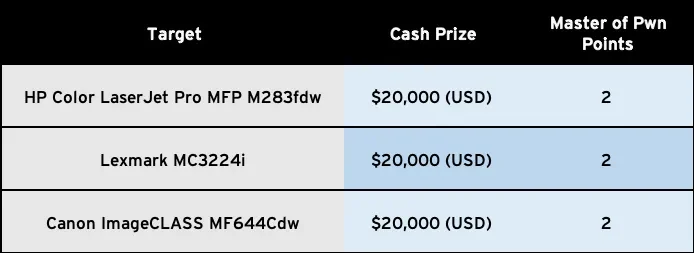
This write-up describes how Synacktiv compromised a Canon ImageCLASS MF644Cdw network printer during Pwn2Own Austin 2021, where network printers were featured for the first time. Three LaserJet printers were in scope: HP, Lexmark and Canon. The team compromised all of them and won the competition. This article focuses on the Canon device.
The authors argue that network printers are attractive targets because they are rarely reinstalled or supervised, which makes them a good place to hide on a network, and because they hold persistent access to sensitive documents that may be scanned or printed.
The target feature is the CADM service, a Canon proprietary administration protocol reachable over TCP (47545), TCP with TLS (47547) and UDP (47545). The vulnerability is a heap-based overflow in the handler that checks a user password (operation code 0x83), which the team turned into code execution and used to draw the Synacktiv logo on the printer's LCD.
Setup
The competition format: each team registers for one or several devices, and if it succeeds within one of three attempts it earns "master of pwn" points, a cash prize that varies by equipment, and the equipment itself. The points feed an overall ranking that decides the "Master of Pwn" title. The team compromised the Canon printer on the first attempt, winning a $20,000 cash prize and 2 "master of pwn" points.
The tools and preconditions used across the research:
- A SOP8 clip and a CH341A programmer, with flashrom, to dump the serial NOR Flash.
- binwalk to inspect the dump.
- IDA Pro for reverse engineering, plus a custom IDA loader published in the Synacktiv GitHub repository.
- A Saleae logic analyzer to locate the UART, and a USB to serial adapter with pyserial to talk to the debug shell.
- nmap for a quick scan of exposed UDP and TCP ports in the default configuration.
- The firmware under study is version 10.02, which was running on the targeted device during the contest and was the latest available at that time.
Finding it
Getting the bootloader
The first step is to obtain the binary executed by the device, which means dumping the memory storage. On the printed circuit board the team identified interesting integrated circuits and a potential UART connector.
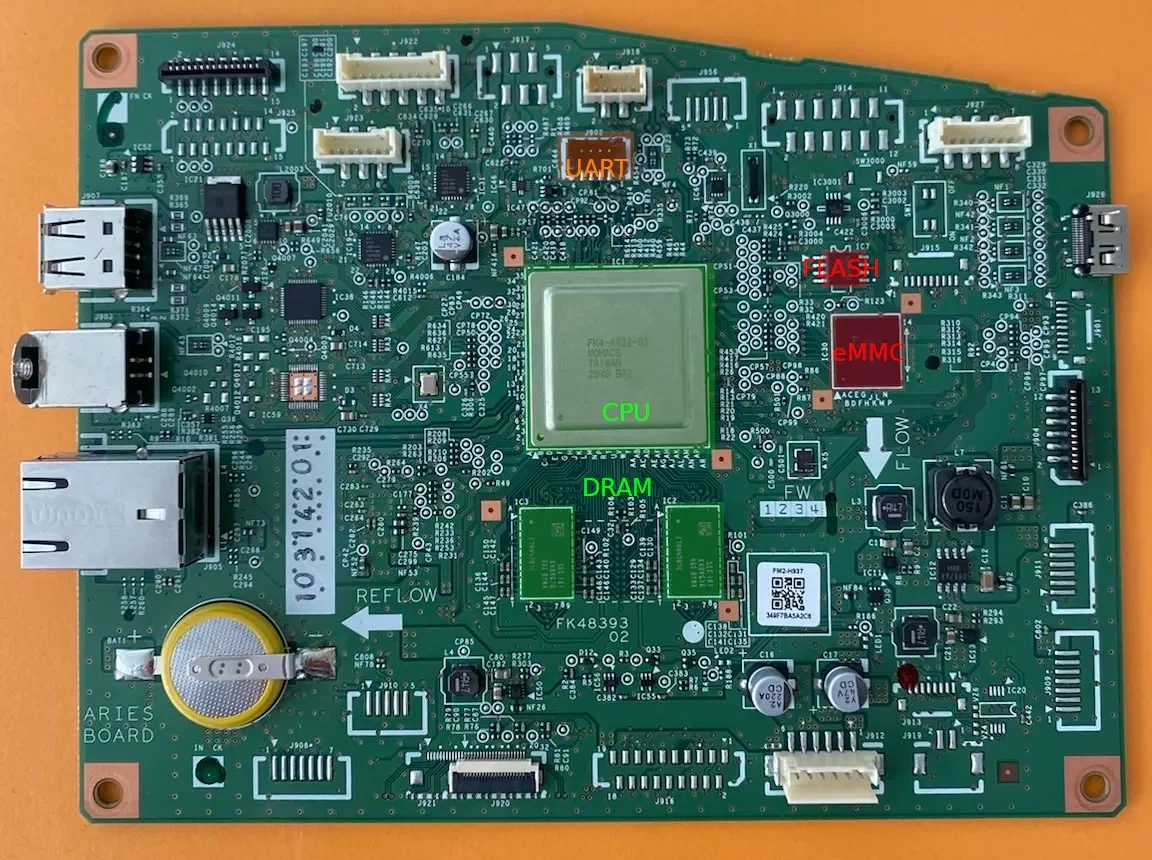
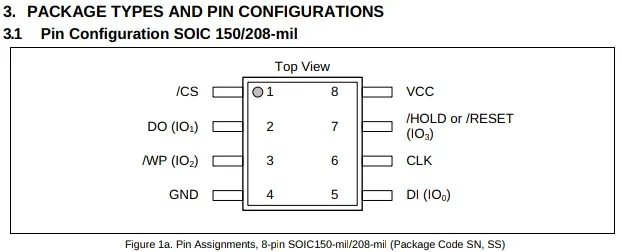
The Flash circuit is marked W25Q16JV, a 16Mbit serial NOR Flash. Using the pin configuration from its datasheet on the Winbond website, the content was extracted with a SOP8 clip and a CH341A, using flashrom.
The dump contains no filesystem and no ELF or PE executable, but binwalk still reports interesting structures:
$ binwalk flash.bin

DECIMAL       HEXADECIMAL     DESCRIPTION
--------------------------------------------------------------------------------
336448        0x52240         Zlib compressed data, default compression
337968        0x52830         Zlib compressed data, default compression
341524        0x53614         Zlib compressed data, default compression
348537        0x55179         Copyright string: "Copyright (C) 1997-2015 by CANON Inc."
350068        0x55774         Certificate in DER format (x509 v3), header length: 4, sequence length: 859
351488        0x55D00         SHA256 hash constants, little endian
361256        0x58328         Unix path: /home/nca/workspace/RB-EMERALD/printing_pf/release/modules/dryos/../dryos/src/mohacs_boot/device/lcd_7line.c
361468        0x583FC         Unix path: /home/nca/workspace/RB-EMERALD/printing_pf/release/modules/dryos/../dryos/src/mohacs_boot/device/emmc.c
361748        0x58514         Unix path: /home/nca/workspace/RB-EMERALD/printing_pf/release/modules/dryos/../dryos/src/mohacs_boot/device/sicdlIntegritycheck.c
362256        0x58710         Unix path: /home/nca/workspace/RB-EMERALD/printing_pf/release/modules/dryos/../dryos/src/mohacs_boot/device/sicdlRomData.c
365496        0x593B8         Unix path: /home/nca/workspace/RB-EMERALD/printing_pf/release/modules/dryos/../dryos/src/oscore/stdlib/iobuf.c
365712        0x59490         Unix path: /home/nca/workspace/RB-EMERALD/printing_pf/release/modules/dryos/../dryos/src/mohacs_boot/drysh/cmd_chkcachelib.c
444441        0x6C819         Certificate in DER format (x509 v3), header length: 4, sequence length: 1288
[…]
Loading the dump in IDA and finding the absolute address let the team deduce a loading address of 0x10000000. This was not the firmware running on the device, only the bootloader that starts it; the actual firmware is stored on the eMMC at address 0x1500000 and mapped at 0x40b00000.
  if ( emmc_direct_read(0x40B00000, 0x1500000u, 0x40u) != 0x40 )
  {
    printf("BOOTABLE HEADER READ ERROR\n");
    return -1;
  }
  if ( BOOTLOADER_GET_ROM_HEADER_INFO(&v7, (nca1_header *)0x40B00000) )
  {
    printf("BOOTABLE GET ROM HEADER ERROR \n");
    return -1;
  }
  if ( BOOTLOADER_ROM_HEADER_HEADER_CHKSUM(&v7, 0x40B00000) )
  {
    printf("BOOTABLE ROM HEADER CHECK ERROR \n");
    return -1;
  }
  printf("BOOTLOADER BOOTABLE START\n");
The bootloader can "download" a firmware to the eMMC. The decompiled code shows the firmware format: a header starting with a 4 byte magic, and depending on that magic the content is obfuscated.
int __fastcall firmware_header_check(_BYTE a1[4], int a2, int a3, unsigned int a4)
{
  unsigned int magic; // r0
  unsigned int v6; // [sp+0h] [bp-8h] BYREF

  v6 = a4;
  like_memcpy((unsigned __int8 *)&v6, a1, 4u, a4);
  magic = bswap32(v6);
  v6 = magic;
  if ( magic == 'NCFW' )
    return 1;
  if ( magic == 0xAFAF9C9C )
    return 0;
  do_assert("unknown = 0x%08x\n", magic);
  return 2;
}
The deobfuscation routine is:
_BYTE *__fastcall NCFW_deobfuscate(_BYTE *data, unsigned int size, char offset)
{
  unsigned int i; // r3
  unsigned int tmp; // r4

  for ( i = 0; i < size; ++i )
  {
    tmp = (unsigned __int8)(data[i] - (offset + i) - 1);
    data[i] = ~((2 * tmp) | (tmp >> 7));
  }
  return data;
}
Getting the firmware
Dumping the eMMC should work, but the team found an easier route: set an HTTP proxy with the printer's administration panel web interface and check for updates. Firmware updates use plain-text HTTP, so the firmware download URL is easy to capture if an update is available.
Another method is to extract the firmware from the "MF643Cdw/ MF641Cw Firmware Update Tool" on the Canon support website. It ships as a PE file (e.g. win-mf643-641-fw-v1005.exe) or a macOS disk image (e.g. mac-mf643-641-fw-v1005-64.dmg). The PE file is a self-extracting archive containing another PE (e.g. [redacted].exe), from which three NCFW packages can be extracted because they are simply appended as raw files:
user@debian:~/ 7z x win-mf643-641-fw-v1005.exe
user@debian:~/ grep --byte-offset --only-matching --text 'NCFW' [redacted].exe
470016:NCFW
140927837:NCFW
152682373:NCFW
user@debian:~ dd if=[redacted].exe of=package1.bin bs=1 skip=470016 count=$((140927837-470016))
user@debian:~ dd if=[redacted].exe of=package2.bin bs=1 skip=140927837 count=$((152682373-140927837))
user@debian:~ dd if=[redacted].exe of=package3.bin bs=1 skip=152682373
The three NCFW packages are the firmware itself (134MB), a language package (12MB), and a DCON package (506K) related to the DC controller. The report notes that the CEFW package exists only for firmware updates coming from the internet.
The package format is shown in the following figure:
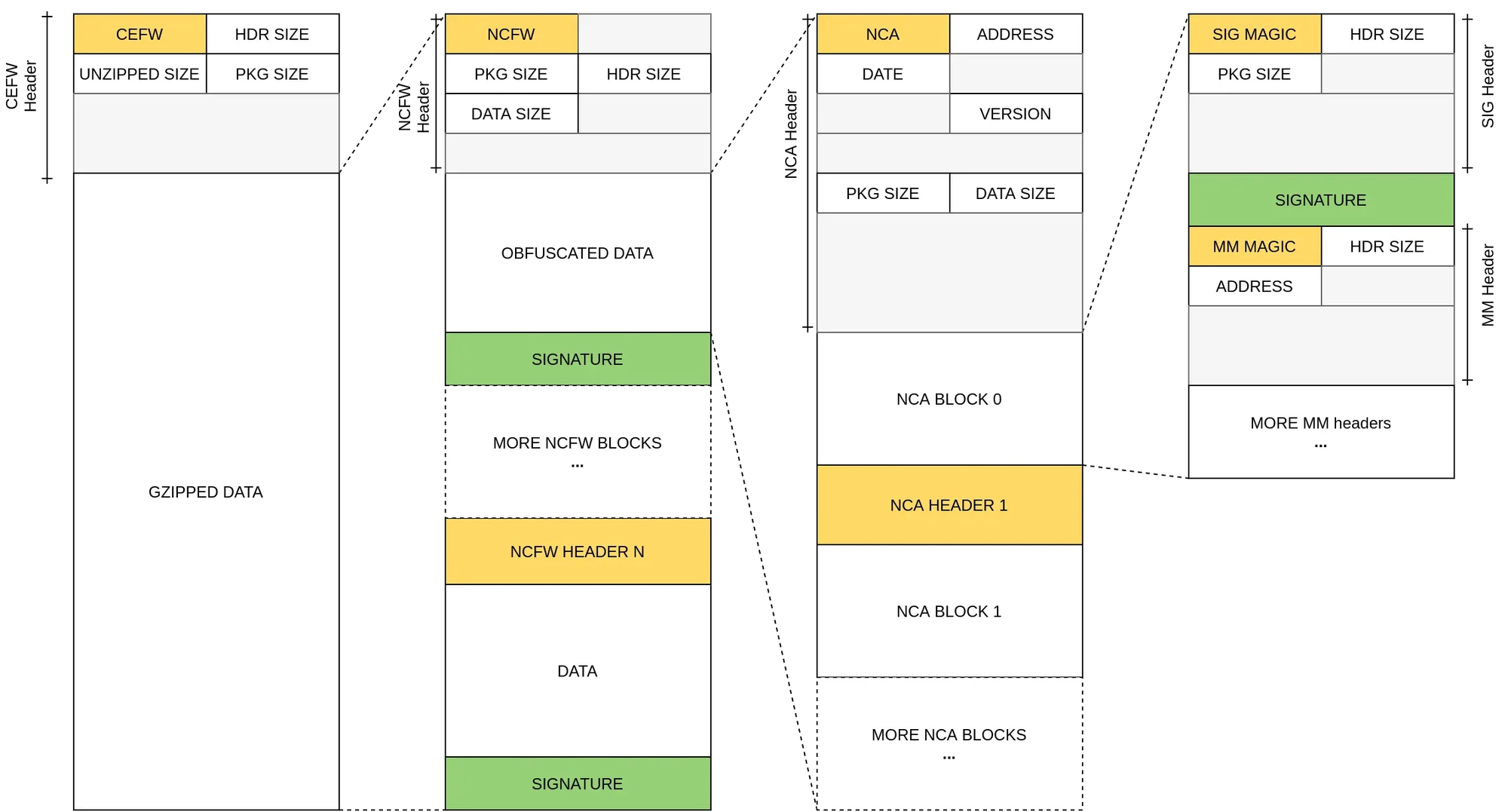
- The CEFW package is only present when the printer downloads its upgrade directly from a Canon website. The content is gzipped and the header contains in particular the header size, the uncompressed size and the actual package size. The uncompressed data holds one to many NCFW packages.
- The NCFW package has a header containing in particular the header size and package size, with the content obfuscated by the routine shown above. The deobfuscated data holds one to many NCA packages.
- The NCA package represents a block of data written on the eMMC. Its header contains the eMMC address where the package should be written, its size, apparently its release date (directly in hex, 0x20220222 for the 22nd of February 2022 for instance) and its version. In most cases the first NCA package in an NCFW package is special and contains a SIG package and one to many Mm packages.
- The Sig package holds cryptographic signatures of the data of the different NCA packages.
- The Mm package is only a header containing in particular the eMMC address of the other NCA packages in the same NCFW package, so it tells how many NCA packages remain.
Operating system and debug shell
The printer runs a custom real time operating system named DryOS:
DRYOS version 2.3, release #0059
The team had already met this OS in a previous work on a much older Canon printer (MX920 series) running release #0049. DryOS is based on µITRON, a Japanese RTOS specification, and Canon uses it not only for printers but also for DSL cameras.
Knowing that DryOS provides a debug shell called DryShell, the team looked for the UART on the main board with a Saleae logic analyzer. They also found that the bootloader sends several debug messages on the UART:
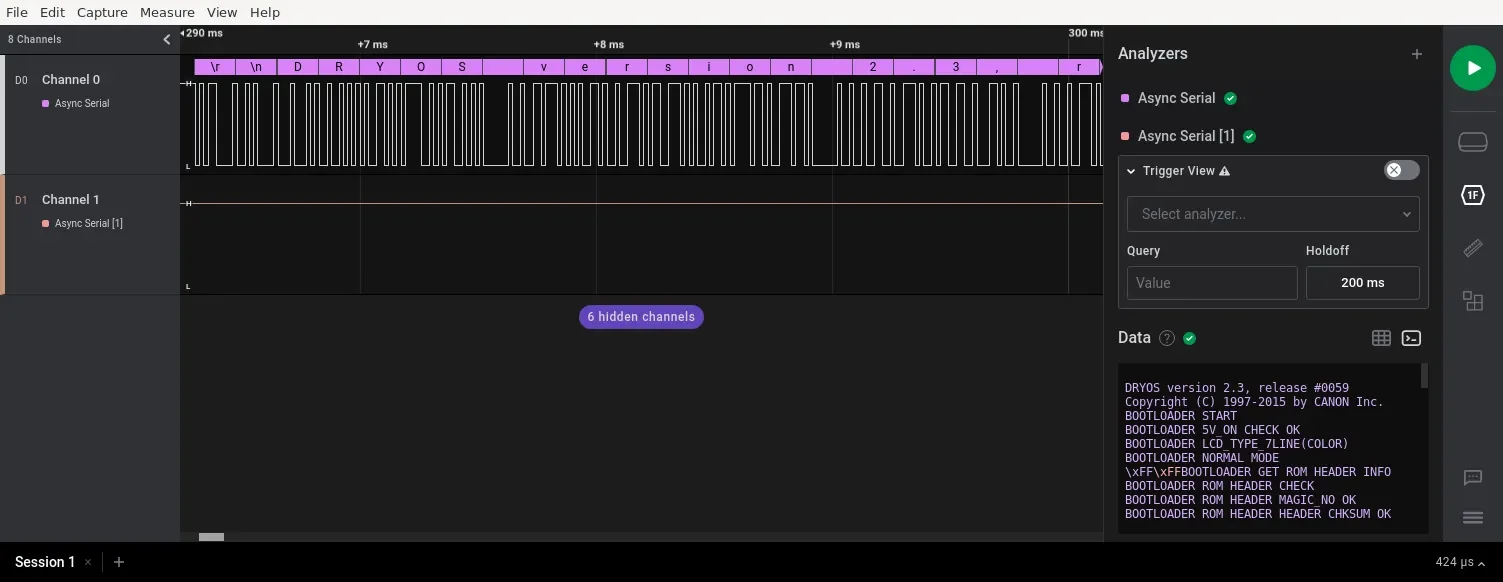
After identifying the UART, they soldered TX, RX and GND points to use a USB to serial adapter, and drove the debug shell with pyserial. Once the boot initialisation finishes, the DryOS shell prompt appears and commands can be used:
Dry> vers
DRYOS version 2.3, release #0059
  Dry-MK 2.66
  Dry-DM 1.21
  Dry-FSM 0.10
  Dry-EFAT 1.22
  Dry-stdlib 1.57
  Dry-PX 1.15
  Dry-drylib 1.22
  Dry-shell 1.19
  Dry-command alpha 065
Commands such as xd and xm dump and modify memory respectively, which proved very useful during exploitation.
Attack surface
The firmware contains more than 100k functions, automatically discovered by IDA, and no symbol information. A common approach is to look for strings used for debug purposes. The team found a logging function used more than 19k times in the firmware. Examples of calls:
logf(2802, 3, "[CPC] %s ERROR [Fail getOperationParam]\n", "pjcc_act_checkUserPassword2");
logf(3604, 3, "[CADM] %s: cadmMessage.message.pEventMessage is NULL", "cadm_sendEventMessage");
logf(3520, 6, "[USBD] %s EPNo = 0x%X EPNoSS = 0x%X\n", "ScanBULK Out", (unsigned __int8)v14[0], v1)
The third argument often matches a string like "[PREFIX] %s" with the first variadic argument being the function name. The team wrote an IDA Python script based on BIP to use Hex-Rays' API and rename functions automatically.
A quick nmap scan of the default configuration gave the exposed UDP and TCP ports, and for each service the related DryOS task and entry point:
| Service | Port | Task name | Notes |
|---|---|---|---|
| HTTP/HTTPS | 80/TCP, 443/TCP | HtpInit | Canon HTTP Server |
| LPD | 515/TCP | LPDCtrl | Line Printer Daemon Protocol |
| IPP/IPPS | 631/TCP, 10443/TCP | IPP_INIT | Internet Printing Protocol |
| Jetdirect | 9100/TCP | RAWctrl | Allow printing using PDL (Page Description Language) |
| Canon MFNP | 8610/TCP, 8610/UDP | pscan_TCP_Task, pscan_UDP_Task | Print/Scan jobs over the network (based on BJNP protocol) |
| Canon CADM | 9007/TCP, 9013/TCP, 47545/TCP, 47547/TCP (SSL), 47545/UDP | cadm_tcp_res, cadm_tcp_cal, cadm_tcp_adm, cadm_tcp_sec, cadm_udp_adm | Canon administration proprietary protocol |
| NetBIOS | 137/UDP, 138/UDP | smbinit | NetBIOS |
| SNMP | 161/UDP | SNAgent | Simple Network Management Protocol |
| SLP | 427/UDP | SLPSvcAgent | Service Location Protocol |
| WSD | 3702/UDP | WSINinit | Web Services Dynamic Discovery |
| Zeroconf | 5353/UDP | BN_BNSet | Multicast DNS (Bonjour Apple) |
The custom HTTP server implements the web administration panel with CGI scripts. Most CGI scripts are reachable only after authentication and were excluded from the analysis. The HTTP server also handles IPP requests, since IPP is based on HTTP, and handles TLS for HTTPS and IPPS. Like the HTTP server, the TLS stack does not seem to be based on an open-source project. LPD and Jetdirect are implemented alongside IPP, and SLP, WSD and Zeroconf support discovery on typical office networks. MFNP is a Canon custom protocol based on BJNP for print and scan job creation. CADM is another Canon custom protocol for printer administration over TCP (47545), TCP+TLS (47547) or UDP (47545). The team chose CADM because analysing the packet flow processing and reverse engineering the command handlers was straightforward.
Exploitation
The vulnerability
The vulnerability is in the CADM service. The following figure illustrates the CADM message format:
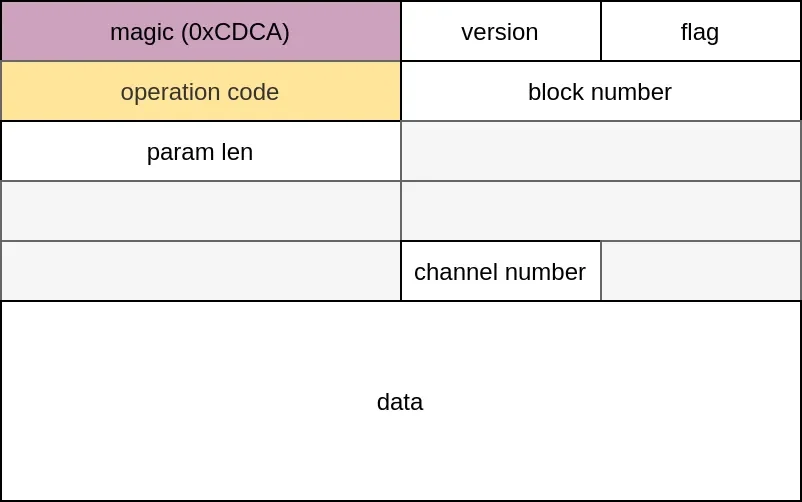
The header starts with the magic value 0xCDCA. The param len field encodes the length of the payload and the operation code field specifies the type of operation. CADM supports operations such as adding a new user (operation code = 12), changing the password of a user (operation code = 15) or simply echoing back the submitted payload (operation code = 1). There are 41 handlers defined at offset 0x44557b58 through this structure:
struct pjcc_handlers {
    uint16_t operation_code;
    uint16_t field_2;
    void    *field_4;
    uint32_t field_8;
    uint32_t (*decode_func)(void);
    uint32_t (*encode_func)(void);
    uint32_t (*release_func)(void);
    uint32_t (*field_14)(void);
    uint32_t field_1c;
    uint32_t field_20;
}
The vulnerability is in the decoding function of the handler that checks the password (operation code = 0x83), namely pjcc_act_checkUserPassword2 (0x4198ecf0).
The payload is shown in the following figure. It is made of 3 distinct buffers along with their size encoded into a 1 byte field.

The vulnerable function allocates a 428 byte structure and copies the data from the packet into its inlined buffers without checking the size:
uint32_t pjcc_dec_ope_checkUserPassword2(int *a1, int a2, int *a3)
{
    /* ... */

    alloc = (pjcc_checkpassword_payload *)pjcc_zeroAlloc(428);
    pjcc_checkpass_obj = alloc;

    v7 = pjcc_dec_ubyte(a1, alloc);
    v12 = pjcc_dec_ulong(a1, (int)&pjcc_checkpass_obj->field_4);

    v14 = pjcc_dec_ubyte(a1, &pjcc_checkpass_obj->buffer_len);
    v17 = pjcc_dec_buffer(a1, pjcc_checkpass_obj->buffer_len, (char *)
        pjcc_checkpass_obj->buffer, v15);

    v19 = pjcc_dec_ubyte(a1, &pjcc_checkpass_obj->salt_len);
    v22 = pjcc_dec_buffer(a1, pjcc_checkpass_obj->salt_len, (char *)
        pjcc_checkpass_obj->salt, v20);

    v24 = pjcc_dec_ubyte(a1, &pjcc_checkpass_obj->hash_len);

    result = pjcc_dec_buffer(a1, pjcc_checkpass_obj->hash_len, (char *)
        pjcc_checkpass_obj->hash, v25);

    /* ... */
}
The vulnerable object pjcc_checkpass_obj has this structure:
struct pjcc_checkpassword_payload
{
    unsigned uint8_t type;
    unsigned uint8_t field_4;
    unsigned uint8_t buffer_len;
    unsigned uint8_t buffer[256];
    unsigned uint8_t salt[32];
    unsigned uint8_t salt_len;
    unsigned uint8_t hash[128];
    unsigned uint8_t hash_len;
};
The buffers salt and hash are vulnerable to a heap-based overflow, as shown in the following figure:

Step 1: understand the allocator
Exploitation requires digging into the allocator internals. The DryOS allocator is a "best-fit" allocator that maintains a singly linked list of free chunks. The freelist is stored at address 0x45f17540 and is a linked list of free chunks:
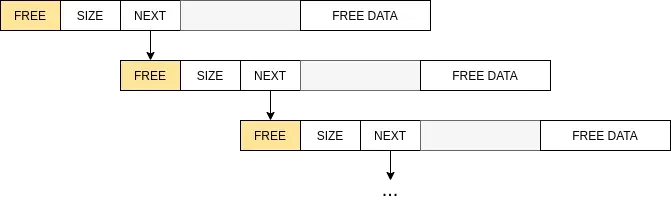
The allocation function iterates over the freelist and returns the first chunk that fulfils the requested size. The current chunk is fragmented and a new chunk is created if the remaining space (chunk_size - request_size > metadata_size) is larger than the size of the chunk's metadata (40 bytes). The allocated chunk is then unlinked from the freelist.
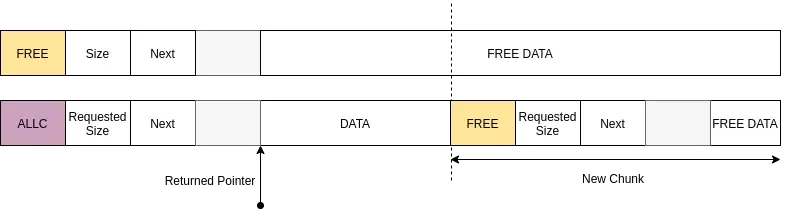
Chunks in the freelist are ordered by address, and a freed chunk is inserted back into the freelist and merged with adjacent free chunks. To track allocations, the team implemented a DryShell command that dumps the freelist.
Step 2: fragment the heap
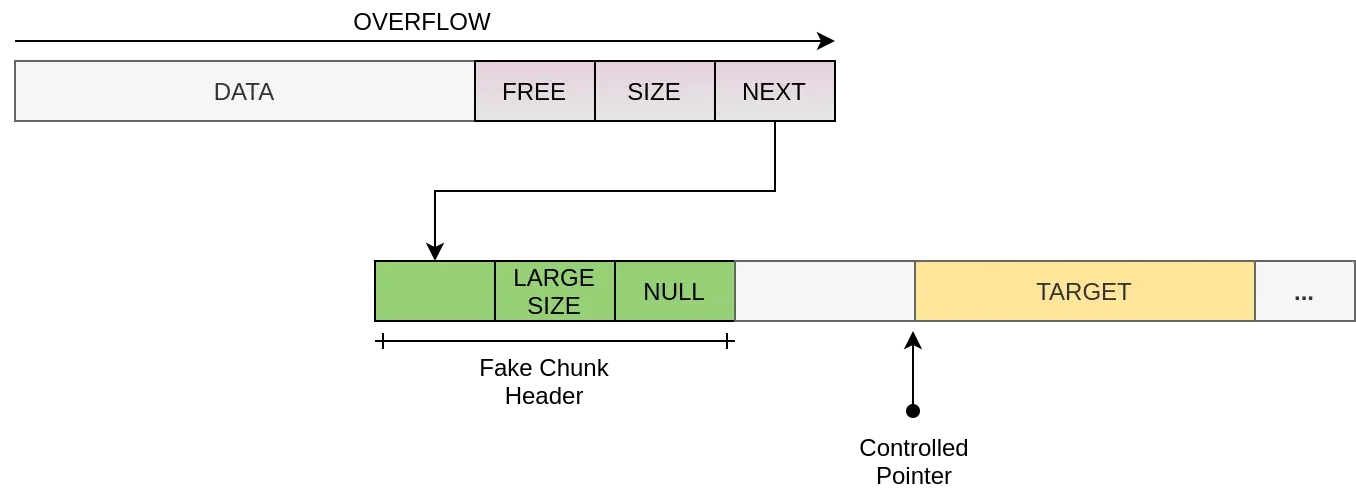
The strategy is to overflow the hash buffer and corrupt the next field of the chunk adjacent in memory to the vulnerable object, forcing a subsequent allocation at an arbitrary address.
The first step is to fragment the heap so that large chunks are inserted. The goal is to allocate the vulnerable object from a large chunk, so that the fake chunk is not served at an early stage once the vulnerable chunk is inserted back into the freelist. Requesting the UI over HTTPS is enough to create the desired heap state:
DryOs > !hd
magic = 0x0, size = 0x5ff930, next = 0x49c1dc88
magic = 0x46524545, size = 0x48, next = 0x49c1e7c0
magic = 0x46524545, size = 0x78, next = 0x49c30e50
magic = 0x46524545, size = 0x30, next = 0x49c30f10
magic = 0x46524545, size = 0x60, next = 0x49c35c98
magic = 0x46524545, size = 0x48, next = 0x49d0b578
magic = 0x46524545, size = 0x60, next = 0x49d14c70
magic = 0x46524545, size = 0x60, next = 0x49d15a18
magic = 0x46524545, size = 0x240, next = 0x49d22268
magic = 0x46524545, size = 0x2848, next = 0x49d24b68
magic = 0x46524545, size = 0x9198, next = 0x49d2ddd8
magic = 0x46524545, size = 0x292140, next = 0x0
Step 3: corrupt the next pointer
The second step is to trigger the overflow and corrupt the next field of a freed chunk. The exploit sets the next pointer to 0x44557b14. This address was chosen because it precedes several CADM structures (state machine, handlers, etc.) that contain multiple function pointers. It is also a good candidate for a fake chunk because the memory at 0x44557b14 + 4 contains a very large value (size field), which allows requesting a large allocation that cannot be fulfilled by the previous free chunks in the freelist. The memory at 0x44557b14 + 8 contains a NULL pointer (next field) that closes the freelist. The report notes that there is no need to have the string 'FREE' at the selected address since the allocator makes no security checks.
Step 4: overlap CADM structures with a large echo packet
The final step is to send a large CADM echo packet to get the fake chunk and overlap CADM data structures with controlled data. More precisely, the exploit rewrites these data structures with their original content so as not to break the CADM state machine. It only corrupts the handler responsible for processing the echo request (pjcc_act_echo) so that it points to the shellcode. The shellcode is also embedded in the echo payload and is executed immediately after the CADM echo packet is processed according to the CADM state machine.
Step 5: post exploitation, drawing on the LCD
To illustrate successful exploitation, the team wrote a shellcode that displays a picture (the Synacktiv logo) on the printer's LCD. The first step was to understand the framebuffer, which is mapped at 0x40900000. Using the xm (modify memory) command of DryShell, they wrote a green pixel (0x00FF00) as a long value:
Dry> xm --help
usage: xm [-|addr [access [e_addr value flag]]]
      - : usage
   addr : [0-9a-fA-F]*
 access : b(byte:default) | w(word) | l(long word)
 e_addr : [0-9a-fA-F]*
  value : [0-9a-fA-F]*
   flag : f(fill) | s(search) | u(unmatch)
   -> + : auto increment
Dry> xm 0x40900000 l 0x40900000 0x00ff00 f
The first pixel of the LCD changed to green and was quickly restored to its previous value. This showed that the framebuffer is simply an array where 3 bytes store a single pixel value, each byte defining the Red, Green and Blue intensity. With a resolution of 800x480 pixels, the framebuffer size is 800x480x3.
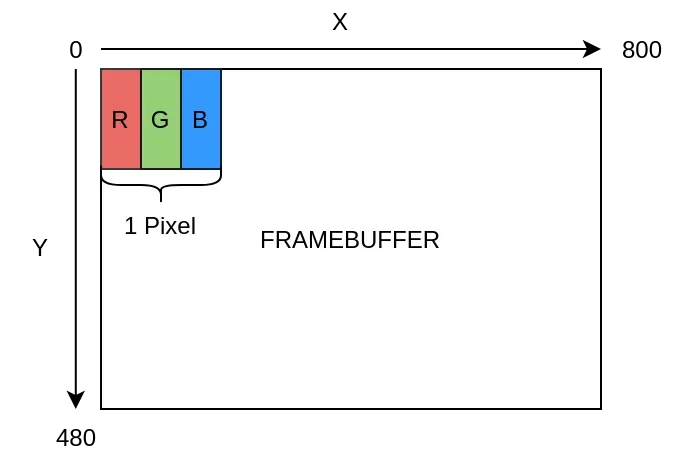
To keep the shellcode small, a TCP socket reads each pixel value from a picture sent by a Python script using PIL (Python Imaging Library) that implements the server side. The shellcode calls these network functions:
- netSocket (0x424bbfb4)
- netConnect (0x424bc298)
- netRecv (0x424bc554)
The sin_family field of the sockaddr_in structure must be set to 0x100 to specify AF_INET, unlike Linux where AF_INET is 0x02. Because the shellcode calls netRecv in an infinite loop, DryOS can perform task context switches, and only the CADM service is impacted by the exploitation. Another approach would have been to create a proper DryOS task and restore the hijacked function context.
The exploit code is available in the Synacktiv GitHub repository. The video shows the Ninja displayed on the printer's screen:
Root cause
The decoding function pjcc_dec_ope_checkUserPassword2 allocates a 428 byte structure and copies three attacker-controlled buffers into inlined fixed-size arrays: buffer[256], salt[32] and hash[128]. Each length is read from a 1 byte field and passed straight to pjcc_dec_buffer without any comparison against the destination capacity. The salt and hash copies therefore overflow past their arrays into adjacent heap memory, including the metadata of the next chunk.
The allocator offers no mitigation: it is a best-fit singly linked list with no security checks, so a corrupted next pointer is followed without validation, and the report explicitly notes that no 'FREE' marker is required at the fake chunk address. The report does not discuss stack canaries, ASLR or other runtime hardening.
Impact
An attacker who can reach the CADM service can send a crafted password-check message (operation code 0x83) and, per the report, obtain code execution on the printer. The team demonstrated this by running shellcode that draws an image on the LCD. Because the shellcode loops on netRecv, DryOS keeps scheduling other tasks and only the CADM service is affected, so the device stays usable while the payload runs. The report frames printers as attractive because they are rarely reinstalled or supervised and hold access to sensitive scanned or printed documents. The report does not state which authentication, if any, is required to reach the vulnerable handler, nor whether the attack works over UDP as well as TCP; it only says the vulnerability is in the CADM service and lists the CADM ports.
Fix
The report does not describe a patch, a vendor response or a fixed version. Based on the root cause, the fix should be to validate each length field against the destination buffer size before calling pjcc_dec_buffer for buffer, salt and hash, and to reject messages whose declared lengths exceed 256, 32 and 128 respectively.
Variants to test
- Other CADM operations with length-prefixed buffers. Send operation codes other than 0x83 with oversized length fields and watch for crashes or memory corruption in the debug shell. A positive result is a fault or a changed freelist dump after the request.
- Other length fields in the same handler. Vary buffer_len as well as salt_len and hash_len; the report only highlights salt and hash, so buffer may also be reachable depending on the decoder.
- The same pattern in other Canon protocols. MFNP, IPP and the CGI scripts all parse network data; look for decode functions that pass a length to a copy without a bound. A positive result is a crash under a debugger or a corrupted heap chunk.
- Allocator metadata corruption on other DryOS devices. The technique of pointing next at a structure full of function pointers, with a large fake size and a NULL next, should transfer to other Canon firmware using the same allocator at 0x45f17540. A positive result is an allocation served at the chosen address.
- Firmware update path. Since updates are fetched over plain HTTP, test whether a proxy can substitute a package; the Sig package is meant to prevent this, so a positive result would be a package accepted without a valid signature.
What happened, in plain words
In 2021 a security contest called Pwn2Own put three office printers on stage: one from HP, one from Lexmark and one from Canon. Contest rules said that for the first time network printers were part of the competition. A team of researchers from a French company called Synacktiv took on all three devices, broke into all of them, and won the event. This article is about the Canon machine, an ImageCLASS MF644Cdw.
A printer is a small computer. It has a processor, memory, a screen, a network card and a storage chip, and it runs an operating system. It also listens on the network so that office computers can send it documents. The researchers' goal was to make the printer run code of their own choosing, without permission, by sending it specially crafted network messages. In security language, making a machine run your code is called code execution, and it is usually the worst thing that can happen to a device.
Why would anyone care about a printer? The authors give two reasons. First, printers are rarely reinstalled or closely watched, so they are a comfortable place for an attacker to hide inside a network. Second, printers keep copies of sensitive documents that people scan or print, so an attacker who controls one gets a lasting view of that material.
The specific feature that was broken is called CADM, a Canon-made protocol for administering the printer over the network. A protocol is just an agreed format for messages, like the format of a letter (address at the top, body below). CADM is reachable on TCP port 47545, on TCP port 47547 with TLS (encrypted transport), and on UDP port 47545. Inside CADM there is a command that checks a user's password. The researchers found that this command copies data from the incoming message into a fixed-size area of memory without checking how much data arrives. That is a heap-based overflow: think of pouring a litre of water into a 250 ml glass, the extra spills onto whatever is next to the glass. Here the spill lands on the printer's memory management records, and the team used that spill to take control. They finished by drawing the Synacktiv logo on the printer's LCD screen.
Setup
Before any of that, some background on how the contest worked and what tools were needed.
The contest format
Each team registers for one or several devices it wants to attack. If the team succeeds within one of three attempts, it earns "master of pwn" points, a cash prize that varies by equipment, and the equipment itself. The points feed an overall ranking that decides the "Master of Pwn" title at the end of the event. The team compromised the Canon printer on the first attempt, winning a $20,000 cash prize and 2 "master of pwn" points.
The toolbox
A short list of what the researchers used, and why each item matters:
- A SOP8 clip and a CH341A programmer, with flashrom, to dump the serial NOR Flash. A clip is a small clamp that grips the legs of a chip so you can read it without unsoldering it. A programmer is a device that talks to memory chips. flashrom is free software that drives such programmers.
- binwalk to inspect the dump. binwalk scans a file for known patterns (compressed data, certificates, text strings) and tells you what it finds and where.
- IDA Pro for reverse engineering, plus a custom IDA loader published in the Synacktiv GitHub repository. IDA Pro is a program that turns a raw binary into readable assembly and pseudo-code. A loader is a plugin that teaches IDA how a particular vendor's firmware file is laid out.
- A Saleae logic analyzer to locate the UART, and a USB to serial adapter with pyserial to talk to the debug shell. A logic analyzer records electrical signals on wires so you can see the digital conversation. UART is a simple two-wire serial link (one wire sends, one receives) that many embedded devices expose for debugging. pyserial is a Python library for sending and receiving bytes over such a link.
- nmap for a quick scan of exposed UDP and TCP ports in the default configuration. A port is a numbered door on a machine; a network service listens behind each door. nmap knocks on doors and reports which ones answer.
- The firmware under study is version 10.02, which was running on the targeted device during the contest and was the latest available at that time. Firmware is the software permanently installed on a device, the printer's equivalent of an operating system plus applications.
Finding it
Getting the bootloader
The first step is to obtain the binary executed by the device, which means dumping the memory storage. A binary is a file of machine instructions, the raw form of a program. To get it, the team looked at the printer's main circuit board and identified interesting integrated circuits and a potential UART connector.
The image shows the printed circuit board the team examined.
The Flash circuit is marked W25Q16JV, a 16Mbit serial NOR Flash. Flash is a memory chip that keeps its contents when power is removed, like a USB stick. "16Mbit" means 16 megabits, that is 2 megabytes of storage. "Serial NOR" describes how the chip is wired and read. Using the pin configuration from its datasheet on the Winbond website, the content was extracted with a SOP8 clip and a CH341A, using flashrom. A datasheet is the manufacturer's instruction sheet for a part; the pin configuration tells you which leg does what, so you can connect your reader correctly.
The image relates to the W25Q16JV pin configuration from its datasheet.
The dump contains no filesystem and no ELF or PE executable, but binwalk still reports interesting structures. A filesystem is the way files are organised on storage (folders and files). ELF and PE are the two common formats for executable programs (ELF on Linux-like systems, PE on Windows). Finding neither means the dump is not a tidy package of files, just a blob. binwalk still finds recognisable pieces inside it:
$ binwalk flash.bin

DECIMAL       HEXADECIMAL     DESCRIPTION
--------------------------------------------------------------------------------
336448        0x52240         Zlib compressed data, default compression
337968        0x52830         Zlib compressed data, default compression
341524        0x53614         Zlib compressed data, default compression
348537        0x55179         Copyright string: "Copyright (C) 1997-2015 by CANON Inc."
350068        0x55774         Certificate in DER format (x509 v3), header length: 4, sequence length: 859
351488        0x55D00         SHA256 hash constants, little endian
361256        0x58328         Unix path: /home/nca/workspace/RB-EMERALD/printing_pf/release/modules/dryos/../dryos/src/mohacs_boot/device/lcd_7line.c
361468        0x583FC         Unix path: /home/nca/workspace/RB-EMERALD/printing_pf/release/modules/dryos/../dryos/src/mohacs_boot/device/emmc.c
361748        0x58514         Unix path: /home/nca/workspace/RB-EMERALD/printing_pf/release/modules/dryos/../dryos/src/mohacs_boot/device/sicdlIntegritycheck.c
362256        0x58710         Unix path: /home/nca/workspace/RB-EMERALD/printing_pf/release/modules/dryos/../dryos/src/mohacs_boot/device/sicdlRomData.c
365496        0x593B8         Unix path: /home/nca/workspace/RB-EMERALD/printing_pf/release/modules/dryos/../dryos/src/oscore/stdlib/iobuf.c
365712        0x59490         Unix path: /home/nca/workspace/RB-EMERALD/printing_pf/release/modules/dryos/../dryos/src/mohacs_boot/drysh/cmd_chkcachelib.c
444441        0x6C819         Certificate in DER format (x509 v3), header length: 4, sequence length: 1288
[…]
Line by line:
$ binwalk flash.binruns binwalk on the file called flash.bin, which is the dump taken from the chip.- The two columns are the same offset written two ways: DECIMAL is the position in ordinary numbers, HEXADECIMAL is the same position in base 16, the notation programmers use for memory addresses.
Zlib compressed datameans a block of compressed data, the same kind of compression used in zip files. Compressed data usually hides something readable once decompressed.Copyright stringis plain text found in the file, here a Canon copyright notice, which confirms the dump really belongs to a Canon device.Certificate in DER format (x509 v3)is a digital certificate, a signed statement of identity used in encrypted connections. Its presence hints at code that checks signatures.SHA256 hash constantsare fixed numbers used by the SHA256 hashing algorithm. A hash is a short fingerprint computed from data; finding its constants suggests the firmware verifies integrity.- The
Unix pathlines are leftover file paths from the computer where the firmware was built, for example/home/nca/workspace/RB-EMERALD/.... They are gold for a reverse engineer because they reveal internal module names such asmohacs_boot,dryos,emmcanddrysh.
Loading the dump in IDA and finding the absolute address let the team deduce a loading address of 0x10000000. An address is a numbered position in memory, like a house number on a street. The loading address is the position where the code expects to sit in memory, which IDA needs to know so that internal references line up. This was not the firmware running on the device, only the bootloader that starts it. A bootloader is a small program whose only job is to load and start the main software. The actual firmware is stored on the eMMC at address 0x1500000 and mapped at address 0x40b00000. eMMC is the soldered storage chip on the board, the printer's internal disk.
  if ( emmc_direct_read(0x40B00000, 0x1500000u, 0x40u) != 0x40 )
  {
    printf("BOOTABLE HEADER READ ERROR\n");
    return -1;
  }
  if ( BOOTLOADER_GET_ROM_HEADER_INFO(&v7, (nca1_header *)0x40B00000) )
  {
    printf("BOOTABLE GET ROM HEADER ERROR \n");
    return -1;
  }
  if ( BOOTLOADER_ROM_HEADER_HEADER_CHKSUM(&v7, 0x40B00000) )
  {
    printf("BOOTABLE ROM HEADER CHECK ERROR \n");
    return -1;
  }
  printf("BOOTLOADER BOOTABLE START\n");
Line by line:
emmc_direct_read(0x40B00000, 0x1500000u, 0x40u)reads 0x40 bytes (64 bytes) from the eMMC starting at 0x1500000 and places them at memory address 0x40B00000. Theusuffix just marks the number as unsigned.!= 0x40checks that exactly 64 bytes came back. If not, it printsBOOTABLE HEADER READ ERRORand returns -1, meaning failure.BOOTLOADER_GET_ROM_HEADER_INFOparses those 64 bytes as a header (a small block of information describing what follows). If parsing fails, it printsBOOTABLE GET ROM HEADER ERRORand stops.BOOTLOADER_ROM_HEADER_HEADER_CHKSUMverifies a checksum, a simple arithmetic fingerprint used to detect corruption. If the checksum does not match, it printsBOOTABLE ROM HEADER CHECK ERRORand stops.- If all three checks pass, it prints
BOOTLOADER BOOTABLE STARTand continues booting.
The point of showing this is that the bootloader reads a header from storage, validates it, and only then starts the firmware. That tells the researchers how firmware is packaged and where it lives.
The bootloader can "download" a firmware to the eMMC. The decompiled code shows the firmware format: a header starting with a 4 byte magic, and depending on that magic the content is obfuscated. "Decompiled" means turned back from machine instructions into something resembling source code. A magic number is a fixed value at the start of a file that identifies its type, like the first word of a sentence telling you the language. Obfuscated means deliberately scrambled so it is not directly readable.
int __fastcall firmware_header_check(_BYTE a1[4], int a2, int a3, unsigned int a4)
{
  unsigned int magic; // r0
  unsigned int v6; // [sp+0h] [bp-8h] BYREF

  v6 = a4;
  like_memcpy((unsigned __int8 *)&v6, a1, 4u, a4);
  magic = bswap32(v6);
  v6 = magic;
  if ( magic == 'NCFW' )
    return 1;
  if ( magic == 0xAFAF9C9C )
    return 0;
  do_assert("unknown = 0x%08x\n", magic);
  return 2;
}
Line by line:
- The function takes four bytes
a1[4]and some other arguments, and returns an integer. like_memcpy((unsigned __int8 *)&v6, a1, 4u, a4)copies those four bytes into a local variablev6. It is a memcpy-like helper, that is a function that copies a block of bytes from one place to another.magic = bswap32(v6)reverses the byte order of the 32-bit value. Byte order matters because different processors store multi-byte numbers in different orders; swapping makes the comparison work regardless.if ( magic == 'NCFW' ) return 1;if the four bytes spell NCFW, the function reports type 1. NCFW is the package type the researchers will meet again later.if ( magic == 0xAFAF9C9C ) return 0;a second known magic value reports type 0.do_assert("unknown = 0x%08x\n", magic);anything else triggers an assertion, a deliberate stop with a message, printing the unknown value.return 2;is the fallback return value.
The deobfuscation routine is:
_BYTE *__fastcall NCFW_deobfuscate(_BYTE *data, unsigned int size, char offset)
{
  unsigned int i; // r3
  unsigned int tmp; // r4

  for ( i = 0; i < size; ++i )
  {
    tmp = (unsigned __int8)(data[i] - (offset + i) - 1);
    data[i] = ~((2 * tmp) | (tmp >> 7));
  }
  return data;
}
Line by line:
- The function receives a pointer to data, a size, and an offset, and returns the same pointer after modifying the data in place.
for ( i = 0; i < size; ++i )walks over every byte of the data.tmp = (unsigned __int8)(data[i] - (offset + i) - 1);subtracts a value that depends on the positioniand the offset, then keeps only the low 8 bits. This is a simple position-dependent scrambling step.data[i] = ~((2 * tmp) | (tmp >> 7));shifts bits around and inverts them with~, producing the unscrambled byte.return data;hands back the buffer.
Because the scrambling is this simple and reversible, the team could unscramble any NCFW package they obtained.
Getting the firmware
Dumping the eMMC should work, but the team found an easier route: set an HTTP proxy with the printer's administration panel web interface and check for updates. A proxy is a middleman program that sits between your browser and the internet and can record every request and response. The printer's admin panel is the web page you open in a browser to configure the device. Firmware updates use plain-text HTTP, so the firmware download URL is easy to capture if an update is available. Plain-text HTTP means the traffic is not encrypted, so anyone in the middle can read it.
Another method is to extract the firmware from the "MF643Cdw/ MF641Cw Firmware Update Tool" on the Canon support website. It ships as a PE file (e.g. win-mf643-641-fw-v1005.exe) or a macOS disk image (e.g. mac-mf643-641-fw-v1005-64.dmg). A PE file is a Windows executable; a disk image is a single file that behaves like a disk when opened on a Mac. The PE file is a self-extracting archive containing another PE (e.g. [redacted].exe), from which three NCFW packages can be extracted because they are simply appended as raw files. A self-extracting archive is an installer that unpacks its contents when run. "Appended as raw files" means the packages are glued onto the end of the executable, one after another, with no special container around them.
user@debian:~/ 7z x win-mf643-641-fw-v1005.exe
user@debian:~/ grep --byte-offset --only-matching --text 'NCFW' [redacted].exe
470016:NCFW
140927837:NCFW
152682373:NCFW
user@debian:~ dd if=[redacted].exe of=package1.bin bs=1 skip=470016 count=$((140927837-470016))
user@debian:~ dd if=[redacted].exe of=package2.bin bs=1 skip=140927837 count=$((152682373-140927837))
user@debian:~ dd if=[redacted].exe of=package3.bin bs=1 skip=152682373
Line by line:
7z x win-mf643-641-fw-v1005.exeunpacks the self-extracting installer with 7-Zip, a free archiving tool. Thexmeans extract with full paths.grep --byte-offset --only-matching --text 'NCFW' ...searches the inner executable for the four letters NCFW and prints the byte position of each hit.--byte-offsetasks for the position,--only-matchingprints just the match,--texttreats the binary as text so grep does not skip it.- The three output lines
470016:NCFW,140927837:NCFWand152682373:NCFWsay the packages start at those byte positions. dd if=... of=package1.bin bs=1 skip=470016 count=$((140927837-470016))copies a slice of the file.ifis the input file,ofthe output file,bs=1means work one byte at a time,skipis how many bytes to jump over before starting, andcountis how many bytes to copy. The count is computed as the distance to the next package start, so package1 runs from 470016 up to 140927837.- The second
dddoes the same for package2, from 140927837 to 152682373. - The third
ddcopies from 152682373 to the end of the file, because nocountis given.
The three NCFW packages are the firmware itself (134MB), a language package (12MB), and a DCON package (506K) related to the DC controller. A DC controller is the board that drives the printing mechanism. The report notes that the CEFW package exists only for firmware updates coming from the internet.
The package format is shown in the following figure:
- The CEFW package is only present when the printer downloads its upgrade directly from a Canon website. The content is gzipped and the header contains in particular the header size, the uncompressed size and the actual package size. The uncompressed data holds one to many NCFW packages. Gzipped means compressed with the gzip format, the same idea as a zip file.
- The NCFW package has a header containing in particular the header size and package size, with the content obfuscated by the routine shown above. The deobfuscated data holds one to many NCA packages.
- The NCA package represents a block of data written on the eMMC. Its header contains the eMMC address where the package should be written, its size, apparently its release date (directly in hex, 0x20220222 for the 22nd of February 2022 for instance) and its version. In most cases the first NCA package in an NCFW package is special and contains a SIG package and one to many Mm packages. Hex here means the date is written as if it were a number, year-month-day.
- The Sig package holds cryptographic signatures of the data of the different NCA packages. A cryptographic signature is a mathematical seal: if even one byte of the signed data changes, the seal no longer matches. It is how the device can tell genuine firmware from tampered firmware.
- The Mm package is only a header containing in particular the eMMC address of the other NCA packages in the same NCFW package, so it tells how many NCA packages remain.
Operating system and debug shell
The printer runs a custom real time operating system named DryOS:
DRYOS version 2.3, release #0059
This single line is the version banner the system prints. A real time operating system is one built to react within strict time limits, which matters for a device that must feed paper and fire laser drums on schedule.
The team had already met this OS in a previous work on a much older Canon printer (MX920 series) running release #0049. DryOS is based on µITRON, a Japanese RTOS specification, and Canon uses it not only for printers but also for DSL cameras. A specification here means a written standard describing how such an operating system should behave.
Knowing that DryOS provides a debug shell called DryShell, the team looked for the UART on the main board with a Saleae logic analyzer. A debug shell is a text prompt, like the command line on a computer, that lets you type commands and see output. They also found that the bootloader sends several debug messages on the UART:
The image shows the logic analyzer capture from the Saleae.
After identifying the UART, they soldered TX, RX and GND points to use a USB to serial adapter, and drove the debug shell with pyserial. TX is the transmit wire, RX the receive wire, GND the ground reference. Soldering means attaching a wire permanently with melted metal. Once the boot initialisation finishes, the DryOS shell prompt appears and commands can be used:
Dry> vers
DRYOS version 2.3, release #0059
  Dry-MK 2.66
  Dry-DM 1.21
  Dry-FSM 0.10
  Dry-EFAT 1.22
  Dry-stdlib 1.57
  Dry-PX 1.15
  Dry-drylib 1.22
  Dry-shell 1.19
  Dry-command alpha 065
Line by line:
- The first output line repeats the OS version.
- The indented lines list the versions of individual components:
Dry-MK,Dry-DM,Dry-FSM,Dry-EFAT,Dry-stdlib,Dry-PX,Dry-drylib,Dry-shellandDry-command. Each is a module of the operating system, and knowing their versions helps match the running device against the firmware files.
Commands such as xd and xm dump and modify memory respectively, which proved very useful during exploitation. Dumping memory means printing its contents; modifying means writing new values into it. Having a shell that can do both is like having a debugger built into the printer.
Attack surface
The firmware contains more than 100k functions, automatically discovered by IDA, and no symbol information. A function is a named block of code that does one job. Symbol information is the list of names that normally ships with a program so you can read it; without it, every function is just an address, which makes analysis much harder.
A common approach is to look for strings used for debug purposes. A string is a piece of text embedded in a program, such as an error message. The team found a logging function used more than 19k times in the firmware. A logging function writes messages to a log, a diary of what the program is doing. Examples of calls:
logf(2802, 3, "[CPC] %s ERROR [Fail getOperationParam]\n", "pjcc_act_checkUserPassword2");
logf(3604, 3, "[CADM] %s: cadmMessage.message.pEventMessage is NULL", "cadm_sendEventMessage");
logf(3520, 6, "[USBD] %s EPNo = 0x%X EPNoSS = 0x%X\n", "ScanBULK Out", (unsigned __int8)v14[0], v1)
Line by line:
- The first call logs a message tagged
[CPC], with a%splaceholder filled by the function namepjcc_act_checkUserPassword2, and the textERROR [Fail getOperationParam]. The numbers 2802 and 3 are likely a message identifier and a severity level. - The second call logs a
[CADM]message saying that a field calledpEventMessageis NULL, with the function namecadm_sendEventMessagesubstituted in. NULL means "points to nothing", an empty value. - The third call logs a
[USBD]message with two hexadecimal numbers,EPNoandEPNoSS, filled from variables.%Xmeans print in hexadecimal.
The third argument often matches a string like "[PREFIX] %s" with the first variadic argument being the function name. Variadic means the function accepts a variable number of arguments, like a form with extra lines you can add. The team wrote an IDA Python script based on BIP to use Hex-Rays' API and rename functions automatically. Hex-Rays is the part of IDA that produces readable pseudo-code; an API is a documented way for one program to ask another to do things, like a waiter taking your order to the kitchen. Renaming functions automatically means the script reads each log message, guesses the function name from it, and labels the function in IDA, turning anonymous addresses into meaningful names.
A quick nmap scan of the default configuration gave the exposed UDP and TCP ports, and for each service the related DryOS task and entry point. UDP and TCP are the two main ways data travels over a network: TCP is a reliable conversation with acknowledgements, UDP is a quick fire-and-forget postcard. A task is a running job inside the operating system; an entry point is the function where that job starts.
| Service | Port | Task name | Notes |
|---|---|---|---|
| HTTP/HTTPS | 80/TCP, 443/TCP | HtpInit | Canon HTTP Server |
| LPD | 515/TCP | LPDCtrl | Line Printer Daemon Protocol |
| IPP/IPPS | 631/TCP, 10443/TCP | IPP_INIT | Internet Printing Protocol |
| Jetdirect | 9100/TCP | RAWctrl | Allow printing using PDL (Page Description Language) |
| Canon MFNP | 8610/TCP, 8610/UDP | pscan_TCP_Task, pscan_UDP_Task | Print/Scan jobs over the network (based on BJNP protocol) |
| Canon CADM | 9007/TCP, 9013/TCP, 47545/TCP, 47547/TCP (SSL), 47545/UDP | cadm_tcp_res, cadm_tcp_cal, cadm_tcp_adm, cadm_tcp_sec, cadm_udp_adm | Canon administration proprietary protocol |
| NetBIOS | 137/UDP, 138/UDP | smbinit | NetBIOS |
| SNMP | 161/UDP | SNAgent | Simple Network Management Protocol |
| SLP | 427/UDP | SLPSvcAgent | Service Location Protocol |
| WSD | 3702/UDP | WSINinit | Web Services Dynamic Discovery |
| Zeroconf | 5353/UDP | BN_BNSet | Multicast DNS (Bonjour Apple) |
Reading the table: each row is a network service the printer offers by default. HTTP/HTTPS is the web admin page. LPD, IPP and Jetdirect are standard ways to send print jobs. MFNP is Canon's own print and scan protocol. CADM is Canon's own administration protocol, and it is the one the team chose. NetBIOS, SNMP, SLP, WSD and Zeroconf are discovery and management protocols that help office computers find the printer automatically. SSL in the port list means the connection is encrypted.
The custom HTTP server implements the web administration panel with CGI scripts. A CGI script is a small program the web server runs to produce a page, for example when you press a button in the admin panel. Most CGI scripts are reachable only after authentication and were excluded from the analysis. Authentication means proving who you are, usually with a username and password. The HTTP server also handles IPP requests, since IPP is based on HTTP, and handles TLS for HTTPS and IPPS. TLS is the encryption layer behind the padlock in a browser. Like the HTTP server, the TLS stack does not seem to be based on an open-source project. A TLS stack is the collection of code that implements encryption; open-source means the code is public and can be reviewed by anyone.
LPD and Jetdirect are implemented alongside IPP, and SLP, WSD and Zeroconf support discovery on typical office networks. MFNP is a Canon custom protocol based on BJNP for print and scan job creation. CADM is another Canon custom protocol for printer administration over TCP (47545), TCP+TLS (47547) or UDP (47545). The team chose CADM because analysing the packet flow processing and reverse engineering the command handlers was straightforward. A packet is one message travelling on the network. A command handler is the piece of code that reacts to a particular command. In plain terms, CADM was the easiest door to understand, so it was the best place to start looking for a bug.
Exploitation
The vulnerability
The vulnerability is in the CADM service. The following figure illustrates the CADM message format:
The header starts with the magic value 0xCDCA. The param len field encodes the length of the payload and the operation code field specifies the type of operation. CADM supports operations such as adding a new user (operation code = 12), changing the password of a user (operation code = 15) or simply echoing back the submitted payload (operation code = 1). Echoing back means the service sends you the same data you sent, like a mirror. There are 41 handlers defined at offset 0x44557b58 through this structure:
struct pjcc_handlers {
    uint16_t operation_code;
    uint16_t field_2;
    void    *field_4;
    uint32_t field_8;
    uint32_t (*decode_func)(void);
    uint32_t (*encode_func)(void);
    uint32_t (*release_func)(void);
    uint32_t (*field_14)(void);
    uint32_t field_1c;
    uint32_t field_20;
}
Line by line:
struct pjcc_handlers {starts the definition of a structure, a template describing how a block of memory is laid out, like a form with labelled boxes.uint16_t operation_code;is a 16-bit number holding the command number.uint16_t field_2;is another 16-bit field whose purpose the report does not name.void *field_4;is a pointer, a value that holds a memory address rather than data.uint32_t field_8;is a 32-bit field.uint32_t (*decode_func)(void);is a function pointer: a variable that holds the address of a function. When the program calls through it, it jumps to whatever code sits at that address. This is the key detail for the attack, because overwriting a function pointer lets an attacker choose where the program jumps.encode_func,release_funcandfield_14are three more function pointers of the same kind.field_1candfield_20are two more 32-bit fields.
The vulnerability is in the decoding function of the handler that checks the password (operation code = 0x83), namely pjcc_act_checkUserPassword2 (0x4198ecf0). A decoding function turns the raw bytes of a message into usable values.
The payload is shown in the following figure. It is made of 3 distinct buffers along with their size encoded into a 1 byte field. A buffer is a reserved area of memory used to hold data temporarily, like a tray holding incoming letters.
The vulnerable function allocates a 428 byte structure and copies the data from the packet into its inlined buffers without checking the size. Allocating means asking the memory manager for a block of memory. Inlined means the buffers are stored directly inside the structure rather than elsewhere.
uint32_t pjcc_dec_ope_checkUserPassword2(int *a1, int a2, int *a3)
{
    /* ... */

    alloc = (pjcc_checkpassword_payload *)pjcc_zeroAlloc(428);
    pjcc_checkpass_obj = alloc;

    v7 = pjcc_dec_ubyte(a1, alloc);
    v12 = pjcc_dec_ulong(a1, (int)&pjcc_checkpass_obj->field_4);

    v14 = pjcc_dec_ubyte(a1, &pjcc_checkpass_obj->buffer_len);
    v17 = pjcc_dec_buffer(a1, pjcc_checkpass_obj->buffer_len, (char *)
        pjcc_checkpass_obj->buffer, v15);

    v19 = pjcc_dec_ubyte(a1, &pjcc_checkpass_obj->salt_len);
    v22 = pjcc_dec_buffer(a1, pjcc_checkpass_obj->salt_len, (char *)
        pjcc_checkpass_obj->salt, v20);

    v24 = pjcc_dec_ubyte(a1, &pjcc_checkpass_obj->hash_len);

    result = pjcc_dec_buffer(a1, pjcc_checkpass_obj->hash_len, (char *)
        pjcc_checkpass_obj->hash, v25);

    /* ... */
}
Line by line:
- The function takes some arguments and returns a 32-bit number. The
/* ... */marks code the report left out. alloc = (pjcc_checkpassword_payload *)pjcc_zeroAlloc(428);asks for 428 bytes of memory, zeroed, and treats it as a password-check structure. Zeroed means every byte starts at zero, so no old data leaks.pjcc_checkpass_obj = alloc;keeps a global pointer to that structure so other code can reach it.pjcc_dec_ubyte(a1, alloc)reads one byte from the message into the start of the structure.pjcc_dec_ulong(a1, (int)&pjcc_checkpass_obj->field_4)reads a 32-bit value intofield_4.pjcc_dec_ubyte(a1, &pjcc_checkpass_obj->buffer_len)reads one byte as the length of the first buffer.pjcc_dec_buffer(a1, pjcc_checkpass_obj->buffer_len, (char *)pjcc_checkpass_obj->buffer, v15)copies that many bytes from the message intobuffer. The length comes straight from the message and is never compared with the size ofbuffer.- The next two pairs do the same for
salt_lenandsalt, then forhash_lenandhash. result = ...stores the return value of the last copy.
The vulnerable object pjcc_checkpass_obj has this structure:
struct pjcc_checkpassword_payload
{
    unsigned uint8_t type;
    unsigned uint8_t field_4;
    unsigned uint8_t buffer_len;
    unsigned uint8_t buffer[256];
    unsigned uint8_t salt[32];
    unsigned uint8_t salt_len;
    unsigned uint8_t hash[128];
    unsigned uint8_t hash_len;
};
Line by line:
typeis a one-byte field.field_4is a one-byte field.buffer_lenis a one-byte length for the next field.buffer[256]is a fixed area of 256 bytes.salt[32]is a fixed area of 32 bytes. A salt is random data mixed with a password before hashing, so that two users with the same password do not produce the same stored value.salt_lenis a one-byte length for the salt.hash[128]is a fixed area of 128 bytes. A hash here is the fingerprint of the password, the value the printer compares against.hash_lenis a one-byte length for the hash.
The buffers salt and hash are vulnerable to a heap-based overflow, as shown in the following figure:
Why this matters: a one-byte length can express any value from 0 to 255. salt holds only 32 bytes and hash only 128, so a length of 255 makes the copy write far past the end of the array. The heap is the general-purpose pool of memory the program uses for data created while it runs. Writing past a buffer on the heap corrupts whatever sits next to it, and in this case that includes the memory manager's own bookkeeping.
Step 1: understand the allocator
Exploitation requires digging into the allocator internals. The allocator is the part of the operating system that hands out and takes back memory, like a cloakroom attendant who gives you a ticket and stores your coat. The DryOS allocator is a "best-fit" allocator that maintains a singly linked list of free chunks. Best-fit means it looks for the smallest free block that is still big enough. A singly linked list is a chain where each item stores the address of the next item, like a treasure hunt where each clue points to the next. A chunk is one block of memory in that list. The freelist is stored at address 0x45f17540 and is a linked list of free chunks:
The allocation function iterates over the freelist and returns the first chunk that fulfils the requested size. The current chunk is fragmented and a new chunk is created if the remaining space (chunk_size - request_size > metadata_size) is larger than the size of the chunk's metadata (40 bytes). The allocated chunk is then unlinked from the freelist. Fragmented here means split: if you ask for a small amount from a big block, the block is cut in two, one part given to you and the rest left free. Metadata is data about data, here the 40 bytes each chunk uses to record its own size and the next chunk's address.
Chunks in the freelist are ordered by address, and a freed chunk is inserted back into the freelist and merged with adjacent free chunks. Merging means joining neighbouring free blocks back into one bigger block, so memory does not stay chopped into tiny pieces. To track allocations, the team implemented a DryShell command that dumps the freelist. That command is their window into the cloakroom: it shows which blocks are free and where they sit.
Step 2: fragment the heap
The strategy is to overflow the hash buffer and corrupt the next field of the chunk adjacent in memory to the vulnerable object, forcing a subsequent allocation at an arbitrary address. In plain words: they will spill data out of the password structure, overwrite the pointer that tells the allocator where the next free block is, and thereby trick the allocator into handing out memory at an address of their choosing.
The first step is to fragment the heap so that large chunks are inserted. The goal is to allocate the vulnerable object from a large chunk, so that the fake chunk is not served at an early stage once the vulnerable chunk is inserted back into the freelist. Requesting the UI over HTTPS is enough to create the desired heap state. The UI here is the printer's web interface; simply loading it makes the printer allocate and free memory in a pattern the team wanted.
DryOs > !hd
magic = 0x0, size = 0x5ff930, next = 0x49c1dc88
magic = 0x46524545, size = 0x48, next = 0x49c1e7c0
magic = 0x46524545, size = 0x78, next = 0x49c30e50
magic = 0x46524545, size = 0x30, next = 0x49c30f10
magic = 0x46524545, size = 0x60, next = 0x49c35c98
magic = 0x46524545, size = 0x48, next = 0x49d0b578
magic = 0x46524545, size = 0x60, next = 0x49d14c70
magic = 0x46524545, size = 0x60, next = 0x49d15a18
magic = 0x46524545, size = 0x240, next = 0x49d22268
magic = 0x46524545, size = 0x2848, next = 0x49d24b68
magic = 0x46524545, size = 0x9198, next = 0x49d2ddd8
magic = 0x46524545, size = 0x292140, next = 0x0
Line by line:
DryOs > !hdis the team's custom shell command that dumps the freelist. The!prefix marks it as their own addition.- Each following line describes one free chunk: its
magic, itssizeand the address of thenextchunk. - The first line has
magic = 0x0, a size of 0x5ff930 and a next pointer, which looks like the head of the list rather than a normal chunk. - The value
0x46524545appears on every other line. In ASCII, the standard mapping of numbers to letters, 0x46 is F, 0x52 is R, 0x45 is E and 0x45 is E, so the marker spells FREE. It is how the allocator recognises a free chunk. - The sizes vary from 0x48 (72 bytes) up to 0x292140 (about 2.7 MB), showing a heap chopped into blocks of many sizes.
- The last line has
next = 0x0, meaning the chain ends there.
This dump is the evidence that the heap reached the state the team wanted before sending the malicious message.
Step 3: corrupt the next pointer
The second step is to trigger the overflow and corrupt the next field of a freed chunk. The exploit sets the next pointer to 0x44557b14. This address was chosen because it precedes several CADM structures (state machine, handlers, etc.) that contain multiple function pointers. A state machine is code that tracks which step of a conversation it is in, like a checkout page that knows whether you are entering an address or paying. It is also a good candidate for a fake chunk because the memory at 0x44557b14 + 4 contains a very large value (size field), which allows requesting a large allocation that cannot be fulfilled by the previous free chunks in the freelist. The memory at 0x44557b14 + 8 contains a NULL pointer (next field) that closes the freelist. The report notes that there is no need to have the string 'FREE' at the selected address since the allocator makes no security checks.
In everyday terms, the team is writing a fake entry in the cloakroom's ledger. The ledger says "there is a free coat space at this address, it is huge, and it is the last one". The attendant believes the ledger without checking, so the next time someone asks for a big space, the attendant hands out the address the team wrote down. That address happens to sit right in front of CADM's own data, including the function pointers that decide what code runs for each command.
Step 4: overlap CADM structures with a large echo packet
The final step is to send a large CADM echo packet to get the fake chunk and overlap CADM data structures with controlled data. More precisely, the exploit rewrites these data structures with their original content so as not to break the CADM state machine. It only corrupts the handler responsible for processing the echo request (pjcc_act_echo) so that it points to the shellcode. Shellcode is a small piece of machine code the attacker supplies and wants the victim to run. The shellcode is also embedded in the echo payload and is executed immediately after the CADM echo packet is processed according to the CADM state machine.
Why rewrite the original content first? Because if the whole CADM state machine were scrambled, the service would crash before reaching the corrupted handler. By keeping everything else intact and changing only one function pointer, the team makes the printer calmly jump to their code at the moment it handles the echo command.
Step 5: post exploitation, drawing on the LCD
To illustrate successful exploitation, the team wrote a shellcode that displays a picture (the Synacktiv logo) on the printer's LCD. The first step was to understand the framebuffer, which is mapped at 0x40900000. A framebuffer is the area of memory that directly represents the screen: change a value there and the picture changes. Mapped at an address means the screen hardware reads from that memory location. Using the xm (modify memory) command of DryShell, they wrote a green pixel (0x00FF00) as a long value:
Dry> xm --help
usage: xm [-|addr [access [e_addr value flag]]]
      - : usage
   addr : [0-9a-fA-F]*
 access : b(byte:default) | w(word) | l(long word)
 e_addr : [0-9a-fA-F]*
  value : [0-9a-fA-F]*
   flag : f(fill) | s(search) | u(unmatch)
   -> + : auto increment
Dry> xm 0x40900000 l 0x40900000 0x00ff00 f
Line by line:
Dry> xm --helpasks the memory-modify command for its usage text.usage: xm [-|addr [access [e_addr value flag]]]shows the accepted arguments: an address, an access size, then an end address, a value and a flag.addr : [0-9a-fA-F]*says the address is written in hexadecimal.access : b(byte:default) | w(word) | l(long word)says you can write one byte, a word (usually 2 bytes) or a long word (4 bytes).e_addr,valueandflagare the end address, the value to write, and an operation flag.flag : f(fill) | s(search) | u(unmatch)lists the flags: fill writes the value repeatedly, search looks for it, unmatch does the opposite.-> + : auto incrementmeans the address advances automatically as it fills.Dry> xm 0x40900000 l 0x40900000 0x00ff00 fwrites the 4-byte value 0x00ff00 starting at 0x40900000 and fills forward. 0x00ff00 is a colour code: red 0x00, green 0xff, blue 0x00, which is pure green.
The first pixel of the LCD changed to green and was quickly restored to its previous value. This showed that the framebuffer is simply an array where 3 bytes store a single pixel value, each byte defining the Red, Green and Blue intensity. An array is a numbered list of items in memory. With a resolution of 800x480 pixels, the framebuffer size is 800x480x3. That is 800 times 480 pixels, each needing three bytes, one for each colour channel.
To keep the shellcode small, a TCP socket reads each pixel value from a picture sent by a Python script using PIL (Python Imaging Library) that implements the server side. A socket is one end of a network conversation, the programmatic equivalent of a phone handset. PIL is a Python library for opening and manipulating images. The shellcode calls these network functions:
- netSocket (0x424bbfb4)
- netConnect (0x424bc298)
- netRecv (0x424bc554)
These three functions do what their names suggest: create a socket, connect it to a server, and receive data. The addresses in brackets are where each function lives in the printer's memory, so the shellcode can call them.
The sin_family field of the sockaddr_in structure must be set to 0x100 to specify AF_INET, unlike Linux where AF_INET is 0x02. A sockaddr_in is the structure describing a network address (address and port). AF_INET means "IPv4 internet address". On Linux that constant is 2, but on this printer it is 0x100, a difference that would silently break the connection if missed. Because the shellcode calls netRecv in an infinite loop, DryOS can perform task context switches, and only the CADM service is impacted by the exploitation. A context switch is the operating system pausing one task and resuming another, so the printer keeps printing and serving other requests while the shellcode waits for pixels. Another approach would have been to create a proper DryOS task and restore the hijacked function context.
The exploit code is available in the Synacktiv GitHub repository. The video shows the Ninja displayed on the printer's screen:
Root cause
The decoding function pjcc_dec_ope_checkUserPassword2 allocates a 428 byte structure and copies three attacker-controlled buffers into inlined fixed-size arrays: buffer[256], salt[32] and hash[128]. Each length is read from a 1 byte field and passed straight to pjcc_dec_buffer without any comparison against the destination capacity. The salt and hash copies therefore overflow past their arrays into adjacent heap memory, including the metadata of the next chunk.
The allocator offers no mitigation: it is a best-fit singly linked list with no security checks, so a corrupted next pointer is followed without validation, and the report explicitly notes that no 'FREE' marker is required at the fake chunk address. A mitigation is a defence that makes a bug harder to turn into an attack, such as a guard value that detects overflow. The report does not describe any stack canary, ASLR or other hardening that would have stopped the attack. A stack canary is a known value placed next to a buffer so that overflow is detected; ASLR is address space layout randomisation, which shuffles memory addresses so an attacker cannot predict them. The only integrity mechanism mentioned is the signature of NCA packages in the Sig package, which protects firmware packages, not runtime heap data.
Impact
An attacker who can reach the CADM service can send a crafted password-check message (operation code 0x83) and, per the report, obtain code execution on the printer. The team demonstrated this by running shellcode that draws an image on the LCD. Because the shellcode loops on netRecv, DryOS keeps scheduling other tasks and only the CADM service is affected, so the device stays usable while the payload runs. The report frames printers as attractive because they are rarely reinstalled or supervised and hold access to sensitive scanned or printed documents.
Fix
A patch is an update that repairs a bug. Based on the root cause, the fix should be to validate each length field against the destination buffer size before calling pjcc_dec_buffer for buffer, salt and hash, and to reject messages whose declared lengths exceed 256, 32 and 128 respectively. In everyday terms: check the size of the glass before pouring.
Variants to test
- Other CADM operations with length-prefixed buffers. Send operation codes other than 0x83 with oversized length fields and watch for crashes or memory corruption in the debug shell. A positive result is a fault or a changed freelist dump after the request.
- Other length fields in the same handler. Vary buffer_len as well as salt_len and hash_len; the report only highlights salt and hash, so buffer may also be reachable depending on the decoder.
- The same pattern in other Canon protocols. MFNP, IPP and the CGI scripts all parse network data; look for decode functions that pass a length to a copy without a bound. A positive result is a crash under a debugger or a corrupted heap chunk.
- Allocator metadata corruption on other DryOS devices. The technique of pointing next at a structure full of function pointers, with a large fake size and a NULL next, should transfer to other Canon firmware using the same allocator at 0x45f17540. A positive result is an allocation served at the chosen address.
- Firmware update path. Since updates are fetched over plain HTTP, test whether a proxy can substitute a package; the Sig package is meant to prevent this, so a positive result would be a package accepted without a valid signature.
Glossary
- Address: a numbered position in memory, like a house number on a street.
- AF_INET: the constant that means "IPv4 internet address" in a network address structure; 2 on Linux, 0x100 on this printer.
- Allocator: the part of an operating system that hands out and reclaims memory.
- API: a documented way for one program to ask another to do things, like a waiter taking an order.
- Array: a numbered list of items stored one after another in memory.
- ASLR: address space layout randomisation, a defence that shuffles memory addresses so attackers cannot predict them.
- Authentication: proving who you are, usually with a username and password.
- Best-fit: an allocation strategy that picks the smallest free block still big enough.
- Binary: a file of machine instructions, the raw form of a program.
- binwalk: a tool that scans a file for known patterns and reports what it finds and where.
- Bootloader: a small program whose job is to load and start the main software.
- Buffer: a reserved area of memory used to hold data temporarily.
- CADM: a Canon proprietary protocol for administering the printer over the network.
- CEFW: a package type present only when the printer downloads its upgrade directly from a Canon website.
- CGI script: a small program a web server runs to produce a page.
- Checksum: a simple arithmetic fingerprint used to detect corruption.
- Chunk: one block of memory managed by the allocator.
- Code execution: making a machine run code of your choosing without permission.
- Context switch: the operating system pausing one task and resuming another.
- Datasheet: the manufacturer's instruction sheet for a part, including its pin configuration.
- DC controller: the board that drives the printing mechanism.
- Debug shell: a text prompt on a device that lets you type commands and see output.
- Decoding function: code that turns the raw bytes of a message into usable values.
- Decompiled: turned back from machine instructions into something resembling source code.
- Deobfuscation: reversing deliberate scrambling so data becomes readable again.
- DryOS: the custom real time operating system Canon uses on this printer and on DSL cameras.
- DryShell: the debug shell provided by DryOS.
- eMMC: the soldered storage chip on the board, the printer's internal disk.
- Firmware: the software permanently installed on a device.
- Flash: a memory chip that keeps its contents when power is removed.
- Framebuffer: the area of memory that directly represents the screen.
- Freelist: the chain of free memory chunks the allocator keeps.
- Function: a named block of code that does one job.
- Function pointer: a variable that holds the address of a function, so calling through it jumps to that code.
- gzip: a compression format, the same idea as a zip file.
- Handler: the piece of code that reacts to a particular command.
- Hash: a short fingerprint computed from data.
- Heap: the general-purpose pool of memory a program uses for data created while it runs.
- Heap-based overflow: writing more data into a heap buffer than it can hold, so the extra spills into neighbouring memory.
- Hex / hexadecimal: base-16 notation, the way programmers write memory addresses and byte values.
- IDA Pro: a program that turns a raw binary into readable assembly and pseudo-code.
- Inlined: stored directly inside a structure rather than elsewhere.
- Logic analyzer: a device that records electrical signals on wires so you can see the digital conversation.
- Magic number: a fixed value at the start of a file that identifies its type.
- Metadata: data about data, here the bytes each chunk uses to record its own size and next address.
- Mitigation: a defence that makes a bug harder to turn into an attack.
- NCA: a package type representing a block of data written on the eMMC.
- NCFW: a package type whose content is obfuscated and which holds NCA packages.
- nmap: a tool that knocks on network doors (ports) and reports which ones answer.
- NULL: an empty value, meaning "points to nothing".
- Obfuscated: deliberately scrambled so it is not directly readable.
- Operation code: the number in a message that says which command it is.
- Packet: one message travelling on the network.
- Patch: an update that repairs a bug.
- Payload: the part of a message that carries the actual data, after the header.
- PE file: a Windows executable format.
- Pixel: one dot on a screen, made of red, green and blue intensities.
- Pointer: a value that holds a memory address rather than data.
- Port: a numbered door on a machine behind which a network service listens.
- Protocol: an agreed format for messages.
- Proxy: a middleman program that sits between your browser and the internet and can record traffic.
- pyserial: a Python library for sending and receiving bytes over a serial link.
- Real time operating system: an operating system built to react within strict time limits.
- Reverse engineering: working out how a program works from its binary, without source code.
- Salt: random data mixed with a password before hashing so identical passwords produce different stored values.
- Self-extracting archive: an installer that unpacks its contents when run.
- Shellcode: a small piece of machine code an attacker supplies and wants the victim to run.
- Signature (cryptographic): a mathematical seal that breaks if the signed data changes.
- Singly linked list: a chain where each item stores the address of the next item.
- Socket: one end of a network conversation.
- SOP8 clip: a small clamp that grips the eight legs of a chip so you can read it without unsoldering.
- Stack canary: a known value placed next to a buffer so overflow is detected.
- State machine: code that tracks which step of a conversation it is in.
- String: a piece of text embedded in a program.
- Symbol information: the list of names that normally ships with a program so you can read it.
- Task: a running job inside the operating system.
- TCP: a reliable network conversation with acknowledgements.
- TLS: the encryption layer behind the padlock in a browser.
- UART: a simple two-wire serial link many embedded devices expose for debugging.
- UDP: a quick fire-and-forget network postcard with no acknowledgements.
- UI: the user interface, here the printer's web administration page.
- Variadic: a function that accepts a variable number of arguments.
- Zeroed: memory whose every byte starts at zero, so no old data leaks.

