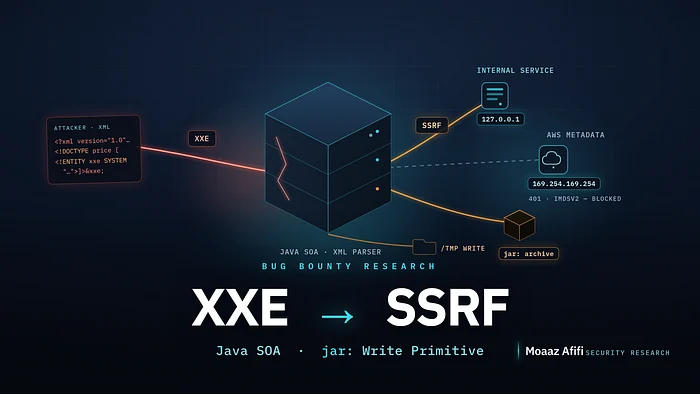
Unauthenticated XXE leading to SSRF and internal resource access
An unauthenticated XML endpoint processed external entities, allowing an attacker to make the server fetch internal and external resources. This enabled SSRF, internal service enumeration, in-band retrieval of internal HTTP responses, a file existence oracle, and remote archive retrieval with temporary file write.

medium.com
Published on medium.com
Ssrf
The full write-up lives on its author's site
It belongs to its author, so we link to it rather than copy it. The other two tabs are our own rewrites, checked against it.
Context
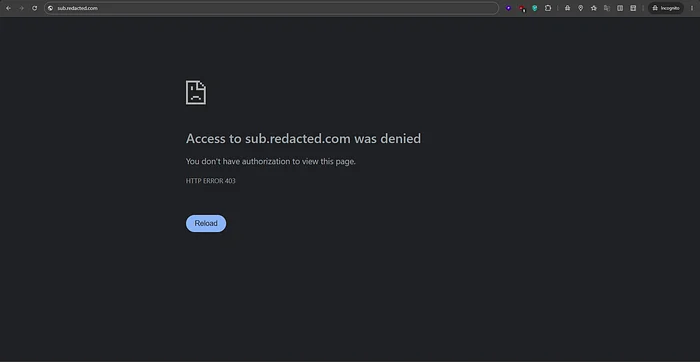
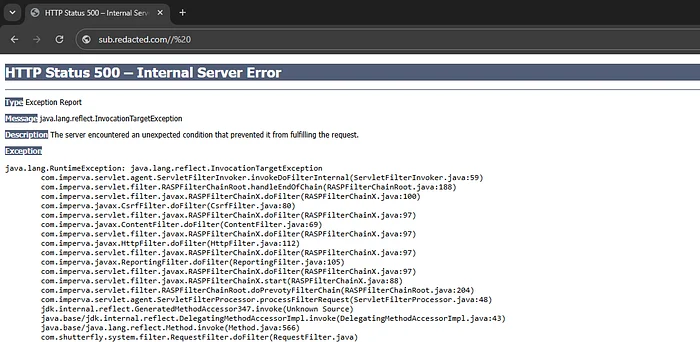
The target was a subdomain that returned 403 on everything. Sending an XML body to the root produced a 500 with a full Java stack trace. The trace showed Apache Tuscany SCA running JAXB databinding through Wink JAX-RS on Tomcat, with an Imperva servlet agent and two custom filters in the chain. The request in the report was sent to /photobookprice with Content-Type: application/xml.
An old Java SOA stack is one of the first places to check for XML parser issues.
Setup
No accounts or special roles were needed: the endpoint was reachable unauthenticated. The stack details come from the leaked stack trace: Apache Tuscany SCA, JAXB databinding, Wink JAX-RS, Tomcat, an Imperva servlet agent and two custom filters.
Finding it
The subdomain returned 403 on every path, but an XML body sent to the root produced a 500 with a full Java stack trace. That trace identified the parsing stack, which is what made an XML parser issue worth testing.
Exploitation
Step 1: Confirm the parser resolves external entities
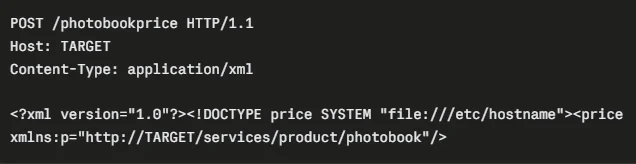
A minimal XML document with an external DTD pointing at a local file was posted to the endpoint:
POST /photobookprice HTTP/1.1Host: TARGETContent-Type: application/xml
<?xml version="1.0"?><!DOCTYPE price SYSTEM "file:///etc/hostname"><price xmlns:p="http://TARGET/services/product/photobook"/>
The server returned:
SAXParseException: The markup declarations contained or pointed to by the documenttype declaration must be well-formed. systemId: file:///etc/hostname lineNumber: 1 columnNumber: 1 at com.sun.org.apache.[redacted].impl.XMLDTDScannerImpl.scanDecls
The important part was systemId: file:///etc/hostname. The parser attempted to resolve the external DTD from the local filesystem and then failed while parsing the retrieved content, because /etc/hostname is not valid DTD syntax. This established that external file:// resources were being processed by the XML parser.
Step 2: Out-of-band confirmation
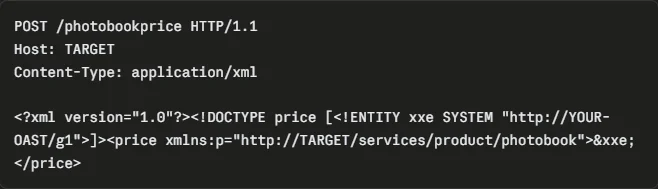
An external entity pointing at an OAST endpoint was used. The application returned an error complaining about an unexpected <html> element: the OAST endpoint had returned an HTML response, and that response reached the JAXB parsing layer through the external entity. The collector recorded:

Three different AWS egress IPs within the same second, showing that the outbound requests were coming through multiple backend egress sources.
Step 3: SSRF to the instance metadata endpoint
With external entity resolution confirmed, the AWS instance metadata endpoint was tested:
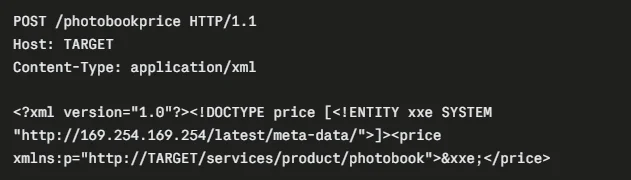
Server returned HTTP response code: 401 for URL: http:
IMDSv2 is enforced, so no credentials were obtained. The important part is that the request reached [redacted] and the backend received an HTTP 401 response.
Step 4: Internal service and port enumeration
The response behaviour was then used as a signal to enumerate internal services:
Target Response Result────────────────────────────────────────────────────────────────────────────────http://INTERNAL-HOST:8080/ unexpected element {xhtml}html Alive, past edgehttp://[redacted]:8888/metrics parse-success (HTTP 200) Localhost sidecarhttp://INTERNAL-HOST:9200/ connect timed out Filteredhttp://[redacted]:8005/ Connection reset Tomcat shutdown porthttp://[redacted]:8009/ Connection refused AJP closedhttp://BOGUS-HOST.example/ hostname echoed in error DNS oracle
The different responses provided a practical internal service and port enumeration oracle.
Step 5: In-band retrieval of an internal response body
One internal endpoint went beyond a simple connectivity signal. The Axis service inventory was blocked externally with a 403 on /services/*. The same resource was requested through the vulnerable XML endpoint:
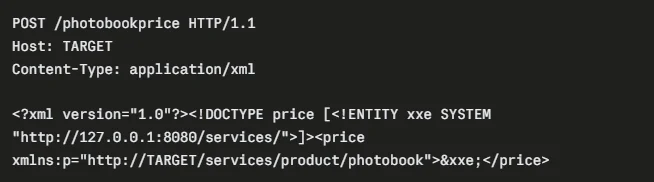
The internal response came back through the JAXB error envelope:
<h2>And now... Some Services</h2><ul><li>AdminService <a href="http://[redacted]:8080/services/AdminService?wsdl">(wsdl)</a></li><li>Version <a href="http://[redacted]:8080/services/Version?wsdl">(wsdl)</a></li></ul>
This was an in-band SSRF primitive, not just a port check: the server fetched an internal HTTP resource and returned its contents to the external caller.
Step 6: File existence oracle
The exception behaviour changed depending on whether the requested path existed:
Path Exception class Result─────────────────────────────────────────────────────────────────────────────────────file:///etc/hostname must be well-formed EXISTSfile:///etc/passwd must be well-formed EXISTSfile:///proc/self/environ must be well-formed EXISTSfile:///dist/tomcat/conf/server.xml must be well-formed EXISTSfile:///dist/tomcat/webapps/ROOT/WEB-INF/web.xml must be well-formed EXISTSfile:///dist/tomcat/README No such file or directory ABSENT (control)file:///etc/zzq-nonexistent-7781 No such file or directory ABSENT (control)
Two distinct exception classes: existing files produce the DTD parsing error, nonexistent paths produce the filesystem error. That is a boolean oracle across the origin filesystem without ever reading file contents.
Step 7: Remote archive retrieval and temporary-file write via jar:
The Java jar: URL handler exposed another primitive. A remote archive was supplied and a nonexistent entry referenced:
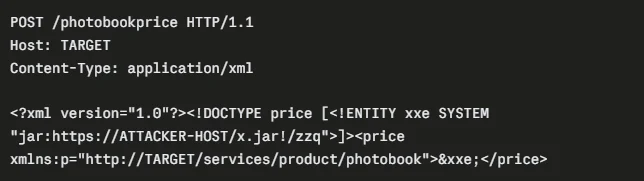

The URLJarFile.retrieve stack and the generated temporary archive path show that the Java jar: handler retrieved the remote archive and used a temporary file under /dist/tomcat/temp/ while processing it.
Step 8: Checking for a deserialisation chain
Whether this could be chained into code execution through Jackson polymorphic deserialisation was also checked:
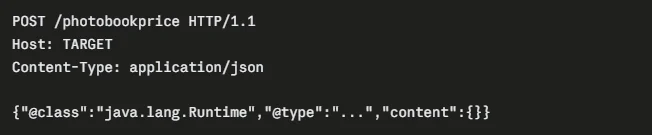
@class and @type were silently ignored. No working deserialisation chain was found, so no RCE is claimed. The confirmed primitive is server-side remote archive retrieval and temporary-file write through the Java jar: URL scheme.
Root cause
The XML parser on the /photobookprice endpoint resolves external entities, including file:// and remote HTTP resources, and the resulting parse errors are returned to the caller.
Impact
An unauthenticated attacker could make the backend resolve attacker-controlled external entities, providing:
- Server-side HTTP requests to internal and external hosts
- Access attempts to link-local infrastructure (IMDS reachable, IMDSv2 blocked credentials)
- Internal service and port enumeration via response differentials
- In-band retrieval of internal HTTP response bodies
- A filesystem path existence oracle via exception class differential
- Remote archive retrieval and temporary-file write via the
jar:URL scheme
Fix
Disable DTD processing and external entity resolution in the XML parser used by the endpoint, and stop returning parser exception details to clients. The report does not describe a fix that was applied.
Variants to test
- Send a
DOCTYPEwith aSYSTEMidentifier pointing atfile:///etc/hostnameto any XML-accepting endpoint. A positive result is aSAXParseExceptionnaming thesystemId, which shows the parser tried to resolve the external DTD. - Point an external entity at an OAST collector. A positive result is an inbound request from the target, ideally from several egress IPs.
- Point an external entity at
http://[redacted]/. A positive result is any HTTP status coming back through the error, even a 401 when IMDSv2 is enforced. - Use the response text as a port oracle against internal hosts and localhost ports. A positive result is distinguishable responses such as
unexpected element,parse-success,connect timed out,Connection resetorConnection refused. - Request an internal resource that is blocked at the edge, such as
/services/*. A positive result is the internal body echoed back in the error envelope. - Probe existing and nonexistent
file://paths and compare exception classes. A positive result is one class for existing files and a different one for missing paths. - Supply a remote archive through the
jar:scheme and reference a nonexistent entry. A positive result is aURLJarFile.retrievestack and a temporary archive path under the server temp directory. - Try Jackson polymorphic deserialisation with
@classand@type. A positive result is the type being honoured rather than silently ignored.
What happened, in plain words
The server that received that data was configured to go and fetch other files or web pages mentioned inside it, without checking who was asking or what it was being pointed at. None of this required logging in.
This kind of flaw is called XXE, short for XML External Entity. The "external entity" is the part of an XML document that says "go and get this other thing and put it here". When a server honours that instruction for anyone who asks, the person asking can point it at things they should never be able to reach.
Some background first
A few ideas come up constantly below, so here they are before we start.
A server and a browser. Your browser asks a website for a page; the server is the computer that answers. When you fill in a form and press submit, your browser sends your data to the server, and the server decides what to do with it.
An API. Think of a restaurant. The menu and the dining room are the website you see; the kitchen is the server. An API is the waiter: a fixed way of asking the kitchen for something and getting an answer back, without going into the kitchen yourself. Software talks to other software through APIs all day.
HTTP and status codes. The language browsers and servers use to talk is HTTP. Every answer carries a three-digit number. 200 means "here you go". 403 means "I understood you, but you are not allowed". 500 means "something broke on my side". 401 means "you are not identified". These numbers matter a lot later, because the differences between them leak information.
XML. A way of writing data as nested tags, a bit like a form with labelled boxes inside labelled boxes. It looks similar to HTML, the language of web pages, but it is meant for data rather than for display. Many older systems use it to exchange messages.
A DTD and an entity. At the top of an XML document you can declare a DTD, a set of rules describing what tags are allowed. Inside a DTD you can declare an entity: a shortcut name that stands for some content. An external entity is one whose content is not written in the document but must be fetched from somewhere else, for example a file on the server's disk or a web address. That fetching is the dangerous part.
A parser. The piece of software that reads XML and turns it into something the program can use. If the parser is told to fetch external entities, it will happily do so, and it does not care whether the address points at something private.
A stack trace. When software crashes, it often prints a list of the functions it was inside at the moment of the crash, plus the error message. Developers need this to debug. Attackers love it, because it names the software and versions in use, which is a map of where to look next.
SSRF. Server-Side Request Forgery. The server is tricked into making a request on the attacker's behalf, from inside the network where it lives. Compare it to asking a receptionist to phone an internal extension for you: you cannot dial it yourself, but the receptionist can, and then tells you what was said.
Out-of-band (OOB) and OAST. Sometimes the server's answer to you does not contain what you asked for, but you can still tell the request happened because it arrives somewhere you control. An OAST collector is a service that gives you a unique address and records every request that reaches it. It is like leaving a camera pointed at your own front door: you know someone visited even if they left no note.
Loopback and link-local addresses. [redacted] always means "this same machine". [redacted] is a special address used by cloud servers to reach a small internal service that describes the server itself. That service is called the instance metadata service, or IMDS.
IMDSv2. The metadata service has two versions. The older one answers anyone who asks. The newer one, IMDSv2, requires the caller to first obtain a short-lived token and present it. If IMDSv2 is enforced, a blind request gets refused.
A port. A single computer can run many services; a port number is like a door number in a large building. 8080 is a common door for web applications, 8005 is often Tomcat's shutdown door, 8009 is often the AJP connector door.
Tomcat, JAXB, Wink, Tuscany, Axis, Imperva. Names of Java software. Tomcat is a web server that runs Java applications. JAXB turns XML into Java objects and back. Wink is a framework for building web APIs in Java. Tuscany is an older framework for building services. Axis is another such framework, and it publishes a page listing its services. Imperva is a web application firewall, a product that sits in front of a site and filters bad traffic.
A filter. A checkpoint in the code that every request passes through before reaching the application. A firewall product and custom filters were both in the chain here.
A jar: URL. Java can treat a zip archive as a kind of address, written jar: followed by the location of the archive and the name of a file inside it. If the archive is remote, Java downloads it first, usually to a temporary file.
Deserialisation. Turning stored data back into live objects in memory. Some libraries will create an object of whatever type the data names. If an attacker can name a dangerous type, that can lead to running code. Jackson is a Java library that does this, and @class and @type are the fields it uses to name a type.
RCE. Remote Code Execution: the attacker gets their own code running on the server. It is the worst outcome, so it is only claimed when proven.
The starting point
The researcher was looking at a subdomain, a smaller site under a larger one, and every path on it answered 403, meaning "not allowed". That is a wall. But walls have doors, and the way to find them is to send something unexpected and watch how the wall reacts.
So an XML body was sent to the root of the site. Instead of 403, the answer was 500, and the body of that answer contained a full Java stack trace. The trace named the whole chain: Apache Tuscany SCA, JAXB databinding, Wink JAX-RS, Tomcat, an Imperva servlet agent and two custom filters.
That is a gift. It says exactly which software is reading the input, and old Java service frameworks are a well-known place to look for XML parser problems. The endpoint used in the report is /photobookprice, and it accepts application/xml, which is the label a client puts on a request to say "the body is XML".
What was needed to test it
Nothing special: no account, no login, no role. The endpoint answered anyone.
Step 1: Does the parser fetch external things?
The first question is the whole ballgame: when the XML says "go and fetch this", does the server actually go? The cheapest way to find out is to point it at a file that certainly exists on the server and see whether the error message mentions it.
POST /photobookprice HTTP/1.1Host: TARGETContent-Type: application/xml
Line by line:
POST /photobookprice HTTP/1.1says "I am sending data to the path/photobookprice, using version 1.1 of HTTP".POSTis the method used when you are submitting something rather than just asking for a page.Host: TARGETsays which site the request is for.TARGETstands in for the real hostname.Content-Type: application/xmltells the server the body is XML, so it should use an XML parser on it.
<?xml version="1.0"?><!DOCTYPE price SYSTEM "file:///etc/hostname"><price xmlns:p="http://TARGET/services/product/photobook"/>
Line by line:
<?xml version="1.0"?>is the standard opening line of an XML document, saying which version of XML it uses.<!DOCTYPE price SYSTEM "file:///etc/hostname">declares a DTD for the document, andSYSTEMfollowed by a location says "the rules for this document live at this address". The address here isfile:///etc/hostname, a file on the server's own disk.file://is the scheme for local files, just ashttp://is the scheme for web pages./etc/hostnameis a small text file that holds the machine's name.<price xmlns:p="http://TARGET/services/product/photobook"/>is the actual data element, namedprice, with a namespace declaration. A namespace is just a label that keeps names from different systems from clashing. The element is empty and closed immediately with/>.
The server answered:
SAXParseException: The markup declarations contained or pointed to by the documenttype declaration must be well-formed. systemId: file:///etc/hostname lineNumber: 1 columnNumber: 1 at com.sun.org.apache.[redacted].impl.XMLDTDScannerImpl.scanDecls
Line by line:
SAXParseExceptionis the name of the error: the XML parser could not make sense of something.The markup declarations contained or pointed to by the documenttype declaration must be well-formedmeans the rules it fetched were not valid DTD syntax.systemId: file:///etc/hostnameis the crucial part. It names the address the parser went to. The parser really did open that file.lineNumber: 1 columnNumber: 1is where in the fetched content the problem was found.at com.sun.org.apache.[redacted].impl.XMLDTDScannerImpl.scanDeclsis the internal function that was running. Xerces is the XML parser built into Java.
Why this matters: the file /etc/hostname contains a machine name, not DTD rules, so of course parsing it failed. The failure is the proof. The parser fetched a local file because the XML told it to. External file:// resources are being processed.
Step 2: Confirming it from outside
A local file error is good evidence, but it could in principle be a quirk. The stronger test is to point the entity at a server the researcher controls and watch for the visit. That is out-of-band confirmation: the proof arrives at the collector, not in the response.
An external entity pointing at the OAST endpoint was used. The application then returned an error complaining about an unexpected <html> element. That is a beautiful detail: the OAST endpoint had replied with an HTML page, that HTML was pulled in through the external entity, and the XML parser then choked because HTML is not valid where it expected XML. The collector recorded:
It also confirms the traffic is genuinely coming from the target's infrastructure, not from the researcher's own machine.
Step 3: Asking the cloud about itself
With fetching confirmed, the next target is the instance metadata service at [redacted]. On cloud servers this small service can describe the machine and, depending on configuration, hand out temporary credentials. If an attacker can make the server ask it questions, the answers can be very valuable.
Server returned HTTP response code: 401 for URL: http:
Line by line:
Server returned HTTP response code: 401means the metadata service answered "you are not identified".for URL: http:is the truncated address in the error message.
IMDSv2 is enforced, so no credentials were obtained. That is the honest reading: the door was reached, but it was locked. The important part is that the request reached [redacted] at all and the backend received an HTTP 401. A refusal is still information: it proves the server can talk to that address.
Step 4: Using the answers as a map
Once you know the server will make requests and report back differently depending on what happened, you can use those differences as a measuring instrument. This is called an oracle: a yes/no signal you can ask questions of. Here the questions are "is anything listening at this address and port, and what is it?".
Target Response Result────────────────────────────────────────────────────────────────────────────────http://INTERNAL-HOST:8080/ unexpected element {xhtml}html Alive, past edgehttp://[redacted]:8888/metrics parse-success (HTTP 200) Localhost sidecarhttp://INTERNAL-HOST:9200/ connect timed out Filteredhttp://[redacted]:8005/ Connection reset Tomcat shutdown porthttp://[redacted]:8009/ Connection refused AJP closedhttp://BOGUS-HOST.example/ hostname echoed in error DNS oracle
Line by line:
http://INTERNAL-HOST:8080/answered withunexpected element {xhtml}html. Something replied with an HTML page, so a web service is alive there, and it is reachable from the backend even though it is not reachable from outside. "Past edge" means the request got beyond the outer firewall.http://[redacted]:8888/metricsgaveparse-success (HTTP 200). The response was valid enough for the parser to accept, and the status was 200. Something on the same machine is serving metrics, a common sidecar pattern where a small helper process runs alongside the main application.http://INTERNAL-HOST:9200/gaveconnect timed out. Nothing answered in time, so that port is filtered, meaning traffic to it is dropped rather than refused.http://[redacted]:8005/gaveConnection reset. Something is listening on Tomcat's shutdown port and closed the connection abruptly.http://[redacted]:8009/gaveConnection refused. Nothing is listening on the AJP connector port; the operating system actively said no.http://BOGUS-HOST.example/had its hostname echoed back in the error. That is a DNS oracle: it shows the name was looked up and the failure message carries the name, which is useful for confirming how names are resolved.
Why this matters: each distinct message is a different fact about the internal network. Without ever seeing the internal network, the researcher can tell which doors are open, which are locked, and which do not exist.
Step 5: Reading an internal page through the error
A port check tells you a door exists. It does not tell you what is behind it. The next step is to fetch an actual internal page and get its contents back in the response. The target was the Axis service inventory, a page that lists the web services an Axis installation publishes. From outside, /services/* was blocked with a 403. Through the vulnerable XML endpoint, the same resource was requested:
The internal response came back inside the JAXB error envelope:
<h2>And now... Some Services</h2><ul><li>AdminService <a href="http://[redacted]:8080/services/AdminService?wsdl">(wsdl)</a></li><li>Version <a href="http://[redacted]:8080/services/Version?wsdl">(wsdl)</a></li></ul>
Line by line:
<h2>And now... Some Services</h2>is the heading of the internal page. It is HTML, which is why the parser complained earlier: HTML arriving where XML was expected.<ul>opens an unordered list, and each<li>is a list item.AdminServiceandVersionare the names of two published services.- Each
<a href="...">(wsdl)</a>is a link to that service's WSDL, the machine-readable description of what the service offers and how to call it. The links point at[redacted]:8080, the machine itself.
This is the difference between a port check and a real SSRF primitive. The server fetched an internal HTTP resource and handed its contents to an external caller. The 403 at the edge was bypassed entirely, because the request came from inside.
Step 6: Asking whether a file exists without reading it
Sometimes you cannot get a file's contents back, but you can still learn whether it is there. The error message changed depending on whether the requested path existed:
Path Exception class Result─────────────────────────────────────────────────────────────────────────────────────file:///etc/hostname must be well-formed EXISTSfile:///etc/passwd must be well-formed EXISTSfile:///proc/self/environ must be well-formed EXISTSfile:///dist/tomcat/conf/server.xml must be well-formed EXISTSfile:///dist/tomcat/webapps/ROOT/WEB-INF/web.xml must be well-formed EXISTSfile:///dist/tomcat/README No such file or directory ABSENT (control)file:///etc/zzq-nonexistent-7781 No such file or directory ABSENT (control)
Line by line:
file:///dist/tomcat/conf/server.xmlandfile:///dist/tomcat/webapps/ROOT/WEB-INF/web.xmlare Tomcat configuration and application descriptor files. Same error, so they exist too.file:///dist/tomcat/READMEandfile:///etc/zzq-nonexistent-7781producedNo such file or directory. These are the controls: one is a plausible file that is not there, the other is a deliberately silly name. Both give the filesystem error instead of the parsing error.
Two distinct exception classes. Existing files produce the DTD parsing error because their contents are not valid DTD; missing paths produce the filesystem error because there is nothing to open. That is a boolean oracle across the server's filesystem: a yes/no answer for "does this path exist", without ever reading the contents. The two control rows are what make the result trustworthy, because they show the two outcomes are genuinely different.
Step 7: Making the server download and write a file
Java has a jar: URL scheme. It means "treat this archive as an address, and look inside it for this entry". If the archive is remote, Java fetches it first, and to do that it writes it to a temporary file. That is a second capability beyond reading: the server can be made to pull a file from the internet and put it on disk.
A remote archive was supplied and a nonexistent entry inside it was referenced. The URLJarFile.retrieve stack and the generated temporary archive path show that the Java jar: handler retrieved the remote archive and used a temporary file under /dist/tomcat/temp/ while processing it. In plain words: the server went out to the internet, downloaded the archive, saved it in its own temp folder, and then complained that the entry asked for was not inside it. The complaint is the proof of the download and the write.
Step 8: Checking whether it can become code execution
A file write is serious. The obvious next question is whether it can be turned into running code. Jackson, a Java library for turning data into objects, has a known pattern where the data names the class to create, using @class and @type. If those fields are honoured, an attacker may be able to name a dangerous class and get code to run.
@class and @type were silently ignored. Nothing happened. No working deserialisation chain was found, so no RCE is claimed. That restraint matters: the confirmed primitive is server-side remote archive retrieval and temporary-file write through the Java jar: URL scheme, and nothing more.
Why it worked
The XML parser on /photobookprice resolves external entities, including file:// and remote HTTP resources, and the resulting parse errors are returned to the caller.
What an attacker could do
An unauthenticated attacker could make the backend resolve external entities they control, which provides:
- Server-side HTTP requests to internal and external hosts
- Access attempts to link-local infrastructure (IMDS reachable, IMDSv2 blocked credentials)
- Internal service and port enumeration via response differentials
- In-band retrieval of internal HTTP response bodies
- A filesystem path existence oracle via exception class differential
- Remote archive retrieval and temporary-file write via the
jar:URL scheme
How to fix it
Disable DTD processing and external entity resolution in the XML parser used by the endpoint, and stop returning parser exception details to clients. The report does not describe a fix that was applied.
How to test for the same thing
- Send a
DOCTYPEwith aSYSTEMidentifier pointing atfile:///etc/hostnameto any endpoint that accepts XML. A positive result is aSAXParseExceptionnaming thesystemId, which shows the parser tried to resolve the external DTD. - Point an external entity at an OAST collector. A positive result is an inbound request from the target, ideally from several egress IPs.
- Point an external entity at
http://[redacted]/. A positive result is any HTTP status coming back through the error, even a 401 when IMDSv2 is enforced. - Use the response text as a port oracle against internal hosts and localhost ports. A positive result is distinguishable responses such as
unexpected element,parse-success,connect timed out,Connection resetorConnection refused. - Request an internal resource that is blocked at the edge, such as
/services/*. A positive result is the internal body echoed back in the error envelope. - Probe existing and nonexistent
file://paths and compare exception classes. A positive result is one class for existing files and a different one for missing paths. - Supply a remote archive through the
jar:scheme and reference a nonexistent entry. A positive result is aURLJarFile.retrievestack and a temporary archive path under the server temp directory. - Try Jackson polymorphic deserialisation with
@classand@type. A positive result is the type being honoured rather than silently ignored.
Glossary
- API: a fixed way for one piece of software to ask another for something and get an answer.
- AJP: a connector protocol used by Tomcat; port 8009 is its usual door.
- Axis: a Java framework that publishes web services and lists them on a service inventory page.
- Boolean oracle: a yes/no signal you can ask questions of, here "does this path exist".
- Control: a test case with a known expected outcome, used to show that the difference you observed is real.
- Deserialisation: turning stored data back into live objects in memory; dangerous when the data can name the object type.
- DNS oracle: using whether and how a hostname is resolved, and what the error echoes, as a source of information.
- DTD: a set of rules at the top of an XML document describing which tags are allowed.
- Egress IP: the outbound address a server's traffic appears to come from.
- Entity: a shortcut name in XML that stands for some content; an external entity fetches that content from elsewhere.
- Filter: a checkpoint in application code that every request passes through.
- Firewall / WAF: a product that sits in front of a site and filters traffic; Imperva is one such product.
- HTTP: the language browsers and servers use to exchange requests and responses.
- IMDS: the cloud instance metadata service at
[redacted], which describes the server and can issue temporary credentials. - IMDSv2: the newer metadata service version that requires a token before answering.
- In-band: the result comes back in the normal response to the attacker, as opposed to out-of-band.
- Instance metadata: information a cloud platform exposes about a running server.
- Jackson: a Java library that converts data to and from objects, with
@classand@typefields that can name a type. - JAXB: a Java library that converts XML to Java objects and back.
jar:URL: a Java address scheme that treats a zip archive as a location and looks inside it for an entry.- Link-local address: an address in the
169.254.x.xrange used for local network discovery, not the public internet. - Load balancer: a machine that spreads incoming traffic across several backend servers.
- Loopback: the address
[redacted], meaning "this same machine". - OAST: out-of-band application security testing; a collector service that records requests reaching an address you control.
- Out-of-band (OOB): proof of a request that arrives somewhere other than the response to the attacker.
- Parser: software that reads a data format such as XML and turns it into something a program can use.
- Port: a numbered door on a computer through which a particular service listens.
- SAXParseException: the Java error raised when an XML parser cannot make sense of a document.
- Sidecar: a small helper process running alongside the main application on the same machine.
- SOA: service-oriented architecture; a style of building systems from many small services.
- SSRF: server-side request forgery; tricking a server into making a request on the attacker's behalf from inside its network.
- Stack trace: the list of functions software was running when it crashed, plus the error message.
- Status code: the three-digit number in an HTTP response, such as 200, 401, 403 or 500.
- Subdomain: a smaller site under a larger one, such as
shop.example.comunderexample.com. - Tomcat: a Java web server that runs Java applications.
- Tuscany: an older Java framework for building services.
- Wink: a Java framework for building web APIs.
- WSDL: a machine-readable description of a web service: what it offers and how to call it.
- Xerces: the XML parser built into Java.
- XML: a tag-based format for writing structured data.
- XXE: XML External Entity; a flaw where a parser fetches external entities supplied by an attacker.



