Using E-Notation to bypass Access Control restrictions to access arbitrary user PII-discussions
The discussions API used a user ID in the URL and checked access control by validating only the leading numeric characters, so an attacker could use E-notation (e.g., 123e1) to access other users' discussions. This allowed unauthorised access to sensitive PII discussions of other users.

The company targeted in this bug bounty research is a large cap company with over 2 million customers worldwide. More specifically the host discussed in this article is a multi-user website with various functions, including discussions feature between the company employees and its users.
The full write-up lives on its author's site
It belongs to its author, so we link to it rather than copy it. The other two tabs are our own rewrites, checked against it.
Context
The target was a large cap company with more than 2 million customers worldwide. The host discussed here is a multi-user website with several functions, one of which is a discussions feature between the company's employees and its users. Those discussions are treated as highly sensitive and contain PII data that should be protected accordingly.
The discussions feature is backed by an API that takes a user ID in the path. The report shows the request as:
GET /api/v1/user/123/discussions
Sensitive details about the company and the requests are redacted, and the requests shown do not represent any real user.
Setup
The report does not describe accounts, roles or tooling versions. The only identifiers used throughout are the sample user ID 123 and the IDs derived from it.
Finding it
The discussions endpoint used a user ID in the path and was protected against IDOR: if the caller lacked access to the entered ID, it returned a 403 error. That part behaved as expected.
What looked wrong was the handling of unconventional formats. Entering an ID such as 123a produced a 400 error with the message error from discussions API. On the same host, a different API request with the same unconventional user ID format behaved differently:
GET /api/v1/information/users/123a
This returned the same result as the standard request:
GET /api/v1/information/users/123
That inconsistency highlighted abnormal behaviour in the discussions API, which became the focus of the investigation.
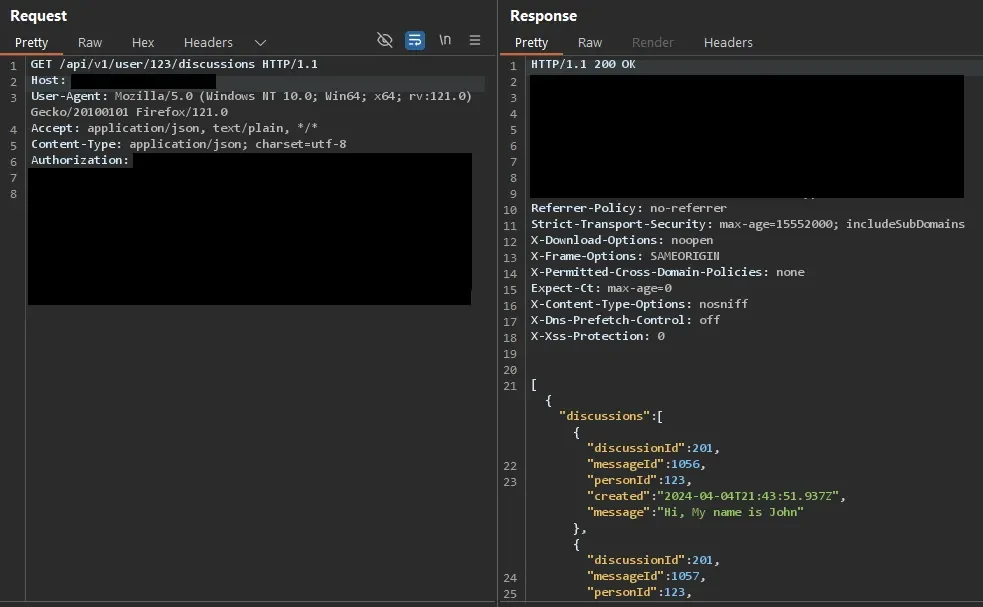
The screenshot shows a normal request to fetch a user's discussions.
Exploitation
Step 1: map the validation behaviour with different ID formats
Multiple attempts were made against the discussions API user ID validation. The responses were inconsistent across formats:
123aaa, > 400,Error from discussions api123, > 200,Discussions for user 123: …123.0, > 200,Discussions for user 123: …123.2, > 200,Discussions for user 123: …111.0, > 403,User has no access to this id1234, > 403,User has no access to this id123+1, > 400,Error from discussions api123/1, > 400,Error from discussions api123*1, > 400,Error from discussions api123–0, > 400,Error from discussions api
Arithmetic manipulation of the ID proved ineffective: 123+1, 123/1, 123*1 and 123–0 all failed with the API error. But modifying the value so that it still resulted in the correct numeric representation of the correct ID allowed successful requests. That is, 123.0 and 123.2 were accepted and returned the discussions for user 123, while 111.0 was correctly refused with 403 and 1234 was refused with 403.
Step 2: look for other numeric representations
Since there are different ways of expressing numbers, that became the next point of focus. The expression could not be hex (123 = 0x7B), and it could not include characters that are not URL safe, because it had to start with the correct user ID. The remaining option was scientific notation, E-notation.
E-notation is normally used to represent very large or very small numbers that would be too long to conveniently write in decimal form. For example, 100 in E-notation can be written as 10e1, 1000e-1 or 10.0e1. A scientific notation calculator was used during the case to find the correct representation.
Because the expression had to start with the correct user ID to pass the access control validation, that constraint had to be respected when constructing the payload.
Step 3: smuggle a second value past the validation
By combining the correct user ID with E-notation, the access control validation was bypassed:
123e0(123 in decimal), > 200,Discussions for user 123: …123e1(1230), > 200,Discussions for user 1230: You should not see this…
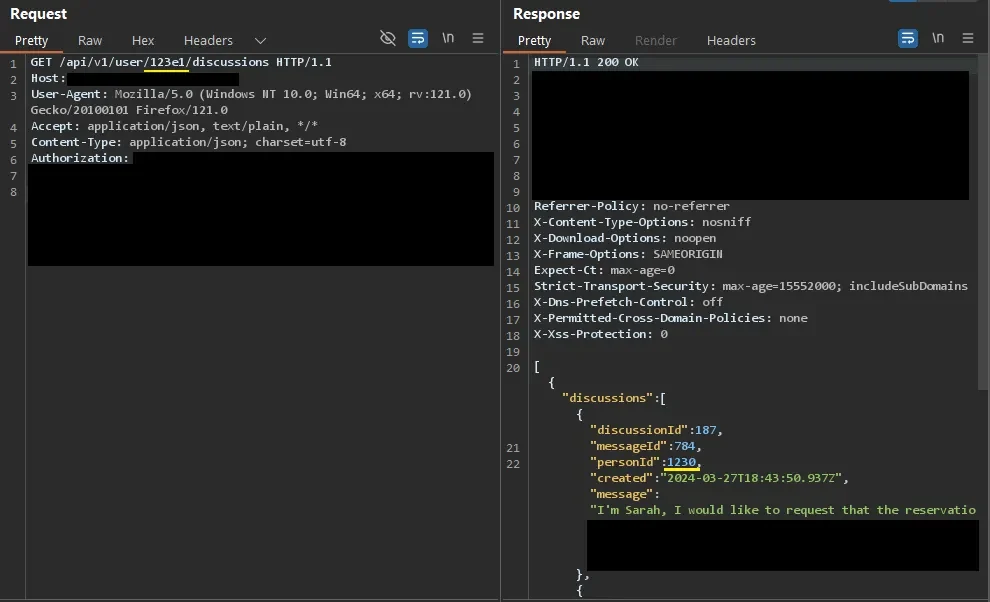
The screenshot shows the request with E-notation incorporated, which allowed the bypass of the access control validation. The user data in the photo is fictive.
The method worked by including the pieces the validation needed while smuggling additional values into the backend call. Validation only checked the first numeric characters entered, and the rest was disregarded as long as the representation was the correct numeric value, for example 123.0, 123.3 or 123e3.
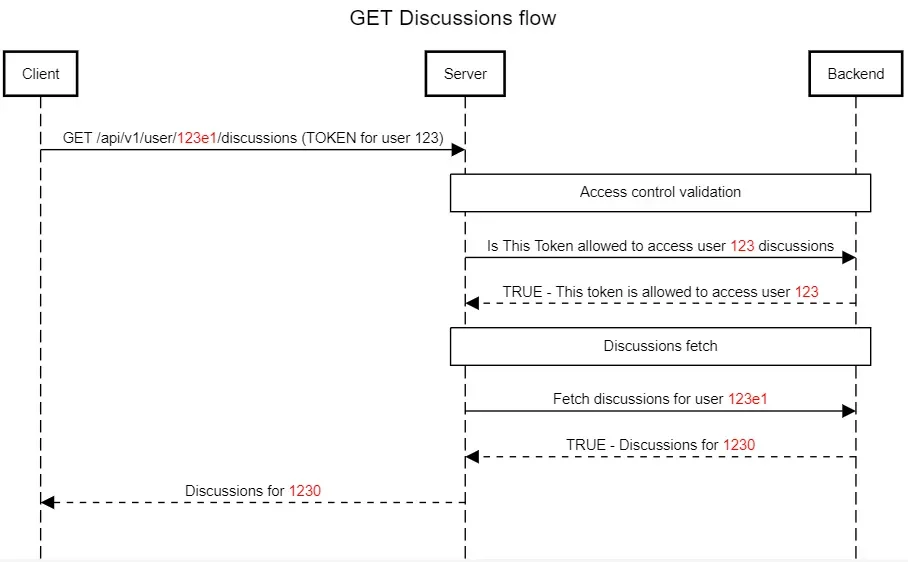
The diagram shows the discussions fetch flow and the inconsistencies in the numeric representation.
Step 4: understand the limits
The approach has limitations. Traversal was restricted to IDs higher than the user's own ID by a factor of 10, for example ID 123 could access discussions for user 1230 and above:
123e1, > 1230123.1e1, > 1231123.2e1, > 1232
Certain edge cases also allowed access to users included in the requester's ID:
123e-1, > 12.3, > user 12123e-2, > 1.23, > user 1
Root cause
The vulnerability was caused by the possibility of smuggling values into the backend calls that fetch a user's discussions. This was made possible by inconsistent handling of different numeric representations by the backends. The access control validation only validated the first numeric characters of the input and disregarded the rest when the representation evaluated to the correct numeric value, while the backend call consumed the full expression and resolved it to a different user ID.
Impact
An attacker could read other users' discussions, which are regarded as highly sensitive and contain PII data. The reachable set is constrained: traversal is limited to IDs higher than the attacker's own ID by a factor of 10, and certain edge cases allow access to users whose IDs are contained in the requester's ID (for example 123e-1 reaching user 12 and 123e-2 reaching user 1). The report does not describe any other impact beyond unauthorised access to discussions.
Fix
Variants to test
- Append a fractional part to a valid ID (
123.0,123.2) and check whether the response is 200 with the original user's data rather than a 400. A positive result is the same data as the plain ID. - Append E-notation to a valid ID (
123e1,123.1e1,123.2e1) and check whether the response returns discussions for a different user. A positive result is data for the derived ID, not the original. - Use negative exponents (
123e-1,123e-2) to reach users whose IDs are contained in the requester's ID. A positive result is data for user 12 or user 1. - Compare the same unconventional ID against a second endpoint on the same host that takes a user ID, as was done with
/api/v1/information/users/123a, to spot endpoints that normalise differently from the one under test.
What happened, in plain words
A large company, with more than 2 million customers worldwide, runs a website where employees and customers can hold discussions with each other. Those discussions are treated as highly sensitive because they contain personal data (PII, short for personally identifiable information: anything that can be tied to a specific person, such as a name, an email address or an account number).
The discussions are not stored inside the web pages themselves. They live behind an API. An API (application programming interface) is the part of a website that answers requests from software rather than drawing a page for a human. A useful comparison is a restaurant: the web page is the dining room you sit in, and the API is the kitchen door where the waiter hands in your order and gets a plate back. When you click something on a modern website, your browser usually sends a small request to an API behind the scenes and then displays what comes back.
Each request to the discussions API includes a user ID, a number that identifies whose discussions you want. The request in the report looks like this:
GET /api/v1/user/123/discussions
Here GET is the type of request ("give me something"), /api/v1/user/123/discussions is the address being asked, and 123 is the user ID. The API was supposed to check whether the person making the request is allowed to see that user's discussions, and to refuse with an error if not. That check is called access control: the rule that says who may see what.
The researcher found that the check could be fooled. By writing the user ID in a different but mathematically equivalent way, such as 123e0, the request was accepted for user 123. By writing it as 123e1, which means 1230, the request was accepted for user 1230, a completely different person whose discussions the researcher should never have been able to read. This kind of flaw, where changing an identifier in a request lets you reach someone else's data, is called IDOR (insecure direct object reference), and it sits under the wider label of broken access control.
The company recognised the finding as a critical severity issue and rewarded it with a significant four-digit bounty. A bug bounty is a programme where a company pays people for reporting security problems responsibly instead of exploiting them.
Sensitive details about the company and the requests are redacted, and the requests shown do not represent any real user.
The target and the feature
The host discussed in the report is a multi-user website: many different people log in and each sees their own account. One of its functions is the discussions feature between the company's employees and its users. Because those conversations carry personal data, they are exactly the sort of thing an access control check exists to protect.
The discussions feature is backed by an API that takes a user ID in the path. The path is the part of the address after the domain name, the bit that looks like a folder structure. In the request above, the path is /api/v1/user/123/discussions, and the 123 sits in the middle of it.
Setting the scene
The report does not describe accounts, roles or tooling versions. A host is simply the machine (identified by its domain name) that answers the requests. The only identifiers used throughout are the sample user ID 123 and the IDs derived from it.
Finding it
The discussions endpoint used a user ID in the path and was protected against IDOR: if the caller lacked access to the entered ID, it returned a 403 error. HTTP status codes are the short numeric answers a server gives. 200 means "here is your data", 403 means "you are not allowed", and 400 means "I could not understand your request". So far, so normal.
What looked wrong was the handling of unconventional formats. Entering an ID such as 123a produced a 400 error with the message error from discussions API. That is a strange answer: 123a is not a number, so a strict server would reject it, and this one did, but with a vague internal error rather than a clear complaint about the format.
On the same host, a different API request with the same unconventional user ID format behaved differently:
GET /api/v1/information/users/123a
This returned the same result as the standard request:
GET /api/v1/information/users/123
Line by line: the first request asks the information API for the user whose ID is written 123a. The second asks the same API for user 123. Both came back with the same answer. In other words, the information API quietly ignored the trailing a and treated 123a as 123, while the discussions API choked on it. Two parts of the same website disagreed about what a user ID is. That inconsistency highlighted abnormal behaviour in the discussions API, which became the focus of the investigation.
Why does this matter? If one part of a system is lenient about input and another is strict, the gap between them is where bugs live. The researcher now had a reason to believe the discussions API was doing something odd with the ID before using it.
The screenshot shows a normal request to fetch a user's discussions: the ordinary, expected case that the rest of the investigation is compared against.
Exploitation
Step 1: map the validation behaviour with different ID formats
Before trying to break anything, the researcher sent a series of IDs in different shapes and wrote down exactly what came back. This is the security equivalent of knocking on a door in different ways to learn how the lock works. Multiple attempts were made against the discussions API user ID validation, and the responses were inconsistent across formats:
123aaa, > 400,Error from discussions api123, > 200,Discussions for user 123: …123.0, > 200,Discussions for user 123: …123.2, > 200,Discussions for user 123: …111.0, > 403,User has no access to this id1234, > 403,User has no access to this id123+1, > 400,Error from discussions api123/1, > 400,Error from discussions api123*1, > 400,Error from discussions api123–0, > 400,Error from discussions api
Reading the list in plain words:
123aaais rejected with a 400. Letters after the number are not accepted.123is the normal request and returns the discussions for user 123 with a 200.123.0also returns the discussions for user 123 with a 200. In ordinary arithmetic, 123.0 is the same number as 123, and the server apparently agreed.123.2also returns the discussions for user 123 with a 200. This is the first genuinely suspicious line: 123.2 is not 123, yet the answer is user 123's data.111.0is refused with a 403, the "no access" answer. So the access check is still doing something: a different user's ID is blocked.1234is refused with a 403. A plain different number is blocked too.123+1,123/1,123*1and123–0all fail with a 400. Arithmetic symbols are not accepted at all.
Arithmetic manipulation of the ID proved ineffective: 123+1, 123/1, 123*1 and 123–0 all failed with the API error. But modifying the value so that it still resulted in the correct numeric representation of the correct ID allowed successful requests. That is, 123.0 and 123.2 were accepted and returned the discussions for user 123, while 111.0 was correctly refused with 403 and 1234 was refused with 403.
The lesson from this step: the check seems to look only at the beginning of the value, the 123 part, and to accept anything after it as long as the whole thing still counts as a number. The 123.2 case shows the rest of the value is not simply thrown away, though, because the server did not complain about it. Something later in the chain must be reading the whole expression.
Step 2: look for other numeric representations
Since there are different ways of expressing numbers, that became the next point of focus. The researcher needed a way to write a number that starts with the valid ID, passes the check, and means a different number to whatever processes it next.
Two routes were ruled out. The expression could not be hex: hexadecimal is a way of writing numbers using sixteen symbols (0 to 9 plus A to F), so 123 in decimal is written 0x7B in hex, but that does not start with 123. And it could not include characters that are not URL safe, because it had to start with the correct user ID and travel inside a web address. A URL is the address of a page or API call, and certain characters have special meanings in it, so only a restricted set can be used safely.
The remaining option was scientific notation, also called E-notation. E-notation is normally used to represent very large or very small numbers that would be too long to conveniently write in decimal form. The letter e stands for "times ten to the power of". For example, 100 in E-notation can be written as 10e1 (10 times 10), 1000e-1 (1000 divided by 10) or 10.0e1. A scientific notation calculator was used during the case to find the correct representation.
Because the expression had to start with the correct user ID to pass the access control validation, that constraint had to be respected when constructing the payload. A payload here simply means the crafted value the researcher puts into the request.
Step 3: smuggle a second value past the validation
By combining the correct user ID with E-notation, the access control validation was bypassed:
123e0(123 in decimal), > 200,Discussions for user 123: …123e1(1230), > 200,Discussions for user 1230: You should not see this…
Line by line: 123e0 means 123 times ten to the power of zero, and anything to the power of zero is one, so the value is 123. The server answered 200 with user 123's discussions, which is expected. 123e1 means 123 times ten, which is 1230. The server answered 200 with the discussions for user 1230, a different person. The response text in the report even reads "You should not see this", which is the researcher's own sample data making the point that this content belongs to someone else.
The screenshot shows the request with E-notation incorporated, which allowed the bypass of the access control validation. The user data in the photo is fictive.
The method worked by including the pieces the validation needed while smuggling additional values into the backend call. "Backend" means the server-side software that does the real work behind the API. Validation only checked the first numeric characters entered, and the rest was disregarded as long as the representation was the correct numeric value, for example 123.0, 123.3 or 123e3.
A comparison: imagine a bouncer at a club who only reads the first three letters of the name on your invitation, and a cloakroom attendant inside who reads the whole thing. If your invitation says "123e1", the bouncer sees "123" and waves you in, while the attendant reads "1230" and fetches the coat belonging to a different guest. The flaw is not that either person is careless in isolation; it is that they read the same document differently.
The diagram shows the discussions fetch flow and the inconsistencies in the numeric representation: the same input is interpreted one way by the check and another way by the code that actually fetches the data.
Step 4: understand the limits
The approach has limitations. Traversal was restricted to IDs higher than the user's own ID by a factor of 10, for example ID 123 could access discussions for user 1230 and above:
123e1, > 1230123.1e1, > 1231123.2e1, > 1232
Line by line: 123e1 is 123 times ten, so 1230. 123.1e1 is 123.1 times ten, so 1231. 123.2e1 is 123.2 times ten, so 1232. Because the value must begin with 123, the smallest number you can reach this way is ten times your own ID. You cannot simply ask for user 124; you can only reach IDs in the 1230s and beyond, depending on the digits you append.
Certain edge cases also allowed access to users included in the requester's ID:
123e-1, > 12.3, > user 12123e-2, > 1.23, > user 1
Line by line: 123e-1 means 123 divided by ten, which is 12.3, and the system resolved that to user 12. 123e-2 means 123 divided by a hundred, which is 1.23, and that resolved to user 1. Here the reachable users are the ones whose ID appears at the start of the requester's own ID. The reach is narrow, but it is still someone else's data.
Root cause
The vulnerability was caused by the possibility of smuggling values into the backend calls that fetch a user's discussions. This was made possible by inconsistent handling of different numeric representations by the backends. The access control validation only validated the first numeric characters of the input and disregarded the rest when the representation evaluated to the correct numeric value, while the backend call consumed the full expression and resolved it to a different user ID.
In everyday terms: two parts of the system were asked the same question, "which user is this?", and gave two different answers. The guard checked the first few digits and said "user 123, allowed". The code that fetched the data read the whole expression, did the maths, and fetched user 1230's discussions. Neither part was doing anything obviously wrong on its own; the bug lived in the space between them.
Impact
An attacker could read other users' discussions, which are regarded as highly sensitive and contain PII data. The reachable set is constrained: traversal is limited to IDs higher than the attacker's own ID by a factor of 10, and certain edge cases allow access to users whose IDs are contained in the requester's ID (for example 123e-1 reaching user 12 and 123e-2 reaching user 1). The report does not describe any other impact beyond unauthorised access to discussions.
For a beginner, the important part is the shape of the harm: private conversations between a company and its customers, containing personal data, could be read by someone who was never part of them. The limits make it less than "read everything", but they do not make it harmless.
Fix
Put simply: decide what a user ID is allowed to look like (digits only, nothing else), check the whole thing against that rule, and then use that same checked value everywhere. If the bouncer and the cloakroom attendant read from the same corrected list, nobody gets the wrong coat.
Variants to test
Each one is a small experiment with a clear expected result.
- Append a fractional part to a valid ID (
123.0,123.2) and check whether the response is 200 with the original user's data rather than a 400. A positive result is the same data as the plain ID. - Append E-notation to a valid ID (
123e1,123.1e1,123.2e1) and check whether the response returns discussions for a different user. A positive result is data for the derived ID, not the original. - Use negative exponents (
123e-1,123e-2) to reach users whose IDs are contained in the requester's ID. A positive result is data for user 12 or user 1. - Compare the same unconventional ID against a second endpoint on the same host that takes a user ID, as was done with
/api/v1/information/users/123a, to spot endpoints that normalise differently from the one under test. "Normalise" means tidying up input into a standard form before using it.
Glossary
- API: the part of a website that answers requests from software rather than drawing pages for people; the kitchen behind the dining room.
- Access control: the rules that decide who is allowed to see or do what.
- Backend: the server-side software that does the real work behind an API.
- Broken access control: a flaw where those rules can be bypassed, so someone reaches data or actions they should not.
- Bug bounty: a programme where a company pays people for reporting security problems responsibly.
- E-notation (scientific notation): a way of writing numbers as a value times ten to a power, such as
123e1for 1230. - Endpoint: a specific address on an API that performs one job, such as fetching a user's discussions.
- GET: the type of HTTP request that asks a server to return something.
- Hex (hexadecimal): a way of writing numbers using sixteen symbols, where 123 in decimal is
0x7B. - Host: the machine, identified by a domain name, that answers requests.
- HTTP status code: the short numeric answer a server gives, such as 200 (here is your data), 400 (I could not understand the request) or 403 (you are not allowed).
- IDOR (insecure direct object reference): a flaw where changing an identifier in a request lets you reach someone else's data.
- Normalise: to tidy input into a standard form before using it.
- Path: the part of a web address after the domain name, such as
/api/v1/user/123/discussions. - Payload: the crafted value a researcher puts into a request to test or exploit a system.
- PII (personally identifiable information): any data that can be tied to a specific person, such as a name, email address or account number.
- URL: the address of a page or API call.
- URL safe: made only of characters that can travel inside a URL without special meaning, such as letters, digits and a few symbols.
- User ID: the number that identifies whose account or data a request refers to.
- Validation: the check a system performs on input before using it.



