[VDP] Open Redirection Bug on LinkedIn Sales Navigator Login Panel
The LinkedIn Sales Navigator login panel had a redirect endpoint that accepted a user-supplied URL and sent the browser there. An attacker could use it to send victims to a malicious site that imitates LinkedIn and steal their credentials.

altamashbm.medium.com
Published on altamashbm.medium.com
Information Security
The full write-up lives on its author's site
It belongs to its author, so we link to it rather than copy it. The other two tabs are our own rewrites, checked against it.
Context
LinkedIn Sales Navigator is described in the report as a sales tool that helps sales groups, associations and individuals build and maintain client relationships. Its login panel is served from two subdomains:
https://app.pointdrive.linkedin.com
https://view.pointdrive.linkedin.com
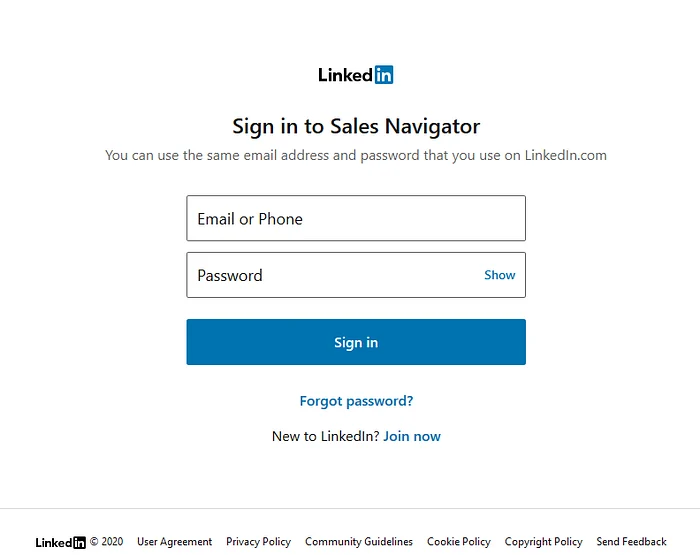
The screenshot shows the Sales Navigator login panel. The feature of interest is the redirect endpoint on those hosts, which takes a url parameter.
Setup
The report does not describe any accounts, roles, tooling or versions. The only precondition visible in the write-up is that the two login subdomains above expose a /redirect endpoint that accepts a url parameter.
Finding it
The researcher focused on the redirect?url= parameter on both subdomains and found that it accepted an arbitrary external destination. In the author's definition, open redirection is a bug where a web application uses a user-submitted link to divert the user to a given site or malicious page, and exploiting it only requires identifying the vulnerable parameter that can be used to redirect users to an attacker's site.
Exploitation
Step 1: Craft the redirect URL
The payloads used against the two subdomains were:
https://app.pointdrive.linkedin.com/redirect?url=http%3a%2f%2fattacker.com%2f%3f
https://view.pointdrive.linkedin.com/redirect?url=http%3a%2f%2fattacker.com%2f%3f
The url parameter carries a URL-encoded value, http%3a%2f%2fattacker.com%2f%3f, which decodes to http://attacker.com/?. The endpoint takes this value and redirects the browser to it instead of to a trusted LinkedIn destination.
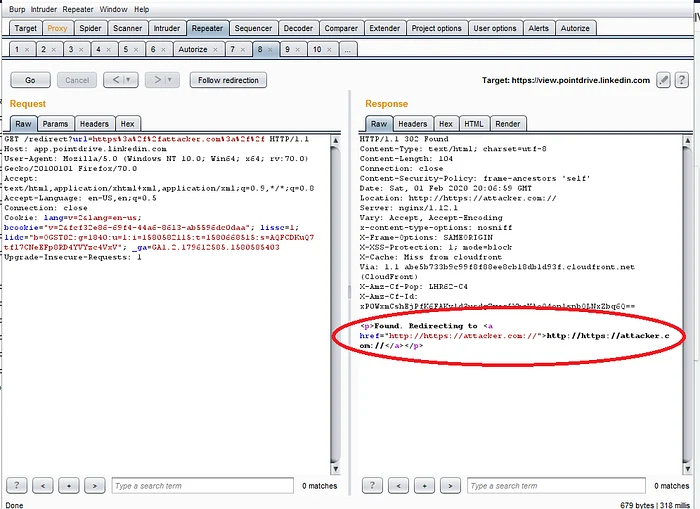
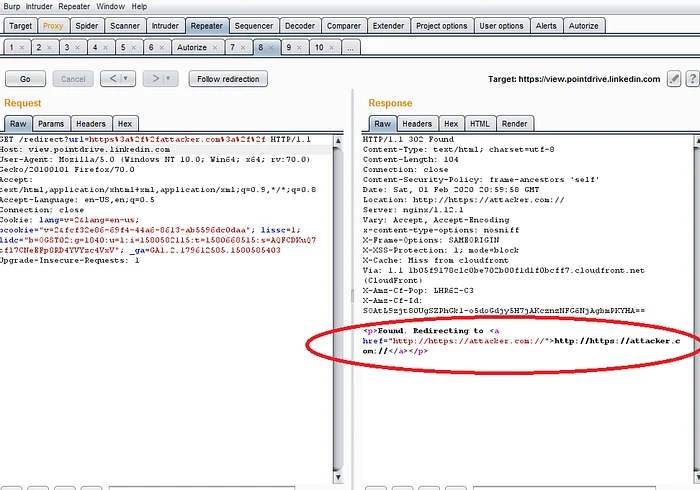
Step 2: Report both subdomains
The researcher reported both subdomains as vulnerable to open redirection.
Root cause
The report does not analyse the code. What it shows is that the url parameter of the /redirect endpoint is used as the redirect destination without restricting it to trusted hosts, so any external URL supplied by the user is honoured. Why existing defences did not stop it is not discussed in the report.
Impact
In the author's words, an attacker can take advantage and redirect clients to a malicious website pretending to be a sales executive and steal credentials. The report does not describe the conditions needed for the impact.
Fix
The report states that the LinkedIn security team confirmed the issue, and that after a few days the researcher heard back that the vulnerability was fixed and that he was acknowledged for reporting it.


Variants to test
- Try the same
redirect?url=pattern on other login or SSO panels: a positive result is a response that sends the browser to an external host you control. - Try encoded and double-encoded values (for example
%2f%2f,%252f%252f) in theurlparameter: a positive result is a redirect that survives decoding to an external host. - Try absolute URLs with different schemes and hosts, and protocol-relative forms such as
//attacker.com: a positive result is any of them being followed off-site. - Try appending a trusted host as a prefix or suffix (for example
https://[redacted]orhttps://attacker.com/trusted.example): a positive result is a redirect to the attacker-controlled host despite the trusted string. - Try the same parameter on sibling subdomains of the same product: a positive result is the same off-site redirect behaviour on each host.
What happened, in plain words
A security researcher found a bug on the login pages of LinkedIn Sales Navigator, a LinkedIn product for salespeople. The bug is called an open redirection. In simple terms, the login pages had a special web address that was supposed to send you somewhere sensible after you log in, but it would actually send you to any website the person who built the link chose, including a fake site made to look like LinkedIn.
The researcher reported the problem to LinkedIn's security team. The team confirmed it, and after a few days the researcher heard back that it was fixed and that he was acknowledged for reporting it.
This article walks through the whole story from the beginning, assuming you have never done security testing before. You only need a browser and a computer to follow along.
The product and the login panel
LinkedIn Sales Navigator is described in the report as a sales tool that helps sales groups, associations and individuals build and maintain client relationships. Think of it as a more powerful version of LinkedIn aimed at people whose job is to find and keep customers.
To use it, you log in. The login panel is served from two web addresses, called subdomains:
https://app.pointdrive.linkedin.com
https://view.pointdrive.linkedin.com
A subdomain is a smaller address that sits under a bigger one. If linkedin.com is a large office building, app.pointdrive.linkedin.com is one particular office inside it. Both addresses are the subdomains the report gives for the login panel.
The screenshot shows the Sales Navigator login panel. The part that matters here is a feature called a redirect endpoint. After you log in, a website often needs to send your browser onwards to another page. It does this by giving your browser a small instruction that says "go to this address". The redirect endpoint on these two hosts takes a url parameter, which is simply a value attached to the end of a web address after a question mark.
What an open redirection is
The report gives its own definition: an open redirection is a bug where a web application uses a user-submitted link to divert the user to a given site or malicious page. To exploit it, all you need is to find the vulnerable parameter that can be used to redirect users to an attacker's site.
Here is an everyday comparison. Imagine a receptionist at a company who is told "please send this visitor to room 12". That works fine. Now imagine the receptionist will send the visitor to any room number anyone writes down, including a room in a different building that a stranger controls. The receptionist is doing exactly what they were asked, but the instruction itself was never checked. An open redirection is the same idea: the website trusts the address in the link and forwards the visitor there without checking that the address belongs to a trusted place.
Why does that matter? Because the link starts with a real LinkedIn address. A victim who receives it sees pointdrive.linkedin.com at the start and may assume the whole thing is safe. The destination, however, can be a site the attacker controls.
Setting up
The report does not describe any accounts, roles, tooling or versions. The only precondition visible in the write-up is that the two login subdomains above expose a /redirect endpoint that accepts a url parameter. In other words, you do not need special software or a paid account to understand this bug. You need a browser and the two addresses.
Finding it
The researcher focused on the redirect?url= parameter on both subdomains. The question being asked was simple: what happens if I put a website that is not LinkedIn into that url value? The answer was that the site accepted an arbitrary external destination, meaning any address at all, not just LinkedIn ones.
This is the key step in any open redirection test. You find a place where the site takes an address from the user, you replace that address with one you control, and you watch where the browser goes. If it leaves the trusted site, you have found the bug.
Exploitation
Step 1: Craft the redirect URL
The payloads used against the two subdomains were:
https://app.pointdrive.linkedin.com/redirect?url=http%3a%2f%2fattacker.com%2f%3f
https://view.pointdrive.linkedin.com/redirect?url=http%3a%2f%2fattacker.com%2f%3f
Line by line:
https://app.pointdrive.linkedin.com/redirectis the real LinkedIn address of the redirect feature. This part is genuine, which is what makes the link convincing.?url=starts the parameter. Everything after the equals sign is the value the site will read.http%3a%2f%2fattacker.com%2f%3fis the value, written in a form called URL encoding. Some characters are not allowed to appear raw in a web address, so they are written as a percent sign followed by two characters.%3ameans a colon,%2fmeans a forward slash, and%3fmeans a question mark. Decoded, the value ishttp://attacker.com/?, a website belonging to the attacker.- The second line is the same thing on the other subdomain,
view.pointdrive.linkedin.com.
The endpoint takes this value and redirects the browser to it instead of to a trusted LinkedIn destination. The researcher did not have to break any login or guess a password. The site simply obeyed the address it was given.
Step 2: Report both subdomains
The researcher reported both subdomains as vulnerable to open redirection.
Root cause
The report does not analyse the code. What it shows is that the url parameter of the /redirect endpoint is used as the redirect destination without restricting it to trusted hosts, so any external URL supplied by the user is honoured. Why existing defences did not stop it is not discussed in the report.
In plain words: the site had a rule that said "send the visitor wherever the link says", and no rule that said "but only if the destination is one of ours". A safe version would keep a list of allowed destinations and refuse anything else.
Impact
In the author's words, an attacker can take advantage and redirect clients to a malicious website pretending to be a sales executive and steal credentials. Credentials here means a username and password.
The impact depends on a victim following a crafted link on the legitimate pointdrive.linkedin.com subdomains and then trusting the page they land on. The impact depends on a victim following a crafted link and trusting the page they land on.
Fix
The report states that the LinkedIn security team confirmed the issue, and that after a few days the researcher heard back that the vulnerability was fixed and that he was acknowledged for reporting it. The report does not describe what change was made.
Variants to test
If you want to look for the same kind of bug yourself, these are the variations worth trying. Each one is a way of sneaking an outside address past a check that is trying to stop you.
- Try the same
redirect?url=pattern on other login or SSO panels. SSO, or single sign-on, is a login system shared across many sites. A positive result is a response that sends the browser to an external host you control. - Try encoded and double-encoded values (for example
%2f%2f,%252f%252f) in theurlparameter. Double encoding means encoding the percent sign itself, so%2fbecomes%252f. A positive result is a redirect that survives decoding to an external host. - Try absolute URLs with different schemes and hosts, and protocol-relative forms such as
//attacker.com. A scheme is thehttporhttpspart at the front. A protocol-relative address leaves the scheme out and lets the browser fill it in. A positive result is any of them being followed off-site. - Try appending a trusted host as a prefix or suffix (for example
https://[redacted]orhttps://attacker.com/trusted.example). The first form uses the@sign, which in a web address separates login details from the host, so the browser actually goes toattacker.com. A positive result is a redirect to the attacker-controlled host despite the trusted string. - Try the same parameter on sibling subdomains of the same product. Sibling subdomains are other addresses under the same parent, like the two login hosts in this report. A positive result is the same off-site redirect behaviour on each host.
Glossary
- Subdomain: a smaller web address that sits under a main domain, such as
app.pointdrive.linkedin.comunderlinkedin.com. - Parameter: a named value attached to the end of a web address after a question mark, such as
url=inredirect?url=.... - Endpoint: a specific address on a website that performs a particular action, such as
/redirect. - Open redirection: a bug where a website takes an address supplied by the user and sends the browser there without checking that the destination is trusted.
- Payload: the crafted value an attacker sends to a website to trigger a bug.
- URL encoding: writing characters in a web address as a percent sign plus two characters, such as
%3afor a colon, so they can travel safely inside a link. - Decoding: turning an encoded value back into its readable form, so
http%3a%2f%2fattacker.com%2f%3fbecomeshttp://attacker.com/?. - Double encoding: encoding an already encoded value, so
%2fbecomes%252f. - Scheme: the
httporhttpspart at the start of a web address that says how to fetch it. - Protocol-relative URL: an address that starts with
//and leaves the scheme out, letting the browser use the current page's scheme. - Credentials: a username and password used to log in.
- SSO (single sign-on): a login system shared across several sites, so one login works for all of them.
- Root cause: the underlying reason a bug exists, as opposed to the symptom you see.
- Impact: the harm an attacker could cause by abusing a bug.
- Vulnerability: a weakness in a website or system that an attacker can use to do something harmful.




