When a “Secret” S3 Link Isn’t So Secret: IDOR in a Whistleblowing System
Uploaded whistleblowing attachments were stored in an S3 bucket and the upload response returned a direct object URL that served the file to anyone without authentication. Anyone holding such a link could read confidential evidence permanently, with no way to revoke access.

Bug Bounty Writeup
The full write-up lives on its author's site
It belongs to its author, so we link to it rather than copy it. The other two tabs are our own rewrites, checked against it.
Context
A whistleblowing channel exists so that a reporter can describe misconduct without being identified. The application in scope included exactly that: a form where employees or external parties could submit reports of misconduct, optionally attaching supporting files such as PDFs.
As in most modern web applications, uploads were offloaded to an S3 bucket rather than stored on the application server. That is a reasonable architectural choice, provided access to the bucket is actually controlled. The question the researcher set out to answer was simple: once a file is uploaded, who can see it afterwards?
The write-up deliberately redacts identifying details (bucket name, domain, object paths) because remediation was still in progress at the time of publication. It focuses on the vulnerability class and the methodology rather than on reproducing the issue against the live target.
Setup
The report describes no accounts, roles or special preconditions. The researcher filled out the public whistleblowing form and attached a harmless test file named Hello world.pdf. The only tool mentioned is Burp Suite, used as an intercepting proxy to capture the upload request and inspect the response body.
Finding it
The upload flow was exercised with the test PDF, and the request was intercepted in Burp Suite. The response body contained a field called attached_file_path, which held a full, direct S3 URL pointing at the uploaded object. That field is returned to the client on every upload, so the URL is visible to anyone who can intercept traffic, check browser history, or read a server or proxy access log.
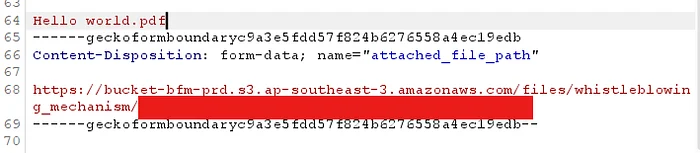
What made this look wrong is that the URL itself was the only thing standing between a stranger and the file. The storage model relied on the link being secret rather than on any access control.
Exploitation
Step 1: Upload a test file through the form
The researcher submitted the whistleblowing form with a harmless attachment, Hello world.pdf, to observe how the upload flow behaved.
Step 2: Intercept the response and read attached_file_path
With Burp Suite in the middle, the upload request was intercepted and the response body inspected. It contained attached_file_path, a full, direct S3 URL for the uploaded object.
Step 3: Request the URL without credentials
The S3 URL was requested directly. The server answered with the full PDF, byte for byte. There was no prompt for credentials and no 403. The file was served purely because the requester had the URL.
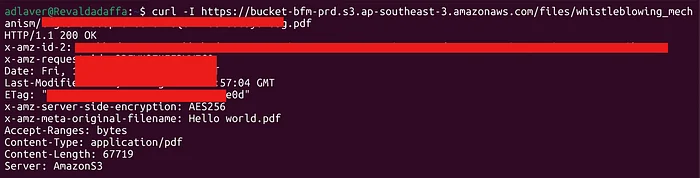
That is the whole bug. No exploitation technique more advanced than reading the response was required.
Root cause
The design treated the S3 object URL as the access control: possession of the link was sufficient to read the object, with no authentication or authorisation check on the object itself. The application handed that link to the client on every upload, so the secret was distributed to every party that could observe the response, browser history or access logs. Because the object was served directly from storage, the application had no opportunity to check who was asking.
Impact
For the application, the storage model relied entirely on the URL being secret rather than on actual access control. Once a link leaks, through a log, a Referer header, a shared screen or browser history, access is permanent and unauthenticated, and there is no way to revoke it.
For reporters, the attachments are not marketing assets or product screenshots. They are evidence attached to reports of misconduct. If an attachment leaks, it can expose who filed the report and what they reported, which can translate directly into retaliation: job loss, harassment, or worse.
For the organisation, whistleblower protection is a legal and regulatory obligation in most jurisdictions, not a nice-to-have. A confidentiality failure here is not only a reputational problem but can also be a compliance one, and it erodes the one thing a whistleblowing channel depends on: trust that people can use it safely.
Fix
The report does not describe the remediation that was applied; it states only that remediation was still in progress and that identifying details were redacted for that reason. What the design requires is access control on the object rather than secrecy of its URL: the bucket should not serve objects to unauthenticated requesters holding only a link, and the application should mediate access so that only the parties entitled to a report's attachments can retrieve them.
Variants to test
- Upload endpoints that return a storage URL. Submit any file upload and inspect the response for fields holding direct object-storage URLs. A positive result is a URL that returns the file when requested without credentials.
- Direct object requests without authentication. Take the returned URL and request it in a fresh session with no cookies. A positive result is a 200 with the file contents rather than a 403 or an authentication prompt.
- Link leakage through logs and headers. Check whether the storage URL appears in access logs, Referer headers sent to third parties, or browser history after normal use. A positive result is the URL being recorded or transmitted somewhere outside the authenticated session.
- Sensitive upload contexts. Apply the same check to features where attachments are confidential by nature, such as report or complaint forms. A positive result is an unauthenticated read of an attachment whose confidentiality the feature promises.
What happened, in plain words
A whistleblowing channel is a place where someone can report wrongdoing at their organisation, for example harassment, fraud or safety problems, without having to give their name. The whole point of such a channel is that the person who reports something stays safe. If the report can be traced back to them, they may lose their job, be harassed, or worse.
The application in this report had a form for exactly that purpose. Employees or outsiders could write a report and, if they wanted, attach a file such as a PDF as evidence.
When someone uploaded a file, the application did not keep the file on its own server. It stored the file in a service called S3, a cloud file storage service. That is a normal and sensible way to build a website: storage is cheap and reliable, and the web server does not have to carry the weight of every uploaded document.
The problem was how the application let people get their file back. After an upload, the application sent back a long web address (a URL) that pointed straight at the file in the storage locker. Anyone who had that address could open the file, with no login and no password. The address itself was the only protection.
The researcher uploaded a harmless test file, watched the traffic between the browser and the server, and saw that address in the server's reply. Then they opened the address on its own. The server handed back the full PDF, every byte of it, without asking who was asking. That is the bug: a link that was supposed to be secret was handed out on every upload, and the storage service never checked whether the person opening it was allowed to.
This kind of bug is called an IDOR. The name stands for Insecure Direct Object Reference. In everyday terms: imagine a hotel where the receptionist gives every guest a key, but the key is just the room number written on a card, and any card opens any door. The lock exists, but it does not check anything. Here, the "key" was the URL, and the storage service accepted it from anyone.
The target
The application in scope included a whistleblowing mechanism: a form where employees or external parties could submit reports of misconduct, optionally attaching supporting files such as PDFs.
A few words first, because they come up constantly:
- Application: the website or web app you use in a browser. It has pages, forms and buttons, and behind them a server that does the real work.
- Server: the computer (or group of computers) that runs the application and answers your browser's requests. When you press a button, your browser sends a request to the server, and the server sends back a response.
- Request and response: a request is your browser asking for something ("here is my form, please save it"). A response is the server's answer ("saved, here is the result"). Both are just text travelling over the network, which is why tools can capture and read them.
- S3 bucket: S3 is Amazon's file storage service. A bucket is a container inside it, like a folder in the cloud. Files placed in a bucket can be given a URL, and that URL can be opened in a browser like any other web address.
Like most modern web apps, file uploads here were offloaded to an S3 bucket rather than stored on the application server itself. That is a sane architectural choice, if access to the bucket is actually controlled. The question the researcher wanted to answer was: once a file is uploaded, who can see it afterwards?
The report deliberately hides identifying details (bucket name, domain, object paths) because remediation was still in progress when it was published. It focuses on the type of bug and the method used to find it, not on reproducing it against the live target.
Setup
The report describes no accounts, roles or special preconditions. The researcher filled out the public whistleblowing form and attached a harmless test file named Hello world.pdf. The only tool mentioned is Burp Suite, used as an intercepting proxy to capture the upload request and inspect the response body.
Two concepts to unpack here:
- Intercepting proxy: a program that sits between your browser and the server, like a post office that opens every letter, copies it, and then sends it on. Burp Suite is one such tool. It lets you pause a request or response and read exactly what is inside, which a normal browser does not show you.
- Response body: the main content of the server's answer. A response has some technical wrapping (status code, headers) and then the body, which is the actual data: a web page, a file, or in this case a block of text describing the upload result.
Why use a proxy at all? Because the interesting information is often not shown on screen. The browser may display a friendly "upload complete" message while the server's reply quietly contains extra details, such as the address of the stored file. A proxy lets you see those details.
Finding it
The upload flow was exercised with the test PDF, and the request was intercepted in Burp Suite. The response body contained a field called attached_file_path, which held a full, direct S3 URL pointing at the uploaded object. That field is returned to the client on every upload, so the URL is visible to anyone who can intercept traffic, check browser history, or read a server or proxy access log.
What made this look wrong is that the URL itself was the only thing standing between a stranger and the file. The storage model relied on the link being secret rather than on any access control.
A few more terms, because they matter for the rest of the story:
- Field: a named piece of data in a response, like a labelled box on a form. Here the box is called
attached_file_pathand it holds the file's address. - Client: your side of the conversation, usually the browser. The server is the other side.
- Access control: the check that decides whether the person asking is allowed to see something. A login page is one form of it; a permission check on a file is another. When access control is missing, the only thing left is secrecy, and secrecy is fragile.
- Referer header: when your browser follows a link to another site, it often tells that site which page you came from. If a page's address contains a secret link, that secret can travel to a third party this way.
- Access log: a file on a server that records every request it received, including the full address requested. Anyone who can read that log can read the secret link.
Exploitation
Step 1: Upload a test file through the form
The researcher submitted the whistleblowing form with a harmless attachment, Hello world.pdf, to observe how the upload flow behaved.
Why a harmless file? Because the goal is to understand the mechanics, not to touch anyone's real data. A harmless test PDF proves the flow works without putting any confidential material at risk.
Step 2: Intercept the response and read attached_file_path
With Burp Suite in the middle, the upload request was intercepted and the response body inspected. It contained attached_file_path, a full, direct S3 URL for the uploaded object.
Why look at the response rather than the page? Because the page only shows what the designers chose to show. The response is the raw answer, and it is where the application reveals how it stores and serves your file.
Step 3: Request the URL without credentials
The S3 URL was requested directly. The server answered with the full PDF, byte for byte. There was no prompt for credentials and no 403. The file was served purely because the requester had the URL.
What does "without credentials" mean? It means opening the address in a fresh browser session, with no login, no cookie and no session token. A cookie is a small piece of data a website stores in your browser so it can recognise you on the next request, like a wristband at an event. A session token is a longer secret value inside that cookie that proves you logged in. If a file opens with neither, the server is not checking who you are at all.
What is a 403? Web servers answer with numbered status codes. 200 means "here is your content". 403 means "I understand you, but you are not allowed". A login prompt is another way of saying "prove who you are first". Getting the full PDF with none of these is the proof: the file was served purely because the requester had the URL.
That is the whole bug. No exploitation technique more advanced than reading the response was required.
Root cause
The design treated the S3 object URL as the access control: possession of the link was sufficient to read the object, with no authentication or authorisation check on the object itself. The application handed that link to the client on every upload, so the secret was distributed to every party that could observe the response, browser history or access logs. Because the object was served directly from storage, the application had no opportunity to check who was asking.
Two words that are often confused:
- Authentication: proving who you are. Logging in is authentication.
- Authorisation: deciding what you are allowed to do once we know who you are. Even a logged-in user should not be able to read someone else's report.
Here neither check happened on the file itself. The application did not act as a gatekeeper: it simply pointed the browser at the storage service, and the storage service handed over whatever was asked for. The secret was the address, and the address was given out on every upload.
Impact
For the application, the storage model relied entirely on the URL being secret rather than on actual access control. Once a link leaks, through a log, a Referer header, a shared screen or browser history, access is permanent and unauthenticated, and there is no way to revoke it.
For reporters, the attachments are not marketing assets or product screenshots. They are evidence attached to reports of misconduct. If an attachment leaks, it can expose who filed the report and what they reported, which can translate directly into retaliation: job loss, harassment, or worse.
For the organisation, whistleblower protection is a legal and regulatory obligation in most jurisdictions, not a nice-to-have. A confidentiality failure here is not only a reputational problem but can also be a compliance one, and it erodes the one thing a whistleblowing channel depends on: trust that people can use it safely.
"Permanent and unauthenticated" deserves a plain explanation. A normal login can be revoked: change the password, end the session, and the old access stops working. A public link cannot be revoked in the same way. Once it is out, anyone who saved it, copied it or found it in a log can keep using it, and the storage service will keep answering.
Fix
The report does not describe the remediation that was applied; it states only that remediation was still in progress and that identifying details were redacted for that reason. What the design requires is access control on the object rather than secrecy of its URL: the bucket should not serve objects to unauthenticated requesters holding only a link, and the application should mediate access so that only the parties entitled to a report's attachments can retrieve them.
In everyday terms: the storage locker should not open for anyone holding a piece of paper with the locker number on it. The application should stand in front of the locker, check who is asking, and only then fetch the file and pass it on.
Variants to test
These are the same checks applied more widely. They are useful because the same mistake often appears in more than one place.
- Upload endpoints that return a storage URL. Submit any file upload and inspect the response for fields holding direct object-storage URLs. A positive result is a URL that returns the file when requested without credentials.
- Direct object requests without authentication. Take the returned URL and request it in a fresh session with no cookies. A positive result is a 200 with the file contents rather than a 403 or an authentication prompt.
- Link leakage through logs and headers. Check whether the storage URL appears in access logs, Referer headers sent to third parties, or browser history after normal use. A positive result is the URL being recorded or transmitted somewhere outside the authenticated session.
- Sensitive upload contexts. Apply the same check to features where attachments are confidential by nature, such as report or complaint forms. A positive result is an unauthenticated read of an attachment whose confidentiality the feature promises.
An endpoint is simply a specific address on a server that does a specific job, such as the address that receives uploads. When people say "test the upload endpoint", they mean "send requests to that address and see how it answers".
Glossary
- Access control: the check that decides whether the person asking is allowed to see or do something.
- Access log: a file on a server recording every request it received, including the full address requested.
- Application: the website or web app you use in a browser, together with the server behind it.
- Authentication: proving who you are, for example by logging in.
- Authorisation: deciding what a known user is allowed to do.
- Bucket: a container for files inside a cloud storage service such as Amazon S3.
- Burp Suite: a tool that sits between your browser and a server so you can pause, read and change requests and responses.
- Cookie: a small piece of data a website stores in your browser so it can recognise you on later requests.
- Credentials: the proof of identity a server asks for, such as a login and password or a valid session.
- Endpoint: a specific address on a server that performs a specific job.
- Field: a named piece of data inside a request or response, like a labelled box.
- 403: an HTTP status code meaning the server understood the request but refuses to allow it.
- IDOR (Insecure Direct Object Reference): a bug where an object such as a file or record is reachable directly, and the only thing protecting it is knowing its address.
- Intercepting proxy: a tool placed between browser and server that captures traffic so you can inspect it.
- Object: a single stored item, such as one uploaded file, in a storage service.
- Referer header: information a browser may send to a site saying which page you came from.
- Remediation: the work of fixing a vulnerability.
- Request: your browser asking the server for something.
- Response: the server's answer to a request.
- Response body: the main content of a response, such as a page, a file or a block of data.
- S3: Amazon's cloud file storage service.
- Session token: a secret value stored in a cookie that proves you are logged in.
- Status code: a number in a response saying how the request went, such as 200 for success or 403 for forbidden.
- URL: a web address, the text you type or click to reach a page or file.
- Vulnerability class: a family of bugs that share the same underlying mistake, such as IDOR.
- Whistleblowing channel: a form or service for reporting misconduct confidentially, often with the option to attach evidence.



