When a Trusted Profile Link Becomes a Malware Delivery Vector
A profile customisation feature let users set arbitrary external destinations for social-media and website links, which the application then displayed as trusted profile buttons. An attacker could point such a button at a file on their own server, so a visitor clicking it would be sent to an attacker-controlled download.

medium.com
Published on medium.com
Bug Bounty
The full write-up lives on its author's site
It belongs to its author, so we link to it rather than copy it. The other two tabs are our own rewrites, checked against it.
Context
A profile page is not usually where you go looking for security bugs. It holds names, bios, social-media accounts, portfolios, websites and a few buttons, and nothing about it looks particularly exciting. This write-up is about a profile customisation feature that changed that impression: the application let users control the destination of profile links without sufficiently restricting where those links could point.
The feature itself is ordinary. Users get profile fields for adding external links and social-media profiles, and the application renders each one as a clickable icon or button on the public profile. A normal user enters something like:
https://github.com/username
or:
https://linkedin.com/in/username
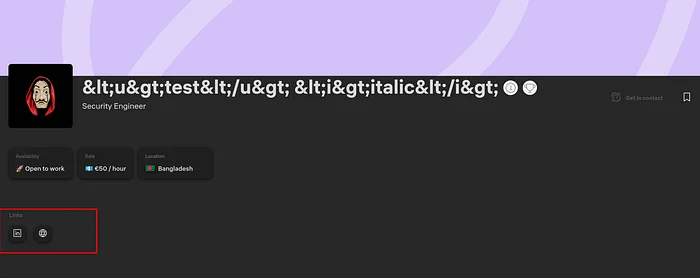
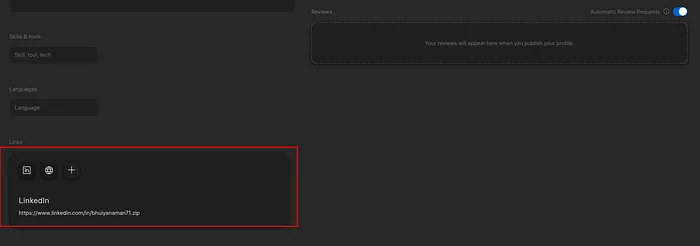
The expected trust relationship is straightforward:
User ↓Profile ↓Social Media Button ↓Expected Social Media Website
The user supplies a link, the profile displays it, and the button leads to the platform the label promises. The behaviour observed in testing allowed the destination to be controlled much more freely, which turns the flow into:
Attacker ↓Profile Editor ↓Arbitrary URL ↓Trusted Profile ↓Victim Click ↓Attacker-Controlled Server
Setup
All target-specific information has been intentionally anonymised: target.com stands for the generic target, attacker.example stands for attacker-controlled infrastructure, and no real account names, profile identifiers, payload URLs or target-specific details are included. The file-delivery discussion uses harmless proof-of-concept concepts rather than operational malware, and the work is described as authorised security research.
Finding it
While testing a profile customisation feature, the researcher came across a small piece of functionality that stood out: the application accepted an arbitrary external destination in a profile link field and then presented that destination through the profile interface. The label and icon on the public profile did not necessarily communicate where the link actually went.
That is the whole observation. No exploit payload was needed to demonstrate the underlying issue; a harmless test file was enough.
Exploitation
Step 1: Point a profile link at an external URL
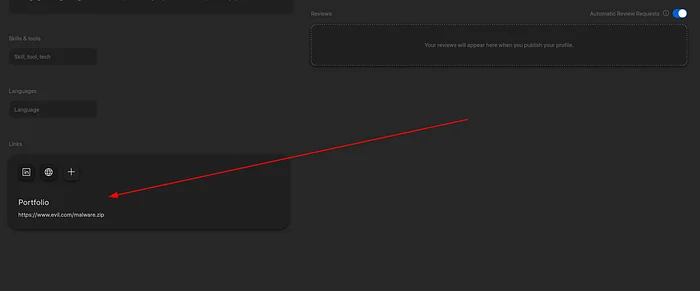
Instead of entering a normal social-media URL, the researcher tested the field with an external URL under their control:
https://attacker.example/malware.zip
The important part was not the ZIP file itself. It was that the application accepted an arbitrary external destination and subsequently presented that destination through the profile interface.
Step 2: Save the profile and observe the public rendering
After saving, the supplied URL appeared as a clickable link on the public profile. From the victim's perspective the interaction looks completely normal:
Public Profile │ ┌────────────┼────────────┐ │ │ │ GitHub Website LinkedIn │ │ │ └────────────┼────────────┘ │ Click │ ▼ External Destination
The problem is that the visual appearance of the button does not necessarily communicate where the link actually goes. A button that looks like a social-media link can point somewhere completely unrelated, which creates a trust-boundary problem.
Step 3: Deliver a file through the trusted link
For the proof of concept, the researcher hosted a harmless ZIP file on an external server and configured the profile link to point to it:
https://attacker.example/test.zip
A visitor clicking the profile button was sent to the external resource. The resulting chain was:
target.com profile ↓profile button ↓attacker.example ↓test.zip ↓browser download
This is the core behaviour. The platform does not need to host the malicious file; it only needs to provide a trusted place where the attacker can place the link. That makes the issue more accurately described as a trusted-link abuse / arbitrary external file-delivery primitive rather than traditional server-side Remote File Inclusion.
Root cause
The application accepted user-controlled URL components without properly validating the resulting destination, and then rendered them behind platform-specific labels. The write-up frames this as a broken trust relationship rather than a parsing bug: the application allows an attacker-controlled destination to inherit trust from the profile interface.
The social-media fields make the gap clearer. A profile editor may contain fields such as:
GitHubLinkedInWebsiteTwitter/XPortfolio
Users naturally assume that a field called GitHub will produce a GitHub URL. Conceptually, the expected model is:
GitHub ↓github.com/user
whereas the observed security model was:
GitHub ↓User-controlled destination ↓Any external resource
That difference is small from a development perspective but significant from an abuse perspective.
Impact
The destination of a link on a professional profile may be identical to the destination of a random link, but the second scenario has something the first does not: contextual trust. A victim may be much more comfortable clicking a link that appears inside a professional profile. The write-up lists the resulting opportunities as phishing, malware delivery, social engineering, malicious redirects, credential harvesting, reputation abuse and external file delivery. The profile effectively becomes a delivery channel.
Downloading a ZIP file does not automatically mean remote code execution, and the write-up is explicit about not overstating this. The URL injection itself does not execute code on the victim's computer. The actual result depends on the victim's environment:
Attacker-controlled URL ↓File download ↓Browser behavior ↓Operating system behavior ↓Security controls ↓User interaction ↓Potential execution
Every step matters. A browser may simply download the file and stop, an operating system may display a warning, an antivirus product may block it, a sandbox may prevent execution, or a particular browser/OS/file combination may process the downloaded content more automatically. The reference research discussed in the write-up specifically investigated Safari's handling of files considered "safe" by the browser/OS environment and demonstrated the behaviour on macOS.
The technically safer conclusion is therefore:
The vulnerability enables attacker-controlled file delivery through a trusted profile link, with potential client-side compromise depending on browser, operating-system, file-type, and user-environment conditions.
That is a stronger security statement than claiming that clicking the link gives RCE.
The researcher rates the issue Medium severity, CVSS 4.3. The confirmed vulnerability is:
Attacker-controlled URL ↓Trusted profile link ↓Victim ↓Arbitrary external resource/file
The potential for code execution is conditional and requires the right combination of browser behaviour, OS behaviour, file format, security configuration, user interaction and potentially additional vulnerabilities. The comparable disclosed report was ultimately adjusted to Medium (4.3), which the write-up offers as context for this class of issue.
Fix
A common fix for this kind of vulnerability is a blacklist, for example blocking:
javascript:data:file:
or blocking:
This can help in some cases, but it is not the ideal security model. URL validation should be based on the actual purpose of the field. For a GitHub field, ask whether the URL actually belongs to GitHub; for a LinkedIn field, whether it belongs to LinkedIn; for a custom website field, whether it is a valid HTTPS URL. The security control should follow the semantic meaning of the input.
A safer implementation could look like this:
User Input │ ▼ Parse URL │ ▼ Validate Scheme │ ▼ Validate Hostname │ ┌───────┴────────┐ │ │ Social Field Custom URL │ │ ▼ ▼ Domain Allowlist Security Policy │ │ └───────┬────────┘ ▼ Store Validated URL │ ▼ Contextual Encoding │ ▼ Render Profile
For a social-media field, an even better design is to avoid accepting a complete URL at all. The user supplies a username:
GitHub username:example
and the application constructs the URL itself:
https://github.com/example
That removes a large portion of the attack surface.
The specific recommendations are:
- Validate the URL scheme. Only permit schemes that are actually required. For normal profile links,
https:should generally be preferred, and dangerous or unnecessary schemes should be rejected server-side. - Enforce domain allowlists for social fields. If a field represents a specific platform, validate the hostname, for example
GitHub → github.comandLinkedIn → linkedin.com. Do not allowGitHub → attacker.example. - Parse URLs properly. Do not rely on regular expressions or simple string filtering alone. The server should parse the URL, normalise it, validate the scheme, validate the hostname, validate ports where appropriate, apply field-specific restrictions, and safely render the final value.
- Warn users about external destinations. For unrestricted custom URLs, consider displaying a message such as: You're leaving target.com. This link leads to an external website that isn't controlled by target.com. This does not replace validation, but it establishes a much clearer trust boundary.
- Consider download warnings. If a profile link points directly to downloadable content, an additional warning could be useful:
This link may download a filefrom an external website.
Continue?
The broader lesson for developers is to treat user-controlled URLs as untrusted data even when they are only used to create hyperlinks: validate them according to their intended purpose, enforce domain restrictions where possible, and make the transition to external content visible to the user.
Variants to test
- A positive result is the public profile rendering the button with the external destination as its actual target.
- Direct file links. Point a profile link at a downloadable file on a server you control. A positive result is a visitor's click producing a browser download from your host rather than a navigation to the expected platform.
- A positive result is the rendered link pointing anywhere other than the platform's own domain.
- A positive result is the profile path skipping a warning that the rest of the product shows.
- A positive result is any mismatch between what the button claims to be and where it leads.
A profile button may look innocent. Always check where it actually leads.
What happened, in plain words
A website let people fill in their profile with links to their other online homes: a GitHub page, a LinkedIn page, a personal website. The site then showed each of those links as a neat little button on the public profile, with the right logo next to it. Anyone visiting the profile could click the GitHub button and expect to land on GitHub.
The problem was that the site never really checked where the link pointed. It accepted whatever address the person typed in, and then displayed it behind a button that looked official. So someone could put a link to a file on their own server behind a button that looked like a social-media link, and a visitor who trusted the profile would click it and download that file.
That is the whole bug. Nobody broke into the website. Nobody ran code on the server. The website simply lent its good name to a link that went somewhere else. The researcher calls this a broken trust relationship, and rates it Medium severity, CVSS 4.3.
Below I walk through the same ground as the technical write-up, but from zero: what a profile page is, what a URL is, what a link actually does when you click it, why a ZIP file matters, and why this is not automatically the same thing as someone taking over your computer.
Context
A profile page is the part of a website where you describe yourself to other users. It usually holds a name, a short biography, a photo, links to your accounts elsewhere, and a few buttons. On most sites it is the least exciting page in the product, which is exactly why it is worth looking at: nobody expects a security problem to live there.
The feature in question is ordinary. The application gives users profile fields for adding external links and social-media profiles. When you fill one in, the application shows it on your public profile as a clickable icon or button. A normal user types something like this into the GitHub field:
https://github.com/username
or this into the LinkedIn field:
https://linkedin.com/in/username
Let me unpack those two lines, because everything later depends on understanding them.
https://is the scheme, the part that tells the browser how to talk to the server.httpsmeans the conversation is encrypted, so nobody sitting between you and the site can read or change it. You will also seehttp(unencrypted), and a few odd ones likejavascript:anddata:, which we will come back to.github.comis the hostname, the name of the machine on the internet you are talking to. It is the part that decides whose website you end up on./usernameis the path, which tells that machine which page you want.- Together, the whole thing is a URL: a full address, in the same way a postal address has a country, a street and a house number.
When you click a link in a browser, the browser reads the URL and goes to the hostname in it. The text you see on the button and the logo next to it have no effect on where you go. They are decoration. The URL is the truth.
The expected trust relationship is straightforward:
User ↓Profile ↓Social Media Button ↓Expected Social Media Website
Read that diagram top to bottom. The user supplies a link. The profile displays it. The button leads to the platform the label promises. That is what everyone assumes is happening.
The behaviour observed in testing allowed the destination to be controlled much more freely, which turns the flow into:
Attacker ↓Profile Editor ↓Arbitrary URL ↓Trusted Profile ↓Victim Click ↓Attacker-Controlled Server
Again, top to bottom: an attacker edits their own profile, puts in any URL they like, the trusted profile page shows it, a victim clicks, and the victim's browser goes to a server the attacker controls. The word arbitrary here just means "whatever the attacker chooses", with no restriction.
Setup
All target-specific information has been intentionally anonymised. That means the details that would identify the real company have been replaced with stand-ins:
target.comstands for the generic target, the website being tested.attacker.examplestands for attacker-controlled infrastructure, a server the attacker runs.- No real account names, profile identifiers, payload URLs or target-specific details are included.
- The file-delivery discussion uses harmless proof-of-concept concepts rather than operational malware. A proof of concept, usually shortened to PoC, is a small, safe demonstration that a problem is real, without actually causing harm.
- The work is described as authorised security research, meaning the person testing had permission to do so.
Why does this matter to a beginner? Because security research done without permission is a crime in most countries, even if you mean no harm. Bug bounty programmes are the usual way to get that permission: a company publishes rules saying which parts of its systems you may test and what it will pay for real findings. The write-up does not name a programme, so I will not guess at one.
Finding it
While testing a profile customisation feature, the researcher came across a small piece of functionality that stood out: the application accepted an arbitrary external destination in a profile link field and then presented that destination through the profile interface.
In plain words: the site asked "what is your GitHub address?", the researcher answered with an address that was not GitHub at all, and the site said "great, saved" and put it on the profile with a GitHub-style button. The label and icon on the public profile did not necessarily communicate where the link actually went.
That is the whole observation. No exploit payload was needed to demonstrate the underlying issue; a harmless test file was enough. An exploit payload would be something designed to take advantage of a victim, such as a program that installs itself. Here, none was needed, because the bug is not about what the file does. It is about who decides where the button points.
Why test this at all? Because the question "who controls the final destination of this link?" is one of the cheapest questions you can ask of any web application, and it is very often answered badly. You do not need special tools to ask it. You need a browser and a profile field.
Exploitation
Exploitation here means demonstrating the problem in practice, step by step, in a way that proves it without harming anyone.
Step 1: Point a profile link at an external URL
Instead of entering a normal social-media URL, the researcher tested the field with an external URL under their control:
https://attacker.example/malware.zip
Line by line, in plain words:
https://is the scheme, telling the browser to use an encrypted connection.attacker.exampleis the hostname, a server the researcher controls. The.exampleending is reserved for documentation and testing, so it can never be a real company's site./malware.zipis the path to a file on that server. The name is deliberately alarming, but the file itself was harmless.
The important part was not the ZIP file itself. It was that the application accepted an arbitrary external destination and subsequently presented that destination through the profile interface. In other words, the site did not check that a field labelled GitHub actually contained a GitHub address. It took the researcher's word for it.
Why start here? Because the simplest possible test of any link field is to put in a link to a server you own and see whether the site accepts it. If it does, you have learned something important with almost no effort.
Step 2: Save the profile and observe the public rendering
After saving, the supplied URL appeared as a clickable link on the public profile. From the victim's perspective the interaction looks completely normal:
Public Profile │ ┌────────────┼────────────┐ │ │ │ GitHub Website LinkedIn │ │ │ └────────────┼────────────┘ │ Click │ ▼ External Destination
This diagram is a picture of the profile page. At the top is the public profile. Below it, three buttons sit side by side: GitHub, Website and LinkedIn. They all feed down into a single point labelled Click, and from there an arrow leads to External Destination.
The point of the diagram is that all three buttons look equally official, and all three lead wherever their stored URL says. The visual appearance of the button does not necessarily communicate where the link actually goes. A button that looks like a social-media link can point somewhere completely unrelated, which creates a trust-boundary problem.
A trust boundary is simply the line between "things I vouch for" and "things I do not". When you visit a bank's website, you trust that everything on the page came from the bank. The moment the bank shows you a link to somewhere else, that trust should stop at the link. If the bank makes the link look like part of itself, the boundary has been blurred.
Why save and look at the public page rather than the editor? Because the editor is what the attacker sees, and the public page is what the victim sees. The bug only matters if the misleading button is visible to other people.
Step 3: Deliver a file through the trusted link
For the proof of concept, the researcher hosted a harmless ZIP file on an external server and configured the profile link to point to it:
https://attacker.example/test.zip
Same structure as before: encrypted scheme, a hostname the researcher controls, and a path to a file. The only change is the file name, from malware.zip to test.zip, which reflects that this is the harmless demonstration.
A visitor clicking the profile button was sent to the external resource. The resulting chain was:
target.com profile ↓profile button ↓attacker.example ↓test.zip ↓browser download
Read it as a sequence of events. The visitor is on the target.com profile. They click the profile button. The browser goes to attacker.example. It asks for test.zip. The browser downloads the file.
This is the core behaviour. The platform does not need to host the malicious file; it only needs to provide a trusted place where the attacker can place the link. That makes the issue more accurately described as a trusted-link abuse or arbitrary external file-delivery primitive rather than traditional server-side Remote File Inclusion.
Two terms there need unpacking.
- A primitive, in security writing, is a basic building block. It is not the whole attack; it is a capability the attacker has gained, which can be combined with other things later. Here the primitive is "make a trusted page deliver a file of my choosing".
- Remote File Inclusion, often shortened to RFI, is a classic server-side bug where a website is tricked into fetching and running a file from another server. That is not what happened here. Nothing was fetched by the server. The server just displayed a link, and the victim's own browser did the downloading. Confusing the two would overstate the impact, which is why the write-up is careful about the name.
Why a ZIP file rather than a web page? Because a web page would only prove that the link redirects somewhere. A ZIP proves that the link delivers a file, which is a different and more serious kind of outcome.
Root cause
Root cause means the underlying reason the bug exists, as opposed to the symptom you see. The application accepted user-controlled URL components without properly validating the resulting destination, and then rendered them behind platform-specific labels.
Validation means checking that what the user typed is acceptable before you store or display it. Rendering means turning stored data into what appears on the page. The write-up frames this as a broken trust relationship rather than a parsing bug: the application allows an attacker-controlled destination to inherit trust from the profile interface.
The social-media fields make the gap clearer. A profile editor may contain fields such as:
GitHubLinkedInWebsiteTwitter/XPortfolio
That block is just the list of field labels as they appear in the editor, run together: GitHub, LinkedIn, Website, Twitter/X and Portfolio. Each one is a separate box the user fills in.
Users naturally assume that a field called GitHub will produce a GitHub URL. Conceptually, the expected model is:
GitHub ↓github.com/user
That is: the field labelled GitHub leads to github.com, followed by the user's name.
Whereas the observed security model was:
GitHub ↓User-controlled destination ↓Any external resource
That is: the field labelled GitHub leads to whatever the user typed, which can be any server anywhere.
That difference is small from a development perspective but significant from an abuse perspective. A developer sees two text boxes and thinks the difference is cosmetic. An attacker sees a button with a trusted logo on it that goes wherever they like.
Impact
Impact means what harm the bug can actually cause, and to whom. The destination of a link on a professional profile may be identical to the destination of a random link, but the second scenario has something the first does not: contextual trust. Contextual trust means trusting something because of where you found it, not because of what it is. You would not open an attachment from a stranger's email, but you would open the same attachment if a colleague handed it to you in the office. The file is identical; the context is not.
A victim may be much more comfortable clicking a link that appears inside a professional profile. The write-up lists the resulting opportunities as:
- phishing, which is tricking someone into handing over information or running something by pretending to be someone they trust;
- malware delivery, which is getting harmful software onto someone's machine;
- social engineering, which is manipulating people rather than machines;
- malicious redirects, which is bouncing someone through a link to a destination they did not expect;
- credential harvesting, which is collecting usernames and passwords, usually through a fake login page;
- reputation abuse, which is borrowing a trusted brand's good name for a bad purpose;
- external file delivery, which is what the proof of concept demonstrated.
The profile effectively becomes a delivery channel.
Now the important caution. Downloading a ZIP file does not automatically mean remote code execution. Remote code execution, usually shortened to RCE, means an attacker getting their own code to run on someone else's machine. It is the worst outcome in most security reports, and it is also the most overclaimed.
The write-up is explicit about not overstating this. The URL injection itself does not execute code on the victim's computer. The actual result depends on the victim's environment:
Attacker-controlled URL ↓File download ↓Browser behavior ↓Operating system behavior ↓Security controls ↓User interaction ↓Potential execution
Read it as a chain of gates, each of which can stop the attack:
- The attacker-controlled URL is the starting point.
- The file download has to happen at all.
- The browser has to handle the file in a way that leads onward, rather than just saving it.
- The operating system has to do something with it, rather than warning and stopping.
- Security controls such as antivirus or a sandbox have to fail to block it. A sandbox is an isolated space where risky files can be opened without endangering the rest of the machine.
- The user has to interact, for example by opening the file.
- Only then is there potential execution.
Every step matters. A browser may simply download the file and stop, an operating system may display a warning, an antivirus product may block it, a sandbox may prevent execution, or a particular browser, operating system and file combination may process the downloaded content more automatically. The reference research discussed in the write-up specifically investigated Safari's handling of files considered "safe" by the browser and operating-system environment, and demonstrated the behaviour on macOS. Safari is Apple's browser and macOS is Apple's desktop operating system; the point is that some combinations are more permissive than others.
The technically safer conclusion is therefore:
The vulnerability enables attacker-controlled file delivery through a trusted profile link, with potential client-side compromise depending on browser, operating-system, file-type, and user-environment conditions.
Client-side here means on the visitor's own computer, as opposed to server-side, which would mean on the website's computers. Compromise means the attacker gaining some level of control. That sentence is a stronger security statement than claiming that clicking the link gives RCE, because it says exactly what was proven and leaves the rest conditional.
The researcher rates the issue Medium severity, CVSS 4.3. CVSS is the Common Vulnerability Scoring System, a standard way of turning a bug's characteristics into a number from 0 to 10 so that different teams can compare findings. Medium is the middle band: real, worth fixing, not an emergency. The confirmed vulnerability is:
Attacker-controlled URL ↓Trusted profile link ↓Victim ↓Arbitrary external resource/file
The potential for code execution is conditional and requires the right combination of browser behaviour, operating-system behaviour, file format, security configuration, user interaction and potentially additional vulnerabilities. The comparable disclosed report was ultimately adjusted to Medium (4.3), which the write-up offers as context for this class of issue.
Fix
A recommendation is advice for the developer, not a record of what happened.
A common fix for this kind of vulnerability is a blacklist, for example blocking:
javascript:data:file:
or blocking:
A blacklist is a list of things you refuse. The first block lists three URL schemes that are often dangerous: javascript: runs code in the page when clicked, data: embeds content directly in the URL, and file: points at files on the local machine. The second block lists characters often used to break out of HTML or SQL when data is inserted carelessly: angle brackets, double quote, single quote and semicolon.
This can help in some cases, but it is not the ideal security model. The reason is that a blacklist only stops what you thought of. There is always another scheme, another encoding, another way to write the same thing. A whitelist, by contrast, lists what you allow and refuses everything else, which is far harder to slip past.
URL validation should be based on the actual purpose of the field. For a GitHub field, ask whether the URL actually belongs to GitHub; for a LinkedIn field, whether it belongs to LinkedIn; for a custom website field, whether it is a valid HTTPS URL. The security control should follow the semantic meaning of the input. Semantic meaning just means what the field is for. A field called GitHub has one job, and the check should match that job.
A safer implementation could look like this:
User Input │ ▼ Parse URL │ ▼ Validate Scheme │ ▼ Validate Hostname │ ┌───────┴────────┐ │ │ Social Field Custom URL │ │ ▼ ▼ Domain Allowlist Security Policy │ │ └───────┬────────┘ ▼ Store Validated URL │ ▼ Contextual Encoding │ ▼ Render Profile
This is a flowchart of the recommended processing, top to bottom:
- User input arrives.
- Parse the URL, meaning break it into its parts (scheme, hostname, path) rather than treating it as one blob of text.
- Validate the scheme, allowing only the ones you need.
- Validate the hostname, checking it is one you accept.
- Branch on the kind of field. A social field goes down the domain allowlist path, meaning only a fixed list of domains is accepted. A custom URL goes down the security policy path, meaning broader rules apply.
- Store the validated URL, so what is saved is already known to be acceptable.
- Apply contextual encoding, meaning escape the value correctly for wherever it is being placed, so it cannot break out of the page.
- Render the profile.
For a social-media field, an even better design is to avoid accepting a complete URL at all. The user supplies a username:
GitHub username:example
and the application constructs the URL itself:
https://github.com/example
That removes a large portion of the attack surface. Attack surface is the total set of things an attacker can influence. If the user never supplies a hostname, the user can never supply a bad hostname.
The specific recommendations are:
- Validate the URL scheme. Only permit schemes that are actually required. For normal profile links,
https:should generally be preferred, and dangerous or unnecessary schemes should be rejected server-side. Server-side means the check happens on the website's own computers, where the user cannot bypass it by editing the page in their browser. - Enforce domain allowlists for social fields. If a field represents a specific platform, validate the hostname, for example
GitHub → github.comandLinkedIn → linkedin.com. Do not allowGitHub → attacker.example. - Parse URLs properly. Do not rely on regular expressions or simple string filtering alone. A regular expression is a pattern-matching tool for text; it is powerful but easy to get subtly wrong for URLs, which have many legal spellings. The server should parse the URL, normalise it, validate the scheme, validate the hostname, validate ports where appropriate, apply field-specific restrictions, and safely render the final value. Normalise means convert to one standard form, so that different spellings of the same address are treated as the same address. A port is the numbered door on a server that a particular service listens on.
- Warn users about external destinations. For unrestricted custom URLs, consider displaying a message such as: You're leaving target.com. This link leads to an external website that isn't controlled by target.com. This does not replace validation, but it establishes a much clearer trust boundary. It is the online equivalent of a sign on the door saying you are leaving the building.
- Consider download warnings. If a profile link points directly to downloadable content, an additional warning could be useful:
This link may download a filefrom an external website.
Continue?
Those two blocks are the text of a warning and its confirmation prompt, as they would appear to the user. The missing space in filefrom is how it appears in the write-up.
The broader lesson for developers is to treat user-controlled URLs as untrusted data even when they are only used to create hyperlinks: validate them according to their intended purpose, enforce domain restrictions where possible, and make the transition to external content visible to the user.
Variants to test
These are the same checks, written so that you could try them yourself on a site you have permission to test. Each one names what you do and what a positive result looks like.
- A positive result is the public profile rendering the button with the external destination as its actual target. To check the actual target, hover over the button and look at where the browser says it will go, or right-click and copy the link address.
- Direct file links. Point a profile link at a downloadable file on a server you control. A positive result is a visitor's click producing a browser download from your host rather than a navigation to the expected platform.
- A positive result is the rendered link pointing anywhere other than the platform's own domain.
- A positive result is the profile path skipping a warning that the rest of the product shows.
- A positive result is any mismatch between what the button claims to be and where it leads.
A profile button may look innocent. Always check where it actually leads.
Glossary
- Allowlist: a list of things that are permitted, with everything else refused. The opposite of a blacklist.
- Attack surface: the total set of inputs and features an attacker can influence.
- Blacklist: a list of things that are refused, with everything else permitted.
- Browser: the program you use to view websites, such as Chrome, Firefox or Safari.
- Bug bounty programme: a scheme where a company publishes rules for testing its systems and pays for genuine findings.
- Client-side: happening on the visitor's own computer, rather than on the website's servers.
- Contextual trust: trusting something because of where you found it, not because of what it is.
- Credential harvesting: collecting usernames and passwords, usually through a fake login page.
- CVSS: Common Vulnerability Scoring System, a standard 0 to 10 score used to compare the severity of security issues.
- Domain: the part of a URL that names the site, such as
github.com. - Exploit payload: the part of an attack that actually does the damage, such as a program that installs itself.
- Hostname: the name of a machine on the internet, such as
github.comorattacker.example. - HTTPS: the encrypted version of the protocol browsers use to talk to websites.
- Malware: software designed to cause harm.
- Malware delivery: the act of getting harmful software onto someone's machine.
- Normalise: convert a value to one standard form so that different spellings are treated as the same.
- Parse: break a piece of text into its structured parts.
- Phishing: tricking someone into handing over information or running something by pretending to be someone they trust.
- Port: the numbered door on a server that a particular service listens on.
- Primitive: a basic capability gained by an attacker, which can be combined with other things later.
- Proof of concept (PoC): a small, safe demonstration that a problem is real.
- RCE (remote code execution): an attacker getting their own code to run on someone else's machine.
- Redirect: sending a browser from one address to another.
- Regular expression: a pattern-matching tool for text.
- Remote File Inclusion (RFI): a server-side bug where a website is tricked into fetching and running a file from another server.
- Render: turn stored data into what appears on the page.
- Sandbox: an isolated space where risky files can be opened without endangering the rest of the machine.
- Scheme: the first part of a URL, such as
https:,javascript:ordata:, which tells the browser how to handle the address. - Semantic meaning: what a field is actually for, as opposed to what it is called.
- Server-side: happening on the website's own computers, where a user cannot bypass it by editing the page.
- Social engineering: manipulating people rather than machines.
- Trust boundary: the line between things a site vouches for and things it does not.
- URL: a full address on the internet, made of a scheme, a hostname and a path.
- Validation: checking that what a user supplied is acceptable before storing or displaying it.
- Whitelist: another word for allowlist.
- ZIP file: a single file that bundles one or more other files, usually compressed.




