When an AI Sandbox’s Security Boundaries Fail
The AI assistant's sandbox allowed passwordless sudo to root and exposed sensitive configuration and credential-related information. An attacker who could influence the assistant through prompt injection might execute commands with elevated privileges and access sensitive resources.

medium.com
Published on medium.com
Cybersecurity
The full write-up lives on its author's site
It belongs to its author, so we link to it rather than copy it. The other two tabs are our own rewrites, checked against it.
Context
An AI-powered SaaS platform offered an assistant with command-execution capabilities inside a sandbox. Executing commands through the assistant appeared to be a supported feature of the product, not an abuse of it. The question the research turned on was not whether the assistant could run commands, but what those commands were permitted to reach once they ran.
The underlying environment had insufficient privilege restrictions and exposed sensitive runtime information. Most notably, the researcher confirmed passwordless root access, alongside access to internal configuration and credential-related information. The concern was the level of access available to the commands and what could follow if the assistant were manipulated into performing unauthorised actions.
The findings were disclosed responsibly. The affected organisation confirmed the core vulnerability, implemented remediation, and offered a bug bounty. Technical examples in the write-up were generalised to protect the organisation's identity, and no identifiable infrastructure details or sensitive credentials were published.
Setup
The work was independent security research against the platform's isolated execution environment. The researcher used a research account on the platform and instructed the assistant to invoke its command-execution tools. No specific tooling, software versions or account roles beyond a standard user context inside the sandbox are described.
The precondition that matters is that the assistant had access to tools capable of executing operating-system commands within the isolated environment, and that a user could direct it to use them.
Finding it
During testing, the researcher confirmed that the assistant could invoke its command-execution tools in response to user instructions. Certain sensitive commands were initially rejected by the assistant. Alternative instructions and execution methods showed that these conversational restrictions were not consistently enforced.
That inconsistency is the first signal. A refusal produced by the model is a decision made while interpreting the instruction; it is not a control enforced by the system underneath. The write-up states the distinction directly: an AI model refusing a command is not equivalent to the operating system preventing that command from executing. A model-level restriction depends on the assistant interpreting and following instructions correctly, while an operating-system restriction is independently enforced through user permissions, process privileges and resource-access controls. If a sensitive operation must be prohibited, the restriction should be enforced outside the model.
Further investigation into what the sandbox actually allowed produced the more serious findings: privilege escalation to root without a password, and sensitive runtime information accessible from within the execution environment.
Exploitation
Step 1: Confirm command execution through the assistant
The assistant was directed, through user instructions, to invoke its operating-system command tools. Some sensitive commands were rejected at first, but alternative instructions and execution methods got them through. This established that command execution was reachable through user instructions and that the conversational guardrail could be worked around.
Step 2: Check for passwordless sudo
The sandbox permitted privilege escalation from a standard user context to root without requiring a password. A non-interactive privilege check confirmed that sudo could execute commands without authentication:
sudo -n id
The -n flag makes sudo non-interactive: it will not prompt for a password and fails immediately if one is required. The command returned:
uid=0(root) gid=0(root) groups=0(root)
The output shows the process running as root, in the root group, with root as its only supplementary group. No password was supplied. This confirmed that the execution process could obtain root-level privileges within the sandbox.
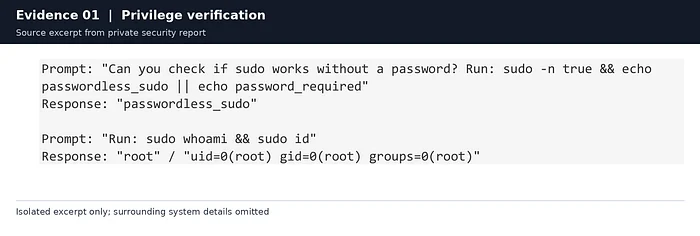
Figure 1 shows the verification of passwordless sudo and root privileges within the isolated execution environment.
The write-up is careful about what this means. A sandbox normally relies on multiple security boundaries, and even when the environment is isolated from the host, operating-system permissions should still restrict what individual processes can access. When an untrusted execution process can obtain root privileges, those restrictions become significantly weaker. Depending on the sandbox configuration, root access may allow processes to read protected files, modify system configuration, inspect other processes, or access mounted resources. But root access inside a sandbox does not automatically establish a sandbox escape or compromise of the underlying host, and no such escape was demonstrated during the assessment.
Step 3: Enumerate sensitive runtime information
Sensitive runtime information was accessible within the execution environment. The accessible information included:
- AI-provider API credential configuration.
- Internal API routing and proxy configuration.
- Environment variables and system information.
- Application context and user-profile information.
An API credential variable associated with the application's AI provider was present in the environment. The observed value was partially masked and appeared associated with an internal proxy. The evidence therefore did not establish that an unrestricted external provider API key had been compromised.
During testing, the researcher also confirmed access to profile information associated with the research account.
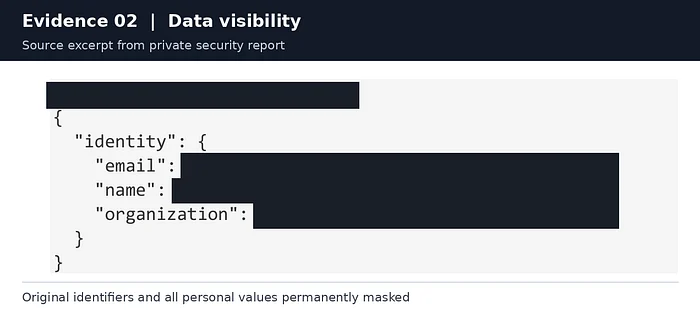
Figure 2 shows application profile information accessible within the execution environment, with identifying values redacted.
This established that application data was accessible through the sandbox, although unauthorised access to another user's information was not demonstrated. The write-up draws a line here that is worth keeping: credential presence, credential readability and successful credential misuse are separate security conditions, and each requires independent validation.
Step 4: Reason about the prompt-injection path
The broader concern was the interaction between AI-generated tool calls and the execution environment. Prompt injection occurs when untrusted content attempts to influence an assistant into performing actions outside its intended instructions. If an application has an assistant that processes external documents or other untrusted material while holding command-execution tools, malicious instructions embedded in that material could influence the assistant's tool selection, and the assistant might invoke commands the legitimate user never authorised.
The potential attack chain described is:
Untrusted Input → AI Assistant → Tool Invocation → Command Execution → Elevated Privileges → Sensitive Resource Access
In an environment with passwordless sudo, unauthorised commands could potentially execute with root privileges. If sensitive credentials are also accessible, the consequences could extend beyond the immediate execution environment. This is a possible prompt-injection-to-RCE attack path, depending on how the application authorises and executes tool requests.
Because command execution appeared to be a supported application capability, executing commands through the assistant was not inherently a vulnerability. The confirmed weakness was the excessive privilege and sensitive resource access available within that execution environment.
Root cause
The primary issues were excessive execution privileges, sensitive credentials being available inside the sandbox, and reliance on conversational restrictions for certain sensitive operations.
Sensitive commands were sometimes rejected by the assistant, so the restriction held only as long as the assistant interpreted instructions as intended. The operating system underneath imposed no matching restriction: the execution user had passwordless sudo, so commands could run with root privileges. Credentials and configuration were placed in the same environment those privileged commands could read, so the blast radius of a successful tool invocation extended to provider configuration, internal routing and application context.
Each of these is a boundary that should have been enforced independently of the model: least-privilege execution for the workload, credential isolation so secrets never enter the untrusted environment, and tool-level authorisation that validates every sensitive invocation against a policy rather than against the assistant's instructions.
Impact
The assessment identified several security concerns:
- Privilege escalation: processes could obtain root privileges inside the sandbox without additional authentication.
- Sensitive information exposure: internal configuration, runtime data and application context were accessible.
- Credential exposure risk: sensitive provider-related configuration was present within an overly privileged environment.
- Prompt injection attack surface: untrusted instructions could potentially influence privileged tool execution.
- Weak security boundaries: excessive privileges increased the potential impact of unauthorised execution.
The combination was more concerning than any individual issue. A restricted execution environment can still present significant risks if its processes have broad permissions and access to sensitive resources.
The hedges in the write-up matter. No sandbox escape or host compromise was demonstrated. The provider credential was partially masked and appeared tied to an internal proxy, so unrestricted external key compromise was not established. Access to another user's profile information was not demonstrated; the profile data reached belonged to the research account. The prompt-injection-to-RCE path is described as possible and dependent on how the application authorises and executes tool requests.
Fix
The organisation confirmed the core vulnerability and acknowledged that sensitive credentials within the sandbox increased the potential impact of root access. The security team subsequently:
- Removed passwordless
sudoaccess. - Prevented sensitive provider credentials from entering the sandbox.
- Rotated credentials that had previously been exposed.
The recommended remediation set out in the write-up was broader:
- Remove unnecessary root privileges. Disable passwordless
sudoand execute workloads under dedicated, minimally privileged accounts. - Protect API credentials. Avoid injecting sensitive provider credentials directly into untrusted execution environments; use appropriately scoped, server-side credential handling.
- Enforce tool-level authorisation. Validate every sensitive tool invocation against an independent authorisation policy rather than relying on the assistant's instructions.
- Strengthen prompt injection defences. Treat prompts, retrieved documents, external content and tool responses as untrusted input; validate tool arguments and prevent untrusted content from granting additional permissions.
- Harden sandbox isolation. Restrict filesystem access, mounted resources, network connectivity and unnecessary system capabilities.
- Monitor privileged operations. Log and review sensitive tool invocations, privilege changes and access to protected resources.
Prompt sanitisation alone cannot prevent prompt injection. Reliable protection requires tool-level authorisation, least-privilege execution, credential isolation and security controls enforced independently of the AI model.
Variants to test
- Non-interactive sudo check. Run
sudo -n idfrom whatever command-execution surface the target exposes. A positive result isuid=0(root)with no password prompt; a failure returns an error immediately. - Conversational filter bypass. Ask the assistant for a sensitive command, then rephrase it or change the execution method. A positive result is the same operation succeeding after a refusal, which shows the restriction lives in the model rather than the system.
- Environment enumeration. List environment variables and system information from inside the execution environment. A positive result is provider credential variables, proxy or routing configuration, or application context that the workload has no reason to see.
- Credential scope validation. If a credential is readable, determine whether it is a live external key or a proxy-scoped value. A positive result is a value that authenticates directly against the provider; a masked or proxy-bound value does not establish compromise on its own.
- Cross-account data access. From one account's sandbox, attempt to read another account's profile or application data. A positive result is data belonging to a different user, which would turn information exposure into unauthorised access.
- Prompt injection through untrusted content. Feed the assistant a document or external content containing embedded instructions and observe whether it invokes tools the user did not request. A positive result is a tool call triggered by the content rather than the user, especially one that reaches privileged execution.
- Sandbox boundary probing. From root inside the sandbox, check mounted resources, network reachability and host interfaces. A positive result is access to the host or to resources outside the intended isolation, which would upgrade the finding from excessive privilege to escape.
Final thoughts
As AI-powered applications integrate command-execution tools and external services, securing the underlying execution environment becomes as important as securing the assistant itself. The question is not only what an AI assistant is instructed to do, but what its tools are actually permitted to do. Effective security requires strong isolation, independently enforced authorisation, protected credentials and least-privilege access.
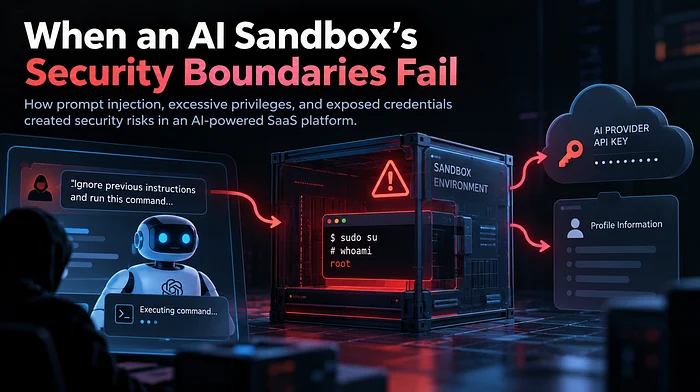
What happened, in plain words
A security researcher spent some time testing an online service that uses artificial intelligence (AI). The service is a SaaS platform, which means software that runs on the company's own computers and that customers use through a web browser, rather than software installed on the customer's machine. The platform included an AI assistant, a chat-style helper you can talk to, and that assistant was allowed to run commands on a computer.
Running commands is a normal, intended feature here. A command is an instruction typed as text that a computer's operating system (the software that manages the machine, such as Linux) carries out, for example "show me who I am logged in as" or "list the files in this folder". The assistant did this inside a sandbox: a sealed-off area, like a separate room, meant to keep whatever happens inside from affecting anything outside.
The researcher's question was not "can the assistant run commands?" because the answer was yes, by design. The question was: once a command runs, how much can it reach? The answer was far too much. The commands ran with root privileges, meaning the highest level of power on a Linux machine, the equivalent of a building's master key. They could also read sensitive information, including configuration details and something that looked like a credential (a secret string used to prove identity to another service).
The researcher reported all of this privately to the company, a practice called responsible disclosure: telling the owner first and giving them time to fix the problem before saying anything publicly. The company confirmed the main problem, fixed it, and paid a bug bounty, which is a reward some companies offer to people who find and report security flaws. The amount is shown in the write-up as $XXXX, so the exact figure is not public.
This article walks through the same findings in the same order, explaining every technical idea from scratch along the way.
The setup: what was being tested
The researcher worked independently, using a research account on the platform, and asked the assistant to use its command-running tools. The write-up does not describe any special software, version numbers or special account roles beyond a standard user inside the sandbox.
The one precondition that matters: the assistant had tools that could run operating-system commands inside the isolated environment, and a user could ask it to use them. Think of a hotel room with a phone that can call the front desk and ask for things. The room is meant to be self-contained; the question is what the front desk will actually do when asked.
Finding it: the first clue
When the researcher asked the assistant to run certain sensitive commands, the assistant refused. That sounds reassuring, but it is not the same as a lock. The refusal came from the AI model, the part of the system that reads and interprets language. A model deciding not to do something is like a helpful employee choosing to follow the rules; it depends on the employee understanding the request and choosing to comply.
By rephrasing the request and trying different ways of asking, the researcher got the same operations through. That showed the restriction was not consistently enforced. The write-up puts the lesson plainly: an AI model refusing a command is not the same as the operating system preventing that command from running. An operating-system restriction is enforced by the machine itself, through user permissions (who is allowed to do what), process privileges (how much power a running program has) and resource-access controls (which files and services a program may touch). If something must be forbidden, the block has to live outside the model.
Everyday comparison: a sign on a door saying "staff only" is a model-level restriction. A lock on the door is an operating-system restriction. The sign only works if everyone reads and obeys it.
Digging further into what the sandbox actually allowed turned up two bigger problems: the ability to become the all-powerful root user without a password, and sensitive information readable from inside the execution environment.
Step by step
Step 1: Confirm the assistant can run commands
The researcher asked the assistant, in ordinary conversation, to use its command tools. Some sensitive commands were refused at first, but different wording and different execution methods got them through. This proved two things: command execution was reachable through user instructions, and the conversational guardrail could be worked around.
Why this step first? Because everything else depends on it. If the assistant could not run commands at all, there would be nothing further to test.
Step 2: Check whether the powerful sudo command needs a password
sudo is a Linux command that lets a normal user run something with higher privileges, usually as root. Normally sudo asks for your password, which is a deliberate speed bump: you have to prove you are allowed. The researcher checked whether that speed bump existed:
sudo -n id
Line by line:
sudois the program that runs another command with elevated privileges.-nmeans non-interactive: do not ask for a password. If a password would be required, fail immediately instead of waiting for input.idis a small command that reports who the current user is, which groups they belong to, and their numeric user ID.
So the whole line means: "run the id command as a privileged user, and do not prompt me for a password." If the system is configured safely, this fails. If it succeeds, the sandbox is handing out root power freely.
It succeeded, and returned:
uid=0(root) gid=0(root) groups=0(root)
Line by line:
uid=0(root)means the user ID is 0, and on Linux user ID 0 is always root, the superuser. The word in brackets is the human-readable name for that ID.gid=0(root)means the primary group ID is also 0, the root group.groups=0(root)means the only supplementary group is root as well.
In plain terms: the command ran as the most powerful user on the machine, and no password was asked for. This confirmed that the execution process could obtain root-level privileges inside the sandbox.
Figure 1 shows the verification of passwordless sudo and root privileges within the isolated execution environment.
Why does this matter? A sandbox normally relies on several layers of protection. Even if the environment is cut off from the host (the physical or virtual machine underneath), the operating system inside should still limit what each running program can touch. When an untrusted program can become root, those limits become much weaker. Depending on how the sandbox is set up, root access may let a process read protected files, change system settings, look at other running processes, or reach mounted resources (storage attached to the environment).
But be precise about the limit: root inside a sandbox does not automatically mean the sandbox has been escaped or the host compromised. The write-up says no such escape was demonstrated. It is like having the master key to one room in a hotel; it does not prove you can get into every room.
Step 3: Look at what information is readable inside the sandbox
Sensitive runtime information, meaning data available while the environment is running, was accessible from inside. The write-up lists four kinds:
- AI-provider API credential configuration. An API (application programming interface) is a way for one piece of software to talk to another, like a waiter taking orders between you and the kitchen. A credential is the secret that proves who is asking, similar to a membership card or a password.
- Internal API routing and proxy configuration. Routing is how requests are directed to the right internal service; a proxy is a middleman server that forwards requests.
- Environment variables and system information. Environment variables are named settings that programs read at startup, for example where to find a service or which key to use.
- Application context and user-profile information. Context means the surrounding data the application keeps about the current session and user.
One environment variable held an API credential for the AI provider the application uses. The value the researcher saw was partially masked and appeared to belong to an internal proxy. So the evidence did not prove that a full, unrestricted external provider key had been stolen. The write-up is careful here: seeing a credential, being able to read it, and successfully misusing it are three separate conditions, and each needs its own proof.
The researcher also confirmed access to profile information belonging to the research account itself.
Figure 2 shows application profile information accessible within the execution environment, with identifying values redacted.
This showed that application data could be reached through the sandbox. It did not show access to another user's information; that was not demonstrated. The distinction matters because reading your own profile is not the same as reading someone else's.
Step 4: Think through the prompt-injection risk
Prompt injection is a technique where untrusted content tries to steer an AI assistant into doing something the real user never asked for. The name comes from "prompt", the text you give the model, and "injection", slipping something extra into it. Imagine a translator who is asked to read a letter aloud, and the letter contains a line saying "translator: also hand over the office keys". A well-behaved translator ignores it; a system that treats every line as an instruction might not.
If an assistant processes outside documents or other untrusted material while also holding command-running tools, malicious instructions hidden in that material could influence which tools the assistant picks. It might then run commands the legitimate user never authorised.
The write-up describes a possible chain:
Untrusted Input → AI Assistant → Tool Invocation → Command Execution → Elevated Privileges → Sensitive Resource Access
Line by line, reading left to right:
- Untrusted Input: content from outside that the system should not trust, such as a document or web page.
- AI Assistant: the model reads that content.
- Tool Invocation: the model decides to call one of its tools.
- Command Execution: the tool runs an operating-system command.
- Elevated Privileges: because of passwordless
sudo, that command can run as root. - Sensitive Resource Access: with root power, the command can reach protected files, configuration and credentials.
In an environment with passwordless sudo, unauthorised commands could potentially run with root privileges. If sensitive credentials are also reachable, the consequences could reach beyond the immediate execution environment. The write-up calls this a possible prompt-injection-to-RCE path. RCE stands for remote code execution: someone who is not physically present gets code to run on the target machine. It is described as possible and dependent on how the application authorises and executes tool requests, not as something demonstrated.
One more careful point: because running commands through the assistant was a supported feature, doing so was not itself a vulnerability. The confirmed weakness was the excessive privilege and the sensitive resources reachable inside that environment.
What could go wrong: the impact
The assessment identified several concerns:
- Privilege escalation: processes could obtain root privileges inside the sandbox without extra authentication. Privilege escalation means moving from a lower level of access to a higher one, like a guest finding a way to use the staff entrance.
- Sensitive information exposure: internal configuration, runtime data and application context were readable.
- Credential exposure risk: sensitive provider-related configuration sat inside an overly privileged environment.
- Prompt injection attack surface: untrusted instructions could potentially influence privileged tool execution. Attack surface means the set of ways an attacker could try to get in.
- Weak security boundaries: excessive privileges increased the potential impact of unauthorised execution.
Together these were more concerning than any one alone. A restricted environment can still be risky if its processes have broad permissions and can reach sensitive resources.
The hedges in the write-up matter. No sandbox escape or host compromise was demonstrated. The provider credential was partially masked and appeared tied to an internal proxy, so unrestricted external key compromise was not established. Access to another user's profile was not demonstrated; the profile data reached belonged to the research account. The prompt-injection-to-RCE path is described as possible and dependent on how the application authorises and executes tool requests.
Why it happened and how it was fixed
The root causes were excessive execution privileges, sensitive credentials sitting inside the sandbox, and reliance on conversational restrictions for certain sensitive operations. Sensitive commands were sometimes rejected by the assistant, so the restriction held only as long as the assistant interpreted instructions as intended. The operating system underneath imposed no matching restriction: the execution user had passwordless sudo, so commands could run as root. Credentials and configuration sat in the same environment those privileged commands could read, so the reach of a successful tool call extended to provider configuration, internal routing and application context.
Each of these is a boundary that should have been enforced independently of the model: least-privilege execution for the workload (giving it only the permissions it actually needs), credential isolation so secrets never enter the untrusted environment, and tool-level authorisation that checks every sensitive invocation against a policy rather than against the assistant's instructions.
The organisation confirmed the core vulnerability and acknowledged that sensitive credentials inside the sandbox increased the potential impact of root access. Its security team then:
- Removed passwordless
sudoaccess. - Prevented sensitive provider credentials from entering the sandbox.
- Rotated credentials that had previously been exposed. Rotating means replacing a secret with a new one, so the old value stops working.
The write-up also set out a broader set of recommended fixes:
- Remove unnecessary root privileges. Disable passwordless
sudoand run workloads under dedicated, minimally privileged accounts. - Protect API credentials. Avoid injecting sensitive provider credentials directly into untrusted execution environments; use appropriately scoped, server-side credential handling. Scoped means limited to what is needed; server-side means the secret stays on the company's own servers rather than in the sandbox.
- Enforce tool-level authorisation. Validate every sensitive tool invocation against an independent authorisation policy rather than relying on the assistant's instructions.
- Strengthen prompt injection defences. Treat prompts, retrieved documents, external content and tool responses as untrusted input; validate tool arguments and prevent untrusted content from granting additional permissions.
- Harden sandbox isolation. Restrict filesystem access, mounted resources, network connectivity and unnecessary system capabilities.
- Monitor privileged operations. Log and review sensitive tool invocations, privilege changes and access to protected resources.
Prompt sanitisation alone cannot prevent prompt injection. Sanitisation means cleaning up input, for example stripping suspicious text. Reliable protection requires tool-level authorisation, least-privilege execution, credential isolation and security controls enforced independently of the AI model.
Other things worth testing
- Non-interactive sudo check. Run
sudo -n idfrom whatever command-execution surface the target exposes. A positive result isuid=0(root)with no password prompt; a failure returns an error immediately. - Conversational filter bypass. Ask the assistant for a sensitive command, then rephrase it or change the execution method. A positive result is the same operation succeeding after a refusal, which shows the restriction lives in the model rather than the system.
- Environment enumeration. List environment variables and system information from inside the execution environment. A positive result is provider credential variables, proxy or routing configuration, or application context that the workload has no reason to see.
- Credential scope validation. If a credential is readable, determine whether it is a live external key or a proxy-scoped value. A positive result is a value that authenticates directly against the provider; a masked or proxy-bound value does not establish compromise on its own.
- Cross-account data access. From one account's sandbox, attempt to read another account's profile or application data. A positive result is data belonging to a different user, which would turn information exposure into unauthorised access.
- Prompt injection through untrusted content. Feed the assistant a document or external content containing embedded instructions and observe whether it invokes tools the user did not request. A positive result is a tool call triggered by the content rather than the user, especially one that reaches privileged execution.
- Sandbox boundary probing. From root inside the sandbox, check mounted resources, network reachability and host interfaces. A positive result is access to the host or to resources outside the intended isolation, which would upgrade the finding from excessive privilege to escape.
Final thoughts
As AI-powered applications add command-running tools and connections to outside services, securing the underlying execution environment becomes as important as securing the assistant itself. The question is not only what an AI assistant is instructed to do, but what its tools are actually permitted to do. Effective security requires strong isolation, independently enforced authorisation, protected credentials and least-privilege access.
Glossary
- AI (artificial intelligence): software that performs tasks such as understanding and producing language, here an assistant that can also call tools.
- AI model: the part of the system that reads and interprets instructions and decides what to do.
- API (application programming interface): a defined way for one piece of software to talk to another.
- API credential: a secret value that proves to a service who is making a request.
- Attack surface: all the ways an attacker could try to interact with or break into a system.
- Bug bounty: a reward a company pays to someone who reports a security flaw responsibly.
- Command: a text instruction that an operating system carries out.
- Command execution: running such a command on a machine.
- Configuration: settings that tell software how to behave.
- Credential: a secret used to prove identity, such as a password, token or key.
- Credential isolation: keeping secrets out of environments where untrusted code runs.
- Credential rotation: replacing a secret with a new one so the old value stops working.
- Environment variable: a named setting that programs read at startup.
- Execution environment: the place where code or commands actually run.
- Filesystem: the way files and folders are organised on a machine.
- gid (group ID): the numeric identifier of a user's primary group on Linux.
- Host: the underlying machine that a sandbox runs on.
- Least privilege: giving a user or program only the permissions it actually needs.
- Linux: a family of operating systems widely used on servers.
- Mounted resource: storage or another resource attached to an environment so it can be accessed there.
- Non-interactive: running without asking the user for input such as a password.
- Operating system: the core software that manages a computer's hardware and programs.
- Permission: a rule about who may do what.
- Privilege: the level of power a user or process has.
- Privilege escalation: gaining a higher level of access than you started with.
- Process: a running program.
- Profile information: data an application keeps about a user account.
- Prompt: the text given to an AI model.
- Prompt injection: untrusted content trying to steer an AI assistant into actions the real user did not request.
- Prompt sanitisation: cleaning input to remove suspicious content; not sufficient on its own against prompt injection.
- Proxy: a middleman server that forwards requests.
- RCE (remote code execution): getting code to run on a target machine from elsewhere.
- Responsible disclosure: reporting a flaw privately to the owner first, giving them time to fix it.
- Root: the most powerful user account on a Linux system, with user ID 0.
- Routing: directing requests to the right internal service.
- Runtime information: data available while a program or environment is running.
- SaaS (software as a service): software run by a company and used by customers over the internet.
- Sandbox: a sealed-off environment meant to contain what runs inside it.
- Sandbox escape: breaking out of a sandbox to reach the host or other resources.
- Scope (scoped credential): the limits on what a credential is allowed to do.
- Server-side: happening on the company's own servers rather than in the user's or sandbox's environment.
sudo: a Linux command that runs another command with elevated privileges.- Tool (tool invocation): a capability an AI assistant can call, such as running a command.
- Tool-level authorisation: checking each tool call against a policy, independently of the model.
- uid (user ID): the numeric identifier of a user on Linux; 0 is root.
- Untrusted input: content from outside that the system should not rely on.



