When One Integer Crosses the Authorization Boundary
An authenticated API endpoint returned marketing communication preferences for any member identifier supplied by the client, without checking that the identifier belonged to the authenticated account. An attacker with one account could therefore read another account's preference state by changing the member identifier.

medium.com
Published on medium.com
Api Security
The full write-up lives on its author's site
It belongs to its author, so we link to it rather than copy it. The other two tabs are our own rewrites, checked against it.
Context
Some authorization bugs are obvious: you change an identifier and suddenly get another user's private data. Others are quieter. This write-up is about the quiet kind, found while reviewing an authenticated booking flow.
The feature in question is a preference endpoint responsible for returning marketing communication preferences. The response itself is simple: a few booleans and a subscription status. What caught my attention was that the client was supplying the member identifier directly, rather than the server deriving it from the session.
Setup
I used two separate accounts, each with its own member ID, which I will call Account A and Account B. No special tooling is described: the testing was done with an authenticated browser session and the ability to modify the request body.
Finding it
The application called:
POST /api/cusco/communicationPreference/getMarketingDisplayRules
The request contained a structure similar to:
{ "subscriptionQuery": { "memberId": 12345678 }, "userId": "..."}
The response returned the preference state associated with that member:
{ "isSuccess": true, "result": { "isCheckBoxDisplay": true, "isDefaultOptIn": false, "userSubscriptionStatus": "OptOut" }, "error": null}
For the authenticated user's own account, this was expected. The real question was whether the backend actually tied that memberId to the authenticated session. The client was supplying the identifier, so the server had to be checking ownership somewhere, or it was not checking at all.
Exploitation
Step 1: establish a baseline with the session's own identifier
I authenticated as Account B and kept the session unchanged throughout the test. Same cookies, same authentication context, same browser session. Only the memberId changed.
With Account B's own identifier:
Session B + memberId B→ OptOut
This confirms the endpoint works normally for the account that owns the session.
Step 2: substitute the other account's identifier
I then supplied Account A's identifier while still authenticated as Account B:
Session B + memberId A→ OptOut
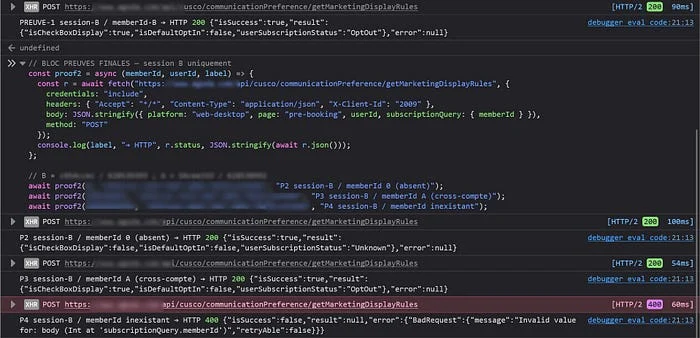
The screenshot shows the same authenticated session with a different member ID, and the cross-account request returning HTTP 200. The request was accepted and the preference state associated with the supplied member was returned.
Step 3: probe other identifiers without touching the session
I continued testing other identifiers without changing the session:
memberId = 0→ Unknown memberId = 2147483647→ Unknownadjacent memberId→ OptInanother adjacent memberId→ OptIn
Across all of these requests, the authenticated session remained the same. The returned state followed the client-controlled memberId. That was the important part: the returned state followed the client-controlled memberId.
Root cause
The backend was effectively answering:
Which memberId did the client request?
without first enforcing:
Is this authenticated account allowed to access that member?
Those are two different questions. An identifier can be used to locate an object, but it should not be treated as proof that the caller owns that object. In this case, Account B could supply Account A's identifier and receive data associated with Account A, which means the ownership boundary between authenticated accounts was not properly enforced.
The underlying problem was simple: object selection and authorization were treated as the same thing. The client supplied the member identifier, the backend located the corresponding preference state, and the server did not sufficiently bind that object to the authenticated identity before returning it.
Impact
The endpoint did not expose passwords, authentication tokens or payment information. But severity is not determined only by the sensitivity of one returned field. The more important security issue was that one authenticated user could access an object associated with another account simply by changing a client-controlled identifier.
That changes the question from how sensitive is this preference value? to why can one account resolve another account's object at all? That is the more useful authorization question. The broken ownership check is the finding, not the sensitivity of the returned field.
Fix
The main fix is to enforce object-level authorization on every request. Conceptually:
authenticatedMember = session.memberIdrequestedMember = request.memberIdif requestedMember != authenticatedMember: reject request
Even better, when possible:
memberId = session.memberId
This removes the client-controlled ownership decision entirely. For an endpoint that only needs to operate on the current user's data, the safer design is to derive the member context directly from the authenticated session. If a client-supplied identifier is required, ownership should be validated server-side before any data is returned.
Rate limiting can help reduce enumeration, but it does not solve the underlying authorization issue.
Variants to test
- Any endpoint that accepts a member or account identifier in the body. Send your own identifier, then a second account's identifier, keeping the session fixed.
- Numeric boundary values. Try
0and2147483647, as I did, plus adjacent values. - Identifier in query string or path.
- Endpoints that only need the current user's data.
- Enumeration at scale.
What happened, in plain words
Imagine a hotel where the receptionist hands out room keys. You tell the receptionist your room number, and they give you the key to that room. Now imagine you tell them someone else's room number, and they still hand you the key, without checking whether you are allowed into that room. That is essentially the bug described here.
A website had a feature that shows a logged-in customer their marketing communication preferences: whether a checkbox should be shown, whether they are opted in by default, and whether they are currently opted in or out. To fetch those preferences, the website sent a request to the server that included a number identifying the customer, called a memberId. The server looked up the preferences for whatever number was sent and returned them.
The problem: the server never checked whether the logged-in person was actually allowed to see the preferences belonging to that number. So one logged-in customer could send another customer's number and receive that other customer's preference data. The researcher proved this by using two accounts and swapping only the number, while keeping the same login session.
This kind of flaw is called a broken object-level authorization bug, or more commonly an IDOR (Insecure Direct Object Reference). The name sounds technical, but the idea is simple: the server trusts a number supplied by the client to decide which record to show, without verifying that the client owns that record.
Background concepts, from zero
Before walking through the test, here are the ideas you need.
What is an API? An API (Application Programming Interface) is the way a website's front end (the part you see in the browser) talks to the back end (the server that holds the data). Think of it as a waiter in a restaurant: you tell the waiter what you want, the waiter goes to the kitchen, and brings back your food. You never walk into the kitchen yourself. In web terms, the browser sends a request to a URL, and the server sends back a response, usually in a format called JSON.
What is JSON? JSON is a way of writing data as text so both computers can read it easily. It looks like a set of labels and values inside curly braces, for example {"name": "Alice", "age": 30}. Each label is called a key, and each value sits after a colon.
What is a cookie? A cookie is a small piece of text that a website stores in your browser after you log in. Every time your browser talks to that website, it sends the cookie along, so the server knows who you are. Think of it as a wristband you get at an event: you show it at the door and you are let in without showing your ticket again.
What is a session? A session is the server's memory of your logged-in state. The cookie is the ticket; the session is the server-side record that says "this ticket belongs to this person." When we say "same session," we mean the browser kept sending the same cookie, so the server kept treating the request as coming from the same logged-in user.
What is an identifier? An identifier (often called an ID) is a number or string that names a specific record in a database. Your member ID is the number the website uses internally to refer to your account. It is not secret in the sense of a password, but it is also not something you should be able to use to reach someone else's data.
What is authorization? Authentication is proving who you are (logging in). Authorization is deciding what you are allowed to do once you are logged in. A broken authorization bug means the server knows who you are but does not check whether you should be allowed to see the thing you asked for.
What is an IDOR? Insecure Direct Object Reference. It happens when a program uses a value supplied by the user (like a memberId) to look up a record, and does not check that the user is allowed to access that record. The fix is to check ownership on the server before returning anything.
What is a booking flow? The researcher was reviewing an authenticated booking flow, meaning a part of a website where logged-in users make bookings. The endpoint in question was not the booking itself but a preference endpoint used alongside it.
The feature under test
The feature returns marketing communication preferences. In plain terms, it tells the front end how to display a checkbox about marketing emails: whether to show the checkbox at all, whether the customer is opted in by default, and whether the customer is currently opted in or out. The response is small: a few true/false values and a status word.
What caught the researcher's attention was that the browser was sending the member identifier itself, rather than the server working it out from the session. That is the red flag. If the client chooses which record to fetch, the server must check ownership. If it does not, anyone can ask for anyone else's record.
The request
The application called:
POST /api/cusco/communicationPreference/getMarketingDisplayRules
Line by line:
POSTis the type of request. It means "I am sending some data to the server." Other common types areGET(give me something) andPUT(update something)./api/cusco/communicationPreference/getMarketingDisplayRulesis the path, the address on the server that handles this particular action. The wordapitells you this is a back-end endpoint, not a web page.cuscoappears to be a product or service name.communicationPreferenceis the feature area.getMarketingDisplayRulesis the specific action: fetch the rules for displaying marketing preferences.
The request contained a structure similar to:
{ "subscriptionQuery": { "memberId": 12345678 }, "userId": "..."}
Line by line:
- The outer curly braces hold the whole request body, the data the browser sends to the server.
"subscriptionQuery"is a key whose value is another set of curly braces. It groups together the details of the query being made."memberId": 12345678is the crucial part. This is the number identifying which member's preferences are being requested. The value12345678is a placeholder for a real member ID."userId": "..."is another identifier, shown here with its value replaced by dots. The report does not say what this value is or how it is used.
The response returned the preference state associated with that member:
{ "isSuccess": true, "result": { "isCheckBoxDisplay": true, "isDefaultOptIn": false, "userSubscriptionStatus": "OptOut" }, "error": null}
Line by line:
"isSuccess": truemeans the request worked. The server is saying "yes, I processed this.""result"holds the actual answer, again in curly braces."isCheckBoxDisplay": truemeans the marketing checkbox should be shown to the user."isDefaultOptIn": falsemeans the user is not opted in by default."userSubscriptionStatus": "OptOut"means the user is currently opted out of marketing communications."error": nullmeans there was no error.nullis a special value meaning "nothing."
For the authenticated user's own account, this was expected. The real question was whether the back end actually tied that memberId to the logged-in session. Since the browser was choosing the number, the server had to be checking ownership somewhere, or it was not checking at all.
Testing the authorization boundary
The researcher used two separate accounts, each with its own member ID, called Account A and Account B. The test was done with an authenticated browser session and the ability to modify the request body. No special tooling is described.
Step 1: establish a baseline with the session's own identifier
The researcher authenticated as Account B and kept the session unchanged throughout the test. Same cookies, same authentication context, same browser session. Only the memberId changed.
With Account B's own identifier:
Session B + memberId B→ OptOut
Line by line:
Session Bmeans the request was sent while logged in as Account B, with Account B's cookie.+ memberId Bmeans the request body contained Account B's own member ID.→ OptOutmeans the server responded with the statusOptOut.
Why this step matters: before you can show that something is broken, you need to show what normal looks like. Asking for your own data and getting your own data back is the expected behaviour. It confirms the endpoint works and gives you a reference point.
Step 2: substitute the other account's identifier
The researcher then supplied Account A's identifier while still authenticated as Account B:
Session B + memberId A→ OptOut
Line by line:
Session Bagain means the request was sent with Account B's cookie. The login did not change.+ memberId Ameans the request body now contained Account A's member ID instead of Account B's.
The screenshot shows the same authenticated session with a different member ID, and the cross-account request returning HTTP 200. HTTP 200 is the standard status code for "OK, here is your response." The request was accepted and the preference state associated with the supplied member was returned.
Why this step matters: this is the actual test. If the server had checked ownership, it would have refused the request, for example with a 403 (forbidden) or 404 (not found). Instead it answered normally. That means Account B was able to read data associated with Account A simply by changing a number.
Step 3: probe other identifiers without touching the session
The researcher continued testing other identifiers without changing the session:
memberId = 0→ Unknown memberId = 2147483647→ Unknownadjacent memberId→ OptInanother adjacent memberId→ OptIn
Line by line:
memberId = 0means the request body contained the number zero. The server answeredUnknown, meaning it did not recognise that member.memberId = 2147483647means the request body contained the largest value a 32-bit signed integer can hold. The server again answeredUnknown.adjacent memberIdmeans a member ID numerically next to a known one. The server answeredOptIn.another adjacent memberIdmeans a different neighbouring ID. The server again answeredOptIn.
Why this step matters: it shows that the response follows the number the client sends, not the session. Zero and the maximum integer are boundary values, chosen because they are easy to reason about and often reveal how the server handles numbers. The Unknown answers show the server is actually looking up the supplied number rather than ignoring it.
Across all of these requests, the authenticated session remained the same. The returned state followed the client-controlled memberId. That was the important part: the returned state followed the client-controlled memberId.
The authorization failure
The back end was effectively answering:
Which memberId did the client request?
without first enforcing:
Is this authenticated account allowed to access that member?
Those are two different questions. An identifier can be used to locate an object, but it should not be treated as proof that the caller owns that object. In this case, Account B could supply Account A's identifier and receive data associated with Account A, which means the ownership boundary between authenticated accounts was not properly enforced.
A useful comparison: a library catalogue number tells you where a book sits on the shelf. It does not prove the book is yours. If the librarian hands you any book whose number you say, the catalogue is doing its job but the lending rules are not.
Why the response alone does not tell the whole story
The endpoint did not expose passwords, authentication tokens or payment information. But severity is not determined only by the sensitivity of one returned field. The more important security issue was that one authenticated user could access an object associated with another account simply by changing a client-controlled identifier.
That changes the question from how sensitive is this preference value? to why can one account resolve another account's object at all? That is the more useful authorization question. The broken ownership check is the finding, not the sensitivity of the returned field.
Root cause
The underlying problem was simple: object selection and authorization were treated as the same thing. The client supplied the member identifier, the back end located the corresponding preference state, and the server did not sufficiently bind that object to the authenticated identity before returning it.
In everyday terms: the server asked "which record?" and stopped there. It never asked "and are you allowed to see it?"
Remediation
The main fix is to enforce object-level authorization on every request. Conceptually:
authenticatedMember = session.memberIdrequestedMember = request.memberIdif requestedMember != authenticatedMember: reject request
Line by line:
authenticatedMember = session.memberIdmeans: work out who the logged-in user is from the session, not from the request body. The session is the server's own record, so the client cannot forge it.requestedMember = request.memberIdmeans: read the member ID the client asked for.if requestedMember != authenticatedMember: reject requestmeans: if the two do not match, refuse the request.!=means "is not equal to."
Even better, when possible:
memberId = session.memberId
Line by line:
memberId = session.memberIdmeans: ignore whatever the client sent and use the session's member ID directly. This removes the client-controlled ownership decision entirely.
For an endpoint that only needs to operate on the current user's data, the safer design is to derive the member context directly from the authenticated session. If a client-supplied identifier is required, ownership should be validated server-side before any data is returned.
Rate limiting can help reduce enumeration, but it does not solve the underlying authorization issue. Rate limiting means limiting how many requests a client can make in a given time. It makes walking through many IDs slower, but it does not stop a single cross-account request from succeeding.
Variants to test
These are the same patterns applied to other parts of a site. They are useful because the same mistake often appears in more than one place.
- Any endpoint that accepts a member or account identifier in the body. Send your own identifier, then a second account's identifier, keeping the session fixed.
- Numeric boundary values.
- Identifier in query string or path.
- Endpoints that only need the current user's data.
- Enumeration at scale.
Final thought
One authenticated session. One changed identifier. One missing ownership check. The returned data was simple. The authorization failure behind it was not.
Glossary
- API: the interface a website's front end uses to talk to its back end, sending requests and receiving responses.
- Authentication: proving who you are, usually by logging in.
- Authorization: deciding what a logged-in user is allowed to do or see.
- Broken object-level authorization: a flaw where the server does not check that the user owns the record they are asking for.
- Cookie: a small piece of text stored in the browser and sent with each request so the server can recognise the user.
- Cross-account request: a request made under one account that asks for data belonging to another account.
- Endpoint: a specific address on a server that handles a particular action.
- Enumeration: systematically trying many identifiers to discover which ones exist or what they return.
- HTTP 200: the standard status code meaning the request succeeded.
- HTTP 403: the standard status code meaning the server understood the request but refuses to allow it.
- HTTP 404: the standard status code meaning the requested resource was not found.
- IDOR (Insecure Direct Object Reference): a bug where a user-supplied identifier is used to look up a record without an ownership check.
- Identifier (ID): a number or string that names a specific record in a database.
- Integer: a whole number, positive, negative or zero.
- JSON: a text format for structured data, using keys and values inside curly braces.
- memberId: the identifier for a member account in this application.
- OptIn / OptOut: statuses meaning the user has agreed to, or declined, marketing communications.
- POST: an HTTP request type used to send data to the server.
- Rate limiting: limiting how many requests a client can make in a period of time.
- Request body: the data sent along with a request, as opposed to the address it is sent to.
- Response: the data the server sends back.
- Session: the server's record of a logged-in user, linked to the browser by a cookie.
- Severity: how serious a security issue is judged to be.
- Token: a piece of data used to prove identity or grant access; the report mentions authentication tokens as something the endpoint did not expose.
- 32-bit signed integer: a whole number that can hold values from roughly minus two billion to plus two billion;
2147483647is its maximum.



