When the PDF Started Oversharing: From XXE to Reading /etc/passwd
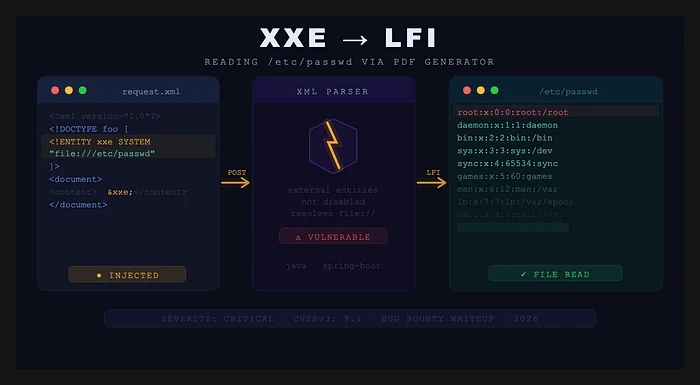
The application's PDF export feature accepted XML input and processed external entities without restrictions, allowing an attacker to read local files on the server. The contents of those files were then embedded in the generated PDF, demonstrating local file disclosure.

medium.com
Published on medium.com
Bug Bounty Writeup
The full write-up lives on its author's site
It belongs to its author, so we link to it rather than copy it. The other two tabs are our own rewrites, checked against it.
Context
The target here is a web application with a document export feature: a user submits some data, the application processes it, and a finished document is generated. The feature is labelled Export as PDF and is meant to take data, format it nicely and produce a professional-looking report. Nothing in the normal workflow suggests that the server should ever touch its own filesystem on the user's behalf.
The write-up is about how that ordinary export button turned into a case of XML External Entity injection (XXE) that ended with the contents of local files appearing inside the generated PDF. The application accepted XML in the request body, and a PDF was generated as the result of processing that input.
Setup
The researcher explored the application and its available features, then used the PDF export feature as a normal user while monitoring HTTP requests through Burp Suite. Testing was kept within the authorised scope of the program, and out-of-band techniques were only considered where the program's scope and rules permitted them.
The report does not name the target host, the program, the technology versions or the account roles used. The request examples below are explicitly described in the write-up as illustrative of the request structure rather than verbatim copies of the original request.
Finding it
The starting point was reconnaissance rather than payload spraying. The researcher asked a set of questions about the export feature:
- Does the application accept XML input?
- Is an XML parser used on the server?
- Does the parser allow external entity processing?
- Can the results of XML processing appear in the generated PDF?
- Could this behaviour allow access to local files on the server?
None of these questions proves a vulnerability; they define a direction. The researcher also looked at the technology stack, noting that if an application uses Java, the configuration of its XML parser is relevant when investigating potential XXE, and that if PDF generation is handled by a separate component it matters whether that component processes XML directly or receives data already processed by another layer. The write-up stresses that identifying a technology does not prove it is vulnerable.
The clue came from using the feature normally: the request contained XML data. That shifted the feature from "simple export operation" to something worth inspecting more closely.
Exploitation
Step 1: Inspect the export request
Inspecting the request in Burp Suite showed that the application accepted XML in the request body. A simplified example of the request looks like this:
POST /api/generate-pdf HTTP/1.1Host: [TARGET_HOST]Content-Type: application/xmlAuthorization: Bearer [REDACTED]
<?xml version="1.0" encoding="UTF-8"?><document> <title>Security Report</title> <author>Researcher</author> <content>Report content goes here.</content></document>
The body carries fields such as title, author and content, which means some component has to parse the XML before it can be transformed into a document. The write-up is explicit that an XML request does not automatically mean the application is vulnerable: the risk depends on how the XML is processed, how the parser is configured, and whether appropriate security restrictions are enforced.
Step 2: Test whether external entities are processed
The hypothesis to validate was whether the parser processes external entities. One possible method is out-of-band testing with a tool such as Burp Collaborator, provided the technique is permitted by the program's scope and rules. The idea is to monitor whether processing a request produces an external interaction associated with the test; an expected DNS lookup or HTTP interaction can indicate that the server attempted to access the external resource.
The write-up lists the caveats that go with this technique:
- An interaction does not automatically prove that every form of XXE is possible.
- The absence of an interaction does not conclusively prove that the vulnerability does not exist.
- The observed result must be correlated with the submitted request, and alternative explanations should be considered.
- Testing must remain within the authorised scope and avoid unnecessary exposure of data or disruption.
During the investigation the researcher observed indicators associated with external entity processing. That raised the next question: was the impact limited to an external interaction, or could it extend to reading local files?
Step 3: Read a low-sensitivity local file
To demonstrate impact in a clear and controlled way, the researcher started with a relatively low-sensitivity file, /etc/hostname. On Linux systems this file typically contains the system's hostname, so its contents help show whether processing has reached a local file on the server.
The file's contents appeared in the generated PDF. That was the important indicator: the result was no longer just an external interaction, and it suggested that local file contents were being disclosed through the document generation process.
Step 4: Confirm with /etc/passwd
The impact was then verified with another file, /etc/passwd, which commonly exists on Linux systems and contains account information including usernames, user and group IDs and other account-related fields. A typical example looks like this:
root:x:0:0:root:/root:/bin/bashdaemon:x:1:1:daemon:/usr/sbin:/usr/sbin/nologinwww-data:x:33:33:www-data:/var/www:/usr/sbin/nologin
The first line breaks down as follows:
root:x:0:0:root:/root:/bin/bash
root: the account username.x: a marker indicating that password information is stored separately, depending on the system configuration.0: the user ID (UID).0: the group ID (GID).root: the account description./root: the account's home directory./bin/bash: the configured login shell.
The write-up notes that many accounts in this file are system or service accounts rather than humans, and that the presence of account information does not mean passwords were obtained: the file generally contains account metadata, not actual passwords. The key finding was not the name of the file but that the application exposed local file contents through a feature designed to generate PDFs.
Why the PDF mattered
The application did not simply return a text response; it generated a PDF as the result of processing the input. If the contents of an entity were processed and inserted into a document field, those contents could appear in the resulting PDF. So even if the information was not displayed directly on the web page, that did not mean the application was not exposing it. The generated artifact had to be inspected, not just the HTTP response.
Root cause
The underlying issue is insecure processing of external entities: the XML parser used on the server processed external entities without appropriate security restrictions, so user-supplied XML could influence the server into accessing resources that should not be reachable through the feature. The entity contents appeared in the generated PDF, which is how the disclosure became visible.
The write-up frames the problem as a boundary failure between user-supplied input and resources accessible to the server. It does not show the parser configuration or the server-side code, so the exact setting that was missing is not documented; the fix section points at DTD and external entity processing as the settings that should be disabled.
Terminology matters here. The write-up distinguishes XXE (the vulnerability caused by insecure processing of external entities) from local file disclosure (the impact in which the vulnerability exposes local file contents). People often call this LFI, but the more precise description is that XXE resulted in local file disclosure, which is not necessarily the same as a traditional Local File Inclusion vulnerability involving unsafe handling of file paths within an application.
Impact
The demonstrated impact was the disclosure of local file contents through the PDF generator, shown with /etc/hostname and /etc/passwd. The concern is not that /etc/passwd alone is extremely sensitive; it is that the application was able to access a local file outside the data the user was supposed to control. That raises the question of whether other files could also be accessible, depending on the service account's permissions and the system's configuration. Application configuration files or certain environment files may contain application secrets or credentials.
The write-up is careful about the limits. Being able to read /etc/passwd does not automatically prove that every other file is readable: each file has its own permissions, services may run under different accounts, and isolation mechanisms may prevent access to particular resources. Access to database credentials, signing keys or cloud credentials would depend on which files were actually accessible and what permissions the service had, and those possibilities should not be presented as confirmed results without evidence. Severity should reflect the evidence, exploitability, sensitivity of the exposed data and potential consequences: not every XXE is Critical, and not every local file disclosure means the entire server is compromised.
Fix
The write-up gives four directions.
- Disable external entity processing. If the application does not require external entities, the XML parser should be configured to prevent their processing. In Java, secure settings for
DocumentBuilderFactorycan disable DTD processing and external entities, with the exact configuration verified against the parser implementation and version in use:
DocumentBuilderFactory factory = DocumentBuilderFactory.newInstance();
factory.setFeature( "http://apache.org/xml/features/disallow-doctype-decl", true);factory.setFeature( "http://xml.org/sax/features/external-general-entities", false);factory.setFeature( "http://xml.org/sax/features/external-parameter-entities", false);factory.setXIncludeAware(false);factory.setExpandEntityReferences(false);
This illustrates the general direction of the fix but is not a substitute for reviewing the parser's documentation and verifying that the settings are supported and actually enforced. If a critical security setting cannot be enabled, the application should fail securely rather than continue with uncertain protections.
-
Use a secure XML parser configuration. If the application does not actually need XML, consider whether a simpler data format suits the use case. If XML is necessary, use a suitable parser and secure configuration instead of relying on default settings without reviewing them. XML itself is not the problem; the way the application processes it determines the risk.
-
Apply the principle of least privilege. Even with a misconfigured parser, the service responsible for generating PDFs should not have permission to read files unrelated to its function. Run it with restricted permissions, isolate it from unnecessary files and secrets, and limit its network access to what it actually requires. Defence in depth matters because a single configuration mistake should not turn into a much larger incident.
-
Test the fix. After the changes, verify that the parser no longer allows the unsafe behaviour and that normal PDF generation still works. Also review other parts of the application that process XML: fixing one endpoint does not necessarily mean every component is secure.
Variants to test
- Other XML-accepting endpoints.
- Entity content rendered into artifacts. A positive result is local file content visible in the generated document even when the HTTP response shows nothing.
- Low-sensitivity file first. Use
/etc/hostnamebefore anything else to confirm local file access with minimal exposure. A positive result is the hostname appearing in the generated output. - Parser behaviour checks. A positive result is any interaction or content expansion that should not occur under a secure configuration.
- Least-privilege probing. A positive result is a file outside the feature's intended data being readable, with the specific permissions and account documented.
Lessons
The write-up closes with five takeaways: test features rather than just endpoints, because an ordinary Export as PDF can involve several processing stages; understand the data flow, asking where data enters, which component processes it, whether it is transformed into another format and what happens before the result reaches the user; treat evidence as stronger than assumptions, since an XML request does not prove XXE and XXE does not automatically mean every local file is readable; inspect artifacts, because the generated PDF revealed what the HTTP response did not; and write reports that separate what actually happened from what remains a possibility, which helps the security team reproduce and fix the issue and makes the impact assessment more credible.
What happened, in plain words
A security researcher was looking at an ordinary web application, the kind you use in a browser every day. One of its features was a button called Export as PDF: you give the site some information, and it hands you back a nicely formatted document you can download and print.
That button turned out to be doing something it should never have done. When the researcher looked at what the browser was actually sending to the server behind the scenes, they found the site was sending its data in a format called XML. The server processed that XML, and a PDF was generated as a result. The problem was that the server's XML reader was too trusting. It would follow extra instructions hidden inside the XML, instructions that caused it to fetch a file from the server's own disk, whose contents appeared in the PDF.
The researcher proved this by asking the server to read two files that exist on almost every Linux machine: /etc/hostname (which holds the machine's name) and /etc/passwd (which lists the user accounts on the machine). Both files' contents came back inside the generated PDF.
This kind of bug is called XXE, short for XML External Entity injection. The result, files from the server appearing in a document you downloaded, is called local file disclosure.
Below is the whole story, step by step, with every concept explained from scratch.
Some words you will meet before we start
Before walking through the investigation, here are the basic pieces of the web that the story relies on. If you already know them, skip ahead.
- Server: the computer somewhere else that runs a website. Your browser asks it for pages and data; it answers. Think of it as the kitchen of a restaurant and your browser as the dining room.
- Request and response: your browser sends a request ("please give me this page" or "please generate this PDF") and the server sends back a response (the page, the file, an error). Every interaction on the web is a pair of these.
- HTTP: the language requests and responses are written in. It has a fixed shape: a first line saying what you want, then a set of headers (small labelled facts about the request), then optionally a body (the actual data you are sending).
- API: a way for one piece of software to talk to another without a human clicking anything. When a website's page needs data, its own JavaScript often calls an API behind the scenes. An API is like a service counter: you hand over a specific request in a specific format, and you get a specific answer back.
- Endpoint: one specific address on a server that does one specific job, for example
/api/generate-pdf. Think of a large office building: the building is the server, and each endpoint is a different desk you can walk up to. - Token / bearer token: a long random string that proves who you are, a bit like a cloakroom ticket. You show it with each request and the server lets you in without asking for your password again. It is a secret: if someone else gets it, they can act as you. In this article it is always shown as
[REDACTED]. - Cookie: a small piece of data your browser stores for a website and sends back automatically with every request, often used to remember that you are logged in. Similar in purpose to a token, but handled by the browser rather than by the code.
- Burp Suite: a tool that sits between your browser and the server and lets you read, pause and edit every request and response. Imagine a transparent pipe you can look into, with a valve that lets you change what flows through.
- Burp Collaborator: a companion service that gives you a unique, throwaway address on the internet. You plant that address in a test request; if the server ever tries to contact it, the service records the attempt. It is like leaving a fake phone number and seeing whether anyone calls it.
- XML: a way of writing data using tags, similar to HTML. You wrap values in labels so both sides know what each value means.
- Parser: the piece of software on the server that reads a format like XML and turns it into something the program can use. A parser is like a translator: it takes the written text and turns it into meaning.
- PDF: a file format for documents that look the same on every computer. It can contain text, images and layout instructions.
- Linux: a family of operating systems, very common on servers. Files on Linux live in a single tree starting at
/, so a path like/etc/passwdmeans "the file called passwd inside the folder called etc at the root". - Vulnerability: a weakness in software that lets someone make it do something it was not meant to do.
- Bug bounty: a programme where a company invites outside researchers to look for vulnerabilities in its systems, within agreed rules, and often pays for good findings.
- Scope: the list of systems and techniques a bug bounty programme allows you to test. Anything outside it is off limits.
The starting point: an ordinary export button
The target is a web application with a document export feature. A user submits some data, the application processes it, and a finished document is generated. The feature is labelled Export as PDF and is meant to take data, format it nicely and produce a professional-looking report. Nothing in the normal workflow suggests that the server should ever touch its own filesystem on the user's behalf.
The write-up is about how that ordinary export button turned into a case of XML External Entity injection (XXE) that ended with the contents of local files appearing inside the generated PDF. The application accepted XML in the request body, and the PDF generator was the component that turned the parsed data into the final document.
That is exactly why it is worth testing. Features that look boring are often the ones nobody has checked.
Setting up: how the testing was done
The researcher explored the application and its available features, then used the PDF export feature as a normal user while monitoring HTTP requests through Burp Suite. Testing was kept within the authorised scope of the programme, and out-of-band techniques were only considered where the programme's scope and rules permitted them.
Why start by using the feature normally? Because that is how you learn what the application actually sends. Before you can test anything, you need to see the real traffic. Burp Suite makes that visible: you click Export as PDF in your browser, and Burp shows you the exact request that left your machine and the exact response that came back.
The report does not name the target host, the programme, the technology versions or the account roles used. The request examples below are explicitly described in the write-up as illustrative of the request structure rather than verbatim copies of the original request.
Finding it: asking questions before throwing payloads
The starting point was reconnaissance rather than payload spraying. Reconnaissance means getting to know the application before attacking it: what it does, what it accepts, what it is built with. Payload spraying is the opposite: firing random attack strings at everything and hoping something breaks. The researcher deliberately avoided that.
Instead, the researcher asked a set of questions about the export feature:
- Does the application accept XML input?
- Is an XML parser used on the server?
- Does the parser allow external entity processing?
- Can the results of XML processing appear in the generated PDF?
- Could this behaviour allow access to local files on the server?
None of these questions proves a vulnerability; they define a direction. Each one narrows down what to look at next. If the answer to the first is no, the rest do not matter. If the answer is yes, the next question becomes relevant, and so on.
The researcher also looked at the technology stack, meaning the collection of software the site is built from. The write-up notes that if an application uses Java, the configuration of its XML parser is relevant when investigating potential XXE, and that if PDF generation is handled by a separate component it matters whether that component processes XML directly or receives data already processed by another layer. The write-up stresses that identifying a technology does not prove it is vulnerable. Knowing a restaurant uses gas ovens does not mean the kitchen is unsafe; it just tells you what to check.
The clue came from using the feature normally: the request contained XML data. That shifted the feature from "simple export operation" to something worth inspecting more closely.
Step 1: looking at the export request
Inspecting the request in Burp Suite showed that the application accepted XML in the request body. A simplified example of the request looks like this:
POST /api/generate-pdf HTTP/1.1Host: [TARGET_HOST]Content-Type: application/xmlAuthorization: Bearer [REDACTED]
Line by line:
POST /api/generate-pdf HTTP/1.1: this is the first line of the request.POSTis the method, meaning "I am sending data to you"./api/generate-pdfis the endpoint, the desk in the building that handles PDF generation.HTTP/1.1is the version of the protocol being spoken.Host: [TARGET_HOST]: which website this request is for. The real hostname is hidden here.Content-Type: application/xml: tells the server what format the body is in. Here it says "the body is XML", which is the important clue.Authorization: Bearer [REDACTED]: the credential proving the user is allowed to make this request.Bearermeans "whoever holds this token is authorised". The token itself is a secret and is hidden.
Then the body:
<?xml version="1.0" encoding="UTF-8"?><document> <title>Security Report</title> <author>Researcher</author> <content>Report content goes here.</content></document>
Line by line:
<?xml version="1.0" encoding="UTF-8"?>: a declaration saying "what follows is XML, version 1.0, using the UTF-8 character encoding". It is a label on the box, not the contents.<document>: the opening tag of the outermost container. Everything inside belongs to a document.<title>Security Report</title>: a field calledtitlewhose value isSecurity Report. The opening tag starts the field, the closing tag ends it.<author>Researcher</author>: a field calledauthorwith the valueResearcher.<content>Report content goes here.</content>: a field calledcontentwith some text.</document>: closes the outermost container.
The body carries fields such as title, author and content, which means some component has to parse the XML before it can be transformed into a document. The write-up is explicit that an XML request does not automatically mean the application is vulnerable: the risk depends on how the XML is processed, how the parser is configured, and whether appropriate security restrictions are enforced.
What XXE actually is
To understand the next step, you need to know one thing about XML: it supports entities.
An entity is a named shortcut for a piece of text. You define it once and then refer to it by name. A bit like a contact in your phone: you save a number under a name, and from then on you just tap the name.
There is a special kind of entity called an external entity. Instead of standing for a piece of text written in the document, it stands for something the parser must go and fetch from elsewhere, such as a file on the server or a resource on the network.
If an XML parser processes external entities without appropriate security restrictions, a user may be able to influence the server into accessing resources that should not be accessible through that feature. That is the core idea behind XXE.
In plain English: you asked the server to generate a report, and because its parser was not configured securely, it might decide to fetch information from its own machine too. That definitely was not part of the original feature request.
Step 2: testing whether external entities are processed
The hypothesis to validate was whether the parser processes external entities. A hypothesis is a specific, testable guess: not "this site is broken" but "this parser follows external entities".
One possible method is out-of-band testing with a tool such as Burp Collaborator, provided the technique is permitted by the programme's scope and rules. Out-of-band means the evidence does not come back in the response you receive; it comes back through a separate channel. You plant a unique address in your request, and you watch that address for a visit.
The idea is to monitor whether processing a request produces an external interaction associated with the test; an expected DNS lookup or HTTP interaction can indicate that the server attempted to access the external resource. A DNS lookup is the step where a computer turns a name like example.com into a numeric address so it can connect; an HTTP interaction is an actual web request arriving at your address.
The write-up lists the caveats that go with this technique:
- An interaction does not automatically prove that every form of XXE is possible.
- The absence of an interaction does not conclusively prove that the vulnerability does not exist.
- The observed result must be correlated with the submitted request, and alternative explanations should be considered.
- Testing must remain within the authorised scope and avoid unnecessary exposure of data or disruption.
Why so careful? Because a single signal can have innocent explanations, and a missing signal can have technical ones (a firewall, a blocked outbound connection). Evidence has to be tied to your specific request before you draw conclusions.
During the investigation the researcher observed indicators associated with external entity processing. That raised the next question: was the impact limited to an external interaction, or could it extend to reading local files?
Step 3: reading a low-sensitivity local file
To demonstrate impact in a clear and controlled way, the researcher started with a relatively low-sensitivity file, /etc/hostname. On Linux systems this file typically contains the system's hostname, so its contents help show whether processing has reached a local file on the server.
Why start with that file? Because it is boring. A hostname is not a secret. If something goes wrong, or if the test is seen by someone else, nothing sensitive has been exposed. It is the equivalent of testing a new key on a cupboard before trying it on the safe.
The file's contents appeared in the generated PDF. That was the important indicator: the result was no longer just an external interaction, and it suggested that local file contents were being disclosed through the document generation process.
Step 4: confirming with /etc/passwd
The impact was then verified with another file, /etc/passwd, which commonly exists on Linux systems and contains account information including usernames, user and group IDs and other account-related fields. A typical example looks like this:
root:x:0:0:root:/root:/bin/bashdaemon:x:1:1:daemon:/usr/sbin:/usr/sbin/nologinwww-data:x:33:33:www-data:/var/www:/usr/sbin/nologin
Each line describes one account, with the fields separated by colons. The first line breaks down as follows:
root:x:0:0:root:/root:/bin/bash
root: the account username.x: a marker indicating that password information is stored separately, depending on the system configuration.0: the user ID (UID).0: the group ID (GID).root: the account description./root: the account's home directory./bin/bash: the configured login shell.
The write-up notes that many accounts in this file are system or service accounts rather than humans, and that the presence of account information does not mean passwords were obtained: the file generally contains account metadata, not actual passwords. The key finding was not the name of the file but that the application exposed local file contents through a feature designed to generate PDFs.
Why the PDF mattered
The application did not simply return a text response; it generated a PDF as the result of processing the input. If the contents of an entity were processed and inserted into a document field, those contents could appear in the resulting PDF. So even if the information was not displayed directly on the web page, that did not mean the application was not exposing it. The generated artifact had to be inspected, not just the HTTP response.
An artifact here means a file the application produces, such as the PDF. It is like checking the receipt, not just the till display: the screen might show one thing while the printed slip contains more.
The root cause
The underlying issue is insecure processing of external entities: the XML parser used on the server processed external entities without appropriate security restrictions, so user-supplied XML could influence the server into accessing resources that should not be reachable through the feature. The parsed entity contents were then placed into document fields and rendered into the generated PDF, which is how the disclosure became visible.
The write-up frames the problem as a boundary failure between user-supplied input and resources accessible to the server. It does not show the parser configuration or the server-side code, so the exact setting that was missing is not documented; the fix section points at DTD and external entity processing as the settings that should be disabled.
A DTD (Document Type Definition) is the part of an XML document where entities and document structure are declared. If a parser refuses to process DTDs at all, external entities cannot be defined in the first place.
Terminology matters here. The write-up distinguishes XXE (the vulnerability caused by insecure processing of external entities) from local file disclosure (the impact in which the vulnerability exposes local file contents). People often call this LFI, but the more precise description is that XXE resulted in local file disclosure, which is not necessarily the same as a traditional Local File Inclusion vulnerability involving unsafe handling of file paths within an application. LFI means the application takes a file path from the user and opens it; that is a different bug with a different cause.
What the impact really was
The demonstrated impact was the disclosure of local file contents through the PDF generator, shown with /etc/hostname and /etc/passwd. The concern is not that /etc/passwd alone is extremely sensitive; it is that the application was able to access a local file outside the data the user was supposed to control. That raises the question of whether other files could also be accessible, depending on the service account's permissions and the system's configuration. Application configuration files or certain environment files may contain application secrets or credentials.
A service account is the user identity a program runs under on the server. Every program runs as somebody, and that somebody can only open files it has been given permission to open.
The write-up is careful about the limits. Being able to read /etc/passwd does not automatically prove that every other file is readable: each file has its own permissions, services may run under different accounts, and isolation mechanisms may prevent access to particular resources. Access to database credentials, signing keys or cloud credentials would depend on which files were actually accessible and what permissions the service had, and those possibilities should not be presented as confirmed results without evidence. Severity should reflect the evidence, exploitability, sensitivity of the exposed data and potential consequences: not every XXE is Critical, and not every local file disclosure means the entire server is compromised.
Severity is the rating a finding gets, from low to critical, based on how bad the consequences are and how easily they can be reached. Exploitability means how easy it is for an attacker to actually pull off.
How to fix it
The write-up gives four directions.
- Disable external entity processing. If the application does not require external entities, the XML parser should be configured to prevent their processing. In Java, secure settings for
DocumentBuilderFactorycan disable DTD processing and external entities, with the exact configuration verified against the parser implementation and version in use:
DocumentBuilderFactory factory = DocumentBuilderFactory.newInstance();
This line creates the object that will build the XML parser. DocumentBuilderFactory.newInstance() asks Java for a fresh factory; factory is the name we give it so we can configure it on the next lines.
factory.setFeature( "http://apache.org/xml/features/disallow-doctype-decl", true);factory.setFeature( "http://xml.org/sax/features/external-general-entities", false);factory.setFeature( "http://xml.org/sax/features/external-parameter-entities", false);factory.setXIncludeAware(false);factory.setExpandEntityReferences(false);
Line by line:
factory.setFeature("http://apache.org/xml/features/disallow-doctype-decl", true): switch on the rule that refuses any document containing a DTD declaration. No DTD means no place to define entities.factory.setFeature("http://xml.org/sax/features/external-general-entities", false): switch off general external entities, the kind used to pull in outside content.factory.setFeature("http://xml.org/sax/features/external-parameter-entities", false): switch off parameter external entities, a second kind that can be used in more complex attacks.factory.setXIncludeAware(false): turn off XInclude, a separate XML mechanism for pulling one document into another.factory.setExpandEntityReferences(false): stop the parser from expanding entity references into their contents.
This illustrates the general direction of the fix but is not a substitute for reviewing the parser's documentation and verifying that the settings are supported and actually enforced. If a critical security setting cannot be enabled, the application should fail securely rather than continue with uncertain protections. Fail securely means: if you cannot guarantee safety, refuse to process the input rather than guess.
-
Use a secure XML parser configuration. If the application does not actually need XML, consider whether a simpler data format suits the use case. If XML is necessary, use a suitable parser and secure configuration instead of relying on default settings without reviewing them. XML itself is not the problem; the way the application processes it determines the risk.
-
Apply the principle of least privilege. Even with a misconfigured parser, the service responsible for generating PDFs should not have permission to read files unrelated to its function. Run it with restricted permissions, isolate it from unnecessary files and secrets, and limit its network access to what it actually requires. Least privilege means giving each program the smallest set of permissions it needs to do its job, and no more. Defence in depth matters because a single configuration mistake should not turn into a much larger incident.
-
Test the fix. After the changes, verify that the parser no longer allows the unsafe behaviour and that normal PDF generation still works. Also review other parts of the application that process XML: fixing one endpoint does not necessarily mean every component is secure.
Other places to look for the same pattern
- Other XML-accepting endpoints.
- Entity content rendered into artifacts. A positive result is local file content visible in the generated document even when the HTTP response shows nothing.
- Low-sensitivity file first. Use
/etc/hostnamebefore anything else to confirm local file access with minimal exposure. A positive result is the hostname appearing in the generated output. - Parser behaviour checks. A positive result is any interaction or content expansion that should not occur under a secure configuration.
- Least-privilege probing. A positive result is a file outside the feature's intended data being readable, with the specific permissions and account documented.
Lessons
The write-up closes with five takeaways: test features rather than just endpoints, because an ordinary Export as PDF can involve several processing stages; understand the data flow, asking where data enters, which component processes it, whether it is transformed into another format and what happens before the result reaches the user; treat evidence as stronger than assumptions, since an XML request does not prove XXE and XXE does not automatically mean every local file is readable; inspect artifacts, because the generated PDF revealed what the HTTP response did not; and write reports that separate what actually happened from what remains a possibility, which helps the security team reproduce and fix the issue and makes the impact assessment more credible.
Glossary
- API: a way for software to talk to other software over the network, with fixed requests and fixed answers.
- Artifact: a file an application produces, such as a PDF, as opposed to the raw response.
- Bearer token: a secret string sent with a request that proves who you are; whoever holds it is treated as you.
- Bug bounty: a programme where a company invites outside researchers to find vulnerabilities within agreed rules, often paying for good findings.
- Burp Collaborator: a service that gives you a unique throwaway address so you can detect whether a server tried to contact it.
- Burp Suite: a tool that sits between your browser and a server so you can read, pause and edit requests and responses.
- Cookie: a small piece of data a browser stores for a site and sends back automatically, often used to keep you logged in.
- Defence in depth: layering several independent protections so one mistake does not lead to a full compromise.
- DNS lookup: the step where a computer turns a name into a numeric address so it can connect.
- DTD: the part of an XML document where entities and structure are declared.
- Endpoint: one specific address on a server that performs one specific job.
- Entity: a named shortcut inside XML that stands for a piece of text or, in the external case, for something to be fetched.
- Exploitability: how easy it is for an attacker to actually carry out an attack.
- External entity: an XML entity whose value must be fetched from outside the document, such as a file or a network resource.
- Fail securely: when a safety setting cannot be applied, refuse to process the input rather than continue unprotected.
- Header: a labelled fact attached to an HTTP request or response, such as the content type or the authorisation token.
- HTTP: the protocol requests and responses on the web are written in.
- Hypothesis: a specific, testable guess about how something behaves.
- Java: a programming language and runtime commonly used for server applications.
- Least privilege: giving each program only the permissions it needs to do its job.
- LFI (Local File Inclusion): a vulnerability where an application takes a file path from the user and opens it; a different bug from XXE.
- Linux: a family of operating systems widely used on servers, with a single file tree starting at
/. - Local file disclosure: the impact where a vulnerability lets someone read files stored on the server itself.
- Out-of-band: gathering evidence through a separate channel rather than in the response you receive.
- Parser: software that reads a format such as XML and turns it into something a program can use.
- Payload: the crafted input sent to test or exploit a vulnerability.
- PDF: a document format that looks the same on every computer.
- Reconnaissance: getting to know an application before testing it: features, technologies, data flows.
- Request / response: the pair of messages in every web interaction; the browser asks, the server answers.
- Server: the remote computer that runs a website and answers requests.
- Service account: the user identity a program runs under on a server, with its own file permissions.
- Severity: a rating of how bad a finding is, based on impact and exploitability.
- Token: a secret string used to prove identity or authorisation, similar in purpose to a cookie.
- Vulnerability: a weakness that lets software be made to do something it was not meant to do.
- XML: a way of writing data using tags, where values are wrapped in labels.
- XXE (XML External Entity injection): a vulnerability where an XML parser follows external entity instructions and fetches resources it should not, such as local files.



