White Pixels, Big Problems: An Image Decompression Bomb Case Study
The server accepted a base64-encoded PNG in a JSON profile picture upload and decoded it without checking its pixel dimensions. A small solid-colour PNG with huge dimensions made a single request take over 22 seconds, showing resource exhaustion.
 Published on medium.com
Bug Bounty
The full write-up lives on its author's site
It belongs to its author, so we link to it rather than copy it. The other two tabs are our own rewrites, checked against it.
Context
The target was a web application with a profile picture upload feature. The endpoint accepts the image as a base64 string inside a JSON body rather than as a conventional multipart file upload:
PUT /rest/users/profile-pictureContent-Type: application/json{"image": "data:image/png;base64,<data>"}
Because the image arrives as a data URI in JSON, there is no filename or extension at this layer. The only thing the server checks, as far as the researcher could observe, is the MIME type declared inside the data URI itself. That raised the question that drives the whole write-up: does the server validate the actual pixel dimensions of the image, or does it only look at file size and declared type?
Setup
The testing was done against the profile picture upload endpoint above. The payload was generated with Python using the Pillow library, and response times were measured with Burp Suite. The report does not describe any particular account, role or privilege level needed to reach the endpoint, beyond it being a profile picture upload feature of the application.
Finding it
The starting observation was structural. Since the image is submitted as base64 inside JSON, there is no filename or extension validation at that layer, and the only check is the MIME type embedded in the data URI. If only the MIME type is checked, the natural follow-up is whether the file's actual content, specifically its dimensions, is validated at all.
The suspicion was that the server decodes the image fully into memory without first checking how large the real dimensions are. Image formats such as PNG use compression, so an image filled with a solid colour can be compressed into a very small file even when its pixel dimensions are enormous. A server that decodes such an image will try to reconstruct every pixel, consuming a large amount of RAM even though the uploaded file was tiny. This is a decompression bomb, sometimes called a pixel flood in the image context.
Exploitation
Step 1: Generate a small file with huge dimensions
The payload was generated with a short Python script. The two properties that matter are a solid colour, which maximises PNG compression and keeps the base64 payload small, and progressively larger dimensions, which is what explodes once the server decodes the image.
from PIL import Imageimport base64import iodimension = 20000img = Image.new('RGB', (dimension, dimension), color='white')buffer = io.BytesIO()img.save(buffer, format="PNG")raw_size = len(buffer.getvalue())b64_str = base64.b64encode(buffer.getvalue()).decode('utf-8')print(f"Dimensi: {dimension}x{dimension}")print(f"Ukuran file mentah: {raw_size / 1024:.2f} KB")print(f"Ukuran Base64 (payload): {len(b64_str) / 1024:.2f} KB")if len(b64_str) < 2000000: with open("payload_bomb_20k.txt", "w") as f: f.write(f'{{"image":"data:image/png;base64,{b64_str}"}}') print("Berhasil dibuat dan disimpan ke payload_bomb_20k.txt")else: print("Terlalu besar, coba turunkan dimensinya.")
The script creates a white RGB image of the given dimension, saves it as PNG in memory, base64-encodes the bytes, and writes a JSON body of the form {"image":"data:image/png;base64,..."} to payload_bomb_20k.txt. It also refuses to write the file if the base64 string exceeds 2,000,000 characters, telling the operator to lower the dimensions instead.
Step 2: Send the payload and measure response time
The generated JSON body was sent to the profile picture endpoint, and response time was measured in Burp Suite. The dimensions were increased gradually while response time was measured.

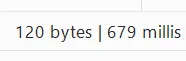

Result normal, 10.000Px, and 20.000Px
The comparison is the core of the finding. The payload grew only from a few KB to 1.5 MB, at most a few hundred times larger, while the response time increased 34x compared to the baseline. With the 1.5 MB PNG, a single request took over 22 seconds to process. That disproportion is the signal: the only reasonable explanation is that the server was struggling to allocate memory to decode an image of that size.
Root cause
The server decodes the uploaded image fully into memory without first checking the actual dimensions. Validation at the endpoint covers the declared MIME type in the data URI, but not the pixel dimensions encoded in the image header. Because PNG compresses a solid-colour image so efficiently, a file of 1.5 MB can describe an image of 20,000 by 20,000 pixels, and the decoder allocates memory for every pixel when it processes the request. The report does not show the server-side code, so the exact decoding path is inferred from the timing behaviour rather than observed directly.
Impact
An attacker who can reach the upload endpoint can make the server spend over 22 seconds of processing time on a single request using a 1.5 MB file. Repeated submissions of such payloads would consume memory and processing capacity, affecting availability for other users. The report frames this as a DoS/resource exhaustion issue and does not quantify how many requests would be needed to take the service down, nor does it describe testing beyond single requests with increasing dimensions. The researcher also notes that testing DoS on production carries real risk to availability for other users, which is why programs often treat this category carefully.
The finding was reported to the relevant bug bounty program and rejected, because the DoS/resource exhaustion category falls outside that program's scope.
Fix
The implied remediation is to validate image dimensions before decoding: read the dimensions from the image header and reject images whose pixel count exceeds a sane limit, rather than relying on declared MIME type and byte size alone. Whether such a change was made is not stated.
Variants to test
- Other compressed formats. Try the same solid-colour trick with formats that compress well, such as GIF or BMP, and watch response time and memory use as dimensions grow. A positive result is a large jump in processing time for a small file.
- Different upload transports. Where the endpoint accepts multipart uploads rather than base64 JSON, send the same bomb as a file part. A positive result is the same disproportionate processing time, showing the dimension check is missing regardless of transport.
- Header versus decoder disagreement. Craft images whose declared dimensions in the header differ from the actual data, and observe whether the server trusts the header or the decoder. A positive result is a crash, error or long processing time that reveals which value is used for allocation.
- Thumbnail and resize paths. Submit the bomb to endpoints that generate thumbnails or resize images, since those paths decode the full image before shrinking it. A positive result is elevated latency or memory pressure on those endpoints specifically.
- Boundary probing. Increase dimensions in steps and record response time at each step to find the point where processing time departs from linear growth. A positive result is a sharp knee in the curve, indicating where memory allocation becomes the bottleneck.
What happened, in plain words
A security researcher was looking at a website that lets people upload a profile picture, the small image shown next to your name on an account. While poking at that feature, one question came to mind: does the server actually check how big the picture is in pixels, or does it only check how many bytes the file takes up?
It turned out the server only looked at the declared file type. So the researcher built a PNG image file that was only 1.5 MB on disk but described a picture of 20,000 by 20,000 pixels. Sending that one file made the server work for over 22 seconds on a single request. The bug bounty program that received the report rejected it, because denial of service and resource exhaustion issues were outside their scope. The researcher still wrote it up as a learning case, and that is what this article walks through.
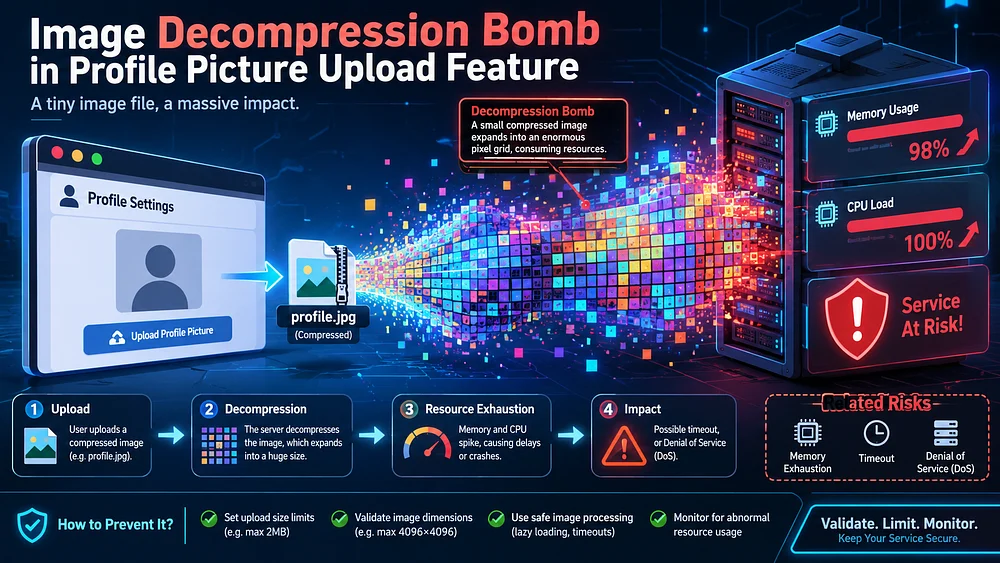
The idea: what a decompression bomb is
Before the technical part, it helps to understand one thing about image files.
Formats like PNG store pictures in a compressed form. Compression means the file does not list every pixel one by one; it stores a recipe that a program can follow to rebuild the picture. A picture that is entirely one colour, say pure white, is the easiest possible thing to compress, because the recipe is basically "fill everything with white". So a file can be tiny on disk while describing a picture with an enormous number of pixels.
A simple comparison: imagine a blank canvas the size of a football field. Because it is plain white, you can describe the whole thing in one sentence: "white canvas, 100 by 50 metres". That is roughly how image compression works under the hood.
The trouble starts when a server receives such an image and immediately rebuilds every pixel in its memory, without first asking how many pixels the picture claims to have. Memory here means the working space the computer uses to hold data while it is busy with it. Rebuilding a 20,000 by 20,000 picture means handling 400 million pixels, and each one takes up a little space. The file that arrived was tiny, but the work of expanding it is huge. This is called a decompression bomb, and for images it is sometimes called a pixel flood.
The target and the first observation
The researcher found the profile picture upload endpoint. An endpoint is simply a specific address on a server that accepts a particular kind of request, like a counter in a shop that deals with one type of transaction. This one looked like this:
PUT /rest/users/profile-pictureContent-Type: application/json{"image": "data:image/png;base64,<data>"}
Line by line:
PUT /rest/users/profile-pictureis the request.PUTis the verb that means "store this here", and/rest/users/profile-pictureis the address of the counter that handles profile pictures.Content-Type: application/jsontells the server that the body of the request is written in JSON, a text format for structured data that looks like{"key": "value"}.{"image": "data:image/png;base64,<data>"}is that body. It has one field calledimage, and its value is a data URI: a way of putting a whole file inside a piece of text.data:image/pngsays "this is a PNG image",base64says how the bytes were turned into text, and<data>is where the actual encoded file goes.
Base64 is a way of writing raw bytes using only ordinary text characters, so a binary file can travel inside a text document. Think of it as packing a piece of furniture into a flat box so it fits through the letterbox; the shape changes, the contents do not.
The first thing the researcher noticed was that the image arrives as base64 inside a JSON body, not as a normal file upload. A normal file upload is the kind where a web page shows a "Choose file" button and the browser sends the file as a separate part of the request, with its filename and extension attached. Here there is no filename and no extension at this layer. The only thing the server checks, as far as the researcher could see, is the MIME type declared inside the data URI itself. A MIME type is the label that says what kind of file something is, such as image/png for a PNG picture.
That raised the suspicion: if only the label is checked, what about the actual content of the file, and specifically its dimensions? Dimensions are the width and height of the picture in pixels. A pixel is one tiny dot of colour; a picture is a grid of them.
Building the payload
A payload is the piece of data you send to test what a system does with it. This one is surprisingly easy to make, just a few lines of Python. Python is a programming language, and the script uses a library called Pillow, which is a toolkit for creating and editing images in code.
from PIL import Imageimport base64import iodimension = 20000img = Image.new('RGB', (dimension, dimension), color='white')buffer = io.BytesIO()img.save(buffer, format="PNG")raw_size = len(buffer.getvalue())b64_str = base64.b64encode(buffer.getvalue()).decode('utf-8')print(f"Dimensi: {dimension}x{dimension}")print(f"Ukuran file mentah: {raw_size / 1024:.2f} KB")print(f"Ukuran Base64 (payload): {len(b64_str) / 1024:.2f} KB")if len(b64_str) < 2000000: with open("payload_bomb_20k.txt", "w") as f: f.write(f'{{"image":"data:image/png;base64,{b64_str}"}}') print("Berhasil dibuat dan disimpan ke payload_bomb_20k.txt")else: print("Terlalu besar, coba turunkan dimensinya.")
What each part does:
from PIL import Image,import base64andimport ioload three toolkits: Pillow for images, base64 for the text encoding, and io for holding data in memory as if it were a file.dimension = 20000sets the width and height, in pixels, that the picture will claim to have.img = Image.new('RGB', (dimension, dimension), color='white')creates a new picture in RGB colour (red, green, blue) that is 20,000 by 20,000 pixels and filled entirely with white. The solid colour is deliberate: it is what makes the compressed file so small.buffer = io.BytesIO()creates an empty container in memory, a stand-in for a file on disk.img.save(buffer, format="PNG")saves the picture into that container as a PNG.raw_size = len(buffer.getvalue())measures how many bytes the PNG takes up.b64_str = base64.b64encode(buffer.getvalue()).decode('utf-8')turns those bytes into base64 text, ready to be placed inside JSON.- The three
printlines report the dimensions, the raw file size in kilobytes, and the size of the base64 text in kilobytes. The messages are in Indonesian;Dimensimeans dimensions,Ukuran file mentahmeans raw file size, andUkuran Base64 (payload)means base64 payload size. if len(b64_str) < 2000000:is a safety check. If the base64 text is shorter than 2,000,000 characters, the script writes the JSON body to a file calledpayload_bomb_20k.txtand prints a success message. Otherwise it prints a message telling you the payload is too large and to lower the dimensions.
The trick lies in two things. First, the solid colour (color='white') maximises PNG compression, which keeps the base64 text small. Second, the dimensions are increased step by step, first 10,000 by 10,000, then 20,000 by 20,000; that is the part that explodes once the server decodes the image. Decoding means turning the compressed recipe back into actual pixels.
Sending it and measuring the result
The generated JSON body was sent to the profile picture endpoint, and the response time was measured with Burp Suite. Burp Suite is a tool that sits between your browser and a website, letting you look at and change the requests that go out and the responses that come back; it also shows how long each one took. The dimensions were raised gradually while the response time was measured.
Result normal, 10.000Px, and 20.000Px
The comparison is the heart of the finding. The payload only grew from a few kilobytes to 1.5 MB, at most a few hundred times larger, but the response time went up 34 times compared with the baseline. The baseline is the timing of the normal, harmless request you compare everything else against. With the 1.5 MB PNG, a single request took over 22 seconds to process.
That disproportion is the signal. If the server were simply receiving more bytes, you would expect the time to grow roughly in step with the file size. Instead it grew far faster, and the only reasonable explanation is that the server was struggling to set aside memory for decoding a picture of that size. Setting aside memory is called allocating it.
Why it happens
The server decodes the uploaded image fully into memory without first checking the real dimensions. Validation at the endpoint covers the declared MIME type in the data URI, but not the pixel dimensions written in the image header. The header is the small block of information at the start of an image file that describes the picture, including its width and height, before the pixel data itself.
Because PNG compresses a solid-colour image so efficiently, a 1.5 MB file can describe a 20,000 by 20,000 pixel image, and the decoder allocates memory for every pixel when it handles the request. The report does not show the server-side code, so the exact decoding path is inferred from the timing behaviour rather than observed directly.
What an attacker could do with it
Anyone who can reach the upload endpoint can make the server spend over 22 seconds of processing time on a single request using a 1.5 MB file. Sending such payloads repeatedly would use up memory and processing capacity and affect availability for other users. Availability is simply whether the service is up and responsive for everyone else.
This kind of issue is called denial of service, or DoS: the goal is not to steal data but to make the service too busy to serve normal users. The report frames it as a DoS and resource exhaustion issue. It does not quantify how many requests would be needed to take the service down, and it does not describe testing beyond single requests with increasing dimensions. The researcher also notes that testing DoS on production carries real risk to availability for other users, which is why programs often treat this category carefully. Production means the live system that real users are using, as opposed to a test copy.
The finding was reported to the relevant bug bounty program and rejected, because the DoS and resource exhaustion category falls outside that program's scope. A bug bounty program is an arrangement where an organisation invites people to report security problems and may pay for valid ones; scope is the list of what is and is not covered.
How it should be fixed
The implied remediation is to validate image dimensions before decoding: read the width and height from the image header and reject images whose pixel count exceeds a sensible limit, rather than relying on the declared MIME type and byte size alone. Whether such a change was made is not stated.
Other things worth testing
- Other compressed formats. Try the same solid-colour trick with formats that compress well, such as GIF or BMP, and watch response time and memory use as the dimensions grow. A positive result is a large jump in processing time for a small file.
- Different upload transports. Where the endpoint accepts ordinary multipart uploads rather than base64 JSON, send the same bomb as a file part. Multipart is the standard way a browser sends a file with a form. A positive result is the same disproportionate processing time, showing the dimension check is missing regardless of how the file arrives.
- Header versus decoder disagreement. Craft images whose declared dimensions in the header differ from the actual data, and observe whether the server trusts the header or the decoder. A positive result is a crash, an error or a long processing time that reveals which value is used for allocation.
- Thumbnail and resize paths. Submit the bomb to endpoints that generate thumbnails or resize images, since those paths decode the full image before shrinking it. A positive result is elevated latency or memory pressure on those endpoints specifically. Latency is the delay before a response arrives.
- Boundary probing. Increase dimensions in steps and record the response time at each step to find the point where processing time stops growing in a straight line. A positive result is a sharp bend in the curve, indicating where memory allocation becomes the bottleneck.
Glossary
- API: a defined way for one piece of software to talk to another, like a service counter with set rules for what you can ask for.
- Base64: a way of writing raw bytes using ordinary text characters so binary data can travel inside text.
- Baseline: the measurement of a normal, harmless request that you compare test results against.
- Bug bounty program: an arrangement where an organisation invites people to report security problems and may pay for valid ones.
- Burp Suite: a tool that sits between your browser and a website so you can inspect, change and time requests and responses.
- Data URI: a way of embedding a whole file inside a piece of text, starting with
data:and the file type. - Decoding: turning a compressed file back into its full contents, such as rebuilding every pixel of a picture.
- Decompression bomb: a small compressed file that expands into an enormous amount of data when opened, exhausting the machine that opens it.
- Denial of service (DoS): making a service too busy or too broken to serve normal users.
- Dimensions: the width and height of a picture, measured in pixels.
- Endpoint: a specific address on a server that accepts a particular kind of request.
- Header (image): the small block of information at the start of an image file describing the picture, including its width and height.
- JSON: a text format for structured data, written as key and value pairs inside braces.
- Latency: the delay before a response arrives.
- Memory: the working space a computer uses to hold data while it is busy with it.
- MIME type: the label that says what kind of file something is, such as
image/png. - Multipart upload: the standard way a browser sends a file together with a form, as separate parts of one request.
- Payload: the piece of data you send to a system to test how it behaves.
- Pixel: one tiny dot of colour; a picture is a grid of them.
- Pixel flood: another name for a decompression bomb in the context of images.
- PNG: a common image file format that stores pictures in compressed form.
- Production: the live system that real users are using, as opposed to a test copy.
- Python: a programming language, used here to generate the image file.
- Pillow: a Python toolkit for creating and editing images in code.
- Resource exhaustion: using up a system's memory, processing power or other capacity until it cannot work properly.
- RGB: a colour model that describes a colour as amounts of red, green and blue.
- Scope: the list of targets and issue types a bug bounty program covers.
- Validation: checking that incoming data meets the rules before using it.
- Vendor: the organisation that makes or runs the software being tested.


