API Key Exposed in JavaScript File on 1Password Developer Site
The researcher found an API key embedded in a public JavaScript file on 1Password's developer documentation site. They claimed it could allow unauthorised access to APIs or services, but the program stated the key is a public, client-side key for Algolia search with limited permissions and no sensitive access.
 Originally disclosed on HackerOne
- Disclosed after 6 months
Summary by the program
The researcher reported an API key exposed within a JavaScript file on our public developer documentation site (developer.1password.com). This key is intentionally embedded to enable Algolia-powered search functionality. It is a public, client-side key with strictly limited permissions and does not grant access to any sensitive data or privileged actions.
This behavior is expected and aligns with Algolia’s recommended integration practices for public-facing search implementations.
Additionally, developer.1password.com is an asset that is explicitly out of scope for our bug bounty program. We encourage all researchers to review our program brief carefully before submitting reports to ensure focus on in-scope targets and high-impact findings.
Based on these factors, the report was closed as Not Applicable.
The report
An API key has been exposed in the JavaScript file accessible via the public developer documentation for 1Password. This exposure could potentially allow unauthorized access to APIs or services that rely on this key, leading to a range of security issues, including data leakage or unauthorized actions within the affected system.
Steps To Reproduce:
- Visit the following URL: https://developer.1password.com/assets/js/main.43f8ae7b.js
- Inspect the contents of the file.
- Locate the exposed API key (in plain text) embedded within the JavaScript code.
- Confirm the key's accessibility without any authentication or restriction.
Supporting Material/References: Direct link to the exposed file: https://developer.1password.com/assets/js/main.43f8ae7b.js
Impact
An attacker can potentially use the exposed API key to:
- Access or manipulate sensitive data from the service it is associated with.
- Perform unauthorized actions or requests, potentially leading to data breaches or service disruption.
- Cause reputational damage if the exposed key is linked to critical resources.
Attachments
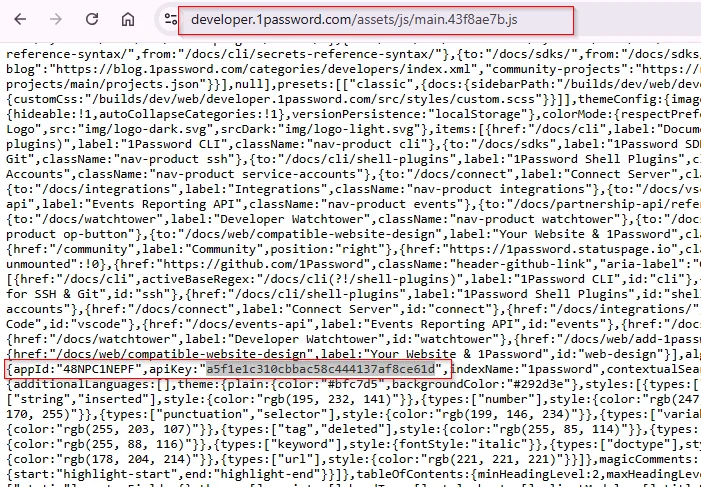
Context
The target is the public developer documentation site for 1Password, at developer.1password.com. The site serves a JavaScript file that contains a client-side API key used to power search. The key belongs to Algolia, a hosted search service, and is embedded so that the browser can query the search index directly. The program's summary describes this as an intentional, public, client-side key with strictly limited permissions, following Algolia's recommended integration practice for public-facing search.
The report itself frames the finding as an exposed API key in a JavaScript file, with the usual concerns about unauthorised access to APIs or services that rely on the key, data leakage and unauthorised actions. The program's summary is the authoritative account of what the key actually is and what it can do.
Setup
No accounts, roles, tools or versions are needed. The only precondition is that the JavaScript bundle is publicly reachable, which it is: the report gives the direct URL of the file. The report gives no detail on how the file was inspected; no authentication is involved at any point.
Finding it
The researcher noticed that the JavaScript file served by the developer documentation site contains an API key in plain text. The file is loaded by the public site, so anyone who visits the documentation can fetch it and read the key. The report's concern is that the key is accessible without any authentication or restriction, and that anything relying on that key could therefore be reached by an attacker.
Exploitation
Step 1: Fetch the JavaScript bundle
The report gives the URL of the file directly:
https://developer.1password.com/assets/js/main.43f8ae7b.js
This is the URL of the file given in the report. Because it is a static asset served to every visitor, no credentials or special headers are required to retrieve it.
Step 2: Inspect the contents
The researcher inspected the file and located the API key embedded in the JavaScript code, in plain text. The report does not reproduce the key or the surrounding code, so the exact location within the bundle is not shown here.
Step 3: Confirm accessibility
The final step is to confirm that the key can be read without any authentication or restriction. Since the file is public and the key is in plain text inside it, this confirmation follows directly from the previous step.
The attachment is a single image, ev.png, included as supporting evidence for the finding. The report does not describe what the image shows beyond that.
Root cause
The key is embedded in the client-side bundle by design. The program explains that it is intentionally included to enable Algolia-powered search, that it is a public, client-side key with strictly limited permissions, and that this matches Algolia's recommended integration for public-facing search implementations. In other words, the exposure is the expected behaviour of the integration rather than a mistake in how the key was handled: a search key that the browser must use has to be delivered to the browser.
The report's impact section assumes the key grants access to sensitive data or privileged actions. The program's summary contradicts that assumption for this particular key, stating that it does not grant access to any sensitive data or privileged actions. The report does not show any request made with the key or any response returned, so there is no evidence in the report of what the key can actually reach.
A second factor is scope. The program states that developer.1password.com is explicitly out of scope for its bug bounty program, and the asset field in the report's metadata repeats that assets not owned by the researcher, including accounts where the researcher is a user but not the owner, are out of scope. The program encourages researchers to review the program brief before submitting.
Impact
The report lists the following potential consequences if the key were usable by an attacker:
- Access to or manipulation of sensitive data from the service the key is associated with.
- Unauthorised actions or requests, potentially leading to data breaches or service disruption.
- Reputational damage if the key is linked to critical resources.
These are hedged possibilities, not demonstrated outcomes. The program's assessment is that the key is public and limited, so none of these apply in this case. The report was closed as Not Applicable, with no severity and no bounty recorded.
Fix
No fix was made, because the program considers the behaviour correct and expected. The program's response was procedural rather than technical: it asked researchers to review the program brief so that reports focus on in-scope targets and high-impact findings.
Variants to test
These are generalisations from the report's pattern, not findings from it.
- Search-service keys in other bundles. Fetch the main JavaScript bundles of a target and look for keys belonging to hosted search providers. A positive result is a key in plain text in a public bundle; the next question is whether the key is a search-only key with a restricted scope, which is the expected case, or a key with write or admin permissions, which is not.
- Keys with broader permissions than the feature needs. For any client-side key you find, test what it can actually do, for example whether it can write, delete or read indexes beyond the one the site searches. A positive result is a key that performs an action the public feature does not require.
- Scope check before reporting. Compare the host serving the bundle against the program's in-scope asset list. A positive result for a report is a host that is explicitly in scope; a host that is out of scope, as here, will be closed regardless of the technical finding.
Hunting notes
Client-side bundles are the usual hiding place for this pattern: static assets under paths such as /assets/js/, loaded by every page of a documentation or marketing site. During recon, the signal is a public JavaScript file that contains a long string in plain text near configuration for a third-party service. The important discipline, which this report illustrates by counterexample, is to check two things before writing up: whether the host is in scope, and whether the key's permissions are actually broader than the public feature requires. Here the host was out of scope and the key was a restricted public search key, so the report was closed as Not Applicable; the report's impact section described possible consequences without demonstrating any request or response with the key.
What happened, in plain words
A security researcher was looking at the public developer documentation website for 1Password, a company that makes a password manager. A password manager is a program that stores all your passwords in one encrypted place, so you only have to remember one master password. The developer documentation site is the place where programmers read instructions for building things that connect to 1Password.
The researcher noticed that one of the files the website sends to every visitor's browser contains an API key written in plain text. An API key is a long string of characters that works like a password for a computer program rather than a person: a service hands it out so that software can prove who it is and ask for data. The researcher worried that anyone could copy this key and use it to reach the service behind it, possibly reading data or performing actions they should not be able to.
The company that runs the bug bounty program looked at the report and disagreed. In their summary they explained that the key is put there on purpose. It belongs to Algolia, a hosted search service, meaning a company that runs search for other websites. The key lets the visitor's browser ask Algolia for search results directly. It is a public key, designed to be seen by everyone, and it has strictly limited permissions. The company also pointed out that developer.1password.com is explicitly out of scope for their bug bounty program, meaning they do not accept reports about that particular website. They closed the report as Not Applicable, which means the finding does not qualify.
A bug bounty program is a scheme where a company invites outside people to report security problems and sometimes pays them for it. Each program publishes a brief that says which systems are fair game (in scope) and which are not (out of scope).
The site and the file
The target is the public developer documentation site for 1Password, at developer.1password.com. The site serves a JavaScript file to its visitors. JavaScript is the programming language that browsers run to make web pages interactive. A bundle is simply many small script files glued together into one to save download time.
That bundle contains a client-side API key used to power search. Client-side means the code runs in the visitor's own browser, on their computer, rather than on the company's server. Anything in client-side code is delivered to every visitor, so it can never be truly secret. The key belongs to Algolia, a hosted search service, and is embedded so that the browser can query the search index directly. A search index is a pre-prepared list of everything on the site, arranged so that lookups are fast, a bit like the index at the back of a book.
The program's summary describes this as an intentional, public, client-side key with strictly limited permissions, following Algolia's recommended integration practice for public-facing search. In other words, this is how Algolia tells its customers to set things up when the search box is open to the public.
The report itself frames the finding as an exposed API key in a JavaScript file, with the usual concerns about unauthorised access to APIs or services that rely on the key, data leakage and unauthorised actions. The program's summary is the authoritative account of what the key actually is and what it can do.
What you need to try it
No accounts, roles, tools or versions are needed. The only precondition is that the JavaScript bundle is publicly reachable, which it is: the report gives the direct URL of the file. The report does not say how the file was inspected. An HTTP client is any program that can ask a web server for a page or file; your browser is one, and so is a command-line tool such as curl. No authentication is involved at any point. Authentication means proving who you are, usually by logging in; here there is nothing to log in to, because the file is served to everyone.
Finding it
The researcher noticed that the JavaScript file served by the developer documentation site contains an API key in plain text. Plain text means readable characters, not scrambled or encoded. The file is loaded by the public site, so anyone who visits the documentation can fetch it and read the key. The report's concern is that the key is accessible without any authentication or restriction, and that anything relying on that key could therefore be reached by an attacker.
Step 1: Fetch the JavaScript bundle
The report gives the URL of the file directly:
https://developer.1password.com/assets/js/main.43f8ae7b.js
Line by line, in plain words:
https://is the scheme, the set of rules for talking to a web server securely. Thesstands for secure: the traffic is encrypted so nobody in between can read or change it.developer.1password.comis the host, the name of the server being asked. The part before the first dot tells you which subdomain it is; here it is the developer documentation rather than the main 1Password site./assets/js/main.43f8ae7b.jsis the path, the location of the file on that server.assetsis a folder for supporting files,jsstands for JavaScript, andmainis the name of the bundle. The43f8ae7bpart is a fingerprint, a short code added to the filename that changes whenever the file changes, so browsers and caches know they are looking at a new version. The.jsending says the file is JavaScript.
This is the URL of the file given in the report. Because it is a static asset served to every visitor, no credentials or special headers are required to retrieve it. A header is a small piece of extra information sent along with a web request, such as what kind of file the browser will accept; credentials are the login details a request might carry. Neither is needed here.
Why this step matters: if the file were behind a login, only logged-in people could see the key, and the concern would be smaller. Because it is public, the first half of the researcher's claim, that the key is readable by anyone, is easy to check.
Step 2: Inspect the contents
The researcher inspected the file and located the API key embedded in the JavaScript code, in plain text. The report does not reproduce the key or the surrounding code, so the exact location within the bundle is not shown here.
Why this step matters: finding a long random-looking string in a script is the moment the finding is made. A bundle is often thousands of lines long, so the practical approach is to open the file and search it for words such as key, api or the name of a service, then look at what sits next to the match.
Step 3: Confirm accessibility
The final step is to confirm that the key can be read without any authentication or restriction. Since the file is public and the key is in plain text inside it, this confirmation follows directly from the previous step.
Why this step matters: a report is stronger when it shows that the exposure is real for an ordinary visitor, not just for someone with special access. Here the check is simple, because the file is served to everyone.
The attachment is a single image, ev.png, included as supporting evidence for the finding. The report does not describe what the image shows beyond that.
Why the key is there
The key is embedded in the client-side bundle by design. The program explains that it is intentionally included to enable Algolia-powered search, that it is a public, client-side key with strictly limited permissions, and that this matches Algolia's recommended integration for public-facing search implementations. In other words, the exposure is the expected behaviour of the integration rather than a mistake in how the key was handled: a search key that the browser must use has to be delivered to the browser.
A useful comparison: a library card that only lets you search the catalogue is not a secret. Everyone who walks in can use it, and it cannot be used to take books home or change the records. A key that only lets a browser search a public index is the same kind of thing. A key that could also add, delete or read private records would be a different matter entirely.
The report's impact section assumes the key grants access to sensitive data or privileged actions. The program's summary contradicts that assumption for this particular key, stating that it does not grant access to any sensitive data or privileged actions.
A second factor is scope. The program states that developer.1password.com is explicitly out of scope for its bug bounty program, and the asset field in the report's metadata repeats that assets not owned by the researcher, including accounts where the researcher is a user but not the owner, are out of scope. The program encourages researchers to review the program brief before submitting.
What the report said could go wrong
The report lists the following potential consequences if the key were usable by an attacker:
- Access to or manipulation of sensitive data from the service the key is associated with.
- Unauthorised actions or requests, potentially leading to data breaches or service disruption.
- Reputational damage if the key is linked to critical resources.
These are hedged possibilities, not demonstrated outcomes. The program's assessment is that the key is public and limited, so none of these apply in this case. The report was closed as Not Applicable, with no severity and no bounty recorded.
Was anything changed
No fix was made, because the program considers the behaviour correct and expected. The program's response was procedural rather than technical: it asked researchers to review the program brief so that reports focus on in-scope targets and high-impact findings.
Similar things worth checking elsewhere
These are generalisations from the report's pattern, not findings from it.
- Search-service keys in other bundles. Fetch the main JavaScript bundles of a target and look for keys belonging to hosted search providers. A positive result is a key in plain text in a public bundle; the next question is whether the key is a search-only key with a restricted scope, which is the expected case, or a key with write or admin permissions, which is not.
- Keys with broader permissions than the feature needs. For any client-side key you find, test what it can actually do, for example whether it can write, delete or read indexes beyond the one the site searches. A positive result is a key that performs an action the public feature does not require.
- Scope check before reporting. Compare the host serving the bundle against the program's in-scope asset list. A positive result for a report is a host that is explicitly in scope; a host that is out of scope, as here, will be closed regardless of the technical finding.
Notes for anyone hunting this pattern
Client-side bundles are the usual hiding place for this pattern: static assets under paths such as /assets/js/, loaded by every page of a documentation or marketing site. During recon, the signal is a public JavaScript file that contains a long string in plain text near configuration for a third-party service. Recon means the early stage of looking around a target to see what it is made of.
The important discipline, which this report illustrates by counterexample, is to check two things before writing up: whether the host is in scope, and whether the key's permissions are actually broader than the public feature requires. Here the host was out of scope and the key was a restricted public search key, so the report was closed as Not Applicable; the report's impact section described possible consequences without demonstrating any request or response with the key.
Glossary
- API: a way for one piece of software to ask another for data or actions, like a service counter where you make a request and get a defined answer.
- API key: a long string of characters that software uses to identify itself to a service, similar to a password but meant for programs.
- Algolia: a hosted search service, a company that runs search for other websites so those sites do not have to build it themselves.
- Authentication: proving who you are, usually by logging in.
- Bug bounty program: a scheme where a company invites outside people to report security problems, sometimes for a reward, under published rules.
- Bundle: many small script files combined into one file so the browser downloads fewer things.
- Client-side: code that runs in the visitor's own browser rather than on the company's server.
- Credentials: the details a request uses to prove identity, such as a login and password.
- Header: a small piece of extra information sent with a web request or response, such as the type of file wanted.
- Host: the name of the server being contacted, such as
developer.1password.com. - HTTP client: any program that can request pages or files from a web server, such as a browser or
curl. - In scope / out of scope: whether a system is covered by a bug bounty program's rules and eligible for a report.
- JavaScript: the programming language browsers run to make web pages interactive.
- Not Applicable: the status used when a report does not qualify under the program's rules.
- Path: the location of a file on a server, such as
/assets/js/main.43f8ae7b.js. - Permissions: the set of actions a key or account is allowed to perform.
- Plain text: readable characters, not scrambled or encoded.
- Recon: the early stage of exploring a target to understand what it is made of.
- Search index: a pre-prepared list of a site's content arranged for fast lookups, like the index at the back of a book.
- Static application: a site made of ready-made files downloaded by the browser, rather than pages built fresh by the server for each visitor.
- Subdomain: a named part of a larger domain, such as
developerindeveloper.1password.com. - URL: the full address of something on the web, including the scheme, host and path.



