The issue
Many ServiceNow knowledge base article endpoints were publicly accessible without authentication, allowing anyone to read internal articles by guessing article numbers. Attackers could obtain internal procedures, passwords, tokens, and customer PII.
 Published on medium.com
ServiceNow is a cloud-based company that provides software as a service (SaaS) for technical management support. The company specializes in IT services management (ITSM), IT operations management (ITOM) and IT business management (ITBM), allowing users to manage projects, teams and customer interactions via a variety…
The full write-up lives on its author's site
It belongs to its author, so we link to it rather than copy it. The other two tabs are our own rewrites, checked against it.
Context
ServiceNow is a cloud-based company that provides software as a service (SaaS) for technical management support. It specialises in IT services management (ITSM), IT operations management (ITOM) and IT business management (ITBM), letting users manage projects, teams and customer interactions through a variety of apps and plugins. Its products offer a service model that helps users identify the root cause of issues and correct them with self-service, presented as tasks, activities and processes separated by cloud services. Each customer instance is reached at a hostname of the form:
https://yourcompanyname.service-now.com
The module this work focused on is the Knowledge base. The ServiceNow Knowledge Management (KM) application enables the sharing of information in knowledge bases, and those knowledge bases contain articles that provide users with information such as self-help, troubleshooting and task resolution. Once created, each KB is identified with a unique number.
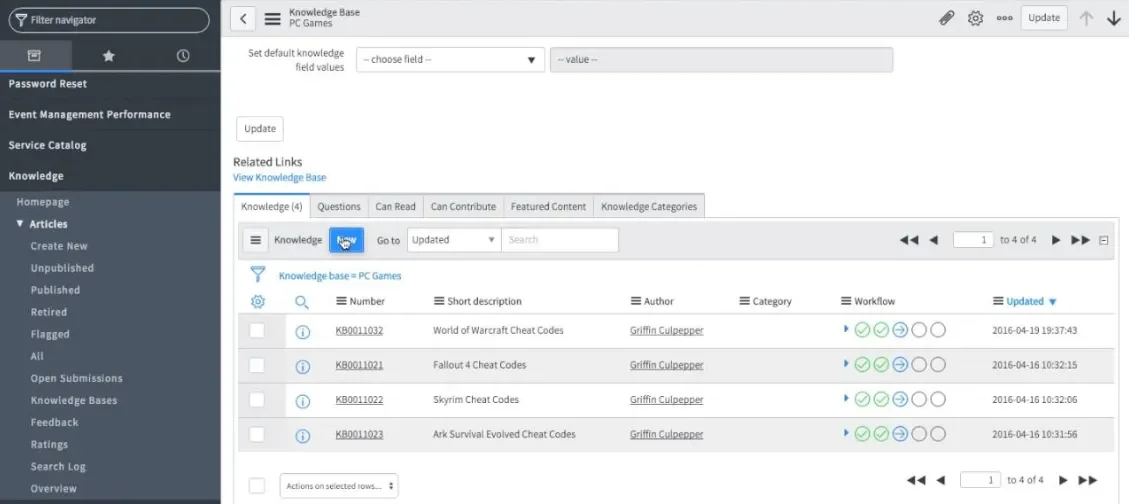
The number column is the unique identifier. When a user opens one of those articles, the endpoint called is:
Setup
The KB article endpoints were reachable without authentication. The precondition was simply a ServiceNow instance whose knowledge base article endpoint was reachable from the internet. The tools used were a subdomain scanner, a list of top Alexa companies for brute-forcing subdomains, and Burp Suite, specifically its Intruder and Grep/Match features. The researcher also checked which of the identified companies ran a bug bounty programme, since that determined where findings could be reported.
Finding it
It was noticed that a lot of companies had these endpoints reachable publicly without authentication. Reaching the company instance itself directly would send you to Okta, OneLogin and similar identity providers in order to log in with corporate credentials, but the KB endpoints were not behind that redirect. Reaching the instance directly sent you to Okta, OneLogin and similar identity providers, but the KB endpoints were not behind that redirect.
Exploitation
Step 1: enumerate candidate instances
The methodology was, in order:
- Do a normal subdomain scan for
*.service-now. - Use top Alexa companies as a list and brute-force subdomains.
- Check which of those companies had a bug bounty programme.
Step 2: brute-force the article identifier
Once a misconfigured instance was identified, Burp Intruder was used to brute-force the last four digits of the sysparm_article parameter. Burp Intruder was used to brute-force the last four digits of the sysparm_article parameter.
Step 3: triage the responses
Results were sorted by response size, or filtered with Burp's Grep/Match options for words such as password, internal, credentials and confidential. Results were sorted by size or filtered with Burp Grep/Match options for words like password, internal, credentials and confidential.
Results
For most of the companies tested, the knowledge base was not being used as intended. The summary of findings was:
- Internal procedures, SOPs, diagrams and development plans.
- Passwords and tokens for internal corporate domains.
- Attachments for change requests containing IP addresses and configurations.
- Some customers' PII in communications between employees.
For other companies the exposure was an accepted risk, as there was nothing sensitive or with an impact if an unauthorised person read it, but they were still encouraged to fix the permission issue.
Initial discovery to $30,000
It took almost two days to report the findings for multiple companies externally or within HackerOne and Bugcrowd, with the help of close friends. That resulted so far in approximately 30K in bounties, and some reports were still in triage. ServiceNow is one of the top five cloud ITSM providers and is used by a lot of big companies worldwide.
Root cause
This is not a vulnerability in the ServiceNow product. It is a common misconfiguration made by the individual companies, which did not set up permissions properly on the knowledge base and left it open to unauthorised people publicly.
Impact
Under the condition that an instance's KB endpoint is publicly reachable without authentication, anyone who can guess or enumerate an article number can read that article. In the cases found, that meant internal procedures, SOPs, diagrams and development plans; passwords and tokens for internal corporate domains; change request attachments containing IP addresses and configurations; and customer PII in employee communications. For other companies the exposure was an accepted risk, as there was nothing sensitive or with an impact if an unauthorised person read it.
Fix
The fix belongs to the customer, not to ServiceNow: set up permissions properly on the knowledge base so it is not open to unauthorised people publicly. Companies that accepted the risk were still encouraged to correct the permission issue.
Variants to test
- Other ServiceNow instances with the same pattern. Run a subdomain scan for
*.service-nowand brute-force company names from a top-sites list. A positive result is an instance whose main URL redirects to an identity provider but whosekb_view_customer.doendpoint returns article content without a login. - Article number enumeration. Brute-force the last four digits of
sysparm_articleon a candidate instance. A positive result is a set of responses of differing sizes, or hits on Grep/Match terms such aspassword,internal,credentialsandconfidential. - A positive result is a downloadable file containing IP addresses or configurations.
- A positive result is public article content on a tenant that otherwise enforces corporate login.
What happened, in plain words
A security researcher found that many companies using a product called ServiceNow had left a part of it open to anyone on the internet, with no login required. That part is the company's knowledge base: a collection of help articles, procedures and internal documents. Because the article numbers were predictable, the researcher could brute-force the last four digits and request articles. Some of those articles contained passwords, internal procedures, diagrams, and personal information about customers.
The researcher reported the problem to many companies, through external channels and bug bounty platforms, resulting so far in approximately 30,000 US dollars in bounties. The important point is that the flaw was not in ServiceNow's software. It was a setup mistake made by each individual company.
What ServiceNow is
ServiceNow is a company that sells software as a service, usually shortened to SaaS. SaaS means you do not install the software on your own computers; you use it through a website, and the vendor runs it for you. Think of the difference between owning a washing machine and going to a launderette: with SaaS, someone else owns and maintains the machine, and you just use it.
ServiceNow specialises in three areas:
- ITSM (IT services management): handling things like support tickets and requests.
- ITOM (IT operations management): keeping an eye on servers and systems.
- ITBM (IT business management): managing projects, teams and customer interactions.
All of this is delivered through apps and plugins inside the product. The product presents work as tasks, activities and processes, split up by cloud service.
Each company that buys ServiceNow gets its own separate copy of the system, called an instance. An instance is reached at a web address built from the company's name, in this pattern:
https://yourcompanyname.service-now.com
Read that address as: the secure web protocol (https), then the company's own name, then service-now.com, which is the vendor's domain. So a company called Example Ltd would have an instance at something like example.service-now.com. Every customer gets a different subdomain, which matters later.
The knowledge base and its article numbers
The part of ServiceNow this work focused on is the Knowledge base, or KB. The Knowledge Management (KM) application lets a company share information in these knowledge bases. A knowledge base holds articles that give users information such as self-help, troubleshooting steps and how to resolve tasks. If you have ever used a help centre on a company website, you have used something like a knowledge base.
When a knowledge base is created, it gets a unique number. The screenshot below shows that number in the product's interface:
The number column is the unique identifier. In other words, that column is how the system tells one knowledge base apart from another.
When a user opens one of the articles, the browser requests this address:
Let us take that address apart piece by piece, because every part matters:
https://is the secure version of the web protocol. The padlock in your browser relates to this.company.service-now.comis the company's instance, as described above./kb_view_customer.dois the path, meaning the specific page or action on that server. The.doending is a convention some server software uses for pages that run a program rather than serve a fixed file.?marks the start of the query string, the part of a web address that carries extra information to the server.sysparm_article=KB00xxxxis a parameter: a name (sysparm_article) and a value (KB00xxxx). The server reads the value to know which article you want.
The value KB00xxxx is the article's identifier. The KB00 part is fixed, and the xxxx stands for four digits. So article numbers look like KB00xxxx, where xxxx stands for four digits. That predictability is the heart of the whole story: if you can guess the digits, you can ask for articles you were never meant to see.
The problem: no login required
The researcher noticed that a lot of companies had these article addresses reachable publicly, without authentication. Authentication simply means proving who you are, usually by logging in with a username and password.
Here is the strange part. If you tried to open the company's instance directly, you would be sent to a login service such as Okta or OneLogin. These are identity providers: outside services that companies use to check employees' identities, so that one corporate username and password works across many systems. Being redirected there is normal and good: it means the front door is locked.
But the knowledge base article addresses were not behind that redirect. They answered directly, with no login at all. So the front door was locked while a side window stood wide open. That mismatch is what made the exposure look wrong rather than intentional.
How the researcher found the exposed instances
The researcher needed a way to find companies whose knowledge base was open. The method had three steps, in this order:
- Do a normal subdomain scan for
*.service-now. - Use top Alexa companies as a list and brute-force subdomains.
- Check which of those companies had a bug bounty programme.
Some terms need explaining.
A subdomain is a name that sits in front of a main domain. In example.service-now.com, the example part is the subdomain of service-now.com. A subdomain scan is an automated search for subdomains that exist, by trying many possible names and seeing which ones answer.
The *.service-now notation uses a wildcard, the asterisk, meaning "any name in front of service-now". So the scan was looking for any customer instance of ServiceNow.
Brute-forcing means trying many possibilities in a systematic way instead of being clever. It is like trying every key on a big ring until one opens the door. Here, the researcher took a list of well-known companies (ranked by Alexa, a service that used to rank websites by popularity) and tried each company name as a subdomain, to see which ones had a ServiceNow instance.
Finally, the researcher checked which of those companies ran a bug bounty programme. A bug bounty is a scheme where a company publicly offers money to people who report security problems to it responsibly. Knowing this in advance matters, because it tells you where and how you are allowed to report what you find. Reporting to a company that has no such scheme, or reporting in the wrong way, can cause problems instead of solving them.
Reading the articles by guessing numbers
Once a misconfigured instance was identified, the researcher used a tool called Burp Suite, specifically a feature called Intruder. Burp Suite is software that sits between your browser and the internet so you can inspect and modify what is sent. Intruder automates sending many variations of one request, each time swapping in a different value.
Here the target was the last four digits of the sysparm_article parameter in the address shown earlier. The target was the last four digits of the sysparm_article parameter. The researcher did not have to guess cleverly; the numbering scheme did the work.
Sorting the results
Brute-forcing produces many responses, too many to read by hand. So the researcher narrowed them down in two ways:
- Sorting by response size. The size of a response is how much data came back. Results were sorted by response size. Sorting by size pushes the substantial responses to the top, like sorting a pile of letters by thickness to find the ones with several pages inside.
- Using Burp's Grep/Match options. Grep is a way of searching text for a pattern. Grep/Match flags any response containing chosen words. The words used were
password,internal,credentialsandconfidential.
Both techniques turn a huge pile of responses into a shortlist worth reading. This is triage: quickly separating what matters from what does not.
What was found
For most of the companies tested, the knowledge base was not being used as intended. The findings, as summarised by the researcher, were:
- Internal procedures, SOPs, diagrams and development plans.
- Passwords and tokens for internal corporate domains.
- Attachments for change requests containing IP addresses and configurations.
- Some customers' PII in communications between employees.
A few of those terms deserve a plain explanation.
SOP stands for standard operating procedure: a written, step-by-step description of how a company does a particular job. Diagrams here means drawings of systems and how they connect, which are useful to an attacker because they show where things live.
A token is a short piece of text that acts like a temporary key, proving that a program is allowed to do something, without sending a password each time. If a token leaks, someone else can use it as if they were the rightful owner, until it expires or is cancelled.
A change request is a formal record of a planned alteration to a system. Such records often carry attachments, files such as documents or configuration exports. Configuration means the settings that define how a system behaves.
PII stands for personally identifiable information: data that can identify a specific person, such as a name, address or phone number. Finding it in internal communications means private details about real people were readable by outsiders.
For other companies, the exposure was an accepted risk. That means the company looked at the finding and decided, on the record, that nothing sensitive was there and that no harm would come from an unauthorised person reading it. Even so, the researcher encouraged them to fix the permission issue.
From first discovery to 30,000 dollars
Reporting the findings for multiple companies, either through the companies' own external channels or through the platforms HackerOne and Bugcrowd, took almost two days, with help from close friends. HackerOne and Bugcrowd are bug bounty platforms: websites where companies list their programmes and researchers submit reports.
So far this resulted in approximately 30,000 US dollars in bounties, and some reports were still in triage. Triage is the stage where a company reviews a submitted report to decide whether it is valid and what it is worth.
For context, ServiceNow is one of the top five cloud ITSM providers and is used by a lot of big companies worldwide. That is why one setup mistake repeated across many customers added up to a large amount of exposed information.
Was this a flaw in ServiceNow itself?
No. This was a common misconfiguration made by the individual companies. A misconfiguration is not a bug in the software; it is a setting left in the wrong position, like leaving a door unlocked even though the lock works perfectly. The companies did not set up permissions properly on the knowledge base and left it open to unauthorised people publicly.
Permissions are the rules that decide who may see or do what. Reaching the instance directly sent you to Okta, OneLogin and similar identity providers, but the KB endpoints were not behind that redirect. So the corporate login gave no cover for the articles themselves: anyone who knew or guessed an article number could read it.
What the impact was
Whenever an instance's knowledge base address is publicly reachable without authentication, anyone who can guess or enumerate an article number can read that article. Enumerate here means walking through the possible numbers one by one, which is exactly what the four-digit guessing did.
In the cases found, that meant internal procedures, SOPs, diagrams and development plans; passwords and tokens for internal corporate domains; change request attachments containing IP addresses and configurations; and customer PII in employee communications. For other companies the exposure was an accepted risk, as there was nothing sensitive or with an impact if an unauthorised person read it.
How to fix it
The fix belongs to the customer, not to ServiceNow: set up permissions properly on the knowledge base so it is not open to unauthorised people publicly. Companies that accepted the risk were still encouraged to correct the permission issue.
Other places to look for the same pattern
- Other ServiceNow instances with the same pattern. Run a subdomain scan for
*.service-nowand brute-force company names from a top-sites list. A positive result is an instance whose main address redirects to an identity provider but whosekb_view_customer.doaddress returns article content without a login. - Article number enumeration. Brute-force the last four digits of
sysparm_articleon a candidate instance. A positive result is a set of responses of differing sizes, or hits on Grep/Match terms such aspassword,internal,credentialsandconfidential. - A positive result is a downloadable file containing IP addresses or configurations.
- SSO, single sign-on, is the arrangement where one corporate login covers many separate systems. A positive result is public article content on a tenant that otherwise enforces corporate login.
Glossary
- SaaS: software you use through a website while the vendor runs and maintains it for you.
- ITSM: IT services management, the handling of support tickets and service requests.
- ITOM: IT operations management, the monitoring and running of systems and servers.
- ITBM: IT business management, the management of projects, teams and customer interactions.
- Instance: one company's own separate copy of a hosted product, reached at its own web address.
- Subdomain: a name placed in front of a main domain, such as
exampleinexample.service-now.com. - Subdomain scan: an automated search that tries many possible subdomain names to see which exist.
- Wildcard: the asterisk symbol, used to mean any name in a given position.
- Knowledge base (KB): a collection of help and reference articles.
- Endpoint: a specific address on a server that accepts a request and returns a response.
- Query string: the part of a web address after the question mark that carries extra information.
- Parameter: a named value in a query string, such as
sysparm_article=KB00xxxx. - Authentication: proving who you are, usually by logging in.
- Identity provider: an outside service such as Okta or OneLogin that checks identities so one corporate login works across many systems.
- SSO (single sign-on): the arrangement where one login covers many separate systems.
- Brute-forcing: trying many possibilities systematically rather than cleverly.
- Alexa: a service that used to rank websites by popularity, used here as a list of well-known companies.
- Bug bounty programme: a scheme where a company offers rewards to people who report security problems responsibly.
- Burp Suite: software that sits between your browser and the internet so you can inspect and modify requests.
- Intruder: the Burp Suite feature that automates sending many variations of one request.
- Grep/Match: a way of searching text for a pattern, used in Burp to flag responses containing chosen words.
- Response size: how much data a server sent back, useful for spotting substantial pages among error pages.
- Triage: the stage where a company reviews a submitted report to decide whether it is valid and what it is worth.
- SOP: standard operating procedure, a written step-by-step description of how a job is done.
- Token: a short piece of text that acts like a temporary key, proving a program is allowed to do something.
- Change request: a formal record of a planned alteration to a system.
- Attachment: a file carried alongside a record, such as a document or configuration export.
- Configuration: the settings that define how a system behaves.
- PII: personally identifiable information, data that can identify a specific person.
- Accepted risk: a documented decision that a finding causes no real harm and will not be fixed immediately.
- Misconfiguration: a setting left in the wrong position, as opposed to a flaw in the software itself.
- Permissions: the rules that decide who may see or do what.
- Enumerate: to walk through possible values one by one to discover what exists.
- HackerOne / Bugcrowd: bug bounty platforms where companies list programmes and researchers submit reports.





