[No Bounty] India’s Aadhar Card Source Code Disclosure via Exposed .svn/wc.db
 Published on 0xlittlespidy.medium.com
Hi Guys, I recently found a .svn/wc.db folder exposed on a resident.uidai.gov.in, and used it to reconstruct the Web app’s source code. I cannot find any article about svn, So this will be very useful for those who find svn on a website.
The full write-up lives on its author's site
It belongs to its author, so we link to it rather than copy it. The other two tabs are our own rewrites, checked against it.
Context
Aadhaar is India's national identity system, and resident.uidai.gov.in is the resident-facing web portal for it. The write-up describes how an exposed Subversion administrative directory on that portal allowed the author to reconstruct the web application's source code. The weakness is source code disclosure through a .svn folder, specifically the Subversion working-copy database .svn/wc.db.
The author explains the file first. .svn/wc.db is a database file used by Subversion, a version control system. It contains information about the state of the working copy, including the revision numbers of the files, the dates and times when they were last updated, and any local modifications that have been made. Subversion uses it to track changes to the files in the working copy and to manage the process of merging changes from the repository into the working copy.
The author also contrasts it with Git: .svn/wc.db is a database file used by Subversion, a centralized VCS, while .git is a database file used by Git, a distributed VCS.
Setup
The author states that no directory or file brute-forcing was used. Instead, a Chrome extension called DotGit was used, which automatically finds .git and .svn in a website while surfing. The only other tools mentioned are wget, SQLite Browser (sqlitebrowser), and a script the author wrote to download all the source code, published as a GitHub gist.
Finding it
The author used the DotGit extension, which automatically finds .git and .svn in a website while surfing, rather than brute-forcing. That is the signal: a production web root is serving the version-control metadata directory that should never be reachable over HTTP.
Exploitation
Step 1: Download the working-copy database
The author appended .svn/wc.db to the site root and downloaded the database file:
wget https://resident.uidai.gov.in/.svn/wc.db
This retrieves the SQLite database that Subversion keeps in the .svn directory of a working copy. Because it is served as a static file, no authentication or special request is needed.
Step 2: Open the database
The file is opened locally in SQLite Browser:
sqlitebrowser wc.db
The author reports that a lot of tables appeared.
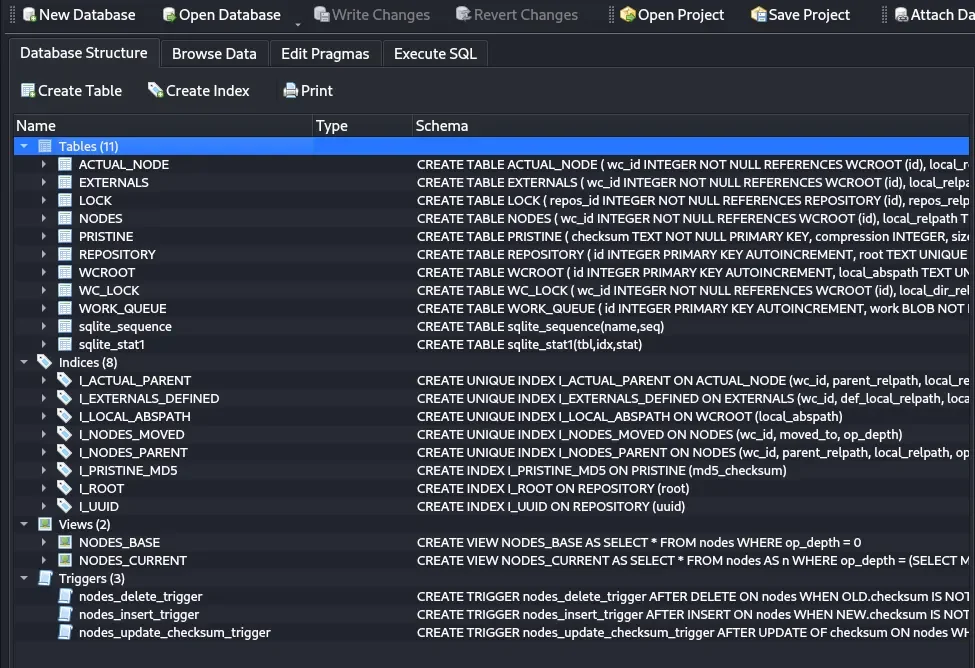
Step 3: Read the nodes table
The nodes table contains many columns, but two matter here:
local_relpath: contains the path of a web app file.checksum: contains a checksum value for that path.
The author gives an example row:
local_relpath = /Bio-Lock-Enable.php
checksum = $sha1$[redacted]
Step 4: Map checksums to pristine files
Subversion keeps a backup copy of all files in one location:
.svn/pristine/<XX>/<CHECKSUM>.svn-base
Two rules turn a checksum into a URL:
CHECKSUMis the SHA1 sum of the file, with the$sha1$prefix removed.XXis the first two characters ofCHECKSUM.
The author's example URL is:
https://resident.uidai.gov.in/.svn/pristine/c7/[redacted].svn-base
The author's example URL for that pristine path is:
Step 5: Automate the download
Downloading a single file with wget is easy, but the author had more than 500 paths, so a simple script was written to download all the source code. The script is published at the gist linked in the write-up:
https://gist.github.com/0xLittleSpidy/[redacted]
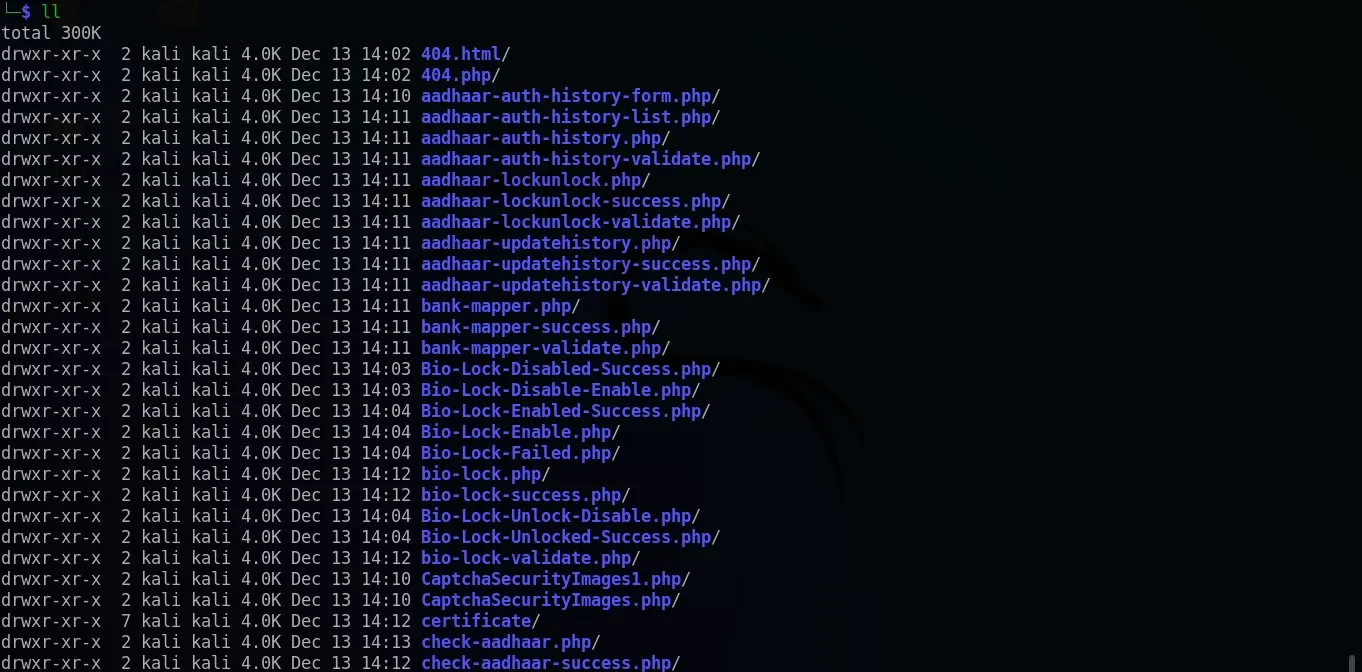
The result, as the author puts it, was the complete source code of the Aadhaar website.
Root cause
The web server exposes the .svn administrative directory of a working copy to the public. Subversion stores both the metadata database (wc.db) and the pristine copies of every versioned file under predictable paths derived from the checksum. Once wc.db is readable, the nodes table supplies the file paths and checksums, and the pristine store supplies the file contents. No application logic is bypassed; the disclosure comes from serving files that should never be in the document root. The report does not describe any server configuration or defence that was in place, so why existing controls did not stop it is not stated.
Impact
An unauthenticated remote party can download the working-copy database and then reconstruct the source code of the web application, file by file, including files whose paths are listed in the nodes table. In this case the author reports obtaining the complete source code of the Aadhaar website. Source code can reveal application logic, file names and other implementation details useful for further attacks; the report does not enumerate specific secrets or vulnerabilities found in the code. The report says the Indian government has fixed the issue.
Fix
The report says the issue was fixed by the Indian government but does not describe the change. The general remediation for this class of exposure is to stop serving .svn (and .git) directories from the web root, for example by removing the working copy from the deployed directory, blocking access to dot-directories at the server, or deploying only the built artefacts rather than a checkout.
Variants to test
-
Request
/.svn/wc.dbon any host. A positive result is a downloadable SQLite file; opening it and finding anodestable withlocal_relpathandchecksumcolumns confirms the exposure. -
Take a
checksumfromnodes, strip$sha1$, and request/.svn/pristine/<first two chars>/<checksum>.svn-base. A positive result is the original file content. -
Use a browser extension such as DotGit while browsing to surface
.gitand.svnautomatically, then verify each hit manually with a direct request.
What happened, in plain words
A security researcher was browsing the website of Aadhaar, India's national identity system. The public-facing part of that system lives at resident.uidai.gov.in, a portal where residents go to look at or manage their Aadhaar details. He used a browser extension called DotGit, which automatically finds .git and .svn in a website while surfing, instead of brute-forcing. That folder is meant to stay on the developer's own computer. It is not meant to be reachable from the internet at all.
Inside that folder is a small database file. The researcher downloaded it, opened it, and found a list of every file that makes up the website, together with a fingerprint (a checksum) for each one. The same folder also keeps a backup copy of every one of those files. By combining the list with the backups, he was able to download the website's source code, file by file, without logging in and without any special access. He reports that he ended up with the complete source code of the Aadhaar website, and that the Indian government has since fixed the issue.
This write-up walks through exactly how that worked, assuming you have never heard of version control, checksums or source code disclosure. Every step is explained from zero.
Some background you need first
What source code is
A website is built from text files: instructions that tell the server what to show and how to behave. Those files are called the source code. Visitors normally never see them. The server reads them and sends back only the finished result, the web page you see in your browser. Think of a restaurant: you see the plated dish, not the recipe and the kitchen. Source code is the recipe and the kitchen.
If someone can download the source code, they can read the recipe. That can reveal how the site works, what files exist, and details that help an attacker plan further attacks. This kind of problem is called source code disclosure.
What version control is
When several people work on the same set of files, they need a way to keep track of who changed what and when, and to undo mistakes. Software that does this is called version control (or a VCS, version control system). It is like the "track changes" feature in a word processor, but for a whole project and many people at once.
Two popular version control systems are Subversion and Git. They work in slightly different ways:
- Subversion is centralised: there is one main copy on a central server, and each developer has a working copy on their own machine.
- Git is distributed: every developer has a full copy of the whole history.
When a developer uses Subversion, a hidden folder called .svn appears next to their project files. It holds the bookkeeping for the working copy. When a developer uses Git, a hidden folder called .git appears instead. Both folders are internal machinery. Neither should ever be uploaded to a public web server.
What .svn/wc.db is
Inside the .svn folder there is a file called wc.db. The "wc" stands for working copy, and "db" stands for database. It is a small database file that Subversion uses to remember the state of the working copy: which revision of each file is present, when each file was last updated, and any local changes that have been made. Subversion uses it to track changes and to manage merging changes from the central repository into the working copy.
A useful comparison: if the project is a library, wc.db is the card catalogue. It does not contain the books themselves, but it tells you which books exist, where they are, and which edition you have.
What a checksum is
A checksum is a short string of characters computed from a file's contents. The same file always produces the same checksum, and even a tiny change to the file produces a completely different one. It works like a fingerprint: it identifies the file without containing it. Subversion uses a particular kind called SHA1, and stores it with a $sha1$ prefix to say which algorithm was used.
What SQLite Browser is
A .db file is not readable as plain text. You need a program that understands the database format. SQLite Browser (the command is sqlitebrowser) is a free program that opens SQLite database files and lets you look at their tables, the way a spreadsheet program opens a spreadsheet. A table is just a grid of rows and columns, like a sheet in a spreadsheet.
What wget is
wget is a small command-line program that downloads a file from a URL. It is the command-line equivalent of right-clicking a link in your browser and choosing "Save link as". You give it a URL, and it saves the file to your computer.
What brute-forcing is, and why it matters here
Brute-forcing means guessing: trying thousands of possible file or folder names in the hope that one exists. It is noisy and slow. The researcher is careful to say he did not do this. Instead, he used a browser extension called DotGit, which watches the sites you visit and automatically notices when .git or .svn folders are being served. It is like a metal detector that beeps when it passes over something, rather than digging holes everywhere.
How the researcher found it
The author used the DotGit extension, which automatically finds .git and .svn in a website while surfing, rather than brute-forcing. That is the whole signal: a live production website was serving the version-control metadata folder that should never be reachable over HTTP. The author states that no directory or file brute-forcing was used.
How the researcher exploited it
Step 1: Download the working-copy database
The researcher took the site's address and appended .svn/wc.db to it, then downloaded the result:
wget https://resident.uidai.gov.in/.svn/wc.db
Line by line:
wgetis the download program.https://resident.uidai.gov.in/.svn/wc.dbis the full address of the file. The site isresident.uidai.gov.in, and the path on the server is/.svn/wc.db.
Why this works: the web server treats wc.db as an ordinary file sitting in a folder, and hands it out to anyone who asks. No login, no special header, no trick. The server simply should not have been serving that folder.
Step 2: Open the database
With the file on his computer, the researcher opened it in SQLite Browser:
sqlitebrowser wc.db
Line by line:
sqlitebrowserstarts the database viewer.wc.dbis the file that was just downloaded.
The researcher reports that a lot of tables appeared.
Step 3: Read the nodes table
The nodes table has many columns, but two of them matter here:
local_relpath: the path of a file in the web application, for example the location of a particular page.checksum: the fingerprint of that file's contents.
The researcher gives an example row:
local_relpath = /Bio-Lock-Enable.php
checksum = $sha1$[redacted]
In plain words: this row says "there is a file called /Bio-Lock-Enable.php in the project, and its contents have the fingerprint [redacted]". The $sha1$ part is just a label saying which fingerprint method was used.
Step 4: Turn each checksum into a download address
Subversion keeps a backup copy of every file in one predictable place. The researcher explains the pattern:
.svn/pristine/<XX>/<CHECKSUM>.svn-base
Two simple rules turn a checksum into a working URL:
CHECKSUMis the SHA1 fingerprint of the file, with the$sha1$prefix removed.XXis the first two characters of that checksum.
So for the example row above, the address becomes:
https://resident.uidai.gov.in/.svn/pristine/c7/[redacted].svn-base
Reading that URL in plain words:
https://resident.uidai.gov.inis the site./.svn/pristine/is the folder where Subversion keeps its backup copies.c7/is a subfolder named after the first two characters of the checksum.[redacted].svn-baseis the backup file itself, named after the checksum.
The author's example address for that pristine path is: The pristine in the folder name is the clue: these are untouched copies, the original versions of the files.
Step 5: Automate the download
Downloading one file with wget is easy. But the researcher had more than 500 paths, so doing it by hand would have taken far too long. He wrote a simple script to download all the source code. The script is published at the gist linked in the write-up:
https://gist.github.com/0xLittleSpidy/[redacted]
A gist is a small public page on GitHub for sharing a snippet of code. The script itself is not reproduced here; the link above is where it lives.
The result, as the researcher puts it, was the complete source code of the Aadhaar website.
Why this was possible
The web server was serving the .svn administrative folder of a working copy to the public. Subversion stores two things in that folder: the metadata database (wc.db) and the backup copies of every versioned file. Both sit at predictable addresses derived from the checksum. Once wc.db is readable, the nodes table hands over the file paths and checksums, and the backup store hands over the file contents. Nothing in the application itself was bypassed. The disclosure comes purely from serving files that should never have been in the public web folder.
The report does not describe any server configuration or defence that was in place, so why existing controls did not stop it is not stated.
What the impact was
Anyone on the internet, without logging in, could download the working-copy database and then rebuild the web application's source code, file by file, including every file whose path appears in the nodes table. In this case the researcher reports obtaining the complete source code of the Aadhaar website.
Source code can reveal how the application works, what files exist, and other implementation details that are useful for planning further attacks. The report does not list any specific secrets or vulnerabilities found inside the code. The researcher states that the Indian government has fixed the issue.
How it was fixed
The report says the Indian government fixed the issue but does not describe the change. The general remedy for this kind of exposure is to stop serving .svn (and .git) folders from the public web folder. That can be done by removing the working copy from the deployed directory, by blocking access to dot-folders at the server, or by deploying only the finished build rather than a full checkout.
Things worth checking on other sites
These checks follow the pattern the researcher describes, written so you can follow them yourself:
-
Request
/.svn/wc.dbon any host. A positive result is a downloadable SQLite file. Opening it and finding anodestable withlocal_relpathandchecksumcolumns confirms the exposure. -
Take a
checksumfromnodes, strip$sha1$, and request/.svn/pristine/<first two chars>/<checksum>.svn-base. A positive result is the original file content. -
Use a browser extension such as DotGit while browsing to surface
.gitand.svnautomatically, then verify each hit manually with a direct request.
Glossary
- Aadhaar: India's national identity system;
resident.uidai.gov.inis the resident-facing portal for it. - Backup copy (pristine): an untouched original of a file kept by Subversion so it can restore or compare versions.
- Brute-forcing: guessing many possible names or values automatically in the hope that one is correct.
- Checksum: a short string computed from a file's contents that acts as a fingerprint; the same file always gives the same checksum.
- Command line: a text interface where you type commands instead of clicking buttons.
- Database: an organised collection of data stored in tables, rows and columns.
- Distributed version control: a version control system where every developer has a full copy of the project history, as with Git.
- Centralised version control: a version control system with one main copy on a central server, as with Subversion.
- DotGit: a Chrome extension that automatically notices
.gitand.svnfolders on websites you visit. .git: the hidden folder Git uses to store its bookkeeping for a project.- Gist: a small public page on GitHub for sharing a code snippet.
- HTTP: the protocol browsers and web servers use to exchange pages and files.
local_relpath: a column in Subversion'snodestable holding the path of a file in the project.nodestable: the table insidewc.dbthat lists the files in the working copy along with their paths and checksums.pristine: the folder inside.svnwhere Subversion keeps its backup copies of files.- Revision: a numbered snapshot of a project at a point in time.
- SHA1: a fingerprinting algorithm that turns file contents into a short string of characters.
- Source code: the text files that make up a website or program, which visitors normally never see.
- Source code disclosure: a problem where a site lets outsiders download its source code.
- SQLite Browser: a free program for opening and viewing SQLite database files.
- Subversion (SVN): a version control system that keeps a hidden
.svnfolder next to a project's files. .svn: the hidden folder Subversion uses to store its bookkeeping and backup copies.- Table: a grid of rows and columns inside a database, like a sheet in a spreadsheet.
- URL: the address of a page or file on the web.
- Version control (VCS): software that tracks changes to files over time and lets people work on them together.
wc.db: the database file inside.svnthat records the state of the working copy.wget: a command-line program that downloads a file from a URL.- Working copy: a developer's local copy of a project, managed by version control.




