How Cross-Site Frame Counting Exposes Private Repositories On Github
GitHub's codespaces editor loaded a different number of iframes depending on whether a private repository and file existed. An attacker could count the iframes from a malicious site to infer the existence of private repositories and filenames.

Cross-Site Frame Counting alludes to the technique of determining the total number of windows references (iframes) from external websites. While it is not a vulnerability in itself, as I will demonstrate in the following example, it can potentially lead to the exposure of private information if the number of iframes…
The full write-up lives on its author's site
It belongs to its author, so we link to it rather than copy it. The other two tabs are our own rewrites, checked against it.
Context
GitHub offers custom VS-Codespaces to improve the code editing experience for repositories. At the time of the research, the URL pattern used to access and edit files followed this form:
https://github.dev/{USER}/{REPOSITORY}/blob/master/{FILENAME}
The technique at the centre of the write-up is Cross-Site Frame Counting: determining the total number of window references (iframes) that an external website loads. On its own this is not a vulnerability. It becomes one when the number of iframes a target page loads varies depending on some condition, because an attacker can then read that count from their own page and infer the condition.
In this case the varying condition was whether a private repository, and a file inside it, existed. The researcher credits the GitHub team for confirming that publishing the article based on the report contents was acceptable. The HackerOne report itself was marked as an internal duplicate and could not be disclosed, so the research is shared through this write-up instead.
Setup
The write-up does not describe accounts, roles, tooling versions or other preconditions beyond the target feature itself. What it does establish is the observation surface: a page on github.dev addressed by the URL pattern above, loaded inside an iframe from an attacker-controlled page, with the attacker reading frames.length on their own window.
Finding it
While testing the github.dev URL pattern, the researcher noticed that the number of iframes loaded changed depending on the state of the repository and the file being requested. Three distinct observations came out of this:
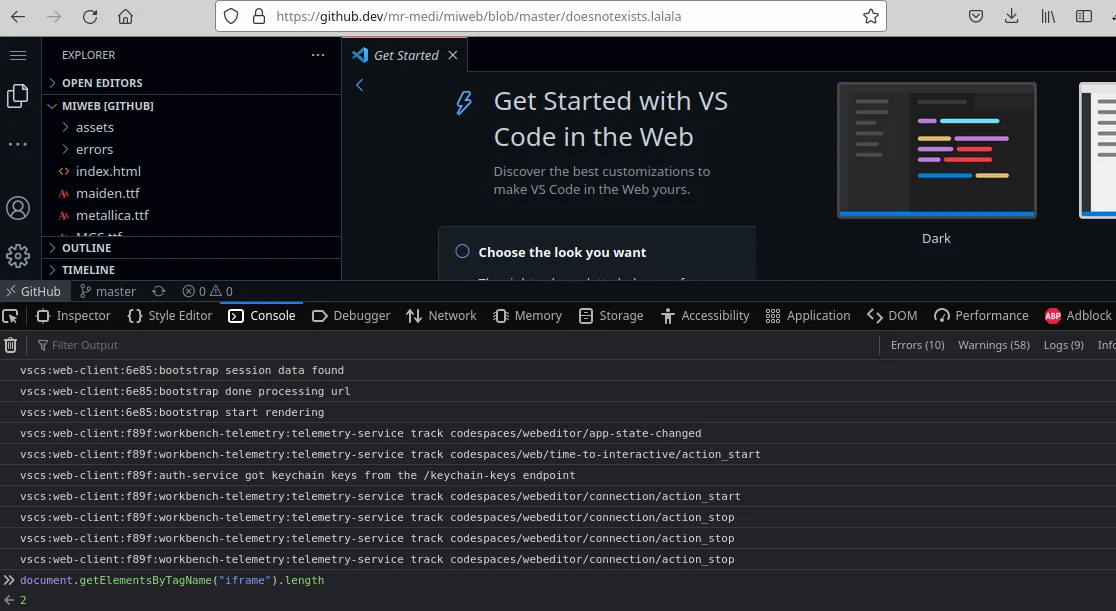
- When 2 iframes are loaded, the file does not exist, but the private repository does. This happens because the Get Started section is embedded within an iframe.
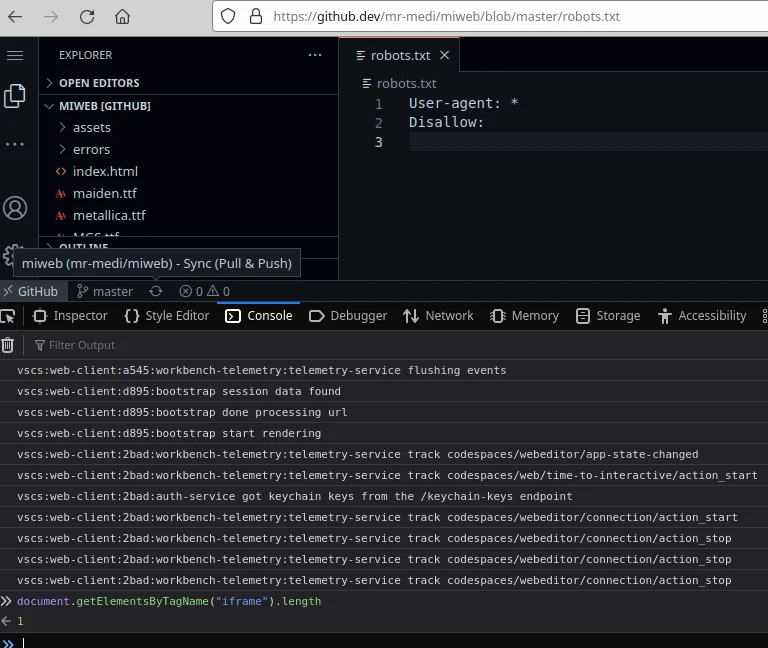
- When only 1 iframe is loaded, the file exists in the repository.
- When 0 iframes are loaded, the repository does not exist.
The second case, a single iframe, is the signal that the requested file is present:
Because these three states produce three different counts, the count itself leaks which state the target is in. That is what made the behaviour worth reporting: an attacker does not need to read any content from the private repository, only to count frames on their own page.
Exploitation
Step 1: embed the target URL
Step 2: read the frame count
The count maps to the three states described above: 2 means the repository exists but the file does not, 1 means the file exists, and 0 means the repository does not exist.
Step 3: enumerate
The write-up frames this as a proof of concept of a potential attacker website built to expose private repositories and files in a private GitHub repository:
Root cause
The design mistake is that the number of iframes loaded by the github.dev page is not constant across states. The page embeds the Get Started section in an iframe when the file does not exist but the repository does, and the frame count differs when the file exists or when the repository does not exist. Any page whose frame count varies with a secret condition turns that count into an oracle for the condition.
The write-up does not go into further detail on the browser mechanics beyond noting that COOP headers restrict cross-origin access to the opened window.
Impact
Under the conditions described, the technique could potentially expose the names of private GitHub repositories and the filenames inside them. The write-up is careful to present this as potential exposure: the technique allowed attackers to infer existence, not to read file contents. It was reported at the end of 2022.
Fix
The write-up says it was patched by adding COOP headers, which restrict cross-origin access to the opened window. The write-up also gives general guidance for applications: load the same number of iframes consistently, regardless of any state, so that variations in frame count cannot leak information, or use COOP headers as described.
Variants to test
- State-dependent frame counts on other editors and preview services. Load a guessed resource URL in an iframe from your own page and read
frames.length. A positive result is a count that differs between "resource exists", "parent exists but resource does not" and "nothing exists". - Error pages versus success pages. Compare the frame count for a valid and an invalid path on any product that embeds help, onboarding or "get started" content conditionally. A positive result is a stable difference in count between the two states.
- Authenticated versus unauthenticated views. Repeat the count with and without a session for the same URL. A positive result is a count that reveals whether the viewer has access to a private resource.
- Nested embeds. Check whether the conditional section is itself an iframe, as with the Get Started section here. A positive result is an extra frame appearing only in one state, which makes the oracle easy to read.
- COOP regression checks. On targets that have shipped COOP, verify that the window reference no longer exposes the count cross-origin. A positive result is a count that is still readable from an attacker page, which would mean the mitigation is incomplete for that path.
What happened, in plain words
GitHub is a website where people store code in folders called repositories. Some repositories are public (anyone can see them) and some are private (only the owner and people they invite can see them). A private repository can also contain files whose names are meant to stay secret.
This write-up describes a technique that could potentially expose the names of private GitHub repositories and the files inside them. The trick does not read the secret files. It only counts how many small embedded windows a GitHub page opens, and that count changes depending on whether the secret exists.
The technique is called Cross-Site Frame Counting. An iframe is a small window embedded inside a web page, like a picture frame hanging on a wall: the outer page stays the same, but the frame shows another page inside it. A website can count how many of these frames it has opened. If that number depends on a secret, the number itself becomes a way to ask a yes or no question about the secret.
The researcher reported this at the end of 2022, and it was patched by adding COOP headers (explained later). GitHub also confirmed the researcher was free to publish this article. The original bug report on HackerOne was marked as an internal duplicate and could not be disclosed, so the research is shared here as a write-up instead.
Introduction
Cross-Site Frame Counting means working out the total number of window references (iframes) that an external website loads. On its own, counting frames is not a vulnerability. It becomes one when the number of frames a target page loads changes depending on some condition. An attacker can then read that count from their own page and infer the condition.
A simple everyday comparison: imagine a shop where the number of lights switched on in the window tells you whether a particular item is in stock. You never go inside and never see the item. You just count the lights from the street. Here, the "lights" are iframes and the "item" is a private repository or file.
In this case the varying condition was whether a private repository, and a file inside it, existed.
Methodology
To identify this kind of attack, the researcher applied a methodology, shown in the image below.
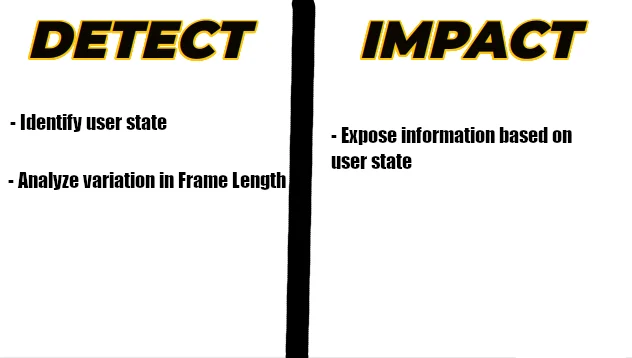
If the count differs between "the thing exists" and "the thing does not exist", you have a way to test for existence without seeing any content.
Context
GitHub offers custom VS-Codespaces to improve the code editing experience for repositories. A codespace is a ready-made coding environment in the browser, so you can edit files without installing anything on your computer. At the time of the research, the URL pattern used to access and edit files followed this form:
https://github.dev/{USER}/{REPOSITORY}/blob/master/{FILENAME}
Line by line, in plain words:
https://github.devis the address of the GitHub editing service.{USER}is a placeholder for the account name, for example a person or organisation.{REPOSITORY}is a placeholder for the repository (project folder) name./blob/master/is the part of the address that points at a file on the main branch of the repository. A branch is a line of development;masteris the default one here.{FILENAME}is a placeholder for the name of the file you want to open.
The curly braces are not typed literally. They mark the spots where an attacker would try different guesses, such as a guessed repository name or a guessed filename.
While testing this URL pattern, the researcher noticed that the number of iframes loaded changed depending on the state of the repository and the file being requested. Three distinct observations came out of this:
- When 2 iframes are loaded, the file does not exist, but the private repository does. This happens because the Get Started section is embedded within an iframe.
- When only 1 iframe is loaded, the file exists in the repository.
- When 0 iframes are loaded, the repository does not exist.
The image above shows the second case: two iframes are loaded, which means the file does not exist but the private repository does. The extra frame comes from the Get Started section being embedded inside an iframe.
The second case, a single iframe, is the signal that the requested file is present:
The image above shows that single iframe, the state where the file exists in the repository.
Because these three states produce three different counts, the count itself leaks which state the target is in. That is what made the behaviour worth reporting: an attacker does not need to read any content from the private repository, only to count frames on their own page.
Exploit
With those conditions in mind, the researcher coded a proof of concept (PoC) as an example of a potential attacker website, to show how to expose private repositories and files in a private GitHub repository:
A proof of concept is a small demonstration that shows a problem is real, without being a full attack tool.
The steps behind it are:
- Embed the target URL. A window reference is a handle in JavaScript, the browser's scripting language, that lets one page point at another window or frame.
- Read the frame count. The count maps to the three states described above: 2 means the repository exists but the file does not, 1 means the file exists, and 0 means the repository does not exist.
- Enumerate. To enumerate means to try a list of guesses one by one, like trying every key on a keyring until one turns.
This was reported at the end of 2022 and patched by adding COOP headers.
Final Thoughts
Cross-Site Frame Counting is an old but still relevant issue. Despite few public reports, it is worth highlighting on major platforms like GitHub. Using COOP headers can help mitigate this issue by restricting cross-origin access to the opened window.
COOP stands for Cross-Origin Opener Policy. It is a response header, a small piece of information a website sends back with its pages, that tells the browser how much one site's window may interact with another site's window. Cross-origin means "from a different website address". Restricting that access means an attacker page can no longer reach into the opened window to read its frame count.
The researcher is not sure who first discussed this issue, so for references the XSLeaks Wiki is cited. XSLeaks is short for cross-site leaks: a family of techniques where a website leaks a small amount of information through side effects such as timing, sizes or counts, rather than through a direct data breach.
Securing applications
To mitigate the risk of data exposure through Cross-Site Frame Counting, it is crucial to load the same number of iframes consistently, regardless of any state. By ensuring a uniform iframe loading behaviour, the application can prevent potential information leakage that could occur due to variations in the number of iframes. Or use COOP headers as described, to restrict cross-origin access to the opened window.
In everyday terms: if the shop window always shows the same number of lights, counting them tells you nothing. The two fixes are to keep the count constant, or to stop strangers from counting at all.
References
- Cross-Site Frame Counting Explained in XS-Leaks Wiki
- Expose who you have been messaging with via Cross-Site Frame Counting on Facebook
Glossary
- Repository: a project folder on GitHub that holds code and files; it can be public or private.
- Private repository: a repository only its owner and invited people can see.
- iframe: a small window embedded inside a web page that shows another page.
- Frame: another word for one of those embedded windows;
frames.lengthis the count of them. - Cross-Site Frame Counting: working out how many iframes a page from another website loads, and using that number to learn something.
- Window reference: a handle in JavaScript that lets one page point at another window or frame.
- JavaScript: the scripting language browsers run to make pages interactive.
- VS-Codespaces / codespace: a ready-made coding environment that runs in the browser, so files can be edited without local setup.
- URL pattern: the fixed shape of an address, with placeholders for the parts that change.
- Branch: a line of development in a repository;
masteris the default one in the URL shown here. - Get Started section: an onboarding area of the GitHub editing page that, in this case, was embedded in its own iframe.
- Proof of concept (PoC): a small demonstration showing that a problem is real.
- Enumerate: to try a list of guesses one by one to discover what exists.
- COOP (Cross-Origin Opener Policy): a response header that limits how much one site's window can interact with another site's window.
- Response header: a small piece of information a website sends back to the browser along with a page.
- Cross-origin: belonging to a different website address.
- XSLeaks (cross-site leaks): techniques where a site leaks a little information through side effects such as timing, sizes or counts.
- Oracle: any observable signal, such as a count, that answers a yes or no question about a secret.
- Mitigate: to reduce or remove a risk.





