Reflected XSS via "Error" parameter on https://admin.acronis.com/admin/su/
The Error parameter on the admin page was reflected into the HTML response without proper encoding, allowing an attacker to inject a script. An attacker could execute arbitrary JavaScript in a victim's browser to steal cookies or credentials.

- Triaged in 20 hours
- Fixed in 45 days
- Paid in 29 days
- Disclosed after 11 months
Summary
Hello,
There is possible to inject arbitrary HTML constructions on the page /admin/su/. The problem is in the insufficient escaping of special characters (like <>) for the Error parameter. If this parameter contains a specially crafted vector, the application will return the page that will reflect this vector directly into the HTML response without proper encoding.
This XSS vector will work in most modern browsers.
Steps To Reproduce
- Open the next URL in the browser: https://admin.acronis.com/admin/su/?Error=%3cscript%3ealert(document.domain)%3c%2fscript%3e
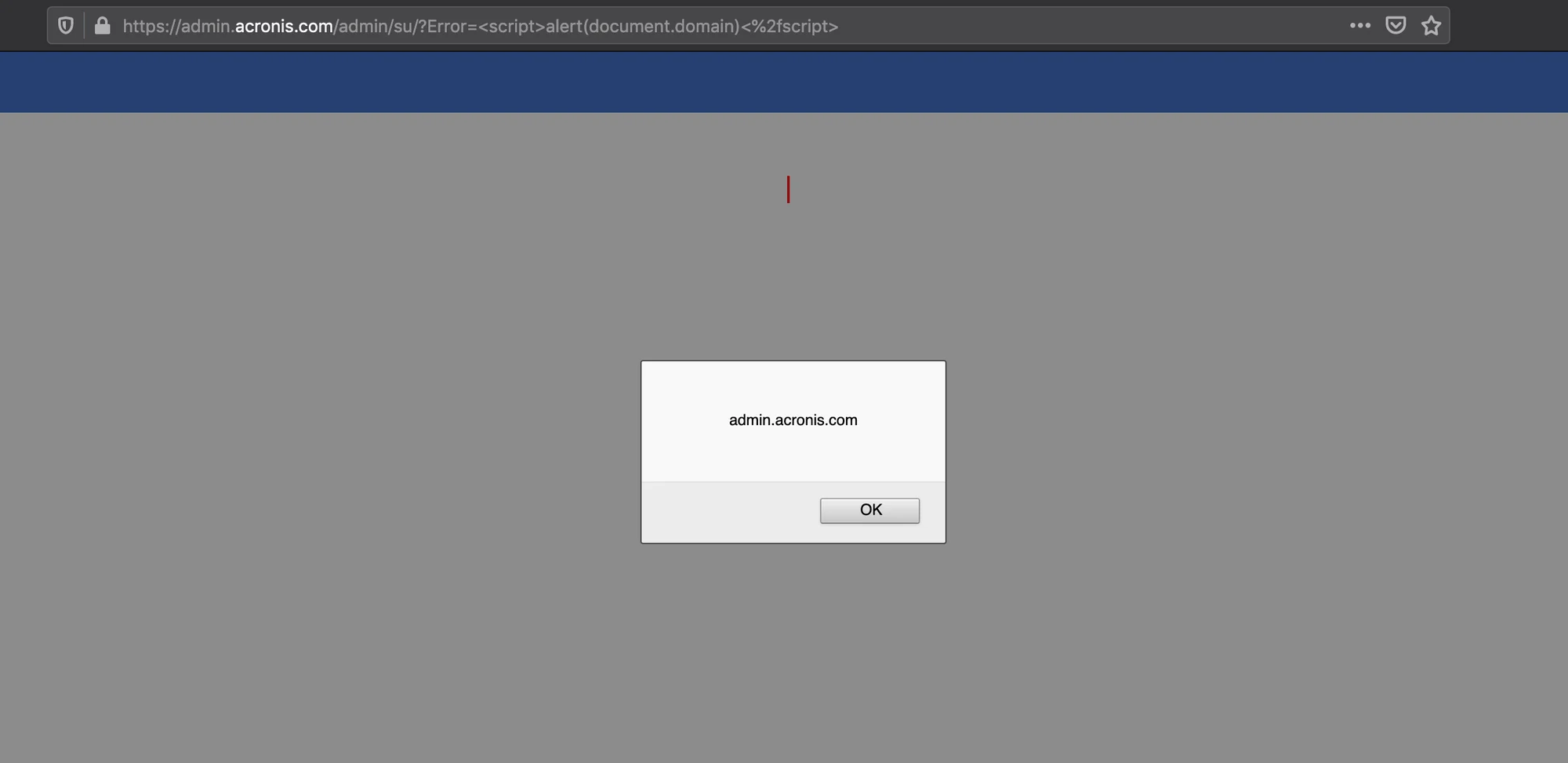
The XSS will be executed automatically when the page will be loaded.
Impact
A cross-site scripting attack against the application's clients can be used to obtain user authentication information (like cookies), phishing or malware spreading. In this case, an authorized user can be the primary target of this attack, so cookie and credentials stealing are possible ways to exploit this vulnerability.
Recommendations
It's recommended to provide the processing of web application user input by replacing potentially insecure characters that could be used to format HTML pages to their equivalents that are not HTML format characters. This should be done for any data obtained from external sources and displayed in a browser (including HTTP headers, like Referer).
Impact
A cross-site scripting attack against the application's clients can be used to obtain user authentication information (like cookies), phishing or malware spreading. In this case, an authorized user can be the primary target of this attack, so cookie and credentials stealing are possible ways to exploit this vulnerability.
Context
The target is the Acronis administration interface, specifically the page at https://admin.acronis.com/admin/su/. The report does not describe what the su page normally does beyond the fact that it renders a page and that it accepts an Error parameter, which the application reflects back into the HTML response. The asset scope is *.acronis.com, and the weakness is classified as reflected cross-site scripting.
The researcher's claim is narrow and concrete: the Error parameter is not escaped for special characters such as < and >, so a crafted value is written directly into the HTML response without proper encoding. The report states that the vector works in most modern browsers.
Setup
No accounts, roles, tools or versions are described. The only precondition shown is that the page is reachable and that it processes the Error query parameter. The reproduction is done entirely in a browser by opening a URL.
Finding it
The researcher identified that the Error parameter on /admin/su/ is reflected into the page and that characters with HTML meaning, in particular < and >, are not escaped. Because the value lands in the HTML response unencoded, a value containing markup is interpreted by the browser as markup rather than as text. That is the whole of the observation: insufficient escaping of special characters for the Error parameter.
Exploitation
Step 1: Open the crafted URL
The researcher opened the following URL in a browser:
https://admin.acronis.com/admin/su/?Error=%3cscript%3ealert(document.domain)%3c%2fscript%3e
The Error parameter carries a percent-encoded <script> element whose body calls alert(document.domain). Decoded, the value is <script>alert(document.domain)</script>. Because the application reflects this value into the HTML response without encoding the angle brackets, the browser parses it as a script element and executes it. The report notes that the XSS executes automatically when the page loads, with no further interaction beyond visiting the URL.
The report includes a screenshot taken while opening the crafted URL.
Root cause
The application takes user input from the Error query parameter and writes it into the HTML response without escaping characters that have meaning in HTML, such as < and >. The report frames this as insufficient escaping of special characters for the Error parameter, and states that the vector is reflected directly into the HTML response without proper encoding. No server-side framework, templating engine or specific escaping routine is named, so the exact location of the mistake is not identified in the report.
Impact
The report describes the impact in general terms. A cross-site scripting attack against the application's clients can be used to obtain user authentication information such as cookies, for phishing, or for malware spreading. The researcher notes that an authorised user can be the primary target of this attack, so stealing cookies and credentials are possible ways to exploit the vulnerability. These are stated as possible consequences rather than demonstrated ones; the proof of concept shows script execution via alert(document.domain).
Fix
The report gives a recommendation rather than a record of a change. It recommends processing web application user input by replacing potentially insecure characters that could be used to format HTML pages with equivalents that are not HTML format characters. This should be done for any data obtained from external sources and displayed in a browser, including HTTP headers such as Referer.
Variants to test
Hunting notes
The proof of concept shows automatic script execution in the site's origin with alert(document.domain). The report was rated medium severity with a CVSS score of 5.0 and a bounty of 50.00 USD, and was disclosed on 2021-07-19.
What happened, in plain words
A security researcher found a way to make a page on Acronis's administration website run code that the researcher supplied, simply by sending someone a specially built web address. The page is at https://admin.acronis.com/admin/su/, and it accepts a value in the address called the Error parameter. The page takes whatever is in that value and pastes it into the page it sends back to the browser, without cleaning it first. If the value contains HTML code, the browser treats that code as part of the page and runs it.
This kind of bug is called reflected cross-site scripting, usually shortened to XSS. "Reflected" means the bad value bounces straight back from the server to the browser in the same response, rather than being stored somewhere for later. "Cross-site scripting" means an attacker can get their own script to run inside a page that belongs to the real website, so the browser trusts it as if the site had written it itself.
A useful everyday comparison: imagine a receptionist who reads out loud whatever name a visitor gives, without checking it. If a visitor says "the building is on fire", the receptionist shouts that to the whole office and everyone panics. The receptionist did not mean any harm, but they passed on a message that was not theirs to pass on. Here the web page is the receptionist, the Error value is the visitor's name, and the script is the fake announcement.
The report does not say what the su page normally does, beyond the fact that it displays a page and accepts an Error parameter that it echoes back into the HTML. The scope of the programme covers *.acronis.com, meaning any host under the acronis.com domain, and the weakness is classified as reflected cross-site scripting.
The researcher's claim is narrow and concrete: the Error parameter is not escaped for special characters such as < and >, so a crafted value ends up written directly into the HTML response without proper encoding. The report states that the technique works in most modern browsers.
Setup
The report describes no accounts, roles, tools or software versions. The only precondition shown is that the page can be reached and that it processes the Error query parameter. The whole reproduction happens in a browser by opening a web address.
A quick word on the pieces involved, since they come up constantly:
- A URL (web address) can carry extra information after a question mark. Everything after the
?is called the query string, and it is made of parameters, each written asname=valueand separated by&. - Percent-encoding is a way of writing characters in a URL that would otherwise be awkward or ambiguous. A character is replaced by a percent sign and two hexadecimal digits. For example,
<becomes%3cand>becomes%3e. Browsers and servers decode these back to the original characters when they process the request. - HTML is the language web pages are written in. Angle brackets mark the start and end of elements, such as
<script>and</script>. That is why<and>are called special characters: in HTML they are instructions, not text. - Escaping (also called encoding) means converting characters that have a special meaning into a safe form so they are displayed as plain text instead of being interpreted. If a page shows a user's input as text, it must escape
<and>; otherwise the browser may treat the input as markup. - A cookie is a small piece of data a website asks the browser to store and send back with later requests, commonly used to remember that you are logged in. If a script from another origin can read it, the attacker may be able to act as you.
Finding it
The researcher noticed that the Error parameter on /admin/su/ is reflected into the page, and that characters with HTML meaning, in particular < and >, are not escaped. Because the value lands in the HTML response unencoded, a value containing markup is interpreted by the browser as markup rather than as text. That is the whole observation: insufficient escaping of special characters for the Error parameter.
Why does this matter so much? When a browser receives a page, it does not know which parts the website's developers wrote and which parts came from a visitor. It simply reads the HTML from top to bottom and follows the instructions it finds. If a visitor's text is inserted without escaping, the browser cannot tell the difference between the site's own code and the visitor's text, so it obeys both.
Exploitation
Step 1: Open the crafted URL
The researcher opened the following URL in a browser:
https://admin.acronis.com/admin/su/?Error=%3cscript%3ealert(document.domain)%3c%2fscript%3e
Line by line, in plain words:
https://admin.acronis.com/admin/su/is the address of the page on the Acronis administration site. The researcher chose this page because it is the one that echoes theErrorvalue back.?starts the query string, the part of the address that carries extra information to the server.Error=is the name of the parameter. The page is being told: here is an error message to show.%3cscript%3eis the percent-encoded form of<script>. The<script>tag tells the browser that what follows is a program, not text.alert(document.domain)is the program itself.alertopens a small pop-up box with a message.document.domainis a built-in way for a script to ask the browser which website it is currently running on. So the pop-up shows the domain of the page, which proves the script is running in the context of that site.%3c%2fscript%3eis the percent-encoded form of</script>, which marks the end of the script.
Decoded, the value is <script>alert(document.domain)</script>. Because the application reflects this value into the HTML response without encoding the angle brackets, the browser parses it as a script element and executes it. The report notes that the XSS executes automatically when the page loads, with no further interaction beyond visiting the URL. That last point is what makes it dangerous: the victim does not have to click a button or type anything. Opening the link is enough.
The report includes a screenshot taken while opening the crafted URL.
Root cause
The application takes user input from the Error query parameter and writes it into the HTML response without escaping characters that have meaning in HTML, such as < and >. The report frames this as insufficient escaping of special characters for the Error parameter, and states that the vector is reflected directly into the HTML response without proper encoding. No server-side framework, templating engine or specific escaping routine is named, so the exact location of the mistake is not identified in the report.
In everyday terms: the page is a form letter with a blank space for the error message, and nobody checks what gets written in the blank. Whatever is written there is printed and sent out as if the site had written it.
Impact
The report describes the impact in general terms. A cross-site scripting attack against the application's clients can be used to obtain user authentication information such as cookies, for phishing, or for malware spreading. The researcher notes that an authorised user can be the primary target of this attack, so stealing cookies and credentials are possible ways to exploit the vulnerability. These are stated as possible consequences rather than demonstrated ones; the proof of concept shows script execution via alert(document.domain).
Why would an attacker target an authorised user? Because the report says an authorised user can be the primary target of this attack. If a logged-in administrator opens the crafted link, the script runs inside a page that the browser considers part of the Acronis site. The report says cookie and credential stealing are possible ways to exploit the vulnerability. Phishing fits here too: a link to a real, trusted domain is far more convincing than a link to an unknown one.
Fix
The report gives a recommendation rather than a record of a change. It recommends processing web application user input by replacing potentially insecure characters that could be used to format HTML pages with equivalents that are not HTML format characters. This should be done for any data obtained from external sources and displayed in a browser, including HTTP headers such as Referer.
In plain words: before putting any outside value into a page, convert the dangerous characters into harmless ones. For example, show < as the text < so the browser displays a less-than sign instead of starting a tag. The report stresses that this rule applies to every source of outside data, not just the obvious ones. HTTP headers are extra pieces of information the browser sends with each request, and the Referer header says which page you came from. If a site displays that header on its page, it needs the same treatment.
Variants to test
These are follow-up ideas in the same spirit as the original test. Each one describes what to try and what a positive result looks like.
Hunting notes
The proof of concept shows automatic script execution in the site's origin with alert(document.domain). The report was rated medium severity with a CVSS score of 5.0 and a bounty of 50.00 USD, and was disclosed on 2021-07-19.
Glossary
- XSS (cross-site scripting): a class of bug where an attacker gets their own script to run inside a page belonging to a trusted website, so the browser treats it as the site's own code.
- Reflected XSS: XSS where the malicious value is sent in a request and echoed straight back in the response, rather than being stored on the server.
- Parameter: a named value in a URL's query string, written as
name=valueafter the?. - Query string: the part of a URL after the
?that carries parameters to the server. - URL: a web address; it can include a path to a page and a query string with parameters.
- Percent-encoding: a way of writing characters in a URL using a percent sign and two hexadecimal digits, for example
%3cfor<. - HTML: the language web pages are written in, where angle brackets mark elements such as
<script>. - Special characters: characters that have a meaning in a language rather than being plain text, such as
<and>in HTML. - Escaping (encoding): converting such characters into a safe form so they are shown as text instead of being interpreted.
<script>element: an HTML element that tells the browser the content inside it is a program to run.alert(): a browser function that opens a pop-up box with a message; often used to prove that a script ran.document.domain: a value a script can read to learn which website it is running on.- Cookie: a small piece of data a site asks the browser to store and send back with later requests, often used to keep you logged in.
- Credentials: the information used to prove who you are, such as a username and password or a session token.
- Phishing: tricking someone into trusting a fake message or link, often to steal their login details.
- HTTP header: extra information sent alongside a web request or response, such as the
Refererheader that says which page you came from. Refererheader: an HTTP header the browser sends to say which page the request came from.- Origin: the combination of scheme, host and port that identifies a website; scripts from one origin are normally not allowed to read data from another.
- CVSS score: a standard number from 0 to 10 that rates the severity of a vulnerability.
- Severity: a label such as low, medium or high that summarises how serious a vulnerability is.
- Bounty: a reward paid by a bug bounty programme for a valid report.
- Bug bounty programme: a scheme where organisations pay researchers for reporting security problems responsibly.
- Disclosure: the point at which a reported vulnerability is made public.




