Stored XSS, and SSRF in Google using the Dataset Publishing Language
Google Public Data Explorer used supplied dataset metadata without context-aware encoding or validation, allowing stored XSS on www.google.com. The DSPL remote sources feature also allowed SSRF to access localhost services.
 Published on s1gnalcha0s.github.io
TLDR; Crafting Dataset Publishing Language bundles to get stored XSS in the context of www.google.com, and using the DSPL remote sources functionality to access local services (SSRF).
The full write-up lives on its author's site
It belongs to its author, so we link to it rather than copy it. The other two tabs are our own rewrites, checked against it.
Context
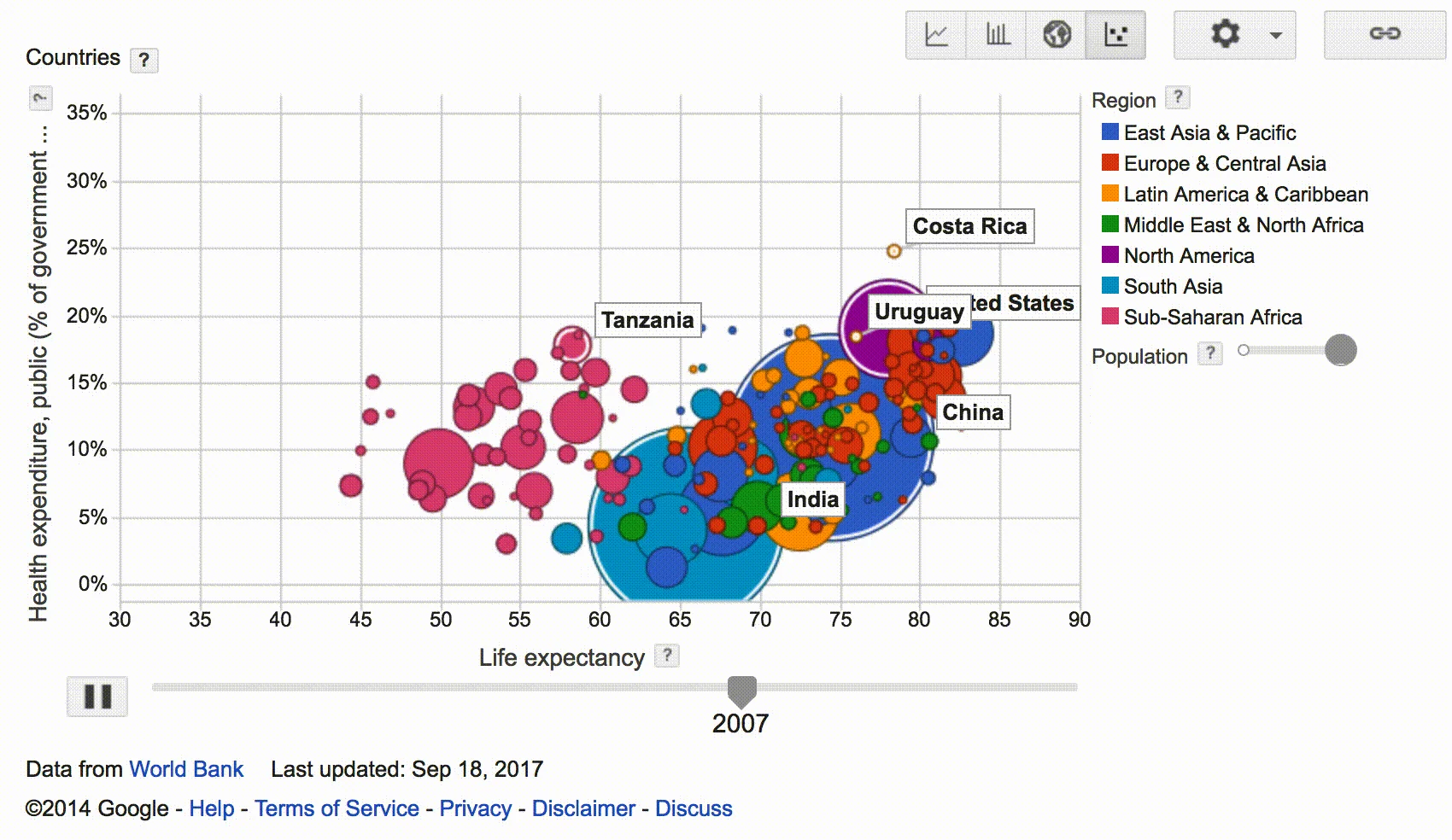
Google Public Data Explorer is a tool for exploring and visualising large datasets. The example given is visualising World Bank health expenditure data as a percentage of government expenditure.
Datasets for the product are described in the Dataset Publishing Language (DSPL): XML files that describe the dataset metadata, paired with CSV data files. A sample bundle is distributed as sample.zip.
The two issues in this write-up both come from how Public Data Explorer handled that supplied metadata: it used some of it without context-aware encoding or validation, and it also supported retrieving data from remote HTTP or FTP sources.
Setup
The researcher downloaded the sample dataset bundle, modified its metadata, repackaged it, and uploaded it to Google Public Data Explorer, sharing the result publicly. The commands used to fetch and unpack the sample are:
curl https://storage.googleapis.com/google-code-archive-downloads/v2/code.google.com/dspl/tutorial1.0.zip -o sample.zip
unzip sample.zip; rm sample.zip
No special account, role or tooling beyond a shell and the Public Data Explorer upload interface is described.
Finding it
The observation was that Google Public Data Explorer would use some of the supplied metadata from the dataset archive without context-aware encoding or validation. That made two separate behaviours interesting: metadata that ends up rendered in the page, and the DSPL feature that fetches data from remote HTTP or FTP sources.
Exploitation
Step 1: Stored XSS through the dataset name
Starting from the sample dataset, the metadata name value in dataset.xml was modified. The XML CDATA section was used so that the JavaScript payload would not be treated as XML markup. The bundle was then repackaged:
zip -r poc.dspl *
The resulting dataset was uploaded to Google Public Data Explorer and shared publicly. Anyone who viewed the shared dataset would execute the attacker's arbitrary JavaScript in the context of the www.google.com domain. The researcher notes coinhive as an example of what that script could do.
A short video shows how this worked before it was fixed, allowing stored XSS in the context of www.google.com using DSPL:
Step 2: SSRF through remote data sources
DSPL also has functionality to retrieve data from remote HTTP or FTP sources. That functionality allowed server-side request forgery to reach localhost service resources, and potentially also internal, non internet accessible systems and devices.
The example given refers to the contents of poc.dspl/dataset.xml. Uploading that dataset would return the response of the HTTP or FTP request in the resulting error condition responses:
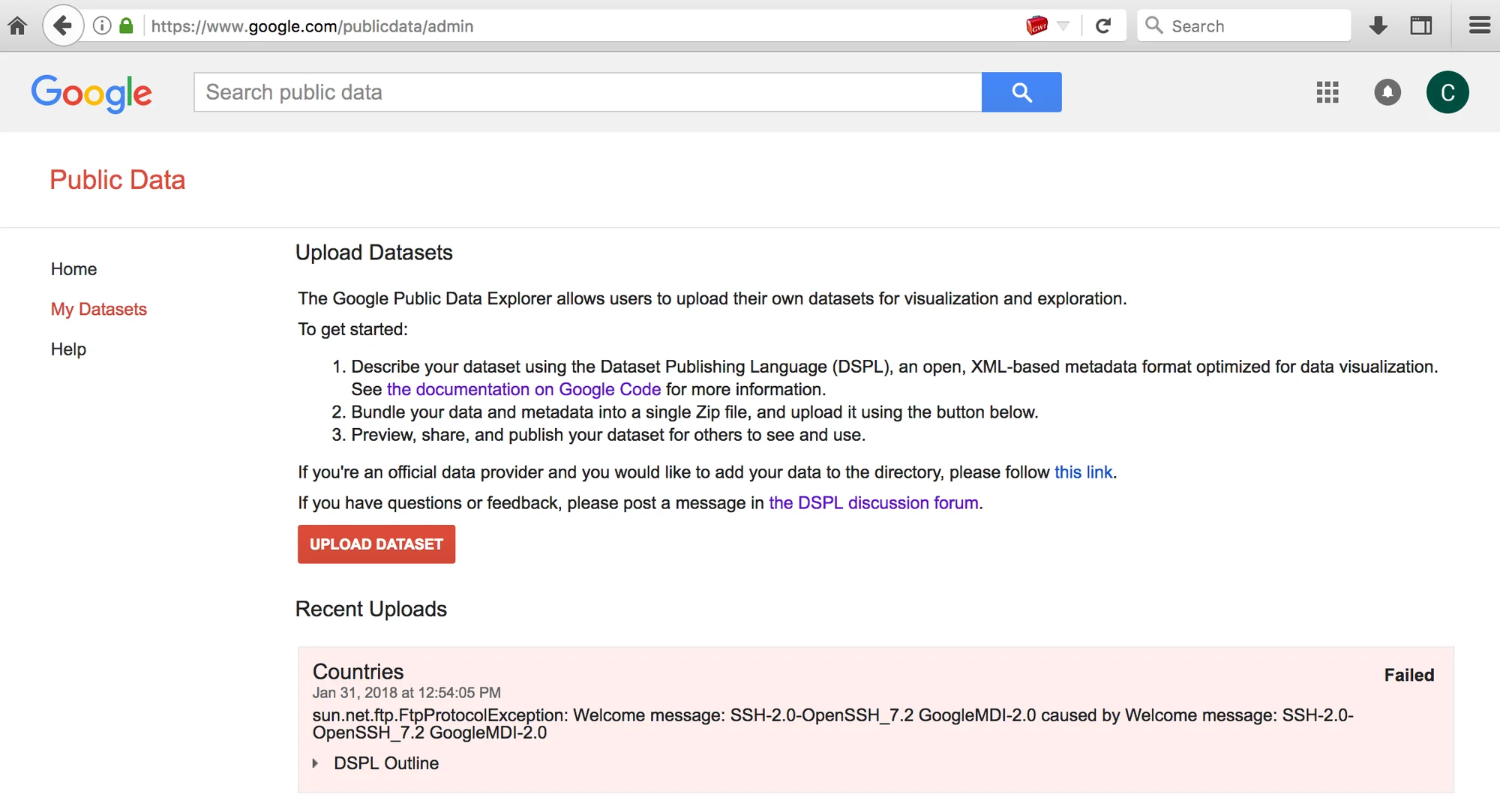
In the example, the response shows the local SSH banner, a service that is not publicly accessible.
Root cause
For the XSS, the root cause is that Public Data Explorer used supplied dataset metadata in the page without context-aware encoding or validation. The CDATA trick matters because it keeps the payload from being parsed as XML markup, so it survives as text in the metadata and is only interpreted when it reaches the HTML context.
For the SSRF, the root cause is that the remote HTTP/FTP source feature was allowed to make requests to arbitrary destinations, including localhost, and the resulting error conditions reflected the response of that request back to the uploader.
Impact
Stored XSS: anyone who viewed a shared dataset would run the attacker's JavaScript in the context of www.google.com. The attacker only needed to upload and publicly share the crafted dataset.
SSRF: an uploader could reach localhost service resources and potentially internal, non internet accessible systems and devices, and read the response through the error condition output. The example demonstrates reading a local SSH banner.
Fix
The report states that the issues were verified as fixed in February 2018, without describing the code changes.
Variants to test
- Metadata fields other than the dataset name: put a CDATA-wrapped payload in each descriptive field and view the shared dataset. A positive result is script execution in the product's origin.
- Remote source schemes: try both HTTP and FTP sources pointing at localhost and at internal addresses. A positive result is the fetched response appearing in an error message.
- Error paths: supply sources that fail in different ways (connection refused, timeout, unexpected content) and check whether any error output includes the response body or banner.
- Other import formats that accept archives with metadata and data files: check whether names and descriptions are encoded on output. A positive result is stored script execution from an uploaded bundle.
Timeline
- Jan 2018: reported to Google
- Feb 2018: verified that the reported issues were fixed
- Feb 2018: rewarded $5,000 for the stored XSS
- Mar 2018: rewarded $13,337 for the SSRF
What happened, in plain words
A security researcher found two separate problems in a Google product called Google Public Data Explorer. The product lets people upload a bundle of files that describe a dataset, and then share that dataset so anyone can view it in a browser.
The first problem was a stored cross-site scripting (XSS) bug. The researcher could put a small piece of JavaScript inside the dataset's metadata (its descriptive information). When the dataset was shared and someone opened it, that JavaScript ran inside the www.google.com website. In everyday terms: imagine a noticeboard where visitors can pin notes. If the noticeboard displays whatever is written on a note without checking it, someone can pin a note that says "do this" and every visitor who reads it follows the instruction. Here the "note" was the dataset name, and the "instruction" was JavaScript running in Google's own page.
The second problem was a server-side request forgery (SSRF) bug. The dataset format supports pulling data from a remote web (HTTP) or file transfer (FTP) address. The researcher could point that address at a service running on the server itself, such as the machine's own SSH service, and the server would make the request and then show the response back in an error message. In everyday terms: imagine a hotel concierge who will fetch anything you ask for, including from locked staff-only rooms, and then reads the result out to you. The concierge is the Google server; the locked room is a service that is not reachable from the public internet.
Both issues were reported to Google in January 2018, confirmed fixed in February 2018, and paid for through Google's bug bounty programme: $5,000 for the stored XSS and $13,337 for the SSRF.
The product and the file format
Google Public Data Explorer is a tool for exploring and visualising large datasets. The example in the report is visualising World Bank data on health expenditure as a percentage of government expenditure.
Datasets for the product are described in the Dataset Publishing Language, or DSPL. DSPL uses XML files to describe the dataset's metadata (its name, descriptions and structure) and CSV data files to hold the actual numbers. XML is a text format that uses tags like <name>...</name> to mark up information; CSV is a simple table format where values are separated by commas. A sample bundle of these files is distributed as sample.zip.
Both bugs come from the same area: how Public Data Explorer handled the metadata supplied inside the uploaded archive. It used some of that metadata without context-aware encoding or validation, and it also supported fetching data from remote HTTP or FTP sources.
Two terms worth unpacking here:
- Context-aware encoding means converting text so that it is safe for the place it is about to appear. Text that is safe inside an XML file is not automatically safe when it is later placed into an HTML web page; the characters that mean something special in HTML (like
<and>) have to be escaped so the browser shows them as text instead of treating them as code. - Validation means checking that input matches what is expected before using it, for example rejecting anything that is not a plain name.
Setting up
The researcher downloaded the sample dataset bundle, changed its metadata, repackaged it, and uploaded it to Google Public Data Explorer, sharing the result publicly. The commands used to fetch and unpack the sample are:
curl https://storage.googleapis.com/google-code-archive-downloads/v2/code.google.com/dspl/tutorial1.0.zip -o sample.zip
unzip sample.zip; rm sample.zip
Line by line:
curl ... -o sample.zipdownloads a file from the given web address and saves it on the local machine under the namesample.zip.curlis a command-line tool for making web requests;-otells it where to write the result.unzip sample.zipextracts the contents of the zip archive into the current folder, so the individual XML and CSV files become visible and editable.rm sample.zipdeletes the downloaded archive itself, since it is no longer needed once unpacked. The semicolon just runs the two commands one after the other.
No special account, role or tooling beyond a shell and the Public Data Explorer upload interface is described. A shell is simply a text window where you type commands.
Finding it
The observation was that Google Public Data Explorer would use some of the supplied metadata from the dataset archive without context-aware encoding or validation. That made two separate behaviours interesting: metadata that ends up rendered in the page, and the DSPL feature that fetches data from remote HTTP or FTP sources.
In other words, the researcher asked two questions. First: does any text I control in the dataset end up displayed on a Google page, and is it escaped? Second: can I make Google's server fetch a web address of my choosing?
Exploitation
Step 1: Stored XSS through the dataset name
Starting from the sample dataset, the metadata name value in dataset.xml was modified. The XML CDATA section was used so that the JavaScript payload would not be treated as XML markup. The bundle was then repackaged:
zip -r poc.dspl *
What this does: zip -r poc.dspl * creates a new zip archive called poc.dspl containing everything in the current folder (*), recursing into subfolders (-r). The point of repackaging is to turn the edited files back into a single uploadable bundle.
A few concepts from this step, from zero:
- JavaScript is the programming language that web pages run in your browser. If an attacker can get their JavaScript to run on a site you trust, it runs with that site's privileges.
- XSS (cross-site scripting) is the class of bug where an attacker gets their own script to run in someone else's browser, in the context of a trusted website. Stored XSS means the malicious content is saved on the server (here, inside the uploaded dataset) and served to every later visitor, rather than being delivered in a single crafted link.
- CDATA is an XML construct, written
<![CDATA[ ... ]]>, that tells the XML parser "treat everything inside literally as text, do not interpret it as markup". It matters here because the payload contains characters that would otherwise look like XML tags; wrapping it in CDATA lets it survive XML parsing as plain text, so it is only interpreted later, when it reaches the HTML page. - Context in "in the context of
www.google.com" means the script runs as if it were part of Google's own page: it can read what that page can read and act as that page.
The resulting dataset was uploaded to Google Public Data Explorer and shared publicly. Anyone who viewed the shared dataset would execute the attacker's arbitrary JavaScript in the context of the www.google.com domain. The researcher notes coinhive as an example of what that script could do. Coinhive was a service that used a visitor's browser to mine cryptocurrency, which shows the kind of abuse a script running on a popular site could be put to.
A short video shows how this worked before it was fixed, allowing stored XSS in the context of www.google.com using DSPL:
Step 2: SSRF through remote data sources
DSPL also has functionality to retrieve data from remote HTTP or FTP sources. That functionality allowed server-side request forgery to reach localhost service resources, and potentially also internal, non internet accessible systems and devices.
Unpacking the terms:
- HTTP is the protocol browsers use to fetch web pages; FTP is an older protocol for transferring files. Both involve one machine asking another for something.
- localhost means "this same machine". A request to localhost never leaves the server; it goes to a service running on that server itself.
- SSRF (server-side request forgery) is the bug where an attacker can make the server send a request to an address the attacker chooses. The attacker cannot reach that address directly, but the server can, because the server sits inside the network. It is like convincing a member of staff to go into a back room and read out what is on the shelf.
The example given is the contents of poc.dspl/dataset.xml. Uploading that dataset would return the response of the HTTP or FTP request in the resulting error condition responses:
In the example, the response shows the local SSH banner, a service that is not publicly accessible. An SSH banner is the short greeting text a secure shell (SSH) service sends when a client connects; seeing it proves the request reached a real service on the machine.
Root cause
For the XSS, the root cause is that Public Data Explorer used supplied dataset metadata in the page without context-aware encoding or validation. The CDATA trick matters because it keeps the payload from being parsed as XML markup, so it survives as text in the metadata and is only interpreted when it reaches the HTML context.
For the SSRF, the root cause is that the remote HTTP/FTP source feature was allowed to make requests to arbitrary destinations, including localhost, and the resulting error conditions reflected the response of that request back to the uploader.
Impact
Stored XSS: anyone who viewed a shared dataset would run the attacker's JavaScript in the context of www.google.com. The attacker only needed to upload and publicly share the crafted dataset.
SSRF: an uploader could reach localhost service resources and potentially internal, non internet accessible systems and devices, and read the response through the error condition output. The example demonstrates reading a local SSH banner.
Fix
The report states that the issues were verified as fixed in February 2018, without describing the code changes.
Variants to test
- Metadata fields other than the dataset name: put a CDATA-wrapped payload in each descriptive field and view the shared dataset. A positive result is script execution in the product's origin.
- Remote source schemes: try both HTTP and FTP sources pointing at localhost and at internal addresses. A positive result is the fetched response appearing in an error message.
- Error paths: supply sources that fail in different ways (connection refused, timeout, unexpected content) and check whether any error output includes the response body or banner.
- Other import formats that accept archives with metadata and data files: check whether names and descriptions are encoded on output. A positive result is stored script execution from an uploaded bundle.
Timeline
- Jan 2018: reported to Google
- Feb 2018: verified that the reported issues were fixed
- Feb 2018: rewarded $5,000 for the stored XSS
- Mar 2018: rewarded $13,337 for the SSRF
Glossary
- API: a defined way for one piece of software to ask another for data or actions, like a menu of requests a service accepts.
- Bug bounty: a programme where organisations pay researchers for reporting security flaws responsibly.
- CDATA: an XML section,
<![CDATA[ ... ]]>, whose contents are treated as literal text and not parsed as markup. - Context-aware encoding: converting text so it is safe for the specific place it will appear (HTML, XML, URL), escaping characters that would otherwise be interpreted as code.
- CSV: a plain-text table format where values are separated by commas.
- curl: a command-line tool for making web requests and saving the responses.
- DSPL (Dataset Publishing Language): Google's format for describing datasets, using XML metadata plus CSV data files.
- FTP: an older protocol for transferring files between machines.
- HTTP: the protocol browsers and servers use to exchange web requests and responses.
- JavaScript: the programming language that runs in web browsers and can act on a page.
- localhost: the name for "this same machine"; a request to localhost stays on the server itself.
- Metadata: descriptive information about data, such as its name and description, as opposed to the data values themselves.
- SSH banner: the short greeting text an SSH (secure shell) service sends when a client connects, which identifies the service.
- SSRF (server-side request forgery): a bug where an attacker can make a server send a request to an address of the attacker's choosing, including internal or localhost addresses.
- Stored XSS: cross-site scripting where the malicious script is saved on the server and served to every visitor who views the affected content.
- Validation: checking that input matches what is expected before using it.
- XSS (cross-site scripting): a bug where an attacker's script runs in another user's browser in the context of a trusted website.
- XML: a text format that uses tags to mark up structured information.
- Zip archive: a single file that bundles other files together, often with compression.




